

Page 1

SCT-1066
CAMERA CONTROL CODE TRANSLATOR
AD MANCHESTER to KALATEL RS-422 Ver. 1.0
Sennetech, Inc. 6455 W. Bath Rd. Perry, MI 48872 U.S.A. Ph (517) 675-1150 Fax (517) 675-1151
www.sennetech.net
1
SCT-1066 Ver. 1.0
Page 2

PRODUCT DESCRIPTION
The SCT-1066 is an American Dynamics to Kalatel control code translator designed to permit
control of Kalatel cameras from AD controllers. It receives AD manchester format commands and
transmits the appropriate commands in Kalatel RS-422 format. There are four independent Kalatel
RS-422 outputs.
Internal switches are used to configure the code translator. The Kalatel output code can be Digiplex
III at 2400 or 4800 baud, or it can be Digiplex II at 2400 or 4167 baud.
The camera addresses can be offset by 1 so that instead of AD camera addresses 1~64 being
converted to Kalatel addresses 1~64, they will be converted to Kalatel addresses 0~63.
Input and output connections are made with mating screw terminal connectors. Front panel LEDs
indicate status of power, receive, and transmit.
There is an optional 19" rack mount panel (one rack unit high).
SIZ E : 5.57"W x 1.52H x 5.45D
WEIGHT : 1.5 lbs.
POWER: 9Volt to 15V olt AC or DC at 75ma
INDICAT ORS: Front panel LEDs: Power , Rx, & T x
AD CONNECTION: (1) mating 3-pin screw terminal connector
KALATEL CONNECTIONS: (4) mating 3-pin screw terminal connectors
SPECIFICA TIONS
2
Page 3
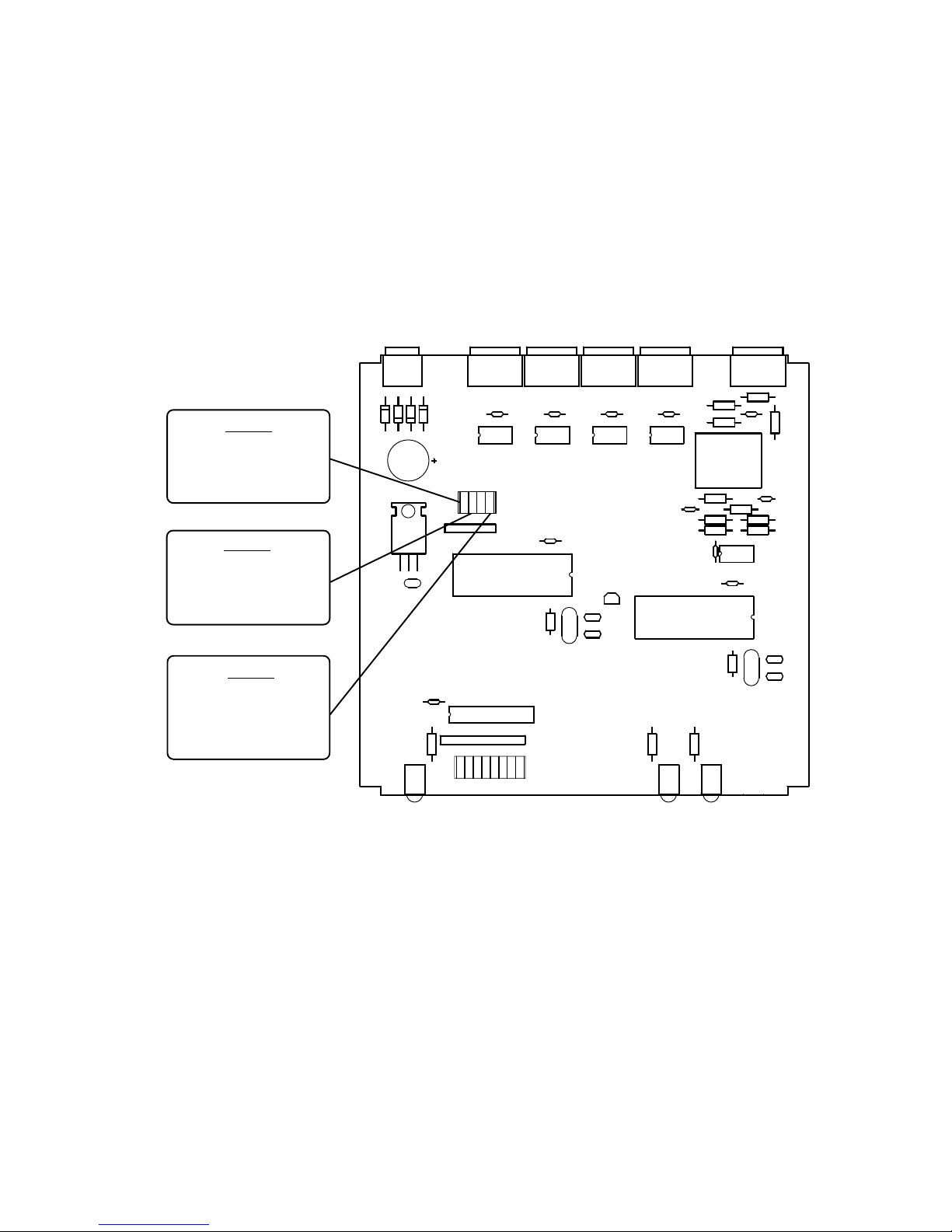
SETTING THE SWITCHES
T o set the configuration switches, remove the back panel, which is secured by two screws. Then
slide the cover back to expose the switches. The switches can be changed while the code translator is powered up and the new settings will take effect immediately .
KALA TEL CODE
ON: Digiplex II
(Default)
OFF: Digiplex III
KALATEL BAUD
ON: 2400
(Default)
OFF: 4800/4167
ADDRESS OFFSET
ON: ENABLED
(Default)
OFF: DISABLED
SW3-1
SW3-2
SW3-4
CN1
U1
CN7 CN6
U10 U9 U8 U7
SW3
ON
3412
OFF
KALATEL XMTR
CN5
U3
CN4
Q9
AD RECEIVER
XT2
U4
LED1
21 76543 8
SW1
ON
OFF
LED2
CN2
T1
U6
U2
LED3
3
SCT-1066 Ver. 1.0
Page 4
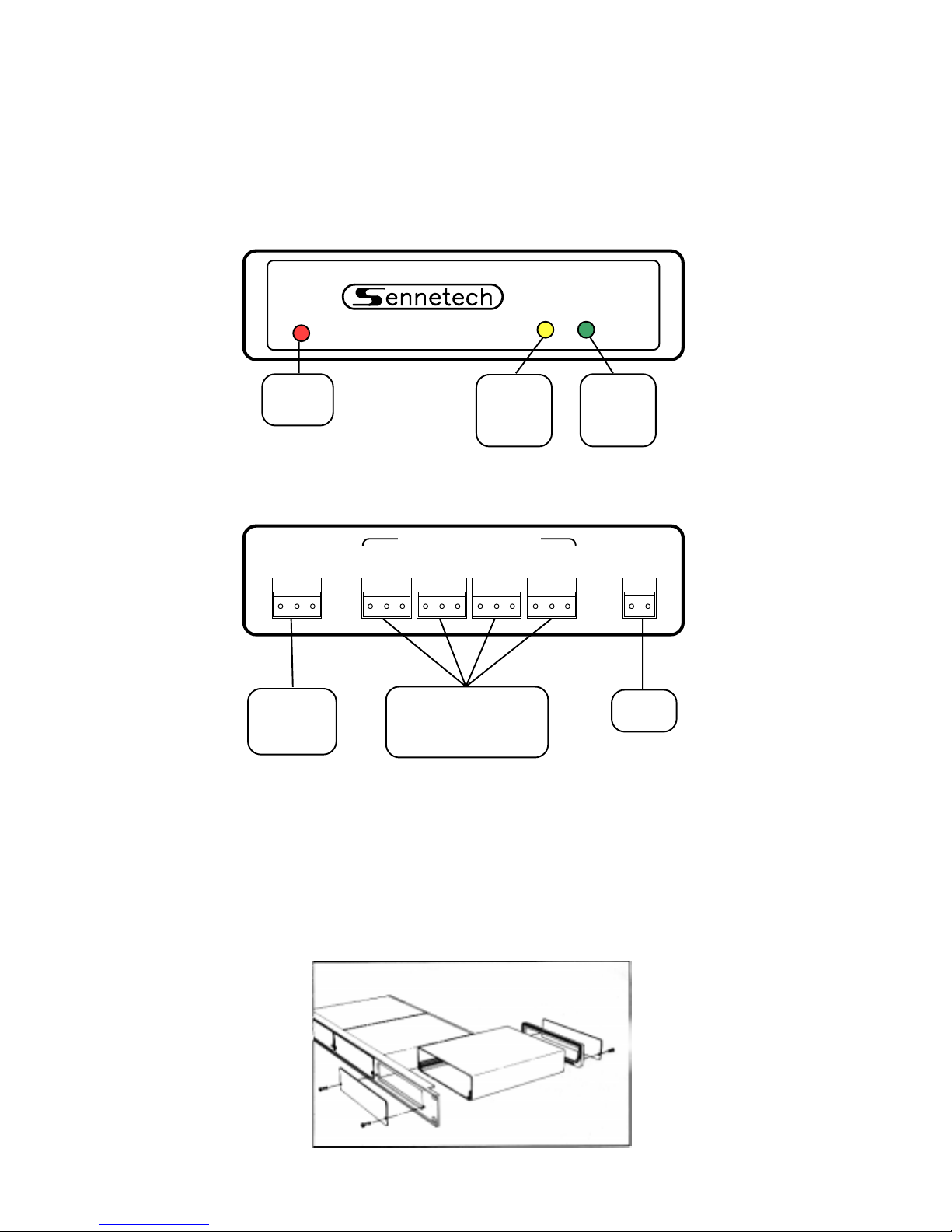
INST ALLATION
FRONT P ANEL
Power T xRx
Power
indicator
CODE TRANSLATOR
AD
receive
indicator
REAR PANEL
AD
INPUT
B W S A B S A B S A B S A B S
AD
manchester
input
KALATEL DAT A OUTPUTS
Connect output(s) to
Kalatel receiver RS422 A & B terminals.
Kalatel
transmit
indicator
POWER
9V to 15V
AC or DC
Power
input
T o install the case on the rack mount frame, remove the front panel and the plastic bezel. The rack
mount frame takes the place of the bezel as shown below .
4
Page 5

OPERA TION
AD Pan, Tilt, Zoom, Focus, and Iris commands are converted to the equivalent Kalatel commands. Additional commands will be converted to Kalatel commands according to the following
table.
AD COMMAND KALA TEL COMMAND
Call Shot 1~64 Find Preset 0~63
Set Shot 1~ 64 Program Preset 0~63
Note: Kalatel uses some presets for special dome commands.
Set Shot 63 Set Autopan Lef t Limit
Set Shot 64 Set Autopan Right Limit
Call Shot 66 Activate Preset Tour 1
Call Shot 67 Activate Preset Tour 2
Call Shot 68 Activate Preset Tour 3
Call Shot 69 Activate Preset Tour 4
Call Shot 70 Auto Pan
Call Shot 71 Auto Focus
1 Off Rcvr Off
1 On Rcvr On
2 Off Door 1 Open
2 On Door 2 Open
3 Off Face Video
3 On Badge Video
5
SCT-1066 Ver. 1.0
Page 6

October 2006 SCT-1066 Ver. 1.0
6
 Loading...