

Page 1
SenixVIEW™ Setup Software
Configures, Tests and Clones all ToughSonic® Sensors
Ultrasonic Toolkit
A fourth
generation tool
from the company
that invented
PC-configured
sensors
apture the power designed
C
into all Senix ToughSonic
distance and level sensors! With
SenixVIEW you gain complete
control at the bench or in the
field. Work safely remote from
equipment to adjust, verify and
duplicate setups.
Setups can use metric or
English units. One sensor or a
network group of sensors can be
updated with one click.
Using SenixVIEW, ToughSonic
sensor flexibility allows one
model to be applied in many
applications. Enjoy lower life
cycle cost, less inventory, fast
setup and rapid maintenance!
To the familiar Windows® menus
and icons we add...
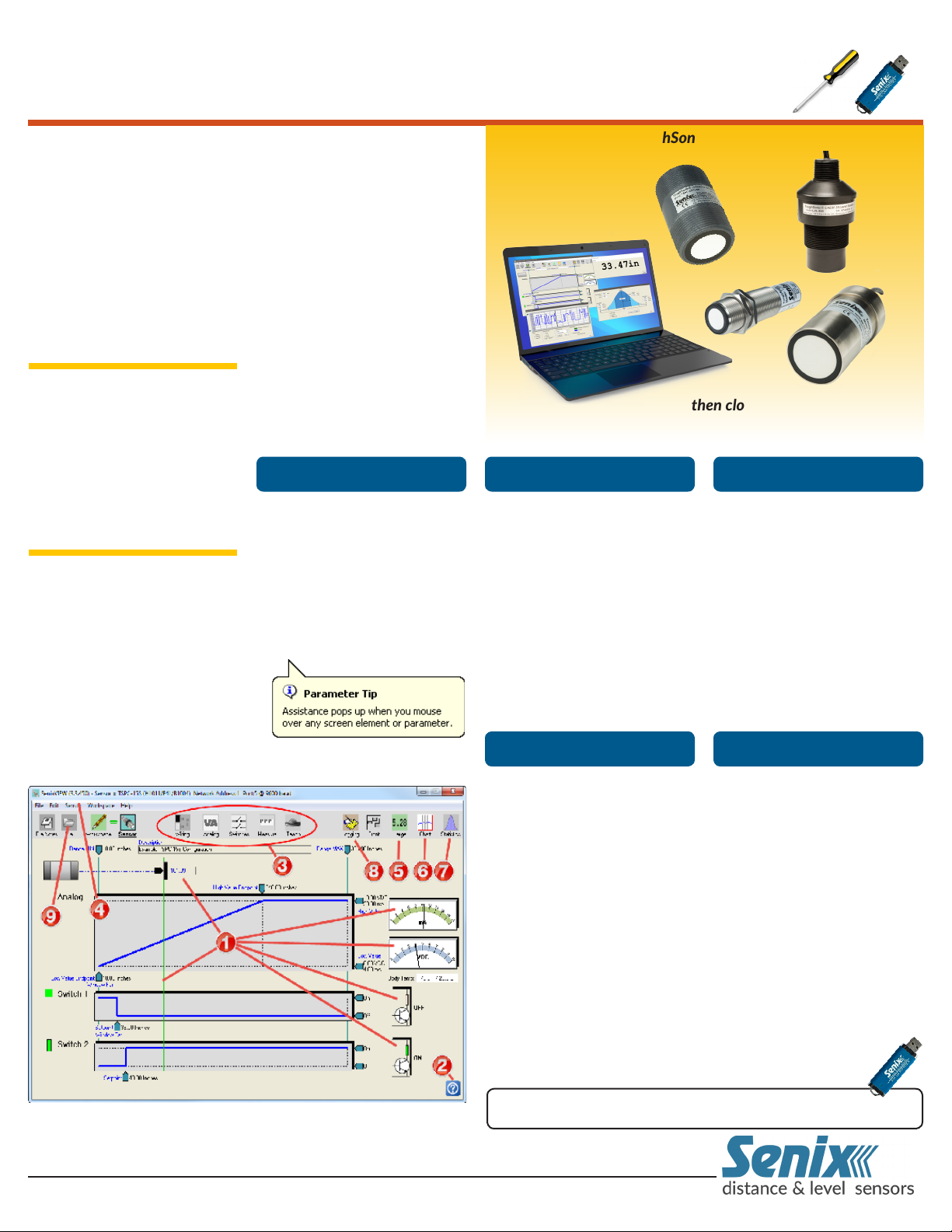
Real-Time Graphics include
target data & symbols, meters,
switch states, charts, graphs,
statistics & logs all in real-time.
Click a parameter to revise it,
then send it to the sensor!
Help Tips
Quickly optimize any ToughSonic sensor installation...
then clone it in 3 seconds!
AnalyzeEasy to Use Powerful Setup
Adjust sensors quickly to get
your application just right...
Adjust over 60 function-
ally organized parameters.
Calibrate and set measure rate,
operating range, filters, timeouts and responses to unusual
measurement conditions.
Multi-Sensor features can
manage a sensor network by
address. Adjust one sensor, a
batch of sensors, or an entire
network using Group Control.
Evaluate performance using
these extended features...
Statistics displays the min,
max, average, standard deviation and max deviation, continuously or over a selected
number of samples.
Logging stores time-stamped
measurements to a disk file at
an adjustable rate while showing a real-time strip chart. Files
can be replayed on the strip
chart or exported to Excel.
Tips have user selected delay
timing, or can be turned off.
Click to view the following in
repositionable windows...
View
Large Display shows outputs
in big characters so you can
view PC screen measurements
from afar while working on
equipment. Resize to your preference, then view the screen
from up to 100 feet away.
Strip Chart shows a running
measurement history graph of
distance vs. time in a one-shot
or continuous mode. Time
and distance scales are manually or automatically adjusted.
Adjust sensor filters and check
the results in real-time—both
filtered and unfiltered data are
shown simultaneously.
Download SenixVIEW from senix.com/senixview. A memory stick is
Note: Circled numbers in text () correspond to screen image and back page.
800 677 3649 802 489 7300 10516 Route 116 Suite 300, Hinesburg, VT 05461 USA
Fax: 802 489 7400 e-mail: [email protected] web: senix.com
included in USB interface kits UA-KIT-USB-485 and UA-KIT-USB-232.
Store & Recall
Finished? Click once more in case
you need it in the future...
Save a sensor setup to the PC
disc file. Need another identical sensor? Connect it, recall
the file, then copy the setup to
the sensor for an exact copy
in 3 seconds—no calibration
needed! Configurations can be
also be exchanged by email.
OEM and MRO maintenance
operations find quick
duplication particularly
useful to reduce
setup and down time
Senix can also ship pre-configured sensors with your
custom setup. Contact
Senix for details.
Page 2
Features
Senix® Corporation, 10516 Route 116 Suite 300, Hinesburg, VT 05461 USA
Phone: 800 677 3649 or 802 489 7300 FAX: 802 489 7400
Web : senix.com E-mail: [email protected]
SenixVIEW™ Setup Software for ToughSonic Sensors
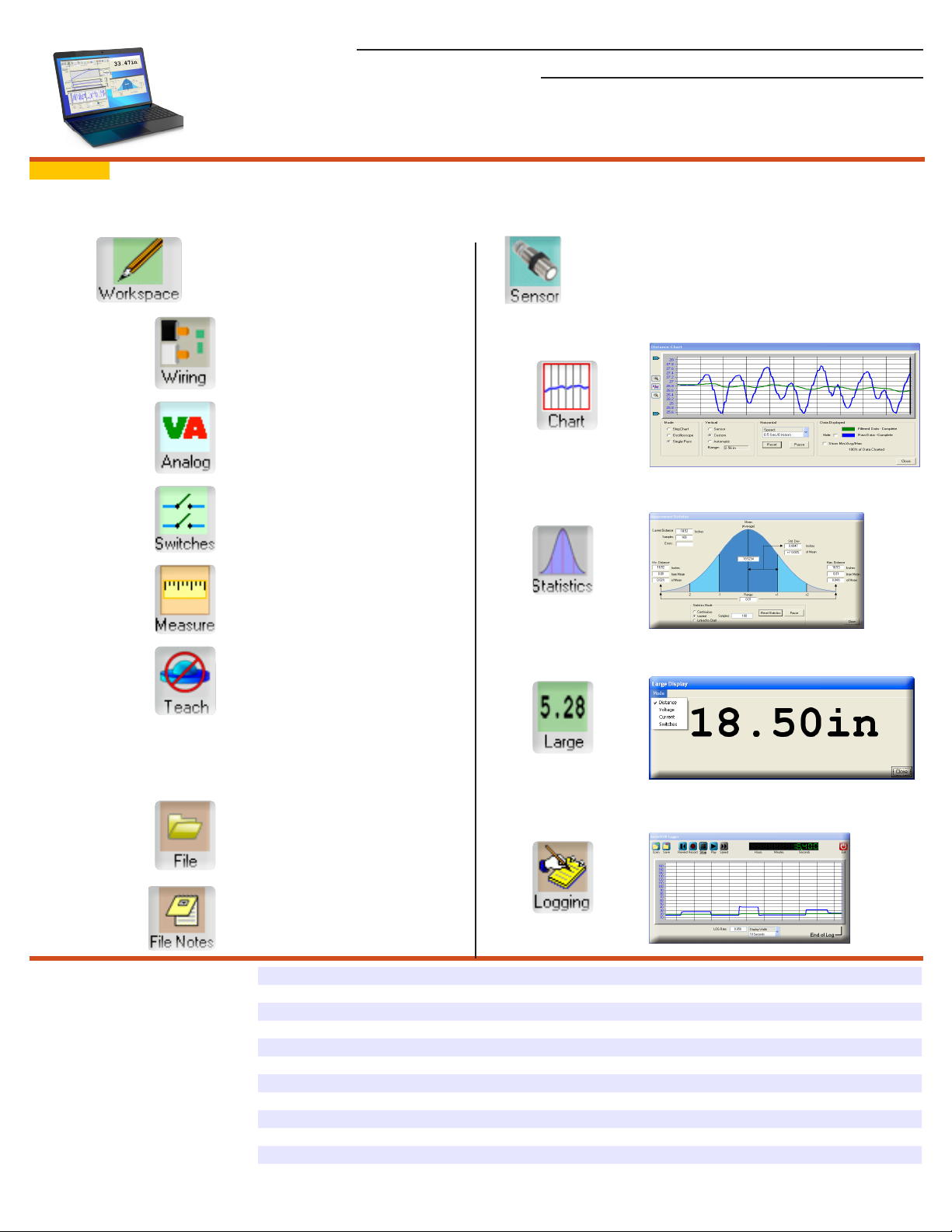
Note: Circled numbers ()correspond to text on front page.
Sensor Setup Real-Time Viewing
● Click to edit sensor parameters
● Calibrate output distances
● Choose outputs on ToughSonic 3
and ToughSonic 14 models
● Set switches to sinking or sourcing
● Select status indicator functions
● Power-up output values
● No target output value & delays
● No SYNC output values
● Hysteresis & setpoint modes
● On, off & no-target delays
● Polarities, power up states
● Measurement mode & rate
● Temperature compensation
● Sensitivity & filtering
● Teach button can be either enabled
or diasabled for security
● ToughSonic 3, 14 & 30 models have
push-button Teach
File Operations
Click!
Click
Click!
● Click Sensor to start real-time viewing
● View real-time distance and outputs
● Enables real-time features shown below
View running strip chart display
View running statistics display
!
View large digits displays on screen
23 Oct 2017 - SenixVIEW 3.4.530
● Save sensor setup to disk file
● Recall later and clone another
● Add user notes with additional infor-
mation about your application.
Product Compatibility All Senix ToughSonic General Purpose, ToughSonic REMOTE and ToughSonic CHEM models
PC Operating System Windows XP, 7, 8, 9 and 10 compatible
SenixVIEW version This document applies to SenixVIEW Version 3.4.530 or later
Sensor Interface PC COM Port (RS-232, RS-485 and Bluetooth sensor interfaces are available)
Protocol Modbus, at 9600, 19200, 38200, 57600 or 115,200 baud, N-8-1
COM Ports COM 1 through COM 255; Port loopback verification test included
Test Features Sensor outputs test, range environment test, data communications loopback
IP Compatibility LAN or internet connection to sensors using Modbus over IP
Sensor connection By sensor address (1 to 247); up to 32 sensors in an RS-485 network or SYNC group
Sensor Groups
Updates Auto SenixVIEW & sensor firmware update from web site; supports firmware installation
All rights reserved. Specifications subject to change without notice. Senix products are not recommended for applications with hazardous or
explosive materials, or as a primary device for personal safety. Copyright 2017 Senix Corporation. Printed in U.S.A.
Identifies attached sensors by address; single or multi-sensor parameter transfers or saves
Click!
Log data, replay or view in Excel
 Loading...