

Page 1
Item #21126 For Ages 12 & Up
VIDEO GAME SYSTEM
User’s Guide & Game Instructions
Please keep this manual and package for future reference.
www.senario.com
©2005 JMBH, Inc. You’re Fired! You’re Hired! THE
APPRENTICE, and all logos and slogans TM JMBH, Inc.
All Rights Reserved.
©2005 Senario LLC. All Rights Reserved
Apprentice Manual.indd 1 2005-06-08 2:51:44 PM
Page 2
2
3
THANK YOU!
Thanks for buying this Senario video entertainment system. At Senario,
we strive to make sure you get the most entertainment possible for
your money. All our products are easy to set-up and simple to operate.
After all, you shouldn’t have to work hard just to play!
To ensure proper performance, please read this brief manual before
connecting the game to your television.
Contents
Battery Installation . . . . . . . . . . . . . . . . . . . . . . . . . . . . . 3
Controls & Connections . . . . . . . . . . . . . . . . . . . . . . . . . . 4
Using Your Game System . . . . . . . . . . . . . . . . . . . . . . . . . 5
Caring For Your Game System . . . . . . . . . . . . . . . . . . . . . 6
Troubleshooting . . . . . . . . . . . . . . . . . . . . . . . . . . . . . . 7
Playing The Game . . . . . . . . . . . . . . . . . . . . . . . . . . . . . 8
Warnings and Precautions. . . . . . . . . . . . . . . . . . . . . . . . 15
BATTERY INSTALLATION
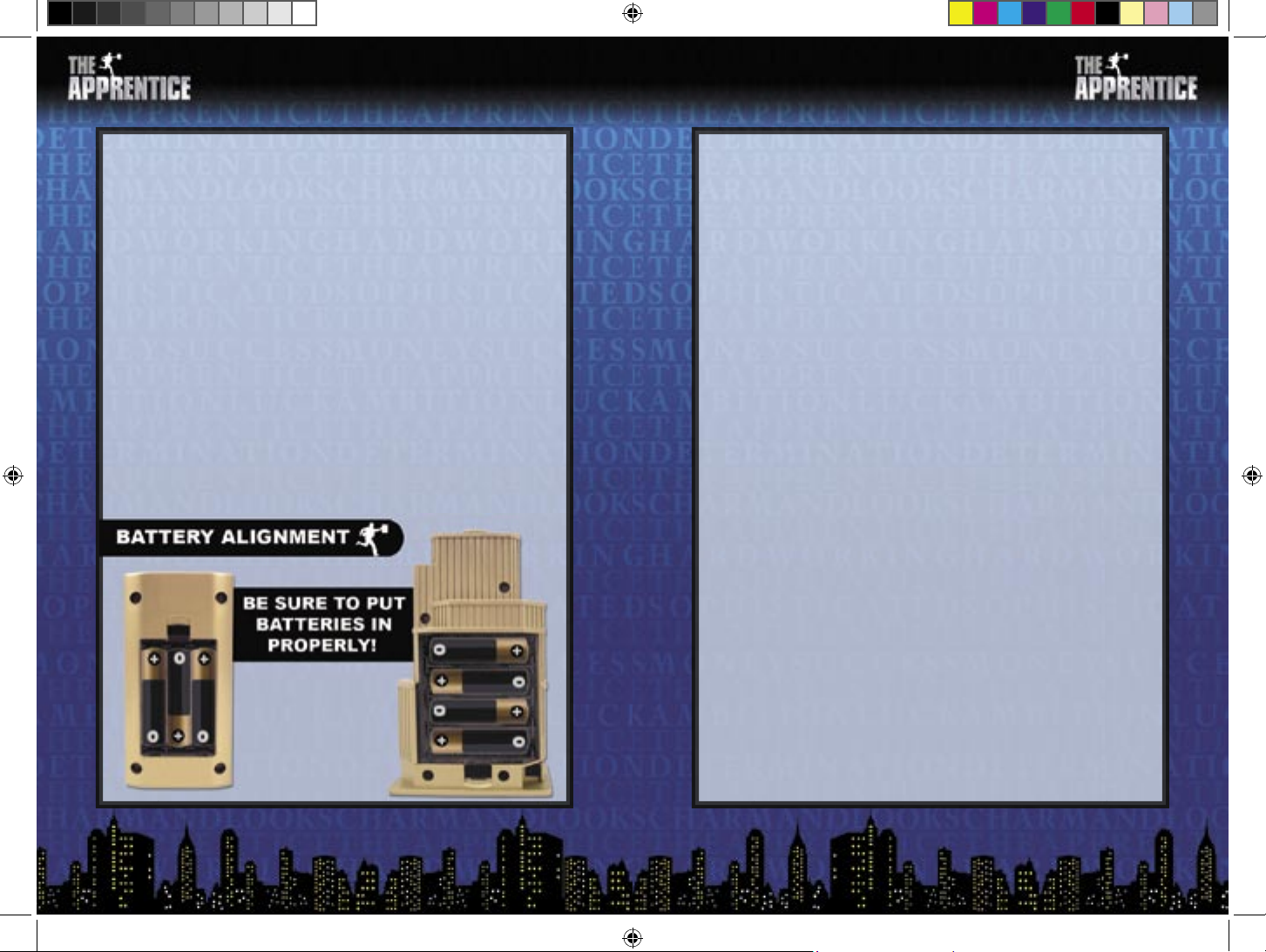
Your game system requires 10 batteries —4 type AA in the housing and
3 type AAA in each of the handsets.
Help protect our environment! Senario encourages the use of
rechargeable batteries. Keep one set charged and one in the game so
you’ll always have fresh batteries available!
To Install or Replace Batteries
• Remove the battery cover.
• Remove exhausted batteries and dispose of properly.
• Replace with new batteries. Be sure the positive (+) and negative (-)
ends of the batteries are facing the correct direction.
• Replace the battery cover.
Battery Warnings
• Remove batteries when your game will not be used for a long
time.
• Battery installation should be supervised by an adult.
• Do not mix old and new batteries.
• Do not mix alkaline batteries with standard (carbon-zinc) or
rechargeable batteries.
• Do not mix different brands of batteries.
• Only use batteries of the type recommended in this manual.
• Be sure to insert batteries with correct polarity.
• Remove exhausted batteries from the product.
• Be careful not to short circuit the supply terminals.
• Do not attempt to recharge non-rechargeable batteries.
Note: When the batteries begin to lose their charge, the Power LED will
dim, and the game will turn itself off. If the game images start to break
up or look jagged, the batteries are probably getting low and need to
be replaced.
Apprentice Manual.indd 2-3 2005-06-08 2:51:50 PM
Page 3
4
5
CONTROLS & CONNECTIONS
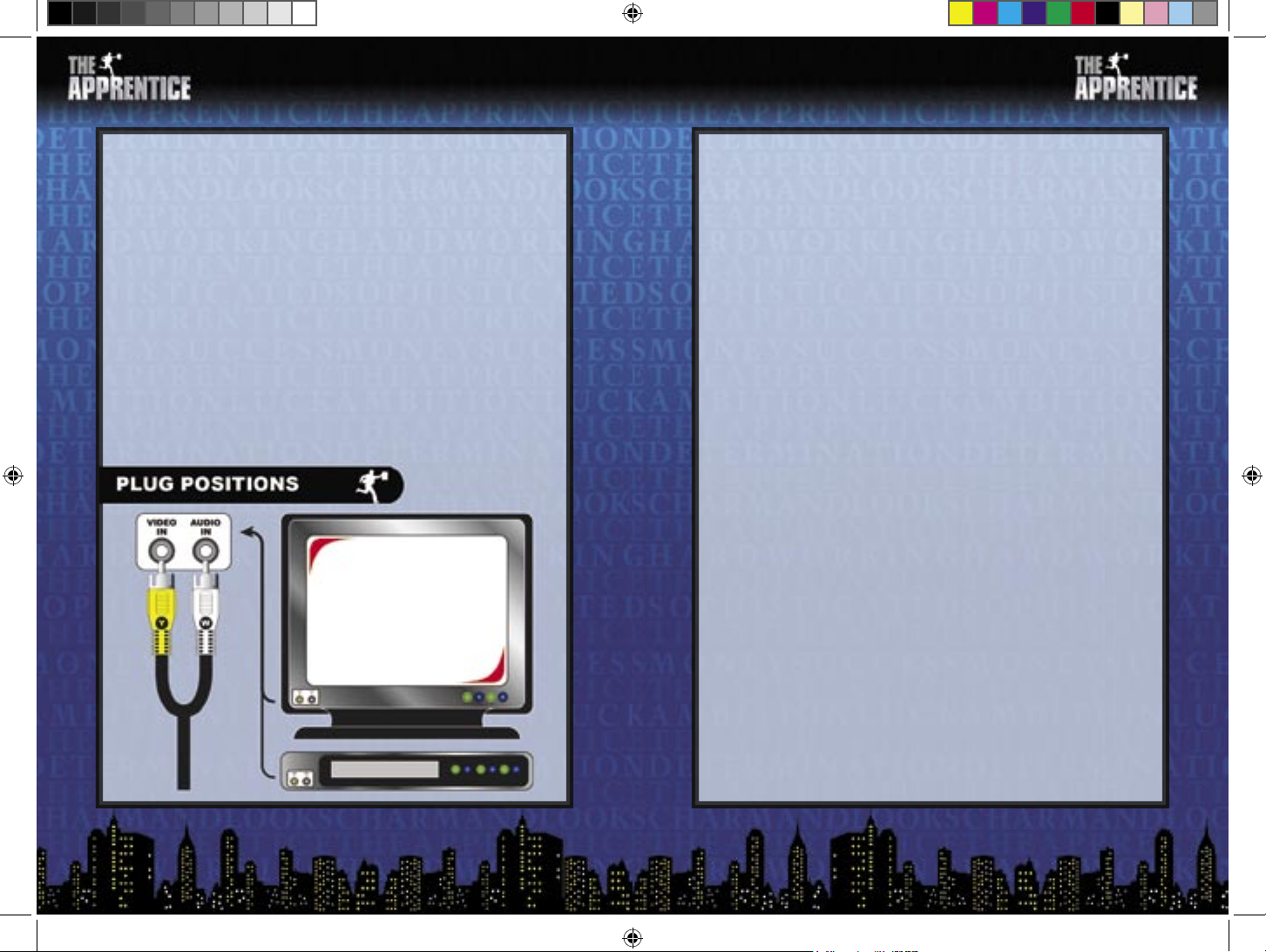
Your game connects to the TV set with a pair of standard RCA plugs.
Most TV sets, video monitors, and VCRs have easily accessible RCA
jacks. These are usually labeled “video” and “audio” or are color coded
to indicate the video connection (yellow) and audio connections (red
and/or white).
The RCA plugs on the game console must be connected to the proper
“input” RCA jacks. Be sure to insert the yellow video jack into the
yellow video socket. The remaining audio plug can be inserted into
either the white or red audio socket on your TV, video monitor, or
VCR.
Note: If your TV, video monitor, or VCR does not have RCA jacks,
you’ll need to purchase a separate A/V adaptor (not included).
USING YOUR GAME SYSTEM
Turning On Your Game
• Make sure your game is turned off before connecting it to your TV
set.
• Turn your TV on and tune it to the A/V channel. This channel is
often called “input”, “auxiliary”, “line”, or even “game”. You might
have to change channels using the original TV, video monitor, or
VCR remote control (as opposed to a universal remote) to access
it. Look for a button on the remote marked “input” or “auxiliary”.
If you are having trouble switching to the INPUT mode, contact the
TV manufacturer or retailer for assistance.
• Slide the game’s power switch to the “ON” position.
• The title screen will appear on your TV set.
Turning Off Your Game
After you have fi nished playing, slide the power switch to the “OFF”
position.
Disconnect the game from the television and switch the channel back to
view regular TV programs.
Apprentice Manual.indd 4-5 2005-06-08 2:51:55 PM
Page 4
6
7
CARING FOR YOUR GAME SYSTEM
Standard Care
• Do not disassemble the game.
• Do not try to repair the game.
• Always switch the power off when connecting or disconnecting the
RCA plugs to/from your TV, video monitor, or VCR.
• Do not store your game system in a humid place, on the fl oor, or in
any location where it may collect dirt, dust, lint, etc.
• Do not drop, hit, throw, or abuse the game system or any of its
components.
• Be sure all cable connections are made carefully and inserted into
the correct locations.
• Be sure all plugs are fi rmly seated in the proper sockets by holding
them straight when inserting them.
• When disconnecting any plugs, carefully pull out the plug itself.
Do not pull on the cord.
• Do not step on, sharply pull, or bend any wires or cables.
• Do not expose the game system or any of its components to extreme
temperatures. The game may not work properly if it is too hot.
• Do not expose the game to direct sunlight for extended periods of
time.
• Do not rapidly turn the power switch on and off. This may shorten
the life of the batteries and game system.
Cleaning Your Game System
• Use a soft slightly damp cloth.
• Allow the game to dry completely before using again.
• Do not pour or spill any type of liquids or solvents on the game or
its components.
TROUBLESHOOTING
Before requesting repair or exchange, please try the following:
No picture on the screen
• Is the game turned on?
• Is the TV turned on?
• Is the TV on the Input or A/V channel?
• Is the A/V cable connected properly?
• Do the batteries have enough power?
• Are the batteries properly installed?
Screen fl ickers or no color
• Are the TV color controls set properly?
• Are the TV channel fi ne adjustments set properly?
• Do the batteries have enough power?
No game sound
• Is the TV volume too low or muted?
• Has the audio cable become loose or disconnected?
Picture on TV is unsteady
• Adjust the vertical or horizontal hold controls on your television
until the picture becomes steady.
• Do the batteries have enough power?
Fringes appear on TV during play
• Is the video cable connected properly?
• Do the batteries have enough power?
Picture is blinking or distorted
• Try pressing the reset button. If there is no improvement, turn
power off and try again.
• Do the batteries have enough power?
No power
• Are the batteries inserted properly?
• Is the power switch turned on?
Apprentice Manual.indd 6-7 2005-06-08 2:51:59 PM
Page 5
8
9
mean you and your friends – the people actually playing the game.
When we say “character”, we mean the people who appeared on the
show and are represented by the ID badges included with the game.
Each player will take the role of one character during the game.
Episodes and Seasons
The Apprentice is designed to capture the feel of the hit TV show.
Because of this, it’s played in EPISODES and SEASONS rather than
turns. Each game you play represents one season of the show. The
number of episodes in that season will vary depending on how many
characters are participating and the whims of The Donald.
PLAYING THE GAME
Welcome to the exciting world of The Apprentice!
Like the hit TV show that inspired it, this game is designed to challenge
your knowledge of business and test the limits of your managerial
skills. If you’ve got what it takes, you’ll make your way through
Challenge after Challenge until, at last, you’ll take your place alongside
the Donald at the head of a multi-million dollar empire. If you don’t
quite make the grade, you can bet you’ll be hearing those two words
everyone dreads: You’re Fired!
The Apprentice is a simple game to play, but will demand all your
concentration and intelligence to master. It is possible to plug in the
game and start playing without reading the instructions. Care has been
taken to make the game fairly intuitive and text on the screen guides
you through the choices you have to make. However, taking a few
minutes to look over these instructions will make sure you understand
the details of game play and enhance your enjoyment.
Basic Concepts
There are a few basic terms and concepts you’ll want to make sure you
understand before you start playing.
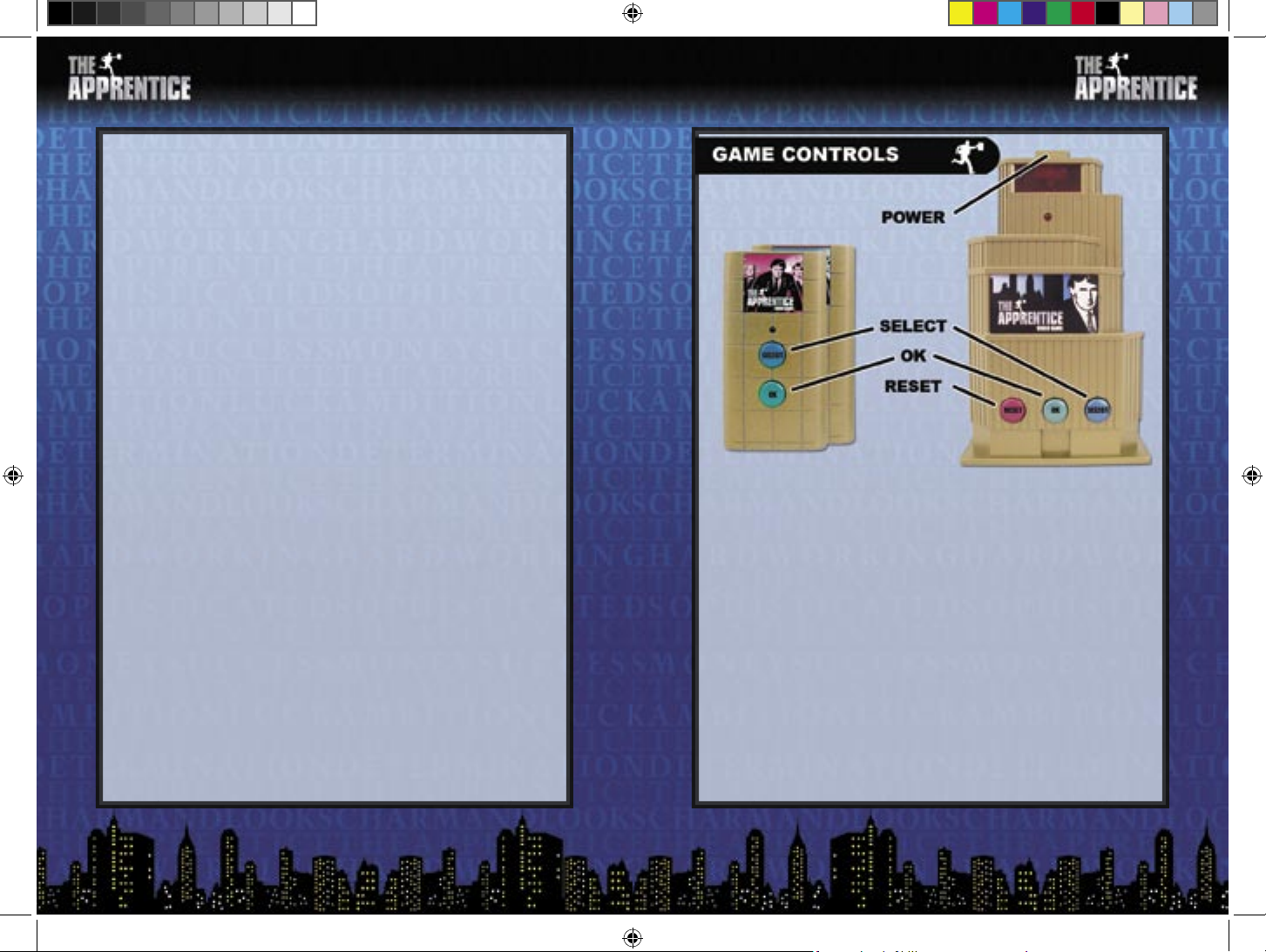
Handsets and Console
The game includes two HANDSETS, one for each of the teams, and one
building-shaped CONSOLE. The console plugs into your TV set and
the handsets communicate with it via harmless infrared beams. The
initial steps in setting up the game are done with the buttons on the
console. The latter steps for setting up the game and game play are all
done with the handsets.
Players and Characters
As you read these rules, it is important to understand the difference
between CHARACTERS and PLAYERS. When we say “player”, we
Apprentice Manual.indd 8-9 2005-06-08 2:52:04 PM
Page 6
10
11
Game Setup
Number of Characters
The fi rst thing you’ve got to decide is how many characters will appear
in this season of the show. The game can be played with as few as 4
characters and as many as 12. Just toggle through the choices on the
screen by pressing the SELECT button on the console. When the option
you want is highlighted, press the OK button on the console to confi rm
your choice. The number of characters equals the number of people
playing the game.
Select Characters
Once you know how many characters are going to be on the show this
season, you need to decide who they will be. In The Apprentice you can
select any character from any of the show’s fi rst three seasons.
Selecting a character is a two-step process. First, you use the SELECT
button on the console to toggle between the seasons. When the season
you want is highlighted, press the OK button on the console to confi rm
your choice.
Next, you toggle through the characters in the chosen season (again,
using the console SELECT button) until the one you want is highlighted.
Press OK on the console to confi rm your choice.
After you select the character you want to be during this season, take
the ID badge with his or her name and picture on it.
Assign Teams
After all of the characters have been chosen, the game will automatically
form them into red and blue teams. You can accept the decision made
by the game, have it randomly move the characters around to create
new teams, or opt to decide which characters are on which teams
manually.
Once you are satisfi ed with the teams, select ACCEPT THESE TEAMS
to continue.
Team Names
Now that the teams have been formed, each one must be named. The
game will instruct either the red or blue team to pick a name fi rst.
Deciding on a name is the fi rst challenge your team will face! Make
sure you pick one that captures the style and imagination of everyone
on your team. Exactly how you pick a team name is up to you.
Once you decide, use the SELECT button on your team’s handset (not
the console) to toggle to your choice and hit OK to confi rm it.
After the other team makes their choice, the game will proceed to the
fi rst episode!
Playing an Episode
Now that you’ve set up your teams and laid out the guidelines for
your season of The Apprentice, it’s time to get started! Each episode
begins with the presentation of a new Challenge. This might be selling
gourmet foods, organizing a fund raiser, or promoting tourism. There
are hundreds of Challenges in the game, so you never now what you’ll
be asked to do next!
Project Managers
Each episode begins when the game tells the players what type of
Challenge they’re about to face. For example, they might be told they’re
going to sell antique furniture. Each team then decides who will be the
Project Manager for this episode. It’s a good idea to pick someone who
is likely to know the most about the subject in question.
Before everyone rushes to be the Project Manager, a word of warning
is in order. If your team should lose the Challenge, The Donald will
look very carefully at your performance. Being a Project Manager gives
you a good chance to lead your team, but it carries with it a little bit of
risk as well.
Give the handsets to the Project Managers so they can identify
themselves to the game.
Apprentice Manual.indd 10-11 2005-06-08 2:52:08 PM
Page 7
12
13
The Challenge Questions
Each Challenge is made up of four questions about the chosen topic.
The faster your team answers these questions, the more points they
earn (if they get it right, of course!).
Exactly how your team comes up with an answer is up to the Project
Manager – after all, he’s the one holding the handset! If he is confi dent
he knows the answer, he can enter his selection without talking to
anyone else about it. This is where the job of being a Project Manager
gets tricky. If you act fast and select the right answer, your team will
admire your skill. If you pick the wrong answer, they will blame you
for defeat if you end up in the Boardroom!
Outside Help
As the game progresses, characters are going to be fi red and removed
from the show. If a player’s character has been fi red, he’s essentially
out of the game. But that’s not much fun, so once during each episode
(not once per question), a Project Manager can ask any such player to
help his team with the current question.
Whether or not that person decides to be helpful is up to him – he is
under no obligation at all. A player might refuse to help or agree and
then provide bad advice. It’s always a good idea to be careful when
asking for help from someone you fi red or voted against on a previous
turn. Either way, the Project Manager can not ask anyone else (except
his own team, of course) for help. Picking the right resource is a sign of
good management material.
It is possible for both teams to ask the same person for help – even at
the same time! Again, that’s just the way the business world works.
Challenge Summary
After all of the questions in a Challenge are asked, the results are
displayed. Here, you can see who got which answers right and how
many points they won. At the bottom of the screen, the totals are
displayed along with the name of the team that won the Challenge.
The Reward
Now that the hard work is done, it’s time to sit back and enjoy your
victory – assuming you were on the team that won, of course! Just
like on the show, the winning team is rewarded for their efforts.
Exactly what sort of prize they won is determined by the nature of
the Challenge. For example, if you were creating a new superhero you
might receive a rare and valuable comic book in mint condition.
It is worth noting that no actual prizes are being given away here. Just
because the screen tells you that everyone on your team won a new
sports car, you don’t get one in real life. These prizes are all in the
game. Everyone got that? Great!
The Boardroom
While the winners are enjoying their reward, the losing team is called
into the Boardroom. Here, they must face The Donald – and each other
– as they attempt to justify their actions and efforts.
Once your team enters the Boardroom, you’re going to be asked some
diffi cult questions. In his effort to fi nd the best person to join his team,
Donald is going to want to fi nd out who was responsible for the failings
of your team.
The fi rst person he’ll ask is the Project Manager. Remember, he’s
watching this person very carefully. He’ll be quick to listen to their
opinion and just as quick to blame them for poor leadership.
After the Project Manager has given his opinion, Donald will ask
the other players on the losing team what they think. One by one,
everybody will get to have their input.
Lastly, Donald will seek one more piece of information before deciding
who will be fi red. He might decide to ask someone for a second opinion,
either the Project Manager or one of the team members. He might even
ask a fi red character for his input or question someone on the winning
team.
Apprentice Manual.indd 12-13 2005-06-08 2:52:13 PM
Page 8
14
15
You’re Fired!
Once The Donald has all the information he needs, he’ll make his
decision and one of the characters on the losing team will be fi red!
The player using the fi red character will have to perform some sort of
forfeit for his failure. He might have to get his teammates something to
drink, clean up all the dishes in the room, or even confess some dark
secret – like what he really hates about his real life job!
Remember, even if you have been fi red you’re not totally out of the
game. Project Managers are allowed to seek help from fi red characters
once during each episode, so you might be tapped for help often. In
addition, Donald is known to enjoy shaking things up. What better
way to do that than by returning a fi red character to the show? With a
little luck, you could still end up as The Apprentice!
The Donald Says…
At the end of each episode, there is a chance that Donald will decide to
even the playing fi eld. There are many ways he can do this. He might
move characters from one team to the other, fi re an extra player, bring
back a fi red character, or even decide to make someone become the
Project Manager on the next episode – whether they want to be or not!
The Next Episode
After the fi rst episode is fi nished, it’s time to get started on the next
one! This plays just like the fi rst one, starting with the selection of a
new project manager (or the same one, if you want!) and fi nishing
with another trip to The Boardroom. Episode by episode, the season
progresses and characters are removed from the show.
You’re Hired!
Eventually, the game is going to come down to two players – one on
each team – facing off in the fi nal episode of the season. The winner of
that challenge will emerge triumphant and become The Apprentice!
Optional Rule:
Playing With Two Players
Although The Apprentice is designed to be played by between 4 and 12
people, it makes an excellent 2 player game as well.
When playing like this, each player should select between 2 and 6
characters for his team and place their ID badges face up in front of
him, showing the side matching the color of his team. If a character
is fi red, the appropriate ID badge is set aside. If a character changes
teams, the player hands it to his opponent.
WARNINGS AND PRECAUTIONS
Warning
A very small portion of the population have a condition that may cause them
to have epileptic seizures or suffer a momentary loss of consciousness when
viewing certain kinds of fl ashing lights or patterns commonly presented in
our daily environment. These people may experience seizures while watching
some television pictures or playing certain video games. People who have
not had any previous seizures may nonetheless have an undetected epileptic
condition. If you or anyone you may know has experienced symptoms linked
to an epileptic condition (e.g. seizures or loss of awareness), please consult your
physician before playing any video games. We recommend that parents observe
their children while they play video games. If you or your child experience any
of the following symptoms: dizziness, altered vision, eye or muscle twitching,
involuntary movements, loss of awareness, disorientation, or convulsions,
discontinue use of video games and consult your physician.
Image Retention Warning
Some televisions and monitors can be damaged by video game images. This
“image retention” is most commonly caused by test patterns, programming
screens, paused video games, and other unchanging images. In general,
Projection TVs are more vulnerable to this type of damage. Before using your
game system, be sure to review the documentation supplied with your television
or video monitor to determine whether or not you can safely play video games on
Apprentice Manual.indd 14-15 2005-06-08 2:52:17 PM
Page 9

16
it. If you have any questions, please contact the TV manufacturer for additional
information. Senario LLC can not be held liable for damage to your TV set.
Additional Safety Information
Before using your video game system with any TV (especially front or rear
projection screens and HDTV systems), video monitor, or VCR, review all of
the original manufacturer’s documentation to determine whether video games
can be safely played on it. Senario LLC can not be held liable for any damage
to your TV.
Precautions
• When using the game, do not sit or stand too close to the television or video
monitor screen.
• Play the game as far back from the screen as possible.
• Do not play the game if you are tired or need sleep.
• Always play the game in a well-lit room.
Repetitive Strain Warning
Some people may experience fatigue or discomfort after playing for a long time.
Regardless of how you feel, you should always take a 10 to 15 minute break every
hour while playing. If your hands or arms become tired or uncomfortable while
playing, stop and rest. If you continue to experience soreness or discomfort
during or after play, listen to the signals your body is giving you. Stop playing
and consult a doctor .Failure to do so could result in long term injury. If your
hands, wrists or arms have been injured or strained in other activities, use of this
system could aggravate the condition. If unsure about your physical condition,
consult a doctor before playing.
FCC Compliant
This device complies with part 15 of the FCC rules. Operation is subject to the
condition that this device does not cause harmful interference.
FCC ID: #######
Senario LLC
1725 Kilkenny Court
Woodstock, IL 60098 USA
©2005 Senario LLC. All Rights Reserved.
Made in China
Apprentice Manual.indd 16 2005-06-08 2:52:19 PM
 Loading...