

Page 1
HelloDevice Pro Series
Quick Start Guide
PS110
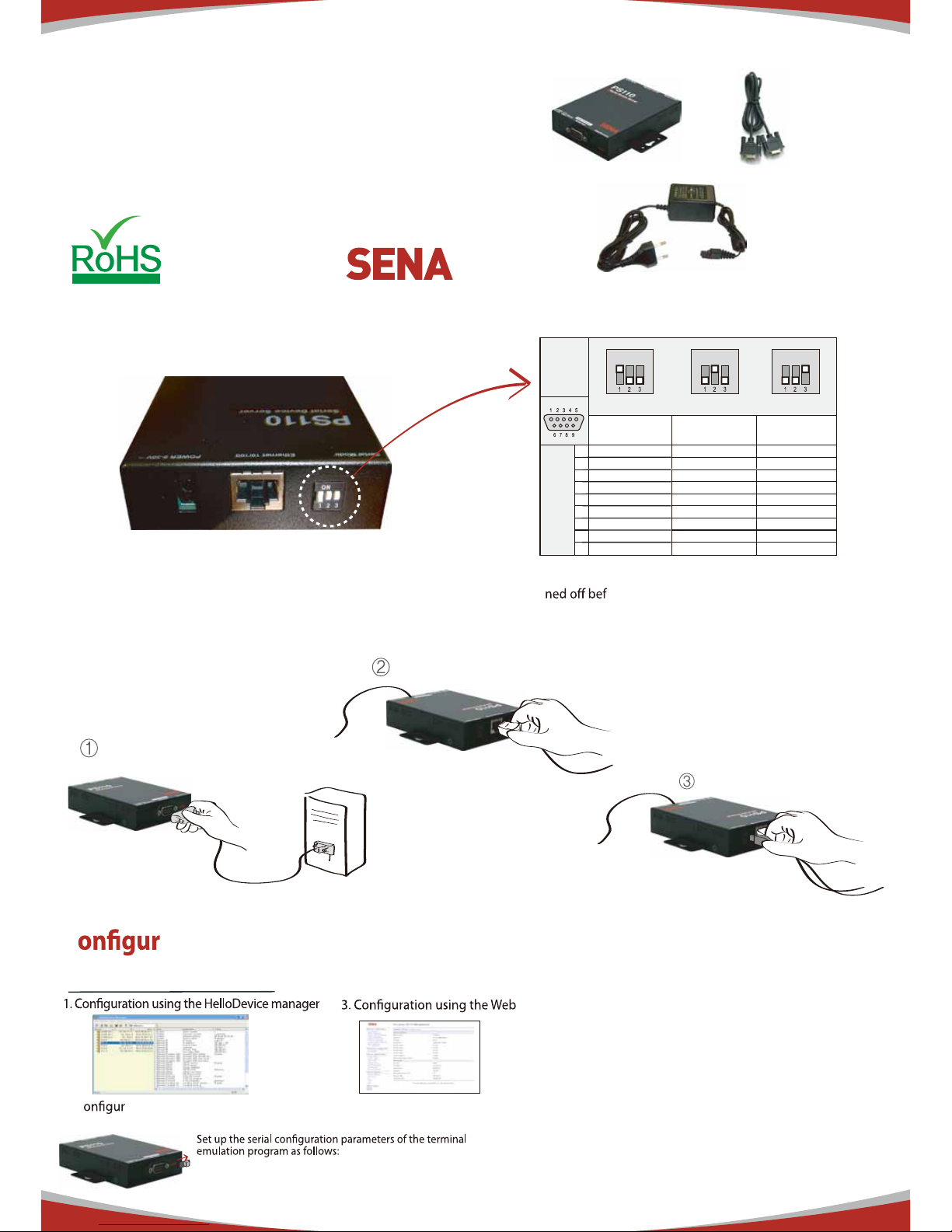
Set DIP Switch & Pin-outs
Connection
C
ation
Set serial DIP switch according to your
serial device requirements(RS-232/422/485)
* Please note that the power of the Pro Series should be
tur
ore changing the serial communication type.
User can choose one of the following processes
2. C ation using the Hyper terminal or Telnet
Connect to host PC. Then, slide Data/Console switch to the Console side.
DIP
Switch
Setting
RS232
(console andserial ports)
RS422
(serial ports only)
RS485
(serial ports only)
1 DCD Tx+ Tx+
2 Rx RX+ RX+
3 Tx RTS+ -
-
-
-
4 DTR CTS+
5 GND GND GND
6 DSR TX- TX7 RTS RTS8 CTS RX- RX-
DB-9
Pinouts
9 - CTS-
ON
RS-232 ModeONRS-422/485 Full ModeONRS-485 Half Mode
Serial
Device
Connect serial device
Connect Ethernet cable
Connect Power supply
9600 Baud rate/8 Data bits/None Parity/1 Stop bits/
No Hardware flow control
Default Log-in ID/Password is root/root.
After login, "editconf" command will allow you to get into
the text-menu driven interface. Then menu screen is displayed.
Copyright 1998-2012, Sena Technologies, Inc. All rights reserved.
Visit us at
www.senaindustrial.com
HelloDevice Manager and User Manual are available for
download from Sena website at
http://www.senaindustrial.com/support/downloads/.
For more information, refer to the user manual.
Compliant
Page 2
HelloDevice Pro Series
Quick Start Guide
PS410
Compliant
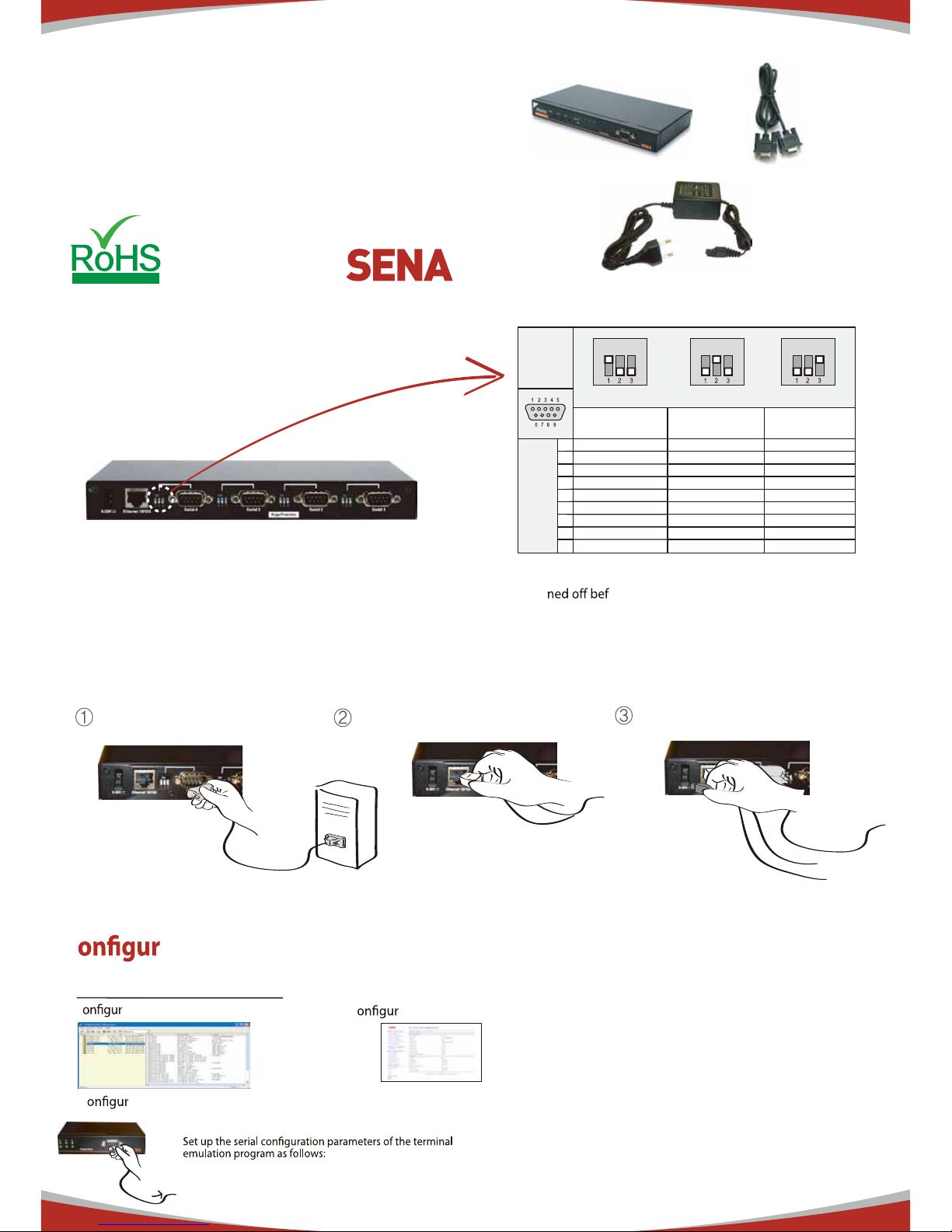
Set DIP Switch & Pin-outs
Connection
C
ation
Set serial DIP switch according to your
serial device requirements(RS-232/422/485)
* Please note that the power of the Pro Series should be
tur
ore changing the serial communication type.
User can choose one of the following processes
1. C ation using the HelloDevice manager
2. C
ation using the Hyper terminal or Telnet
Connect the host PC and PS410's console port using a serial console cable.
DIP
Switch
Setting
RS232
(console and serial ports)
RS422
(serial ports only)
RS485
(serial ports only)
1 DCD Tx+ Tx+
2 Rx RX+ RX+
3 Tx RTS+ -
-
-
-
4 DTR CTS+
5 GND GND GND
6 DSR TX- TX7 RTS RTS8 CTS RX- RX-
DB-9
Pinouts
9 - CTS-
ON
RS-232 ModeONRS-422/485 Full ModeONRS-485 Half Mode
Serial
Device
Connect serial device
Connect Ethernet cable
Connect Power supply
3. C ation using the Web
PC
Default Log-in ID/Password is root/root.
9600 Baud rate/8 Data bits/None Parity/1 Stop bits/
No Hardware flow control
After login, "editconf" command will allow you to get into
the text-menu driven interface. Then menu screen is displayed.
Copyright 1998-2012, Sena Technologies, Inc. All rights reserved.
Visit us at
www.senaindustrial.com
HelloDevice Manager and User Manual are available for
download from Sena website at
http://www.senaindustrial.com/support/downloads/.
For more information, refer to the user manual.
Page 3
HelloDevice Pro Series
Quick Start Guide
PS810
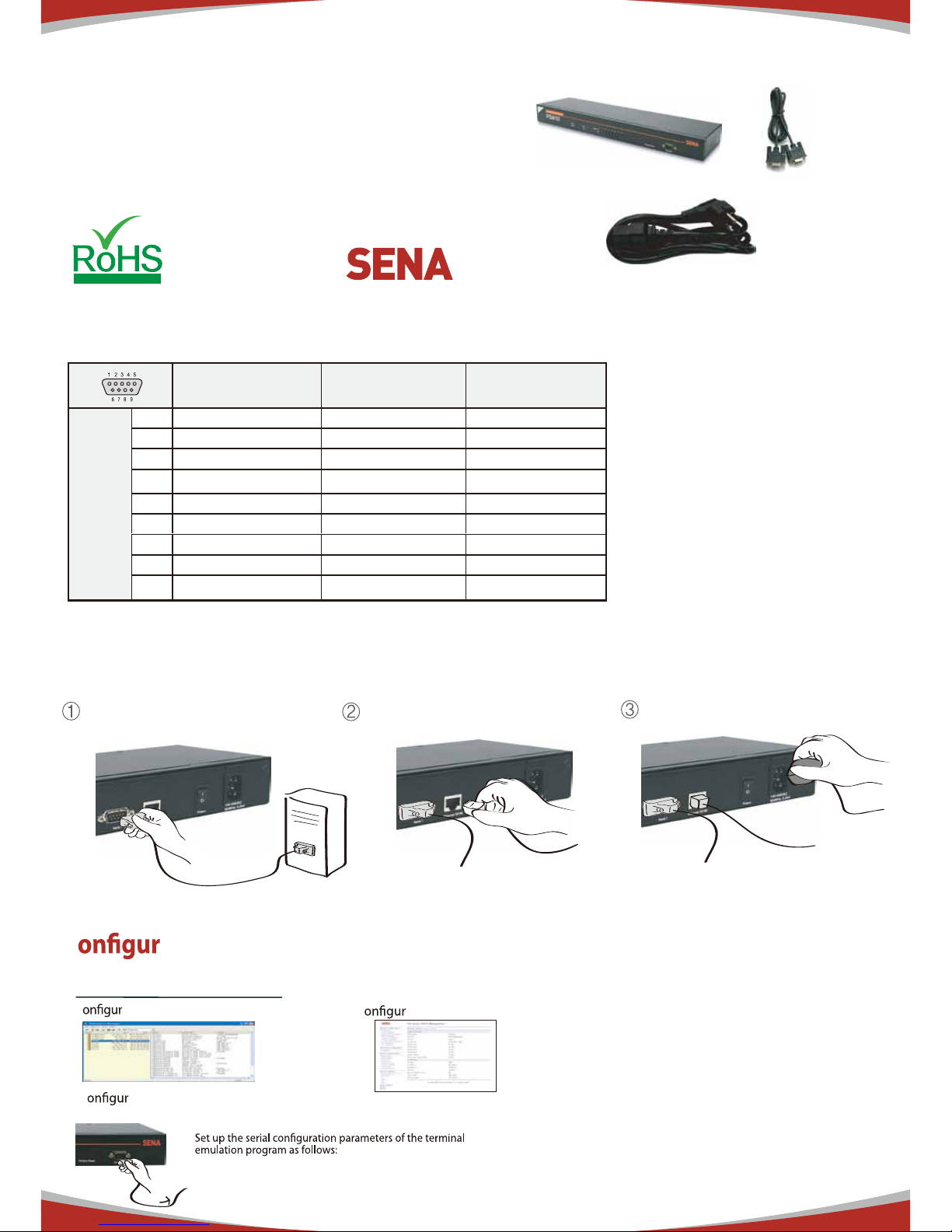
Pin-outs
Connection
C
ation
User can choose one of the following processes
1. C ation using the HelloDevice manager
2. C
ation using the Hyper terminal or Telnet
Connect the host PC and PS810's console port using a serial console cable.
Serial
Device
Connect serial device
3. C ation using the Web
PC
Connect Ethernet cable
* User can change the serial communication
type using software such as hyper terminal,
telnet or web management interface.
RS232
(console and serial ports)
RS422
(serial ports only)
RS485
(serial ports only)
1 DCD Tx+ Tx+
2 Rx RX+ RX+
3 Tx RTS+ -
4 DTR CTS+ -
5 GND GND GND
6 DSR TX- TX-
7 RTS RTS- -
8 CTS RX RX-
DB-9
Pinouts
9 - CTS- -
Connect Power cord
Default Log-in ID/Password is root/root.
9600 Baud rate/8 Data bits/None Parity/1 Stop bits/
No Hardware flow control
After login, "editconf" command will allow you to get into
the text-menu driven interface. Then menu screen is displayed.
Compliant
Copyright 1998-2012, Sena Technologies, Inc. All rights reserved.
Visit us at
www.senaindustrial.com
HelloDevice Manager and User Manual are available for
download from Sena website at
http://www.senaindustrial.com/support/downloads/
For more information, refer to the user manual.
 Loading...