

Page 1

User Manual
Original Instructions
www.segway.com
The manufacturer reserves the right to make changes to the One S2, release firmware updates, and update t his manual at any
time. Visit www.segway.com to download the latest user materials and watch the safety video. You must install the Ninebot
App to follow the New Rider Tutorial, activate your One S2, and obtain the latest updates and safety instructions.
EU201607-V1.0
Page 2

01
Contents
NOTE
1 Packing List ----------------------------------------------------------------------------------------------------------------- 03
2 Diagram ----------------------------------------------------------------------------------------------------------------------04
3 Carry Mode------------------------------------------------------------------------------------------------------------------ 04
4 Charging --------------------------------------------------------------------------------------------------------------------- 05
5 Battery Charge Level ----------------------------------------------------------------------------------------------------- 05
6 Warning ---------------------------------------------------------------------------------------------------------------------- 06
7 First Use --------------------------------------------------------------------------------------------------------------------- 09
8 Learning to Ride ----------------------------------------------------------------------------------------------------------- 10
9 Rider Safety ----------------------------------------------------------------------------------------------------------------- 12
10 Additional Features--------------------------------------------------------------------------------------------------------14
11 Maintenance ---------------------------------------------------------------------------------------------------------------- 14
12 Removing the Battery-----------------------------------------------------------------------------------------------------16
13 Specifications--------------------------------------------------------------------------------------------------------------- 18
14 Trademark and Legal Statement -------------------------------------------------------------------------------------- 19
15 Contact------------------------------------------------------------------------------------------------------------------------20
You must have smart phone with Android system ( version 4.3 or above) or with iOS system ( version 7.0 or
above), then download "Ninebot" App to initialize unit. The App will lead you through the New Rider Tutorial.
For your safety, the vehicle will limit t he max speed to 4 km/h before activation. After activati on and before
completing the New Rider Tutorial, the max speed will be limited to 7 km/h, For the first 1 km after completing the New Rider Tutorial, the max speed will be limited to 12 km/h, after which you can disable the speed
limiter via the App and reach a maximum speed of 24 km/h.
Page 3
02 03
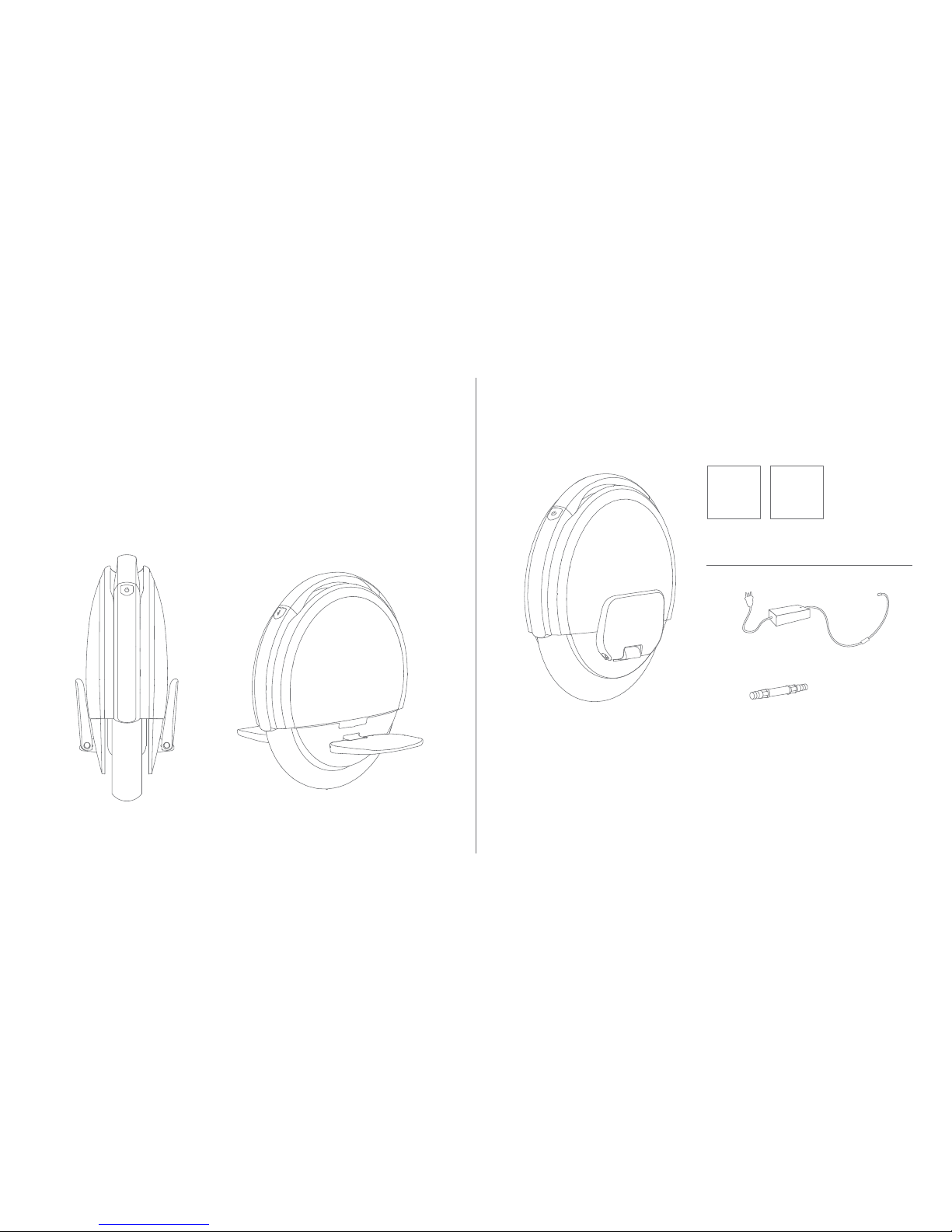
Vehicle body
Valve Stem Extension
Charger, Power Cord
User Materials
Accessories
Welcome!
Thank you for choosing the Ninebot One™ S2 by Segway (hereinafter referred to as One S2).
Your One S2 is a portable smart electric self-balancing vehicle and leisure device.
Enjoy your ride!
1 Packing List
USER MANUAL
When unpacking your vehicle, please verify that the above items are included in the package. If you are
missing any components, please contact your local dealer or retailer first.
Please retain the box and packaging materials in case you need to ship your One S2 in the future.
LIMITED WARRANTY
Page 4
0504
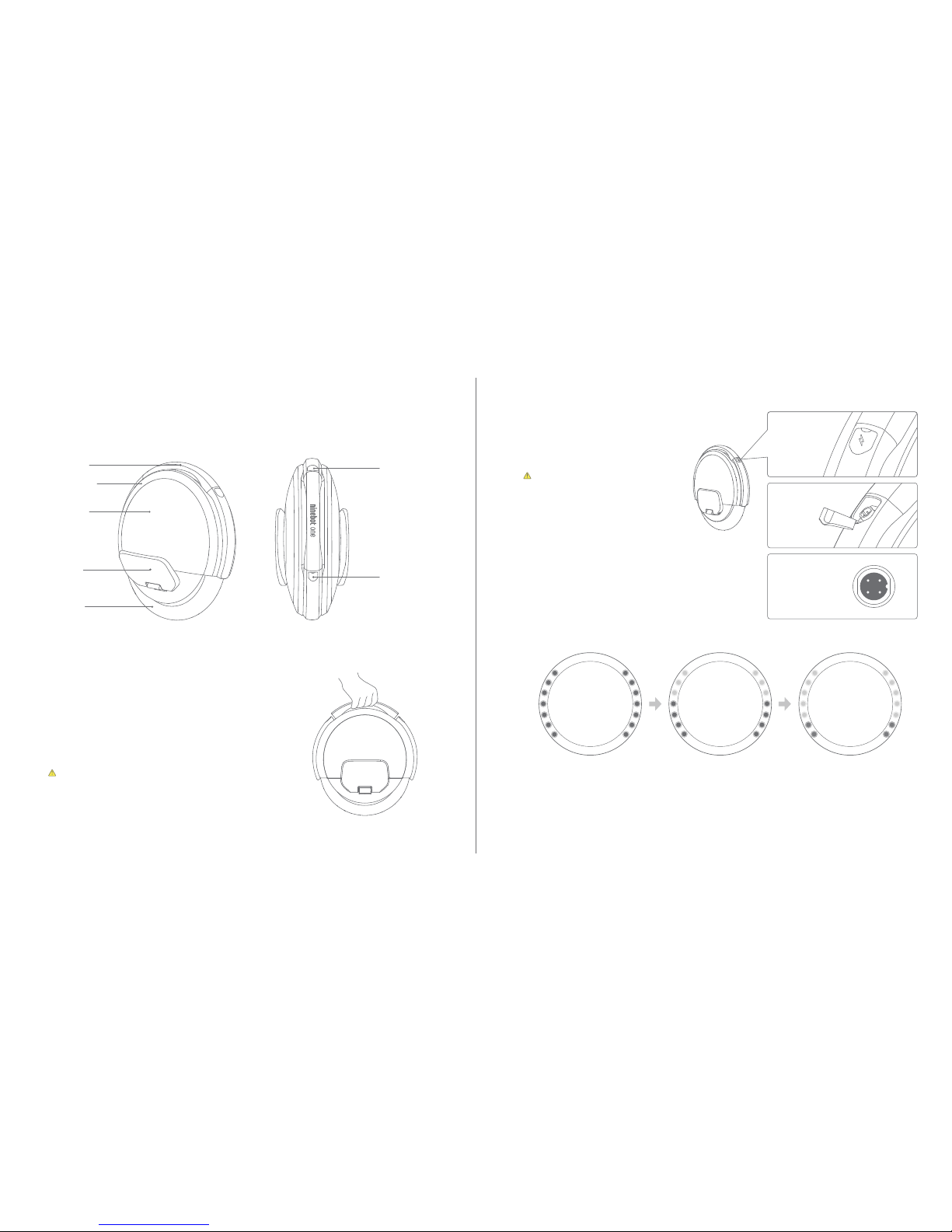
Handle
Power Button
Light ring
Pedals
Wheel
5 Battery Charge Level
3 Carry Mode
High
50% 100%
2 Diagram
Charge port
Medium
20% 50%
Low
0% 20%
Battery
cover
1
2
3
4
5
6
7
1
2
3
4
5
6
7
1
2
3
4
5
6
7
1
2
3
4
5
6
7
1
2
3
4
5
6
7
1
2
3
4
5
6
7
Front
4 Charging
2 Open the charge
port cover
3 Plug the charger
into the unit
1 Locate the
charge port
Rear
Green Yellow Red
— — —
You can enable/disable Carry Mode in the App.
WARNING
Carry Mode prevents the wheel from spinning when you lift your
vehicle by the handle while it is powered on. With Carry Mode you
can step off your vehicle, carry it across or around obstacles, then
put it down and continue riding — all without having to turn off your
vehicle.
Do not lift your vehicle by the handle when the vehicle is powered
on when Carry Mode has been disabled. Doing so will cause the
wheel to spin, and may result in personal injury or damage to your
vehicle.
Turn off your vehicle before charging.
WARNING
Do not connect the charger if the charge
port or charge cable is wet.
When charging, press the power button to
enable a visual display of the charge
level.
Your vehicle is fully charged when the
LED on the charger changes from red
(charging) to green (trickle charge).
The battery charge level display appears when the vehicle is kept stationary.
Each pair of lights represents 14% of battery life. When the battery is nearly empty the lights blinks in red.
Use the App to read the remaining power and estimated remaining range.
As the power level decreases, your vehicle will gradually reduces the speed limit.
Page 5
06 07
6 Warning
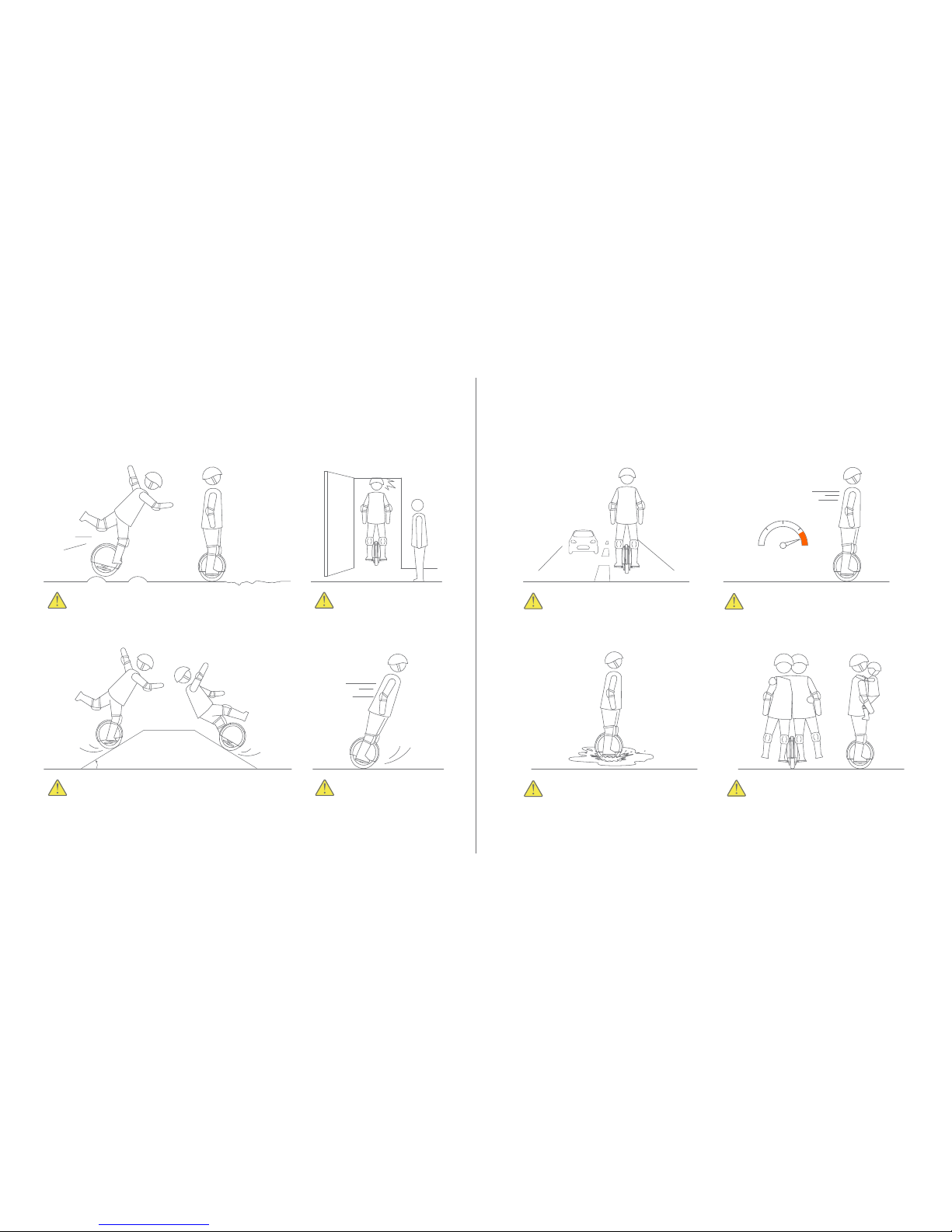
When traversing small bumps or uneven terrain, maintain
a moderate speed — 3
—
10 km/h — and keep,your knees
bent. Do not go too slow or too fast ; otherwise you may
lose control and fall.
The One S2 is for one rider only. Do not ride
doubl e or carry an y pa ssengers. Do not
carry a child.
Do not ride through puddles or other
bodies of water. Do not get wet.
Avoid slopes steeper than 15° or you may lose traction.
Do not accelerate or
decelerate abruptly.
Watch your head when
passing through doorways.
Do not ride on public roads,
motorways, highways, or streets.
You must read and understand the Warnings and Rider Safety instructions in this manual before
attempting to ride your One S2.
>15°
24 km/h
0
Do not a ccelerate when th e vehicle
tilts back or sounds an alarm. Do not
attempt to override the speed limiter.
Page 6
08 09
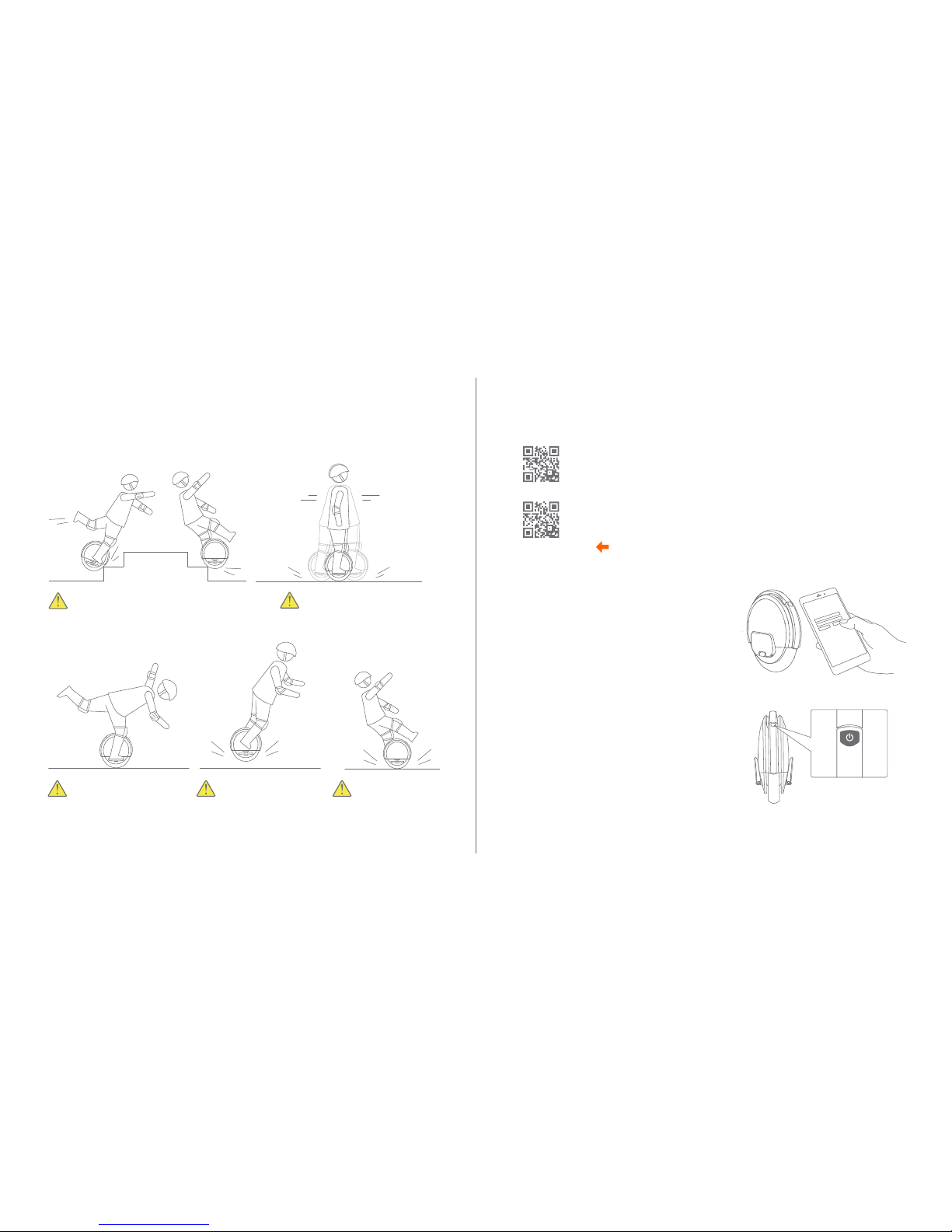
1 Install the App and register/login.
2 Hold the vehicle upright and power it on. Turn it
off and on again to familiarize yourself with the
controls.
3 Click “Search Device” to connect to your vehicle.
The vehicle will beep to indicate a successful
connection.
4 Follow the instructions in the App.
7 First Use
For your safety, your new vehicle is not activated at time of purchase, and the speed
an d sens itiv ity are se t at low levels. You must i ns ta ll the App and follow the
instructions to activate the vehicle before use.
You must have smart phone with Android system ( version 4.3 or above) or with iOS
system ( version 7.0 or above), then go to the Apple App Stor e (iOS) or the Google
Play S tor e (Androi d) and sear ch for “Ninebot by Segway” to download and install
the App. The App will lead you through the New Rider Tutorial.
Scan to download the App.
Do not ride over holes, curbs, steps,
or other obstacles.
Do not attempt stunts of any
kind. Always keep both feet
on the pedals.
Maintain contact with the
ground at all times.Do not
jump or attempt stunts.
Do not rock back and forth or
shift your weight abruptly.
Android
iOS
Warning (cont’d)
Do not ride on limited
traction surfaces.
Page 7
10 11
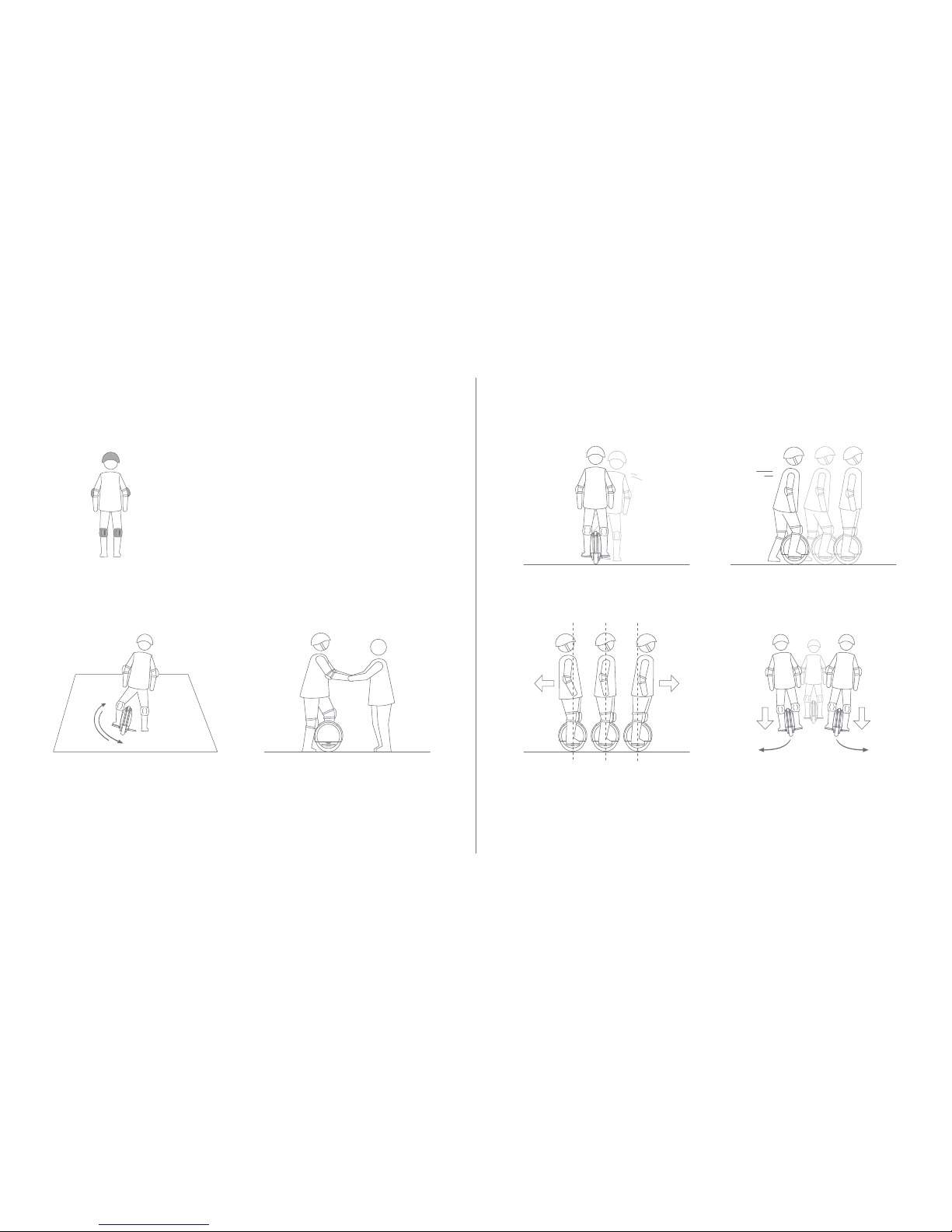
After activation, the App will lead you through the New Rider Tutorial.
Please follow the instructions in the App and in this manual.
For your safety, the vehicle will limit the m ax speed to 4 km/h
before activation. After activation and before completing the New
Rider Tutorial, the max speed will be limited to 7 km/h. For the
first 1 km after completing the New Rider Tutorial, the max spe ed will
be limited t o 12 km/h, afte r which you can di sable the speed lim it
via the App.
Learning to ride proficiently can take many hours. Practice each step
fo r 15 m in utes each day u ntil you are com fortable wit h that
maneuver. Then move on to the next step and repeat the process.
Wear an approve d helme t and
other protective gear to
minimize any p ossible in jury.
8 Learning to Ride
With assistance from a friend, place one
foot on a pedal, raise the other off the
ground for 1-2 seconds, and glide forward.
Place one foot on a pedal, push off
with your other foot, and glide forward.
Place both feet on the pedals and
practice traveling forward and
backward by controlling your body’s
center of gravity.
Turn by pressing harder on one pedal
than the other, and by shifting your
weight slightly.
4
5 6
3
Get used to the way the vehicle operates:
step on one pedal, then swing your leg
back and forth to feel the controls.
1
With assistance from a friend, put one
foot on a pedal and gradually shift your
body weight onto the vehicle.
2
Page 8

12 13
9 Rider Safety
• T o reduce risk o f injury, you m ust r ead and follow all “CAUTI ON” and “WARNING” noti ces in this
document. Do not ride at an unsafe speed. Under no circumstance should you ride on roads with
motor vehicles. Always follow these safety instructions:
A) The following people should not ride Ninebot vehicle:
i. Anyone under 16 years old or above 50 years old. Rid ers between 16-18 y ears old should
ride under adult supervision.
ii. Anyone under the influence of alcohol or drugs.
iii. Anyone who suffers from disease that puts them at risk if they engage in strenuous physi-
cal activity.
iv. Anyone who has problems with balance or with motor skills that would interfere with their
ability to maintain balance.
B) Comply with local laws and regulations when riding this product. Do not ride where prohibited by
local laws.
C) To ride safely, you must be able to clearly see what is in front of you and you must be clearly visible
to others.
D) Do not ride in the snow, in the rain, or on roads which are wet, muddy, icy, or that are slippery for
any reason. Do not ride over obstacles (sand, loose gravel, or sticks). Doing so could result in a
loss of balance or traction and could cause a fall.
E) Do not accelerate or decelerate suddenly. Do not accelerate when the vehicle tilts back or sounds
an alarm. Do not attempt to override the speed limiter.
F) While the Ninebot App is useful, do not allow the App to distract you while you are riding. Always
pay attention to your surroundings.
• Never restart and ride your vehicle after it has indicated an empty battery condition or powered
off due to low battery. Your vehicle may not have enough power to keep you balanced, especially
if you demand a lot of power at once. If you restart and continue riding, you risk falling. Also, you
risk damaging your batteries, resulting in reduced battery life and capacity.
• Do not insert the power cord if the charge port is wet.
• Use a surge protector when charging to help protect your vehicle from damage due to power
surges and voltage spikes. Only use your Ninebot by Segway supplied charger. Do not use a
charger from any other product.
• Always shut down your vehicle and unplug the AC Power Cord before performing any maintenance.
• Use only Ninebot by Segway approved parts and accessories. Do not modify your vehicle.
Modifications to your vehicle could interfere with the operation of the vehicle, could result in serious
injury and/or damage, and could void the Limited Warranty.
• The vehicle is an entertainment product, which is different from motor vehicles driving on the road.
Before mastering riding skills, you need to practice. Neither Ninebot Inc. nor Segway Inc. is responsible
for any injuries or damage caused by a rider’s inexperience or failure to follow the instructions in this
document.
• Please understand t hat you can reduce the risk by following all the instructions and warnings in this
manual, but you cannot eliminate all the r
isks. Remember that whenever you ride the vehicle you r isk
injury or death from loss of control, collisions, and fall s. When entering into public sp aces always
comply with the local laws a nd regulations. As with other vehi cles, faster speed s require longer
braking distance. Sudden braking on smooth surfa ces could lead to wheel slip, lo ss of balance, or
falls. Be cautious and always keep a safe distance between you and other people or vehi cles when
riding. Be alert and slow down when entering unfamiliar areas.
• Respect pede strians b y always yield ing t he right o f way. P ass on the left whenever possible. When
approaching a pedestrian from the front, stay to the right and slow down. Avoid startling pedestrians.
When approaching from behind, announce yourself and slow down to walking speed when passing.
• In places without laws and regulations governing self-balancing electric vehicles, comply with the
safety guidelines outlined in this manual. Neither Ninebot Inc. nor Segway Inc. is responsible for any
property damage, personal injury/death, accidents, or legal dispute s caused by violations of the
safety instructions.
• Do not allow anyone to ride the vehicle o n his/her own unl
ess they have carefully r ead this manual,
watched the safety video, and followed the New Rider Tutorial on the Ninebot by Segway App. The
safety of new riders is your responsibility. Spot new riders until they are comfortable riding t he vehicle.
Make sure each new rider wears a helmet and other protective gear.
• Before each ride check for loose fasteners, damaged components, and low tire pressure. If the vehicle
ma kes abnormal sounds or signals an al arm, i mmedia tel y st op riding . Cont act y our
dealer/distributor for service.
• Always wear a helmet when riding. Use an approved bicycle or skateboard helmet that fits properly
with the chin strap in place, and provides protection for the back of your head.
• Be alert! Scan bo th far ahead and in front of your vehicle — your eyes are your best tool for safely
avoiding obstacles and low traction s urfaces (includ ing, but not limited to, wet ground, loose sand,
loose gravel, and ice).
• Do not attempt your first ride in any area where you might encounter children, pedestrians, pets,
vehicles, bicycles, or other obstacles and potential hazards.
• Use caution when riding in new environments.
Page 9

14 15
10 Additional Features
Lock Mode
Press the lock icon in the Ninebot App to enable Lock Mode when your One S2 is powered ON. If anyone
tries to move your One S2 an alarm will sound.
Speed Limit Mode
Use the Ninebot App to enable Speed Limit Mode. When enabled, the maximum speed is set to a
user-configurable level. The default speed limit is 7km/h.
Light Pattern
You can use the Ninebot App to change the pattern and colors of the lights on the sides of your One S2.
11 Maintenance
Cleaning
WARNING
Make sure the One S2 is powered OFF, the charge cable is unplugged, and the silicone cap on the
charge port is tightly sealed before cleaning; otherwise you may expose yourself to electric shock or
damage the electronic components. Do not wash your One S2 with a power washer or high pressure
hose.
Wipe your One S2 clean with a soft, wet cloth. For stubborn stains, use a toothbrush and toothpaste.
Scratches on plastic parts can be polished with extra fine grit abrasive paper.
NOTE
Do not wash your One S2 with alcohol, gasoline, acetone, or other corrosive/volatile solvents. These
substances may damage the appearance and internal structure of your One S2.
Storing
Store the vehicle in a cool, dry place. Do not store it outdoors for extended periods of time. Exposure to
excessive sunlight or temperature extremes (both hot and cold) may affect the vehicle’s appearance,
battery life, and tires.
Tire Pressure
Inflate tire to 35 psi.
Battery Maintenance
WARNING
Risk of fire. No user serviceable parts. Do not attempt to disassemble the battery.
Do not allow the battery to get colder than -4°F (-20°C) or hotter than 122°F (50°C), e.g. in a car Do not
expose the battery to fire. Do not discard or destroy the battery. For more information, refer to the label
on the battery itself. Refer to your local laws and regulations regarding battery recycling and/or disposal.
To extend the battery's life, charge it frequently and avoid draining the battery completely. At 77°F
(25°C) the battery range and performance is at its best; whereas at termperatures below 32°F (0°C)
range and performance are decreased. Typically, at -4°F (-20°C) range can be half that of the same
battery at room temperature. Battery range will recover when temperature rises. More details are
available in the App.
NOTE
A fully-charged Ninebot One S2 can remain in standby mode for about 120 to 180 days. Completely
draining the battery may cause permanent damage to the battery. Electronics inside the battery record
the charge-discharge condition of the battery; damage caused by over-discharge or under-discharge
will not be covered by the Limited Warranty.
Page 10
16 17
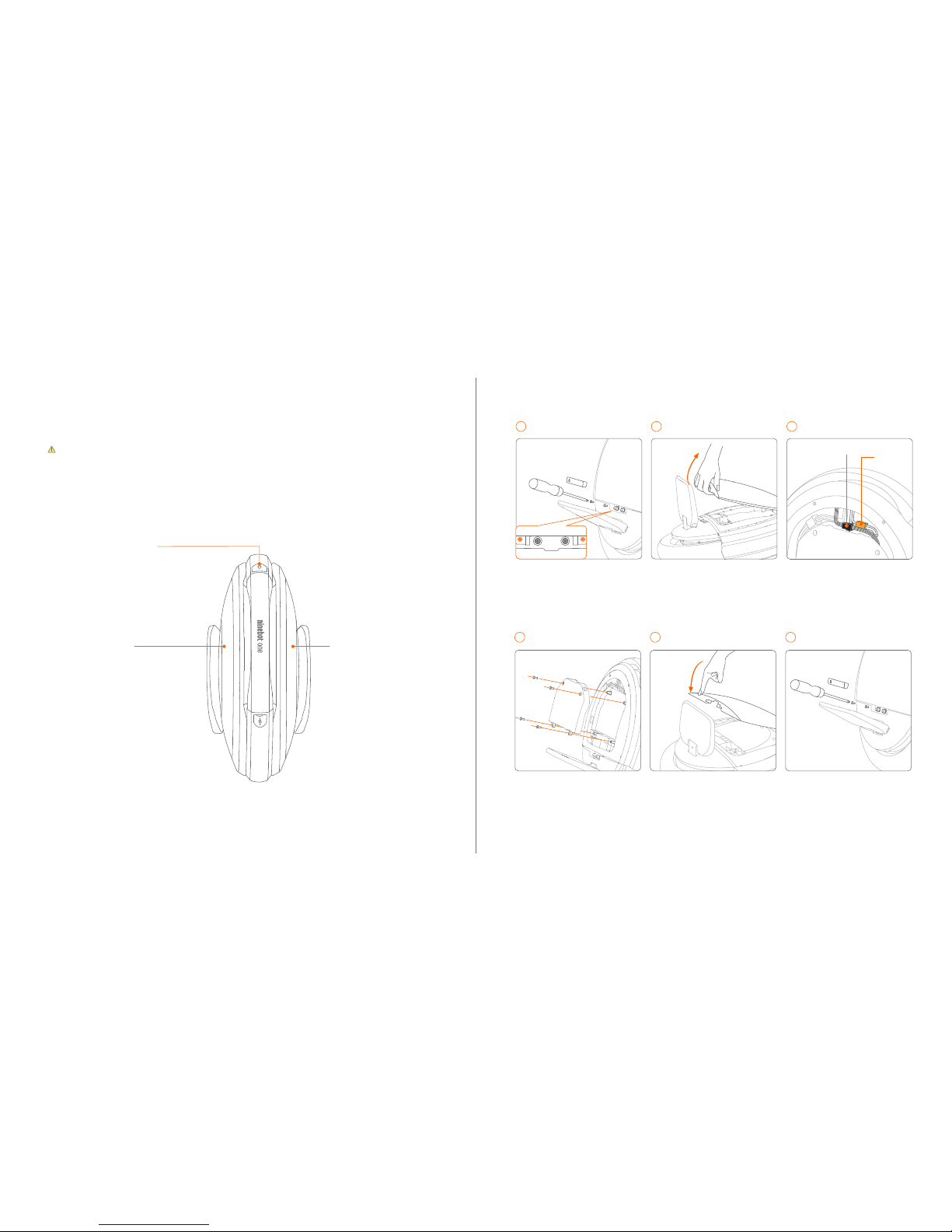
12 Removing the Battery
WARNING
Removing a battery can be dangerous. You risk personal injury from electric shock. If you are not
comfortable removing the battery yourself, please contact your dealer/distributor or email us.
Battery
Compartment
Battery
Compartment
Power switch
Press down firmly on the edges of
the batter y cover to snap it in
place. Start at the top and work to
the bottom. Be c areful no t to
pinch any wires.
Use a Phillip s-head screwdriver
to in stall the battery co ve r
scr ews, th en pr ess th e rubb er
plug into place.
Use a Phillips-head screwdriver to
remove the four battery screws as
shown.
Remove the screws
4
Install the battery cover
5 Install screws and plug6
BATT.OPEN
Use a Phillips-h ead screwdriver
to remove the two screws. Then,
with a firm tug, use your hand to
lift and remove the battery cover.
Power off the vehic le and
disconnect t he charger. Then
remove the rubber plug on t he
side of the vehicle.
Unplug the black wire (A) first,
then unplug the yellow wire (B).
Pull the connector fi rmly. Do no t
pull on the wire it self or you may
damage it.
B wire
A wire
Remove the rubber plug
1
Open the battery cover
2
Disconnect the wires
3
BATT.OPEN
Install in the reverse order of removal.
The standard Ninebot One S2 (with a capacity of 310 Wh) has two batteries, one on either side.
Removing one battery reduces the power, range, and weight of the Ninebot One S2. For your safey,
the speed is limited when only one battery is installed. Please ride carefully.
Page 11

1918
13 Specifications
1
Typical Range: tested while riding under full power, with 154 lbs (70 kg) load, at 77°F (25°C), and an average speed of 9.3 mph
(15 km/h) on level pavement. Range varies with payload, environment, temperature, road conditions, and other variables.
Charger
Model Number HT-A10-120W
Manufacturer Chingmi (Beijing) Technology Co., Ltd.
Supplier Chingmi (Beijing) Technology Co., Ltd.
Nominal Power 120 W
Input Voltage 100–240 VAC @ 50–60 Hz
Output Voltage Approx. 63
Output Current Approx. 1.9 A
Charging Temperature 32–104°F (0–40°C)
Charge Time 3 hours
Compliance
CCC,CB,CE,FCC,UL,PSE,KC,SAA
Item One S2 Parameters
Dimensions Vehicle Size 17.6 x 16.6 x 7.2 in (448 x 419 x 189 mm)
Weight
Max. Payload 264 lbs (120 kg)
Net Weight 25 lbs (11.4 kg)
Rider
Requirements
Age 16–50 years
Height 4’0”–6’6” (120–200 cm)
Machine
Parameters
Max. Speed 14.9 mph (24 km/h)
Typical Range
1
~18 miles (~30 km)
Max. Slope ~15°
Beginner Mode
Beginner mode is automatically deactivated after 0.6 miles
(1 km) of riding. Enable beginner mode at any time via the App.
Traversable Terrain
Pavement, packed dirt, slopes < 15°, obstacles < 1.2 inches
(3 cm), gaps < 1.2 inches (3 cm).
Operating Temperature 14–104°F (-10–40°C)
Storage Temperature -4–122°F (-20–50°C)
IP Rating IPX4
14 Trademark and Legal Statement
Battery
Nominal Voltage
Type
Li-ion battery pack
54.3 VDC
Max. Charging Voltage 63 VDC
Charging Temperature 32–104°F (0–40°C)
Nominal Capacity 310 Wh
Battery Management System
Over-voltage, under-voltage, short circuit, and over-heating
protection. Auto-sleep and auto-wake.
Motor
Nominal Power
Max. Power
500 W
1000 W
Display Lighting
Ring type display panel on both sides, with 14x2 independent
RGB LEDs, battery level display, and customized light patterns.
Ninebot, ninebot one, ninebot in Chinese character(纳恩博) are trademarks of Ninebot; Segway, ninebot by segway are trademarks
of Segway. Unless otherwise indicated or authorized by Ninebot or Segway, no user may change the Trademark. The forbidden
changes include, without limitation, changes in the color, proportion, or design, or removal of any words, artwork, or trademark
symbols. No part of the Trademark may in any form, alone or in combination with other marks, names, or products, or by any
electronic, mechanical, photocopying, recording or any other means be used, or reproduced, or be broadcast, or transmitted
without prior written permission from Ninebot.
iPhone and iOS, that of Apple Inc.; Android, that of Google Inc. The respective owners reserve the rights of their trademarks referred
to in this manual.The vehicle is covered by U.S. and foreign patents. For patent information please go to http://www.segway.com.
No entity or individual may exploit the patent without the authorization of the Ninebot.
This manual is prepared by Ninebot who reserves all its copyrights. Without prior written consent by Ninebot , any reproduction,
modification, storage in a retrieval system or retransmission, or tied sale with other products in any form or by any means, regarding
any part of the above products, service, information and materials, electronic, mechanical or otherwise, is illegal and strictly
prohibited.Any infringement of our intellectual property will not be tolerated by Ninebot and Ninebot can seek injunction, relief and
indemnifications available under the Trademark Law, Patent Law, Copy right Law and other relevant laws.
We have attempted to include descriptions and instructions for all the functions of the vehicle at the time of printing. However, your
vehicle may differ slightly from the one shown in this document. Please note that there are multiple Ninebot by Segway models with
different functions, and some of the functions mentioned herein may not be applicable to your unit. The manufacturer reserves the
right to change the design and functionality of the vehicle product and documentation without prior notice.
All rights reserved. Copyright Ninebot 2016.
Page 12

2120
Aff ix barcode here.
15 Contact
All products are delivered with a free of charge standard warranty that may vary depending on your region and product starting
from the date of your purchase. Please make sure to keep your receipt to identify your purchase location and date. All after
sales regulations shall be followed according to your region/local laws and regulations. You will find the latest standard
warranty terms and conditions, certifications, contacts of local after service centers at our websitewww.segway.com. If you
have any questions or inquiries, for quick and accurate respond, please prepare your Serial Number (which you can find on the
package and your product with format of e.g. “A1BCD2345E0000”) and your receipt of purchase before contacting your local
after service center. In case you need further assistance claiming warranty, please do not hesitate to contact us
1. Local dealer or retailer
Please consult your unit with prove of delivery, receipt or order confirmation to your local dealer or retailer.
You can also checkwww.segway.comfor local official distributor contacts.
2. EMEA: Segway Europe BV.
Hogehilweg 8 ,1101 CC Amsterdam ,The Netherlands
E-mail:[email protected]
3. APAC: Ninebot Inc.
1F A1 BLDG., ZGC DongSheng Science Park(Northern Territory), 66 Xixiaokou Rd. Haidian Disct. Beijing, China
Tel:+86-10-84828002 (Consultation) 400-607-0001 (After-sales service)
E-mail:[email protected] (Consultation) [email protected] (After-sales service)
Product warranty shall be followed and regulated base on the local region laws and regulations.
Warranty shall start from the purchasing date with valid invoice and stamped warranty sheet.
Unit with activation requirement needs to be properly activated before the warranty claim.
Warning
 Loading...