

Page 1

OPERATING MANUAL
(TEMP. 09/01/00)
901 Cambridge Drive
Elk Grove Village, IL 60007-2434
Phone: (847) 364-9787
FAX: (847) 364-9831
Internet: www.sammyusa.com
Page 2

DIP SWITCH SETTING (Pokemon' Catch)
DIPSW 1
FUNCTIONS SETTING DIP SW
SW1 SW2 SW3 SW4 SW5 SW6 SW7 SW8
BULK SETTING OFF OFF
ON ON
ATTRACT SOUND ON OFF
OFF ON
OFF
30 SECONDS OFF OFF OFF
PLAY TIME
PER 1 CREDIT
75 SECONDS ON ON ON
FREE PLAY OFF OFF
ON ON
35 SECONDS
40 SECONDS
45 SECONDS
50 SECONDS OFF OFF ON
55 SECONDS
60 SECONDS OFF ON ON
ON
ON OFF OFF
OFF ON OFF
ON ON OFF
ON OFF ON
ON
OFF
Page 3

DIPSW 2
FUNCTIONS SETTING DIP SW
SW1 SW2 SW3 SW4 NOTE
1 COIN / 1 CREDIT OFF OFF OFF OFF $0.25 per play
COIN CHUTE
2 COINS / 1 CREDIT ON OFF OFF OFF $0.50 per Play
3 COINS / 1 CREDIT OFF ON OFF OFF $0.75 per play
4 COINS / 1 CREDIT OFF OFF ON OFF $1.00 per play
5 COINS / 1 CREDIT OFF OFF OFF ON $1.25 per play
6 COINS / 1 CREDIT ON ON OFF OFF $1.50 per play
7 COINS / 1 CREDIT ON OFF ON OFF $1.75 per play
8 COINS / 1 CREDIT ON OFF OFF ON $2.00 per play
10 COINS / 1 CREDIT ON ON ON OFF $2.50 per play
12 COINS / 1 CREDIT ON ON OFF ON $3.00 per play
14 COINS / 1 CREDIT ON OFF ON ON $3.50 per play
16 COINS / 1 CREDIT OFF ON ON OFF $4.00 per play
18 COINS / 1 CREDIT OFF ON OFF ON $4.50 per play
20 COINS / 1 CREDIT OFF OFF ON ON $5.00 per play
1 COIN / 2 CREDITS OFF ON ON ON Dollar Coin per 2 play
1 COIN / 4 CREDITS ON ON ON ON Dollar Coin per 4 play
Page 4
TEST MODE
HOW TO GO TO TEST MODE
? Open Upper Coin Door and presss TEST
Switch on COUNTERS & SWITCHES
BRACKET to machine will go to TEST mode.
NOTE:
0 0 0 0 0 0 0 0 0 0 0 0
FREE CREDIT
? Press SERVICE Switch at normal game mode
PRIZE OUT COUNTER
COIN IN COUNTER
to give the free credit without coin in counter
up.
STOP ERROR CODE
? Press SERVICE Switch during the Error to
stop to output the error beep sound. After that,
spin the Wheel little bit (Sense the Optical
VIEW OF COUNTERS & SWITCHES
TEST PAYOUT SERVICE
BRACKET
sensor of wheel Assy) to clear Error code. If
you eliminate any cause of error, machine will
automatically back to normal game mode.
SCORE AND TIME LED DISPLAY TEST
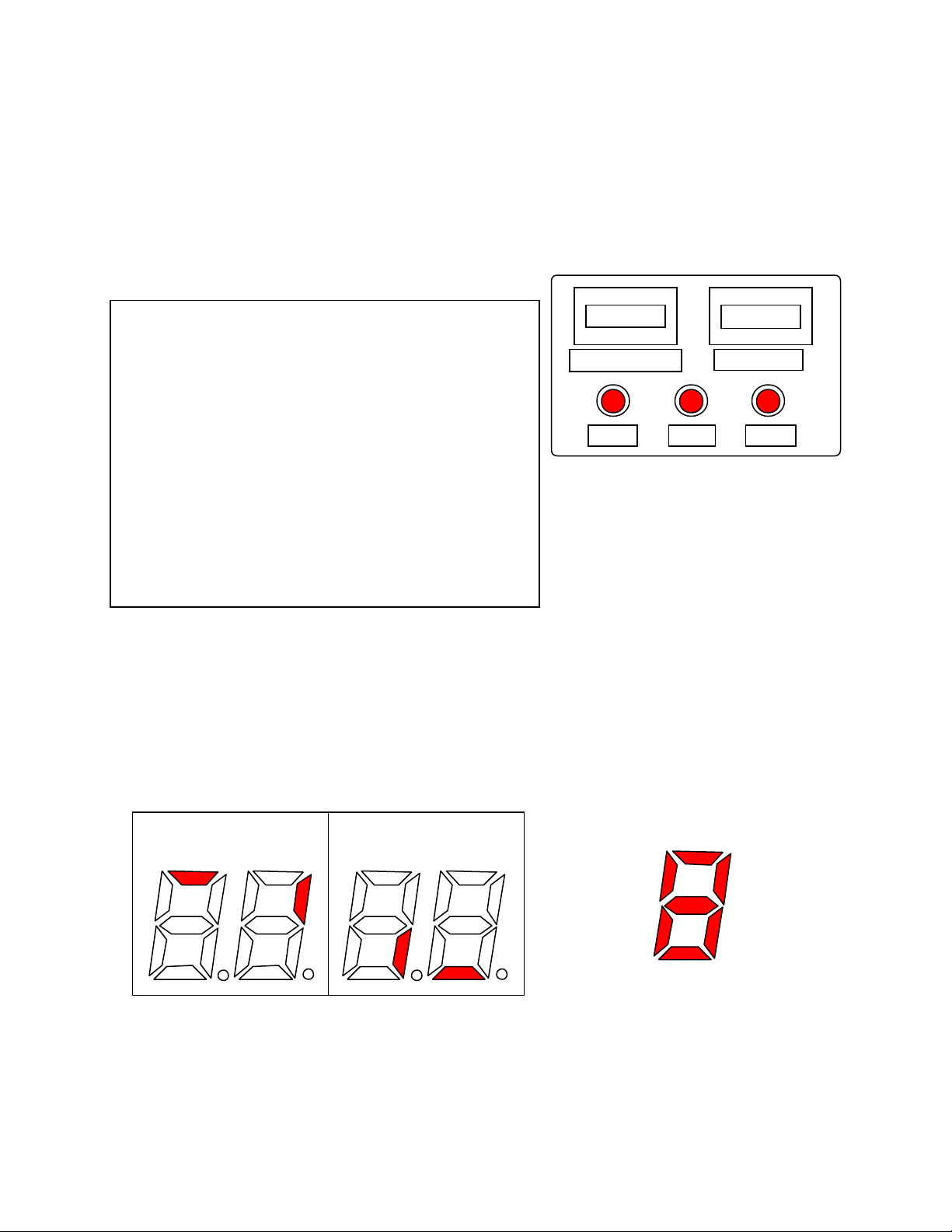
1 Press TEST switch to display "1" on TIME LED Display to select this mode.
2 Press SERVICE switch once to light up LED block like Fig.-1.
3 Press SERVICE switch again to all 4 digits of LED block are light up from A to G.
(loop) Refer Fig.-2.
4 Press hold SERVICE switch over 3 seconds to light up each Block one by one. (loop)
SCORE TIME
Fig.-1 Fig.-2
E
F
D
G
A
B
C
Page 5
LAMP TEST
1 Press TEST switch to display "2" on TIME LED Display to select this mode.
2 Press PAYOUT switch to light up the Payout lamp inside of Prize payout door.
3 Press SERVICE switch once to move the CHARACTER PANEL left and right auto-
matically. Then balls are start to fall down from top to the playfield.
4 SCORE LED will display the number when the Ball is caught by Character panel.
5 Press SERVICE switch again to stop above test.
SENSOR TEST
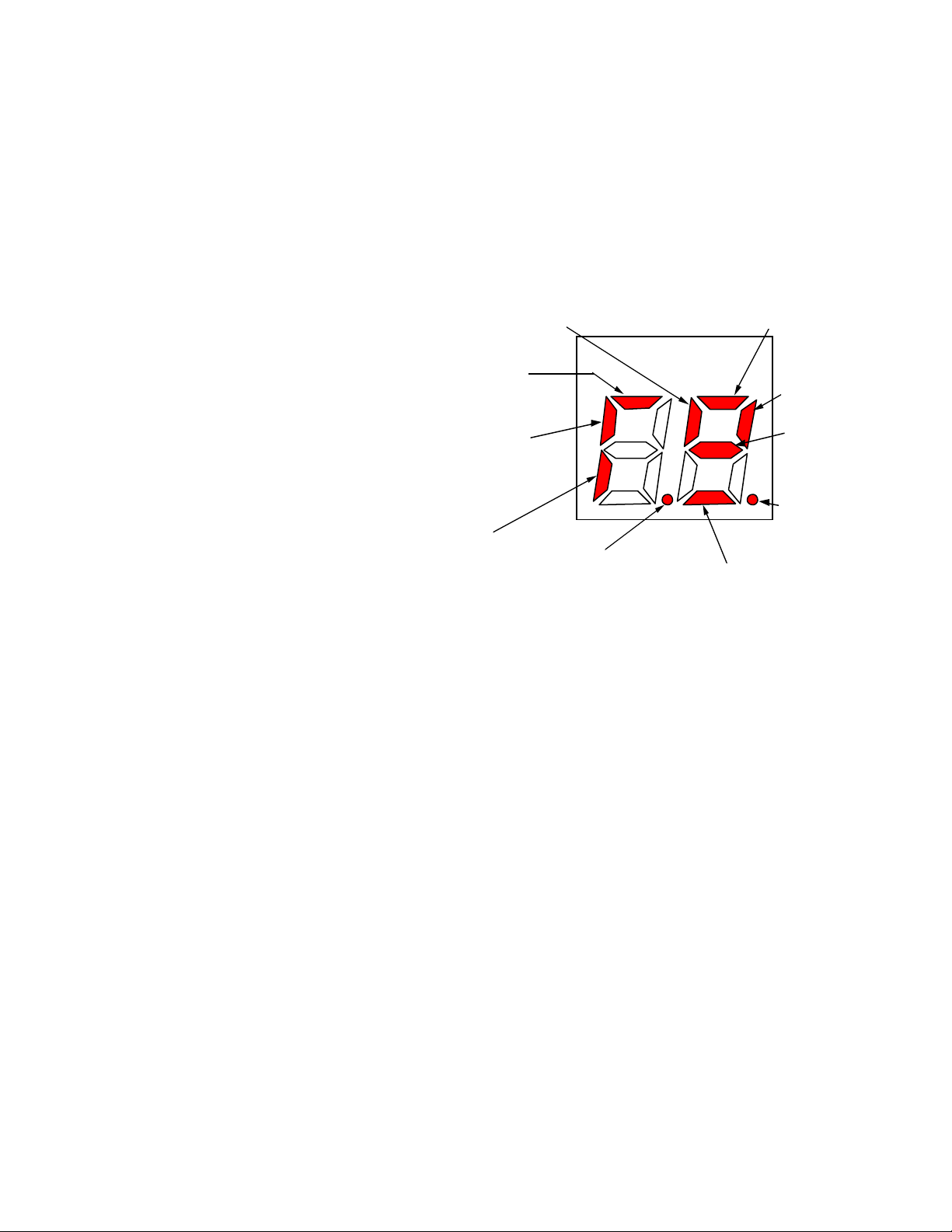
1 Press TEST switch to display "3" on
TIME LED Display to select this
mode.
2 Activate any sensors to light up the
SCORE LED blocks. Refer left pic-
ture. When the PRIZE OUT SEN-
Ball passing
sensor, lifter
Wheel
Sensor A
Limit
Switch (L)
SCORE
Wheel Sensor B
Limit
Switch (R)
Character
Motor, Spin-
ning Sensor
SOR is ON, Prize out lamp will light
up.
3 Press SERVICE switch to move
Lifter and Ball motor. Re-press to
stop.
Hopper turning
switch
Ball Switch 2 (L) Ball passing sensor
Ball Switch
1 (R)
COIN LOCK OUT COIL TEST (Option)
* Use this test only the customer who uses Lock out Coil to the Coin selector option-
ally. Press TEST switch to display "4" on TIME LED Display to select this mode.
When you touch the Coin switch, Lock out Coil will works. (Pull = Ready to insert
coin)
* Coin In Counter does not work. Credit is not counted in CPU memory.
MOTOR UNIT TEST
1 Press TEST switch to display "5" on TIME LED Display to select this mode. Press
SERVICE switch to move lifter and Ball motor.
2 2 of DOTS of SCORE LED block light up when the Ball Switch 1 and 2 are ON.
(Refer above picture.) also, SCORE LED will count the balls.
HOPPER TEST
1 Press TEST switch to display "6" on TIME LED Display to select this mode.
2 Press SERVICE switch to payout the Capsule and Prize out counter will count
once. If any problem, machine will out put the Alarm sound.
3 Prize payout Lamp will light up wh en the Prize payout Sensor is ON. (Sensed by
Capsule.)
4 SCORE LED Block, "Left digit, position E" will light up when the Hopper Turning
Switch is ON.
Page 6
SOUND TEST
1 Press TEST switch to display "7" on TIME LED Display to select this mode.
2 Press SERVICE switch to output the all of Voice and Effect sound one by one.
(loop)
3 After one turn, Prize payout lamp will light up.
DIPSW CONFIRMING TEST
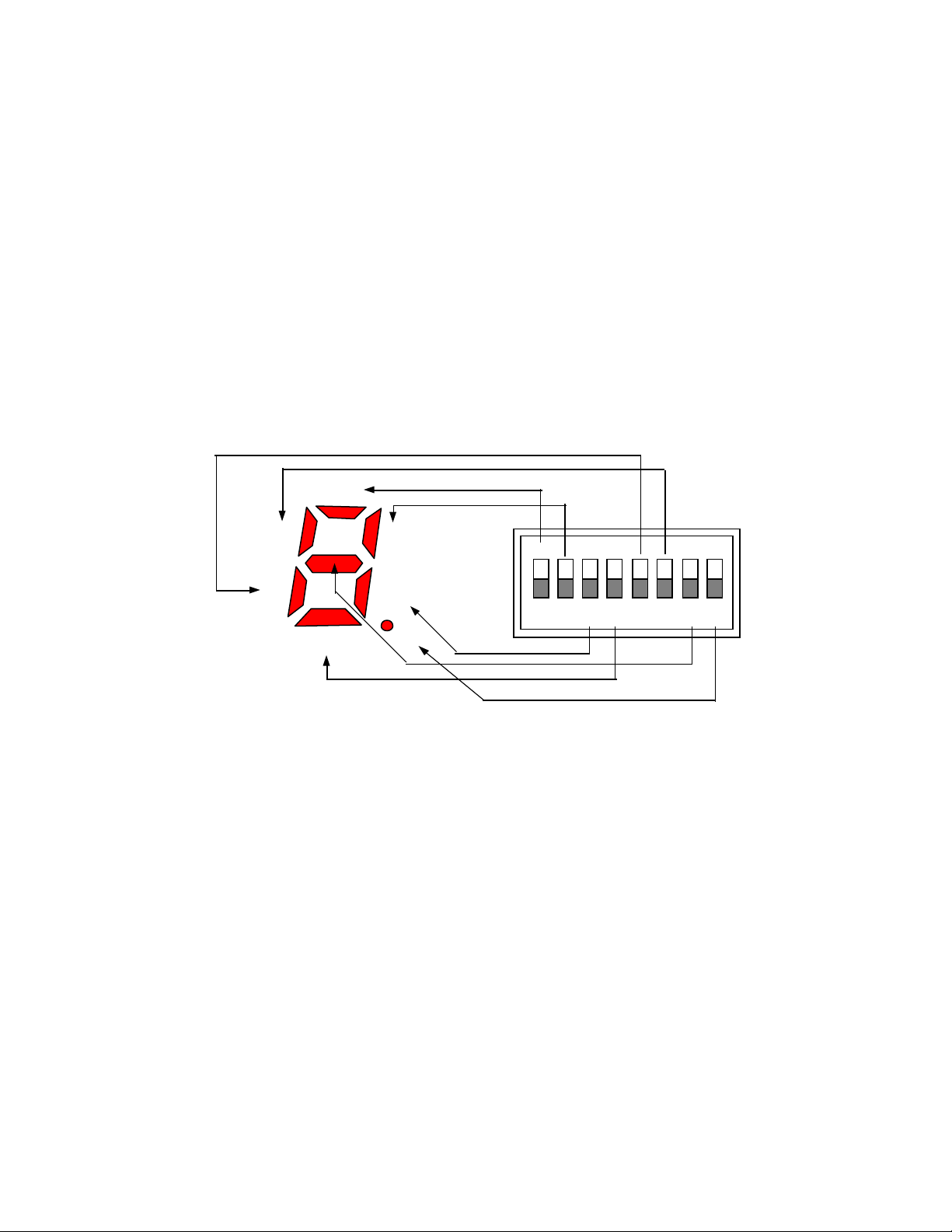
1 Press TEST switch to display "8" on TIME LED Display to select this mode.
2 Right digit of SCORE LED blocks will light up when the each of DIP switch are ON
position. Refer below.
Right digit of SCORE LED Display
1
5
6
7
4
2
3
8
DIP SWITCH ON MAIN PCB
ON
1 2 3 4 5 6 7 8
BULK HOPPER (Option Unit) TEST
1 Press TEST switch to display "9" on TIME LED Display to select this mode.
2 Press SERVICE switch to payout the Bulk Capsule. (No payout counter for Bulk
Capsule) If any problem, machine will out put the Alarm sound.
3 Prize payout Lamp will light up when the Prize payout Sensor is ON. (Sensed by
Capsule.)
2 SCORE LED Block, "Left digit, position E" will light up when the Bulk Payout Sen-
sor is ON.
NOTE:
COIN COUNT TEST
1 During TEST mode except MODE 4, coin count switch and Coin In Counter are active.
2 Insert the coin to coin mech. then check the Coin In Counter works.
Page 7
ERROR CODE
CAPSULE EMPTY
TIME LED will display "C" and output Alarm sound. Press SERVICE switch to stop the Alarm then fill the
Capsules to the Hopper Unit. Spin the Wheel to clear Error code and back to normal game mode.
CAPSULE JAM
TIME LED will display "E1" or "E2" and output Alarm sound. Power off the machine, check and remove
any jammed stuffs in Hopper Unit.
OTHER ERROR CODE
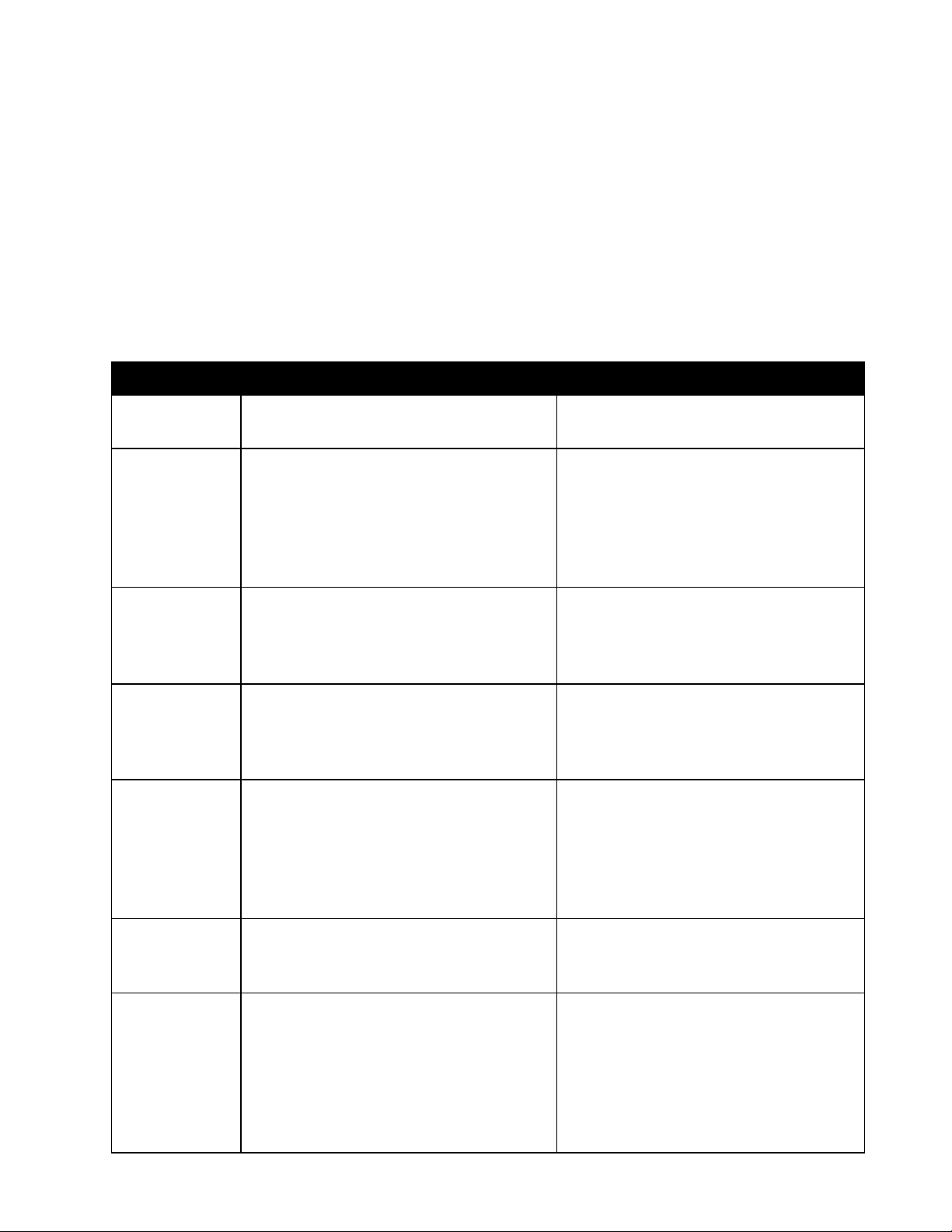
Refer bel ow table.
TIME LED # Contents of ERROR Cause of problem and Solution.
Malfunction of Main CPU Board Need to exchange the Main CPU
E0
Board.
E1
E2
E3
E4
Problem of Hopper Turning Switch
on Hopper Unit.
Malfunction of Payout switch on
Hopper unit.
Malfunction of Ball passing switch Ball Passing switch problem. check
Coin Switch Error This Error code will be appeared
Hopper Jam. Check and remove
the stuffs jammed in Hopper Unit.
Or Turning Switch, Hopper Motor
problem. Need exchange those. If
still NG, Need to exchange Hopper
Unit.
Check the Payout Switch on Hopper unit. If the Hopper keep spinning, need to exchange the Main
CPU Board.
the metal wire of micro switch. If still
NG, need to exchange the Character Assy or Ball passing Unit.
when the Coin Switch get stuck or
Coin Jam. Check the Coin Switch
by test mode or check the Coin
Mech. If NG, exchange the Coin
switch or Coin Mech.
E5
E6
Malfunction of Spinning sensor on
Character Motor.
Malfunction of Ball Rail Sensor Jamming the ball on part of Ball rail
Check the Belt of this Assy.
Jammed, cut off or Belt is off from
pulley.
that before reach to lifter. Or check
the ball Rail Sensor area. (Ball
Jammed)
If the Motor does not spinning, Motor or Main CPU Board problem.
Need exchange those.
Page 8
TIME LED # Contents of ERROR Cause of problem and Solution.
Problem of Lifter Ball Sensor . Ball stuck, Ball missing, not enough
E7
Lifter Motor Problem. Jamming or Stuck the balls in Lifter
E8
Doll Limit Switch problem. Doll was off from Belt. Doll Limit
E9
Main Hopper empty Hopper Payout switch does not
C0
Bulk Hopper (Option Unit) empty Bulk Hopper Payout switch does
C1
Bulk Hopper Payout Sensor error. Check the Payout sensor of Bulk
EA
ball in play field. Lifter Sensor board
broken.
or Lifter motor broken.
Switch broken.
work. Switch broken, Prize stuck in
Hopper or Prize empty.
not work. Switch broken, Prize
stuck in Hopper or Prize empty.
Hopper.
 Loading...