

Page 1
50m 1080p Mini HDMI
Cat5e/6 Extender
User Manual
HDMIEXTMINI50M
Page 2
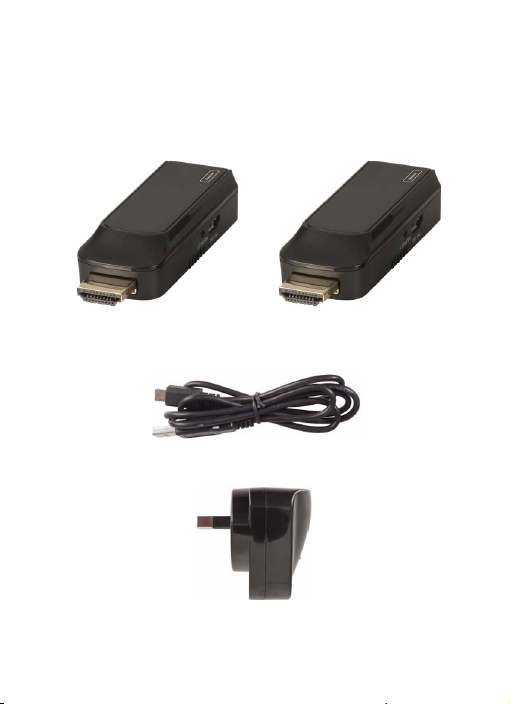
Box Contents:
1 x HDMI Transmitter 1 x HDMI Receiver
USB
1 x
Micro-B Power Cable
1 x USB Mains Power Adapter
Page 3
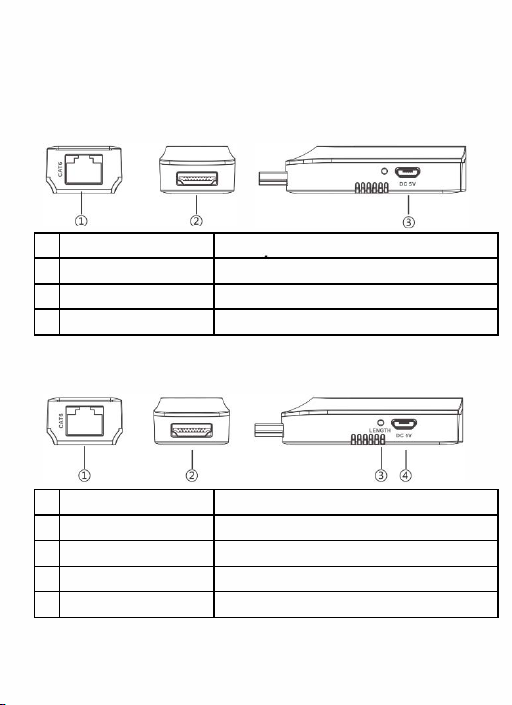
Product Diagram:
Transmitter:
#
Feature: Description:
1 Ethernet Output Connect to the CatSe/6 Ethernet Cable
2
HDMI Input
3
USB Power Socket Connect to the SVDC mains
Receiver;
#
Feature: Description:
1 Ethernet Input Connect to the CatSe/6 Ethernet Cable
2
HDMI Output Connect to a TV or Monitor
3
Length Equaliser Adjusts length of CatSe/6 cable (40m Default)
4 USB Power Socket Connect to a USB power cable (Optional)
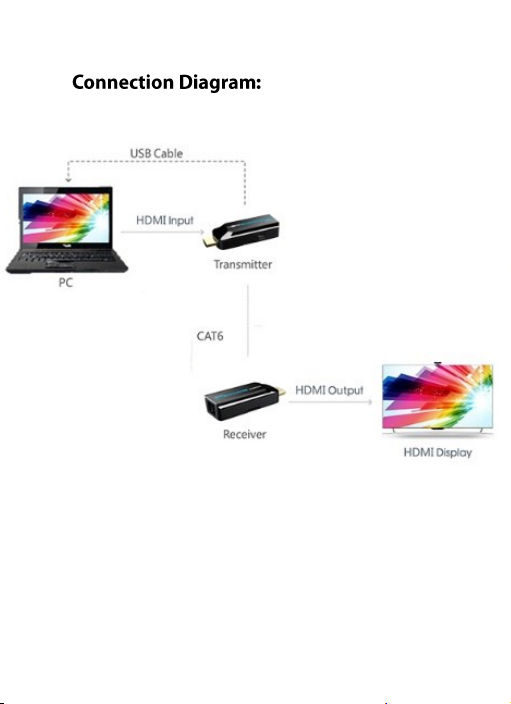
Connect to the
HDMI source device
power
adaptor
Page 4
Page 5

Operation:
Transmitter:
1. Connect the USB Micro-B power cable to the USB
power socket
of the USB power cable to the USB
the transmitter. Plug the opposite end
of
mains
power adaptor
or a suitable 1 A socket. Plug in the mains power adaptor
to a 240VAC wall socket.
2. Connect the HDMI input plug of the transmitter to the
HDMI socket of your source device such as Pay TV, DVD
player or media player.
3. Connect a CatSe or Cat6 ethernet network cable to
the ethernet
output of the transmitter.
Page 6

Receiver:
Connect opposite end
1.
network cable to the ethernet input of the receiver.
2. Connect the HDMI output plug of the receiver to the
HDMI input socket of your TV or monitor.
3. The video should now be displayed once your source
device and
If you
press the length button located on the side of the
receiver.
The
length ethernet cable then please keep pressing the
length button until the video is displayed.
Note: This unit
technology so only the transmitter needs to
powered.
The receiver has a USB power
transmitter is not receiving enough power from the USB
charger, TV USB socket or third party mains charger.
TV
/monitor has been turned on.
notice the video not being displayed, then please
default length is set at 40m,
has
the
of
CatSe or Cat6 ethernet
you have a different
if
power over catS/6 cable (PoC)
socket
be
incase the
Page 7

Length Equaliser:
The default length setting of the ethernet Cat5e/Cat6
cable is 40m. If you're using a different cable length,
then please keep pressing the button until the video is
displayed. The receiver has a memory function so it will
use the last used level when the device has been turned
off and on. The length equaliser has 12 levels in total
which consist of the following lengths below:
Note: If the default length is not working, then only
press the button once which will automatically set the
resolution to best work with your cable length. Only set
the manual level as below if absolute necessary.
Length:
Level:
0 40m (Default)
1 Automatic
2 Automatic Scaling 8 Manual 30m-35m
3 Manual 5m-10m 9 Manual 35m-40m
4 Manual 10m-15m 10 Manual 40m-45m
5 Manual 15m-20m
Level:
6
7
11
Length:
Manual 20m-25m
Manual 25m-30m
Manual 45m-50m
Page 8

Troubleshooting:
Problem Solution
Adjust the length equaliser settings depending on the
Cat5e/Cat6 ethernet cable length. The default is set at
40m, keep pressing the button until video is displayed
Check to see your source device and monitors/TV's
resolution and frequency matches the supported
resolution of the HDMI extender.
No Video Output
Check to see if your source device and TV's/monitors are
all switched on
Ensure you have a Cat5e/Cat6 standard ethernet cable
connector, crossover cables will not work
Check to see if the USB mains power adaptor and USB
charging cable is connected properly and switched on
Reconnect the HDMI input and output plugs on both the
transmitter and receiver
Page 9

Problem
Image is flickering
or unstable
Solution
Adjust the length equaliser settings depending on the
Cat5e/Cat6 ethernet cable length. The default is set at
40m, keep pressing the button until video is displayed
Check to see your source device and monitors/TV's
resolution and frequency matches the supported
resolution of the HDMI extender.
It is recommended to use an ethernet Cat5e/Cat6 cable
between 15-S0m otherwise image may be unstable.
Ensure the USB charging cable is connected to a 1A USB
mains power adaptor or USB charging port.
Page 10

Safety:
Do
1.
2. Do not expose
3.Position the unit in a well ventilated area to
4. Only use the supplied SVDC, 1 A power adaptor.
open
not
assistance to avoid electrical shock.
liquid
the unit from overheating.
If you use
voltage is the same to prevent the unit from damage.
any
the device without professional
or repair
this
unit to water, moisture or any
prevent
third party power supplies, ensure the
Features:
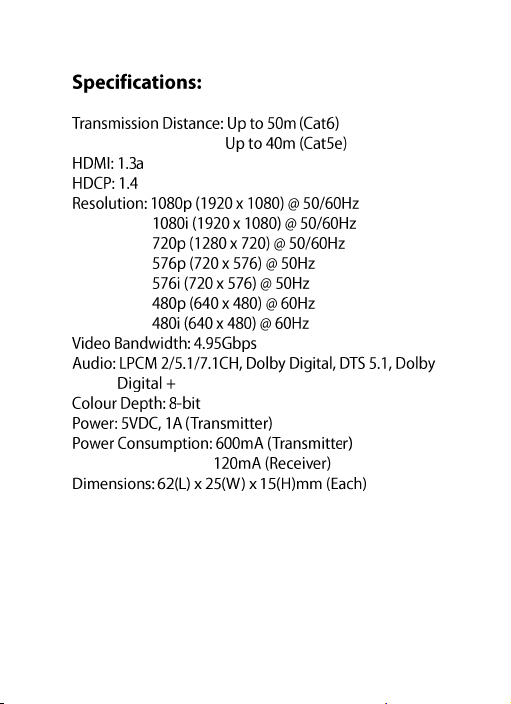
. 50m(Cat6), 40m(Cat5e) Transmission Range
. Power Over Cat5e/Cat6 Cable (Poe)
.
HDCP & 3D Support
. Adjustable Equaliser
Page 11
 Loading...