

Page 1
INSTRUCTIONS FOR
IMPORTANT: PLEASE READ THESE INSTRUCTIONS CAREFULLY. NOTE THE SAFE OPERATIONAL REQUIREMENTS, WARNINGS & CAUTIONS. USE
THE PRODUCT CORRECTLY AND WITH CARE FOR THE PURPOSE FOR WHICH IT IS INTENDED. FAILURE TO DO SO MAY CAUSE DAMAGE AND/OR
PERSONAL INJURY AND WILL INVALIDATE THE WARRANTY. KEEP THESE INSTRUCTIONS SAFE FOR FUTURE USE.
TORQUE ADAPTOR DIGITAL 1/2”SQ. DRIVE
40-200NM (29.5-147.5LB.FT)
MODEL NO: STW290.V2
Thank you for purchasing a Sealey product. Manufactured to a high standard, this product will, if used according to these instructions,
and properly maintained, give you years of trouble free performance.
Refer to
instruction
manual
Wear eye
protection
1. SAFETY
WARNING! DO NOT use the digital torque adaptor if damaged or thought to be faulty.
9 Ensure all workshop safety rules, regulations and conditions are complied with when using this digital torque adaptor.
9 Maintaincorrectbalanceandfooting.Ensuretheoorisnotslipperyandwearnon-slipshoes.
9 Keep children and unauthorised persons away from the working area.
9 After use clean with a soft dry cloth and store in a safe, dry, childproof location.
9 Keep the digital torque adaptor away from magnets.
8 DO NOT subject the digital torque adaptor to excessive force or shocks.
8 DO NOT drop or throw the digital torque adaptor.
8 DO NOTusedigitaltorqueadaptorunlessyouhavebeeninstructedinitsusebyaqualiedperson.
8 DO NOT leave the digital torque adaptor in any place exposed to excessive heat, humidity or direct sunlight.
8 DO NOT use organic solvents such as alcohol or thinners to clean the digital torque adaptor.
8 DO NOT submerge the digital torque adapter in water or any other liquid.
8 DO NOT disassemble the digital torque adaptor.
8 DO NOT exceed the permitted torque value for the digital torque adaptor.
9 Toensureaccuratemeasurementperiodicre-calibrationisnecessary.
2. INTRODUCTION
Designedforusewitharatchetorbreakerbar.Idealforworkaroundtheenginebayandthetighteningofwheelnutstofactoryspecications.
LargeLCDdisplaywithselectablereadingsinNm,lb.ft,lb.in,kg-cmorkg-mandaccurateto±2%ofstatedcapacity.Memorystoresupto
50readingsandfeaturesautoshutoafter70seconds.Suppliedwithcerticateandstoragecase.
3. SPECIFICATION
Model no: ................................................................. STW290
Drive type: .................................................................. 1/2”Sq.
Length: ......................................................................... 75mm
Range: ........................................ 40-200Nm(29.5-147.5lb.ft)
Battery: ....................................................... 2xAAAsupplied
4. OPERATION
WARNING! DO NOTpressMemandOn/obutton
together as this will enter the unit into Calibration Mode.
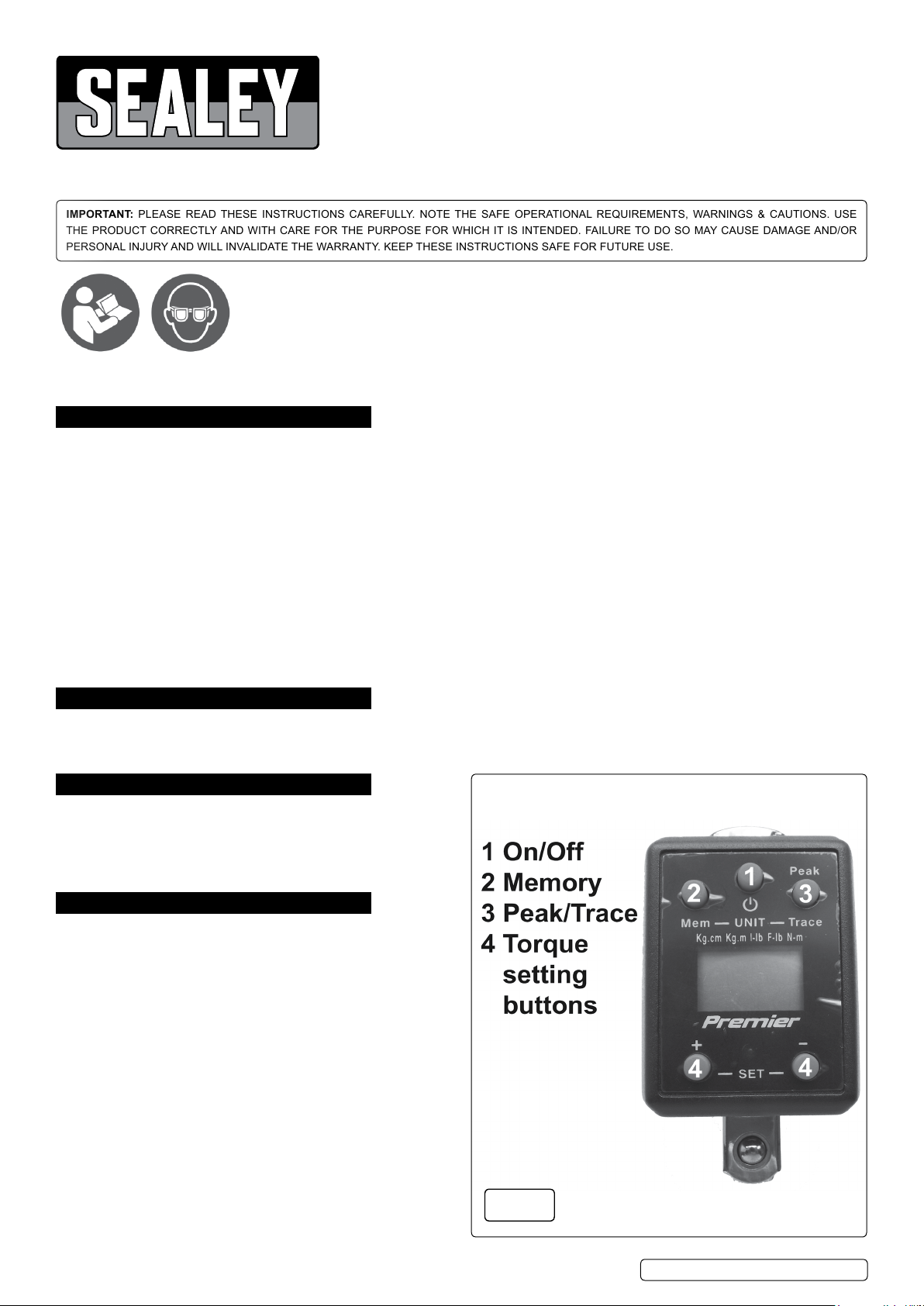
4.1. POWER ON (g.1).
4.1.1. Attach the adaptor to a ratchet or breaker bar.
4.1.2. After2secondstheLCDpanelwillshow0.0.
4.1.3. Tighten the nut or bolt.
4.1.4. The LCD displays the torque value measured.
Note:Ifnotusedfor70secondstheDigitalTorqueAdaptorwill
automaticallyshuto.
4.2. HOW TO SELECT UNIT(g.1).
Press Mem and Peak / Trace button together and release to
selectdierenttorqueunits.
Note: When you change units the target setting will also be
changed to the new units value.
This Digital Torque Adaptor contains 5 unit selections.
(kg-cm,kg-m,in-lb,ft-lb,N-m).
4.3. HOW TO SELECT TARGET TORQUE VALUE (g.1).
4.3.1. Increase(+):Pressandholdthe(+)buttontoincreasethe
current target value.
© Jack Sealey Limited
Original Language Version
Fig.1
STW290.V2|Issue:131/01/18
Page 2
4.3.2. Decrease(-):Pressandholdthe(-)buttontolowerthecurrenttargetvalue.
4.3.3. The target will show for 10 seconds.
4.3.4. After 10 seconds the LCD will display 0.0.
Note:Whenthedigitaltorqueadaptorgetto20unitsbeforethetarget,theredLEDwillashandanintermittentbuzzerwillsound,
warning that the target value is close.
WhenthetargetvalueisattainedtheredLEDwillbeilluminatedandthebuzzerwillsoundcontinuously.
4.4. HOW TO SET PEAK OR TRACE (g.1).
4.4.1. Peak:PressandreleasePeak/Trace-buttonwhenthedigitaltorqueadaptorison.TheLCDpanelshowsPtoP.
4.4.1.1. TheLCDpanelshows0.0after2seconds.
4.4.2. Trace:PressandreleasePeak/Trace-buttonwhenthedigitaltorqueadaptorison.
4.4.3. The LCD panel shows trACE.
4.4.4. TheLCDpanelshows0.0after2seconds.
4.5. TURN OFF (g.1).
4.5.1. Iftheadaptorisnotusedfor70seconds,itwillautomaticallyshutdown.
4.5.2. TomanuallyturnothedigitaltorqueadaptorpressandreleasetheOn/Obutton.
4.6. MEMORY(g.1).
4.6.1. To display the stored readings. Turn on the digital torque adaptor.
4.6.2. Press and release the Mem button.
4.6.3. ThedisplayshowsthememorynumberisP01andthentheTorqueValue.
4.6.4. Pressandreleasethe“M”button,again.
4.6.5. ThedisplayshowsthememorynumberisP02andthentheTorqueValue.
Note: This Digital Torque Adaptor stores the last 50 torque value readings, P01 is the latest reading, P50 is the oldest.
5. MAINTENANCE
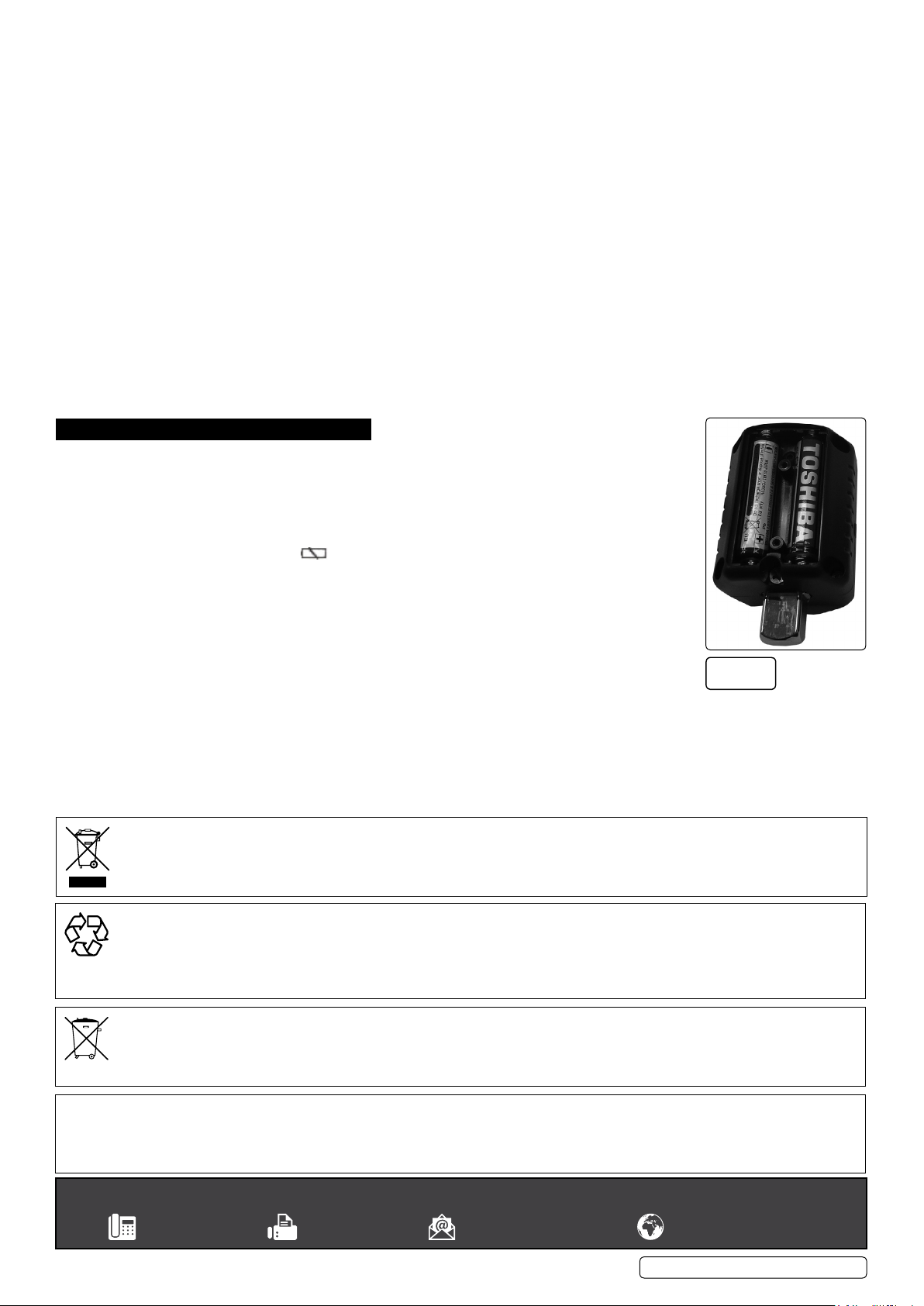
5.1. BATTERY REPLACEMENT(g.2)
5.1.1. Remove the two screws from the battery cover.
5.1.2. Liftothebatterycover.
5.1.3. Remove the battery from the holder.
5.1.4. Install new batteries observing correct polarity.
5.1.5. Retthebatterycoverandthescrews.
Note: When the battery is low the will light.
Remove the battery if the torque adaptor is to be stored for a long time.
Battery life is dependant on battery quality and the amount of torque adaptor is used
(typicallifeisupto55hours).
5.2. CALIBRATION
5.2.1. Periodic calibration is required for this product contact your Sealey stockist for details.
Fig.2
WEEE REGULATIONS
Dispose of this product at the end of its working life in compliance with the EU Directive on Waste Electrical and Electronic Equipment
(WEEE).Whentheproductisnolongerrequired,itmustbedisposedofinanenvironmentallyprotectiveway.Contactyourlocalsolid
waste authority for recycling information.
ENVIRONMENT PROTECTION
Recycle unwanted materials instead of disposing of them as waste. All tools, accessories and packaging should be sorted, taken to
a recycling centre and disposed of in a manner which is compatible with the environment. When the product becomes completely
unserviceableandrequiresdisposal,drainanyfluids(ifapplicable)intoapprovedcontainersanddisposeoftheproductandfluids
according to local regulations.
BATTERY REMOVAL SEE SECTION 5.1
UndertheWasteBatteriesandAccumulatorsRegulations2009,JackSealeyLtdarerequiredtoinformpotentialpurchasersofproducts
containingbatteries(asdefinedwithintheseregulations),thattheyareregisteredwithValpak’sregisteredcompliancescheme.Jack
SealeyLtd’sBatteriesProducerRegistrationNumber(BPRN)isBPRN00705.
Note: It is our policy to continually improve products and as such we reserve the right to alter data, specifications and component parts without prior
notice.
Important: No Liability is accepted for incorrect use of this product.
Warranty:Guaranteeis12monthsfrompurchasedate,proofofwhichisrequiredforanyclaim.
Sealey Group, Kempson Way, Suffolk Business Park, Bury St Edmunds, Suffolk. IP32 7AR
© Jack Sealey Limited
Original Language Version
STW290.V2|Issue:131/01/18
 Loading...