

Page 1

INSTRUCTIONS FOR:
ON-GUN AIR PRESSURE
REGULATOR / GAUGE DIGITAL
MODEL NO: ARD01
Refer to Instruction
Manual
1. SAFETY
WARNING! Ensure Health & Safety, local authority, and general workshop practice regulations are adhered to when using
this equipment.
WARNING!Disconnect the equipment from the air supply before changing accessories,servicing or performing any
maintenance.
Keep the equipment clean and maintain it in good condition (use an authorised service agent).
Replace or repair damaged parts. Use genuine parts only. Unauthorised parts may be dangerous and will invalidate the
warranty.
WARNING! Ensure that the correct air pressure is maintained and not exceeded.
Keep air hoses away from heat, oil and sharp edges. Check hoses for wear before each use and ensure that all connections
are secure.
DO NOT direct air from the air hose at yourself, others or animals.
DO NOT operate air tools when tired or under the influence of drugs, alcohol or intoxicating medication.
Drain the compressor air tank and the filter bowl daily. Water in the air line will damage your equipment.
When work is complete ensure that the air supply is turned off.
2. INTRODUCTION
On-gun pressure regulator/gauge with digital LCD display. On/off button with adjustable auto-off function for extended battery life.
Small and compact with composite body. Pressure can be displayed in psi, bar or MPa. Just one of a comprehensive range of
quality spray gun accessories.
3. SPECIFICATION
Model No: ............................................ARD01
Maximum Pressure: ...........................150psi/10bar/1MPa
Maximum Flow: .................................18cfm at 100psi
4. SETTINGS
4.1 Press the on/off button once to switch the gauge on or off.
4.2. Additionally, the on/off button may be used to alter the three function settings.
4.3. Resetting the gauge to zero:
4.3.1. Ensure that the gauge is not under pressure.
4.3.2. With the gauge switched on, hold the on button for about 3 seconds, until the display shows ‘---’ then release the
button.
4.3.3. The display will cycle between 0,1 and 2.
4.3.4. Select 0 and the display will show 00-.
4.3.5. Press the button again and the display will show 000.
4.3.6. Press the button again within 3 seconds and the gauge will reset to zero.
4.3.7. ‘End’ will display for 2 seconds and the unit will switch off automatically.
4.4 Automatic Shut Off mode.
4.4.1. The default automatic shut off time is 60 seconds.
4.4.2. To change the automatic shut off time, select mode 1 as per instructions as at 4.3.2 and 4.3.3.
4.4.3. The display will cycle between 30, 60 120 and 180 seconds.
4.4.4. Press the button to select the required automatic shut off time.
4.4.5. The selected time will flash 3 times and ‘end’ will display before the unit switches off.
© Jack Sealey Limited
Original Language Version
ARD01 Issue: 1 - 02/06/16
Page 2
4.5. Pressure Unit Selection mode.
4.5.1. The default pressure unit setting is psi.
4.5.2. To change the pressure units, select mode 2 as at 4.3.2. and 4.3.3.
4.5.3. After selecting mode 2 a dash will appear at the bottom of the display, corresponding to the units displayed at the
top (psi, bar or MPa).
4.5.4. When the dash corresponds to the required setting, press the button to select.
4.5.5. The selected unit will flash 3 times. After showing ‘End’ , the unit will switch off.
5. OPERATION
5.1. Mount the regulator/gauge in a convenient location in the air inlet circuit, ensuring that all connections are tight.
5.2. To adjust the pressure, turn the adjusting knob clockwise to reduce and anticlockwise to increase.
6. BATTERY REPLACEMENT
6.1. To replace/remove batteries:
Replacement battery type: LR44 / AG13 / L1154. Alkaline button cell 1.5V
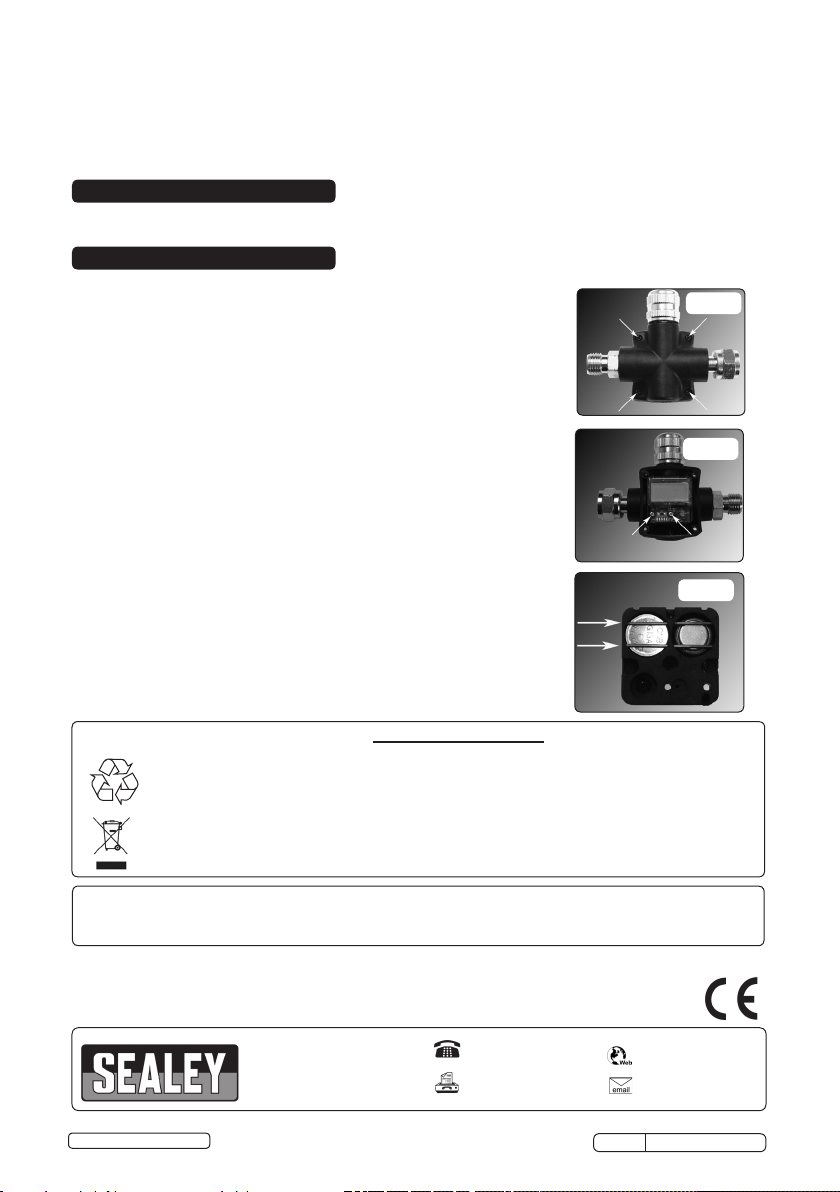
6.1.2. Remove the 4 screws securing the casing (fig.1).
6.1.3. Remove the printed circuit board by removing the 2 screws (fig.2).
6.1.4. On the reverse of the printed circuit board, remove the batteries by
driving out the battery retainers with a small screwdriver (fig.3).
fig.1
fig.1
fig.1
fig.2
fig.3
fig.2
Recycle unwanted materials instead of disposing of them as waste. All tools, accessories and packaging
should be sorted, taken to a recycling centre and disposed of in a manner which is compatible with the
environment. When the product becomes completely unserviceable dispose of it according to local
regulations.
Dispose of this product at the end of its working life in compliance with the EU Directive on Waste
Electrical and Electronic Equipment (WEEE). When the product is no longer required, it must be disposed
of in an environmentally protective way. Contact your local solid waste authority for recycling information.
Under the Waste Batteries and Accumulators Regulations 2009, Jack Sealey Ltd are required to inform potential purchasers of
products containing batteries (as defined within these regulations), that they are registered with Valpak’s registered compliance
scheme.
Jack Sealey Ltd’s Batteries Producer Registration Number (BPRN) is BPRN00705
NOTE: It is our policy to improve products continually and as such we reserve the right to alter data, specifications and
component parts without prior notice.
IMPORTANT: No liability is accepted for incorrect use of this product.
WARRANTY: Guarantee is 12 months from purchase date, proof of which will be required for any claim.
Sole UK Distributor, Sealey
Group, Kempson Way, Suffolk
Business Park, Bury St.
Edmunds, Suffolk,IP32 7AR
© Jack Sealey Limited
Original Language Version
Environmental Protection
WEEE Regulations
01284 757500
01284 703534
www.sealey.co.uk
ARD01 Issue: 1 - 02/06/16
 Loading...