

Seagate Business Storage 2-Bay NAS, STBN100, STBN6000100, STBN4000100, 2-Bay Quick Start Manual [en, fr, es]
Page 1
3
1 2
4
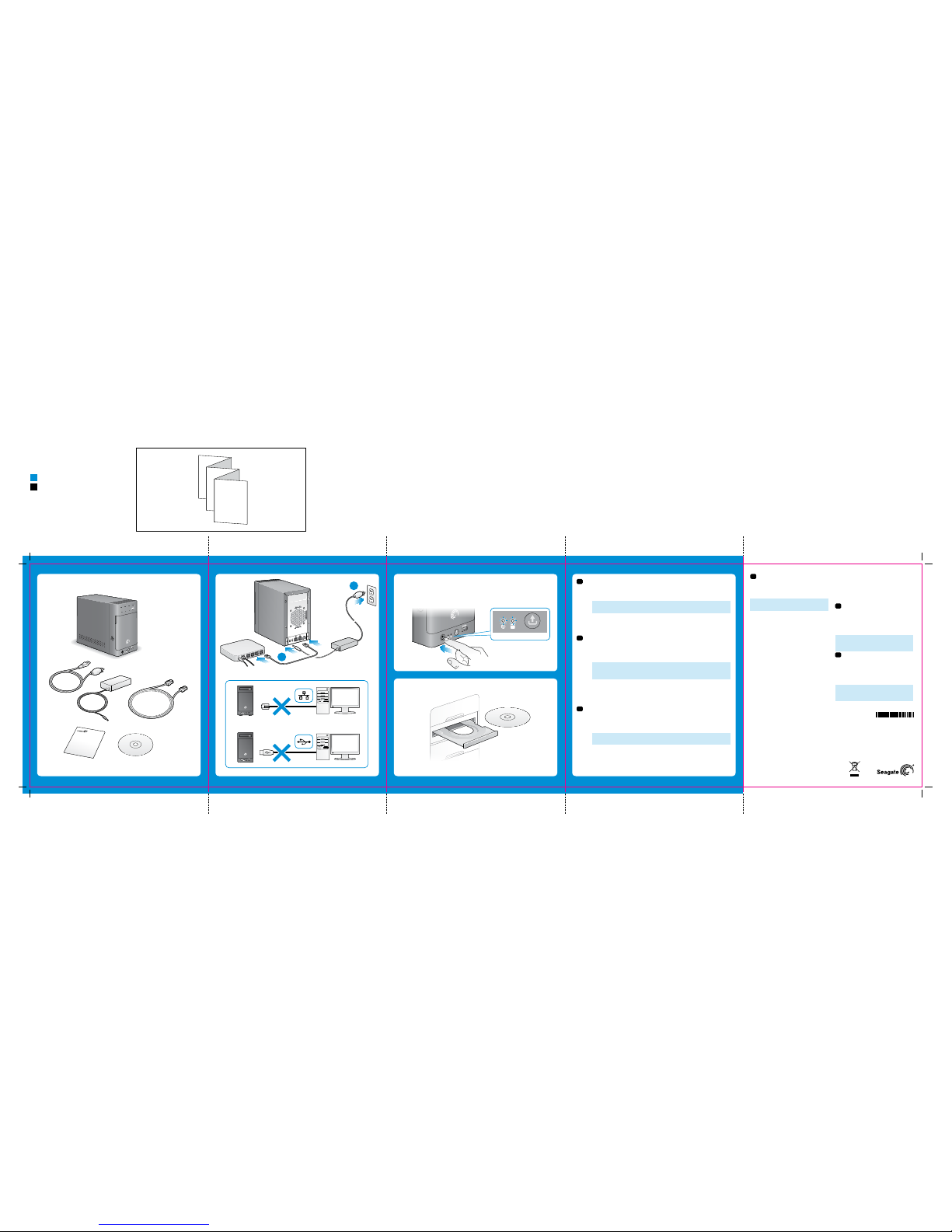
1. Unpack the box.
2. Connect the Seagate NAS.
a. Connect the Ethern et cable from the Seagate NAS to your ro uter.
b. Connect the power adapter fro m the Seagate NAS to a power outlet.
NOTE: Do not connect the Seagate NAS directly to your computer;
connect the computer through a router to the Seagate NAS.
3. Press the power button o n the Seagate NAS. Wait for the LEDs on the f ront
panel to stop blinking. This may ta ke a couple of minutes.
4. Insert the DVD. Follow the on -screen instructions to c omplete the setup.
1. Déballez le produit .
2. Connectez le ser veur NAS Seagate.
a. Connectez le câble Eth ernet du serveur NAS Seag ate à votre routeur.
b. Branchez le cordon d’alimenta tion du serveur NAS Seagate su r une
prise de courant.
REMARQUE : Ne connectez pas le serveur NAS Seagate directement à
votre ordinateur. Utilisez votre routeur comme intermédiaire entre votre
ordinateur et le serveur NAS.
3. Appuyez sur le bouton de m arche/arrêt du serveur NAS S eagate. Attendez
que les voyants du panneau avant ces sent de clignoter. Cela peut prend re
quelques minutes.
4. Insérez le DVD. Suivez les in structions à l’écran pour termin er l’installation.
1. Desembale la caja.
2. Conecte Seagate NAS.
a. Conecte el cable Ethe rnet desde Seagate NAS al enr utador.
b. Conecte el adaptador de co rriente desde Seagate NAS a un
tomacorriente.
NOTA: No conecte Seagate NAS directamente a la computadora;
conecte la computadora a Seagate NAS mediante un enrutador.
3. Presione el botón de enc endido de Seagate NAS. Esper e que los
indicadores LED en el panel f rontal terminen de parpade ar. Esto puede
demorar algunos minutos.
4. Inserte el DVD. Siga las i nstrucciones en pantal la para completar la
configuración.
EN
2-BAY NAS
Business
Storage
QUICK START GUIDE
a
b
2 Bay PANAM
NAS 2 Bay PANAM
Part N umber: 10071004 2
Folded Size: 120mm W x 150mm H
Trim Size: mm 600W X 150mm H
Colors: 2C/2C
NAS Blue
K
ES
FR
© 2012 Seagate Technology LLC. All rights reserved. Seagate, Seagate Technology, and the Wave logo are
trademarks or registered trademarks of Seagate Technology LLC or one of its affiliated companies in the United
States and/or other cou ntries. All othe r trademarks or r egistered trad emarks are the pro perty of their r espective
owners. When referr ing to hard drive cap acity, one gigaby te, or GB, equals one b illion bytes and o ne terabyte, or TB,
equals one thousand b illion bytes. Your co mputer’s operatin g system may use a dif ferent standar d of measuremen t
and report a lower cap acity. In addition, s ome of the listed cap acity is used for f ormatting and o ther functions a nd
will not be available for da ta storage. The exp ort or re-exp ort of hardware or s oftware cont aining encry ption may
be regulated by the U.S. Dep artment of Comm erce, Bureau of In dustry and Sec urity (for more i nformation, vis it
www.bis.doc.gov). Seagate reserves the right to change, without notice, product offerings or specifications.
Seagate Technology LLC
10200 S. De Anza Blvd.
Cupertino, CA 95014
U.S.A.
PN: 10071004 2 06/12
EN
WWW.SEAGATE.COM
Visit us at our Support pages for assistance with:
•Installation: Additional instructions and
troubleshooting assistance
•Warranty Information
To contact support, vis it us at our Contact Us page.
NOTE: To protect your data, alway s follow the safe
removal procedures for your operating system
when disconnecting your product.
FCC DECLARATION OF CONFORMANCE
This device complies w ith Part 15 of the FCC Rule s.
Operation is subjec t to the following two co nditions: (1)
this device may not cause h armful interfe rence, and (2)
this device must accep t any interferen ce received,
including interfer ence that may caus e undesired
operation.
CLASS B
This equipment has be en tested and foun d to comply
with the limits for a Class B d igital device, pu rsuant to
Part 15 of the FCC Rules. Thes e limits are desig ned to
provide reasonable protection against harmful
interference in residential installation. This equipment
generates, uses, an d can radiate radio f requency
energy and, if not insta lled and used in ac cordance
with the instruction s, may cause harmf ul interferenc e
to radio communications.
However, there is no guarante e that interfere nce will
not occur in a particu lar installatio n. If this equipmen t
does cause harmful in terference to ra dio or television
reception, which can b e determined by tur ning the
equipment off and on, t he user is encour aged to try to
correct the interfe rence by one or more o f the
following measures:
•Reor ientorrelocatetherec eivingantenna.
•Incre asetheseparationbe tweentheequipmenta nd
recei ver.
•Conne cttheequipmentintoano utletonacircuit
different from that to w hich the receiver i s
connected.
•Consu ltthedealeroranexper iencedradio/T V
technician for help.
CAUTION: Any changes or m odifications m ade to this
equipment may void the us er’s authority to op erate
this equipment.
FR
WWW.SEAGATE.COM
Consultez les pages de support technique de notre
site pour toute question r elative aux point s suivants :
•Installation : Instructions supplémentaires et
assistance dépannage
•Informations sur la garantie
Pour contacter le support technique, consultez la
page Nous contacter.
REMARQUE : Pour protéger vos données,
suivez toujours les pro cédures de retra it sécurisé
correspondant à votr e système d’exploitatio n lors
de la déconnexion du produit.
ES
WWW.SEAGATE.COM
Consulte nuestras páginas de asistencia técnica para
recibir ayuda sobre:
•Instalación: Instrucciones adicionales y asistencia
para la resolución de problemas
•Información de garantías
Para ponerse en contacto con el servicio de asistencia
técnica, consulte nuestra página Contacto.
NOTA: Para pr oteger sus datos, as egúrese de
seguir los procedimientos de extracción segura
de su sistema operativo s iempre que desco necte
el producto.
Business
Storage
COVER
100710042
Page 2
FR
1 Emplacement USM
L’emplacement USM (Universal Stora ge Module) est un moyen pra tique de transférer d es données
à partir de votre serve ur NAS Seagate et vers ce lui-ci. Cet emplace ment est environ 17 fois
plus rapide qu’un port US B 2.0 classique. Insére z un disque Seagate compa tible USM dans
l’emplacement pour tran sférer rapidement d es fichiers entre le d isque et le serveur NA S Seagate.
2 Ports US B 3.0
Votre serveur NAS Seagate e st doté de deux ports U SB 3.0. Ces ports sont r étrocompatibles ave c
les appareils USB 2.0. Ils so nt également compa tibles avec la fonction d e transfert OneTouch
®
.
3 Bouton de marche/arrêt
Le bouton de marche/arrê t se trouve sur le panneau ava nt du serveur NAS Seag ate.
4 Voyants
Les voyants situés à l’avant et à l’arriè re du serveur NAS Seag ate indiquent l’état du ser veur et
l’activité du réseau, comme dé crit dans le tablea u suivant :
Voyant État Signification Action
Marche/arrêt
Bleu fixe
Le serveur NAS est allumé et prêt
à être utilisé.
Aucune action requise.
État du système
Bleu fixe
Le serveur NAS est allumé et prêt
à être utilisé.
Aucune action requise.
Bleu clignotant
Le serveur NAS est en cours de
démarrage.
Attendez que le voyant s’arrête
de clignoter avant d’accéder au
serveur NAS.
Orange fixe
Le serveur NAS a détecté une
erreur système ou de disque dur.
Contactez le support Seagate.
État des disques
durs
Bleu fixe
Le disque est allumé et prêt à
être utilisé.
Aucune action requise.
Bleu clignotant Activité des disques. Aucune action requise.
Orange fixe Erreur de disque. Contactez le support Seagate.
Transfert
OneTouch
Bleu fixe
Système prêt pour le transfert.
Transfert terminé.
Aucune action requise.
Bleu clignotant Transfert en cours.
Attendez que le voyant s’arrête
de clignoter avant de retirer le
stockage USM/USB.
Orange Erreur. Contactez le support Seagate.
5 Bouton de t ransfert On eTouch
La fonction OneTouch permet de transférer facilement des données entre un emplacement USM
ou un port USB et votre ser veur NAS Seagate. Il suf fit d’appuyer sur le bouto n OneTouch qui se
trouve à l’avant de votre appareil et l e contenu est automatiq uement transféré. C onsultez l’aide en
ligne pour savoir comment configurer un transfert.
6 Ports Et hernet
Votre serveur NAS Seagate c omporte deux por ts Ethernet pour la co nnexion à un ou deux rése aux
locaux.
Pour toute question, cons ultez l’aide et la documenta tion fournies avec votre s erveur NAS Seagate.
ES
1 Ranura USM
La ranura Módulo unive rsal de almacenami ento (USM) ofrece una ma nera conveniente de tr ansferir
datos desde y a Seagate NAS. L a ranura USM es aproxi madamente 17 veces más veloz que u n
puerto USB 2.0 estánda r. Coloque una unidad Seaga te compatible con USM en l a ranura USM
para mover rápidamente l os archivos entre la uni dad Seagate y Seagate NAS .
2 Puerto s USB 3.0
Seagate NAS posee dos pu ertos USB 3.0. Los pue rtos son compatibl es con dispositivos a nteriores
con puertos USB 2.0. Adem ás, los puertos pos een la función de tra nsferencia OneTouch
®
.
3 Botón de en cendido
El botón de encendido se en cuentra ubicado en el p anel frontal de Seag ate NAS.
4 Indica dores LED
Los indicadores LED en la s partes frontal y po sterior de Seagate NA S indican el estado del
servidor y la activid ad de red, tal como se des cribe en la siguiente t abla:
LED Estado Interpretación Medidas por tomar
Encendido
Azul sólido
NAS está encendido y listo para
su uso.
No es necesario tomar medidas.
Estado del
sistema
Botón azul sólido
NAS está encendido y listo para
su uso.
No es necesario tomar medidas.
La luz azul
parpadea
NAS se está encendiendo.
Espere a que el indicador LED
termine de parpadear para
acceder a NAS.
Ámbar sólido
Existe un error en el sistema o
unidad de disco duro de NAS.
Comuníquese con el Soporte de
Seagate.
Estado de las
unidades de
disco duro
Azul sólido Encendido. La unidad está lista. No es necesario tomar medidas.
La luz azul parpadea Actividad de la unidad. No es necesario tomar medidas.
Ámbar sólido Error en la unidad.
Comuníquese con el Soporte de
Seagate.
Transferencia
OneTouch
Botón azul sólido
Listo para la transferencia;
transferencia finalizada.
No es necesario tomar medidas.
La luz azul
parpadea
Transferencia en progreso.
Espere que el indicador LED
termine de parpadear para
quitar el dispositivo USM/USB.
Ámbar Error
Comuníquese con el Soporte de
Seagate.
5 Botón de transferencia OneTouch
La función de transfe rencia OneTouch facilita la tran sferencia de datos des de o a una ranura USM
o un puerto USB y Seagate NA S. Simplemente pres ione el botón de transfe rencia OneTouch
ubicado en la parte fro ntal del dispositivo y l os contenidos se trans ferirán automática mente.
Consulte la Ayuda en línea para obtener información sobre cómo configurar las transferencias.
6 Puerto s Ethernet
Seagate NAS posee dos pu ertos Ethernet par a efectuar la conexió n a una o dos redes locale s.
Si tiene preguntas adicionales, consulte la sección de Ayuda y la documentación proporcionada
con Seagate NAS.
2- BAY NAS
FR _2- BAY N AS
Business
Storage
QUICK START GUIDE
GUIDE DE DÉMARRAGE RAPIDE
GUÍA DE INICIO RÁPIDO
EN
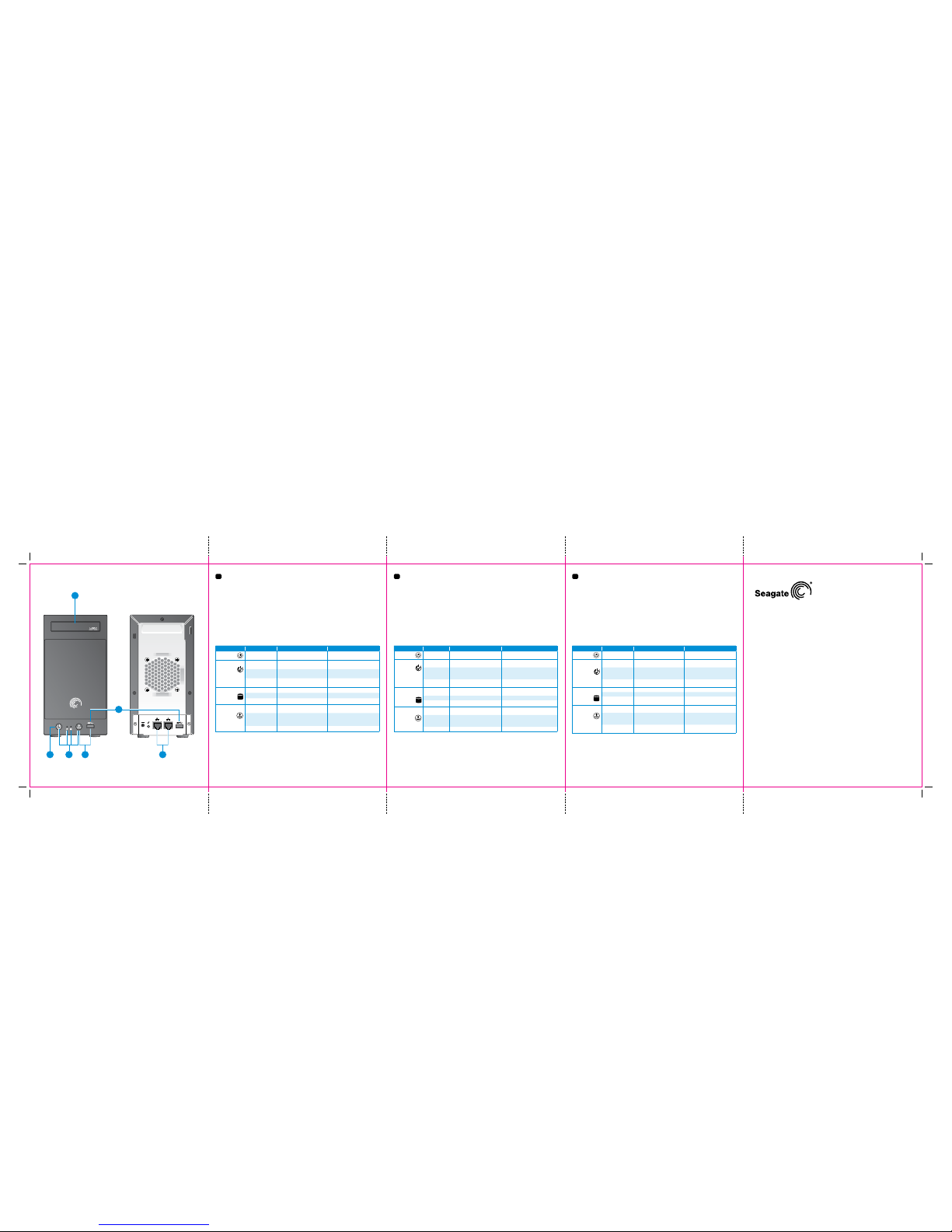
1 USM Slot
The Universal Storag e Module (USM) slot provi des a convenient way to tran sfer data to and
from your Seagate NAS. Th e USM slot is approximatel y 17 times faster than a standa rd USB 2.0
port. Slide a USM-c ompatible Seagate dri ve into the USM slot to quickly m ove files between the
Seagate drive and the Seag ate NAS.
2 USB 3.0 Por ts
Your Seagate NAS has two USB 3.0 por ts. The ports are b ackwards compatib le with USB 2.0
devices. The ports a lso support the OneTouch
®
Transfer feature.
3 Power But ton
The power button is locate d on the front panel of the S eagate NAS.
4 LED Signals
The LEDs on the front and bac k of your Seagate NAS indic ate server status an d network activity,
as described in this ta ble:
LED State Indication Action to Take
Power
Solid blue
NAS is powered on and ready
for use.
No action required.
System Status
Solid blue button
NAS is powered on and ready
for use.
No action required.
Blinking blue NAS is powering on.
Wait until the LED stops blinking
before accessing the NAS.
Solid amber
NAS has a system or hard drive
error.
Contact Seagate Support.
Hard Drive Status
Solid blue Power on, drive is ready. No action required.
Blinking blue Drive activity. No action required.
Solid amber Drive error. Contact Seagate Support.
OneTouch
Transfer
Solid blue button
Ready for transfer; transfer
complete.
No action required.
Blinking blue Transfer in progress.
Wait until the LED stops blinking
before removing the USM/USB
storage.
Amber Error Contact Seagate Support.
5 OneTouch Transfer B utton
The OneTouch Transfer feature makes it ea sy to transfer data to or fro m a USM slot or USB port
and your Seagate NAS. Simp ly press the OneTouch Transfer butto n on the front of your device a nd
the contents are automati cally transferre d. See the online Help for in formation on how to set up
transfers.
6 Ethern et Ports
Your Seagate NAS has two Ethern et ports for connec ting to one or two local net works.
If you have more questions, re view the Help and docume ntation provided with yo ur Seagate NAS.
1
3
2
654
 Loading...