

Page 1
○○○○○○○○○○○○○○○○○○○○○○○○○○○○○○○○○○○○○○○○○
Barracuda 4 Disc Drive
○○○○○○○○○○○○○○○○○○○○○○○○○○○○○○○○○○○○○○○○○
ST15150N/ND
○○○○○○○○○○○○○○○○○○○○○○○○○○○○○○○○○○○○○○○○○
ST15150W/WD/WC/DC
○○○○○○○○○○○○○○○○○○○○○○○○○○○○○○○○○○○○○○○○○
○○○○○○○○○○○○○○○○○○○○○○○○○○○○○○○○○○○○○○○○○
Product Manual, Volume 1
○○○○○○○○○○○○○○○○○○○○○○○○○○○○○○○○○○○○○○○○○
Page 2

Page 3
○○○○○○○○○○○○○○○○○○○○○○○○○○○○○○○○○○○○○○○○○
Barracuda 4 Disc Drive
○○○○○○○○○○○○○○○○○○○○○○○○○○○○○○○○○○○○○○○○○
ST15150N/ND
○○○○○○○○○○○○○○○○○○○○○○○○○○○○○○○○○○○○○○○○○
ST15150W/WD/WC/DC
○○○○○○○○○○○○○○○○○○○○○○○○○○○○○○○○○○○○○○○○○
○○○○○○○○○○○○○○○○○○○○○○○○○○○○○○○○○○○○○○○○○
Product Manual, Volume 1
○○○○○○○○○○○○○○○○○○○○○○○○○○○○○○○○○○○○○○○○○
Page 4

© 1996 Seagate Technology, Inc. All rights reserved
Publication number: 83328880, Rev. D
February 1996
Seagate®, Seagate Technology®, and the Seagate logo are registered
trademarks of Seagate Technology, Inc. Barracuda™ is a trademark of
Seagate Technology, Inc. Other product names are registered trademarks
or trademarks of their owners.
Seagate reserves the right to change, without notice, product offerings or
specifications. No part of this publication may be reproduced in any form
without written permission from Seagate Technology, Inc.
Page 5

Revision status summary sheet
Sheets
Revision Date Writer/Engineer Affected
A 06/27/94 L. Newman/J. Olson All
B 03/08/95 L. Newman/J. Olson 1, 8, 9, 14, 17, 24, 25,
26, 27, 28, 29, 30, 31,
35, 36, 37, 38, 39, 43,
49, 53, 54, 55, 56, 57,
59, 60, 61, 62, 63, 66,
67, 68, 70, 71, 72, 74,
75, 82, 83, 84.
C 06/07/95 L. Newman/J. Olson 11, 12, 29, 33, 34, 35,
36, 41, 42, 54, 59, 60,
61, 62, 65, 70, 71
D 02/07/96 L. Newman/J. Olson 1, 3, 40, 41, 48, 49,
51, 52, 53, 59, 60, 61,
62, 65, 68, 70
Note. Product Manual 83328880 is Volume 1 of a two-volume
document with the SCSI interface information in the
2 SCSI-2 Interface Product Manual,
Part Number 77738479.
Volume
Page 6

Page 7

Contents
1.0 Scope................................................................................................................................... 1
2.0 Applicable standard and reference documentation......................................................... 3
2.1 Standards .................................................................................................................... 3
2.2 Applicable reference documents.................................................................................. 3
3.0 General description ............................................................................................................ 5
4.0 Standard features ............................................................................................................... 7
4.1 Performance ................................................................................................................ 7
4.1.1 Reliability ......................................................................................................... 7
4.2 Unformatted and Formatted Capacities ....................................................................... 8
4.3 Options ........................................................................................................................ 8
4.3.1 Front panel....................................................................................................... 8
4.3.2 Single-unit shipping pack ................................................................................. 8
4.3.3 Barracuda 4 Installation Guide ......................................................................... 8
4.3.4 Adaptor accessory frame kit ............................................................................ 8
4.4 Installation.................................................................................................................... 9
5.0 Performance characteristics............................................................................................. 11
5.1 Internal drive characteristics ....................................................................................... 1 1
5.2 SCSI seek performance characteristics ...................................................................... 1 1
5.2.1 Seek time........................................................................................................13
5.2.2 Format drive command execution time ...........................................................13
5.3 General performance characteristics ..........................................................................14
5.4 Start/stop time.............................................................................................................15
5.5 Prefetch/multi-segmented cache control .....................................................................15
5.6 Caching write data ......................................................................................................17
5.7 Synchronized spindle operation ..................................................................................17
6.0 Reliability specifications ...................................................................................................21
6.1 Error rates...................................................................................................................21
6.1.1 Environmental interference .............................................................................21
6.1.2 Write errors .....................................................................................................21
6.1.3 Seek errors .....................................................................................................22
6.2 Reliability and service .................................................................................................22
6.2.1 Mean time between failures (MTBF) ...............................................................22
6.2.2 Air flow ............................................................................................................22
6.2.3 Preventive maintenance .................................................................................30
6.2.4 Service life ......................................................................................................30
6.2.5 Service philosophy..........................................................................................30
6.2.6 Installation.......................................................................................................30
6.2.7 Service tools ...................................................................................................30
6.2.8 Hot plugging Barracuda 4 disc drives .............................................................31
7.0 Physical/electrical specifications .....................................................................................33
7.1 AC power requirements ..............................................................................................33
7.2 DC power requirements ..............................................................................................33
7.2.1 Conducted noise immunity..............................................................................34
7.2.2 Power sequencing ..........................................................................................34
7.2.3 12V current profile ..........................................................................................35
Page 8

7.3 Heat/power dissipation................................................................................................36
7.4 Environmental limits....................................................................................................36
7.4.1 T emperature....................................................................................................36
7.4.2 Relative humidity ............................................................................................36
7.4.3 Effective altitude (sea level) ............................................................................37
7.4.4 Shock and vibration ........................................................................................37
7.4.5 Air cleanliness.................................................................................................38
7.4.6 Acoustics ........................................................................................................38
7.5 Electromagnetic compatibility......................................................................................38
7.6 Mechanical specifications ...........................................................................................39
7.6.1 Drive orientation..............................................................................................42
7.6.2 Cooling ...........................................................................................................42
8.0 Media characteristics ........................................................................................................43
8.1 Media description........................................................................................................43
9.0 Defect and error management ..........................................................................................45
9.1 Drive internal defects/errors ........................................................................................45
10.0 Drive configuration............................................................................................................47
10.1 Option headers ...........................................................................................................47
10.1.1 ST15150N/ND drives option headers .............................................................47
10.1.2 ST15150W/WD drives option headers ............................................................50
10.1.3 ST15150WC/DC drives option headers ..........................................................53
10.2 Synchronized spindles interface .................................................................................55
10.2.1 Electrical description.......................................................................................55
10.3 Grounding...................................................................................................................57
10.4 Drive termination.........................................................................................................57
11.0 Interface requirements ......................................................................................................59
11.1 General description.....................................................................................................59
11.2 SCSI interface messages supported...........................................................................59
11.3 SCSI interface commands supported..........................................................................60
11.3.1 Inquiry data.....................................................................................................62
11.3.2 Mode sense data ............................................................................................63
11.4 SCSI bus conditions and miscellaneous features supported.......................................66
11.5 Synchronous data transfer..........................................................................................67
11.5.1 Synchronous data transfer periods supported ................................................67
11.5.2 REQ/ACK offset..............................................................................................67
11.6 DC cable and connector .............................................................................................67
11.7 SCSI physical interface...............................................................................................68
11.7.1 Physical characteristics ..................................................................................69
11.7.2 Connector requirements .................................................................................70
11.7.3 Electrical description .......................................................................................71
11.8 SCSI non-wide physical interface ...............................................................................75
11.9 SCSI wide physical interface.......................................................................................7 8
11. 10SCSI SCA physical interface.......................................................................................81
11.11Disc drive SCSI timing ................................................................................................84
Index ............................................................................................................................................87
Page 9

Figures
Figure 1. Barracuda 4 disc drive ............................................................................................. 1
Figure 2. Barracuda disc drive (exploded view) ...................................................................... 5
Figure 3. OEM interruptible thermal calibration implementation .............................................. 13
Figure 4. Synchronized drive interconnect diagram ................................................................ 17
Figure 5. Synchronized reference signal characteristics ......................................................... 18
Figure 6. Air flow ..................................................................................................................... 23
Figure 7. AYHX temperature measurement locations ............................................................. 24
Figure 8. LYHX temperature measurement locations.............................................................. 25
Figure 9. MYHX temperature measurement locations............................................................. 26
Figure 10. NYHX temperature measurement locations ............................................................. 27
Figure 11. JYHX temperature measurement locations.............................................................. 28
Figure 12. KYHX temperature measurement locations ............................................................. 29
Figure 13. Temperature measurement location......................................................................... 30
Figure 14. Typical Barracuda 4 drive +12V current profile......................................................... 35
Figure 15. Mounting configuration dimensions for N/ND drives ................................................. 39
Figure 16. Mounting configuration dimensions for W/WD drives ............................................... 40
Figure 17. Mounting configuration dimensions forWC/DC drives .............................................. 41
Figure 18. Recommended mounting ......................................................................................... 42
Figure 19. ST15150N/ND drives option header locations.......................................................... 47
Figure 20. ST15150N/ND drives option select jumper connectors ............................................ 48
Figure 21. ST15150W/WD drives option header locations ........................................................ 50
Figure 22. ST15150W/WD drives option select jumper connectors........................................... 51
Figure 23. ST15150WC/DC drives option header locations ...................................................... 53
Figure 24. ST15150WC/DC drives option select jumper connectors ......................................... 53
Figure 25. SCSI reference index signal driver/receiver combination ......................................... 55
Figure 26. ST15150N/ND drives configuration select header specification ............................... 56
Figure 27. ST15150W/WD drives configuration select header specification.............................. 56
Figure 28. ST15150N/ND drives physical interface ................................................................... 68
Figure 29. ST15150W/WD drives physical interface ................................................................. 68
Figure 30. ST15150WC/DC drives physical interface ............................................................... 68
Figure 31. Single-ended transmitters and receivers .................................................................. 72
Figure 32. Typical differential I//O line transmitter/receiver and terminators .............................. 73
Figure 33. Non-shielded SCSI device connector ....................................................................... 75
Figure 34. Wide SCSI device connector.................................................................................... 78
Figure 35. SCA SCSI device connector .................................................................................... 81
Page 10

Page 11
ST15150N/ND/W/WD/WC/DC Product Manual, Rev. D 1
1.0 Scope
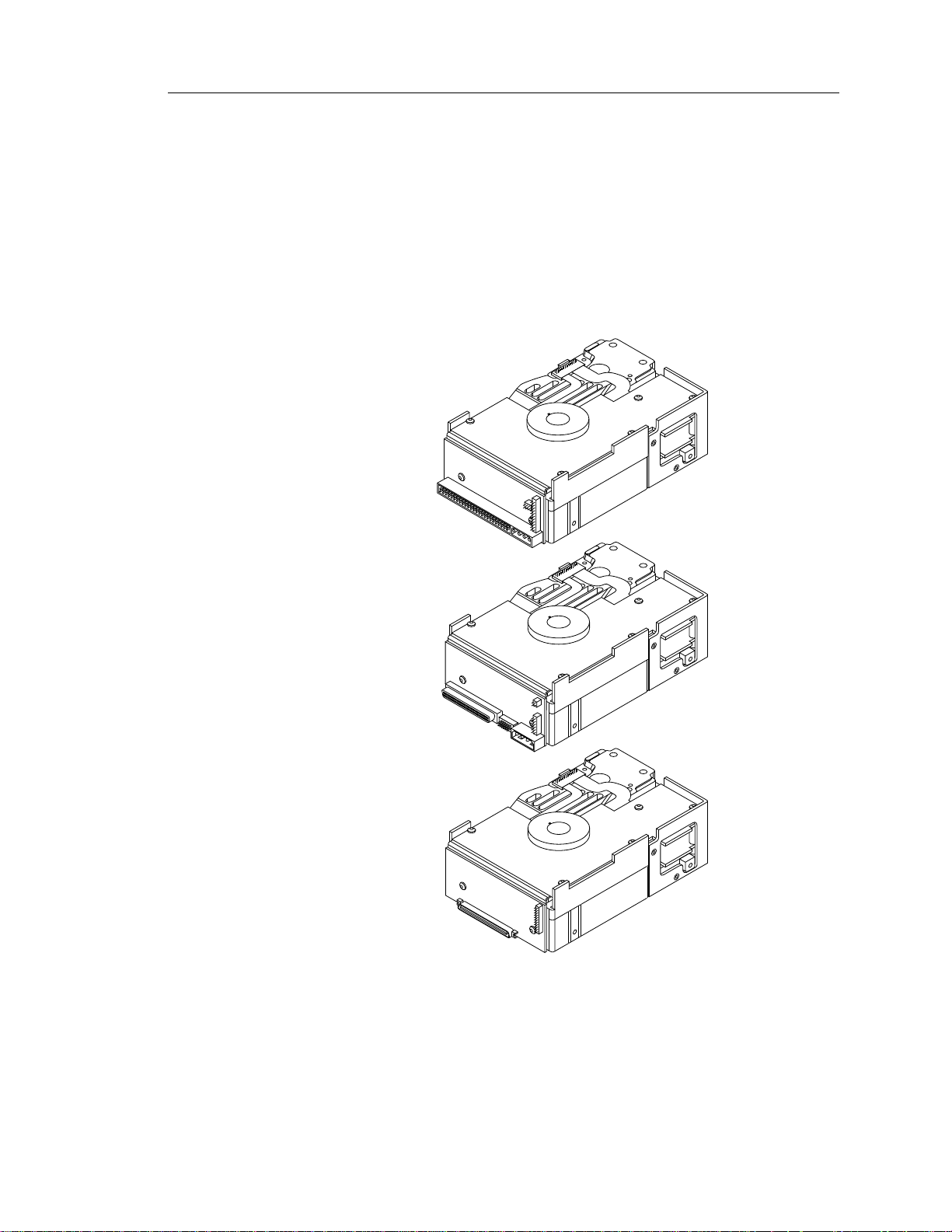
This manual describes Seagate Technology®, Inc. Barracuda™ 4 disc
drives.
Barracuda drives support the Small Computer System Interface-2 ( SC SI-2 )
as described in the ANSI SCSI and SCSI-2 interface specifications to the
extent described in this manual. This manual defines the performanc e
characteristics of the Barracuda 4 drives. The
Manual
characteristics of this and other families of Seagate drives.
(part number 77738479) describes the general SCSI interfac e
N/ND type
SCSI-2 Interface Product
W/WD type
WC/DC type
Figure 1. Barracuda 4 disc drives
Page 12

2 ST15150N/ND/W/WD/WC/DC Product Manual, Rev. D
Page 13

ST15150N/ND/W/WD/WC/DC Product Manual, Rev. D 3
2.0 Applicable standard and
reference documentation
Seagate takes all reasonable steps to insure that its products are certifiable
to currently accepted standards. Typical applications of these disc drives
include customer packaging and subsystem design.
Safety agencies conditionally certify component parts, such as the Barracuda disc drive, based on their final acceptability in the end-use product. The
subsystem designer is responsible for meeting these conditions of acceptability in obtaining safety/regulatory agency compliance in their end use
product and certifying where required by law.
2.1 Standards
The Barracuda disc drive is a UL recognized component per UL1950, CSA
certified to CSA C22.2 No. 950-M89, and VDE certified to VDE 0805 and
EN60950.
If this model has the CE Marking, it complies with the European Union
requirements of the Electromagnetic Compatibility Directive 89/336/EEC of
03 May 1989 as amended by Directive 92/31/EEC of 28 April 1992 and
Directive 93/68/EEC of 22 July 1993.
Seagate uses an independent laboratory to confirm compliance to the above
directives. Drives are tested in representative systems for typical applications. The selected system represents the most popular characteristics for
test platforms. The system configurations include:
• 486, Pentium, and PowerPC Microprocessors
• 3.5-inch floppy disc drive
• Keyboard
• Monitor/display
Although the test system with this Seagate model complies to the directives,
we cannot guarantee that all systems will comply. The computer manufacturer or system integrator shall confirm EMC compliance and provide CE
Marking for their product.
The Barracuda disc drive is supplied as a component part. It is the responsibility of the subsystem designer to meet EMC/regulatory requirements.
Engineering test characterizations of radiated emissions are available from
the Seagate safety department.
2.2 Applicable reference documents
Barracuda 4 Installation Guide
Seagate part number: 83328870
SCSI-2 Interface Product Manual (volume 2)
Seagate part number: 77738479
ANSI small computer system interface (SCSI) documents
ANSI X3.131-1986 (SCSI-1)
X3T9.2/86-109 Rev. 10H (SCSI-2)
X3T9.2/91-010 Rev. 10 (SCSI-3) Parallel Interface
In case of conflict between this document and any referenced document, this
document takes precedence.
Page 14

4 ST15150N/ND/W/WD/WC/DC Product Manual, Rev. D
Page 15
ST15150N/ND/W/WD/WC/DC Product Manual, Rev. D 5
3.0 General description
Barracuda drives are low cost, high performance, random access storage
devices designed to meet the needs of the original equipment manufacturer
(OEM) marketplace.
The Barracuda drive’s interface supports multiple initiators, disconnect/
reconnect, self-configuring host software, and automatic features that relieve the host from knowing the physical characteristics of the targets (logical
block addressing is used).
The head and disc assembly (HDA) is environmentally sealed at the factory.
Air circulates within the HDA through a non-replaceable filter to maintain a
contamination-free HDA environment.
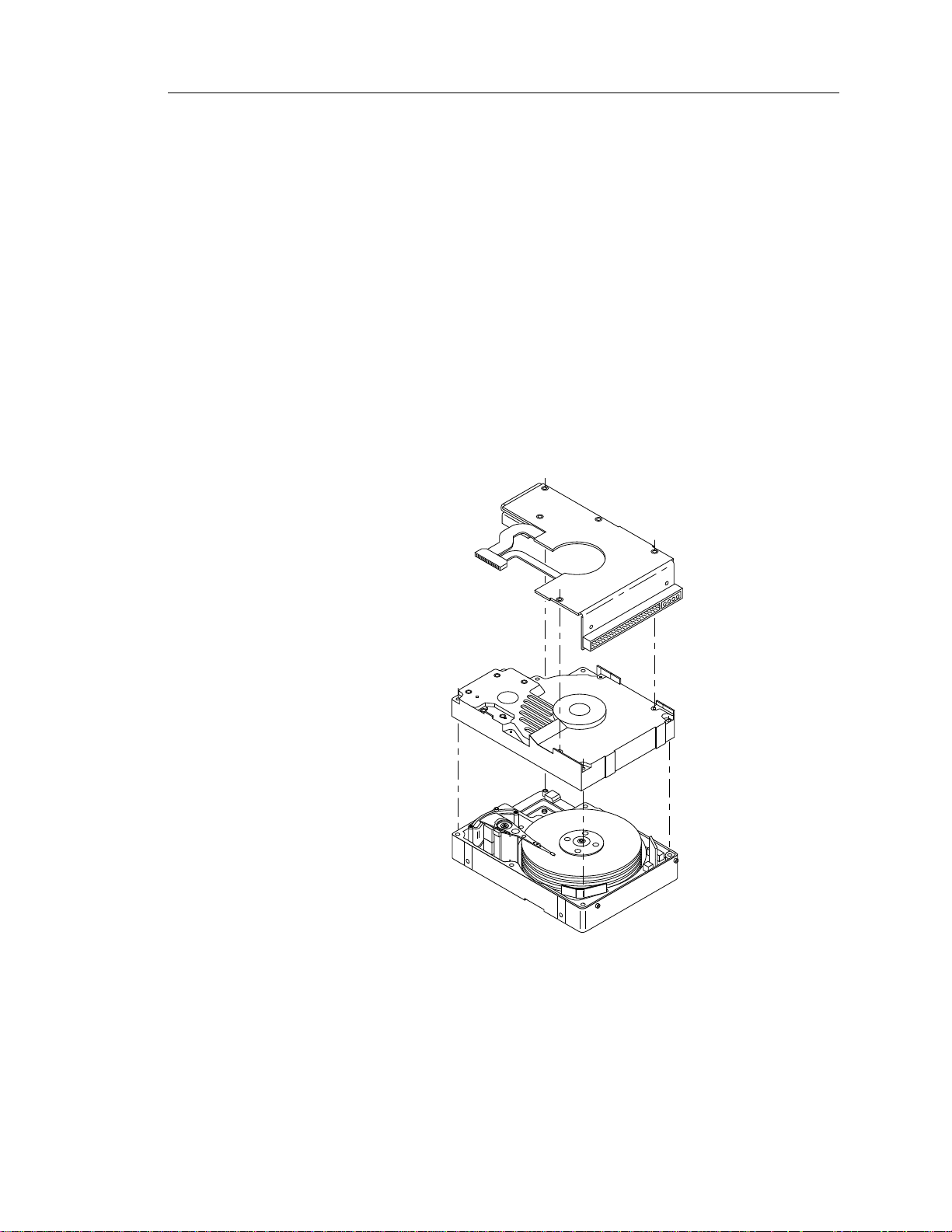
Refer to Figure 2 for an exploded view of the drive. This exploded view is for
information only—never disassemble the HDA and do not attempt to service
items in the sealed enclosure (heads, media, actuator, etc.) as this requires
special facilities. The drive contains no replaceable parts. Opening the HDA
voids your warranty.
Figure 2. Barracuda 4 disc drive (exploded view)
Page 16

6 ST15150N/ND/W/WD/WC/DC Product Manual, Rev. D
Barracuda drives use a dedicated landing zone at the innermost radius of the
media to eliminate the possibility of destroying or degrading data by landing
in the data zone. The drive automatically goes to the landing zone when the
power is removed.
An automatic shipping lock prevents potential damage to the heads and
discs that results from movement during shipping and handling. The shipping
lock disengages when power is applied to the drive and the head load
process begins.
Barracuda drives decode track 0 location data from the dedicated servo
surface to eliminate mechanical transducer adjustments and related reliability concerns.
A high-performance actuator assembly with a low inertia, balanced, patented, straight arm design provides excellent performance with minimal
power dissipation.
Page 17

ST15150N/ND/W/WD/WC/DC Product Manual, Rev. D 7
4.0 Standard features
Barracuda 4 drives have the following standard features:
• Integrated SCSI controller
• Single-ended or differential SCSI drivers and receivers
• Asynchronous and synchronous data transfer protocols
• Firmware downloadable using a SCSI interface
• Selectable sector size from 180 to 4,096 bytes per sector
• Programmable sector reallocation scheme
• Flawed sector reallocation at format time
• Programmable auto write and auto read reallocation
• Reallocation of defects on command (post format)
• 96-bit Reed-Solomon error correction code
• Sealed head and disc assembly (HDA)
• No preventive maintenance or adjustments required
• Dedicated head landing zone
• Automatic shipping lock
• Automatic thermal compensation
• Embedded Grey Code track address to eliminate seek errors
• Self-diagnostics performed at power-on
• 1:1 interleave
• Zone bit recording (ZBR)
• Vertical, horizontal, or top-down mounting
• Dynamic spindle brake
• Active termination for single-ended models
• 1,024 Kbyte data buffer (see Section 5.5)
4.1 Performance
• Programmable multi-segmentable cache buffer
• 7,200 RPM spindle; average latency = 4.17 msec
• Command queuing of up to 64 commands
• Background processing of queue
• Supports start and stop commands
• Provides synchronized spindle capability
• Low audible noise for office environment
• Low power consumption
4.1.1 Reliability
• 800,000 hour MTBF
• Adaptive seek velocity; improved seek performance
• LSI circuitry
• Balanced low-mass rotary voice-coil actuator
Page 18

8 ST15150N/ND/W/WD/WC/DC Product Manual, Rev. D
4.2 Unformatted and Formatted Capacities
Standard OEM models are formatted to 512 bytes per block.
ST15150 drives have nine (9) spare sectors per cylinder and one (1) spare
cylinder per unit.
Formatted Unformatted
4,294 Mbytes 5,062 Mbytes
Users having the necessary equipment may modify the data block size
before issuing a format command to obtain different formatted capacities.
User-available capacity also depends on the spare reallocation sc heme
selected. See the Mode Select command and the Format command in the
SCSI-2 Inte rfac e P r oduc t Manual
(part number 77738479).
4.3 Options
The following items are incorporated at the time of production or are
available as accessories. All kits may be installed in the field.
• Front panel kit (green lens), part number 70869751
• Single-unit shipping pack kit
•
Barracuda 4 Installation Guide,
• Adapter accessory frame kit, part number 75790701 (adapts a 3.5-inch
drive to fit in a 5.25-inch drive mounting space)
part number 83328870
4.3.1 Front panel
The front panel normally available is black plastic. You may order other
colors. Each panel has a single rectangular green LED indicator lens that,
when glowing, indicates the drive is selected.
4.3.2 Single-unit shipping pack
The drive is normally shipped in bulk packaging to provide maximum
protection against transit damage. Units shipped individually require additional protection as provided by the single-unit shipping pack. Users
planning single-unit distribution should specify this option.
4.3.3
Barracuda 4 Installation Guide
Part number 83328870
This manual provides basic information about how to install the drive. It also
includes information to assist in obtaining service for the drive.
4.3.4 Adaptor accessory frame kit
Part number 75790701
This kit contains the frame to allow a 3.5-inch drive to be mounted in a
5.25-inch form factor. It includes mounting hardware, front panel with a
green lens, an LED with cable that connects to the remote LED connector,
and installation instructions.
Page 19

ST15150N/ND/W/WD/WC/DC Product Manual, Rev. D 9
4.4 Installation
For option jumper locations and definitions refer to Figures 20, 22, or 24.
Drive default mode parameters are not normally needed for installation.
Refer to Section 11.3.2 for default mode parameters if you need them.
• Ensure that the SCSI ID of the drive is not the same as the host adapter.
• If multiple devices are on the bus, set the drive’s SCSI ID to one that is not
presently used by other devices on the bus.
• If the drive is the only device on the bus, attach it to the end of the SCSI
bus cable. Internal termination is available on single-ended (ST15150N/
W/WC) drives by enabling this feature with a jumper (see Section 10).
External terminators are required for differential (ST15150ND/WD/DC)
drives. These external terminators must be provided by the user,
systems integrator, or host e quipment manufacturer.
• If you attach the drive to a bus that contains other devices, and the new
drive is not attached to the end of the bus, remove the termination from the
new drive.
• Set all appropri a te option jumpe rs prior to appl yin g pow er to the drive.
If you change jumpers after applying power, recycle the drive’s power to
make the new settings effective.
Formatting
• It is not necessary to low-level format this drive. The drive is shipped from
the factory low-level formatted in 512-byte sectors.
• Reformat the drive if:
a. You select a different sector size.
b. You select a different spare-sector allocation scheme.
Page 20

10 ST15150N/ND/W/WD/WC/DC Product Manual, Rev. D
Page 21

ST15150N/ND/W/WD/WC/DC Product Manual, Rev. D 11
5.0 Performance characteristics
This section provides performance-related characteristics and features of
Barracuda 4 drives.
5.1 Internal drive characteristics
Drive capacity, Mbytes unformatted 5,062
Read/write data heads, maximum (physical) 2 1
Bytes per track, average bytes 64,160
Bytes per surface, Mbytes unformatted 232.4
Cylinders/tracks per surface, user accessible 3,711
Tracks per inch 4,048
Bits per inch 73,820
Servo heads 1
Internal data rate per physical head, Mbits/sec, 47.5 to 72.0
variable with zone
Disc rotation speed 7,200 ± 0.5%
Avg rotational latency, msec 4.17
5.2 SCSI seek performance characteristics
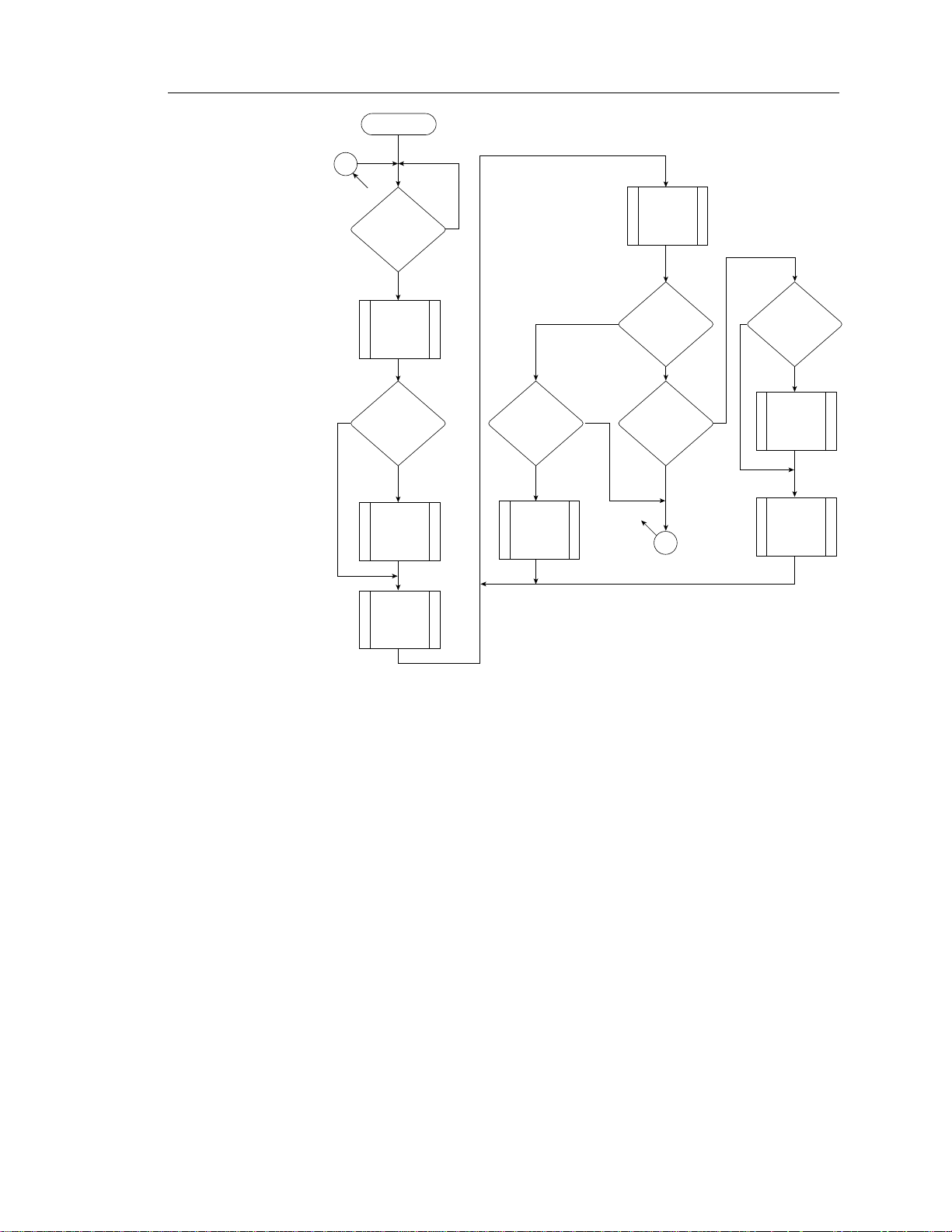
ASA I download code thermal calibration (TCAL)
All performance characteris tics assum e that thermal calibration is no t in
process when the drive receives the SCSI command. Thermal calibration
will not interrupt an active SCSI command. If thermal calibration is in
process when a SCSI command is received, the command is queued until
the calibration for the specific head being calibrated completes. When
calibration completes for the specific head being calibrated, the first queued
SCSI command executes. When ex ecution of the first queued command is
complete, the drive continues the calibration for the remaining head.
The above p roced ure c ontin ues unt il calibrat ion fo r all head s has co mpleted, or until 10 minutes have elapsed. The drive initiates a thermal
calibration cycle once on power-up before completing its initialization
sequence and then once after 1 minute from the end of initialization. After
this, the drive initiat es thermal calibration cycle approximately once every
10 minutes . Automatic no n- i nte rr upt i bl e the r mal c alibrati o n oc cu rs at
other times but should be transparent to the user (e.g., during format,
Rezero command, at spindle-up, during read error recovery, and during
reassign block functions). You can use the Rezero command to reset the
thermal calibration timer back to its start so that the host knows when the
interruption for thermal calibration will occur.
Page 22

12 ST15150N/ND/W/WD/WC/DC Product Manual, Rev. D
ASA II download code thermal calibration (TCAL)
1. All heads are thermally calibrated at power-up and following SCSI resets
before any read or write commands are processed. All heads are also
thermally calibrated during the SCSI Rezero Unit command.
2. The drive then delays a fixed period of time (D) before initiating any further
thermal calibrations. This delay provides a guaranteed time interval when
no thermal calibration interruptions will occur.
3. A single-head TCAL is scheduled to occur every N1 seconds where:
N1 = (T – D)/(2 • H)
T = Maximum allowable thermal calibration period for any single
head (600 seconds)
D = Time delay after the power-up/reset calibration before initiating
subsequent thermal calibrations (300 seconds)
H = Number of heads in the drive (see Section 5.1 “Internal drive
characteristics”).
4. After the drive has cycled once through all the heads (H) at the N1 time
interval, single-head TCAL scheduling switches to a N2 time interval
where: N2 = T/(2 • H).
5. When a single-head TCAL is scheduled, the drive attempts to find an idle
period of 25 to 50 milliseconds prior to performing the TCAL. If the TCAL
has still not been performed after another N1 or N2 seconds (whichever
is the current time interval) the drive forces a TCAL to occur at the next
command boundary (even during a read look ahead sequence), and
immediately resets the N1 or N2 timer. This guarantees that no head will
remain uncalibrated for more than T (600) seconds and that no TCALs will
occur closer together in time than approximately N1 or N2 seconds.
6. TCALs performed during the “standard” retry sequence are limited to the
failing head, and will be disabled if the host selects a retry count of zero.
Refer to Section 11.11 and to the
number 77738479) for additional timing details.
SCSI-2 Interface Product Manual
(part
Page 23
ST15150N/ND/W/WD/WC/DC Product Manual, Rev. D 13
Start
Has
10 min.
timer
expired?
Set
10 minute
timer
Yes
No
Yes
A
Is
SCSI
command in
progress?
No
Complete
Command
Seek to
TCAL cyl
and select
head zero
TCAL
head
Has
target
received a SCSI
command?
No
Yes
All
heads
calibrated?
Yes
A
All
heads
calibrated?
No
Yes
Select
next
head
No
Has
target
received a SCSI
command?
Yes
No
Target
completes
SCSI
command
Seek to
TCAL cyl
and select
next head
Figure 3. OEM interruptible thermal calibration implementation
5.2.1 Seek time
Drive level (msec) without disconnect* (msec)
read write read write
Average typ* 8.0 9.0 9.0 10.0
Single track typ* 0.6 0.9 1.6 1.9
Full stroke typ* 17 19 18.0 20.0
*Typical seek values are measured under nominal conditions of tempera-
ture, voltage, and horizontal or ientation on a representative sample of
drives.
5.2.2 Format drive command execution time
for
Maximum (with verify) 60 minutes
≥≥
≥ 512-byte sectors
≥≥
Maximum (without verify) 40 minutes
Drive including
controller overhead
Page 24

14 ST15150N/ND/W/WD/WC/DC Product Manual, Rev. D
5.3 General performance characteristics
Minimum sector interleave 1 to 1
Data buffer to/from disc media 512-byte sector
Data transfer rate (≤ 1 sector)
Minimum 5.30 Mbytes/sec*
Maximum 8.94 Mbytes/sec*
Data transfer rate (< 1 track)
Minimum, divided by interleave factor 3.56 Mbytes/sec
Maximum, divided by interleave factor 7.65 Mbytes/sec
Sector sizes
Default 512-byte data blocks
Variable in even-sector sizes 180 to 4,096 bytes
SCSI interface data
Async. transfer rate, max instantaneous
ST15150N/ND 5.0 Mbytes/sec*, **
ST15150W/WD/WC/DC 10.0 Mbytes/sec*, ***
Synchronous transfer rate fast
ST15150N/ND 0.5 to 10.0 Mbytes/sec
Synchronous transfer rate wide
ST15150W/WD/WC/DC 0.5 to 20.0 Mbytes/sec
Read/write consecutive sectors on a track Yes
Flaw reallocation performance impact Negligible
(for flaws reallocated using the spare
sectors per track reallocation scheme)
Flaw reallocation performance impact Negligible
(for flaws reallocated using the spare
sectors per cylinder reallocation scheme)
Flaw reallocation performance impact 35 msec (typical)
(for flaws reallocated using the spare
tracks per volume reallocation scheme)
Overhead time for head switch 0.7 msec
Overhead time for one track cylinder switch 1.6 msec (typical)
Average rotational latency 4.17 msec
* Rate m easur ed fr om the start o f the first s ector transfer t o or from the host.
** Assumes system ability to support 5.0 Mbytes/sec and no cable loss.
***Assumes system ability to support 1 0.0 Mbytes/sec and no cable loss.
Page 25

ST15150N/ND/W/WD/WC/DC Product Manual, Rev. D 15
5.4 Start/stop time
Disabling the Motor Start option causes the drive to become ready within 30
seconds after DC power is applied. If a recoverable error condition is
detected during the start sequence, the drive executes a recovery procedure−this may cause the time it takes for the drive to become ready to exceed
30 seconds. During the start sequence, the drive responds to some commands over the SCSI interface. Stop time is less than 30 seconds after
removing DC power. This means the motor starts as soon as power is
applied. During this time the drive responds to some commands over the
SCSI interface. Stop time is less than 30 seconds from removal of DC power.
Enabling the Motor Start option causes the internal controller to accept the
commands listed in the
than 3 seconds after applying DC power. After receiving the Motor Start
command, the drive becomes ready for normal operations within 30 seconds
(excluding an error recovery procedure, if needed). The Motor Start command can also be used to command the drive to stop the spindle (see the
Start/Stop command information in the
There is no power control switch on the drive.
SCSI-2 Interface Product Manual
SCSI-2 Interface Product Manual).
(77738479) less
5.5 Prefetch/multi-segmented cache control
The drive provides a prefetch/multi-segmented cache algorithm that in many
cases enhances system performance. To select this feature the host sends
the Mode Select command with the proper values in the applicable bytes in
page 08h (see the
cache operation enabled.
Of the 1,024 Kbytes physical buffer space, approximately 954 Kbytes can be
used as a cache. The cache can be divided into logical segments from which
data is read and to which data is written.
The drive keeps track of the logical block addresses of the data stored in each
segment of the cache. If the cache is enabled (see RCD bit, Table 5.2.1-27
in the
SCSI-2 Interface Product Manual),
read command is retrieved from the cache, if possible, before any disc
access is initiated. Data in contiguous logical blocks immediately beyond that
requested by the Read command can be retrieved and stored in the cache
for immediate transfer to the initiator on subsequent read commands. This
is referred to as the prefetch operation. Since data that is prefetched may
replace data already in the cache segment, an initiator can limit the amount
of prefetch data to optimize system performance. The drive never prefetches
more sectors than the number specified in bytes 8 and 9 of Mode page 08h
(see the
Kbytes of the buffer are used as a circular buffer for read/writes, with no
prefetch operation and no segmented cache operation.
The following is a simplified description of the prefetch/cache operation:
SCSI-2 Interface Product Manual).
SCSI-2 Interface Product Manual).
data requested by the host with a
If the cache is not enabled, 954
Default is prefetch and
Case A. Read command is received and the first logical block is already in
the cache.
1. Drive transfers to the initiator the first logical block requested plus all
subsequent contiguous logical blocks that are already in the cache. This
data may be in multiple segments.
Page 26

16 ST15150N/ND/W/WD/WC/DC Product Manual, Rev. D
2. When a requested logical block is reached that is not in any segment, the
drive fetches it and any remaining requested logical block addresses
from the disc and puts them in a segment of the cache. The drive transfers
the remaining requested logical blocks from the cache to the initiator in
accordance with the “buffer-full” ratio specification given in Mode Select
Disconnect/Reconnect parameters, page 02h (see the
SCSI-2 Interface
Product Manual).
3. The drive prefetches additional logical blocks contiguous to those transferred in step 2 above and stores them in the segment. The drive stops
filling the segment when the maximum prefetch value has been transferred (see the
Case B. Read command is received and the first logical block address
requested is not in any segment of the cache.
1. The drive fetches the requested logical blocks from the disc and transfers
them into a segment, then from there to the initiator in accordance with
the “buffer-full” ratio specification given in Mode Select Disconnect/
Reconnect parameters, page 02h (see the
SCSI-2 Interface Product Manual)
SCSI-2 Interface Product
.
Manual).
2. The drive prefetches additional logical blocks contiguous to those transferred in Case A, step 2 above and stores them in the segment. The drive
stops filling the segment when the maximum prefetch value has been
transferred.
During a prefetch, the drive crosses a cylinder boundary to fetch data only
if the Discontinuity (DISC) bit is set to 1 in bit 4 of byte 2 of the Mode Select
parameters page 8h. Default is zero for bit 4 (see the
SCSI-2 Interface
Product Manual).
Each cache segment is actually a self-contained circular buffer whose length
is an integer number of sectors. The wrap-around capability of the individual
segments greatly enhances the cache’s overall performance, allowing a
wide range of user-selectable configurations, which includes a pure prefetch
strategy. The drive supports operation of any integer number of segments
from 1 to 16. Divide the 976,896 bytes in the buffer by the number of
segments to get the segment size. Default is 3 segments. (See the
SCSI-2
Interface Product Manual.)
Page 27
ST15150N/ND/W/WD/WC/DC Product Manual, Rev. D 17
5.6 Caching write data
Write caching is a drive write operation that uses a drive buffer storage area
where the data to be written to the disc is stored while the drive performs the
Write command.
Write caching is enabled along with read caching. For write caching, the
same buffer space and segmentation is used as set up for read functions.
When a write command is issued, the cache is first checked to see if any
logical blocks to be written are already stored in the cache from a previous
read or write command. If there are, the respective cache segments are
cleared. The new data is cached for subsequent read commands.
If a 10-byte CDB Write command (2Ah) is issued with the data page out
(DPO) bit set to 1, no write data is cached, but the cache segments are still
checked and cleared, if needed, for any logical blocks that are being written
(see the
If the number of write data logical blocks exceeds the size of the segment
being written into when the end of the segment is reached, the data is written
into the beginning of the same cache segment, overwriting the data that was
written there at the beginning of the operation. However, the drive does not
overwrite data that has not yet been written to the disc.
SCSI-2 Interface Product Manual).
5.7 Synchronized spindle operation
The synchronized spindle operation allows several drives operating from the
same host to operate their spindles at the same synchronized rotational rate.
Drives operating in a system in synchronized mode increase the system
capacity and transfer rate in a cost-effective manner.
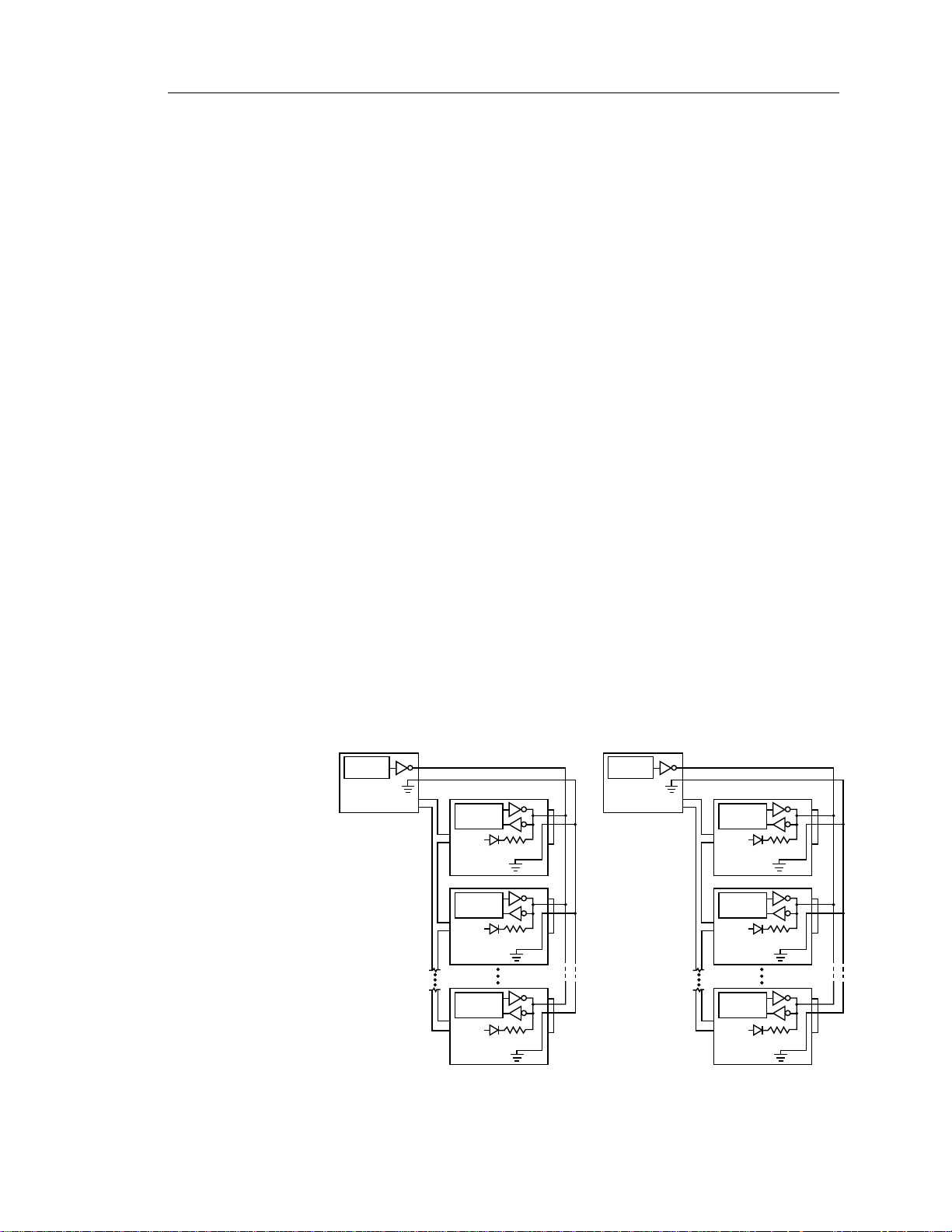
The interface consists of a twisted-pair cable that connects the drives in the
synchronized system in a daisy-chain configuration as shown in Figure 4.
Note. ST15150WC/DC drives can use J6 pin 37 from the SCA connector
or J04 pin 6 for spindle sync.
Sync Interface
Master Sync
Source
Host
(or other drive)
System
Interface
Spindle
Control
+5V
Drive 1
Spindle
Control
+5V
Drive 2
Spindle
Control
+5V
Drive n
J4
1
2
R
T
J4
1
2
R
T
J4
1
2
R
T
Master Sync
Source
Host
(or other drive)
System
Interface
Sync Interface
Spindle
Control
+5V
Drive 1
Spindle
Control
+5V
Drive 2
Spindle
Control
+5V
Drive n
J5
11
12
R
T
J5
11
12
R
T
J5
11
12
R
T
ST15150N/ND Drives ST15150W/WD Drives
Figure 4. Synchronized drive interconnect diagram
Page 28
18 ST15150N/ND/W/WD/WC/DC Product Manual, Rev. D
The host c an rec o nf ig ure the drive any t i me a f ter p ower- u p to be t he
master or a slave by using the Mode Select command on the Rigid Disc
Drive Geometry page. The master provides the reference signal to
which all other drives phase-lock, including the master. There is only
one master per system, and that ca n be a drive or the host co m puter.
All drives may be configured as slav es allowing the host t o pro vide the
reference signal.
Each drive also can be config ured for t he non- syn chro nized mode in
which it ignores any reference signal that might be present—this is the
default mode as shipped from the factory. The connection of the
synchronized reference signal to the host is required only if the host
provides the reference signal. If the host does not provide the reference
signal, do not connect the host.
Rotational position locking
Note. Mode Select page 4, byte 17, bits 1 and 0.
RPL Description
00b Spindle synchronization is disabled (default value)
01b The target operates as a synchronized-spindle slave
10b The target operates as a synchronized-spindle master
11b The target operates as a synchronized-spindle master control
(not supported by the disc drive)
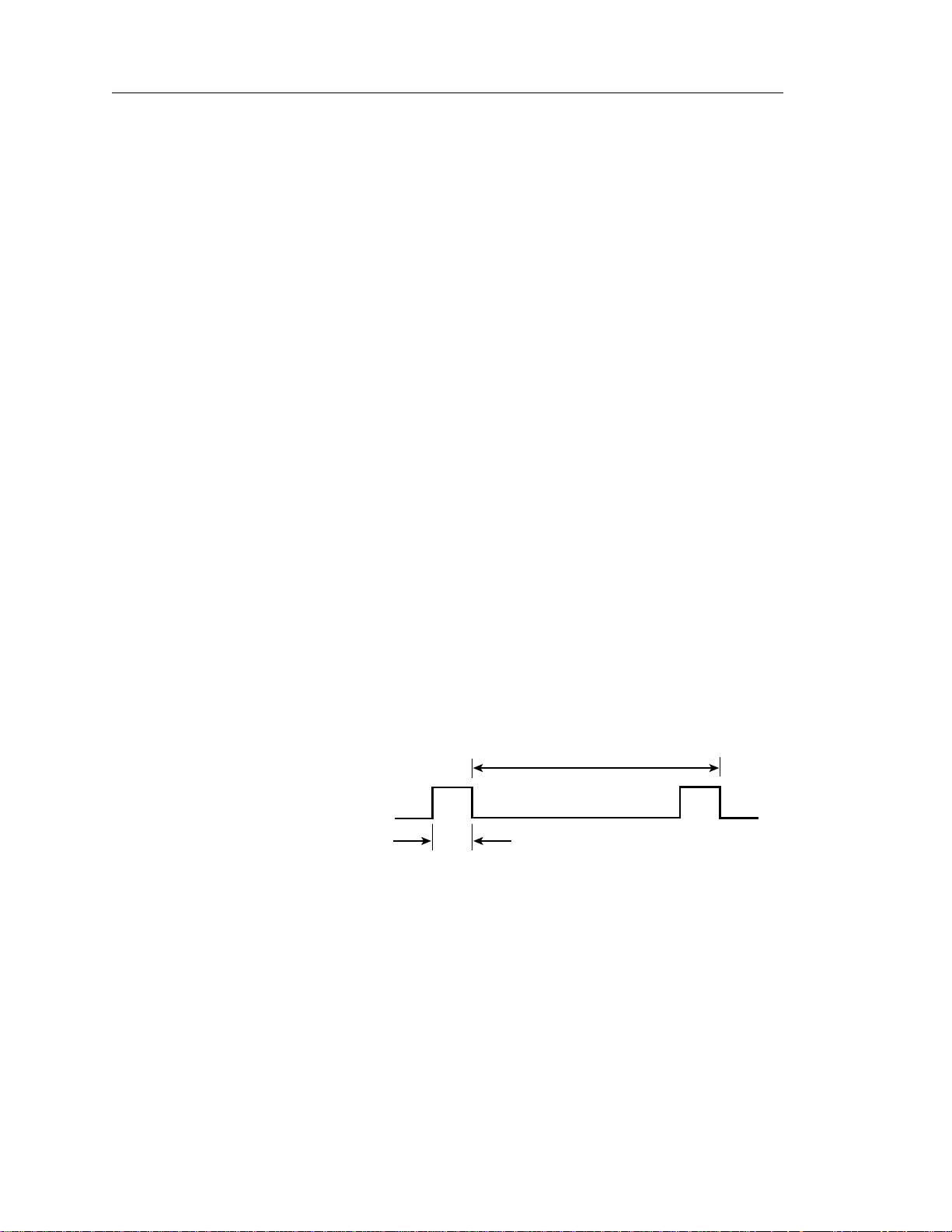
The Pike LSI on the master drive provides the reference signal (SSREF +).
The index signal generates a 1 20 Hz signal. The signal is normally false/
negated (nominal 0V) and makes a transition to the true/asserted
(nominal +5V) lev el to indicate the re fe ren ce p osi tio n du rin g th e r ev ol u-
tion period. The master and slave drives use the trailing (falling) edge
of the reference signal to phase-lock their spindles. A maximum of 10
seconds is allo wed for a slav e to synchroniz e with the refe rence signa l.
Figure 5 shows the characteristics of the reference signal.
T
1
SSREF +
Figure 5. Synchronized reference signal characteristics
0
1.0 µsec min.
1.37 µsec max.
T = 0.0083 seconds ± 1.0% max
± 20 microseconds phase error while synchronized
Page 29

ST15150N/ND/W/WD/WC/DC Product Manual, Rev. D 19
SCSI interface factors
The Rotational Position Locking (RPL) field in byte 17 (bits 0 and 1) of the
Rigid Disc Drive Geometry mode parameters page 04h is used for enabling
and disabling spindle synchronization mode (see the
Product Manual).
Attention to all initiators. The sense key is set to Unit Attention and the
additional sense code is set to Spindles Synchronized (5C01).
After reaching synchronization, if the target detects a change of synchronization and:
1. If the logical unit is not executing an I/O process for the initiator, then the
target creates a unit attention condition. The sense key is set to Unit
Attention and the additional sense code is set to Spindles Synchronized
(5C01) or Spindles Not Synchronized (5C02).
2. If the logical unit is executing an I/O process and no other error occurs,
then the target returns Check Condition status. The sense key is set to
Recovered Error if the target is able to complete the I/O process or to
Hardware Error if the target is unable to complete the I/O process. The
additional sense code is set to Spindles Synchronized (5C01) or Spindles
Not Synchronized (5C02).
You may operate the drive may with a rotational skew when synchronized.
The rotational skew is applied in the retarded direction (lagging the synchronized spindle master control). A rotational offset of up to 255/256 of a
revolution lagging may be selected. Select the amount of offset by using the
Mode Select command, Rigid Disc Drive Geometry page (page 04), byte 18
(see the
the numerator of a fractional multiplier that has 256 as the denominator. For
example, 40h selects 40h/FFh or 1/4 of a revolution lagging skew, 80h
selects 1/2 revolution lagging skew, etc. Since the drive supports all offset
values from 0 to 255, values sent by the initiator are not rounded off. The drive
translation of the digital offset values to physical rotational offsets results in
offset values whose phase error lies within the ± 20 microseconds phase
error with respect to the supplied 120 Hz reference signal.
SCSI-2 Interface Product Manual).
When the target achieves synchronization, it sends a Unit
The value in byte 18 (0–FFh) is
SCSI-2 Interface
The drive does not have the capability to adjust the rotational offset value
requested by the initiator to a physical offset in the drive that corresponds in
any way to sector boundaries or changes in ZBR zones. The initiator must
formulate these boundaries or changes, if required, to calculate the value of
offset it sends to the drive.
Page 30

20 ST15150N/ND/W/WD/WC/DC Product Manual, Rev. D
Page 31

ST15150N/ND/W/WD/WC/DC Product Manual, Rev. D 21
6.0 Reliability specifications
The following reliability specifications assume correct host and drive operational interface, including all interface timings, power supply voltages, and
environmental requirements.
Seek error rate Less than 10 errors in 108 seeks
Recoverable error rate Less than 10 errors in 1011 bits transferred
(using default settings)
Unrecovered data Less than 1 sector in 1014 bits transferred
Miscorrected data Less than 1 sector in 1021 bits transferred
MTBF 800,000 hours
Service life 5 years
Preventive maintenance None required
6.1 Error rates
The error rates stated in this manual assume the following:
• The drive is operated per th is manual using DC power as defined in
Section 7.2.
• The drive has been formatted with the SCSI format commands.
• Errors cau sed by media defec ts or host system failures are excluded
from error rate computations. Refer to Section 9.0, “Defect and error
management.”
6.1.1 Environmental interference
When evaluating systems operation under conditions of electromagnetic
interference (EMI), the performance of the drive within the system is
considered acceptab le if the drive does not g enerate an unrecoverable
condition.
An unrecoverable error or condition is defined as one that:
• is not detected and corrected by the drive itself;
• is not capable of being detected from the error or fault status provided
through the drive or SCSI interface; or
• is not capable of being recovered by normal drive or system recovery
procedures without operator intervention.
6.1.2 Write errors
Write errors can occur as a result of media defects, environmental interference, or component malfunction. Therefore, write errors are not predictable
as a function of the number of bits passed.
If an unrecoverable write error occurs because of a component malfunction
in the drive, the error is classified as a failure affecting MTBF. Unrecoverable
write errors are those that cannot be corrected within two attempts at writing
the record with a read verify after each attempt (excluding media defects).
Page 32

22 ST15150N/ND/W/WD/WC/DC Product Manual, Rev. D
6.1.3 Seek errors
A seek error is defined as a failure of the drive to position the heads at the
addressed track. There must be no more than one recoverable seek error in
107 physical seek operations. After detecting an initial seek error, the drive
automatically reseeks to the addressed track up to three times. If a reseek
is successful, the extended sense reports a seek positioning error (15h), no
seek complete error (02h), or track follow error (09h), and the sense key
reports a recovered error (1h). If all three reseeks fail, a seek positioning error
(15h) is reported with a medium (3h) or hardware error (4h) reported in the
sense key. This is an unrecoverable seek error. Unrecoverable seek errors
are classified as failures for MTBF calculations. Refer to Section 5.1.1.2 of
the
SCSI-2 Interface Product Manual
(part number 77738479).
6.2 Reliability and service
You can enhance the reliability of Barracuda 4 disc drives by ensuring that
the drive receives adequate cooling. This section provides recommended
air-flow information, temperature measurements, and other information that
may be used to enhance the service life of the drive.
6.2.1 Mean time between failures (MTBF)
The production disc drive achieves an MTBF of 800,000 hours when
operated in an average local disc drive ambient temperature of 95°F (35°C )
or less. Short-term excursions up to the specification limits (1 22°F, 50°C)
of the opera t ing en v iro nme nt wil l not affe ct MTBF performance.
The following expression defines MTBF:
MTBF =
Estimated power-on operating hours means the estimated total power-on
hours for all drives in service.
Drive failure means any stoppage or substandard performance caused by
drive malfunction.
Data is calculated on a rolling-average base for a minimum period of six
months.
6.2.2 Air flow
The rack, cabinet, or drawer environment for the Barracuda 4 drive must
provide cooling of the electronics and head and disc assembly (HDA). You
should confirm that adequate cooling is provided using the temperature
measurement guidelines described below.
Orient the drive or direct the air flow so that the least amount of air-flow
resistance is created while providing air flow to the electronics and HDA.
Also, choose the shortest possible path between the air inlet and exit to
minimize the travel length of air heated by the Barracuda 4 drive and other
heat sources within the rack, cabinet, or drawer environment.
Estimated power-on operating hours in the period
Number of drive failures in the period
Possible air-flow patterns are shown in Figure 6. Create the air-flow patterns
by using one or more fans, either forcing or drawing air as shown in the
illustrations. Other air-flow patterns are acceptable as long as the temperature measurement guidelines are met.
Page 33

ST15150N/ND/W/WD/WC/DC Product Manual, Rev. D 23
Above unit
Under unit
Note. Air flows in the direction shown (back to front)
or in reverse direction (front to back)
Above unit
Under unit
Note. Air flows in the direction shown or
in reverse direction (side to side)
Figure 6. Air flow (ST15150N shown)
Page 34

24 ST15150N/ND/W/WD/WC/DC Product Manual, Rev. D
To confirm that the required cooling for the Barracuda electronics and HDA
is provided, place the drive in its final mechanical configuration, perform
random write/read operations and, after the temperatures stabilize, measure
the case temperature of the components listed on the next several pages.
To obtain the maximum temperature for each of the reference components
listed, add 15°C to the MTBF case temperatures. Operation of the drive at
the maximum case temperature is intended for short time periods only.
Continuous operation at the elevated temperatures will reduce product
reliability.
Air-flow cooling
ST15150N drives
single-ended
MTBF
800k hours
Card Component Reference case temperature (°C)
AYHX Polar 1 48
AYHX Writer 2 64
AYHX CSAW 3 47
AYHX Pike 4 52
AYHX Driver 5 60
HDA housing Figure 13
The air-flow pattern with which the temperature guidelines above were
generated is shown in Figure 6. Local average air velocities were 0.61 msec
(120 lfpm) and inlet air temperature to the drive was 30°C (86°F), plus a 5°C
temperature rise in the test enclosure (35°C ambient local to the drive).
The maximum allowable HDA case temperature is 60°C.
2
1
5
43
Figure 7. AYHX temperature measurement locations
Page 35

ST15150N/ND/W/WD/WC/DC Product Manual, Rev. D 25
Air-flow cooling
ST15150ND drives
differential
MTBF
800k hours
Card Component Reference case temperature (°C)
LYHX Polar 1 48
LYHX Writer 2 64
LYHX CSAW 3 47
LYHX Pike 4 52
LYHX Driver 5 60
HDA housing Figure 13
The air-flow pattern with which the temperature guidelines above were
generated is shown in Figure 6. Local average air velocities were 0.61
msec (120 lfpm) and inlet air temperature to the drive was 30°C (86°F),
plus a 5°C temperature rise in the test enclosure (35°C ambient local to
the drive).
The maximum allowable HDA case temperature is 60°C.
2
1
43
Figure 8. LYHX temperature measurement locations
5
Page 36

26 ST15150N/ND/W/WD/WC/DC Product Manual, Rev. D
Air-flow cooling
ST15150W drives
single-ended wide
MTBF
800k hours
Card Component Reference case temperature (°C)
MYHX Polar 1 48
MYHX Writer 2 64
MYHX CSAW 3 47
MYHX Pike 4 52
MYHX Driver 5 60
HDA housing Figure 13
The air-flow pattern with which the temperature guidelines above were
generated is shown in Figure 6. Local average air velocities were 0.61 msec
(120 lfpm) and inlet air temperature to the drive was 30°C (86°F), plus a 5°C
temperature rise in the test enclosure (35°C ambient local to the drive).
The maximum allowable HDA case temperature is 60°C.
2
1
43
Figure 9. MYHX temperature measurement locations
5
Page 37

ST15150N/ND/W/WD/WC/DC Product Manual, Rev. D 27
Air-flow cooling
ST15150WD drives
differential wide
MTBF
800k hours
Card Component Reference case temperature (°C)
NYHX Polar 1 48
NYHX Writer 2 64
NYHX CSAW 3 47
NYHX Pike 4 52
NYHX Driver 5 60
HDA housing Figure 13
The air-flow pattern with which the temperature guidelines above were
generated is shown in Figure 6. Local average air velocities were 0.61 msec
(120 lfpm) and inlet air temperature to the drive was 30°C (86°F), plus a 5°C
temperature rise in the test enclosure (35°C ambient local to the drive).
The maximum allowable HDA case temperature is 60°C.
2
14
Figure 10. NYHX temperature measurement locations
3
5
Page 38

28 ST15150N/ND/W/WD/WC/DC Product Manual, Rev. D
Air-flow cooling
ST15150WC drives
single-ended wide (SCA)
MTBF
800k hours
Card Component Reference case temperature (°C)
JYHX Polar 1 48
JYHX Writer 2 64
JYHX CSAW 3 47
JYHX Pike 4 52
JYHX Driver 5 60
HDA housing Figure 13
The air-flow pattern with which the temperature guidelines above were
generated is shown in Figure 6. Local average air velocities were 0.61 msec
(120 lfpm) and inlet air temperature to the drive was 30°C (86°F), plus a 5°C
temperature rise in the test enclosure (35°C ambient local to the drive).
The maximum allowable HDA case temperature is 60°C.
2
1
3
Figure 11. JYHX temperature measurement locations
4
5
Page 39

ST15150N/ND/W/WD/WC/DC Product Manual, Rev. D 29
Air-flow cooling
ST15150DC drives
differential wide (SCA)
MTBF
800k hours
Card Component Reference case temperature (°C)
KYHX Polar 1 48
KYHX Writer 2 64
KYHX CSAW 3 47
KYHX Pike 4 52
KYHX Driver 5 60
HDA housing Figure 13
The air-flow pattern with which the temperature guidelines above were
generated is shown in Figure 6. Local average air velocities were 0.61 msec
(120 lfpm) and inlet air temperature to the drive was 30°C (86°F), plus a 5°C
temperature rise in the test enclosure (35°C ambient local to the drive).
The maximum allowable HDA case temperature is 60°C.
2
1
3
Figure 12. KYHX temperature measurement locations
4
5
Page 40

30 ST15150N/ND/W/WD/WC/DC Product Manual, Rev. D
Measure the HDA housing temperature at the location specified in Figure 13.
1.00
.50
Figure 13. Temperature measurement location
6.2.3 Preventive maintenance
No preventive maintenance is required.
6.2.4 Service life
The drive has a useful service life of five years. Depot repair or replacement
of major parts is permitted during this period.
6.2.5 Service philosophy
Special equipment is required to repair the drive HDA. To achieve the 5-year
service life, repairs must be performed only at a properly equipped and
staffed service and repair facility. Troubleshooting and repair of PCBs in the
field is not recommended because of the extensive diagnostic equipment
required for effective servicing. Also, there are no spare parts available for
this drive. The drive warranty is voided if the HDA is opened.
6.2.6 Installation
The drive is designed, manufactured, and tested with a “plug in and play”
installation philosophy. This philosophy minimizes the requirements for
highly trained personnel to integrate the drive into the OEM’s system,
whether in a factory or field environment. Refer to the
Guide
(83328870) for installation instructions.
The drive has been low-level formatted at the factory and does not need to
be reformatted.
Barracuda 4 Installation
6.2.7 Service tools
No special tools are required for site installation or recommended for site
maintenance. Refer to Section 6.2.3. The depot repair philosophy of the drive
precludes the necessity for special tools. Field repair of the drive is not
practical because users cannot purchase individual parts for the drive.
Page 41

ST15150N/ND/W/WD/WC/DC Product Manual, Rev. D 31
6.2.8 Hot plugging Barracuda 4 disc drives
Caution. Hot-plug drives are not designed for simultaneous power discon-
nection and physical removal.
During power-up and power-down periods, the hot SCSI connect/disconnect
capability does not produce glitches or any corruptions on an active SCSI
bus.
Notes. It is the responsibility of the systems integrator to assure that no
temperature, energy, or voltage hazard is presented during the hot
connect/disconnect operation.
The SCSI bus termination must be external to the drive being
inserted or removed.
Connector J01 must be configured so there is no connection
between the drive and the TRMPWR signal on the SCSI bus.
Removing all term power jumpers accomplishes this.
When installing the drive on a carrier or tray, discharge the static
electricity from the carrier or tray prior to inserting it into the system.
Procedure:
1. Ensure that all I/O processes to the drive you are insertinng or removing
have ceased (for ST15150WC and ST15150DC drives, all I/O processes
on the entire SCSI bus must be inactive). All other devices on the same
SCSI bus must have receivers that conform to the SCSI-3 standard.
2. When inserting a drive, attach the power connector to the drive first, at
least 1 millisecond before attaching the I/O connector to the bus. Maintain
the ground connections during and after connecting the drive to the SCSI
bus.
When removing a drive, disconnect the I/O connector at least 1 millisecond before removing the power connector from the drive, and wait for the
spindle to stop. The disc drive motor should come to a complete stop prior
to changing the plane of operation to ensure data integrity.
Notes. Do not remove or add terminator power or resistance to the SCSI
bus while hot plugging a disc drive.
The power to the electronics and mechanics of the drive may be
simultaneously switched with the bus contacts if the power distribution system is able to maintain adequate power stability to other
devices during the transition and the grounding requirements are
met by following the instructions provided in step 2.
Page 42

32 ST15150N/ND/W/WD/WC/DC Product Manual, Rev. D
Page 43

ST15150N/ND/W/WD/WC/DC Product Manual, Rev. D 33
7.0 Physical/electrical specifications
This section provides information relating to the physical and electrical
characteristics of Barracuda 4 drives.
7.1 AC power requirements
None.
7.2 DC power requirements
The voltage and current requirements for a single drive ar e shown below.
Values indicat ed apply at the drive ’s pow er connector.
Table 1. DC power requirements for ST15150N/ND/W/WD/WC/DC
drives
N/W/WC ND/WD/DC
[11]
±±
±±
±12V
±5V
±±
±±
Voltage regulation
[5]
Notes
±±
±5%
±±
±±
±5%
±±
[2]
Amps
Max operating current DC
3σ [1] 0.95 0.95 1.19 0.95
Average idle current DC X [1] [12] 0.63 0.78 0.69 0.78
Max start current
(peak) DC 3σ [3] [6] 0.93 2.18 1.02 2.18
(peak) AC 3σ [3] — 3.10 — 3.10
Delay motor start (max) DC
3σ [1] [4] 0.95 0.10 0.94 0.10
Peak operating current
Typical DC X [1] [10] 0.92 0.86 1.13 0.86
Maximum DC
Maximum (peak) AC
3σ [1] 0.95 0.95 1.19 0.95
3σ 1.08 1.8 1.95 1.8
Track following at
OD DC X [1] 0.91 0.80 0.97 0.80
ID DC X [1] 0.89 0.86 0.96 0.86
Read track
OD DC
AC
3σ [1] [14] 0.97 0.89 1.39 0.89
3σ 1.05 1.10 1.96 1.10
Seeking
Typical DC X [1] [13] 0.91 1.10 0.98 1.10
Maximum DC
Maximum (peak) AC
3σ [1] 0.92 1.20 1.02 1.20
3σ 1.05 1.87 1.7 1.87
±±
±5V
±±
±±
±5%
±±
[11]
±±
±12V
±±
±±
±5%
±±
[2]
Notes:
[1] Measured with average reading DC ammeter. Instantaneous +12V current
peaks will exceed these values.
[2] A –10% tolerance is permissible during initial start of spindle and must
return to ±5% before 7,200 RPM is reached. The ±5% must be maintained
after the drive signifies that its power-up sequence has been completed
and that the drive is able to accept selection by the host initiator.
[3] See Figure 14.
Page 44

34 ST15150N/ND/W/WD/WC/DC Product Manual, Rev. D
[4] This condition occurs when the Motor Start Option is enabled and the drive
has not yet received a Start Motor command.
[5] See Section 7.2.1 “Conducted noise immunity.” Specified voltage toler-
ance is inclusive of ripple, noise, and transient response.
[6] At power-up, the motor current regulator limits the 12V current to an
average value of less than 2.18A, although instantaneous peaks may
exceed this value. These peaks should measure 5 msec duration or less.
[7] Minimum current loading for each supply voltage is not less than 3% of the
maximum operating current shown.
[8] The +5V and +12V supplies employ separate ground returns.
No terminator power. See Section 11.7.3.4.
[9] Where power is provided to multiple drives from a common supply, careful
consideration for individual drive power requirements should be noted.
Where multiple units are powered on simultaneously, the peak starting
current must be available to each device.
[10] Operating condition is defined as a third stroke seek at OD and read one
track. A command is issued every 0.063 sec for N/W/WD/WC/DC drives
(0.075 sec for ND drives).
[11] No terminator power. See 11.7.3.4.
[12] All power saving features enabled; ASA II code only.
[13] Seeking is defined as a third stroke seek at OD. A command is issued every
20 msec.
[14] Read track is defined as repeat reads of track 15 with a 60% duty cycle for
N/ND drives, 74% duty cycle for W drives, 32% duty cycle for WC drives,
44% duty cycle for WD drives, and 50% duty cycle for DC drives.
7.2.1 Conducted noise immunity
Noise is specified as a periodic and random distribution of frequencies
covering a band from DC to 10 MHz. Maximum allowed noise values given
below are peak-to-peak measurements and apply at the drive’s power
connector.
0 to 100 kHZ 100 kHz to 10 MHz
++
+5V 150 mV 100 mV
++
++
+12V 150 mV 100 mV
++
7.2.2 Power sequencing
The drive does not require power sequencing. The drive protects against
inadvertent writing during power-up and down. Daisy-chain operation requires that power be maintained on the terminated device to ensure proper
termination of the peripheral I/O cables.
To automatically delay motor start based on the target ID (SCSI ID), select
the Delay Motor Start option and deselect the Enable Motor Start option on
the J4 connector. See Section 10.1 for pin selection information.
To delay the motor until the drive receives a Start Unit command, select the
Enable Motor Start option on the J4 connector.
Page 45

ST15150N/ND/W/WD/WC/DC Product Manual, Rev. D 35
7.2.3 12V current profile
Figure 14 identifies the drive’s +12V current profile. The current during the
various times is as shown.
3.0
2.85
2.5
2.0
1.9
1.5
+12V CURRENT (A)
1.0
0.5
T0
0.0
Peak AC
Nominal (average) curve
Minimum AC
T2
T1
0 5 10 15 20 25 30
Figure 14. Typical Barracuda 4 drive
T3
T5
T4
TIME (S)
++
+12V current profile
++
T6
T7
T0 Power is applied to the drive.
T1 Controller self-tests are performed.
T2 Spindle begins to accelerate under current limiting after performing
internal diagnostics. See Note 1 of Table 1.
T3 The spindle is up to speed and the head-arm restraint is unlocked.
T4 Heads move from the landing zone to the data area.
T5 The adaptive calibration sequence is performed.
T6 Thermal calibration.
T7 Calibration is complete and the drive is ready for reading and writing.
Note. All times and currents are typical. See Table 1 for maximum current
requirements.
Page 46

36 ST15150N/ND/W/WD/WC/DC Product Manual, Rev. D
7.3 Heat/power dissipation
The heat and power dissipation values for your drive are listed below.
ST15150N/W/WC ST15150ND/WD/DC
Typical seek and read 15W 16W
power dissipation of DC power (51 BTUs/hr) (54 BTUs/hr)
average at nominal voltages
Typical power dissipation 12W 12W
under idle conditions (41 BTUs/hr) (41 BTUs/hr)
7.4 Environmental limits
Temperature and humidity must not cause condensation within the drive.
Altitude and atmospheric pressure specifications are referenced to a standard day at 58.7°F (14.8°C). Maximum wet bulb temperature is 82°F (28°C).
7.4.1 Temperature
a. Operating
The MTBF specification for the drive is based on operating at a local
ambient temperature of 95°F (35°C). Occasional excursions to drive
ambient temperatures of 122°F (50°C) may occur without impact to
specified MTBF. The enclosure for the drive should be designed such that
the temperatures at the locations specified in Figures 7, 8, 9, 10, 11, and
12 are not exceeded. Air flow may be needed to achieve these temperatures. Continual or sustained operation at case temperatures above
these values may degrade MTBF.
The drive meets all specifications within a 41° to 122°F (5° to 50°C) drive
ambient temperature range with a maximum gradient of 36°F (20°C) per
hour.
b. Non-operating
Non-operating temperature should remain between –40° to 158°F (–40° to
70°C) package ambient with a maximum gradient of 36°F (20°C) per
hour. This assumes that the drive is packaged in the shipping container
designed by Seagate.
7.4.2 Relative humidity
The values below assume that no condensation on the drive occurs.
a. Operating
5% to 95% relative humidity with a maximum gradient of 10% per hour
b. Non-operating
5% to 95% relative humidity
Page 47

ST15150N/ND/W/WD/WC/DC Product Manual, Rev. D 37
7.4.3 Effective altitude (sea level)
a. Operating
–1,000 to +10,000 feet (–305 to +3,048 meters)
b. Non-operating
–1,000 to +40,000 feet (–305 to +12,210 meters)
7.4.4 Shock and vibration
Shock and vibration limits are measured directly on the drive chassis.
Ensure th at you use an en closure t hat buffe rs and rest ricts t he drive’s
movements to meet the shock and vibration requirements listed below.
The limits of shock and vibration defined within this manual are specified
with the dr i ve mounted in one of the two met h ods shown in Figure 18.
7.4.4.1 Shock
a. Operating in a normal environment
The drive as installed for normal operation operates error free while
subjected to intermittent shock not exceeding:
2.0 Gs at a maximum duration of 11 msec (half-sinewave)
Shock may be applied in the X, Y, or Z axis.
b. Operating in an abnormal environment
The drive as installed for normal operation does not incur physical
damage while subjected to intermittent shock not exceeding:
10 Gs at a maximum duration of 11 msec (half-sinewave)
Shock occurring at abnormal levels may degrade operating performance
during the abnormal shock period. Specified operating performance
continues when normal operating shock levels resume.
Shock may be applied in the X, Y, or Z axis. Do not apply shock more than
two times per second.
c. Non-operating
The limits of non-operating shock apply to all conditions of handling and
transportation. This includes both isolated drives and integrated drives.
The drive does not cause drive damage or performance degradation
while subjected to non-repetitive shock not exceeding:
50 Gs at a maximum duration of 11 msec (half-sinewave)
Shock may be applied in the X, Y, or Z axis.
d. Packaged
The drive as packaged by Seagate for general freight shipment withstands a drop test against a concrete floor or equivalent with specifica tions not exceeding:
20 pounds (8.95 kg) for pack’s gross weight
48 inches (1,070 mm) for distance dropped
Drop test applies to a single or multiple drive pack.
Page 48

38 ST15150N/ND/W/WD/WC/DC Product Manual, Rev. D
7.4.4.2 Vibration
a. Operating in a normal environment
The drive as installed for normal operation operates error free while
subjected to continuous vibration not exceeding:
5-400 Hz @ 0.5 G
Vibration may be applied in the X, Y, or Z axis.
b. Operating in an abnormal environment
Equipment as installed for normal operation does not incur physical
damage while subjected to periodic vibration not exceeding:
15 minutes of duration at major resonant frequency
5-400 Hz @ 0.75 G
Vibration occurring at these levels may degrade operating performance
during the abnormal vibration period. Specified operating performance
continues when normal operating vibration levels are resumed—this
assumes system recovery routines are available.
Abnormal vibration may be applied in the X, Y or Z axis.
c. Non-operating
The limits of non-operating vibration apply to all conditions of handling
and transportation. This includes both isolated drives and integrated
drives.
The drive does not incur physical damage or degraded performance as
a result of continuous vibration not exceeding:
5-22 Hz @ 0.040 inches (1.02 mm) displacement
22-400 Hz @ 2.00 Gs
Vibration may be applied in the X, Y, or Z axis.
7.4.5 Air cleanliness
The drive is designed to operate in a typical office environment with minimal
environmental control.
7.4.6 Acoustics
Sound power during idle mode (when the drive is not seeking, reading, or
writing) is 4.7 bels typical when measured to ISO 7779 specifications.
7.5 Electromagnetic compatibility
As a component assembly, the drive is not required to meet any
susceptibility performance requirements. The system integrator is
responsible for performing tests to ensure that equipment operating in
the same system as the drive does not adversely affect t he performance of the drive. See Section 7.2 “DC power requirements.”
Page 49

ST15150N/ND/W/WD/WC/DC Product Manual, Rev. D 39
7.6 Mechanical specifications
The following nominal dimensions do not include the decorative front-panel
accessory. Refer to Figure 15 for detailed mounting configuration dimensions for ST15150N/ND drives. Refer to Figure 16 for detailed mounting
configuration dimensions for ST15150W/WD drives. Refer to Figure 17 for
detailed mounting configuration dimensions for ST15150WC/DC drives. A
minimum clearance of 0.050 inches must be maintained from the PWA side
of the drive.
Height 1.63 in 41.4 mm
Width 4.00 in 101.6 mm
Depth 5.97 in 151.6 mm
Weight 2.3 lb 1.04 kg
T
U
[1]
R
F
[2]
G
J
[4]
ED
K
L
B
H
S
0.050" minimum clearance
A
M
Notes:
Mounting holes two on each
[1]
side, 6-32 UNC. Max screw
length into side of drive is
0.15 in. (3.81 mm).
Mounting holes four on
[2]
bottom, 6-32 UNC. Max
screw length into bottom of
drive is 0.15 in. (3.81 mm).
Power and interface
[3]
connections.
Decorative front panel.
[4]
A
B
C
D
E
F
G
H
J
K
L
M
N
P
R
S
T
U
[3]
P
N
Inches Millimeters
0.010
145.80
±
5.740
0.010
101.60
±
4.000
0.034
0.020
0.005
0.005
0.010
0.010
0.010
0.020
0.010
0.020
0.015
0.015
0.010
0.010
0.010
101.60
137.69
141.35
151.41
104.14
41.14
15.68
44.45
95.25
60.20
43.82
1.620
.615
4.000
.250
1.750
3.750
2.370
5.420
5.565
5.965
.195
.360
1.725
4.100
.190
0.015
±
±
±
±
±
±
±
±
±
±
±
±
±
±
±
max
C
6.35
4.95
9.14
4.83
0.381
±
±
±
±
±
±
±
±
±
±
±
±
±
±
±
±
±
max
.25
.25
.86
.50
.13
.13
.25
.25
.25
.50
.25
.50
.38
.38
.25
.25
.25
Figure 15. Mounting configuration dimensions for N/ND drives
Page 50

40 ST15150N/ND/W/WD/WC/DC Product Manual, Rev. D
T
U
[1]
R
F
[2]
G
J
[4]
ED
K
L
B
H
S
0.050" minimum clearance
A
M
Notes:
[1]
V
[2]
drive is 0.15 in. (3.81 mm).
Power and interface
[3]
connections.
Decorative front panel.
[4]
A
B
C
D
E
F
G
H
J
K
L
M
N
P
R
S
T
U
V
C
[3]
P
N
Mounting holes two on each
side, 6-32 UNC. Max screw
length into side of drive is
0.15 in. (3.81 mm).
Mounting holes four on bottom,
6-32 UNC. Max
screw length into bottom of
Inches Millimeters
0.010
±
5.740
0.010
±
4.000
0.034
±
1.620
0.020
±
.615
0.005
±
4.000
0.005
±
.250
0.010
±
1.750
0.010
±
3.750
0.010
±
2.370
0.020
±
5.420
0.010
±
5.565
0.035
±
5.968
0.015
±
.190
0.015
±
.347
0.010
±
1.725
0.010
±
4.100
0.010
±
.190
0.015
0.265
max
±
0.020
145.80
101.60
41.14
15.68
101.60
6.35
44.45
95.25
60.20
137.69
141.35
151.58
4.826
8.81
43.82
104.14
4.83
0.381
6.73
±
±
±
±
±
±
±
±
±
±
±
±
±
±
±
±
±
max
±
.25
.25
.86
.50
.13
.13
.25
.25
.25
.50
.25
.90
.38
.38
.25
.25
.25
.50
Figure 16. Mounting configuration dimensions for W/WD drives
Page 51

ST15150N/ND/W/WD/WC/DC Product Manual, Rev. D 41
T
U
[1]
R
F
[2]
G
J
[4]
ED
K
L
[5]
B
H
S
0.050" minimum clearance
A
M
Notes:
[1]
Mounting holes two on each side,
6-32 UNC. Max screw length into
side of drive is 0.15 in. (3.81 mm).
[2]
Mounting holes four on bottom,
6-32 UNC. Max screw length into
bottom of drive is 0.15 in. (3.81 mm).
[3]
Power and interface connections.
[4]
Decorative front panel.
[5]
Connector is centered within “B”
dimension ± 0.02 in.
A
B
C
D
E
F
G
H
J
K
L
M
N
P
R
S
T
U
V
[3]
P
N
Inches Millimeters
0.010
145.80
±
5.740
0.010
101.60
±
4.000
0.034
0.020
0.005
0.005
0.010
0.010
0.010
0.020
0.010
0.035
0.015
0.015
0.010
0.010
0.010
0.020
41.02
15.75
101.60
44.45
95.25
60.07
137.52
141.22
151.58
4.597
43.82
104.14
1.615
.620
4.000
.250
1.750
3.750
2.365
5.420
5.565
5.968
.181
.323
1.725
4.100
.190
0.015
0.265
±
±
±
±
±
±
±
±
±
±
±
±
±
±
±
max
±
C
6.35
8.20
4.83
0.381
8.50
±
±
±
±
±
±
±
±
±
±
±
±
±
±
±
±
±
max
±
.25
.25
.86
.50
.13
.13
.25
.25
.25
.50
.25
.90
.38
.38
.25
.25
.25
.50
Figure 17. Mounting configuration dimensions for WC/DC drives
Page 52

42 ST15150N/ND/W/WD/WC/DC Product Manual, Rev. D
7.6.1 Drive orientation
The balanced rotary arm actuator design of the drive allows it to be mounted
in any orientation. All drive performance evaluations, however, have been
done with the drive in horizontal (discs level) and vertical (drive on its side)
orientations, which are the two preferred mounting orientations. To ensure
proper performance, rigidly mount the drive to the host system in accordance
with the requirements in this product manual.
Figure 18. Recommended mounting
7.6.2 Cooling
Ensure that the enclosure you use provides adequate cooling so that the
ambient temperature immediately surrounding the drive does not exceed
temperat ure condi tions specifie d in Section 7.4. 1 . En sure that you pro vide
adequate air circulation around the printed circuit boards (PCBs) to meet
the requirements of Section 7.4. 1.
Page 53

ST15150N/ND/W/WD/WC/DC Product Manual, Rev. D 43
8.0 Media characteristics
This section provides information regarding the media used in Barracuda 4
disc drives.
8.1 Media description
The media used on the drive has a diameter of approximately 95 mm (3.7
inches). The aluminum substrate is coated with a thin-film magnetic material,
which has a proprietary protective layer for improved durability and environmental protection.
Page 54

44 ST15150N/ND/W/WD/WC/DC Product Manual, Rev. D
Page 55

ST15150N/ND/W/WD/WC/DC Product Manual, Rev. D 45
9.0 Defect and error management
The drive, as delivered, complies with this
rates and specified storage capacities are not dependent on using defect
management routines by the host (initiator).
Defect and error management in the SCSI system involves the drive internal
defect/error management and SCSI system error considerations (errors in
communications between the initiator and the drive). Tools for designing a
defect/error management plan are briefly outlined in this section. References
to other sections are provided when necessary.
9.1 Drive internal defects/errors
Identified defects are recorded on the drive’s defects list (referred to as the
primary or ETF defect list). These known defects are reallocated during the
initial drive format operation at the factory. (See Format Unit command
Section 5.2.1.2 in the
77738479.) Data correction by ECC recovers data from additional flaws if
they occur.
Details of the SCSI commands supported by the drive are described in the
SCSI-2 Interface Product Manual.
Recovery philosophy is presented in Section 6 of the
Product Manual.
SCSI-2 Interface Product Manual,
Also, more information on the drive Error
Product Manual.
SCSI-2 Interface
The read error
part number
Page 56

46 ST15150N/ND/W/WD/WC/DC Product Manual, Rev. D
Page 57

ST15150N/ND/W/WD/WC/DC Product Manual, Rev. D 47
SCSI I/O
Connector
DC Power Connector
J4
J01
Pin 1
10.0 Drive configuration
This section describes how to configure Barracuda 4 drives. Option headers
may be used to customize many functions of the drives for your particular
system. You can also synchronize the spindles of two or more ST15150N/
ND/W/WD drives using circuit-board connectors. ST15150WC/DC drives
use J4 pin 6 for synchronizing spindles.
10.1 Option headers
The headers described in this section enable you to configure the drive to
meet specific functionality requirements.
10.1.1 ST15150N/ND drives option headers
Figure 19. ST15150N/ND drives option header locations
ST15150N and ST15150W models can be terminated using option headers.
ST15150ND, ST15150WD, ST15150WC, and ST15150DC models must be
terminated externally. See Section 10.4.
Page 58

48 ST15150N/ND/W/WD/WC/DC Product Manual, Rev. D
Figure 20 illustrates ST15150N/ND drives option select jumper connectors.
SCSI
SSREF
Connector
Power
Connector
ST15150N
Pin 1
J01
ST15150ND
J01
or
Pin 2
Pin 1
Pin 2
J4
J01
Pin 1
J01
ST15150ND
Pin 1
Pin 2
J4
SCSI ID = 0 (default)
SCSI ID = 1
SCSI ID = 2
SCSI ID = 3
SCSI ID = 4
SCSI ID = 5
SCSI ID = 6
SCSI ID = 7
Reserved.
Parity Disable
Enable Motor Start
Delay Motor Start
Write Protect
Remote LED Connector
Reserved
Spindle Sync Cable Connector
Term. power from drive.
Term. power from SCSI bus.
Term. power to SCSI bus.
Term. power to SCSI bus and drive.
Enable drive terminator.
Disable drive terminator.
Pin 3
J01
ST15150N
Pin 1
Negative
(cathode)
Positive
(anode)
Pin 1
Pin 2
Term. power to SCSI bus.
Host adapter or other device provides
term. power to external terminator.
Figure 20. ST15150N/ND drives option select jumper connectors
Page 59

ST15150N/ND/W/WD/WC/DC Product Manual, Rev. D 49
Block Pins Function
ST15150N J01 1 & 2 Terminator enable.
J01 option jumpers 3 & 4 Terminator power to the SCSI bus.
5 & 6 Terminator power from the SCSI bus.
3 & 4 and Terminator power to the SCSI bus and drive.
5 & 6
4 & 6 Terminator power from the drive.
ST15150ND J01 1 & 3 Terminator power to the SCSI bus.
J01 option jumpers — Host adapter or other device on the SCSI bus provides
terminator power to the external terminator (no jumper on
any of the J01 pins).
ST15150N/ND J4 1 & 2 Spindle sync cable connector.
J4 option jumpers Pin 1 is the SSREF+ or reference index signal.
Pin 2 is Gnd.
3 & 4 Reserved. Default is no jumper.
5 & 6 Remote LED connector. Pin 5 is cathode (neg). Pin 6 is
anode (pos). Pin 6 is current limited through a 1K ohm,
1/10W resistor.
7 & 8 Write Protect option. Jumper installed write protects the
entire disc drive. Default is no jumper.
9 & 10 Delay Motor Start option. Jumper installed waits for 10
seconds for each target ID number before starting the
spindle motor automatically. Default is no jumper.
Example:
If target ID is equal to three (3)
3 x 10 = 30
Target spindle motor starts
in thirty (30) seconds.
11 & 12 Enable Motor Start option. Jumper installed causes the
target to wait for the Start Unit command from the SCSI
host. No jumper installed causes the unit to look at the
Delay Motor Start jumper. Default is no jumper.
13 & 14 Parity Disable option. Jumper installed causes parity
checking and error reporting to be disabled. Default is no
jumper.
15 & 16 Reserved. Default is no jumper.
17 & 18* SCSI ID selector 0
19 & 20* SCSI ID selector 1
21 & 22* SCSI ID selector 2
* See Figure 20 to set the SCSI ID on ST15150N/ND drives
Page 60

50 ST15150N/ND/W/WD/WC/DC Product Manual, Rev. D
SCSI I/O
Connector
DC Power
Connector
J4
J01
Pin 1
J5
10.1.2 ST15150W/WD drives option headers
Figure 21. ST15150W/WD drives option header locations
Page 61

ST15150N/ND/W/WD/WC/DC Product Manual, Rev. D 51
Figure 22 illustrates ST15150W/WD drives option select jumper connectors.
SCSI
Connector
J5
Power
Connector
Pin 1
Pin 1
Pin 1
Pin 1
Pin 1
J4
J01
SCSI ID = 0 (default)
SCSI ID = 1
SCSI ID = 2
SCSI ID = 3
SCSI ID = 4
SCSI ID = 5
SCSI ID = 6
SCSI ID = 7
SCSI ID = 8
SCSI ID = 9
SCSI ID = 10
SCSI ID = 11
SCSI ID = 12
SCSI ID = 13
SCSI ID = 14
SCSI ID = 15
Remote LED Connector
Spindle Sync
Cable Connector
SSREF
J5
Pin 1
Negative
(cathode)
Positive
(anode)
Pin 3
J01
Enable Drive Terminator*
Reserved
Parity Disable
Enable Motor Start
Delay Motor Start
Write Protect
J4
Pin 1
Term. power from drive.
*
Term. power from SCSI bus.
*
Term. power to SCSI bus.
Term. power to SCSI bus and drive.
*
Host adapter or other device provides
term. power to external terminator.
* Valid for single-ended drives only.
Figure 22. ST15150W/WD drives option select jumper connectors
Pin 1
Pin 2
Page 62

52 ST15150N/ND/W/WD/WC/DC Product Manual, Rev. D
Block Pins Function
J01 1 & 2* Terminator power supplied from the drive.
2 & 4* Terminator power supplied from the SCSI bus.
1 & 3 Terminator power supplied to the SCSI bus.
1 & 3 and Terminator power supplied to the SCSI bus and drive.
2 & 4*
— Host adapter or other device on the SCSI bus provides
terminator power to the external terminator (no jumper on
any of the J01 pins).
J4 1 & 2 Write Protect option. Jumper installed write protects the
entire disc drive. Default is no jumper.
3 & 4 Delay Motor Start option. Jumper installed waits for 10
seconds for each target ID number plus a maximum
power-up delay of 3 seconds before starting the spindle
motor automatically. Default is no jumper.
Example:
If target ID is equal to three (3)
(3 × 10) + 3 = 33
Target spindle motor starts
in 33 seconds.
5 & 6 Enable Motor Start option. Jumper installed causes the
target to wait for the Start Unit command from the SCSI
host. No jumper installed causes the unit to look at the
Delay Motor Start jumper. Default is no jumper.
7 & 8 Parity Disable option. Jumper installed causes parity
checking and error reporting to be disabled. Default is no
jumper.
9 & 1 0 Reserved. Default is no jumper.
11 & 12* Enable ST15150W Drive Terminator. Jumper installed
enables the drive terminator on ST15150W drives. Jumper
removed disables the drive terminator. Default is no
jumper.
13 & 14 Reserved. Default is no jumper.
J5 1 & 2** SCSI ID selector 0
3 & 4** SCSI ID selector 1
5 & 6** SCSI ID selector 2
7 & 8** SCSI ID selector 3
9 & 10 Remote LED connector. Pin 9 is cathode (neg). Pin 10 is
anode (pos). Pin 10 is current limited through a 1K ohm,
1/10W resistor.
11 & 12 Spindle sync cable connector. Pin 11 is the SSREF+ or
reference index signal. Pin 12 is Ground.
* Valid for single-ended (ST15150W) drives only.
**See Figure 22 to set the SCSI ID.
Page 63

ST15150N/ND/W/WD/WC/DC Product Manual, Rev. D 53
10.1.3 ST15150WC/DC drives option headers
J6
Figure 23. ST15150WC/DC drives option header locations
J4
Figure 24 illustrates ST15150WC/DC drives option select jumper connectors.
J6
Pin 1
J4
Figure 24. ST15150WC/DC drives option select connectors
Page 64

54 ST15150N/ND/W/WD/WC/DC Product Manual, Rev. D
Block Pin Function
J04 1 ID0
2 Fault
3 ID1
4 Vendor unique
5 ID2
6 Spindle sync
7 ID3
8 Activity LED
9 No connection
10 +5V
11 Reserved
12 Reserved
13 Reserved
14 Reserved
15 Ground
16 Write protect
17 Reserved
18 Reserved
19 Parity enable
20 Ground
21 Reserved
22 Reserved
Page 65

ST15150N/ND/W/WD/WC/DC Product Manual, Rev. D 55
Driver Receiver
2.21K Ohm
SSREF +
GND
Main PWA
J4 - 1 (N/ND Drives)
J5 - 11 (W/WD Drives)
+5V
J4 - 2 (N/ND Drives)
J5 - 12 (W/WD Drives)
Open
Collector
10.2 Synchronized spindles interface
The synchronized spindles interface (SSI) allows several drives operating
from the same host to operate their spindles at a synchronized rotational rate.
The system operation is described in Section 5.7.
10.2.1 Electrical description
The electrical interface consists of one digital TTL reference index signal and
ground. The reference index signal (SSREF+) is an output if the drive is
configured as a master and is an input otherwise. The reference index signal
is connected from drive to drive in a daisy-chain fashion as shown in Figure 4.
10.2.1.1 Drivers and receivers
Figure 25 shows a diagram of the driver/receiver circuit. The driver circuits
have the following electrical specifications:
Negated (false) 0.V to +0.4V @ I = –24 mA (max)
Asserted (true) +2.24V to +5.25V @ I = +250 µA
ST15150WC/DC drives use J04 pin 6 for synchronizing spindles.
Figure 25. SCSI reference index signal driver/receiver combination
Page 66

56 ST15150N/ND/W/WD/WC/DC Product Manual, Rev. D
.866
(22 mm)
.079 (2 mm)
.079
(2 mm)
.787
(20 mm)
J04
10.2.1.2 Termination
The reference index signal (SSREF+) is terminated with a 2.21K ohm
resistor. Each single-ended drive has a terminator resistor located on the
main PCB. The terminator resistor is not removable and is always in the
circuit. A diode prevents current from backfeeding.
10.2.1.3 Physical interface
Dimensions of the J04 (J4) connector mounted on the main PCB of
ST15150N/ND drives to interconnect the drives are shown in Figure 26. The
connector is a 22-pin, 11-position gold 2 mm header type. Only pins 1 and
2 are used for connecting the reference index signal cable, as shown in
Figure 20. Pin 1 is SSREF+ and pin 2 is ground.
Figure 26. ST15150N/ND drives configuration select header specification
Dimensions of the J5 connector mounted on the main P CB of ST 151 50W/WD
drives to interconnect the drives are shown in Figure 27. The connector is
a 1 2- pin, 6-posi tion gold 2 mm header type connector. O nly pins 1 1 a nd 1 2
are used for connecting the reference index signal cable, as shown in
Figure 22. Pin 11 is SSREF+ and pin 12 is ground.
.520
.079
(2 mm)
.079
(2 mm)
Figure 27. ST15150W/WD drives configuration select header specifica tion
(13.2 mm)
J5
Pin 1
.185
(4.7 mm)
Page 67

ST15150N/ND/W/WD/WC/DC Product Manual, Rev. D 57
10.3 Grounding
Signal ground (PCB) and HDA ground are connected together in the
Barracuda 4 family drives—do not separate this connection. Maximizing the
conductive contact area between HDA ground and system ground may
reduce radiated emissions. A bracket shield with tapped holes is available to
system integrators. This shield makes it easier to attach a braid or similar
high-frequency grounding device. If you do not want the system chassis to
be connected to the HDA/PCB ground, you must provide a nonconductive
(electrically isolating) method of mounting the drive in the host equipment;
however, this may increase radiated emissions and is the system designer’s
responsibility.
10.4 Drive termination
ST15150N
To enable internal drive termination, install a jumper on J01 pins 1 and 2 as
shown in Figure 20.
ST15150ND
You must provide external drive termination when termination is required.
ST15150W
To enable internal drive termination, install a jumper on J4 pins 11 and 12 as
shown in Figure 22.
ST15150WD
You must provide external drive termination when termination is required.
ST15150WC
You must provide external drive termination when termination is required.
ST15150DC
You must provide external drive termination when termination is required.
Page 68

58 ST15150N/ND/W/WD/WC/DC Product Manual, Rev. D
Page 69

ST15150N/ND/W/WD/WC/DC Product Manual, Rev. D 59
11.0 Interface requirements
This section describes the interface requirements as implemented on
Barracuda 4 drives.
ASA I is Seagate’s first generation of Advanced SCSI Architecture firmware.
ASA II is Seagate’s second generation of Advanced SCSI Architecture
firmware.
11.1 General description
The major portion of the interface requirements/implementation is described
in the
SCSI-2 Interface Product Manual
11.2 SCSI interface messages supported
Table 4 lists the messages supported by the Barracuda 4 drives SCSI-1
and SCSI-2 modes.
Table 4. SCSI messages supported
Message name code SCSI-1 SCSI-2 SCSI-2
Abort 06h Y Y Y
Abort tag 0Dh Y Y Y
Bus device reset 0Ch Y Y Y
Clear queue 0Eh N Y Y
Command complete 00h Y Y Y
Continue I/O Process 12h N N Y
Disconnect 04h Y Y Y
Extended messages 01h*** Y Y Y
Identify 80h-FFh Y Y Y
Ignore wide residue (two bytes) 23h N N Y
Initiate recovery 0Fh N N N
Initiator detected error 05h Y Y Y
Linked command complete 0Ah Y Y Y
Linked command complete with flag 0Bh Y Y Y
Message parity error 09h Y Y Y
Message reject 07h Y Y Y
Modify data pointer *** N N N
No operation 08h Y Y Y
Queue tag messages (two bytes)
Head of queue tag 21h N Y Y
Ordered queue tag 22h N Y Y
Simple queue tag 20h N Y Y
Release recovery 10h N N N
Restore pointers 03 h Y Y Y
Save data pointer 02h Y Y Y
Synchronous data transfer request *** Y Y Y
Target transfer disable 13h N N Y
Terminate I/O process 11h N N Y
Wide data transfer request *** N Y Y
*** Extended messages (see the
SCSI-2 Interface Product Manual)
(part number 77738479).
Supported by:
Msg ASA I ASA I ASA II
Page 70

60 ST15150N/ND/W/WD/WC/DC Product Manual, Rev. D
11.3 SCSI interface commands supported
Table 5 lists the SCSI interface commands supported in SCSI-1 and SCSI-2
modes. Barracuda 4 family drives can be changed back and forth between
SCSI-1 and SCSI-2 modes by using the Change Definition command.
Standard OEM drives are shipped set to operate in SCSI-2 mode.
Table 5. Supported commands
Supported by
Command ASA I ASA I ASA II
Command name code SCSI-1 SCSI-2 SCSI-2
Change Definition 40h Y Y Y
Compare 39h N N N
Copy 18h N N N
Copy and Verify 3Ah N N N
Format Unit [1] 04h Y Y Y
Inquiry 12h Y Y Y
Date Code Page N Y Y
Firmware Numbers Page N Y Y
Implemented Operating Def. Page N Y Y
Jumper Settings Page N Y Y
Unit Serial Number Page N Y Y
Vital Product Data Page N Y Y
Lock-Unlock-Cache 36h N N N
Log Select 4Ch N Y Y
Log Sense 4Dh N Y Y
Mode Select (6) 15 h Y Y Y
(Same pages as Mode Sense)
Mode Select (10) 55h N Y Y
Mode Sense (6) 1Ah Y Y Y
Caching Parameters Page (08h) N Y Y
Control Mode Page (0Ah) N Y Y
Disconnect/Reconnect Control (02h) Y Y Y
Error Recovery Page (01h) Y Y Y
Format Page (03h) Y Y Y
Notch and Partition Page (0C) (media zones) N Y Y
Power Condition Page (0C) N N Y
Rigid Disc Drive Geometry Page (04h) Y Y Y
Unit Attention Page (00h) Y Y Y
Verify Error Recovery Page (07h) N Y Y
Mode Sense (10) 5Ah N Y Y
Not used 42-4Bh N N N
Not used 4E-54 N N N
Not used 58-59 N N N
Not used 5B-5F N N N
Not used 60-BFh N N N
Not used C0-DFh N N N
Prefetch 34h N N N
Page 71

ST15150N/ND/W/WD/WC/DC Product Manual, Rev. D 61
Supported by
Command ASA I ASA I ASA II
Command name code SCSI-1 SCSI-2 SCSI-2
Read 08h Y Y Y
Read Buffer 3Ch Y Y Y
Read Capacity 25h Y Y Y
Read Defect Data 37h Y Y Y
Read Extended 28h Y Y Y
Read Long 3Eh Y Y Y
Reassign Blocks 07h Y Y Y
Receive Diagnostic Results 1Ch Y Y Y
Supported Diagnostics Pages Y Y Y
Translate Page Y – –
Release 17h Y Y Y
Release (10) 57h N Y Y
Request Sense 03h Y Y Y
Actual Retry Count Bytes N N N
Extended Sense Y Y Y
Field Pointer Bytes Y Y Y
Reserve 16h Y Y Y
Extent Reservation N N N
Third Party Reserve Y Y Y
Reserved (10) 56h N Y Y
Rezero Unit 01h Y Y Y
Search Data Equal 31h N N N
Search Data High 30h N N N
Search Data Low 32h N N N
Seek 0Bh Y Y Y
Seek Extended 2Bh Y Y Y
Send Diagnostics Page 1Dh Y Y Y
Supported Diagnostics Pages Y Y Y
Translate Page Y Y Y
Set Limits 33h N N N
Start Unit/Stop Unit 1Bh Y Y Y
Synchronize Cache 35h N Y Y
Test Unit Ready 00h Y Y Y
Verify 2Fh Y Y Y
Write 0Ah Y Y Y
Write and Verify 2Eh Y Y Y
Write Buffer 3Bh Y Y Y
Firmware download option [2] Y Y Y
Write Extended 2Ah Y Y Y
Write Long 3Fh Y Y Y
Write Same 41h N Y Y
[1] Format to any even number of bytes per sector from 180 to 4,096.
[2] Warning. A 9 SCSI Reset or power loss during flash programming can
result in firmware corruption. This usually makes the drive inoperable.
Page 72

62 ST15150N/ND/W/WD/WC/DC Product Manual, Rev. D
11.3.1 Inquiry data
Tables 6 and 7 list the Inquiry command data that the drive should return to
the initiator per the format provided in the
Table 6. Barracuda 4 drives inquiry data (ASA I)
Bytes Data (hex)
0-15 00 00 ** *** 8F 00 00 [1A] 53 45 41 47 41 54 45 20 Vendor ID
16-31 53 54 [31 35 31 35 30 4E] 20 20 20 20 20 20 20 20 Product ID
32-47 R# R# R# R# S# S# S# S# S# S# S# S# 00 00 00 00
48-63 00 00 00 00 00 00 00 00 00 00 00 00 00 00 00 00
64-79 00 00 00 00 00 00 00 00 00 00 00 00 00 00 00 00
80-95 00 00 00 00 00 00 00 00 00 00 00 00 00 00 00 00
96-111 00 43 6F 70 79 72 69 67 68 74 20 28 63 29 20 31* *Copyright
112-127 39* 39* 36* 20 53 65 61 67 61 74 65 20 41 6C 6C 20 notice
128-143 72 69 67 68 74 73 20 72 65 73 65 72 76 65 64 20
144-147 D# D# D# D#
Table 7. Barracuda 4 drives inquiry data (ASA II)
Bytes Data (hex)
0-15 00 00 ** *** 8F 00 00 [1E] 53 45 41 47 41 54 45 20 Vendor ID
16-31 53 54 [31 35 31 35 30 4E] 20 20 20 20 20 20 20 20 Product ID
32-47 30 30 30 32 S# S# S# S# S# S# S# S# 00 00 00 00
48-63 00 00 00 00 00 00 00 00 00 00 00 00 00 00 00 00
64-79 00 00 00 00 00 00 00 00 00 00 00 00 00 00 00 00
80-95 00 00 00 00 00 00 00 00 00 00 00 00 00 00 00 00
96-111 00 43 6F 70 79 72 69 67 68 74 20 28 63 29 20 31* *Copyright
112-127 39* 39* 36* 20 53 65 61 67 61 74 65 20 41 6C 6C 20 notice
128-143 72 69 67 68 74 73 20 72 65 73 65 72 76 65 64 20
144-147 41 53 41 32 ASA II
SCSI-2 Interface Product Manual.
* Copyright year (changes with actual year).
** 01 = SCSI-1 implemented.
02 = SCSI-2 implemented (default).
The drive can be changed between these two configurations.
*** 01 = Response data is in SCSI-1 format and has compatibility with Common Command Set data.
02 = Response data is in SCSI-2 format (default).
The drive can be changed between these two configurations.
R# Four ASCII digits representing the last four digits of the product firmware release number.
S# Eight ASCII digits representing the eight digits of the product serial number.
D# Reserved 0000.
[ ] Byte 7 is 1A for ST15150N/ND drives and 3A for ST15150W/WD drives.
[ ] Bytes 18 through 23 reflect the model of the drive (ST15150N/ND shown).
Codes for ST15150W/WD drives would be 31,35,31,35,30,57.
Page 73

ST15150N/ND/W/WD/WC/DC Product Manual, Rev. D 63
11.3.2 Mode sense data
The following tables list the data-byte values the drive returns in response to
the Mode Sense command pages for SCSI-1 and SCSI-2 implementations
(see the
Definitions:
DEF = Default value; standard drives are shipped configured this way.
CHG = Changeable bits; indicates if default value is changeable.
Table 8. Mode sense data, Barracuda 4 drives default values
Bytes 00 01 02 03 04 05 06 07 08 09 10 11 12 13 14 15 16 17 18 19 20 21 22 23
Mode
Sense 64 00 10 08
Data 00 7F FE DB 00 00 02 00
<—————————Mode page headers and parameter data bytes—————————>
Mode
Page
SCSI-2 Interface Product Manual).
(ASA I, SCSI-1 implementation)
DEF
01 81 06 04 1B 30 00 00 FF
CHG
01 81 06 EF FF 00 00 00 00
DEF
02 82 0A 80 80 00 0A 00 00 00 00 00 00
CHG
02 82 0A FF FF 00 00 00 00 00 00 00 00
DEF
03 83 16 00 15 00 09 00 00 00 15 00 6C 02 00 00 01 00 0A 00 16 40 00 00 00
CHG
03 83 16 FF FF FF FF 00 00 FF FF 00 00 00 00 00 00 00 00 00 00 00 00 00 00
DEF
04 84 12 00 0E 80 15 00 00 00 00 00 00 00 00 00 00 00 00 00 00
CHG
04 84 12 00 00 00 00 00 00 00 00 00 00 00 00 00 00 00 03 FF 00
DEF
08 88 12 10 00 FF FF 00 00 00 9F 02 7C 80 03 00 00 00 00 00 00
CHG
08 88 12 BD 00 00 00 FF FF FF FF 00 00 A0 FF 00 00 00 00 00 00
DEF
00 80 02 00 00
CHG
00 80 02 77 00
Page 74

64 ST15150N/ND/W/WD/WC/DC Product Manual, Rev. D
Table 9. Mode sense data, Barracuda 4 drives default values
(ASA I, SCSI-2 implementation)
Bytes 00 01 02 03 04 05 06 07 08 09 10 11 12 13 14 15 16 17 18 19 20 21 22 23
Mode
Sense 9F 00 10 08
Data 00 7F FE DB 00 00 02 00
<—————————Mode page headers and parameter data bytes—————————>
Mode
Page
DEF
01 81 0A 04 1B 30 00 00 00 03 00 FF FF
CHG
01 81 0A EF FF 00 00 00 00 FF 00 00 00
DEF
02 82 0E 80 80 00 0A 00 00 00 00 00 00 00 00 00 00
CHG
02 82 0E FF FF 00 00 00 00 00 00 00 00 83 00 00 00
DEF
03 83 16 00 15 00 09 00 00 00 15 00 6C 02 00 00 01 00 0A 00 16 40 00 00 00
CHG
03 83 16 FF FF FF FF 00 00 FF FF 00 00 00 00 00 00 00 00 00 00 00 00 00 00
DEF
04 84 16 00 0E 80 15 00 00 00 00 00 00 00 00 00 00 00 00 00 00 1C 20 00 00
CHG
04 84 16 00 00 00 00 00 00 00 00 00 00 00 00 00 00 00 03 FF 00 00 00 00 00
DEF
07 87 0A 00 1B 30 00 00 00 00 00 FF FF
CHG
07 87 0A 0F FF 00 00 00 00 00 00 00 00
DEF
08 88 12 10 00 FF FF 00 00 00 9F 02 7C 80 03 00 00 00 00 00 00
CHG
08 88 12 BD 00 00 00 FF FF FF FF 00 00 A0 FF 00 00 00 00 00 00
DEF
0A 8A 0A 00 10 00 00 00 00 00 00 00 00
CHG
0A 8A 0A 03 01 00 00 00 00 00 00 00 00
DEF
0C 8C 16 80 00 00 1D 00 00 00 00 00 00 00 0E 7F 14 00 00 00 00 00 00 10 00
CHG
0C 8C 16 40 00 00 00 FF FF 00 00 00 00 00 00 00 00 00 00 00 00 00 00 00 00
DEF
00 80 02 00 00
CHG
00 80 02 77 00
Page 75

ST15150N/ND/W/WD/WC/DC Product Manual, Rev. D 65
Table 10. Mode sense data, Barracuda 4 drives default values
(ASA II, SCSI-2 implementation)
Bytes 00 01 02 03 04 05 06 07 08 09 10 11 12 13 14 15 16 17 18 19 20 21 22 23
Mode
Sense AB 00 10 08
Data 00 7F FE DB 00 00 02 00
<—————————Mode page headers and parameter data bytes—————————>
Mode
Page
DEF 81 0A 04 21 30 00 00 00 03 00 FF FF
CHG 81 0A EF FF 00 00 00 00 FF 00 00 00
DEF 82 0E 80 80 00 0A 00 00 00 00 00 00 00 00 00 00
CHG 82 0E FF FF 00 00 00 00 00 00 00 00 87 00 00 00
DEF 83 16 00 15 00 09 00 00 00 15 00 6C 02 00 00 01 00 09 00 10 40 00 00 00
CHG 83 16 FF FF FF FF 00 00 FF FF 00 00 00 00 00 00 00 00 00 00 00 00 00 00
DEF 84 16 00 0E 80 15 00 00 00 00 00 00 00 00 00 00 00 00 00 00 1C 20 00 00
CHG 84 16 00 00 00 00 00 00 00 00 00 00 00 00 00 00 00 03 FF 00 00 00 00 00
DEF 87 0A 00 21 30 00 00 00 00 00 FF FF
CHG 87 0A 0F FF 00 00 00 00 00 00 00 00
DEF 88 12 10 00 FF FF 00 00 03 3A 03 96 80 02 00 00 00 00 00 00
CHG 88 12 BD 00 00 00 FF FF FF FF 00 00 A0 FF 00 00 00 00 00 00
DEF 8A 0A 02 10 00 00 00 00 00 00 00 00
CHG 8A 0A 03 F1 00 00 00 00 00 00 00 00
DEF 8C 16 80 00 00 1D 00 00 00 00 00 00 00 0E 7F 14 00 00 00 00 00 00 10 00
CHG 8C 16 40 00 00 00 FF FF 00 00 00 00 00 00 00 00 00 00 00 00 00 00 00 00
DEF 8D 0A 00 02 00 00 00 00 00 00 00 00
CHG 8D 0A 00 02 00 00 00 00 00 00 00 00
DEF 80 02 00 00
CHG 80 02 77 80
Read capacity data:
7F FE DA 00 00 02 00
Page 76

66 ST15150N/ND/W/WD/WC/DC Product Manual, Rev. D
11.4 SCSI bus conditions
and miscellaneous features supported
Asynchronous SCSI bus conditions supported by the drive are listed in Table
11. These conditions cause the SCSI device to perform certain actions and
can alter the phase sequence. Other miscellaneous operating features
supported are also listed here.
Table 11. SCSI bus conditions and other miscellaneous features
Supported by
ASA I ASA I ASA II
Conditions or feature SCSI-1 SCSI-2 SCSI-2
Adaptive caching N N N
Arbitrating system Y Y Y
Asynchronous data transfer Y Y Y
Asynchronous event notification N N N
Attention condition Y Y Y
Contingent allegiance condition N Y Y
Deferred error handling N Y Y
Differential interface circuits available Y Y Y
Disconnect/reconnect Y Y Y
Parameter rounding Y Y Y
(controlled by round bit in Mode Select page 0)
Queue tagging (up to 64 queue tags supported) N Y Y
Reporting actual retry count N Y Y
in extended sense bytes 15,16, and 17
Reset condition Y Y Y
Segmented caching Y Y Y
SMP = 1 in Mode Select command needed to save Y Y Y
RPL and rotational offset bytes (in Table 5.2.1-25
of SCSI-2 Interface Product Manual, Vol. 2).
Synchronized (locked) spindle operation Y Y Y
Synchronous data transfer Y Y Y
Zero latency read N N N
ASA I ASAI ASAII
Status supported SCSI-1 SCSI-2 SCSI-2
Busy Y Y Y
Check condition Y Y Y
Condition met/good Y Y Y
Good Y Y Y
Intermediate/condition met/good Y Y Y
Intermediate/good Y Y Y
Queue full Y Y Y
Reservation conflict Y Y Y
Page 77

ST15150N/ND/W/WD/WC/DC Product Manual, Rev. D 67
11.5 Synchronous data transfer
The data transfer period to be used by the drive and the initiator is established
by an exchange of messages during the Message Phase of operation. See
the section on message protocol in the
11.5.1 Synchronous data transfer periods supported
Table 12 lists synchronous data transfer periods supported by the drive. The
data transfer periods used by the drive and initiator is established by an
exchange of messages during the Message phase of operation. Refer to the
message protocol section in the
Table 12. Synchronous data transfer periods
M Transfer period Transfer rate
(decimal) (M times 4 nanoseconds) (mega transfers/second)
25 100 10.0
31 125 8.0
37 150 6.66
50 200 5.0
62 250 4.0
75 300 3.33
87 350 2.86
100 400 2.5
SCSI-2 Interface Product Manual.
SCSI-2 Interface Product Manual
.
11.5.2 REQ/ACK offset
The maximum REQ/ACK offset supported by Barracuda drives is 15 (0Fh).
11.6 DC cable and connector
ST15150N/ND/W/WD drives receive DC power through a 4-pin connector
mounted at the rear of the main PCB (see Figure 28, 29, or 30). Recommended part numbers of the mating connector are listed below, but equivalent parts may be used.
ST15150WC/DC drives receive DC power through the SCA connector (see
Tables 18 and 19).
Table 13. Mating connector parts
Type of cable Connector Contacts (20-14 AWG)
14 AWG AMP 1-480424-0 AMP 60619-4 (loose piece)
Note. The output of a power supply must meet SELV (safety extra low
voltage) as defined in IEC 950.
Pins
1 +12V DC
2 +12V DC return
3 +5V DC return
4 +5V DC
AMP 61117-4 (strip)
4
3
12
Page 78

68 ST15150N/ND/W/WD/WC/DC Product Manual, Rev. D
J4
J6
11.7 SCSI physical interface
Figure 28 shows the locations of the physical interface components for the
N and ND drives. Figure 29 shows the locations of the physical interface
components for the W and WD drives. Figure 30 shows the locations of the
physical interface components for the WC and DC drives.
Details of the physical, electrical, and logical characteristics are given in the
following sections. The SCSI operational aspects of Seagate drive interfaces
are provided in the
SCSI-2 Interface Product Manual.
SCSI I/O
Connector
Pin 1
DC Power Connector
J01
J4
Figure 28. ST15150N/ND drives physical interface
SCSI I/O
Connector
Pin 1
J5
DC Power
Connector
J01
J4
Figure 29. ST15150W/WD drives physical interface
Figure 30. ST15150WC/DC drives physical interface
Page 79

ST15150N/ND/W/WD/WC/DC Product Manual, Rev. D 69
11.7.1 Physical characteristics
This section defines the connectors, cables, signals, terminators, and bus
timing needed to implement the SCSI interface.
11.7.1.1 Physical description
You can daisy chain multiple SCSI devices on a common cable if each device
has the same types of drivers and receivers (all single-ended or all differential). Devices having single-ended interface circuits cannot be on the same
daisy chain with devices having a differential interface circuit. Both ends of
the cable must be terminated. All signals are common between SCSI
devices. A maximum of 8 SCSI devices (including the host) may be daisy
chained together on non-wide systems (ST15150N/ND). Wide SCSI systems (ST15150W/WD/WC/DC) can have a maximum of 16 SCSI devices
(including the host) daisy chained together.
Terminate both ends of the dais y chain, but do not terminate any in termediate SCSI device. Refer to Section 11.7.3.3 for information about how to
terminate each model.
11.7.1.2 Cable requirements
Sections 11.7.1.2.1, 11.7.1.2.2, and 11.7.1.2.3 describe the single-ended,
differential, and general cable requirements for Barracuda 4 drives.
11.7.1.2.1 Single-ended I/O circuits
The maximum total cable length for use with drives having single-ended I/O
driver and receiver circuits is 6 meters (19.7 feet) when operating at line data
transfer rates of 5 Mbytes/second or less, and 3 meters (9.85 feet) when
operating at transfer rates greater than 5 Mbytes/second (fast SCSI). A stub
length of no more than 0.1 meter (0.33 foot) is allowed off the mainline
interconnection with any connected equipment. An ideal impedance match
with cable terminators implies a cable characteristic impedance of 132 ohms.
Single-ended I/O cable pin assignments for ST15150N drives are shown in
Table 14. Single-ended I/O cable pin assignments for ST15150W drives are
shown in Table 16. Single-ended I/O cable pin assignments for ST15150WC
drives are shown in Table 18.
11.7.1.2.2 Differential I/O circuits
The maximum total cable length for use with drives having differential I/O
drivers and receiver circuits is 25 meters (82 feet). A stub length of no more
than 0.2 meter (0.66 foot) is allowed off the mainline interconnection with any
connected equipment. An ideal impedance match with cable terminators
implies a cable characteristic impedance of 122 ohms. Differential I/O pin
assignments for ST15150ND drives are shown in Table 15. Differential
I/ O pin assignments for ST15150WD drives are shown in Table 17.
Differential I/O pin assignments for ST15150DC drives are shown in
Table 19.
Page 80

70 ST15150N/ND/W/WD/WC/DC Product Manual, Rev. D
11.7.1.2.3 General cable characteristics
In general, cables having the characteristic impedances given in Sections
11.7.1.2.1 and 11.7.1.2.2 are not available; however, impedances that are
somewhat lower are satisfactory. A characteristic impedance of 100 ohm
+10% is recommended for non-shielded flat or twisted-pair ribbon cable.
However, most available cables have a somewhat lower characteristic
impedance. To minimize discontinuities and signal reflections, cables of
different impedances should not be used in the same bus. Your specific setup
may require tradeoffs in shielding effectiveness, cable length, the number of
loads, transfer rates, and cost to achieve satisfactory system operation. If
shielded and non-shielded cables are mixed within the same SCSI bus, the
effect of impedance mismatch must be carefully considered. Proper impedance matching is especially important to maintain adequate margin at fast
SCSI transfer rates.
Only non-shielded cable connectors are applicable for N and ND drives. A
50-conductor flat cable or 25 twisted-pair cable is used. A minimum conductor size of 28 AWG should be used to minimize noise effects. Suggested nonshielded flat cable part numbers are:
Flat cable, 35M-3365-50
Twisted pair, Spectra Twist in flat 455-248-50
Equivalent parts may be used.
11.7.2 Connector requirements
ST15150N/ND drives
The non-shielded cable connector is a 50-conductor connector consisting of
two rows of 25 female contacts with adjacent contents 100 mils apart.
Recommended mating flat cable connectors part numbers:
Closed end 3M-3425-7000 without strain relief, no center key
(for cable ends) 3M-3425-7050 with strain relief, no center key
Berg-66900-290 with strain relief, with center key
Open end 3M-3425-6000 without strain relief, no center key
(in daisy chain) 3M-3425-6050 with strain relief, no center key
Berg-66900-250 with strain relief, with center key
The drive device connector is a non-shielded 50-conductor connector
consisting of two rows of 25 male pins with adjacent pins 100 mils apart. The
connector is keyed (see Figure 33).
Mating panel mount connector 3M-CHE-2050-J01A10-KLE
ST15150W/WD drives
Recommended mating wide cable connectors part numbers:
AMP 786096-7, female 68-pin
AMP 786090-7, male 68-pin
Page 81

ST15150N/ND/W/WD/WC/DC Product Manual, Rev. D 71
ST15150WC/DC drives
Recommended mating SCA-2 part numbers:
AMP vertical (SCA), 80-position:
787311-1, 3.18 mm tail length with polarization feature
787311-2, 3.18 mm tail length without polarization feature
787311-3, 4.57 mm tail length with polarization feature
787311-4, 4.57 mm tail length without polarization feature
11.7.3 Electrical description
ST15150N and ST15150W drives use single-ended interface signals. These
signals must be terminated with 110 ohm active termination circuits at each
end of the total cable. Single-ended circuits use open collector or three-state
drivers. These models can be configured to provide the SCSI termination.
ST15150ND and ST15150WD drives use differential interface signals. Each
of these signals must be terminated at each end of the total cable with 330
ohms to +5V and 330 ohms to ground with 150 ohms between each
differential pair. All I/O circuits are open collector, three-state drivers.
Differential I/O drives are shipped without terminators and have no provisions for adding terminator sockets on the PCB. You must provide external
termination for these drives.
ST15150WC/DC drives use the single connection attachment (SCA) connector. This 80-pin connector plugs directly into a rack panel in the host
system. No external cables are required. Active termination on the back
panel must be provided. This connector is not recommended where cabling
is required.
11.7.3.1 Single-ended drivers/receivers
Typical single-ended driver and receiver circuits for the Barracuda 4 family
are shown in Figure 31. Terminator circuits shown are needed only when the
disc drive is first or last on the daisy chain. (See Note 1 following Figure 31.)
Note. All single-ended terminators must be ANSI SCSI-2 alternative 2
active terminators.
Transmitter characteristics
Single-ended drives use an ANSI SCSI compatible open-collector singleended driver. This driver is capable of sinking a current of 48 mA with a lowlevel output voltage of 0.4V.
Receiver characteristics
Single-ended drives use an ANSI SCSI single-ended receiver with hysteresis gate or equivalent as a line receiver.
Page 82

72 ST15150N/ND/W/WD/WC/DC Product Manual, Rev. D
Line Driver
Transmitter
(or transceiver)
[2]
[4]
+2.85V
Flat
110
Ohm
Cable
Pair
[3]
[1]
Line Receiver
[4]
+2.85V
110
[1]
Ohm
Receiver
[2]
Figure 31. Single-ended transmitters and receivers
Notes:
[1] Part of active terminator circuits. Enable drive termination when it is first
or last on the daisy chain.
Interface signal levels and logical sense at the drive I/O connector are
defined as follows:
Logic level Driver output Receiver input
Negated (0) ≥2.5V:≤5.25V ≥2.0V:<5.25V
Asserted (1) ≤0.4V:≥0.0V ≤0.8V:>0.0V
The difference in the voltages between input and output signals is due to
losses in the cable.
[2] ANSI SCSI compatible circuits.
[3] Total interface cable length should not exceed the length specified in
Section 11.7.1.2.1.
[4] Source of drive terminator power is VR1 which has an input source
voltage selected by a jumper.
11.7.3.2 Differential drivers/receivers
Typical differential driver and receiver circuits used by ST15150WD drives
are shown in Figure 32. The differential drives have no provisions for
terminator circuits.
Differential signals
All differential interface signals consist of two lines denoted +SIGNAL and
−SIGNAL. A signal is true when +SIGNAL is more positive than −SIGNAL,
and a signal is false when −SIGNAL is more positive than +SIGNAL. All
assigned signals must be terminated at each end of the cable. You must
provide external termination for the differential drives.
Output characteristics
Each signal driven by differential interface drives should have the following
output characteristics when measured at the disc drive’s SCSI connector:
Low-level output voltage*
= 2.0V maximum at low-level output current
= 55 milliamps
High-level output voltage*
= 3.0V minimum at high-level output current
= −55 milliamps
Page 83

ST15150N/ND/W/WD/WC/DC Product Manual, Rev. D 73
DE
RE
LSI
XCVR
1
1
R2
+5V
+5V
5.6K
Transmit/Receive
Enable [1]
Transmit or
Receive
Signal [2]
[3]
[4]
Differential voltage
= 1.0V minimum with common-mode voltage ranges
from −7V DC to +12V DC
* Measure these voltages between the output terminal and the SCSI
device’s logic ground reference.
The output characteristics must additionally conform to EIA RS-485-1983.
Input characteristics
Each signal received by differential interface drives should have the following
input characteristics when measured at the disc drive’s SCSI connector:
Input current on either input
= +2.0 milliamps maximum
(includes both receivers and passive drivers)
This requirement is met with the input voltage varying between −7V DC and
+12V DC, with power on or off, and with the hysteresis equaling 35 mV
minimum.
The input characteristics must additionally conform to EIA RS-485-1983.
Figure 32. Typical differential I/O line transmitter/receiver and terminators
Notes:
[1] Positive logic enables transmitter (+5V = asserted).
Negative logic enables receivers (0V = asserted).
[2] Negative logic signal (0V = asserted).
[3] Total interface cable length should not exceed 82.1 feet (25 meters)
from the host to the end of the daisy chain.
[4] Terminators must be provided by user where needed.
Page 84

74 ST15150N/ND/W/WD/WC/DC Product Manual, Rev. D
11.7.3.3 Terminator requirements
ST15150N drives
Internal disc drive I/O termination consists of active circuits contained in
permanently mounted IC terminator packs on the main PCB. All single
initiator/single target (non-daisy-chain) applications require you to terminate
the initiator and drive.
Note. Remove the Enable Drive Terminator jumper on J01 pins 1 and 2
when terminators are not required. Removing the terminator power
source jumper does not disconnect the terminator resistors from the
circuit.
You must terminate both ends of the SCSI bus with ANSI SCSI-2 standard
alternative 2 (active) termination, especially if the bus operates at fast SCSI
transfer rates.
Daisy-chain configurations require you to terminate only the units at each
end of the daisy chain. Do not terminate any other peripheral on the chain.
ST15150ND/WD/DC drives
Differential I/O Barracuda drives do not have provisions to add terminator
sockets on the PCB. You must provide external termination.
ST15150W drives
Internal disc drive I/O termination consists of active circuits contained in
permanently mounted IC terminator packs on the main PCB. All single
initiator/single target (non-daisy-chain) applications require you to terminate
the initiator and drive.
Daisy-chain configurations require you to terminate only the units at each
end of the daisy chain. Do not terminate any other peripheral on the chain.
Note. Remove the Enable Drive Terminator jumper on J4 pins 11 and 12
when terminators are not required. Removing the terminator power
source jumper does not disconnect the terminator resistors from the
circuit.
ST15150WC drives
This model does not have provisions to add terminators on the PCB. You
must provide external termination.
11.7.3.4 Terminator power
ST15150N/ND drives may be configured to accept terminator power using
pin 26 of the SCSI bus, to supply power to the SCSI bus, or to provide
terminator power for optional internal terminating resistors using the drive’s
power connector (see Figure 20). ST15150W/WD drives may be configured
as stated above but using pins 17, 18, 51, and 52 (see Figure 22). The drive
can provide power both to its own terminators and to the SCSI bus terminator
power line.
SCSI devices providing terminator power (TERMPWR) must have the
following characteristics:
• V TERM = 4.50V to 5.25V
• 800 mA minimum source drive capability
• 1.0A maximum
Page 85

ST15150N/ND/W/WD/WC/DC Product Manual, Rev. D 75
ST15150WC drives do not have internal termination available. You must add
single-ended external termination when termination is required.
11.8 SCSI non-wide physical interface
C
.100
(2.54)
.370 ± .010
(9.398)
L
(4.06)
.051
(1.30)
.16
.037 Ref. Typ.
(.94)
.025
(.64)
Sq. Contact
50 Places
"D" ± .010
(1.14)
"C" ± .010
"B" Ref.
"A" ± .010
.045
.42
(10.67)
Pin 1
.100
(2.54)
Min. Typ. 3
Typ.
Ref.
No. Pos.
50
4
.834 ± .010
"A"
3.767
(95.68)
.60
(15.24)
3
(21.18)
"B"
3.697
(93.90)
(5.08)
12
.20
Typ.
.065
x 45° Chamfer Typ.
(1.65)
.26
(6.60)
.335 ± .010
(8.50)
.083
(2.1)
Trifurcated Pin
(4 places)
.040
Ref.
(1.02)
"C"
2.720
(69.09)
Typ.
+.001
–.002
"D"
2.400
(60.96)
Dia.
Figure 33. Non-shielded SCSI device connector
Page 86

76 ST15150N/ND/W/WD/WC/DC Product Manual, Rev. D
Table 14. Single-ended cable pin assignments
(non-shielded connector) for ST15150N drives
Signal Pin number Signal Pin number
−DB (0) 2 GROUND 28
−DB (1) 4 GROUND 30
−DB (2) 6 −ATN 32
−DB (3) 8 GROUND 34
−DB (4) 10 −BSY 36
−DB (5) 12 −ACK 38
−DB (6) 14 −RST 40
−DB (7) 16 −MSG 42
−DB (P) 18 −SEL 44
GROUND 20 −C/D 46
GROUND 22 −REQ 48
GROUND 24 −IO 50
TERMPWR 26
Notes:
1. All odd pins except pin 25 are connected to ground. Pin 25 is left open.
Caution. Pin 25 must not be connected to ground at the host end or the
drive end of the cable. If you accidentally plug the I/O connector
in upside down, terminator power on pin 26 will be shorted to
ground.
2. The minus sign preceding a signal name indicates that signal is active low.
Page 87

ST15150N/ND/W/WD/WC/DC Product Manual, Rev. D 77
Table 15. Differential cable pin assignments
(non-shielded connector) for ST15150ND drives
++
+Signal name* Pin number
++
SHIELD GND 1 2 GROUND
DB (0) 3 4 −DB (0)
DB (1) 5 6 −DB (1)
DB (2) 7 8 −DB (2)
DB (3) 9 10 −DB (3)
DB (4) 11 12 −DB (4)
DB (5) 13 14 −DB (5)
DB (6) 15 16 −DB (6)
DB (7) 17 18 −DB (7)
DB (P) 19 20 DB (P)
DIFFSENS 21 22 GROUND
GROUND 23 24 GROUND
TERMPWR 25 26 TERMPWR
GROUND 27 28 GROUND
ATN 29 30 −ATN
GROUND 31 32 GROUND
BSY 33 34 −BSY
ACK 35 36 −ACK
RST 37 38 −RST
MSG 39 40 −MSG
SEL 41 42 −SEL
C/D 43 44 −C/D
REQ 45 46 −REQ
I/O 47 48 −I/O
GROUND 49 50 GROUND
−−
−Signal name*
−−
* See Section 11.7.3.2 for detailed electrical characteristics of these
differential signals.
Page 88

78 ST15150N/ND/W/WD/WC/DC Product Manual, Rev. D
1.368
(34.75)
.315
(8.00)
Position 1
Position 1
4 Position Power
Header, Commercial
Mate-N-Lock
12 Position Auxiliary
Shrouded Post Header
AMPMODU 2mm
68 Position SCSI Receptacle
AMPLIMITE .050 Series
.403
(10.24)
.033
(.84)
Typ
.010
(.25)
Typ
.008
(.20)
Typ
.015
(.38)
.767
(19.46)
.300
(7.62)
Position 1
.740
(18.8)
.870
(22.1)
11.9 SCSI wide physical interface
Figure 34. Wide SCSI device connector
Page 89

ST15150N/ND/W/WD/WC/DC Product Manual, Rev. D 79
Table 16. Single-ended contact assignments (P cable)
for ST15150W drives
Signal Connector Connector Signal
name contact number contact number name
GROUND 1 35 −DB (12)
GROUND 2 36 −DB (13)
GROUND 3 37 −DB (14)
GROUND 4 38 −DB (15)
GROUND 5 39 −DB (P1)
GROUND 6 40 −DB (0)
GROUND 7 41 −DB (1)
GROUND 8 42 -DB (2)
GROUND 9 43 -DB (3)
GROUND 10 44 −DB (4)
GROUND 11 45 −DB (5)
GROUND 12 46 −DB (6)
GROUND 13 47 −DB (7)
GROUND 14 48 −DB (P)
GROUND 15 49 GROUND
GROUND 16 50 GROUND
TERMPWR 17 51 TERMPWR
TERMPWR 18 52 TERMPWR
RESERVED 19 53 RESERVED
GROUND 20 54 GROUND
GROUND 21 55 −ATN
GROUND 22 56 GROUND
GROUND 23 57 −BSY
GROUND 24 58 −ACK
GROUND 25 59 −RST
GROUND 26 60 −MSG
GROUND 27 61 −SEL
GROUND 28 62 −C/D
GROUND 29 63 −REQ
GROUND 30 64 −I/O
GROUND 31 65 −DB (8)
GROUND 32 66 −DB (9)
GROUND 33 67 −DB (10)
GROUND 34 68 −DB (11)
Notes:
1. The minus sign preceding a signal name indicates that signal is active low.
2. Eight-bit devices that connect to the P cable should leave the following
signals o pen: −DB(8), −DB(9), − DB(10), −DB(11), −DB(12), −DB(13), −
DB(14), −DB( 15), and −DB(P 1). Al l other signals should be connected as
defined.
Page 90

80 ST15150N/ND/W/WD/WC/DC Product Manual, Rev. D
Table 17. Differential contact assignments (P cable)
for ST15150WD drives
Signal Connector Connector Signal
name contact number contact number name
DB (12) 1 35 −DB (12)
DB (13) 2 36 −DB (13)
DB (14) 3 37 −DB (14)
DB (15) 4 38 −DB (15)
DB (P1) 5 39 −DB (P1)
GROUND 6 40 GROUND
DB (0) 7 41 −DB (0)
DB (1) 8 42 −DB (1)
DB (2) 9 43 −DB (2)
DB (3) 10 44 −DB (3)
DB (4) 11 45 −DB (4)
DB (5) 12 46 −DB (5)
DB (6) 13 47 −DB (6)
DB (7) 14 48 −DB (7)
DB (P) 15 49 −DB (P)
DIFFSENS 16 50 GROUND
TERMPWR 17 51 TERMPWR
TERMPWR 18 52 TERMPWR
RESERVED 19 53 RESERVED
ATN 20 54 −ATN
GROUND 21 55 GROUND
BSY 22 56 −BSY
ACK 23 57 −ACK
RST 24 58 −RST
MSG 25 59 −MSG
SEL 26 60 −SEL
C/D 27 61 −C/D
REQ 28 62 −REQ
I/O 29 63 −I/O
GROUND 30 64 GROUND
DB (8) 31 65 −DB (8)
DB (9) 32 66 −DB (9)
DB (10) 33 67 −DB (10)
DB (11) 34 68 −DB (11)
Notes:
1. The hyphen preceding a signal name indicates that signal is active low.
2. Eight-bit devices that connect to the P cable should leave the following
signals open: −DB(12), −DB(13), −DB(14), − DB(15), −DB(P1), −DB(8),
−DB(9), −DB(10), −DB(11), DB(12), DB(13), DB(14), DB(15), DB(P1),
DB(8), DB(9), DB(10), and DB(11). All other signals should be connected
as defined.
Page 91

ST15150N/ND/W/WD/WC/DC Product Manual, Rev. D 81
11.10 SCSI SCA physical interface
*
Contacts are recessed in
*
notches in center piece.
Side View
Section X–X
Pin 1
*
0.15
62.15
(2.447)
0.15
Housing
MYM
–Y–
± 0.15
(± .005)
MYM
57.87
(2.278)
0
–0.15
+ .000
[
– .006
Grounding
Pins
[
C
of Datum Y
L
7.00
(.276)
12.70
End View
(.500)
Front View
Insert mating
I/O connector
X
1.27
Contact
0.50
(.020)
0.3
(.012)
MYM
Pin 1
(.05)
Typ
Figure 35. SCA SCSI device connector
C
of Datum Y
L
Top View
X
Grounding
Pins
Back View
Page 92

82 ST15150N/ND/W/WD/WC/DC Product Manual, Rev. D
Table 18. SCA contact assignments for ST15150WC drives
Signal Connector Connector Signal
name contact number contact number name
12 VOLT 1 41 12V GROUND
12 VOLT 2 42 12V GROUND
12 VOLT 3 43 12V GROUND
12 VOLT 4 44 12V GROUND
RESERVED/NC 5 45 RESERVED/NC
RESERVED/NC 6 46 GROUND
DB (11) 7 47 GROUND
DB (10) 8 48 GROUND
DB (9) 9 49 GROUND
DB (8) 10 50 GROUND
I/O 11 51 GROUND
REQ 12 52 GROUND
C/D 13 53 GROUND
SEL 14 54 GROUND
MSG 15 55 GROUND
RST 16 56 GROUND
ACK 17 57 GROUND
BSY 18 58 GROUND
ATN 19 59 GROUND
DB (P0) 20 60 GROUND
DB (7) 21 61 GROUND
DB (6) 22 62 GROUND
DB (5) 23 63 GROUND
DB (4) 24 64 GROUND
DB (3) 25 65 GROUND
DB (2) 26 66 GROUND
DB (1) 27 67 GROUND
DB (0) 28 68 GROUND
DB (P1) 29 69 GROUND
DB (15) 30 70 GROUND
DB (14) 31 71 GROUND
DB (13) 32 72 GROUND
DB (12) 33 73 GROUND
5 VOLT 34 74 5V GROUND
5 VOLT 35 75 5V GROUND
5 VOLT 36 76 5V GROUND
SYNC 37 77 ACTIVE LED OUT
RMT_START 38 78 DLYD_START
SCSI ID(0) 39 79 SCSI ID(1)
SCSI ID(2) 40 80 SCSI ID(3)
Notes:
1. The hyphen preceding a signal name indicates that signal is active low.
2. Eight-bit devices that connect to the P cable should leave the following
signals open: −DB(12), −DB(13), −DB(14), − DB(15), −DB(P1), −DB(8),
−DB(9), −DB(10), −DB(11), DB(12), DB(13), DB(14), DB(15), DB(P1),
DB(8), DB(9), DB(10), and DB(11). All other signals should be connected
as defined.
Page 93

ST15150N/ND/W/WD/WC/DC Product Manual, Rev. D 83
Table 19. SCA contact assignments for ST15150DC drives
Signal Connector Connector Signal
name contact number contact number name
12 VOLT 1 41 12V GROUND
12 VOLT 2 42 12V GROUND
12 VOLT 3 43 12V GROUND
12 VOLT 4 44 12V GROUND
RESERVED/NC 5 45 RESERVED/NC
RESERVED/NC 6 46 DIFF SENSE
− DB (11) 7 47 + DB (11)
− DB (10) 8 48 + DB (10)
− DB (9) 9 49 + DB (9)
− DB (8) 10 50 + DB (8)
− I/O 11 51 + I/O
− REQ 12 52 + REQ
− C/D 13 53 + C/D
− SEL 14 54 + SEL
− MSG 15 55 + MSG
− RST 16 56 + RST
− ACK 17 57 + ACK
− BSY 18 58 + BSY
− ATN 19 59 + ATN
− DB (P0) 20 60 + DB (P0)
− DB (7) 21 61 + DB (7)
− DB (6) 22 62 + DB (6)
− DB (5) 23 63 + DB (5)
− DB (4) 24 64 + DB (4)
− DB (3) 25 65 + DB (3)
− DB (2) 26 66 + DB (2)
− DB (1) 27 67 + DB (1)
− DB (0) 28 68 + DB (0)
− DB (P1) 29 69 + DB (P1)
− DB (15) 30 70 + DB (15)
− DB (14) 31 71 + DB (14)
− DB (13) 32 72 + DB (13)
− DB (12) 33 73 + DB (12)
5 VOLT 34 74 5V GROUND
5 VOLT 35 75 5V GROUND
5 VOLT 36 76 5V GROUND
SYNC 37 77 ACTIVE LED OUT
RMT_START 38 78 DLYD_START
SCSI ID(0) 39 79 SCSI ID(1)
SCSI ID(2) 40 80 SCSI ID(3)
Note:
1. The hyphen preceding a signal name indicates that signal is active low.
Page 94

84 ST15150N/ND/W/WD/WC/DC Product Manual, Rev. D
11.11 Disc drive SCSI timing
Table 20. Disc drive SCSI timing
Waveform Waveform
Description symbol [1] table [1] Typical Max
Target select time (no arbitration) T00 N/A < 1 µs < 250 µs
Target select time (with arbitration) T01 4.5-1,2 2.31 µs 2.36 µs
Target select to command T02 4.5-1 3.33 µs 3.34 µs
Target select to MSG out T 03 4.5-2 1.51 µs 1.54 µs
Identify MSG to command T04 4.5-3 3.34 µs 3.36 µs
Command to status T05 4.5-5 Command dependent
Command to data (para. in) T06 4.5-9 Command dependent
Command to data (para. out) T07 4.5-10 Command dependent
Command to data (write to data buffer) T08 4.5-10 Command dependent
Command to disconnect MSG T09 4.5-6 Command dependent
Disconnect MSG to bus free T10 4.5-6,14 0.64 µs 0.68 µs
Disconnect to arbitration (for re-select) T11 4.5-6 Command dependent
This measures disconnected CMD overhead.
Target win arbitration (for re-select) T12 4.5-7 2.8 µs
Arbitration to re-select T13 4.5-7 1.8 µs
Re-select to Identify MSG in T14 4.5-7 1.34 µs
Re-select Identify MSG to status T15 4.5-8 Command dependent
Re-select Identify MSG to data (media) T16 4.5-11 Command dependent
Data to status T17 4.5-15 Command dependent
Status to command complete MSG T18 4.5-5,8,15 1.0 µs
Command complete MSG to bus free T19 4.5-5,8,15 0.75 µs
Data to save data pointer MSG T20 4.5-14 4.5 µs
Save data pointer MSG to disconnect MSG T21 4.5-14 0.75 µs
Command byte transfer T22 4.5-4 0.04 µs
Next command byte access 4.5-4
Next CDB byte access (byte 2 of 6) T23.6.2 4.5-4 0.55 µs 0.56 µs
Next CDB byte access (byte 3 of 6) T23.6.3 4.5-4 0.10 µs 0.10 µs
Next CDB byte access (byte 4 of 6) T23.6.4 4.5-4 0.09 µs 0.10 µs
Next CDB byte access (byte 5 of 6) T23.6.5 4.5-4 0.13 µs 0.14 µs
Next CDB byte access (byte 6 of 6) T23.6.6 4.5-4 0.13 µs 0.14 µs
T33
T34
Next CDB byte access (byte 2 of 10) T23.10.2 4.5-4 0.59 µs 0.60 µs
Next CDB byte access (byte 3 of 10) T23.10.3 4.5-4 0.14 µs 0.14 µs
Next CDB byte access (byte 4 of 10) T23.10.4 4.5-4 0.13 µs 0.14 µs
Next CDB byte access (byte 5 of 10) T23.10.5 4.5-4 0.12 µs 0.12 µs
Next CDB byte access (byte 6 of 10) T23.10.6 4.5-4 0.11 µs 0.12 µs
Next CDB byte access (byte 7 of 10) T23.10.7 4.5-4 0.10 µs 0.10 µs
Next CDB byte access (byte 8 of 10) T23.10.8 4.5-4 0.09 µs 0.10 µs
Next CDB byte access (byte 9 of 10) T23.10.9 4.5-4 0.13 µs 0.14 µs
Next CDB byte access (byte 10 of 10) T23.10.10 4.5-4 0.12 µs 0.12 µs
Page 95

ST15150N/ND/W/WD/WC/DC Product Manual, Rev. D 85
Waveform Waveform
Description symbol [1] table [1] Typical Max
Data in byte transfer (parameter) T24 4.5-12 0.04 µs
Data out byte transfer (parameter) T25 4.5-13 0.04 µs
Next data in byte access (parameter) T26 4.5-12 0.10 µs 0.12 µs
Next data out byte access (parameter) T27 4.5-13 0.10 µs 0.12 µs
Data in byte transfer (media) [2] T28 4.5-12 0.03 µs 0.04 µs
Data out byte transfer (media) [2] T29 4.5-13 0.03 µs 0.04 µs
Next data in byte access (media) [2] T30 4.5-12 0.10 µs 0.12 µs
Next data out byte access (media) [2] T31 4.5-13 0.10 µs 0.12 µs
MSG IN byte transfer T32 4.5-5,7 0.09 µs 0.04 µs
4.5-8,14,15
MSG OUT byte transfer T33 4.5-2 0.04 µs
STATUS byte transfer T34 4.5-5,8 0.04 µs
4.5-15
Synchronous data transfer characteristics:
Request signal transfer period [3] – – various 800 ns
Notes:
[1] See the
[2] Maximum SCSI asynchronous interface transfer rate is given in Section 5.3.
[3] Synchronous transfer period is determin ed by negotiations be twe en an initiator and a drive. The
drive is capable of setting periods as give n in Section 11.5 in this manual. Se e Sections 3.1.5.2
and 3.5.3.2 of the
transfer operation.
SCSI-2 Interface Product Manual
SCSI-2 Interface Product Manual
(part number 77738479), Section 4.5.
for a description of synchronous data
General timing diagrams for SCSI interface operation are shown in the
Manual,
Section 4.5.
SCSI-2 Interface Product
Page 96

86 ST15150N/ND/W/WD/WC/DC Product Manual, Rev. D
Page 97

ST15150N/ND/W/WD/WC/DC Product Manual, Rev. D 87
D
Index
A
AC power requirements 33
accessories
Barracuda 4 Installation Guide 8
acoustics 38
active termination 7, 71
actuator assembly 6
adapter accessory frame kit 8
air cleanliness requirements 38
air flow 22
altitude, effective limits 37
ambient temperature range 36
ANSI documents 3
ASA I 59
ASA II 59
asynchronous
data transfer protocol 7
SCSI bus conditions supported 66
auto write and auto read reallocation 7
automatic
shipping lock 6, 7
thermal compensation 7
A YHX temperature
measuring 24
B
Barracuda 4 Installation Guide 8
bits, number of 11
bytes, number of 7, 11
C
cable pin assignments
differential 77
single-ended 76
cable requirements 69
cache control 15
caching write data 17
capacities 8
CE Marking 3
commands supported, SCSI interface 60
conducted noise immunity 34
connector parts for DC power connection 67
contact assignments - P cable
differential 77, 80
single-ended 76, 79
cooling, mechanical 42
current
12V profile 35
requirements 33
daisy chaining 69
data
buffer 7, 14
heads, number of 11
transfer rate 14
zone 6
data block size
modifying the 8
DC cable and connector 67
DC power requirements 33
defect and error management 45
Delay Motor Start option 49, 52
diameter
of the media (disc) 43
differential
terminating resistors 74
differential drivers/receivers 72
terminating 72
differential I/O
cable requirements 69, 70
digital offset values 19
dimensions
J4 connector 56
J5 connector 56
mounting configuration 39
disc rotation speed 11
disconnect/reconnect 5
drive
defect and error management 45
defects list 45
termination 9, 49, 57
drive failure
defined 22
drive orientation 42
drivers and receivers 55
E
effective altitude (sea level) 37
electromagnetic compatibility 38
Electromagnetic Compatibility Directive 3
electromagnetic interference (EMI) 21
EMC/regulatory requirements
meeting 3
Enable Drive Terminator 52
Enable Motor Start option 49, 52
enabling and disabling
spindle synchronization mode 19
environmental interference 21
environmental limits
effective altitude 37
shock and vibration 37
temperature 36
Page 98

88 ST15150N/ND/W/WD/WC/DC Product Manual, Rev. D
error correction code 7
error rates 21
ETF defect list 45
European Union requirements 3
F
fans
positioning for cooling 22
features
listed 7
firmware 7
flaw reallocation performance impact 14
flawed sector reallocation 7
format drive command execution time 13
formatted capacity 8
formatting 9
front panel kit 8
front panel kit (with green lens) 8
G
grounding 57
H
head and disc assembly (HDA) 5
cooling 22
measuring the temperature of
the 28, 29, 30
head switch
overhead time 14
heat/power dissipation 36
hot plugging Barracuda disc drives 31
humidity 36
I
I/O circuits 69
index signal 18
inquiry data 62
installation 30
instructions 9
interface requirements 59
interleave 7
minimum sector 14
internal
termination 9
internal data rate 11
J
J01
jumper connector 49
J4
jumper connector 49, 52
J5
jumper connector 52
jumper connectors
explained 49, 52, 54
illustrated 48, 51
K
KYHX temperature
measuring 29
L
landing zone 6
LYHX temperature
measuring 25
M
mean time between failures (MTBF) 22
mechanical specifications 39
media characteristics 43
media description 43
miscellaneous operating features supported 66
miscorrected data transferred 21
Mode Select command 8, 15, 18, 19
Mode sense data 63
modifying data block size 8
Motor Start command 15
mounting configuration dimensions 39, 40, 41
MTBF 21
multiple initiators 5
MYHX temperature
measuring 26
N
noise
cable characteristics for minimizing 70
defined 34
maximum allowed 34
NYHX temperature
measuring 27
O
offset values 19
one track cylinder switch
overhead time 14
operating current
ST15150N/ND 33
option/configuration headers 47
options
drive temination 57
single-unit shipping pack 8
overhead time 14
Page 99

ST15150N/ND/W/WD/WC/DC Product Manual, Rev. D 89
P
panel
front kit 8
panel, front kit 8
Parity Disable option 49, 52
performance
general 7, 14
list of characteristics 11
susceptibility requirements 38
physical rotational offsets 19
physical/electrical specifications 33
power control switch 15
power dissipation 6
power requirements
AC 33
DC 33
power sequencing 34
prefetch/multi-segmented cache control 15
preventive maintenance 7, 21, 30
primary defect list 45
R
radiated emissions
characterizations 3
reallocation of defects on command (post
format) 7
recoverable error rate 21
Reed-Solomon error correction code 7
reference documents
Barracuda 4 Installation Guide 3
SCSI-2 Reference Manual 3
reference index signal 55
termination 56
reference signal 18, 19
relative humidity 36
reliability
general characteristics 7, 8
reliability and service 22
reliability specifications 21
remote LED connector 49, 52
REQ/ACK offset 67
rotation speed 11
rotational latency
average 11
rotational position locking 18
rotational skew
operating the drive with 19
S
safety agencies
certification 3
safety/regulatory agency compliance 3
SCA contact assignments 83
SCSI
documents, ANSI 3
SCSI bus conditions and misc. features 66
SCSI drivers and receivers 7
SCSI interface
cable connector requirements 70
commands supported 60
electrical description 71
differential drivers/receivers 72
single-ended drivers/receivers 71
messages supported by the 59
physical connections 68
terminator requirements 74
transfer rate 14
SCSI physical interface 68
illustrated 68
non-wide 75
wide 78
SCSI SCA (single connector attachment) physi-
cal in
wide 81
SCSI timing 84
sector reallocation scheme 7
sector size
allowable range 7, 14
seek error rate 21
seek errors 22
defined 22
seek times
listed 13
self-configuring host software 5
service life 21, 30
service philosophy 30
service tools 30
servo heads
number of 11
shock
non-operating 37
operating
abnormal 37
normal 37
packaged 37
shock and vibration 37
single-ended
cable pin assignments 76
drives, air-flow cooling 24, 26
I/O cable requirements 69
SCSI drivers and receivers 7
terminating resistors 74
single-ended drivers/receivers 71
terminating 71
single-ended I/O
cable requirements 69
Page 100

90 ST15150N/ND/W/WD/WC/DC Product Manual, Rev. D
single-unit shipping pack 8
single-unit shipping pack kit 8
spare reallocation 8
spindle
stopping with the Motor Start
command 15
spindle brake 7
spindle sync cable connector 49, 52
spindle synchronization mode
enabling and disabling 19
start current
ST15150N/ND 33
start/stop time 15
surface
cylinders and tracks 11
number of bytes 11
synchronized drive interconnect diagram 17
synchronized spindle operation 17
synchronized spindles interface 55
electrical description 55
synchronous data transfer
periods supported 67
protocol 7
synchronous transfer rate
wide 14
synchronous transter rate
fast 14
T
temperature
case 24, 25, 26, 27, 28, 29
measurement locations 28, 30
operating and non-operating 36
terminating
drives 9
terminating resistors 74
terminating SCSI devices 69
termination
active 7
internal 9
terminator
options 49, 52
terminator power 74
options 52
terminator requirements 74
thermal calibration 11, 12
tracks
per inch, number of 11
per surface, number of 11
tracks, characteristics 11
U
UL 3
unformatted capacity 8
unit attention 19
unrecoverable error
defined 21
unrecoverable write errors
defined 21
unrecovered data transferred 21
V
vibration
non-operating 38
operating
abnormal 38
normal 38
VIC 2 LSI 18
voltage requirements 33
W
write data
caching 17
write errors 21
Write Protect option 49, 52
Z
zone bit recording (ZBR) 7
 Loading...