

Page 1
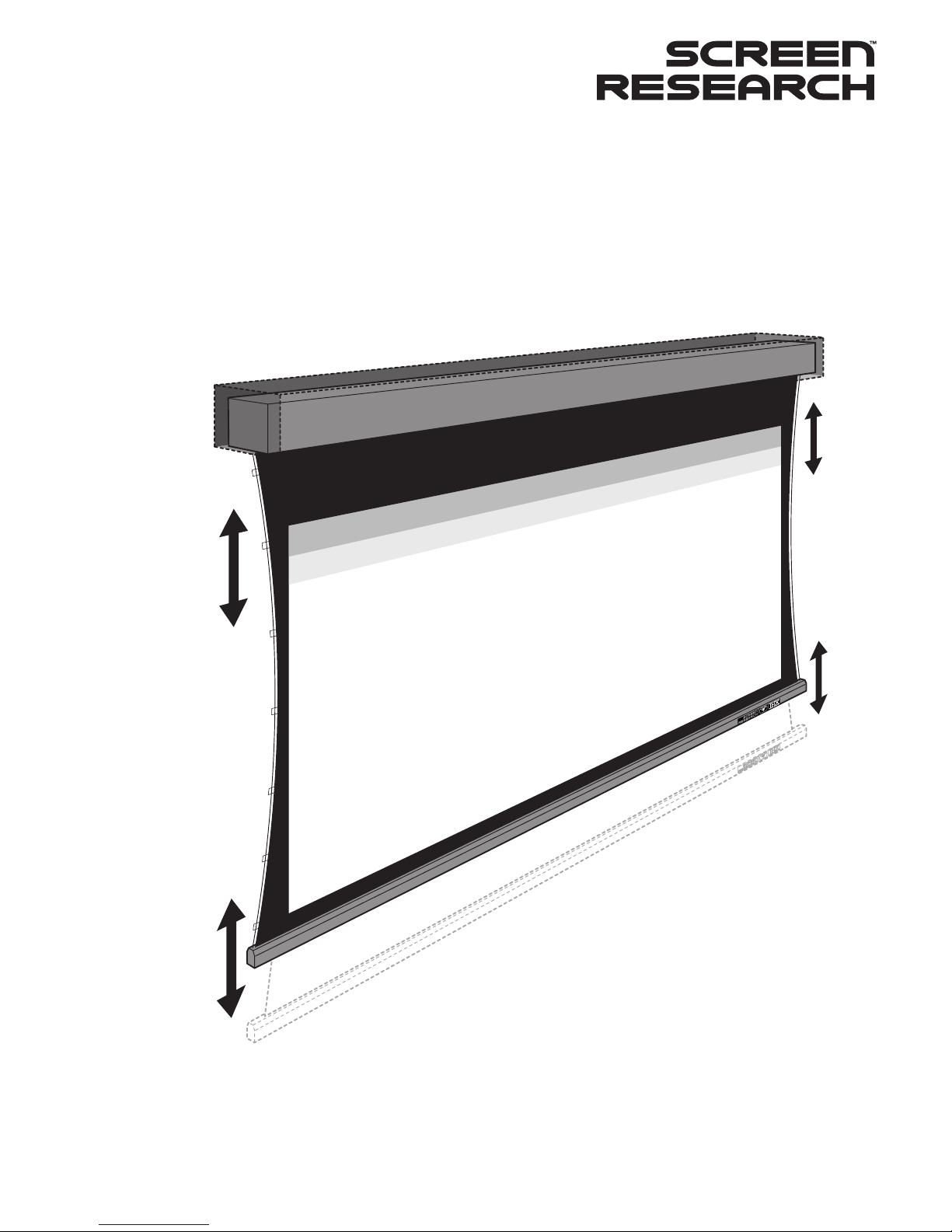
Installation Manual
Motorized Supreme 2 Drop Down Screens
In-Ceiling Slot Opening
with TFXTM Floating Tab-Tensioning
Page 2

Tools & Storage
Transit security fixings
Ceiling mounting
Screen transit locking removal
Manual switch connection
Manual deployment of the screen
Removal of masking transit security screws
End travel verification
MCS installation
MCS configuration - testing
Installation of the slot aperture plate(s)
Installation of slot aperture end-plates
Tab-tensioning bar adjustment
Manual adjustment of motor end-stops
Warranty
Legal Information
1
1
2
2
3
3
3
4
4
4
5
5
5
6
7
8
Table of Contents
Please read this manual before starting work.
Page 3
L
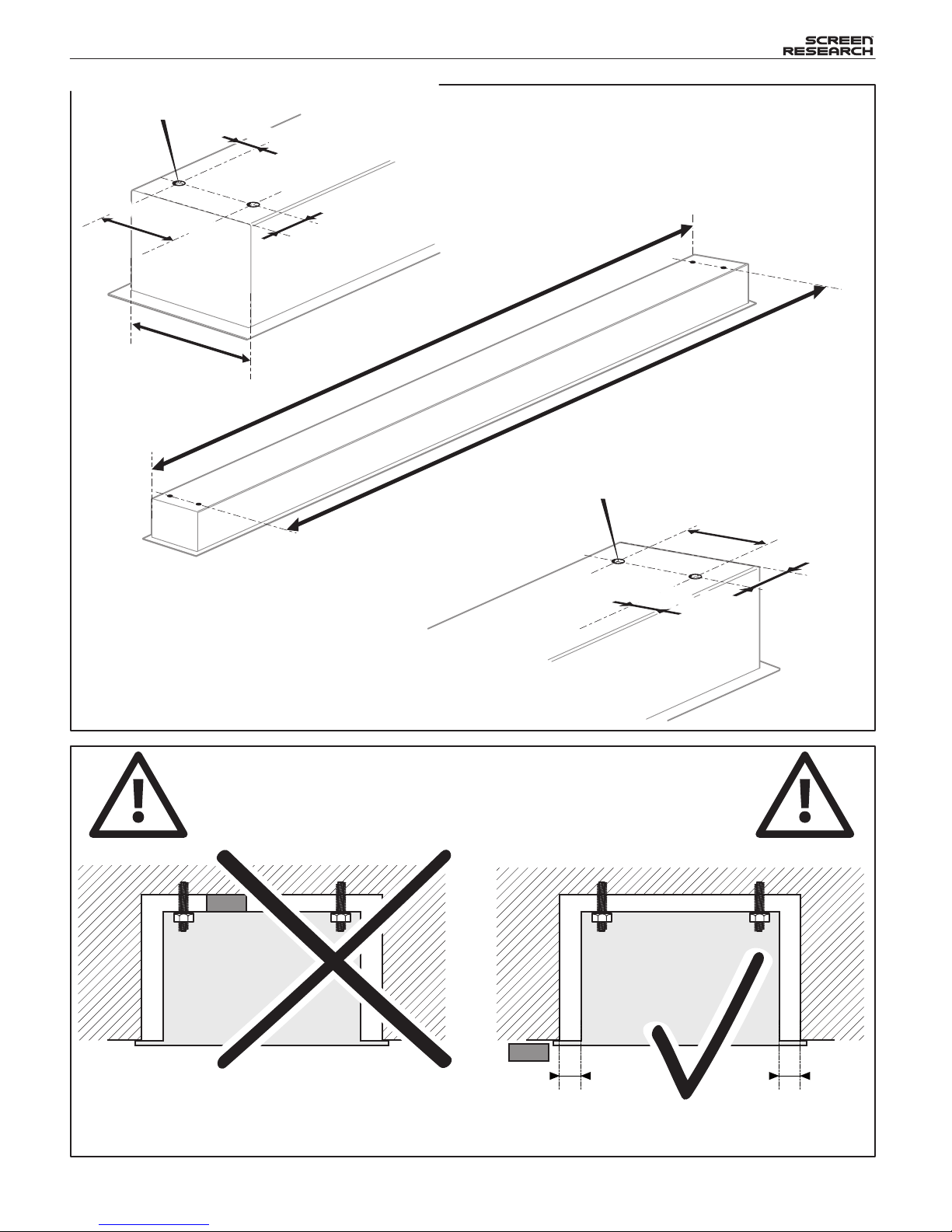
Recommendations
D
Ø 10 mm (
13
/
32
”)
30 mm
(
1
3
/
16
”)
D
-60 mm
(
2
3
/
8
”)
D-60 mm
(
2
3
/
8
”)
30 mm
(
1
3
/
16
”)
30 mm
(
1
3
/
16
”)
L
-60 mm
(
2
3
/
8
”)
L-60 mm
(
2
3
/
8
”)
Ø 10 mm (
13
/
32
”)
30 mm
(
1
3
/
16
”)
D-60 mm
(
2
3
/
8
”)
30 mm
(
1
3
/
16
”)
30 mm
(
1
3
/
16
”)
MCS control units should remain accessible after the
installation of the screen to allow access should this
be required !
MCS
MCS
VS
ICMS1 Install Manual : Rev B 01 Apr 2009
CLEARANCE
RECOMMENDATION: Keep a minimum clearance of 10mm (3/8") all around the screen casing.
CLEARANCE
Casing and Fixing Hole Dimensions
(Casing Length without Lips)
Page 4
1
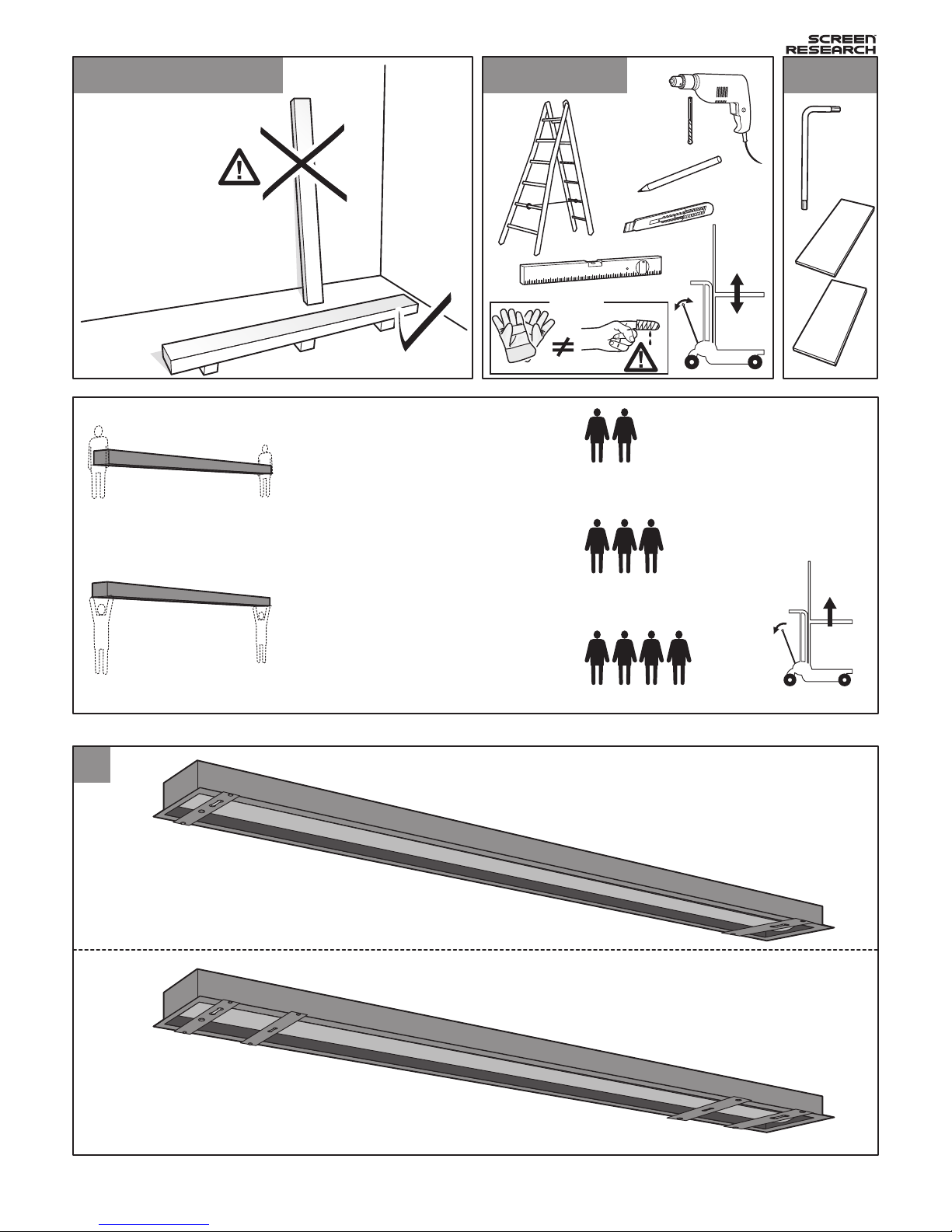
Tools & Storage
Transit Security Fixings
Models without masking.
Models with horizontal masking.
Models with lateral masking.
Do not store standing Essential Tools Provided
-1-
ICMS1 Install Manual : Rev B 01 Apr 2009
MS2-IS (80-100")
MS2-IS (100-120")
MMS2-L1/T-IS (80-100")
MS2-IS (120-160")
MMS2-L1/T-IS (100-160")
MMS2-4/L2-IS (All sizes)
& / or
Tip
Page 5
3
2
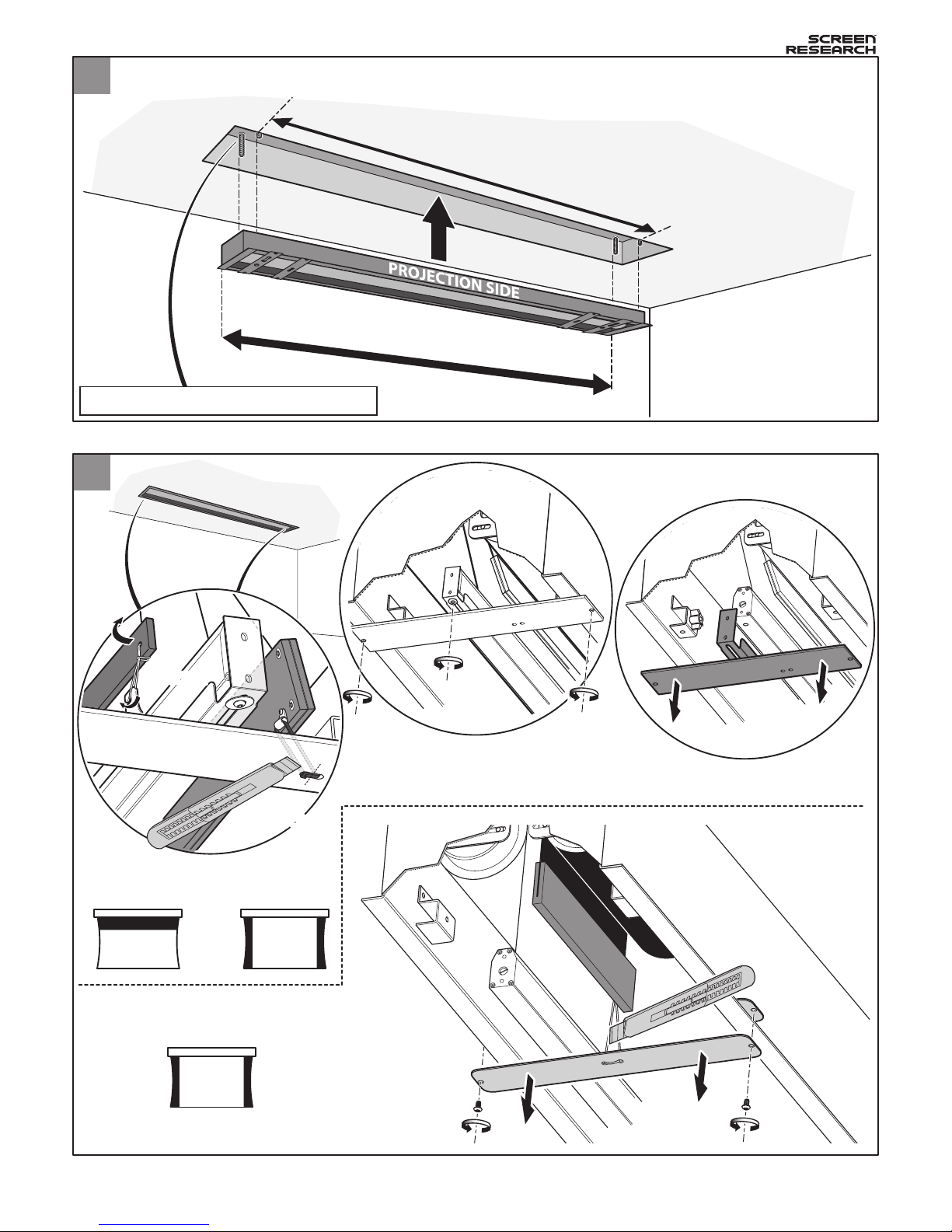
Ceiling Mounting
Screen transit locking removal
Mount the screen into the ceiling as shown below.
-2-
ICMS1 Install Manual : Rev B 01 Apr 2009
Use fixings suitable for load bearing structure
L - 60 mm (2
3
/
8
")
L
2
3
* BB (Black Backing) layer may not be present on your model.
* M (Masking) may not be present on your model.
* LM (Lateral Masking) may not be present on your model.
LM*
CUT
& REMOVE
1
M*
BB*
REMOVEREMOVE
CUT
& REMOVE
CUT
& REMOVE
Horizontal
Masking
OR
Lateral
Masking
Lateral
Masking ONLY
Page 6
6
-3-
ICMS1 Install Manual : Rev B 01 Apr 2009
4
5
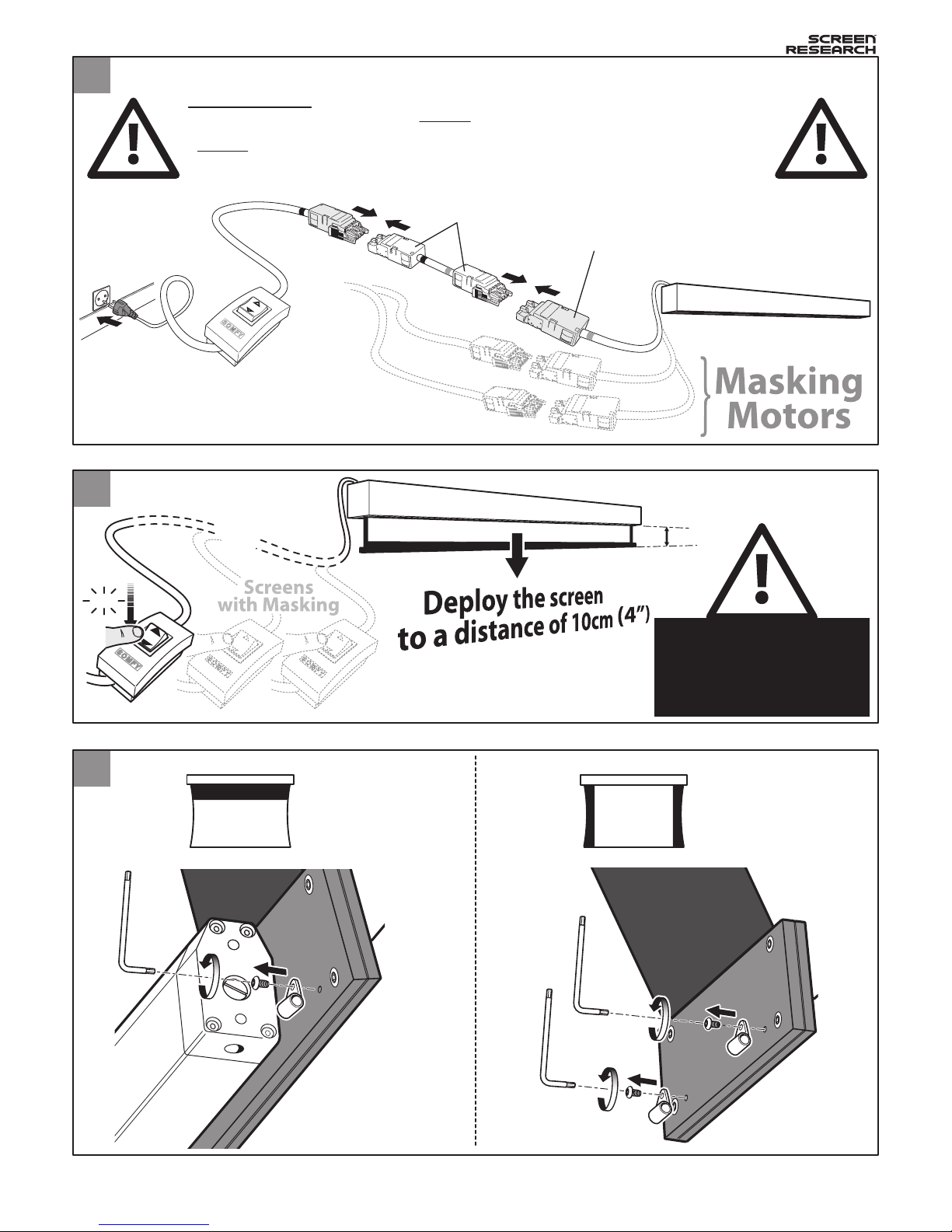
Manual Deployment of the Screen
Removal of Masking Transit Security Screws
Manual Switch Connection
Screens with masking require more than one connection.
click
10 cm (4”)
1
Screen motor
Adaptor
blue
blue
yellow
blue or
yellow
2
3
REMOVE
Repeat at each
end of the screen.
Repeat at each
end of the screen.
REMOVE
Horizontal
Masking
Lateral
Masking
Only carry out this
step once all transit
security fixings have
been removed
IMPORTANT:
FOR MODELS WITH MASKING
ONLY
:
- Use the Reverse adaptor supplied to connect the switch to the screen motor.
-
Never
use the reverse adaptor to connect switches to the masking motors.
- Connect plugs matching the color rings (Blue to Blue, Yellow to Yellow).
- Failure to follow this procedure will invalidate any product warranty.
(USE ONLY WHEN A YELLOW RING IS USED ON THE SCREEN MOTOR CONNECTION)
Page 7
-4-
ICMS1 Install Manual : Rev B 01 Apr 2009
7
8
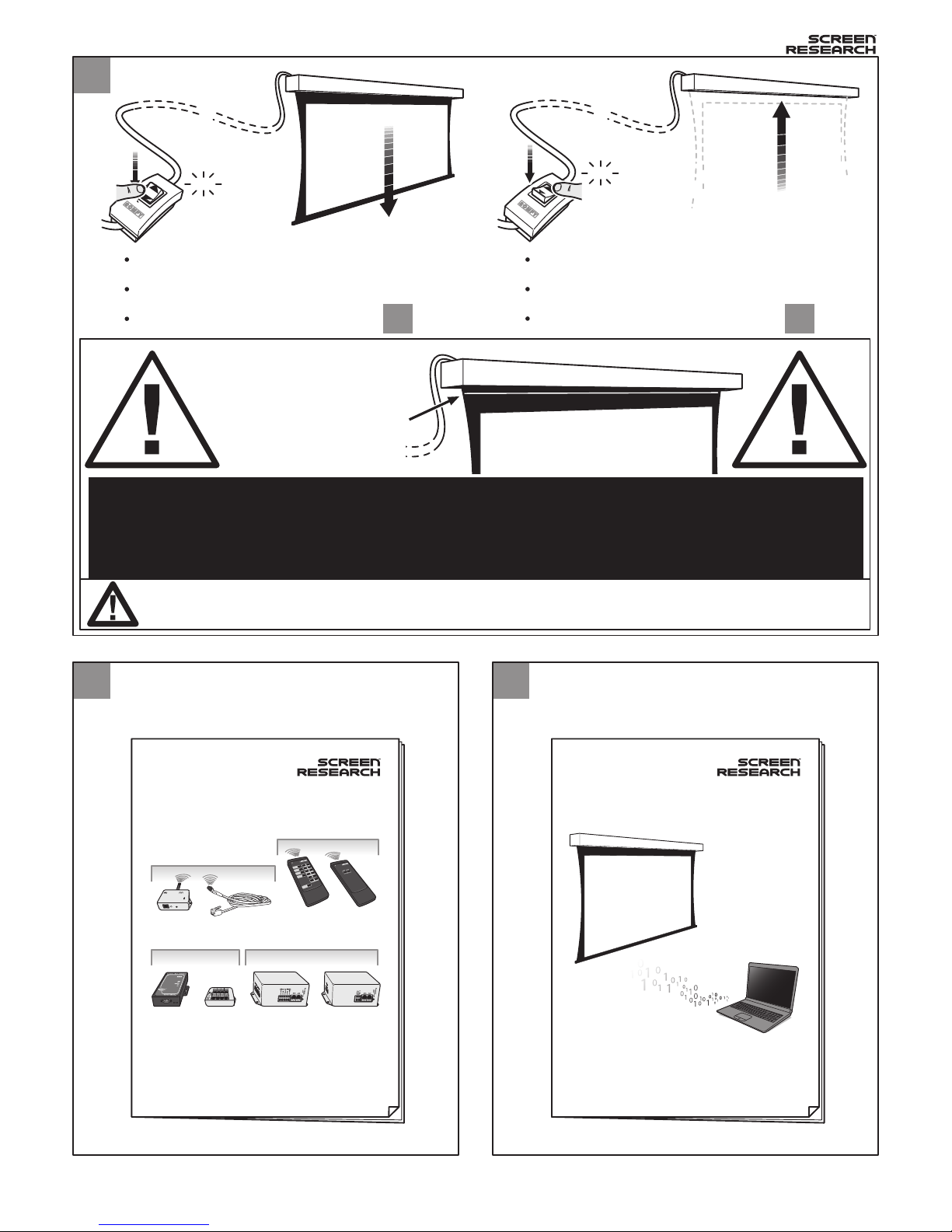
MCS Installation
End Travel Verification (Default set at factory)
Refer to the MCS hardware guide in
order to connect your control devices
correctly.
Refer to the MCS software guide
should you wish to reprogram the
motor control system.
MCS-320 MCS-310
MCS-BRR
Receivers
Interfaces Motors
MCS-BIE
(Radio Frequency) (Infrared)
MCS-RR0
MCS-IR0
MCS-RR1
MCS-IR1
MCS-BRSMCS-SIP
UP
Remotes
MCS (Motor Control Systems) Manual
9
MCS Configuration - Testing
MCS (Motor Control Systems) Manual
Carefully deploy the screen to its maximum extent.
Verify that it stops automatically at the desired end of travel.
If this is not the case, please proceed to Step
Carefully stow the screen to its stored position.
Verify that it stops automatically at the desired end of travel.
If this is not the case, please proceed to Step
click
click
13 13
Do not pass the white line
drawn in the black drop zone.
After this point, deployment
of the fabric risks damage to
the product.
Perform this step for all motors/masks !
Important : As part of the installation procedure it is important that the motor end stops are
verified in order to prevent damage to the screen.
The end stop limits are set at the factory, but may have been released during shipping.
Failure to perform this procedure will void any subsequent claims made under the product
warranty. Please contact Screen Research if you have any questions.
Page 8
10
11
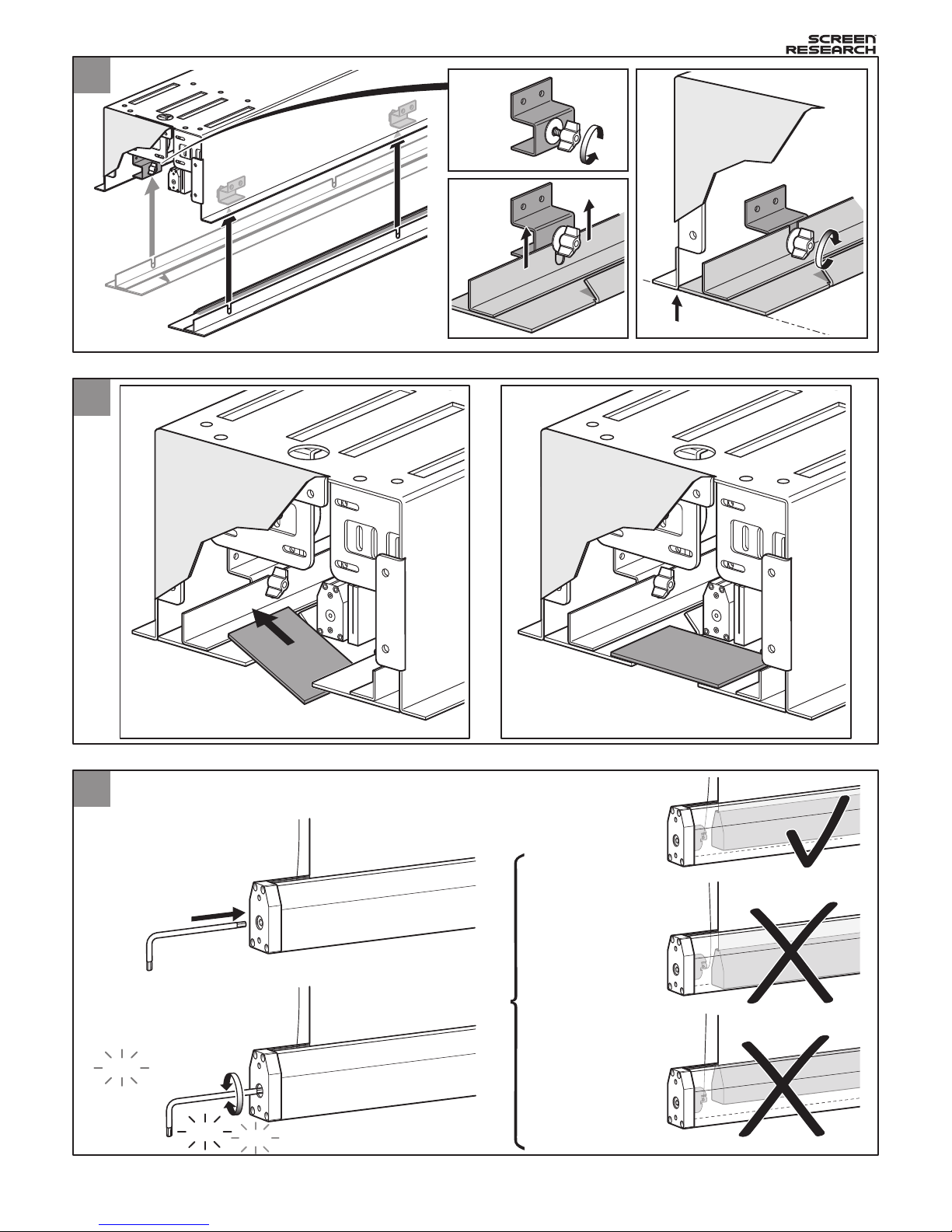
Installation of aperture end-plates
Installation of the slot aperture plate(s)
-5-
ICMS1 Install Manual : Rev B 01 Apr 2009
Alignment
31
2
21
Magnet attachment
x2
Aperture plate only present
in certain models
Aperture plate present in all models
12
Tab-tensioning Bar Adjustment
Deploy the screen to its standard operating position before
adjusting the tab-tensioning system.
1
2
Insert & push
Adjust
Good
: Inner
bar is floating............
Gently move the bar from side
to side to establish whether
the inner bar is floating free
Bad : Inner bar is
too low......................
Bad : Inner bar is
too high....................
click
click
click
Page 9
-6-
ICMS1 Install Manual : Rev B 01 Apr 2009
click
click
13
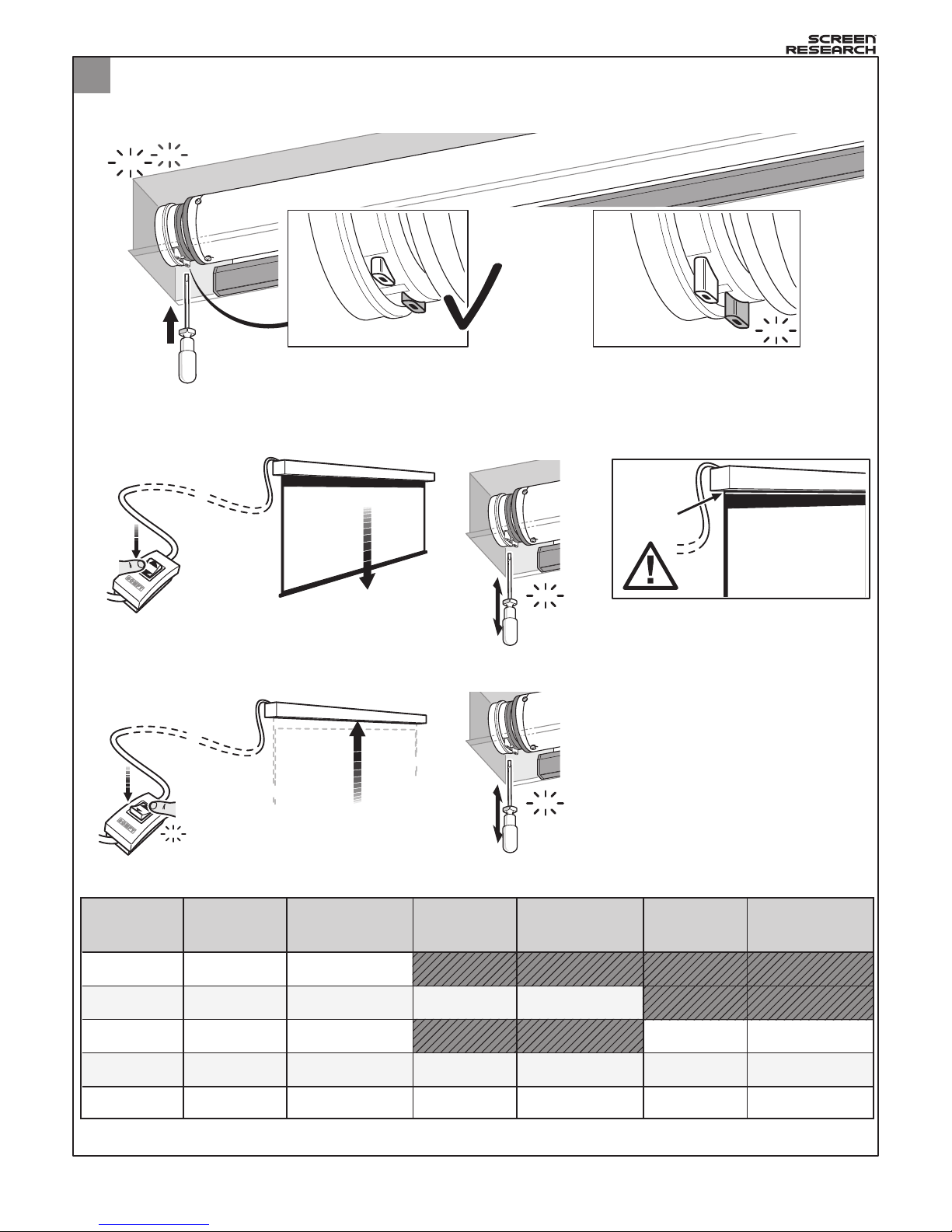
Manual adjustment of motor end-stops
1 -
Using a screwdriver, push the two buttons in order to free the screen stopping positions.
2 -
Carefully deploy the screen to the desired position.
Lock this position by releasing the correct button as shown in the table below.
3 -
Carefully define the desired closed position.
Lock this position by releasing the correct button as shown in the table below.
yellowMS2 white
Screen
Model
Screen
Lock UP
Screen
Lock DOWN
whiteMMS2-L1 yellow
whiteMMS2-T yellow
whiteMMS2-L2 yellow
whiteMMS2-4 yellow
Lateral Mask
Lock UP
Lateral Mask
Lock DOWN
yellow white
yellow white
yellow white
Top Mask
Lock UP
Top Mask
Lock DOWN
yellow white
yellow white
yellow white
click
Pushed buttons = unlocked screen
No more stop position memorized
Released buttons = locked screen
Stop positions are memorized
Please, follow this step ONLY if the end of travel of the motors has moved during transit. If your screen
automatically stops at the desired full extension and full winding up, you do NOT need this step.
Refer to this table if the motor of your screen is mounted on the LEFT
MAX
LIMIT !
click
click
click
Page 10

Screen Research Product Warranty
1.LIMITED WARRANTY
Screen Research warrants the product designated herein to be free of manufacturing defects in material and workmanship, subject to
the term and conditions hereinafter set forth.
Surface fabric(s) and frames are warranted for a period of five (5) years from the date of invoice by the original purchaser.
Motors, motor controllers, remote controls, and related assembly hardware are warranted for three (3) years parts and labor from date
of invoice by the original purchaser.
2.CONDITIONS AND LIMITATIONS
This Warranty is subject to the following conditions and limitations. The Warranty is void and inapplicable if the product has been used
or handled other than in accordance with the instructions in the owner’s manual, abused or misused, damaged by accident or neglect
or in being transported, or the defect is due to the product being repaired or tampered with by anyone other than Screen Research or
an authorized Screen Research dealer or installer. The product must be installed by a professional, duly-authorized Screen Research
dealer/custom installer, and maintained according to the written instructions.
3.RETURNS
No product returns accepted without a prior written return authorization from Screen Research.
Product must be packed in the original PACKAGE CONTENTS or equivalent packaging in order to avoid any damage during transportation. The product(s) must be packed and returned to Screen Research or an authorized Screen Research repair center by the customer
at his or her sole expense. Screen Research will pay return freight of its choice.
A RETURNED PRODUCT MUST BE ACCOMPANIED BY A WRITTEN DESCRIPTION OF THE DEFECT AND A PHOTOCOPY OF THE
ORIGINAL PURCHASE RECEIPT. This receipt must clearly list model and serial number, the date of purchase, the name and address of
the purchaser and authorized dealer and the price paid by the purchaser. Screen Research reserves the right to modify the design of
any product without obligation to purchasers of previously manufactured products and to change the prices or specifications of any
product without notice or obligation to any person.
4.REMEDY
In the event the product fails to meet the above Warranty, the purchaser’s sole remedy under this Limited Warranty shall be to return
the product to Screen Research or an authorized Screen Research service center where the defect will be rectified without charge for
parts or labor, during the term of this Limited Warranty.
5.LIMITED TO ORIGINAL PURCHASER
This Warranty is for the sole benefit of the original purchaser of the covered product and shall not be transferred to a subsequent
purchaser of the product.
6.MISCELLANEOUS
Any implied warranties relating to Screen Research products shall be limited to the duration of this warranty. The warranty does not
extend to any incidental or consequential damages to the purchaser. Some states or countries do not allow limitations on how long an
implied warranty lasts, or an exclusion or limitation of incidental or consequential damages, so the above limitations or exclusions may
not apply to you. This Warranty gives you specific legal rights, and you may also have other rights which vary from state to state, or
country to country.
7.WARRANTOR
Enquiries regarding the above Limited Warranty may be sent to the following address, specific to country where purchased:
Purchases in North and South America:
Screen Research, 2021 Las Positas Court, Suite 147, Livermore, California 94551 USA
Purchases in Europe, Asia, Middle East, Africa, India, Asia, Australia:
Screen Research, Parc d’Activité de Ragon - 16, rue Louis Pasteur - 44119 NANTES - Treillières - France
8.WARRANTY SUPPORT MANAGED BY AUTHORIZED DISTRIBUTORS
Screen Research has authorized distribution in many countries of the world. In each country, the authorized importing Distributor is
responsible for warranty support of products sold in the respective country by that retailer or distributor. Warranty service should be
obtained from the importing retailer or distributor from whom you purchased your product. In the unlikely event of service required
beyond the capability of the importer, Screen Research will fulfill the conditions of the warranty. No product returns will be accepted
without a prior written return authorization from Screen Research. All product returns must be shipped at the owner’s expense to the
Screen Research factory, together with a photocopy of the bill of sale for that product, a detailed description of the problem, and any
information necessary for return shipment.
-7-
ICMS1 Install Manual : Rev B 01 Apr 2009
Page 11

-8-
© Copyright 2009 Screen Research. All rights reserved.
Screen Research products are covered by one or more of the following patents:
No. 00 07372 (France); No. 6,552,847 B2 (USA); No. 04787296.5 (Europe) pending; No. 03 10375 (France); No.
US-2008-0211972-A1 (USA) pending; No. PCT/FR04/02241 (International) pending; No. 200480025260.9 (China)
pending; No. 1126/CHGENP/2006 (India) pending; No. 2006-524397 (Japan) pending; No. 04787296.5-2217
(United Kingdom) pending; No. 0409574 (France) pending; No. PCT/IB05/003917 (International) pending; No.
05817119.0-1252 (Europe) pending; No. 08.02361 (France) pending; No. 08/05836 (France) pending; No. 03 07216
(France); No. 10/557 781 (USA) pending; No. 04742791.9 (Europe) pending; No. 6,785,047 (USA)
ClearPix, ClearPix2, SolidPix, SolidPix1, GrayPix, X-Mask, C-Mask, LeWing, TheaterCurve, Pi-Grip, FastGrip, TFX,
StopLight, DécorMask, TailorMade and the Screen Research logo are all trademarks of Screen Research.
All other trademarks are the property of their respective owners.
Screen research contacts
Europe/ROW
Screen Research Worldwide
Parc d’activité Ragon
16 rue Louis Pasteur
44119 NANTES - Treillières
France
Tel: +33 (0)2 40 77 87 89
Fax: +33 (0)2 40 77 86 78
Email
To place an order [email protected]
To obtain a quotation [email protected]
To contact Customer Service [email protected]
To contact Technical Support [email protected]
North America
Screen Research USA
2021 Las Positas Court, Suite 147
Livermore, CA 94551
USA
Tel: +1 925 454 9900
Fax: +1 925 454 9904
Email
To place an order [email protected]
To obtain a quotation [email protected]
To contact Customer Service [email protected]
To contact Technical Support [email protected]
Asia
Screen Research Asia
898/32B SV City 19th Fl. Oce Tower
2 Rama III Road
Bangpongpang Yannawa
Bangkok 10120
Thailand
Tel: +66-(0)26 82 90 52
Fax: +66-(0)26 82 65 90
ICMS1 Install Manual : Rev B 01 Apr 2009
 Loading...