

Page 1
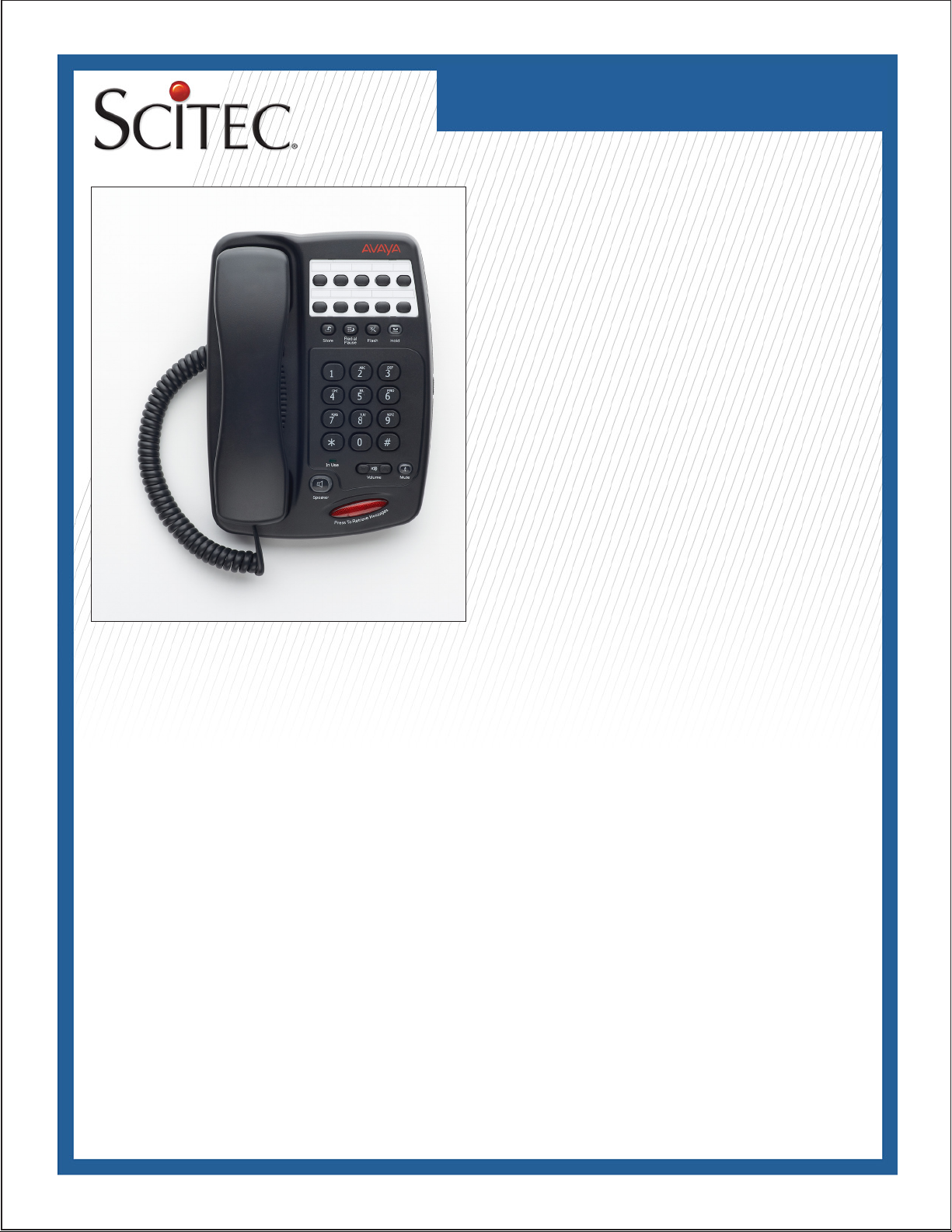
AVAYA AV SERIES
Telephone User Guide
Avaya AV100, AV200, AV300
Single-Line Telephones
Congratulations on the purchase of your Avaya AV Series telephone. This high precision electronic device includes advanced
features suitable for use in today’s environment and requires
minimum maintenance. It is simple to install and easy to use.
Installation
This telephone is only intended for connection to telecommunications systems from Avaya. It must not be connected directly
to the PSTN. If any problems should occur during operation,
please initially contact your specialist dealer or your system
administrator.
Tips on phone location
Place the telephone on a non-slip surface, especially if the furniture is new or has recently been cleaned or polished. Varnishes
or cleaning agents may contain substances which soften the
base parts of your telephone, and the softened bases can leave
undesirable marks on the furniture. Scitec cannot assume liability for damages of this kind.
Declaration of conformity
We, Scitec, declare that Avaya AV Series telephones comply
with the basic requirements and other relevant rules in accordance with EU directive 1999/5/EU (radio and telecommunication terminal equipment, R&TTE). This telephone is intended
for connection to Avaya telecommunications systems and
meets the fundamental requirements formulated in EC directive
1999/5/EC (Radio and Telecommunication Terminal Equipment,
R&TTE). The design of this telephone makes it unsuitable for
direct operation on interfaces of public telephone networks.
Safety
When using your telephone equipment, follow basic safety pre-
cautions to reduce the risk of re, shock and injury to persons:
1. Read all instructions.
2. Follow all warnings and instructions marked on the product.
3. Before cleaning, unplug this product from the wall. Use a
damp cloth for cleaning. Do not use liquid cleaners or aerosol
cleaners.
4. Do not use this product near water, for example, near a bathtub, washbowl, kitchen sink or laundry tub, in a wet basement,
or near a swimming pool.
5. Do not place this product on an unstable cart, stand, or table.
The product may fall, causing damage to the product.
6. Do not block or cover the slots and openings in the cabinet
and on the back or bottom of the product. Do not place the
product on the bed, sofa, rug, or other similar surface.
7. Do not place this product near or over a radiator or heat register.
8. Do not place this product in a built-in installation unless
proper ventilation is provided.
9. Never push objects of any kind into this product through cabinet slots. This could result in re or electric shock. Never spill
liquid of any kind on the product.
10. To reduce the risk of electric shock, do not disassemble this
product. When service or repair is required, take it to a qualied
serviceperson.
Page 2
AVAYA AV SERIES
Telephone User Guide
Safety
11. Unplug this product from the wall outlet and refer servicing
to qualied personnel under the following conditions:
a) If liquid has been spilled into the product.
b) If the product has been exposed to rain or water.
c) If the product does not operate according to the operating
instructions.
d) If the product has been dropped or the cabinet has been
damaged.
e) If the product exhibits a distinct change in performance.
12. Do not use the telephone (other than a cordless type) during
an electrical storm. There is a remote risk of electrical shock
from lightning.
13. Do not use the telephone to report a gas leak if the telephone is in the vicinity of the leak.
14. Keep the telephone dry. Wipe immediately if wet. Liquids
may contain minerals that can corrode the electronic circuits.
15. Use and store the telephone in a moderate temperature
environment. Extreme temperatures can shorten the life of
electronic devices, damage batteries and distort or melt plastic
parts.
16. Keep the telephone away from excessive dust and dirt.
17. Wipe the telephone with a damp cloth occasionally to keep
it looking new. Do not use harsh chemicals, cleaning solvents
or strong detergents to clean the telephone.
Checking the Parts List
Ensure that you have the following parts:
1. Modular handset
2. Telephone
3. Modular telephone line cord (7’)
4. Modular coiled handset cord (10’)
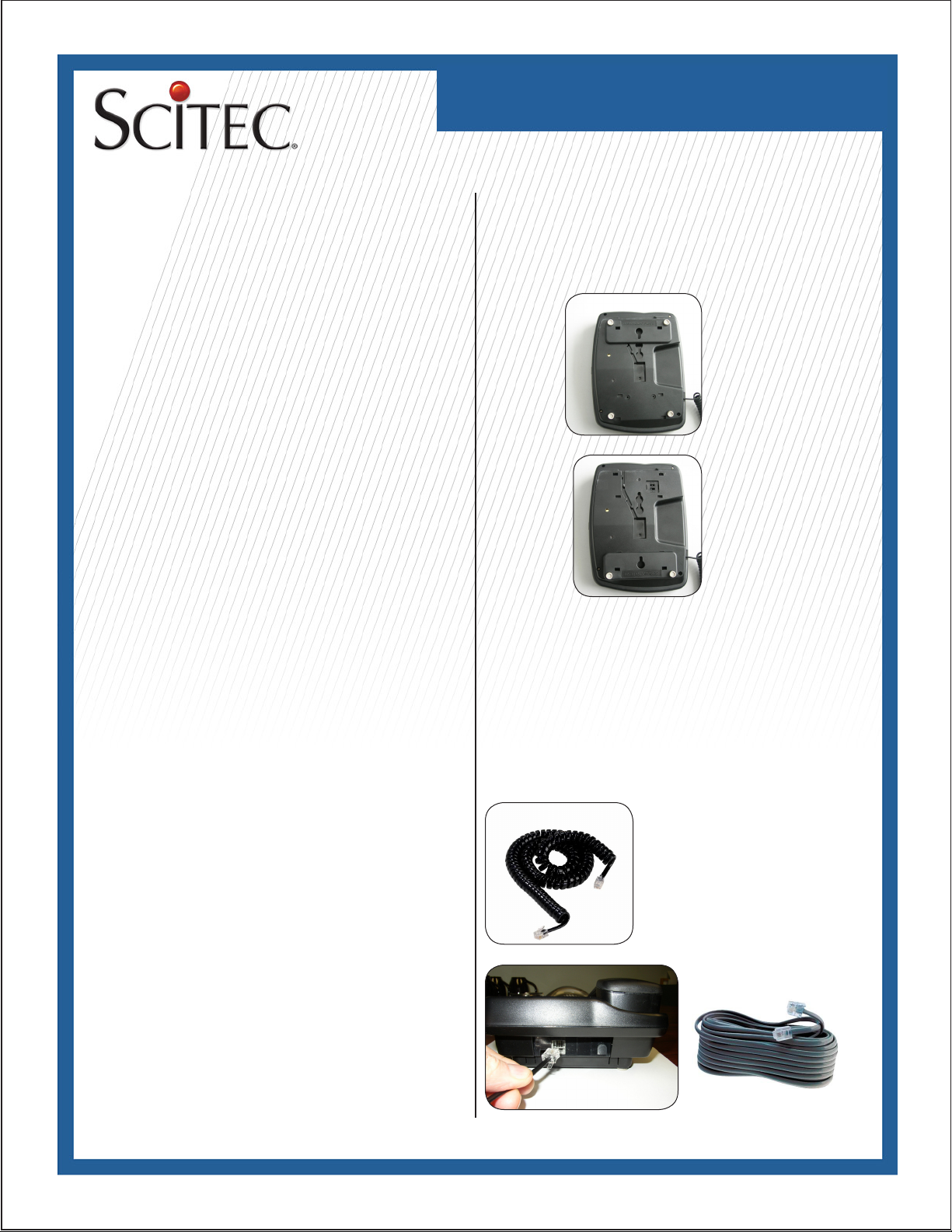
Connecting the handset cord
1. Plug one end of the handset cord into the modular jack on
the handset.
2. The remaining end of the handset cord plugs into the jack
located on the left side of the base unit.
Connecting the line cord
If the telephone is to be desk mounted, plug one end of the 7’
line cord into the modular jack at the rear of the telephone. The
remaining end of the line cord plugs into the jack located on
the wall.
Desk/Wall Mounting
Each telephone is equipped with a bracket. The phone may be
installed in either desk or wall mount mode by changing the
position of the bracket.
Desk mount>
Wall mount>
Page 3
AVAYA AV SERIES
Telephone User Guide
Redial/Pause Key
The REDIAL/PAUSE key is used to automatically redial the last
number dialed. To use:
1. Lift the handset.
2. Press the REDIAL/PAUSE key.
3. The number that was last dialed will automatically be dialed.
Pause into Memory
The PAUSE key is used to program a 3 second delay into
memory. A speed dial number may need to pause during its
dialing sequence prior to entering the next set of digits to ensure
proper connections. Note: The PAUSE function counts as 1
digit when stored into a speed dial memory location.
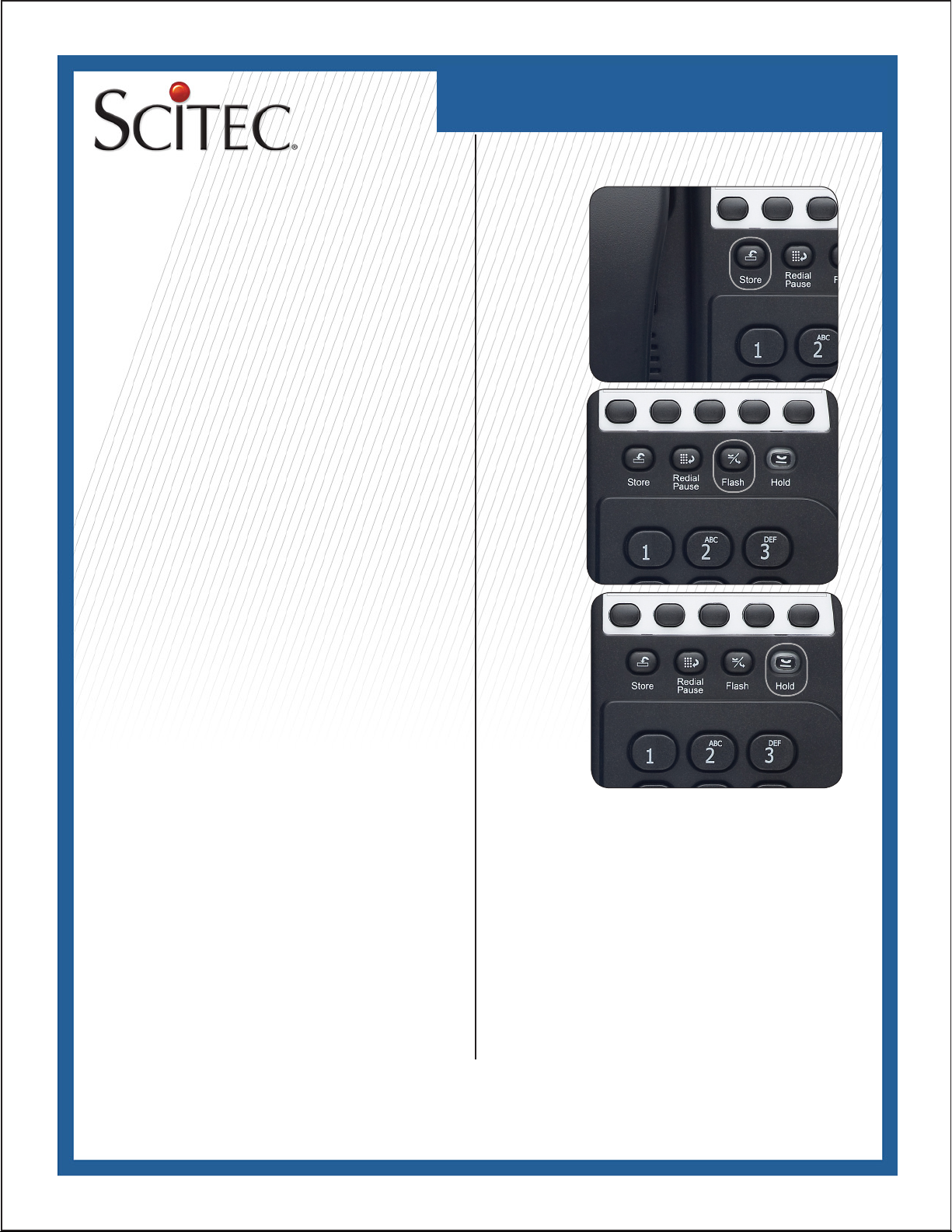
Flash Key
The FLASH key may be programmed to operate at 100, 300, or
600mS. To program:
1. Lift the handset
2. Press the STORE key.
3. On the dial pad, press “1” for 100mS, “3” for 300mS, or “6”
for 600mS.
4. Press the STORE key again.
5. Press the FLASH key to conrm the new setting.
Hold Key-AV200 and AV300
To use, press the HOLD key. The key will illuminate indicating that the line is on hold. When placing a caller on hold, the
handset can be returned to its on-hook position. The line will not
be disconnected. To return to the caller, lift the handset.
Hold Key-AV100
The HOLD key on the AV100 is located in the
lower left base of the phone.
Page 4
AVAYA AV SERIES
Telephone User Guide
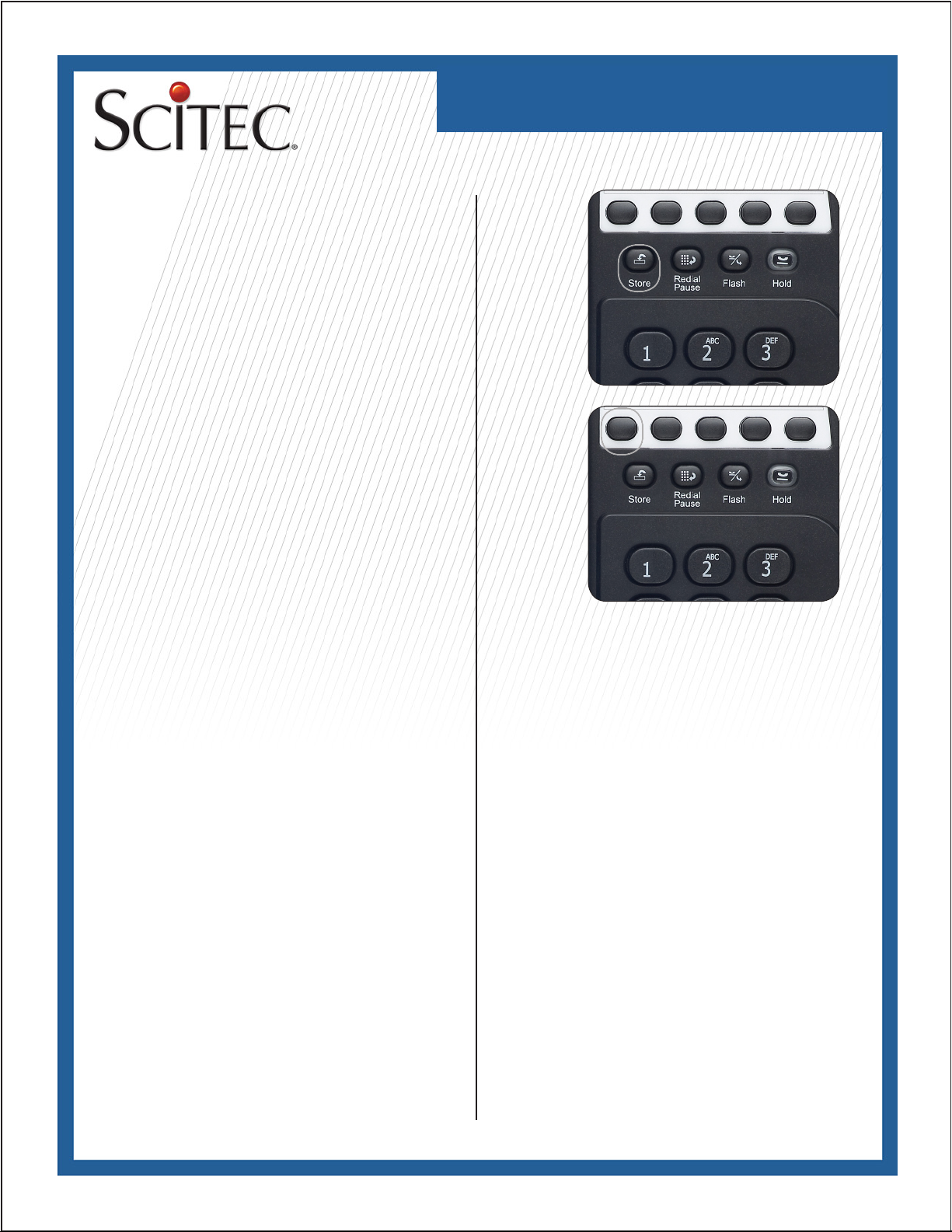
Store Key
While in ‘OFF HOOK’ state, press the STORE key to program
feature keys.
Speed Dial Programming
AV200 and AV300 telephones are equipped with 10 speed
dial locations convenient for dialing frequently used telephone
numbers. The TouchLite™ key may also be alternatively programmed as an additional memory location. Each speed dial
location can store up to 32 digits.
Programming Notes: For program understanding, read these
notes before beginning the programming process. Speed dial
programming must be done with the telephone plugged into
the telephone line. Telephone programming should be performed with the telephone off-hook.
Programming a Speed Dial Key
1. While in ‘OFF HOOK’ state, press the STORE key.
2. Using the keypad, enter the number to be stored.
3. After entering the number, press the ‘Speed Dial Key’ location
to store the number. The number
for that location is now stored.
4. To exit, place the phone handset on base (ON HOOK).
5. To delete an incorrect entry, repeat steps 1, 3 and 4.
Placing a Call from a Speed Dial Location
1. Lift the handset.
2. Press the Memory Location Key to dial the number.
Mute Key
Located in the lower right of the AV300 speakerphone
facia, press the MUTE key for privacy in a background conversation.
In Use Line Indicator
The LED will illuminate to indicate that
another phone is in use and sharing the
same line.
Page
Page 5
AVAYA AV SERIES
Telephone User Guide
TouchLiteTM Message Waiting Light/Voice Mail Retrieval
Touchbar
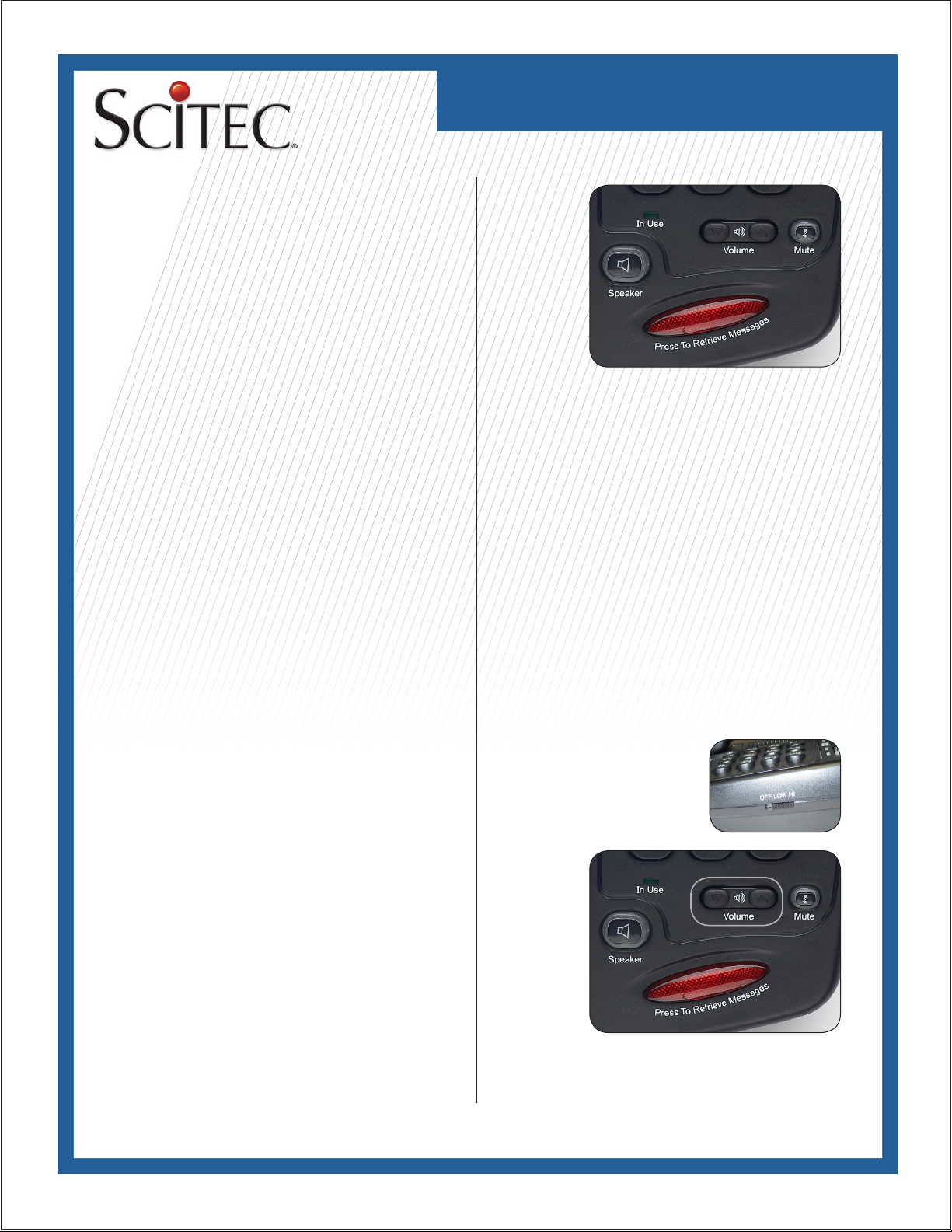
TouchLite™ is an Avaya-compatible message waiting light that
blinks to provide notication of a message. TouchLite™ also
integrates the visual message waiting lamp, speakerphone, and
a speed dial key into one, enabling the user to instantly retrieve
voice mail messages.
AV300 - When the message waiting lamp lights to notify the user
that a message is waiting, press the red TouchLite™ button.
Once programmed, the TouchLiteTM key will automatically turn
the speakerphone ‘On’ and speed dial the user into the voice
mail message center. The TouchLite™ key may alternatively be
programmed as an additional memory location.
AV100/AV200 - When the message waiting lamp lights to notify
the user that a message is
waiting, simply lift the handset and press the red TouchLite™.
Once programmed, the TouchLite™ key will speed dial the user
to the voice mail message center. The TouchLite™ key may
alternatively be programmed as an additional memory location.
TouchLite™ Programming
1. Lift the handset (or press the speakerphone key on the
AV300).
2. Press the “STORE” key.
3. Enter the numbers to be stored using the numeric dial pad.
4. Press the red TouchLite™ key to store.
5. Hang up the handset (or turn off the speakerphone on the
AV300).
Ringer Volume
The switch used to adjust the ringer volume is located on the
right side of the telephone base. To adjust the volume of the
ringing, slide the switch to the desired position of HI, LOW or
OFF. The factory sets the ringer volume to the HI position.
Handset Volume Control
With the handset off-hook, press the arrows on the VOLUME
key repeatedly to increase or decrease the volume. The volume
of the handset receiver can be increased by 12 to 18 decibels.
The handset volume control switch will automatically reset back
to its normal level when hanging up. This will ensure that the
handset volume resets back to normal for the next phone call.
Page 6
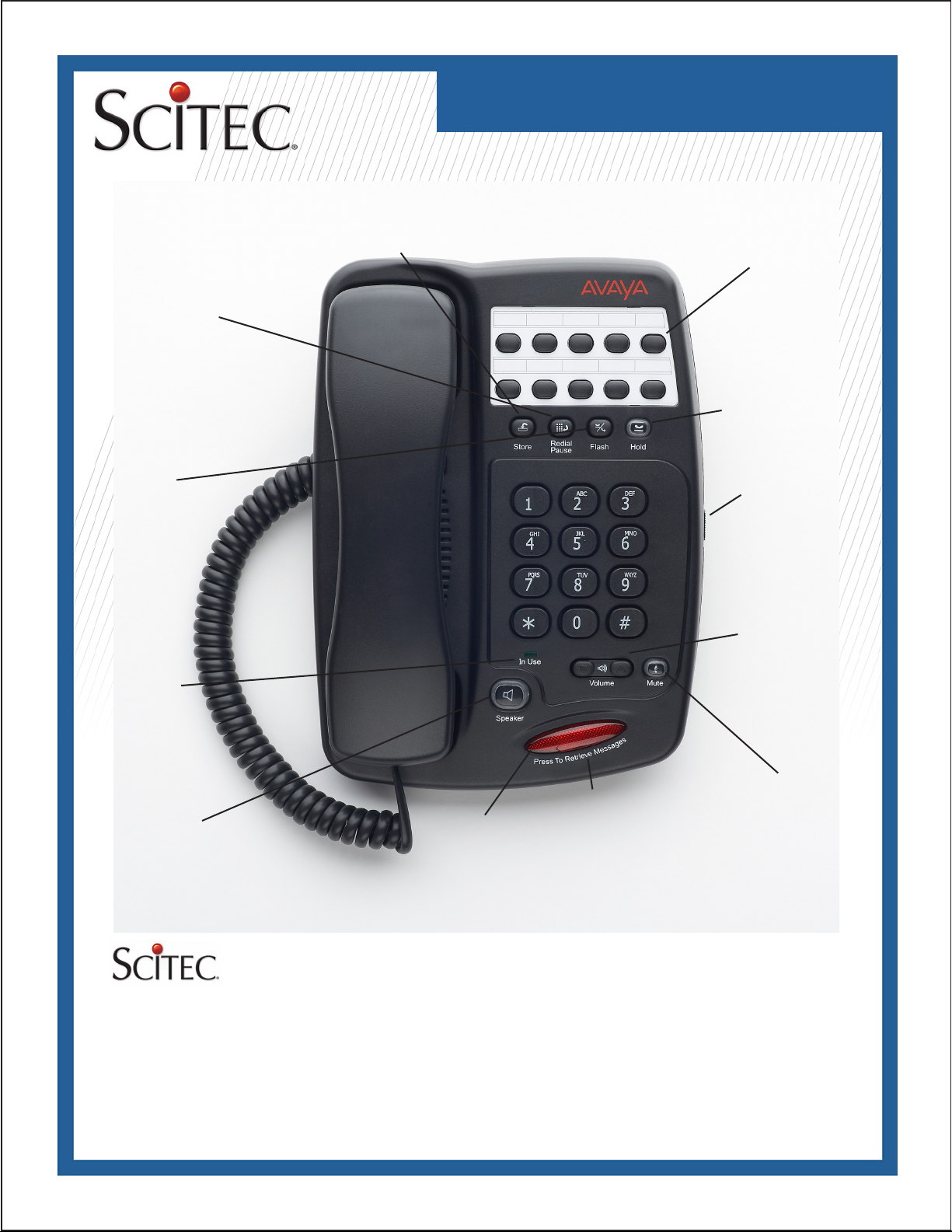
Redial/Pause Key
Redials last number
dialed. Pause used to
program 3 second delay
in speed dialing.
AVAYA AV SERIES
Telephone User Guide
Store Key
Used for storing memory locations.
Memory Keys
10 programmable
speed dial
keys on
AV200 and
AV300 sets.
Hold Key (AV300)
Used to place a
caller on hold.
Flash Key
Provides
100/300/600mS
timed line break.
In Use Light
Shows the
line is in use
when it is
illuminated.
Speaker Key
On/Off speaker key.
Serves as Hold key on AV100 andAV200 sets.
Message Light
TouchLite
TM
Avaya-compatible.
Programmable one-touch message light turns
on the speaker (AV300) and speed dials user
into voice mail (AV200/AV300)
Volume Control
3-position volume
control slide
bar located
on the side
of the phone.
Handset Volume
Control Toggle
Controls the
volume of the
handset when off
hook.
Mute Key
Mute key on
AV300 for
privacy in a
background
conversation.
5025 Galley Road
Colorado Springs, CO 81915 USA
+1.719.638.8821 tel
+1.719.638.8815 fax
[email protected]
www.scitecinc.com
Scitec is a registered trademark of Scitec Inc.
© 2009 Scitec, Inc.
Specications subject to change without notice.
Refer to www.scitecinc.com for latest data.
Scitec, Inc. is a minority-owned business.
 Loading...