

Page 1
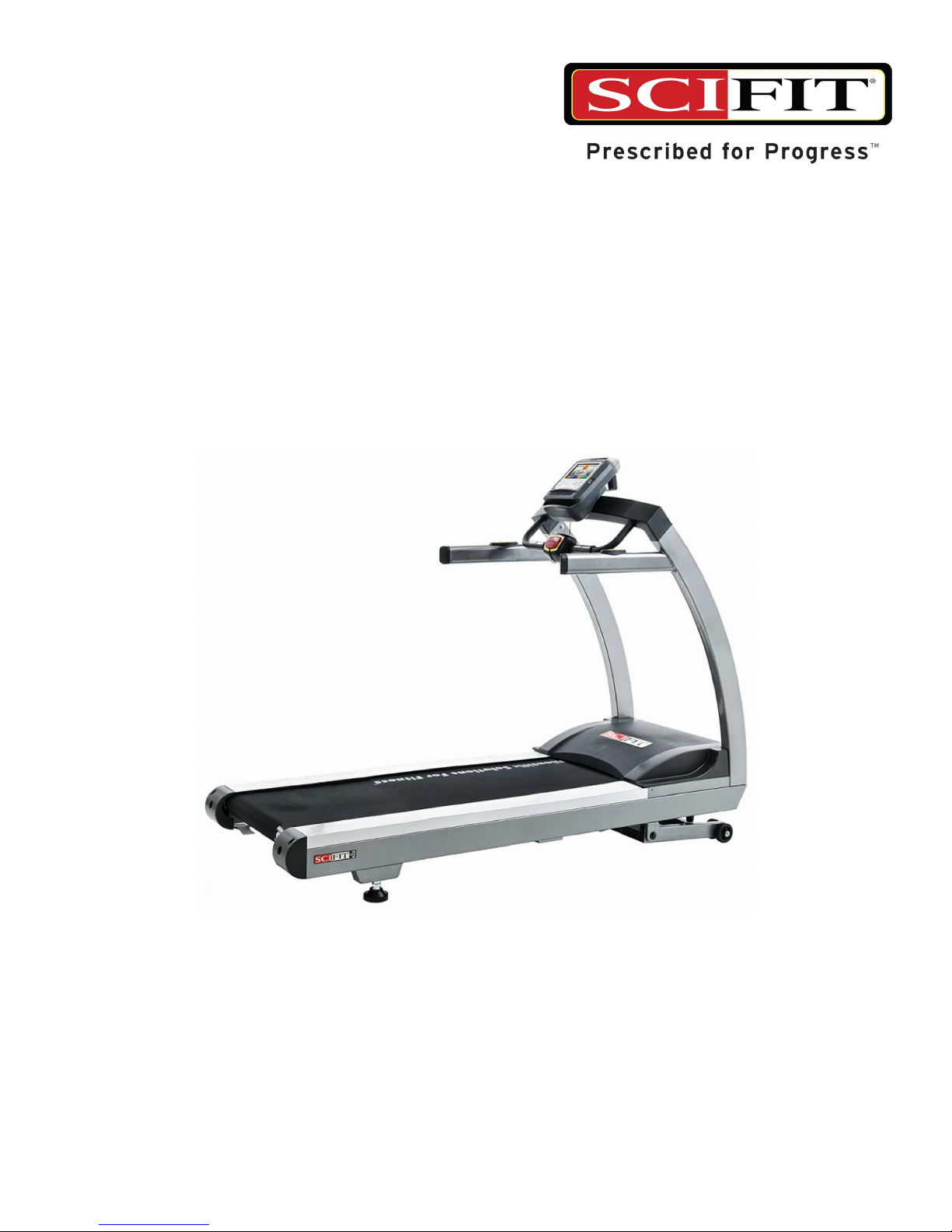
AC5000 Series
Machine User's Manual
AC5000-XXXXXX, AC5000M-XXXXXX, AC5003M-XXX, AC5005-XXX
Treadmill
Page 2

Page 3
User and Service Documents Link
Operation Manuals and other Product Information available at http://www.scit.com/resources/specications-manuals/
http://www.scit.com/resources/specications-manuals/
http://www.scit.com/resources/specications-manuals/
http://www.scit.com/resources/specications-manuals/
http://www.scit.com/resources/specications-manuals/
http://www.scit.com/resources/specications-manuals/
Trobareu el manual de funcionament i altra informació de producte a http://www.scit.com/resources/specications-manuals/
Mae Llawlyfrau Gweithredu a Gwybodaeth Arall am Beiriannau ar gael yn http://www.scit.com/resources/specications-manuals/
Die Betriebsanleitung und andere Produktinformationen erhalten Sie unter http://www.scit.com/resources/specications-manuals/
Encontrará el manual de funcionamiento y otra información de producto en http://www.scit.com/resources/specications-manuals/
Erabiltzailearen Eskuliburua eta Beste Produktuei buruzko Informazioa eskuratu http://www.scit.com/resources/specications-manuals/
gunean
Käyttöoppaat ja muut tuotetiedot ovat saatavana osoitteessa http://www.scit.com/resources/specications-manuals/
Les manuels d’utilisation, ainsi que d’autres informations sur les Produits, sont disponibles sur
http://www.scit.com/resources/specications-manuals/
Felhasználói kézikönyvek és más termékinformációk: http://www.scit.com/resources/specications-manuals/
Manuali di funzionamento e altre informazioni sui prodotti disponibili su http://www.scit.com/resources/specications-manuals/
Instrukcje obsługi i inne informacje o produktach dostępne na stronie http://www.scit.com/resources/specications-manuals/
Manuais de Operação e Informações sobre outros produtos disponíveis em http://www.scit.com/resources/specications-manuals/
http://www.scit.com/resources/specications-manuals/
Kullanım Kılavuzları ve Diğer Ürün Bilgileri http://www.scit.com/resources/specications-manuals/’da bulunmaktadır
Page 3 of 22
Page 4

Corporate Headquarters
Columbia Centre III, 9525 West Bryn Mawr Avenue, Rosemont, Illinois 60018 • U.S.A.
International Ofces
AMERICAS
North America
SCIFIT
5151 S. 110th E. Avenue
Tulsa, OK, 74146 U.S.A
Toll Free: +1 (800) 745 1373
Email: Service@scit.com
Service Website: www.scit.com/service-information
Brazil
Life Fitness Brasil
Av Reboucas 2315
Jd. Paulistano
São Paulo, SP 05401-300
BRAZIL
SAC: 0800 773 8282
Telephone: +55 (11) 3095 5200
Service Email: suporte@lifetness.com.br
Sales/Marketing Email: lifetness@lifetness.com.br
Latin America & Caribbean*
Life Fitness, Inc.
Columbia Centre III
9525 West Bryn Mawr Avenue
Rosemont, IL 60018 U.S.A.
Telephone: (847) 288 3300
Service Email: customersupport@lifetness.com
Sales/Marketing Email: commercialsales@lifetness.com
EUROPE, MIDDLE EAST, & AFRICA
(EMEA)Netherlands & Luxemburg
Life Fitness Atlantic BV
Bijdorpplein 25-31
2992 LB Barendrecht
THE NETHERLANDS
Telephone: (+31) 180 646 666
Service Email: service.benelux@lifetness.com
Sales/Marketing Email: marketing.benelux@lifetness.com
847.288.3300 • FAX: 847.288.3703
Service phone number: 800.351.3737 (toll-free within U.S.A., Canada)
Global Website: www.lifetness.com
United Kingdom & Ireland
Life Fitness UK LTD
Queen Adelaide
Ely, Cambs, CB7 4UB
Telephone: General Ofce (+44)
1353.666017
Customer Support (+44) 1353.665507
Service Email: uk.support@lifetness.com
Sales/Marketing Email: life@lifetness.com
Germany & Switzerland
Life Fitness Europe GMBH
Siemensstraße 3
85716 Unterschleißheim
GERMANY
Telephone: (+49) 89.31 77 51.0 (Germany)
(+41) 0848 000 901 (Switzerland)
(+41) 043 818 07 20 (Switzerland)
Service Email: kundendienst@lifetness.com
Sales/Marketing Email: kundenberatung@lifetness.com
Austria
Life Fitness Austria
Vertriebs G.m.b.H.
Dückegasse 7-9/3/36
1220 Vienna
AUSTRIA
Telephone: (+43) 1.61.57.198
Service Email: kundendienst@lifetness.com
Marketing/Sales Email: kundenberatung@lifetness.com
Spain
Life Fitness IBERIA
C/Frederic Mompou 5,1º1ª
08960 Sant Just Desvern Barcelona
SPAIN
Telephone: (+34) 93.672.4660
Service Email: servicio.tecnico@lifetness.com
Sales/Marketing Email: info.iberia@lifetness.com
Belgium
Life Fitness Benelux NV
Parc Industrial de Petit-Rechain
4800 Verviers
BELGIUM
Telephone: (+32) 87 300 942
Service Email: service.benelux@lifetness.com
Sales/Marketing Email: marketing.benelux@lifetness.com
All Other EMEA Countries & Distributor Business
C-EMEA*
Bijdorpplein 25-31
2992 LB Barendrecht
THE NETHERLANDS
Telephone: (+31) 180 646 644
Service Email: service.db.cemea@lifetness.com
Sales/Marketing Email:
marketing.db.cemea@lifetness.com
ASIA PACIFIC (AP)
Japan
Life Fitness Japan
Japan Nippon Brunswick Bldg., #8F
5-27-7 Sendagaya
Shibuya-Ku, Tokyo
Japan 151-0051
Telephone: (+81) 3.3359.4309
Service Email: service@lifetnessjapan.com
Sales/Marketing Email: sales@lifetnessjapan.com
Hong Kong
Life Fitness Asia Pacic LTD
32/F, Global Trade Square
21 Wong Chuk Hang Road
HONG KONG
Telephone: (+852) 2575.6262
Service Email: HongKongEnquiry@lifetness.com
Sales/Marketing Email:
Marketing.HK.Asia@lifetness.com
All Other Asia Pacic countries & distributor business Asia
Pacic*
32/F, Global Trade Square
21 Wong Chuk Hang Road
HONG KONG
Telephone: (+852) 2575.6262
Service Email: HongKongEnquiry@lifetness.com
Sales/Marketing Email:
Marketing.HK.Asia@lifetness.com
*Also check www.SCIFIT.com for local representation or distributor/dealer
* Order online 24/7 at www.SCIFIT.com
Page 4 of 22
Page 5

Table of Contents
Safety
Introduction................................................................................................................................6
Safety Information.....................................................................................................................6
Service and Technical Data
Maintenance...............................................................................................................................8
Adjustments
Serial Number and Power Cord Location..................................................................................9
Emergency Stop Options............................................................................................................9
Machine Reloaction.................................................................................................................10
Footpad Adjustment.................................................................................................................11
Belt Alignment and Tension.....................................................................................................12
Belt Tension.............................................................................................................................13
Elevation Calibration Test........................................................................................................14
Biomechanical Positioning
AC5 Treadmill Mounting.........................................................................................................16
AC5 Treadmill Initiating a Workout........................................................................................16
AC5 Treadmill Dismounting....................................................................................................16
Specications
Specications - AC5000/AC5000M........................................................................................17
Troubleshooting
Troubleshooting.......................................................................................................................19
Warranty
What is Covered.......................................................................................................................20
Who is Covered........................................................................................................................20
How long is it covered.............................................................................................................20
Who Pays Transportation and Insurance For Service..............................................................20
What We Will Do To Correct Covered Defects.......................................................................20
What is not covered..................................................................................................................20
What you must do....................................................................................................................21
How to get replacement parts and service...............................................................................21
Exclusive Warranty..................................................................................................................21
Changes in Warranty Not Authorized......................................................................................21
Effects of State Laws...............................................................................................................21
Our Pledge To You...................................................................................................................21
©
Copyright 2018, SCIFIT, a division of Brunswick Corporation. All Rights Reserved.
5151 S. 110th E. Avenue, Tulsa, OK 74146 • 1-800-745-1373
www.scit.com • A7241A • 2018
Page 5 of 22
Page 6
Safety
Introduction
Thank you for your purchase of this SCIFIT exercise machine. We have incorporated the nest technology and ergonomic design into
this machine to assist you in achieving your tness goals.
This SCIFIT machine is designed for class “S” (commercial) and class “A” (high accuracy) and class “II a” (medical directive) applications.
The intended uses are for general health and wellness, cardio & pulmonary rehabilitation, sports medicine, physical therapy, physical
conditioning and strength training. SCIFIT equipment are suitable for placement in medical, wellness, tness, and recreational facilities.
The machine has 191 levels of console controlled resistance, which ensures that users of all tness levels will be able to get a challenging
but not overwhelming workout.
To review the latest guidelines and recommendations, visit the American College of Sports Medicine website: www.acsm.org
FCC Warning - Possible Radio / Television Interference
This equipment has been tested and found to comply with the limits for a Class A digital device, pursuant to part 15 of the FCC rules.
These limits are designed to provide reasonable protection against harmful interference when the equipment is operated in a commercial
environment. This equipment generates, uses and can radiate radio frequency energy, and if not installed and used in accordance with
the instruction manual, may cause harmful interference to radio communications. Operation of this equipment in a residential area is
likely to cause harmful interference in which case the user will be required to correct the interference at his own expense.
Safety Information
Danger: To reduce the risk of electrical shock or injury from moving parts, always unplug the machine before cleaning or
attempting any maintenance activity.
Danger: Improper connection of the equipment grounding conductor can result in a risk of electric shock. Check with a qualied
electrician or serviceman if you are in doubt as to whether the product is properly grounded. Do not modify the plug provided
with the product. If it will not t the outlet, have a proper outlet installed by a qualied electrician. This treadmill requires a
100-120 Volt (50 Hz or 60 Hz), 15 amp dedicated circuit. The circuit must have a minimum of 12 gauge wire. A dedicated circuit
is a power outlet reserved for the exclusive use of your treadmill. This requires a power line to be routed from the main breaker
box or subpanel to the power outlet for the treadmill. The outlet should not be shared with any other piece of equipment. If you
have not previously arranged for such an outlet, contact a qualied electrician to have one installed. An insufcient power supply
may cause your treadmill to function improperly and will void the warranty. If you have any questions, please contact customer
service.
Warning: Health-related injuries may result from incorrect or excessive use of exercise equipment. It is STRONGLY recommended
seeing a physician for a complete medical exam before undertaking an exercise program, particularly if the user has a family
history of high blood pressure or heart disease, is over the age of 45, smokes, has high cholesterol, is obese, or has not exercised
regularly in the past year. If, at any time while exercising, the user experiences faintness, dizziness, pain, or shortness of breath,
he or she must stop well immediately.
Warning: To reduce the risk of burns, re, electrical shock, or injury, it is imperative to connect each product to a properly
grounded electrical outlet.
Warning: Heart rate monitoring systems may be inaccurate. Over exercising may result in serious injury or death. If you feel
faint, stop exercising immediately.
Warning: Allow a distance of 80 in. (2m) between the widest part of the machine and other objects on either side. Provide 80
in (2m) between the front or rear of the SCIFIT machine to any other objects.
Warning: Be sure the emergency stop lanyard is clipped to the user and in proper position on the treadmill before beginning any
workout.
Warning: The belt centering adjustment must be performed if the belt is not between the marks indicating the maximum allowed
lateral positions.
Page 6 of 22
Page 7

Caution: Risk of injury to persons – to avoid injury, use extreme caution when stepping onto or off of a moving belt. Read the
manual before using.
Caution: Any changes or modications to this equipment could void the product warranty.
• Read all warnings and instructions on each product prior to using your exercise machine. Save these instructions for future reference.
• If warnings are missing or damaged, please contact customer service immediately for replacement warning labels. Warning labels
are shipped with every product and should be installed before the product is used. SCIFIT is not responsible for missing or damaged
warning labels.
• Use the exercise machine only for its intended purposes as described in this manual. Do not use attachments not recommended by
the manufacturer.
• Never insert objects into any opening in these products. If an object should drop inside, turn off the power, unplug the power cord
from the outlet, and carefully retrieve it. If the item cannot be reached, contact customer support services..
• This machine is intended for indoor use only. Do not place in direct sunlight, high humidity or where water is present (i.e. pool or
spa areas).
• This machine is not intended for use by persons with reduced physical sensory or mental capabilities, or lack of experience and
knowledge, unless they have been given supervision or instruction concerning use of the machine by a person responsible for their
safety. Keep children under the age of 14 away from this machine.
• Never operate the machine with the air openings blocked. Keep air openings free of lint, hair, or any other obstructing material.
• Never place liquids of any type directly on the unit, except in an accessory tray or holder. Containers with lids are recommended. Do
not use this machine in bare feet. Always wear shoes. Wear shoes with rubber or high-traction soles. Do not use shoes with heels,
leather soles, cleats or spikes. Make sure no stones are embedded in the soles.
• Keep all loose clothing, shoelaces, and towels away from moving parts.
• Do not reach into, or underneath, the unit or tip it on its side during operation.
• Do not allow other people to interfere in any way with the user or equipment during a workout.
• The product should never be left unattended when plugged in. Disconnect from the electrical outlet when not in use, and before
putting on or taking off parts.
• Free standing equipment shall be installed on a stable and leveled surface.
• Do not stand or sit on plastic shrouds.
• Never operate the exercise machine if it has a damaged electrical power cord or plug, not working properly, or even immersed in
water. Contact customer service.
• Keep the power cord away from heated surfaces. Do not pull the equipment by the power cord or use the cord as a handle. Do not
run the power cord on the oor under or along the side of the treadmill.
• Do not use this product in areas where aerosol spray products are being used or where oxygen is being administered. Such substances
create the danger of combustion and explosion.
• Position the product so that the power cord plug to the wall is accessible to the user. Make sure that the power cord is not knotted or
twisted and that it is not trapped under any equipment or other objects.
• If the electrical supply cord is damaged, it must be replaced by the manufacturer, an authorized service agent, or a similarly qualied
person to avoid a hazard.
• Never mount or dismount the treadmill while the running belt is moving. Use the handrails whenever additional stability is required.
In case of an emergency, such as tripping, grasp the handrails and place the feet on the side platforms
• Health and Environmental Regulations Warning - This product may contain chemicals known to the State of California to cause
cancer, birth defects, or other reproductive harm. For more information related to the European Commission Regulation (EC) No.
1907/2006 (REACH) and the California Safe Drinking Water and Toxic Enforcement Act of 1986 (Proposition 65), please visit
https://www.lftechsupport.com/web/guest/environmental-regulations-information.
Page 7 of 22
Page 8
Maintenance
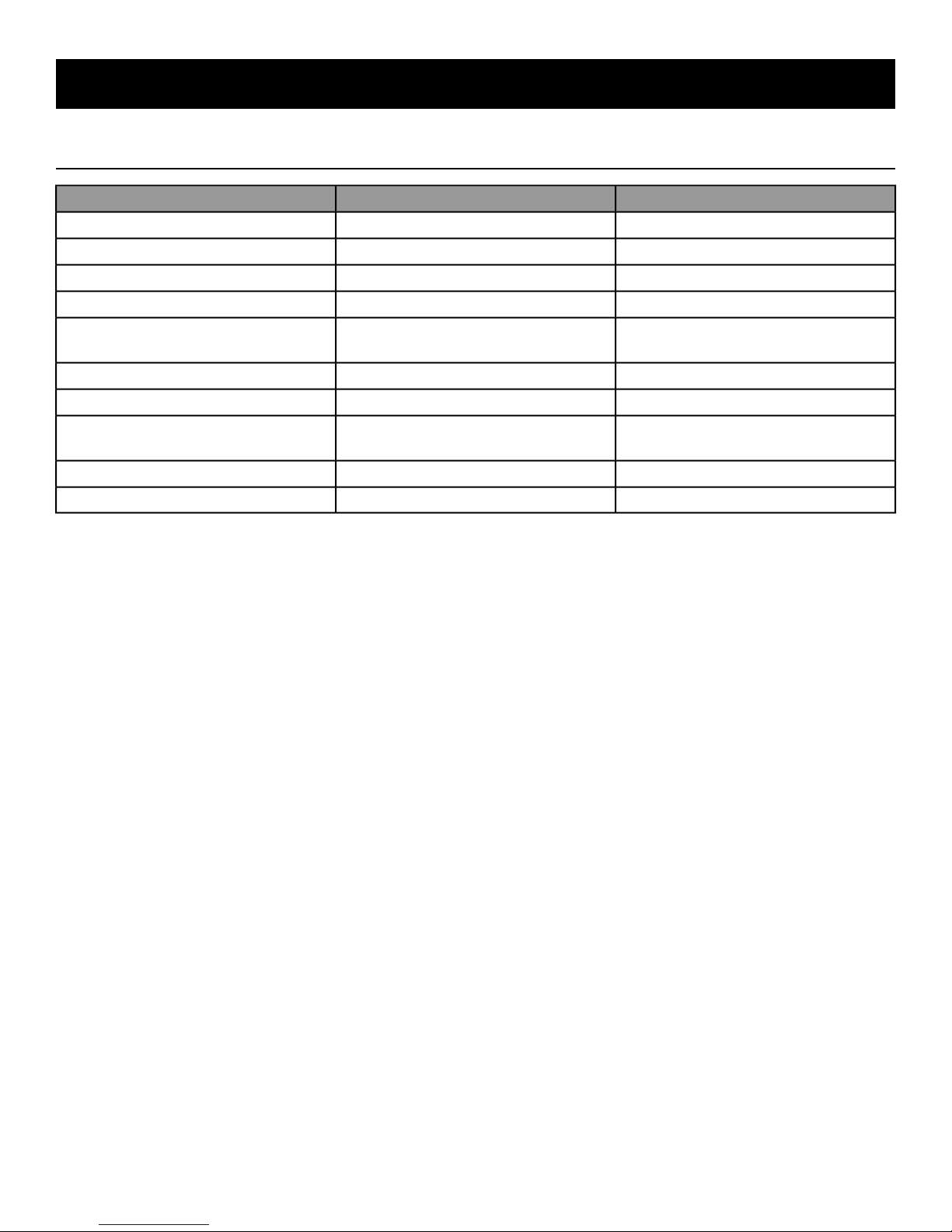
Motor Drive Belt
Front/Rear Rollers
Service and Technical Data
Inspect For tension 120 ft/lbs (178 kg/m)
and Cracks
Remove Any Abnormal Build-Up Which
can cause noise during workout
WhenActionComponent
WeeklyDamp ClothFrame, Motor Cover and Console
WeeklyLCD Cleaning ToweletteConsole LCD Screen
MonthlyVacuumInside Motor Cover
MonthlyClean VFD Cooling FanVFD
Monthly
MonthlyInspect For Tension or Replace If DamagedWalk Belt
AnnuallyFlip Yearly or Replace If DamagedWalk Deck
As Needed
AnnuallyLithium Multi-Purpose GreaseActuator Elevation Screw Shaft
DailyInspect For DamagePower Cord
Page 8 of 22
Page 9
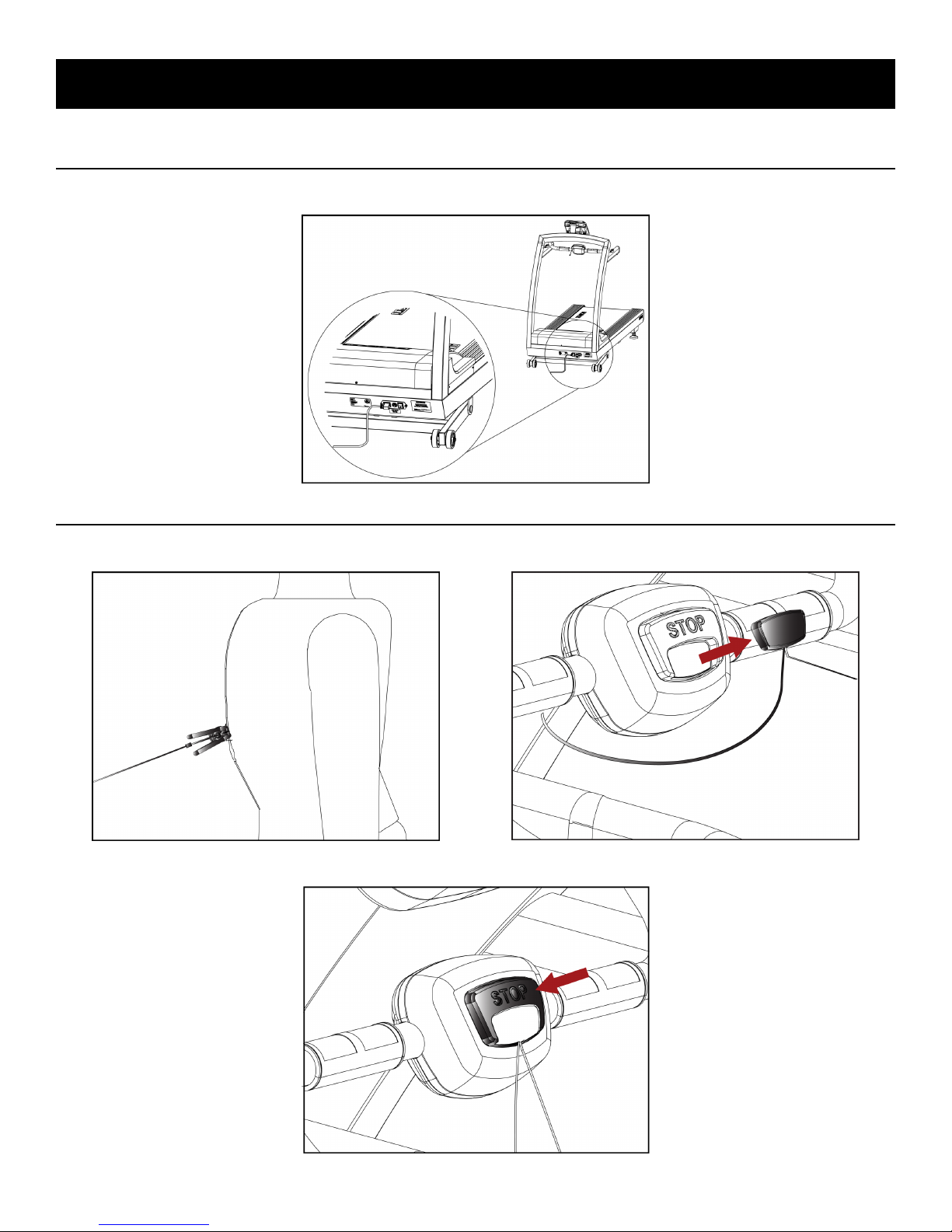
Adjustments
Serial Number and Power Cord Location
The serial number label and the power cord are located at the front of the machine.
Emergency Stop Options
Option 1: Attach the tether clip to your clothing. The E-Stop magnet will release when the tether is over extended.
Option 2: Press the [STOP] button on the E-Stop module.
Page 9 of 22
Page 10
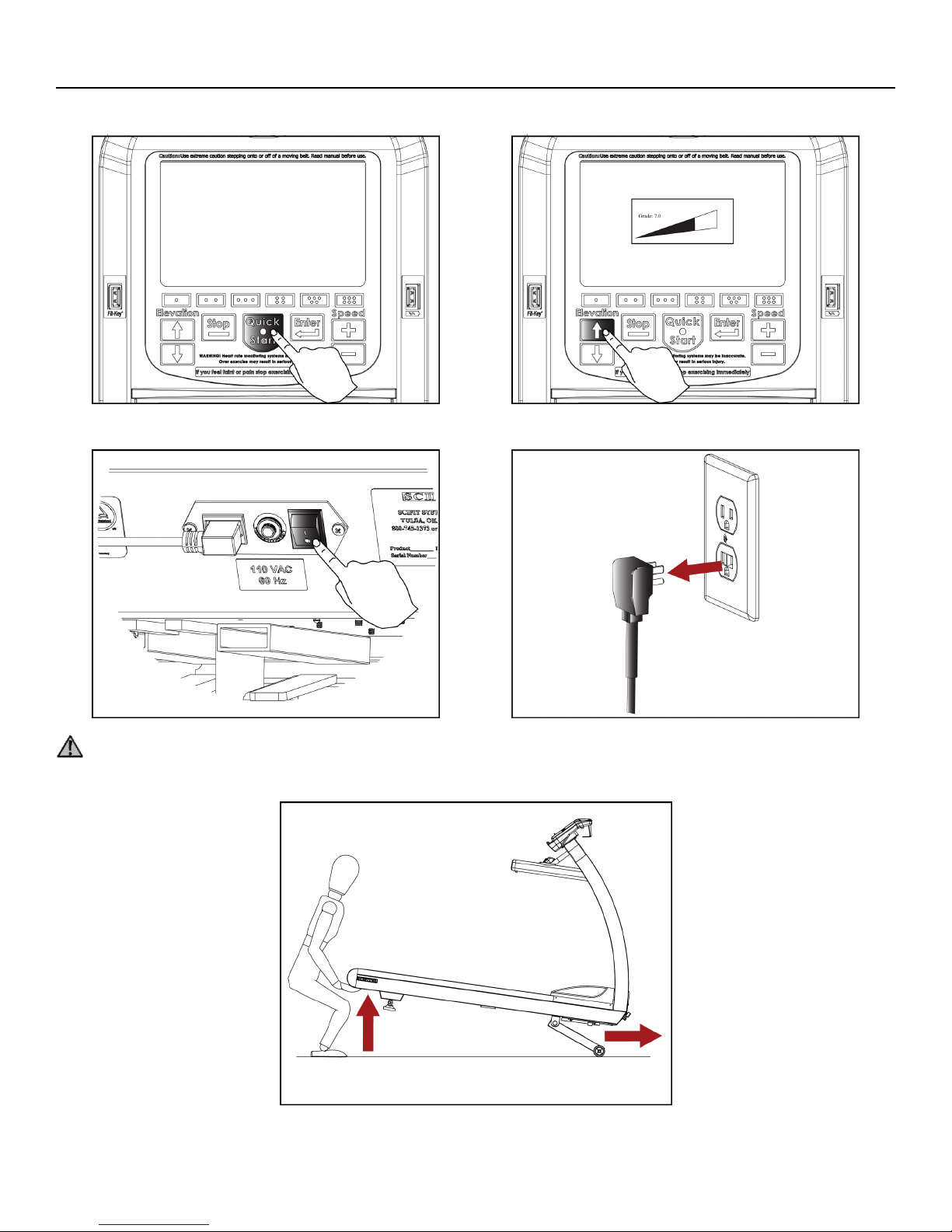
Machine Reloaction
Step 1: Press [Quick Start] button on the console and increase the elevation to 7%.
Step 2: Turn off the machine, then unplug the power cord from the wall outlet.
Attention: Two people required.
Step 3: Carefully lift the machine from the rear and move to the new location.
Page 10 of 22
Page 11
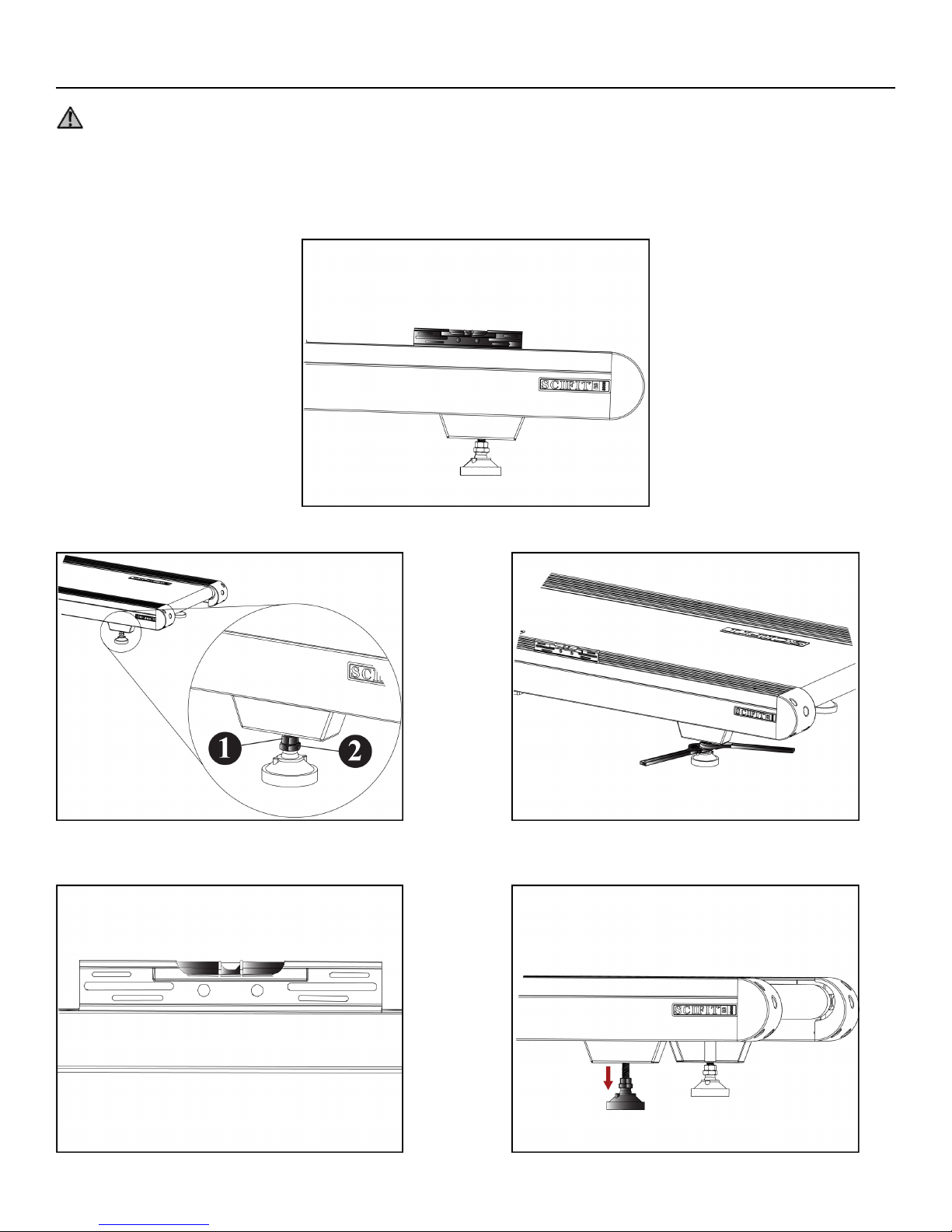
Footpad Adjustment
Attention: A machine not level may cause walk belt tracking issues.
Tools required:
Step 1: Place the level on top of the treadmill side rail.
•• Cresent Wrenches (Qty. 2)Level
Step 2: Use the cresent wrenches to loosen the height adjustment nut (item 1) and jam nut (item 2) on both right and left footpads.
Step 3: Lift and stabilize the rear of the treadmill until the machine is level (see bubble on the level), then adjust the right and
left footpads until they touch the oor.
Page 11 of 22
Page 12
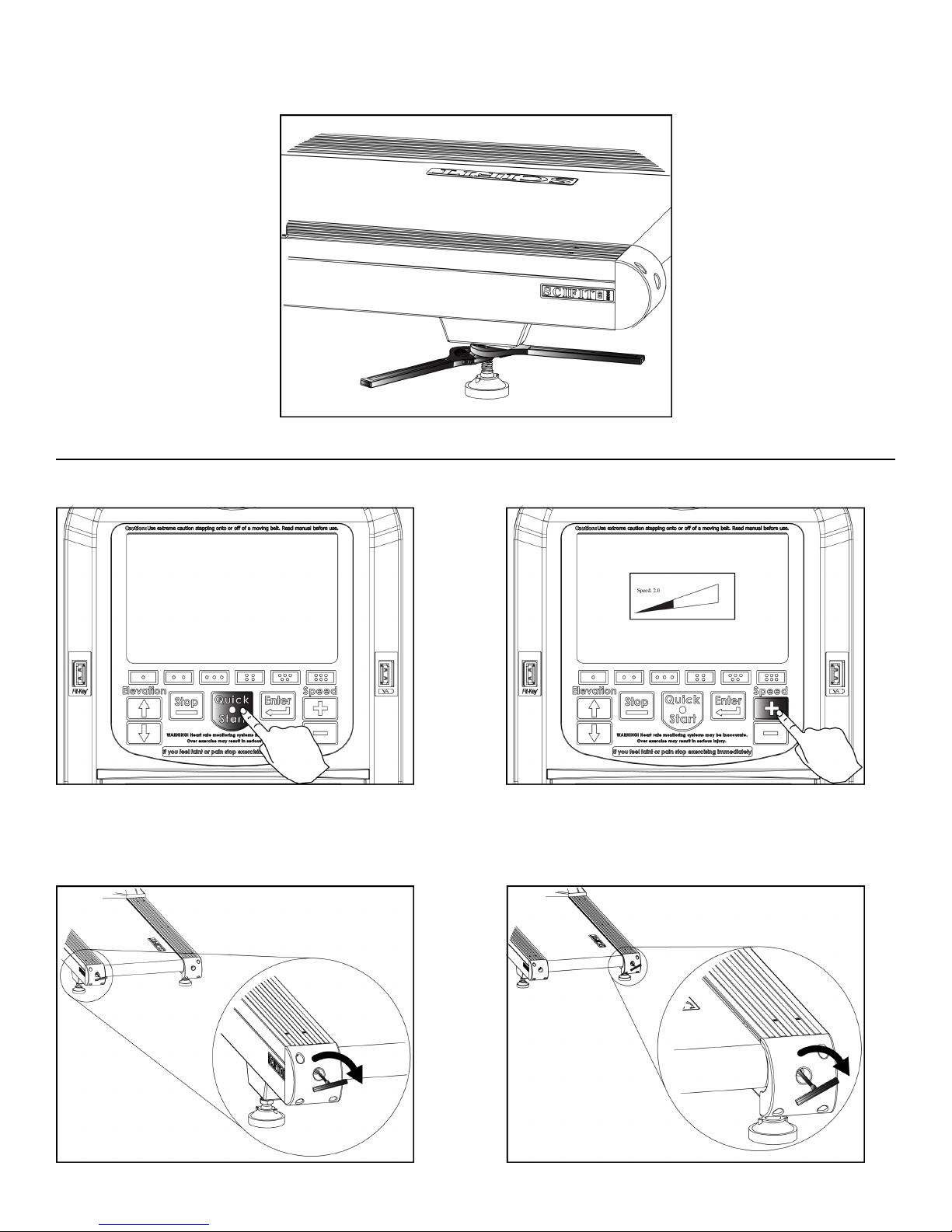
Step 4: Move the height adjustment nut back up to the top of the threads followed by the jam nut on both footpads, then tighten
with the cresent wrenches.
Belt Alignment and Tension
Step 1: Press the [Quick Start] button and increase the speed to 2 mph (3.2 km/h).
Step 2:
* If belt tracks to the left, insert the T-handle into the left end cap and turn clockwise 1/4 at a time to move the belt to the right.
* If belt tracks to the right, insert the T-handle into the right end cap and turn clockwise 1/4 at a time to move the belt to the left.
Page 12 of 22
Page 13
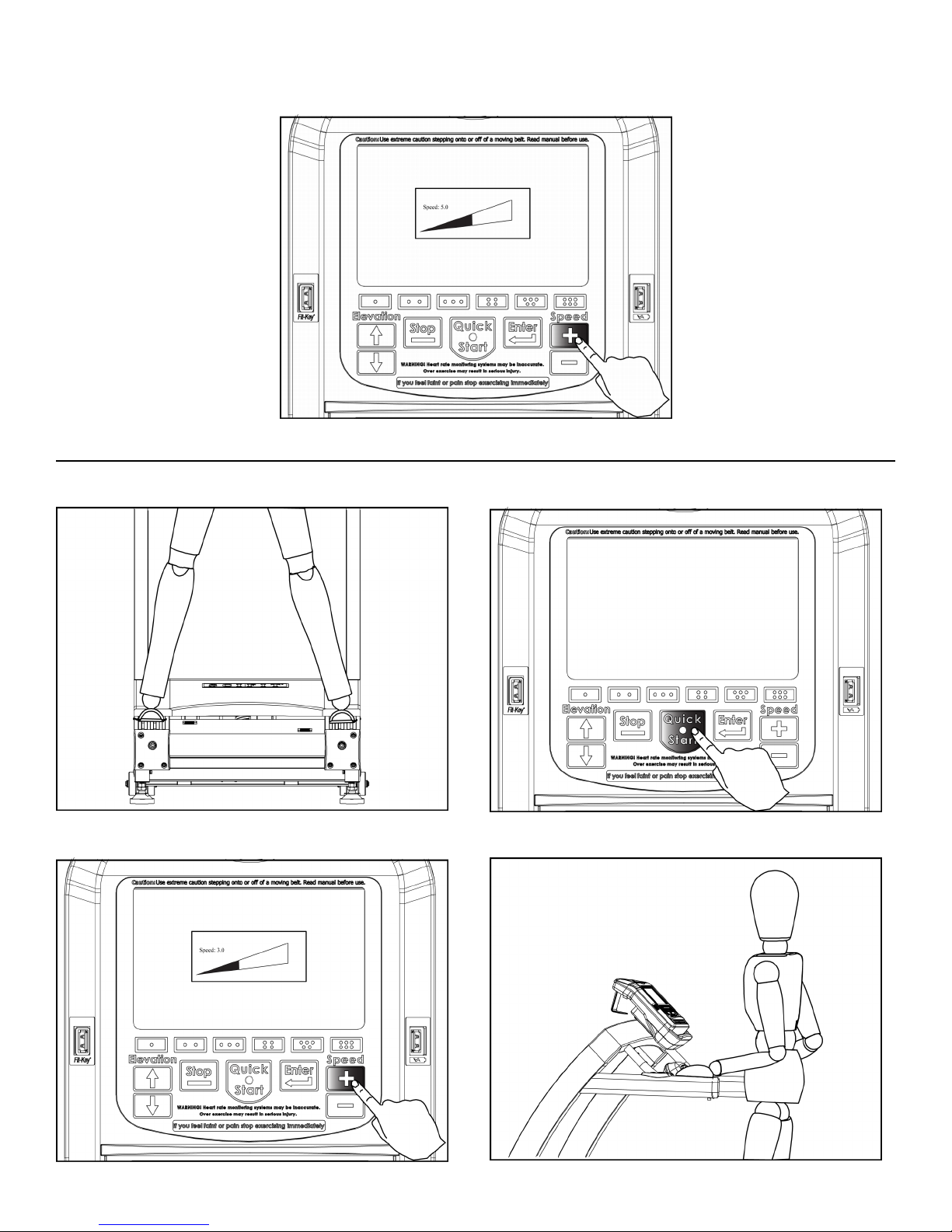
Step 3: When the belt tracking is consistent, then increase the speed to 5 mph (8 km/h) and adjust the belt if needed according
to step2.
Belt Tension
Step 1: Mount the treadmill and place your feet on the side rails straddling the machine, then press the [Quick Start] button.
Step 2: Increase the speed to 3 mph (4.8 km/h), then grab hold of the handrails and begin to walk.
Page 13 of 22
Page 14
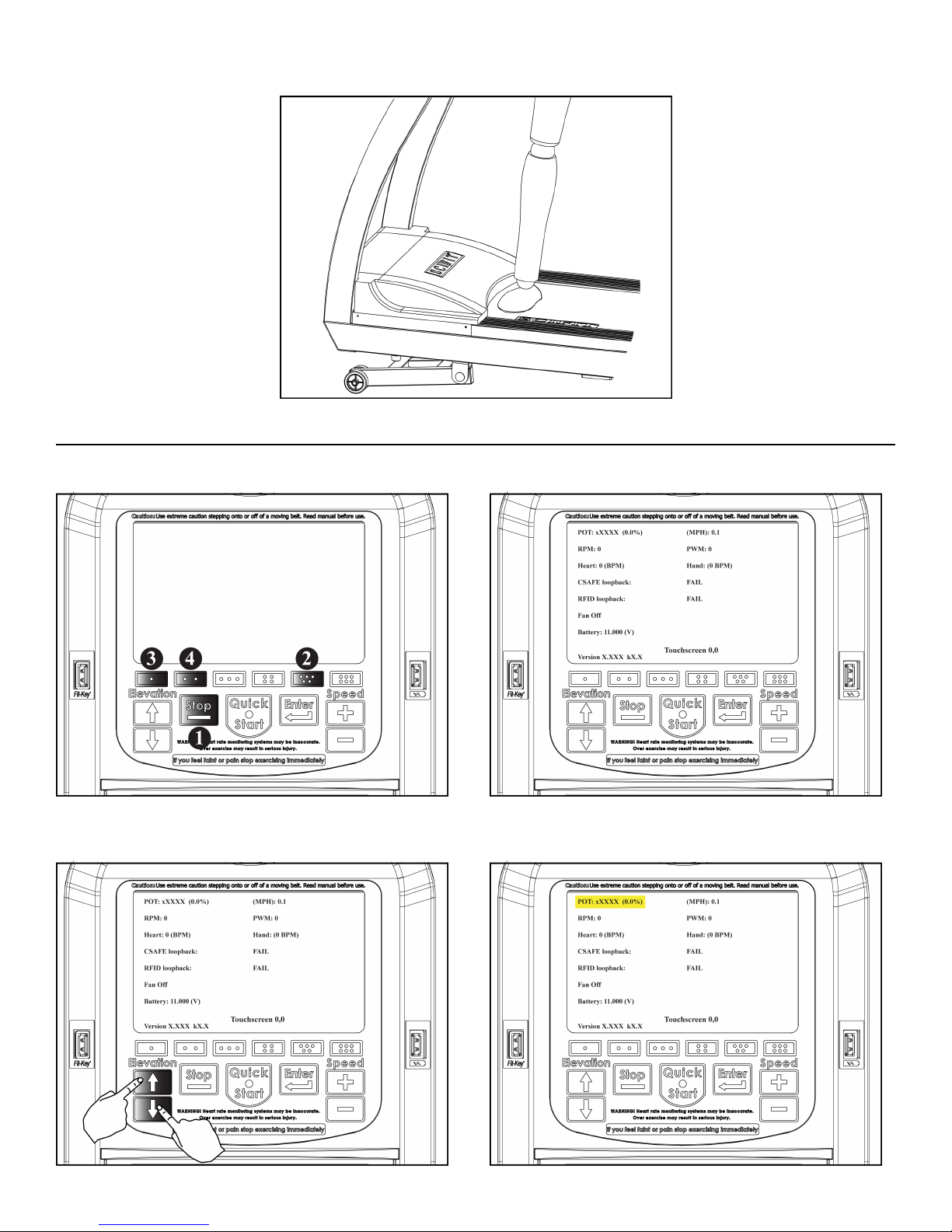
Step 3: Stomp your foot in front of the motor cover. If the belt slips return to the "Belt Alignment/Tension" section.
Elevation Calibration Test
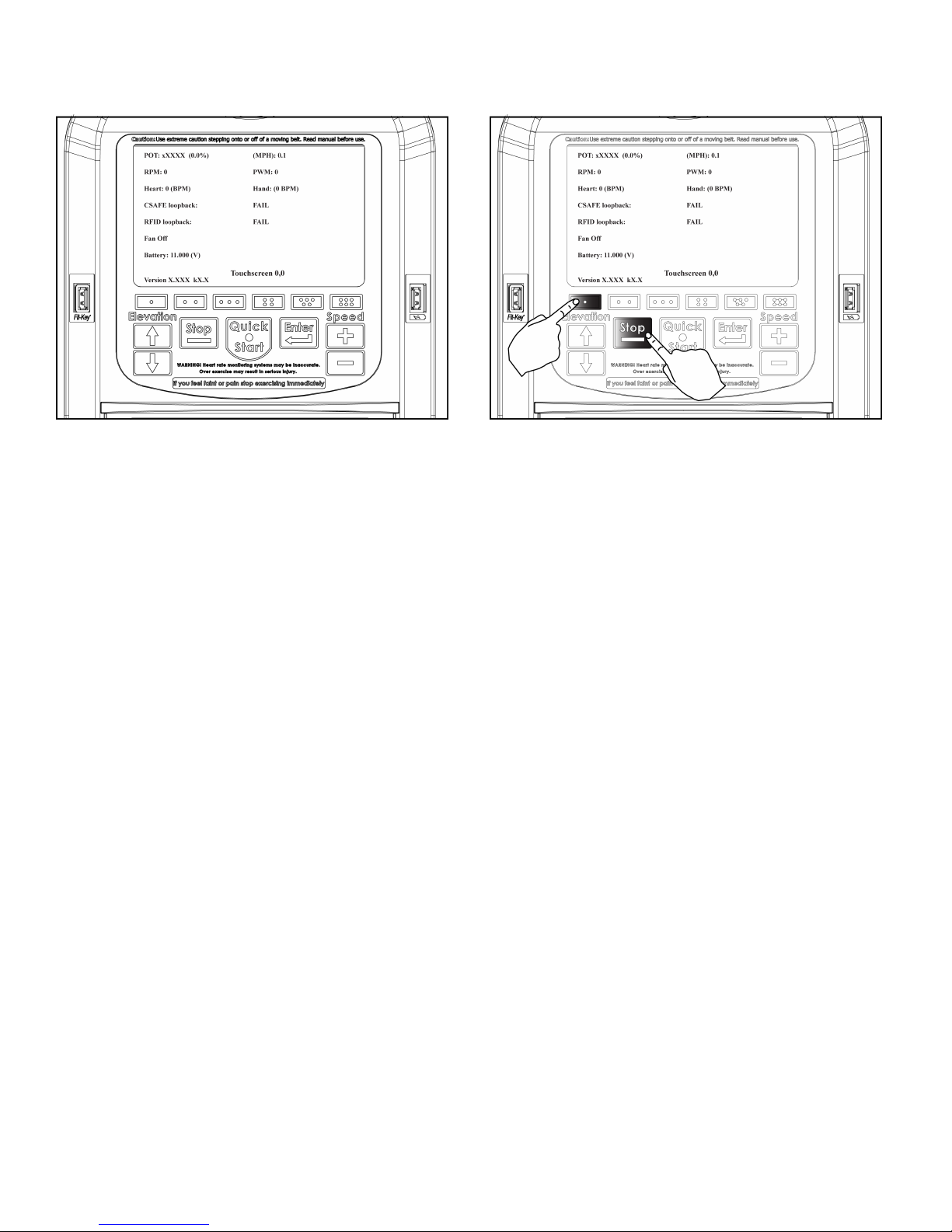
Step 1: Access the test screen by pressing in sequence the [Stop], then [Five Dot], then [One Dot] and nally the [Two Dot] buttons.
Step 2: Standing off of the machine press the elevation [Up Arrow] and [Down Arrow] buttons at the same time, this will highlight
the "POT" category yellow and the calibration process will begin.
Page 14 of 22
Page 15
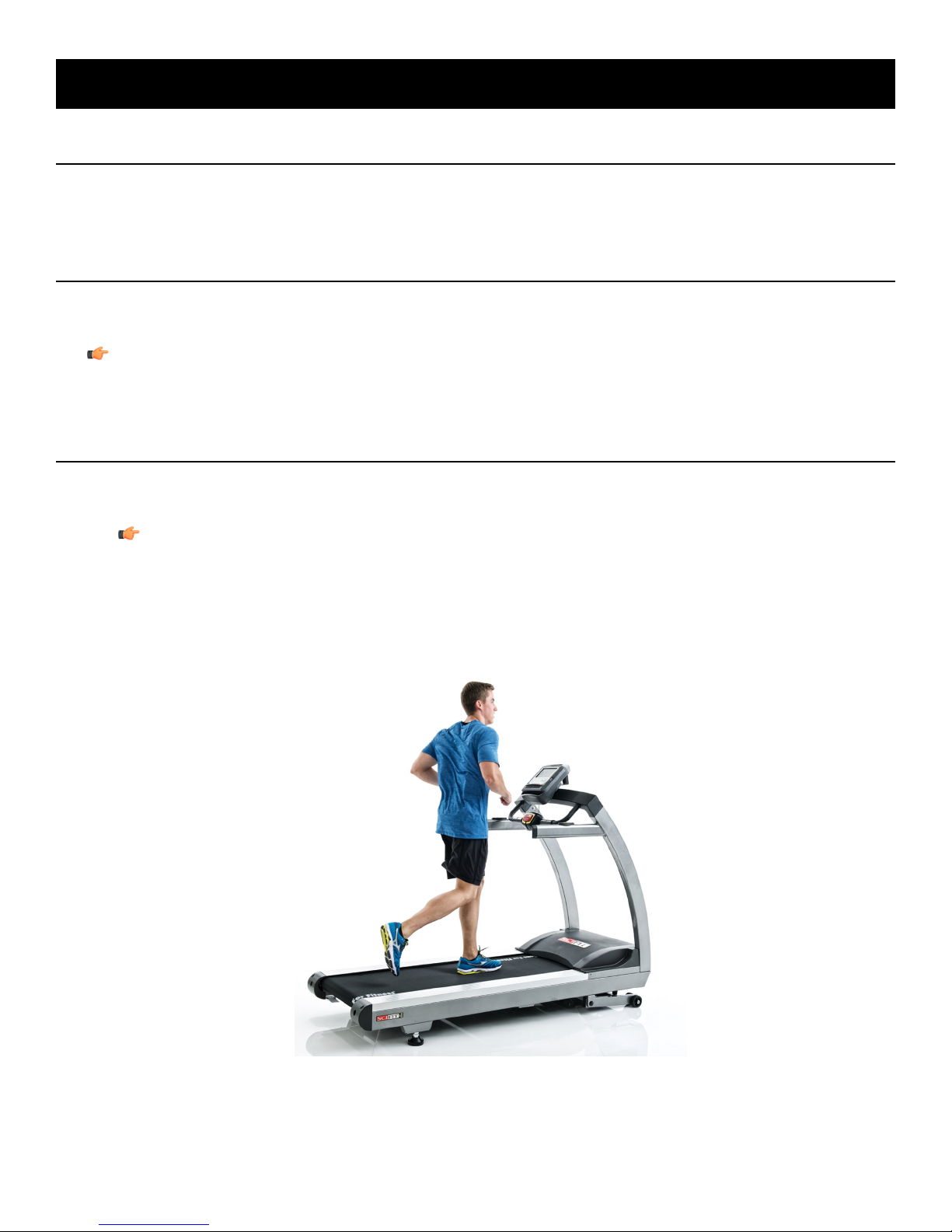
Step 3: When the calibration is complete, the "POT" category will unhighlight. You may now exit by pressing and holding the
[One Dot] button, then press the [Stop] button, then release both buttons. The screen will then change to the main menu.
Page 15 of 22
Page 16
Biomechanical Positioning
AC5 Treadmill Mounting
1.
Grab the handrail rmly and place one foot onto the siderail cover.
2.
Mount the machine and face the console.
AC5 Treadmill Initiating a Workout
1.
Attach the emergency stop tether clip to your clothing.
2.
Select the workout program preferred (see Console Program manual) and begin the workout.
Note: The console will show a count down starting at 3, then the workout will begin.
3.
Firmly grab the handlebars to stabilize yourself and begin walking, as the speed increases then begin to jog/run.
AC5 Treadmill Dismounting
1.
When the workout is completed a "Cool Down" screen will appear displaying nal results, then you may:
a) Save your results, then wait until the "Cool Down" timer reaches "0"
Note: "Cool Down" time count down starts 5 minutes.
b) Save your results, then press the [Stop] button on the console overlay.
2.
Wait for the walk belt to stop, detach the emergency clip from your clothing, then grab the handlebar rmly and carefully step off
the treadmill.
Page 16 of 22
Page 17
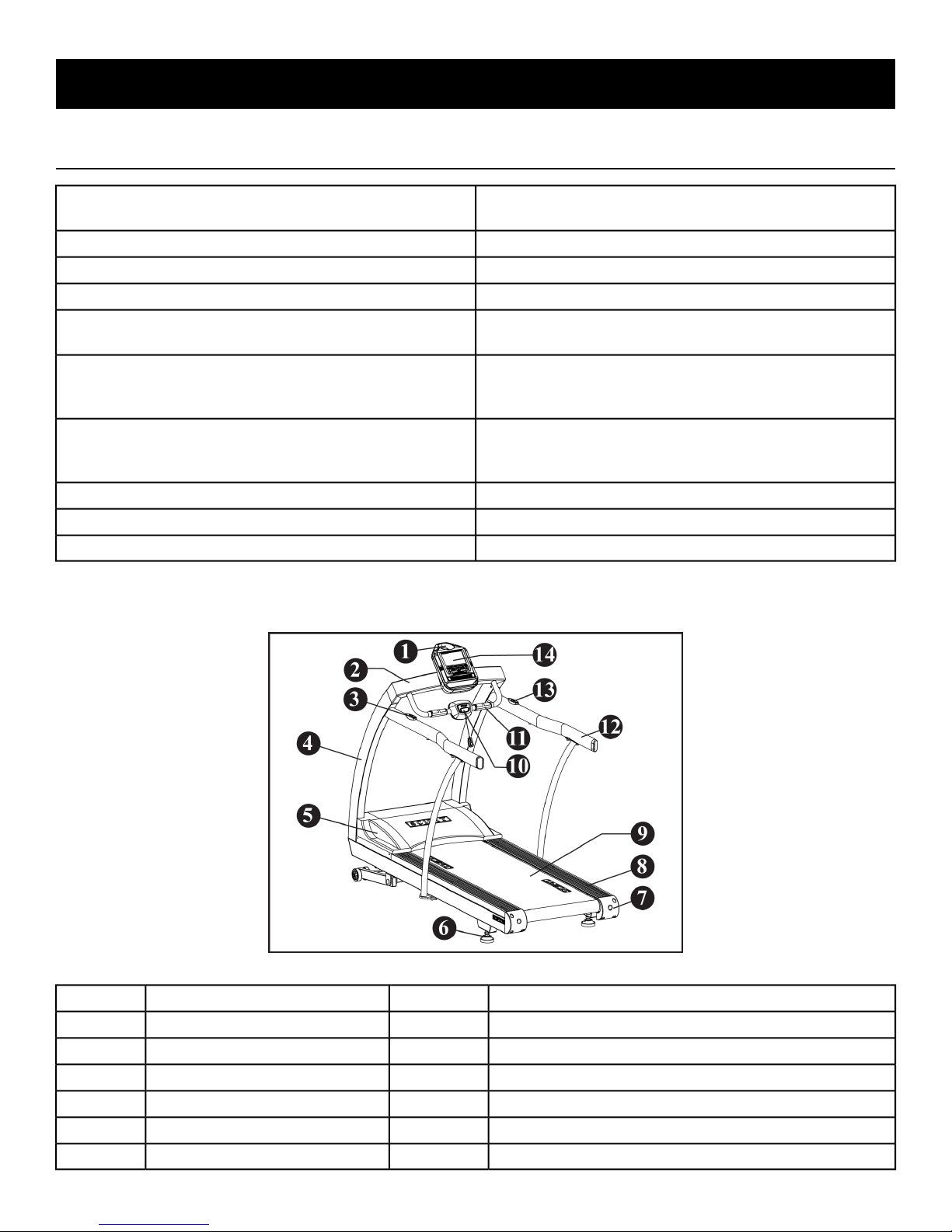
Specications - AC5000/AC5000M
Specications
Weight
Elevation Range
Speed Range
Programs
External Parts
AC5 - 458 lbs/208 kg (Assembled), 500 lbs/227 kg (Boxed) AC5M
- 483 lbs/219 kg (Assembled), 525 lbs/238 kg (Boxed)
550 lbs (250 kg)Max User Weight
120V/15 amp dedicated circuitPower
5-15P Right AnglePower Cord
AC5 - (0 to 15%) .5% increments AC5M - (-3 to 12%) .5%
increments
AC5 - Forward .1 to 12 mph (.3 to 19.3 km/h), .1 mph (.1 km/h)
increments AC5M - Forward .1 to 12 mph (.3 to 19.3 km/h), Reverse
.1 to 4 mph (.3 to 6.4 km/h), .1 mph (.1 km/h) increments
Quick Start, Manual, Forward (AC5M Only), Reverse (AC5M
Only), Heart Rate, 7 Pre-programmed elevation programs, 7
Pre-programmed speed programs
89" (226 cm)Length
63" (160 cm)Height
AC5 - 34" (86 cm), AC5M - 36" (91 cm)Width
Side Rail Covers8Water Bottle Holder1
Walk Belt9Center Weldment2
Emergency Stop10Elevation Switch3
Contact Heart rate11Left and Right Upright Frames4
Extended Hand Rails (ACM Only)12Motor Cover5
Speed Switch13Leveling Footpads6
Intelli-Fit Console14Left and Right End Caps7
Page 17 of 22
Page 18
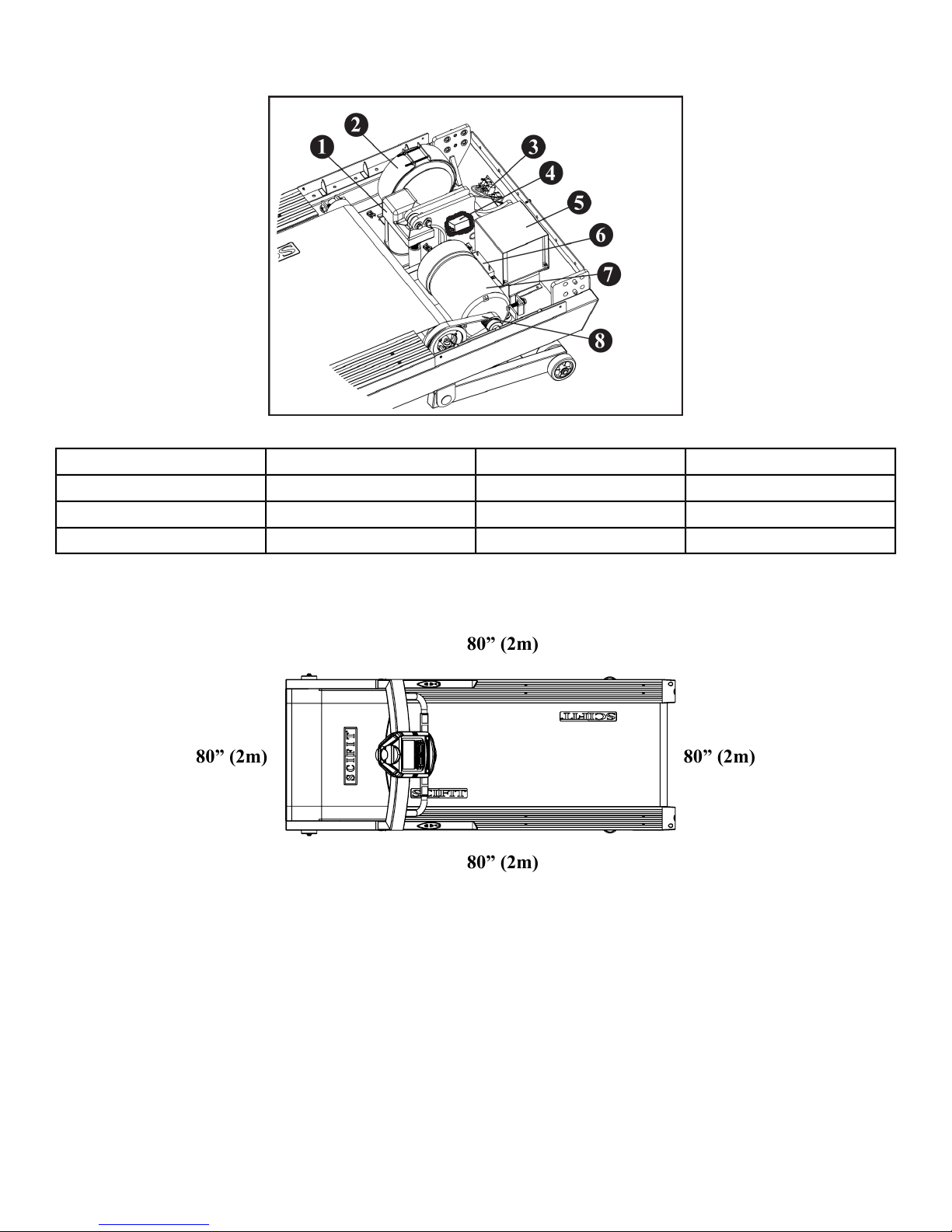
Internal Parts
80” (2m)
80” (2m)80” (2m)
80” (2m)
VFD With Shield5Elevation Motor1
Dynamic Resistor6Isolation Transformer2
AC Motor7AC Power Inlet Module3
Drive Belt8AC Inline Filter4
Safety Perimeter
Page 18 of 22
Page 19
Troubleshooting
Machine does not turn on.
Troubleshooting
Power switch is in the "OFF" position.
Voltage supply is not available.
Problem is between the wall outlet and VFD.
SolutionReasonCondition
Connect the power cord into the wall socket.Power cord is not connected.
Turn the power switch to the "ON" position
located at the front of the machine.
• Check if power is at the wall socket.
(Consult a qualied electrician)
• Check the cables under the motor cover.
• Check the breaker switch.
Consult a qualied technician for the
following:
• Verify power is present at the input side
of the line lter with the power switch
in the "ON" position.
• Verify power is present at the output side
of the line lter with the power switch
on the "ON" position.
• Verify power is present at the connector
that attaches to the VFD.
Power present to VFD, but VFD not
supplying power.
Roller noise.
Noise coming from the belt each time the
seam of the belt passes over the roller.
Noise at rear part of the machine. Replace roller.Bearings bad in rear roller.
Motor is not working.
Elevation does not work during the workout
program.
The motor runs, but the walk belt does not
move.
Walk belt build-up on the roller.
Walk belt seam.
Power from VFD not present.
Verify the connectors on the motor and VFD
do not show signs of arcing.
Power from VFD is not present.
Replace VFD
Replace rollerBad bearing.
Scrape roller, if build-up can not be
removed, then replace the roller.
Noise goes away after a day or two, if noise
persists contact SCIFIT customer service.
Replaced motor.Bearings of motor damaged.Motor making noise.
Level machine.Unlevel machine.
Align walk belt.Walk belt out of alignment.
Replace motor.Bad motor.
Verify the actuator cable is connected to the
VFD and that power is coming from the
VFD when the motor is activated.
Replace motor and VFD.
Verify the actuator cable is connected to the
VFD and that power is coming from the VFD
when the motor is activated.
Adjust the drive belt tension.Drive belt is too loose.
Replace the drive belt.Drive belt broken.
Tighten the tension of the walk belt.Walk belt tension too loose.Walk belt slips.
Page 19 of 22
Page 20
Warranty
What is Covered
This SCIFIT commercial exercise equipment Product is warranted to be free of all defects in material and workmanship.
Who is Covered
The original purchaser or any person receiving the product as a gift from the original purchaser.
How long is it covered
All coverage is provided by specic Product according to the guidelines listed on the chart below.
XWalk Belt
XWalk Deck
XHandrails and Handles
XHeart Rate Grips
XHeart Rate Transmitter Belt
XUSB Drives
XYellow Non-Skid Safety Step
5 Years3 Years1 Year90 daysItem
XStructure and Frame
XDrive System Inclusive Of Motor and VFD
Who Pays Transportation and Insurance For Service
If the Product or any covered part must be returned to a service facility for repairs, We, SCIFIT, will pay all transportation and insurance
charges for the rst year. You are responsible for transportation and insurance charge after the rst year.
What We Will Do To Correct Covered Defects
We will ship to you any new or rebuilt replacement part or component, or at our option, replace the Product. Such replacement parts are
warranted for the remaining portion of the original warranty period.
What is not covered
Any failures or damage caused by unauthorized service, misuse, accident, negligence, improper assembly or installation, debris resulting
from any construction activities in the Product’s environment, rust or corrosion as a result of the Product’s location, alterations or
modications without our written authorization or by failure on your part to use, operate and maintain the Product as set out in your
Operation Manual (“Manual”).
One type RJ45 interchangeable Network ready and Fitness Entertainment port is supplied with the Product. This port complies with the
FitLinxx CSAFE specication dated August 4, 2004 stating: 4.75VDC to 10VDC; maximum current of 85mA. Any Product damage
caused by a load exceeding this FitLinxx CSAFE specication is not covered by warranty.
All terms of this warranty are void if this product is moved beyond the continental borders of the United States of America (excluding
Alaska, Hawaii and Canada) and are then subject to the terms provided by that country’s local authorized SCIFIT representative.
Detailed warranty guidelines are available at: http://www.scit.com/service-information/.
Page 20 of 22
Page 21

What you must do
Register your Product online at http://www.scit.com/warranty-registration-2/.
Retain proof of purchase; use, operate and maintain the Product as specied in the Manual; notify Customer Support Services of any
defect within 10 days after discovery of the defect; if instructed, return any defective part for replacement or, if necessary, the entire
Product for repair.
How to get replacement parts and service
Refer to the front of this manual for your local service contact information. Reference your name, address and the serial number of your
Product. They will tell you how to get a replacement part, or, if necessary, arrange for service where your Product is located.
Exclusive Warranty
THIS LIMITED WARRANTY IS IN LIEU OF ALL OTHER WARRANTIES OF ANY KIND EITHER EXPRESSED OR IMPLIED,
INCLUDING BUT NOT LIMITED TO THE IMPLIED WARRANTIES OF MERCHANTABILITY AND FITNESS FOR A
PARTICULAR PURPOSE, AND ALL OTHER OBLIGATIONS OR LIABILITIES ON OUR PART. We neither assume nor authorize
any person to assure for us any other obligation or liability concerning the sale of this Product. Under no circumstances shall we be liable
under this warranty, or otherwise, of any damage to any person or property, including any lost prots or lost savings, for any special,
indirect, secondary, incidental or consequential damages of any nature arising out of the use of or inability to use this Product. Some
states do not allow the exclusion or limitation of implied warranties or of liability for incidental or consequential damages, so the above
limitations or exclusions may not apply to you. Warranty coverages and terms may differ outside the United States. Please contact the
SCIFIT ofce servicing your country (contact information found at the front of this manual) or visit the applicable local SCIFIT website
to receive the specic warranty information for your country.
Changes in Warranty Not Authorized
No one is authorized to change, modify or extend the terms of this limited warranty.
Effects of State Laws
This warranty gives you specic legal rights, and you may have other rights which vary from state to state and country by country.
Our Pledge To You
Our Products are designed and manufactured to the highest standards. We want you to be completely satised with our Products and
will do everything possible under the terms of this warranty to keep you secure in knowing you have bought the best!
Page 21 of 22
Page 22

A7241A
2018
www.scit.com
 Loading...