

Page 1
NUSG-eNodTouch-MS-FE_196776_D.docx
SCAIME SAS – Technosite Altéa – 294, Rue Georges Charpak – 74100 JUVIGNY - FRANCE
Tél. : +33 (0)4 50 87 78 64 – www.scaime.com
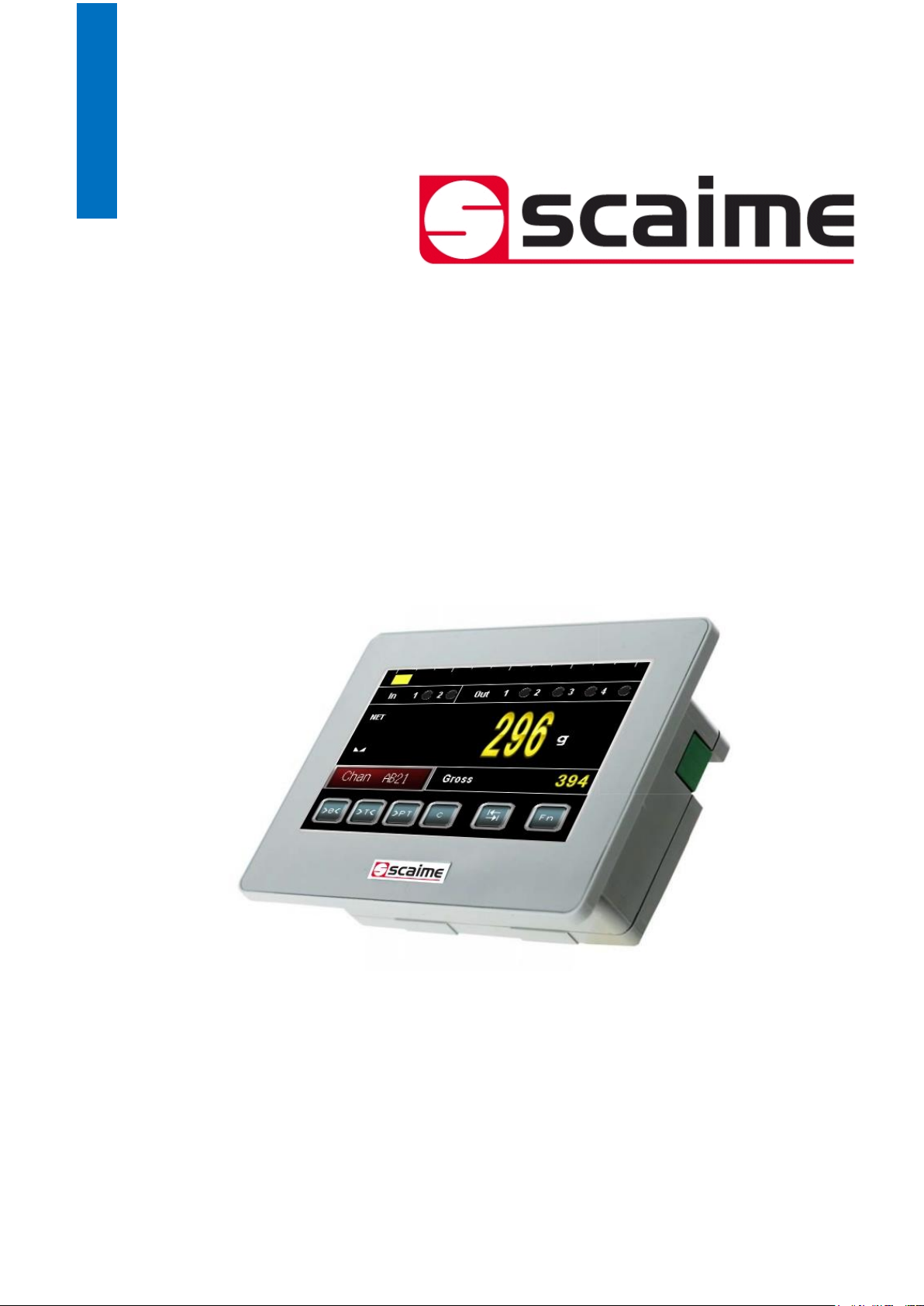
eNodTouch-MS
Ecran tactile pour multiples contrôleurs eNod4
Touch screen for multiple eNod4 controllers
Quick Start guide
Page 2

2
Quick Start Guide SCAIME: NUSG-eNodTouch-MS-FE_196776_D.docx
SOMMAIRE / CONTENT
Français
Présentation .................................................................................................................................... 3
Installation ...................................................................................................................................... 4
Conditions d’installation ............................................................................................... 4
Installation d’eNodTouch ............................................................................................. 5
Alimentation électrique ................................................................................................ 5
Interface RS485 pour la connexion à l’eNod4 ........................................................... 6
Entrer dans le mode Offline en fonctionnement ......................................................................... 7
English
Presentation .................................................................................................................................... 8
Installation ...................................................................................................................................... 9
Installation requirements .............................................................................................. 9
eNodTouch installation ................................................................................................. 9
Electrical powering ..................................................................................................... 10
RS485 interface for connection to eNod4 ................................................................. 10
Entering Offline mode when Operating ..................................................................................... 11
Page 3
3
Quick Start Guide SCAIME: NUSG-eNodTouch-MS-FE_196776_D.docx
Présentation
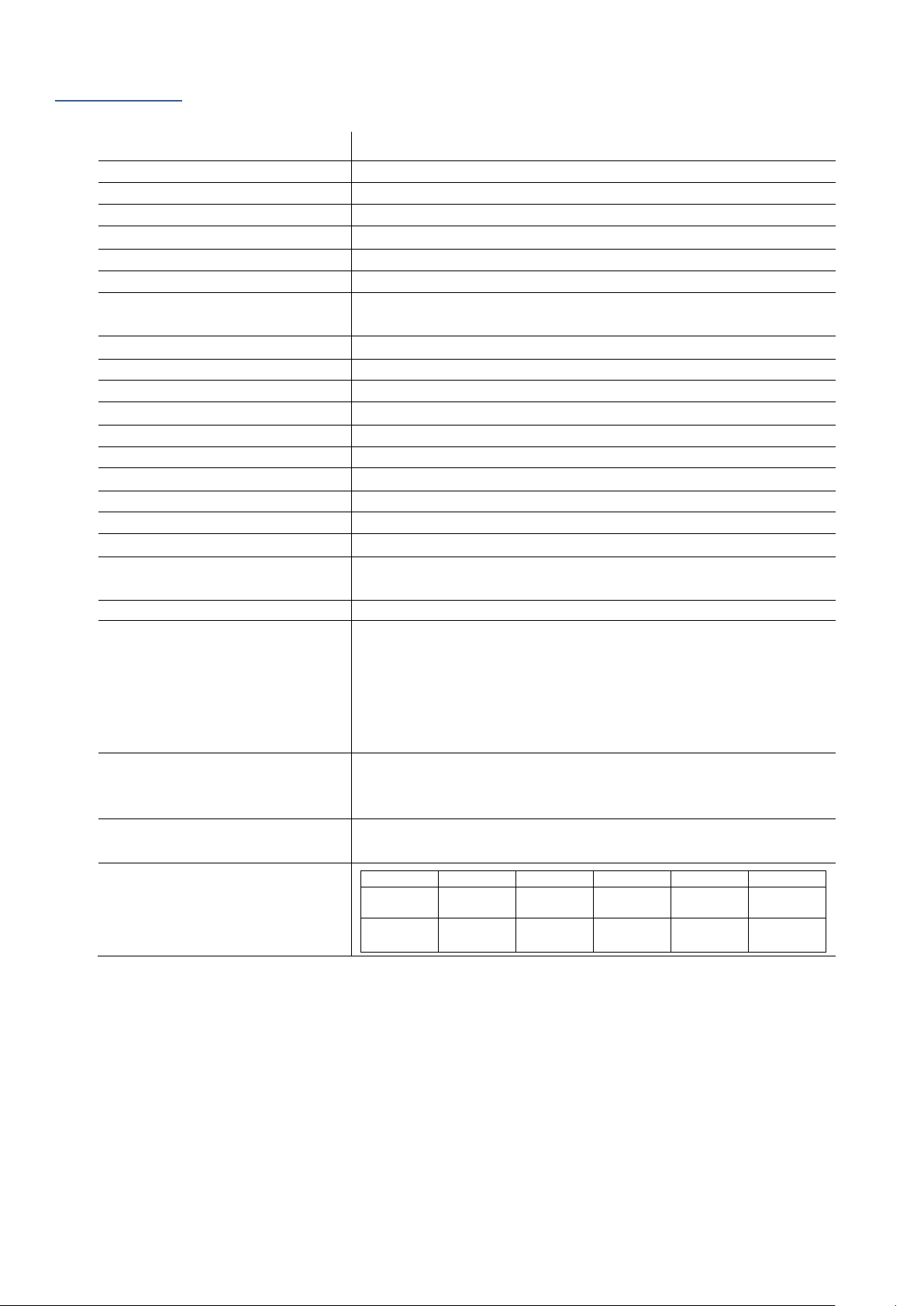
eNodTouch-MS est une interface homme machine graphique présentant les caractéristiques suivantes :
Afficheur
4.3’’ TFT Couleur LCD
Résolution
480 x 272 pixels
Taille d’affichage
W95 x H53.9 mm
Couleurs d’affichage
65,536 couleurs
Rétro-éclairage
White LED
Luminosité / Contraste
16 Niveaux (Ajusté avec le touch Panel)
Type de dalle tactile
Film résistif analogique
Durée de vie panneau tactile
50,000 heures ou plus (en opération en continue à 25 °C avant que la
luminosité du rétro-éclairage ne diminue de 50%)
Alimentation
24VDC, 3.6W ou moins
Tension
DC 12 à 24V
Résistance d’isolement
DC 500V, 10M
Mise à la terre
Résistance de mise à la terre de 100Ω
Dimension
W124.9 x H90.4 x D38.8 mm
Poids
0.22 kg
Température d’air ambiante
0 à +50°C
Humidité ambiante
10%...90% RH (sans condensation, température humide 39 °C ou moins)
Poussière
0.1 mg/m³ ou moins (niveaux non conductifs)
Température de stockage
-20 à +60°C
Structure
IP65F, Type 1, Type 4X (Utilisation à l'intérieur seulement), Type 13 sur le
panneau avant lorsqu'il est correctement installé dans une enceinte.
Refroidissement
Circulation naturelle d’air
Interface série COM1
Transmission asynchrone : RS-422/485
Longueur des données : 7 ou 8 bits
Bit de Stop : 1 ou 2 bits
Parité : Aucune, impair, ou pareil
Données de Vitesse de transmission : 2,400(1,200) à 115,200 bps,
187,500 bps (MPI)
Connecteurs : 2-pièces terminal block 9 pin x 1
USB1 interface
Connecteurs : USB 2.0 (Type A) x1, Tension d'alimentation : 5 Vdc ±5%,
Fourni Courant maximum 500 mA/port, Distance de transmission
maximale : Moins de 3 m.
USB2 interface
Connecteurs : USB 2.0 (mini-B) x 1, Distance de transmission maximale :
Moins de 3 m.
Compatibilité eNod
eNodTouch
eNod4 T
eNod4 C
eNod4 D
eNod4 B
eNod4 F
2.00
1.21
2.09 (ETH)
1.09
2.09 (ETH)
1.07
2.08 (ETH)
1.06
2.09 (ETH)
1.06
2.09 (ETH)
1.03 1.21
2.09 (ETH)
1.09
2.09 (ETH)
1.07
2.08 (ETH)
1.05
2.07 (ETH)
1.04
2.07 (ETH)
Page 4
4
Quick Start Guide SCAIME: NUSG-eNodTouch-MS-FE_196776_D.docx
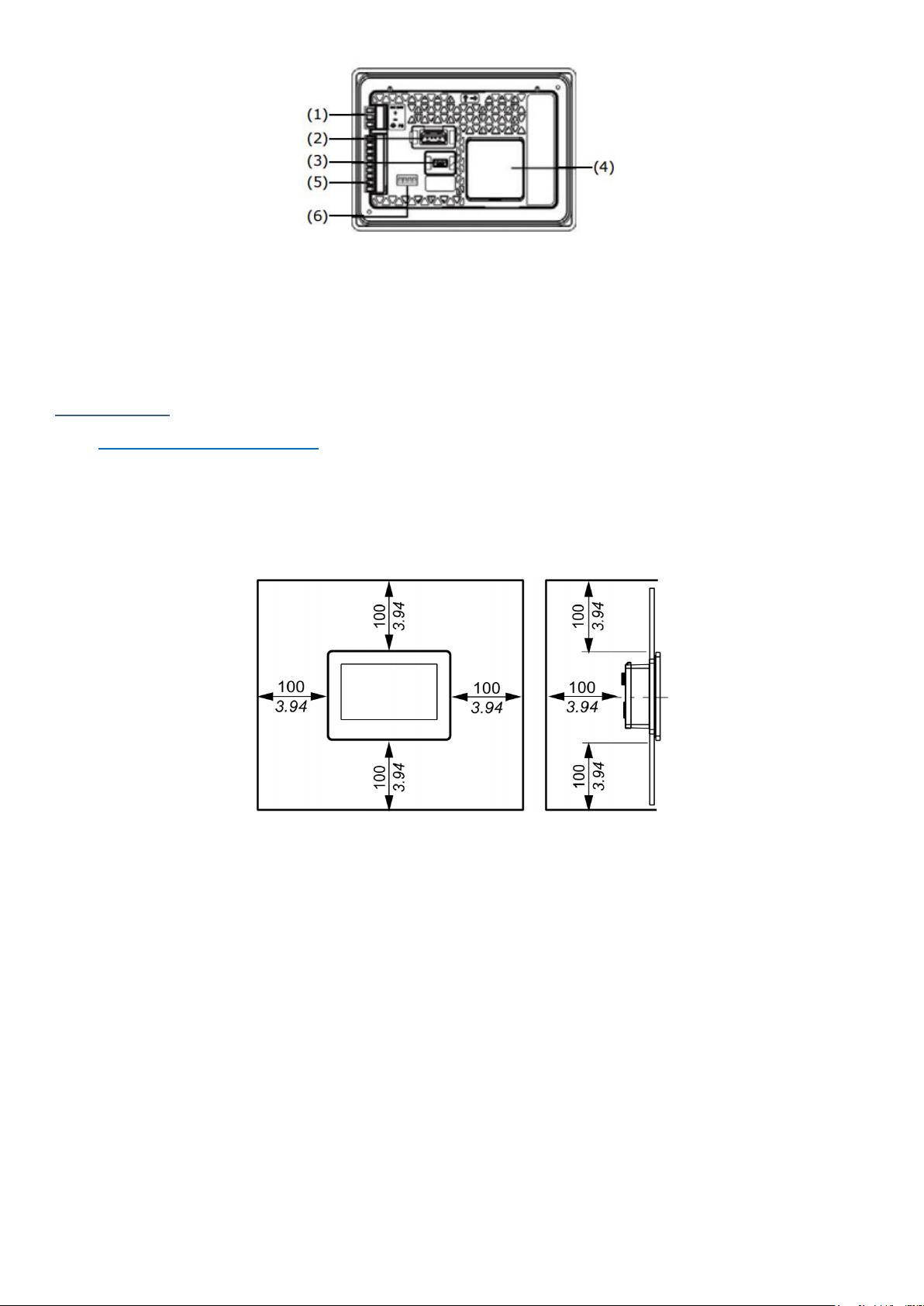
(1) Connecteur d'alimentation
(2) USB (Type A) Interface
(3) USB (mini-B) Interface
(4) RTC Batterie Cover Set
(5) Interface Série
(6) DIP Switch
Installation
Conditions d’installation
• Pour faciliter la maintenance et la ventilation, veillez à installer eNodTouch à au moins 100 mm d'autres équipements.
• Lors de l'installation eNodTouch sur le panneau d'une armoire ou un coffret, assurez-vous que la température et
l'humidité ambiante sont compatibles avec les caractéristiques données (Température de l'air environnant : 0 à 50 ° C,
l'humidité ambiante : 10 à 90% HR, température humide : 39 ° C max). Lors de l'installation d’eNodTouch sur le panneau
d'une armoire ou d’une enceinte, "Température de l'air environnant" indique à la fois la température du panneau et de
l’intérieur de l'armoire ou de l’enceinte.
Page 5
5
Quick Start Guide SCAIME: NUSG-eNodTouch-MS-FE_196776_D.docx
Installation d’eNodTouch
Adaptateur de
découpe de
panneau
eNodTouch-S
W (mm)
H (mm)
Epaisseur de
panneau (X) (mm)
Pour prévenir les chutes lors
de l’installation, eNodTouch
comporte deux ergots sur le
dessus. Insérer l'unité dans
le panneau avec un angle de
façon à éviter
d’endommager les ergots.
Non
112.5
77.5
1.5 à 6.0
Oui
105.0
66.0
1.5 à 6.0
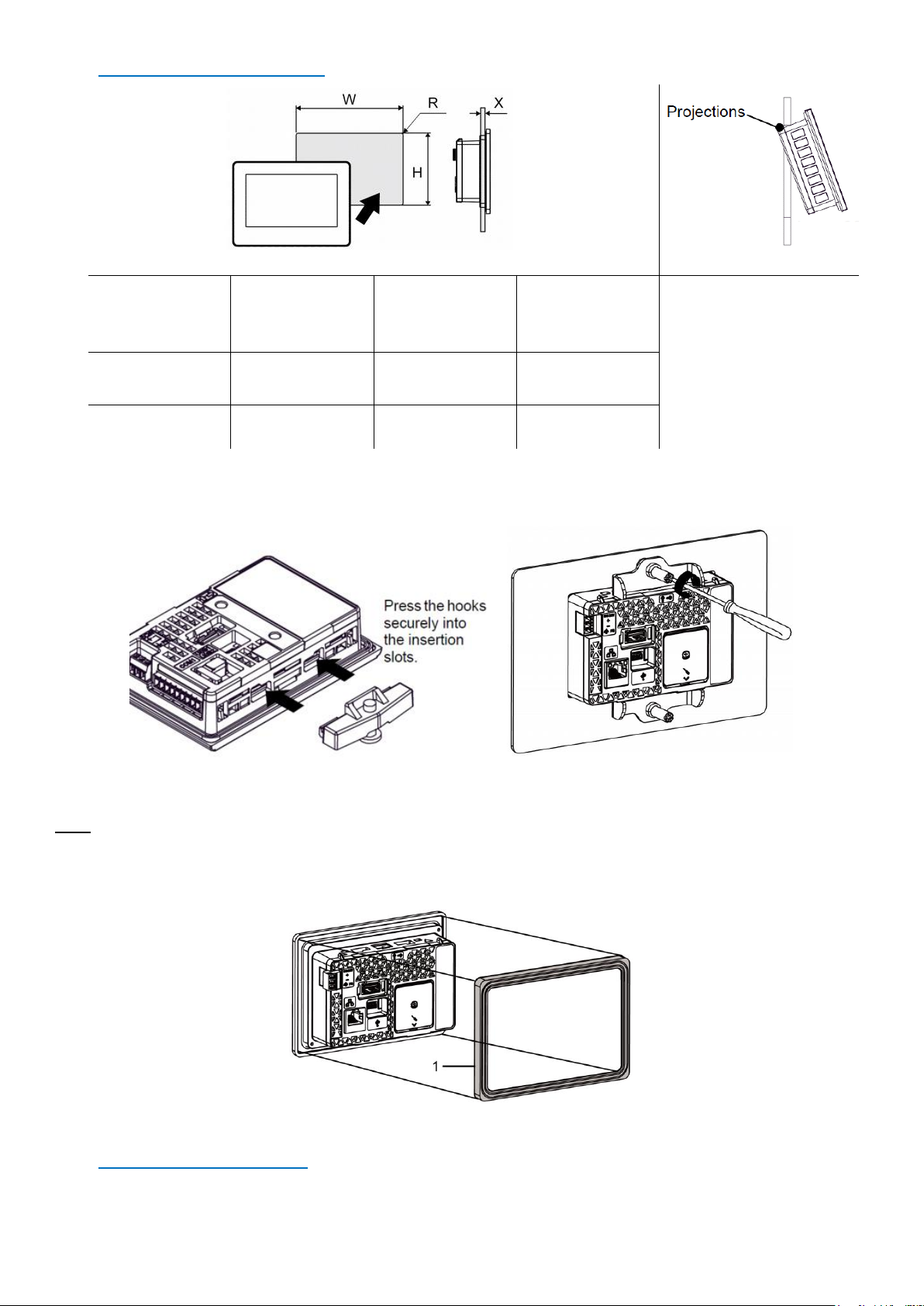
• Réalisez une ouverture dans le panneau selon les dimensions de la découpe eNodTouch.
• Assurez-vous que le joint d’étanchéité est bien positionné à l'unité eNodTouch puis placez l'appareil dans le panneau
par l'avant.
• Il est nécessaire d’utiliser le joint d’étanchéité, car il absorbe les vibrations et assure l’étanchéité du montage.
• Positionner les crochets des éléments de fixation dans les fentes d’eNodTouch prévues à cet effet.
• Visser les éléments de fixation avec un tournevis. Il y a deux fentes d'insertion sur le dessus et le dessous d’eNodTouch.
NOTE : Lors de l’installation sur une découpe de panneau pour le modèle monochrome (eNodTouch-S) l’adaptateur pour
remplacement eNodTouch-S par MS (réf. 632156) (adaptateur de découpe de panneau) est nécessaire. Dans ce cas, avant de
placer l’appareil dans le panneau :
- Retirer le joint d’étanchéité du produit
- Positionner l’adaptateur pour remplacement eNodTouch-S par MS sur le produit :
1- Adaptateur pour remplacement eNodTouch-S par MS
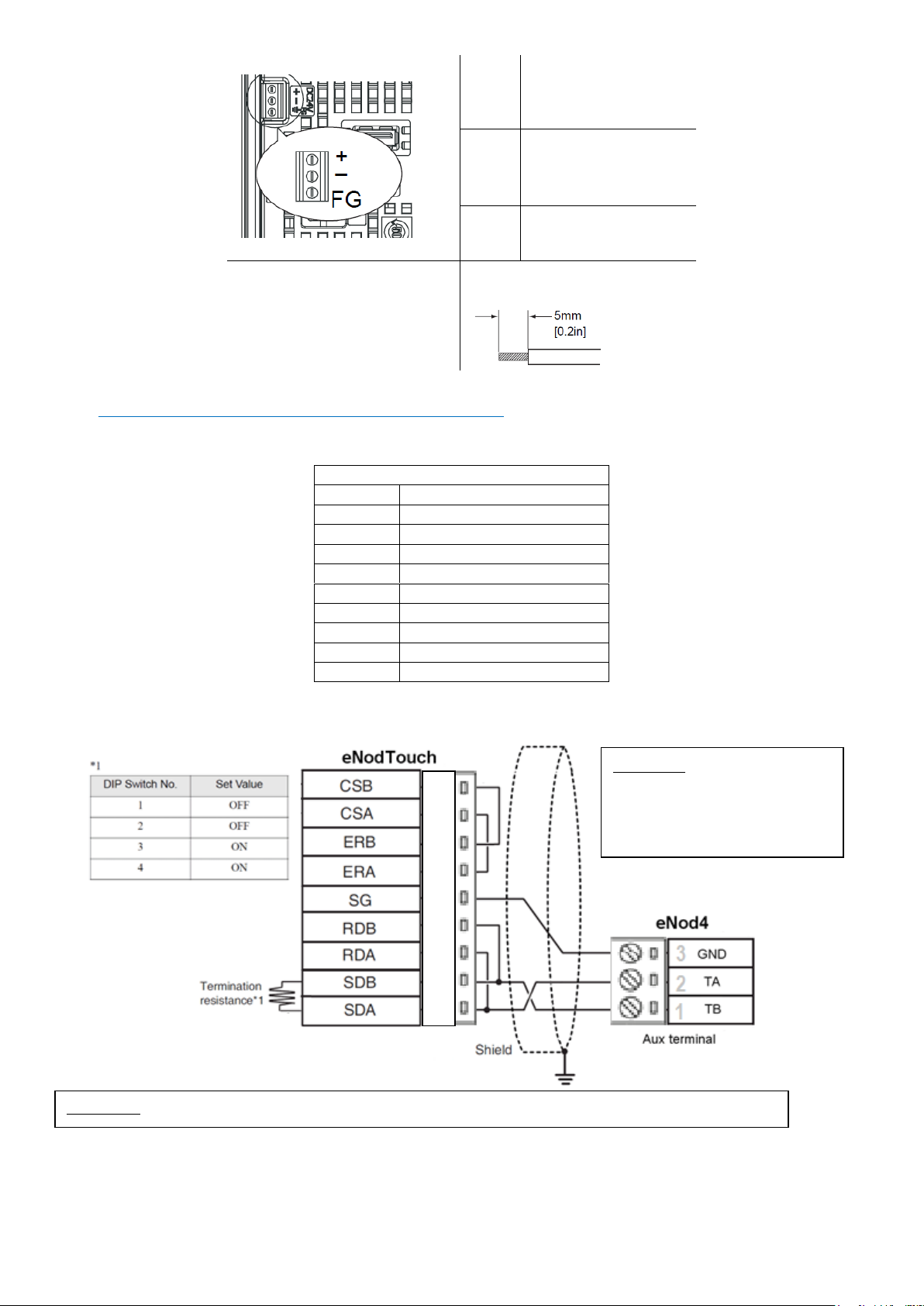
Alimentation électrique
• Une tension d'alimentation autre que celle spécifiée peut endommager la source d'alimentation et eNodTouch.
• Quand la borne FG est connectée, assurez-vous que le fil est relié à la terre.
Page 6
6
Quick Start Guide SCAIME: NUSG-eNodTouch-MS-FE_196776_D.docx
+
24V
-
0V
FG
Borne de mise à la terre
connectée au châssis
Type de conducteur
Fil simple: 0.75 to 1.5mm2
Fil torsadé: 0.75 to 1mm2
Interface RS485 pour la connexion à l’eNod4
• L’interface RS485 n’est pas isolée. Toujours connecter SG (Signal Ground) d’eNodTouch au contrôleur eNod4 connecté.
• Les bornes SG (Signal Ground) et FG (Frame Ground) sont connectées en interne.
Bornier RS422/RS485
Étiquette
Descriptif
CSB
Send Possible B (-)
CSA
Send Possible A (+)
ERB
Data Terminal Ready B (-)
ERA
Data Terminal Ready A (+)
SG
Signal Ground
RDB
Receive Data B (-)
RDA
Receive Data A (+)
SDB
Send Data B (-)
SDA
Send Data A (+)
• Une résistance de terminaison peut être insérée en utilisant le DIP Switch (4-bit) à l’arrière d’eNodTouch. Par défaut,
tous les DIP switch sont sur “OFF” (Pas de résistance de terminaison).
1
2
3
4
5
6
7
8
Important : Si la distance entre
eNodTouch et eNod4 est courte
(<1m), n’utiliser aucune résistance
de terminaison, ni du côté
eNodTouch, ni du côté eNod4.
Important : GND (SG) ne doit pas être connecté à la protection de câble reliée à la masse (Shield).
Page 7
7
Quick Start Guide SCAIME: NUSG-eNodTouch-MS-FE_196776_D.docx
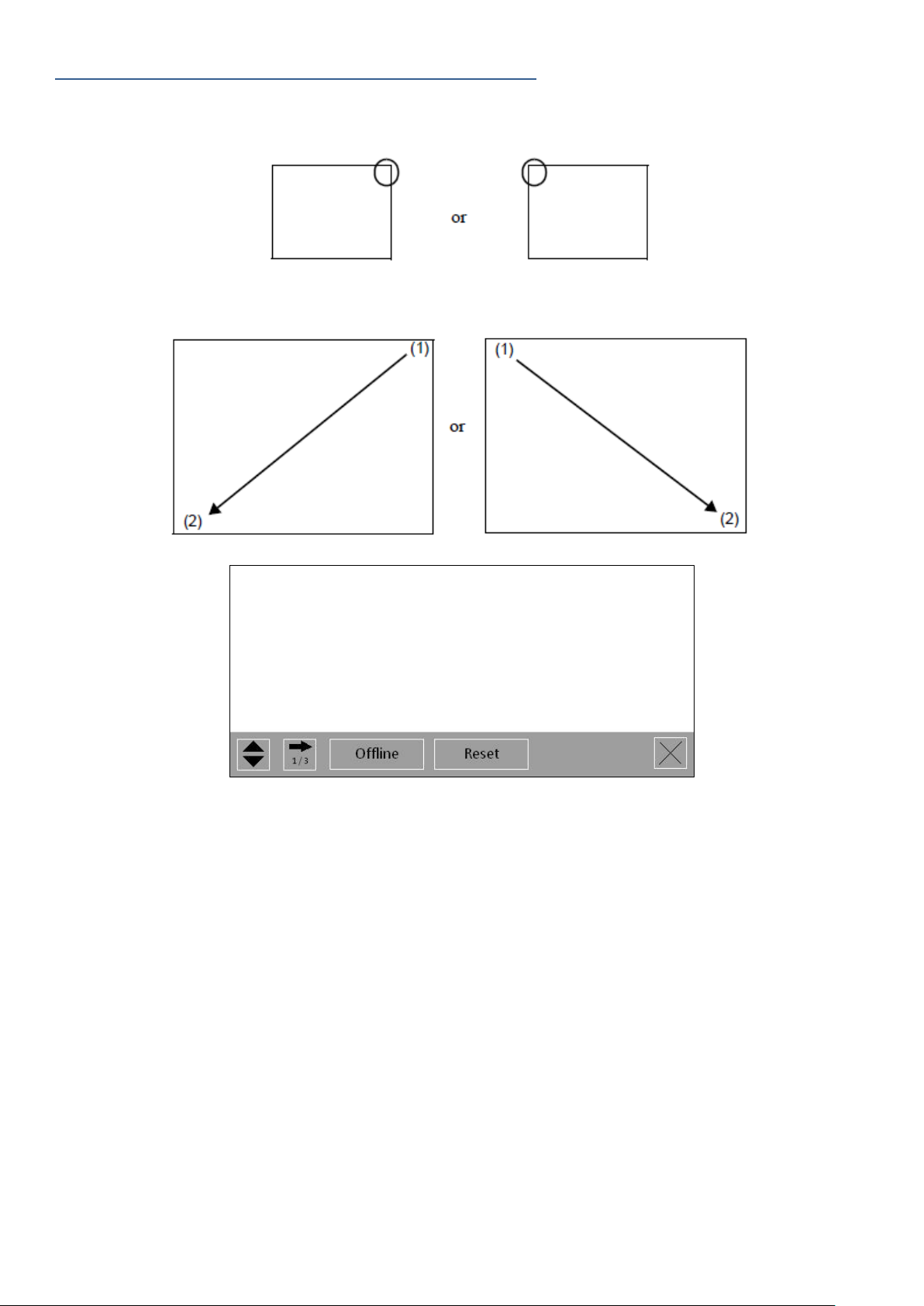
Entrer dans le mode Offline en fonctionnement
A la mise sous tension
Toucher le coin supérieur droit ou le coin supérieur gauche de l’écran pendant au moins 3 secondes juste après l’allumage de
l’écran.
En fonctionnement
Toucher le coin supérieur droit suivi du coin inférieur gauche, ou le coin supérieur gauche suivi du coin inférieur droit de l’écran
dans les 0,5 secondes :
Quand le menu système apparaît, toucher le bouton [Offline].
Pour plus d’informations et de détails sur les menus, consultez le manuel d’utilisation.
Page 8
8
Quick Start Guide SCAIME: NUSG-eNodTouch-MS-FE_196776_D.docx
Presentation
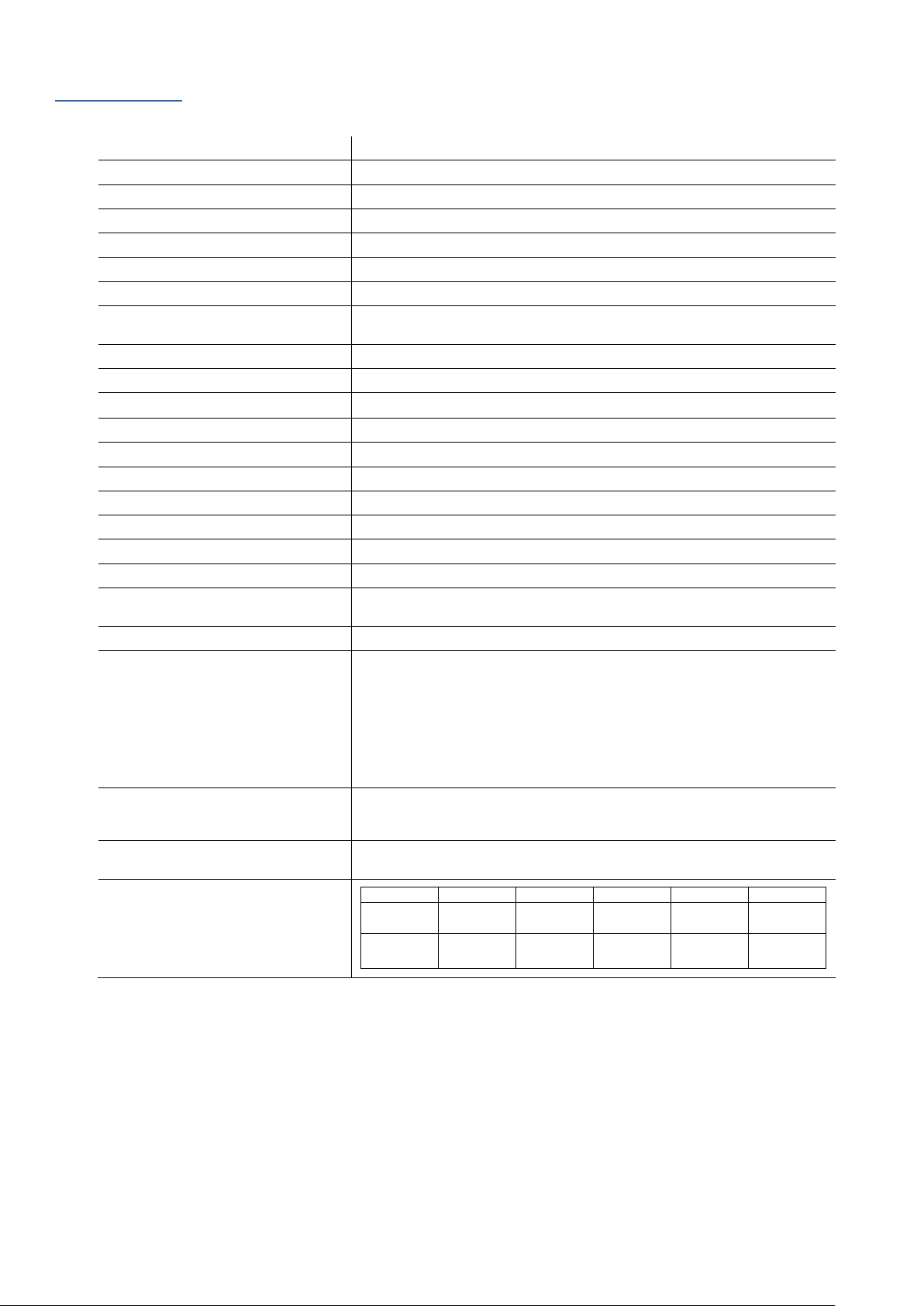
eNodTouch-MS is a compact graphic operator interface with the following specifications:
Display type
4.3’’ TFT Color LCD
Resolution
480 x 272 pixels
Display area
W95 x H53.9 mm
Display colours
65,536 colors
Backlight
White LED
Brightness / Contrast
16 Levels (Adjusted with touch panel)
Touch Panel type
Analog resistive film
Touch panel service life
50,000 hours or more (continuous operation at 25 °C [77 °F] before
backlight brightness decreases to 50%
Input voltage
24VDC, 3.6 W or less
Rated voltage
DC 12 to 24V
Insulation resistance
DC 500V, 10M
Grounding
Grounding resistance of 100Ω
Dimension
W124.9 x H90.4 x D38.8 mm (W4.92 x H3.56 x D1.53 in.)
Weight
0.22 kg
Surrounding air temperature
0 to +50°C
Ambient humidity
10%...90% RH (Non-condensing, wet bulb temperature 39 °C or less)
Dust
0.1 mg/m³ or less (non-conductive levels)
Storage temperature
-20 to +60°C
Structure
IP65F, Type 1, Type 4X (Indoor Use only), Type 13 on the front panel
when properly installed in an enclosure.
Cooling method
Natural air circulation
Serial Interface COM1
Asynchronous Transmission: RS-422/485
Data Length: 7 or 8 bits
Stop Bit: 1 or 2 bits
Parity: None, odd, or even
Data Transmission Speed:
2,400(1,200) to 115,200 bps, 187,500 bps (MPI)
Connector: 2-piece terminal block 9 pin x 1
USB1 interface
Connector: USB 2.0 (Type A) x1, Power Supply Voltage: 5 Vdc ±5%,
Maximum Current Supplied: 500 mA/port, maximum transmission
Distance: Less than 3 m (9.84 ft.)
USB2 interface
Connector: USB 2.0 (mini-B) x 1, Maximum Transmission Distance:
Less than 3 m (9.84 ft.)
eNod Compatibility
eNodTouch
eNod4 T
eNod4 C
eNod4 D
eNod4 B
eNod4 F
2.00
1.21
2.09 (ETH)
1.09
2.09 (ETH)
1.07
2.08 (ETH)
1.06
2.09 (ETH)
1.06
2.09 (ETH)
1.03 1.21
2.09 (ETH)
1.09
2.09 (ETH)
1.07
2.08 (ETH)
1.05
2.07 (ETH)
1.04
2.07 (ETH)
Page 9
9
Quick Start Guide SCAIME: NUSG-eNodTouch-MS-FE_196776_D.docx
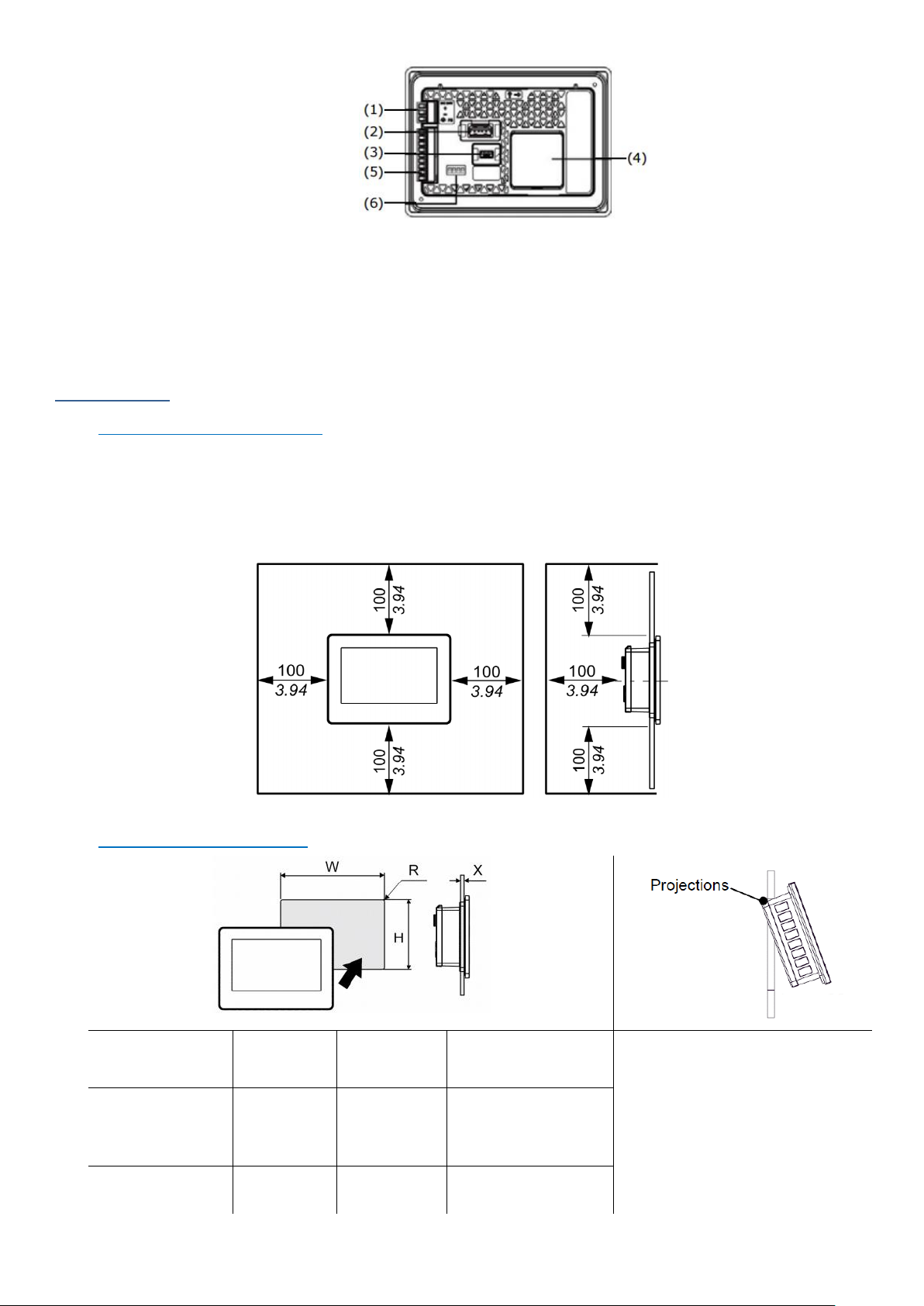
(1) Power Connector
(2) USB (Type A) Interface
(3) USB (mini-B) Interface
(4) RTC Battery Set Cover
(5) Serial Interface
(6) DIP Switch
Installation
Installation requirements
• For easier maintenance, operation, and improved ventilation, be sure to install eNodTouch at least 100mm [3.94in.]
away from adjacent structures and other equipment.
• Be sure that the surrounding air temperature and the ambient humidity are within their designated ranges.
(Surrounding air temperature: 0 to 50°C, Ambient humidity: 10 to 90%RH, Wet bulb temperature: 39°C max.) When
installing eNodTouch on the panel of a cabinet or enclosure, “Surrounding air temperature” indicates both the panel
face and cabinet or enclosure’s internal temperature.
eNodTouch installation
eNodTouch-S Panel
Cut-out Adapter
W
H
Panel thickness (H)
eNodTouch has two projections on
the top to prevent falling during
installation. Please insert the unit into
the panel at an angle to avoid hitting
the projections.
NO
112.5
[4.43]
77.5
[3.05]
1.5 [0.06]
To 6.0 [0.24]
YES
105.0
[4.13]
66.0
[2.60]
1.5 [0.06]
To 6.0 [0.24]
• Cut a hole in the panel according to the eNodTouch cut-out dimensions.
Page 10
10
Quick Start Guide SCAIME: NUSG-eNodTouch-MS-FE_196776_D.docx
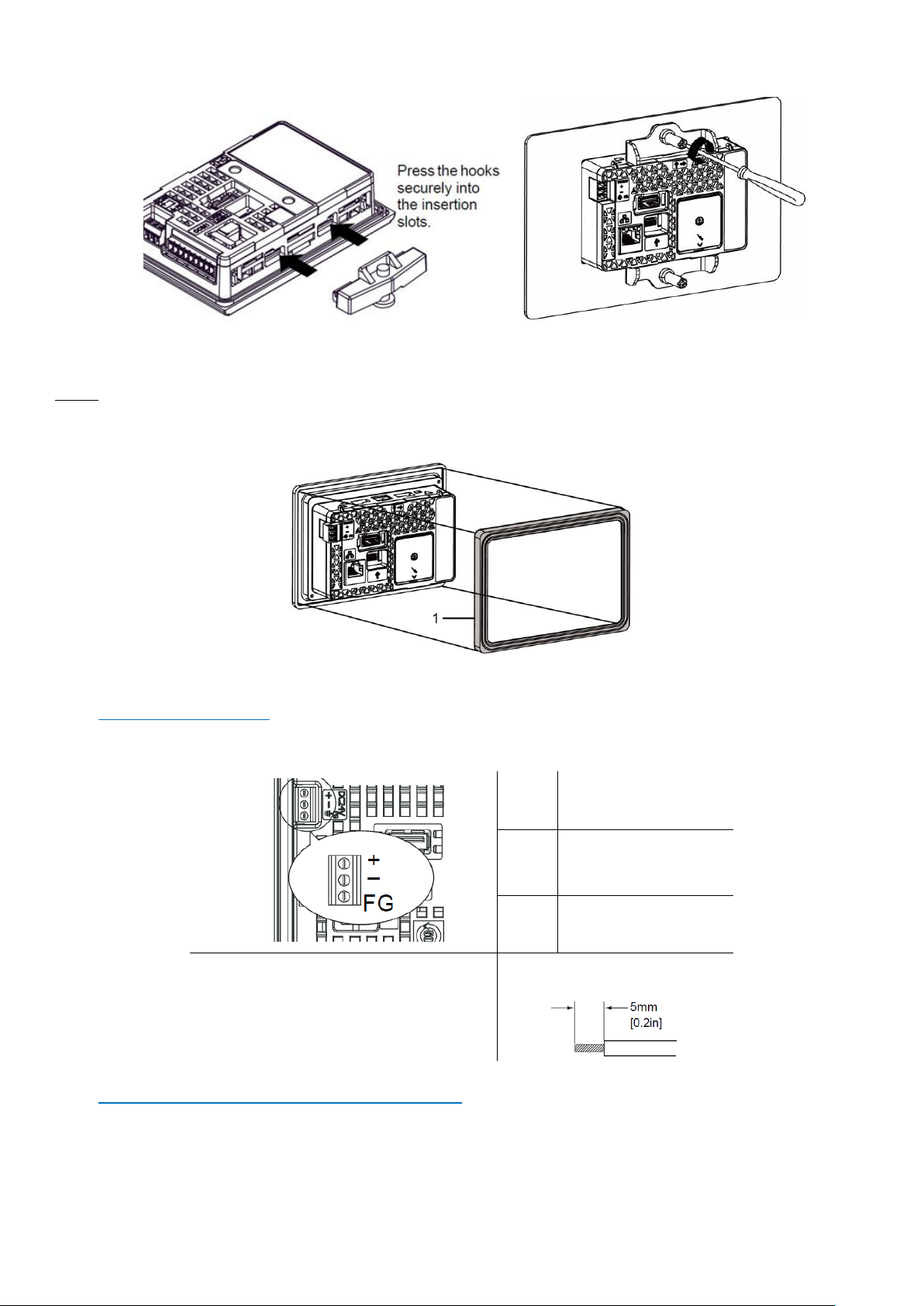
• Confirm that the installation gasket is attached to eNodTouch unit and then place the unit into the Panel from the front.
• It is strongly recommended that you use the installation gasket, since it absorbs vibration in addition to repelling water.
• Press the installation fastener hooks securely into the insertion slots on eNodTouch.
• Tighten the installation fasteners with a screwdriver. There are two insertion slots on both the top and bottom.
NOTE: When installing to panel cut-out for monochrome model (eNodTouch-S) the eNodTouch-S Panel Cut-out Adapter (ref.
632156) is required. In this case, before placing eNodTouch-MS into the Panel:
- Remove the gasket from this product
- Attach the eNodTouch-S Panel Cut-out Adapter to this product:
1- eNodTouch-S Panel Cut-out Adapter
Electrical powering
• Supplying a power voltage other than that specified will damage the power source and the unit.
• When the FG terminal is connected, be sure the wire is grounded.
•
+
24V
-
0V
FG
Grounding Terminal
connected
to eNodTouch chassis
Conductor type
Simple Wire: 0.75 to 1.5mm2
Stranded Wire: 0.75 to 1mm2
RS485 interface for connection to eNod4
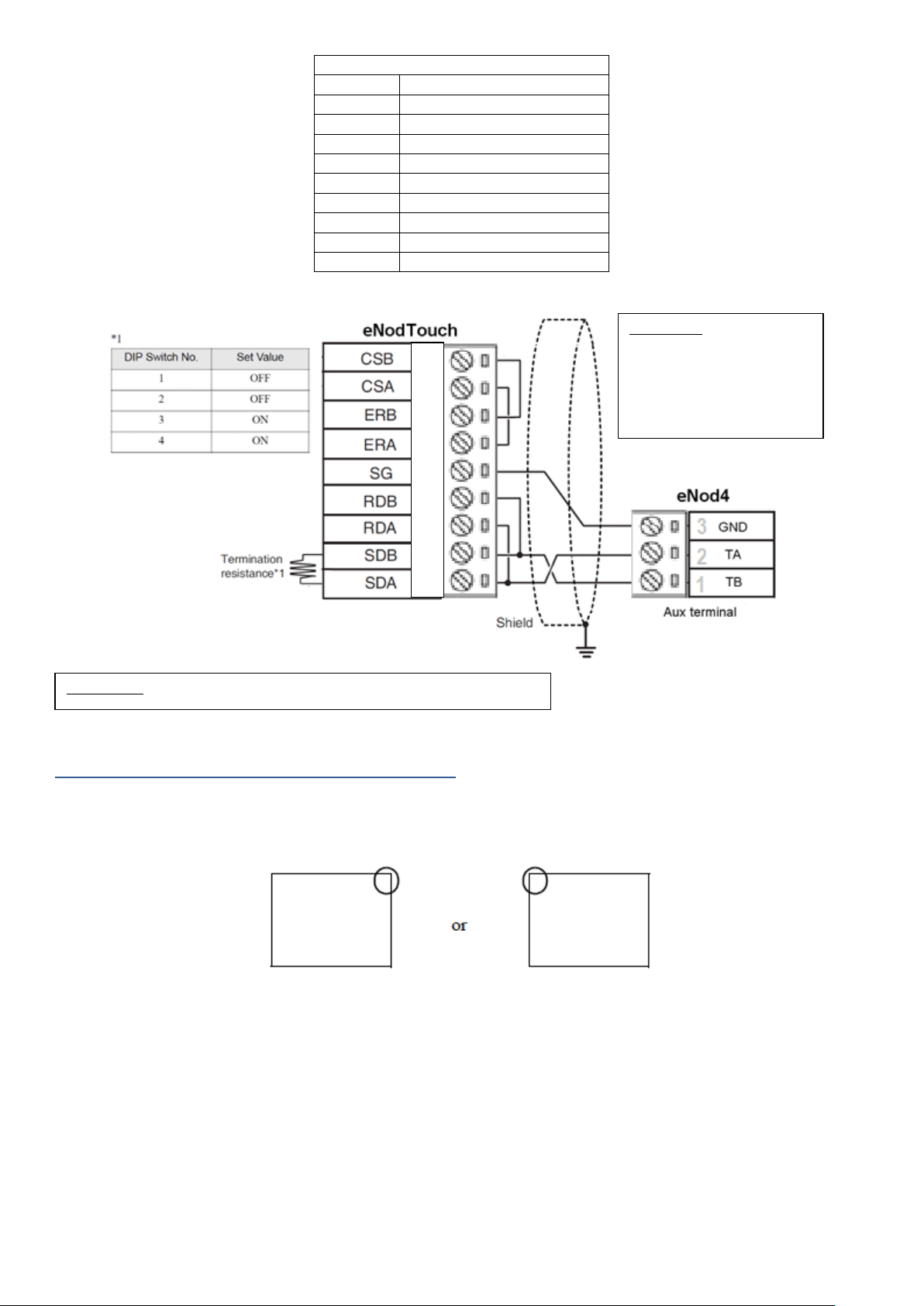
• The serial interface is not isolated. Always connect the SG (Signal Ground) of the unit to the connected device.
• SG (Signal Ground) and FG (Frame Ground) are connected internally
Page 11
11
Quick Start Guide SCAIME: NUSG-eNodTouch-MS-FE_196776_D.docx
RS422/RS485 terminal Block
Label
Meaning
CSB
Send Possible B (-)
CSA
Send Possible A (+)
ERB
Data Terminal Ready B (-)
ERA
Data Terminal Ready A (+)
SG
Signal Ground
RDB
Receive Data B (-)
RDA
Receive Data A (+)
SDB
Send Data B (-)
SDA
Send Data A (+)
• A terminating resistor can be inserted using the DIP Switch (4-bit) on the rear of the RS-422/485 type. Factory default
settings are all set to “OFF” (no terminating resistor).
Entering Offline mode when Operating
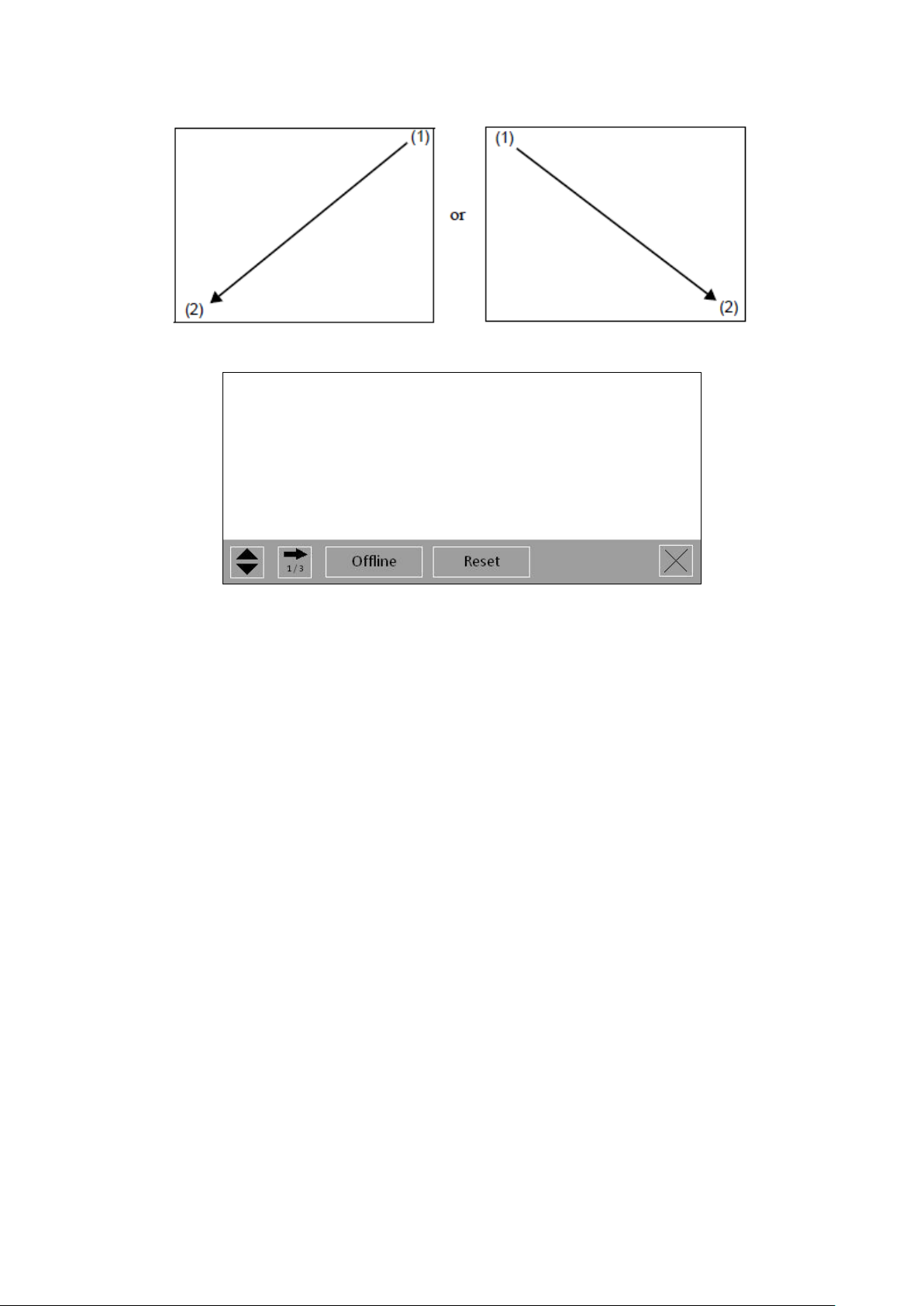
At Power ON
Touch the upper right corner or upper left corner (within 40 pixels of the edges) of the panel for at least 3 seconds soon after the
startup screen is displayed.
Important: If the distance
between eNodTouch and
eNod4 is short (<1m),
don’t use terminating
resistor on the
eNodTouch side as well
as the eNod4 side.
1
2
3
4
5
6
7
8
Important: GND (SG) must not be connected to ground Shield.
Page 12
12
Quick Start Guide SCAIME: NUSG-eNodTouch-MS-FE_196776_D.docx
When Operating
Touch the upper right then bottom left corners, or the upper left and bottom right corners of the panel (within a 40-pixel area)
within 0.5 seconds.
When the system menu is displayed, touch the [Offline] button
For more information and details about the menus, see the user manual.
 Loading...