

Page 1
NUSG-eNodTouch-ML-FE-196775-D.docx
SCAIME SAS – TechnositeAltéa –BP501- 74105 ANNEMASSE Cedex
Tél. : +33 (0)4 50 87 78 64 – www.scaime.com
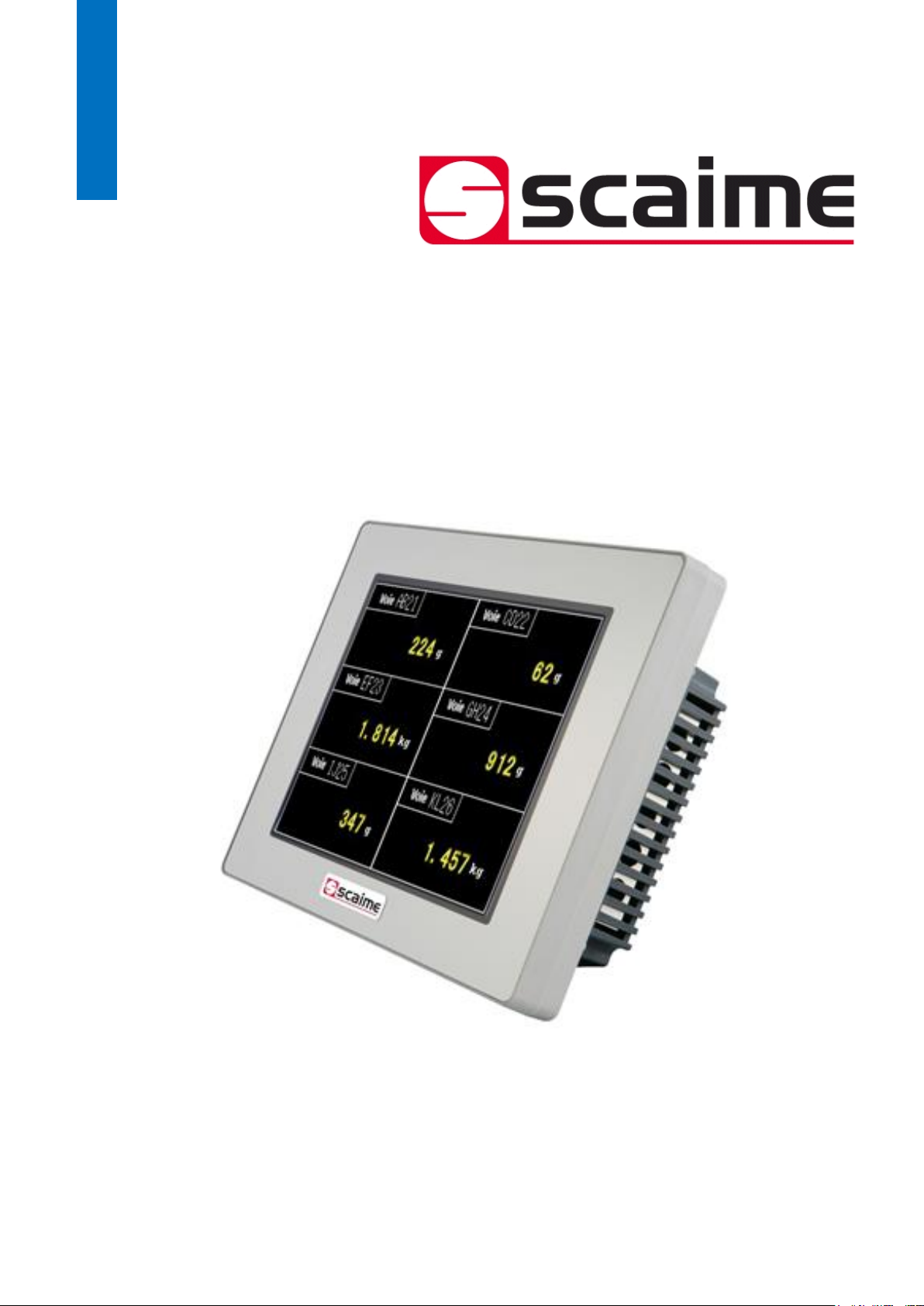
eNodTouch-ML
Ecran tactile pour multiples contrôleurs eNod4
Touch screen for multiple eNod4 controllers
Quick Start guide
Page 2

2
Quick Start Guide SCAIME: NUSG-eNodTouch-ML-FE-196775-D.docx
SOMMAIRE / CONTENT
Français
Présentation .................................................................................................................................... 3
Installation ...................................................................................................................................... 4
Conditions d’installation ............................................................................................... 4
Installation d’eNodTouch ............................................................................................. 5
Alimentation électrique ................................................................................................ 8
Interface RS485 pour la connexion à l’eNod4 ........................................................... 8
Entrer dans le mode Offline en fonctionnement ......................................................................... 9
English
Presentation .................................................................................................................................. 10
Installation .................................................................................................................................... 11
Installation requirements ............................................................................................ 11
eNodTouch installation ............................................................................................... 13
Electrical powering ..................................................................................................... 14
RS485 interface for connection to eNod4 ................................................................. 15
Entering Offline mode when Operating ..................................................................................... 16
Page 3
3
Quick Start Guide SCAIME: NUSG-eNodTouch-ML-FE-196775-D.docx
Présentation
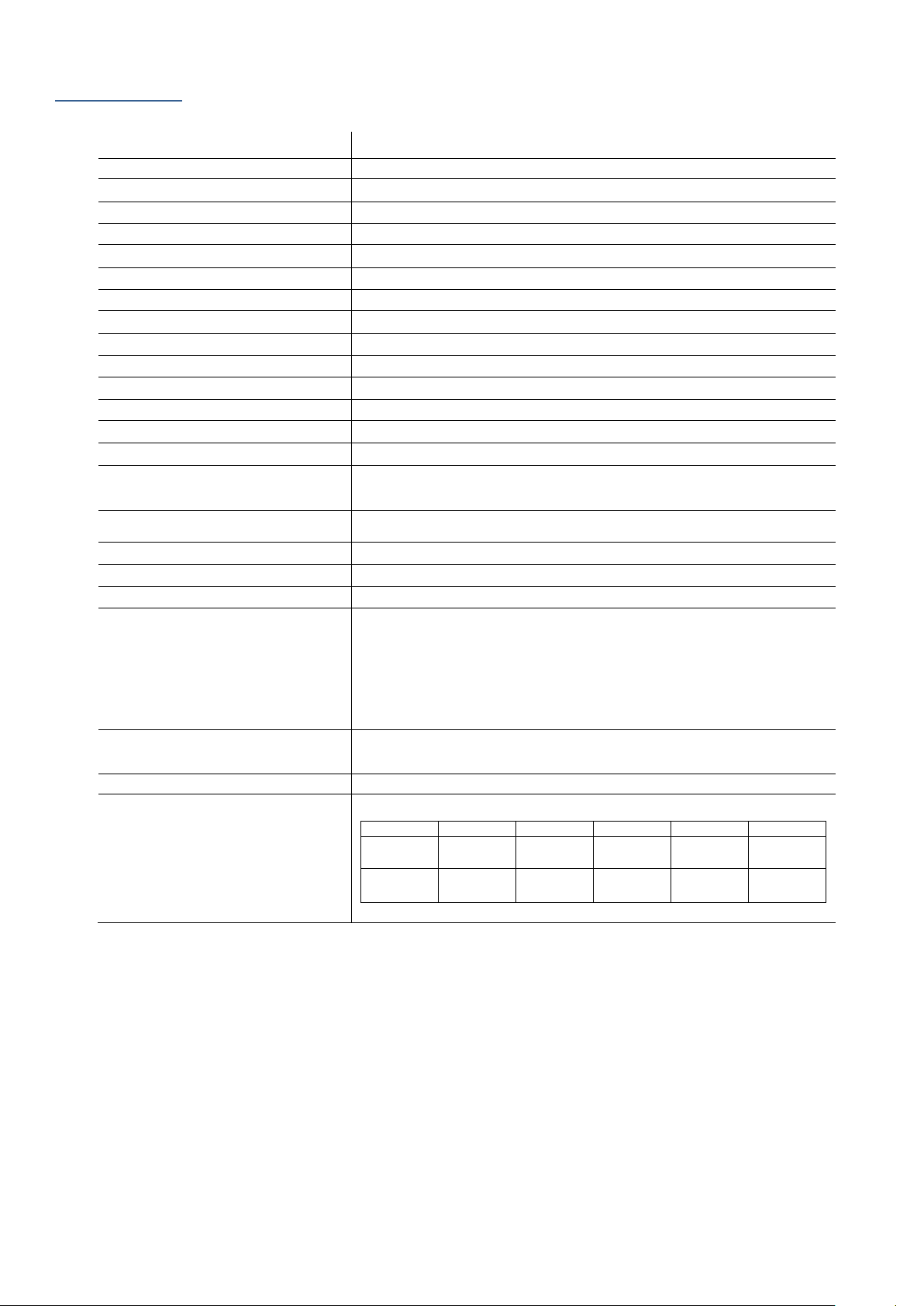
eNodTouch-ML est une interface homme machine graphique présentant les caractéristiques suivantes :
Afficheur
5.7” TFT Couleur LCD
Résolution
L320 x H240 pixels
Taille d’affichage
L115.2 x H86.4 mm
Couleurs d’affichage
65536 couleurs
Rétro-éclairage
Aucun
Luminosité
16 niveaux
Type de dalle tactile
Film résistif analogique
Durée de vie panneau tactile
1 000 000 cycles ou plus
Alimentation
24VDC, 6.8W ou moins
Tension
DC 20.4 à 28.8V
Résistance d’isolement
DC 500V, 10M
Mise à la terre
Résistance de mise à la terre de 100Ω
Dimension
L163 x H129.4 x P32.8 mm
Poids
0,62 kg
Température d’air ambiante
0 à +50°C
Humidité ambiante
85 % RH (Température de bulbe humide : 39 °C ou moins sans
condensation.)
Poussière
0.1 mg/m³ ou moins (niveaux non conductifs)
Température de stockage
-20 à +60°C
Structure
IP65 en face avant si correctement installé
Refroidissement
Circulation naturelle d’air
Interface série COM1
Transmission asynchrone : RS-422/485
Longueur des données : 7 ou 8 bits
Bit de Stop : 1 ou 2 bits
Parité : Aucune, impair, ou pair
Données de Vitesse de transmission : 2,400 à 115,200 bps
Distance de communication : 30 m ou moins
USB1 interface
Conforme USB2.0 (Type A), tension d’alimentation : DC 5 V ±5 %, Distance
de communication : 5 m ou moins
USB2 interface
Conforme USB2.0 (mini-B), Distance de communication : 5 m ou moins
Compatibilité eNod
eNodTouch
eNod4 T
eNod4 C
eNod4 D
eNod4 B
eNod4 F
2.00
1.21
2.09 (ETH)
1.09
2.09 (ETH)
1.07
2.08 (ETH)
1.06
2.09 (ETH)
1.06
2.09 (ETH)
1.03 1.21
2.09 (ETH)
1.09
2.09 (ETH)
1.07
2.08 (ETH)
1.05
2.07 (ETH)
1.04
2.07 (ETH)
Page 4
4
Quick Start Guide SCAIME: NUSG-eNodTouch-ML-FE-196775-D.docx
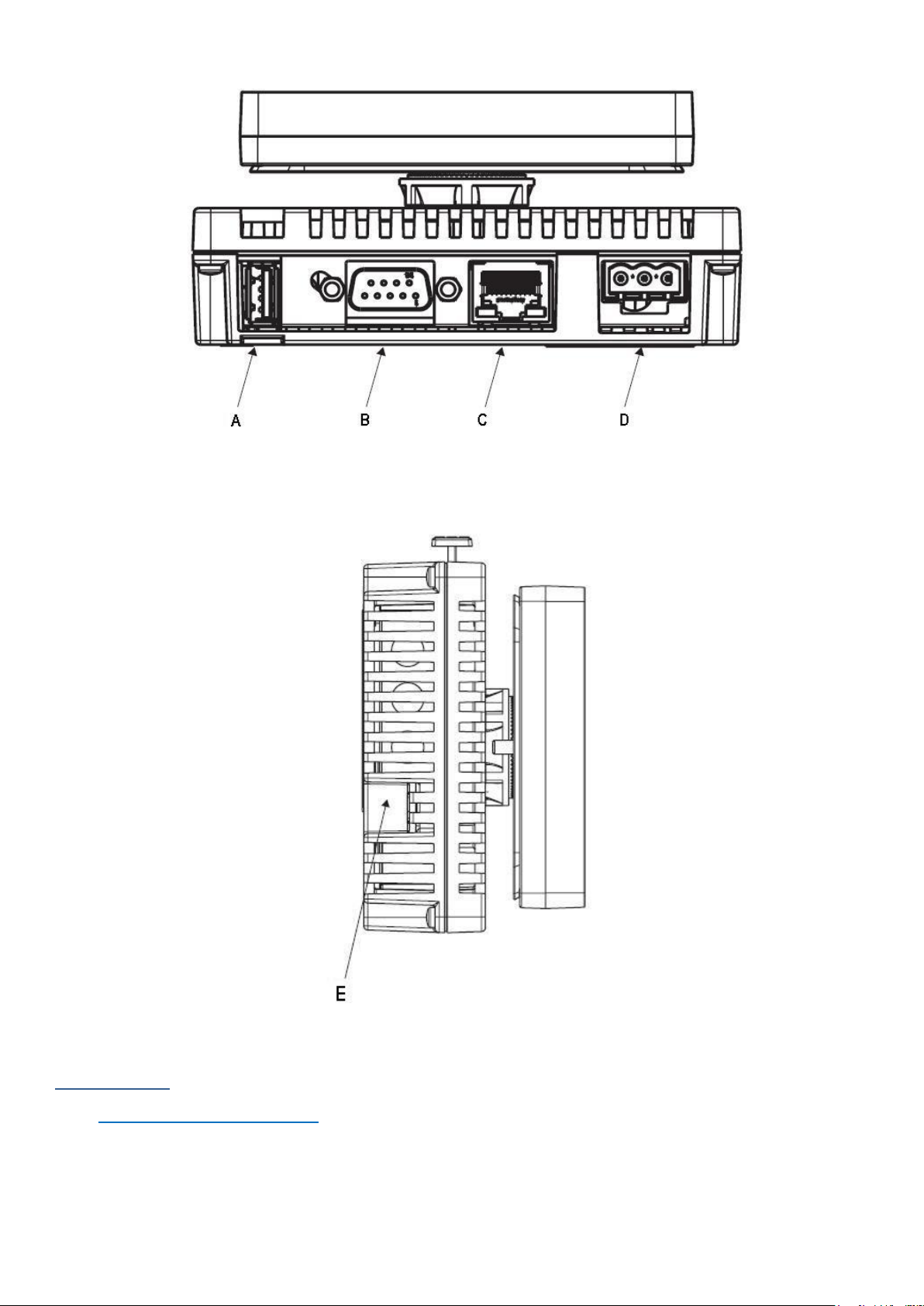
(A) Interface USB (Type A) (USB1)
(B) Interface série (COM1)
(C) Port Ethernet
(D) Connecteur d’alimentation
(E) Interface USB (mini B) (USB2)
Installation
Conditions d’installation
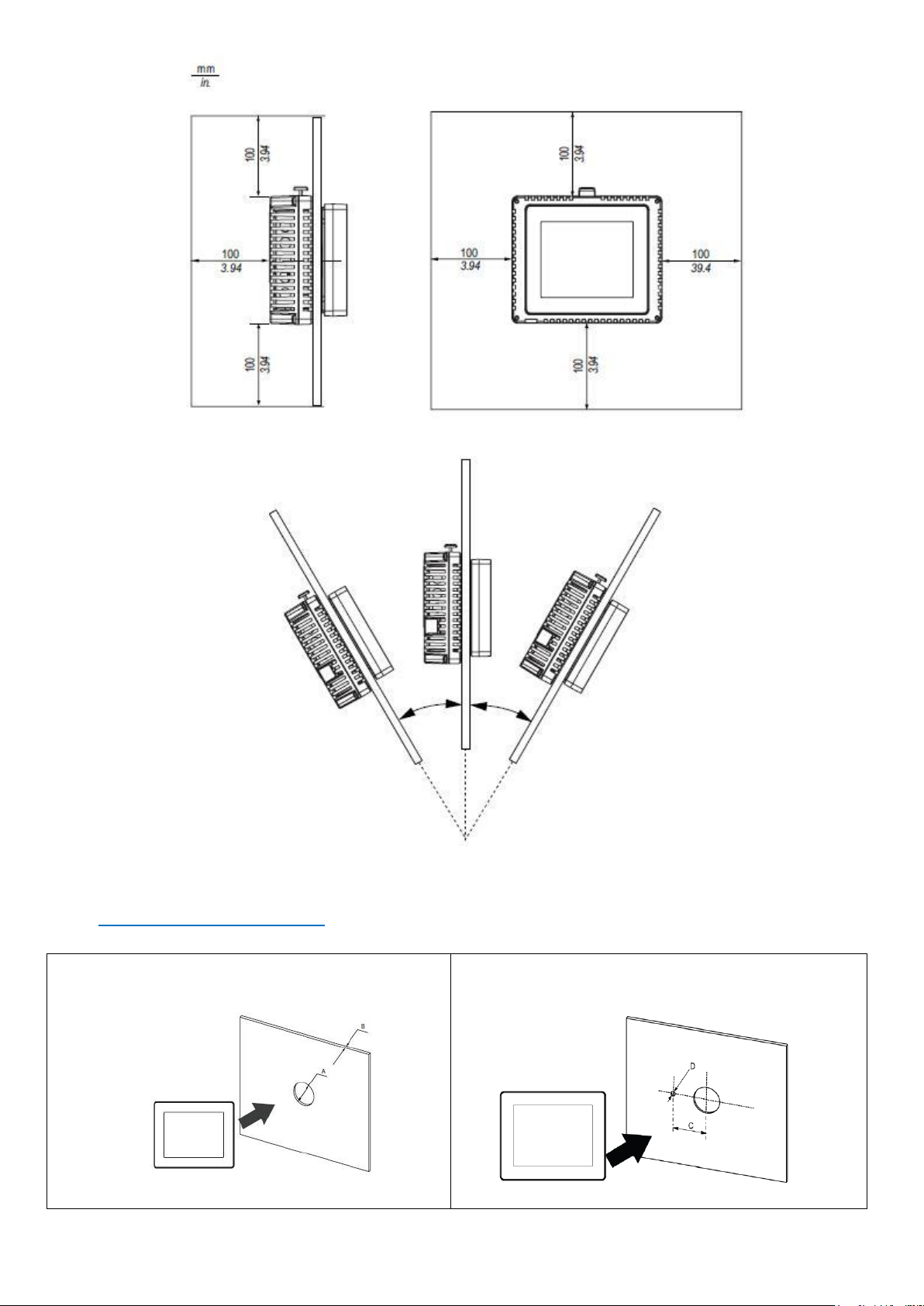
• Pour faciliter la maintenance et la ventilation, veillez à installer eNodTouch à plus de 100 mm d'autres équipements.
• Lors de l'installation d’eNodTouch sur le panneau d'une armoire ou un coffret, assurez-vous que la température et
l'humidité ambiante sont compatibles avec les caractéristiques données (Température de l'air environnant : 0 à 50 ° C,
l'humidité ambiante : 85% HR, température de bulbe humide : 39 ° C max).
Page 5
5
Quick Start Guide SCAIME: NUSG-eNodTouch-ML-FE-196775-D.docx
• Le panneau ne doit pas être incliné de plus de 30°.
Installation d’eNodTouch
Découpe du panneau :
Sans pion anti rotation
Avec pion anti rotation
Page 6
6
Quick Start Guide SCAIME: NUSG-eNodTouch-ML-FE-196775-D.docx
A (mm)
B (mm) (1)
B (mm) (2)
C (mm)
D (mm)
22.5 (tolérance -0.30)
1.5 à 6
3 à 6
30 (tol -0.20)
4 (tol -0.20)
(A) Diamètre de la découpe
(B) Epaisseur du panneau
(1) Matériau du panneau : Acier
(2) Matériau du panneau : Fibre de verre en plastique renforcé
Etapes d’installation :
Etape
Action
1
Placer l’appareil sur une surface plane et propre avec l’écran d’affichage tourné vers le bas.
2
Réaliser la découpe d’un panneau dont l’épaisseur respecte les dimensions spécifiées en fonction du
type de matériau du panneau.
3
Réaliser la découpe du trou de diamètre 22.5mm (tol - 0.30) sur le panneau qui portera l’appareil.
4
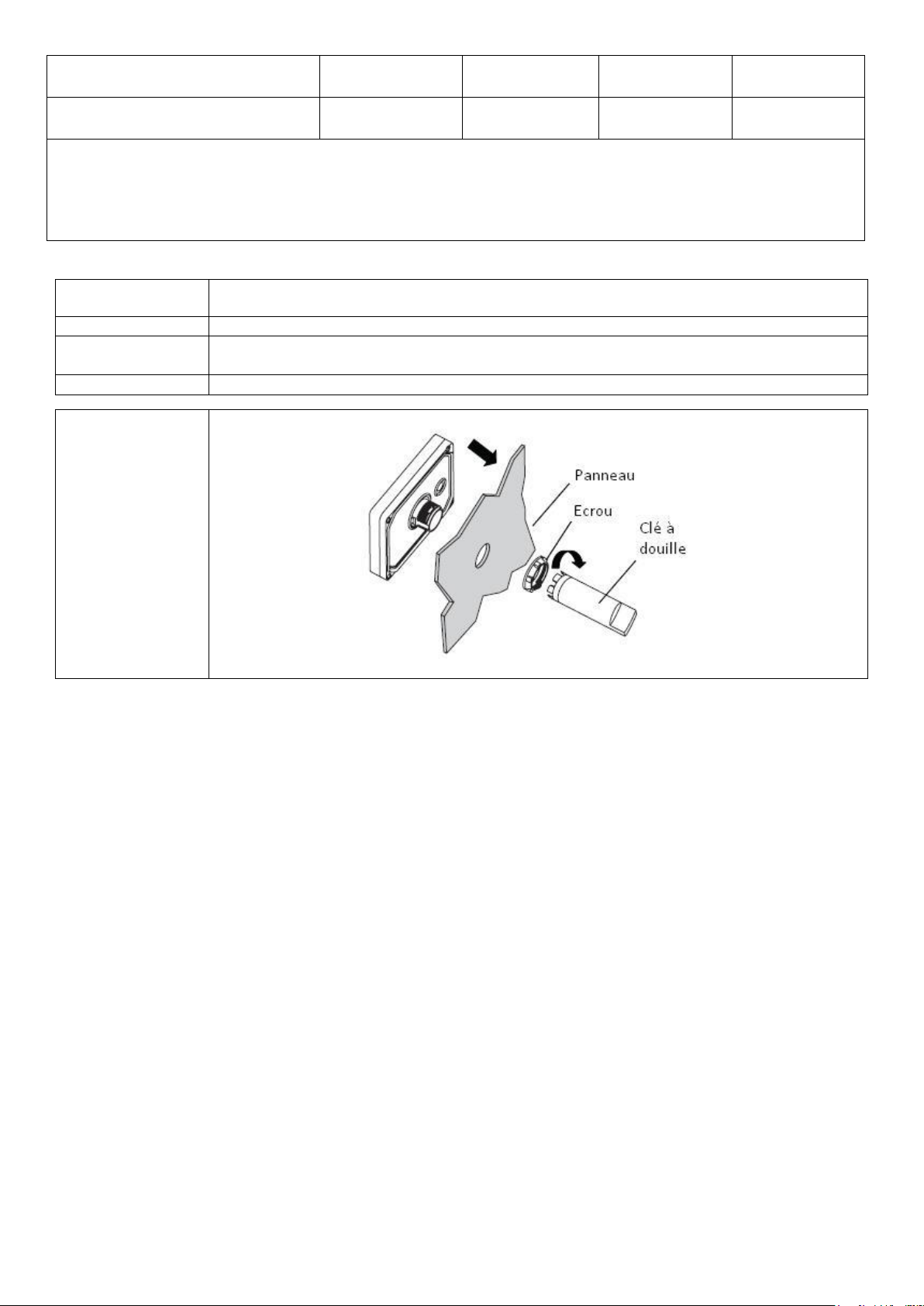
Insérer l’afficheur dans le panneau en suivant le schéma :
Visser l’écrou avec une clé à douille ayant un couple entre 1.2 et 2 N.m
Page 7
7
Quick Start Guide SCAIME: NUSG-eNodTouch-ML-FE-196775-D.docx
5
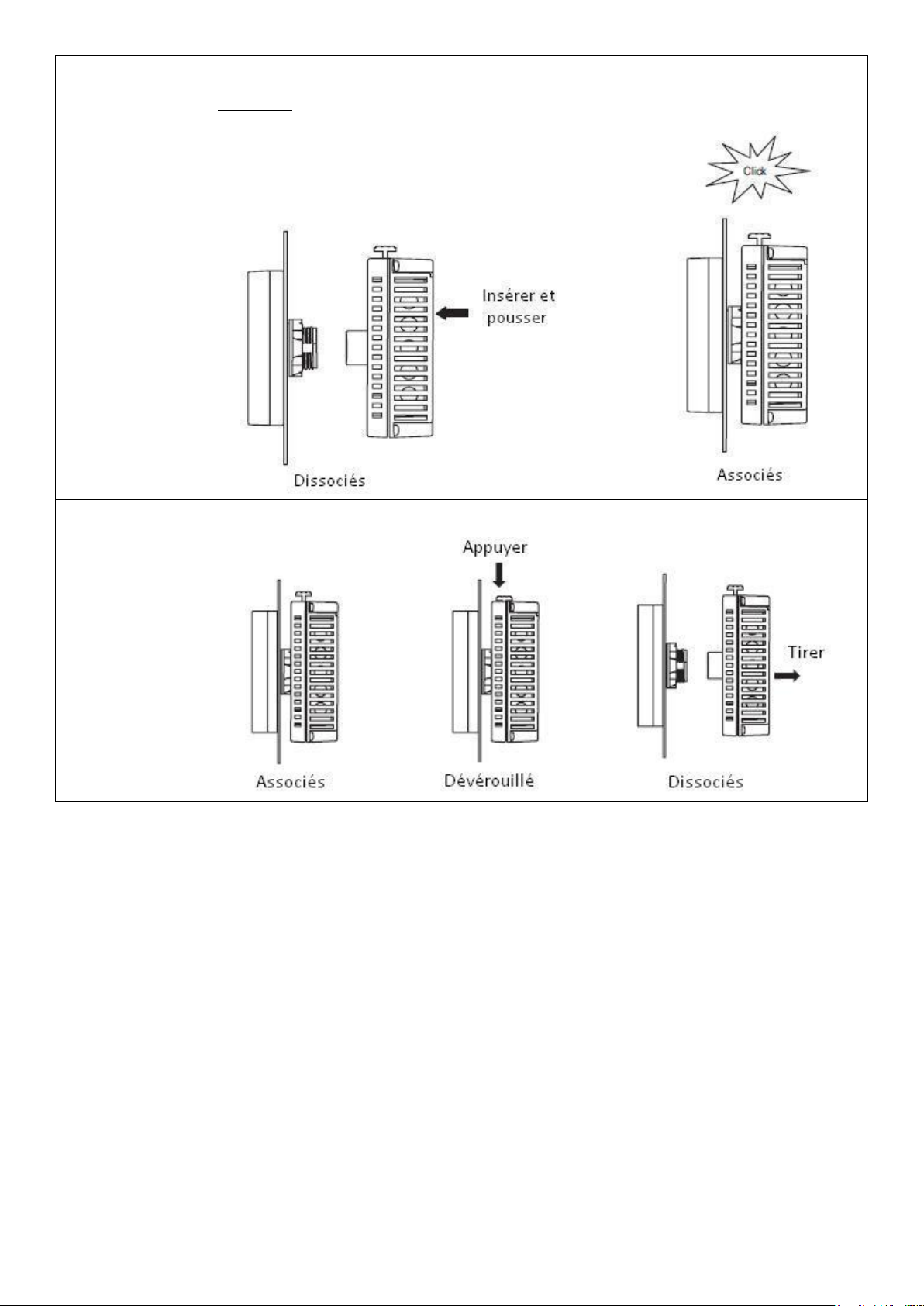
Insérer et pousser le module arrière jusqu’à ce qu’il se verrouille
ATTENTION : Insérer le module arrière dans l’orientation indiquée sur l’illustration afin d’éviter
d’endommager le connecteur.
6
Pour retirer le module arrière, appuyez sur le bouton jaune pour le déverrouiller puis tirez le module
arrière pour le retirer.
Page 8
8
Quick Start Guide SCAIME: NUSG-eNodTouch-ML-FE-196775-D.docx
Alimentation électrique
• Une tension d'alimentation autre que celle spécifiée peut endommager la source d'alimentation et eNodTouch.
• Quand la borne FG est connectée, assurez-vous que le fil est relié à la terre.
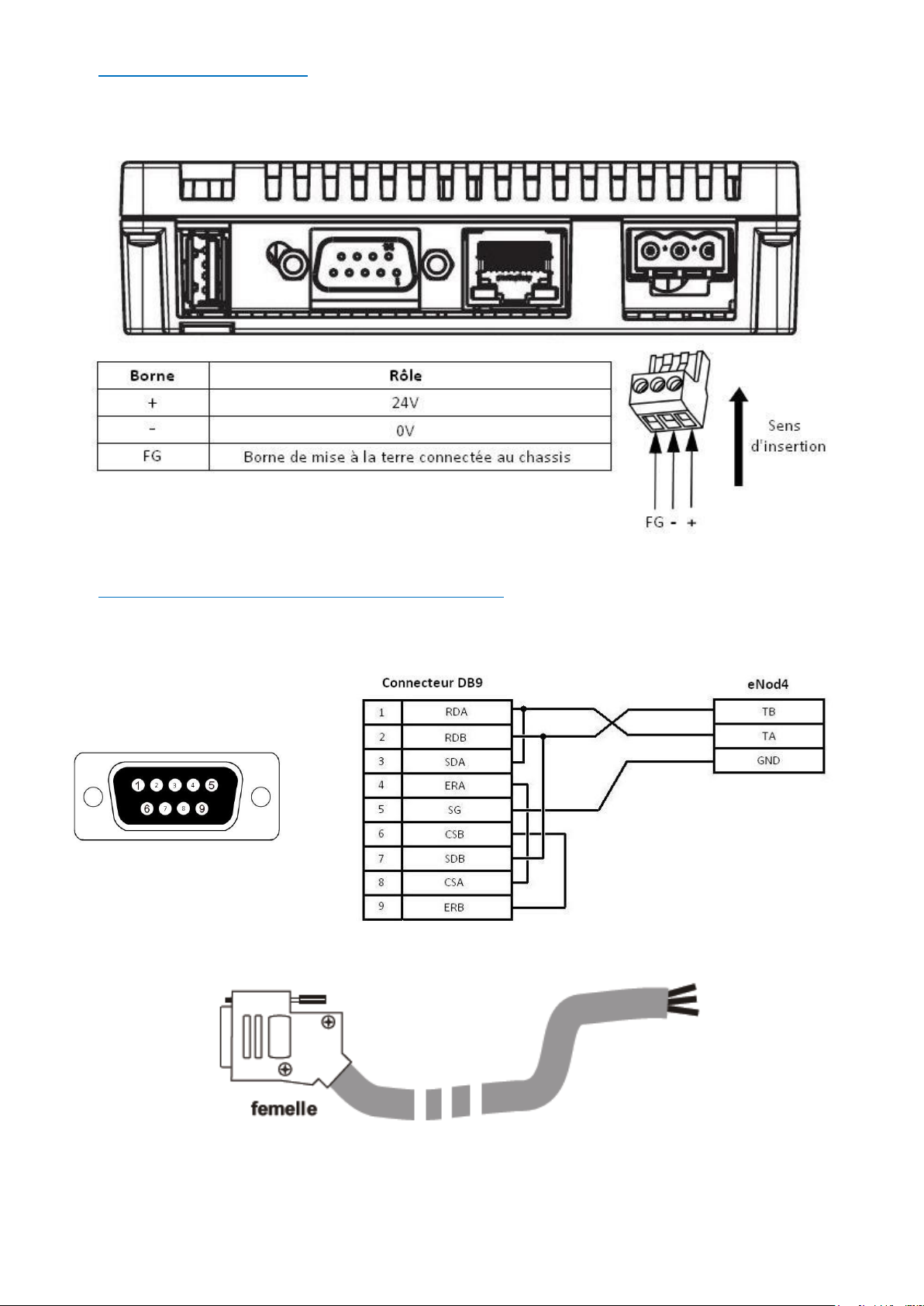
• Pour alimenter eNodTouch, veuillez-vous référer au schéma suivant :
Interface RS485 pour la connexion à l’eNod4
• La connexion de la RS485 se fait au moyen d’un connecteur DB9 femelle. Veillez à respecter le schéma ci -dessous, ou
utiliser un câble SCAIME réf. 632153. Merci de contacter votre représentant local pour plus d’informations.
RS485 connexion
Câble réf. 632153
Page 9
9
Quick Start Guide SCAIME: NUSG-eNodTouch-ML-FE-196775-D.docx
Entrer dans le mode Offline en fonctionnement
A la mise sous tension
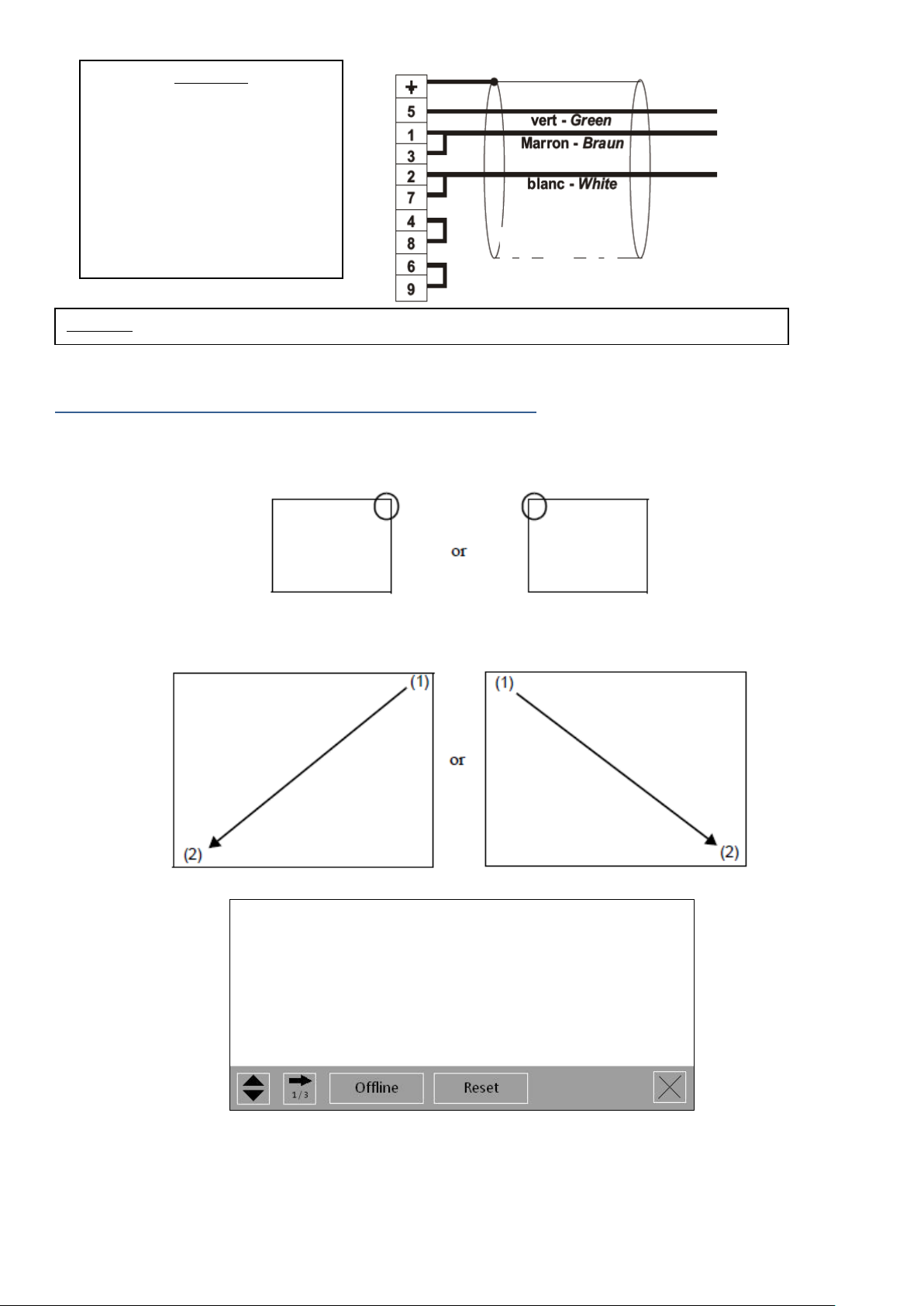
Toucher le coin supérieur droit ou le coin supérieur gauche de l’écran pendant au moins 3 secondes juste après l’allumage de
l’écran.
En fonctionnement
Toucher le coin supérieur droit suivi du coin inférieur gauche, ou le coin supérieur gauche suivi du coin inférieur droit de l’écran
dans les 0,5 secondes :
Quand le menu système apparaît, toucher le bouton [Offline].
Pour plus d’informations et de détails sur les menus, veuillez consulter le manuel utilisateur.
0V
Ta/Ra
Tb/Rb
Important :
Lorsque la distance entre
l’eNodTouch et l’eNod4 est
importante, veillez à ajouter une
résistance de terminaison (120 Ohm
entre TA et TB).
A l’inverse, si cette distance est faible
(<1m), cette résistance ne doit pas
être ajoutée.
Important : GND (SG) ne doit pas être connecté à la protection de câble reliée à la masse (Shield).
Page 10
10
Quick Start Guide SCAIME: NUSG-eNodTouch-ML-FE-196775-D.docx
Presentation
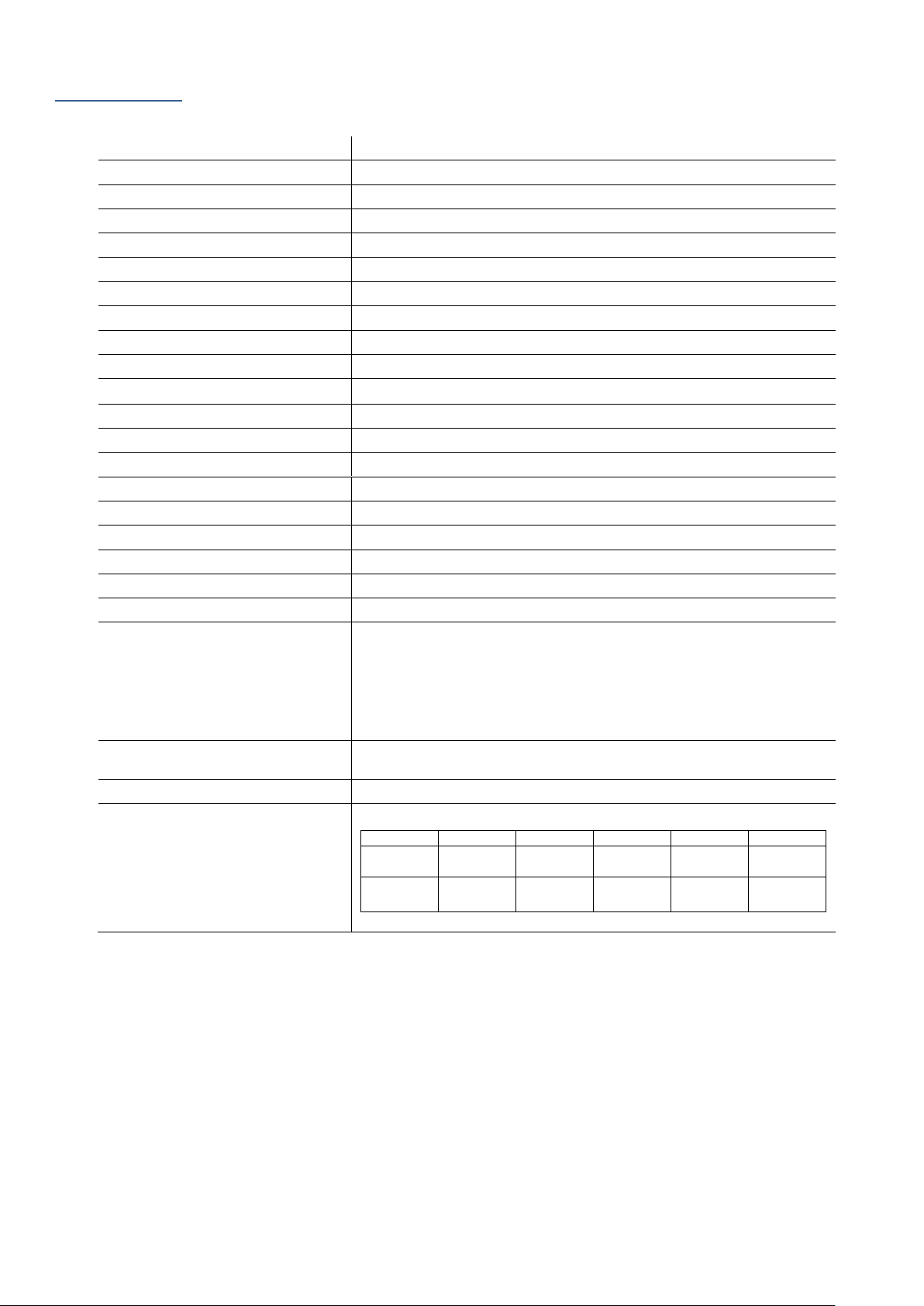
eNodTouch-ML is a compact graphic operator interface with the following specifications:
Display type
5’’7 TFT Color LCD
Resolution
W320 x H240 pixels
Display area
W115.2 x H86.4 mm
Display colours
65536 colors
Backlight
None
Brightness / Contrast
16 levels
Touch Panel type
Analog resistive film
Touch panel service life
1,000,000 times or more
Input voltage
24VDC, 6.8W or less
Rated voltage
DC 20.4 to 28.8V
Insulation resistance
DC 500V, 10M
Grounding
Grounding resistance of 100Ω
Dimension
W163 x H129.4 x D32.8 mm
Weight
0, 62 kg approx.
Surrounding air temperature
0 to +50°C
Ambient humidity
85 % RH (Wet bulb temperature: 39 ℃ or less - no condensation.)
Dust
0.1 mg/m³ or less (non-conductive levels)
Storage temperature
-20 to +60°C
Structure
IP65, on the front panel when properly installed in an enclosure
Cooling method
Natural air circulation
Serial Interface COM1
Asynchronous Transmission: RS-422/485
Data Length: 7 or 8 bits
Stop Bit: 1 or 2 bits
Parity: None, odd, or even
Data Transmission Speed: 2,400(1,200) to115,200 bps
Communication Distance: 30 m or less
USB1 interface
Conforms to USB2.0 (Type A), Power Supply Voltage: DC 5 V ±5 %,
Communication Distance: 5 m or less
USB2 interface
Conforms to USB2.0 (mini-B), Communication Distance: 5 m or less
eNod Compatibility
eNodTouch
eNod4 T
eNod4 C
eNod4 D
eNod4 B
eNod4 F
2.00
1.21
2.09 (ETH)
1.09
2.09 (ETH)
1.07
2.08 (ETH)
1.06
2.09 (ETH)
1.06
2.09 (ETH)
1.03 1.21
2.09 (ETH)
1.09
2.09 (ETH)
1.07
2.08 (ETH)
1.05
2.07 (ETH)
1.04
2.07 (ETH)
Page 11
11
Quick Start Guide SCAIME: NUSG-eNodTouch-ML-FE-196775-D.docx
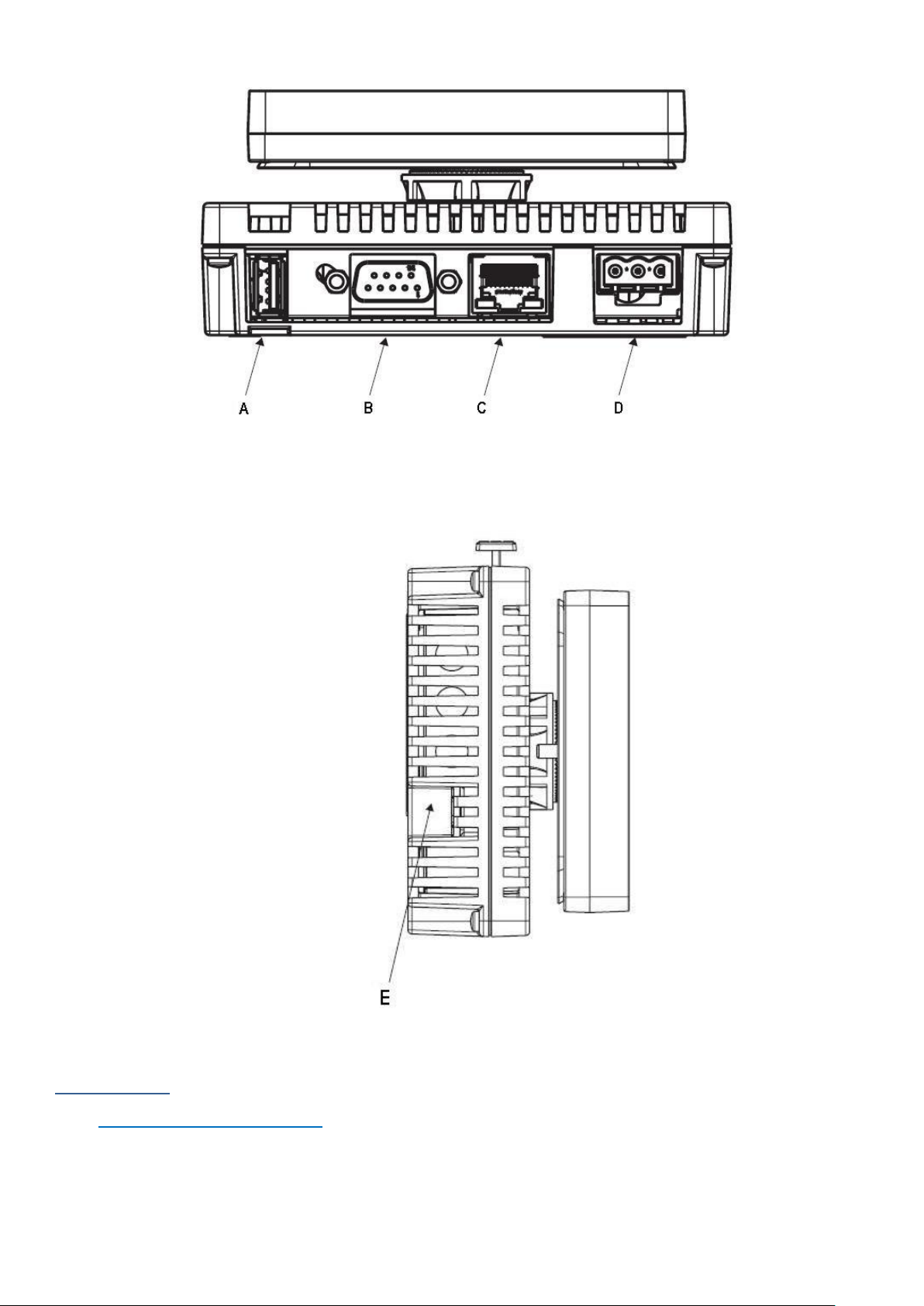
(A) USB Interface (Type A) (USB1)
(B) Serial Interface (COM1)
(C) Ethernet Port
(D) Supply connector
(E) USB Interface (mini B) (USB2)
Installation
Installation requirements
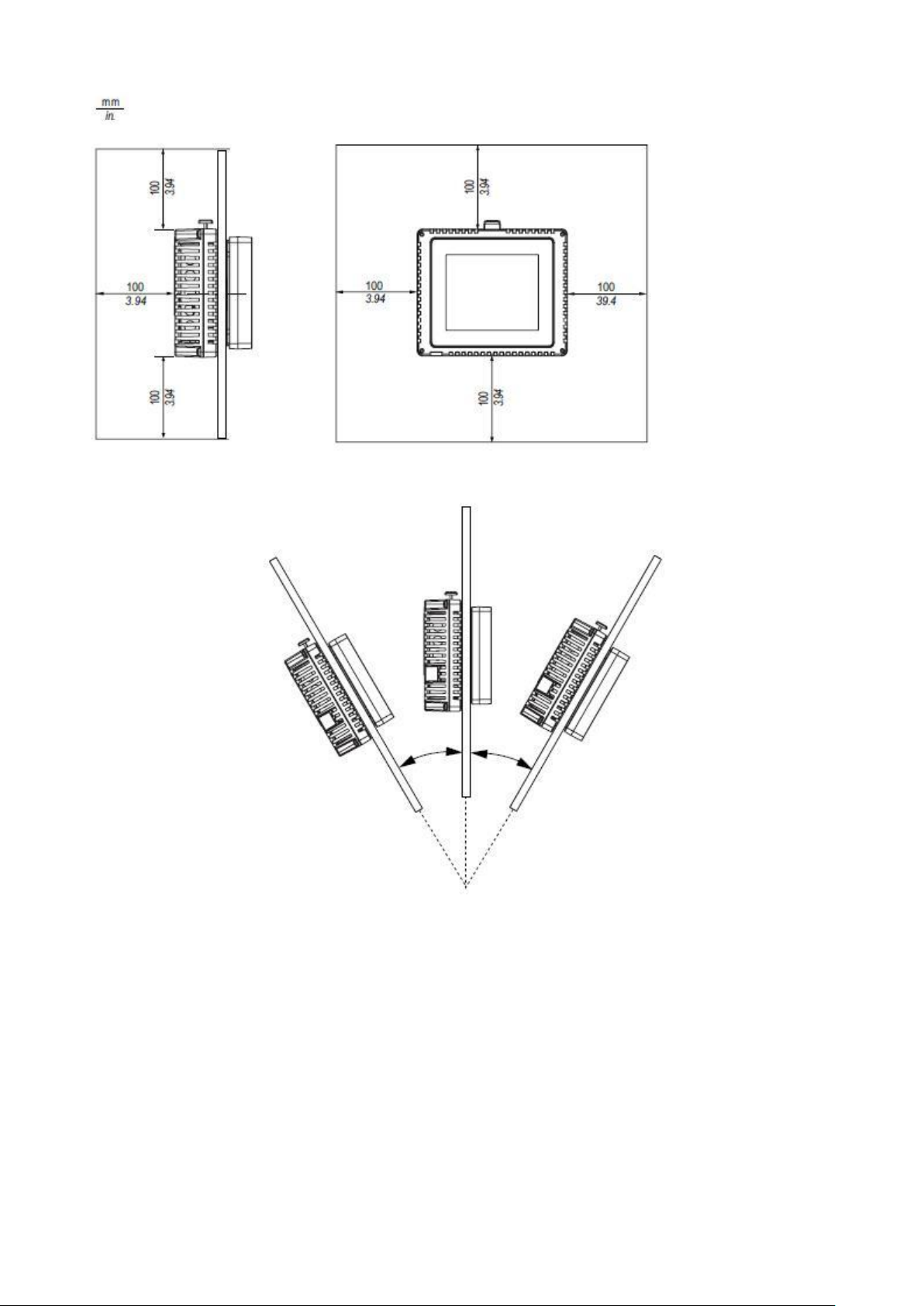
• For easier maintenance, operation, and improved ventilation, be sure to install eNodTouch at least 100mm [3.94in.]
away from adjacent structures and other equipment.
• Be sure that the surrounding air temperature and the ambient humidity are within their designated ranges.
(Surrounding air temperature: 0 to 50°C, Ambient humidity: 85% RH, Wet bulb temperature: 39°C max.) When installing
Page 12
12
Quick Start Guide SCAIME: NUSG-eNodTouch-ML-FE-196775-D.docx
eNodTouch on the panel of a cabinet or enclosure, “Surrounding air temperature” indicates both the panel face and
cabinet or enclosure’s internal temperature.
• The panel should not be inclined more than 30°.
Page 13
13
Quick Start Guide SCAIME: NUSG-eNodTouch-ML-FE-196775-D.docx
eNodTouch installation
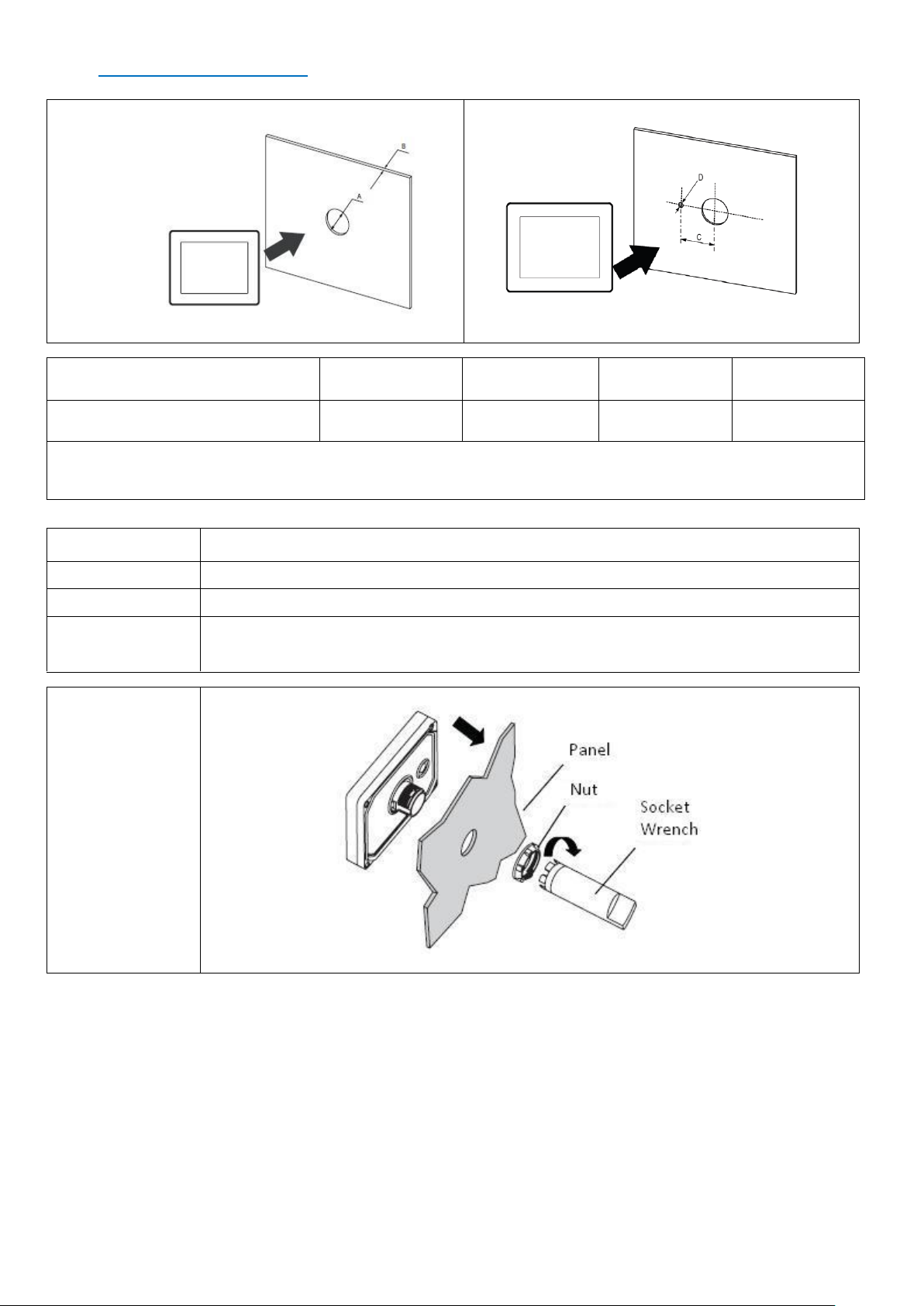
Panel cut dimensions:
Without Anti-rotation Tee
With Anti-rotation Tee
A (mm)
B (mm) (1)
B (mm) (2)
C (mm)
D (mm)
22.5 (tolerance -0.30)
1.5 à 6
3 à 6
30 (tol -0.20)
4 (tol -0.20)
(A) Diameter of the cut
(B) Thickness of the panel
(1) Material of the panel: Steel
(2) Material of the panel: Glass fiber reinforced
Installation procedure:
Step
Action
1
Place the unit on a clean and level surface with the display panel facing downward.
2
Cut a panel with the specified thickness in function of the material.
3
Create the correct sized hole with a diameter of 22.5mm (tol -0.30) on the panel.
4
Insert the display module following the illustration:
Screw the nut with the socket wrench with a torque between 1.2 and 2 N.m.
Page 14
14
Quick Start Guide SCAIME: NUSG-eNodTouch-ML-FE-196775-D.docx
5
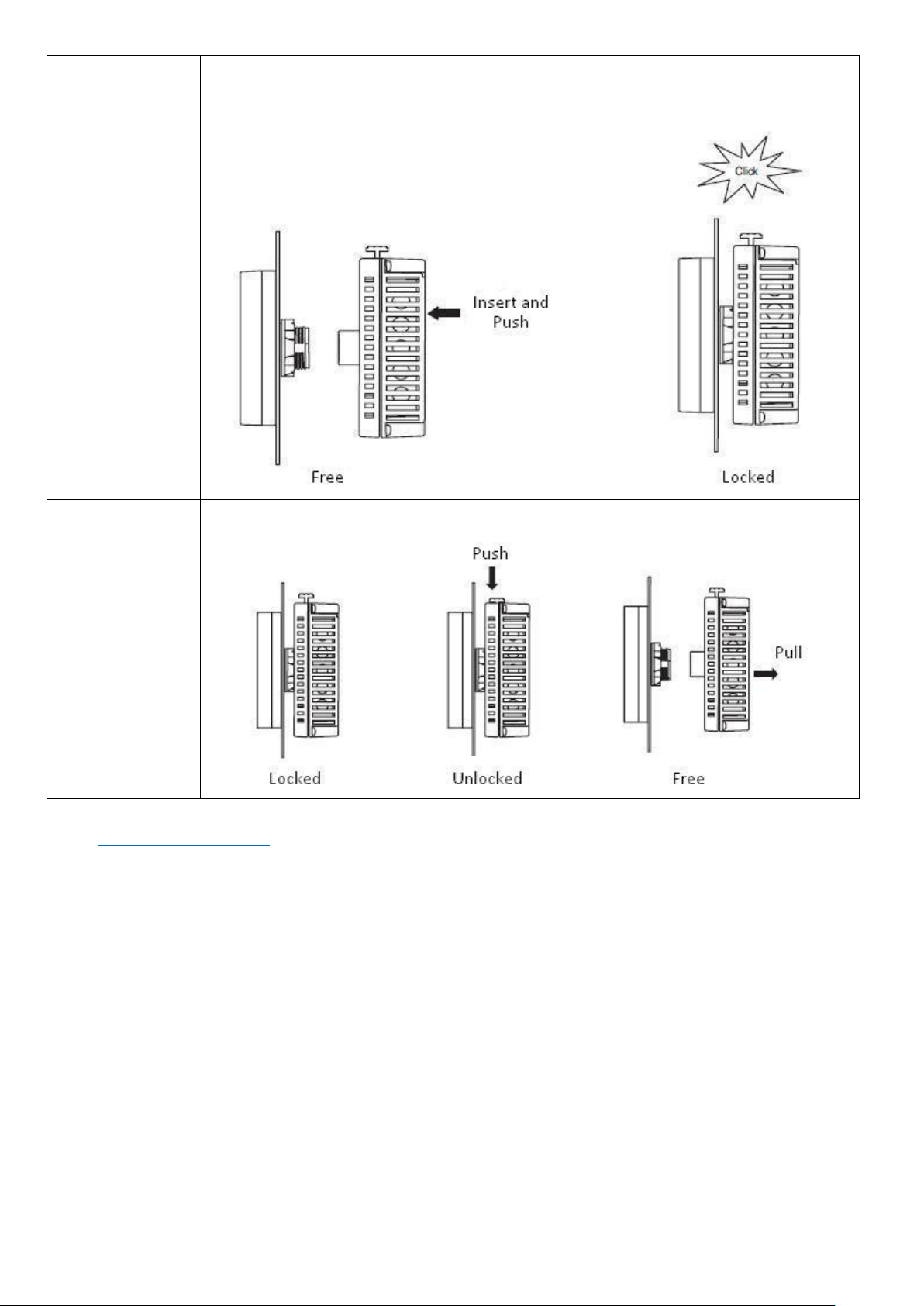
Insert and push the rear module until it locks into place.
IMPORTANT: Install the rear module in the orientation shown in the illustration.
If either unit is installed incorrectly, the connector may be damaged.
6
To remove the rear module, push the yellow button to unlock it, then pull the rear module out
following the illustration:
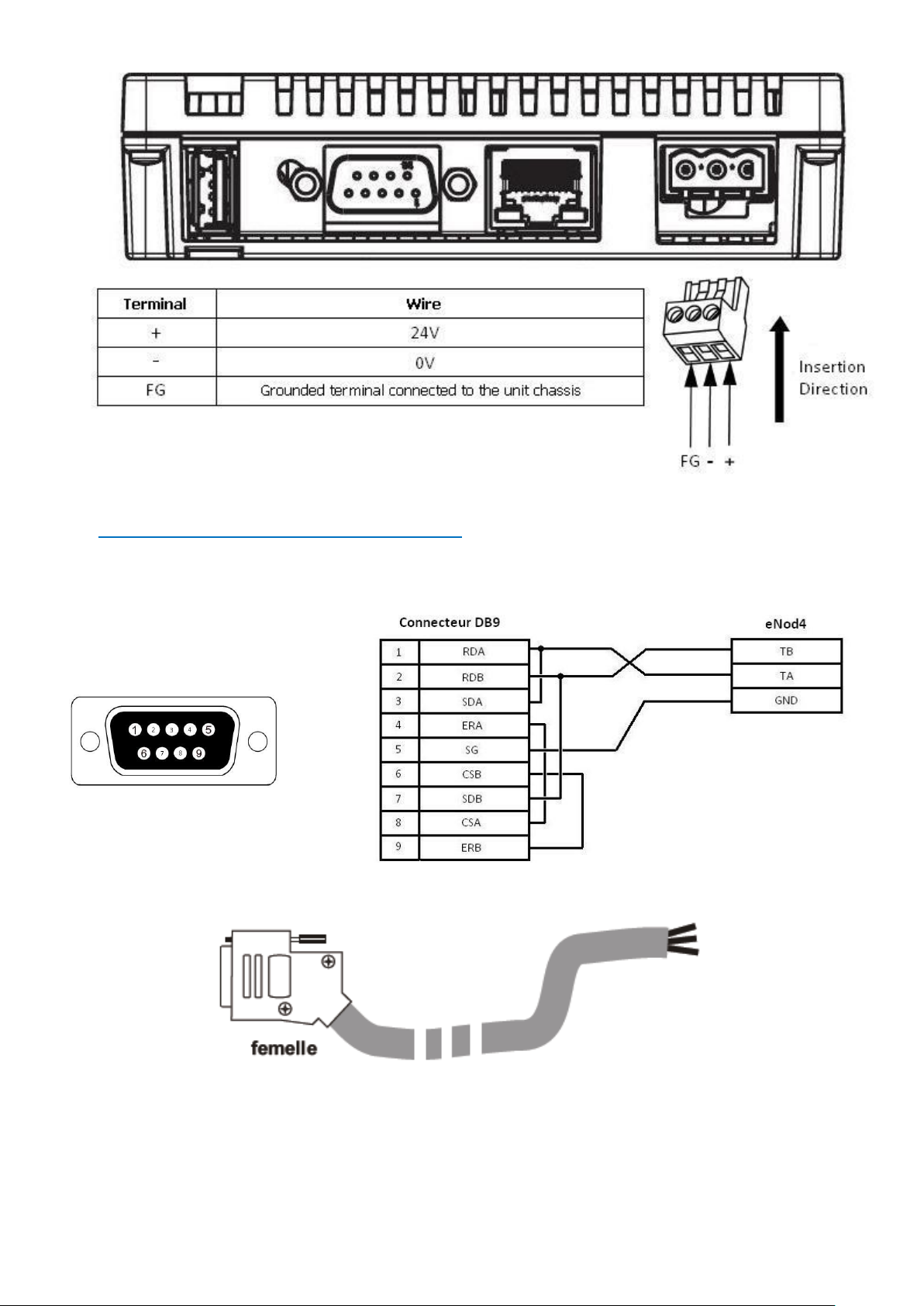
Electrical powering
• Supplying a power voltage other than that specified will damage the power source and the unit.
• When the FG terminal is connected, be sure the wire is grounded.
Page 15
15
Quick Start Guide SCAIME: NUSG-eNodTouch-ML-FE-196775-D.docx
RS485 interface for connection to eNod4
• RS485 uses a DB9 connector. Please follow the below cable recommendation or use a SCAIME Cable ref 632153.
Contact your local sales representative for more information.
RS485 connection
Cable ref. 632153
Page 16
16
Quick Start Guide SCAIME: NUSG-eNodTouch-ML-FE-196775-D.docx
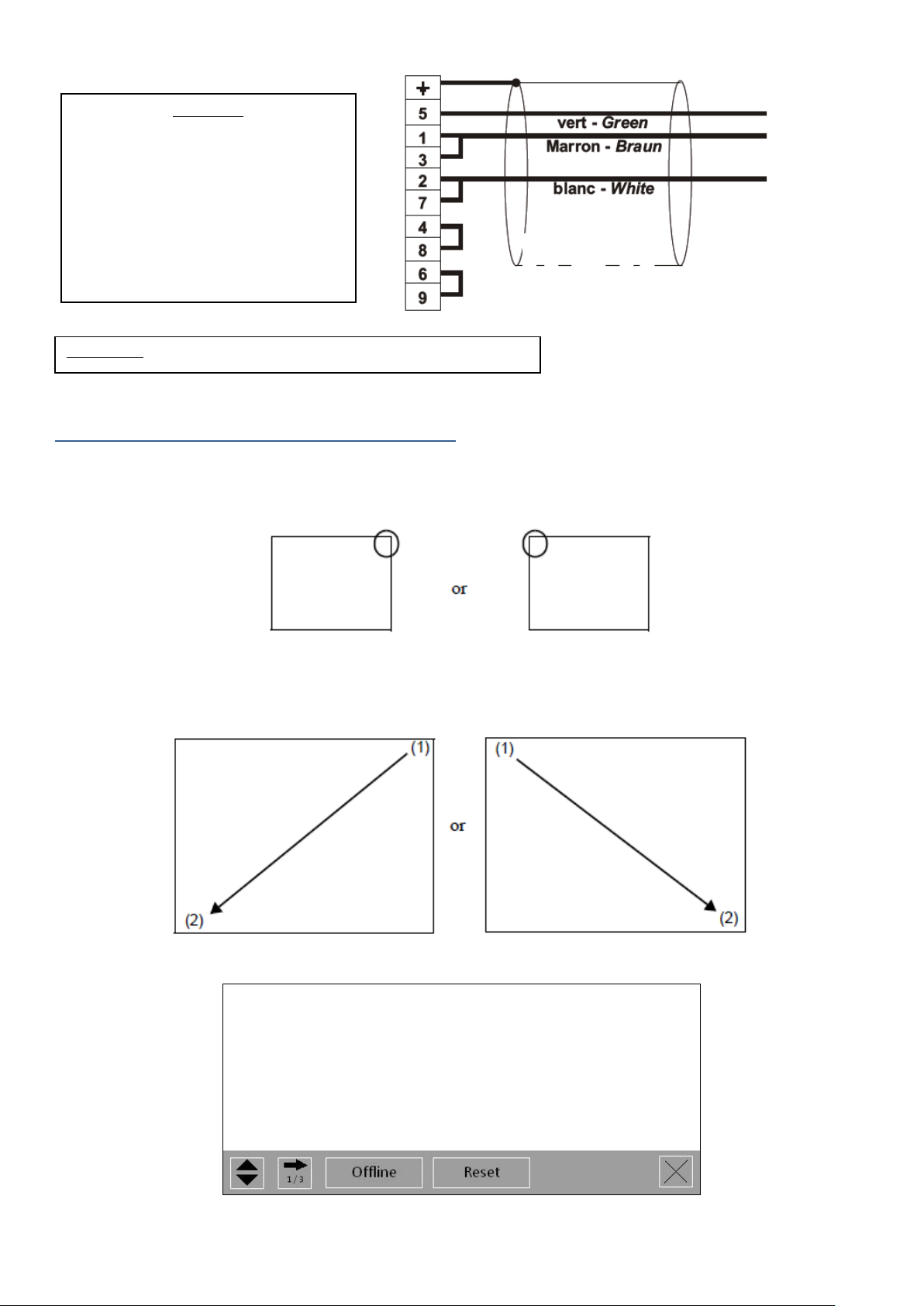
Entering Offline mode when Operating
At Power ON
Touch the upper right corner or upper left corner (within 40 pixels of the edges) of the panel for at least 3 seconds soon after the
startup screen is displayed.
When Operating
Touch the upper right then bottom left corners, or the upper left and bottom right corners of the panel (within a 40-pixel area)
within 0.5 seconds.
When the system menu is displayed, touch the [Offline] button
For more information and details about the menus, please refer to the user manual.
Important:
You may need to add a terminating
resistor (120 Ohm) if the distance
between eNod4Touch and eNod4 is
important.
If distance is short (<1m), do not add
resistor.
0V
Ta/Ra
Tb/Rb
Important: GND (SG) must not be connected to ground Shield.
 Loading...