

Page 1
Instructions for use
TV Adapter 3.0
Page 2

Introduction to this booklet
Intended use
This booklet guides you on how to use and maintain your new
TV Adapter. Please read the booklet carefully, including the
Warning section. This will help you to get the most out of your new
TV Adapter.
If you have additional questions about the use of your TV Adapter,
please contact your hearing care professional.
About Installation Daily use Warnings Additionals
For your convenience, this booklet contains a navigation bar to help
you navigate easily through the different sections.
Manufactured under license from Dolby Laboratories. Dolby and the
double-D symbol are registered trademarks of Dolby Laboratories.
The TV Adapter is intended as a wireless transmitter of sound from a
TV or from other electronic audio devices to hearing aids.
The TV Adapter is intended to be used by children (> 36 months)
and adults together with their hearing solution.
Page 3

Table of content
About
Installation
Daily use
Package content 6
TV Adapter overview 8
Installation 10
Placing the TV Adapter 11
Connecting the TV Adapter to a power outlet 12
Connecting the TV Adapter to the TV 14
Connecting using TOSLINK 16
Connecting using RCA 18
Connecting using mini jack Adapter 20
Connecting using SCART 22
Pairing the TV Adapter with your hearing aids 24
Start TV sound using your hearing aids 26
Turn off TV sound using your hearing aids 27
Volume control using your hearing aids 28
Start TV sound using the hearing aid Remote Control 30
Turn off TV sound using your Remote Control 31
Volume control using your Remote Control 32
Mute using your Remote Control 33
Start TV sound using the Oticon ON App 34
Turn off TV sound using the Oticon ON App 35
Volume control using the Oticon ON App 36
Mute using the Oticon ON App 37
More than one user 38
Removing a user/clear pairings 39
Cleaning and maintenance 40
Warnings
Warnings 42
Additionals
Technical information 44
International warranty 47
Page 4

Package content
The TV Adapter box consists of the following elements:
TV Adapter Power supply
TV Adapter 3.0
Instructions for use
(Installation guide and Instructions for use)
6
About Installation Daily use Warnings Additionals
SCART Adapter Mini jack AdapterThis guide
TOSLINK
RCA cable
Page 5
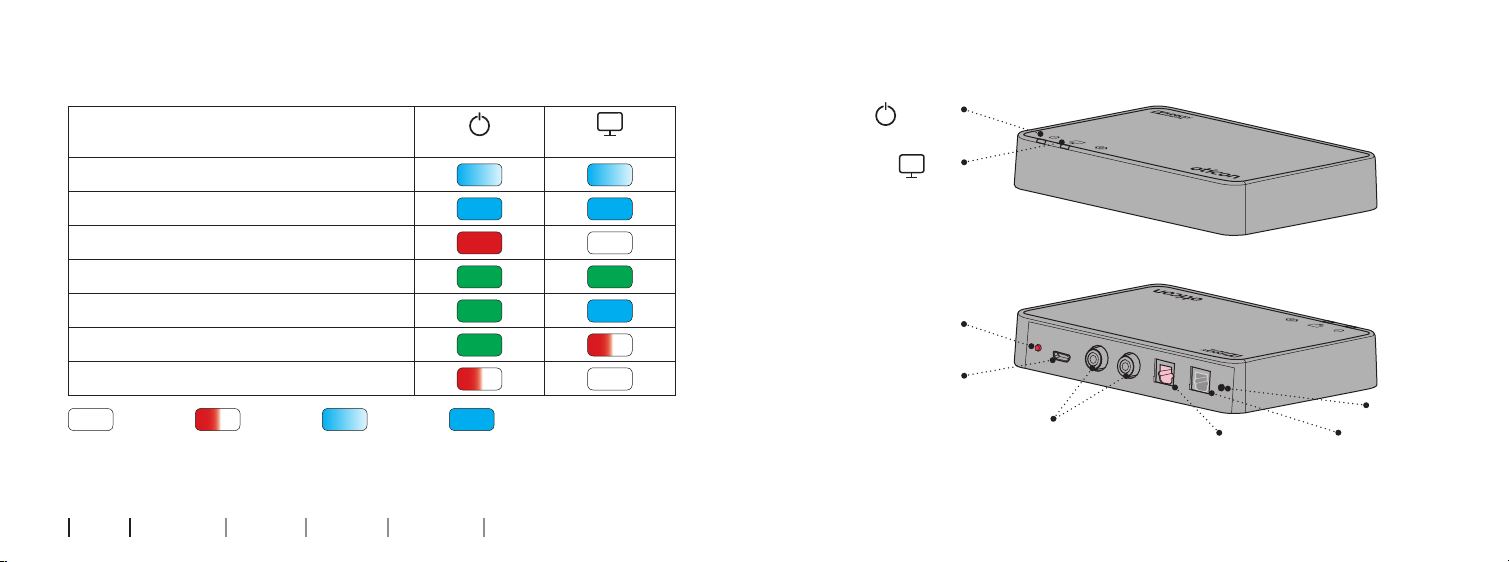
TV Adapter overview
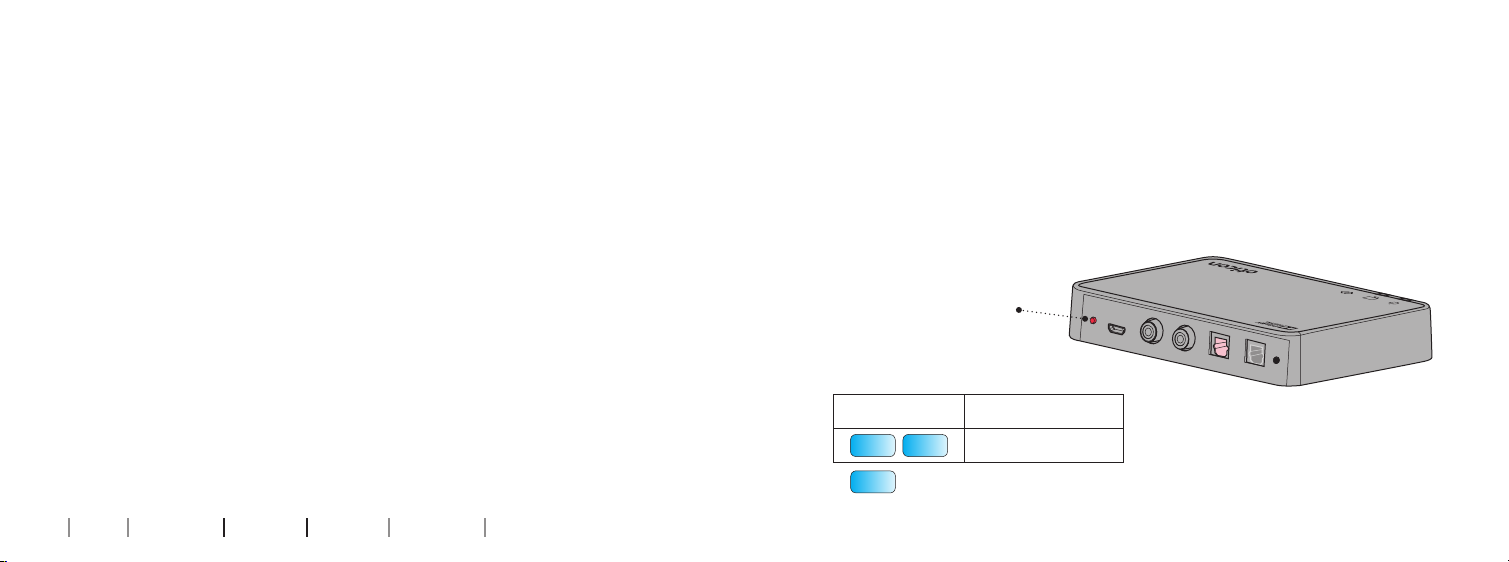
Mode Power indicator TV indicator
Power on, not paired to any hearing aids
Pairing complete (steady light 30 secs)
Front
Power
TV
Power on, not streaming
RCA inserted and streaming
TOSLINK inserted and streaming (digital)
TOSLINK inserted and streaming (invalid signal)*
Fault condition *
No light
* Try other input connection
** Contact your hearing care professional
8 9
About Installation Daily use Warnings Additionals
Blinking Fading Steady
Power supply
More information: www.oticon.com
Setup
POWER
RCA left and right
L
Back
R
IN
OUT
TOSLINK in
Mode
TOSLINK out
Page 6
Installation
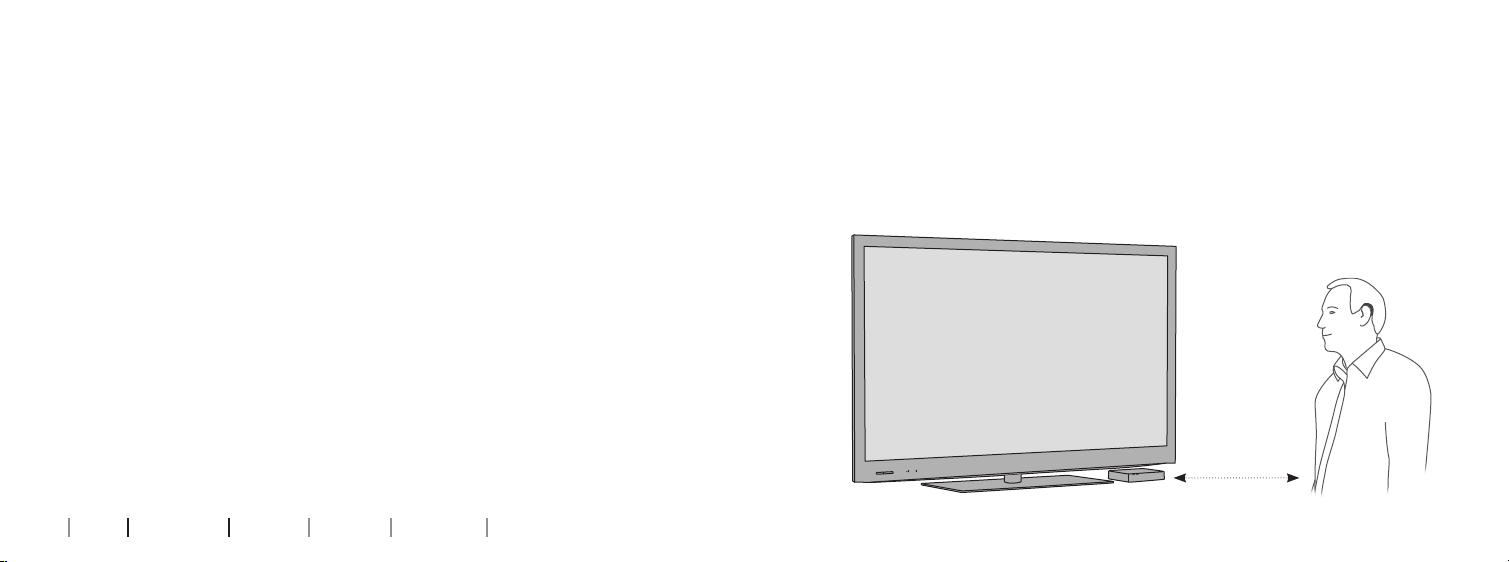
Placing the TV Adapter
Using the TV Adapter for the first time
Before you can use your hearing aids with your TV, the TV Adapter must be connected to a power outlet, connected to the TV and
paired with your hearing aids.
This is a step-by-step guide on how to install the TV Adapter.
All parts needed for the installation are included in the package.
10 11
About Installation Daily use Warnings Additionals
Place the TV adapter close to the TV - horizontally, with free line of
sight to the hearing aids.
Page 7
Connecting the TV Adapter to a power outlet
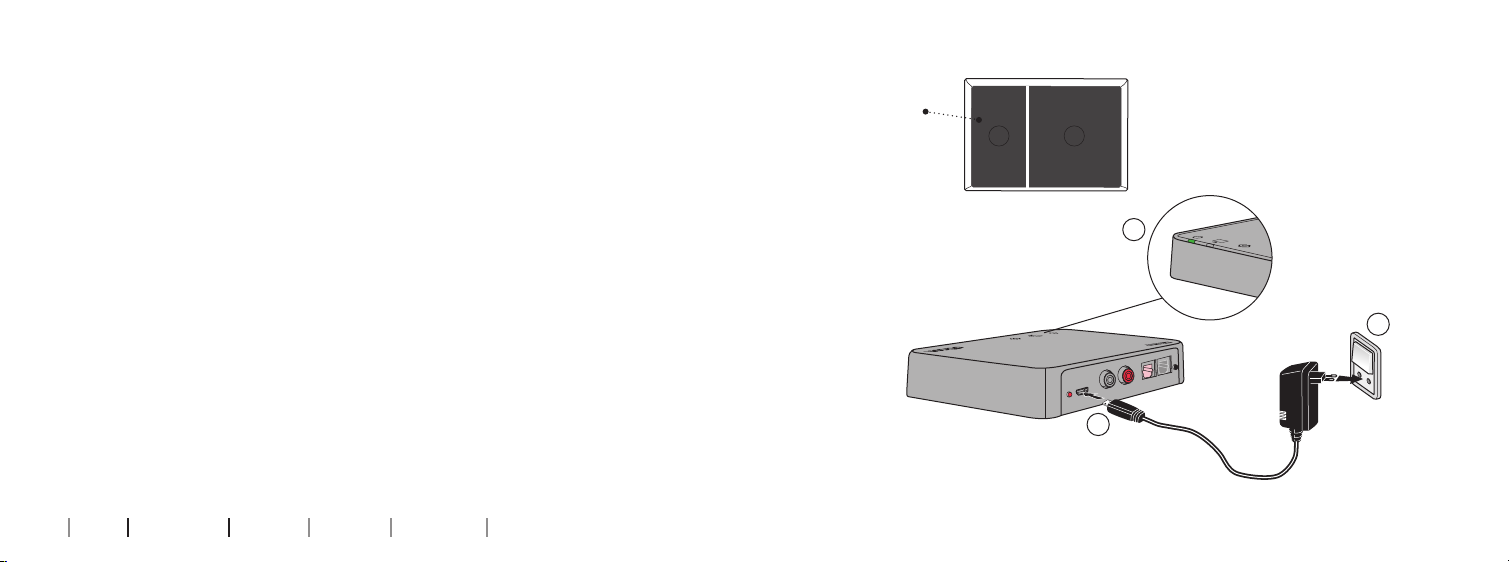
Start by connecting the TV Adapter to a power outlet.
Box 1
Use the power supply from box 1
1. Plug the power cord into the “power” connector on the TV Adapter (A).
1 3
2. Plug the power supply into the mains wall socket (B).
3. Check that the power is turned on; after a few seconds both indicators
will fade blue to indicate that pairing with your hearing aids is needed.
C
See page 24.
B
TUO
IN
R
L
POWER
A
12 13
About Installation Daily use Warnings Additionals
Page 8
L
R
Audio
Out
L
R
Audio
Out
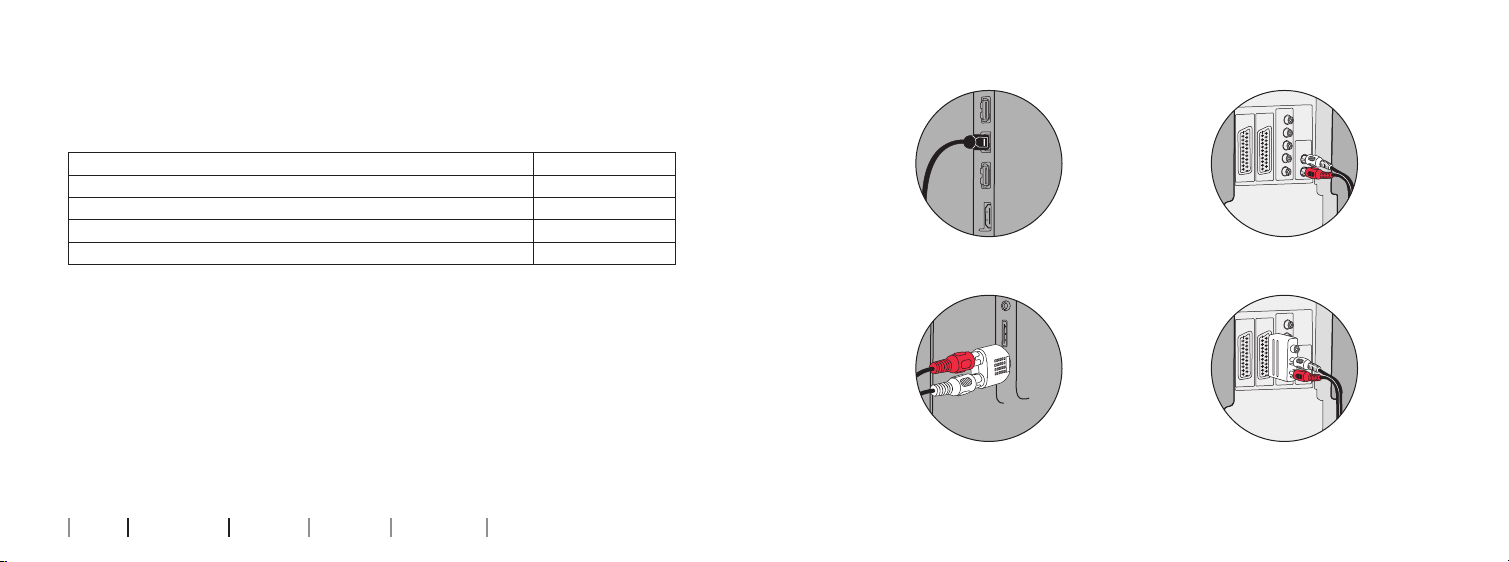
Connecting the TV Adapter to the TV
TOSLINK (p. 16)
RCA (p. 18)
You can connect the TV Adapter to the TV in four different ways.
Connection Page
TOSLINK. Either digital stereo (PCM) or Dolby® Digital * 16
RCA audio output L+R 18
Mini jack audio output (typically headphone output) 20
SCART audio output (L+R) 22
*Dolby and the double-D symbol are registered trademarks of Dolby Laboratories.
Mini jack (p. 20)
SCART (p. 22)
We recommend using TOSLINK.
Please see the following pages for a solution which fits your TV.
14 15
About Installation Daily use Warnings Additionals
More information: www.oticon.com
Page 9
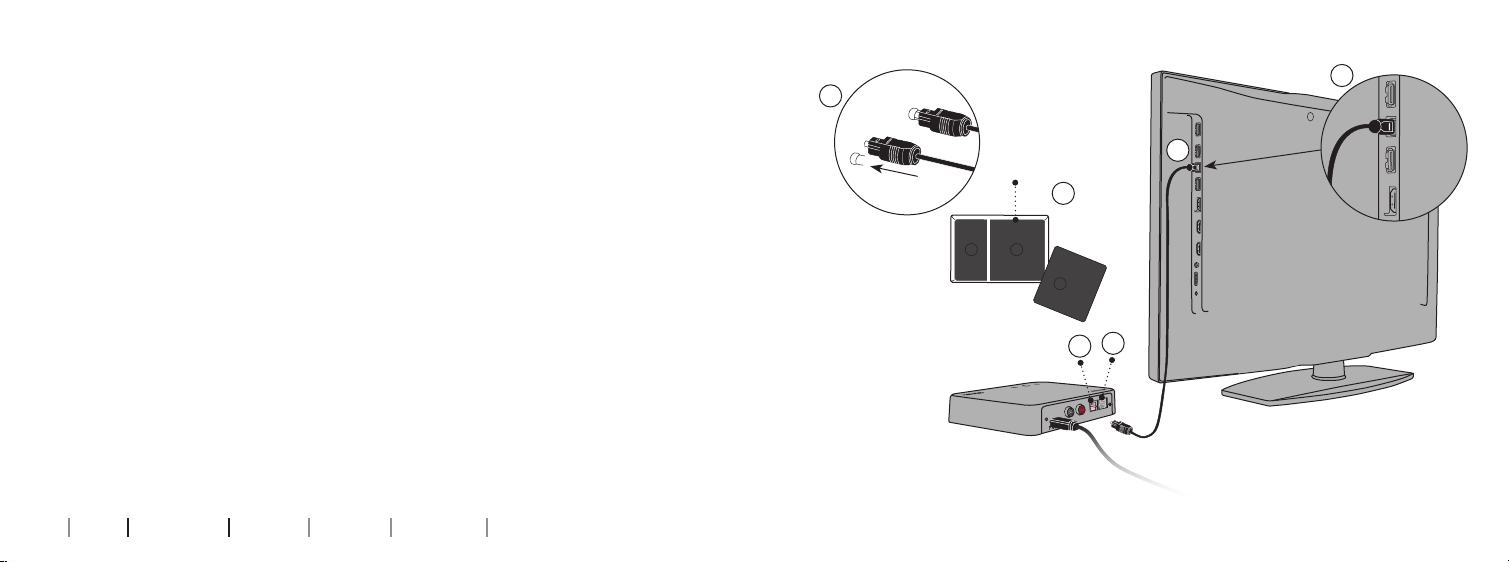
Connecting using TOSLINK
1. Use the TOSLINK cable from box no. 3 (A).
2. Remove the plastic cap from the TOSLINK cable. (B)
3. Connect the TOSLINK cable to the TOSLINK output on your TV/home
theater system (C).
4. Connect the TOSLINK cable to the pink TOSLINK input (D) on the
TV Adapter.
5. The TOSLINK output (E) may be used to connect other TOSLINK devices
such as external Dolby Decoders and surround sound systems.
6. Refer to page 24 for pairing of the TV Adapter with your Hearing Aid.
C
B
C
Box 3
A
1 3
Please note: It may be necessary to configure your TV, DVD player
or home theater system so that the correct audio output is
2
E
D
available on the TOSLINK output.
TUO
IN
R
L
16 17
About Installation Daily use Warnings Additionals
Page 10
L
R
Audio
Out
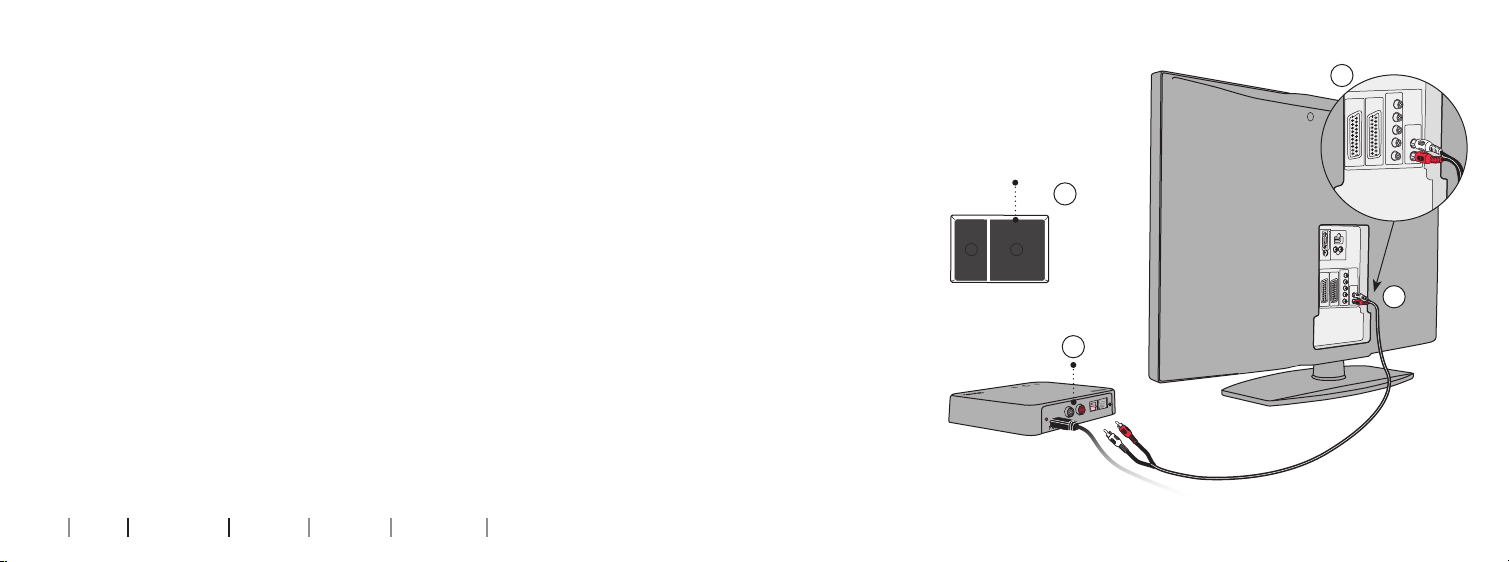
Connecting using RCA
1. Use the RCA cable from box no. 2 (A).
2. Connect the RCA cable to the RCA output on your TV (B) or home theater
system. (Typically marked “L – R AUDIO OUT” and found on the TV back or
bottom panel.)
3. Connect the RCA cable to the RCA connectors (C) on the back of the TV
Adapter.
4. Refer to page 24 for pairing of hearing aids with the TV Adapter.
B
Box 2
A
Please note: It may be necessary to configure your TV so that the
correct audio output is available on the RCA output.
1 2
Audio
Out
L
C
R
C
TUO
IN
R
L
18 19
About Installation Daily use Warnings Additionals
Page 11
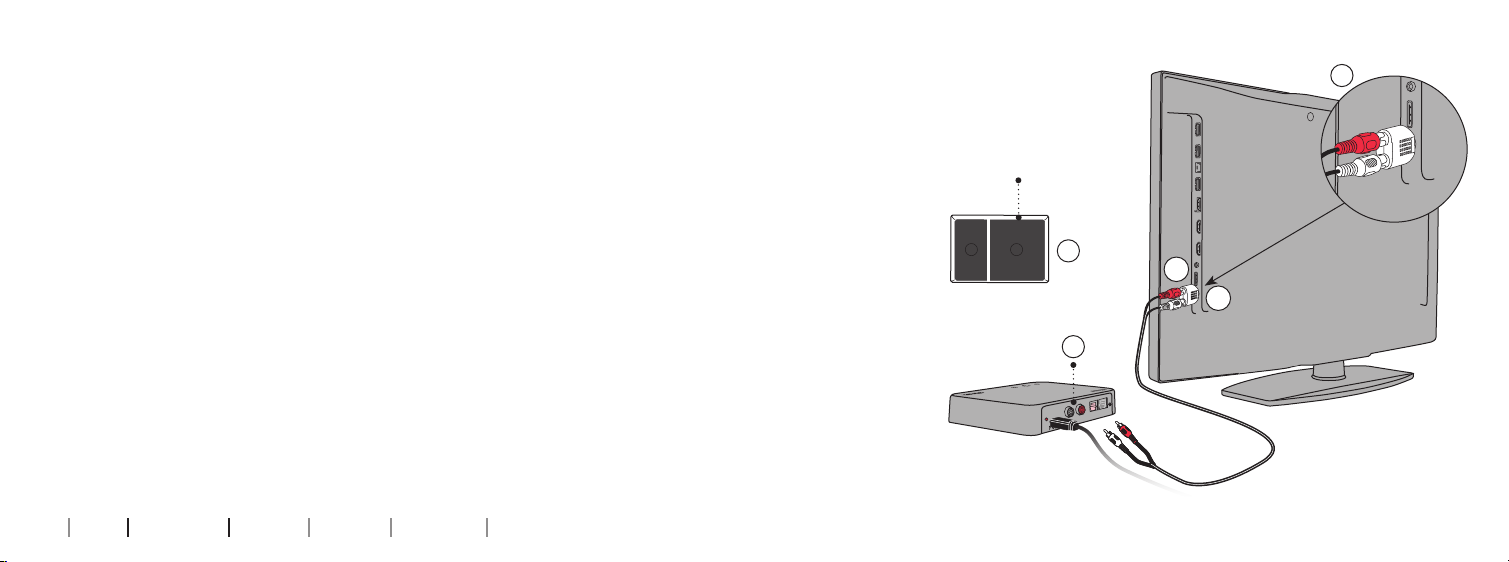
Connecting using mini jack Adapter
1. Use the mini jack Adapter from box no. 2 (A).
2. Connect the RCA cable to the mini jack Adapter (B1).
3. Connect the mini jack to the TV, this is typically the headphone output
(B2).
4. Connect the RCA connectors to the TV Adapter RCA input (C).
5. Refer to page 24 for pairing of the TV Adapter with your hearing aids.
B
Box 2
Please note: The TV speakers may be muted when connecting to
the headphone output, and sound only heard through the Hearing
Aids/TV Adapter.
1 2
A
B1
B2
D
TUO
IN
R
L
20 21
About Installation Daily use Warnings Additionals
Page 12
L
R
Audio
Out
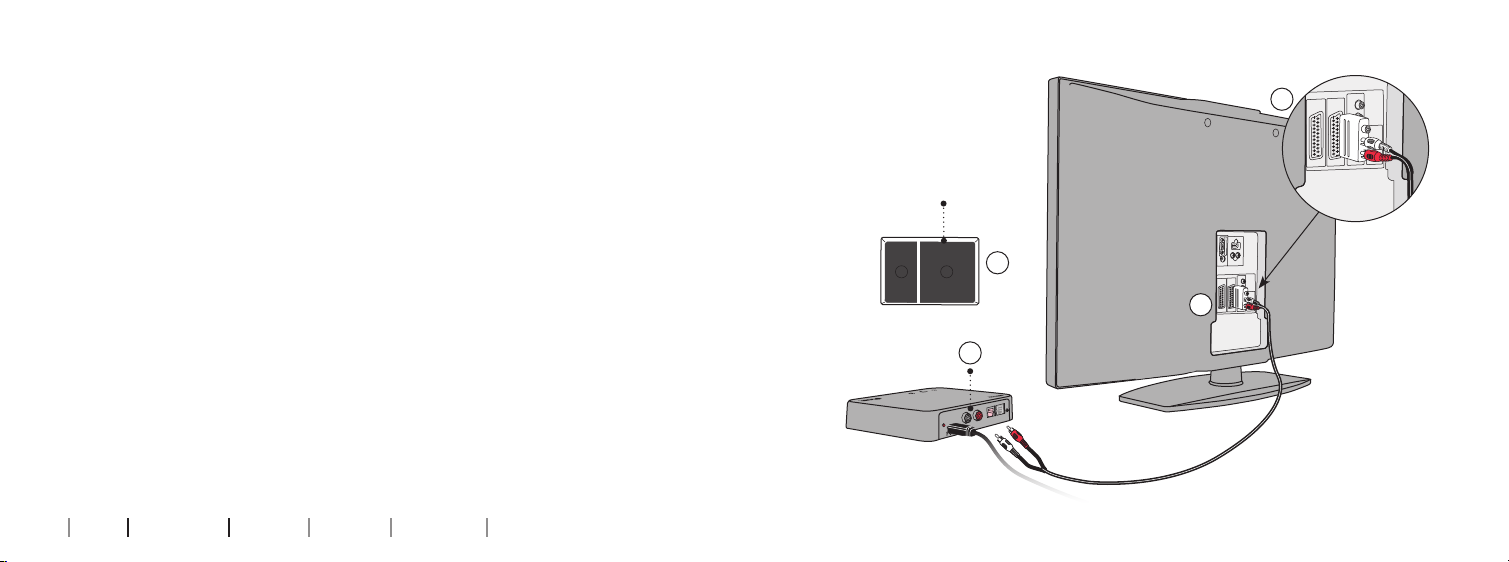
Connecting using SCART
1. Use the SCART Adapter from box no. 2 (A).
2. Connect the RCA cable to the red and white terminals on the SCART
Adapter (B).
3. Connect the SCART Adapter to the SCART output on your TV (C).
4. Connect the RCA connectors to the TV Adapter RCA input (D).
5. Refer to page 24 for pairing of the TV Adapter with your Hearing Aids.
B
Box 2
Please note: The audio output on the SCART connector can be
dependent on the source selected on the TV. For example some TVs
will only make TV sound available on the SCART output (i.e. not e.g.
1 2
A
Audio
Out
L
R
C
sound from a connected DVD player).
D
TUO
IN
R
L
22 23
About Installation Daily use Warnings Additionals
Page 13
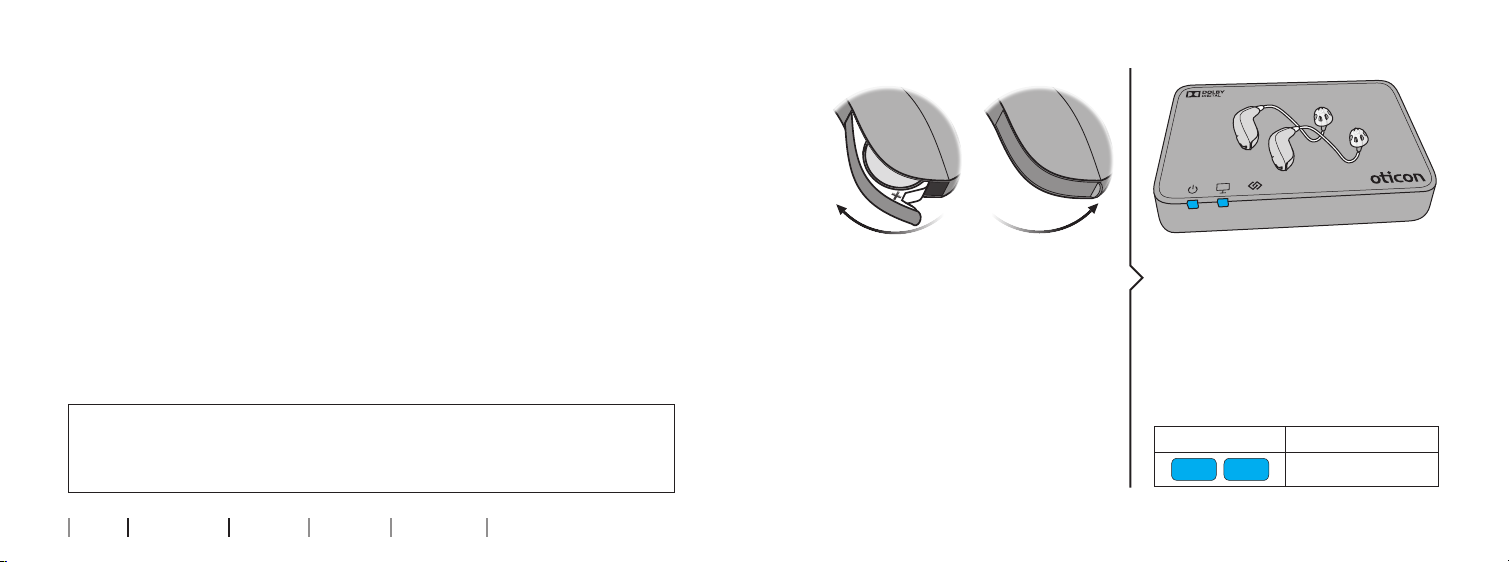
Pairing the TV Adapter with your hearing aids
Before using the TV adapter, it must be paired with your hearing
aids.
Pairing is only required once, and takes around 20-60 seconds.
Make sure the TV Adapter is
powered on.
Open and close the battery door on
Note: This TV Adapter can be paired to as many hearing aids as you like. All users will be able to hear the
same sound. Please see page 38 for more details.
both your hearing aids.
IMPORTANT NOTICE
Please refer to your hearing aid‘s instructions for use for details on the
functionality of your specific hearing aid solution.
24 25
About Installation Daily use Warnings Additionals
Place both hearing aids close to, or
on top of the TV Adapter.
Pairing is completed when the
power indicator and the TV indicator is blue for about 30 secs.
TV Adapter Description
Pairing completed
Page 14
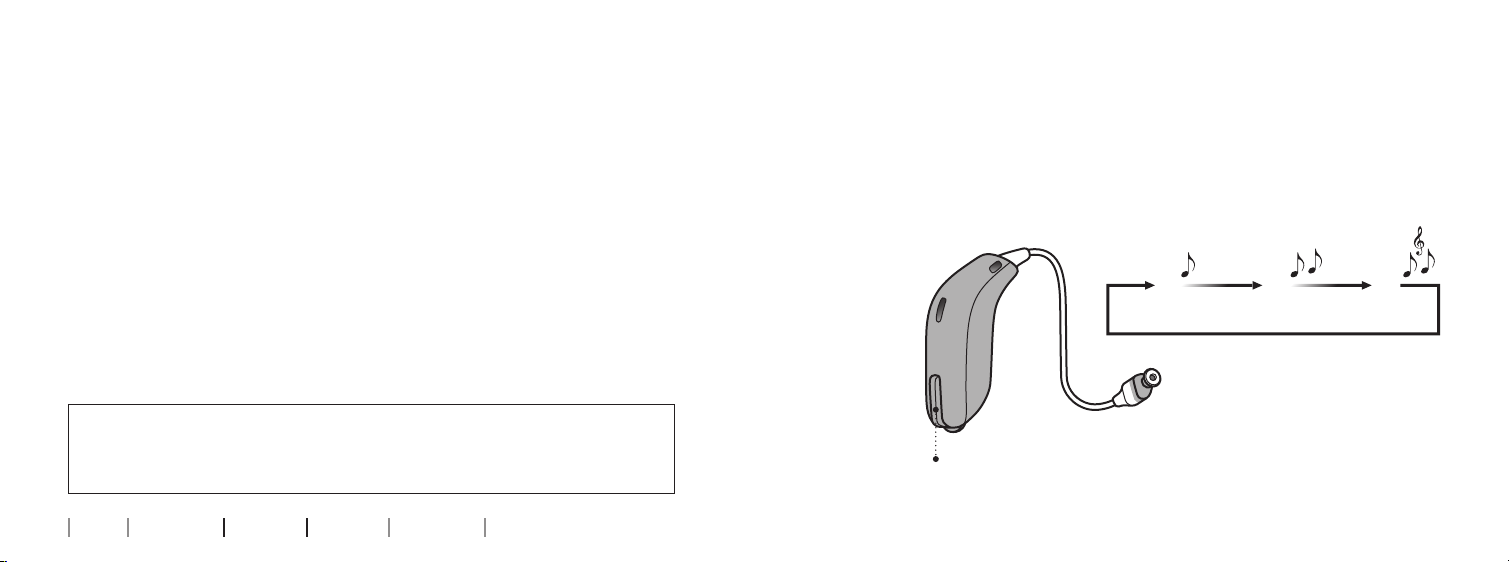
Start TV sound using your hearing aids
Turn o TV sound using your hearing aids
Once a TV Adapter has been paired with your hearing aids, it will be
available as a program in your hearing aids. To listen to TV simply
To stop the sound from the TV simply change to the desired
program in your hearing aids.
press and hold the program switch on your hearing aids to change
programs.
The program cycle will depend on the programs already
available in your hearing aids.
The TV program indicator - which is different from hearing aid pro-
P2 TVP1
gram indicators - will be heard once the TV program is selected.
IMPORTANT NOTICE
Please refer to your hearing aid‘s instructions for use for details on the
functionality of your specific hearing aid solution.
26 27
About Installation Daily use Warnings Additionals
Change program
Page 15
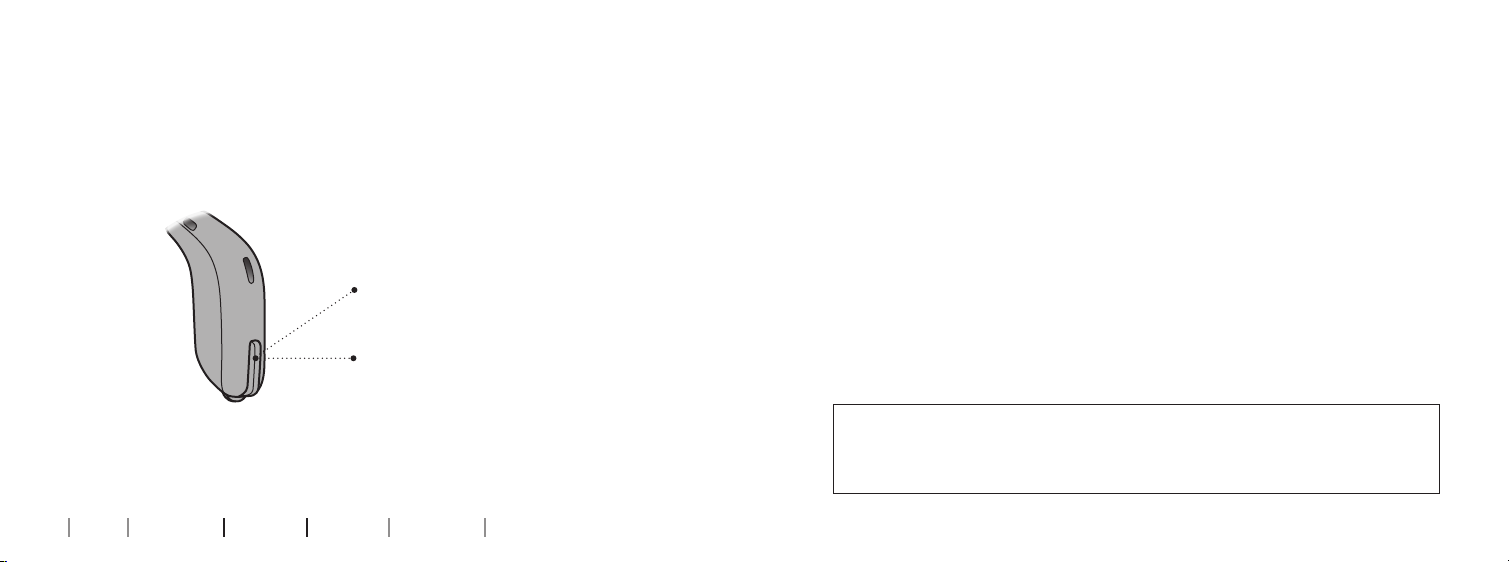
Volume control using your hearing aids
Use the volume button on your hearing aid to adjust the TV
volume level in both hearing aids. Adjust the volume by pressing up
or down briefly. Press briefly repeatedly for further adjustments.
A short press on the RIGHT
hearing aid increases the volume.
A short press on the LEFT
hearing aid decreases the
volume
IMPORTANT NOTICE
Please refer to your hearing aid‘s instructions for use for details on the
Note: The TV volume in the hearing aids is normally not affected by volume adjustments from the TV
Remote Control.
28 29
About Installation Daily use Warnings Additionals
functionality of your specific hearing aid solution.
Page 16
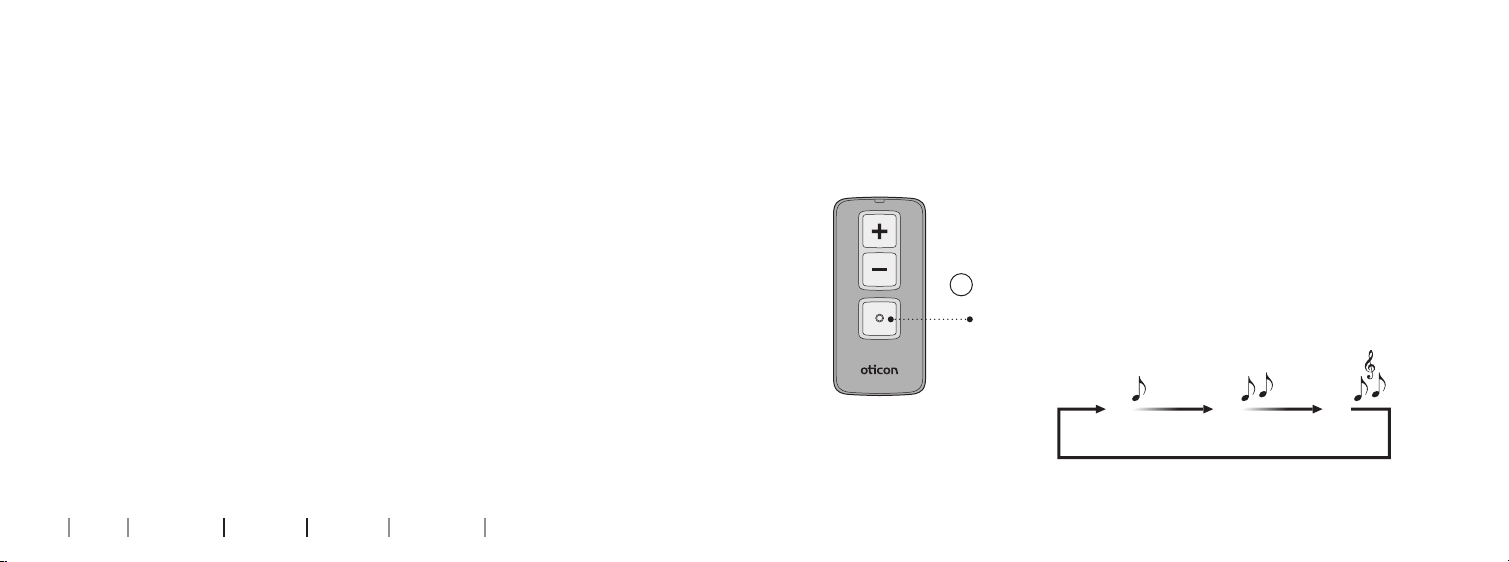
Start TV sound using the hearing aid Remote
Control
The Remote Control is an optional accessory to your wireless
Turn o TV sound using your Remote Control
To stop the sound from the TV simply change to the desired
program in your hearing aids.
hearing aids.
Once a TV Adapter has been paired to your hearing aids it will be
available as a program. To listen to TV simply press the
program selector and change program (A).
The program cycle will depend on the programs already
available in your hearing aids.
A
Change program
The TV program indicator - which is different from program indicators - will be heard once the TV program is selected.
More information: www.oticon.com
30 31
About Installation Daily use Warnings Additionals
P2 TVP1
Page 17
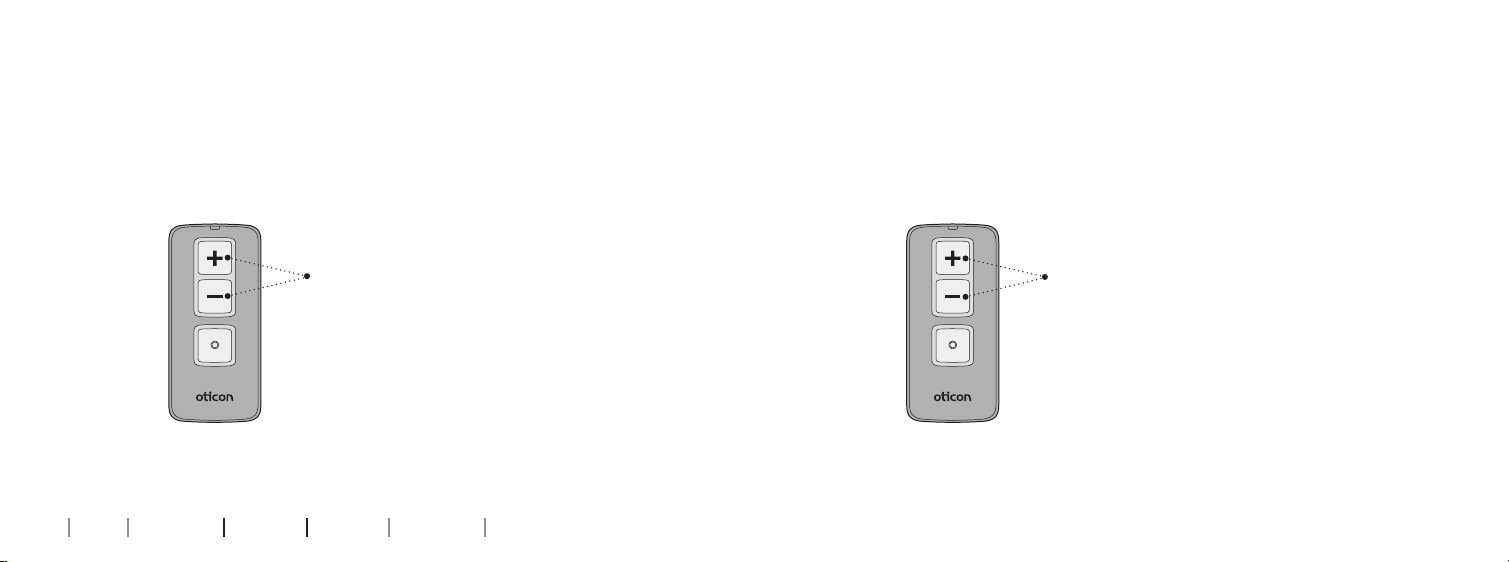
Volume control using your Remote Control
Mute using your Remote Control
Use the volume buttons on your remote to adjust the TV volume
level in both hearing aids.
Adjust the volume by pressing
up or down briefly. Repeat the
brief press for further adjustments.
Note: The TV volume in the hearing aids is normally not affected by volume adjustments from the
TV Remote Control.
32 33
About Installation Daily use Warnings Additionals
While watching TV you can switch off the microphones in your
hearing aids, so that only the sound from the TV is heard.
Press and hold the volume down button
for approx 3 seconds until the surrounding
sound is muted. You will hear a confirmation
beep indicating that the microphones in the
hearing aids are now muted.
To unmute simply press volume up or down
briefly.
Note: The mute and volume functions are optinal and can be customized by your hearing care professional.
Page 18
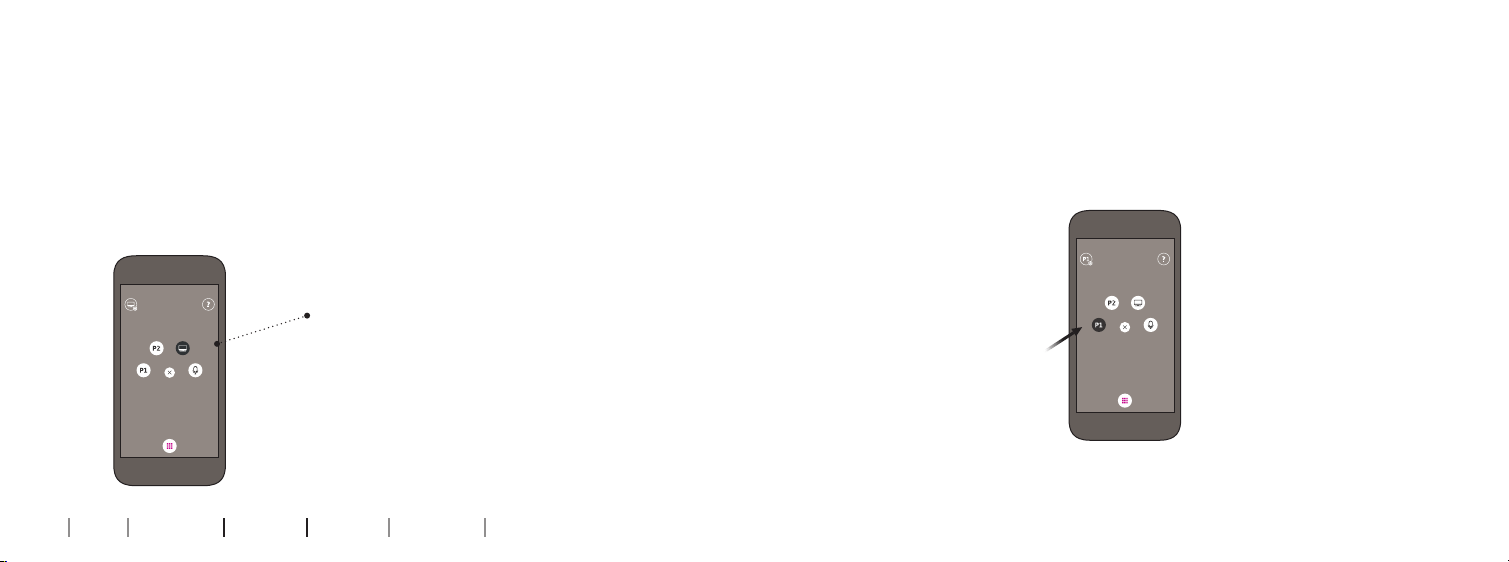
Start TV sound using the Oticon ON App
Turn o TV sound using the Oticon ON App
The Oticon ON App is an optional accessory to your wireless
hearing aids. The app works with iPhone®, iPad®, iPod touch®, and
To stop the sound from the TV simply change to the wanted
program in your hearing aids.
Android™ devices. iPhone, iPad, and iPod touch are trademarks of
Apple Inc., registered in the U.S. and other countries. Android is a
trademark of Google Inc. For information on compatibility, please
visit www.oticon.com.
Once a TV Adapter has been paired to
your hearing aids it will be available
as a program in your hearing aids and
visible as a source in the Oticon ON
App. To listen to TV simply select the
TV source from the app.
34 35
About Installation Daily use Warnings Additionals
Page 19
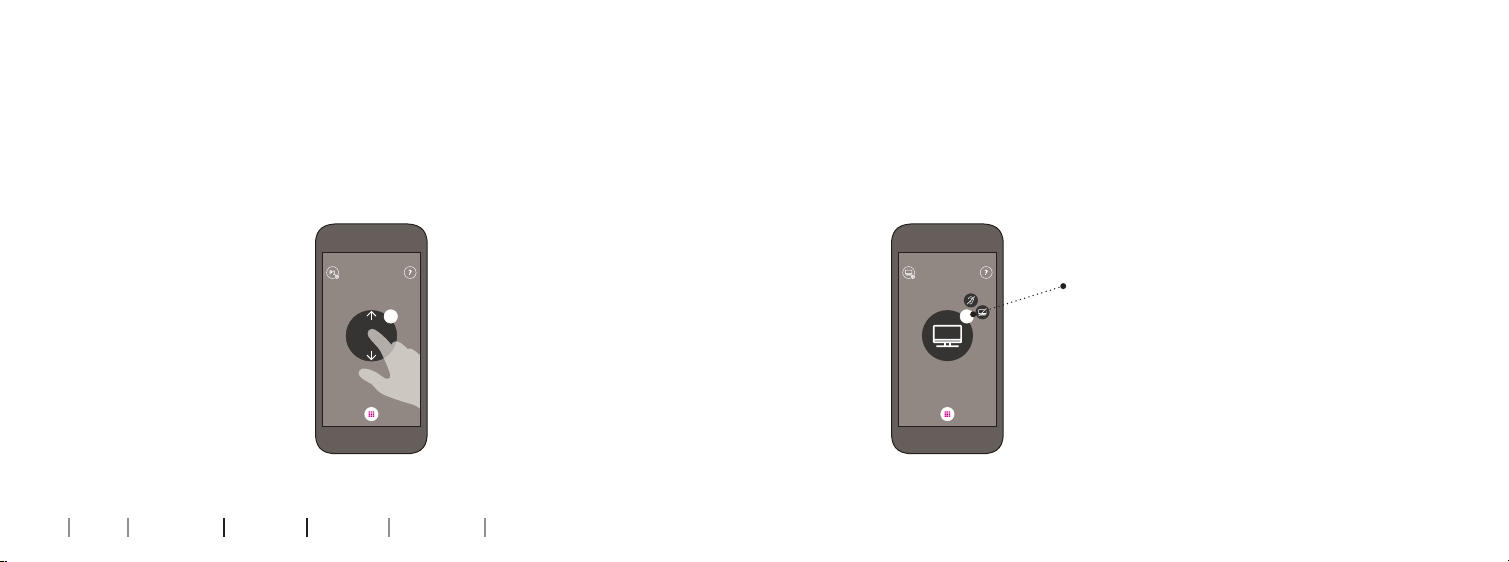
Volume control using the Oticon ON App
Mute using the Oticon ON App
Swipe your finger up or down to adjust the volume.
While watching TV you can switch off the microphones in your
hearing aids, so that only the sound from the TV is heard.
Press the volume indicator to mute
0 0
P1
36 37
About Installation Daily use Warnings Additionals
the surrounding sounds. You will hear
a confirmation beep indicating that
the microphones in the hearing aids
are now muted.
To unmute simply press the volume
indicator again, or swipe your finger
up or down to adjust the volume.
Page 20
More than one user
Removing a user/clear pairings
An unlimited number of hearing aid users can listen to the sound
from one TV Adapter.
Pair the hearing aids to the TV Adapter as described on page 24.
To remove a user from your TV Adapter perform a system reset and
re-pair the required hearing aids.
1. Reset system: Press and hold the setup button for more than 5 seconds
2. Indicators fade blue to indicate no pairings
3. Re-pair the required instruments (see page 24)
Setup
POWER
L
R
IN
OUT
TV Adapter Description
Fading
38 39
About Installation Daily use Warnings Additionals
No pairings
Page 21

Cleaning and maintenance
Use a soft, dry cloth to clean the TV Adapter.
IMPORTANT NOTICE
The TV Adapter must never be washed or immersed in water or other
liquids.
40
About Installation Daily use Warnings Additionals
Page 22

Warnings
You should familiarize yourself fully
with the following general warnings and the entire contents of this
booklet before using your TV Adapter
to ensure personal safety and correct
use. Consult your hearing care
professional if you experience
unexpected operations or events
with your TV Adapter.
Choking hazards and risk of
swallowing small parts
• Your TV Adapter and its parts
should be kept out of reach of
children and anyone who might
swallow these items or otherwise
cause injury to themselves. If small
parts are swallowed, see a doctor
immediately.
42 43
About Installation Daily use Warnings Additionals
Explosives
• The power source in your TV
Adapter has insufficient energy
to cause fire in normal usage
conditions. The TV Adapter has not
been tested for compliance with
international standards concerning
explosive environments. We
recommend not to use your TV
Adapter in areas where there is a
danger of explosions.
Interference
• Your TV Adapter has been thoroughly tested for interference
according to the most stringent
international standards. However,
interference with your TV adapter
and other devices may occur, (e.g.
some mobile telephones, citizens
band devices and other wireless
devices). If this occurs, increase the
distance between the TV adapter
and the interfering device.
Connection to external equipment
• The safety of the use of the TV
Adapter with an auxiliary input
cable is determined by the external
signal source. When the input cable
is connected to equipment plugged
into a wall outlet, this equipment
must comply with IEC-60065,
IEC-60601 or equivalent safety
standards.
Page 23

Technical information
Model name TVA3
Operating conditions Temperature: +5°C to +40°C
Storage and transportation
conditions
Humidity: 15% to 93%, non-condensing
Atmospheric pressure: 700 hPa to 1060 hPa
Temperature and humidity shall not exceed the below
limits for extended periods during transportation and
storage:
Temperature: -25 °C to +70 °C
Humidity: 15% to 93%, non-condensing
USA and Canada
This device is certified under:
FCC ID: 2ACAHTVA3
IC: 11936A-TVA3
The device complies with Part 15 of the FCC Rules and with Industry Canada’s
license-exempt RSSs.
Operation is subject to the following two conditions:
1. This device may not cause harmful interference.
The TV Adapter contains a wireless transmitter using 2.4 GHz technology.
The emission power from the TV Adapter is max. 17.1 dBm EIRP.
The TV Adapter complies with international standards concerning electromag-
2. This device must accept any interference received, including interference
that may cause undesired operation.
netic compatibility and human exposure.
Changes or modifications not expressly approved by the party responsible for
Due to the limited space available on the TV Adapter relevant approval markings
compliance could void the user’s authority to operate the equipment.
can be found in this document.
44 45
About Installation Daily use Warnings Additionals
Page 24

Note: This equipment has been tested and found to comply with the limits for
a Class B digital device, pursuant to part 15 of the FCC Rules. These limits are
designed to provide reasonable protection against harmful interference in a
residential installation. This equipment generates, uses and can radiate radio
frequency energy and, if not installed and used in accordance with the instructions, may cause harmful interference to radio communications. However, there
is no guarantee that interference will not occur in a particular installation. If
this equipment does cause harmful interference to radio or television reception, which can be determined by turning the equipment off and on, the user is
encouraged to try to correct the interference by one or more of the following
measures:
• Reorient or relocate the receiving antenna.
• Increase the separation between the equipment and receiver.
• Connect the equipment into an outlet on a circuit different from that to which
the receiver is connected.
• Consult the manufacturer or an experienced radio/TV technician for help.
To comply with FCC RF exposure requirements, the device and the antenna for
this device must be installed to ensure a minimum separation distance of 20 cm
or more from a person’s body. Other operating configurations should be avoided.
46 47
About Installation Daily use Warnings Additionals
International warranty
Your TV adapter is covered by an
international limited warranty issued
by the manufacturer for a period of
12 months from the date of delivery.
This limited warranty covers manufacturing and material defects in the
device itself, but not in accessories
such as e.g. batteries, cables, power
supplies, etc. Problems arising from
improper/incorrect handling or care,
excessive use, accidents, repairs
made by an unauthorized party, exposure to corrosive conditions, damage
due to foreign objects entering the
device or incorrect adjustments are
NOT covered by the limited warranty
and may void it. The above warranty
does not affect any legal rights that
you might have under applicable
national legislation governing sale
of consumer goods. Your hearing
care professional may have issued
a warranty that goes beyond the
clauses of this limited warranty.
Please consult him/her for further
information.
If you need service
Take your TV adapter to your hearing
care professional, who may be able
to sort out minor problems and
adjustments immediately.
Page 25
The manufacturer declares that this
TV adapter is in compliance with the
essential requirements and other
relevant provisions of Directive
1999/5/EC.
Declaration of Conformity is available
at the manufacturer.
SBO Hearing A/S
Kongebakken 9
DK-2765 Smørum
Denmark
www.sbohearing.com
Waste from electronic
equipment must be
handled according to
local regulations.
48
About Installation Daily use Warnings Additionals
E2831
168366US / 06.06.2016
168366US / 06.06.2016
Page 26
0000168366000001
 Loading...