

Page 1

Instructions for use
ConnectClip
Page 2

Introduction to this booklet
This booklet guides you on how to use and maintain your new ConnectClip.
Please read the booklet carefully, including the Warning section. This will help
you get the most out of your new ConnectClip. If you have additional questions
about the use of your ConnectClip, please contact your hearing care professional.
For your convenience, this booklet contains a navigation bar to help you navigate
easily through the different sections.
Page 3

Intended use
Introduction
The ConnectClip is intended as a wireless receiver and transmitter of sound between
hearing aids and the surrounding environment, including speech and wireless electronic audio devices. The ConnectClip also assists users of wireless hearing aids to
control the functionality provided by their hearing solution.
The ConnectClip is intended to be used by children (> 36 months) and adults together
with their hearing solution.
IMPORTANT
Please familiarise yourself with the entire contents of this booklet before using
your ConnectClip. It contains instructions and important information about the use
and handling of your ConnectClip.
The ConnectClip can be used both as a wireless headset for mobile phones and as a
remote microphone/partner microphone.
1. Headset with mobile phone 2. Remote/partner -microphone
Sounds from your phone
will be streamed to your
hearings aids through
the ConnectClip (A).
Your voice is picked
up by the ConnectClip
and sent to the
mobile phone (B).
AB
The voice of a chosen speaker will
be transmitted wirelessly FROM the
ConnectClip TO your hearing aids.
Up to XX m
Page 4

Contents
Package content 9
ConnectClip overview - main functions 10
First time use – initial setup – only needed once! 14
Pairing mobile phone with the ConnectClip 16
Daily use: On/Off 18
Daily use: Charging 19
Using ConnectClip with mobile phone 20
Ensuring ConnectClip is connected to the phone 21
Receiving calls 22
Making calls 24
Advanced headset features 25
Listening to music 26
Using ConnectClip as remote microphone 28
6 7
Selecting microphone mode 29
Starting/stopping sound from remote microphone 30
Regulating level from remote microphone 31
Starting/stopping sound from remote microphone using your hearing aids 32
Using ConnectClip as remote control for hearing aids 34
Landline phone - Phone Adapter 2.0 35
PC/Laptop - BTD800 Bluetooth dongle 36
Other features and functions 37
Overview of product statuses 38
Warnings 40
Technical information 46
International warranty 49
Index 52
Page 5

Package content
The ConnectClip box consists of the following elements:
ConnectClip Lanyard - long Lanyard - regular Pouch
PLACEHOLDER
Instructions for use
(Instructions for use)
ConnectClip 1.0
(will vary from country to country)
Wall charger
9
USB charger cableThis guide
Page 6

ConnectClip overview - main functions
Microphones
Front Back
10 11
Multi button
- On/off
- Answer phone
- Mode selector
Volume
- Up
- Down
Status
indicator
Charging socket.
Micro USB
Power
indicator
Clip (rotating)
for wearing the
ConnectClip
Page 7

Getting started
Before you can use the ConnectClip with your hearing aids, both the hearing aids and
the ConnectClip need to be paired/connected. Using the ConnectClip with a mobile
phone also requires the ConnectClip to be paired with/connected to your mobile phone.
1. Pairing hearing aid and ConnectClip
Basic
2. Pairing ConnectClip and mobile
See page
14
12 13
See page
16
Page 8

First time use – initial setup – only needed once!
1. Ensure ConnectClip is powered off
Press and hold multi-button
for approx. 6 seconds until power indicator OFF
2. Turn both hearing aids OFF
(open battery drawer)
3. Turn both hearings aids ON
(close battery drawer)
4. The hearing aids will now be ready
for first time connection with the ConnectClip.
This wil take about 3 minutes.
5. Turn ON ConnectClip
Press and hold multi-button for approx. 3 seconds
until power indicator shows STEADY GREEN
14 15
6. ConnectClip will now search for your
hearing aids.
Status indicator BLINKING YELLOW
Initial setup
7. Place ConnectClip and both
hearing aids close to each other
20 cm
(max distance 20cms)
8. Connection established with
hearing aid(s) is indicated by status
indicator STEADY YELLOW
Page 9

Pairing mobile phone with the ConnectClip
Enable pairing on mobile phone
Place ConnectClip in pairing mode
Press and hold the multi button AND
volume up button for about 6 seconds
A
(A) until status BLINKS BLUE
The ConnectClip will be in pairing
mode for about 3 minutes.
16 17
Turn on Bluetooth. Search for and connect to/pair
with ConnectClip.
This is normally in the settings/Bluetooth section
of your phone.
Enter pin code
If your phone requests a pin code enter 0000 (four zeros).
Pairing complete
Pairing complete with mobile phone
is indicated by status STEADY BLUE
Initial setup
Page 10
Daily use: On/O Daily use: Charging
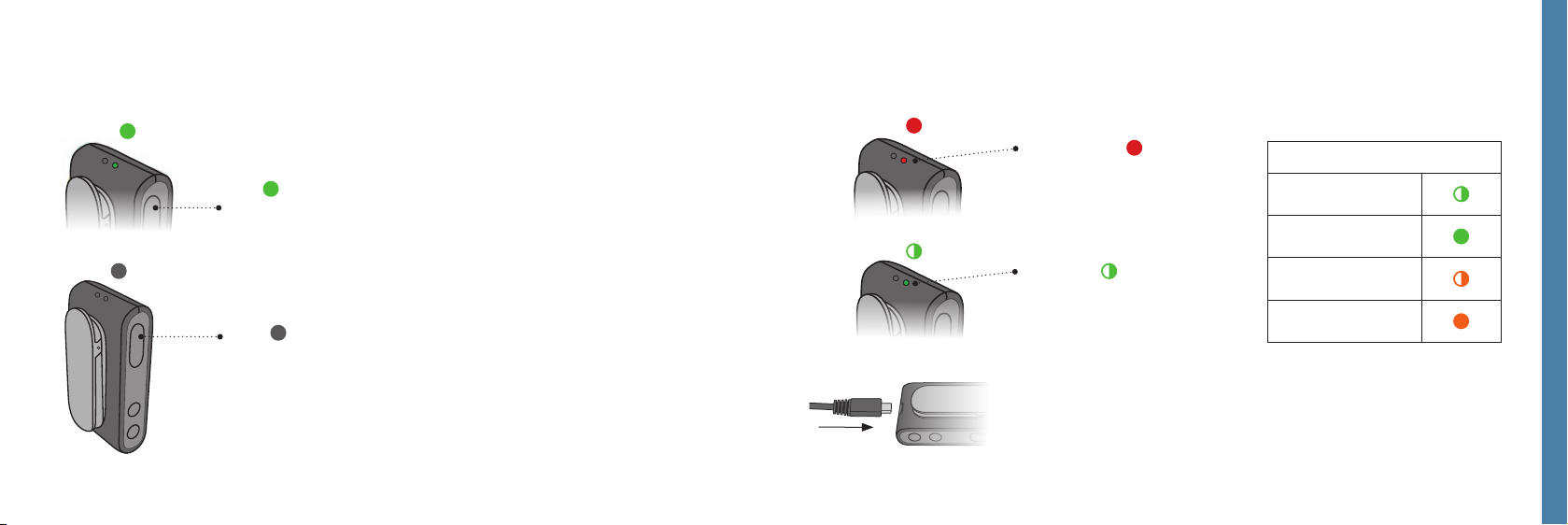
ON
Press and hold multi-button for approx.
3 seconds until power indicator shows STEADY GREEN.
OFF
Press and hold multi-button
for approx. 6 seconds until power indicator OFF.
18 19
Battery low
With about 30 mins
remaining streaming
time, the power indicator
turns RED.
Charging
Connect the enclosed
charger through the micro
USB connector at the buttom of the ConnectClip.
The power indicator
BLINKS GREEN or ORANGE.
Charging indicators (power LED)
Charging
(ConnectClip on)
Charging complete
(ConnectClip on)
Charging
(ConnectClip off)
Charging complete
(ConnectClip off)
Using ConnectClip with mobile phone
Page 11
Using ConnectClip with a mobile phone
Ensuring ConnectClip is connected to the phone
Select phone mode
Press and hold multi-button for approx. 3
seconds to change mode. Mode change is
confirmed by an audible indication in
your hearing aids. STATUS BLUE
A
IMPORTANT
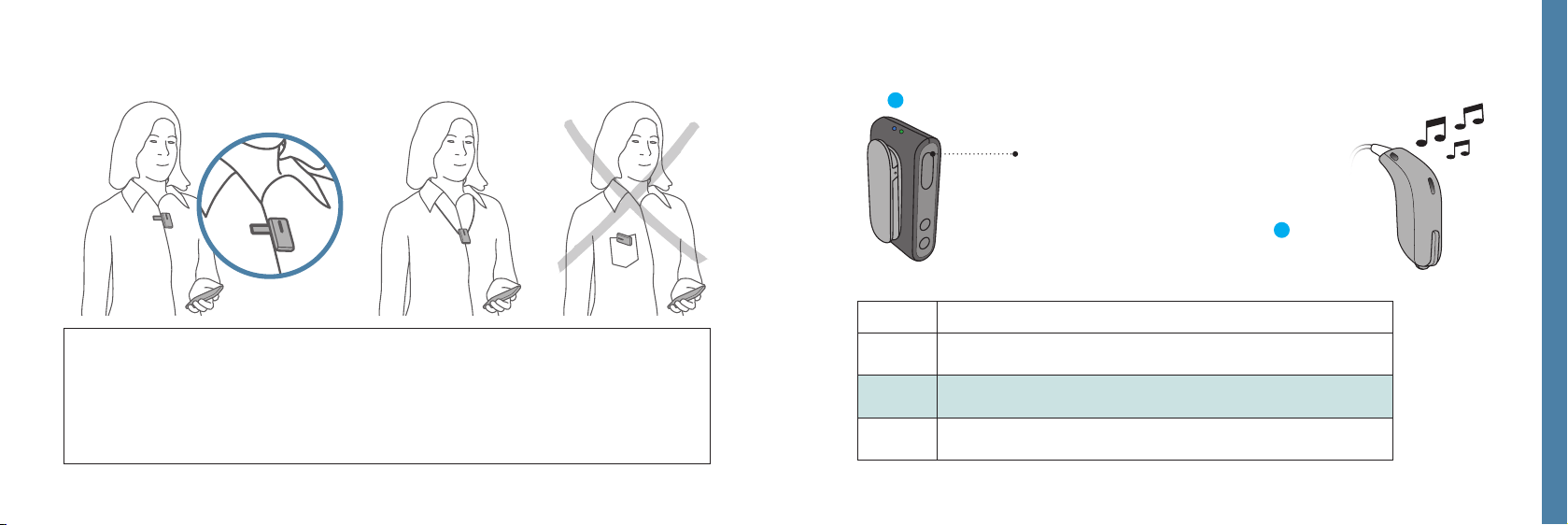
The ConnectClip should be worn as indicated for best possible performance. It is
important that the microphone in the ConnectClip is pointing towards your mouth
(A), and that the ConnectClip is not covered by clothes etc. Maximum distance
between ConnecClip and mobile phone 10 metres.
20 21
Status Mode
Idle Connected to hearing aids. Not connected to a mobile phone.
•
Connected to mobile phone.
•
Remote/partner microphone mode.
•
Using ConnectClip with mobile phone
Page 12
Receiving calls
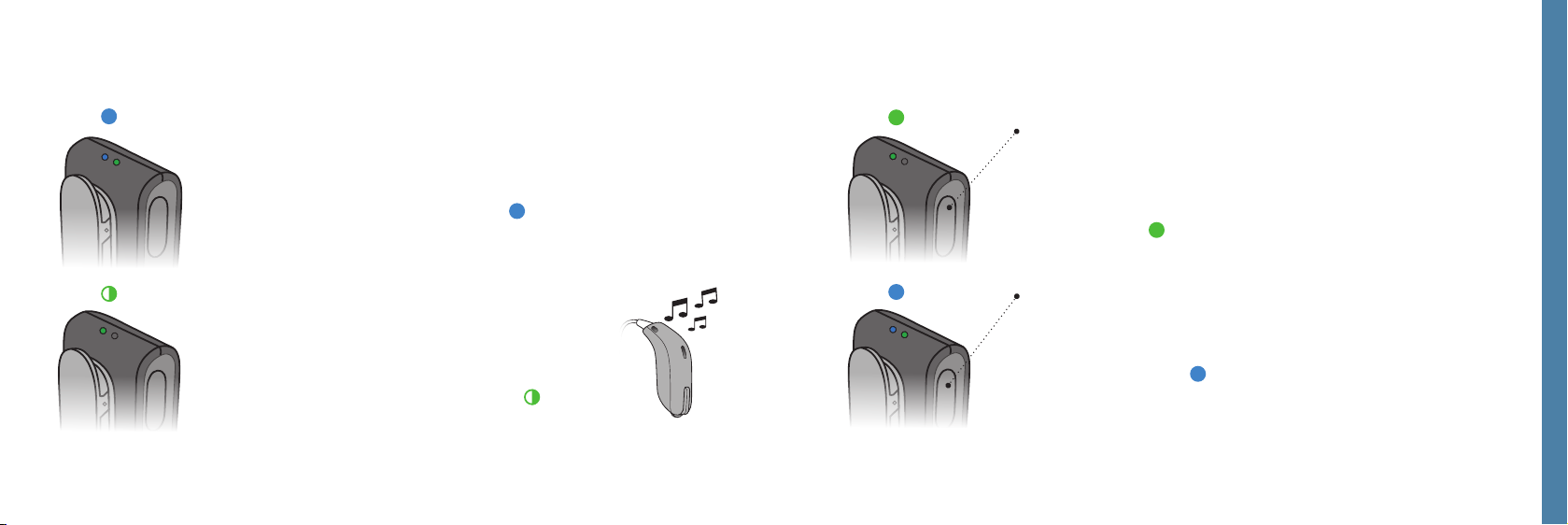
Phone connected
When the ConnectClip is turned on and is in range of your
mobile phone it will automatically connect to the mobile phone.
The status indicator is STEADY BLUE
Phone ringing
When the phone rings you will hear a ring indicator
and, if available, the ring-tone from your phone) in
your hearing aids.
The status inidcator will BLINK GREEN
22 23
A
Answer call
Either click the multi-button shortly (A) -or answer
the call from your mobile phone.
Once the call is connected status will change to
STEADY GREEN
End call
A
Either click the multi button shortly (A) -or hang up
the call from your mobile phone.
Status STEADY BLUE
Using ConnectClip with mobile phone
Page 13
Making calls
33 40 17
Advanced headset features
Voice dialling
When connected to a mobile phone, a short press on the multi button activates
voice dialling if supported by the phone.
_ _
Reject call
A long press on the volume down button, while the phone is ringing, rejects the call.
Mute hearing aid microphones
Press and hold volume down for about 3 seconds to mute the hearing aid
microphones.
Using ConnectClip with mobile phone
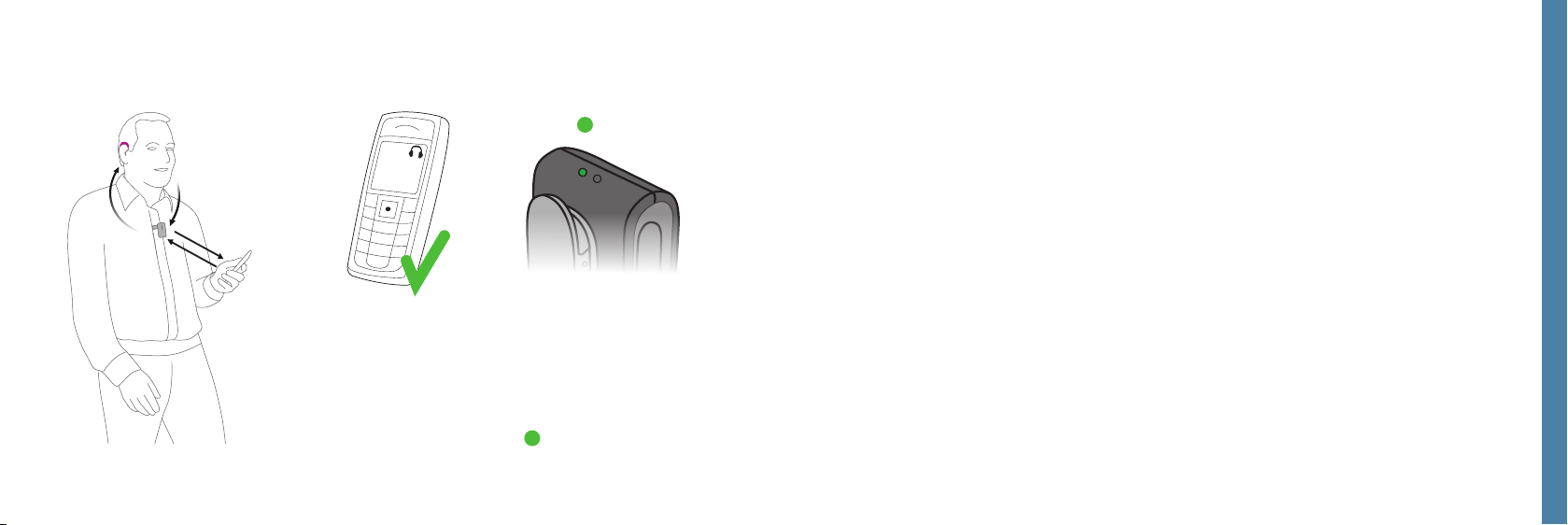
To make a call you only have to use the mobile
Short press volume up or down will unmute hearing aids
phone. The call will automatically be connected
to the ConnectClip.
Once the call is connected the status LED will
change to STEADY GREEN
24 25
Page 14
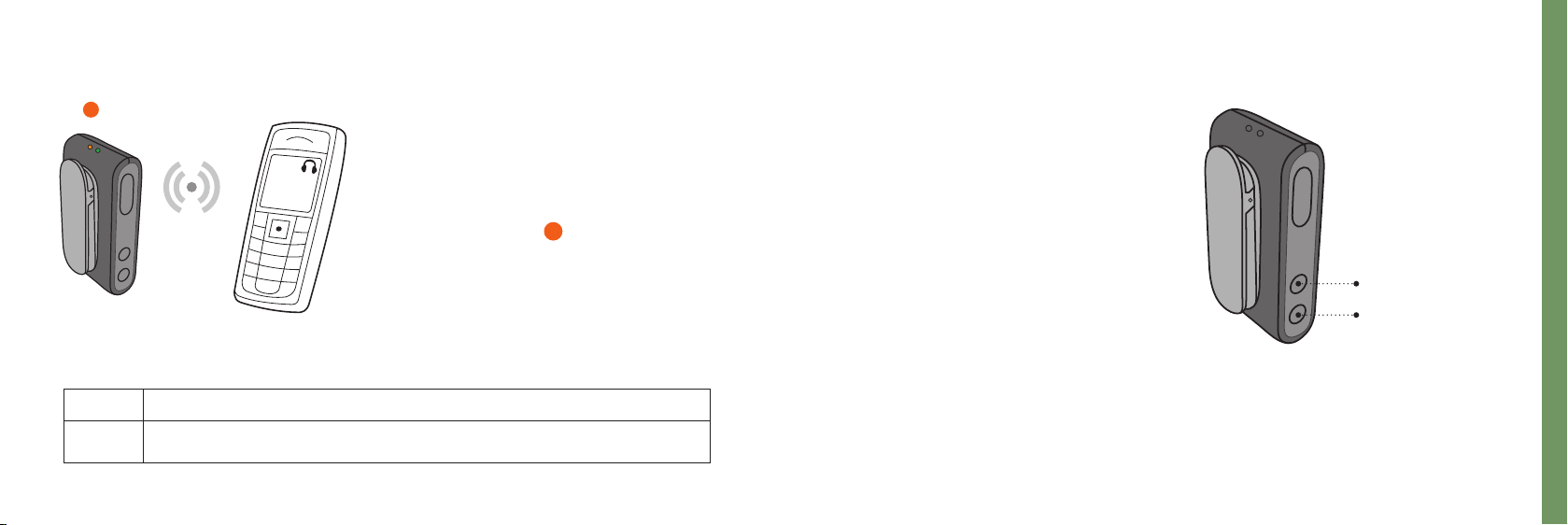
Listening to music
Status Description
The ConnectClip is turned on - and streaming music from the phone
•
Wireless audio (A2DP)
If connected to a mobile phone, or other
device, through Bluetooth, the music
played on the phone/device will automatically be played in your hearing aids.
Status LED ORANGE
You do not need to operate anything
on the ConnectClip.
26 27
Adjusting volume
While listening to music, the level
of the streamed signal can be adjusted
using the volume up/down buttons.
Stopping sound from phone
Use the controls on the phone to
stop the sound.
Volume up
Volume down
Using ConnectClip with mobile phone
Page 15
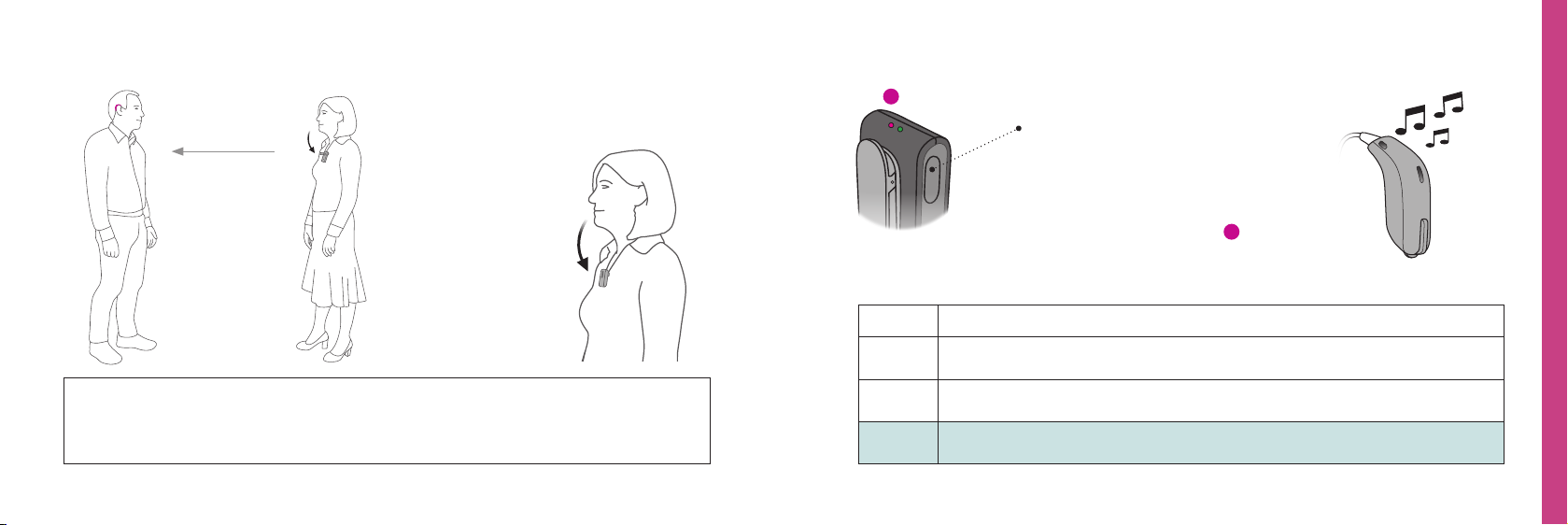
Using ConnectClip as a remote microphone Selecting microphone mode
Up to XX meters
IMPORTANT
Ensure that the microphone is pointing to the speaker’s mouth and that it is not
covered by clothes etc.
Remote microphone
In this mode speech from
the person wearing
the ConnectClip will
be streamed directly
to your hearing aids.
28 29
Status Description
The ConnectClip is turned on. In idle mode i.e. not connected to a phone
•
The ConnectClip is turned on. In idle mode i.e. not connected to a phone
•
The ConnectClip is turned on - and in remote microphone mode
•
Select mic. mode
Press and hold multi-button for
approx. 3 seconds to change mode.
Mode change is confirmed by an
audible indication in your hearing aids.
Status STEADY MAGENTA
Using ConnectClip as remote microphone
Page 16
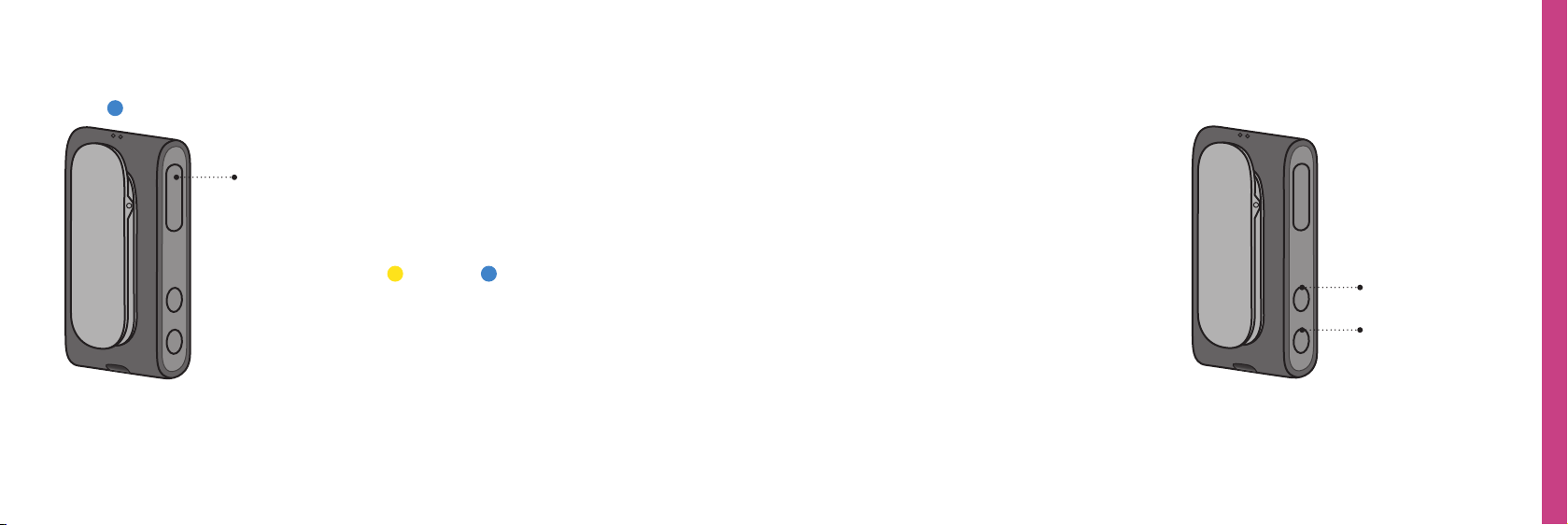
Starting/stopping sound from remote microphone Regulating level from remote microphone
Stop sound from Microphone
Press and hold multi-button (A) for approx. 3
A
seconds to stop the signal from the microphone
to the hearing aids and switch the hearing aids
back to their normal program.
The status inidcator will change to
YELLOW
or BLUE
30 31
Volume up or volume down
The streamed signal can be adjusted
using the volume up/down buttons.
Mute Hearing aid microphones
(only sound from the remote
microphone).
Press and hold volume down for
about 3 seconds to mute the
hearing aid microphones.
Short press volume up or down
will unmute hearing aids.
Volume up
Using ConnectClip as remote microphone
Volume down
Page 17
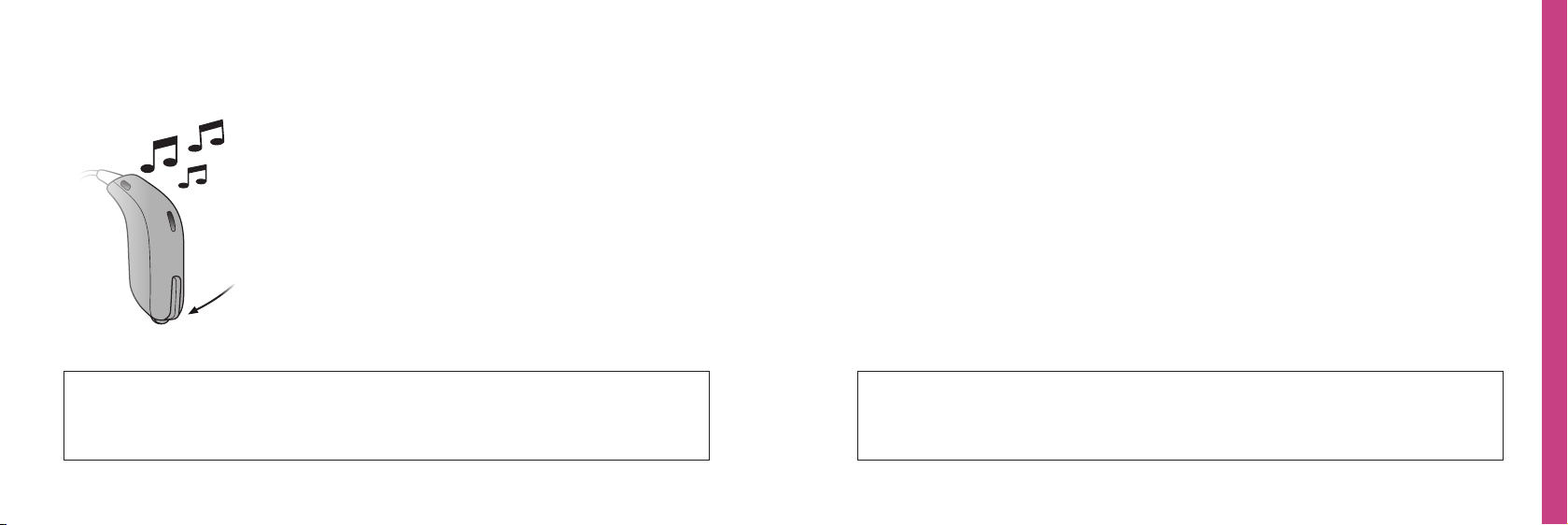
Starting/stopping sound from remote microphone
using your hearing aids
P1 --> P2 --> TV --> Microphone
A long press on the hearing aid button will
toggle to the next program in the hearing aids.
Once you reach the remote mirophone
program you will hear the remote
microphone program indicator.
Cleaning the ConnectClip
To stop remote microphone sound simply
toggle to back to the hearing aid program.
IMPORTANT
Please refer to your hearing aid’s instructions for details on the
functionality of your specific hearing aid solution.
32 33
Using ConnectClip as remote microphone
IMPORTANT
Use a soft, dry cloth to clean the ConnectClip. It must never be washed or
immersed in water or other liquids.
Page 18
Using ConnectClip as a remote control for hearing aids
Landline phone - Phone Adapter 2.0
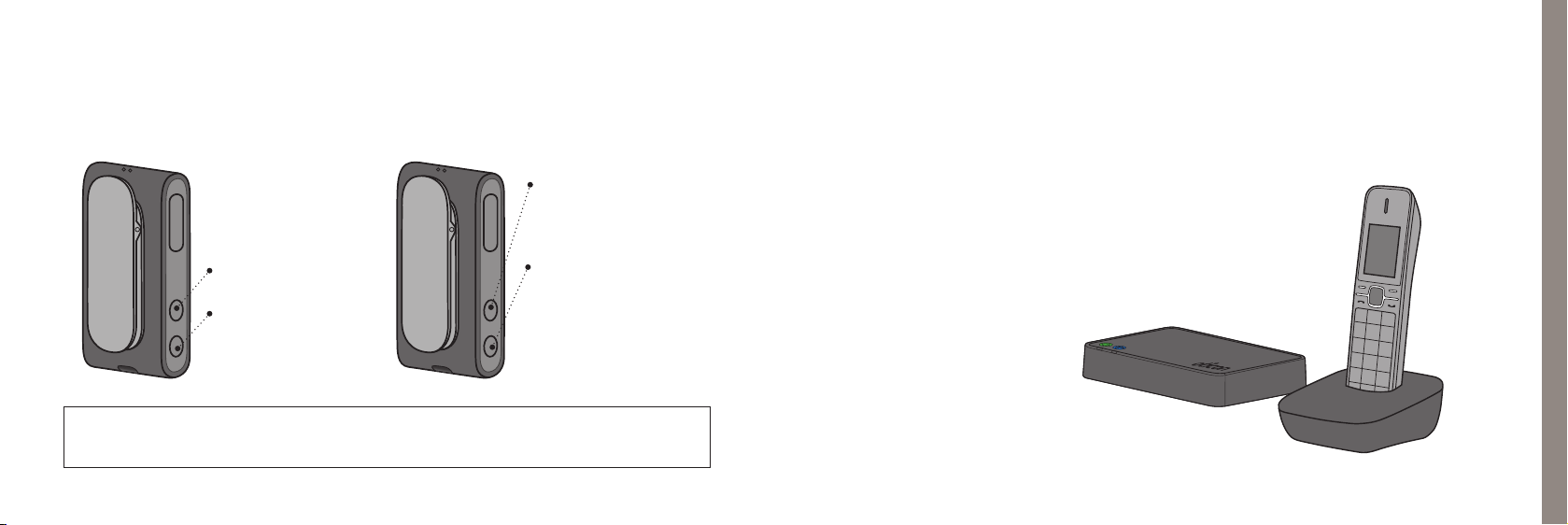
When ConnectClip is not streaming sound it doubles as a remote control for
your hearing aids.
Next Program
- Press and hold for 3
secs for next program
Volume up
- short press
Volume down
- short press
Mute hearing aid
microphones -
long press
short press volume up
or down will unmute
IMPORTANT
Maximum distance between ConnecClip and hearing aids 2 metres.
34
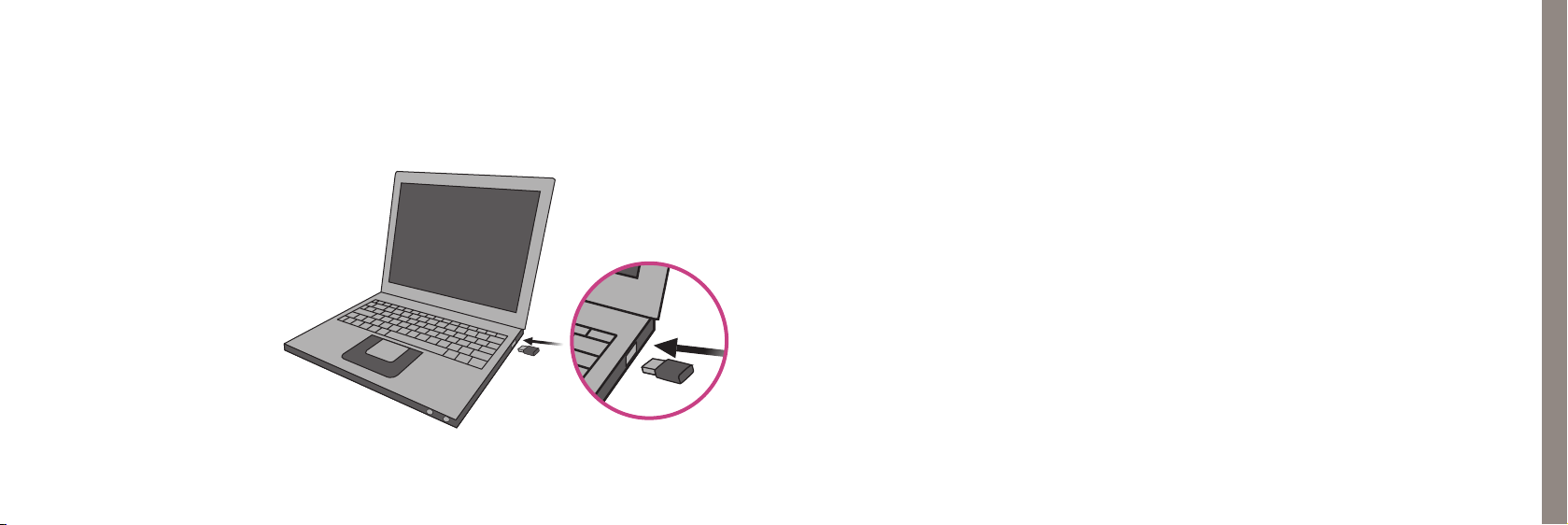
The ConnectClip and your hearing aids can also be used
with domestic/landline phones through the ConnectLine
Phone Adapter 2.0.
Please refer to information available on www.oticom.global
Remote control of hearing aids
Page 19
PC/Laptop - BTD800 Bluetooth dongle
Other features and functions
The ConnectClip and your hearing aids can also be used with PCs and laptops
through the BTD800 dongle.
Please refer to information
available on www.oticom.global
36 37
One connection at a time
When paired with several devices (up to eight), the ConnectClip will only
connect to the first phone available/in range.
No calls when used as microphone
When using the ConnectClip as Partner/Remote -microphone - there will be no
connection to the mobile phone.
Timeout (out of range) when in microphone mode
If the ConnectClip is out of range of the hearing aids - the hearing aids will return to
their initial program after 90 seconds.
Clear Bluetooth pairings
Press and hold multi-button, volume up and volume down for 3 seconds to clear all
Bluetooth pairings. Indicated by status LED BLINKING RED.
Phone Adapter 2.0 and BTD800
Page 20
Overview of product statuses
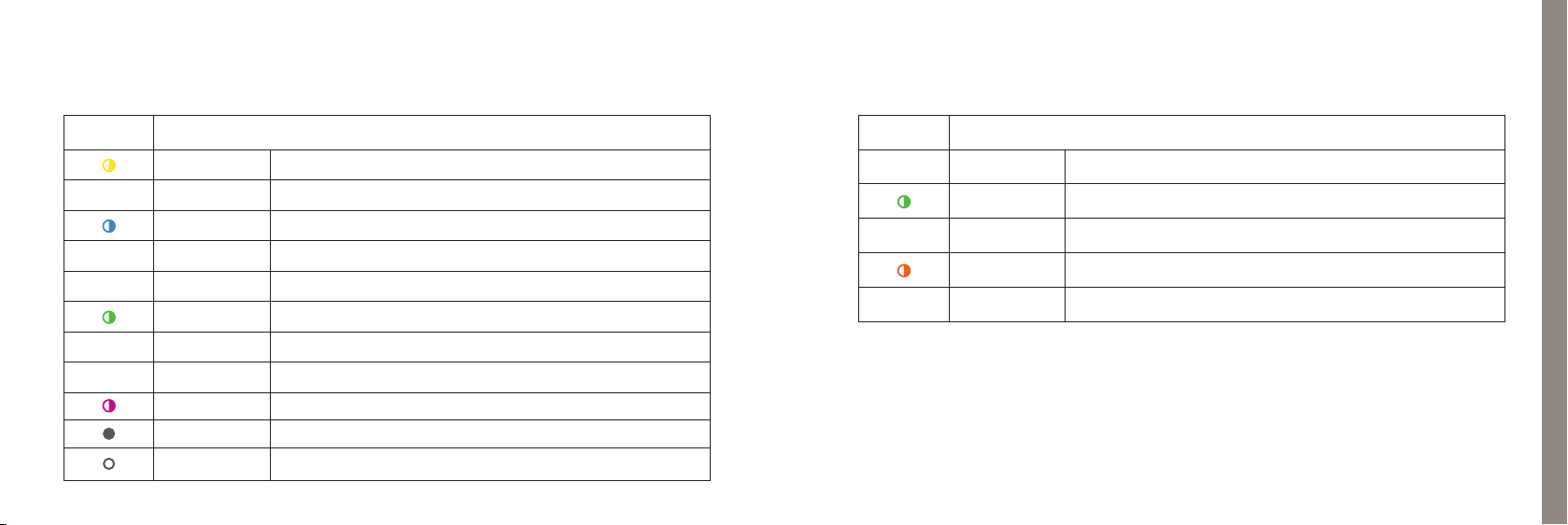
Status LED Description
Blinking yellow Searching for hearing aids
•
•
•
•
•
Steady yellow Idle. Hearing aids connected, Not connected to a phone
Blinking blue Searching for a mobile phone (pairing)
Steady blue Connected to a Mobile Phone
Steady green In a call. Headset (HFP); Mobile, PA2 or BTD800
Blinking green Incoming call
Steady orange Music; Mobile Phone, Cable or BTD800
Steady magenta Remote microphone mode
Blinking mag. Remote microphone reconnecting
Steady grey Connected to a PA20
Steady white Connected to BTD800
Power LED Description
•
•
•
Steady red Battery low
Blinking green Turned on - charging
Steady green Turned on - charging complete
Blinking orange Turned off - charging
Steady orange Turned off - charging complete
Phone Adapter 2.0 and BTD800
39
Page 21

Warnings Warnings
You should familiarise yourself fully with the following general warnings and the
entire contents of this booklet before using your ConnecClip to ensure personal safety
and correct use. Consult your hearing care professional if you experience unexpected
operations or events with your ConnectClip.
Choking hazards and risk of swallowing small parts
ConnectClip and its parts should be kept out of reach of children and anyone who might
swallow these items or otherwise cause injury to themselves. If a small part is swallowed,
see a doctor immediately.
Explosives
The power source in your ConnectClip has insufficient energy to cause fire in normal usage
conditions. The ConnectClip has not been tested for compliance with international standards concerning explosive environments. We recommend you do not use your ConnectClip
in areas where there is a danger of explosion.
40 41
X-ray/CT/MR/PET scanning, electrotherapy and surgery
Remove your ConnectClip before X-ray/CT/MR/PET scans, electrotherapy, surgery,
etc. as your ConnectClip may be damaged when exposed to strong fields.
Heat and chemicals
The ConnectClip must never be exposed to extreme heat e.g. left inside a parked car
in the sun. The ConnectClip must not be dried in microwave ovens or other ovens.
The chemicals in cosmetics, hairspray, perfume, aftershave lotion, suntan lotion and
insect repellent can damage the ConnectClip. Always remove your ConnectClip before
applying such products and allow time to dry before use.
Interference
The ConnectClip has been thoroughly tested for interference according to the most
stringent international standards. However, interference between the ConnectClip and
other devices (e.g. some mobile telephones, citizens band devices, shop alarm systems
and other wireless devices) may occur. If this occurs, increase the distance between the
ConnectClip and the interfering device.
Page 22

Warnings Warnings
Use in traffic
Using the ConnectClip can distract you. Be aware of your surroundings while using
the ConnectClip. Please refer to national traffic laws regarding the use of communication
devices while in traffic.
Use on aircraft
Your ConnectClip contains Bluetooth. The ConnectClip should not be used on board an
aircraft, unless specifically permitted by the flight personnel.
Active implants
Caution must be taken with active implants. If you have an active brain implant,
please contact the manufacturer of your implanted device for information about the
risk of disturbance.
42 43
Rechargeable battery
Do not attempt to open the ConnectClip, as this may damage the battery.
Never attempt to replace the battery. If battery replacement is needed, please return
your device to the supplier. The service guarantee is void if there are signs of tampering.
The safety of recharging batteries using a USB connector is determined by the external
equipment. When the USB connector is connected to equipment plugged into a wall
outlet, this equipment should be UL approved or comply with IEC-60065, IEC-60950 or
other equivalent safety standards.
Connection to external equipment
The safety of the use ConnectClip when connected to external equipment
(via auxiliary input cable, via USB cable, or directly), is determined by the external equip-
ment. When connected to external equipment plugged into a wall outlet, this equipment
must comply with IEC-60065, IEC-60950 or equivalent safety standards.
Page 23

Warnings Warnings
Cross control
Your ConnectClip should be kept out of reach of children or anyone who might take control
of the functionality, to ensure your personal safety and avoid incorrect use.
Use of lanyard
If by accident the lanyard is caught on something while wearing it, the lanyard is designed
to break automatically. Therefore, never try to shorten or modify the lanyard in an
unauthorised way. The lanyard should not be used by children under 36 months of age.
Possible side effects
The otherwise non-allergenic materials used in your ConnectClip may in rare cases cause a
skin irritation or other side effects. Please consult a doctor if these conditions occur.
44 45
Mobile phone compatibility
Please refer to www.oticon.global for a list of mobile phones that have been tested
comprehensively by Oticon, and have been found to fulfil the minimum requirements
for compatibility at the time of testing. However, Oticon takes no responsibility for such
compatibility in general. Specifically, Oticon shall not be responsible for incompatibility
resulting from future updates of the mobile phones, nor from events of incompatibility not
covered by and/or found in these tests. Oticon takes no financial responsibility in terms of
reimbursements of mobile phones that do not work as expected.
Before purchasing a new mobile phone, you are advised to consult the list mentioned
above.
Page 24

Technical information
Conditions of Use:
Operating humidity: 15% to 93% relative humidity, non-condensing.
Operating temperature: 5-40 °C
Storage and transportation: -25-70 °C
The ConnectClip contains a radio transceiver using Bluetooth EDR, Bluetooth Low Energy
(BLE) and a proprietary short range radio technology all working at 2.4 GHz. The 2.4 GHz
radio transmitter is weak and always below 17 dBm e.i.r.p. in total radiated power.
The ConnectClip complies with international standards concerning radio transmitters,
electro-magnetic compatibility and human exposure.
Due to the limited space available on the ConnectClip, relevant approval markings can be
found in this booklet.
USA and Canada
This device contains a radio module with the following certification ID numbers:
FCC ID: 2ACAHAC01
IC: 11936A-AC01
The device complies with Part 15 of the FCC Rules and with Industry Canada’s licence-
exempt RSSs.
Operation is subject to the following two conditions:
(1) this device may not cause harmful interference, and
(2) this device must accept any interference received, including interference that may
cause undesired operation.
Changes or modifications not expressly approved by the party responsible for compliance
could void the user’s authority to operate the equipment.
This Class B digital apparatus complies with Canadian ICES-003.
4746
Page 25

Note: This equipment has been tested and found to comply with the limits for a Class B
digital device, pursuant to part 15 of the FCC Rules. These limits are designed to provide
reasonable protection against harmful interference in a residential installation. This equipment generates, uses and can radiate radio frequency energy and, if not installed and used
in accordance with the instructions, may cause harmful interference to radio communications. However, there is no guarantee that interference will not occur in a particular installation. If this equipment does cause harmful interference to radio or television reception,
which can be determined by turning the equipment off and on, the user is encouraged to
try to correct the interference by one or more of the following measures:
• Redirect or relocate the receiving antenna.
• Increase the separation between the equipment and receiver.
• Connect the equipment into an outlet on a circuit different from that to which the
receiver is connected.
• Consult the manufacturer or an experienced radio/TV technician for help.
International warranty
Your ConnectClip is covered by an international limited warranty issued by the
manufacturer for a period of 12 months from the date of delivery. This limited
warranty covers manufacturing and material defects in the device itself, but not in accessories such as e.g. batteries, cables, power supplies, etc. Problems arising from improper/
incorrect handling or care, excessive use, accidents, repairs made by an unauthorised party,
exposure to corrosive conditions, damage due to foreign objects entering the device or
incorrect adjustments are NOT covered by the limited warranty and may void it. The above
warranty does not affect any legal rights that you might have under applicable national
legislation governing sale of consumer goods. Your hearing care professional may have issued a warranty that goes beyond the clauses of this limited warranty. Please consult him/
her for further information.
If you need service
Take your ConnectClip to your hearing care professional, who may be able to sort out minor
problems and adjustments immediately.
4948
Page 26

The manufacturer declares that this ConnectClip is in compliance with the essential
requirements and other relevant provisions of Directive 2014/53/EC. The declaration of
Conformity is available from the manufacturer.
SBO Hearing A/S
Kongebakken 9
DK-2765 Smørum
Denmark
www.oticon.global
Waste from electronic
equipment must be
handled according to
local regulations.
50
Page 27

Index
A
A2DP device. SeeMusic wireless
Accessories 64
Aircraft, use on 14
Android 48
Answer a call 36
Antenna 16
App 48
Audio (music) 50
Cable 50
Listen to music 50
Wireless 54
Placeholder
B
Battery 26
Capacity 26
Charge time 26
Life 26
Low 24
Rechargeable 22
Belt clip 18
Bluetooth 54
C
Call
Answer 36
End 36, 38
Make 38
Reject 40
Transfer 41
Cars, use in 14
Changing programs 28
Charger 22
Charging 22
Chemicals 62
Cleaning 62, 63
Clear pairing 32
Computer
Headset cable 52
Music/audio cable 50
Music/audio wireless 54
ConnectLine
Microphone 44
Phone 42
TV 46
E
Earphones. SeeHeadset
End the call 38
Euro pin socket. SeeFM
Placeholder
F
First-time use 16
FM 60
H
Headphone. SeeHeadset
Headset 9
Cable 52
Mobile phone 35
Splitter cable 52
Wireless 54, 56
Headset cable 52
Headset splitter cable 52
Heat 62
Humidity 62
I
Indication for use 3
Instrument view 11
Interference 13, 68
iPhone 48
5352
Page 28

L
Landline phone 42
Last number redial 40
Listen to audio 50
Listen to music 50
M
Maintenance 63
Make a call 38
Microphone 44
Microphone inlet 11
Mini jack 11
Mini jack cable 50, 52
Mobile phone 35
Mobile phone compatibility 15
Placeholder
MP3 player 54
Music 54
Cable 50
Listen to music 50
Wireless 54
Mute 28
Muting the hearing instruments 28
N
Neck loop 16
P
Pairing 30
Clearing 32
Mode 30
PC. SeeComputer
Personalising 40
Phone solution 42
Pin code 31
Power o/on 20
Protective skin 64
R
Rechargeable battery 22
Reject call 40
Remote control 28
54
S
Sound. Seemusic
Spare parts 64
Splitter 9
Splitter cable 52
T
Talking on the phone 43
T-coil 58
Technical information 67
Tele loop 58
Transfer call 41
178664 UK / 2017.08.17
TV 46
Placeholder
V
Voice dial 40
Volume up/down 28
W
Warnings 12, 13, 14, 15
Wireless 54, 56
Without the neck loop 18
178664 UK / 2017.08.17
Page 29
0000178664000001
 Loading...