

Page 1
Supports Caller ID/Call Waiting Type 2.5 with Call Waiting ID
Installation Manual
Please read this
m anual carefully
before using the
SBC381H and
keep for future
reference.
CALLER ID / CALLER ID CALL W AITING /
CALL W AITING ID OPTIONS COMPATIBLE
Caller ID, Caller ID Call Waiting, and/or Call Waiting ID Options
services are available from SBC. After subscribing to Call
er ID,
Caller ID Call Waiting and/or Call Waiting ID Options services,
this pho ne will display Caller/Caller Waited party’s nam e and
pho ne number, and the associated soft keys of the Call Waiting
ID Optio ns service. Note: With Caller ID services, some
informa tion ma y be blocked or unavailable.
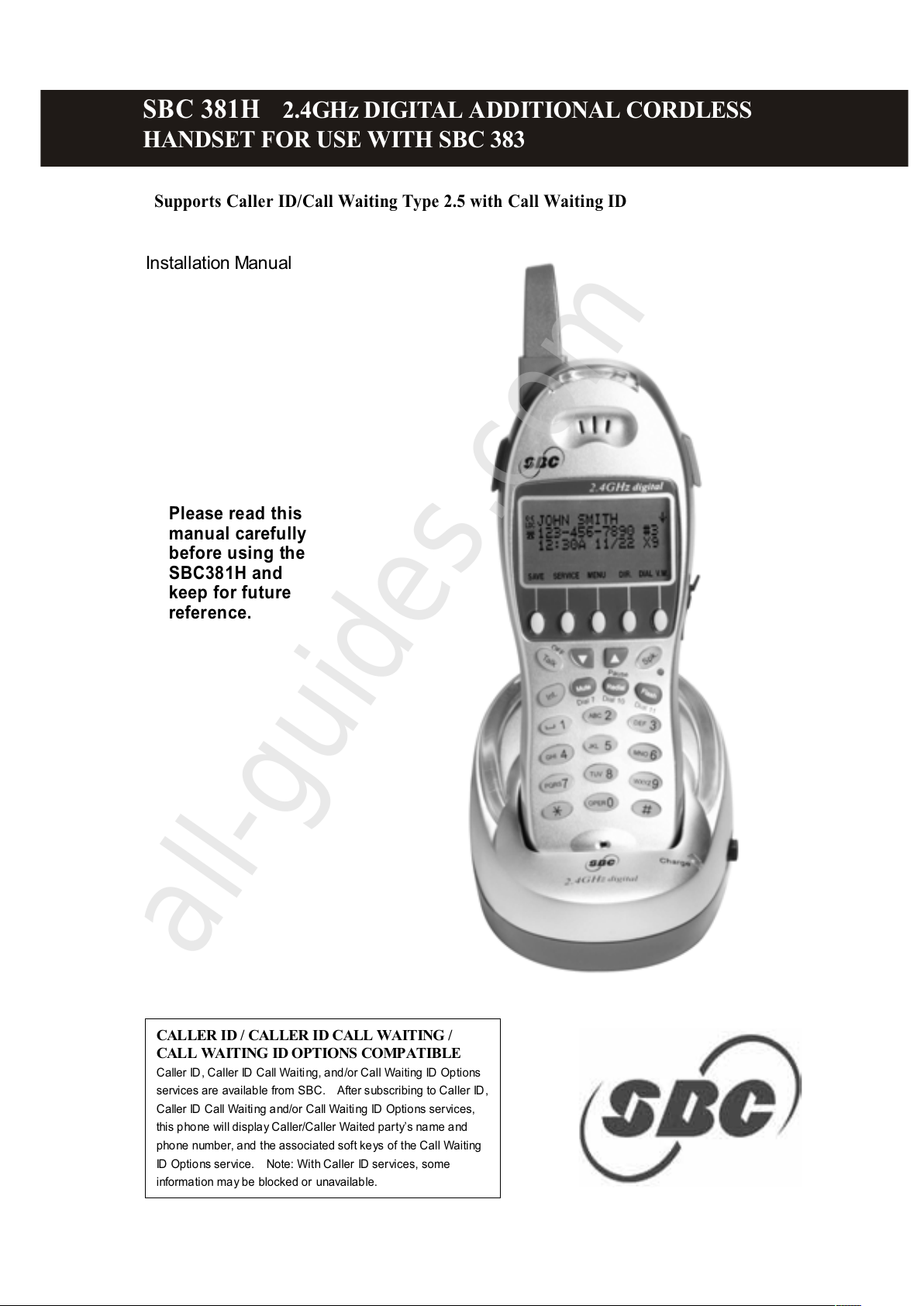
SBC 381H 2.4GHz DIGITAL ADDITIONAL CORDLESS
HANDSET FOR USE W ITH SBC 383
All manuals and user guides at all-guides.com
all-guides.com
Page 2
1
Important Safety Instructions:
To reduce the risk of fire, electric shock and/or injury, always follow these basic
safety precautions when using your telephone equipm ent.
1. Read, understand, and follow all instructions.
2. Unplug this telephone from the wall outlet
before cleaning. Do not use liquid or
aerosol cleaners. If necessary, use a soft
cloth lightly m oistened with a m ild detergent
solution.
3. Do not use this telephone near a bathtub,
kitchen sink, wash bowl, laundry tub,
swimm ing pool, a wet basem ent or anywhere
else there is water or liquid.
4. Do not place this telephone on an unstable
cart, stand or table. A fall could cause
serious dam age to the phone.
5. Slots and openings in the cabinet at the back
or bottom are provided for ventilation to
protect the unit from overheating. These
openings m ust not be blocked or covered.
Do not place this telephone on a bed, sofa,
rug or other sim ilar surface. This telephone
should never be placed near or over a
radiator or heat register. This telephone
should not be placed in a built-in installation
unless proper ventilation is provided.
6. Never push objects of any kind through slots
in the phone. They could touch dangerous
voltage points or short out parts that could
result in a risk of fire or electric shock.
Never spill liquid of any kind on the
telephone.
7. Unplug this telephone from the wall outlet and
refer to a qualified service representative in
any of the following situations:-
a) If liquid has been spilled into the
telephone.
b) If the telephone has been exposed to rain
or water.
c) If the telephone does not operate norm ally
by following the operating instructions.
Adjust only those controls that are covered
by the operating instructions. Improper
adjustment of other controls may result in
damage and will often require extensive
work by a qualified technician to restore
the telephone to norm al operation.
d) If the telephone has been dropped or the
case has been dam aged.
e) If the telephone exhibits a distinct change
in performance.
8. Do not use the telephone to report a gas leak
in the vicinity of the leak.
9. Avoid using a telephone (other than a
cordless type) during an electrical storm.
There m ay be a rem ote risk of electric shock
from lightning.
10. Never install jacks in a wet location unless
the jack is specifically designed for wet
locations.
11. Never touch uninsulated telephone wires or
terminals unless the telephone line has been
disconnected at the network interface.
12. Use with caution when installing or m odifying
telephone lines.
13. To reduce the risk of electric shock, do not
disassem ble this product, but take it to a
qualified servicem an when som e service or
repair work is required. O pening or
rem oving covers m ay expose you to
dangerous voltages or other risks. Incorrect
reassembly can cause electric shock when
the appliance is subsequently used.
14. Use only the power cord and batteries
indicated in this m anual. Do not dispose of
batteries in fire. They m ay explode. Check
with local codes for possible special disposal
instructions.
15. Plug the adaptor to the socket-outlet that near
the equipm ent and shall be easily accessible.
16. CAUTION
RISK OF EXPLOSION IF BATTERY IS
REPLACED BY AN INCO RRECT TYPE.
USE BATTERY TYPE ONLY CYB-103 NiMH
3.6V, 750m Ah
DISPOSE O F USED BATTERIES
ACCORDING TO YOUR LO CAL CODE.
I M P O R T A N T I N F O R M AT I O N
SAVE THESE INSTRUCTIONS
All manuals and user guides at all-guides.com
Page 3
2
2
The new SBC 381H Additional Cordless Handset is for use with the SBC 383
Expandable Cordless System. You must have the SBC 383 Expandable Cordless
System in order to use the SBC 381H Additional Cordless Handset.
This manual only describes the steps necessary to start up the SBC 381H additional
cordless handset. Please read the manual for the SBC 383 Expandable Cordless
System for detailed operating instructions.
SBC 381H consists of the following items:
• A Handset with Belt Clip
• A Charging Cradle
• A Battery Pack
• Installation Manual(s)
Setup of the SBC 381H Additional Cordless Handset
1. Connect the Charging Cradle to a standard 120V AC wall outlet.
2. Press the battery release point on the back of the handset and slide downward to
open the battery compartment.
3. Insert the battery pack into the battery compartment and make sure to position
according to polarity markings.
4. Slide the battery cover upward until it snaps into place.
5. Place the handset in the charging cradle, charge the battery pack for at least 15
hours prior to registering the handset to your SBC 383 system. Make sure that
the red LED of the Charging Cradle lights and charging begins.
Note:
1. Use only the battery indicated in this manual. Do not dispose of batteries in a
fire. They may explode. Check with local codes for possible special disposal
instructions.
2. Plug the Charging Cradle into an AC outlet that is near the equipment and is
easily accessible.
3. After initial charge: To enhance battery life and telephone performance,
completely charge for 15 hours and then completely discharge the batteries
before returning the handset to the charging cradle. This will extend your
battery life allowing longer talk-time and stand-by.
Registration of SBC 381H Additional Cordless Handset
Your new SBC 381H handset must be registered to the SBC 383 base unit. The
handset will be assigned an extension number at registration, “HS (1)” to “HS (4)”,
which will be shown on the display. Note: you may add three (3) SBC381 H
handsets to the SBC383 base unit (or a total of four (4) handsets including the
handset with the base unit.)
G ET T I N G STA R T ED
All manuals and user guides at all-guides.com
Page 4
3
Registration
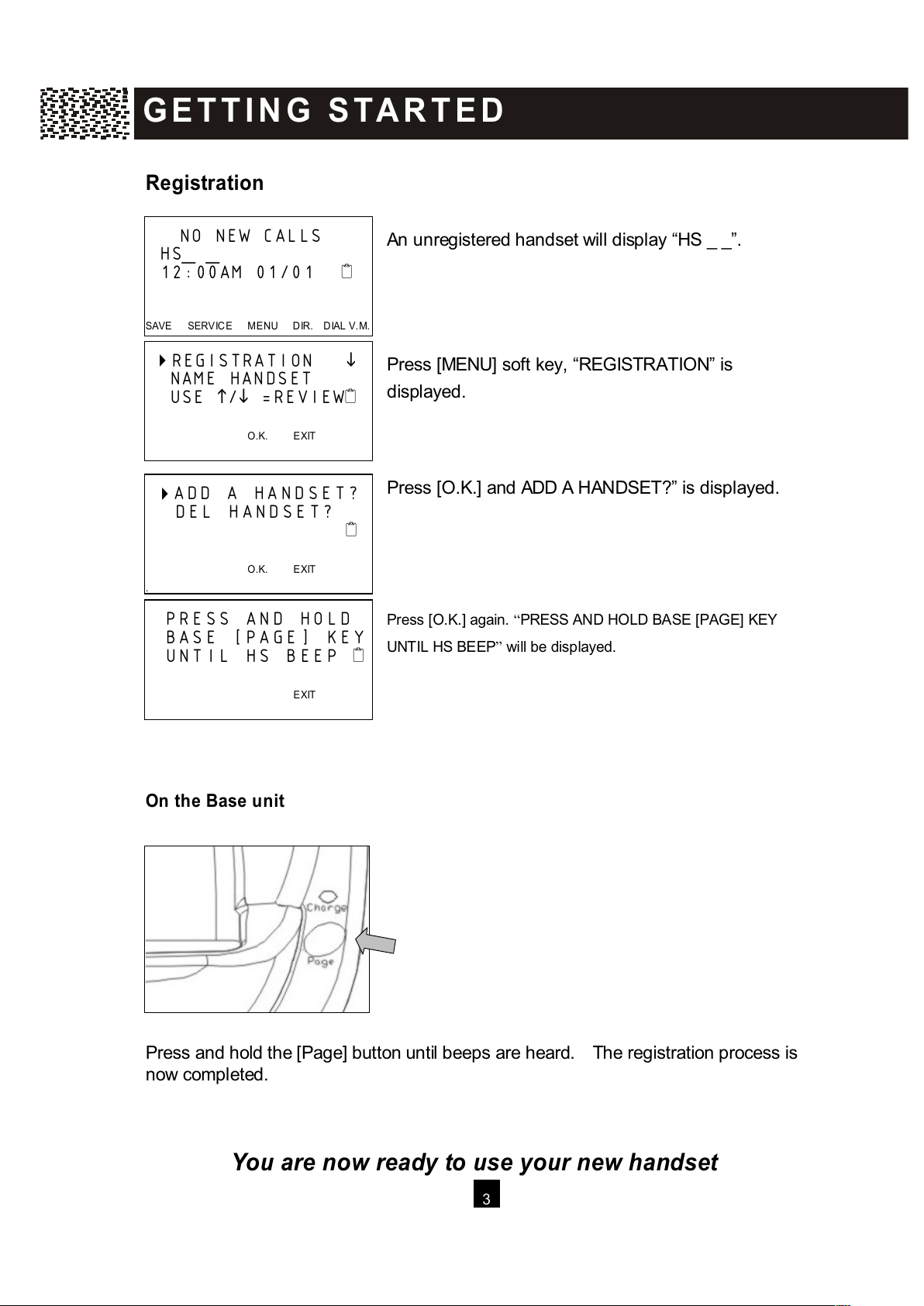
An unregistered handset will display “HS _ _”.
Press [MENU] soft key, “REGISTRATION” is
displayed.
Press [O.K.] and ADD A HANDSET?” is displayed.
Press [O.K.] again. “PRESS AND HOLD BASE [PAGE] KEY
UNTIL HS BEEP” will be displayed.
On the Base unit
Press and hold the [Page] button until beeps are heard. The registration process is
now completed.
You are now ready to use your new handset
NO NEW CALLS
HS_ _
12:00AM 01/01
SAVE SERVICE M ENU DIR. DIAL V.M .
REGISTRATION
NAME HANDSET
USE
/
=REVIEW
O.K. EXIT
ADD A HANDSET?
DEL HANDSET?
O.K. EXIT
PRESS AND HOLD
BASE [PAGE] KEY
UNTIL HS BEEP
EXIT
G E T T I N G S T A R T E D
All manuals and user guides at all-guides.com
Page 5
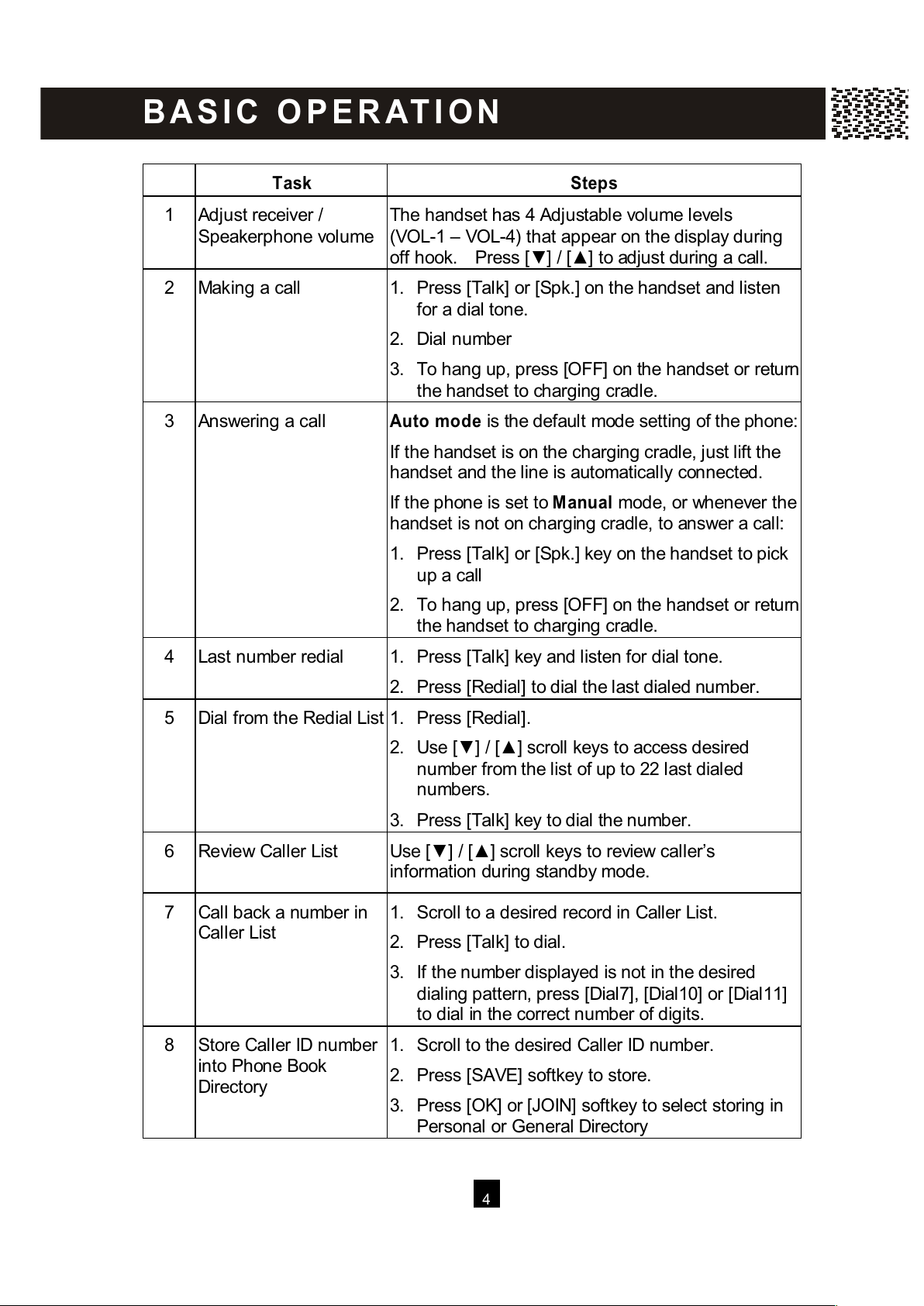
4
Task Steps
1 Adjust receiver /
Speakerphone volume
The handset has 4 Adjustable volume levels
(VOL-1 – VOL-4) that appear on the display during
off hook. Press [▼ ] / [▲ ] to adjust during a call.
2 Making a call 1. Press [Talk] or [Spk.] on the handset and listen
for a dial tone.
2. Dial number
3.
To hang up, press [OFF] on the handset or return
the handset to charging cradle.
3 Answering a call Auto m ode is the default mode setting of the phone:
If the handset is on the charging cradle, just lift the
handset and the line is automatically connected.
If the phone is set to M anual mode, or whenever the
handset is not on charging cradle, to answer a call:
1. Press [Talk] or [Spk.] key on the handset to pick
up a call
2.
To hang up, press [OFF] on the handset or return
the handset to charging cradle.
4 Last number redial 1. Press [Talk] key and listen for dial tone.
2. Press [Redial] to dial the last dialed number.
5 Dial from the Redial List 1. Press [Redial].
2. Use [▼ ] / [▲ ] scroll keys to access desired
number from the list of up to 22 last dialed
numbers.
3. Press [Talk] key to dial the number.
6 Review Caller List Use [▼ ] / [▲ ] scroll keys to review caller’s
information during standby mode.
7 Call back a number in
Caller List
1. Scroll to a desired record in Caller List.
2. Press [Talk] to dial.
3. If the number displayed is not in the desired
dialing pattern, press [Dial7], [Dial10] or [Dial11]
to dial in the correct number of digits.
8 Store Caller ID number
into Phone Book
Directory
1. Scroll to the desired Caller ID number.
2. Press [SAVE] softkey to store.
3. Press [OK] or [JOIN] softkey to select storing in
Personal or General Directory
B A S I C O PE R AT I O N
All manuals and user guides at all-guides.com
Page 6
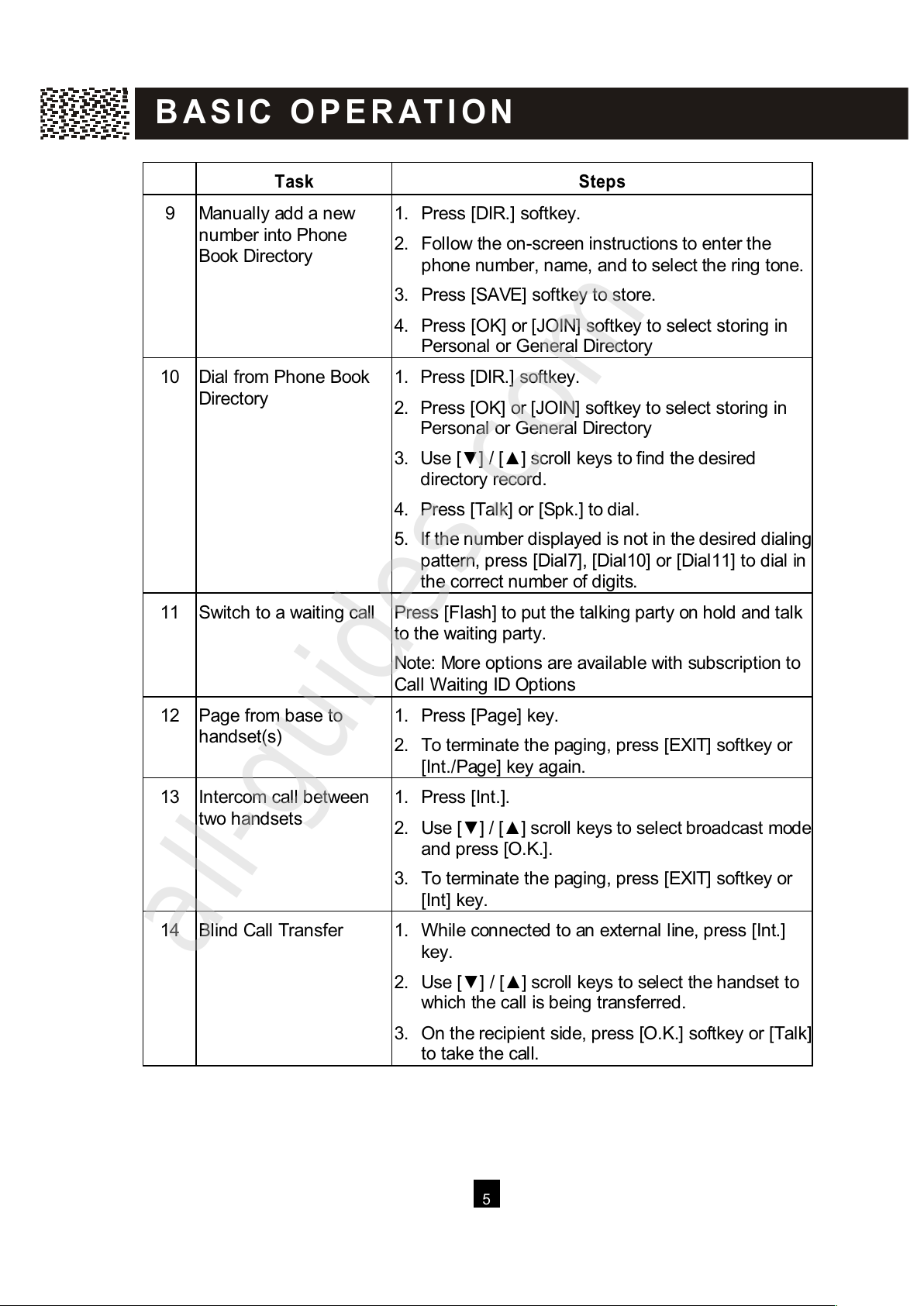
5
Task Steps
9 Manually add a new
number into Phone
Book Directory
1. Press [DIR.] softkey.
2. Follow the on-screen instructions to enter the
phone number, name, and to select the ring tone.
3. Press [SAVE] softkey to store.
4. Press [OK] or [JOIN] softkey to select storing in
Personal or General Directory
10 Dial from Phone Book
Directory
1. Press [DIR.] softkey.
2. Press [OK] or [JOIN] softkey to select storing in
Personal or General Directory
3. Use [▼ ] / [▲ ] scroll keys to find the desired
directory record.
4. Press [Talk] or [Spk.] to dial.
5.
If the number displayed is not in the desired dialing
pattern, press [Dial7], [Dial10] or [Dial11] to dial in
the correct number of digits.
11 Switch to a waiting call Press [Flash] to put the talking party on hold and talk
to the waiting party.
Note: More options are available with subscription to
Call W aiting ID Options
12 Page from base to
handset(s)
1. Press [Page] key.
2. To terminate the paging, press [EXIT] softkey or
[Int./Page] key again.
13 Intercom call between
two handsets
1. Press [Int.].
2. Use [▼ ] / [▲ ] scroll keys to
select broadcast mode
and press [O.K.].
3. To terminate the paging, press [EXIT] softkey or
[Int] key.
14 Blind Call Transfer 1. W hile connected to an external line, press [Int.]
key.
2. Use [▼ ] / [▲ ] scroll keys to select the handset to
which the call is being transferred.
3.
On the recipient side, press [O.K.] softkey or [Talk]
to take the call.
B A S I C O PE R AT I O N
All manuals and user guides at all-guides.com
all-guides.com
Page 7
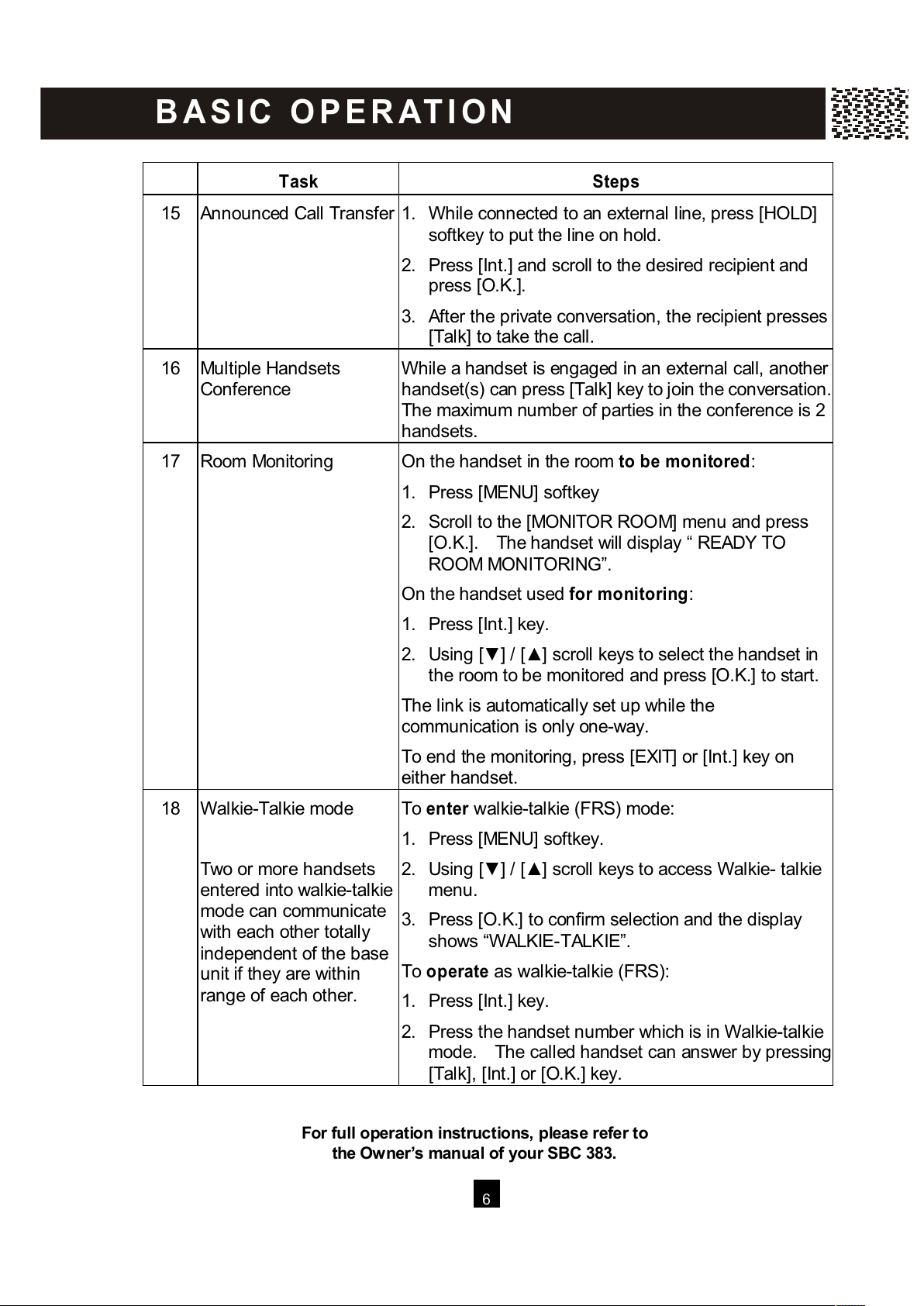
6
Task Steps
15 Announced Call Transfer 1. W hile connected to an external line, press [HOLD]
softkey to put the line on hold.
2. Press [Int.] and scroll to the desired recipient and
press [O.K.].
3. After the private conversation, the recipient presses
[Talk] to take the call.
16 Multiple Handsets
Conference
W hile a handset is engaged in an external call, another
handset(s) can press [Talk] key to join the conversation.
The maximum number of parties in the conference is 2
handsets.
17 Room Monitoring On the handset in the room to be m onitored:
1. Press [MENU] softkey
2. Scroll to the [MONITOR ROOM] menu and press
[O.K.]. The handset will display “ READY TO
ROOM MONITORING”.
On the handset used for m onitoring:
1. Press [Int.] key.
2. Using [▼ ] / [▲ ] scroll keys to select the handset in
the room to be monitored and press [O.K.] to start.
The link is automatically set up while the
communication is only one-way.
To end the monitoring, press [EXIT] or [Int.] key on
either handset.
18 W alkie-Talkie mode
Two or more handsets
entered into walkie-talkie
mode can communicate
with each other totally
independent of the base
unit if they are within
range of each other.
To enter walkie-talkie (FRS) mode:
1. Press [MENU] softkey.
2. Using [▼ ] / [▲ ] scroll keys to access W alkie- talkie
menu.
3. Press [O.K.] to confirm selection and the display
shows “W ALKIE-TALKIE”.
To operate as walkie-talkie (FRS):
1. Press [Int.] key.
2. Press the handset number which is in W alkie-talkie
mode. The called handset can answer by pressing
[Talk], [Int.] or [O.K.] key.
For full operation instructions, please refer to
the Owner’s m anual of your SBC 383.
B A S I C O PE R AT I O N
All manuals and user guides at all-guides.com
Page 8
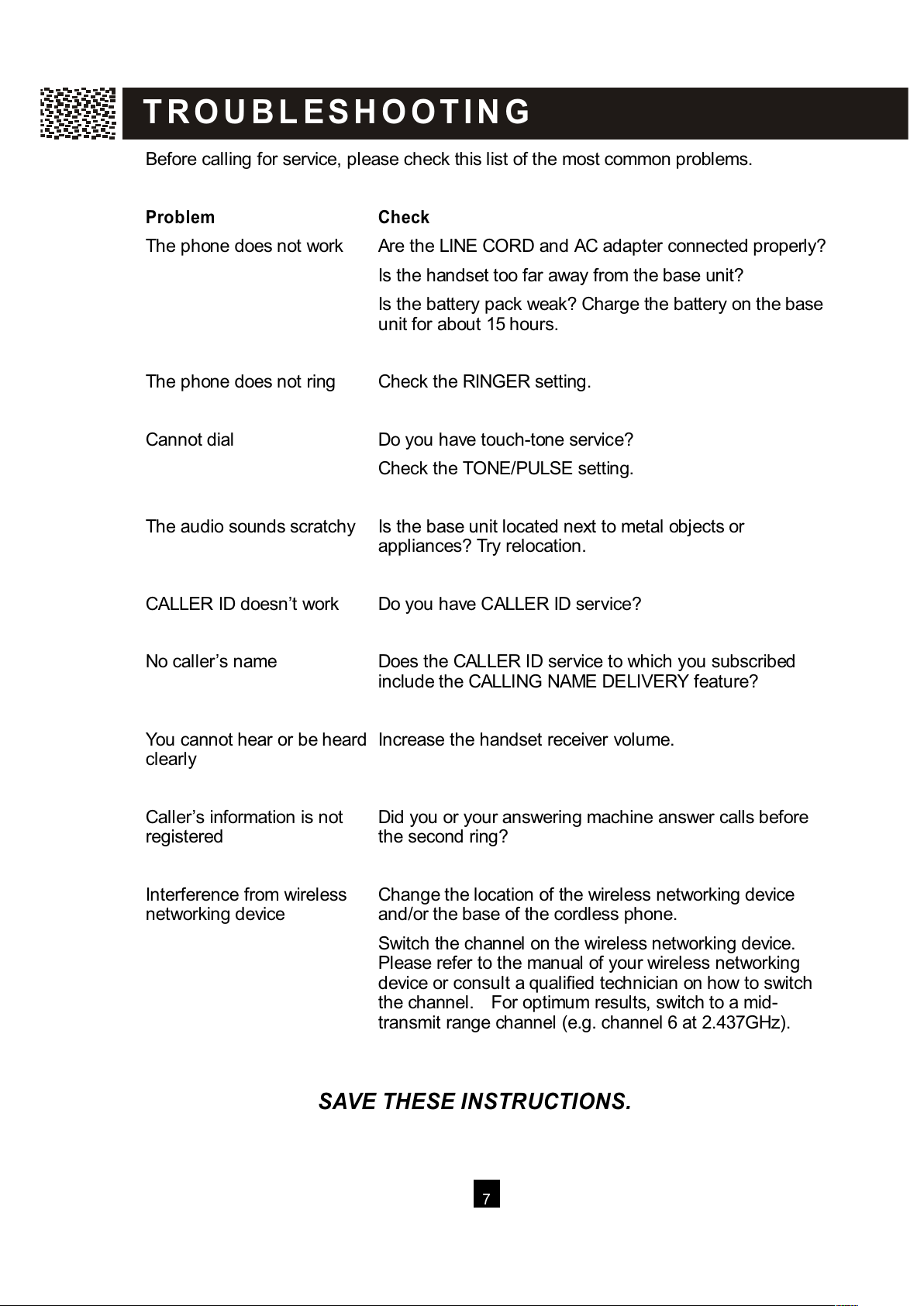
7
Before calling for service, please check this list of the most common problems.
Problem Check
The phone does not work Are the LINE CORD and AC adapter connected properly?
Is the handset too far away from the base unit?
Is the battery pack weak? Charge the battery on the base
unit for about 15 hours.
The phone does not ring
Check the RINGER setting.
Cannot dial
Do you have touch-tone service?
Check the TONE/PULSE setting.
The audio sounds scratchy Is the base unit located next to metal objects or
appliances? Try relocation.
CALLER ID doesn’t work Do you have CALLER ID service?
No caller’s name Does the CALLER ID service to which you subscribed
include the CALLING NAME DELIVERY feature?
You cannot hear or be heard
clearly
Increase the handset receiver volume.
Caller’s information is not
registered
Did you or your answering machine answer calls before
the second ring?
Interference from wireless
networking device
Change the location of the wireless networking device
and/or the base of the cordless phone.
Switch the channel on the wireless networking device.
Please refer to the manual of your wireless networking
device or consult a qualified technician on how to switch
the channel. For optimum results, switch to a mid-
transmit range channel (e.g. channel 6 at 2.437GHz).
SAVE THESE INSTRUCTIONS.
T R O U B L E S H O O T I N G
All manuals and user guides at all-guides.com
Page 9
8
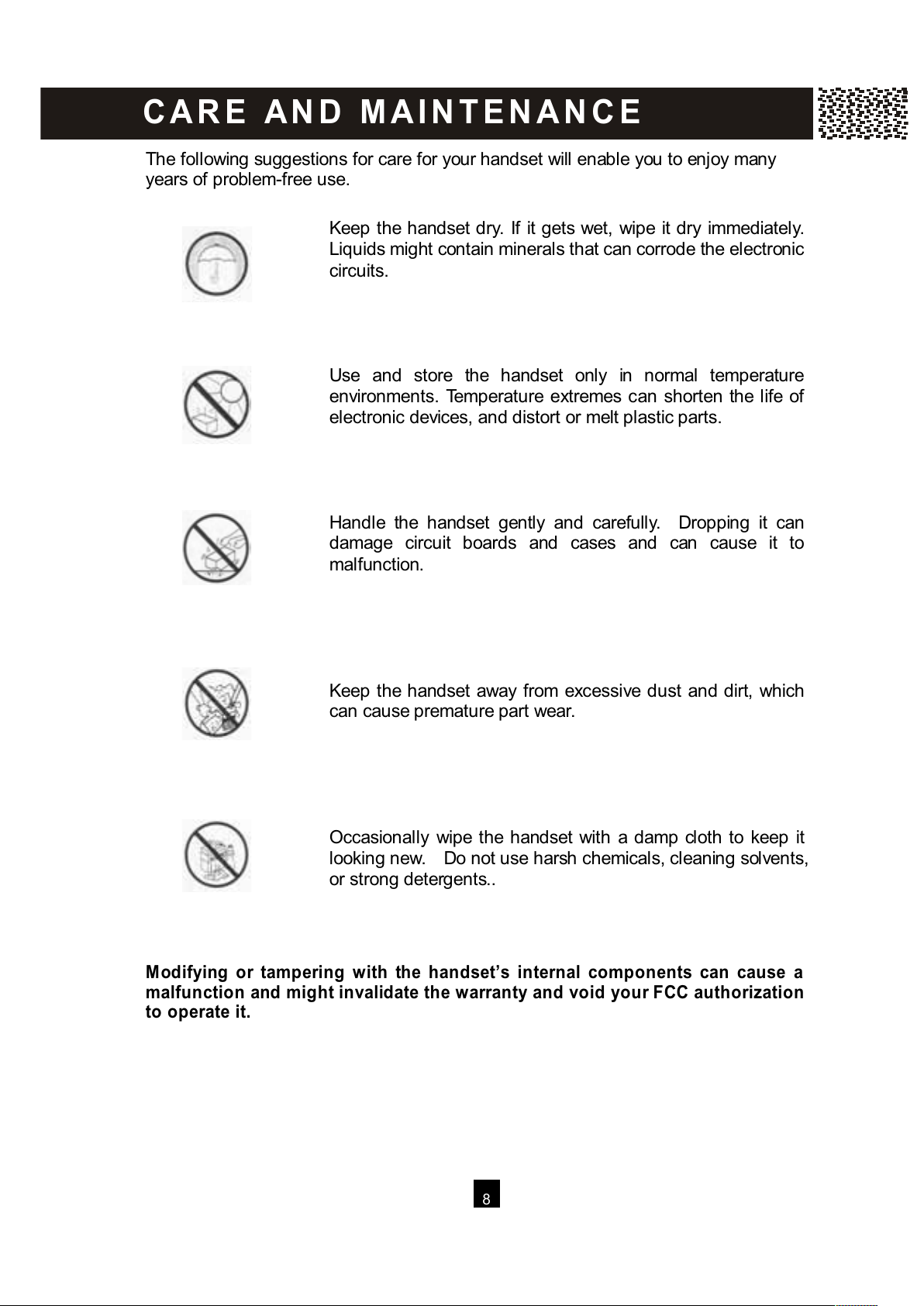
The following suggestions for care for your handset will enable you to enjoy many
years of problem-free use.
Keep the handset dry. If it gets wet, wipe it dry immediately.
Liquids might contain minerals that can corrode the electronic
circuits.
Use and store the handset only in normal temperature
environments. Temperature extremes can shorten the life of
electronic devices, and distort or melt plastic parts.
Handle the handset gently and carefully. Dropping it can
damage circuit boards and cases and can cause it to
malfunction.
Keep the handset away from excessive dust and dirt, which
can cause premature part wear.
Occasionally wipe the handset with a damp cloth to keep it
looking new. Do not use harsh chemicals, cleaning solvents,
or strong detergents..
Modifying or tampering with the handset’s internal components can cause a
malfunction and might invalidate the warranty and void your FCC authorization
to operate it.
C A R E A N D M AI N T E N A N C E
All manuals and user guides at all-guides.com
Page 10
9
This equipment complies with Part 68 of FCC rules and the requirements adopted by
the ACTA. On the bottom of this equipment is a label that contains, among other
information, a product identifier in the format US:CACW 400B383001. If requested,
this number must be provided to the telephone company.
The REN is used to determine the number of devices that may be connected to a
telephone line. Excessive RENs on a telephone line may result in the devices not
ringing in response to an incoming call. In most but not all areas, the sum of the RENs
should not exceed five (5.0). To be certain of the number of devices that may be
connected to a line, as determined by the total RENs, contact the local telephone
company. [For products approved after July 23, 2001, the REN for this product is part
of the product identifier that has the format US:CACW 400B383001. The digits
represented by 00B are the REN without a decimal point (e.g., 03B is a REN of 0.3B).
For earlier products, the REN is separately shown on the label.]
Should you experience trouble with this equipment, please call SBC on:
1-800-677-2118.
for repair or warranty information. If the equipment is causing harm to the telephone
network, the telephone company may request that you disconnect the equipment until
the problem is resolved.
NOTICE: If your home has specially wired alarm equipment connected to the
telephone line, ensure the installation of this equipment ID does not disable your
alarm equipment. If you have questions about what will disable alarm equipment,
consult your telephone company or a qualified installer.
If this equipment (the SBC 381H) causes harm to the telephone network, the
telephone company will notify you in advance that temporary discontinuance of
service may be required. But, if advance notice isn’t practical, the telephone company
will notify you as soon as possible. Also, you will be advised of your right to file a
complaint with the FCC if you believe it is warranted.
The telephone company may make changes in its facilities, equipment, operations, or
procedures that could affect the operation of the equipment. If this happens, the
telephone company will provide advance notice in order for you to make necessary
modifications to maintain uninterrupted service.
FC C R E Q U I R E M E N T S
All manuals and user guides at all-guides.com
Page 11
10
Do not attempt to repair or modify this equipment. Changes or modifications not
expressly approved by the party responsible for its compliance could void the user’s
authority to operate the equipment.
Connection to party line services is subject to state tariffs. Contact the state public
utility commission, public service commission or corporation commission for
information.
Current FCC regulations specify that any direct connections to a telephone company
line be done using only standard phone jacks USOC RJ11C and plugs that are
TIA-968-A compliant.
Note:
This equipment has been tested and found to comply with the limits for a Class B
digital device, pursuant to Part 15 of the FCC Rules. These limits are designed to
provide reasonable protection against harmful interference in a residential installation.
This equipment generates, uses, and can radiate radio frequency energy and, if not
installed and used in accordance with the instructions, may cause harmful
interference to radio communications. However, there is no guarantee that
interference will not occur in a particular installation. If this equipment does cause
harmful interference to radio or television reception, which can be determined by
turning the equipment off and on, the user is encouraged to try to correct the
interference by one or more of the following measures:
1. Reorient or relocate the receiving antenna.
2. Increase the separation between the equipment and receiver.
3. Connect the equipment into an outlet on a circuit different from that to which the
receiver is connected.
4. Consult the dealer or an experienced radio / TV technician for help.
NOTICE TO HEARING AID W EARERS: This telephone has been registered with
the FCC as hearing aid com patible
W arning: Changes or modifications to this unit not expressly approved by the
party responsible for compliance could void the user’s authority to operate the
equipment.
Caution: To maintain compliance with the FCC’s RF exposure guidelines place
the base unit at least 20 cm from nearby persons.
FC C R E Q U I R E M E N T S
All manuals and user guides at all-guides.com
all-guides.com
Page 12
11
Q & A
W HAT DOES OUR W ARRANTY COVER?
• Any defect in material or workmanship.
FOR HOW LONG AFTER THE ORIGINAL PURCHASE?
• To the original purchaser only - ONE YEAR.
W HAT W ILL SBC DO?
• At our option, repair or replace your unit.
HOW DO I SEND MY UNIT, IN OR OUT OF W ARRANTY?
• In the U.S., call Customer Service for Return Authorization at: 1-800-677-2118.
• Properly pack your unit, include any cables and accessories which were originally
provided with the product. W e recommend using the original carton and packing
materials.
• Include in the package a copy of the sales receipt or other evidence of date of
original purchase (if the unit was purchased within the last twelve months).
• Print your name and address, along with a description of the defect, and include
this in the package.
• Include payment for any service or repair not covered by warranty, as determined
by SBC Communications.
W HAT DOES OUR W ARRANTY NOT COVER?
• Batteries
• Damage from misuse, neglect, or acts of nature (lightning, floods, power surges,
etc.)
• Products which may have been modified or incorporated into other products.
• Products purchased and/or operated outside the USA, its territories, or Canada.
• Products serviced by the owner or a service facility not expressly authorized by
SBC Communications.
• Products purchased more than 12 months from current date.
• Units purchased in "AS IS" condition, or units purchased as "Distressed
Merchandise".
HOW DOES STATE LAW OR PROVINCIAL LAW RELATE TO THIS W ARRANTY?
• This warranty gives you specific rights. You may also have other rights which
vary from state to state or province to province.
SBC 381H
20050819
© 2005 Cybiotronics Ltd.
W A R R AN T Y
All manuals and user guides at all-guides.com
 Loading...