

Page 1
This Quick Reference Guide provides all the steps necessary to install
Environmental
Temperature
32° to 104° F (0° to 40° C)
Humidity
10% to 80% Relative Humidity (non-condensing)
Cooling
202 cubic feet per minute (CFM) recommended
BTU
3925 BTU/hr
Dimensions and Weight
Height
5.21 in (13.23 cm)
Width
17.30 in (43.94 cm)
Depth
15.00 in (38.20 cm)
Weight
Shipping: 44 lb (19.5 kg)
Power
Input Power
120V AC 10A 60 Hz - AMP-2000-00
(N. America)
230V AC 5A 50 Hz - AMP-2000I-00
(International)
T15AH/250V (120V) (N. America)
Fuse Rating
T8AL/250V (230V) (International)
Maximum Power
1150 watts
Operating Parameters
Rated Power
40 WPC at 8 ohms, 50 WPC at 4 ohms; (0.1%
THD+N, 1kHz)
Input Impedance
33k ohms
Input Sensitivity
750mV for 40W at 8 ohms
Overall Voltage
Gain
27.5dB
Frequency
Response
Bandwidth limited from 20Hz to 20kHz +0.8dB
Distortion, THD+N
< 0.07% THD+N from 20Hz to 20kHz, All
channels driven at 8 ohms (1 Watt)
Signal-to-Noise
Ratio
>90dB
Input Triggers
3 – 24V AC/DC 5mA
Output Triggers
12V DC 100mA
Regulatory
Safety and
Emissions
FCC Part 15 | UL-60065
RoHS
Compliant
Minimum Supported Release
Savant OS
da Vinci 5.1.1
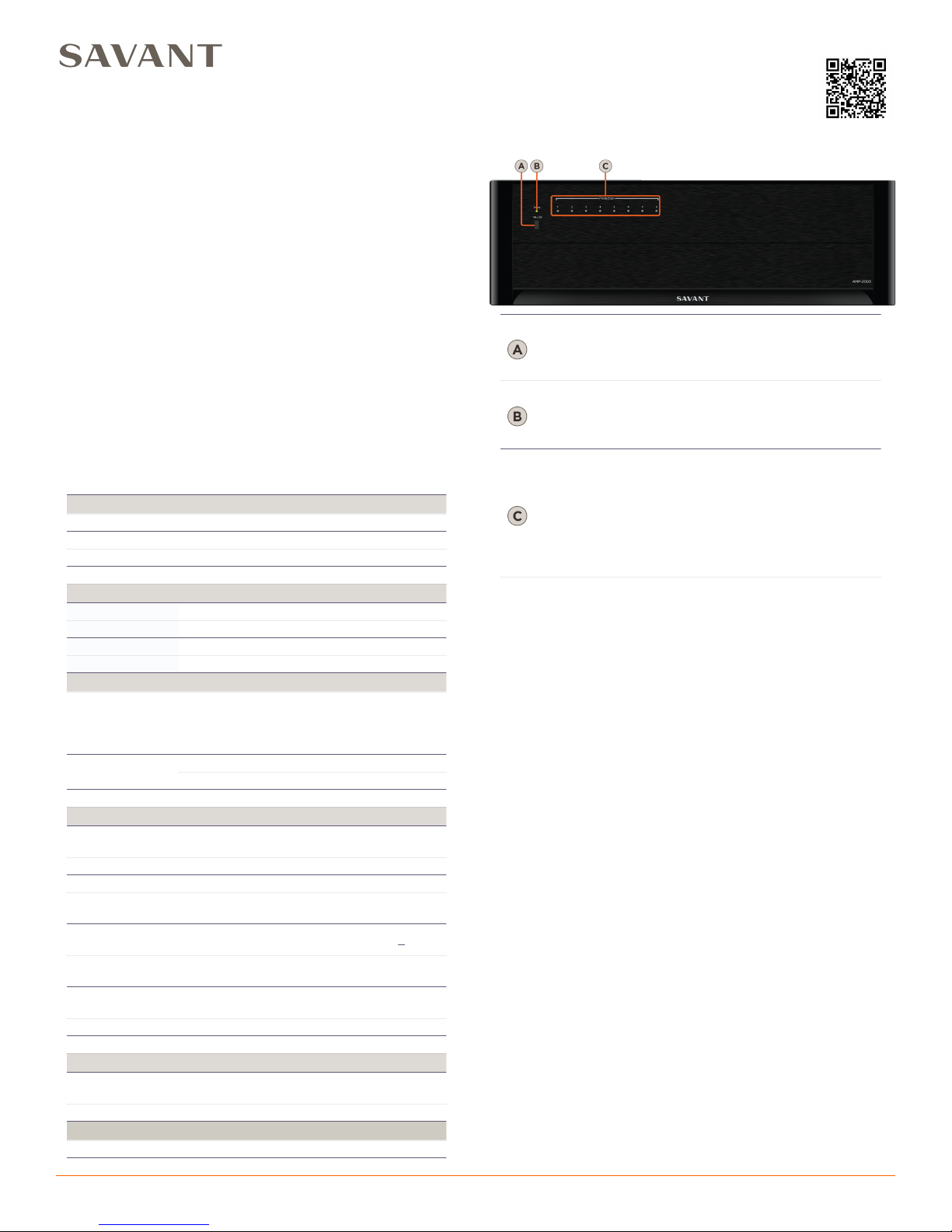
Power Button
(Master)
Turns the amplifier On or Off based on the Turn
On Mode settings.
See Setting the Amplifiers Turn On Mode for
details.
Power LED
Indicates the power state of the amplifier:
Red: Amplifier is in Standby Mode.
Green: Amplifier is On.
Off: No power is supplied to the amplifier.
Protection
Status
Indicators
(LED)
Indicate the status of each zone or pair of
channels when in the central potential
protection mode.
Red: The central potential protection mode has
been enabled to protect a zone/channel.
See Protection Modes for details.
Off: The central potential protection mode has
not been enabled.
AMP-2000-00/AMP-2000I-00 | 009-0421-03 | 150327
45 Perseverance Way, Hyannis, MA 02601
Copyright © 2015 Savant Systems, LLC
1of3
savant.com | 508.683.2500
Savant® 16 Channel Amplifier
Quick Reference Guide
For Product Info
the 16-channel AMP-2000 amplifier.
The following units are supported in this document:
•
AMP-2000-00 (North America)
•
AMP-2000I-00 (International)
Box Contents
(1) Savant 16 Channel Amplifier (AMP-2000-xx or AMP-2000I-xx)
(2) Rack Mounting Brackets
(8) Pan Head Phillips Screws for Brackets (M3 x 8 mm)
(1) AC Power cord - 6 ft
(4) 4-pin Screw Down Plug-in Connectors
(4) Rubber Chassis Feet
(1) Trigger Cable - 2.5 mm (3/32”) Mono to 3.5 mm (1/8”) Mono
(1) Quick Reference Guide (this document)
Note:
The AMP-2000/2000I will be referred to as the AMP-2000 unless
otherwise specified.
Specifications
Front Panel
Page 2
Rear Panel
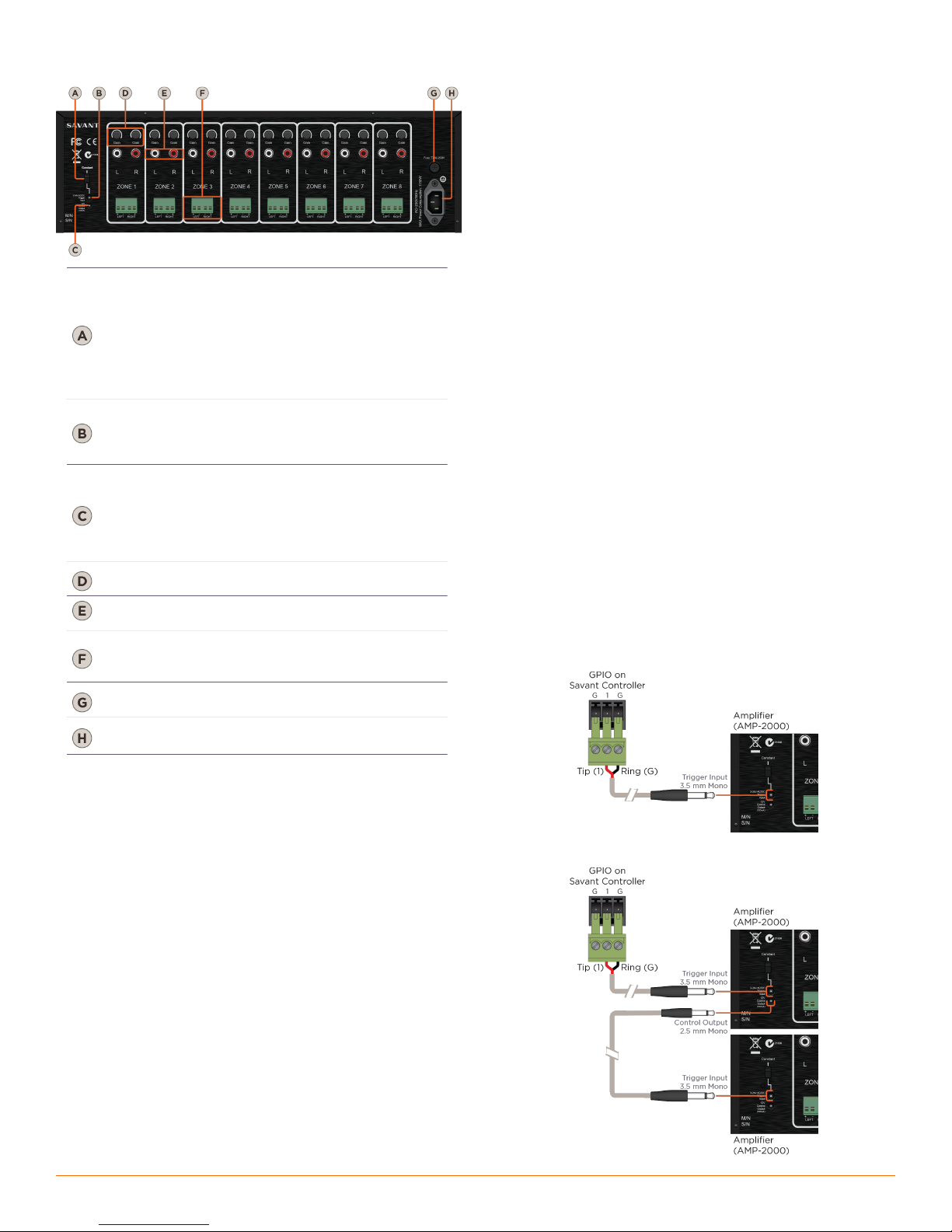
Turn-on Mode
Switch
Provides three options for turning the
AMP-2000 On and Off.
• Constant (manual turn-on via the front panel
master Power button)
• Audio Sense
• 3-24 AC/DC Voltage Trigger (External)
See Setting the Amplifiers Turn On Mode for
details.
3-24V AC/DC
Voltage
Trigger
3-24V AC/DC - 3.5 mm (1/8”) Mono jack
Used to control the power state of the amplifier
when Turn-on Mode switch is set to 3-24 AC/
DC Voltage Trigger mode.
12V Trigger
Control
Output
12V DC 100mA - 2.5 mm (3/32”) Mono jack
Used to trigger an additional AMP-2000 or
other device that is activated by receiving a 12V
DC 100mA signal. This voltage is present only
when the amplifier is active or on.
See External Trigger Connections for details
Gain
Independent gain controls allowing for finetuning the output level of each channel.
Audio Source
Inputs
RCA Stereo (L&R) line-level analog audio
inputs.
Speaker
Connections
4-pin Screw Down Plug-in Connectors
Note: Specify 4 or 8 ohm speakers when
designing the system.
Power Input
IEC 320 power connector with 3-pole
detachable power cord.
Fuse
T15AH/250V (120V) (N. America)
T8AL/250V (230V) (International)
AMP-2000-00/AMP-2000I-00 | 009-0421-03 | 150327
45 Perseverance Way, Hyannis, MA 02601
Copyright © 2015 Savant Systems, LLC
2of3
savant.com | 508.683.2500
Source Audio Connections
The AMP-2000 connects to a Savant distributed audio solution via
shielded line level audio cables with RCA phonograph plugs. Use high
quality RCA cables to connect the audio sources to the amplifier
inputs.
Savant recommends labeling all of the cables as the sources they
connect to (for example, CD player, media server).
Speaker Wire Connections
The AMP-2000 connects to the speakers using 2-conductor speaker
wire. For most applications, Savant recommends using 16-gauge or 18gauge wire. For wiring runs longer than 80 feet, Savant recommends
using 14-gauge wire. Each channel features a removable screw
terminal speaker connection for easy installation in tight spaces. The
terminal connector can accommodate up to 14-gauge stranded
speaker wire.
Bare Speaker Wire
Split the speaker wire insulation so that at least two inches of each
conductor are separated. Strip 1/4 inch of insulation from the end of
each conductor of the speaker wire. Twist the strands of speaker wire
together and insert them into the appropriate screw terminal speaker
connection.
AC Power Plug Connection
The last connection made should be the AC power using a standard
IEC 3-pole detachable power cord. Plug the attached power plug into
a correctly grounded 120V/60 Hz (AMP-2000) or 240V/50 Hz
(AMP-2000I) wall outlet.
External Trigger Connections
CAUTION!
Do not use a DC wall adapter. The long discharge time of the DC adapter’s filter
capacitor will delay the turn-off of the amplifier.
Note:
The 3-24V AC/DC Voltage Trigger mode allows you to configure the amplifier to
turn on automatically.
Note:
When connecting the first AMP in the chain, the 3.5 mm jack connecter will need
to be cut off. Strip the cable’s outer jacket to expose the two leads. Connect as
shown in the diagrams below.
Savant GPIO External Trigger Connection
Installation
The AMP-2000 should be placed on a solid flat surface such as a table
or shelf or in an audio/video equipment rack. It should be placed
upright so that its weight rests on the unit’s four feet (removable). See
Ventilation for information on providing adequate cooling to the
amplifier when placed in a cabinet.
Cabling and Wiring
The AMP-2000 has multiple connections on the back panel. Savant
recommends that you clearly label all the input cables and speaker
wires. Label the cables and wires with their destination or source,
rather than which terminal of the AMP-2000 they are connected to it
will be easier to reconfigure the system in the future.
Cabling Precautions
•
The amplifier must be off whenever you make changes to the input
connections.
•
Never connect a source or preamplifier’s input to the inputs of the
AMP-2000 directly.
•
All speaker wire connections must be made with the amplifier off.
•
Do not allow a single strand of wire to touch the amplifier chassis
or another connector.
Daisy Chaining External Triggers
Page 3
Ventilation
Constant – Power state of the amplifier is
controlled via the front panel master power
button:
IN - Amplifier is powered ON (Sensing circuitry
active)
OUT - Amplifier is powered OFF (Sensing
circuitry inactive)
Audio Sense – Zone/Channel power state is
controlled via the source inputs:
The master power button on the front panel
must be in the On position.
Zone/Channel turns on when an audio signal
higher than -46dB is present on both L/R inputs
for the zone.
Zone/Channel turns off after 5 min. when an
audio signal lower than -46dB or no signal is
present on both L/R inputs for the zone.
Amplifier goes into standby mode if no signal is
present on any zone/channel for 5 minutes.
3-24V AC/DC Voltage Trigger – Power state of
the amplifier is controlled via an external trigger
(Savant GPIO):
The master Power button on the front panel
must be in the On position.
Amplifier will turn on when the voltage trigger
input receives a 3-24V signal.
Amplifier will turn OFF when the 3-24V signal is
removed.
AMP-2000-00/AMP-2000I-00 | 009-0421-03 | 150327
45 Perseverance Way, Hyannis, MA 02601
Copyright © 2015 Savant Systems, LLC
3of3
savant.com | 508.683.2500
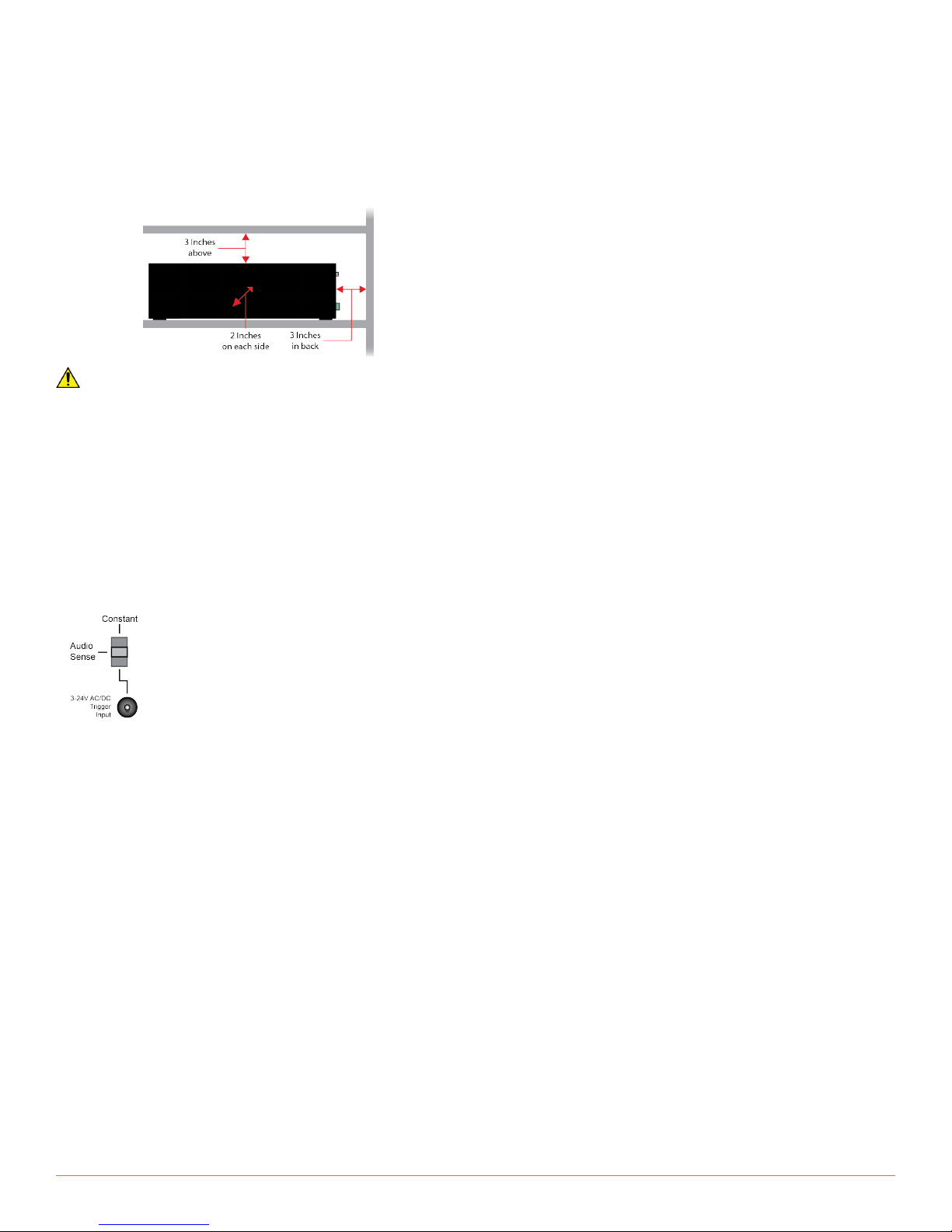
The AMP-2000 must be provided with adequate ventilation for proper
cooling.
•
When installing the AMP-2000 in a cabinet, be sure that the rear of
the cabinet is open to adequate air to provide proper cooling.
•
Be sure to leave a minimum of 3 inches clearance above and behind
the amplifier and at least 2 inches on each side.
•
If installed in a rack, active thermal management (such as rack fans)
is recommended.
CAUTION! Do not block the ventilation holes on the sides and bottom of the
AMP-2000.
Setting the Amplifiers Turn On Mode
Protection Modes
The AMP-2000 provides three protection modes. Note that the
AMP-2000 does not shut down in a protection mode; only the faulty
zone/channel is disabled.
Central potential protection mode (LED indication)
The central potential protection mode is the only mode that activates
the Protection LEDs on the front panel. This mode is more commonly
known as the DC potential protection mode and is designed to protect
the connected speakers from any DC voltage that is output from the
AMP-2000.
When the central potential protection mode is activated, the LED for
that respective channel will be turned on (Red). When a channel is in
the central potential protection mode, other active channels will
remain operational unless they are in a protection mode. After the fault
is fixed, the AMP-2000 will automatically restart the disabled zone/
channel.
Speaker short protection mode (no LED indication)
This mode will disable a zone/channel until the fault is fixed. After the
fault is fixed, the AMP-2000 will automatically restart the disabled
zone/channel.
Overload protection mode (no LED indication)
This mode will disable a zone/channel until the fault is fixed. After the
fault is fixed, the AMP-2000 will automatically restart the disabled
zone/channel.
Cleaning and Maintenance
The internal parts of the AMP-2000 are electronic and require no
maintenance. Once a year it is appropriate to twist the RCA
connectors on each input to remove any oxidation and improve
conductivity. You can clean only with dry cloth. Do not use any spraytype, abrasive cleaners on the amplifier.
Additional Information
Refer to the following documents located on the Savant Community
for additional information.
Relay and General Purpose Input/Output Profiles: Application Note for
•
information on input and output triggers and GPIO input and outputs to
Savant Controllers.
•
RacePoint Blueprint™ Authoring Guide on how to configure the
AMP-2000 into a Savant System.
 Loading...