

Page 1
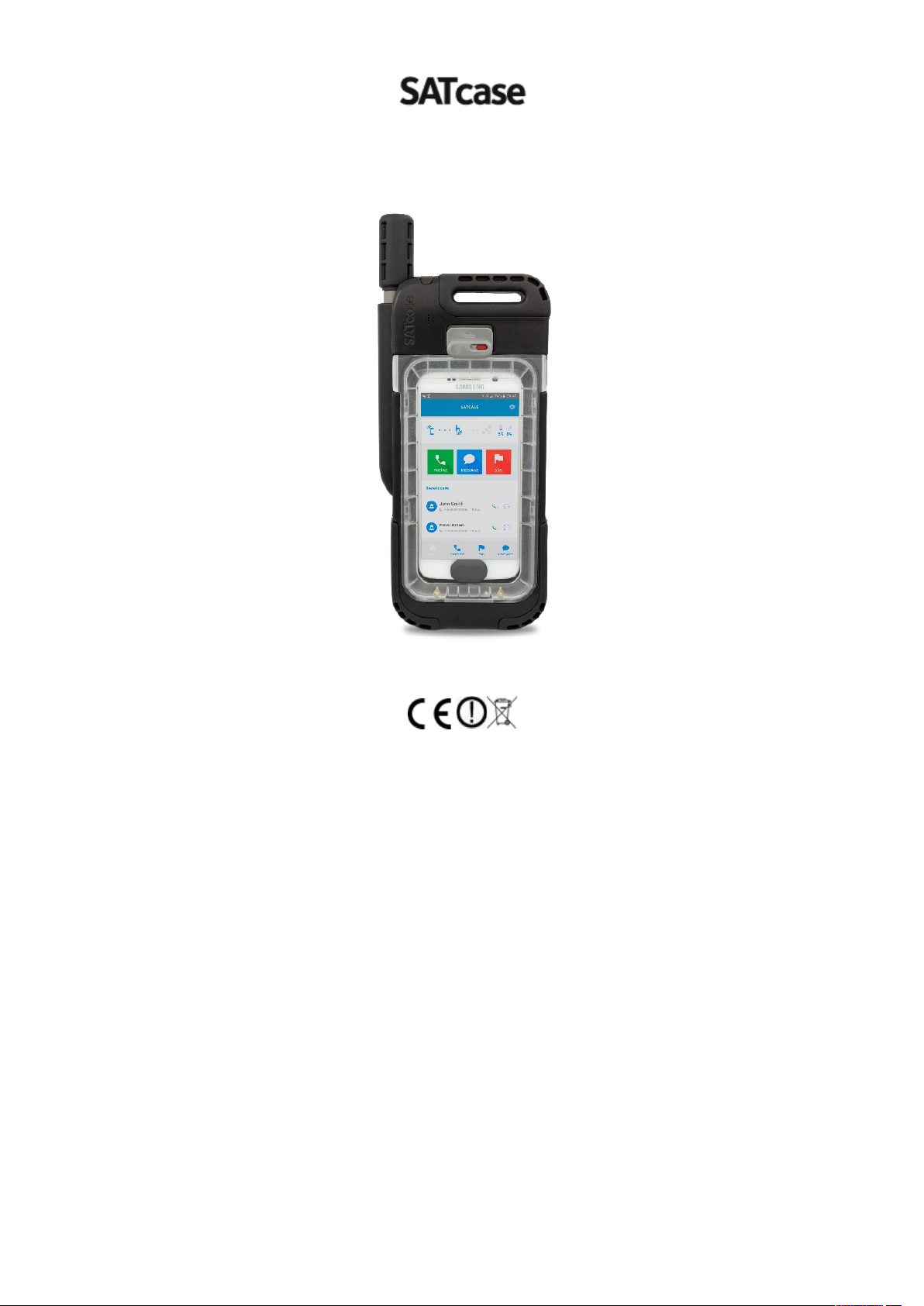
SC01- User Manual
IP681 ● Mil-8102
FFC ID: 2AM7Y-SC01 ● IC: 23028-SC01 ● Made in UK by SATcase LTD
SATcase support: 02038567766
SATcase office number: 01904379966
Email SATcase: [email protected]
Head office: The Catalyst, Baird Lane, Heslington, York, YO10 5GA
Prior to using the SATcase read and understand this User Manual including the safety warnings and
information. Failure to do so could result in serious injury or death. SATcase, the SATcase logo and any other
trademark or service mark referred to or displayed in this document are trademarks or registered trademarks of
SATcase Ltd.
Copyright 2018 SATcase Ltd. All rights reserved.
1
Page 2

Legal Information, Third Party Information, Intellectual Property and Copyright
Information
Every effort has been made to ensure the correctness and completeness of the material in this
document. No company shall be liable for errors contained herein. The information in this
document in subject to change without notice. No warranty of any kind is made with regard
to this material, including, but not limited to, the implied warranties of merchantability and
fitness for a particular purpose. SATcase reserves the right to revise this User Manual or
withdraw it at any time without prior notice. You can find the current version of this SATcase
Manual at www.satcase.com
SATcase products are offered to you conditioned upon your acceptance without modification
of the terms, conditions, and notices contained. The products have been designed for the
specific use of applications. The products may not be used for unlawful purposes and that use
is expressly prohibited under the terms and conditions of its use. No guarantees are given or
implied to the product efficiency, product performance and production or its improvement.
IN NO EVENT, REGARDLESS OF CAUSE, SHALL SATCASE LIMITED BE LIABLE
FOR ANY INDIRECT, SPECIAL, INCIDENTAL, PUNITIVE OR CONSEQUENTIAL
DAMAGES OF ANY KIND INCLUDING HARDWARE, SOFTWARE AND/OR
FIRMWARE) AND/OR ACCESSORIES AND/OR THE COST OF IRIDIUM SATELLITE
SERVICES PROVIDED, WHETHER ARISING UNDER BREACH OF CONTRACT,
TORT (INCLUDING NEGLIGENCE), STRICT LIABILITY OR OTHERWISE, AND
WHETHER BASED ON THIS AGREEMENT OR OTHERWISE, EVEN IF ADVISED OF
THE POSSIBILITY OF SUCH DAMAGES. NO WARRANTY IS MADE AS TO USER
INFORMATION AND/ OR COVERAGE, AVAILABILITY OR GRADE OF SERVICE
PROVIDED BY IRIDIUM SEPARATELY FOR IRIDIUM SATELLITE SERVICES.
SATcase Ltd employees or representatives, oral or written statements do not constitute
warranties, shall not be relied upon by buyer, and is not part of the contract for sale or this
limited warranty. If any part of this disclaimer is determined to be invalid, void,
unenforceable or illegal, including, but not limited to the warranty disclaimers and liability
disclaimers and liability limitations set forth above, then the invalid or unenforceable
provision will be deemed superseded by a valid, enforceable provision that most closely
matches the intent of the original provision and the remainder of the agreement shall remain
in full force and effects.
SATcase Ltd reserves the right to change the terms, conditions, and notices under which their
products are offered. Please refer to the Legal Information Booklet for the Limited Warranty
including Exclusions, Disclaimers, Limitations of Liability and Conditions of Use, and
Warranty Claim Process.
SATcase may include third party information in this documentation but this does not imply
that SATcase endorses that information. SATcase makes no guarantees or warranties or
representations in relating to third party sources of information (including third party
websites), hardware, software, products and services and is not responsible or does not
control any of these third party items including without limitation the legality, copyright,
trustworthy, accuracy, compliance, performance or compatibility of the information and shall
not be liable for any losses, damages, legal costs, liabilities or any other form costs in relation
to any such third party information
2
Page 3

All materials contained in SATcase products, software and documentation are protected by
copyright laws, and may not be reproduced, republished, reversed engineered, distributed,
transmitted, displayed, broadcast or otherwise exploited in any manner, this also extends to
third party products and information contained within.
SATcase names and logos and all related trademarks, tradenames, and other intellectual
property are the property of SATcase and cannot be used without its express prior written
permission.
The user is exclusively responsible for the use of the SATcase hardware, software and third
party materials and must do so without infringing on any copyrights and will deem SATcase
harmless with respect to any such infrigements and agree to pay any costs, fines, damages
and other amounts incurred by SATcase in defence of any claims or actions.
3
Page 4

Contents
1. INTRODUCTION ...................................................................................................................................... 6
1.1 Main Features ........................................................................................................................... 6
1.2 Related documents.................................................................................................................... 6
1.3 What’s in the box? .................................................................................................................... 7
2. IMPORTANT SAFETY INFORMATION / INFORMATIONS DE SÉCURITIÉ IMPORTANTES ............................ 8
2.1 Safety and Warning icons .......................................................................................................... 8
2.1 Icônes de sécurité et d'avertissement......................................................................................... 8
2.2 Radio Frequency Signals .......................................................................................................... 10
Innovation, Science and Economic Development Canada ICES-003 Compliance Label: ...................................... 10
2.2 Signaux de radiofréquence ...................................................................................................... 10
Innovation, Sciences et Développement Économique Canada Étiquette de Conformité ICES-003: .................... 10
2.3 Specific Absorption Rate Data.................................................................................................. 11
2.4 Battery .................................................................................................................................... 11
2.3 Données sur le taux d'absorption spécifique ............................................................................ 11
2.4 La Batterie .............................................................................................................................. 11
2.5 Sim ......................................................................................................................................... 17
2.5 Sim ......................................................................................................................................... 17
2.6 Antenna Care .......................................................................................................................... 18
2.6 Entretien de l'antenne ............................................................................................................. 18
2.7 SOS and Emergency calling ...................................................................................................... 20
2.7 SOS et Appels d'Urgence .......................................................................................................... 20
2.8 Adult use only ......................................................................................................................... 21
2.9 Extended exposure to loud noise.............................................................................................. 21
2.10 Driving and Operation of Other Motor Vehicles ....................................................................... 21
2.8 Utilisation pour adultes seulement .......................................................................................... 21
2.9 Exposition prolongée à un bruit fort ......................................................................................... 21
2.10 Conduite et fonctionnement des autres véhicules automobiles ................................................. 21
2.11 Product Operation ................................................................................................................... 22
2.12 Radio Interference ................................................................................................................... 22
2.11 Exploitation du produit ............................................................................................................ 22
2.12 Interférence radio ................................................................................................................... 22
2.13 Implantable Medical Devices ................................................................................................... 24
2.14 Aircraft ................................................................................................................................... 24
2.13 Dispositifs médicaux implantables ........................................................................................... 24
2.14 Avion ...................................................................................................................................... 24
2.15 Vehicles .................................................................................................................................. 25
2.16 Disposal of SATcase ................................................................................................................. 25
2.17 Strobe LED Safety .................................................................................................................... 25
2.15 Véhicules................................................................................................................................. 25
2.16 Disposition de SATcase ............................................................................................................ 25
2.17 Sécurité LED stroboscopique .................................................................................................... 25
3. SATCASE PRODUCT INFORMATION ...................................................................................................... 26
3.1 SATcase overview .................................................................................................................... 26
3.2 APP overview .......................................................................................................................... 27
3.3 Controls, connections and indicators ....................................................................................... 27
a) SATcase keypad ...................................................................................................................................... 27
b) Keypad LED indicators ............................................................................................................................. 28
c) SATcase SOS button ................................................................................................................................ 28
d) Smartphone power button ...................................................................................................................... 29
e) Bluetooth connection ............................................................................................................................. 29
f) App Notification Indicators ..................................................................................................................... 30
g) Basic diagnostics: .................................................................................................................................... 30
4
Page 5

I) Advanced diagnostics:............................................................................................................................. 31
1. GETTING STARTED ................................................................................................................................ 32
4.1 Remove the SATcase sleeve ..................................................................................................... 32
4.2 Install the SIM Card and Battery .............................................................................................. 32
a) Insert the SIM Card ................................................................................................................................. 32
b) Insert the battery .................................................................................................................................... 32
c) Remove the SIM Card ............................................................................................................................. 33
4.3 Install the SATcase App ........................................................................................................... 33
4.4 Activate the SIM Card .............................................................................................................. 33
4.5 Switch on SATcase ................................................................................................................... 33
4.6 Pair the SATcase and Smartphone ........................................................................................... 33
4.7 Insert the Smartphone ............................................................................................................. 33
4.8 Insert the SATcase sleeve ......................................................................................................... 34
2. HOW TO USE THE SATCASE .................................................................................................................. 35
5.1 How to use the SATcase with the Smartphone App .................................................................. 35
a) Home ..................................................................................................................................................... 35
b) Calls ....................................................................................................................................................... 36
c) Messages ............................................................................................................................................... 38
d) Email ...................................................................................................................................................... 39
e) SOS ........................................................................................................................................................ 39
5.2 How to use the SATcase without a Smartphone ....................................................................... 40
6. TROUBLESHOOTING ............................................................................................................................. 42
7. ENDNOTES ........................................................................................................................................... 43
8. WARRANTY AND SUPPORT .................................................................................................................. 44
9. CONTACT DETAILS ................................................................................................................................ 44
5
Page 6

1. Introduction
Thank you for purchasing the SATcase SC01, the revolutionary device that integrates
Smartphone technology with truly global satellite communications.
This user manual contains important and useful information on how
to use SATcase.
Read the entire manual before you start to use the SATcase. Please pay close attention to
the safety information in chapter 2.
1.1 Main Features
• Seamlessly uses your own Smartphone so all your contacts are ready for you to make
calls, send texts and emails even when you don’t have a terrestrial network
connection.
• The SATcase and Smartphone can be used together or separately to reach satellite
access (when connected via Bluetooth)
• SATcase’s ruggedized construction meets both IP681 and MIL-8102 standards
• Two-way rescue communications to talk with rescuers
• GPS tracking
• Emergency alert available, even without the Smartphone connected
• The SATcase charge input charges the SATcase as well as the Smartphone inside
• Built in LED lights
• Dimensions: 280mm/114mm/48mm
• Operating temperatures: -20℃"to"+55℃
• Storage"temperatures:"-40"℃"to"+85℃
• Standby"time:"16"hours."Talk time: 4 hours
• Global satellite coverage: Iridium narrowband
1.2 Related documents
Visit our website www.satcase.com for the following related documents
6
Page 7
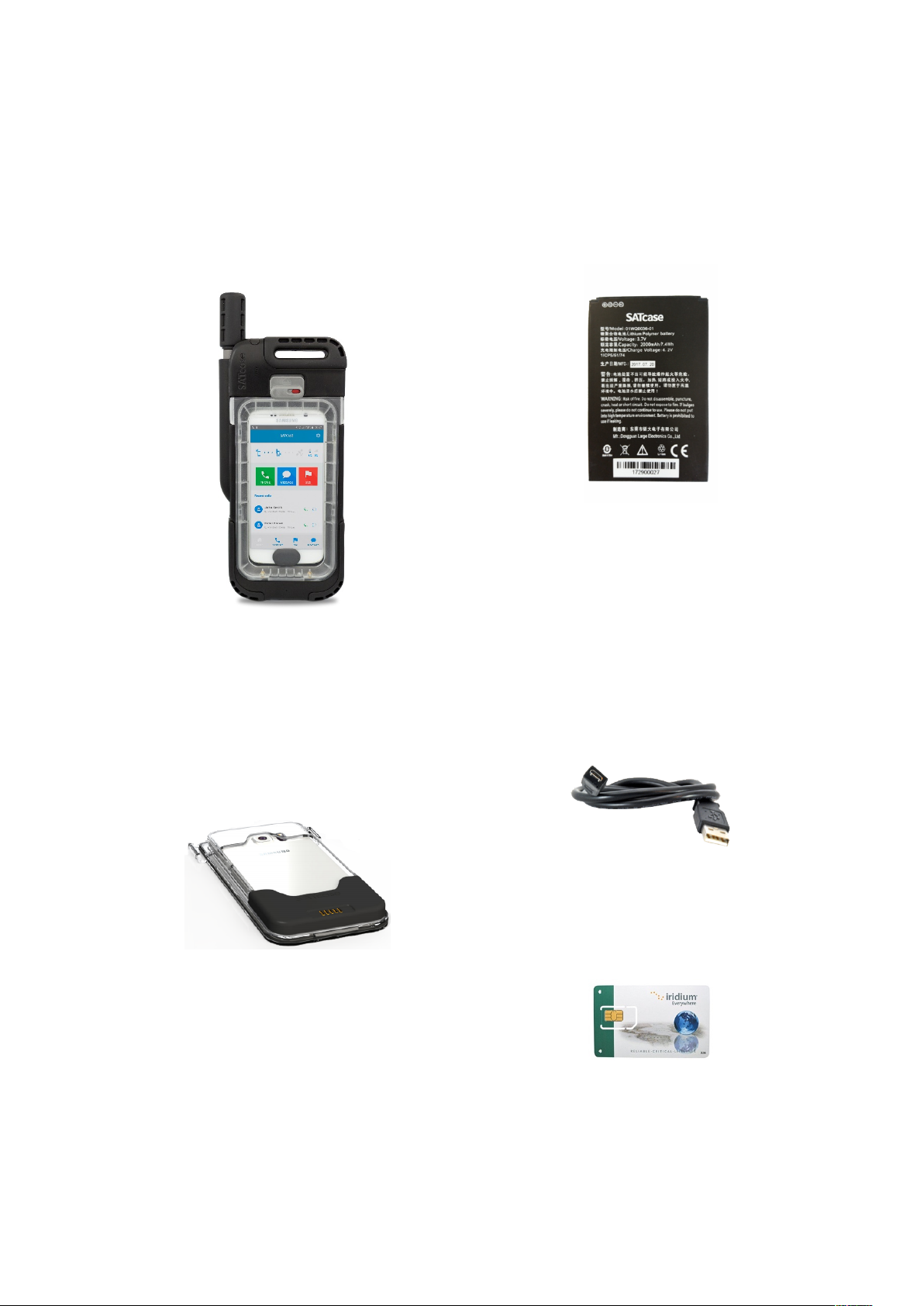
1.3 What’s in the box?
• SATcase-SC01
(Smartphone not included)
• Smartphone sleeve (specific to
user’s Smartphone)
• Battery-
• USB charging cable- only for AC
usage. Please do not plug in to DC
supply
• Sim Card-
7
Page 8
2. Important Safety Information / Informations de sécuritié
importantes
Please read this part of the manual
thoroughly.
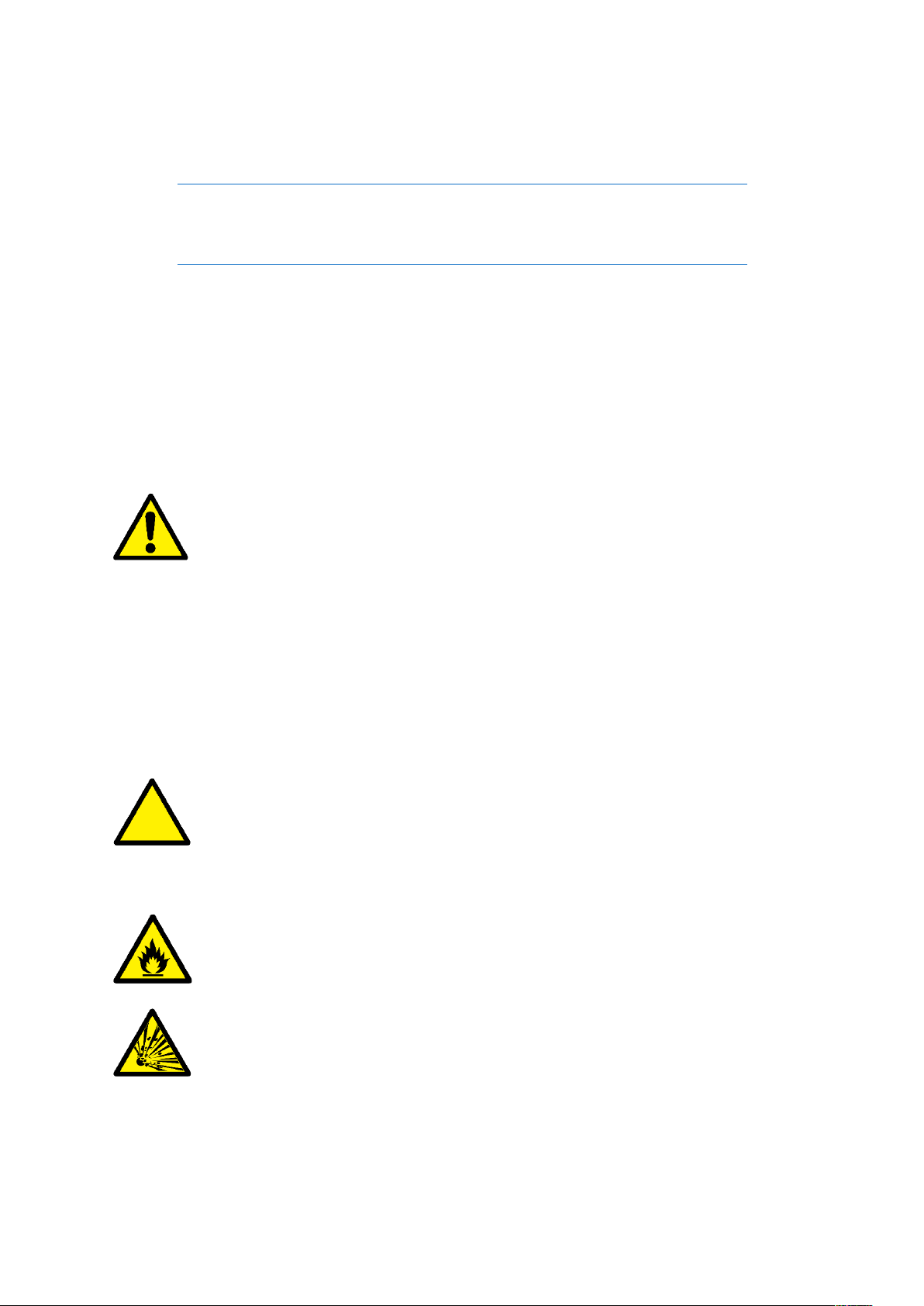
2.1 Safety and Warning icons
The following symbols are used in this user
manual:
Warning! Failure to comply
with this warning could
result in death or serious
injury. Before doing this
task, be sure to familiarize
yourself with appropriate
safety practices, personal
protective equipment and
have a plan in case of
accident.
Caution Failure to follow
directions carefully could
result in injury. Care must
be taken.
Do not dispose of your
battery in a fire.
Risk of explosion.
Veuillez lire attentivement cette partie du
manuel
2.1 Icônes de sécurité et
d'avertissement
Les symboles suivants sont utilisés dans ce
manuel d'utilisation:
Attention! Le non-respect de cet
avertissement peut entraîner la mort ou des
blessures graves. Avant d'effectuer cette
tâche, assurez-vous de vous familiariser
avec les pratiques de sécurité appropriées,
l'équipement de protection individuelle et
d'avoir un plan en cas d'accident.
Attention Le non-respect des instructions
peut entraîner des blessures. Il faut prendre
soin.
Ne jetez pas votre batterie dans le feu.
Risque d'explosion.
8
Page 9
Ne laissez pas votre SATcase entrer en
contact avec de l'eau sans le manchon
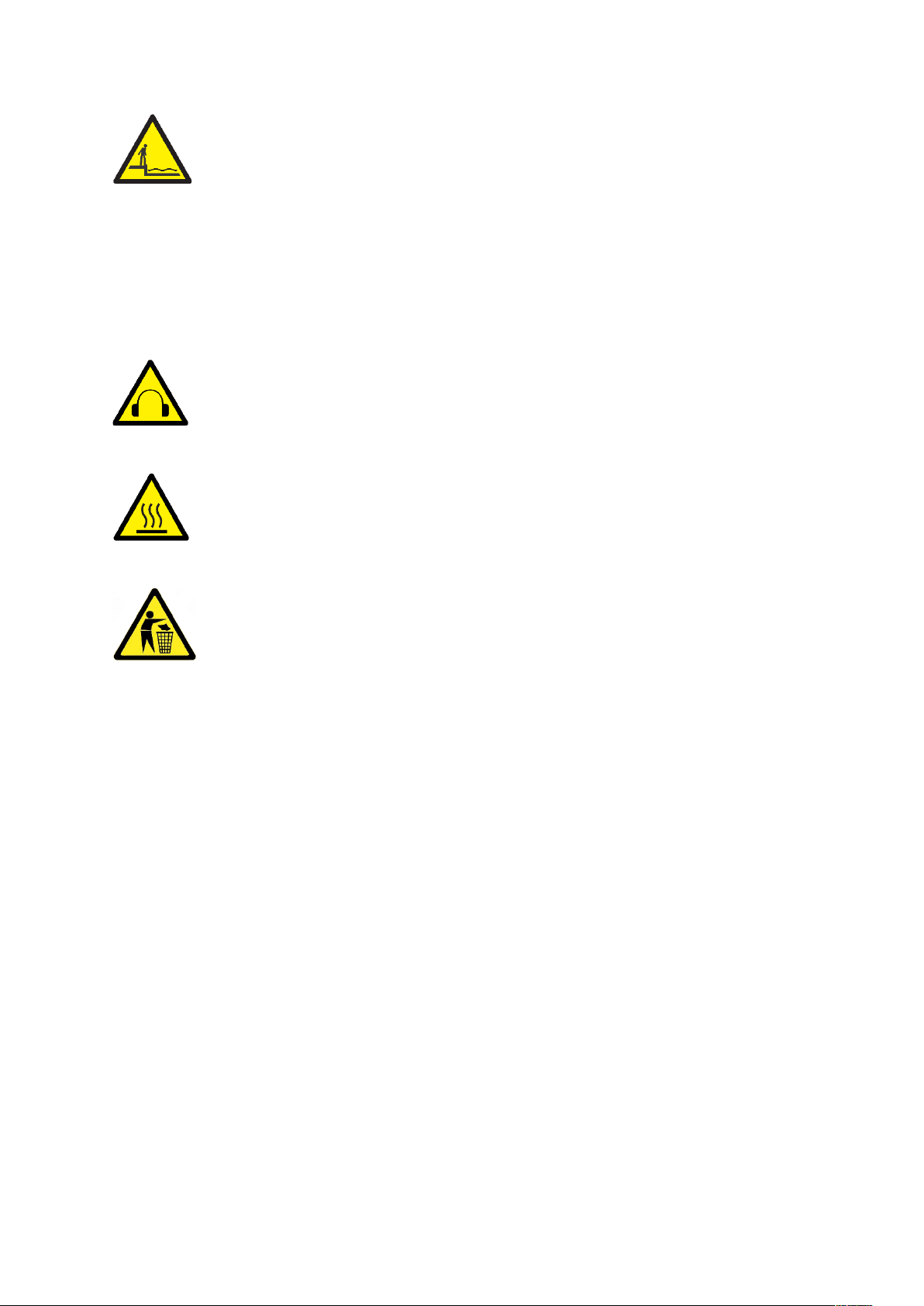
Do not let your SATcase
come into contact with
water without the sleeve
installed into the SATcase.
If there is any liquid around
these areas before use,
please wipe it with a clean
cloth.
Harmful noise.
High heat source. Burn risk.
installé dans le SATcase. S'il y a du
liquide autour de ces zones avant
l'utilisation, veuillez l'essuyer avec un
chiffon propre.
Bruit nocif.
Source de chaleur élevée. Risque de
brûlure.
Ne pas jeter aux ordures.
Do not dispose in trash.
9
Page 10

2.2 Radio Frequency Signals
SATcase is a low power radio transmitter
and receiver that emits low levels of radio
frequency energy. SATcase is designed
not to exceed the safety limits for
exceeding the safety limits for exposure of
human beings to radio frequencies as
recommended by the International
Commission on Non-Ionising Radiation
Protection (ICNIRP) when used in normal
operating modes as described in this
manual.
Innovation, Science and Economic
Development Canada ICES-003
Compliance Label:
The SATcase complies with Canada
ICES-003 (B)/NMB-3(B)
This device complies with Industry Canada’s
licence-exempt RSSs. Operation is subject to
the following two conditions:
(1) This device may not cause interference;
and
(2) This device must accept any interference,
including interference that may cause
undesired operation of the device.
Changes or modifications to this
equipment may cause harmful interference
unless the modifications are expressly
approved in the instruction manual.
The user could lose the authority to
operate this equipment if an unauthorised
change or modification is made.
2.2 Signaux de radiofréquence
SATcase est un émetteur et récepteur radio
de faible puissance qui émet de faibles
niveaux d'énergie radiofréquence.
SATcase est conçu pour ne pas dépasser
les limites de sécurité pour l'exposition des
humains aux fréquences radioélectriques
recommandées par la Commission
Internationale de Protection Contre les
Rayonnements Non-Ionisants (ICNIRP)
lorsqu'ils sont utilisés dans les modes de
fonctionnement normaux décrits dans ce
manuel.
Innovation, Sciences et Développement
Économique Canada Étiquette de
Conformité ICES-003:
Le SATcase est conforme au Canada
ICES-003 (B)/NMB-3(B)
Cet appareil est conforme aux RSS
exempts de licence d'Industrie Canada.
L'opération est soumise aux deux
conditions suivantes:
(1) Cet appareil ne doit pas causer
d'interférences; et
(2) Cet appareil doit accepter toute
interférence, y compris les interférences
susceptibles de provoquer un
fonctionnement indésirable de l'appareil.
Les changements ou modifications
apportés à cet équipement peuvent causer
des interférences nuisibles, à moins que les
modifications ne soient expressément
approuvées dans le manuel d'instructions.
L'utilisateur pourrait perdre le droit
d'utiliser cet équipement en cas de
modification ou de modification non
autorisée.
10
Page 11
2.3 Specific Absorption Rate
Data
Specific Absorption Rate (SAR) is
a unit of measurement that mobile
phones are tested against to
ascertain the radio frequency
energy that is absorbed by the body
when the mobile phone is in use.
SATcase was tested against strict
guidelines and standards set by the
European Commission (EC),
Federal Communications
Commission (FCC) and Industry
Canada (IC) to ensure it was within
maximum SAR levels set when
transmitting at it’s highest certified
power level in all tested frequency
bands. These standards set a SAR
limit of 1.6 W/kg averaged over a
1g volume and the SATcase
measured a level of 0.55 W/kg
which was below this limit and
therefore met governmental
requirements.
2.3 Données sur le taux
d'absorption spécifique
Le taux d'absorption spécifique (DAS) est
une unité de mesure sur laquelle sont testés
les téléphones mobiles pour déterminer
l'énergie radiofréquence absorbée par le
corps lorsque le téléphone est en cours
d'utilisation. SATcase a été testé selon des
directives et des normes strictes établies
par la Commission Européenne (EC), la
Commission Fédérale des
Communications (FCC) et Industrie
Canada (IC) afin de s'assurer que les
niveaux SAR maximum sont respectés.
bandes. Ces normes établissent une limite
SAR de 1,6 W / kg en moyenne sur un
volume de 1 g et le SATcase mesure un
niveau de 0,55 W / kg qui est inférieur à
cette limite et répond donc aux exigences
gouvernementales.
2.4 Battery
WARNING
Make sure you follow the safety
guidelines to prevent death by fire,
explosion or other hazards such as
battery fluid leakage.
Safety guidelines:
Misuse of the battery may cause serious
health issues or property damage.
2.4 La Batterie
ATTENTION
Assurez-vous de respecter les consignes
de sécurité pour éviter les incendies, les
explosions ou d'autres dangers tels que
les fuites de liquide de batterie.
Consignes de sécurité
Une mauvaise utilisation de la batterie peut
entraîner de graves problèmes de santé ou
des dommages matériels.
11
Page 12
Do not let the Smartphone
or battery come into contact
with water. Water can lead
to corrosion of the
Smartphone’s circuits. The
battery, when outside of the
SATcase, is not IP681
protected. Enclose the
battery within the SATcase
properly before using close
to water.
Keep the battery separate
from any metal objects.
Connecting the battery to a
metal object can cause
extreme heating and the
possibility of explosion.
Ne laissez pas le Smartphone ou la batterie
entrer en contact avec de l'eau. L'eau peut
entraîner la corrosion des circuits du
Smartphone. La batterie, à l'extérieur de la
SATcase, n'est pas protégée IP681. Placez
correctement la batterie dans le SATcase
avant de l'utiliser près de l'eau.
Gardez la batterie séparée de tout objet
métallique. La connexion de la batterie à
un objet métallique peut provoquer un
échauffement extrême et la possibilité
d'une explosion.
CAUTION!
RISK OF EXPLOSION IF
BATTERY IS REPLACED
BY AN INCORRECT
TYPE.
DISPOSE OF USED
BATTERIES IN
ACCORDANCE TO THE
INSTRUCTIONS.
MISE EN GARDE!
RISQUE D'EXPLOSION SI LA
BATTERIE EST REMPLACÉE PAR UN
TYPE INCORRECT.
JETER LES BATTERIES USAGÉES
CONFORMÉMENT AUX
INSTRUCTIONS.
12
Page 13

• Do not attempt to take apart or
tamper with the battery in any way.
• The battery, when outside of the
SATcase, is not Mil-8102 protected
so please handle with care. Do not
tamper with the battery and be
careful not to drop it.
• Keep away from heat sources. If
the battery is to exceed its
temperature range: -30 °C to +60
°C, it can result in expanding,
leakage and battery failure. Do not
attempt to cool down or dry the
battery with a heat source, such as
using a heating element or
microwave oven. Keep battery and
SATcase away from other extreme
temperature conditions, such as
leaving in a poor ventilated area for
a long period of time in high
temperatures.
• Charging the battery is not
permitted when the SATcase
exceeds temperatures outside of
0°C~45°C.
• In case of fault or damage to the
battery by any of the reasons
above, contact SATcase customer
service.
Battery Standards:
This product complies with National Standard
GB 31241-2014 (Lithium ion cells and
batteries used In portable electronic
equipment safety requirements) of PRC.
Battery Description:
Type: Li-ion Battery
Model: 435174/1S1P/2000mAh/3.7V
Cell: 435174/2000mAh/3.7V
• N'essayez en aucun cas de démonter ou
d'altérer la batterie.
• La batterie, à l'extérieur de la SATcase,
n'est pas protégée par le Mil-810,
veuillez donc manipuler avec
précaution.Ne modifiez pas la batterie
et veillez à ne pas la laisser tomber.
• Conserver à l'écart des sources de
chaleur Si la batterie doit dépasser sa
plage de température: -30 ° C à +60 °
C, cela peut entraîner une dilatation,
une fuite et une défaillance de la
batterie Ne pas essayer de refroidir ou
de sécher la batterie avec source de
chaleur, comme l'utilisation d'un
élément chauffant ou d'un four à
micro-ondes Garder la batterie et le
SATcase à l'écart des autres conditions
de température extrêmes, comme par
exemple dans un endroit mal ventilé
pendant de longues périodes.
• La charge de la batterie n'est pas
autorisée lorsque le SATcase dépasse
des températures comprises entre 0 °C
et 45 °C.
• En cas de panne ou d'endommagement
de la batterie pour l'une des raisons cidessus, contactez le service clientèle de
SATcase.
Normes de batterie:
Ce produit est conforme à la norme
nationale GB 31241-2014 (piles au lithium
ionique et piles utilisées dans les exigences
de sécurité des équipements électroniques
portables) de la PRC.
Description de la batterie:
Type: Batterie Li-ion
Modèle: 435174 / 1S1P / 2000mAh / 3.7V
Cellule: 435174 / 2000mAh / 3.7V
13
Page 14
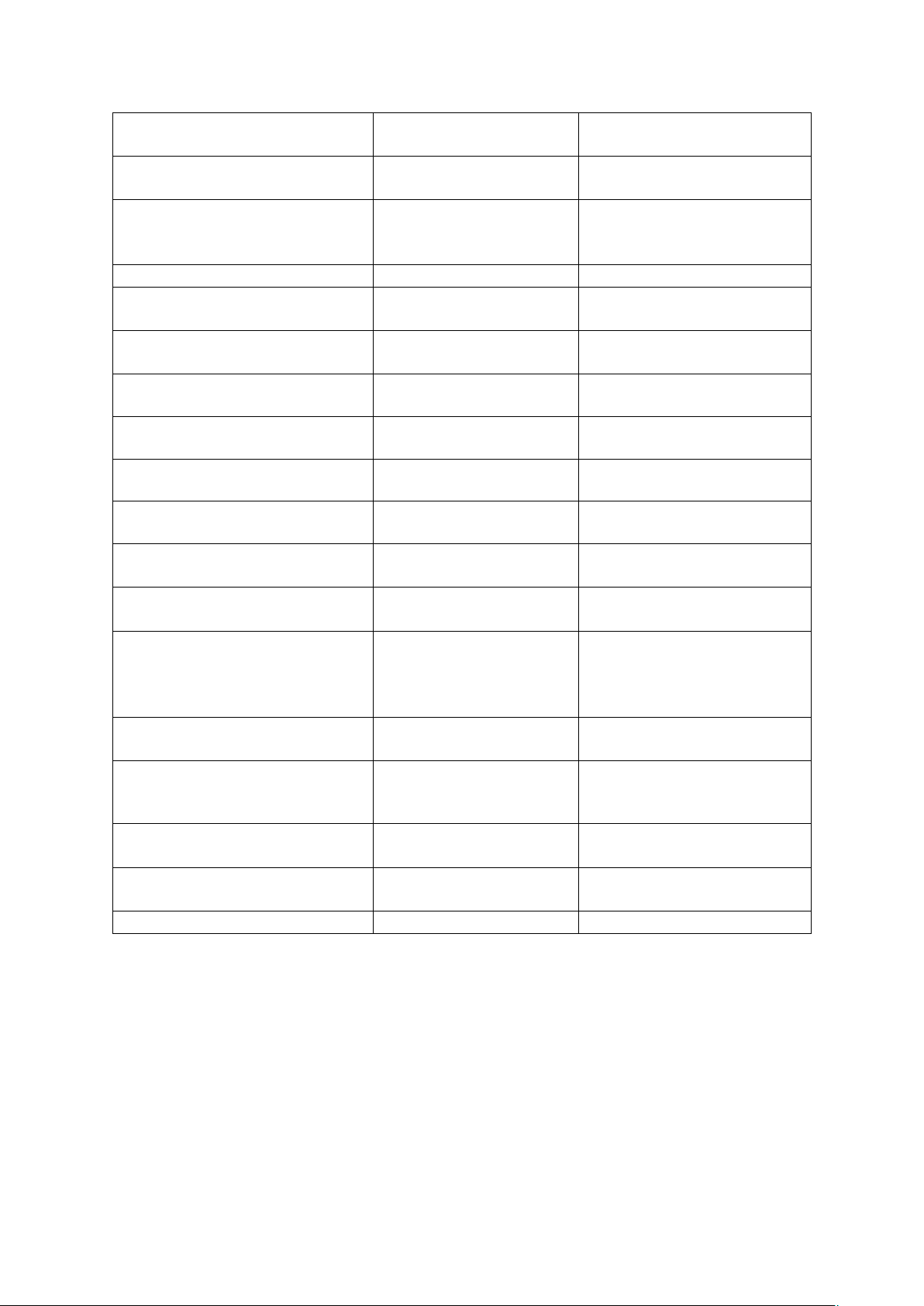
Items / Articles
Parameters /
Paramètres
Remarks / Remarques
Rated Capacity /
Capacité nominale
2000mAh
Discharge / Les écoulement:
0.2C
Minimum Capacity /
Capacité minimale
1950mAh
cut-off voltage /
tension de coupure
:3.0V
Energy / Énergie
7.4 Wh
Nominal Voltage /
Tension nominale
3.7V
Open Voltage /
Tension ouverte
3.6V~3.9V
Load Voltage /
Tension de charge
≥3.6V
10Ω
Internal Impedance /
Impédance interne
≤150mΩ
AC 1KHz after standard charge
/ après la charge standard
Charge voltage /
Tension de chargement
4.2V
Standard charge current /
Courant de charge standard
400mA
0~45℃
Max charge current /
courant de charge maximum
1000mA
0~45℃
Standard discharge current /
Courant de décharge standard
400mA
-30~60℃
Max continuous discharge
current /
Max courant continu de
décharge
2000mA
0~60℃
Discharge cut-off voltage /
Tension de coupure de décharge
3.0V
Operating Temperature /
Température de fonctionnement
0~45℃
-30~60℃
Charge
Discharge / décharge
Storage Temperature /
Température de stockage
-20℃~60℃
Less than 1 month /
Moins de 1 mois
Weight /
Poids
About / sur 110 g
PCM
8261DAA+SL8811+ID 2.4K
LARGE-0303-0010-V1.0
14
Page 15

WARNING
If a NON-SATcase
battery or incorrect
charging power is used on
the battery, death by fire,
explosion or other
hazards such as battery
fluid leakage may occur.
Important: SATcase
warranty does not cover
any use of non-original
parts or chargers not within
specified limitations. Using
incorrect or unauthorised
parts may damage the
SATcase or cause poor user
experience.
Battery Charging
Charge the battery through the SATcase
charging input located at the bottom of the
SATcase.
Battery Disposal
Recycle as lithium-ion (Li-ion) battery as
per your countries guidelines.
To Remove the Battery
To access the area where the battery is
positioned, the user must remove the
SATcase sleeve as well as the battery
cover. Then the battery can be removed
from the pocket by levering the top of the
battery out first.
To Install the Battery
Follow the instructions above to access the
battery position. Slot the bottom end of the
battery in first, then install the battery
cover to hold in place.
ATTENTION
Si une batterie NON-SATcase ou une
alimentation de charge incorrecte est
utilisée sur la batterie, la mort par le
feu, l'explosion ou d'autres dangers tels
que les fuites de liquide de batterie
peuvent se produire.
Important: La garantie SATcase ne couvre
pas l'utilisation de pièces non originales
ou de chargeurs ne respectant pas les
limites spécifiées. L'utilisation de pièces
incorrectes ou non autorisées peut
endommager le SATcase ou provoquer une
mauvaise expérience utilisateur.
Charge de la batterie
Chargez la batterie via l'entrée de charge
SATcase située au bas du SATcase.
Élimination de la batterie
Recycler en tant que batterie lithium-ion
(Li-ion) selon les directives de votre pays.
Pour retirer la batterie
Pour accéder à la zone où la batterie est
positionnée, l'utilisateur doit retirer le
manchon SATcase ainsi que le couvercle
de la batterie. Ensuite, la batterie peut être
retirée de la poche en tirant le haut de la
batterie en premier.
Installer la batterie
Suivez les instructions ci-dessus pour
accéder à la position de la batterie. Insérez
d'abord l'extrémité inférieure de la batterie,
puis installez le couvercle de la batterie
pour le maintenir en place.
15
Page 16

Checking Battery Charge Level
When the SATcase is being used without
the Smartphone, the battery levels are
displayed on the SATcase keypad.
When the battery is 75-100% charged, the
battery LED will light up green.
When the battery is 25-75% charged, the
battery LED will light up red.
Low Battery Warning
When the battery is 1-25% charged the
battery, LED will flash red.
When the battery has 0% then the Battery
LED will turn off.
Charge input
The SATcase does not have a dedicated
adaptor and can be charged through any
5V USB socket. This means any
Smartphone adaptor, USB wall socket or a
computer USB connector.
It takes 4 hours to fully charge the
SATcase from a complete discharge.
Connect the SATcase to a USB charging
port using a USB cable.
The maximum power sourced in to the
SATcase is limited 2 Amps. 500 milliamps
will charge the SATcase and 150 milliamp
will charge the Smartphone (if within
SATcase at the time).
Sleep mode
When the SATcase antenna is retracted the
SATcase will automatically go in to sleep
mode after 10 minutes. The sleep mode is
a power saving feature that will deactivate
the GPS.
Extend the SATcase antenna to disable the
sleep mode. Bluetooth connections will
not have been unpaired during the sleep
mode.
Véririfcation du niveau de charge de la
batterie
Lorsque le SATcase est utilisé sans le
Smartphone, les niveaux de la batterie sont
affichés sur le clavier SATcase.
Lorsque la batterie est chargée à 75-100%,
le voyant DEL de la batterie s'allume en
vert.
Lorsque la batterie est chargée à 25-75%,
la LED de la batterie s'allume en rouge.
Avertissement de batterie fable
Lorsque la batterie est chargée à 1-25%, la
LED clignote en rouge.
Lorsque la batterie a 0%, le voyant de la
batterie s'éteint.
Entrée de charge
Le SATcase n'a pas d'adaptateur dédié et
peut être rechargé via n'importe quelle
prise USB 5V. Cela signifie tout
adaptateur Smartphone, prise murale USB
ou un connecteur USB d'ordinateur.
Il faut 4 heures pour charger
complètement le SATcase à partir d'une
décharge complète. Connectez le SATcase
à un port de chargement USB à l'aide d'un
câble USB.
La puissance maximale fournie au
SATcase est limitée à 2 ampères. 500
milliampères chargeront le SATcase et 150
milliampères chargeront le Smartphone (si
dans SATcase à ce moment-là).
Mode veille
Lorsque l'antenne SATcase est rétractée, le
SATcase passe automatiquement en mode
veille après 10 minutes. Le mode veille est
une fonction d'économie d'énergie qui
désactivera le GPS.
Étendez l'antenne SATcase pour désactiver
le mode veille. Les connexions Bluetooth
n'auront pas été dissociées pendant le
mode veille.
16
Page 17

2.5 Sim
Use certified Iridium SIM card only
The issued Iridium SIM card is to be
installed within the SATcase and NOT the
Smartphone.
The SATcase app will notify the user of
SIM operations once connected, see list
below:
SIM error- Your SIM card has been
installed incorrectly or damaged. This may
also be due to installation of a non-Iridium
SIM card. Contact Iridium or SATcase
customer service for further assistance.
Connection failure- The SATcase has
found the network, but has not been
granted access.
Connected- The SIM is activated and the
SATcase is now connected to the network.
Enter PIN- Type in the Iridium PIN code
to access usage.
Inactivated account- This SIM has not
been activated or reactivated.
PIN blocked- After entering the PIN
incorrectly three times, the SIM will be
blocked. To Unblock the SIM entre #*#*
on the Smartphone keypad to unblock the
SIM.
Activation
To activate the SATcase the user must fill
out the set up page on the SATcase APP,
this will appear when first opening the
SATcase APP.
It may take up to 24 hours for SIM
activation
2.5 Sim
Utiliser uniquement une carte SIM Iridium
certifiée
La carte SIM Iridium émise doit être
installée dans le SATcase et non dans le
Smartphone.
L'application SATcase informera
l'utilisateur des opérations SIM une fois
connecté, voir la liste ci-dessous:
Erreur SIM - Votre carte SIM a été mal
installée ou endommagée. Cela peut
également être dû à l'installation d'une
carte SIM non-Iridium. Contactez le
service client Iridium ou SATcase pour
plus d'assistance.
Échec de la connexion- SATcase a trouvé
le réseau, mais n'a pas reçu d'accès.
Connecté- La carte SIM est activée et le
SATcase est maintenant connecté au
réseau.
Entrer le code PIN - Entrez le code PIN
Iridium pour accéder à l'utilisation.
Compte inactivé - Cette carte SIM n'a pas
été activée ou réactivée.
PIN bloqué - Après avoir saisi le code
PIN incorrectement trois fois, la carte SIM
sera bloquée. Pour débloquer la carte SIM
entre # * # * sur le clavier du Smartphone
pour débloquer la carte SIM.
Activation
Pour activer le SATcase, l'utilisateur doit
remplir la page de configuration de
l'application SATcase, qui apparaîtra lors
de la première ouverture de l'application
SATcase.
Cela peut prendre jusqu'à 24 heures pour
l'activation de la carte SIM
17
Page 18

Once activation is complete, the user’s
SATcase will automatically register with
the Search and Rescue team (GEOS). The
Search and Rescue team (GEOS) takes 24
hours to approve the device. Please wait 24
hours before using the SATcase where you
may need rescuing.
SIM card care
Changes to the user’s airtime contract can
be arranged when contacting SATcase
customer service. This service can be
managed remotely. In some circumstances,
we will send you a new SIM card to
replace the old one. Please dispose of the
old SIM card.
2.6 Antenna Care
Instructions of usage
To activate any satellite communication
through the SATcase, the antenna must be
fully extended. No satellite communication
will transmit if the antenna is down as a
safety precaution and power saving
feature.
When a Smartphone is connected to the
SATcase via Bluetooth, the SATcase
antenna will still need to be extended to
transmit satellite communication.
If satellite communication is missed while
the antenna is down, the Smartphone will
notify the user via the APP, once the
antenna is extended and finds satellite
signal.
To release the antenna from its retracted
position, the latch at the bottom of the
antenna is to be turned anti-clockwise until
the antenna is free to extend. Manually
pull out the antenna until fully extended.
Une fois l'activation terminée, le SATcase
de l'utilisateur sera automatiquement
enregistré auprès de l'équipe de recherche
et de sauvetage (GEOS). L'équipe de
recherche et de sauvetage (GEOS) prend
24 heures pour approuver l'appareil.
Veuillez attendre 24 heures avant d'utiliser
le SATcase où vous pourriez avoir besoin
de sauvetage.
Soins de la carte SIM
Des modifications du contrat de temps
d'antenne de l'utilisateur peuvent être
organisées en contactant le service client
de SATcase. Ce service peut être géré à
distance. Dans certaines circonstances,
nous vous enverrons une nouvelle carte
SIM pour remplacer l'ancienne. Veuillez
jeter l'ancienne carte SIM.
2.6 Entretien de l'antenne
Instructions d'utilisation
Pour activer une communication par
satellite à travers le SATcase, l'antenne
doit être complètement étendue. Aucune
communication par satellite ne sera
transmise si l'antenne est en panne par
mesure de sécurité et d'économie
d'énergie.
Lorsqu'un Smartphone est connecté au
SATcase via Bluetooth, l'antenne SATcase
devra encore être étendue pour transmettre
la communication par satellite.
Si la communication par satellite est
manquée alors que l'antenne est en panne,
le Smartphone notifiera l'utilisateur via
l'APP, une fois que l'antenne est étendue et
trouve un signal satellite.
Pour libérer l'antenne de sa position
rétractée, le verrou au bas de l'antenne doit
être tourné dans le sens anti-horaire jusqu'à
ce que l'antenne soit libre de s'étendre.
Tirez l'antenne manuellement jusqu'à ce
qu'elle soit complètement déployée.
18
Page 19

There is a click feedback that will hold at
the extended position. Now the antenna
can be tilted so the top of the antenna is
pointing to the sky.
The antenna needs to be in clear view of
the sky in order to pick up satellite signal.
Make sure there are no intercepting objects
between the sky and the SATcase.
Warnings
Holding the top of the antenna directly to a
person’s body or head may cause damage
to the user.
When making a satellite call from the
SATcase. Make sure the ear of the user is
to the speaker and the antenna is facing
away from the users head.
When switching between antennas, make
sure there is no water or dust close to the
SATcase.
Il y a un retour de clic qui tiendra à la
position étendue. Maintenant, l'antenne
peut être inclinée de sorte que le haut de
l'antenne pointe vers le ciel.
L'antenne doit être en vue du ciel afin de
capter le signal satellite. Assurez-vous
qu'il n'y a aucun objet interceptant entre le
ciel et le SATcase. Si vous êtes dans un
véhicule ou un bâtiment, vous pouvez
connecter une antenne externe afin que la
communication par satellite puisse encore
être utilisée.
Avertissements
Tenir le haut de l'antenne directement sur
le corps ou la tête d'une personne peut
causer des dommages à l'utilisateur.
Lors d'un appel satellite depuis le
SATcase. Assurez-vous que l'oreille de
l'utilisateur est sur le haut-parleur et que
l'antenne est orientée à l'opposé de la tête
de l'utilisateur.
Lors de la commutation entre les antennes,
assurez-vous qu'il n'y a pas d'eau ou de
poussière à proximité du SATcase.
19
Page 20

2.7 SOS and Emergency
calling
Activating the SOS feature will notify
Search and Rescue that the user is in
danger. The SATcase will automatically
send the user coordinates to the Search and
Rescue team every 15 minutes, so long as
in range of satellite communication. The
Search and rescue team will then attempt
to call the SATcase to understand the
details of the danger and further assist the
user. If no further contact is possible after
activation, the Search and Rescue team
will attempt to perform a rescue mission.
Make sure the antenna is extended the
whole way through the SOS operation.
If the user has a third party rescue service
or uses a close contact to provide support
in times of need, the emergency call button
on the SATcase keypad gives the user a
second option in emergencies. The user
may also wish to save a personal contact to
this button if not using a Smartphone with
the SATcase.
Please note: the emergency call button will
only work when the SATcase has satellite
signal and has a regular satellite call
charge, unlike the SOS button.
To register a phone number to the
emergency call button:
1. Go to the SATcase APP
2. Select settings
3. Select emergency call
4. Enter the phone number of your
choice
Read heading 5.2 for more info on the
emergency button usage.
2.7 SOS et Appels d'Urgence
L'activation de la fonction SOS informera
Search and Rescue que l'utilisateur est en
danger. Le SATcase enverra
automatiquement les coordonnées de
l'utilisateur à l'équipe de recherche et de
sauvetage toutes les 15 minutes, tant que la
portée de la communication par satellite
est atteinte. L'équipe de recherche et
sauvetage tentera ensuite d'appeler le
SATcase pour comprendre les détails du
danger et aider l'utilisateur. Si aucun autre
contact n'est possible après l'activation,
l'équipe de recherche et de sauvetage
tentera d'effectuer une mission de
sauvetage.
Assurez-vous que l'antenne est prolongée
tout au long de l'opération SOS.
Si l'utilisateur dispose d'un service de
secours tiers ou utilise un contact proche
pour fournir une assistance en cas de
besoin, le bouton d'appel d'urgence sur le
clavier SATcase offre à l'utilisateur une
seconde option en cas d'urgence.
L'utilisateur peut également souhaiter
enregistrer un contact personnel sur ce
bouton s'il n'utilise pas de Smartphone
avec le SATcase.
Veuillez noter: le bouton d'appel d'urgence
ne fonctionne que lorsque le SATcase a un
signal satellite et a une charge d'appel
satellite normale, contrairement au bouton
SOS.
Pour enregistrer un numéro de téléphone
sur le bouton d'appel d'urgence:
1. Accédez à l'application SATcase
2. Sélectionnez les paramètres
3. Sélectionnez l'appel d'urgence
4. Entrez le numéro de téléphone
de votre choix
Lisez le chapitre 5.2 pour plus
d'informations sur l'utilisation du bouton
d'urgence.
20
Page 21

2.8 Adult use only
Please prevent use from children due to
radiation safety warnings. SOS charges
cannot be reimbursed once the rescue team
have started their rescue mission even if
pressed by a minor.
2.9 Extended exposure to
loud noise
WARNING
Exposure to loud noise from any source
for extended periods of time may affect
your hearing. The louder the volume sound
level, the less exposure is required to affect
your hearing. To protect your hearing:
• Limit the amount of time you use
the SATcase at high volume
• Avoiding turning up the volume to
block out noisy surroundings
• Turn the volume down if you
cannot hear people speaking near you
• Failure to heed this warning could
result in serious injury or death
2.10 Driving and Operation of
Other Motor Vehicles
The use of the mobile and satellite phone
may cause distraction. Discontinue a call if
you cannot concentrate on driving. Check
the laws and regulations on the use of
mobile and satellite phone in the areas
where you drive. Always obey them. Many
local governments prohibit the use of
mobile and satellite phone while driving.
Observe the following guidelines when
using your mobile and satellite phone
while driving;
2.8 Utilisation pour adultes
seulement
S'il vous plaît empêcher l'utilisation des
enfants en raison des avertissements de
sécurité de rayonnement. Les frais de SOS
ne peuvent pas être remboursés une fois
que l'équipe de secours a commencé sa
mission de sauvetage même si elle est
pressée par un mineur.
2.9 Exposition prolongée à un
bruit fort
ATTENTION
L'exposition à un bruit fort provenant de
n'importe quelle source pendant de
longues périodes peut affecter votre
audition. Plus le volume sonore est fort,
moins l'exposition est nécessaire pour
affecter votre audition. Pour protéger
votre ouïe:
o Limitez la durée d'utilisation du SATcase
à un volume élevé
o Éviter d'augmenter le volume pour
bloquer les environnements bruyants
o Baissez le volume si vous n'entendez pas
les gens parler près de vous
o Le non-respect de cet avertissement
peut entraîner des blessures graves ou la
mort
2.10 Conduite et fonctionnement
des autres véhicules automobiles
L'utilisation du téléphone mobile et
satellite peut causer de la distraction.
Interrompez votre appel si vous ne pouvez
pas vous concentrer sur la conduite.
Vérifiez les lois et les règlements sur
l'utilisation de téléphone mobile et par
satellite dans les zones où vous conduisez.
Toujours leur obéir. De nombreux
gouvernements locaux interdisent
l'utilisation de téléphones mobiles et par
satellite au volant. Respectez les
consignes suivantes lorsque vous utilisez
votre téléphone mobile et votre
téléphone satellite au volant;
21
Page 22

• Give full attention to driving-
driving safely is your first
responsibility
• Pull off the road and park safely
before making or answering a call
Posted Facilities
Turn your mobile or Satellite phone OFF in
any facility where posted notices so
require.
Blasting Areas
WARNING
To avoid interfering with blasting
operations, turn your mobile or Satellite
phone OFF when in a ‘blasting area’ or in
areas posted: “Turn off two-way radio”.
Obey all signs and instructions. Failure to
do so could result in serious injury or
death.
2.11 Product Operation
We do not condone the SATcase antenna
to be extended while attached or next to
the users body as this will expose RF
energy to the user.
• Donnez toute votre attention à la
conduite en toute sécurité est
votre première responsabilité
• Retirez-vous de la route et garez-
vous en toute sécurité avant de
passer ou de répondre à un appel
Installations affichées
Éteignez votre téléphone mobile ou
satellite dans toute installation où des avis
postaux l'exigent.
Zones de dynamitage
ATTENTION
Pour éviter d'interférer avec les opérations
de dynamitage, éteignez votre téléphone
mobile ou satellite lorsque vous vous
trouvez dans une «zone de dynamitage» ou
dans les zones signalées: «Éteignez la
radio bidirectionnelle». Obéissez à tous les
signes et instructions. Ne pas le faire
pourrait entraîner des blessures graves ou
la mort.
2.11 Exploitation du produit
Nous ne tolérons pas l'extension de
l'antenne SATcase lorsqu'elle est attachée
au corps de l'utilisateur, car cela exposera
l'énergie RF à l'utilisateur.
2.12 Radio Interference
The SATcase contains digital circuits for
the display of data and connection to a
personal computer. Please be aware that
emissions from these circuits can cause
radio interference. With respect to such
circuits, this device complies with part 15
of the FCC Rules.
2.12 Interférence radio
Le SATcase contient des circuits
numériques pour l'affichage des données et
la connexion à un ordinateur personnel.
Soyez conscient que les émissions de ces
circuits peuvent causer des interférences
radio. En ce qui concerne ces circuits, cet
appareil est conforme à la partie 15 des
règles FCC.
22
Page 23

Operation is subject to the following
conditions:
(1) This device may not cause harmful
interference.
(2) Any interference received by the
device must be accepted, including
interference that may cause undesired
operation.
This statement above does not apply to
digital circuits used only to enable the
operation of the transmitter in this satellite
phone. The receiver in the SATcase is
subject to the condition that radio
emissions from it does not cause harmful
interference.
This equipment has been tested and found
to comply with the limits for a Class B
digital device, pursuant to Part 15 of the
FCC Rules.
These limits are designed to provide
reasonable protection against harmful
interference in a residential installation.
This device generates, uses and can radiate
radio frequency energy and, if not installed
and used in accordance with the
instructions, harmful interference to radio
communications may occur.
There is, however no guarantee that
interference will not occur in a particular
installation. If interference to radio or
television reception is caused by this
device; which can be determined by
turning the equipment off and on; try to
correct the interference by using one or
more of the following measures:
• relocate or Reorient the receiving
antenna.
• Increase the separation between the
equipment and receiver.
• Connect the equipment into an outlet on
a circuit different from that to which the
receiver is connected.
Le fonctionnement est soumis aux
conditions suivantes:
(1) Cet appareil ne doit pas provoquer
d'interférences nuisibles.
(2) Toute interférence reçue par l'appareil
doit être acceptée, y compris les
interférences pouvant provoquer un
fonctionnement indésirable.
Cette déclaration ci-dessus ne s'applique
pas aux circuits numériques utilisés
uniquement pour permettre le
fonctionnement de l'émetteur dans ce
téléphone satellite. Le récepteur du
SATcase est soumis à la condition que ses
émissions radio ne causent pas
d'interférences nuisibles.
Cet équipement a été testé et déclaré
conforme aux limites d'un appareil
numérique de classe B, conformément à la
partie 15 des règles de la FCC.
Ces limites sont conçues pour fournir une
protection raisonnable contre les
interférences nuisibles dans une
installation résidentielle. Cet appareil
génère, utilise et peut émettre de l'énergie
radiofréquence et, s'il n'est pas installé et
utilisé conformément aux instructions, des
interférences nuisibles aux
communications radio peuvent se produire.
Il n'y a cependant aucune garantie que des
interférences ne se produiront pas dans une
installation particulière. Si des interférences
avec la réception radio ou télévision sont
causées par cet appareil; ce qui peut être
déterminé en éteignant et en allumant
l'équipement; essayez de corriger
l'interférence en utilisant une ou plusieurs des
mesures suivantes:
• repositionner ou réorienter l'antenne de
réception.
• Augmentez la distance entre l'équipement
et le récepteur.
• Connectez l'équipement à une prise d'un
circuit différent de celui de auquel le
récepteur est connecté.
23
Page 24

• Consult the dealer or an experienced
radio/TV technician for help. Radio
Interference is only active when iridium
transmits. This can only happen when the
antenna is extended.
2.13 Implantable Medical
Devices
Hearing Aids
Mobile and satellite phones may
sometimes interfere with some hearing
aids. In the event of such interference,
please to consult your hearing aid
manufacturer to discuss alternatives.
Other Medical Devices
Please consult the manufacturer of any
other medical device you to determine if it
is adequately shielded from external RF
energy. Please also consult your physician
to determine compatibility with your
medical device.
Hospitals or health care facilities may be
using equipment that could be sensitive to
external RF energy. Ensure you turn your
mobile and satellite phone OFF in health
care facilities if instructed to do so
2.14 Aircraft
Switch OFF your satellite phone before
boarding an aircraft. Check and comply
with the policy of your airline regarding
the use of your mobile and satellite phone
while the aircraft is on the ground. Airline
regulations prohibit using your mobile and
satellite phone while in the air.
• Consulter le revendeur ou un technicien
radio / TV expérimenté pour obtenir de
l'aide. L'interférence radio n'est active
que lorsque l'iridium est transmis. Cela ne
peut se produire que lorsque l'antenne
est étendue.
2.13 Dispositifs médicaux
implantables
Appareils auditifs
Les téléphones mobiles et satellites peuvent
parfois interférer avec certains appareils
auditifs. Dans le cas d'une telle interférence,
veuillez consulter votre fabricant d'aides
auditives pour discuter des alternatives.
Autres dispositifs médicaux
Veuillez consulter le fabricant de tout autre
appareil médical afin de déterminer s'il est
correctement protégé contre l'énergie RF
externe. Veuillez également consulter votre
médecin pour déterminer la compatibilité
avec votre appareil médical.
Les hôpitaux ou les établissements de soins de
santé peuvent utiliser un équipement
susceptible d'être sensible à l'énergie RF
externe. Assurez-vous d'éteindre votre
téléphone cellulaire et par satellite dans les
établissements de soins de santé si vous y
êtes invite
2.14 Avion
Éteignez votre téléphone satellite avant
d'embarquer dans un avion. Vérifiez et
respectez la politique de votre compagni
aérienne concernant l'utilisation de votre
téléphone mobile et satellite lorsque
l'avion est au sol. Les règlements de la
compagnie aérienne interdisent l'utilisation
de votre téléphone mobile et satellite
lorsque vous êtes dans les air
24
Page 25

2.15 Vehicles
Improperly installed or inadequately
shielded electronic systems in motor
vehicles may be affected by RF signals.
Check with the manufacturer or its
representative regarding your vehicle and
consult the manufacturer of any equipment
that has been added to your vehicle.
2.16 Disposal of SATcase
Dispose of the SATcase as per your
countries guidelines. Please refer to
subheading 2.4 b) for battery disposal
information.
2.17 Strobe LED Safety
Epilepsy
The SATcase has a feature where the
strobe LEDs on the back of the SATcase
can flash. Some people may be susceptible
to epileptic seizures or blackouts when
exposed to these flashing lights. Please
consult your physician If you or your
family members have a history of such
seizures or blackouts before using the
flashing lights feature on the SATcase.
If any of the following symptoms occurdiscontinue use or consult a physician:
convulsion, eye or muscle twitching, loss
of awareness, involuntary movements or
disorientation. Failure to heed this warning
could result in serious injury or death.
Eye damage
Do not aim the strobe LEDs directly in the
eyes of anyone. This may cause severe eye
damage.
2.15 Véhicules
Des systèmes électroniques mal installés
ou insuffisamment protégés dans les
véhicules à moteur peuvent être affectés
par les signaux RF. Vérifiez avec le
fabricant ou son représentant concernant
votre véhicule et consultez le fabricant de
tout équipement qui a été ajouté à votre
véhicule.
2.16 Disposition de SATcase
Eliminez le SATcase selon les directives
de votre pays. Veuillez vous reporter à la
sous-rubrique 2.4 b) pour plus
d'informations sur la mise au rebut de la
batterie.
2.17 Sécurité LED
stroboscopique
L'épilepsie
Le SATcase a une fonction où les LEDs
stroboscopiques à l'arrière du SATcase
peuvent clignoter. Certaines personnes
peuvent être sujettes à des crises
d'épilepsie ou à des pertes de connaissance
lorsqu'elles sont exposées à ces lumières
clignotantes. S'il vous plaît consulter votre
médecin Si vous ou les membres de votre
famille ont des antécédents de telles crises
ou des pannes d'électricité avant d'utiliser
la fonction de feux clignotants sur le
SATcase. Si l'un des symptômes suivants
se produit, cesser l'utilisation ou consulter
un médecin: convulsions, contractions
oculaires ou musculaires, perte de
conscience, mouvements involontaires ou
désorientation. Le non-respect de cet
avertissement peut entraîner des blessures
graves ou la mort.
Dommage aux yeux
Ne dirigez pas les LED stroboscopiques
directement dans les yeux de quiconque.
Cela peut provoquer des lésions oculaires
graves.
25
Page 26
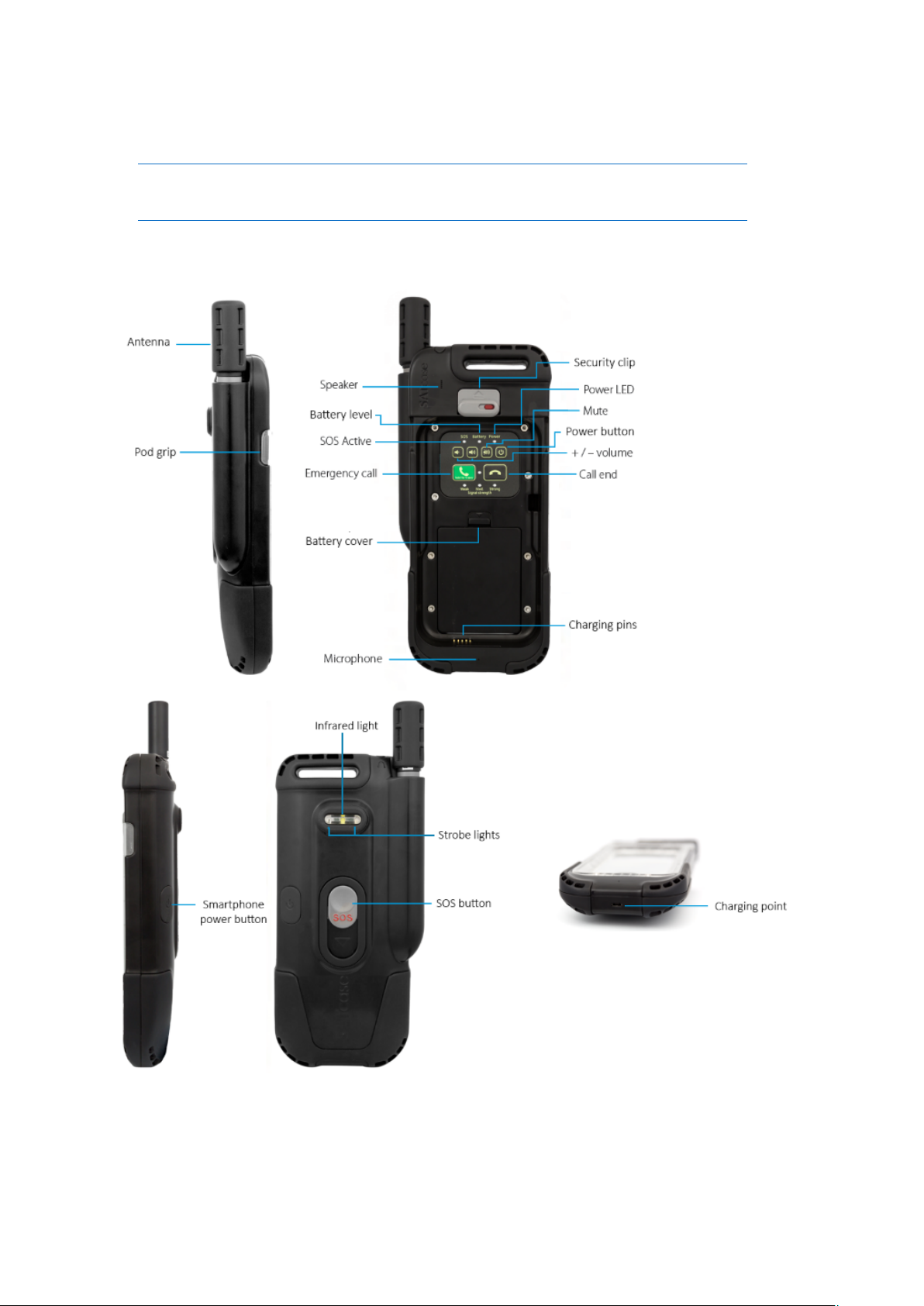
3. SATcase Product Information
3.1 SATcase overview
26
Page 27
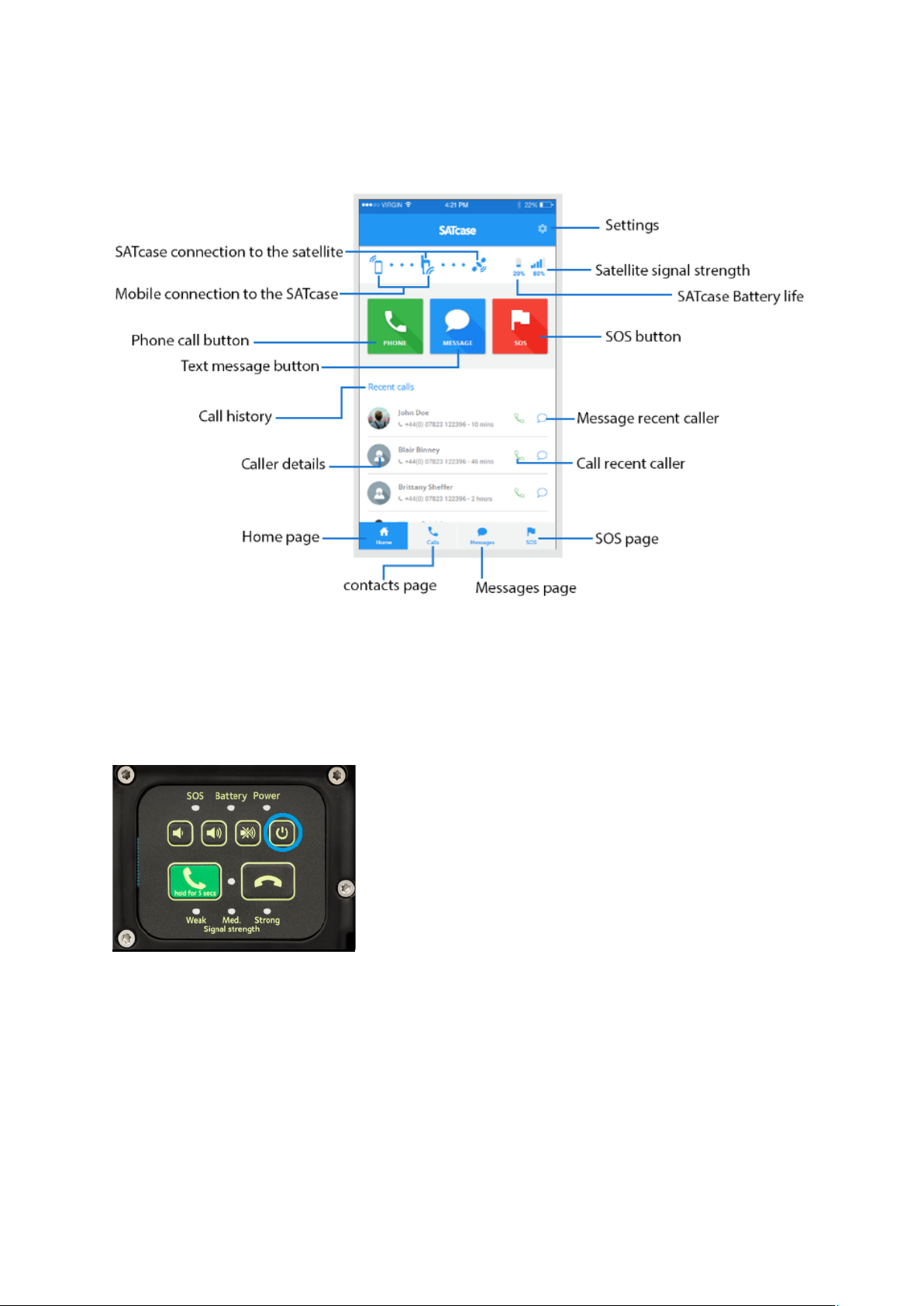
3.2 APP overview
3.3 Controls, connections and indicators
a) SATcase keypad
Power on
Remove the sleeve from the SATcase then press and hold the power button on the keypad.
When the power LED lights up green, the SATcase is powered on.
Pressing the power button when on will turn the SATcase off.
Call/ answer/ cancel call
Press the emergency call button once to answer an incoming call.
Hold the emergency call button for three seconds to call to the emergency pre-programed
number.
Press the end call button to cancel or end a call.
Volume levels/ Mute
27
Page 28
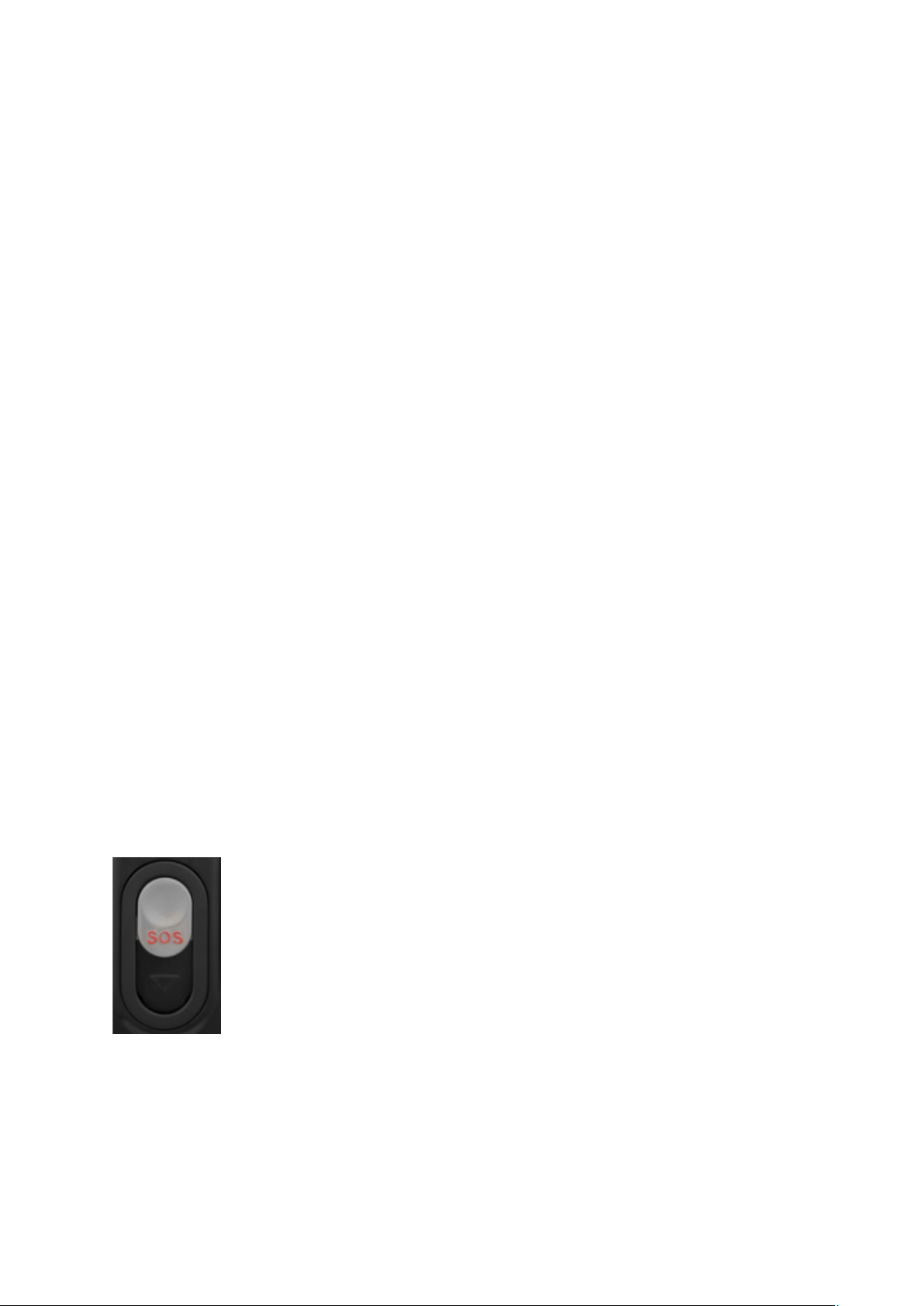
Pressing the volume up button will increase the volume of the SATcase speaker.
Pressing the volume down button will decrease the volume of the SATcase speaker.
Pressing the mute button will mute the sound coming from the SATcase speaker until pressed
again to activate sound.
b) Keypad LED indicators
SOS activation
When the SOS function is activated (from the back of the SATcase), the SOS LED will blink
repeatedly on the keypad.
The SOS LED turns off when SOS has been deactivated.
Call activation
When a call is activated or at calling tone stage, the call LED will light up on the keypad.
The call LED will turn off when the call has ended or failed.
Battery levels
The battery level LED is a bi-LED so will switch between green and red to indicate battery
levels (2.4e – ‘Checking battery charge level’ will instruct how to understand colour signals).
Signal levels
When using SATcase without the APP, little or no satellite signal strength is indicated when
the ‘weak signal strength’ LED lights up on the keypad.
Medium satellite signal strength is indicated when the ‘med signal strength’ LED lights up on
the keypad.
Strong satellite signal strength or full signal is indicated when the ‘strong signal strength’
LED lights up on the keypad.
When using the APP with the SATcase, the APP will notify the satellite signal levels.
Power on/off
When the SATcase is turned on, the power LED will light up constantly.
The power LED will turned off when the SATcase is turned off.
c) SATcase SOS button
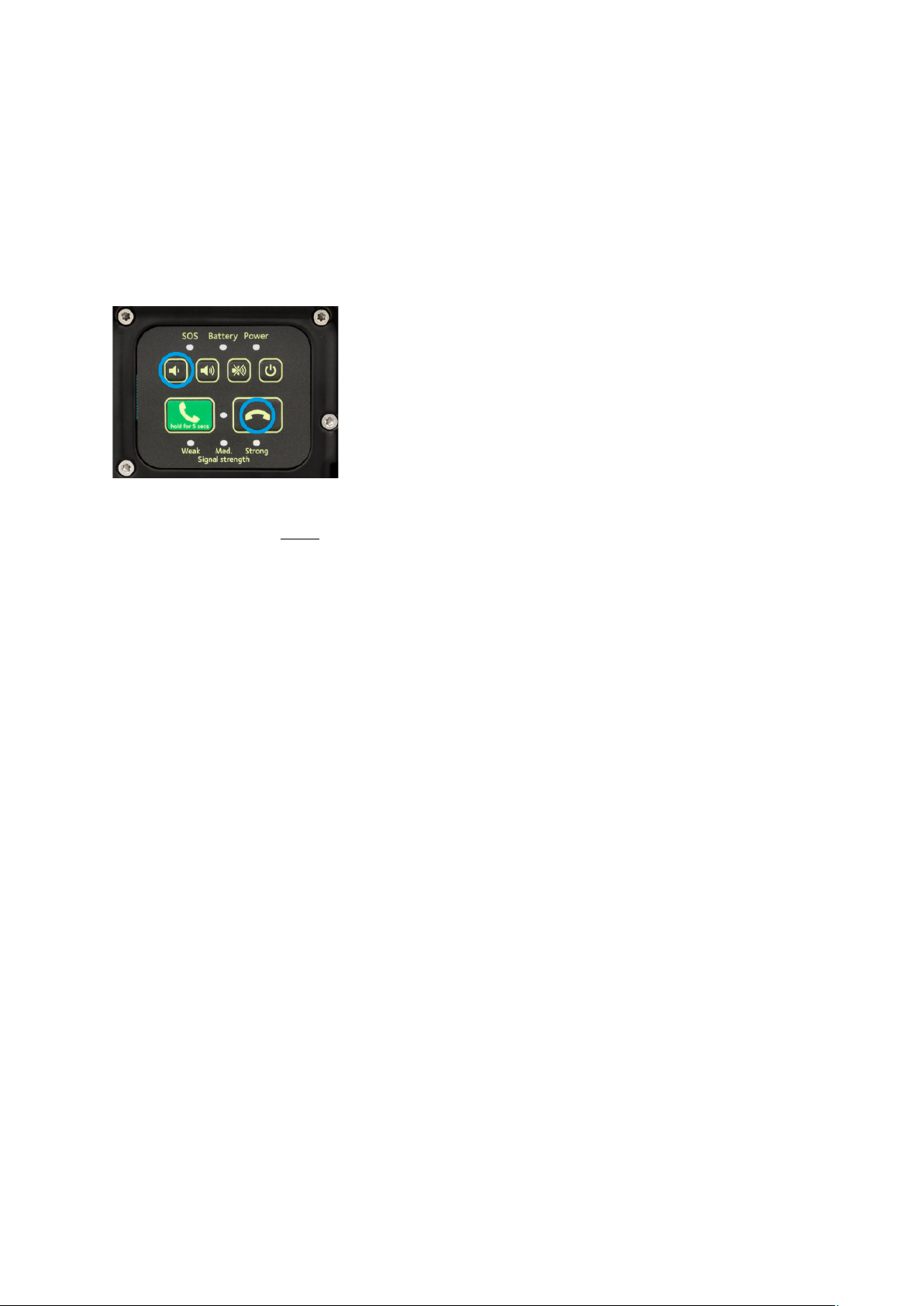
Below is the SOS cover, located on the back of the SATcase:
To send a distress signal to the Search and Rescue services from the SATcase itself, the user
must slide the SOS cover down and the uncovered SOS button must then be held for 3
seconds. The SATcase does not have to have satellite signal nor does the antenna need to be
extended, for the distress signal to activate.
To confirm the SOS is active, the SATcase SOS LED on the keypad will blink repetitively
and vibrate the SATcase for 15 seconds.
28
Page 29
Within the first 20 seconds of activation, the user has the option to cancel the distress signal
by holding down the SOS button for another 3 seconds. The SOS LED will turn off if the
distress signal has been cancelled.
Warning: the Search and Rescue service will charge a fee for their service. This service
charge is not anything to do with SATcase Ltd and all charges will come directly from the
rescue services.
Testing the SOS feedback is as followed:
The user can send an echo test to the SOS service provider to test the connection is
established. This does NOT activate a distress call.
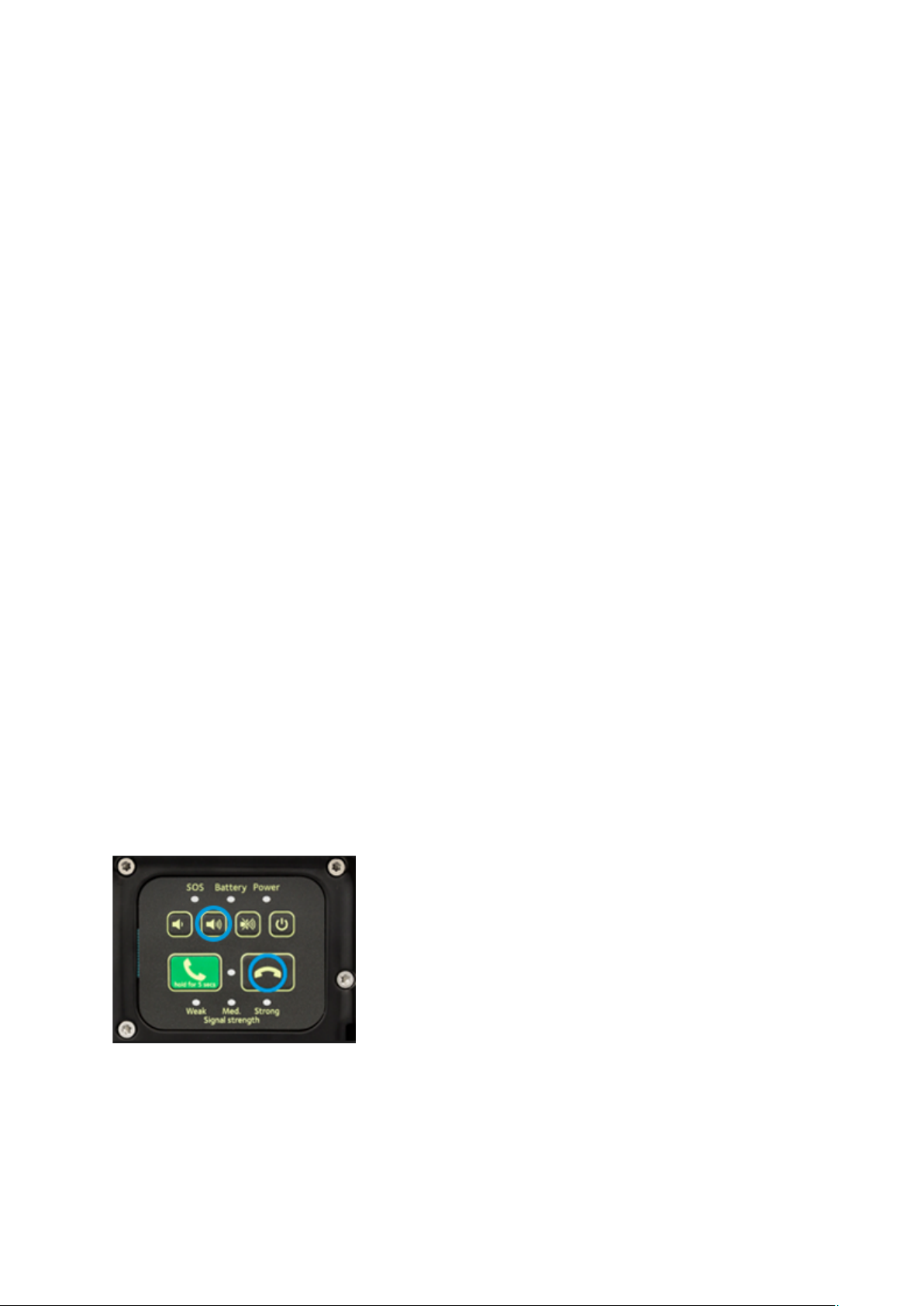
To operate this feature, turn the SATcase on, then press the ‘end call’ and ‘– volume’ button
at the same time. A green light on the keypad will signal a true connection and a red light on
the keypad will signal a failed connection.
Contact SATcase customer service if a red light is shown.
d) Smartphone power button
This button allows the user to turn the Smartphone on and off while inside the SATcase.
This button is located on the backside of the SATcase on the right-hand side (from front
view).
To switch the Smartphone on and off, press and hold this button until the screen display
shows the power on or off messages.
This button will also lock and unlock the Smartphone screen by pressing for a shorter period
of time.
e) Bluetooth connection
Keep the Smartphone and SATcase within 1.5 meter of each other to stay in range of
Bluetooth reach.
Make sure the SATcase is turned on and the Smartphone has Bluetooth turned on.
1. Searching for devices.
2. Select SC01 (SATcase) to connect via Bluetooth.
To prevent overriding or connecting to another SATcase within rage, you can rename the
SATcase Bluetooth name in the SATcase app settings.
Any Smartphone with Bluetooth can connect to the SATcase (not just the Smartphones that
fits in the SATcase).
Once the Smartphone has found the SATcase they will connect with each other and the App
will open automatically on the mobile screen.
29
Page 30
Connection failure
When the attempt to connect a Smartphone and SATcase via Bluetooth fails, make sure the
Smartphone Bluetooth settings are on. Also, make sure the two devices are within range from
each other. Then attempt to connect again.
f) App Notification Indicators
Call
When a call is attempted and there is no satellite signal the APP will notify the user there is
no satellite signal.
When a call is attempted and the Smartphone is not connected to the SATcase via Bluetooth,
the APP will notify the user to connect to the Bluetooth to initiate a call.
SATcase battery levels
The battery levels are shown constantly on the status bar.
Signal levels
The signal levels are shown constantly on the status bar.
Connection to SATcase
When loading the APP, the user will be prompted to connect the two devices via Bluetooth.
The APP will notify the user when the connection is lost and prompted to reconnect.
Antenna extension
For a call to be answered or initiated, the antenna must be fully extended. The APP will
notify the user of this operation if the user attempts to make or answer a call with the antenna
retracted.
g) Basic diagnostics:
A diagnostics test will assure the user that all the safety features are working and that the
SATcase is set up correctly in order to help in times of need.
This test is recommended at the start of every day the SATcase is in use.
This feature is to be operated through the SATcase keypad. In order to activate the basic
diagnostic test, the two buttons highlighted below must be pressed simultaneously.
To determine a successful test, the SATcase will light up the keypad LED green. The
SATcase is ready to use.
If the diagnostic test fails, the SATcase keypad will show a red LED. If this is the case, there
is an error in the device and you should perform an advanced diagnostics test (stated below)
to find out what the problem is.
30
Page 31

I) Advanced diagnostics:
This feature is to be operated through the SATcase APP.
To access this feature the Smartphone and SATcase must be connected via Bluetooth. Then
go to options within the App and select advanced diagnostics. Once the tests are completed, a
list of statuses will appear next to each individual feature tested. This will highlight any
failures and actions to solve issues.
To rectify the highlighted Issues, call SATcase customer service.
31
Page 32
1. Getting Started
4.1 Remove the SATcase sleeve
Unlock the double lock at the top of the sleeve by pulling the notch to the left-hand side and
sliding the latch up to the top position.
Pull on the wings located at the top left and right of the sleeve. When the top of the sleeve is
no longer flush with the SATcase, the sleeve will be able to disconnect from the SATcase
completely.
4.2 Install the SIM Card and Battery
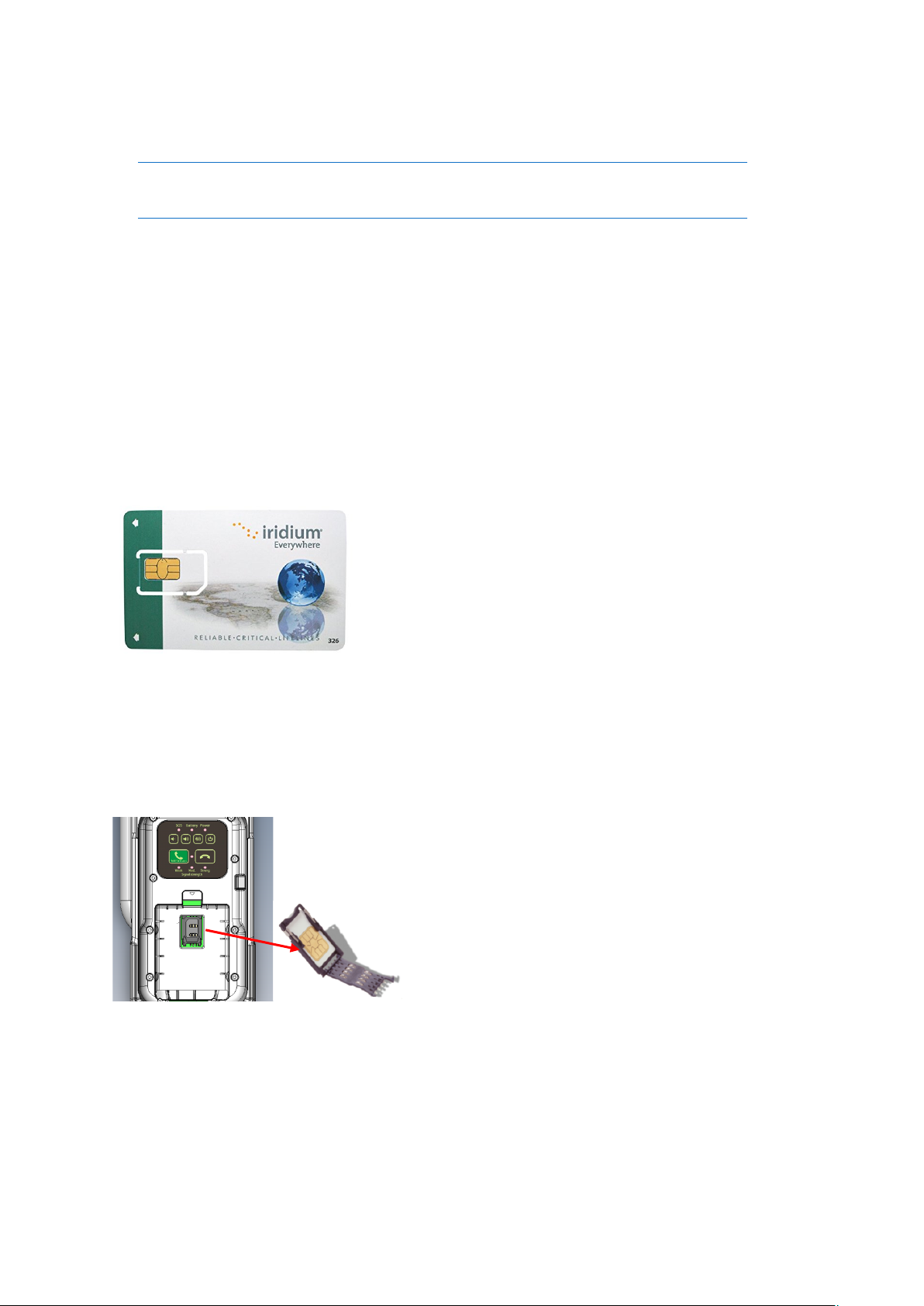
Open the box. Inside the box, you will find a sim card which looks like this:
Carefully remove the sim card from the card surrounding it.
a) Insert the SIM Card
To access the area where the SIM card is positioned, you must remove the SATcase sleeve as
well as the battery cover. Then the SIM can be inserted into the SIM card holder by pulling
back the SIM door and slotting the SIM into the cradle.
b) Insert the battery
Once the SIM card is in place, the battery is to be placed on top, covering the SIM from sight.
Make sure the battery is the right way up, by having SATcase connector pins lined up with
the battery power supply and battery label showing the text the right way round.
32
Page 33
c) Remove the SIM Card
Follow the instructions above to access the SIM and remove the battery. Then remove the
SIM by pulling back the SIM door and removing the SIM from the cradle.
4.3 Install the SATcase App
Download the SATcase APP from the APP Store (if using an iPhone) or Google Play (if
using an android).
4.4 Activate the SIM Card
Register all personal information and preferences on the SATcase APP setup page. After 24
hours the SIM card will be activated.
4.5 Switch on SATcase
Remove the SATcase sleeve (following heading 4.1) and press the power button on the
SATcase keypad.
4.6 Pair the SATcase and Smartphone
When the SATcase APP is loaded, it will prompt the user to activate the Bluetooth. Once
activated on the Smartphone, you need to search for the SATcase’s Bluetooth ID. The
SATcase must be turned on for the Smartphone to receive it. Once found, the SATcase ID is
stored on the APP and stored for the next time used.
4.7 Insert the Smartphone
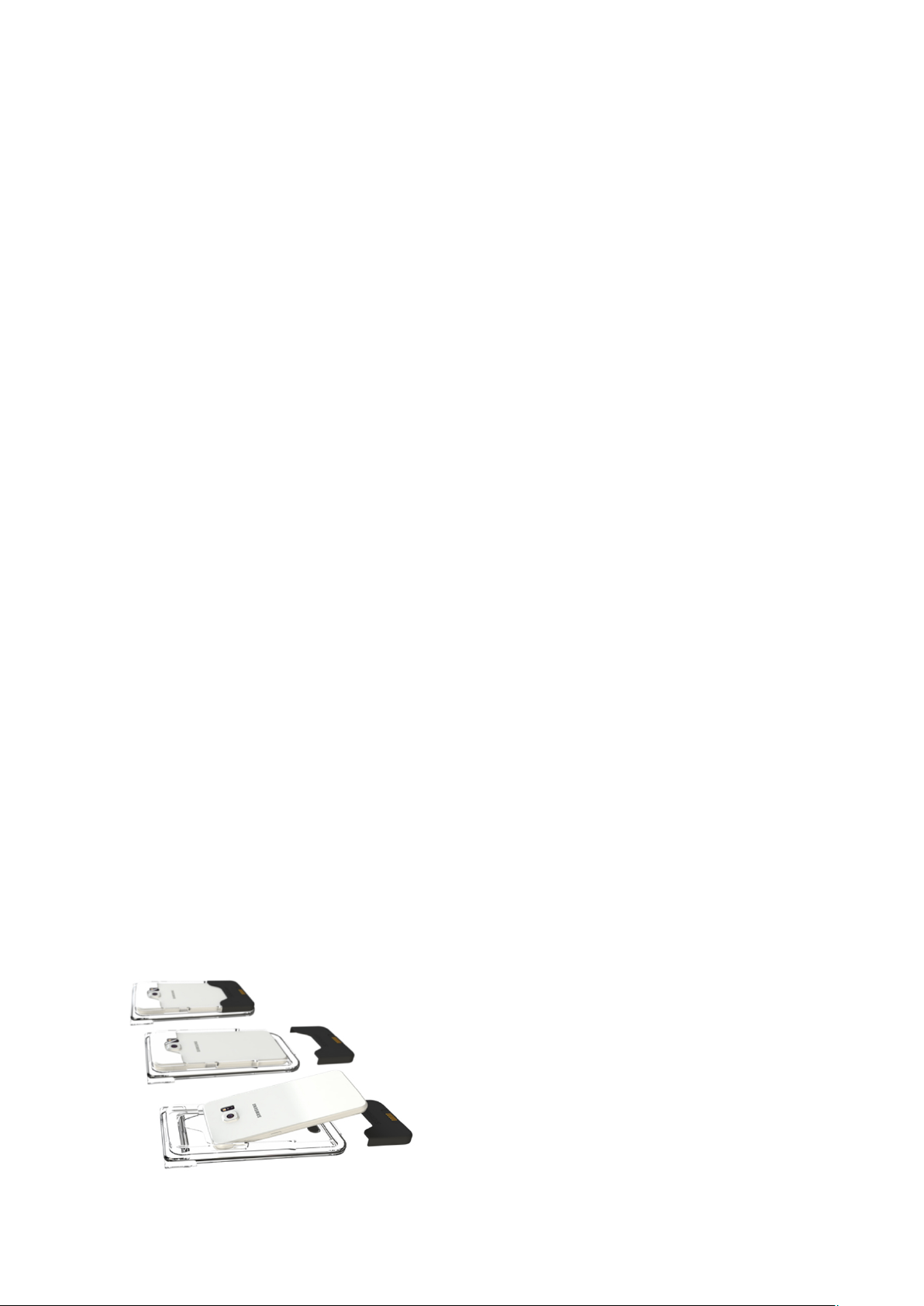
Sliding the bottom of the sleeve apart will present the area where the Smartphone is to be
positioned.
Slot the top of the Smartphone in to the sleeve first. Once flush, lock the Smartphone in to
position by connecting the bottom part on to the sleeve. As shown below:
33
Page 34

The Sleeve that comes with the SATcase should be custom to your personal Smartphone.
To check if the sleeve is correct for you Smartphone, refer to your Smartphones user manual
and make sure the charging port type matches the connector inside the sleeve.
There are a variety for sleeves that fit different Smartphones. Please visit SATcase.com to
find out which Smartphones fit inside the SATcase. You can purchase additional sleeves if
you want to upgrade your Smartphone or have multiple Smartphones.
Please note:
• The SATcase Is limited to connecting to one Smartphone at a time. The SATcase can
swap between Smartphones once Bluetooth is repaired. The sleeve can also be
swapped with an alternative sleeve.
• If your Smartphone does not fit a sleeve, you can connect the Smartphone to the
SATcase via Bluetooth and use the device externally.
4.8 Insert the SATcase sleeve
Cover with the top of the sleeve until a click feedback completes the assembly of the sleeve.
Place the bottom of the sleeve in the bottom of the SATcase bed at a slight angle and push the
top of the sleeve flush into the SATcase, making sure the double lock is unlocked and not
obstructing the path of the sleeve.
Flick the double lock down into its functional position to create an IP681 watertight seal.
Before removing the sleeve, make sure the surrounding areas are dry, if there is any liquid on
it, please wipe it with a clean cloth.
34
Page 35
Smartphone and SATcase icons are blue.
The Smartphone and SATcase are
connected via Bluetooth.
SATcase and satellite icons are blue.
The SATcase is connected to the satellite.
All three icons are blue.
The Smartphone and SATcase is connected
to the satellite.
Smartphone icon is grey
The Bluetooth is not connected
(see heading 3.3e to connect).
The satellite icon is grey
The SATcase is not connected to the
satellite
(see heading 2.6 to connect).
SATcase and satellite icons are grey
The Smartphone is not connected to the
SATcase via Bluetooth
2. How to Use the SATcase
5.1 How to use the SATcase with the Smartphone App
Bluetooth must always be connected between the Smartphone and SATcase when using the
Smartphone for satellite communication.
Once the Smartphone and the SATcase is connected via Bluetooth, the user has the option to
use the mobile within the SATcase or separately.
When selecting the SATcase App on the Smartphone the APP home page will appear.
a) Home
The home page will list any notifications, such as missed calls or unopened messages.
Selecting these notifications will direct the user to the relevant pages.
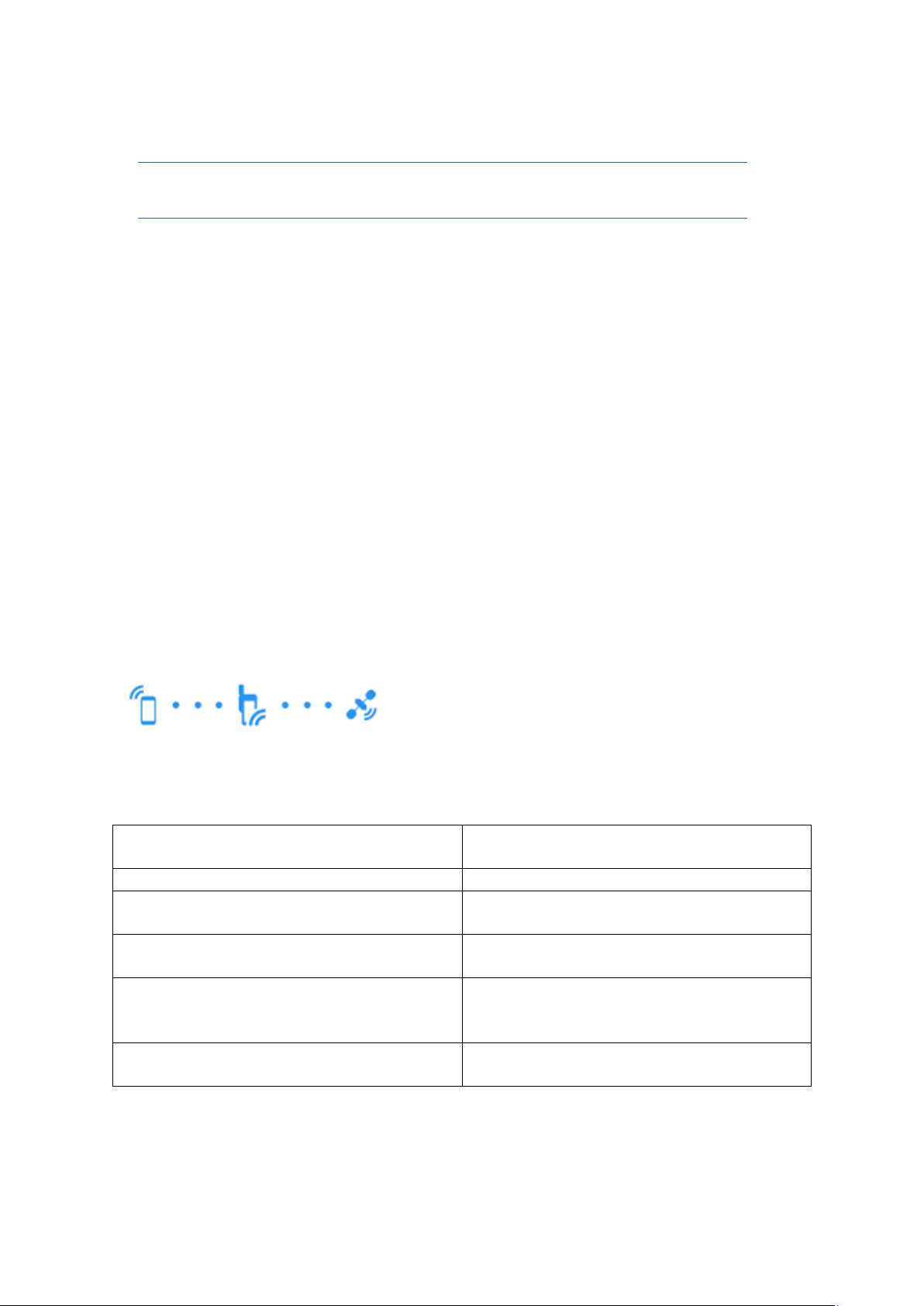
There is a connection feature located at the top of the page. This shows the connection status
between the Smartphone, SATcase and satellite.
The connection feature illustration is shown below:
A blue icon symbolises a positive connection and a grey icon symbolises a negative
connection.
Below are the feature result meanings:
35
Page 36
There is a battery and satellite signal strength feature at the top right of the page.
The battery icon highlights who much battery the SATcase has and is shown below:
The satellite signal strength icon is shown below:
The satellite signal strength icon highlights the satellite signal strength the SATcase is
receiving from the Satellite.
The better the visibility the SATcase antenna has to the open sky, the higher the signal
strength will be.
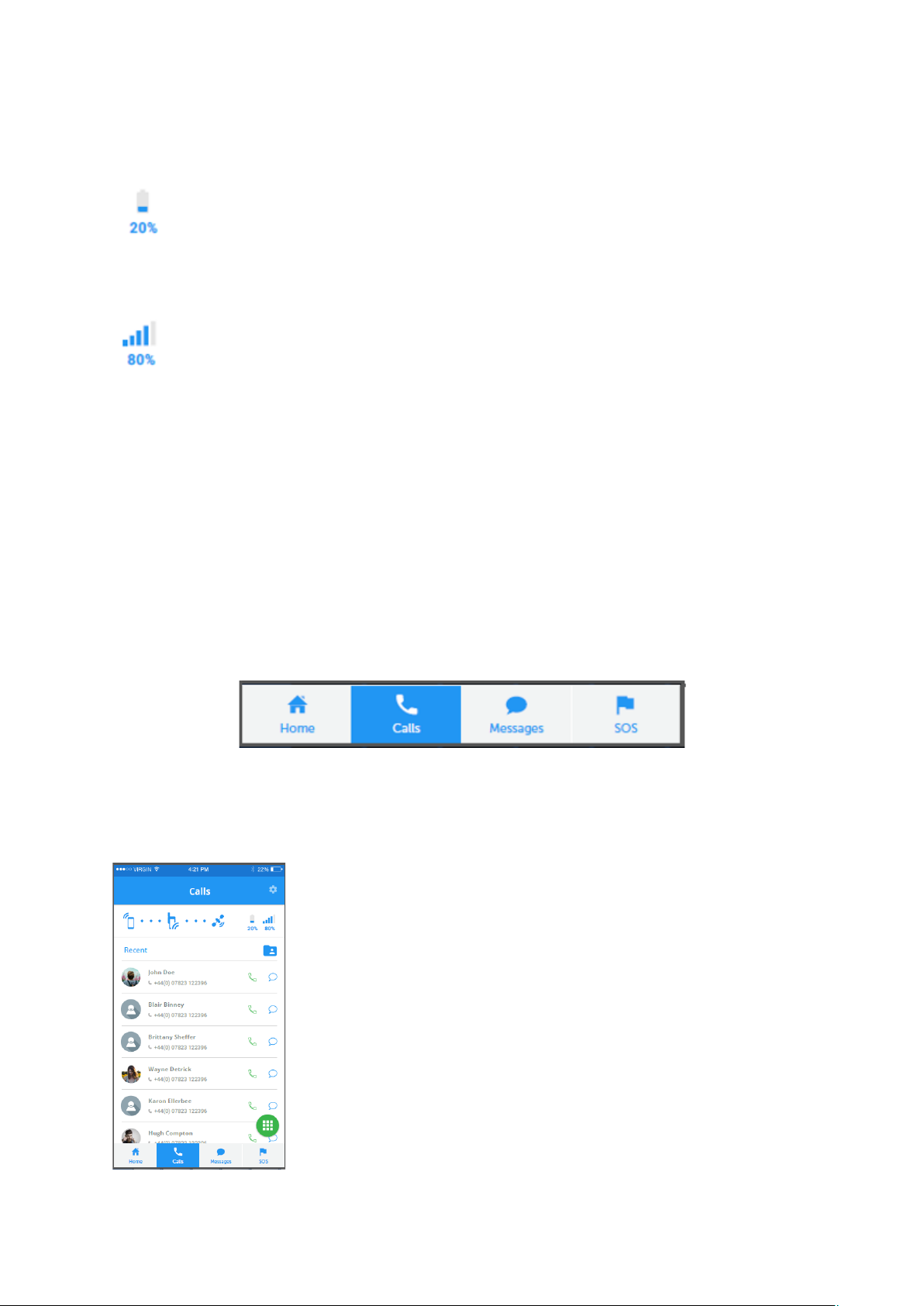
Once at the home page you have four different tabs which you can navigate around:
• Home
• Calls
• Messages
• SOS
•
b) Calls
The Calls page will show a list of previous calls made, received and missed, as show below:
36
Page 37
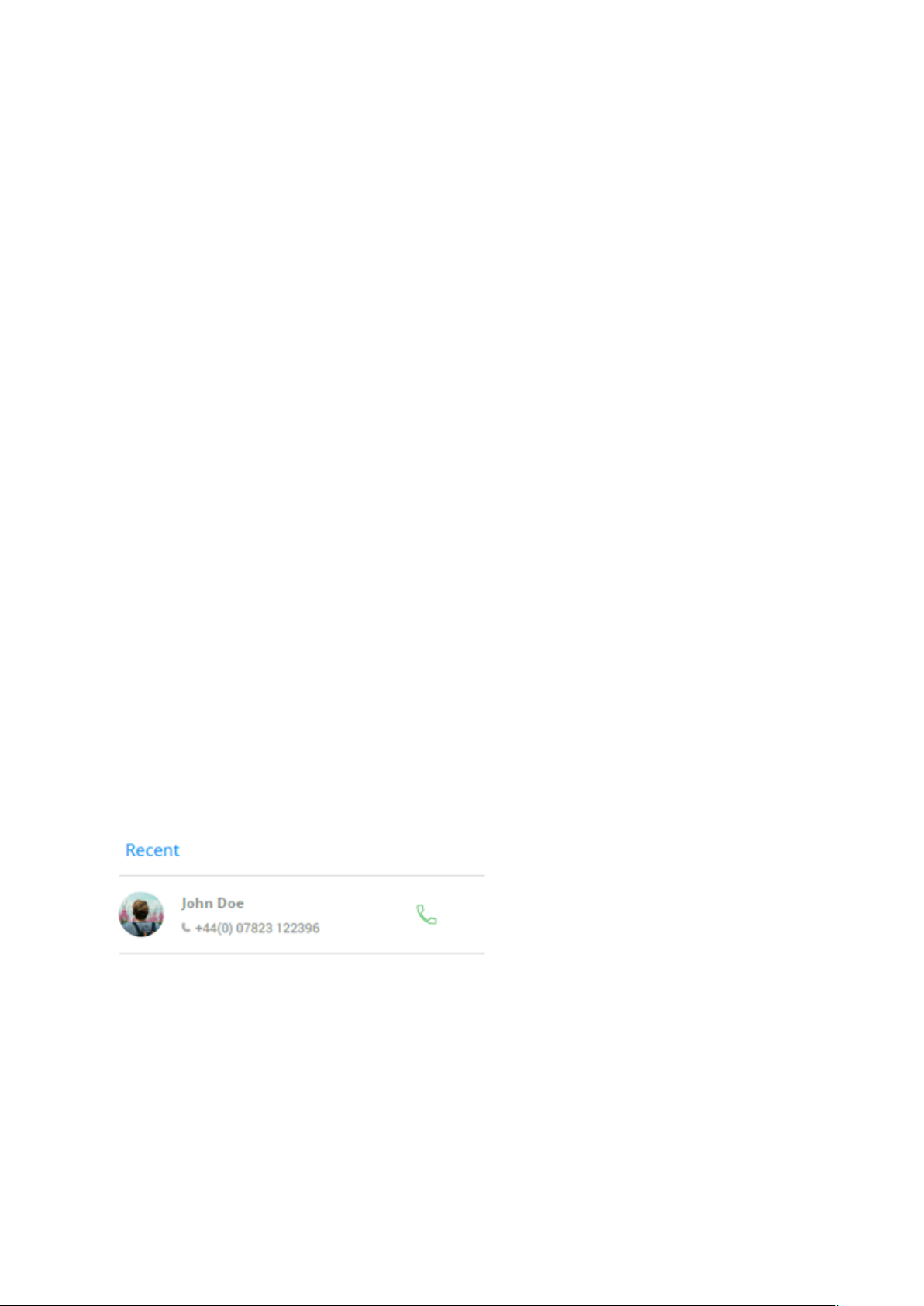
Selecting the call icon next to any of these numbers will prompt a satellite call to the number.
Selecting the message icon next to any of these numbers will prompt a satellite call to the
number.
Receiving a call
If the Smartphone is in the sleeve attached to the SATcase, the call can be answered from the
Smartphone APP. Voice and sound will be enabled through the SATcase.
If the Smartphone is not in reach, the call can be answered from the SATcase and voice and
sound will be enabled through the SATcase.
How to answer a call through the APP:
1. A pop up screen will appear on the SATcase APP, showing a call coming in.
2. Press the ‘answer call’ button to activate the satellite call.
3. Press the ‘end call’ button to end the call.
If a call is missed, the APP will display a missed call notification on the home page and be
recorded on the call page.
If the SATcase is not in operational use when a contact tries to call the SATcase, the call will
be logged as a missed call on the home page as soon as the APP is connected SATcase.
Making a call
If the Smartphone is in the sleeve, attached to the SATcase, the call can be made through the
APP and voice and sound will be enabled through the SATcase.
If the Smartphone is not in reach, the call can be made from the SATcase and voice and
sound will be enabled through the SATcase.
How to make a call through the APP:
1. Select the ‘calls’ page on the APP
2. Select the contact you want to call, either by:
• pressing the call icon next to the recent contact, as shown below:
• Entering a number in manually as shown below:
37
Page 38
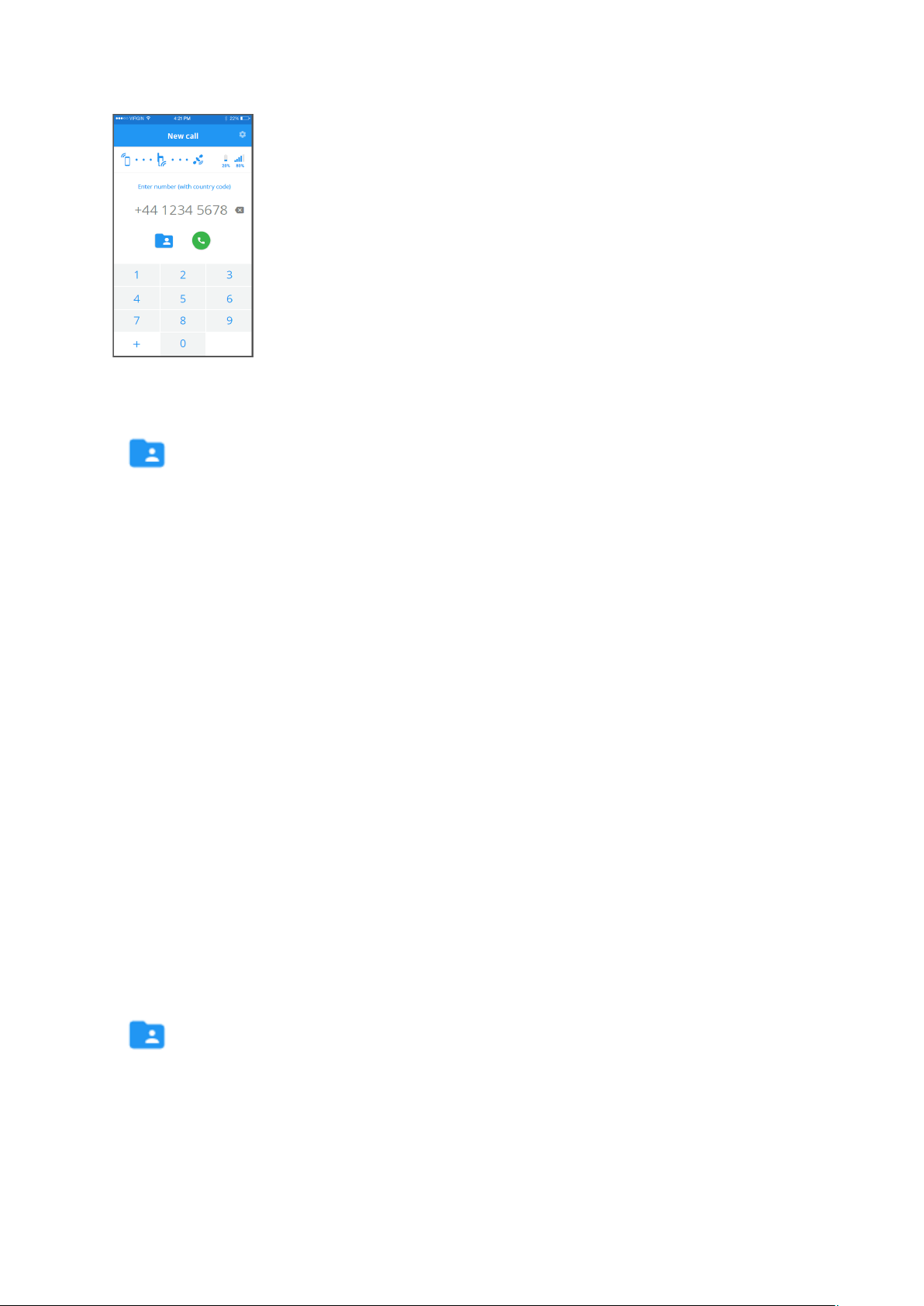
• Browsing through your Smartphones’ contacts, by pressing the icon below:
3. Press the ‘call’ icon to active the call
4. Press the ‘end call’ icon to end the call.
c) Messages
Select the message page within the APP. This page will show message threads of current and
previous message conversations.
Sending a SATcase text message
If you want to communicate by text while outside GSM range, the SATcase text message will
enable you to do so.
How to send a message through the APP:
1. Select the messag page on the APP
2. Start the message by either:
• selecting the ‘new message’ icon.
or
• Select contact from existing message thread
3. Enter the desired text
4. Select the contact (if a new message thread), by either:
• Browsing through your Smartphones’ contacts, by pressing the icon below:
Or
• Typing in a phone number (with county code) in the ‘recipient’ box.
5. Press ‘send’ to send the text.
Message threads
38
Page 39
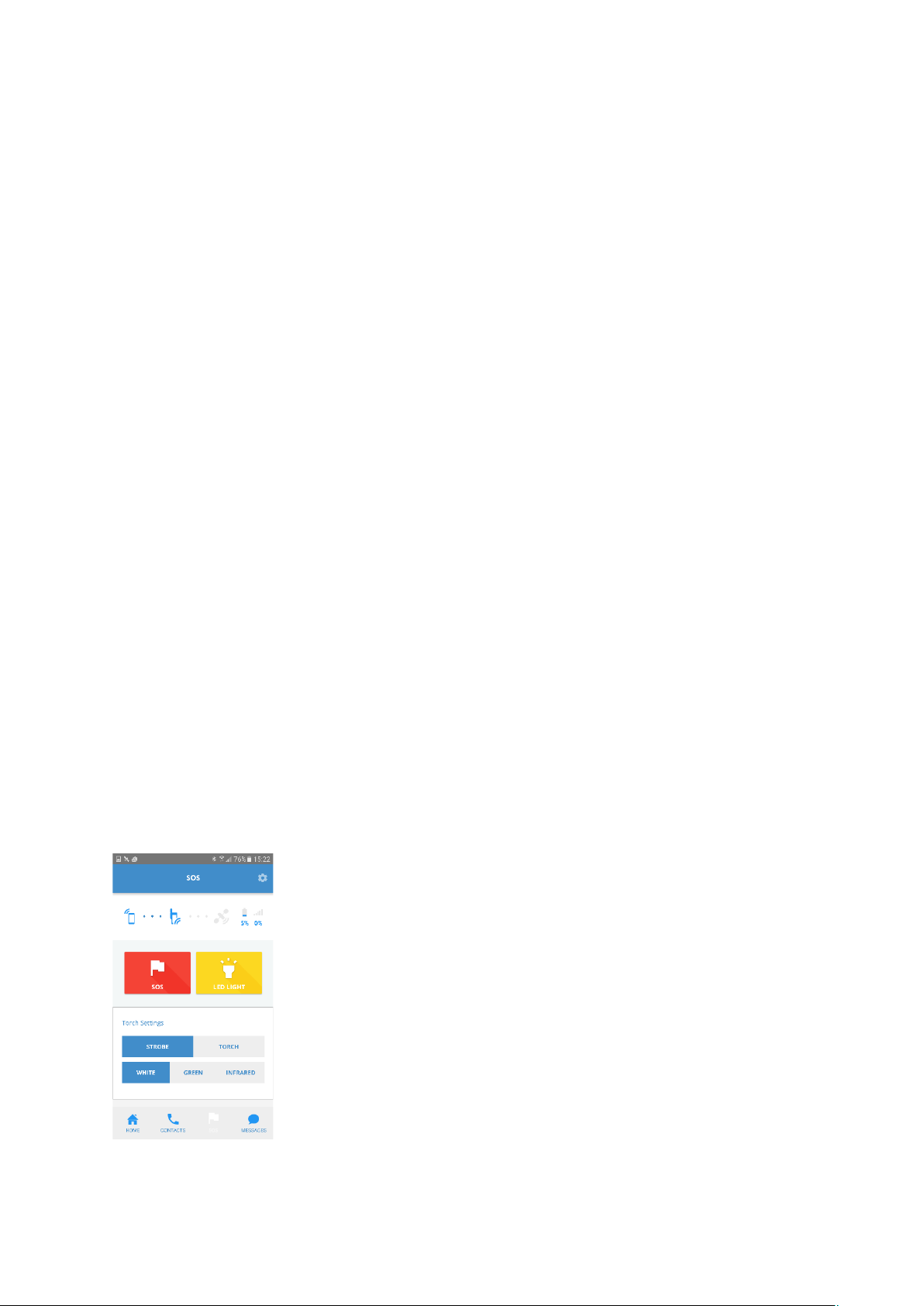
Message threads are recorded history of previous SATcase text messages. Selecting a thread
will enable the user to reread or continue a conversation with participants in each thread.
Sent confirmation
Once a message has been sent, the message sent indication is displayed at the bottom of the
text.
Failed to send
If the message continues to fail and runs out of automatic resending attempts then the
message failed indication is displayed. Click the error message to resend
Sending location via text
The SATcase has a location sharing feature within the messaging command.
When the location symbol is pressed at the stage of sending a text on the messaging page, the
SATcase will paste the location coordinates in to the text box.
Receiving a text
When the user receives a message, a notification will be highlighted on the APP home page.
Selecting this notification with direct the user to the message on the message page. The APP
will organise each contacts message in to threads so the user can scroll through each
conversation.
If the Smartphone and SATcase are not connected via Bluetooth when a message is sent to
the SATcase, the message will be received as soon as the Smartphone Is connected to the
SATcase.
d) Email
An email is sent by copying the instructions of sending a SATcase message but adding an
email address in to the recipients details instead of a phone number.
The maximum characters that can be sent in each email is 500.
e) SOS
Below is a picture of the SOS page:
39
Page 40
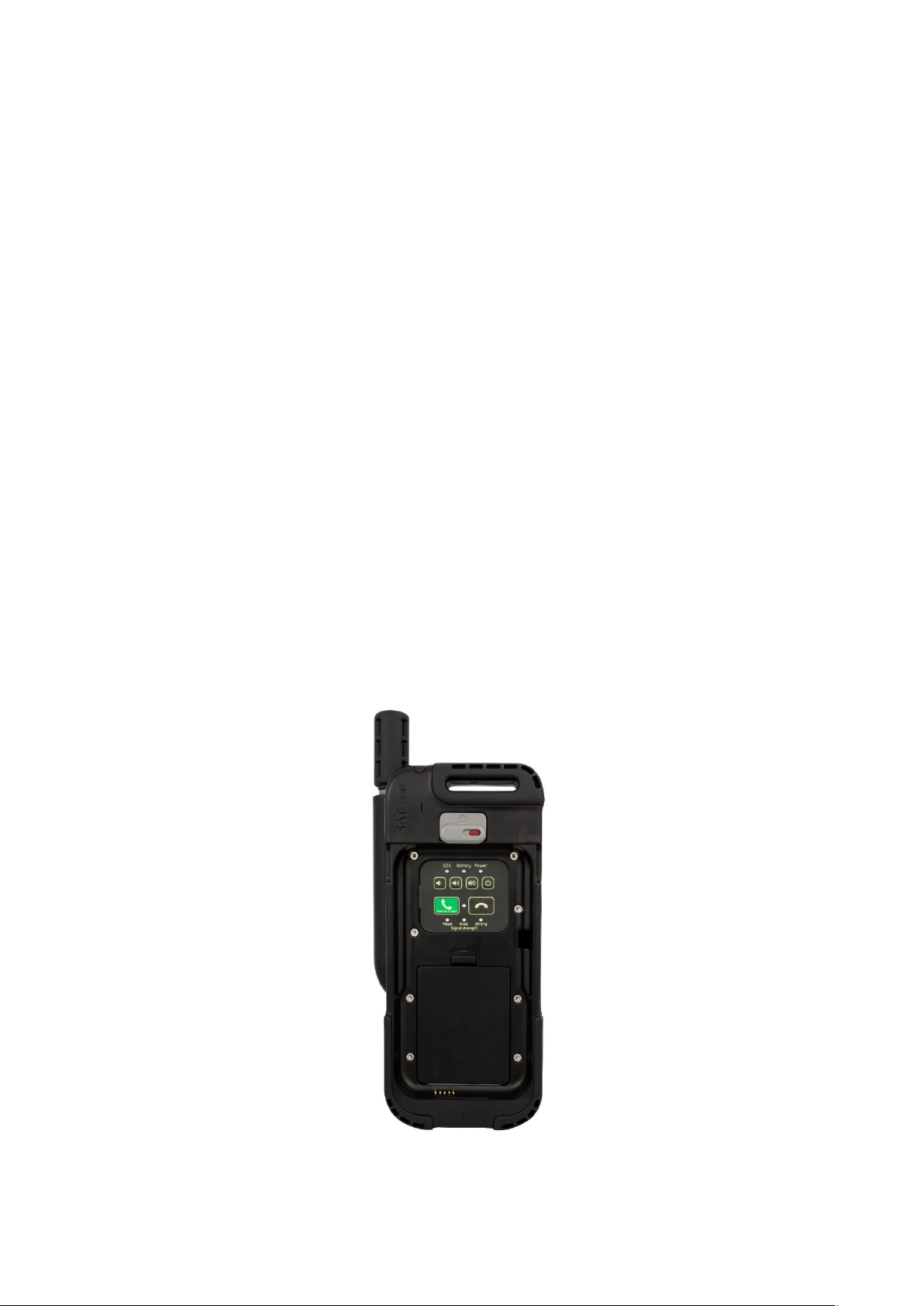
The SOS page shows an SOS button, which alerts Search and Rescue of the users’ danger.
This SOS activates the same alert as the SOS button on the back of the SATcase (read
heading 3.3c to find out more).
To activate the SOS via the APP, the user must hold the SOS icon for 3 seconds.
To confirm the SOS is active, the APP will show a constant SOS notification on the status bar
and the SATcase SOS LED on the keypad will also blink repetitively and vibrate the
SATcase for 15 seconds.
Within the first 20 seconds of activation, the user has the option to cancel the distress signal
by holding down the SOS icon for another 3 seconds.
When the SOS is deactivated, the notification will be removed from the status bar and the
SATcase SOS LED on the keypad will turn off.
Torch LEDs
The SOS page also has the controls for the torch LED’s located on the back of the SATcase.
There are three torch LEDs: White, green and infrared.
Turning on the ‘Flash’ toggle icon will result in the colours selected to flash. To stop the
LED’s from flashing, turn off the ‘Flash’ toggle icon.
Turning on the ‘Torch’ toggle icon will result in the colours selected to shine constantly. To
stop the LED’s from shining constantly, turn off the ‘Torch’ toggle icon.
5.2 How to use the SATcase without a Smartphone
The SATcase can be used without a Smartphone connected.
To access the SATcase keypad, the sleeve needs to be removed from the SATcase.
You will see the keypad on the SATcase as shown below:
40
Page 41

There are a number features on the SATcase keypad. Please refer to headings 3.3a for further
details.
Making a call
Hold the emergency call button on the SATcase keypad for three seconds to activate a
satellite call to the preprogramed number (see heading 2.7 for further details). Press the end
call button to hang up the call.
Answering a call from the SATcase
Press the emergency call button on the SATcase keypad to answer the satellite call. Press the
end call button to hang up the call.
If a call is missed, the user will be notified via the SATcase APP when the Smartphone is
next connected to the SATcase via Bluetooth.
Voicemail
Voicemail needs activating on the SATcase APP set up page. As long as it is set up it will
store voicemails whether the SATcase is on or off.
If the SATcase is not in operational use when a contact leaves a voicemail, the voicemail will
be notified on the SATcase APP home page as soon as the APP is connected SATcase.
41
Page 42

Problem
Solution
Inactivated sim
Sim must be activated before use. Wait 24 hours
after completing the set up in the SATcase APP
The battery won’t charge
Make sure the correct power input is connected
(5V).
If SATcase has been taken outside of the
temperature limits, request for a service from
SATcase.
The battery is draining faster than
usual
If SATcase has been taken outside of the
temperature limits, request for a service from
SATcase.
Not receiving missed calls
Once the Smartphone is connected to the SATcase
via Bluetooth, the missed calls will notify the user
on the APP.
Water damage
The SATcase is only IP681 compliant when the
sleeve is installed into the SATcase. Make sure the
sleeve is locked in position with the safety clip
locked down.
The SATcase is not waterproof any deeper than 1.5
meters
General commands are failing
Conduct a basic diagnostics test and advanced
diagnostics test
Failed diagnostics
Contact SATcase customer service
Lost Bluetooth connection error
Stay in 1.5 meter range of Bluetooth reach.
If the device goes out of
temperature range
Conduct an advanced diagnostics test and contact
SATcase customer service
Can’t hear GSM call through SATcase
No sound is passed through the SATcase on a GSM
call. Either put Smartphone into airplane mode or
remove mobile from sleeve when needing to make
GSM calls
Missed calls notified without
receiving a call.
When the SATcase has no satellite signal the
SATcase will not receive information of a call until
in range of signal. Make sure antenna is extended
to receive a call and is in open view of clear sky.
No sound comes out of the
Smartphone in the sleeve
The mobile will have to be removed from the
sleeve in order for voice and sound to be
activated.
6. Troubleshooting
42
Page 43

7. Endnotes
1. IP68: The IP standard we test to is BS EN 60529:1992 +A2:2013 and IEC 60945.
This standard, titled Degrees of Protection provided by IP Code, contains the
criteria to assess equipment to its appropriate IP code.
• Certified to withstand 1.5 meter underwater for 1hour 30 minutes.
• No ingress of dust; complete protection against contact.
Warning:
Please note, this rating is only valid, if the sleeve is correctly connecting on to
the SATcase.
2. MIL-810: (or MIL STD-810) is a US Military Standard which focuses on a product or piece of
equipment’s ability to withstand environmental stresses and function as intended
throughout its service life, including during transit or storage.
The SATcase can withstand stock from dropping up to a height of 1.5 meters.
That's basically a chest-high tumble, so you can rest assured that your
SATcase will survive falls covering the distance from your hands to the
ground in most circumstances.
MIL STD-810 covers the requirements for both climatic testing and
mechanical testing, as listed below:
• 500 - Low Pressure (Altitude)
• 501 - High Temperature
• 502 - Low Temperature
• 503 - Temperature Shock
• 504 - Contamination by Fluids
• 505 - Solar Radiation
• 506 - Rain
• 507 - Humidity
• 508 - Fungus
• 509 - Salt Fog
• 510 - Sand and Dust
• 511 - Explosive Atmospheres
• 512 - Immersion
• 513 - Acceleration
• 514 - Vibration
• 515 - Acoustic Noise
• 516 - Shock
• 517 - Pyroshock
• 518 - Acidic Atmosphere
• 519 - Gunfire Vibration
• 520 - Temperature, Humidity, Vibration and Altitude
43
Page 44

• 521 - Icing/Freezing Rain
• 523 - Vibro-Acoustic/Temperature
8. Warranty and Support
The SATcase has a 12 month warranty.
If you have an issue or query in regard to the operation of your SATcase please contact us
using one of the following methods;
Call us on +44 (0) 2038567766 to reach the SATcase helpdesk. The helpdesk is open Monday
to Friday from 8am-6pm UK time.
Email us at [email protected]. This will create a helpdesk ticket which we will respond
to within helpdesk hours of Monday to Friday from 8am-6pm UK time.
9. Contact Details
General Enquiries: +44 (0) 1904 37 99 66
SATcase Helpdesk: +44 (0) 2038567766
Business Hours: Monday-Friday 8am-6pm UK Time.
All enquiries outside of business hours will be responded to once business resumes.
44
 Loading...