

Page 1
SR-BH40
True Wireless Stereo E arbuds
真无线蓝牙耳机
This manual is for reference only. Please refer to the actual product for the specific functions and appearance of the
product. Please read it carefully before using this product and keep it in a safe place for future reference.
本手册仅供参考,产品具体功能及外观请以实物为准。使用本产品前请先仔细阅读,并妥善保管,以备查阅。
© 2020 Saramonic Corporation
Page 2
Thank you for purchasing this product!
Please read carefully and strictly follow the instructions and precautions
before using this product, and keep it in a safe place for future reference.
Tips: When you receive this product, please tear off the insulating film at the
charging contacts of the earbuds.
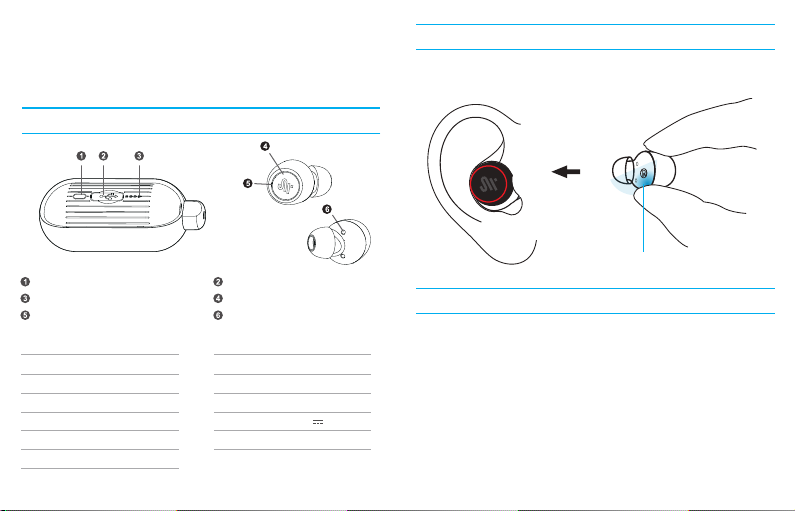
Product Overview
How to wear
Correctly insert the earbuds into your ears according to the L/R mark (L for the
left while R for the right), and make sure that the microphone points to your mouth.
Indicator button
Battery level indicator
Status indicator/built-in microphone
Earbud
Bluetooth Name
Bluetooth Version
Battery Capacity
Wireless Range
Runtime
Weight
Saramonic BH40
5.2
60mAh
Approx. 10m
Approx. 10 hours (50% volume)
4g (Each)
Dust cover of charging port
Versatile touch panel
Charging contacts
Charging Case
Capacity
Additional Runtime
Charging Time
Input Voltage
Weight
320mAh
Approx. 15 hours
Approx. 1.5 hours
5V 300mA
42g
Keep the blue area close to your ears
Power On/Off
1. Power On
① With charging case: open the case and take out the earbuds. The earbuds
will automatically turn on with voice prompts "Power on".
② Without charging case: when earbuds are off, tap and hold the touch panel
for about 2.5 seconds, the earbuds will turn on with voice prompts "Power
On".
2. Power Off
① With charging case: put the earbuds back into the charging case,the
status indicators will be solid red.
② Without charging case: when earbuds are on, tap and hold the touch panel
for about 8 seconds, the earbuds will turn off with voice prompts "Power Off".
Note: ① When connecting for the first time, Voice prompts "Pairing"
② If connected successfully, voice prompts “Connected”
Page 3
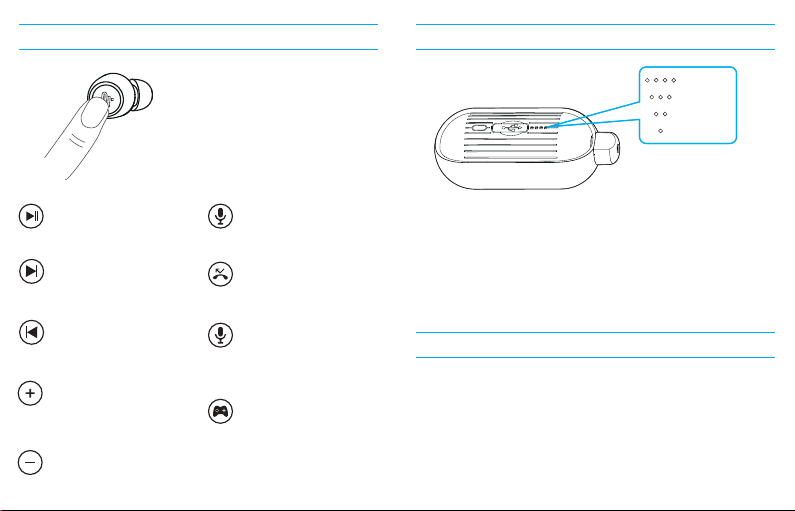
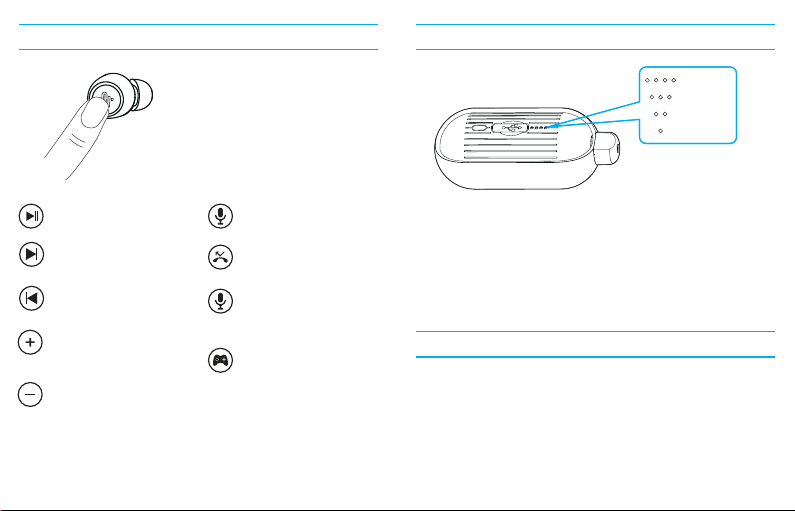
Charging caseTouch control
75%-100%
50%-75%
25%-50%
0%-25%
Play/Pause
Double-tap the touch panel
of L/R earbud
Next
Tap the touch panel of right
earbud 3 times
Previous
Tap the touch panel of left
earbud 3 times
Volume up
Tap and hold the touch panel
of right earbud for 1.5s until
voice prompts “du”
Volume down
Tap and hold the touch panel
of left earbud 1.5s until voice
prompts “du”
Answer/hang up a call
Tap the touch panel of L/R earbud
Reject a call
Tap and hold the touch panel
of L/R earbud for 2s
Activate voice assistant
When connected, tap the touch
panel of left earbud 4 times
Enter/exit game mode
Tap the touch panel of right
earbud 4 times
Enter: voice prompts “Game
Mode”
Exit: voice prompts “Bluetooth
Mode”
To display battery level:
Put the earbuds into the charging case and press the indicator button. The
indicator will display the current battery level of the charging case.
Charging Status:
Connect Type-C charging cable to the charging port, the indicator will show
the current battery level. When the charging case is fully charged, all four blue
Indicators will be on for 1 minute. Remove the charging cable, and all the
indicators will be off.
Factory Reset
Reset the earbuds in the following situations:
1. The earbuds has been paired with other devices, and Saramonic BH40
cannot be found on your device.
2. Only one earbud work.
Steps: Turn on the earbuds and tap the touch panel 3 times, then tap and
hold it for 5s. The status indicator will flash red and blue alternately. Put them
back into the charging case and then take out.
Note: The above steps need to be completed within 8 seconds.
Page 4

FAQ
Q: Only one earbud work?
A: Put the earbuds into the charging case and then take out, if still only one
earbud works, restore them to factory setting.
Q: Failed to connect devices with earbuds?
A: Delete the pairing record on the devices and reconnect with earbuds.
Q: No sound in the phone call?
A: Select "Saramonic BH40" as your audio input source in your device Settings.
Q: Audio delay in video or gameplay?
A: Environment, WiFi, encode/decode speed of other devices and software
are all possible factors to affect the audio data transmission speed of the
earbuds. For example, most game software set real-time audio transmission as
a priority, which is possible to affect the speed.
Q: Why is there stuck/ breakpoint?
A: If there are many WiFi routers, 4G signals, high-power electrical appliances,
etc, when using, it may be stuck or breakpoint. It can be solved by changing
the environment or reconnecting.
Safety instruction
1. Please use the original or with safety certification wire harness for charging.
2. When using earbuds, please adjust the volume appropriately to avoid
damaging the hearing.
3. Please use the product correctly to avoid falling or heavy extrusion.
4. Children should be accompanied by adults to avoid eating by mistake.
5. Keep away from extreme environments such as high temperatures or
humidity.
6. Please do not disassemble this product.
包装清单
1. Changing case
2. L & R earbuds
3. Type-C charging cable
4. Neck strap
5. Manual
6. Warranty card
7. Certificate
After-sales and supports
According to the relevant laws and regulations of consumer electronic
products and the actual situation of the industry, the following after-sales
service regulations are formulated to provide consumers with satisfactory
after-sales services:
1. Warranty certificate mainly includes:
warranty card and sales certificate.
2. After-sales service scope:
• During the warranty period of the product, the company will be responsible
for providing free maintenance for any failure caused by the quality problem
of the product itself under normal use without disassembly and repair;
• For products beyond the warranty period, the warranty certificate shall be
issued and the maintenance fee shall be paid. If any spare parts are
needed for repair, cost for the spare parts would be born by the purchaser;
please avoid repair and replace when the product is not tested by
Saramonic after-sales department;
• Once the warranty certificate is altered, the warranty will become invalid
immediately;
• The warranty certificate of the product shall be properly kept by the
consumer and shall not be supplemented if lost.
Page 5

3. Warranty Period:
• Within one year after purchasing this product, there are quality problems in
normal use (non-human damage) without disassembly and repair; 1-year
warranty (including all accessories) from the date of issuing the sales
certificate;
• Consumers who have quality problems in normal use (non-human damage)
within7 days from the date of purchase, without repair, can enjoy the
replacement service;
• The replacement service is limited to products of the same model and
color.
4. Regulations on invalidation of the warranty during the warranty period
4.1 In the following cases, the warr anty is invalid, but the maintenance service is
provided, the labor fee and parts fee are charged:
(1) any damage to accessories caused by improper use, maintenance and storage
of consumers;
(2) damage caused by force majeure, such as natural disaster s.
4.2 In the following cases, the company will refuse to provide maintenance
services or provide char ged maintenance services:
(1) It is unable to provide the product warrant y card or the content recorded in
the warranty car d is inconsistent with the product, or the content is altered or
illegible;
(2)earbuds that have been removed by any unauthorized person of Shenzhen
Jiayz Photo Industrial., Ltd (such as changing wires, remov ing voice coils,
etc.);
(3) there is no sales voucher or the content of the sales voucher is inconsistent
with the product.
5. We will not provide warranty service in the following cases
After our inquiry, if we find that your repair products are not our products, we will
refuse to provide warranty service or double the maintenance fee. Please attach
the warranty certificate when you send the earbuds to our company for repair. If
you don't have any certificate, our company will handle it as parallel imports
Page 6
感谢您购买本产品,本产品拥有时尚的外观与高品质的音质,希望能丰富您的生
活。使用本产品前请仔细阅读并严格遵循使用说明和注意事项并妥善保管,以备
查阅。
温馨提示:当您收到本产品后,请将耳机触点处的绝缘膜撕掉。
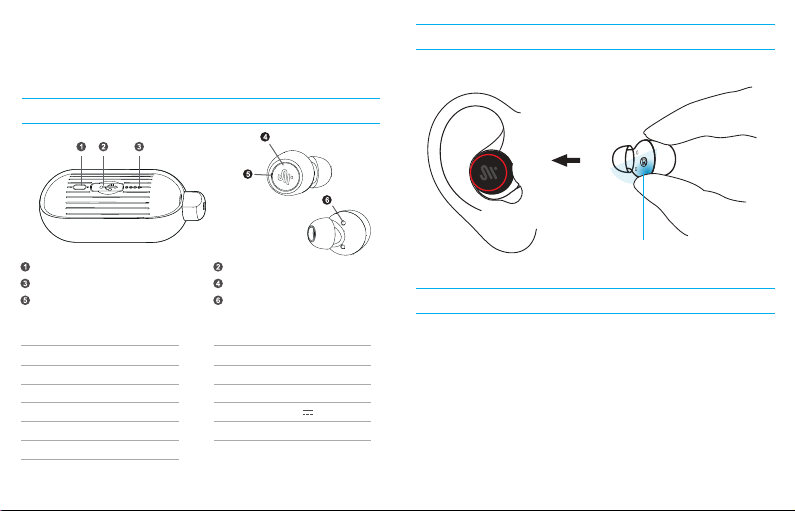
产品图解
佩戴方式
将标识L/R的耳机,对应放置左/右耳内,保证麦克风指向嘴部。
电量显示按键
电量指示灯
耳机指示灯/通话麦克风
耳机配置参数
配对名称
蓝牙版本
电池容量
通讯距离
续航时间
重量
Saramonic BH40
5.2
60mAh
约10米
约10h(50%音量)
4g(单耳)
充电口防尘塞
多功能触控键
充电触点
充电盒配置参数
电池容量
续航时间
充电时间
输入电压
重量
320mAh
约15H
约1.5H
5V 300mA
42g
保持蓝色区域贴近耳朵
操作方式
1. 开机
① 滑开充电盒盖,取出耳机自动开机,语音提醒“Power on”
② 耳机关机状态下,触摸触控键约2.5秒,语音提示“Power On”
2. 关机
① 将耳机放回充电盒,耳机红灯常亮。
② 耳机开机状态下,触摸触控键约8秒,语音提示“Power Off”
注:
① 首次连接会播报”Pairing”
② 已连接过的状态下,自动回连,语音播报“Connected”
Page 7
充电盒指示说明触控模式
75%-100%
50%-75%
25%-50%
0%-25%
播放/暂停 音乐
连接状态下,左/右耳机轻触2次
播放下一曲
音乐状态下,右耳三击
播放上一曲
音乐状态下,左耳三击
音量+
音乐状态下,一直长按右耳机,
1.5s后“Du”一声后松手
音量音乐状态下,一直长按左耳机,
1.5s后“Du”一声后松手
接听/挂断电话
来电时,触摸1下
拒接电话
来电时,长按2秒
语音助手
连接状态下,轻触左耳机4下
游戏模式
进入游戏模式,轻触右耳机4下,
语音播报“Game Mode”
退出游戏模式,轻触右耳机4下,
语音播报“Bluetooth Mode ”
显示电量:
耳机放入充电盒,短按按键,充电盒指示灯会显示充电盒电量。
充电盒充电状态:
接入Type-c充电时,充电盒指示灯显示实时电量,充满电后,四个指示灯全亮1
分钟后熄灭,移除充电线后指示灯熄灭。
耳机重置
注:无下列特殊情况下,请勿使用重置功能
1. 耳机已配对其他设备,搜索不到蓝牙名称:
2. 只有单耳发声,且不能恢复至双耳模式:
步骤:关机状态下,长按开机松手,连续单击3次,再次长按5秒,指示灯进入红
蓝灯同时快闪,入仓重新取出开机 ,完成耳机重置
注:上述动作需在8秒内完成。
Page 8

常见问题
1. 为什么只有单耳发声?
双耳重新放回充电盒,重新取出双耳连接查看是否恢复双耳模式,如未恢复,重
置耳机即可。
2. 蓝牙设备提示无法连接耳机如何解决?
删除蓝牙设备上的配对记录,重新搜索蓝牙设备并连接即可。
3. 为什么听歌/通话耳机没声音?
安卓用户点击手机连接页面右侧设置图标,取消勾选两个音频选项,再进行重新
选择;苹果用户在设置页面中的辅助功能一栏,点击进入音频通话模式,选择自
动,如果原本就处于自动状态,则更换为其他选项,再选择自动,如未恢复,删
除记录,重新配对。
4. 为什么视频/游戏耳机有延迟?
耳机的音频数据的传输会受到环境、网络、其他蓝牙设备解码速度以及软件的影
响,例如游戏软件的传输优先级设定。
5. 为什么会出现声音卡顿/断续?
如果使用时有较多的Wi-Fi连接、4G信号、大功率电器,可能会出现卡顿、断续的
情况,可选择换个环境或重新配对连接。
注意事项
1. 请使用配送或有安全认证的充电线进行充电。
2. 使用耳机时请适量调整音量以免损伤听觉。
3. 请正确使用产品,避免高空摔落或重度挤压。
4. 儿童请在成人陪同下使用,避免误食。
5. 远离高温或潮湿等极端环境。
6. 请勿自行拆卸本产品。
包装清单
1. 充电盒
3. TYPE-C充电线
5. 说明书
7. 合格证
2. 左/右耳机
4. 亲肤颈挂线
6. 保修卡
售后服务
根据消费类电子产品的有关法规以及行业的实际情况,为消费者提供满意的 售后
服务,特制定以下售后服务条例:
1. 保修凭证主要包括:
保修卡及销售凭证。
2. 售后服务范围:
• 在产品保修期内,凡属于正常使用情况下,由于产品本身质量问题引起的故
障,未经拆修,本公司将负责给予免费维修;
• 超出保修期产品,需出具保修凭证并支付维修费。如需订配件,需支付配件费;
订购其他的配件则需把维修的产品寄到我司;经我司专业维修人员检测后维 修
并更换配件;
• 保修凭证一经涂改,保修即时失效。
• 产品的保修凭证,请消费者妥善保存,遗失不补。
3. 保修期:
• 自开具销售凭证之日起计算, 购买本产品一年内,在正常使用情况下(非人为
损坏或拆修)出现质量问题,可享受保修服务(包括所有配件);
• 消费者由购买之日起7天内,在正常使 用情况下(非人为损坏)出现质量问
题,未经拆修,可享受包换服务;
• 包换服务,仅限于同型号、同颜色的产品。
Page 9

4. 保修期内保修失效条例:
• 以下情况保修失效,但提供维修服务,收取人工费,配件费:(1)消费者因使
用、维护、保管不当造成任何配件的损坏;(2)由不可抗力因素所引致的损
坏,如天灾等。
• 在下列情况,本公司将拒绝提供维修服务或提供收费维修服务:(1)不能提供
产品保修卡或保修卡所记载的内容与产品不符,或内容经涂改,或模糊不清无
法辨认;(2)由任何未经深圳市长丰影像器材有限公司授权人士拆动过的耳
机(如:换线,拆卸音圈等);(3)无销售凭证或销售凭证内容与产品不符。
5. 如下情况我司将不提供保修服务:
经我司查询,如发现您的送修产品不属我司生产品,我司将拒绝提供保修服务,
或是加倍收取维修费。请您在把需要维修的耳机寄到我司时,附上保修凭证,如
无任何凭证,我司则作水货处理。
 Loading...