

Page 1
XS1271
XS1872
COOL/DRY Model
This air conditioner uses
the new refrigerant R410A.
INSTRUCTION MANUAL
Inverter-Controlled Split System Air Conditioner
MODE D’EMPLOI
Climatiseur de type séparé contrôlé par inverseur
Pub. OI-85264181108000
© SANYO 2008
Save These Instructions!
Conserver ce mode d’emploi
Page 2

FEATURES
This air conditioner is an inverter type unit that automatically adjusts capability as appropriate. Details on these functions are provided below;
refer to these descriptions when using the air conditioner.
• Microprocessor Controlled Operation
The interior compartment of the remote control unit
contains several features to facilitate automatic operation,
easy logically displayed for easy use.
• Simple One-touch Wireless Remote Control
The remote control unit has several features to facilitate
automatic operation.
• 24-Hour ON or OFF Timer
This timer can be set to automatically turn the unit on or off
at any time within a 24 hour period.
• 1-Hour OFF Timer
This timer can be set to automatically turn off the unit at
any time after one hour.
•Night Setback
This function saves energy by controlling operation to
provide a quieter operating sound than normal.
• Automatic and 3-step Fan Speed
Auto/High/Medium/Low
• Air Sweep Control
This function moves a flap up and down in the air outlet,
directing air in a sweeping motion around the room and
providing comfort in every corner.
• Auto. Flap Control
This automatically sets the flap to the optimum position
during cooling and drying operation.
• Automatic Restart Function for Power Failure
Even when power failure occurs, preset programmed
operation can be reactivated once power resumes.
• High Power Operation
The unit operates at maximum output for 30 minutes,
regardless of the desired temperature.
The fan speed is 1 step above “High”.
CONTENTS
FEATURES.........................................................................................................................................2
PRODUCT INFORMATION ................................................................................................................ 3
ALERT SYMBOLS.............................................................................................................................. 3
INSTALLATION LOCATION ................................................................................................................ 3
ELECTRICAL REQUIREMENTS........................................................................................................3
SAFETY INSTRUCTIONS..................................................................................................................3
NAMES OF PARTS............................................................................................................................. 4
USING THE REMOTE CONTROL UNIT ............................................................................................8
OPERATION WITH THE REMOTE CONTROL UNIT ........................................................................9
1. Operation.............................................................................................................................9
2. Adjusting the Fan Speed .....................................................................................................9
3. Fan Only..............................................................................................................................9
4. Night Setback Mode..........................................................................................................10
5. HIGH POWER Mode.........................................................................................................10
SPECIAL REMARKS........................................................................................................................10
SETTING THE TIMER......................................................................................................................10
USING THE 1-HOUR OFF TIMER...................................................................................................12
TIPS FOR ENERGY SAVING........................................................................................................... 12
ADJUSTING THE AIRFLOW DIRECTION .......................................................................................12
OPERATION WITHOUT THE REMOTE CONTROL UNIT...............................................................13
CARE AND CLEANING....................................................................................................................13
TROUBLESHOOTING......................................................................................................................15
OPERATING RANGE .......................................................................................................................15
WIRED REMOTE CONTROLLER ....................................................................................................15
Page
2
OI-108-2-EG
Page 3
PRODUCT INFORMATION
ELECTRICAL
If you have problems or questions concerning your Air
Conditioner, you will need the following information. Model
and serial numbers are on the nameplate on the bottom of
the cabinet.
Model No. __________________________________
Serial No. ___________________________________
Date of purchase _____________________________
Dealer’s address _____________________________
Phone number________________
ALERT SYMBOLS
The following symbols used in this manual, alert you
to potentially dangerous conditions to users, service
personnel or the appliance:
This symbol refers to a hazard or unsafe
practice which can result in severe
personal injury or death.
CAUTION
This symbol refers to a hazard or unsafe
practice which can result in personal
injury or product or property damage.
INSTALLATION LOCATION
• We recommend that this air conditioner be installed
properly by qualified installation technicians in
accordance with the Installation Instructions
provided with the unit.
• Before installation, check that the voltage of the electric
supply in your home or office is the same as the voltage
shown on the nameplate.
• Do not install this air conditioner
where there are fumes or flammable
gases, or in an extremely humid space
such as a greenhouse.
• Do not install the air conditioner where
excessively high heat-generating
objects are placed.
Avoid:
To protect the air conditioner from heavy corrosion, avoid installing
the outdoor unit where salty sea water can splash directly onto it or
in sulphurous air near a spa.
REQUIREMENTS
1. All wiring must conform to the local electrical codes.
Consult your dealer or a qualified electrician for details.
2. Each unit must be properly grounded with a ground (or
earth) wire or through the supply wiring.
3. Wiring must be done by a qualified electrician.
SAFETY INSTRUCTIONS
• Read this Instruction Manual carefully before using
this air conditioner. If you still have any difficulties
or problems, consult your dealer for help.
• This air conditioner is designed to give you
comfortable room conditions. Use this only for its
intended purpose as described in this Instruction
Manual.
• Never use or store gasoline or other
flammable vapor or liquid near the air
conditioner — it is very dangerous.
• This air conditioner has no ventilator
for intaking fresh air from outdoors.
You must open doors or windows
frequently when you use gas or oil
heating appliances in the same room,
which consume a lot of oxygen from
the air. Otherwise there is a risk of
suffocation in an extreme case.
CAUTION
• Do not turn the air conditioner on and
off from the power mains switch. Use
the ON/OFF operation button.
• Do not stick anything into the air outlet
of the outdoor unit. This is dangerous
because the fan is rotating at high
speed.
• Do not let children play with the air
conditioner.
• Do not cool the room too much if
babies or invalids are present.
OI-108-3-EG
3
Page 4
NAMES OF PARTS
UNIT DISPLAY AND OPERATION
BUTTON
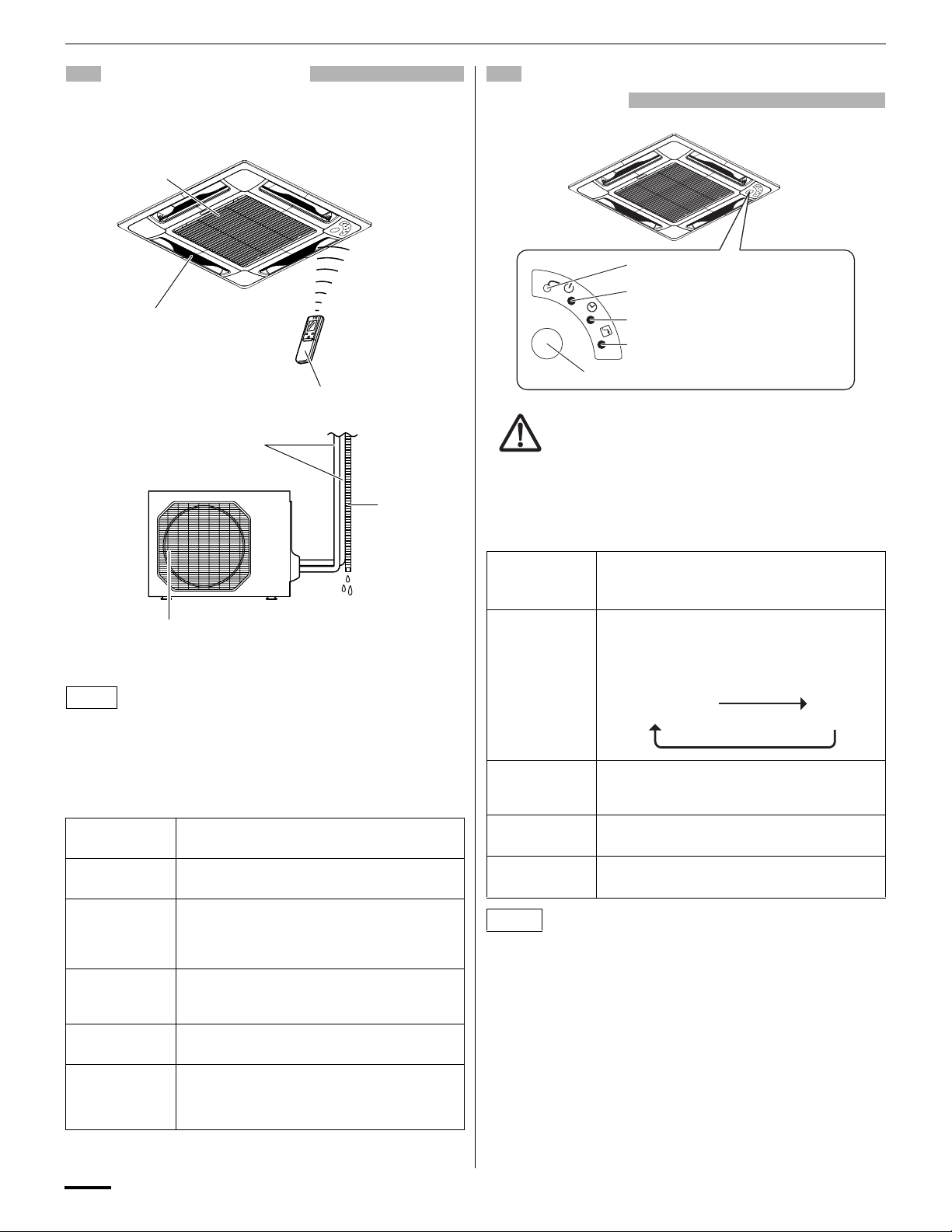
INDOOR UNIT
Air intakes
Air outlet
(4 locations)
Remote control unit
Refrigerant tubes
OUTDOOR UNIT
Drain hose
Air outlet
NOTE
This illustration is based on the external view of a standard model.
Consequently, the shape may differ from that of the air conditioner
which you have selected.
This air conditioner consists of an indoor unit and an outdoor unit.
You can control the air conditioner with the remote control unit.
Air Intake
Air Outlet
Remote
Control Unit
Refrigerant
Tubes
Drain Hose
Outdoor
(Condensing)
Unit
Air from the room is drawn into this section and
passes through air filters which remove dust.
Conditioned air is blown out of the air
conditioner through the air outlet.
The wireless remote control unit controls power
ON/OFF, operation mode selection,
temperature, fan speed, timer setting, and air
sweeping.
The indoor and outdoor units are connected by
copper tubes through which refrigerant gas
flows.
Moisture in the room condenses and drains off
through this hose.
The outdoor unit contains the compressor, fan
motor, heat exchanger coil, and other electrical
components.
INDOOR UNIT
OPERATION button
OPERATION lamp
TIMER lamp
HIGH POWER lamp
REMOTE CONTROL receiver
IMPORTANT
Avoid using radio equipment such as mobile phone near (within
4 ft. (1.2 m)) the remote control receiver. Some radio equipment
may cause malfunction of the unit.
If the trouble happens, disconnect power and restart the air
conditioner after a few minutes.
REMOTE
CONTROL
receiver
OPERATION
button
OPERATION
lamp
TIMER lamp This lamp lights when the system is being
HIGH POWER
lamp
This section picks up infrared signals from the
remote control unit (transmitter).
When the remote control cannot be used,
pressing this button enables cooling operation.
Each time this button is pressed, the operation
mode changes cyclically.
Cooling operation
This lamp lights when the system is in the
continuous DRY (orange), COOL (green) and
FAN (green) mode.
controlled by the timer.
This lamp lights during operation in the HIGH
POWER mode.
Stop
NOTE
The unit’s display lamps are dimmed during operation in the NIGHT
SETBACK mode.
4
OI-108-4-EG
Page 5
REMOTE CONTROL UNIT (DISPLAY)
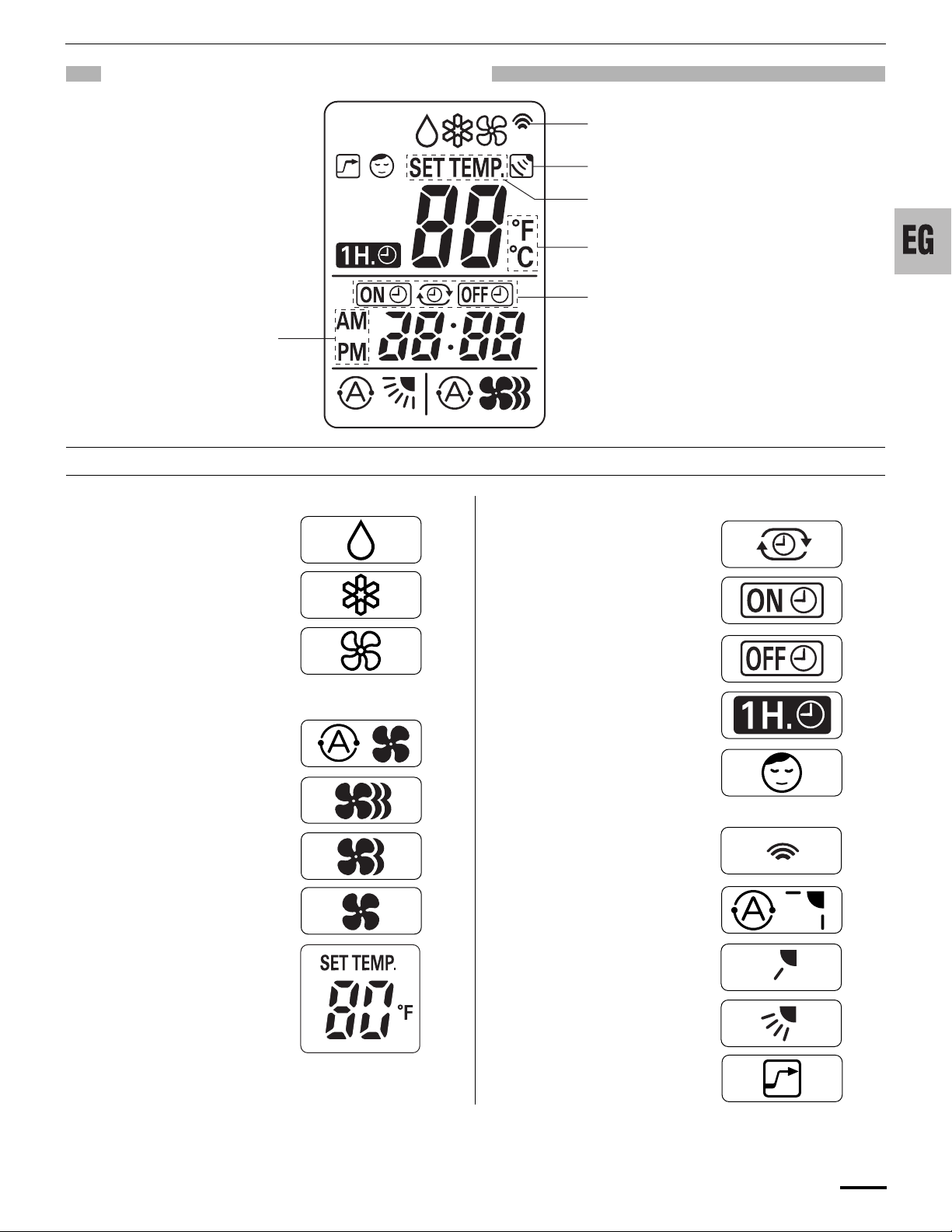
Displayed when the time
display is set to 12-hour
time.
Symbols
Displayed when transmitting data
Displayed when indoor unit sensor is
in use
Displayed when setting temperature
Displayed when temperature is shown
Displayed when setting timer
(1) Operation mode
MILD DRY..............................
COOL.....................................
FAN ........................................
(2) Fan speed
Automatic operation ...............
HIGH .....................................
MEDIUM.................................
LOW.......................................
(4) Timer
24-hour clock with ON/OFF
program Timer .......................
ON Timer. ..............................
OFF Timer. ............................
1-hour OFF Timer..................
(5) NIGHT SETBACK..................
(6) Confirmation
of transmission.......................
(7) Auto. flap indication................
(3) Temperature setting
60–86°F
When set to 80 °F
temperature indication............
OI-108-5-EG
Flap angle indication..............
Sweep indication....................
(8) High power operation.............
5
Page 6
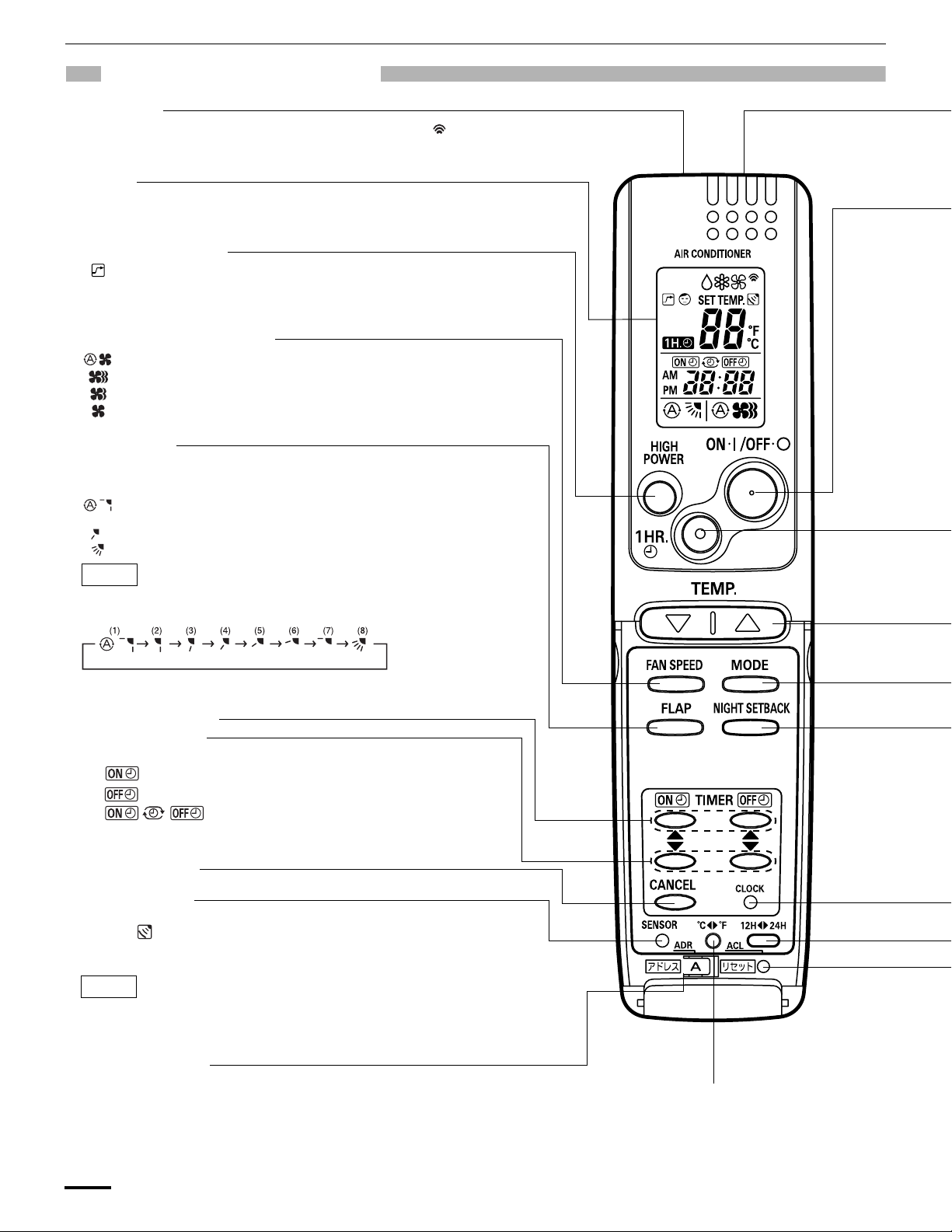
REMOTE CONTROL UNIT
Transmitter
When you press the buttons on the remote control unit, the mark
appears in the display to transmit the setting changes to the receiver
in the air conditioner.
Display
Information on the operating conditions is displayed while the remote
control unit is switched on. If the unit is turned off, FLAP setting and
FAN SPEED setting are not displayed.
HIGH POWER button
: If this button is pressed during DRY, COOL or FAN operation, the unit
operates at maximum output for 30 minutes, regardless of the
desired temperature.
The fan speed is 1step above ‘‘HIGH’’.
FAN SPEED selector button
: The air conditioner automatically decides the fan speeds.
: High fan speed
: Medium fan speed
: Low fan speed
FLAP button
Press this button either to select the setting of the airflow direction to the auto.
flap in each mode or one of the six possible positions manually or to select the
sweep function which moves the flap up and down automatically.
: Auto flap setting: If selected in a cooling or dry operation, the flap is set
at position (7) in the following chart.
: The airflow direction can be set manually. (six positions)
: The flap moves up and down automatically.
NOTE
When you press the FLAP button, the air flow direction will be changed one by
one as follows.
SWEEP
ON TIME/OFF TIME setting buttons
Advance button
Return button
No display: The timer does not operate.
: The air conditioner starts at the set time.
: The air conditioner stops at the set time.
: The air conditioner stops and starts, or starts and
stops, at the set times every day. For details, see
“SETTING THE TIMER”.
CANCEL button
SENSOR button
When you press this button (use a small-tipped object such as a ballpoint
pen), the mark will appear at the display. And the room temperature is
detected by the sensor which is built into the indoor unit and the air
conditioner is controlled accordingly.
NOTE
If the remote control is located near a heat source, such as a space
heater or in direct sunlight, press the SENSOR button to switch to the
sensor on the indoor unit.
ADDRESS switch
• The address switch changes to prevent mixing of signals from remote control units
when two air conditioners are installed next to each other. Normally, the address switch
is set to A. For more information, please contact the dealer where you made the
purchase.
• Normally, the tabs on the remote control unit should not be bent.
6
Temperature display selector button
This switches the temperature display
between °C and °F.
OI-108-6-EG
Page 7
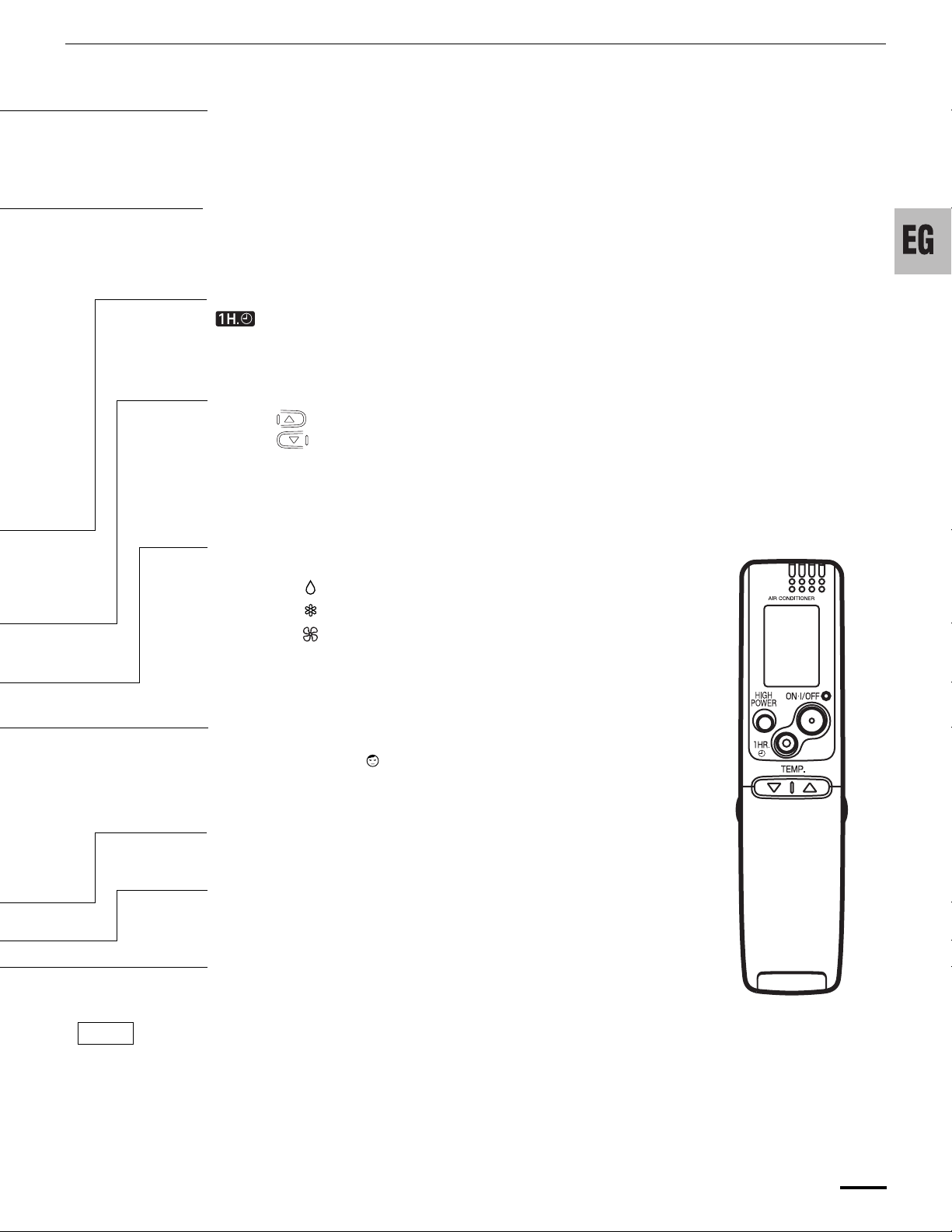
Sensor
A temperature sensor inside the remote control unit senses the room
temperature.
ON/OFF operation button
This button is for turning the air conditioner on and off.
1 HR. TIMER button (1-HOUR OFF TIMER)
: When you press this button, regardless of whether the unit is operating
or stopping, the unit operates for one hour and then shuts down.
Temperature setting buttons (TEMP.)
Press the button to increase the set temperature.
Press the button to reduce the set temperature.
The temperature setting changes by 1 °C or 2 °F each time one of the TEMP.
buttons is pressed.
MODE selector button
Use this button to select DRY, COOL or FAN mode.
(DRY) : The air conditioner reduces the humidity in the room.
(COOL) : The air conditioner makes the room cooler.
(FAN) : The air conditioner works only as a circulation fan.
NIGHT SETBACK button
For details, see “4. Night Setback Mode”. When you press this button in the
DRY or COOL mode, the mark appears in the display, and the remote
control unit will automatically adjust the set temperature to save energy.
CLOCK button
Time display selector button
This switches the time display between 24-hour time and 12-hour time.
ACL button (ALL CLEAR)
Puts the remote control unit into pre-operation status. Always press this button
after replacing the batteries.
NOTE
• The illustration above pictures the remote control unit after the cover has been opened.
• The remote control unit sends the temperature signal to the air conditioner regularly at five minute intervals. If the signal from the
remote control unit stops for more than 15 minutes due to the loss of the remote control unit or other trouble, the air conditioner will
switch to the temperature sensor which is built into the indoor unit and control the room temperature. In these cases, the
temperature around the remote control unit may differ from the temperature detected at the air conditioner’s position.
• The indoor fan runs continuously when the system is in normal operation. It does not turn off when the desired room temperature is
reached. If Night Set Back mode is selected, the fan will turn off intermittently during cooling operation in order to control air flow.
(Cover closed)
OI-108-7-EG
7
Page 8

USING THE REMOTE CONTROL UNIT
HOW TO INSTALL BATTERIES
ACL button
1. Slide the cover in the direction indicated by the arrow and remove
it.
2. Install two AAA alkaline batteries. Make sure the batteries point in
the direction marked in the battery compartment.
3. Use a thin object such as the tip of a pen to press the ACL button.
NOTE
• The batteries last about six months, depending on how much
you use the remote control unit. Replace the batteries when
the remote control unit’s display fails to light, or when the
remote control cannot be used to change the air conditioner’s
settings.
• Use two fresh leak-proof type-AAA alkaline batteries.
• In replacing batteries, follow the instructions as mentioned in
the sub-section “HOW TO INSTALL BATTERIES”.
• If you do not use the remote control unit more than 1 month,
take out the batteries.
• Dispose of the used batteries at the designated location in
compliance with the applicable local ordinances.
HOW TO USE THE REMOTE CONTROL UNIT
When using the remote control unit, always point the unit’s
transmitter head directly at the air conditioner’s receiver.
Air conditioner
(Indoor unit)
Receiver
REMOTE CONTROL UNIT INSTALLATION
POSITION
The remote control unit may be operated either from a non-fixed
position or from a wall-mounted position. To ensure that the air
conditioner operates correctly, DO NOT install the remote control
unit in the following places:
DO NOT
• In direct sunlight
• Behind a curtain or other places where it is covered
• More than 26 ft.(8 m) away from the air conditioner
• In the path of the air conditioner’s airstream
• Where it may become extremely hot or cold
• Where it may be subject to electrical or magnetic noise
• Where there is an obstacle between the remote control unit and air
conditioner (since a check signal is sent from the remote control
unit every 5 minutes)
MOUNTING THE REMOTE CONTROL UNIT
Before mounting the remote control unit, press the ON/OFF
operation button at the mounting location to make sure that the air
conditioner operates from that location. The indoor unit should make
a beeping sound to indicate that it has received the signal.
Rear side
Remote control unit mount
Press
Set in
place
Hole
Mounting screws
5/32 x 5/8"
(4 x 16 mm)
(included)
To take out the remote control unit, pull it forward.
• To prevent loss of the remote control
unit, you can connect the remote
control unit to the mount by passing
a string through the remote control
unit and attachment hole.
WHEN HOLDING THE REMOTE CONTROL UNIT
• When using the remote control unit and during air conditioner
operation, the transmitter on the remote control unit should be
pointed towards the receiver on the indoor unit.
• Make sure that there are no objects between the remote control
unit and receiver which could block the signal.
Remote control
unit
8
(Transmitter
head)
OI-108-8-EG
Page 9

OPERATION WITH THE REMOTE CONTROL UNIT
1. Operation 2. Adjusting the Fan Speed
A. Automatic fan speed
Simply set the FAN SPEED selector button to the
position.
This automatically sets the best fan speed for the room
temperature.
B. Manual fan speed
If you want to adjust fan speed manually during operation,
just set the FAN SPEED selector button as desired. [ ,
STEP 2
STEP 3
3. Fan Only
, or ]
STEP 2
STEP 4
STEP 5
NOTE
STEP 1
Check that the circuit breaker on the power panel is
turned on.
Press the setting buttons as described below and
change the settings as desired.
STEP 1 Press the MODE selector button
STEP 2 To start the air conditioner, press the ON/
STEP 3 Press the TEMP. setting buttons to change
STEP 4 Set the FAN SPEED selector button to the
STEP 5 Press the FLAP button and set the airflow
To stop the air conditioner, press the ON/OFF
operation button again.
and select the desired mode.
For dehumidifying operation
For cooling operation
For fan only operation
OFF operation button.
the temperature setting to the desired
temperature.
Adjustable temperature range:
30 °C max.
16 °C min.
setting you want.
direction as desired.
(Refer to “ADJUSTING THE AIRFLOW
DIRECTION” on page 12.)
or 86 °F max.
60 °F min.
→
→
→
STEP 3
If you want to circulate air without any temperature
control, follow these steps:
STEP 1 Press the MODE selector button to switch to
the fan mode .
STEP 2 Press the ON/OFF operation button.
STEP 3 Press the FAN SPEED selector button to
select the fan speed of your choice ( ,
or ).
STEP 1
NOTE
OI-108-9-EG
• Choose the best position in the room for the remote
control unit, which also acts as the sensor for room
comfort and transmits the operating instructions.
Once you’ve found this best position, always keep the
remote control unit there.
• This appliance has a built-in 5-minute time delay
circuit to ensure reliable operation. When the
operation button is pressed, the compressor will start
running within three minutes. In the event of power
failure, the unit will stop.
9
Page 10

4. Night Setback Mode
Night Setback Mode is used for saving energy.
Press the NIGHT SETBACK button while operation.
The mark appears in the display.
HIGH POWER mode can be used to increase the output of the
indoor unit for all operation modes except automatic operation.
Press the HIGH POWER button while operation.
The mark appears in the display.
To cancel, press HIGH POWER button again.
• When the HIGH POWER button is pressed, the unit operates at
maximum output for 30 minutes, regardless of the desired
temperature. The fan speed is 1 step above “High”.
NOTE
Depending on the operating conditions, the fan speed may be
increased by a small amount only.
SPECIAL REMARKS
‘‘DRY’’ ( ) Operation
How it works?
• Once the room temperature reaches the level that was set, the
unit’s operation frequency is changed automatically.
• During DRY operation, the fan speed automatically runs at lower
speed for providing a comfortable breeze.
• ‘‘DRY’’ operation is not possible if the indoor temperature is 59 °F
or less.
To release the night setback function, press the NIGHT SETBACK
button again.
In Cooling and DRY Mode: ( and )
When the night setback mode is selected, the air conditioner
automatically raises the temperature setting 2 °F when 30 minutes
have passed after the selection was made, and then another 2 °F
after another 30 minutes have passed, regardless of the indoor
temperature when night setback was selected. This enables you
to save energy without sacrificing comfort. This function is
convenient when gentle cooling is needed.
Setting
temperature
Press the NIGHT
SETBACK button
2°F
30 min.
2°F
30 min.
Time
5. HIGH POWER Mode
Cooling ( ) operation
• Sometimes the indoor unit may not get to the set fan speed such as
LOW under cool operation at very low outdoor temperatures due to
the indoor unit being protected from ice or frost when combined with
the outdoor unit for Low Ambient Cooling models.
Power failure during operation
• In the event of power failure, the unit will stop. When the power is
resumed, the unit will restart automatically within five minutes by
the remote control unit.
Clicking Sound
Clicking sound is heard from the air conditioner
• In cooling operation, any plastic parts may shrink due to a sudden
temperature change. In this event, a clicking sound may occur. This
is normal, and the sound will soon disappear.
Remote Control Unit
• The remote control unit sends the setting condition to the air
conditioner regularly at five minute intervals.
SETTING THE TIMER
10
NOTE
In the descriptions below, the following settings are used for the
temperature and time indicator selector button on the bottom front
section of the remote control.
• Temperature: °F
• Time: AM, PM
OI-108-10-EG
Page 11

1. How to set the present time
(Example) To set to 10:30 pm.
Operation Indication
1. Press the CLOCK button
once if the time indicator is
not flashing.
2. Press the Advance, Return
( , ) button until PM 10:30
is displayed.
3. Press the CLOCK button
again.
The time indication alone
flashes.
The time can be set in 1-minute
increments. Holding down the
button advances the time rapidly
in 10-minute increments.
This completes the setting of the
current time.
2. How to set the OFF time
(Example) To stop the air conditioner at 11:00 am.
Operation Indication
1. Press the ON TIME setting
button once.
2. Press the Advance, Return
( , ) button until AM 7:10
is displayed.
3. Wait a few seconds, and then
the setting is complete.
The timer indication is
displayed, and the present ON
time is shown.
The timer indication
blinks.
The time can be set in 10-minute
increments. Holding down the
button advances the time rapidly
in 10-minute increments.
The timer indication
stops blinking and the present
time is displayed.
4. How to set daily ON/OFF repeat timer
(Example) To start operation at 7:10 am. and stop the air conditioner
at 11:00 am.
Operation Indication
1. Press the OFF TIME setting
button once.
2. Press the Advance, Return
( , ) button until AM 11:00
is displayed.
3. Wait a few seconds, and then
the setting is complete.
The timer indication is
displayed, and the present OFF
time is shown.
The timer indication
blinks.
The time can be set in 10-minute
increments. Holding down the
button advances the time rapidly
in 10-minute increments.
The timer indication
stops blinking and the present
time is displayed.
3. How to set the ON time
(Example) To start operation at 7:10 am.
10:30 pm.
Present time
7:10 am.
ON
11:00 am.
OFF
Operation Indication
1. Set the timer ON/OFF times
as shown in 2-1, 2, 3 and 3-1,
2, 3.
The present time 10:30 pm. and
are displayed.
NOTE
• The ON/OFF combination timer uses the current time as the
reference, and it is activated starting from whichever set time
comes first.
• With the ON/OFF combination timer, the settings are repeated
every day.
• You can check the timer ON/OFF times after you have set them by
pressing the ON TIME and OFF TIME setting buttons.
To cancel a timer program
• Press the CANCEL button.
• When either an ON or OFF timer is to be canceled, press the
button corresponding to the timer whose program is to be
canceled, and then press the CANCEL button.
NOTE
• The airflow direction, fan speed and temperature setting can be
changed after a timer program has been set even when the unit is
stopped. Even when operation is stopped during an ON timer
program, the unit will start operating when the set time is reached
provided that the program is not canceled.
• When the ON timer and OFF timer are set to the same time, the
timer operates as if it is turned off.
OI-108-11-EG
11
Page 12

USING THE 1-HOUR OFF
ADJUSTING THE AIRFLOW
TIMER
1. 1-Hour OFF Timer
This function causes the unit to operate for one hour and then
stop, regardless of whether the unit is on or off when this
button is pressed.
The indicator in the display indicates that this function is
operating.
Setting procedure:
Regardless of whether the unit is operating or stopped, press the 1
HR. TIMER button.
appears in the display.
Cancellation procedure:
Press the ON/OFF operation button to turn the unit off, wait for the
unit to stop operating, and then press the ON/OFF operation button
again.
The 1-Hour Timer function is now cancelled and the unit operates
normally.
NOTE
• If, while the 1-Hour Timer function is operating, the 1HR. TIMER
button is pressed once to cancel the function and then again, the
unit continues to operate for one hour from that point in time and
then stops.
• It is not possible to use the OFF Timer and 1-Hour OFF Timer
together. Whichever function is set last takes precedence. If the 1
HR. TIMER button is pressed while the TIMER OFF function
operates, the OFF Timer is cancelled and the unit will stop
operating one hour later.
2. Operation together with the daily ON/OFF
repeat timer
The 1-Hour OFF Timer setting is given priority over the DAILY ON/
OFF REPEAT setting.
TIPS FOR ENERGY SAVING
DIRECTION
The vertical airflow can be adjusted by moving the flap with the
remote control unit. Do not move the flap with your hands. Confirm
that the remote control unit has been turned on. Use the FLAP
button to set either the sweep function or one of the six airflow
direction settings.
A. Sweep function
The flap starts moving
up and down to deliver
air over the sweep
range.
B. Setting the airflow manually
Referring to the above
illustration, use the
FLAP button to set the
airflow direction within
the range used during
cooling or dehumidifying
operation.
C. Auto flap function
The flap is set to
the
recommended
position.
COOL
NOTE
The flap automatically closes when the unit is off.
CAUTION
• Use the FLAP button on the remote control to adjust the
position of the flap. If you move the flap by hand, the flap
position according to the remote control and the actual flap
position may no longer match. If this should happen, shut off
the unit, wait for the flap to close, and then turn on the unit
again; the flap position will now be normal again.
• Do not have the flap pointed down during cooling operation.
Condensation may begin to form around the air vent and drip
down.
DRY
SWEEP
SWEEP
FAN
Do not
• Block the air intake and outlet of the unit. If they are
obstructed, the unit will not work well, and may be damaged.
• Let direct sunlight into the room. Use sunshades, blinds or curtains.
If the walls and ceiling of the room are warmed by the sun, it will
take longer to cool the room.
Do
• Always try to keep the air filter clean. (Refer to “CARE AND
CLEANING”.) A clogged filter will impair the performance of the
unit.
• To prevent conditioned air from escaping, keep windows, doors and
any other openings closed.
12
OI-108-12-EG
Page 13

OPERATION WITHOUT THE
CARE AND CLEANING
REMOTE CONTROL UNIT
INDOOR UNIT
OPERATION button
OPERATION lamp
If you have lost the remote control unit or it has trouble, follow the
steps below.
When the air conditioner is not running
Each time the OPERATION button is pressed, the operation mode
changes cyclically.
Cooling operation
NOTE
The temperature is set to the room temperature minus 4°F during
the cooling operation, and the fan speed and flap are set to Auto.
Stop
• Cleaning and maintenance operations
must be carried out by specially
trained personnel.
While working in high places, slipping
or falling may result in serious injury.
• For safety, be sure to turn the air
conditioner off and also to disconnect
the power before cleaning.
• Do not pour water on the indoor unit to
clean it. This will damage the internal
components and cause an electric
shock hazard.
Ceiling panel (Indoor Unit)
Clean the ceiling panel of the indoor unit with a vacuum cleaner
brush, or wipe it with a clean, soft cloth.
If it is stained, use a clean cloth moistened with a mild liquid
detergent. When cleaning it, be careful not to force the flaps out of
place.
CAUTION
• Never use solvents, or harsh chemicals
when cleaning the indoor unit. Do not
wipe the plastic casing using very hot
water.
• Some metal edges and the fins are
sharp and may cause injury if handled
improperly; be especially careful when
you clean these parts.
• The internal coil and other components
of the outdoor unit must be cleaned
every year. Consult your dealer or
service center.
Cleaning the flaps
• The air outlet flap can be removed and washed with water.
• Be sure to always stop operation before removing the flap.
• After washing with water, allow it to dry, and then remount it.
CAUTION
• Do not move the flap with your hands.
• When using a footstool or the like, be careful not to let it tip
over.
Cleaning the main unit and remote control unit
• Wipe clean using a soft, dry cloth.
• To remove stubborn dirt, moisten a cloth in warm water no hotter
than 104 °F, wring thoroughly, and then wipe.
OI-108-13-EG
13
Page 14

Air filter
The air filter collects dust and other particles from the air and should
be cleaned once every 6 months.
If the filter gets blocked, the efficiency of the air conditioner drops
greatly.
NOTE
The frequency with which the filter should be cleaned depends on
the environment in which the unit is used.
How to remove the filter
Slide the two latches of the air intake grille with your thumbs in the
1.
direction of the arrow to open the grille.
Air intake
grille
How to remove the air intake grille
Open the air intake grille.
1.
2. Detach the safety cord from the frame (remember to attach it
again after cleaning or maintenance).
3. Hold on the air intake grille and pull it towards you to detach the
two air intake grille hinges.
4. Clean the grille gently using a soft sponge, or the like. Then dry it
with care.
Neutral detergent may be used to remove stubborn dirt. Then
rinse thoroughly with water and dry it.
Air intake grille hinge
Latch
Air intake grille hinge
Ceiling
panel
2. Open the air intake grille downward.
Air intake grille
3. Press the tabs on both sides of the air filter (indicated with
marks on the grill) to release the filter, and then, lift and pull the
filter up and out using the tabs to remove it.
Safety cord
Air filter
Safety cord
CAUTION
• When cleaning the air filter, never
remove the safety cord. If it is
necessary to remove it for servicing
and maintenance inside, be sure to
reinstall the safety cord securely (hook
on the grille side) after the work.
• When the air intake grille has been
opened, rotating parts (such as the
fan), electrically charged areas, etc. will
be exposed in the unit’s opening. Bear
in mind the dangers that these parts
and areas pose, and proceed with the
work carefully.
• Periodically check the outdoor unit to
see if the air outlet or air intake is
clogged with dirt or soot.
Care: After a prolonged idle period
Check the indoor and outdoor unit air intakes and outlets for
blockage; if there is a blockage, remove it.
Care: Before a prolonged idle period
• Operate the fan for half a day to dry out the inside.
• Disconnect the power supply and also turn off the circuit breaker.
• Clean the air filter and replace it in its original position.
• Outdoor unit internal components must be checked and cleaned
periodically.
Contact your local dealer for this service.
4. Use a vacuum cleaner to remove light dust. If there is sticky dust
on the filter, wash the filter in lukewarm, soapy water, rinse it in
clean water, and dry it.
5. Insert the filter correctly again inside the grille, close the grille
letting the latches slide towards the outside and fix again the
latch.
14
OI-108-14-EG
Page 15

TROUBLESHOOTING
If your air conditioner does not work properly, first check the following
points before requesting service. If it still does not work properly,
contact your dealer or service center.
Trouble Possible Cause Remedy
Air conditioner does
not run at all.
OPERATION lamp
blinks and air
conditioner does not
operate.
Compressor runs but
soon stops.
Poor cooling
performance.
Clicking sound is
heard from the air
conditioner.
OPERATION lamp
lights but outdoor unit
will not run.
TIMER lamp blinks
(3 sec. interval) and
air conditioner does
not operate.
1. Power failure. 1. Restore power.
2. Leakage circuit
breaker tripped.
3. Line voltage is too
low.
4. Batteries in remote
control unit have
run down.
Trouble in system. Contact service
Obstruction in front of
condenser coil.
1. Dirty or clogged air
filter.
2. Heat source or
many people in
room.
3. Doors and/or
windows are open.
4. Obstacle near air
intake or air
discharge port.
5. Thermostat is set
too high for cooling.
In cooling operation,
any plastic parts may
shrink due to a
sudden temperature
change. In this event,
a clicking sound may
occur.
The use of cellular
phones near the air
conditioner may cause
disturbance to its
normal operation.
FLOAT SWITCH is
actived.
2. Contact service
center.
3. Consult your
electrician or
dealer.
4. Replace batteries.
center.
Remove obstruction.
1. Clean air filter to
improve airflow.
2. Eliminate heat
source if possible.
3. Shut them to keep
the heat out.
4. Remove it to ensure
good airflow.
5. Set the temperature
lower.
This is normal, and
the sound will soon
disappear.
1. Turn off the power
then restart the air
conditioner after a
while.
2. Consult your dealer.
Contact service
center.
OPERATING RANGE
The air conditioner is operable within the temperature ranges as
listed below:
For Cooling Only Models : C1271, C1872
Temperature Indoor air
temperature
COOLING Max. 95 °F DB /
Outdoor air
temperature
115 °F DB
71 °F WB
Min. 67 °F DB /
67 °F DB
57 °F WB
For Low Ambient Cooling Models : CL1271, CL1872
Temperature Indoor air
temperature
COOLING Max. 95 °F DB /
Outdoor air
temperature
115 °F DB
71 °F WB
Min. 67 °F DB /
0 °F DB
57 °F WB
WIRED REMOTE CONTROLLER
A separately sold wired remote controller (STK-RCS7TWSU) used with this air conditioner is also available. If
you wish to use the wired remote control function, you will
need to purchase the optional wired remote controller.
OI-108-15-EG
15
Page 16

STK-RCS-7TWSU
This wired remote controller is designed for
both the “COOL/DRY/HEAT Model” and
“COOL/DRY Model” indoor unit.
Before using the remote controller, be sure
to confirm the “model type” specified on the
front cover of the INSTRUCTION MANUAL
INSTRUCTION MANUAL
Wired Remote Controller
MODE D’EMPLOI
Télécommande Filaire
supplied with the indoor unit.
Save These Instructions!
Conserver ce mode d’emploi
Pub. OI-85264181119000
© SANYO 2008
Page 17

CONTENTS
PRODUCT INFORMATION ................................................................................................................2
ALERT SYMBOLS.............................................................................................................................. 2
INSTALLATION LOCATION ................................................................................................................ 2
ELECTRICAL REQUIREMENTS........................................................................................................2
SAFETY INSTRUCTIONS..................................................................................................................2
REMOTE CONTROL UNIT.................................................................................................................4
OPERATION WITH THE REMOTE CONTROL UNIT ........................................................................6
1. Automatic Operation (only for COOL/DRY/HEAT Model)....................................................6
2. Manual Operation................................................................................................................6
3. Adjusting the Fan Speed .....................................................................................................7
4. Fan Only..............................................................................................................................7
5. Night Setback Mode............................................................................................................7
SPECIAL REMARKS..........................................................................................................................7
SETTING THE TIMER........................................................................................................................8
USING THE 1-HOUR OFF TIMER.....................................................................................................9
ADJUSTING THE AIRFLOW DIRECTION .........................................................................................9
Page
PRODUCT INFORMATION
If you have problems or questions concerning your wired
remote controller, you will need the following information.
Model No. __________________________________
Date of purchase _____________________________
Dealer’s address _____________________________
Phone number________________
ALERT SYMBOLS
The following symbols used in this manual, alert you
to potentially dangerous conditions to users, service
personnel or the appliance:
This symbol refers to a hazard or unsafe
practice which can result in severe
personal injury or death.
CAUTION
This symbol refers to a hazard or unsafe
practice which can result in personal
injury or product or property damage.
INSTALLATION LOCATION
We recommend that this wired remote controller be
installed properly by qualified installation technicians
in accordance with the Installation Instructions
provided with the unit.
• Do not install this wired remote
controller where there are fumes or
flammable gases, or in an extremely
humid space such as a greenhouse.
• Do not install the wired remote
controller where excessively high
heat-generating objects are placed.
Avoid:
To protect the air conditioner from heavy corrosion, avoid installing
the outdoor unit where salty sea water can splash directly onto it or
in sulphurous air near a spa.
ELECTRICAL
REQUIREMENTS
1. All wiring must conform to the local electrical codes.
Consult your dealer or a qualified electrician for details.
2. Each unit must be properly grounded with a ground (or
earth) wire or through the supply wiring.
3. Wiring must be done by a qualified electrician.
SAFETY INSTRUCTIONS
• Read this Instruction Manual carefully before using
this air conditioner. If you still have any difficulties
or problems, consult your dealer for help.
• This air conditioner is designed to give you
comfortable room conditions. Use this only for its
intended purpose as described in this Instruction
Manual.
• Never use or store gasoline or other
flammable vapor or liquid near the air
conditioner — it is very dangerous.
• This air conditioner has no ventilator
for intaking fresh air from outdoors.
You must open doors or windows
frequently when you use gas or oil
heating appliances in the same room,
which consume a lot of oxygen from
the air. Otherwise there is a risk of
suffocation in an extreme case.
CAUTION
• Do not turn the air conditioner on and
off from the power mains switch. Use
the ON/OFF operation button.
• Do not stick anything into the air outlet
of the outdoor unit. This is dangerous
because the fan is rotating at high
speed.
• Do not let children play with the air
conditioner.
• Do not cool or heat the room too much
if babies or invalids are present.
2
OI-119-2-EG
Page 18

REMOTE CONTROL UNIT (DISPLAY)
Symbols
Displayed when indoor unit
sensor is in use
Displayed when operating
NIGHT SETBACK mode
Displayed when setting temperature
Displayed when temperature is shown
Displayed when setting timer
(1) Operation mode
AUTO .....................................
(only for COOL/DRY/HEAT
Model)
HEAT ......................................
(only for COOL/DRY/HEAT
Model)
MILD DRY..............................
COOL.....................................
FAN ........................................
(2) Fan speed
Automatic operation ...............
HIGH .....................................
(3) Temperature setting
60 – 86 °F ..............................
When set to 80 °F
temperature indication...........
(4) Timer
24-hour clock with ON/OFF
program Timer .......................
ON Timer. ..............................
OFF Timer. ............................
1-hour OFF Timer..................
(5) NIGHT SETBACK..................
MEDIUM.................................
LOW.......................................
OI-119-3-EG
(6) Flap angle indication..............
Sweep indication....................
3
Page 19

REMOTE CONTROL UNIT
NOTE
The descriptions on the AUTO ( ) or HEAT ( ) operation mode are only for the “COOL/DRY/HEAT Model,” and not for the
“COOL/DRY Model.”
Display
Information on the operating conditions is displayed while the remote control
unit is switched on. If the unit is turned off, only the mode that was set
previously is still displayed.
Temperature setting buttons (TEMP.)
Press the button to increase the set temperature.
Press the button to reduce the set temperature.
The temperature setting changes by 2 °F each time one of the TEMP. buttons
is pressed.
FAN SPEED selector button
: The air conditioner automatically decides the fan speeds.
: High fan speed
: Medium fan speed
: Low fan speed
NIGHT SETBACK button
For details, see “5. Night Setback Mode”. When you press this button in the
HEAT, DRY or COOL mode, the mark appears in the display, and the
remote control unit will automatically adjust the set temperature to save
energy.
FLAP button
Press this button either to select the setting of the airflow direction to one of
the six possible positions manually or to select the sweep function which
moves the flap up and down automatically.
: The airflow direction can be set manually. (six positions)
: The flap moves up and down automatically.
NOTE
When you press the FLAP button, the air flow direction will be changed one by
one as follows.
SWEEP
Timer and Present Time setting buttons
First, press the SET button to select the mode (ON, OFF and Present Time
settings) you want.
Each time you press the ‘‘HH’’ button, the hours advance by one.
(PM0, PM1.....PM11, AM0, AM1.....AM11)
Each time you press the ‘‘MM’’ button, the minutes advance by one when
setting Present Time and by ten when setting ON and OFF Time.
SET button
For details, see ‘‘Setting the Timer’’.
Press this button to select the mode you want to program.
ACL button (ALL CLEAR)
When you press the ACL button while the
operation button is ON, all settings are cleared.
Press the ACL button if the air conditioner is not
operating correctly.
4
OI-119-4-EG
Page 20

ON/OFF operation button
This button is for turning the air conditioner on and off.
MODE selector button
Use this button to select AUTO, HEAT, DRY, COOL or FAN mode.
(AUTO) : When this setting is selected, the air conditioner calculates the difference between the
thermostat setting and the room temperature and automatically switches to the ‘‘COOL’’ or
‘‘HEAT’’ mode as appropriate.
(HEAT) : The air conditioner makes the room warmer.
(DRY) : The air conditioner reduces the humidity in the room.
(COOL) : The air conditioner makes the room cooler.
(FAN) : The air conditioner works only as a circulation fan.
1 HR. TIMER button (1-HOUR OFF TIMER)
: When you press this button, regardless of whether the unit is operating or stopping, the unit operates for
one hour and then shuts down.
TIMER SELECT button
No display :The timer does not operate.
: The air conditioner starts at the set time.
: The air conditioner stops at the set time.
: The air conditioner stops and starts, or starts and stops, at the set times every day.
Sensor
A temperature sensor inside the remote control unit senses the room temperature.
SENSOR button
When you press this button (use a small-tipped object such as a ballpoint pen), the mark will disappear at the
display. And the room temperature is detected by the sensor which is built into the remote control unit and the air
conditioner is controlled accordingly.
NOTE
If the remote control is located near a heat source, such as a space heater or in direct sunlight, press the
SENSOR button to switch to the sensor on the indoor unit.
NOTE
The indoor fan runs continuously when the system is in normal operation. It does not turn off when the desired room temperature is
reached. If Night Set Back mode is selected, the fan will turn off intermittently during cooling operation in order to control air flow.
OI-119-5-EG
5
Page 21

OPERATION WITH THE REMOTE CONTROL UNIT
1. Automatic Operation
(only for COOL/DRY/HEAT Model)
This unit automatically switches between cooling operation and
heating operation according to the difference between the room
temperature and the temperature setting.
STEP 2
STEP 1
NOTE
NOTE
Check that the circuit breaker on the power panel is
turned on.
Once mode is selected and the unit is preset by
following the steps below, you can have the air
conditioner automatically bring the room to the desired
temperature simply by pressing the ON/OFF operation
button.
STEP 1 Press the MODE selector button to .
STEP 2 Press the ON/OFF operation button.
To stop the air conditioner, press the ON/OFF operation
button again.
To change the temperature setting; press the
temperature setting buttons and change the setting to
the desired temperature.
2. Manual Operation
STEP 5
NOTE
Check that the circuit breaker on the power panel is
turned on.
If the automatic operation settings of the unit do not
meet your needs, press the setting buttons as
described below and change the settings as desired.
STEP 1 Press the MODE selector button
and select the desired mode.
For heating operation
For dehumidifying operation
For cooling operation
For fan only operation
STEP 2 To start the air conditioner, press the ON/
OFF operation button.
STEP 3 Press the TEMP. setting buttons to change
the temperature setting to the desired
temperature.
Adjustable temperature range:
86 °F max.
60 °F min.
STEP 4 Set the FAN SPEED selector button to the
setting you want.
STEP 5 Press the FLAP button and set the airflow
direction as desired.
(Refer to “ADJUSTING THE AIRFLOW
DIRECTION” on page 9.)
To stop the air conditioner, press the ON/OFF
operation button again.
STEP 2
STEP 3
STEP 1STEP 4
→
→
→
→
NOTE
6
• Choose the best position in the room for the remote
control unit, which also acts as the sensor for room
comfort and transmits the operating instructions.
Once you’ve found this best position, always keep the
remote control unit there.
• This appliance has a built-in 5-minute time delay
circuit to ensure reliable operation. When the
operation button is pressed, the compressor will start
running within three minutes. In the event of power
failure, the unit will stop.
• The display on the remote control unit shows the
setting temperature and not the room temperature.
OI-119-6-EG
Page 22

3. Adjusting the Fan Speed
A. Automatic fan speed
Simply set the FAN SPEED selector button to the
position.
This automatically sets the best fan speed for the room
temperature.
B. Manual fan speed
If you want to adjust fan speed manually during operation,
just set the FAN SPEED selector button as desired. [ ,
, or ]
4. Fan Only
A. In Cooling and DRY Mode: ( and )
When the night setback mode is selected, the air conditioner
automatically raises the temperature setting 2 °F when 30 minutes
have passed after the selection was made, and then another 2 °F
after another 30 minutes have passed, regardless of the indoor
temperature when night setback was selected. This enables you
to save energy without sacrificing comfort. This function is
convenient when gentle cooling is needed.
Setting
temperature
2°F
2°F
If you want to circulate air without any temperature
control, follow these steps:
STEP 1 Press the MODE selector button to switch to
the fan mode .
STEP 2 Press the ON/OFF operation button.
STEP 3 Press the FAN SPEED selector button to
select the fan speed of your choice ( ,
or ).
5. Night Setback Mode
STEP 2
STEP 1STEP 3
Press the NIGHT
SETBACK button
30 min.
30 min.
Time
B. In Heating Mode: ( )
(only for COOL/DRY/HEAT Model)
When the night setback mode is selected, the air conditioner
automatically lowers the temperature setting 4 °F when 30
minutes have passed after the selection was made, and then
another 4 °F after another 30 minutes have passed, regardless of
the indoor temperature when night setback was selected. This
enables you to save energy without sacrificing comfort. This
function is convenient when gentle heating is needed.
30 min.
4°F
30 min.
4°F
Time
Setting
temperature
Press the NIGHT
SETBACK button
SPECIAL REMARKS
Night Setback Mode is used for saving energy.
Press the NIGHT SETBACK button while operation.
The mark appears in the display.
To release the night setback function, press the NIGHT SETBACK
button again.
OI-119-7-EG
Power failure during operation
• In the event of power failure, the unit will stop. When the power is
resumed within 3 hours, the unit will restart automatically within five
minutes by the remote control unit.
Remote Control Unit
• The remote control unit sends the setting condition to the air
conditioner regularly at five minute intervals.
Remote Control Unit Display
• If the display malfunctions, press the ACL button.
This resets the remote control unit back to the initial settings.
Make the settings again.
7
 Loading...