

Page 1
2.0 PC Speakers
SSP2011
Quick Start Guide
PRODUCT OVERVIEW OPERATION AND CONNECTION
UNPACKING
ON
L
AC
OFF
ON
L
AC
OFF
Thank you for purchasing your new Sandstrøm 2.0 PC Speakers. Please
check that you have all the items and familiarise yourself with this Quick Start
Guide.
Remove all packaging from the unit. Retain the packaging. If you dispose of it
please do so according to local regulations.
The following items are included:
If items are missing or damaged, please contact Partmaster (UK only).
Tel: 0844 800 3456 for assistance.
Quick Start Guide
(Part Number: SSP2011-001)
Speakers
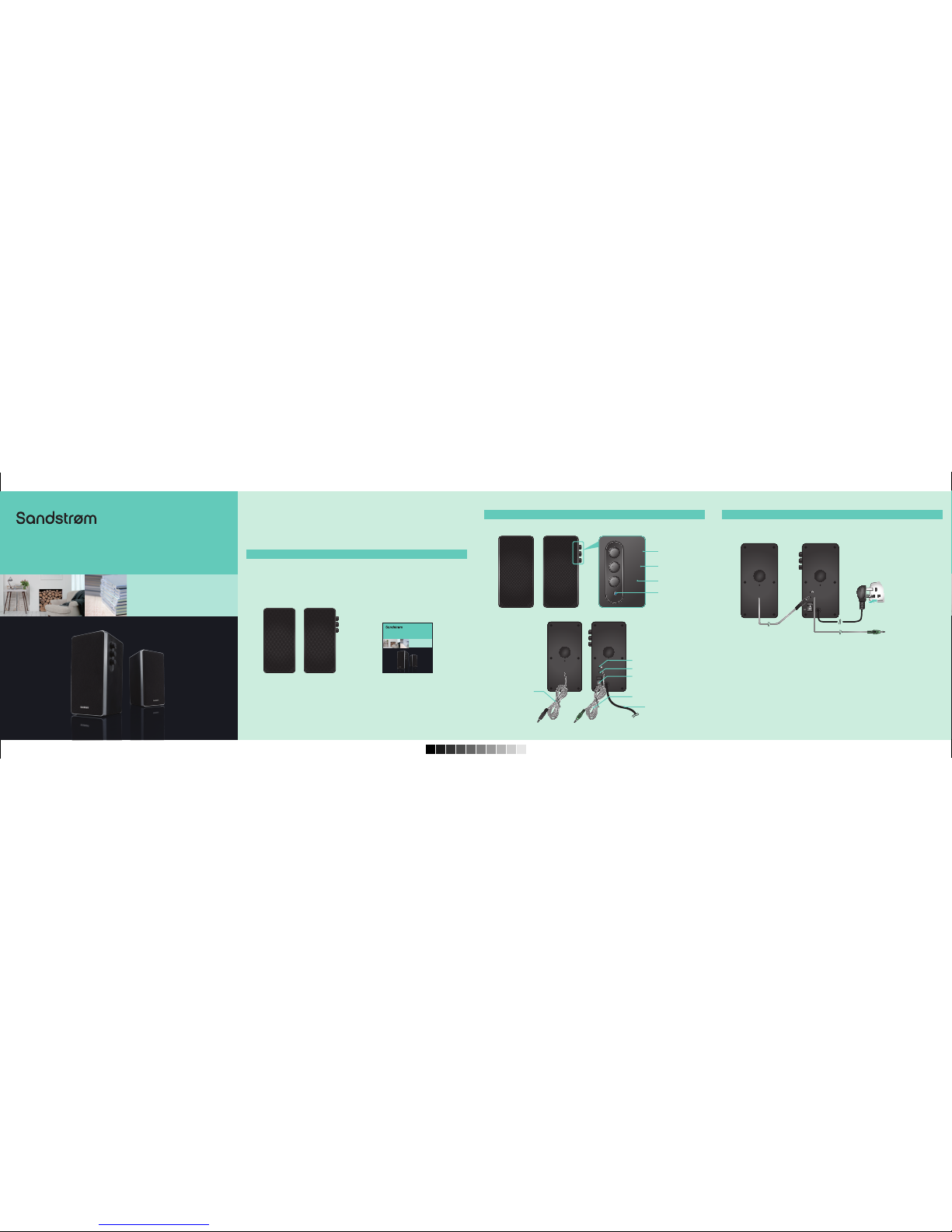
Please make sure the system and the devices are power off before connecting.
VOLUMETREBLE
Front View
Rear View
Please refer to the above figure for cable connections.
Step l: Connect the device (PC/CD/MP3) with the Stereo Input Cable on the
back panel.
Step 2: Connect the speaker cable to the speaker Output Socket on the
back panel.
Step 3: Connect the mains plug to the mains socket and turn on the Power
Switch.
Step 4: Adjust the Volume Control to your desired level.
Volume Control
Treble Control
Bass Control
VOLUME
TREBLE
BASS
Power Switch
Stereo Input Cable
Mains Cable
Earphone Socket
LED Power
Indicator
To Mains Socket
To Audio DeviceSpeaker Cable
Stereo Input Cable
Speaker Cable
Speaker Output Socket
2.0 PC Speakers
SSP2011
Quick Start Guide
SSP2011_IB_110620.pdf 1 20/06/2011 2:42 PM
Page 2
SAFETY INSTRUCTIONS HINTS AND TIPS
SPECIFICATION
1. Read all instructions before using these speakers and keep them for future
reference.
2. Use only voltage specified on the rating label of the speaker.
3. Do not place speakers close to heat sources, such as radiators and heaters.
4. These speakers are intended for household use only and not for commercial or industrial use.
5. Use these speakers only as described in this Quick Start Guide. Any other
use is not recommended by the manufacturer and may cause fire, electric
shock or injury.
6. Always operate on a flat horizontal surface. Do not place the speakers on
an unstable table, stand, tripod or bracket.
7. If the mains cable is damaged, it must be replaced by a qualified electrican
in order to avoid a hazard.
8. Do not use these speakers outdoors, or on wet surfaces. Avoid spilling
liquid on the speakers. Keep the speakers dry and avoid contact with damp
or wet areas.
9. Do not block the openings in the speaker cabinets, never push objects into
the speaker vents or slots because of fire or electric shock hazards, and
provide sufficient space around the speakers for proper ventilation.
10. Only use attachments/accessories specified by the manufacturer.
11. For added protection during lighting storms, unplug the speakers from the
mains socket and turn off the computer.
12. Unplug the speakers when not in use for a long period of time.
If you experience problems during the installation of your system please first
check the following conditions:
1. Make sure all the connections between the speakers and device are
correct.
2. Make sure that the mains power supply is switched on.
3. If connected to a non-standard game console or audio device, please
consult the manual of those devices for connection.
4. Check that your PC volume level is sufficient.
Model: SSP2011
Output Power (Total): 5W +5W
Speaker Driver Unit: (3”4Ω + 1”4Ω) 5W x 2
Frequency Response Range: 150Hz – 20KHz
Speaker Size: 100 x 118 x 201 mm
Power Supply Input: AC 230, 50Hz
Features and specifications are subject to change without prior notice.
(P.N.: SSP2011-001)
13. Do not expose these speakers to rain or moisture to reduce the risk of
electric shock.
14. Place the speakers away from strong electro magnetic environments.
15. These speakers are not intended for use by persons (including children)
with reduced physical, sensory or mental capabilities, or lack of experience
and knowledge, unless they have been given supervision or instruction
concerning the use of the speakers by a person responsible for their safety.
16. Children should be supervised to ensure that they do not play with the
speakers.
This symbol on the product or in the instructions means that your
electrical and electronic equipment should be disposed at the end of
its life separately from your household waste. There are separate
collection systems for recycling in the EU.
For more information, please contact the local authority or your
retailer where you purchased the product.
Visit Partmaster.co.uk today for the easiest way to buy
electrical spares and accessories. With over 1 million spares
and accessories available we can deliver direct to your door
the very next day. Visit www.partmaster.co.uk or call 0844 800 3456 (UK customers
only) Calls charged at National Rate.
DSG Retail Ltd. • Maylands Avenue Hemel Hempstead • Hertfordshire HP2 7TG England
SSP2011_IB_110620.pdf 2 20/06/2011 2:42 PM
 Loading...