

Page 1
Page 2

Page 3
1
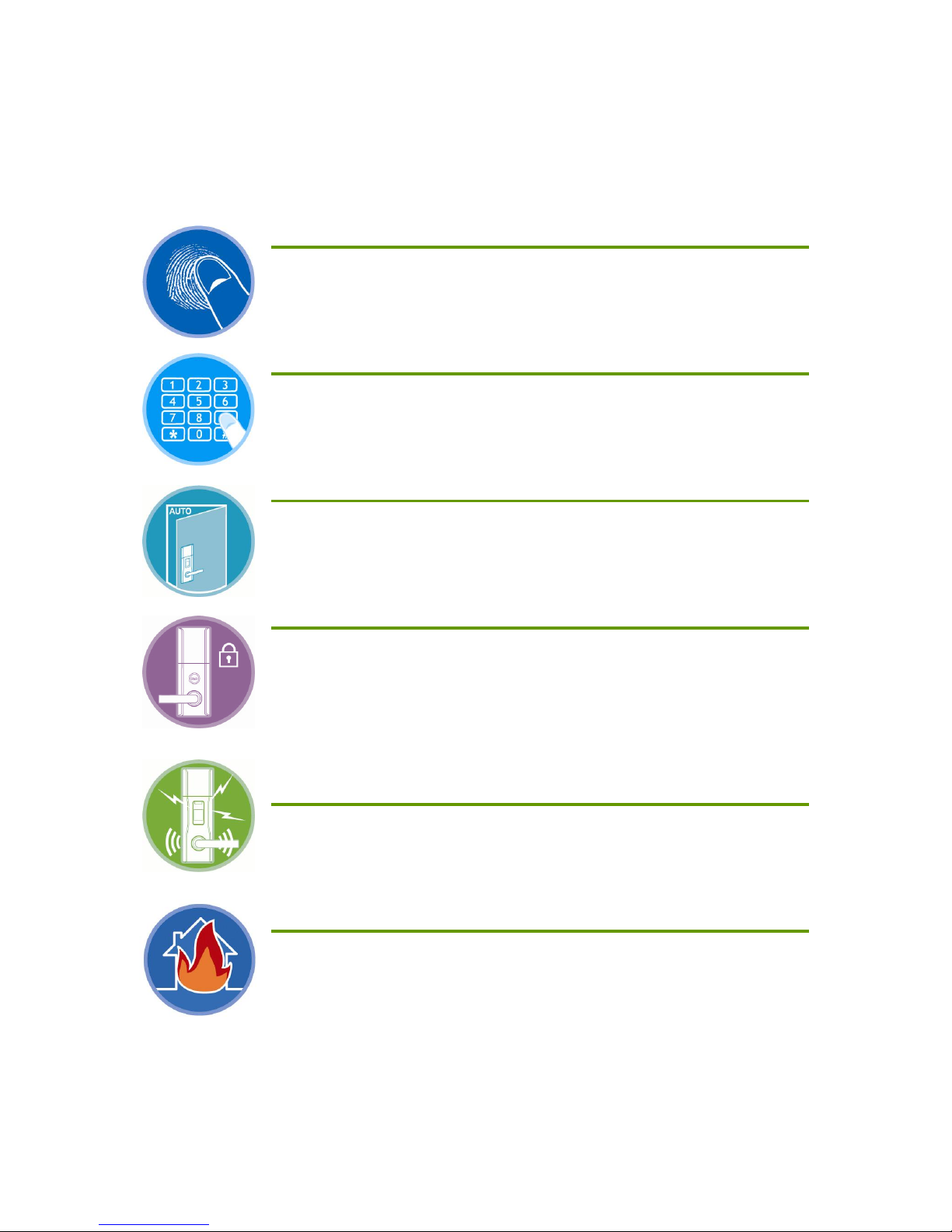
Product Features
You can open the door with the fingerprints
After the fingerprint registration, you can open a door without any
password or card key. (up to 100 fingerprints recordable)
You can open the door with the password
After the password registration, you can open a door without additional
key.
Automatic door lock function
The door will be locked automatically when the door is closed on this
mode. (Automatic / manual lock mode selectable)
Internal forced lock mode
It is not allowed to unlock the door from outside with password or
fingerprint on the internal forced lock mode. This function prevents the
door from burglar intrusion or trespass, especially at night.
Incorrect password and children’s mischief
protection
If incorrect password is entered three (3) times consecutively, the doorlock will stop working in one (1) minute.
Fire alarm and emergency door unlock
If the door-lock detects inside temperature exceeding over certain level
of degree, an emergency alarm will sound and automatically arrange
to unlock the door. (This function may not work in some conditions.)
Page 4

2
Contents
Product Features 1
Contents 2
Safety Instructions 4
Before using the product 7
Product Specification.................................................................. 7
Components ..............................................................................8
Front Body Parts .......................................................................10
Main Body Parts........................................................................12
Mortise ....................................................................................13
Battery Replacement.................................................................. 14
How to use the emergency battery...............................................16
How to use the emergency key....................................................17
Basic Functions 18
How to reset the system (Password/Fingerprint/Remote Controller)...18
Password Registration ................................................................19
Fingerprint Registration ..............................................................21
Deleting Fingerprints ................................................................ 23
Remote Controller Registration ................................................... 24
Deleting Remote Controller ........................................................ 26
Unlock the door-lock with password from outdoor..........................27
Unlock the door-lock with fingerprint from outdoor ....................... 28
Unlock the door-lock from indoor ............................................... 29
Lock the door-lock from outdoor ................................................ 30
Lock the door-lock from indoor.................................................. 30
Page 5

3
Additional Functions 31
Automatic / Manual lock mode setting.......................................... 31
Sound Setting...........................................................................32
Warning / Emergency Alarm .......................................................34
Troubleshooting 38
Quick Manual 40
Product Specification 42
Page 6
4
Safety Instructions
Please read these safety instructions carefully to prevent the product damage or injury
and keep this manual for future reference.
Symbols
Warning
This symbol is intended to prevent a user from injury or hazards.
Caution
This symbol is intended to prevent a product from physical or electrical damage.
Note
This symbol is intended to provide a user with additional product information.
Symbols used in the manual
General warning and caution
Prohibited action while handling the product
Guide a user to use the product
Page 7
5
Installation instruction
Operation instruction
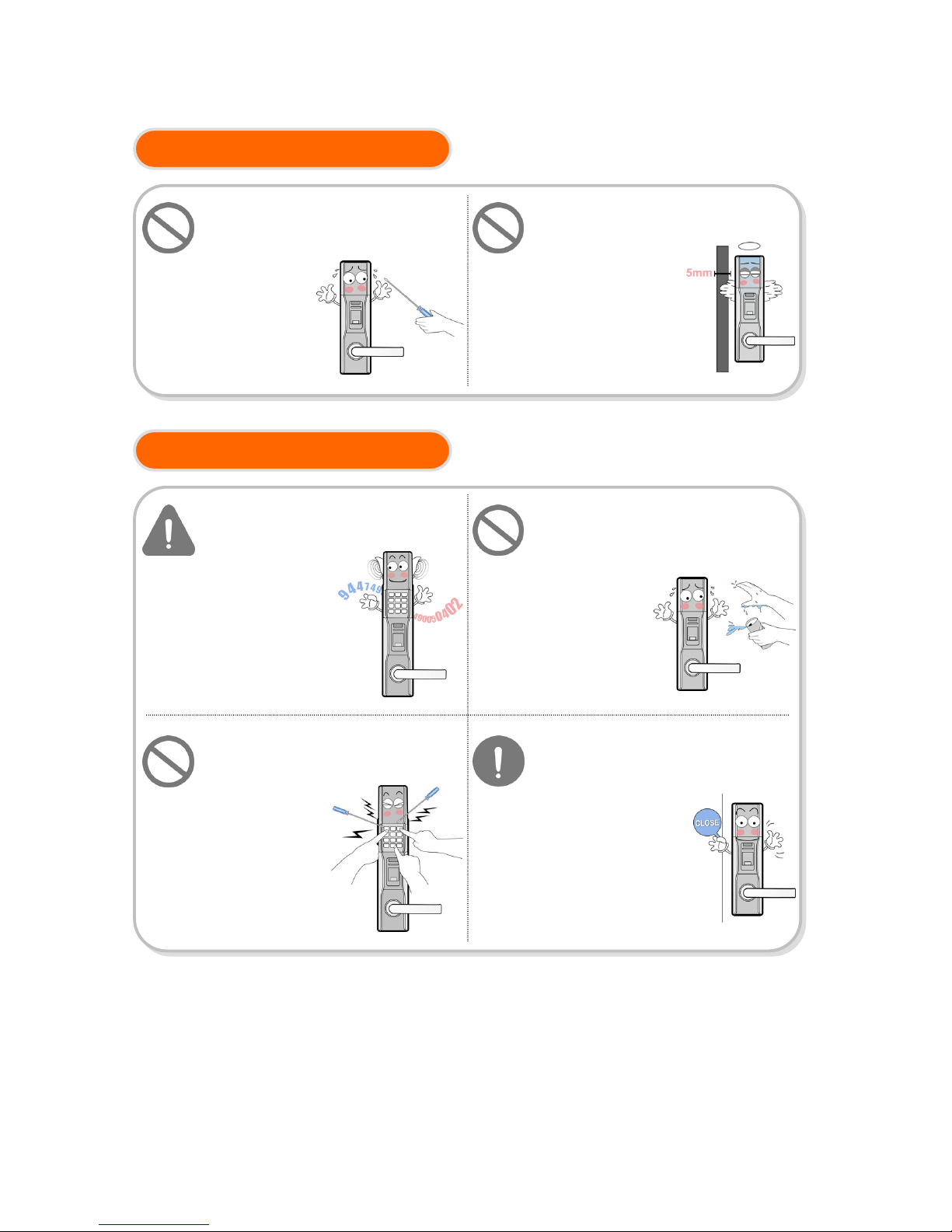
Do not try to install or repair the
product yourself. Refer all servicing
to qualified service personnel or
official dealer.
Manufacturer is
not responsible for
any damage caused
by improper
in
stallation o
r r
epair
To install and operate the product,
the door thickness should not
exceed over 5mm.
Product may not work
at the door, which is
more than 5mm thickness
Make sure the door is locked
when going out.
Manufacturer is not
responsible for
any loss or damage
for this.
Do not disclose your password to
other people and change it
regularly.
Avoid the risk
of theft.
Do not operate the product with
wet hands and never spill water /
drinks into the product.
It may cause product
damage or
malfunction.
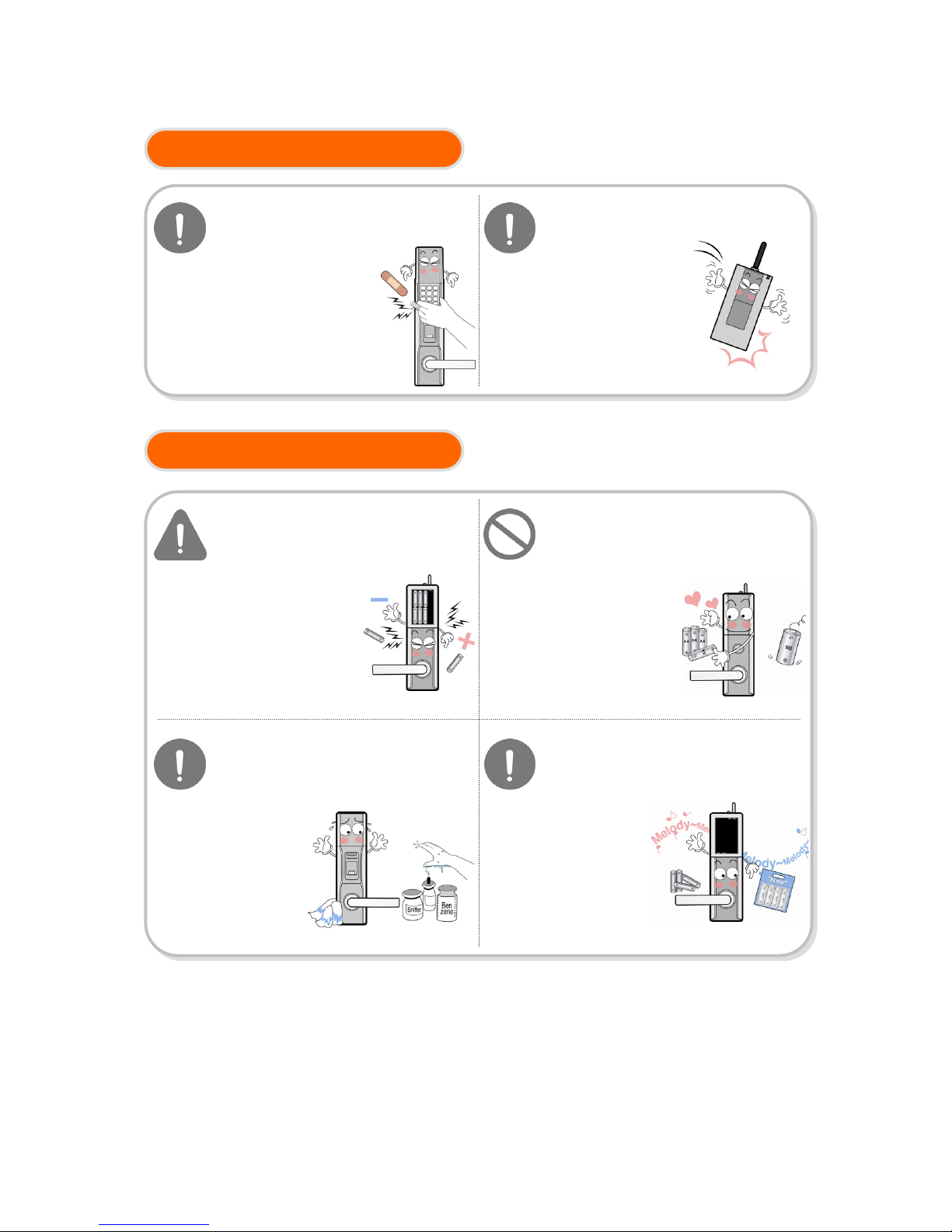
Handle the product gently and do
not push sharp object to / into the
product.
It may cause
product damage
or scratch.
Page 8
6
Operation instruction
Repair & maintenance
Do not drop or impact the remote
controller.
It may cause damage
to remote controller.
Keep attention to your finger
when the number pad cover is
shut
It may cause an injury
to your finger.
Make sure the battery polarity
when inserting batteries.
It may cause leakage,
breakage or overheat
on the product.
Use only ‘AA’ sized battery and
do not mix old or different brand
It may shorten the product life and
cause damage.
Do not use liquid or aerosol
cleaners. Use only damp cloth.
It may cause damage or scratch.
Replace the batteries within a
week after the battery
replacement alarm.
The product will
be powered off
when batteries
run out.
Page 9
7
Before using the product
Product Specification
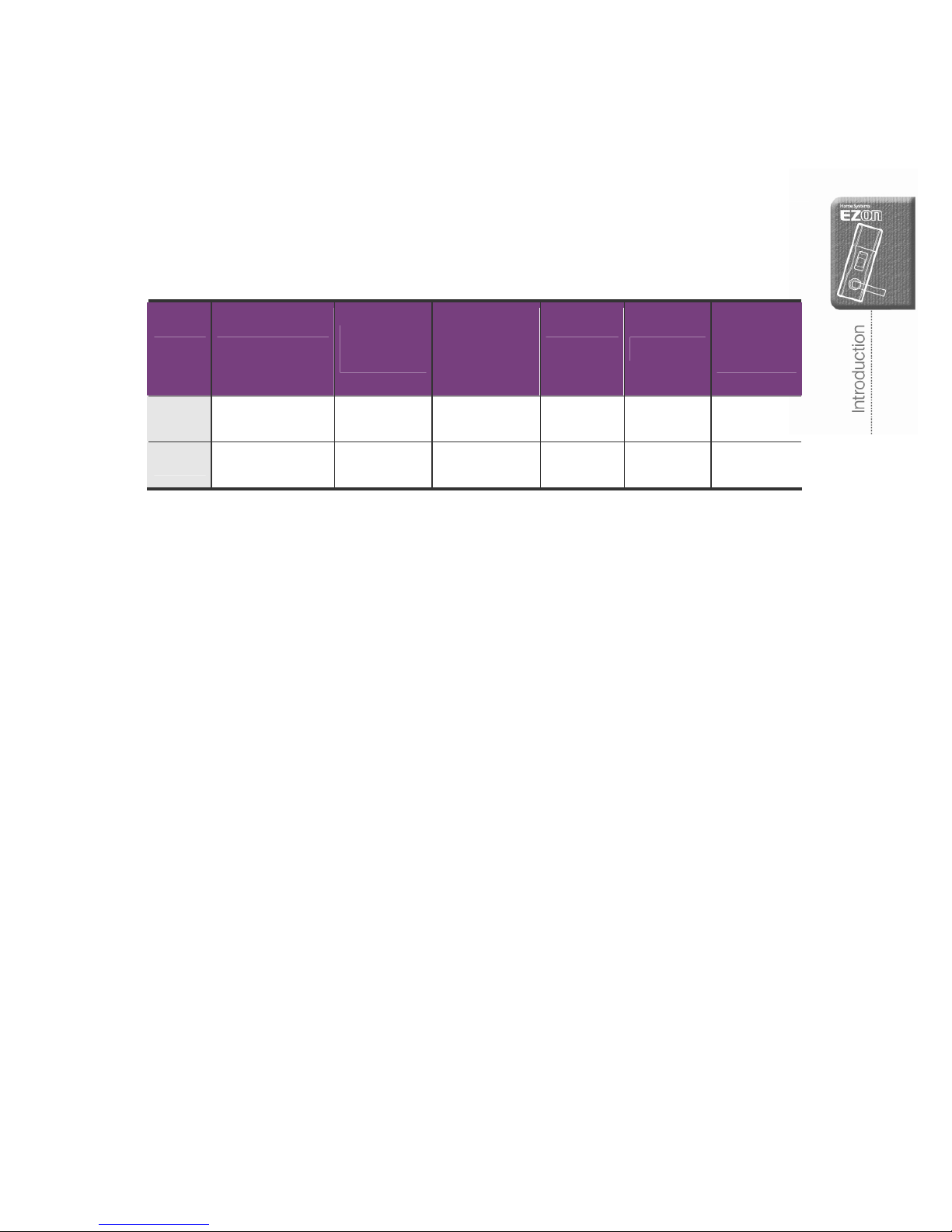
SHS-DL22 series include / exclude following option;
No. Model
Emergency
Key
Automatic
number pad
cover open
Password Fingerprint
Remote
Controller
1 SHS-DL22 SNF ○ ○ ○ ○ ×
2 SHS-DL22 SRF ○ ○ ○ ○ ○
Page 10
8
Components
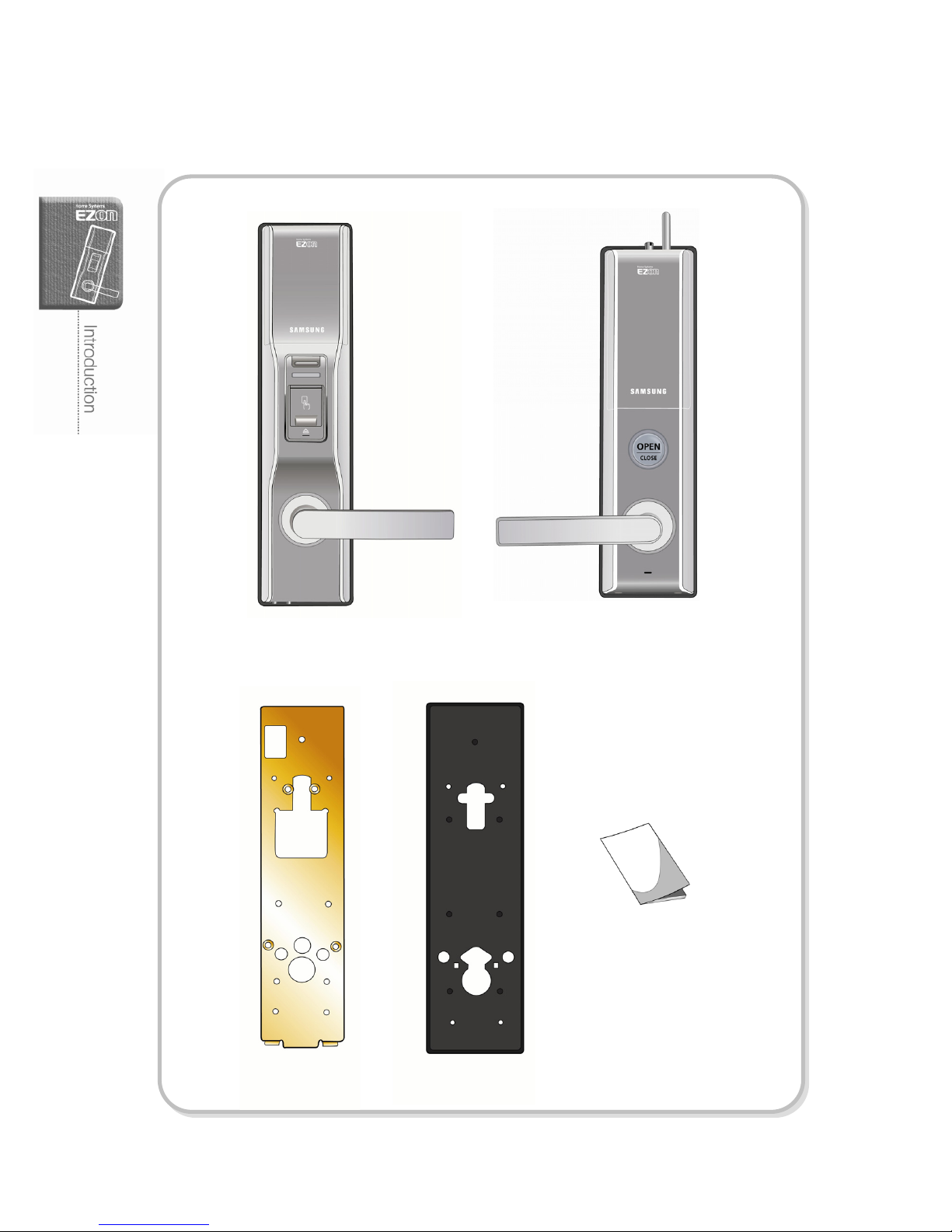
Main Body Install Panel
Main Body Rubber Pad
User Guide
Front Body
(installed outside of a door)
Main Body
(installed inside of a door)
Page 11
9
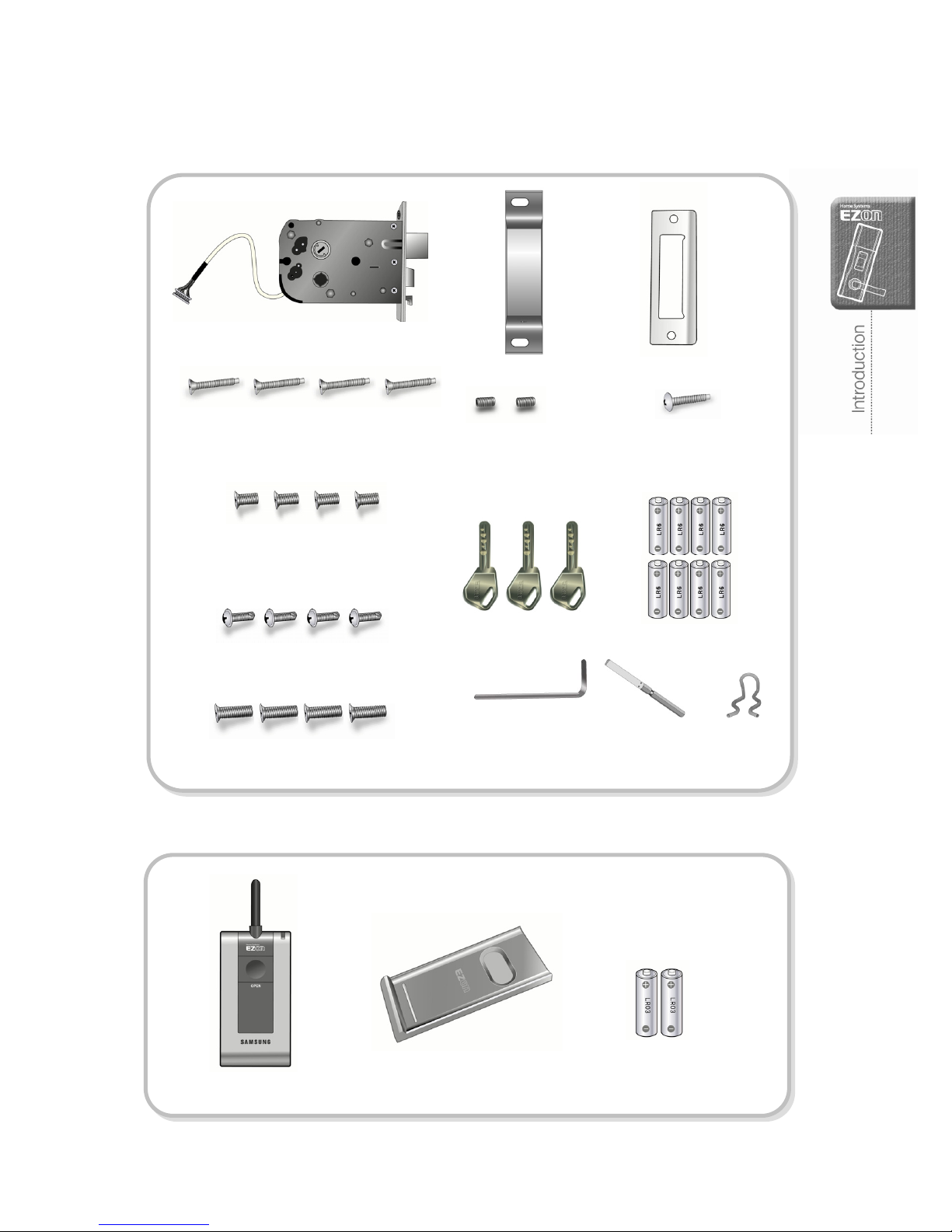
Remote Controller
'AAA' Batteries (LR03, 2EA)
Option
Remote Controller Holder
L-shape hexagonal
wrench(2mm)
Mortise
Strike Box Strike
'AA' batteries (LR6, 8EA)
Mounting screws for the Install
Panel & Front Body
BOLT FH+ M5 X L30
Mounting screws for the Install Panel
& Main Body
BOLT small head FH+ M4×L8
Door handlebar
mounting screws
BOLT M4×L8
Screws for the inner body fixing
BOLT PW+ #8×L16
Screws for the strike fixing
BOLT small head FH+ U10-24×L10
Emergency key (5EA)
Screws for
the mortise fixing
BOLT BH+ M5×L33
Handle shaft
spring
Handle shaft
Page 12
10
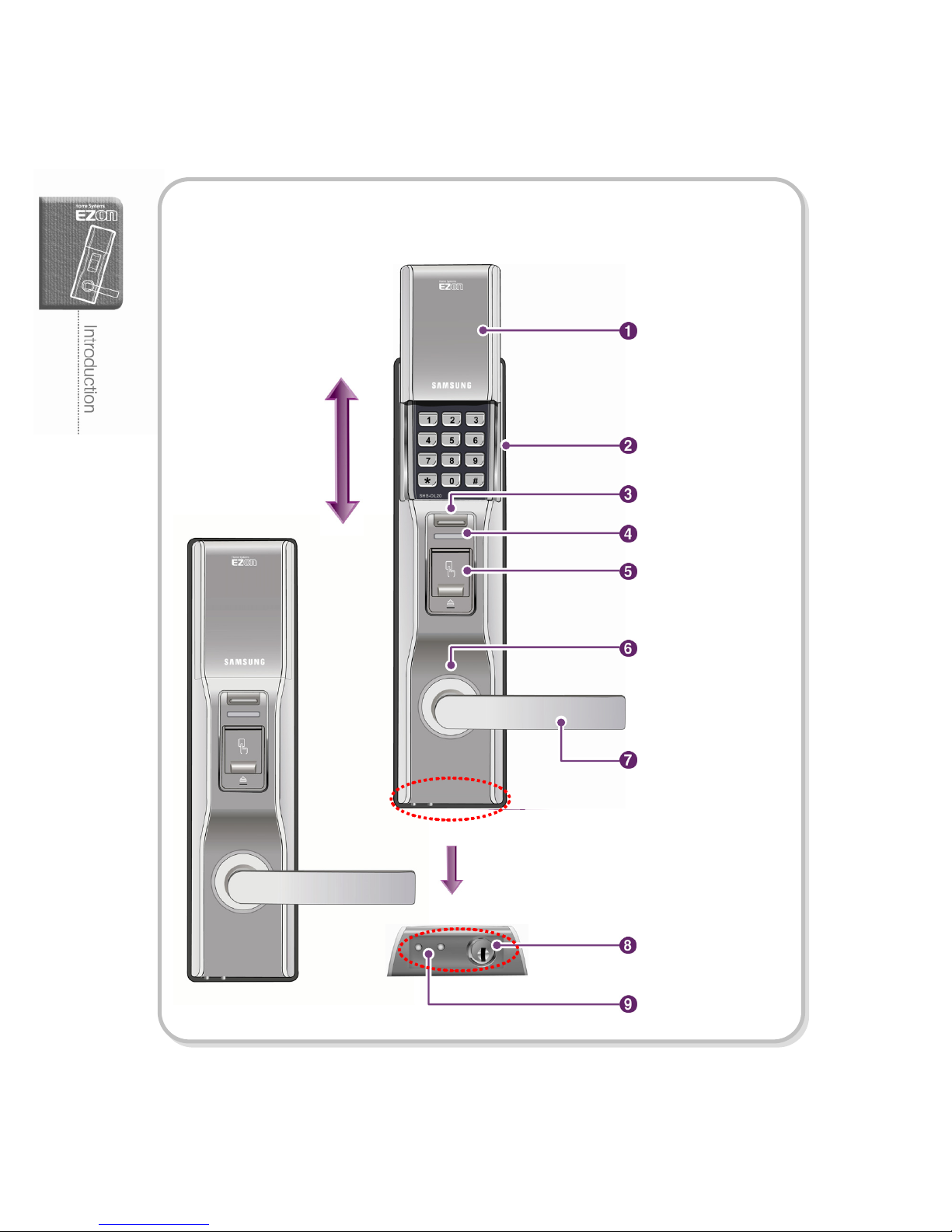
Front Body Parts
Cover close
Open
Close
Exterior handlebar
Cover open
Number pad cover
Number pad
Cover open/close button
Indicating lamp
Lock indicator
Fingerprint reader
Emergency power
supply plate
Emergency keyhole
Page 13
11
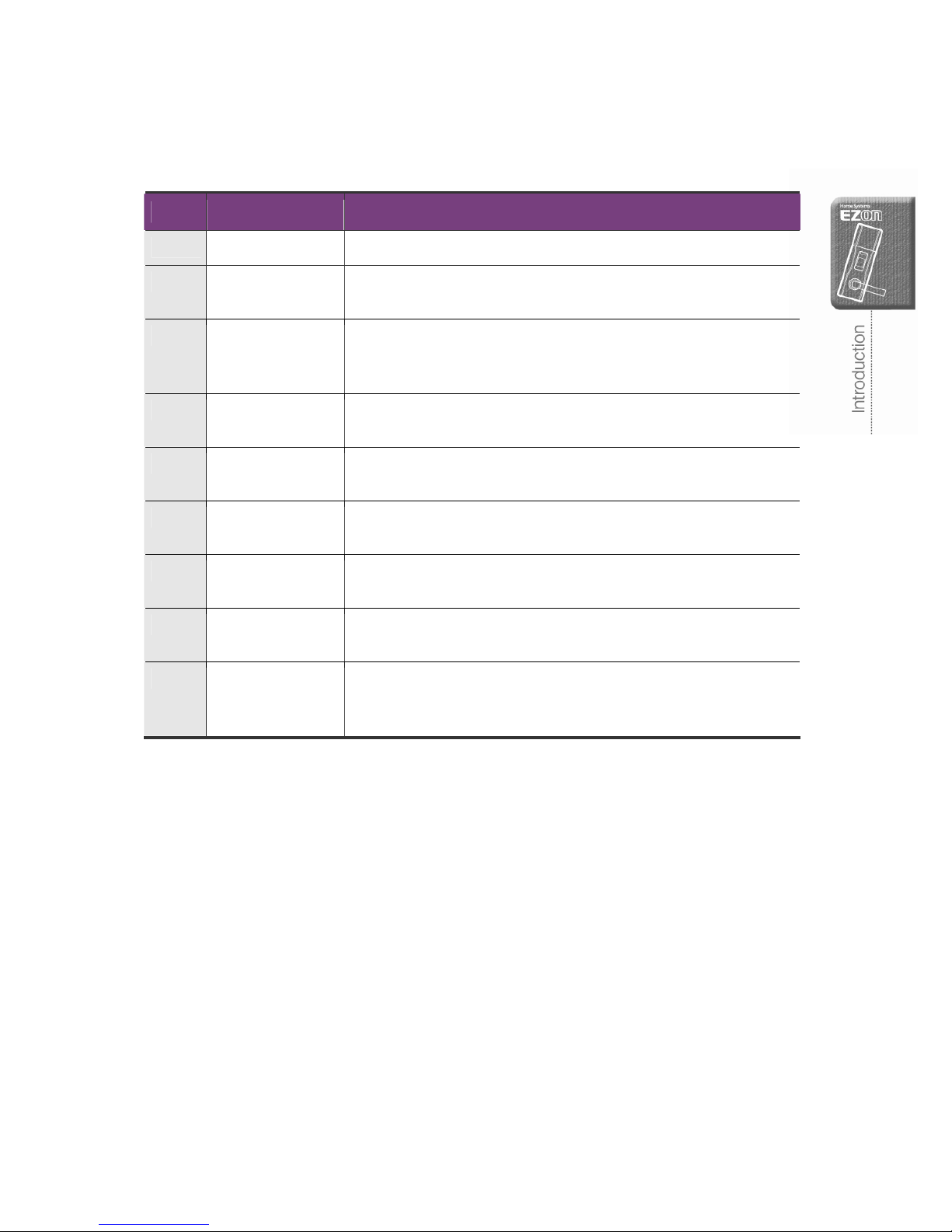
No. Part Function
1 Number pad cover Protect the number pad from dust and scratch.
2 Number pad Enter the number to register, change or delete the password. A
user can use the number pad to open a door.
3 Cover open/close
button
Press this button to open / close the number pad cover. The
number pad will be closed automatically unless other button is
pressed within five (5) seconds.
4 Indicating lamp Illuminate in blue when the door is working and blink in red to alert
the low battery.
5 Fingerprint reader Read the fingerprint placed on the fingerprint reader and open a
door.
6 Lock indicator Illuminate in blue when a user open the door with the password,
fingerprint or emergency key.
7 Exterior handlebar Pull down the exterior handlebar to open the door when the door
is unlocked.
8 Emergency
keyhole
Insert the emergency key and turn to open a door when the
door-lock is powered off or malfunction.
9 Emergency power
supply plate
Contact 9V battery to the emergency power supply plate to supply
instant power to the door-lock when batteries are completely
discharged.
Page 14
12
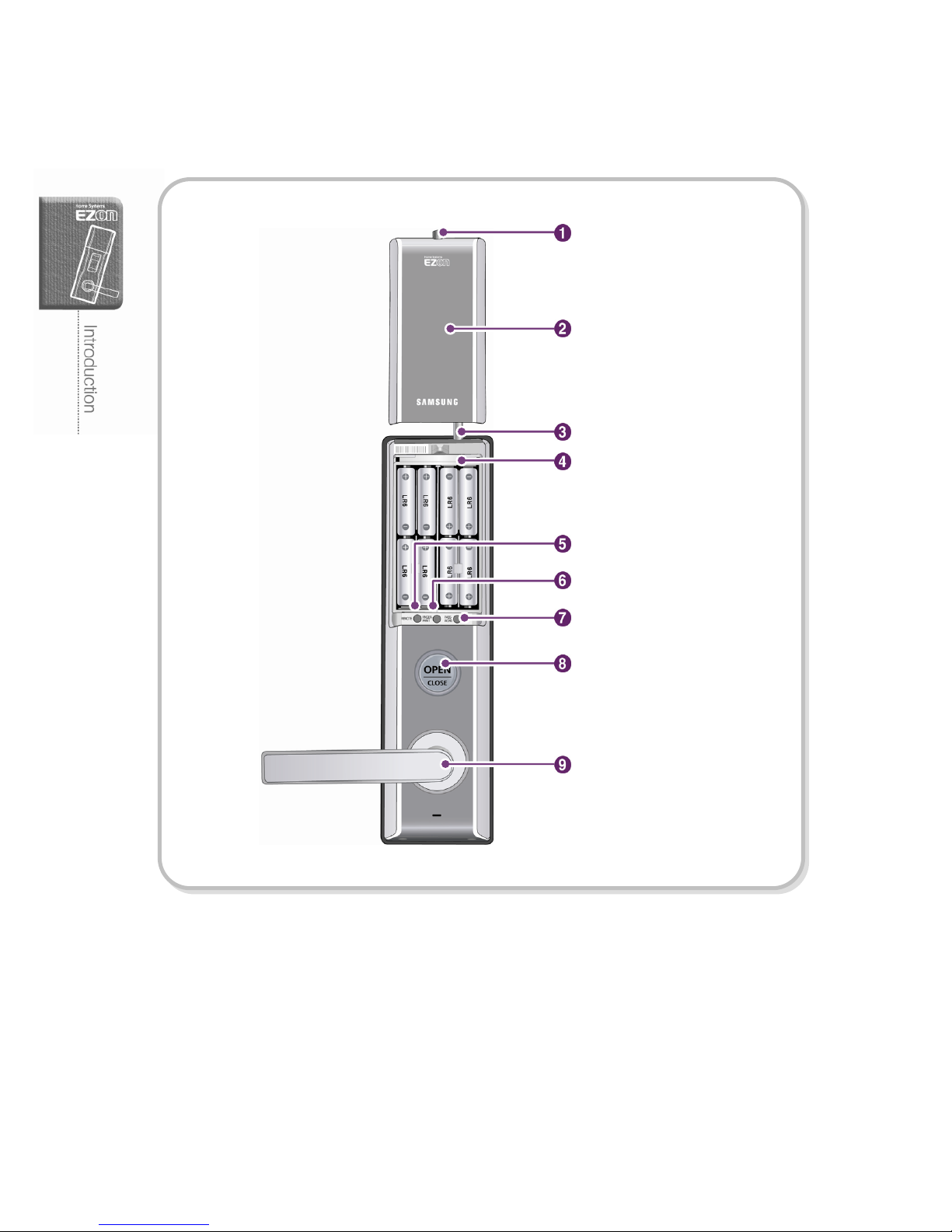
Main Body Parts
Open button
Antenna (Option)
Fingerprint button
Password button
Interior handlebar
Battery cover
Battery cover mounting screw
L-shaped wrench storage
Remote button
Page 15
13
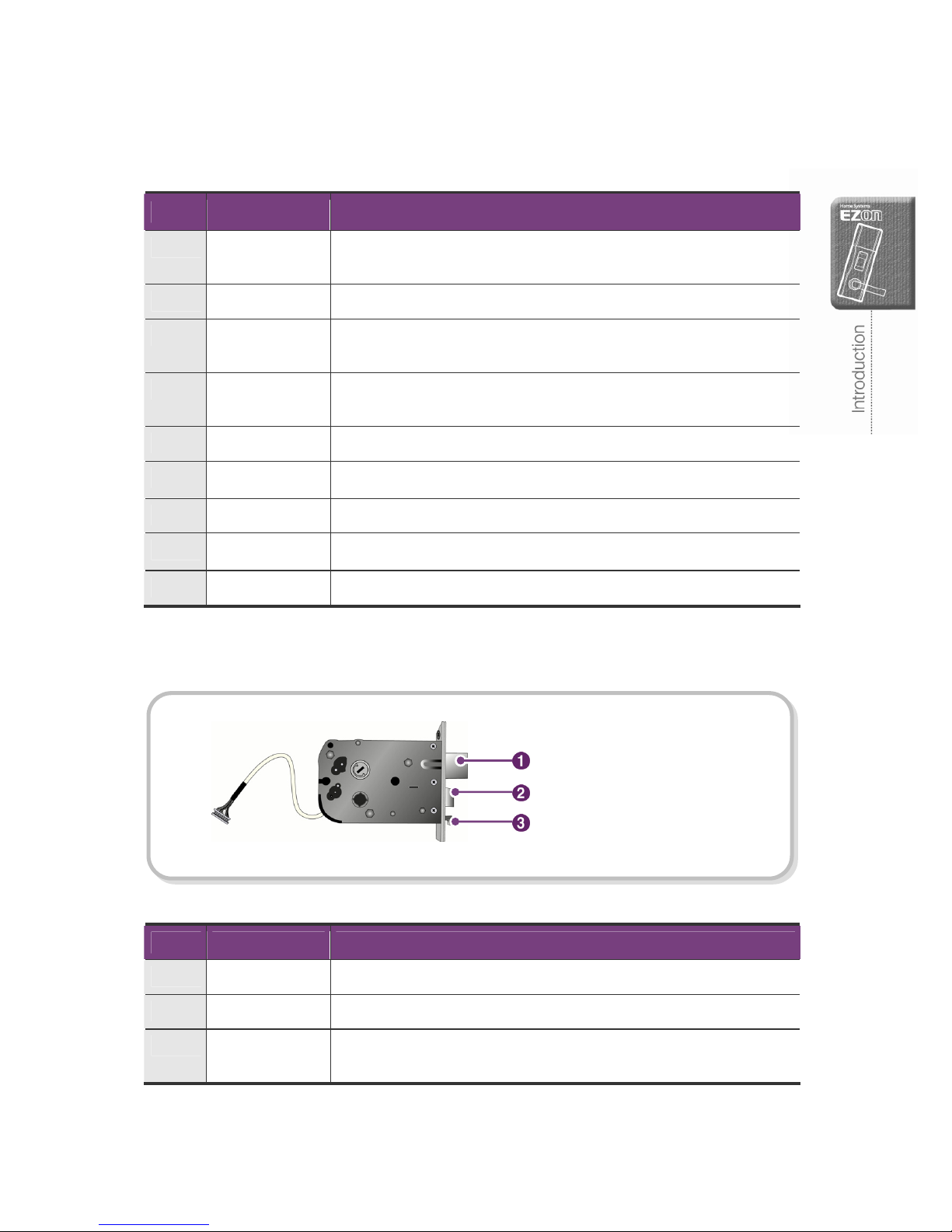
No. Part Function
1 Battery cover
mounting screw
Hold the battery cover from the main body.
2 Battery cover Protect the batteries and registry buttons.
3 Antenna For wireless home network communication (when it is used with H/A
or H/N devices).
4 L-shaped wrench
storage
Store the L-shaped wrench to fasten or loosen the exterior
handlebar mounting screws.
5 Remote button Press this button to register / delete the remote controller.
6 Fingerprint button Press this button to register / delete the fingerprint information.
7 Password button Press this button to change password.
8 Open button Lock/Unlock the door from the inside / set internal forced lock
9 Interior handlebar Pull down the interior handlebar to open the door
Mortise
No. Part Function
1 Dead bolt Lock the door on the door frame
2 Latch bolt Hold the door on the door frame
3 Automatic lock
sensor
Detect whether the door is open or closed (on the automatic lock
mode only)
Latch bolt
Dead bolt
Automatic lock sensor
Page 16
14
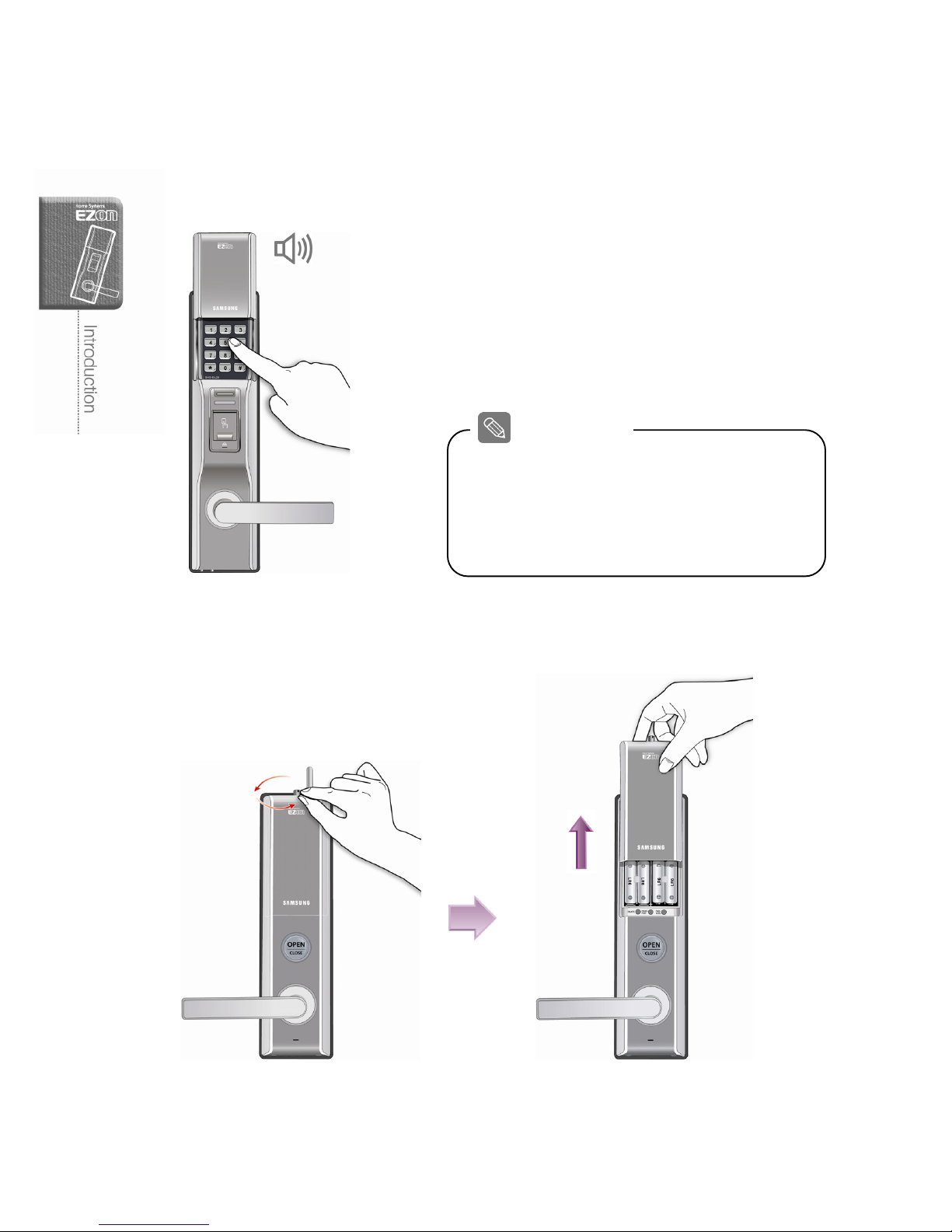
Battery Replacement
1. When the low battery alarm sounds...
Low battery warning melody will sound when
you open the door with a password or
fingerprint. If the indicating lamp on the front
body or [Open] button on the main body turns
on before the door is open, replace the
batteries.
2. How to open the battery Cover
Remove the battery cover mounting screw in anti-clockwise and lift up the battery cover.
About Battery
Warning tune
The batteries will last more than twelve (12) months on the
basis of using 10 times a day (SHS-DL22SNF model).
The battery life will vary from the brand, manufactured
date and environment and use ‘AA’ size 1.5V x 8EA
only.
Page 17
15
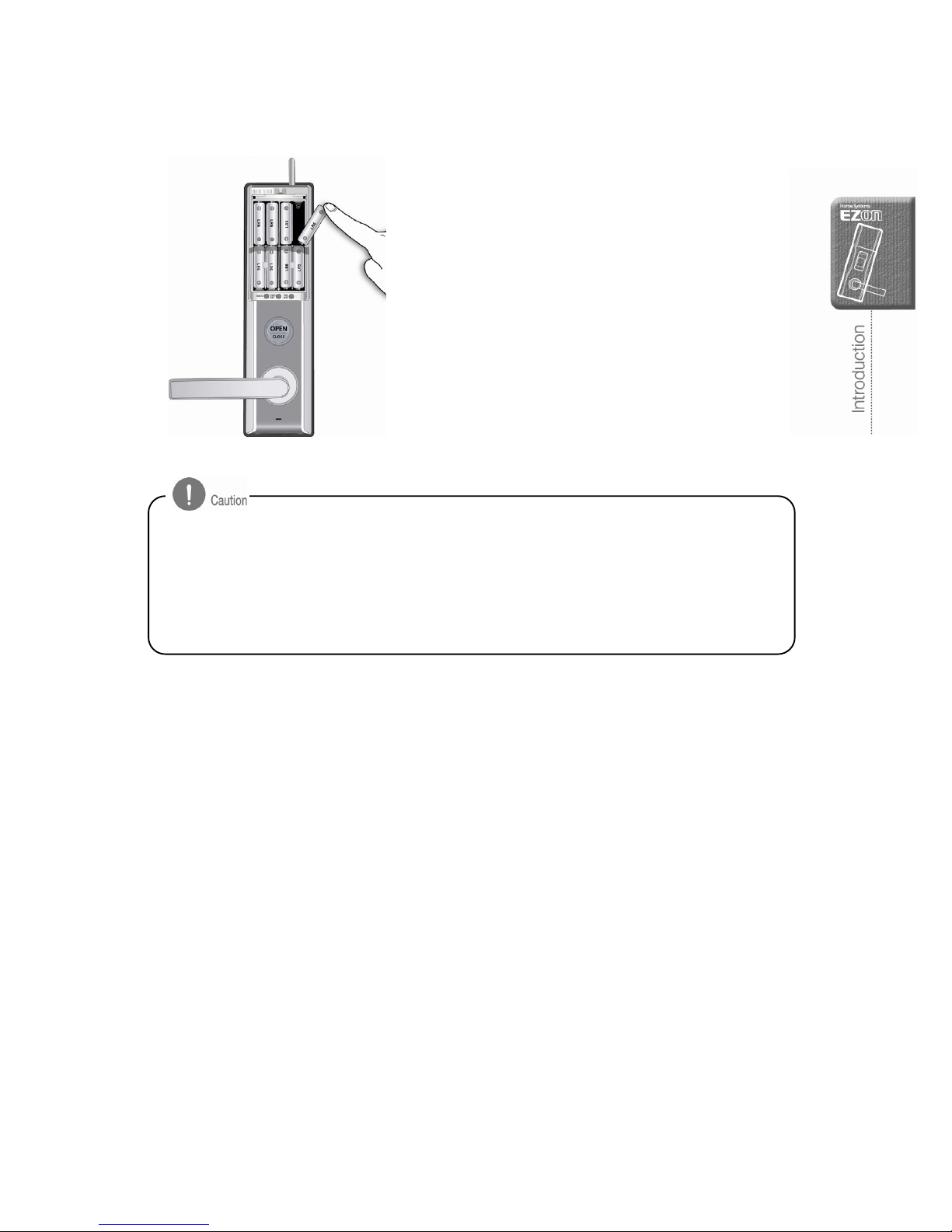
3. How to replace the battery
Replace eight (8) batteries within a week from
the first low battery warning melody.
- The door-lock will be powered off when the
batteries run out.
- It is recommended to replace all batteries at once and do not mix old or different brands.
- Make sure the battery polarity when inserting batteries. It may cause product damage.
- Battery leakage may occur, check the battery on the door-lock regularly in every six
months.
- After the low battery alarm, a user can not register / change / delete / reset the product.
Replace the battery and then register / change / delete / reset it.
Page 18
16
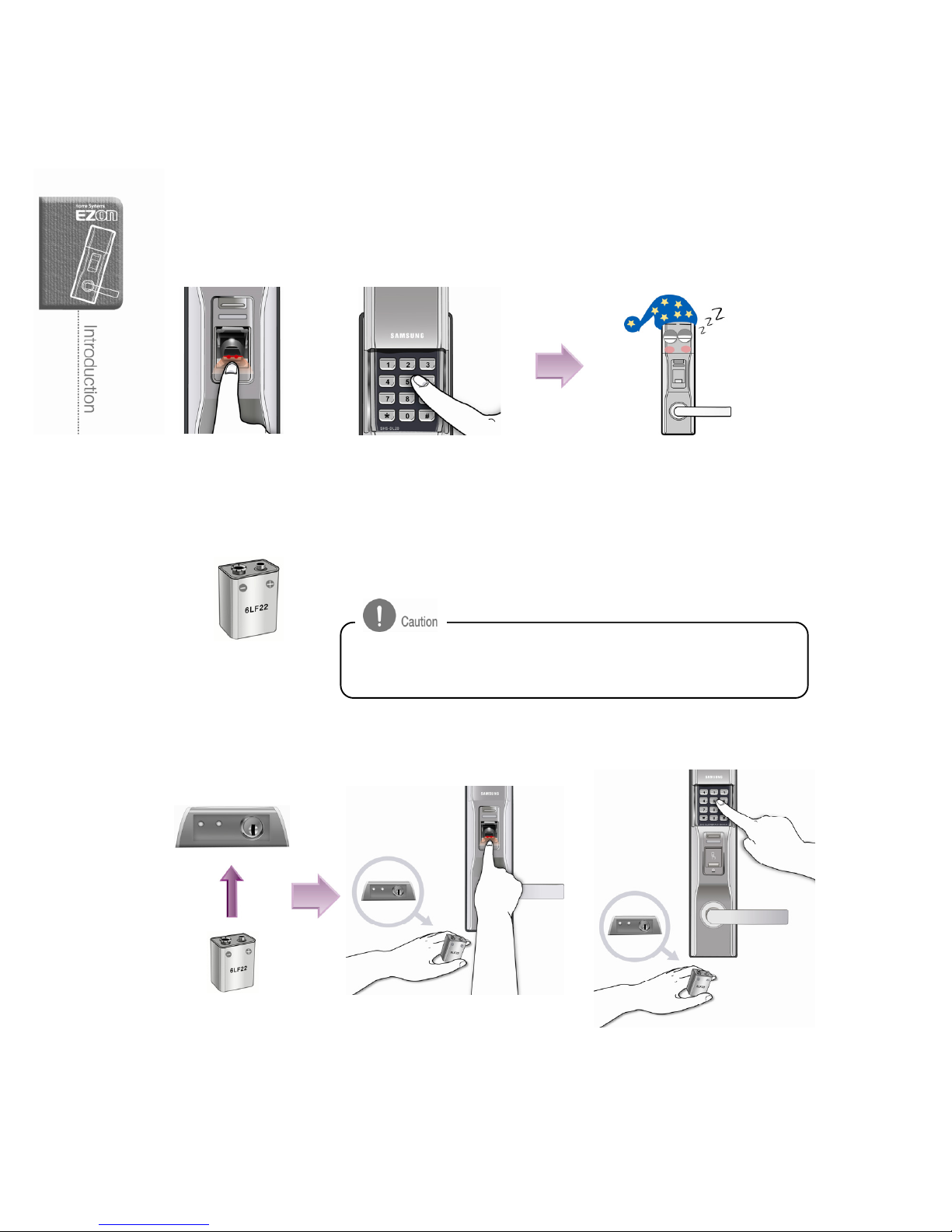
How to use the emergency battery
1. If the batteries are completely discharged…..
Replace the batteries before they are discharged. The door-lock will stop working if you
fail to replace the batteries on time.
2. 9V Square-typed battery
Purchase and use a 9V battery to supply
instant power to the unit.
3. Opening the door with the emergency battery
Contact 9V battery to the emergency power supply plate and enter your password or
place a fingerprint on the reader.
It is recommended to use the Alkaline battery rather than
rechargeable or manganese one to lengthen the battery life.
The door-lock will not work properly
Reading Fingerprint
Entering Password
or
or
Page 19
17
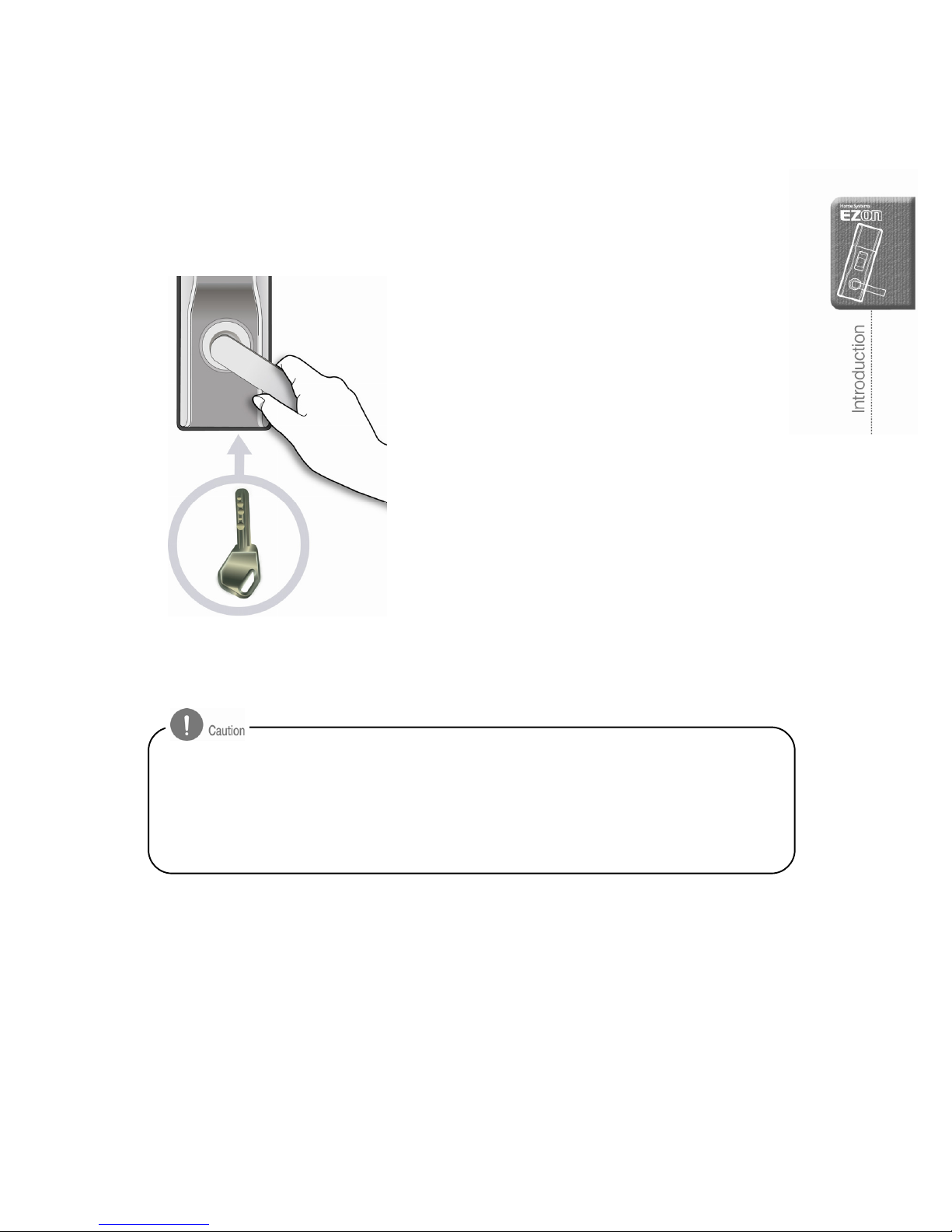
How to use the emergency key
Use the emergency key when the batteries are discharged or inside electric mechanism
is out of order.
There is the emergency keyhole under the
front body.
Insert emergency key and turn it to unlock the
door.
Pull down the exterior handlebar to open the
door.
- Keep the emergency key in a safer place where accessible to outside door-lock or carry
it with you.
- When you lose the emergency key, we recommend you contact the service center to
change the whole key cylinder (Changing the key cylinder is charged).
- Pull out the emergency key afte
r
the door is open and keep it secure.
Page 20
18
Basic Functions
Explain how to reset and register / delete the password, fingerprint and remote
controller. In addition, instruct how to open / close a door.
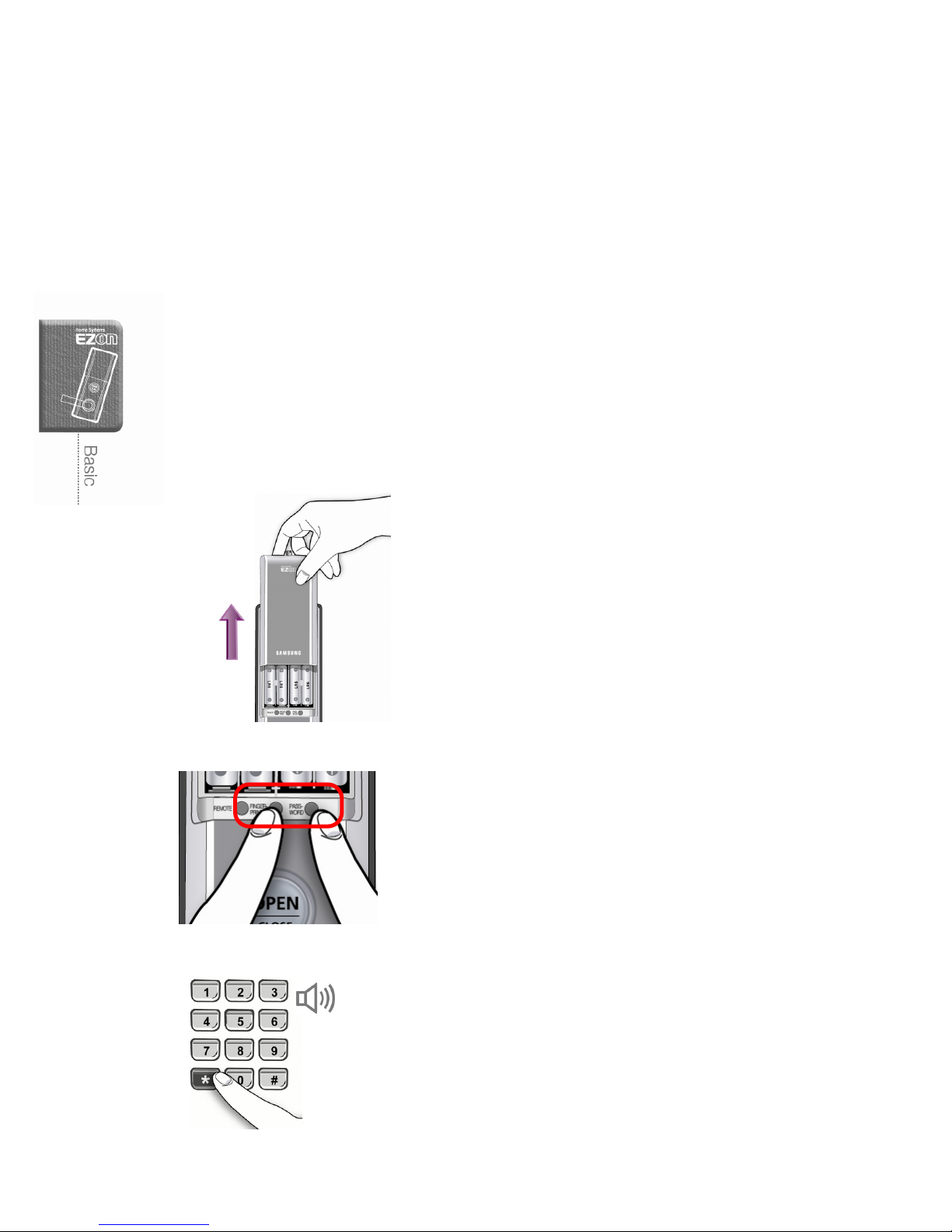
How to reset the system
(Password/Fingerprint/Remote Controller)
After the system reset, all information of previous password, fingerprint and remote
controller registration will be erased and the password will be set ‘1234’ ( factory default ).
Register new password before starting the system.
1. Opening the cover (from indoor)
Remove the battery cover mounting screw in
anti-clockwise and lift up the battery cover.
2. Press [Password] & [Fingerprint] button (from indoor)
Press [Password] button and [Fingerprint]
button simultaneously for five (5) seconds.
- Success: Beep Beep
3. Enter password (from outside)
Enter current password or ‘4560852580’ and
then press [¹] button.
- Success: Cheerful tune
- Failure: Beep~
Page 21
19
Password Registration
The password is available from four (4) up to twelve (12) digits. (You can register only
one password.) Register new password after the system reset or purchase.
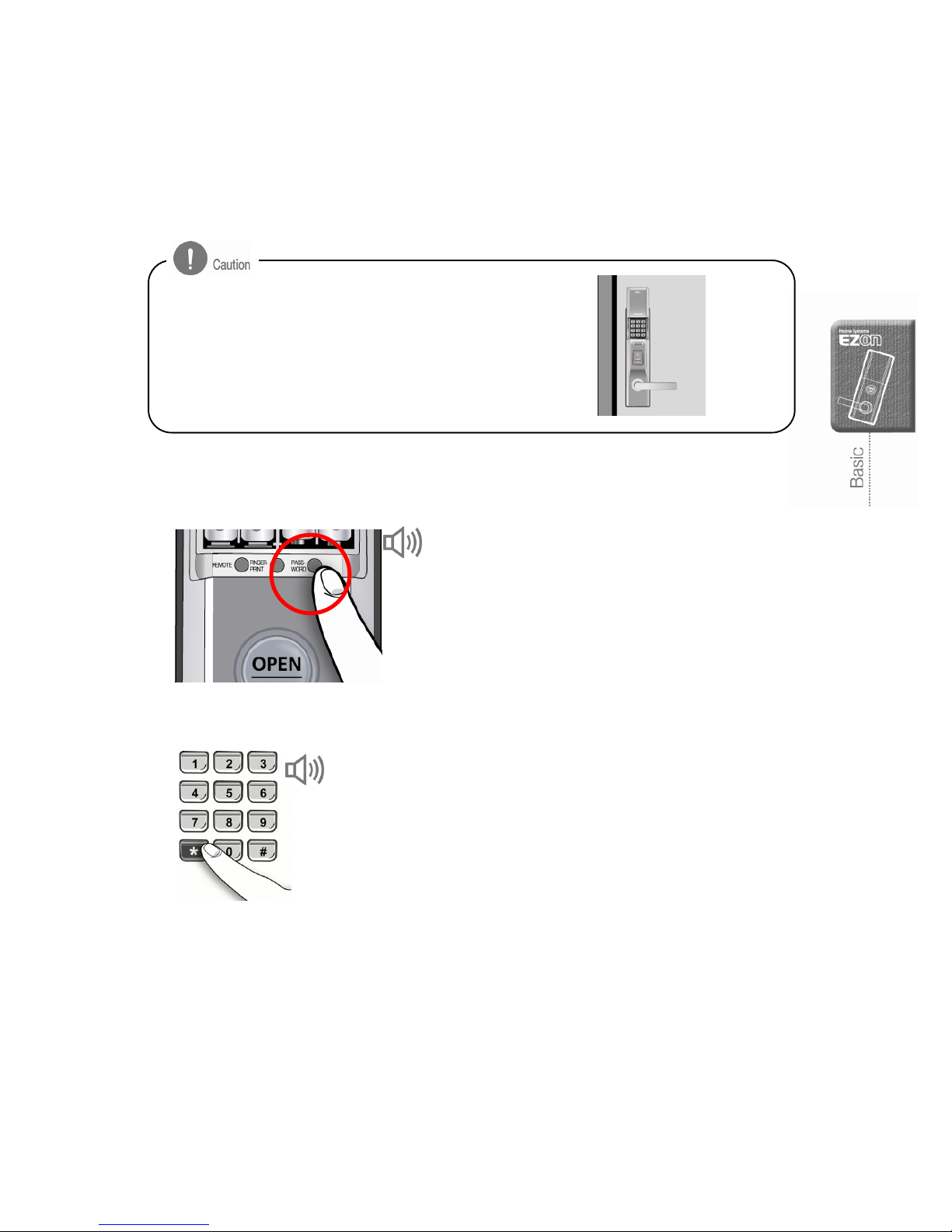
1. Press [Password] button (from indoor)
Lift up the battery cover from the main body.
Press [Password] button.
2. Enter the current password (from outdoor)
Enter current password (or ‘1234’ after the
system setup) and press [¹] button.
Tu n es
Make sure if your door is open during the new password
registration as the door may be locked.
Door open
Beep
Page 22
20
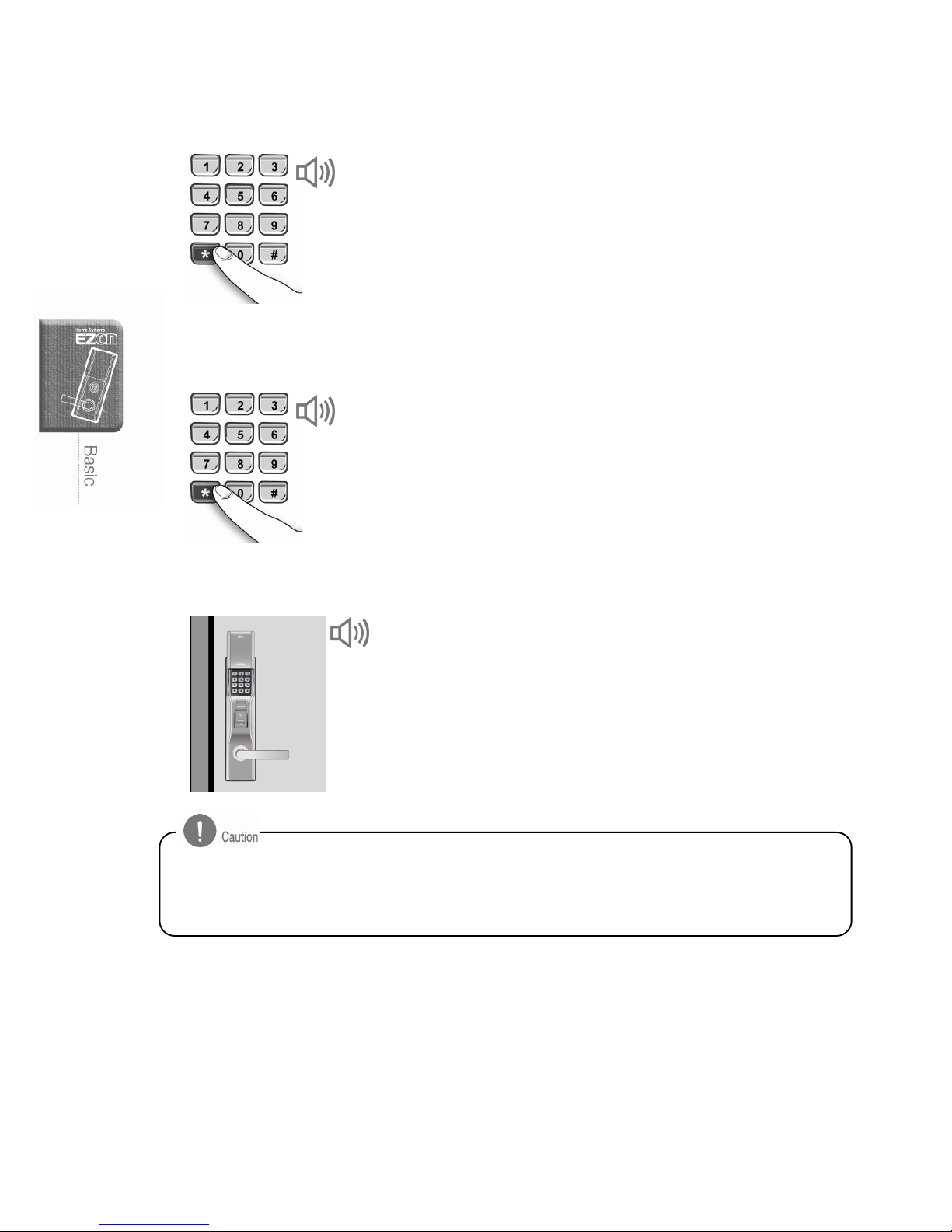
3. Enter new password (from outdoor)
Enter a new password (from 4 up to 12 digits)
and press [¹] button.
- It is recommended to use over 6 digits password
for the security purpose. (The number 0 ~ 9 is
selectable for the password).
4. Confirm new password (from outdoor)
Enter a new password again and press [¹]
button for confirmation. The new password
registration is completed.
5. Test new password registration (from outdoor)
Do not close the door before you test the new
password registration is successful or not.
- See the page 27 (Unlock the door-lock with
password from outdoor)
- It is recommended to change the password regularly for security reason.
- Take good care of the password and not allow anyone to know it except for authorized persons.
- To change the password, register a new password or reset the system.
Beep Beep
Cheerful tune
Cheerful tune
Page 23
21
Fingerprint Registration
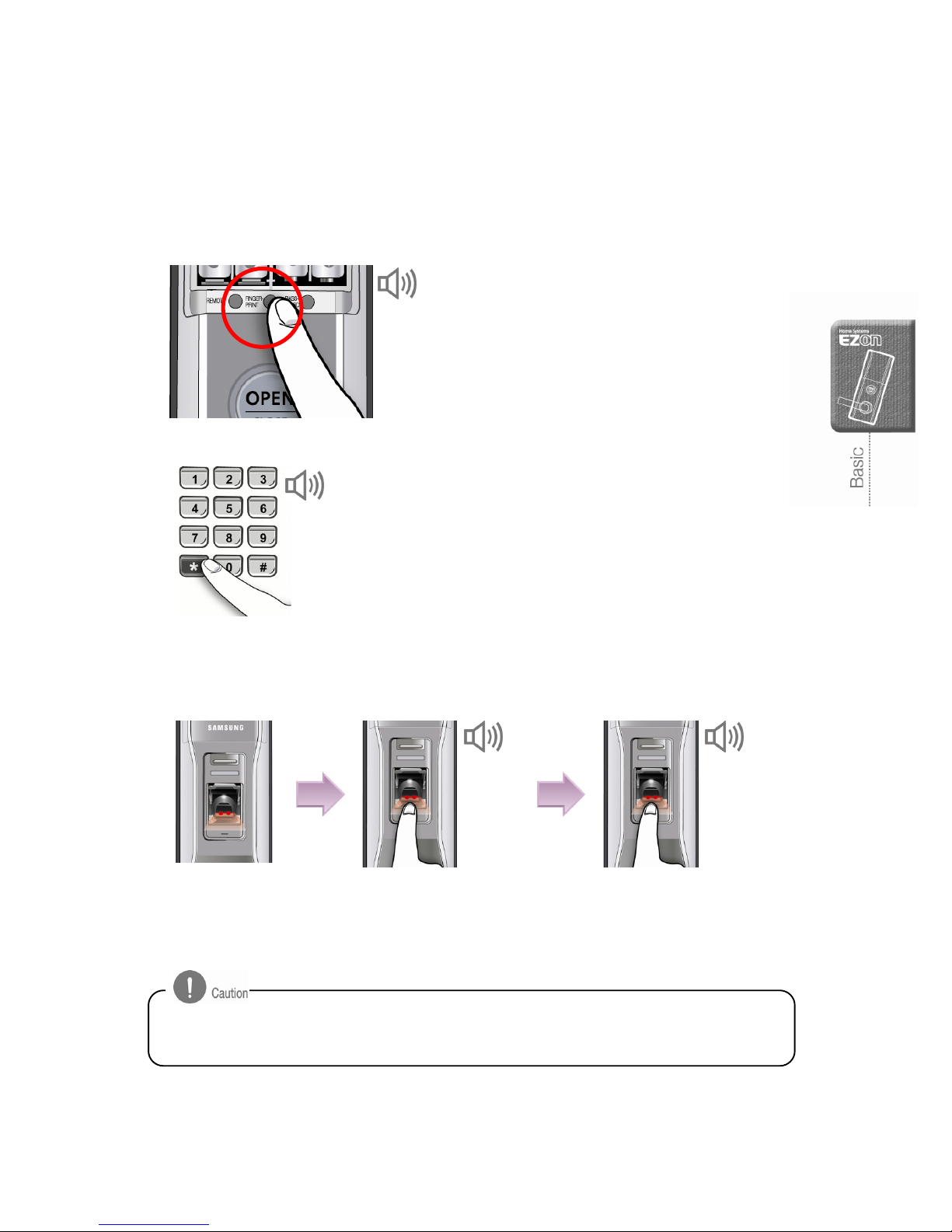
It is available to register max. one hundred (100) of fingerprints.
1. Press the [Fingerprint] button (from indoor)
Lift up the battery cover from the main body.
Press [Fingerprint] button. The number pad
cover will be open automatically.
2. Enter the password (from outdoor)
Enter current password and press [¹] button.
3. Read Fingerprint (from outdoor)
When the fingerprint reader part turns in red,
place your fingerprint on the fingerprint reader
and wait until the beep sound is heard.
(Approx. 1 second)
The fingerprint reader part will turn off
and then on. Place your fingerprint
again. The long beep (tune) will sound
and your fingerprint registration is
completed.
Tun e
- Some fingerprints can not be registered properly when the fingerprint is cut or
contaminated with dust. It is recommended to register more than two (2) fingerprint of your.
Beep
Red light
Beep
Tu n e
Page 24
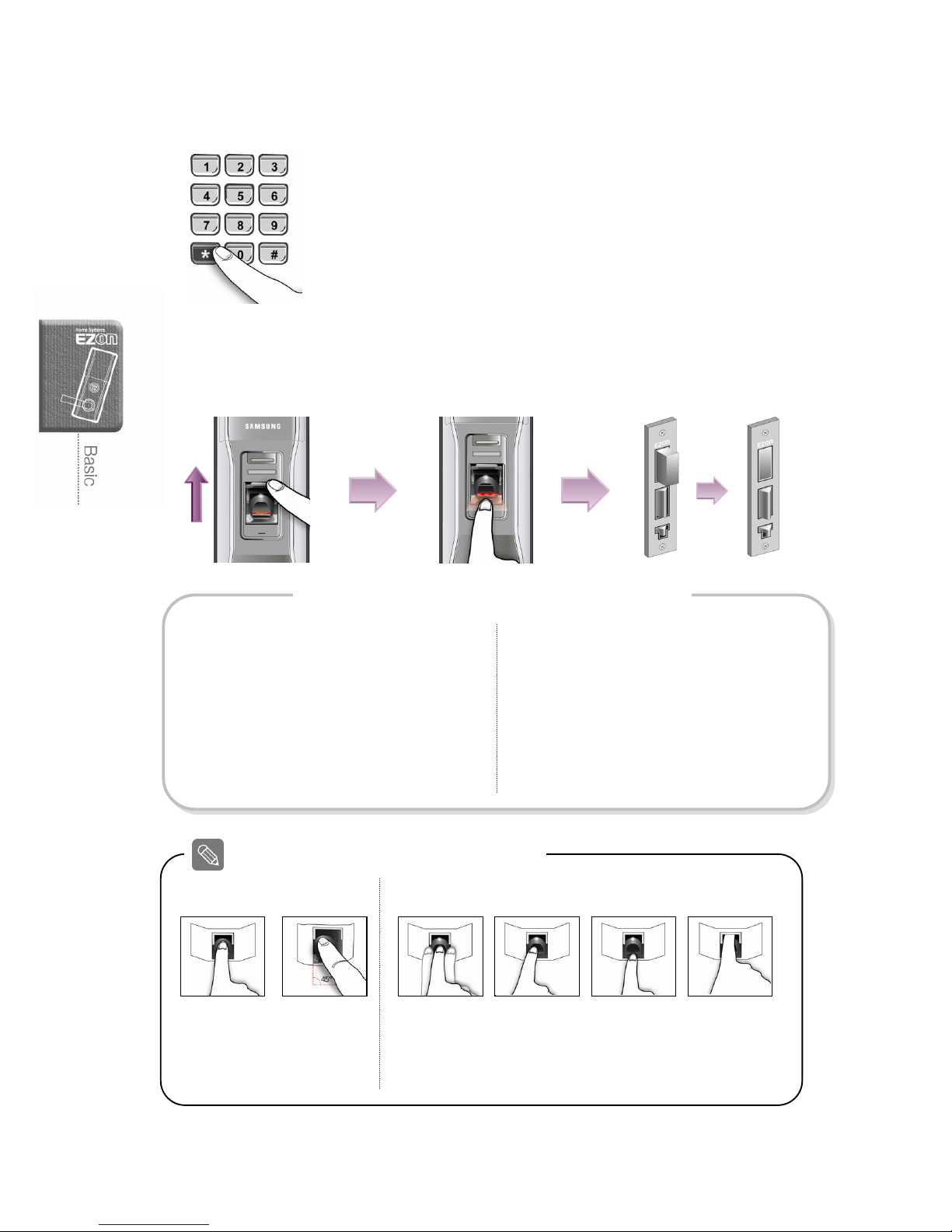
22
4. Complete fingerprint registration (from outdoor)
Press [¹] button to complete the fingerprint
registration
- The number pad cover will be closed automatically
after the fingerprint registration is completed.
5. Test fingerprint registration (from outdoor)
Lift up the fingerprint reader cover and place your fingerprint into the fingerprint reader.
The fingerprint is positioned
correctly.
Correct
Incorrect
How to place fingerprint on the reader
Front view Side view
The finger
is moving
Finger is on
one side
Finger is
outside
Too deep
Continue registration
Registering later
To continue other fingerprint registration,
press [#] button within five (5) seconds and
place a new fingerprint.
The number pad cover will be closed unless
a new fingerprint is placed within five (5)
seconds.
Press [¹] button to end fingerprint
registration.
How to register extra fingerprints
Page 25
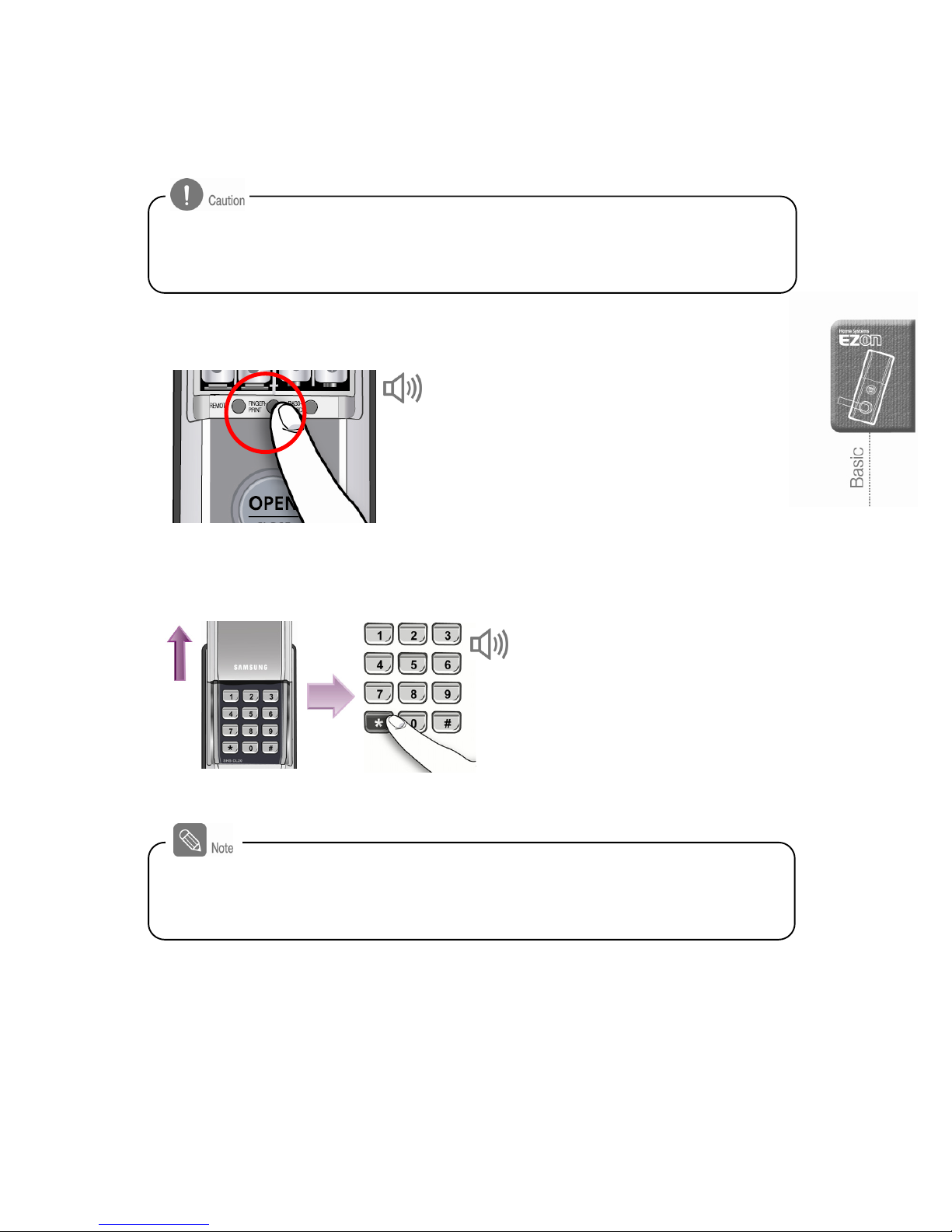
23
Deleting Fingerprints
1. Press [Fingerprint] button (from indoor)
Lift up the battery cover from the main body
and press [Fingerprint] button for five (5)
seconds.
2. Enter the password (from outdoor)
The number pad cover will be
open automatically. Enter
current password and press
[¹] button.
Registered fingerprints can not be deleted individually. All registered fingerprints will be
erased after pressing [Fingerprint] button.
The erased fingerprint can not be used to open a door.
- Register new fingerprint after the previous fingerprint information is deleted.
- After deleting the fingerprint information, if the door is closed by accident,
you can use the password or emergency key.
Beep Beep
Success: Cheerful tune
Failure: Beep
Page 26
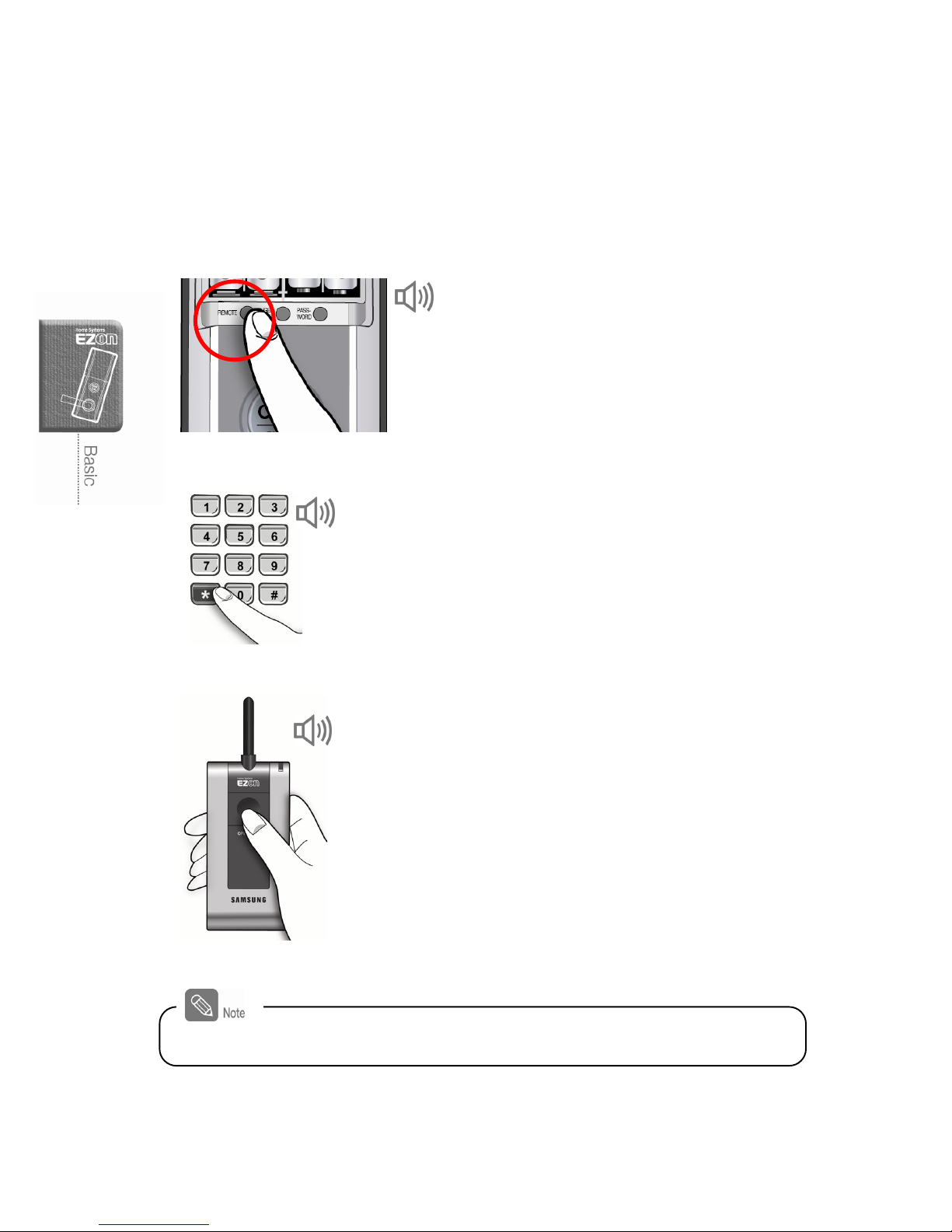
24
Remote Controller Registration
It is available to register up to two (2) remote controllers.
1. Press [Remote] button (from indoor)
Lift up the battery cover from the main body.
Press [Remote] button.
2. Enter the password (from outdoor)
The number pad cover will be open
automatically. Enter current password and
press [¹] button.
3. Press [Open] button (from indoor)
Press [Open] button on the remote controller
that you want to register for three (3) seconds.
Tun e
Beep
Tun e
To continue remote controller registration, repeat the above procedure.
Page 27
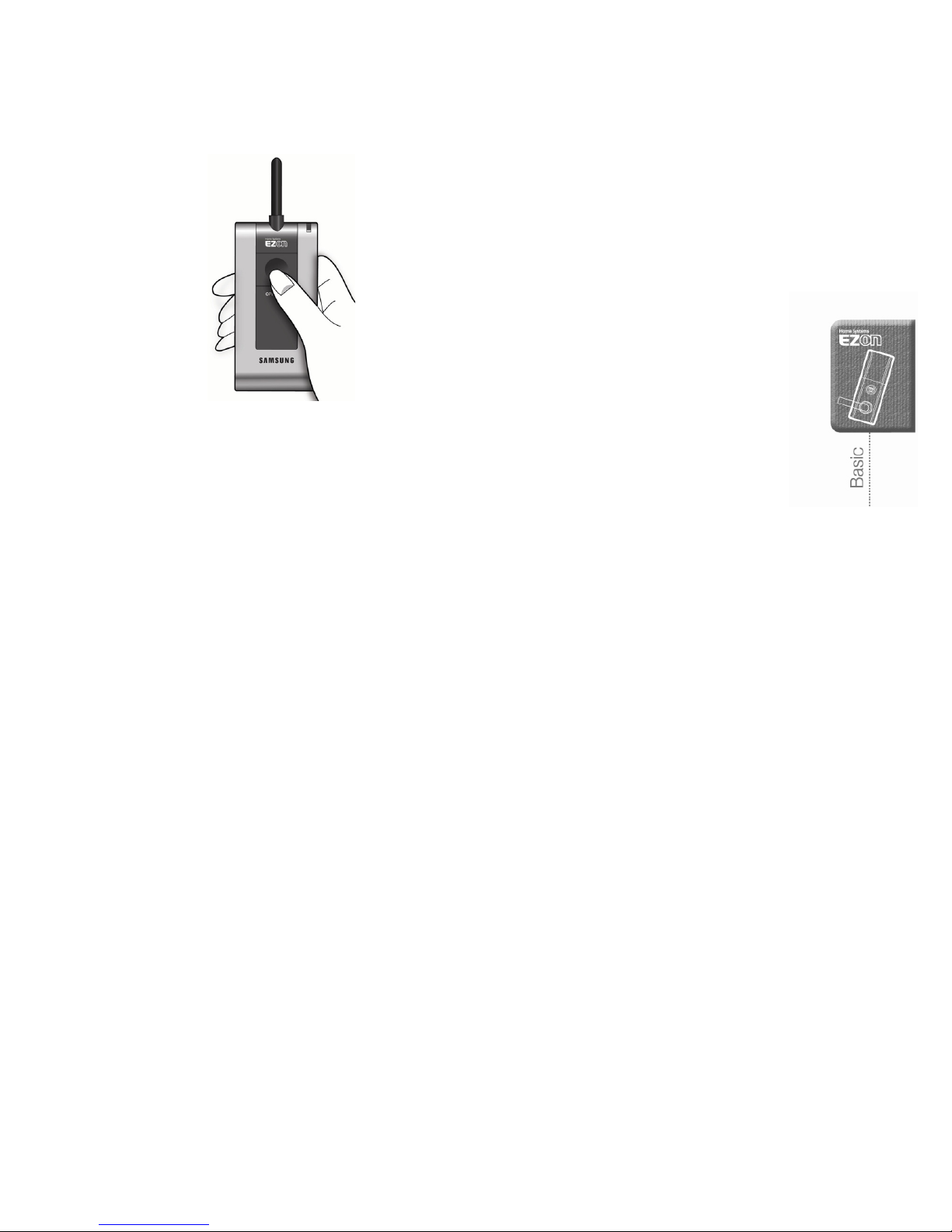
25
4. Test remote controller registration
During automatic lock mode
-
Press [Open] button on the remote controller
During manual lock mode
- Press [Open] button to lock or unlock the door.
Page 28
26
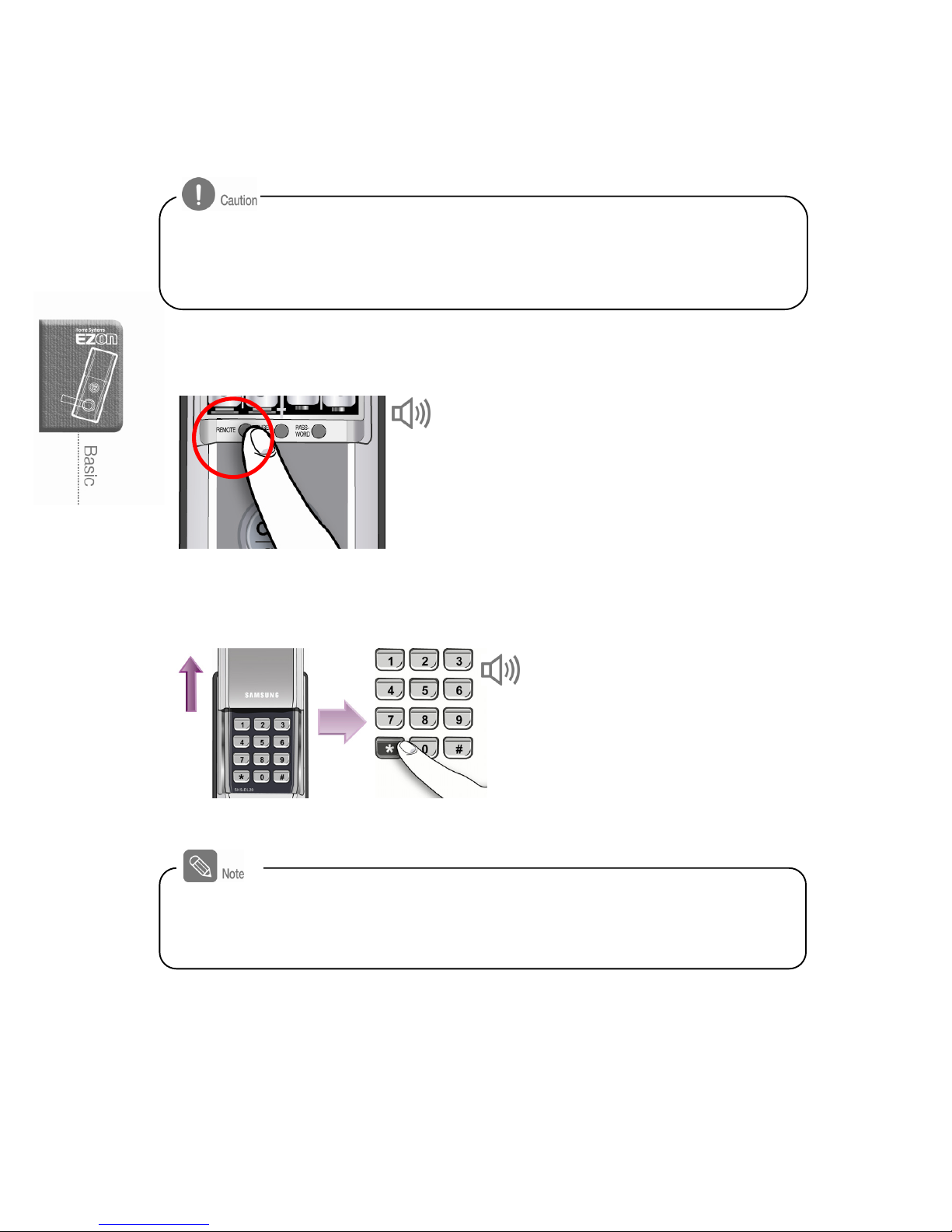
Deleting Remote Controller
1. Press [Remote] button (from indoor)
Lift up the battery cover from the main body
and press [Remote] button for five (5) seconds.
2. Enter the password (from outdoor)
When the number pad cover
is open automatically, enter
the password and press [¹]
button.
Beep
Success: Cheerful tune
Failure: Beep
Registered remote controllers can not be deleted individually. All registered remote controllers
will be erased after pressing [Remote] button.
If you delete the remote controller registration information, it can not be used to open a door.
- Register new remote controller after the previous fingerprint information is deleted.
- After erasing the remote controller information, if the door is closed by accident,
you can use the password, fingerprint or emergency key.
Page 29
27
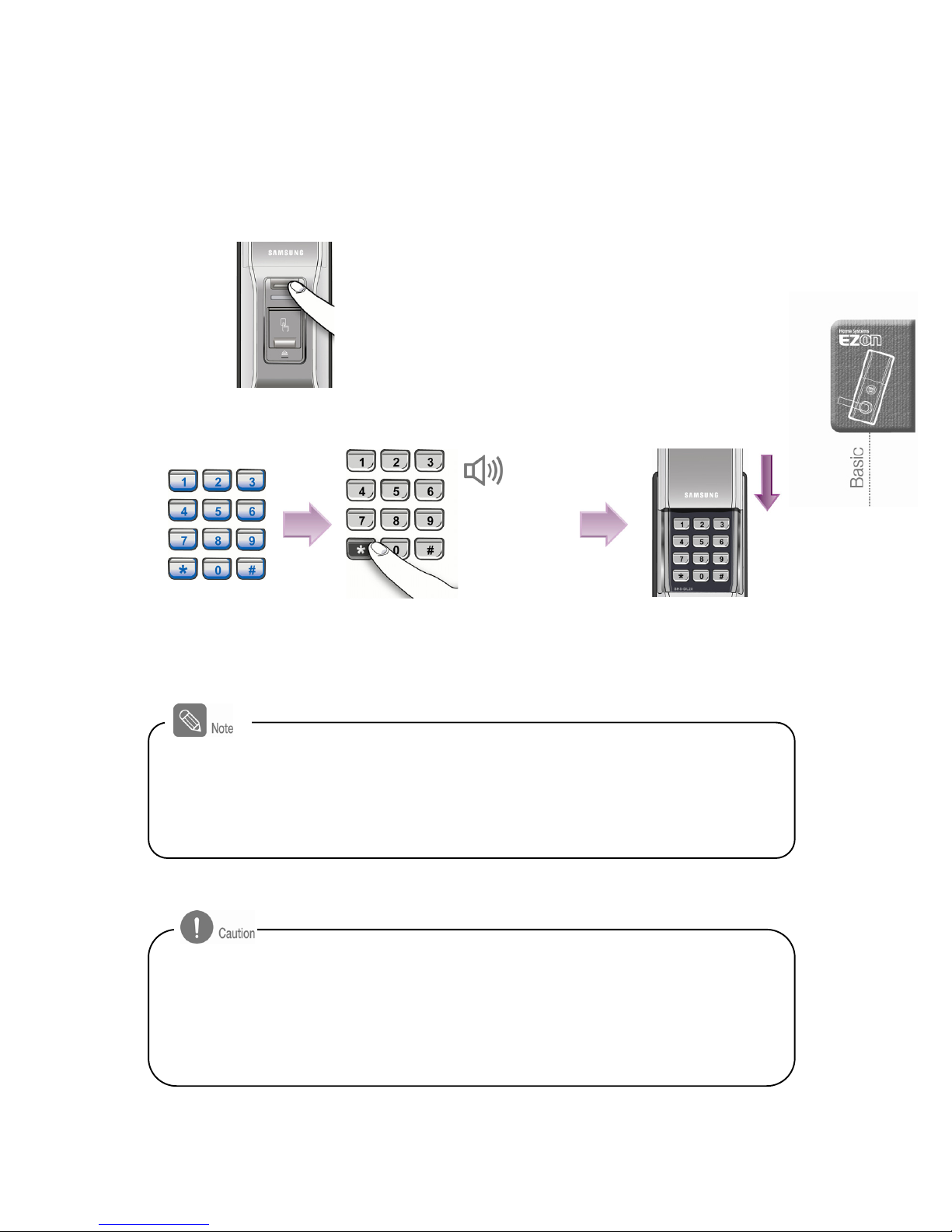
Unlock the door-lock with password from
outdoor
1. Opening the cover
Press [Cover Open/Close] button.
2. Enter the password
Enter the password and
press [¹] button.
The number pad will
illuminate in blue
The number pad cover
will be closed
automatically.
Success: Cheerful
tune
Failure: Beep
If incorrect password is entered for three (3) times consecutively, a warning alarm will
sound (Biri ~ Biri ~ Biri) for ten (10) seconds and the door-lock will not work for a minute.
A beep sound will be heard in every ten seconds during incorrect password and children
mischief protection mode and the system will be restored with tune sound after a minute. If
pressing [#] button for three times consecutively, the children mischief alarm will sound.
- Password should be entered when the number pad illuminate in blue. After the light turns
off, press [¹] button and enter the password.
- The number pad cover may be closed automatically if the light turns off.
- If incorrect password is entered, press [#] button to cancel it and re-enter the correct
p
assword.
Page 30
28
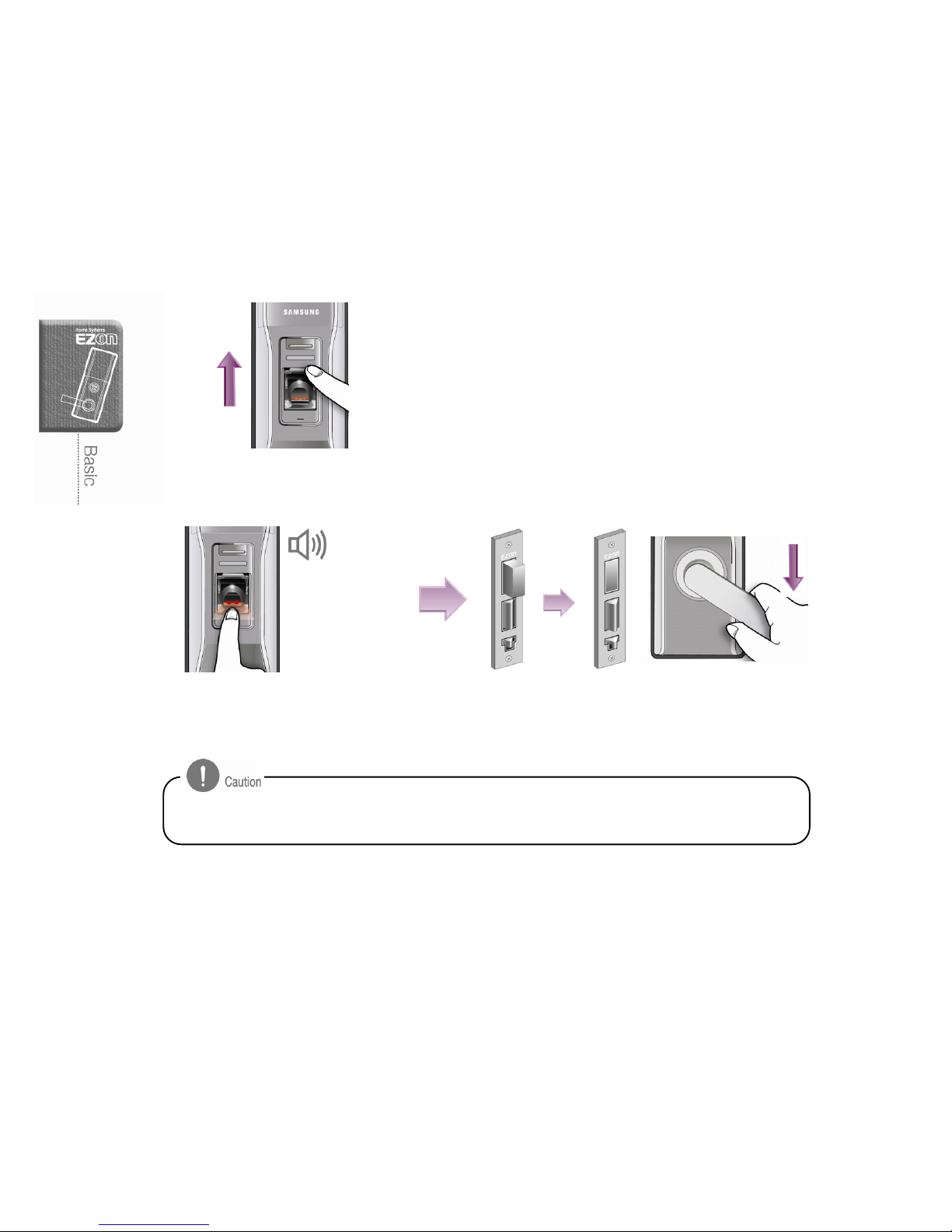
Unlock the door-lock with fingerprint
from outdoor
Place the fingerprint correctly when the fingerprint reader illuminates in red.
1. Open the cover
Lift up the fingerprint reader cover.
2. Read fingerprint
Success: Cheerful tune
Failure: Beep
The fingerprint reader will turn red. Place
the fingerprint for one second.
Close the fingerprint reader cover and pull
down the exterior handlebar to open a door.
- Unregistered fingerprint or not properly read fingerprint will sound warning beep.
Page 31
29
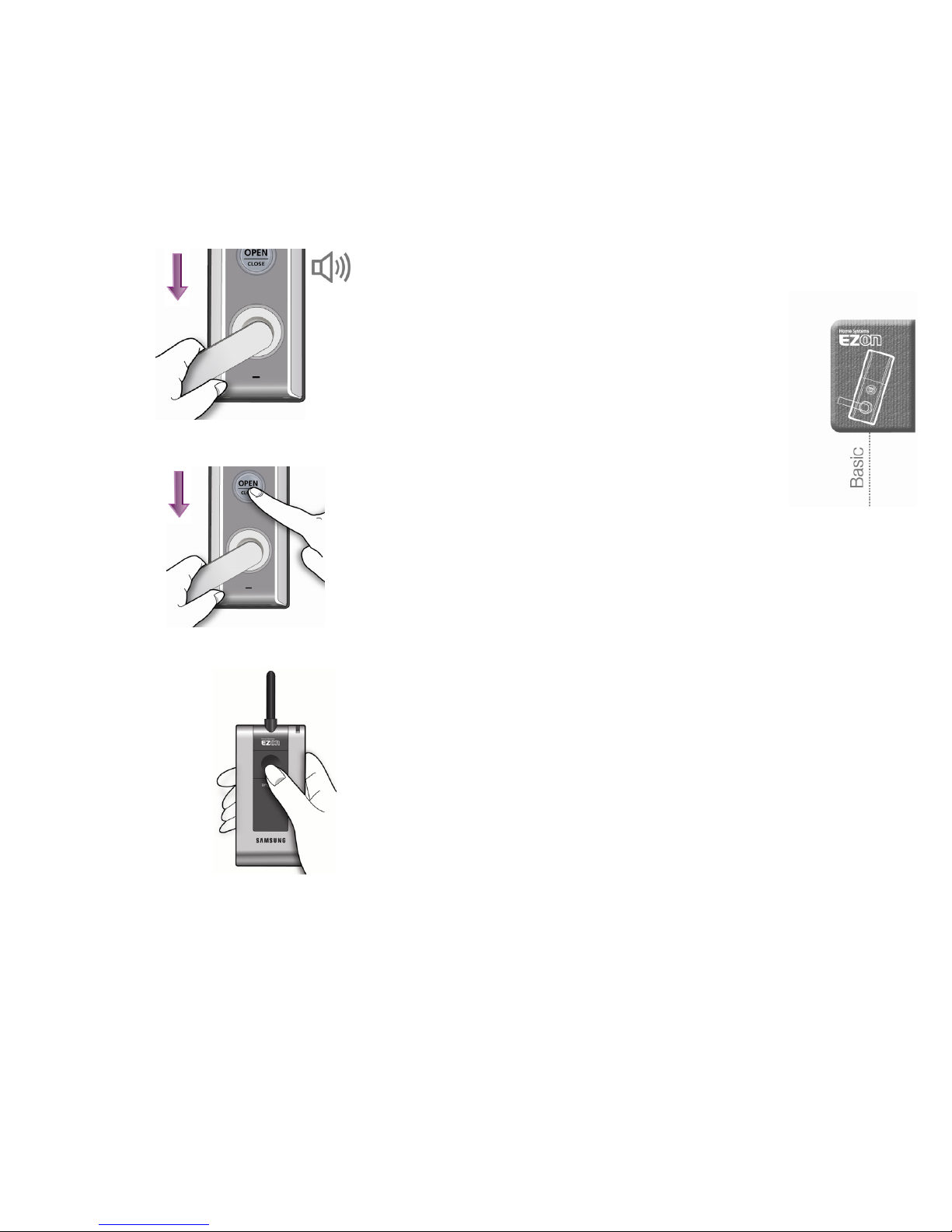
Unlock the door-lock from indoor
Pull down the handlebar
Pull down the interior handlebar.
Press the [Open] button
Press the [Open] button, then Pull down
the interior handlebar.
Press [Open] button
Press [Open] button on the remote controller
- During manual lock mode, the door-lock will be
unlocked or locked if the [Open] button is pressed.
Cheerful tune
Page 32
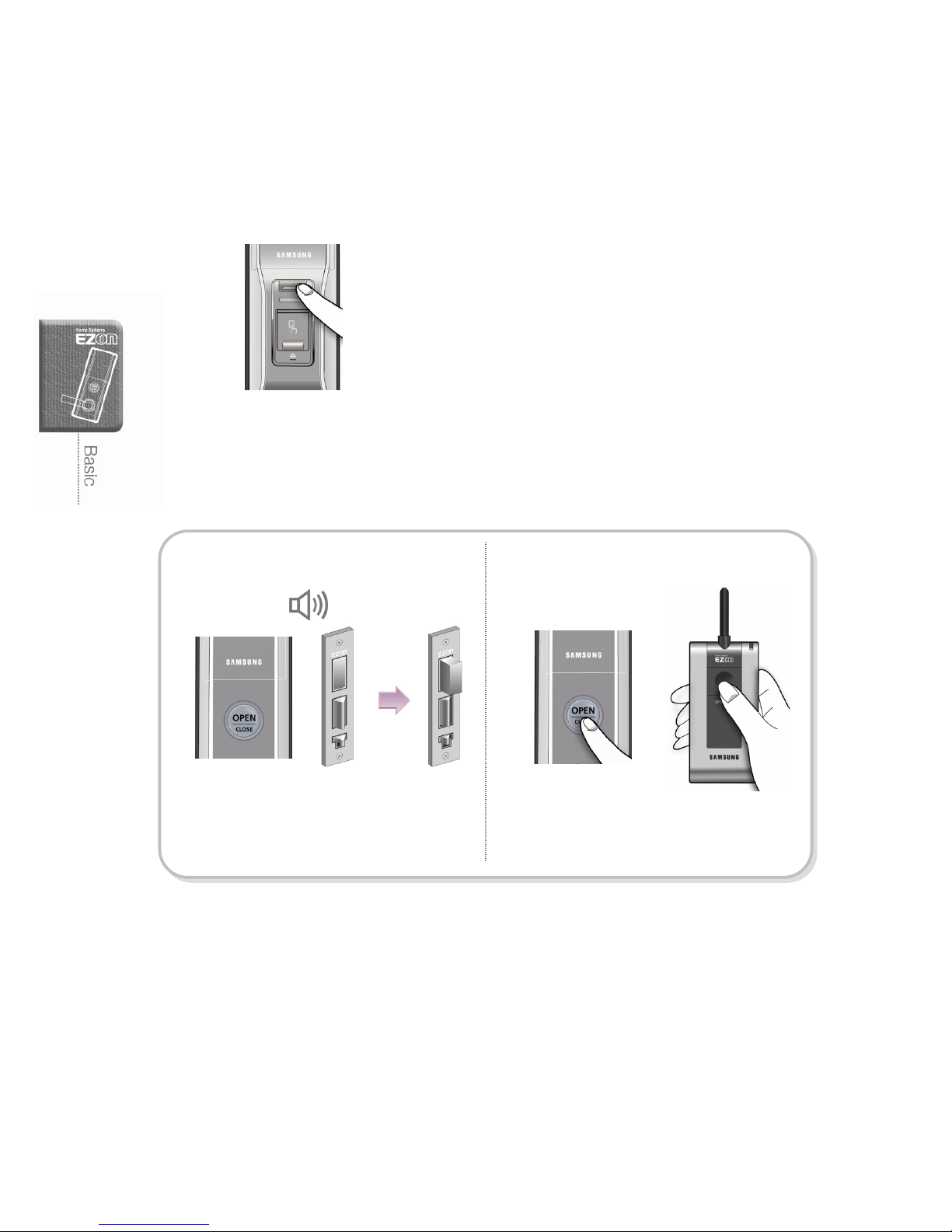
30
Lock the door-lock from outdoor
Press [Cover Open / Close] button
During the manual lock mode, press [Cover
Open / Close] button to lock the door.
Lock the door-lock from indoor
Automatic lock mode Manual lock mode
The door-lock will be locked in a second
when the door is closed.
Press the [Open] button or the [OPEN] on
the remote controller to lock the door.
Tu n e
Page 33
31
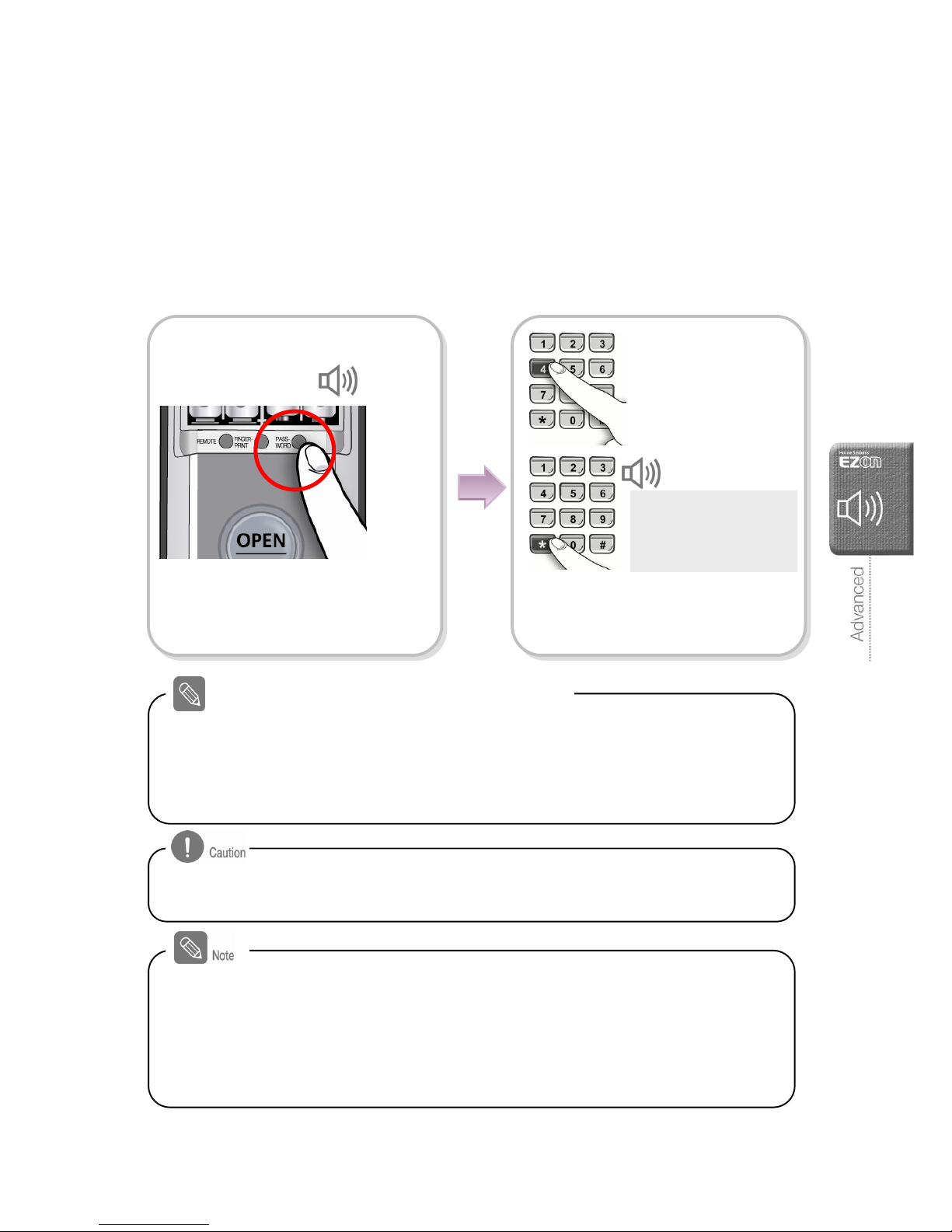
Additional Functions
Automatic / Manual lock mode setting
It is available to set the automatic lock mode to allow the door locked automatically
when the door is closed.
- Automatic lock mode: The door-lock will be automatically locked when the door is
closed. (It may not work if the batteries are completely discharged.)
- Manual lock mode: Although the door is closed, it will not be locked. To lock the door,
press the [Open] button, [Cover Open/Close] button or [Open] button of the
registered remote controller.
About automatic lock and manual lock mode
Mode selection
[4] button : automatic lock
[5] button : manual lock
Tu n e
Press the number you want to select
and then press [¹] button. The lock
mode selection is completed.
Press [Password] button for five (5)
seconds.
Beep
Beep
- On the manual lock mode, the door-lock won’t be locked itself automatically when the
door is closed. Make sure if the door is locked properly.
- If the dead bolt on the mortise moves outside when the automatic lock sensor is pressed,
it indicates the automatic lock mode is selected.
- On the automatic lock mode, the beep sound will be heard in every fifteen (15) seconds if
the door is open. (There is no beep sound on the manual mode.)
- The door-lock will be automatically locked again if more than seven (7) seconds elapse
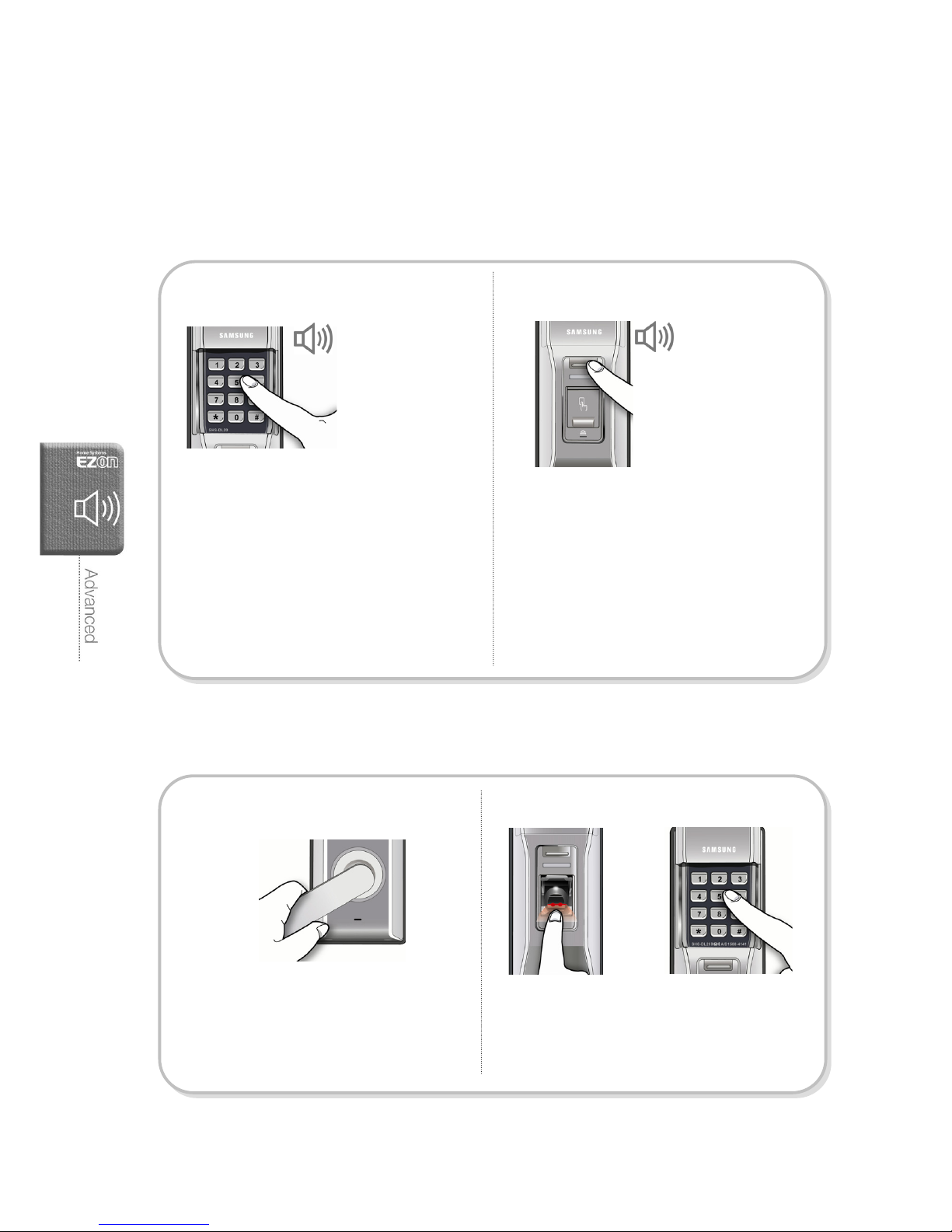
after the password is pressed or the fingerprint is placed.
Page 34
32
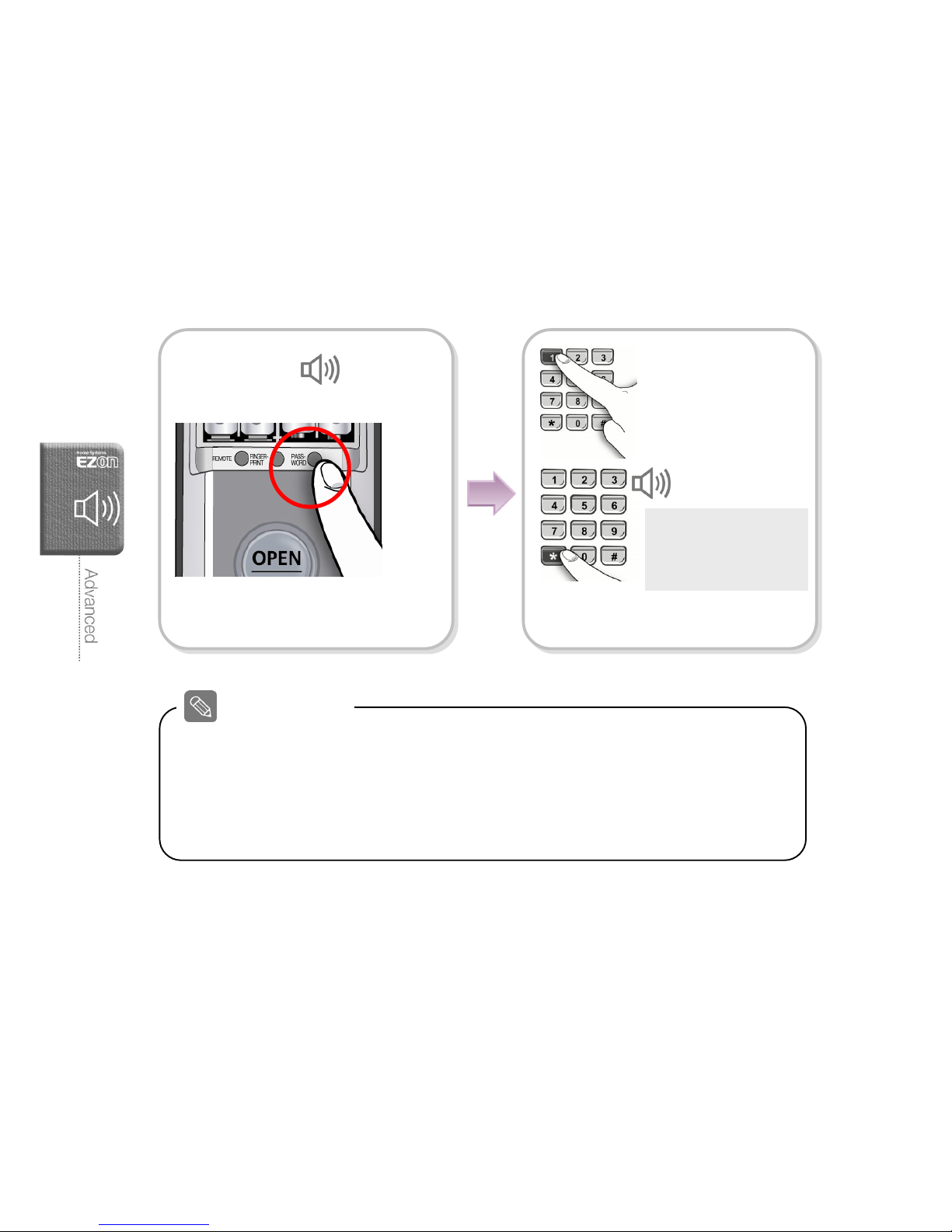
Sound Setting
It is available to set the sound when the number pad is pressed; the door-lock is
locked or unlocked.
Setting the sound function
The factory default is set as the sound function on.
Sound setting
[0] button : sound off
[1] button : manner mode
[2] button : sound on
Tu n e
Press the number you want to select
and press [¹] button.
Beep Æ
Beep Beep
Press [Password] button on the main
body for five (5) seconds.
- [0] button: Sound is off (except for alarm / warning sound)
- [1] button: Sound is off (except for the number pad and alarm / warning sound)
- [2] button: Sound is on
- Sound will be heard during the registration mode regardless of the sound mode you
selected, After the registration mode, the sound will work according to the sound mode
you selected.
Sound Settings
Page 35
33
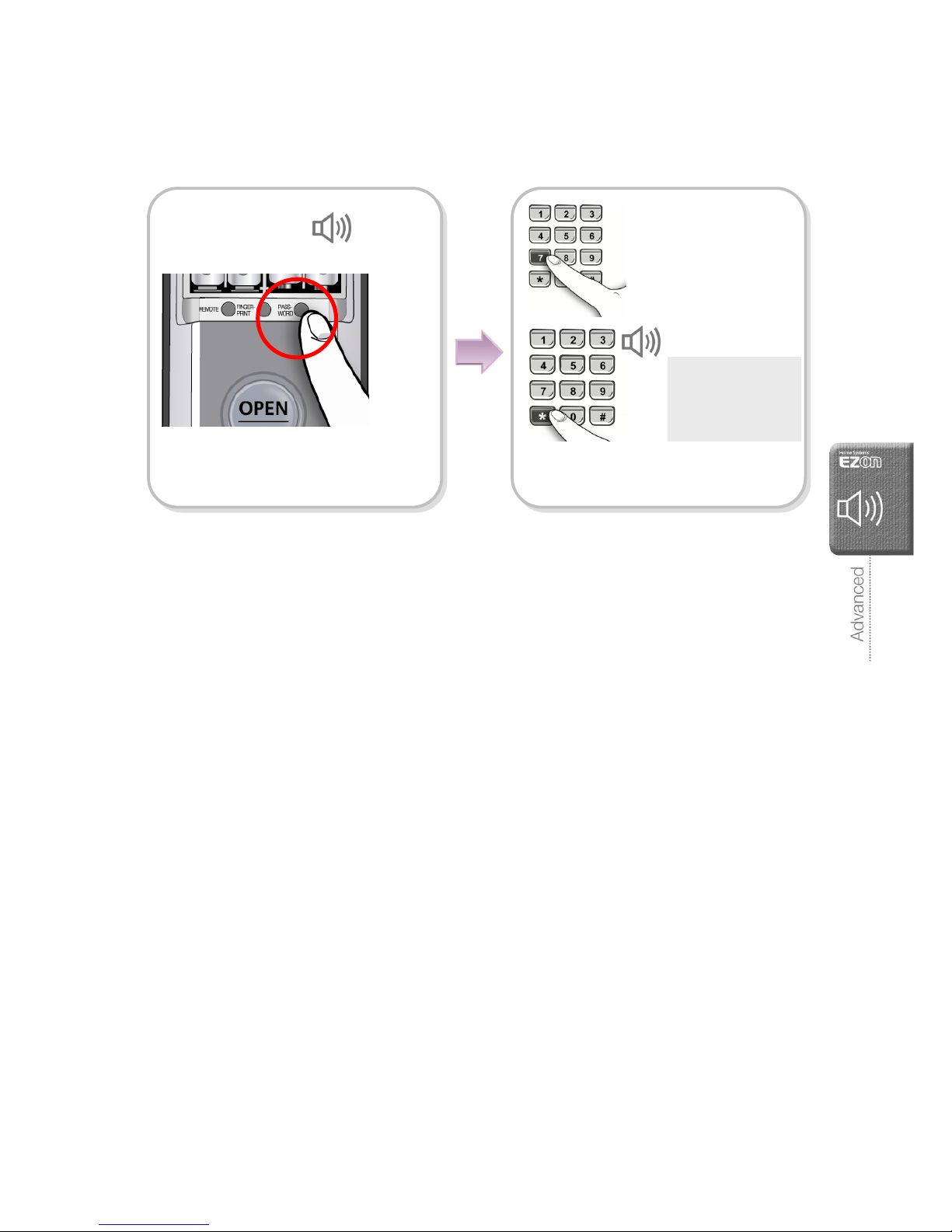
Volume Setting
The factory default is set as a medium volume.
Press [Password] button on the main
body for five (5) seconds.
Volum e ad j ust ment
[7] button: Low
[8] button: Medium
[9] button: High
Tu n e
Press the number you want to select
and press [¹] button. The volume
adjustment is completed.
Beep Æ
Beep Beep
Page 36
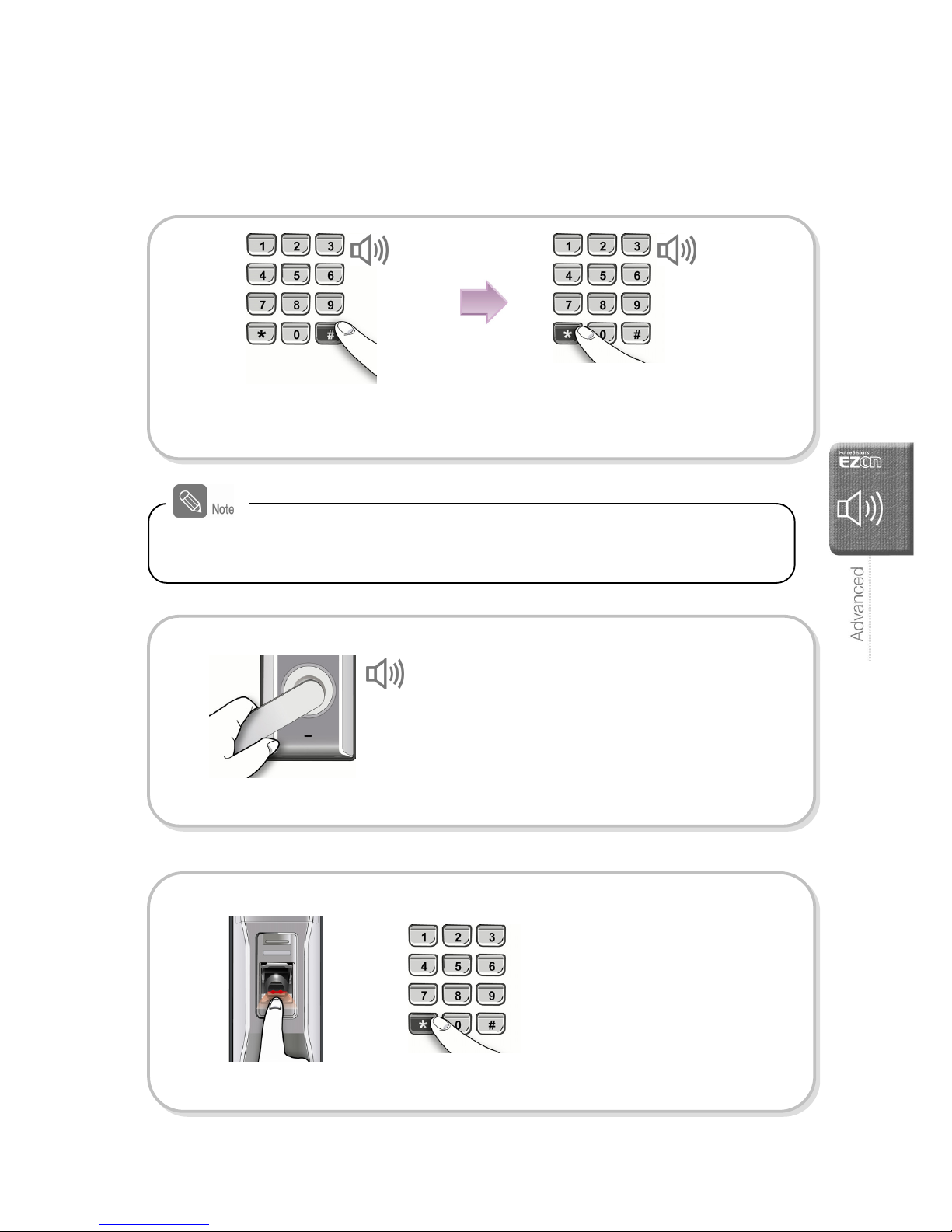
34
Warning / Emergency Alarm
Warning Alarm
When misused, a warning alarm will sound and will block the door-lock from working
Turn off the warning alarm
Incorrect password Number pad cover
If the number pad cover is lifted up and shut
in three (3) times or [#] button is pressed in
three (3) times ;
(A warning alarm will sound for ten (10)
seconds and the door-lock will freeze for a
minute. A beep sound will be heard in every
ten seconds and the system will be restored
with cheerful tune sound.)
If incorrect password is pressed consecutively
for three (3) times;
(A warning alarm will sound for ten (10)
seconds and the door-lock will freeze for a
minute. A beep sound will be heard in every
ten seconds during incorrect password and
children mischief protection mode and the
system will be restored with cheerful tune
sound after a minute.
Alarm
( Biri ~ Biri ~ Biri for
10 seconds)
Press the [Open] button or [Open] button
of the remote controller, or Pull down the
handlebar.
Place the fingerprint or press the password and
then press [¹] button to open a door.
It is only possible to turn off the warning alarm
while the alarm sounds (within 10 seconds)
[From indoor] [From outdoor]
or
Alarm
( Biri ~ Biri ~ Biri for
10 seconds)
Page 37
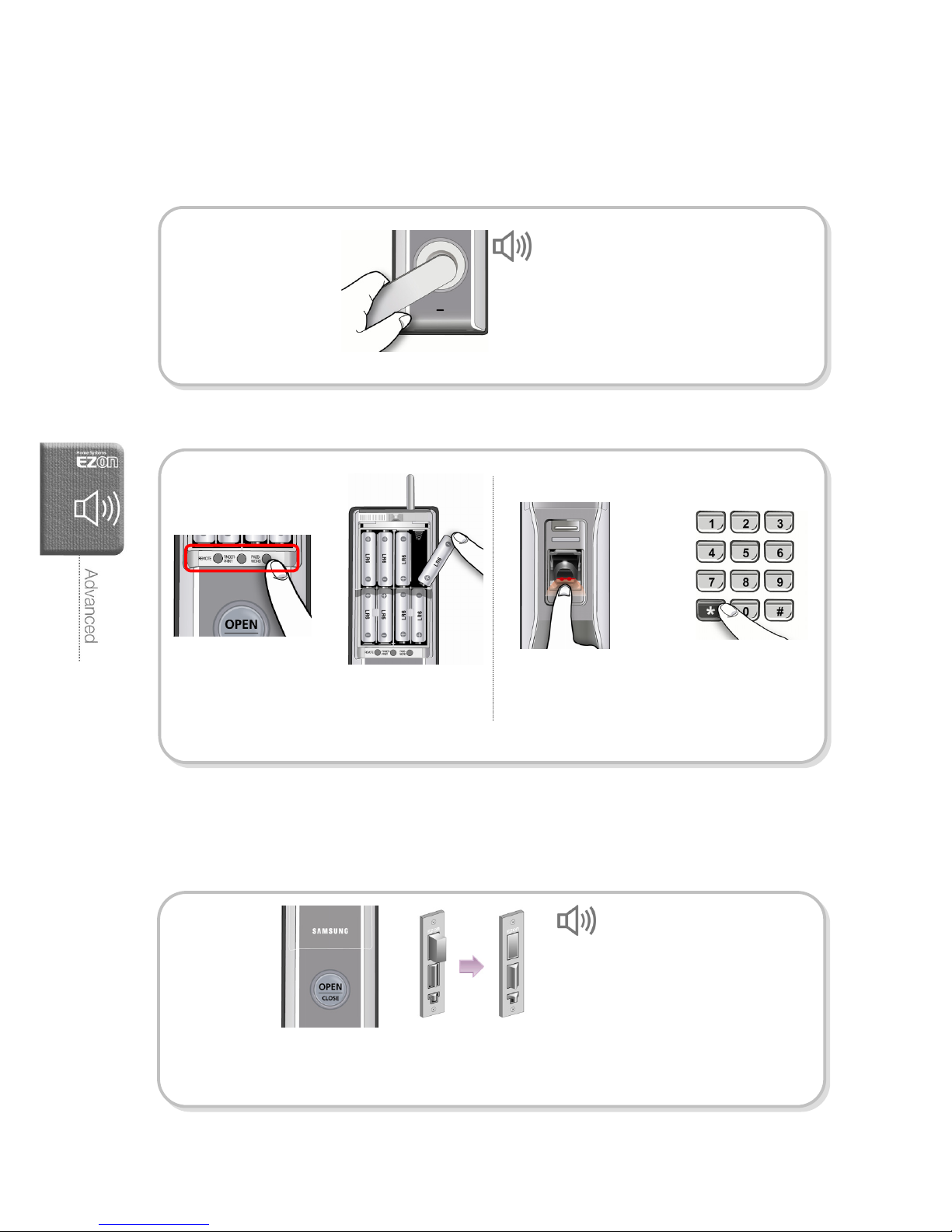
35
Security Mode Setting
An emergency alarm will sound if someone inside tried to open a door during a resident
absence.
Security Alarm
When the security mode is on, if you press
the [Open] button or pull down the
handlebar to open the door,
[From indoor]
Beep ~ Beep ~ Beep ~
(For 5 minutes)
Arm Security
Press [#] button for three (3) seconds
while the door is closed
Enter the password and press
[¹] button.
Cheerful tune Cheerful tune
Place a fingerprint or enter the
password and then press [¹] button to
open a door.
[From outdoor]
Disarm setting
or
The Security Mode will be disarmed automatically if a correct password or fingerprint is
entered or the emergency key is inserted.
Page 38
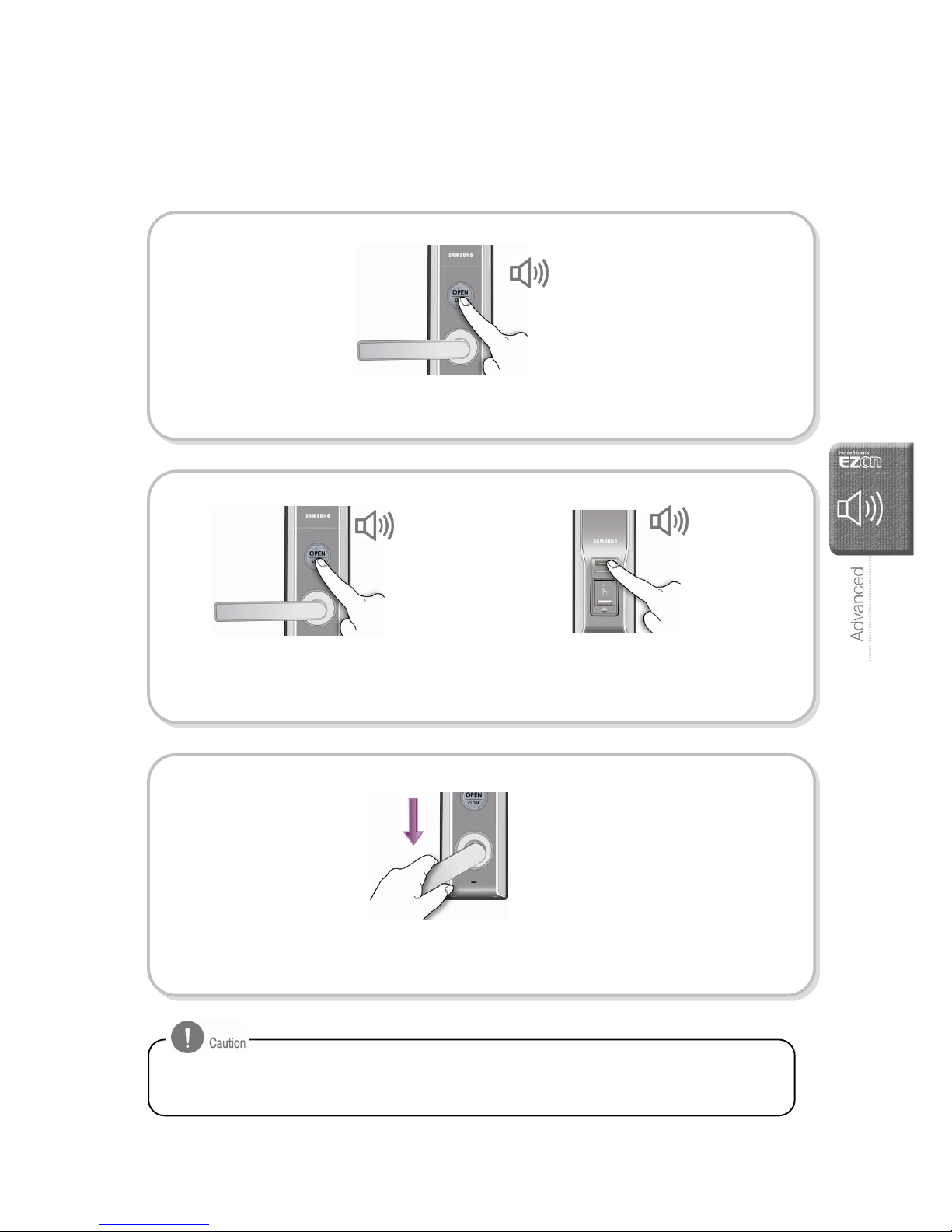
36
Intrusion Detect Function
A warning alarm will sound if someone tries to break the door-lock or force the door
open. (This function is not selectable and set as factory default.)
How to cancel the warning alarm
Fire Alarm
If a fire detected, the door-lock will go off a warning alarm to allow people to
escape.(This function is not selectable and set as factory default.)
If someone tries to break the door-lock
or force the door open, the automatic
lock sensor will detect it and will sound
a warning alarm.
[Indoor]
Beep ~ Beep ~ Beep ~
(For 5 minutes)
After open the battery cover, pull out batteries,
or press a button among [Password],
[Fingerprint], [Remote], or press the [Open]
button of the remote controller.
[Outdoor]
or
[Indoor]
or
Place a registered fingerprint or enter the
password and press [¹] button to open
the door.
The thermal sensor of the door-lock will detect a fire and go off a warning alarm. After the
warning alarm, the door-lock will be unlocked automatically.
(If the indoor temperature come down, the door-lock will be restored and resume.)
Beep ~ Beep ~ Beep ~
(For 15 seconds)
Page 39
37
Internal Forced Lock Mode
During this mode, it is not allowed to unlock the door from outside with password and
fingerprint.
Be careful because the door can be open from the outside only with the emergency key
during the internal forced lock mode. Take care not to select this mode by children.
Internal forced lock
setting
[Indoor]
Internal forced lock
mode
Beep ~ Beep
[Indoor] [Outdoor]
During the internal forced lock mode, if the
fingerprint reader cover is open or [Cover
Open/Close] button is pressed, the alarm will
sound.
If you press the [Open] button or [OPEN]
button of the remote controller, a
warning alarm will go off.
Beep ~ Beep
While the door is locked, press the
[Open] button longer than two seconds.
Beep ~ Beep
Cancel internal forced
lock
[Indoor]
Pull down the interior handlebar to
disarm the internal forced lock mode.
Page 40
38
Troubleshooting
If the problem persists after trying the following troubleshooting, please contact your local
dealer or the A/S center.
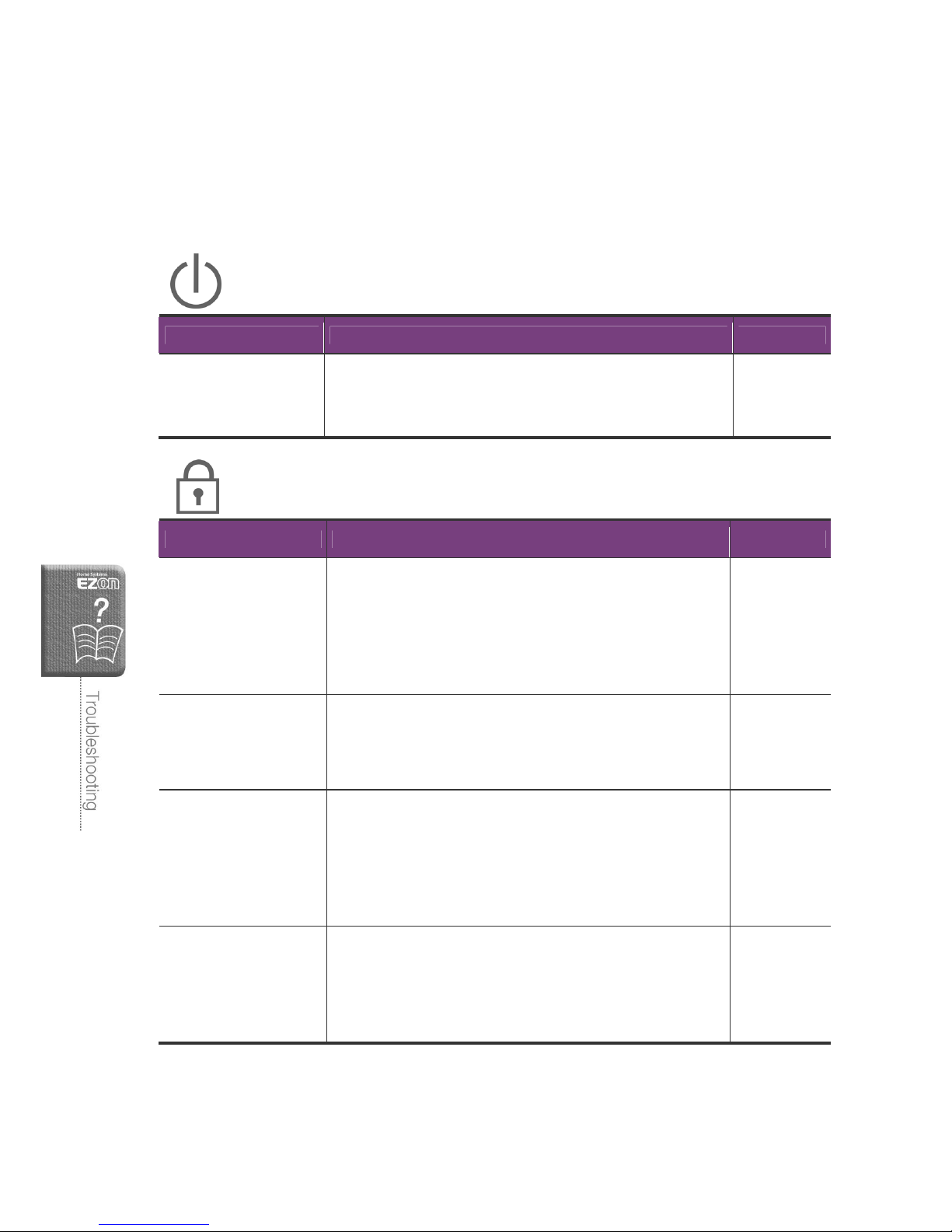
Power
Problem Checking point Reference
The power is off
- Make sure if any button on the unit is being pressed
- Make sure the polarity of the battery inserted and if the
batteries are completely discharged
Page 14~16
Password/Fingerprint
Problem Checking point Reference
Can not change the
password
- Make sure the password should be entered when the
number pad illuminates in blue. If the first digit of the
password is entered, the rest digits should be entered
within 5 seconds.
- Replace the batteries immediately if they are discharged.
- Refer to the “Password Registration”
Page 19~20
Can not register the
fingerprint
- Place the fingerprint after the fingerprint reader part
illuminates in red.
- To continue new fingerprint registration, press [#] button
within five (5) seconds and register a new fingerprint.
Page 21~22
Can not open a door
with the password
- Make sure if the password you try to enter is correct.
- The password can not be entered after the number pad
light turns off, press [¹] button and enter the password.
The number pad light will turn off and the number pad
cover will be shut if the number pad is not pressed
within 5 seconds.
Page 27
Can not open a door
using fingerprint
- Make sure if your fingerprint has been registered
properly. Otherwise, clean the fingerprint and place it
again.
- Place and hold the fingerprint on the reader for a
second.
Page 28
Page 41
39
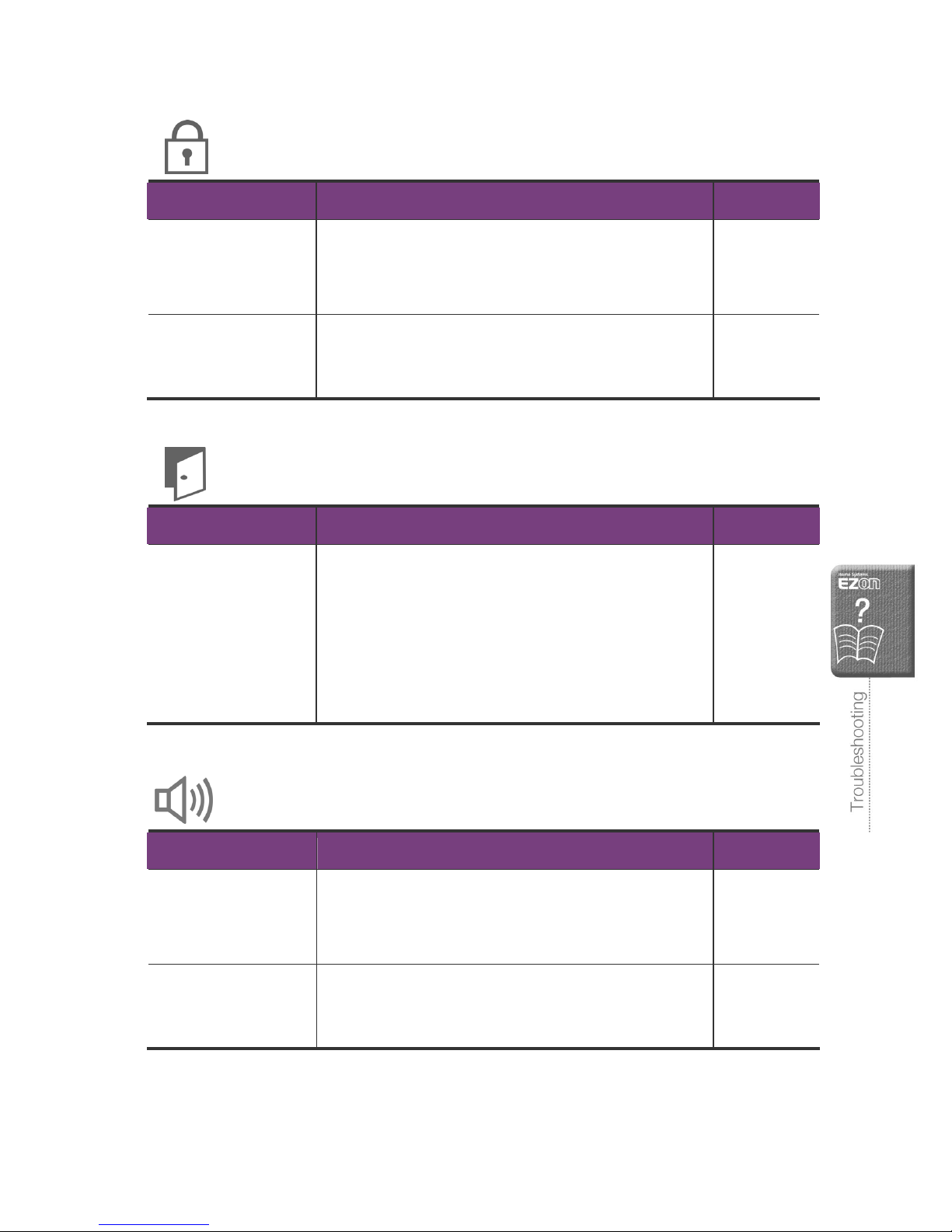
Password/Fingerprint
Problem Checking point Reference
Can not open a door
using password or
fingerprint
During the internal force lock mode, you cannot open the
door from the outside with passwords or fingerprint. If the
[Cover Open/Close] button is pressed or the fingerprint
reader cover is open, the alarm will sound.
Page 37
Door is not open even
if the password and
fingerprint is verified.
Contact the A/S Center -
Automatic lock mode
Problem Checking point Reference
The door is not locked
automatically when it is
closed
- Check whether it is the automatic lock mode. During
the manual lock mode, if the inside [Open] button or
outside [Cover Open/Close] button is pressed, the door
will be locked.
- The door may not be locked on the automatic lock
mode if the door-lock installation is failed.
- If the battery is discharged, the automatic lock mode
can not work.
Page 31
Warning Alarm
Problem Checking point Reference
Warning alarm goes off
when the [Cover Open
/ Close] button is
pressed.
If the internal forced lock mode is selected, the alarm will
sound when the [Cover Open / Close] button is pressed.
Page 37
Alarm sound goes off
when the door-lock is
operated
Low battery alarm will sound before the batteries are
completely discharged. Replace the batteries within a
week from the first low battery alarm.
Page 14~15
Page 42
40
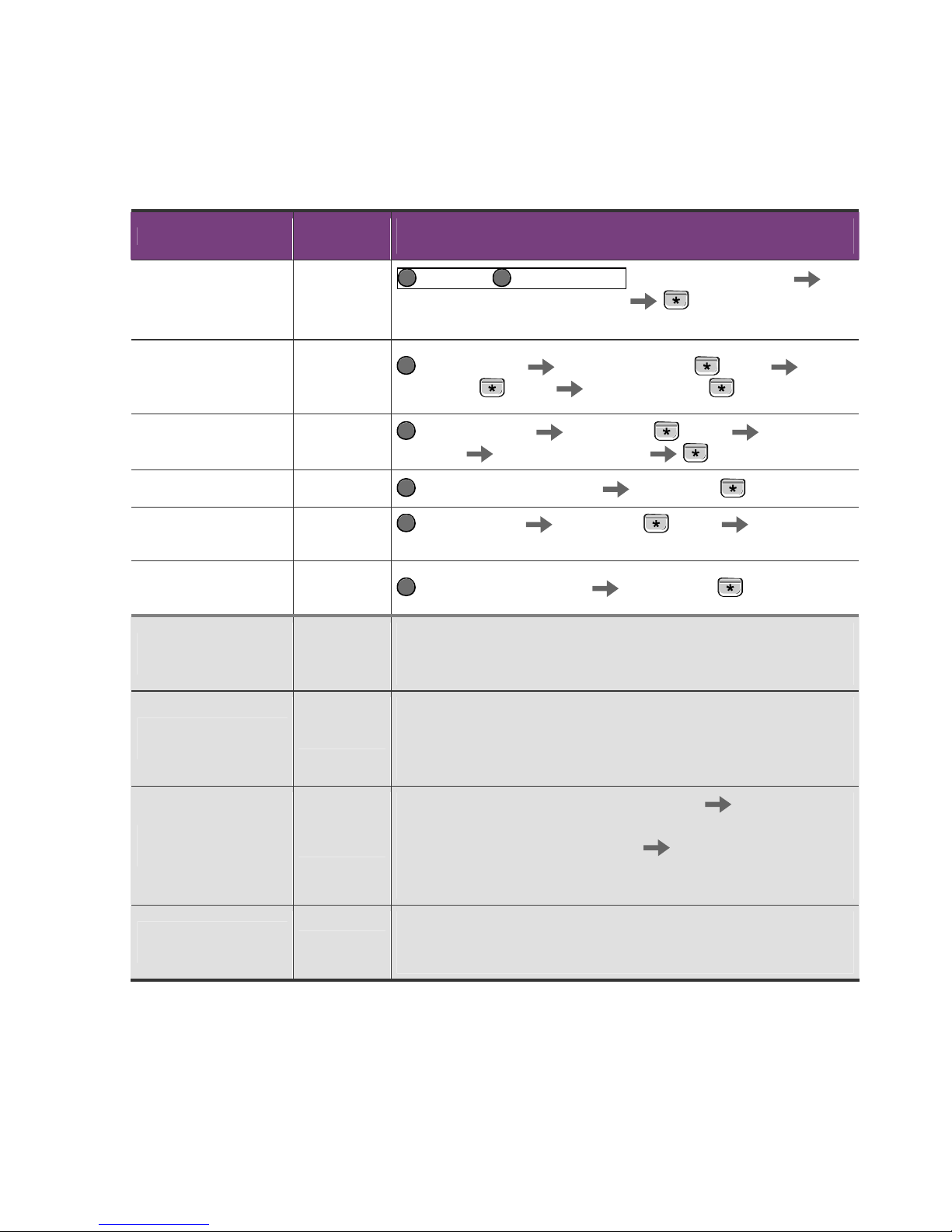
Quick Manual
Function
Factory
default
Set or cancel
(Follow the sequence.)
Reset
(Password/Fingerprint/
Remote Controller)
-
Fingerprint Password button simultaneously for 5 sec.
Current Password or ‘4560852580’
button
※After the reset, the password will be set ‘1234’ as a factory default.
Password
Registration/Change
Current
Password or
'1234'
Password button Current Password +
button
New
Password +
button
New Password +
button
Fingerprint Registration N/A
Fingerprint button Password +
button
Place
fingerprint
Place fingerprint again
button
Delete Fingerprint N/A Fingerprint button for 5 sec. Password +
button
Remote Controller
Registration
N/A
[Remote] button Password +
button
[OPEN]
button on Remote Controller for 3 sec.
Delete Remote
Controller
N/A
[Remote] button for 5 sec. Password +
button
Open the door from
inside
-
[Open] button: Press the [Open] button.
Handlebar: pull down the handlebar on main body.
Remote controller: press [OPEN] button on the remote controller.
Close the door from
inside
-
Automatic lock mode: the door is automatically locked when the
door is closed.
Manual lock mode: Press the inside [Open] button or [OPEN] button
of the remote controller
Open the door from
outside
-
Fingerprint : Open the fingerprint reader cover Place a
fingerprint within 5 sec.
Password : [Cover Open/Close] button Password + [¹] button
Emergency key: Insert the key into the keyhole, then turn it left or
right
Close the door from
outside
-
Automatic lock mode : the door is automatically locked when the
door is closed.
Manual lock mode : Press [Cover Open/Close] button.
Page 43
41
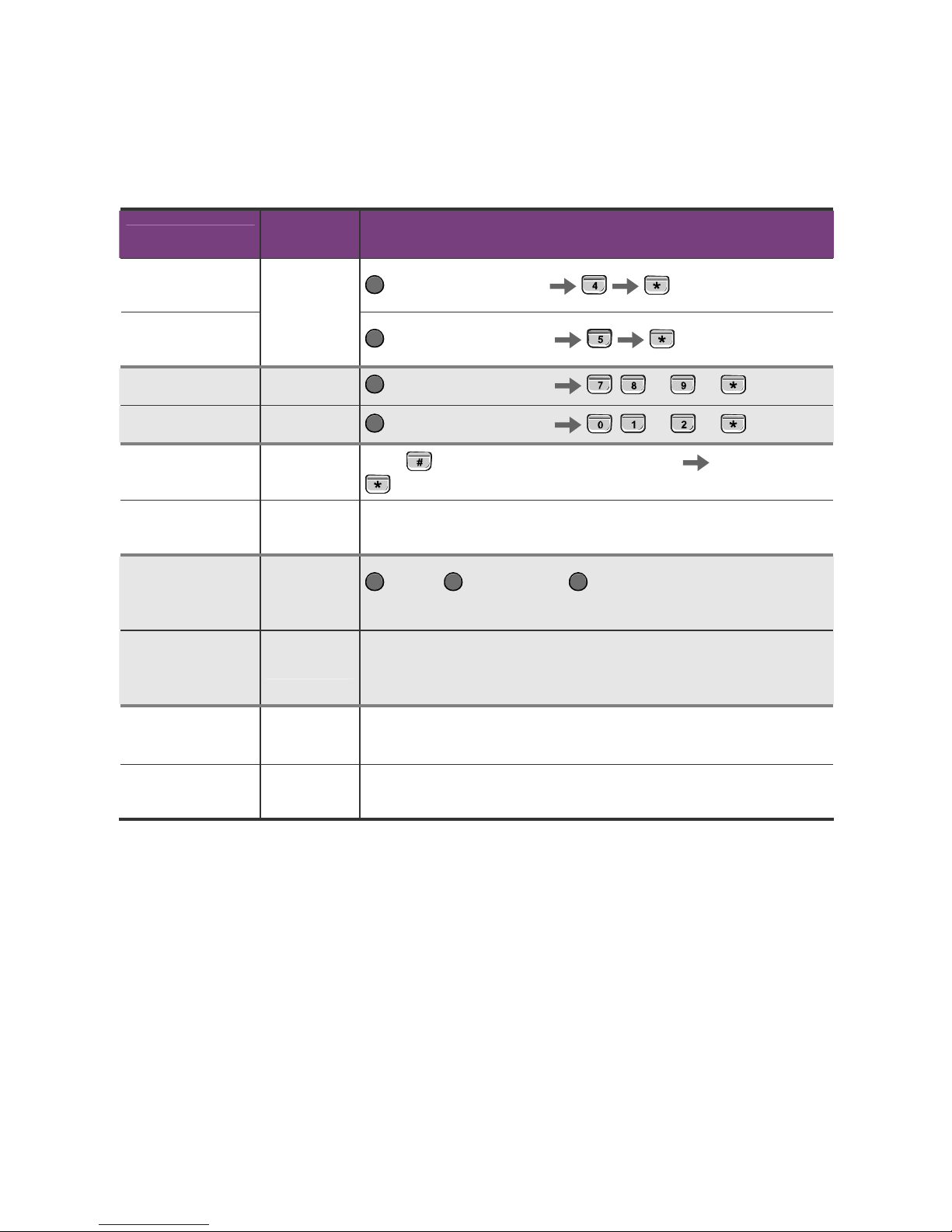
Function
Factory
default
Set or cancel
(Follow the sequence.)
Automatic lock
mode setting
Password button for 5 sec.
button
Manual lock mode
setting
Automatic
lock mode
Password button for 5 sec.
button
Volume s e t t ing 8(medium)
Password button for 5 sec.
, , or + button
Sound setting 2(sound on)
Password button for 5 sec.
, , or +
button
Arm security -
Press
button for 3 sec. when door is closed
Password +
button
Disarm security
mode
-
Enter password or place fingerprint.
Tu r n of f t h e
warning alarm from
inside
-
Remote, Fingerprint and Password or [Open] button of
Remote Control
Tu r n of f t h e
warning alarm from
outside
-
Enter password or place a fingerprint.
Set internal forced
lock mode
-
Press the [Open] button longer than two seconds while the door is
locked.
Cancel internal
forced lock mode
-
Pull down the interior handlebar.
Page 44
42
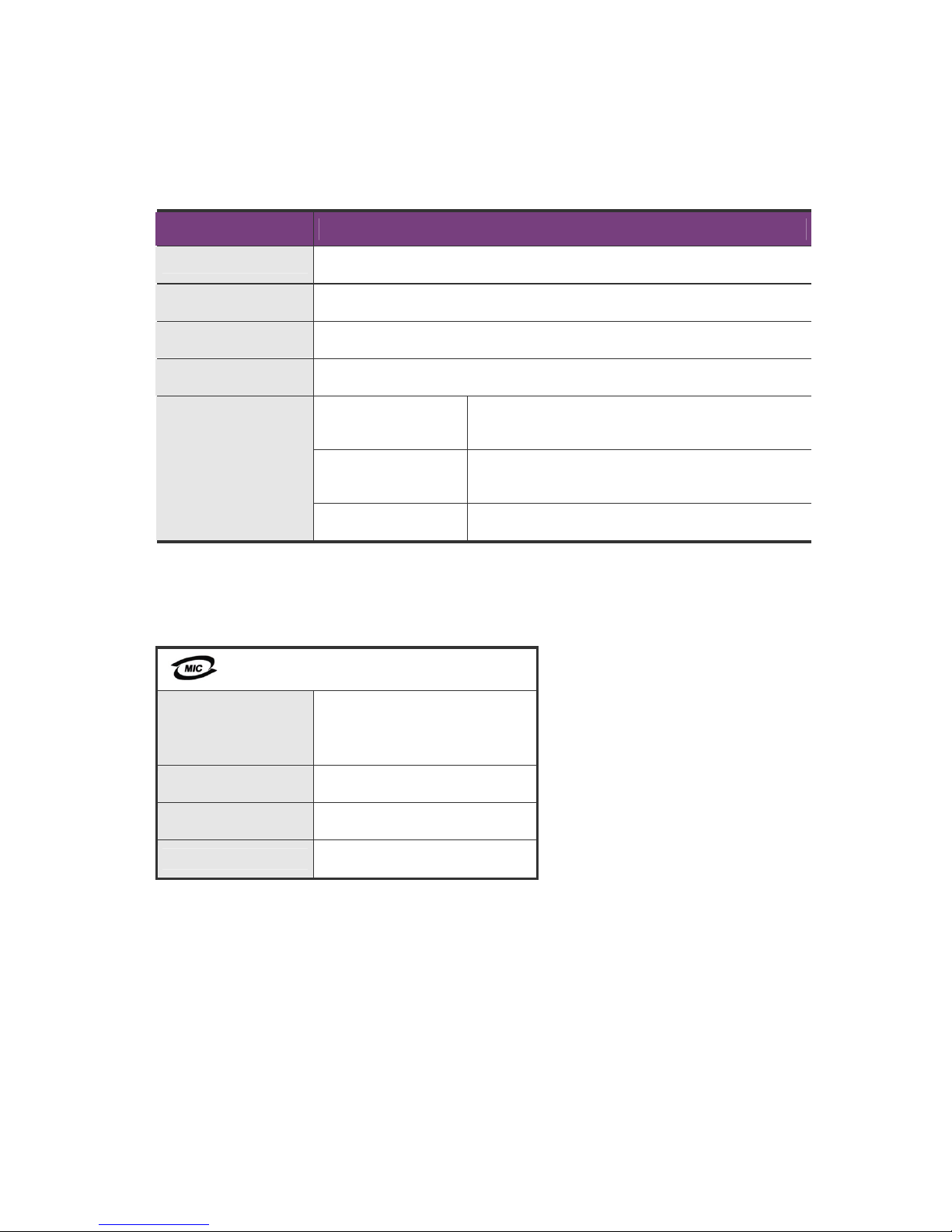
Product Specification
Article Specification
Power AA 1.5 V Battery (LR6) × 8 (6V)
Emergency Power 9V Battery (6LF22) × 1 (Separately purchase)
Operational System Electronic control system (Password or Fingerprint reading)
Weight 5.6kg (indoor and outdoor)
Outdoor
(With the handlebar)
82 mm(W)×330 mm(H)×75.3 mm(D)
Indoor
(With the handlebar)
82 mm(W)×330 mm(H)×82.5 mm(D)
Size
Mortise 25 mm(W)×110 mm(H)×56 mm(D)
The content of the instruction manual may change to improve the product without
informing the customers.
Model Name
Wireless Equipment for Security
System
(SHS-DL22)
Certification No. SCT-SHS-DL22
Certified Company
Seoul CommTech
Country
Korea
Page 45
45
Page 46

 Loading...