

Page 1
SHP-H20
Convenient Door Opening
Easy access with PIN code and Key tag
Silent Mode
When going in or out, the sound of the
key entering and door opening will be
suspended.
Automatic Key Tag Reading Function
When a user places a key tag on the reader,
it automatically recognizes the key tag.
2-Step Authentication Mode
Both PIN code and key tag need to be authenticated
to open the door, ensuring a higher level of security.
Privacy Mode
Unlocking the door from outside is prevented while
someone is inside.
Away Mode
After a user goes out, this function generates
alarm sound when an attempt is made to open
the door from the inside.
High Temperature Alarm
When the built-in sensor detects abnormal
high-temperature, the alarm will be triggered,
and the doorlock will be automatically unlocked
to allow fast escape.
Safety Precautions
This section contains important information to ensure the user’s safety
and prevent potential damage to property.
Please, read this section carefully and use the product accordingly.
Warning
• The installation and repair should be done
by the professional installer or service
person.
• Do not install the product in the place
where the gap between the door and the
frame is 5 mm or more.
• Long-term exposure to direct sunlight
may cause a crack on its touch pad.
Avoid exposure to direct sunlight.
• Do not use the excessive force or sharp
objects to push the lock buttons, as this
can damage the product.
• Do not operate the product with wet
hands, and keep liquids such as water
or drinks away from the product, or the
product may malfunction or be damaged.
• Do not use water, benzene or alcohol
when cleaning the product, but use a soft
dry cloth.
• Make sure that the door is completely
closed when going outside.
• Make sure that no unauthorized person
has the access to the PIN code .
※ The information of this user manual is subject to change without any
notices to improve the performance of this product.
※ Customer’s improper installation may result in a additional service costs.
We highly recommend professional installation.
Change it regularly.
• Be sure to correctly match the battery
polarities (+/-) when installing the batteries.
Wrong direction of battery polarities may
cause the battery liquid leakage or the burst
of them.
• When the battery replacement alarm
melody is generated, use all new batteries
instead of the existing batteries.
• According to the wireless communication
environment, its battery may consume
much.
• Interference in wireless communication
may occur when this product is used, or
radio interference may occur from other
devices.
• As this radio system may have radio
interference during the operation, it cannot
provide a service for human lives.
• Too much dew condensation may affect the
performance of this product.
• Keep 20 cm or longer away from this
product when using it.
Product Components
The product components may vary depending on the installation
environment.
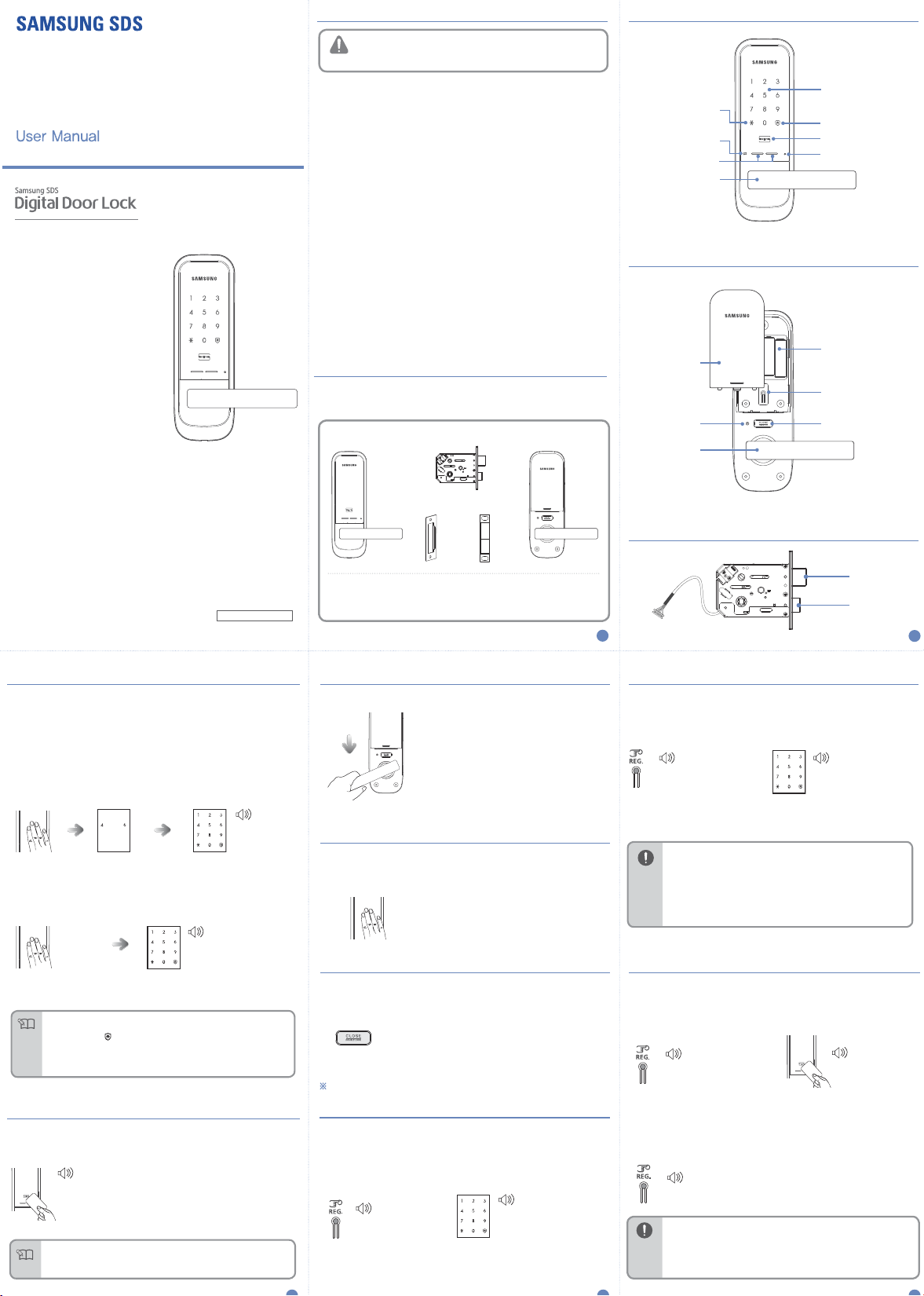
Exterior Unit Interior Unit
Mortise
Dust BoxStrike Plate
Exterior Unit Parts
Entry Complete/
Silent Mode Touch Button
Battery Replacement Alert
LED
External Power
Exterior Unit Handle
Interior Unit Parts
Battery Cover
Door open /
Warning LED
Interior Unit Handle
Number Pad
Away Mode Touch Button
Key Tag Reader
Reset Button
1.5V AA Batteries
[ Registration ]
Button
[ CLOSE / DOUBLE LOCK ]
Button
smarthome.samsungsds.com
PTMP5800ONTB ED:00
Opening the Door from Outside (PIN code)
When purchased, the product is set to Multi-leveled Security Code Entry Mode
initially. Please, refer to ‘Multi-leveled Security Code Entry Mode setting’ for
Common Mode setting.
※ Silent Mode
Before entering the PIN code, press the [] button and enter the PIN code, then both
the sound of the key entering and the door opening will be muted.
It is a useful function if you do not want to disturb neighbors when you go in and
out at night.
1. Randomizer Mode
Success:
BE BE BE BEEP↑
Fail:
DING DONG DING DONG
Touching [Number
Pad] will light up
the number pad.
When two arbitrary
buttons are lighted,
press the buttons
in order.
When the numbers on the
number pad are lighted, enter
the PIN code and press the
[] button.
2. Common Mode
Success:
BE BE BE BEEP↑
Fail:
DING DONG DING DONG
Touching [ Number Pad ]
will light up the number pad.
●
PIN code must be entered after the light is on, and if does not, touch [Number Pad]
and re-enter.
●
To cancel, press [ ] button and re-enter.
Note
●
If the PIN code is wrong 5 times, “peep” warning alarm will sound 20 times and
the system will shut-down for about 3 minutes. When malfunction happens,
“beep” will sound every 10 seconds, and stop mode will be turned
off automatically after 3 minutes with multiple ‘beeps’.
When the number pad lights up, enter the
PIN code and press the [] button.
Opening the Door from Outside (Key Tag)
A locked door can be opened from outside by using a key tag.
Place the registered key tag on the key tag sensor.
Success:
Be be be beep↑
Fail:
Ding dong ding dong
●
When the key tag sensor does not recognize the key tag, touch
the number pad and put the key tag on the key tag sensor to
Note
open the door.
Place the key tag on the key tag sensor.
The door will be opened after 1 second.
●
RF Key Tag : 2EA
●
User Manual
●
‘AA’ Batteries (LR6)
●
Handle Shaft Spring
●
Handle Shaft, Installation Screws
●
Installation Manual
2
Opening the Door from the Inside
In order to open from indoors,
push the Inner Handle downwards to unlock.
Locking the Door from Outside
Automatic Locking Setting
Manual Locking Setting
The door is automatically locked 2 seconds after the
door is closed.
Touch the out body unit number pad
to lock the door.
Locking the Door from the Inside
Automatic Locking Setting
Manual Locking Setting
All registration and setting are activated only when the door is opened.
The door is automatically locked 2 seconds after the
door is closed.
The door is locked when the
[ CLOSE / DOUBLE LOCK ] button
from the inside is pressed.
Initialization (PIN code , Key Tag)
All registered data (PIN code , Key tag) are deleted.
After initialization, the PIN code is set to ‘1234’, and the registered key tag
data are erased. Please register a new PIN code after initialization.
1. Press [Register] Button
DING DONG →
DING DING
Open the battery cover of the
inner body and press the [Register]
button for 3 seconds.
2. Enter the Numbers for Initialization
Success:
DING DONG DENG
Fail:
DING DONG DING DONG
When the number pad is lighted, enter
‘4560852580’ and then press the
[ ] button.
Mortise
Dead Bolt
Latch Bolt
3
Change the PIN code
A user can register a PIN code (4 to 12 digits), and only one PIN code canbe
registered, The default PIN code is “1234.”
1. Press [Register] Button
DING DONG DING DONG DENG
Open the battery cover of the inner body
and press the [Register] button shortly.
●
To prevent an intrusion, it is recommended to make a PIN code with 6 or
more digits. (Each digit number ranges from 0 to 9.)
●
Manage your master PIN code with care so that unauthorized people will not
have access to it. Regularly changing your PIN code can reduce the risk of it
Warning
being leaked.
●
A registered PIN code cannot be deleted. Register a new PIN code .
●
To make sure the PIN code has been properly registered, check the new
PIN code and close the door.
●
If checking the new PIN code fails, initialize the key information (see page 5)
to initialize the PIN code, and change the PIN code again.
2. Enter a New PIN code
Enter the new PIN code (4 to 12 digits)
and press the [] button.
Key Tag Registration
During registration, already registered key tags will be deleted.
Please register all key tags at once.
Up to 20 key tags can be registered. (Only ISO14443 A Type is available.)
1. Press [Register] Button
DING DONG
Open the battery cover of the inner body
and press the [ Register] button shortly.
3. Exit Registration Mode
DING DONG DENG
●
To register multiple key tags, lightly place another key tag to
the Key tag reader within 20 seconds after registering the previous key tag.
●
Only the key tags provided by Samsung SDS can be used.
Warning
●
Samsung SDS will not take responsibilities for any problem that may
occur because you used an authentication means other than the
key tags that we provided.
2. Place the Key Tag Reader
DING DONG DENG
Place the key tag to be registered
on the key tag reader of the outer body.
You will know the key tag has been
registered when “DING DONG DENG”
sounds.
If you want to end this process,
press the [Register ] button
of the inner body shortly.
Page 2
Automatic/Manual Locking Setting
By pressing a PIN code in order after two arbitrary numbers are inputted,
a user can prevent PIN code leak.
By default, the multi-leveled security code entry mode is set.
DING DONG
DING DONG
Open the battery cover of
the inner body and press the
[Register] button shortly.
Press the [] button after pressing the
[7 ] or [9] button, and the security mode
will be set.
DENG
[ 7] Button : Multi-leveled Secur ity
Code Entry Mo de
[9 ] Button : Common Mode
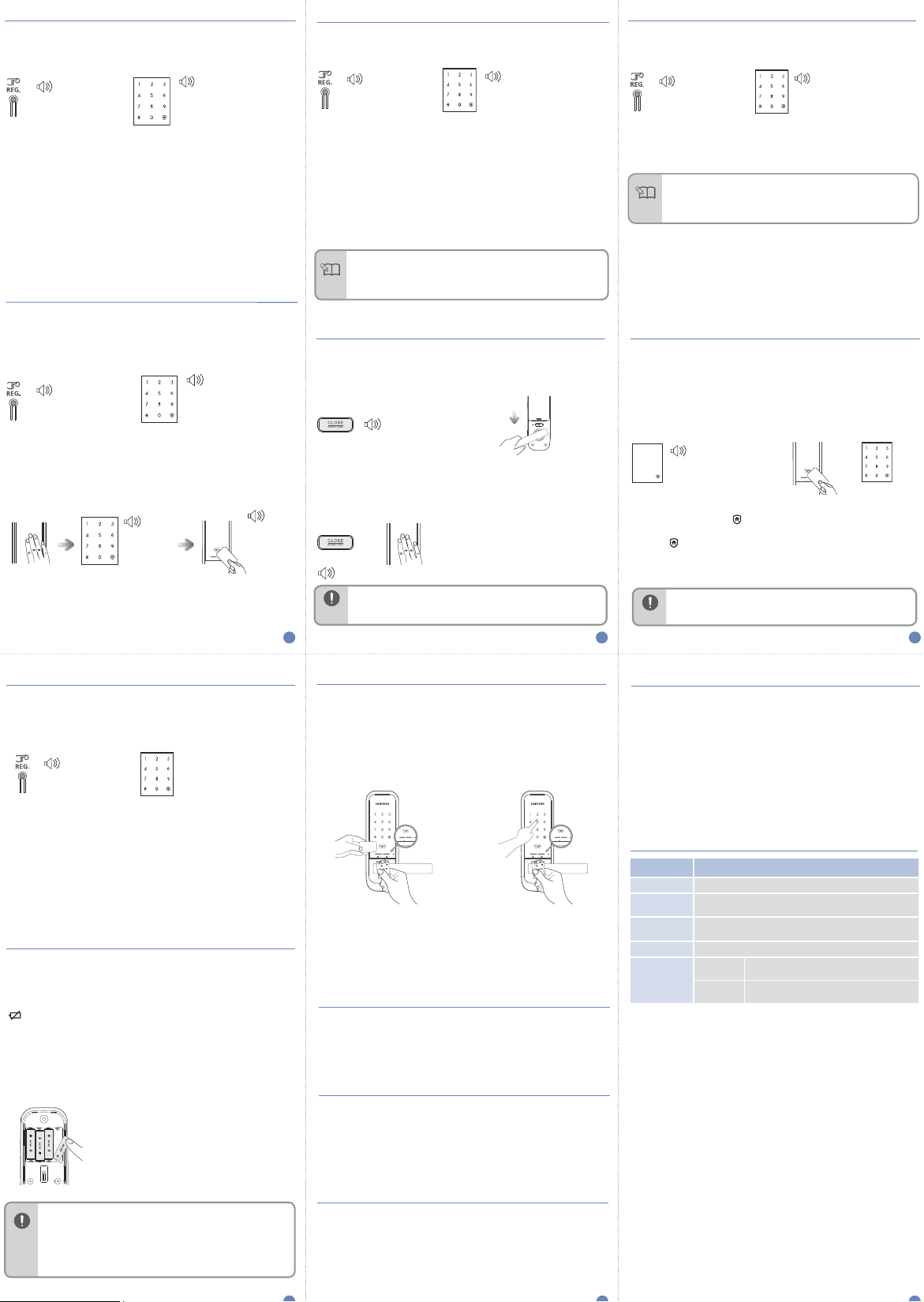
The Automatic Locking mode allows for automatic locking of the door when
Open the battery cover of
the inner body and press the
[Register] button shortly.
Automatic
The door is automatically locked 2 seconds after the door is closed.
If the battery an alarm sound are heard, replace the batteries.
If the voltage of the door lock continues to be low, the door may not be locked.
Manual
The door does not automatically lock, and the [DOUBLE LOCK] button
must be pressed from the inside or touch [number pad] to close the door.
2-Step Authentication Mode
Double authorization mode requires both PIN code and
enhancing more security.
To set the double authorization mode, one or more
When purchased, the door lock is not set to double authorization mode initially.
DING DONG
Open the battery cover of
the inner body and press the
[Register] button shortly.
Press the [] button after pressing the
[4] or [6] button, and the authorization
mode will be set.
Double Authentication Mode Operation
Success:
BE BE BE BEEP↑
Fail:
DING DONG
DING DONG
Touching
[Number Pad].
Enter the PIN code
when the number pad is
lighted, and press the [
button.
key tag
to open the door,
key tag
need to be registered.
DING DONG
DENG
[4] Button : Double authorization
mode on
[6] Button : Double authorization
mode off
Touch the Key tag on to
the [Key tag Reader], if the
authentication is successful,
]
the door will open.
Success:
DING DONG
DENG DONG
Fail: DING DONG
DING DONG
At-home privacy mode is to prevent opening of the door from outside while
someone is inside.
Privacy Mode Activation Privacy Mode Deactivation
While the door is locked, press
[CLOSE ] button on the inner body
part for 3 seconds.
Privacy Mode Operation
Warning
7
it is closed.
DING DONG
DENG
DING DONG
●
Regardless of the automatic/manual locking setting, the door will automatically lock
7 seconds after the door lock is unlocked if the door is not opened.
●
Under automatic lock settings, if the door is not locked properly, an alarm will go off
Note
and the warning LED on the indoor unit will flicker.
DING DONG
DENG
or
Rapid beeping
●
When the Privacy Mode is activated, the door cannot be unlocked from the
outside, so please be careful. Be especially careful not
to allow children to set this mode accidently from the inside.
Outside : Press the [Number Pad] or touch with
[21] Button : Automatic Locking Setting
[22] Button : Manual Locking Setting
Press the [ ] button after pressing the
[21] or [ 22] button, and the Automatic/Manual
Locking mode will be set.
Press down the inner body handle to
deactivate privacy mode.
Inside : Press the [CLOSE] button, then the
sound for action-unavailable willbe
heard.
a Key tag, then the sound for actionunavailable will be heard.
Auto/Manual Key Tag Reading Function SettingRandomizer Mode
This settings is to automatically or manually detect the Key tags.
Default settings is automatic detection.
DING DONG
Open the battery cover of
the inner body and press the
[Register] button shortly.
●
The door will unlock when the key tag is tagged against the key tag sensor
during auto detection mode.
●
Under manual detection mode, you need to touch the number pad and then
Note
key tag against the key tag sensor.
[1] Button : Automatic Detection Setting
[3] Button : Manual Detection Setting
Press the [ ] button after pressing the
[1 ] or [3] button, and the key tag
Auto/Manual Detection mode will be set.
Away Mode Activation/DeactivationPrivacy Mode Activation/Deactivation
To prevent intrusion when a user goes out, this function triggers an alarm
sound when someone tries to open the door from the inside.
In Away mode, if someone tries to open the door from the inside, “beepbeep-” sound is triggered for 5 minutes.
Away Mode Activation Away Mode Deactivation
DING DONG
DENG
Once the door is locked, the [ ]
button of the number pad is lighted.
Press the [
to activate the Away mode.
●
Warning
8
] button within 3 seconds
Away mode function should only be set up when there is no one inside.
Enter the user PIN code,
touch a registered key tag
and open the door to
deactivate the Away mode.
DING DONG
DENG
or
9
Volume Setting
The sound that is generated when the number buttons are pressed, when
the door is locked, or when the locked door is unlocked, can be set accord
ing to the user’s preference.
When purchased, all sounds are set to be generated initially. (1 level)
DING DONG
Open the battery cover of
the inner body and press the
[Register] button shortly.
- [31] : The sounds of door opening/closing and key touching are not deactivated
(except an alarm sound).
- [32]~[33] : All sounds are activated, and the sounds get bigger as the step becomes
higher.
[31]Button : Mute
[32]Button : Low
[33]Button : High
Press the [ ] button after pressing the
[31] ~ [ 33] button, and the Volume
will be set.
Replacing the Batteries
Melody for low battery notification is triggered
If the melody of “Blues for Elise” sounds when opening the door with the
PIN code or a key tag, it is time to replace the batteries.
(If the battery replacement alarm melody sounds, the battery replacement
[ ] LED is lighted on the number pad.)
Battery Replacement
When the battery replacement alarm voice is heard, immediately replace all
batteries with new ones.
- The unit will stop operating suddenly if the batteries are not replaced.
Using the Emergency Battery
If batteries are not replaced on time, they will be completely discharged and
the lock will not operate.
How to open the door Using Emergency Power
Purchase an emergency battery (9V) at the nearest store.
-
As the alkaline batteries offer longer life, they are recommended over the
manganese batteries or rechargeable ones.
or
Place the key tag on the Key tag reader, or enter the PIN code , while
the 9V battery is connected to the external power port of the outer body.
Alarm Sound Deactivation
Open the battery cover on the inner body and press the [Register] button, or
open the battery cover and separate the batteries. Authenticate a registered
key tag or pressing the user PIN code and press the [
] button.
Intrusion Detection Function
This function triggers an alarm sound when an attempt is made to
forcefully open the door from the inside or the outside.
(It is a basic function, and cannot be activate/deactivated by the user.)
If the door is forcefully opened while locked, the open/close door sensor
detects it and triggers an alarm sound for 5 minutes.
High Temperature Alarm Function
If the room temperature abnormally increases, the temperature sensor
detects it and an alarm is triggered. (It is a basic function, and cannot be
activate/deactivated by the user.)
This high temperature alarm function is activated at about
Depending on the installation environment, the temperature may be different.
When a high temperature occurs, the temperature sensor detects it.
The LED of the Warning led on the inner body flashes while an
alarm sound is generated for 15 seconds. After the alarm sound stops,
the door is automatically opened.
(If the room temperature decreases to below a certain temperature,
the door lock is normally operated.)
65 °C ± 5°C.
Product Specifications
Ite m Specifi ca tions
Voltage
Emergency
Power Source
Operation
Method
Weight
Product
Dimensions
(including the
handle)
Four AA Alkaline 1.5 V batteries (LR6) (DC 6 V)
9V Battery (6LF22) (Separately sold)
Electronic Control Method
(PIN code entry or key tag reading)
1.824kg (including both inner and outer bodies)
Outer Body
Inner Body
77mm (W) X 228.9mm (H) X 63.2mm
77mm (W) X 229mm (H) X 73.6mm
(D)
(D)
●
Depending on battery manufacturer, date of manufacture, and the user environment,
the duration of use may vary. (In the case of average use, given as 10 times a day, 4
AA alkaline 1.5V batteries can last for 12 months).
Warning
●
Liquid leaks from batteries can damage the product. Check the batteries regularly
(about every 6 months).
●
Before the batteries are replaced after the battery replacement melody sounds, a
menu function such as activating the registration/setting mode cannot be used.
Prank Prevention Function
This function triggers an alarm sound and deactivates lock operation when
the door lock is improperly handled from the outside.
If a key tag that are not registered or a wrong PIN code are used five times,
an alarm sound is generated and the door lock is deactivated for 3 minutes.
 Loading...