

Page 1
SDP SeriesSDP Series
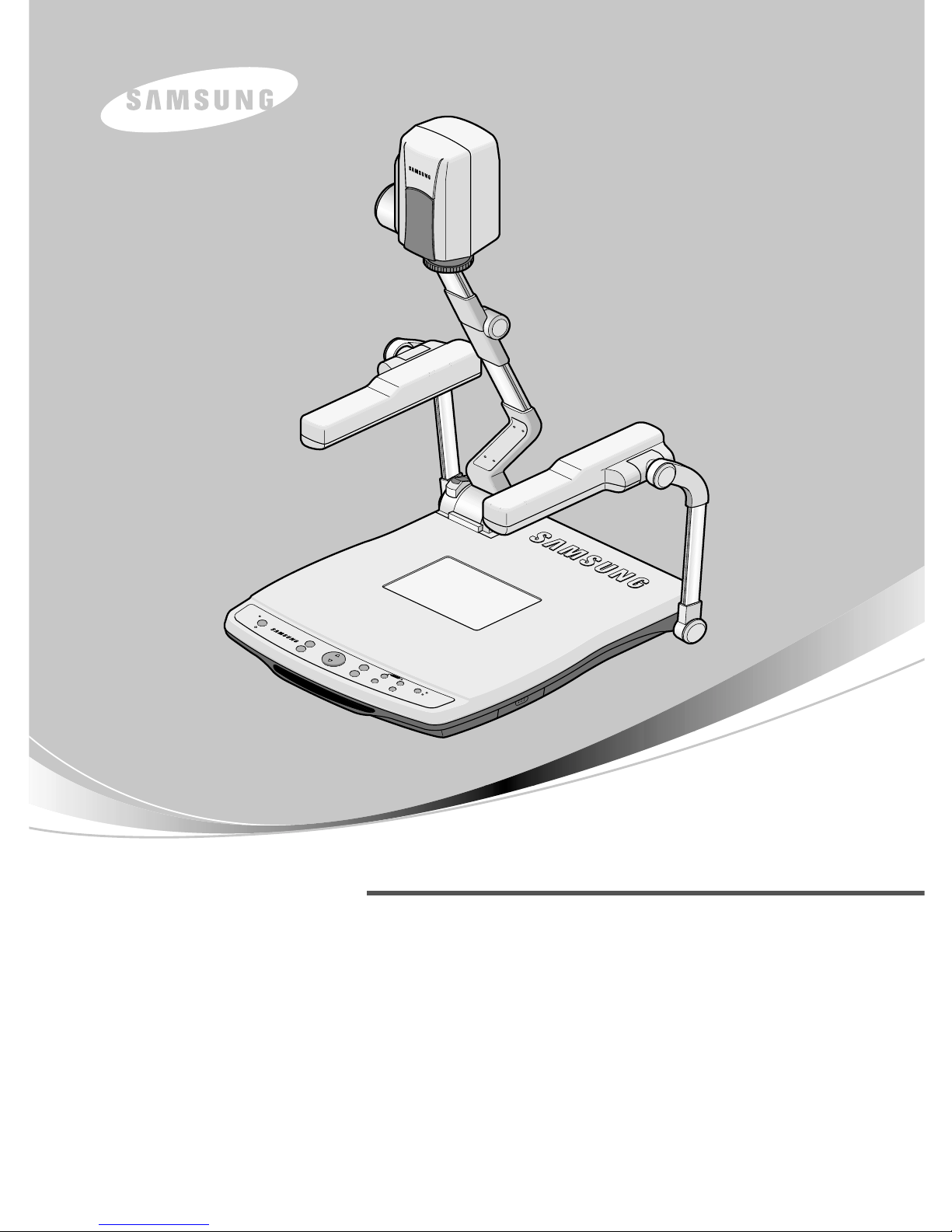
HIGH RESOLUTION DIGITAL PRESENTER
RS-232C REFERENCE
HIGH RESOLUTION DIGITAL PRESENTER
RS-232C REFERENCE
Before attempting to operate this product, Please read the instructions carefully.
www.samsungpresenter.com
Before attempting to operate this product, Please read the instructions carefully.
www.samsungpresenter.com
P
O
T
A
T
E
T
XT
/
I
M
G
D
i
g
i
t
a
l
P
r
e
s
e
n
t
e
r
S
D
P
-
9
5
0
D
X
A
A
F
FR
E
E
ZE
IR
IS
IN
T
/
E
X
T
EXT
1
E
X
T
2
L
A
M
P
A
W
C
Z
O
O
M
SDP900DXA
SDP950DXA/STA
SDP990DXA
Page 2
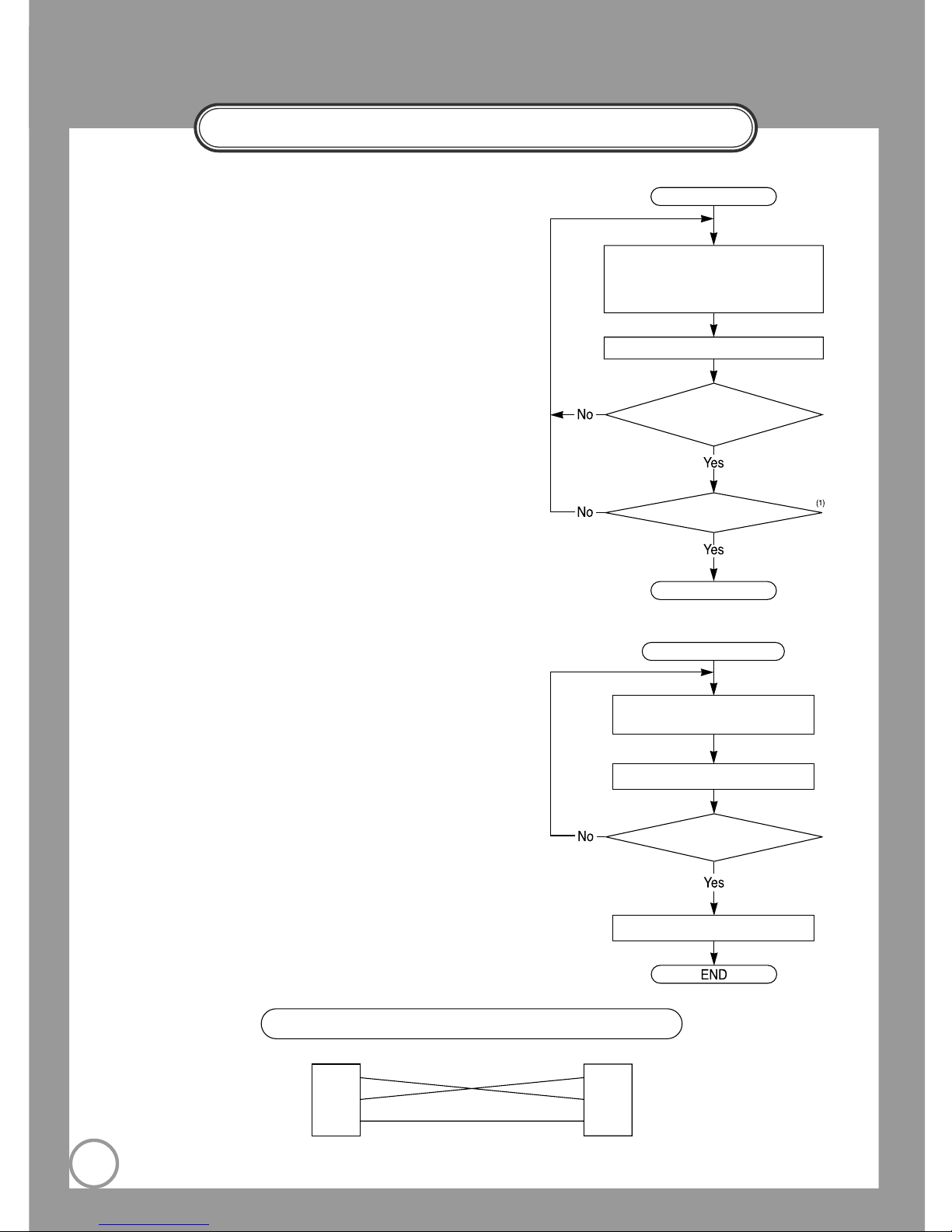
RS232C PC-side FlowChart
2
RS232C Cable Connection
SDP-side PC-side
2
3
5
2
3
5
Send 6-byte to MICOM
[start_code(0xB0)+command code
(4-byte)+stop_code(0xBF)]
Receive 6-byte from MICOM
(1st Rx data==0xB0)
&(6th Rx data==0xBF)
(2nd Rx data==0x80)
Basic Flow
End
Application Flow
Send Message State Check Command
[0xB0 0x64 0x00 0x00 0x00 0xBF]
Receive 6-byte from MICOM
(2nd Rx data == 0x80)
Send User (AWC, etc) Command
- BaudRate: 9600bps
- Parity Bit: No Parity
- Stop Bit Length: 1-bit
- Character Length: 8-bit
- Start Code: 0xB0
- Stop Code: 0xBF
- Command Code: 4-byte
(Note1 2nd Rx data == 0x80)
What the 2nd-Rx-data ("ACK data") is not 0x80
means that the system is doing other operation.
(Check up page 6)
With the command "Message-Status", you can
check up current status of the system and send
the user command. (AWC, etc)
Page 3
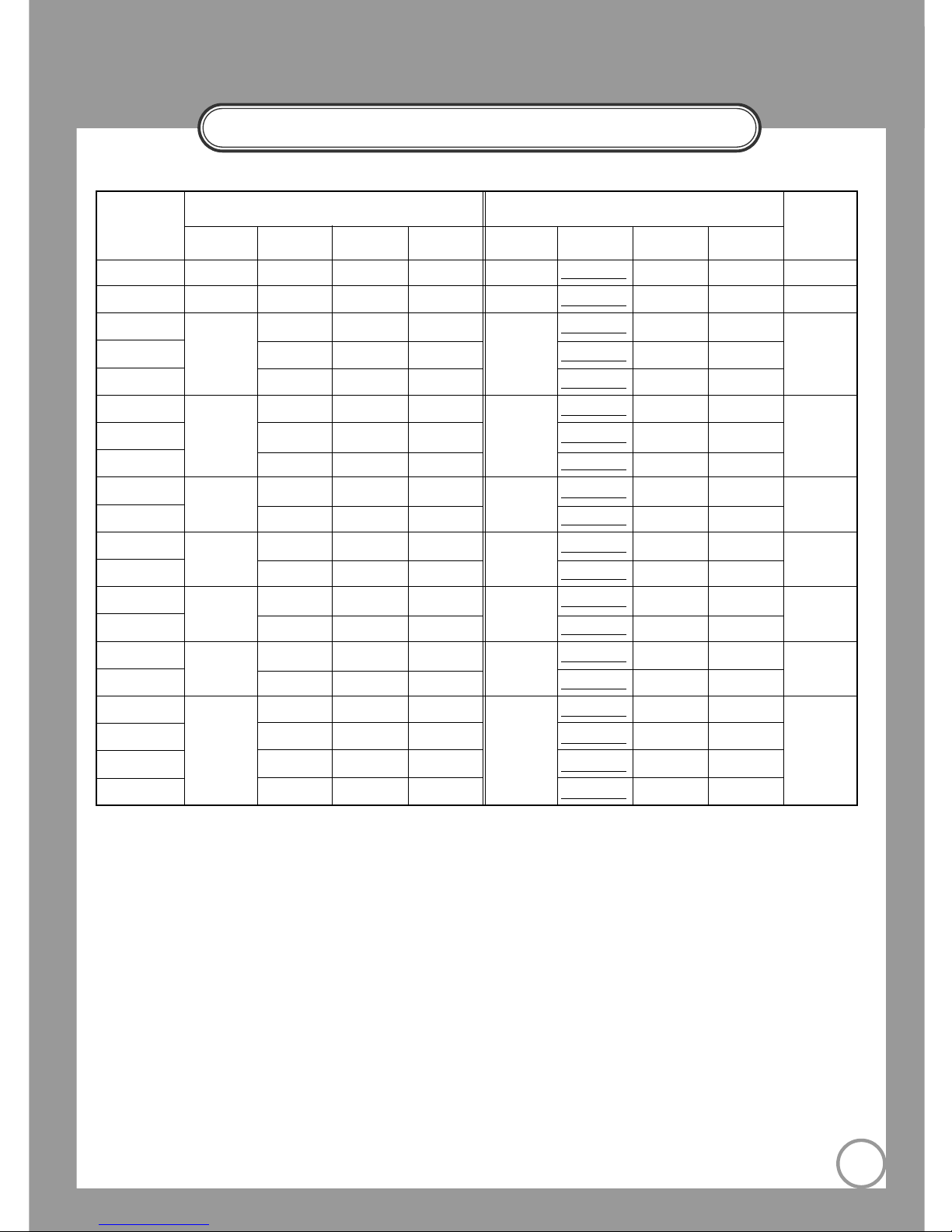
RS232C Command Code
3
AWC 0 x 01 0 x 00 0 x 05 0 x 00 0 x 01 "ACK data"
0 x 05 0 x 00
AF 0 x 02 0 x 00 0 x 05 0 x 00 0 x 02 "ACK data" 0 x 05 0 x 00
Upper Lamp 0 x 00 0 x 05 0 x 00 "ACK data"
0 x 05 0 x 00
Lower Lamp 0 x 03 0 x 00 0 x 08 0 x 00 0 x 03 "ACK data"
0 x 08 0 x 00
Lamp OFF 0 x 00 0 x 0A 0 x 00 "ACK data" 0 x 0A 0 x 00
Internal 0 x 00 0 x 05 0 x 00 "ACK data"
0 x 05 0 x 00
External 1 0 x 04 0 x 00 0 x 08 0 x 00 0 x 04 "ACK data" 0 x 08 0 x 00
External 2 0 x 00 0 x 0A 0 x 00 "ACK data" 0 x 00
Positive
0 x 05
0 x 00 0 x 05 0 x 00
0 x 05
"ACK data" 0 x 05 0 x 00
Negative 0 x 00 0 x 0A 0 x 00 "ACK data" 0 x 0A 0 x 00
NTSC
0 x 08
0 x 00 0 x 05 0 x 00
0 x 08
"ACK data" 0 x 05 0 x 00
PAL 0 x 00 0 x 0A 0 x 00 "ACK data" 0 x 0A 0 x 00
Aperture ON
0 x 09
0 x 00 0 x 05 0 x 00
0 x 09
"ACK data" 0 x 05 0 x 00
Aperture OFF 0 x 00 0 x 0A 0 x 00 "ACK data" 0 x 0A 0 x 00
Power ON
0 x 0F
0 x 00 0 x 05 0 x 00
0 x 0F
"ACK data"
0 x 05 0 x 00
Power OFF 0 x 00 0 x 0A 0 x 00 "ACK data" 0 x 0A 0 x 00
Rotate OFF 0 x 00 0 x 05 0 x 00 "ACK data" 0 x 05 0 x 00
Rotate 90°
0 x 11
0 x 00 0 x 08 0 x 00
0 x 11
"ACK data"
0 x 08 0 x 00
Rotate 180° 0 x 00 0 x 0A 0 x 00 "ACK data" 0 x 0A 0 x 00
Rotate 360° 0 x 00 0 x 0D 0 x 00 "ACK data"
0 x 0D 0 x 00
1st 2nd 3rd 4th
PC Transmit Data to MICOM
Command Remark
PC Receive Data from MICOM
1st 2nd 3rd 4th
Page 4
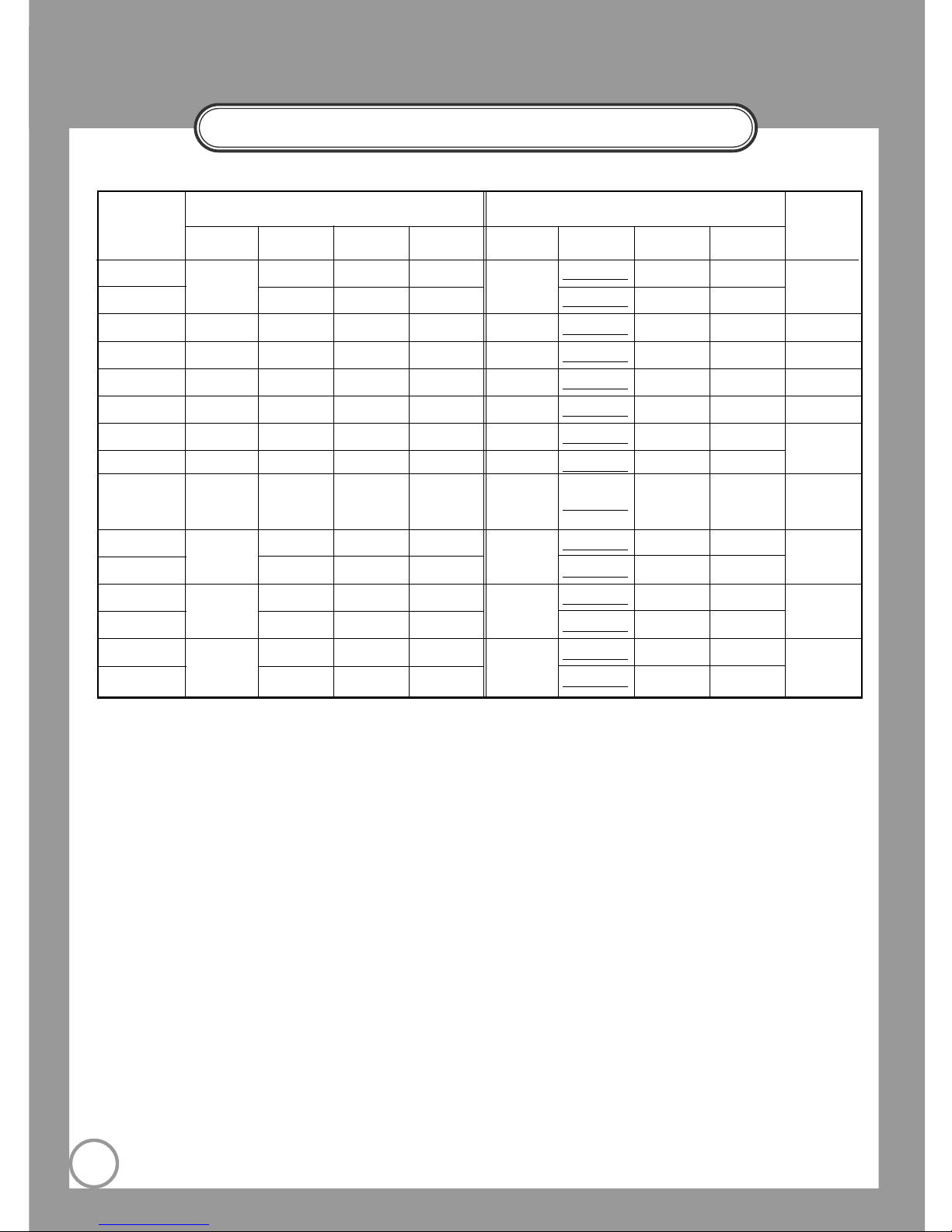
RS232C Command Code
4
Freeze ON
0 x 12
0 x 00 0 x 05 0 x 00
0 x 12
"ACK data"
0 x 05 0 x 00
Freeze OFF 0 x 00 0 x 0A 0 x 00 "ACK data"
0 x 0A 0 x 00
Image Save 0 x 13 0 x 00 Number 0 x 00 0 x 13 "ACK data" Number 0 x 00 Range:"1~8"
Image Recall 0 x 14 0 x 00 Number 0 x 00 0 x 14 "ACK data"
Number 0 x 00 Range:"1~8"
(1)
Image Divide 0 x 15 0 x 00 Number 0 x 00 0 x 15 "ACK data"
Number 0 x 00 Range:"1~9"
Image Shift 0 x 16 0 x 00 0 x 05 0 x 00 0 x 16 "ACK data" 0 x 05 0 x 00
Preset Save 0 x 17 0 x 00 Number 0 x 00 0 x 17 "ACK data" Number 0 x 00
Range:"1~4"
Preset Exe 0 x 18 0 x 00 Number 0 x 00 0 x 18 "ACK data" Number 0 x 00
Recall, divide,
3x3 multi-screen
0 x1F 0 x 00 0 x 05 0 x 00 0 x 1F "ACK data" 0 x 05 0 x 00
Cancel
Iris Up
0 x 21
0 x 00 0 x 05 0 x 00
0 x 21
"ACK data" 0 x 05 0 x 00
Iris Down 0 x 00 0 x 0A 0 x 00 "ACK data"
0 x 0A 0 x 00
Red Up
0 x 23
0 x 00 0 x 05 0 x 00
0 x 23
"ACK data" 0 x 05 0 x 00
Red Down 0 x 00 0 x 0A 0 x 00 "ACK data" 0 x 0A 0 x 00
Blue Up
0 x 24
0 x 00 0 x 05 0 x 00
0 x 24
"ACK data"
0 x 05 0 x 00
Blue Down 0 x 00 0 x 0A 0 x 00 "ACK data"
0 x 0A 0 x 00
1st 2nd 3rd 4th
PC Transmit Data to MICOM
Command Remark
PC Receive Data from MICOM
1st 2nd 3rd 4th
[Note 1] Transmitting number "9" in image divide command, the system executes 3X3 multi-screen mode.
Page 5
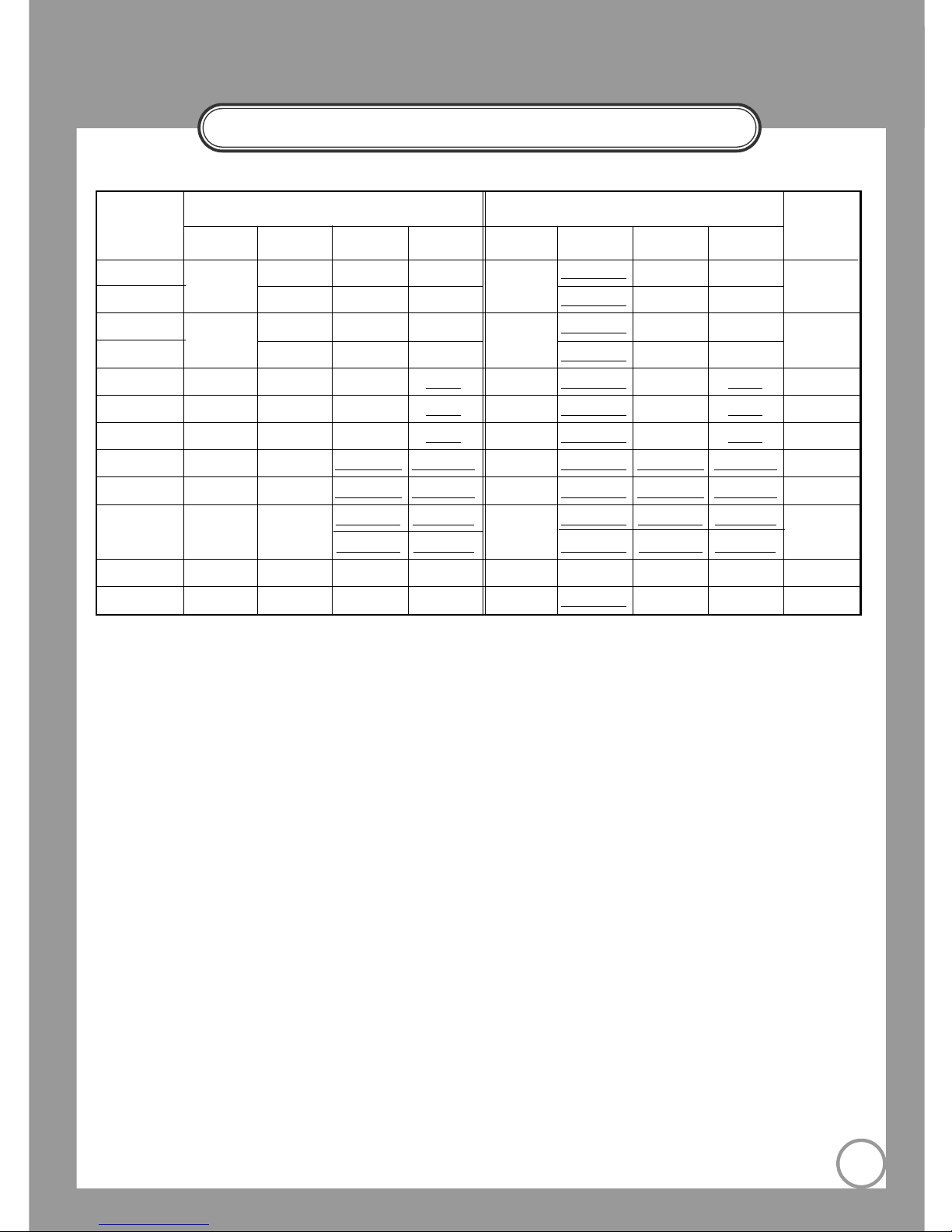
RS232C Command Code
5
Focus Far
0 x 25
0 x 00 0 x 05 0 x 00
0 x 25
"ACK data" 0 x 05 0 x 00
Focus Near 0 x 00 0 x 0A 0 x 00 "ACK data" 0 x 0A 0 x 00
Zoom Tele
0 x 26
0 x 00 0 x 05 0 x 00
0 x 26
"ACK data" 0 x 05 0 x 00
Zoom Wide 0 x 00 0 x 0A 0 x 00 "ACK data"
0 x 0A 0 x 00
Iris Target 0 x 41 0 x 00 0 x 00 "data" 0 x 41 "ACK data" 0 x 00 "data"
Range: "1~120"
Red Target 0 x 43 0 x 00 0 x 00 "data"
0 x 43 "ACK data" 0 x 00 "data"
Range: "1~200"
Blue Target 0 x 44 0 x 00 0 x 00 "data" 0 x 44 "ACK data" 0 x 00 "data"
Range: "1~200"
Focus Target 0 x 45 0 x 00 "MSB data" "LSB data" 0 x 45 "ACK data" "MSB data" "LSB data"
(1)
Range: "0~2225"
Zoom Target 0 x 46 0 x 00 "MSB data" "LSB data" 0 x 46 "ACK data" "MSB data" "LSB data"
Range: "0~1812"
Focus/Zoom
0 x 47
0 x 05
"zoom MSB" "zoom LSB"
0 x 47
"ACK data"
"zoom MSB" "zoom LSB"
(1)
Focus: "0~2225"
concurrent Target
0 x 0A
"focus MSB" "focus LSB"
"ACK data"
"focus MSB" "focus LSB"
Zoom: "0~1812"
(2)
Drive Stop 0 x 2F 0 x 00 0 x 05 0 x 00 0 x 2D "ACK data" 0 x 05 0 x 00
1st 2nd 3rd 4th
PC Transmit Data to MICOM
Command Remark
PC Receive Data from MICOM
1st 2nd 3rd 4th
[Note 1] Depending of the zoom amount, the range of focus data will be changed. You can figure it out to see
page 4. ("Focus-Status[Max]", "Focus-Status[Min]")
[Note 2] Above 10 Command (Iris up/down ,Red up/down, Blue up/down, Focus far/near, Zoom tele/wide) will
go to all the way once you execute it.
"Drive Stop" can stop those command in certain point that you want.
Page 6
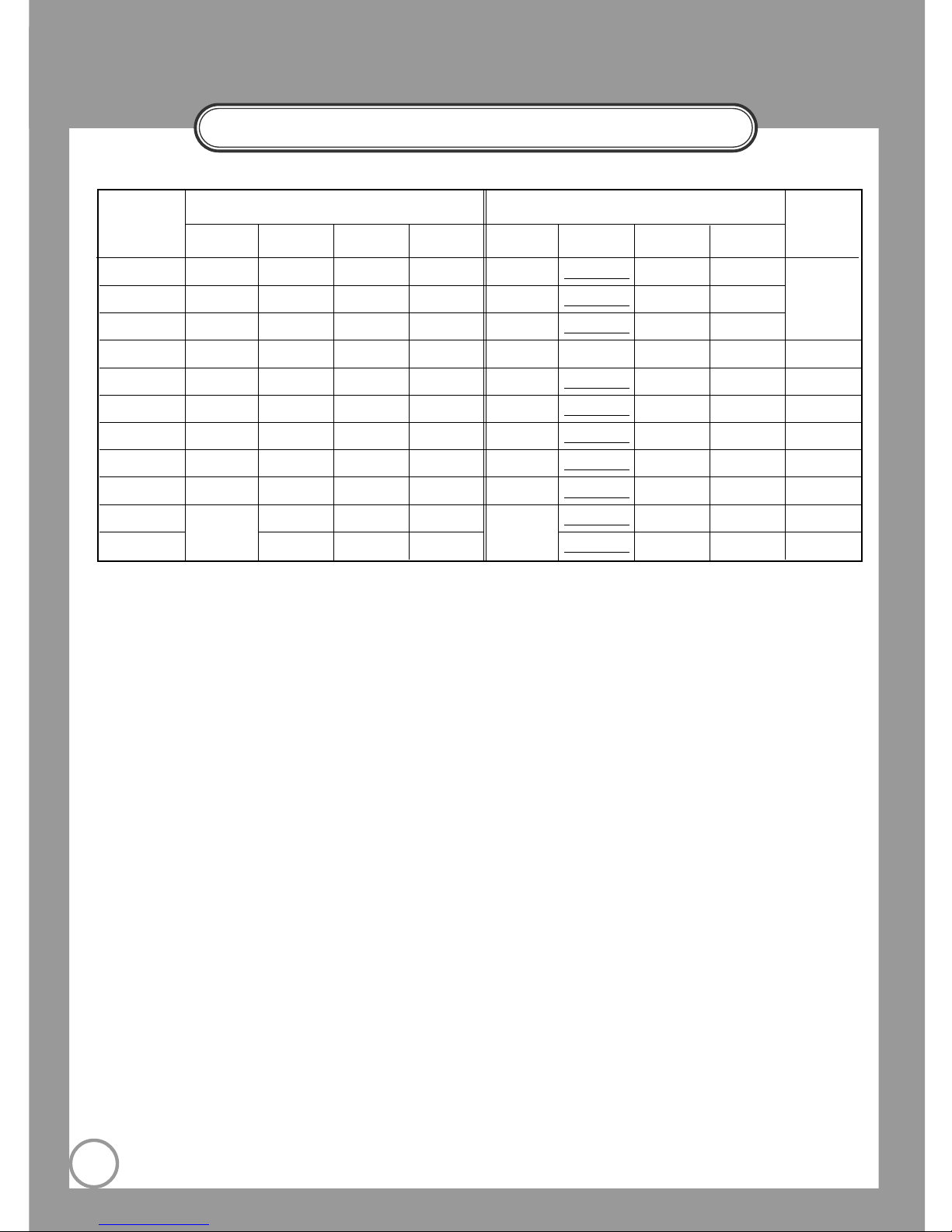
RS232C Command Code
6
Set-Status(Normal)
0 x 61 0 x 00 0 x 00 0 x 00 0 x 61 "ACK data"
Status(MSB) Status(LSB)
Set-Status(Digital)
0 x 62 0 x 00 0 x 00 0 x 00 0 x 62 "ACK data"
Status(MSB) Status(LSB)
Message-Status
0 x 64 0 x 00 0 x 00 0 x 00 0 x 64 "ACK data"
Status(MSB) Status(LSB)
Iris-Status
0 x 65 0 x 00 0 x 00 0 x 00 0 x 65 "ACK data" 0 x 00 Status
Range:"1~120"
Red-Status 0 x 67 0 x 00 0 x 00 0 x 00 0 x 67 "ACK data"
0 x 00 Status
Range:"1~200"
Blue-Status 0 x 68 0 x 00 0 x 00 0 x 00 0 x 68 "ACK data" 0 x 00 Status
Range:"1~200"
Zoom-Status 0 x 69 0 x 00 0 x 00 0 x 00 0 x 69 "ACK data"
Status(MSB) Status(LSB)
Range:"0~1904"
Focus-Status 0 x 6A 0 x 00 0 x 00 0 x 00 0 x 6A "ACK data"
Status(MSB) Status(LSB)
Range:"0~2225"
(1)
Focus-Status(Max)
0 x 6B
0 x 00 0 x 05 0 x 00
0 x 6B
"ACK data"
Status(MSB) Status(LSB)
Range:"648~2225"
(1)
Focus-Status(Min)
0 x 00 0 x 0A 0 x 00 "ACK data"
Status(MSB) Status(LSB)
Range:"0~1383
"
1st 2nd 3rd 4th
PC Transmit Data to MICOM
Command Remark
PC Receive Data from MICOM
1st 2nd 3rd 4th
[Note 1] This command returns focus maximum/minimum data at current zoom position.
Bit definition
of Status
represents
Page 5, 6, 7
Page 7
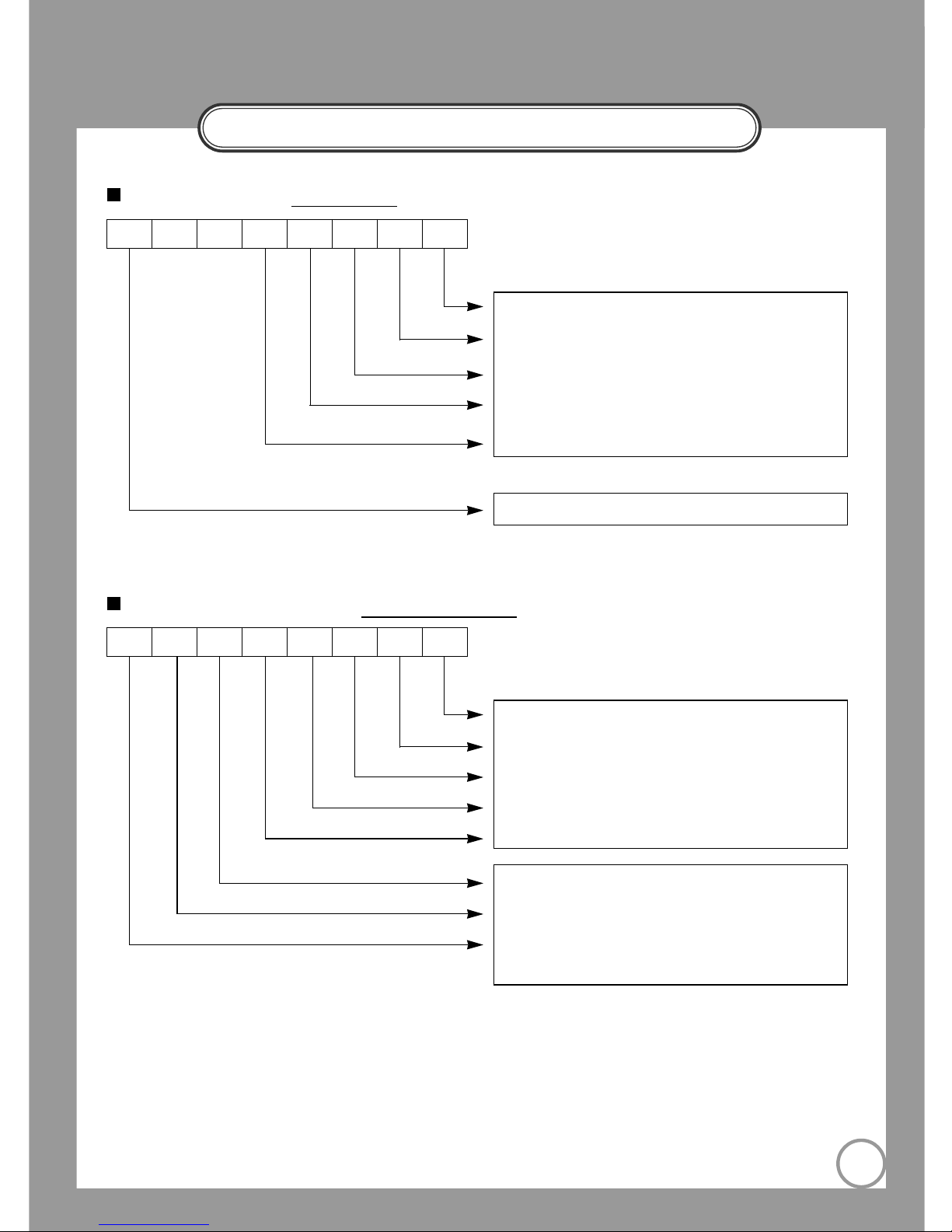
RS232C COMMAND CODE
7
(0,0,0,0,1): Set is executing command by panel-key
(0,0,0,1,0): Set is executing command by remocon
(0,0,1,0,0): Set is executing command by RS232C
(0,1,0,0,0): Set is executing command by USB
(1,0,0,0,0): Set is executing command by MOUSE
Acknowledgement Bit ("0": no-ACK, "1": ACK)
76543210
(0,0,0,0,1): Set is executing command by panel-key
(0,0,0,1,0): Set is executing command by remocon
(0,0,1,0,0): Set is executing command by RS232C
(0,1,0,0,0): Set is executing command by USB
(1,0,0,0,0): Set is executing command by MOUSE
(0,0,1): Set is executing AF command
(0,1,1): Set is executing Preset-Exe command
(1,0,0): Set is executing Image-Save command
(1,0,1): Set is executing Image-Rotate command
76543210
Bit Definition of "ACK data"
Status Bit Definition by Message-Status Command
Page 8
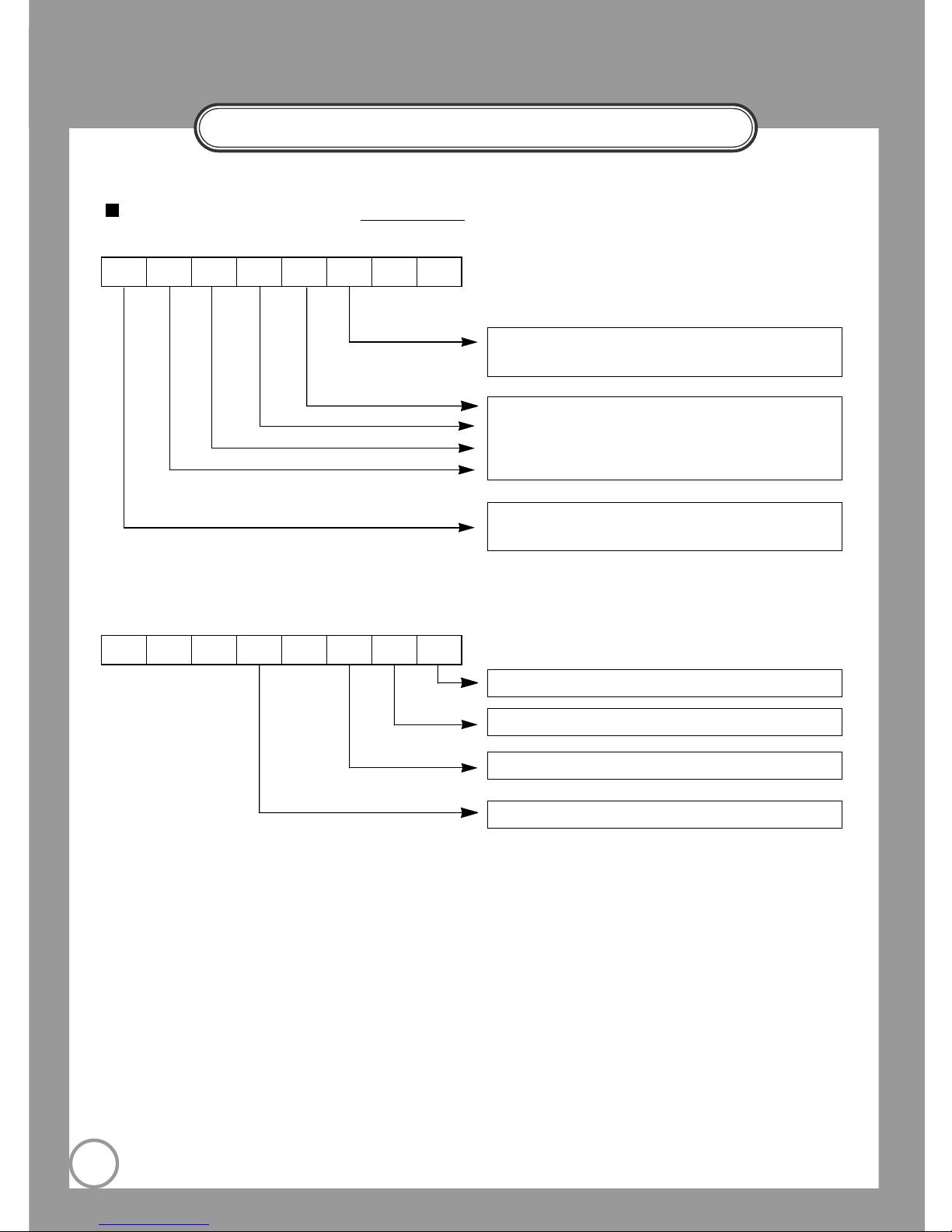
RS232C Command Code
8
(0,0,0): internal input
(1,0,1): NO SYNC (EXT1) (1,0,1): NO SYNC (EXT2)
(1,1,0): external 1 input (1,1,1): external 2 input
(0): lamp all Off
(0,1): upper lamp ON (1,0): lower lamp ON
(0): positive mode (1): negative mode
(0): System Power OFF (1): System Power ON
(0): NTSC (1): PAL
(0): Aperture ON (1): Aperture OFF
(0): DX model (1): ST model
Status Bit Definition by Set-Status Command
- LSB 8bit
- MSB 8bit
76543210
76543210
Page 9
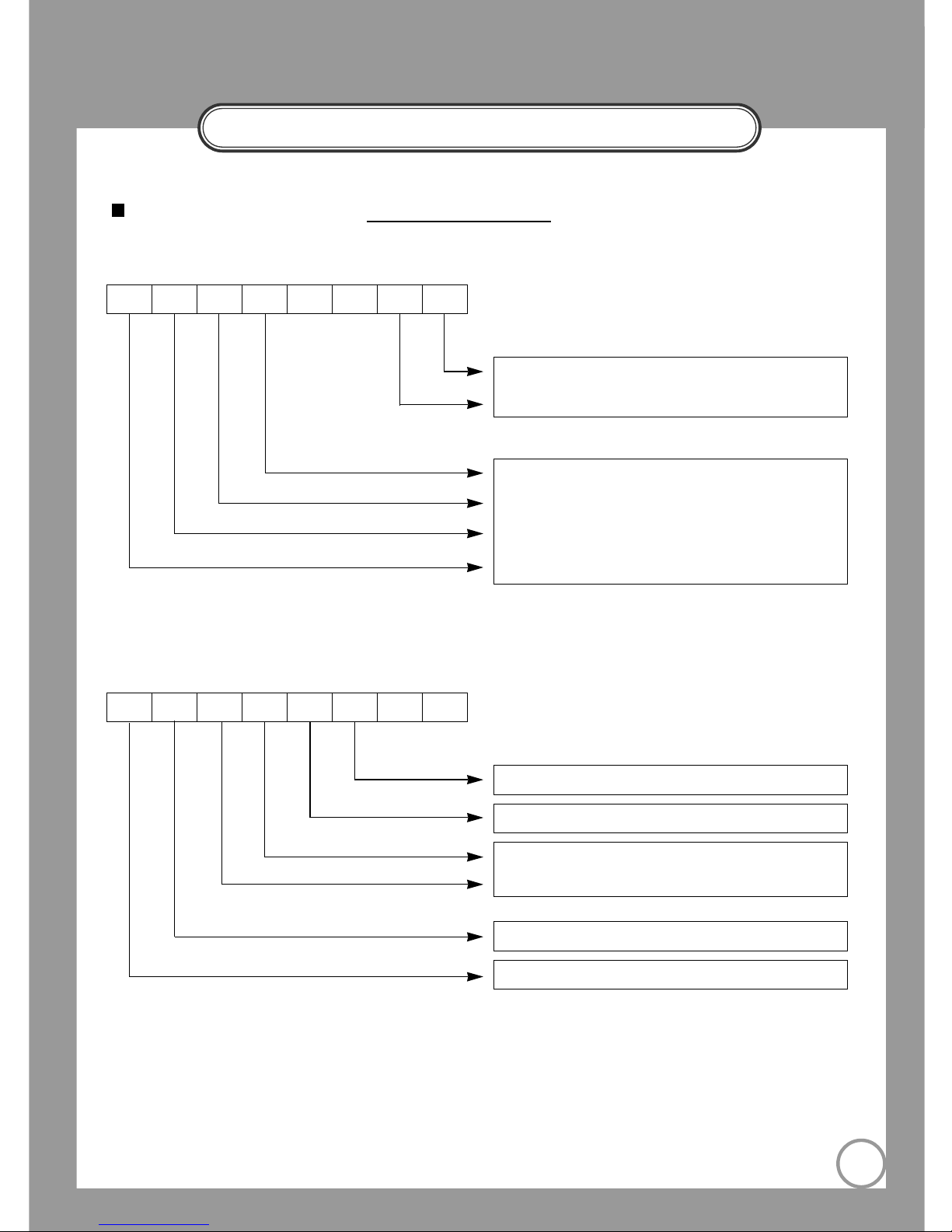
RS232C COMMAND CODE
9
Divide position information
(0,0):shift1 (0,1):shift2 (1,0):shift3
Divide or Recall number information
(0,0,0,1): number1 (0,0,1,0): number2
. .
. .
(0,1,1,1): number7 (1,0,0,0): number8
Status Bit Definition by Set-Status(Digital) Command
- LSB 8bit
76543210
(0): image divide OFF (1): image divide ON
(0): 3X3 multi-screen OFF (1): 3X3 multi-screen ON
(0): image freeze OFF (1): image freeze ON
(0): image recall OFF (1): image recall ON
(0,0):image rotate OFF (0,1):image rotate 90°
(1,0):image rotate 180° (1,1):image rotate 270°
- MSB 8bit
76543210
Page 10

MEMO
10
Page 11

MEMO
11
Page 12

P/No.: 6806-0593-01A
HEAD OFFICE: SAMSUNG TECHWIN CO., LTD
145-3 Sangdaewon 1-Dong, Jungwon-Gu, Sungnam,
Kyungki-Do,Korea 462-703
TEL : 82-31-740-8137~8141
FAX : 82-31-740-8145
U.S.A OFFICE: SAMSUNG OPTO-ELECTRONICS AMERICA, INC.
40 Seaview Drive, Secaucus NJ 07094, U.S.A
TEL : 201-902-0347
FAX : 201-902-0429
SAMSUNG TECHWIN MOSCOW OFFICE
LENNINGRADSKY PR-KT, 37-A. KORP.14
RUSSIA, 125167, MOSCOW
TEL: +7-095-258-9296, 9298 FAX: +7-095-258-9297
SAMSUNG OPTO-ELECTRONICS UK LTD (SOUK)
Samsung House,1000 Hillswood Drive Hillswood Business
Park Chertsey Surrey KT16OPS
TEL :44-(0)1932-45-5308 FAX :44-(0)1932-45-5325
TIANJIN SAMSUNG OPTO-ELECTRONICS CO.,LTD (TSOE)
7 Pingchang Rd,Nankai Dist,Tianjin,P.R China Post Code :300190
TEL :86-22-2761-9698 FAX :86-22-2761-6514
 Loading...