

Page 1

9. User manual
Page 2

User manual
SCH-U485
Page 3
using this manual
This user manual has been specially designed to guide you through the functions
and features of your mobile phone. To get started quickly, refer to “introducing your
mobile phone,” “오류! 참조 원본을 찾을 수 없습니다.,” and “오류! 참조 원본을 찾을 수
없습니다..”
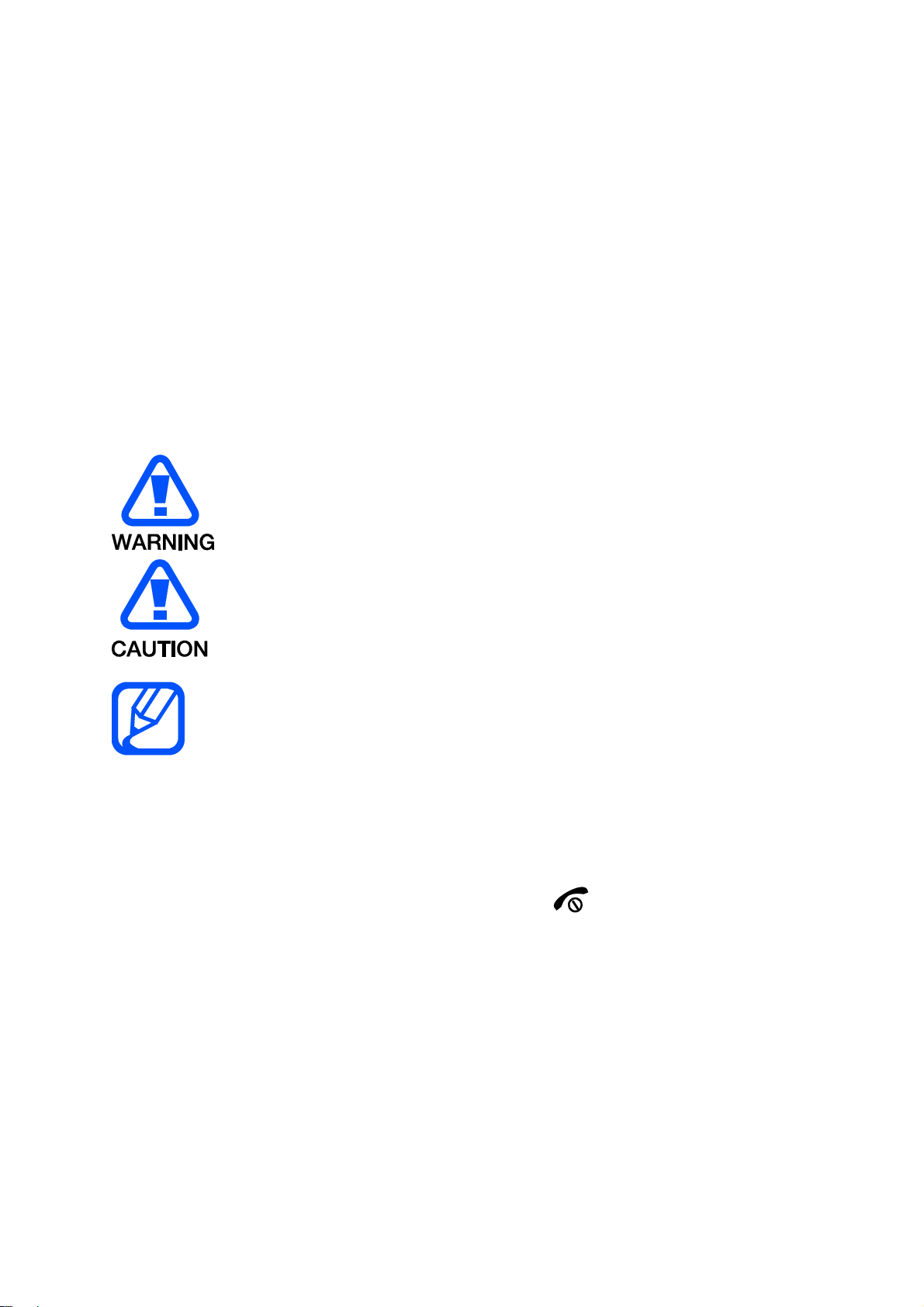
Instructional icons
Before you start, familiarise yourself with the icons you will see in this manual:
Warning—situations that could cause injury to yourself or others
Caution—situations that could cause damage to your phone or other
equipment
Note—notes, usage tips, or additional information
Refer to—pages with related information; for example: p. 12
(represents “see page 12”)
Õ
Followed by—the order of options or menus you must select to perform a
step; for example: In Menu mode, select Messages Õ Create new message
(represents Messages, followed by Create new message)
Square brackets—phone keys; for example: [ ](represents the Power/
[ ]
Menu exit key)
< >
example: <OK> (represents the OK softkey)
Angled brackets—softkeys that control different functions at each screen; for
Copyright information
Rights to all technologies and products that comprise this device are the property of
their respective owners:
Bluetooth® is a registered trademark of the Bluetooth SIG, Inc. worldwide
Java™ is a trademark of Sun Microsystems, Inc.
Page 4

Windows Media Player® is a registered trademark of Microsoft Corporation.
contents
safety and usage information
Safety warnings
Safety precautions
Important usage information
introducing your mobile phone
Unpack ..
Phone layout
Keys
Display
Icons
assembling and preparing your mobile phone
Install the SIM card and battery
Charge the battery
using basic functions
Turn your phone on and off
Access menus
Customise your phone
Use basic call functions
Send and view messages
Add and find contacts
troubleshooting
safety and usage
information
Comply with the following precautions to avoid dangerous or illegal situations and
ensure peak performance of your mobile phone.
Safety warnings
Keep your phone away from small children and pets
Keep your phone and all accessories out of the reach of small children or animals.
Small parts may cause choking or serious injury if swallowed.
Protect your hearing
Page 5

Excessive exposur e to sound at high volum es can cause hearing damage.
Alw ays tur n t he volume down b efore plugging t he ear phones int o an aud io sour ce and
use only t he minim um v olum e set t ing necessary t o hear your conversation or m u sic.
Install mobile phones and equipment with caution
Ensure that any mobile phones or related equipment installed in your vehicle are
securely mounted. Avoid placing your phone and accessories near or in an air bag
deployment area. Improperly installed wireless equipment can cause serious injury
when air bags inflate rapidly.
Handle and dispose of batteries and chargers with care
Use only Samsung-approved batteries and chargers specifically designed for
your phone. Incompatible batteries and chargers can cause serious injuries
or damage to your phone.
Never dispose of batteries or phones in a fire. Follow all local regulations
when disposing used batteries or phones.
Never place batteries or phones on or in heating devices, such as microwave
ovens, stoves, or radiators. Batteries may explode when overheated.
Never crush or puncture the battery. Avoid exposing the battery to high
external pressure, which can lead to an internal short circuit and overheating.
Avoid interference with pacemakers
Maintain a minimum of 15 cm (6 inches) between mobile phones and pacemakers to
avoid potential interference, as recommended by manufacturers and the
independent research group, Wireless Technology Research. If you have any reason
to suspect that your phone is interfering with a pacemaker or other medical device,
turn off the phone immediately and contact the manufacturer of the pacemaker or
medical device for guidance.
Turn off the phone in potentially explosive environments
Do not use your phone at refuelling points (service stations) or near fuels or
chemicals. Turn off your phone whenever directed by warning signs or instructions.
Your phone could cause explosions or fire in and around fuel or chemical storage
and transfer areas or blasting areas. Do not store or carry flammable liquids, gases,
or explosive materials in the same compartment as the phone, its parts, or
accessories.
Reduce the risk of repetitive motion injuries
When sending text messages or playing games on your phone, hold the phone with
a relaxed grip, press the keys lightly, use special features that reduce the number of
keys you have to press (such as templates and predictive text), and take frequent
breaks.
Page 6

Safety precautions
Drive safely at all times
Avoid using your phone while driving and obey all regulations that restrict the use of
mobile phones while driving. Use hands-free accessories to increase your safety
when possible.
Follow all safety warnings and regulations
Comply with any regulations that restrict the use of a mobile phone in a certain area.
Use only Samsung-approved accessories
Using incompatible accessories may damage your phone or cause injury.
Turn off the phone near medical equipment
Your phone can interfere with medical equipment in hospitals or health care facilities.
Follow all regulations, posted warnings, and directions from medical personnel.
Turn off the phone or disable the wireless functions when in an aircraft
Your phone can cause interference with aircraft equipment. Follow all airline
regulations and turn off your phone or switch to a mode that disables the wireless
functions when directed by airline personnel.
Protect batteries and chargers from damage
Avoid exposing batteries to very cold or very hot temperatures (below 0° C/32° F or
above 45° C/ 113° F). Extreme temperatures can reduce the charging capacity and
life of your batteries.
Prevent batteries from contacting metal objects, as this can create a connection
between the + and - terminals of your batteries and lead to temporary or permanent
battery damage.
Never use a damaged charger or battery.
Handle your phone carefully and sensibly
Do not allow your phone to get wet—liquids can cause serious damage. Do not
handle your phone with wet hands. Water damage to your phone can void your
manufacturer’s warranty.
Avoid using or storing your phone in dusty, dirty areas to prevent damage to
moving parts.
Your phone is a complex electronic device— protect it from impacts and
rough handling to avoid serious damage.
Do not paint your phone, as paint can clog moving parts and prevent proper
operation.
Avoid using the phone’s camera flash or light close to the eyes of children or
animals.
Your phone and memory cards may be damaged by exposure to magnetic
fields. Do not use carrying cases or accessories with magnetic closures or
allow your phone to come in contact with magnetic fields for extended
Page 7

periods of time.
Avoid interference with other electronic devices
Your phone emits radio frequency (RF) signals that may interfere with unshielded or
improperly shielded electronic equipment, such as pacemakers, hearing aids,
medical devices, and other electronic devices in homes or vehicles. Consult the
manufacturers of your electronic devices to solve any interference problems you
experience.
Important usage information
Use your phone in the normal position
Avoid contact with your phone’s internal antenna.
Allow only qualified personnel to service your phone
Allowing unqualified personnel to service your phone may result in damage to your
phone and will void your warranty.
Ensure maximum battery and charger life
Avoid charging batteries for more than a week, as overcharging may shorten
battery life.
Over time, unused batteries will discharge and must be recharged before use.
Disconnect chargers from power sources when not in use.
Use batteries only for their intended purpose.
Handle SIM cards and memory cards with care
Do not remove a card while the phone is transferring or accessing
information, as this could result in loss of data and/or damage to the card or
phone.
Protect cards from strong shocks, static electricity, and electrical noise from
other devices.
Frequent writing and erasing will shorten the life span of memory cards.
Do not touch gold-coloured contacts or terminals with your fingers or metal
objects. If dirty, wipe the card with a soft cloth.
Ensure access to emergency services
Emergency calls from your phone may not be possible in some areas or
circumstances. Before travelling in remote or undeveloped areas, plan an alternate
method of contacting emergency services personnel.
Health and safety information
Ex posure to Radio Frequ e n cy ( RF) Sig n a ls
Cert ifica t ion I nfor m a t ion ( SAR)
Your w ireless ph one is a radio t r ansmit t er and receiver . It is designed and
Page 8

m anu fact u red not to exceed t he ex posur e lim its for radio frequency ( RF)
ener gy set by the Federal Comm unications Com m ission (FCC) of the U.S.
gover nm ent . These FCC ex posur e lim its ar e der ived from t he
recom m endations of two exper t or gan izat ions, the Nat ional Coun sel on
Radiation Protect ion and Measuremen t (NCRP) and t h e I n st itute of
Electrical and Elect ron ics En gineers ( I EEE) . I n both cases, t he
recom m endations wer e dev elop ed by scientific and engineer ing experts
drawn from industry, gover nm ent , and academ ia after ext en sive reviews
of the scientific lit erature related to the biological effect s of RF energy.
The exposure lim it set by the FCC for w ireless m obile phones em ploys a
unit of m easurem ent k now n as the Specif ic Absorpt ion Rate ( SAR) . The
SAR is a m easu re of the rat e of absorpt ion of RF energy by t he hum an
body expressed in unit s of wat t s per kilogram (W/ kg) . The FCC r equir es
wir eless phones t o com ply wit h a safety lim it of 1.6 watts per k ilogr am
( 1.6 W/ kg). The FCC ex posur e lim it incorpor ates a su bstan t ial m ar gin of
safety t o give add itional pr otect ion t o the public and t o accou nt for any
var iations in measur ement s.
SAR test s are conducted using standard operatin g posit ions accepted by
the FCC wit h the phone transm it tin g at it s highest cer t ified power lev el in
all t ested frequency ban ds. Alt hough the SAR is deter m in ed at the highest
cert ified power level, the act ual SAR level of t he phone while operating
can be well below t he m axim um value. This is because t he phone is
designed to oper ate at m ult iple power levels so as t o use only t he power
required to reach the networ k . In gener al, the closer you are to a wir eless
base st at ion antenna, the low er t he power ou t put.
Before a new m odel phon e is available for sale to the public, it m ust be
tested and cer t ified to the FCC that it does not ex ceed t h e exposur e lim it
established by t h e FCC. Tests f or each model phone ar e per for m ed in
positions and locat ions (e. g. at t he ear an d w orn on the body ) as r equir ed
by t he FCC.
For body wor n operat ion, t his m odel ph one h as been t ested and m eets
the FCC RF ex posu re guidelines when used wit h a Sam sung accessor y
designat ed for this produ ct or when u sed wit h an accessory t hat cont ains
no m etal and that posit ions the handset a m inim um of 1. 5 cm fr om the
body.
Non- compliance wit h the above rest r ictions may result in violation of FCC
RF exposur e guidelines.
SAR inform ation on this an d other model p hones can be viewed on- lin e at
http://www.fcc.gov/oet/ea/fccid/. This site uses t he ph one FCC I D number,
A3LSCHU485.
to find t h e number. Once you have the FCC I D number for a par t icular
phone, follow t he inst ructions on t he websit e and it shou ld provide values
for typical or m axim um SAR for a par t icular phone. Addit ional pr oduct
specific SAR inform ation can also be obtained at w w w.fcc.gov/ cgb/ sar.
Som et im es it may be necessary t o rem ove t he batter y pack
Page 9

Consum e r I nfor m ation o n W ireless Ph o nes
The U.S. Food and Drug Administrat ion (FDA) has pu blished a series of
Quest ions and Answ ers for consum er s relat ing to radio fr equency (RF)
ex posu re from wir eless phon es. The FDA publicat ion includes the
following in for m ation:
W ha t kin d s of phones are t h e su bj e ct of this u pdate?
The ter m wir eless phone refer s her e t o h and-held wireless phones wit h
built - in ant ennas, oft en called “ cell,” “m obile,” or “PCS” phones. These
types of wireless phones can expose t h e user t o m easurable radio
frequency en er gy ( RF) because of the short distance bet w een t he phone
an d t h e user's head . These RF ex posur es are limited by Feder al
Com m unications Comm ission safet y guidelin es t hat were developed w ith
the advice of FDA and ot her federal h ealt h and safety agencies. When t he
phone is locat ed at gr eat er dist ances from the user, t h e exposur e t o RF is
drast ically lower because a person' s RF exposur e decr eases rapidly with
in cr easing distan ce f rom the source. The so- called “ cordless phones,”
which have a base unit connect ed to t he telephone wirin g in a h ouse,
typically operate at far lower power levels, and thus produce RF
ex posu res w ell within t he FCC's compliance limits.
Do w ir e less phon e s p ose a h e a lth ha zard?
The available scientific evidence does not show t h at any health problems
ar e associated w ith using wireless phones. There is no proof, h owever,
that wir eless phones are absolut ely safe. Wireless phones em it low levels
of radio frequency energy (RF) in the m icrowav e r ange while being used.
They also em it very low levels of RF w hen in t he stand-by m ode. Whereas
high levels of RF can p roduce health eff ects (by heat ing tissue) , exposure
to low level RF t hat does not produce heat ing effect s causes no known
adver se h ealt h effect s. Man y studies of low level RF exposures have not
found any biological effect s. Some st udies hav e su ggested that som e
biological eff ects may occur, bu t such findings h ave not been confirmed
by addit ional research. I n som e cases, other r esear chers hav e h ad
difficult y in reproducing those studies, or in det er m ining t he reasons for
in consist ent r esults.
W ha t is FDA's role conce r ning t h e sa fety of w irele ss p h ones?
Under t h e law, FDA does not review t he safety of radiation-em itting
consum er produ ct s such as wir eless phon es bef ore t hey can be sold, as it
does w ith new dr ugs or m edical dev ices. However , the agency has
au t hor ity t o take action if wireless phones ar e shown to emit radio
frequency en er gy ( RF) at a lev el that is hazardous t o t he user . In su ch a
case, FDA could require the manufacturers of wireless phones to not ify
user s of the health hazard an d t o repair, replace or recall the phones so
that the hazard no longer exists.
Although the exist ing scientific dat a do not j ust ify FDA regulat or y act ions,
FDA has urged the wireless phone indu st r y to t ake a num ber of steps,
in cluding the f ollowin g:
Page 10

“ Support needed resear ch into possible biological effects of RF of
the type emitted by w ireless phones;
“ Design wireless phones in a way that min imizes any RF exposure
to t he user that is not necessary for device funct ion; and
“ Cooperat e in provid ing users of w ireless phones wit h the best
possible infor m at ion on possible effects of w ireless phone u se on
hum an health.
FDA belongs t o an int eragency w orking group of the federal ag en cies t hat
have resp onsibility for dif ferent aspects of RF safet y to ensure coordinat ed
effort s at t he federal lev el. The following agencies belong t o t his w orking
group:
“ National I n st itute for Occupational Safety and Healt h
“ Environm ent al Pr otect ion Agency
“ Federal Com m u nications Com m ission
“ Occupat ional Safet y and Health Adm inist r ation
“ National Telecom m unications and Informat ion Adm inist rat ion
The Nat ional I nstit utes of Healt h participates in som e int eragency working
group activit ies, as w ell.
FDA shar es r egulator y responsibilities f or wir eless phon es w ith t he Federal
Com m unications Comm ission ( FCC) . All phon es t h at are sold in the Unit ed
St ates m ust comply w ith FCC safety g uidelines t hat lim it RF exposure.
FCC relies on FDA and ot her health agencies for safety quest ions about
wir eless phones.
FCC also regulates the base st ations t h at t he wir eless phon e net w orks
rely upon. While t h ese base st ations operat e at higher power than do t he
wir eless phones t hem selves, t he RF ex posur es t h at people get fr om these
base st at ion s ar e t y pically thousands of t imes lower than those t hey can
get fr om wireless phones. Base stat ions are t hus n ot t h e prim ary su bject
of the safet y questions discussed in this document.
W ha t are t he result s of t h e research don e alr e a dy?
The research done t hus far has produced conflicting results, and m any
st udies hav e suffered from flaws in their research met hod s. Anim al
ex periments invest igat in g t he effect s of radio frequency energy (RF)
ex posu res ch aract erist ic of w ireless ph ones have yielded conf lict ing
resu lts that often cannot be r epeat ed in ot her laborat ories. A few anim al
st udies, how ever, hav e suggested that low levels of RF could accelerate
the development of cancer in laborat ory animals. How ever, m any of the
st udies t hat showed increased tum or developm en t used anim als t hat had
been genetically engineered or treat ed wit h cancer - causing ch emicals so
as t o b e pre- disposed t o develop cancer in absence of RF ex posure. Other
st udies exposed t he anim als to RF for up to 22 h our s per day. These
condit ions are not sim ilar t o t he cond itions under which people use
wir eless phones, so w e don 't kn ow with cert ainty what the result s of such
st udies m ean for hum an health.
Three large epidem iology st u dies have been published since December
Page 11

200 0. Between t hem , t he studies inv estigat ed any possible associat ion
between t he use of wireless phones and prim ar y br ain cancer , gliom a,
m eningiom a, or acoust ic neur om a, tumor s of t he brain or salivar y glan d,
leukemia, or other cancer s. None of t he st udies dem onst rat ed the
ex istence of any harmful health effect s from wireless phones RF
ex posu res. However , none of t he studies can an sw er quest ions about
long- t erm exposures, sin ce t h e average period of ph one use in t hese
st udies w as around three years.
W ha t rese a r ch is ne e d e d to decide w he t her RF exposure f r om
w irele ss pho n e s poses a h e a lt h risk?
A com binat ion of laborat ory studies and epid em iological st udies of people
actually using wireless phones would pr ovide som e of the data that ar e
needed. Lifet ime animal exposure stud ies cou ld be com pleted in a few
years. However , very lar ge num bers of anim als would be needed to
provide reliable pr oof of a cancer pr omoting ef fect if on e exist s.
Epidemiological studies can provide dat a t hat is directly applicable t o
hum an populat ions, but ten or mor e years' follow-up m ay be needed to
provide an sw ers about som e healt h effects, such as cancer . This is
because the interval bet w een t h e t ime of ex posure to a cancer - causing
agen t and t he t ime tumors develop - if t h ey do - may be m any , many
years. The int erpret ation of epidemiological studies is ham pered by
difficult ies in m easuring actual RF exposure during day- t o-day use of
wir eless phones. Many fact ors aff ect t his m easurem en t , such as t h e angle
at which the phon e is held, or which m odel of phon e is used.
W ha t is FDA doing t o find out m ore about the p ossible health
effects of w ireless phon e RF?
FDA is w orking wit h the U.S. National Toxicology Program and with
groups of in vestigat ors around the world to ensure that high prior ity
an imal studies are conducted to address im port ant questions about t h e
effect s of ex posur e t o r adio frequen cy ener gy ( RF).
FDA has been a leading part icipant in the Wor ld Healt h Organization
in t ern ational Electrom agnet ic Fields ( EMF) Proj ect since it s inception in
199 6. An in fluent ial result of t h is work has been t he development of a
detailed ag en da of research n eeds t hat has dr iven t he establishment of
new research program s around the world. The Project has also helped
develop a series of public inf orm ation docum ent s on EMF issues.
FDA and Cellu lar Telecomm unications & I nter net Associat ion (CTIA) have
a for m al Cooperativ e Resear ch and Developm ent Agreem en t (CRADA) t o
do research on w ireless ph one safet y. FDA prov ides the scient if ic
ov ersight, obt aining input fr om experts in governm en t , indust r y , and
academ ic organizations. CTI A-funded research is conducted thr ough
cont r acts to independent investigat or s. The init ial resear ch will include
bot h laborator y studies an d studies of wireless phone users. The CRADA
will also include a broad assessmen t of additional resear ch needs in the
cont ext of t he latest r esearch developmen t s ar ound the w orld.
Page 12

W ha t st e p s ca n I t ake to reduce m y exposure t o radio f r e quency
energy from m y w irele ss ph one?
I f there is a risk from these products - and at this point we do not kn ow
that there is - it is pr obably v ery sm all. But if y ou ar e concer ned about
av oiding even pot ential risks, you can t ake a few sim p le steps to m inim ize
your exposure to radio f requency energy (RF). Since tim e is a k ey factor
in how much exposur e a per son r eceives, r educing the am ount of tim e
spent using a wir eless phon e will reduce RF exposur e.
“ I f you must conduct extended conversat ions by wir eless phon e
ev ery day, y ou could place m ore distance bet w een y our body and
the sou rce of t he RF, since the exposure lev el dr ops off
dram atically w ith dist ance.
Again, the scientific dat a do not dem onstrate t hat wir eless phones are
harm ful. But if you are concerned about the RF exposure fr om these
product s, you can use m easures like those descr ibed above to reduce
your RF exposure from wir eless phone use.
W ha t abou t ch ild r e n using w irele ss phones?
The scientific evidence does not show a danger to user s of wir eless
phones, including children and teen ager s. I f you w ant t o t ake steps to
lower exposure to radio fr equency energy ( RF), t he m easu res described
abov e w ould apply to children and teen agers using wireless phones.
Reducing t he tim e of wir eless phon e use and increasing t he dist ance
between t he user and t he RF source will reduce RF exposure.
Some groups spon sored by other national gover nm ent s hav e adv ised t hat
childr en be discour aged from using w ireless ph ones at all. For exam ple,
the government in the United Kingdom distributed leaflet s cont aining such
a recom m en dat ion in Decem ber 20 00. They noted that no evidence ex ists
that using a w ireless phone causes brain tumors or other ill effects. Their
recom m endation to lim it wireless phone use by childr en was st r ictly
precau t ionar y; it was not based on scientific evidence t hat an y health
hazard ex ists.
Do h a n ds- free kit s f or w ir e less phones redu ce r isk s from exposure
t o RF em issions?
Since there are no known risks from exposure to RF emissions from
wir eless phones, t here is n o r eason to believe t h at han ds- free kit s r educe
risks. Hands- f ree k its can be u sed wit h wireless phones for convenience
an d com fort . These system s reduce the absor ption of RF energy in the
head because t h e phone, w hich is the source of the RF em issions, w ill n ot
be placed against the h ead. On t he ot her hand, if the phone is m ount ed
against the w aist or other par t of the body du ring use, t hen that part of
the body will absorb m ore RF energy. Wireless phones mark eted in t he
U.S. are required t o meet safet y requirem ent s r egardless of whether t hey
ar e used against t he head or again st t he body. Eit her con figuration should
resu lt in com pliance wit h the safet y lim it.
Do w ir e less phon e accessories that cla im t o shie ld t h e head f r om
Page 13

RF r a dia t ion w ork?
Since there are no known risks from exposure to RF emissions from
wir eless phones, t here is n o r eason to believe t h at accessor ies that claim
to sh ield the head from those emissions r educe r isks. Som e products that
claim to shield t h e user from RF absorpt ion use special phone cases, w hile
ot hers involve nothing m ore than a m etallic accessor y at t ached t o the
phone. St udies have show n that these product s generally do n ot w ork as
adver t ised. Un like “ hand-fr ee” kit s, these so-called “ shields” m ay int erfere
wit h pr oper operat ion of t he phone. The phone m ay be forced to boost its
power to compensat e, leading to an increase in RF absorp t ion. I n
February 200 2, t he Federal t r ade Comm ission ( FTC) charged t w o
companies t h at sold devices that claim ed t o prot ect wireless phone users
from radiation w ith m aking false and unsubst antiated claim s. According to
FTC, these defendants lacked a r easonable basis to substantiate their
claim.
W ha t abou t w irele ss phon e in t e r f e r e nce w ith m ed ica l e q u ipment ?
Radio frequency energy (RF) from wireless phones can in t eract wit h som e
elect r onic devices. For t his reason, FDA helped develop a det ailed t est
m ethod t o m easure elect r omagnetic interference ( EMI ) of im plant ed
cardiac pacem akers and defibrillat or s from wireless telephones. This test
m ethod is now par t of a st andar d sponsored by the Association for t he
Advancem en t of Medical inst r um ent ation ( AAMI) . The f inal dr aft , a joint
effort by FDA, medical dev ice m anufact urer s, and m any other groups,
was com pleted in lat e 2000 . This standard w ill allow man ufact urers to
ensure that car diac pacem ak ers and defibrillat ors are safe from wireless
phone EMI . FDA has test ed wir eless phones and helped dev elop a
volun t ary st andar d sponsor ed by t he I nst itut e of Electrical and Elect ronic
Engin eers (IEEE) . This st andar d specifies test m ethods and perform ance
requirem ent s for hear ing aids an d w ireless phones so that no inter fer ence
occurs w hen a person uses a compatib le phon e and a com pat ible hear ing
aid at t h e same t ime. This st andar d was appr oved by t h e I EEE in 2000.
FDA cont inues to monitor the use of w ireless phones for possible
in t eract ions wit h other medical devices. Should harmful interference be
found to occur, FDA will conduct test ing to assess t he int erference and
wor k to resolv e t he problem.
Additional infor m ation on the safet y of RF exposu res from various sources
can be obtained from t he follow ing or ganizat ions:
FCC RF Safety Program :
ht t p: / / w w w.fcc.gov/ oet / rfsafet y /
Env ironmen t al Protect ion Agency ( EPA):
ht t p: / / w w w.epa.gov/ r adiat ion/
Occu pat ional Safet y and Health Adm inistrat ion's (OSHA) :
http: / / www.osha. gov/ SLTC/ radiofrequencyr adiat ion/ in dex.ht m l
National in st itute for Occupational Saf ety and Healt h (NI OSH):
ht t p: / / w w w.cdc.gov/ niosh/ emfpg.ht m l
Page 14

World healt h Or gan izat ion (WHO) :
ht t p: / / w w w.who.int/ peh-em f/
I nter nat ional Com m ission on Non-I onizing Radiat ion Protect ion:
ht t p: / / w w w.icn irp.de
National Radiation Pr otect ion Boar d (UK) :
ht t p: / / w w w.nr pb.org. uk
Updated 4 / 3/ 2002: US food and Dru g Adm inist r ation
http://www.fda.gov/Radiation-
EmittingProducts/RadiationEmittingProductsandProcedures/HomeBusinessandEntertainment
/CellPhones/default.htm
Roa d Sa fety
Your w ireless phone giv es y ou t he power ful abilit y to comm unicate by
voice, almost anyw her e, an yt ime. But an important responsibility
accom panies t he benefits of wireless phones, one that ev ery user must
uphold.
Wh en dr iving a car, drivin g is your first r esponsibilit y . When using your
wir eless phone behind t he wheel of a car, practice good com m on sense
an d r emem ber the following t ips:
1. Get to know your wireless phon e and it s feat ures, such as speed
dial and redial. I f available, t hese features help y ou t o place you r
call w ithout t aking you r at t ent ion off t he road.
2. When av ailable, use a hands-fr ee device. I f possible, add an
addit ional lay er of conv en ience an d safet y to your w ireless phone
wit h one of the man y hands free accessories available today .
3. Position you r wireless phone wit hin easy r each. Be able t o access
your wireless phone wit hout rem oving your eyes from t he road. I f
you get an incom ing call at an inconvenien t tim e, let your v oice
m ail answer it for y ou.
4. Let t he person you are speaking wit h know y ou ar e driv ing; if
necessar y , suspend the call in heavy t raffic or hazardous w eather
condit ions. Rain, sleet , snow, ice and even heavy t r affic can be
hazardous.
5. Do not take not es or look up phone numbers wh ile drivin g. Jot t ing
down a “ t o do” list or flipping through your address book t akes
at t ent ion away fr om your prim ar y responsibility, driving safely.
6. Dial sensibly and assess the traffic; if possible, place calls when
you are not m oving or before pulling into t r affic. Try to plan calls
when y our car will be stat ion ary . If y ou need to m ake a call while
m oving, dial only a few n um bers, check the road and your mir r ors,
then contin ue.
7. Do not engage in stressful or em otional conversat ions that m ay be
dist r acting. Make people you ar e t alking with aware you are drivin g
an d suspen d conversations t hat have t he pot ent ial t o divert your
at t ent ion f rom t he road.
8. Use y our wir eless phone t o call for help. Dial 9- 1-1 or other local
Page 15

em er gency nu m ber in the case of fire, t r affic accident or m edical
em er gencies. Rem ember, it is a fr ee call on your wireless phone!
9. Use y our wir eless phone t o help others in em er gencies. If y ou see
an auto acciden t , crim e in progress or other serious em ergency
where lives ar e in danger, call 9 - 1-1 or other local emer gency
num ber, as you w ould w ant others t o do for you .
10. Call roadside assist ance or a special non- emer gency wireless
assist an ce number wh en necessar y. I f you see a broken- down
vehicle posing no ser ious hazar d, a brok en t raf fic sign al, a minor
traffic accident where no one appears inj ured, or a v ehicle y ou
know to be stolen, call r oadside assistance or other special nonem er gency nu m ber .
“Th e w ireless in d ust ry r e m inds you to u se your phone safe ly w h e n
driv ing.”
For m ore inform a t ion, ple a se call 1- 8 8 8 - 9 0 1 - SAFE, or v isit o u r
w e b - sit e w w w .w ow - com . com
Prov ided by t h e Cellular Telecom m unication s & I nt e r net
Association
Ope r a t ing Environ m e nt
Rem ember to follow any special regulat ions in f orce in any area and
always swit ch your phone off whenever it is forbidden t o use it, or w hen it
m ay cause inter fer ence or danger . When connect ing the phone or any
accessory t o anot her device, r ead its user's guide for detailed safet y
in st r uct ions. Do not connect incom pat ible pr odu ct s.
As wit h ot her m obile r adio transm itting equipm en t , users are ad vised t hat
for the sat isfact ory operation of t he equipment and for the safet y of
personnel, it is recomm ended that the equ ipm en t should only be used in
the norm al operat ing posit ion (held to your ear wit h the ant enna point ing
ov er y our shoulder ) .
Using You r Phon e Near Ot h e r Electronic D e vices
Most m odern elect r onic equipment is shielded fr om radio frequency ( RF)
signals. How ever, certain elect r onic equipment may not be shielded
against the RF signals from your w ireless phone. Consult t he
m anu fact u rer to discuss alt ernativ es.
Pacem a k e r s
Pacem aker m anufact urer s recom m end that a m inim um distan ce of 15 cm
( 6 inches) be maintain ed between a wir eless phone an d a pacem aker to
av oid p otential int er fer ence with t h e pacemak er.
These r ecom m endat ions ar e consistent w ith t he in dependent r esear ch
an d r ecom m endat ions of Wir eless Technology Research.
Persons w it h p a cem a k e r s:
should always keep the p hone m ore than 15 cm
( 6 inches) from their pacemak er w hen the phone is switched on.
should not car ry the phone in a breast pock et.
Page 16

should use the ear opposite the pacem ak er t o m inim ize potent ial
in t erf erence.
I f you hav e any reason to suspect that in t erf er ence is taking place, switch
your phone off im m ediat ely.
Hearing Aids
Some digit al wireless phones m ay int erfere wit h som e hearing aids. In t he
ev ent of such interference, you may wish to consu lt y our hear ing aid
m anu fact u rer to discuss alt ernativ es.
Other M e d ica l D e v ices
I f you use any ot her personal m edical dev ices, consu lt t h e m anufactur er
of your dev ice to det ermine if it is adequately shielded fr om exter nal RF
ener gy. Your p hysician m ay be able t o assist you in obt aining this
in for m ation. Sw itch your ph one off in health care facilit ies when any
regulat ions posted in t h ese areas inst ruct you t o do so. Hospitals or
health care facilities m ay be using equipm ent t hat could be sen sitiv e t o
ex t ernal RF ener gy.
Vehicle s
RF sign als m ay affect improperly inst alled or inadequately shielded
elect r onic syst ems in mot or v ehicles. Ch eck w ith t he m anufact urer or it s
represent ativ e r egarding your vehicle. You should also consult the
m anu fact u rer of any equ ipm ent that has been added to your vehicle.
Posted Facilitie s
Switch you r phone off in any facilit y where posted notices require you t o
do so.
Pot e n t ia lly Explosive Env ironm e nt s
Switch you r phone off when in an y area w ith a pot ent ially explosive
at m osph ere and obey all signs and instru ct ion s. Sparks in such ar eas
could cause an explosion or fire resulting in bodily inj u ry or even death.
Users are advised to sw itch t h e phone off w hile at a refueling point
( service st ation). Users are rem inded of the n eed t o observe rest r ict ions
on the use of r adio equipmen t in fu el depots (fu el stor age and dist ribution
ar eas) , chem ical plants or where blast in g operat ions ar e in progress.
Areas wit h a potentially exp losive at m osphere are oft en but not alw ays
clear ly m ark ed. They include below deck on boat s, chem ical transfer or
st orage facilit ies, vehicles using liquefied pet roleum gas (such as pr opane
or but ane), areas w h er e t h e air contains chem icals or particles, such as
grain, dust or met al powder s, an d any other area where you would
norm ally be advised t o t u rn off your v ehicle engine.
Em e r gency Calls
This phone, lik e any wir eless phone, oper ates using r adio sig nals, w ireless
an d landline net w orks as well as user pr ogr amm ed fu nct ions, w hich
cannot guar ant ee connection in all condit ions. Therefore, you should
never rely solely on any wireless phone for essential comm unications
Page 17

( m edical em ergencies, for exam ple) .
Rem ember, t o make or receiv e any calls t h e phone must be switched on
an d in a service area wit h adequ ate signal st rength. Em ergen cy calls m ay
not be possible on all wireless phone networks or when certain networ k
serv ices and/ or phone features are in use. Check with local ser vice
provider s.
To m ake an em erg en cy call:
1. I f the phon e is not on, sw itch it on.
2. Key in t he em er gency nu m ber for your present location ( for
ex ample, 911 or ot her of ficial em erg en cy num ber). Em ergency
num bers vary by locat ion.
3. Press
I f cer t ain f eatures are in use (call bar ring, for ex ample) , y ou m ay first
need to deactivat e t hose f eatures before you can m ake an emer gency call.
Consult t his docu m ent and your local cellu lar service pr ovider.
Wh en m aking an em ergency call, rem em ber to give all the necessar y
in for m ation as accu rat ely as possible. Rem ember that y our phone may be
the only m eans of com m unication at t he scene of an accident ; do not cut
of f the call unt il given per m ission t o do so.
Restricting Children's acce ss t o y our Phone
Your phone is not a t oy. Children should not be allowed to play wit h it
because they could hurt t h em selv es and ot her s, dam age t h e phone or
m ake calls t hat incr ease y our ph one bill.
.
FCC N otice a n d Cautio n s
FCC N otice
Th is dev ice complies wit h Par t 15 of t he FCC Rules. Operat ion is
subject to t he following two conditions: ( 1) this device m ay not cause
harm ful inter fer ence, and (2) t h is dev ice m ust accept any int erference
receiv ed , inclu ding int erference that m ay cause undesired operation.
This equipm ent has been test ed and foun d t o comply wit h the
lim its for a Class B digit al device, pur suant t o par t 15 of t he FCC
Rules. These lim its are desig ned to pr ovide reasonable prot ection
against harmful interference in a residential inst allation. This
equipmen t generat es, uses and can radiate radio frequency energy
an d, if not in st alled and used in accord ance with t h e instru ct ion s,
m ay cause harmful inter feren ce t o radio com m u nications. Howev er,
there is n o guarantee t hat int erfer ence will not occur in a part icular
in st allat ion. I f this equipm ent does cause harm ful inter fer ence to
radio or television recept ion, w hich can be determ ined by t urning
the equipment off and on, t he user is encouraged t o try t o correct
the inter fer ence by one or m ore of t h e following m easures:
- Reorien t or relocate the receiving ant enna.
- I n cr ease t he separation bet w een t h e equipm ent and receiver.
Page 18

- Connect t he equipment into an ou t let on a cir cuit differ ent from that to
which the r eceiver is connected.
- Consult the d ealer or an ex per ienced radio/ TV t echnician for help.
The ph one m ay cause TV or radio int erference if used in close prox imity
to receiving equipment. The FCC can requir e you to st op usin g the phone
if such interference cann ot be elim inated.
Vehicles using liquefied pet roleum gas (such as propane or butane) m ust
comply with t h e National Fir e Protection St andar d (NFPA- 58). For a copy
of this st andar d, contact t he National Fire Pr otect ion Association, One
Battery m arch Park, Quincy , MA 02269 , Attn: Pu blicat ion Sales Division .
Caut ion s
Changes or m odifications m ade in t h e radio phone, not ex pressly
approved b y Sam sun g, will void t he user ’s authorit y to operate the
equipmen t .
Only use appr oved bat t eries, ant enn as and chargers. The use of an y
unauthorized accessories may be d angerous and void the phone war ran t y
if said accessor ies cau se dam age or a defect t o the phone.
Although your phone is quite st urdy , it is a com plex piece of equipment
an d can be broken. Avoid dr opping, hit t ing , bending or sit t ing on it .
Other I m p ortant Safety I n f orm a t ion
Only qu alif ied per sonnel should service the p hone or inst all t he
phone in a vehicle. Faulty installation or serv ice m ay be dangerous
an d m ay inv alidate any w arr anty applicable t o t he device.
Check regu larly that all wir eless phone equipmen t in your v ehicle is
m oun t ed and operat ing pr operly.
Do not stor e or carry flamm able liqu ids, gases or explosive
m aterials in t he same compartmen t as t he phone, its parts or
accessories.
For vehicles equipped wit h an air bag, rem ember that an air bag
in flates wit h great force. Do not place obj ects, including bot h
in st alled or p ort able wireless equipm ent in the area over the air
bag or in t he air bag deploy m ent area. I f wireless equipm en t is
im properly inst alled and the air bag inflat es, serious inj ury could
resu lt.
Switch you r phone off before boar ding an aircraft . The u se of
wir eless phone in aircraft is illegal and m ay be danger ous t o the
aircraft's operat ion.
Failure to observ e t h ese inst ructions may lead t o the susp en sion or
denial of teleph one services to the offender, or legal action, or both.
Prod uct Perfo r m a n ce
Ge t t ing t he Most Out of Yo u r Signa l Re ce p t ion
The qu alit y of each call you mak e or r eceive depen ds on t he signal
st r en gth in you r area. Your phone in form s y ou of the curr ent signal
Page 19

st r en gth by displaying a num ber of bars n ext t o t h e sign al strength icon.
The more bars displayed, t h e st r onger t he signal.
I f you'r e inside a building, being near a window m ay giv e you better
recept ion .
Understandin g the Pow er Save Feature
I f your phone is unable t o find a signal aft er 15 m inu t es of sear chin g, a
Power Sav e featur e is autom atically activ ated. I f your phone is active, it
periodically rech ecks service availability or you can check it yourself by
pressing any k ey.
Anytim e t he Power Save featur e is act ivat ed, a message displays on t he
scr een. When a sign al is found, your phone ret urns t o standb y mode.
Maintain ing Your Phon e 's Peak Perfor m a n ce
For the best care of your phone, only aut hor ized personnel shou ld ser v ice
your phone and accessories. Fault y ser vice may void the warranty.
There ar e several sim ple guidelines to oper ating y our ph one proper ly and
m aintaining safe, satisfactor y ser vice.
Place the m obile phone's acoustic out put n ext t o y our ear for
proper orient ation.
Do not tam per or alter the phone' s an t enna.
Don't use t he ph one if t he ant enn a is damaged.
Speak directly into t he phone's r eceiver.
Avoid exposing your ph one and accessories t o rain or liquid spills.
I f your phone does get wet , im m ediately t u rn t he power off and
rem ov e t h e bat t ery. I f it is inoperable, call Customer Care for
serv ice.
Av a ilabilit y of Vario us Fe a t u r e s/ Ring T ones
Man y ser vices and features are net wor k dependent an d m ay require
addit ional subscr ipt ion and/ or u sage charges. Not all feat u res are
av ailable for pu rchase or use in all areas. Dow nloadable Ring Tones m ay
be available at an additional cost . Other conditions and rest r ict ions may
apply. See your service prov ider for addit ional informat ion.
Ba t t e r y Sta ndby a n d Ta lk Tim e
St andby and talk times will var y depending on phone usage patter ns and
condit ions. Batter y power consum ption depends on fact ors su ch as
net wor k configuration, sign al strength, operat in g t em perat ure, feat ures
selected, frequency of calls, and voice, dat a, and ot her applicat ion usage
patt ern s.
Ba t t e r y Pr e ca u t ion s
Never use any char ger or batter y that is dam aged in any way.
Use t h e bat t ery only for it s int en ded purpose.
I f you use t h e phone near the network's base stat ion , it uses less
power ; talk and st andby time ar e great ly affect ed by t he signal
Page 20

st r en gth on t he cellu lar network and t he param eter s set by t he
net wor k oper ator.
Battery charging tim e depends on t he rem aining battery charge
an d t h e t y pe of battery and char ger used. The batter y can be
char ged and dischar ged hundr eds of tim es, but it will gradu ally
wear out . When the operat ion tim e ( t alk tim e an d standby tim e) is
not iceably shorter than nor m al, it is t im e t o buy a n ew bat t ery.
I f left unused, a fully charged bat t ery will discharge itself over t im e.
Use only Sam sung-appr oved bat t eries and rechar ge your bat ter y
on ly with Samsung- approved chargers. When a charger is n ot in
use, disconn ect it fr om the power source. Do not leav e t he bat t ery
connected t o a charger f or m ore than a w eek, since ov ercharging
m ay sh ort en it s life.
Extrem e t emperat ures will affect the charging capacity of y our
batt ery : it may require cooling or war m ing first.
Do not leave the battery in hot or cold places, such as in a car in
sum m er or w int er condit ion s, as you will reduce the capacity and
lifetime of the battery. Always try t o keep the batter y at room
tem perat ure. A phone wit h a hot or cold bat t ery m ay t emporar ily
not wor k, even w hen the battery is fully charged. Li-ion bat t eries
ar e par t icularly affected by tem per atur es below 0 ° C (32 ° F).
Do not short-circuit the battery. Accidental short- cir cu iting can
occur when a met allic obj ect (coin, clip or pen ) causes a direct
connection between t he + and - t ermin als of the battery ( m etal
st r ips on the batter y) , for exam ple w hen you carry a spare battery
in a pocket or bag. Short- circuit ing the t er m in als m ay dam age t he
batt ery or the object causing t he shor t - circuitin g.
Dispose of used batter ies in accordance wit h local regu lat ions. I n
some ar eas, the disposal of batteries in household or business
trash m ay be pr ohibit ed . For safe disposal options for Li-I on
batt eries, cont act your nearest Sam sung aut hor ized service center .
Always recycle. Do not dispose of bat ter ies in a fire.
Care and Maintenance
Your phone is a product of super ior design and craftsm anship and should
be treat ed wit h care. The suggest ions below w ill help you fu lfill any
war ran t y obligations and allow you to en j oy t h is product for m any year s.
Keep t he phone and all its part s and accessor ies out of the reach of
sm all children.
Keep t he phone dr y. Precipitat ion, hum idity and liquids cont ain
m inerals t hat will corr ode electronic circuit s.
Do not use t he phone w ith a w et hand. Doing so m ay cause an
elect r ic shock to you or dam age t o t h e phone.
Do not use or stor e t he phone in dusty, dir t y ar eas, as it s m oving
parts m ay be damaged.
Do not stor e t he phone in hot areas. High tem perat ures can
Page 21
shor t en t he life of electronic dev ices, damage bat t eries, and warp
or m elt cer t ain plast ics.
Do not stor e t he phone in cold ar eas. When the p hone war m s up t o
it s norm al oper ating t emperature, m oist u re can form inside the
phone, w hich m ay dam age t he phone's electronic circuit boar ds.
Do not drop, kn ock or shake the phone. Rough handling can break
in t ern al cir cu it boards.
Do not use h arsh chem icals, cleaning solvents or st ron g d et er gents
to clean t he ph one. Wipe it wit h a soft clot h sligh t ly dam pened in a
m ild soap- and- wat er solut ion.
Do not paint t he ph one. Pain t can clog t he device's mov ing parts
an d prev en t proper operat ion.
Do not put the phone in or on heat ing devices, su ch as a
m icrow ave oven, a stove or a r adiator. The phon e m ay ex plode
when overheat ed.
Wh en the phon e or bat t ery get s wet , the label indicating wat er
dam age inside the phone ch anges color. I n this case, phone repairs
ar e no longer guaran t eed by t he man ufact urer's warranty, even if
the warranty for y our ph one h as n ot expired.
I f your phone has a flash or light , do not use it too close to t he
ey es of people or an imals. This may cau se dam age t o t heir ey es.
Use only the supplied or an approved r eplacemen t anten na.
Unauthorized antennas or modified accessor ies m ay dam age t he
phone and violate regulat ions governing radio devices.
I f the phone, batter y , charger or any accessory is not working
properly , take it to your n earest qualified service facilit y . The
personnel t here will assist you, and if n ecessary, ar r ange for
serv ice.
Correct disposal of this product
(Waste Electrical & Electronic Equipment)
(Applicable in the European Union and other European countries with separate
collection systems)
This marking shown on the product or its literature, indicates that it should not be
disposed with other household wastes at the end of its working life. To prevent
possible harm to the environment or human health from uncontrolled waste disposal,
please separate this from other types of wastes and recycle it responsibly to promote
the sustainable reuse of material resources.
Household users should contact either the retailer where they purchased this product,
or their local government office, for details of where and how they can take this item
Page 22

for environmentally safe recycling.
Business users should contact their supplier and check the terms and conditions of
the purchase contract. This product should not be mixed with other commercial
wastes for disposal.
Correct disposal of batteries in this product
(Applicable in the European Union and other European countries with separate
battery return systems)
This marking on the battery, manual or packaging indicates that the batteries in this
product should not be disposed of with other household waste at the end of their
working life. Where marked, the chemical symbols Hg, Cd or Pb indicate that the
battery contains mercury, cadmium or lead above the reference levels in EC
Directive 2006/66. If batteries are not properly disposed of, these substances can
cause harm to human health or the environment.
To protect natural resources and to promote material reuse, please separate
batteries from other types of waste and recycle them through your local, free battery
return system.
introducing your mobile
phone
In this section, learn about your mobile phone’s layout, keys, display, and icons
Unpack
Check your product box for the following items:
Mobile phone
Battery
Travel adapter (charger)
User manual
The items supplied with your phone may vary depending on the software and
accessories available in your region or offered by your service provider. You can
obtain additional accessories from your local Samsung dealer.
Phone layout
The front of your phone includes the following keys and features:
The rear of your phone includes the following keys and features:
Page 23

Keys
Key Function
Softkeys Perform actions indicated at the bottom of the display; In
Idle mode, press and hold the left softkey to access the
simplified menus
4-way navigation In Idle mode, access user-defined menus
(left/right/up/down); In Menu mode, scroll through menu
options
Confirm In Idle mode, launch the web browser; In Menu mode,
select the highlighted menu option or confirm an input
Dial Make or answer a call; In Idle mode, retrieve recently
dialled, missed, or received numbers
Power/ Menu exit Turn the phone on and off (press and hold); End a call; In
Menu mode, cancel input and return to Idle mode
Alpha-numeric Enter numbers, letters and special characters; In Idle
mode, press and hold [1] to access voice mails and [0] to
enter an international call prefix
Special function Enter special characters or perform special functions; In
Idle mode, press and hold [#] for the silent profile; Press
and hold [*] to enter a pause between numbers
Volume Adjust the phone’s volume
Display
Your phone’s display consists of three areas:
Icon line
Displays various icons
Text and graphic area
Displays messages, instructions, and information you enter
Softkey line
Displays the current actions assigned to each softkey
Icons
Learn about the icons that appear on your display.
Definition
Signal strength
Call in progress
New text message
Page 24

assembling and preparing
your mobile phone
Get started by assembling and setting up
your mobile phone for its first use.
Install the SIM card and battery
When you subscribe to a cellular service, you will receive a Subscriber Identity
Module, or SIM card, with subscription details, such as your personal identification
number (PIN) and optional services.
To install the SIM card and battery,
1. Remove the battery cover. If the phone is on, press and hold [ ] to turn it
off.
2. Insert the SIM card. Place the SIM card in the phone with the gold-coloured
contacts facing down.
3. Insert the battery.
4. Replace the battery cover.
Charge the battery
Before using the phone for the first time, you must charge the battery.
1. Open the cover to the multifunction jack on the side of the phone.
2. Plug the small end of the travel adapter into the multifunction jack. Improperly
connecting the travel adapter can cause serious damage to the phone. Any
damages by misuse are not covered by the warranty.
3. Plug the large end of the travel adapter into a power outlet.
4. When the battery is fully charged (the [|||||] icon is no longer moving), unplug
the travel adapter from the power outlet.
5. Unplug the travel adapter from the phone.
6. Close the cover to the multifunction jack.
About the low battery indicator
When your battery is low, the phone will emit a warning tone and a low battery
message. The battery icon will also be empty and blinking. If the battery level
becomes too low, the phone will automatically power off. Recharge your battery to
continue using your phone.
using basic functions
Learn how to perform basic operations and use the main features of your mobile
Page 25

phone.
Turn your phone on and off
To turn your phone on,
1. Slide open the phone.
2. Press and hold [
3. Enter your PIN and press <OK> (if necessary).
4. When the setup wizard opens, customise your phone as desired by following
the screen.
To turn your phone off, repeat steps 1 and 2 above.
Switch to the offline profile
By switching to the offline profile, you can use your phone’s non-network services in
areas where wireless devices are prohibited, such as aeroplane and hospitals.
To switch to the offline profile, in Menu mode, select Settings Õ Phone profiles Õ
Offline.
Follow all posted warnings and directions from official personnel when in areas
where wireless devices are prohibited.
].
Access menus
To access your phone’s menus,
1. In Idle mode, press <Menu> to access Menu mode.
2. Use the navigation key to scroll to a menu or option.
3. Press [OK], <Select>, or <Save> to confirm the highlighted option.
4. Press <Back> to move up one level; Press [
] to return to Idle mode.
Customise your phone
Get more from your phone by customising it to match your preferences.
Adjust the volume of the key tones
In Idle mode, press the Volume key up or down to adjust the key tone volume.
Switch to or from the silent profile
In Idle mode, press and hold [#] to silence or unsilence your phone.
Change your ringtone
1. In Menu mode, select Settings Õ Phone profiles .
Page 26

2. Scroll to the profile you are using.
3. Press <Options> Õ Edit Õ Voice call ringtone.
4. Select a ringtone category Õ a ringtone.
5. Press <Options> Õ Select (if necessary).
6. Press <Save>.
To switch to another profile, select it from the list.
Create a phone profile
1. In Menu mode, select Settings Õ Phone profiles .
2. Press <Options> Õ Create.
3. Enter a name for the profile and press <Options> Õ Save.
4. Customise the sound settings as desired.
5. When you are finished, press <Save>.
6.
Select a wallpaper (Idle mode)
1. In Menu mode, select Settings Õ Display and light Õ Home screen.
2. Scroll left or right to Images.
3. Select Wallpaper.
4. Select an image category Õ an image.
5. Press <Select> or <Select> Õ <Set>.
6. Press <Save>.
Select a theme for the display
To select a theme,
1. In Menu mode, select Settings Õ Display and light Õ My theme.
2. Scroll to a theme and press <Select>.
To create and apply a theme,
1. In Menu mode, select Settings Õ Display and light Õ My theme.
2. Scroll to Create and press <Select>.
3. Customise the theme as desired by following the screen.
4. When you have finished, enter a name for the theme and press <Save>.
5. Press <Yes> to apply the theme.
Set menu shortcuts
Page 27

1. In Menu mode, select Settings Õ Phone settings Õ Shortcuts.
2. Select a key to use as a shortcut.
3. Select a menu to assign to the shortcut key.
Use the simplified menus
To set up simplified menu items,
1. In Idle mode, press [OK].
2. Press <Options> Õ Customise menu.
3. Select your favourite menus.
4. Press <Options> Õ Open to select submenus (if necessary).
5. Press <Save>.
6. To access an item from the simplified menus,
7. In Idle mode, press [OK].
8. Scroll to the menu item you want and press [OK].
Lock your phone
1. In Menu mode, select Settings Õ Security Õ Phone lock Õ On.
2. Enter a new 4- to 8-digit password and press <OK>.
3. Enter the new password again and press <OK>.
Use basic call functions
Learn to make or answer calls and use basic call functions.
Make a call
1. In Idle mode, enter an area code and a phone number.
2. Press [ ] to dial the number
3. To end the call, press [ ].
Answer a call
1. When a call comes in, press [ ].
2. To end the call, press [ ].
Adjust the volume
To adjust the volume during a call, press the Volume key up or down.
Page 28

Use the speakerphone feature
1. During a call, press [OK] Õ <Yes> to activate the speaker.
2. To switch back to the earpiece, press [OK] again.
In noisy environment, you may have difficulty hearing the calls while using the
speakerphone feature. For better performance, use the normal phone mode.
Use the headset
By plugging the supplied headset into the multifunction jack, you can make and
answer calls:
To redial the last call, press and hold the headset button.
To answer a call, press the headset button.
To end a call, press the headset button.
Send and view messages
Learn to send or view text (SMS), multimedia (MMS), or email messages.
Send a text or multimedia message
1. In Menu mode, select Messages Õ Create new message Õ Message.
2. Enter a destination number or an email address and scroll down.
3. Enter your message text. p. 오류! 책갈피가 정의되어 있지 않습니다.
For sending as a text message, skip to step 5.
For attaching multimedia, continue with step 4.
4. Press <Options> Õ Add multimedia and add an item.
5. Press [OK] Õ Send to send the message.
Send an email
1. In Menu mode, select Messages Õ Create new message Õ Email.
2. Enter an email address and scroll down.
3. Enter a subject and scroll down.
4. Enter your email text.
5. Press <Options> Õ Attach multimedia and attach a file (if necessary).
6. Press [OK] Õ Send to send the message.
Enter text
When entering text, you can change the text input mode:
Page 29
Press and hold [*] to switch between T9 and ABC modes. Depending on your
country, you may be able to access an input mode for your specific language.
Press [*] to change case or switch to Number mode.
Press and hold [#] to switch to Symbol mode.
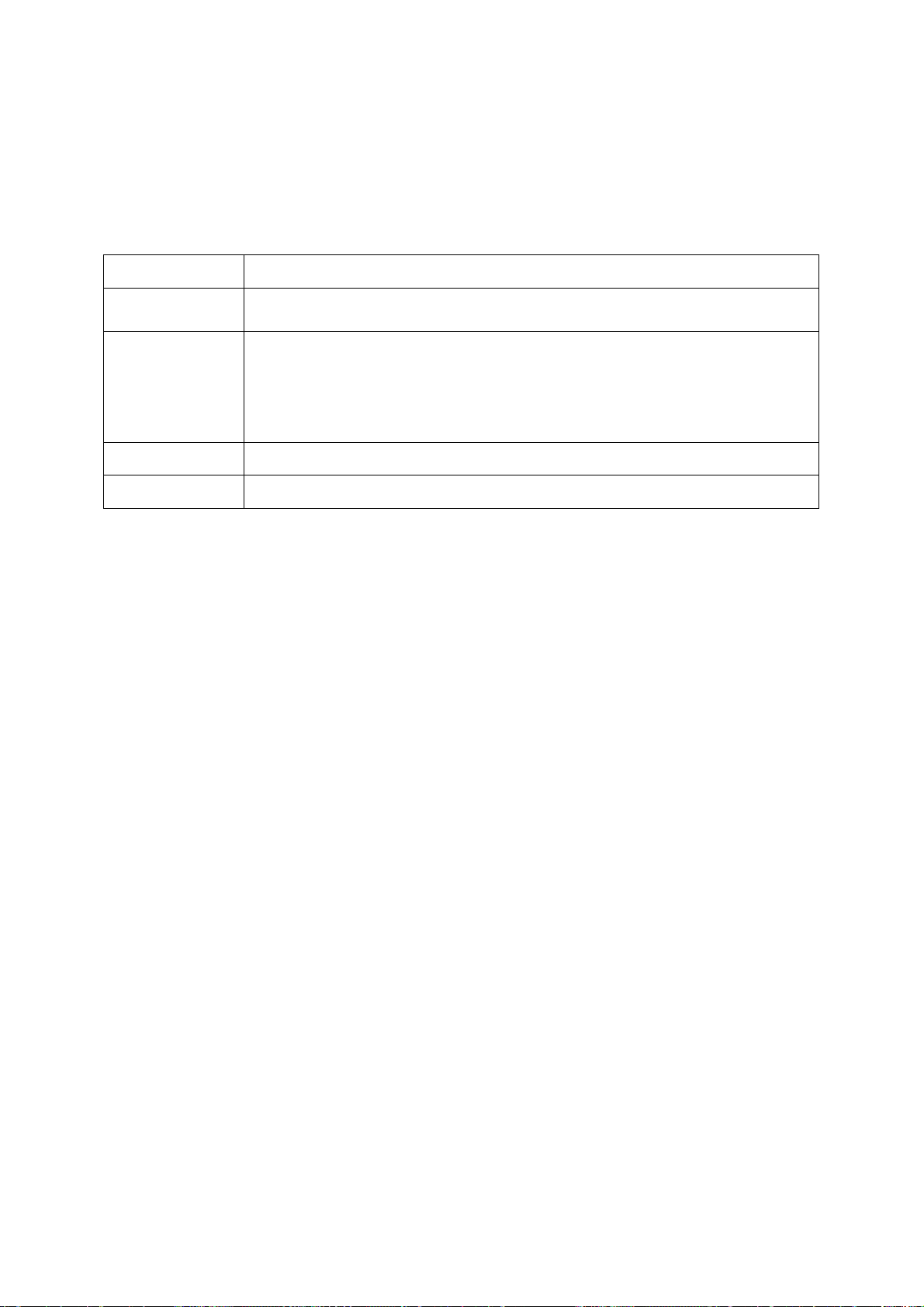
Enter text in one of the following modes:
Mode
ABC Press the appropriate alphanumeric key until the character you
want appears on the display.
T9
Number
Symbol
View text or multimedia messages
1. In Menu mode, select Messages ÕMy messages ÕInbox.
2. Select a text or multimedia message.
View an email
1. Press the appropriate alphanumeric keys to enter an entire
word.
2. When the word displays correctly, press [0] to insert a
space. If the correct word does not display, select an
alternate word from the list that appears.
Press the appropriate alphanumeric key to enter a number.
Press the appropriate alphanumeric key to select a symbol.
Function
1. In Menu mode, select Messages Õ My messages Õ Email inbox.
2. Select Check new email.
3. Select an email or a header.
4. If you selected a header, press <Options> Õ Retrieve to view the body of the
email.
Add and find contacts
Learn the basics of using the phonebook feature.
Add a new contact
1. In Idle mode, enter a phone number and press <Options>.
2. Select Save Õ a memory location (phone or SIM) Õ New.
3. Select a number type (if necessary).
4. Enter contact information.
5. Press <Options> Õ Save to add the contact to memory.
Find a contact
Page 30
1. In Menu mode, select Phonebook.
2. Enter the first few letters of the name you want to find.
3. Select the contact’s name from the search list.
Once you have found a contact, you can:
call the contact by pressing []
edit the contact information by pressing [OK]
troubleshooting
If you are having trouble with your mobile phone, try these troubleshooting
procedures before contacting a service professional.
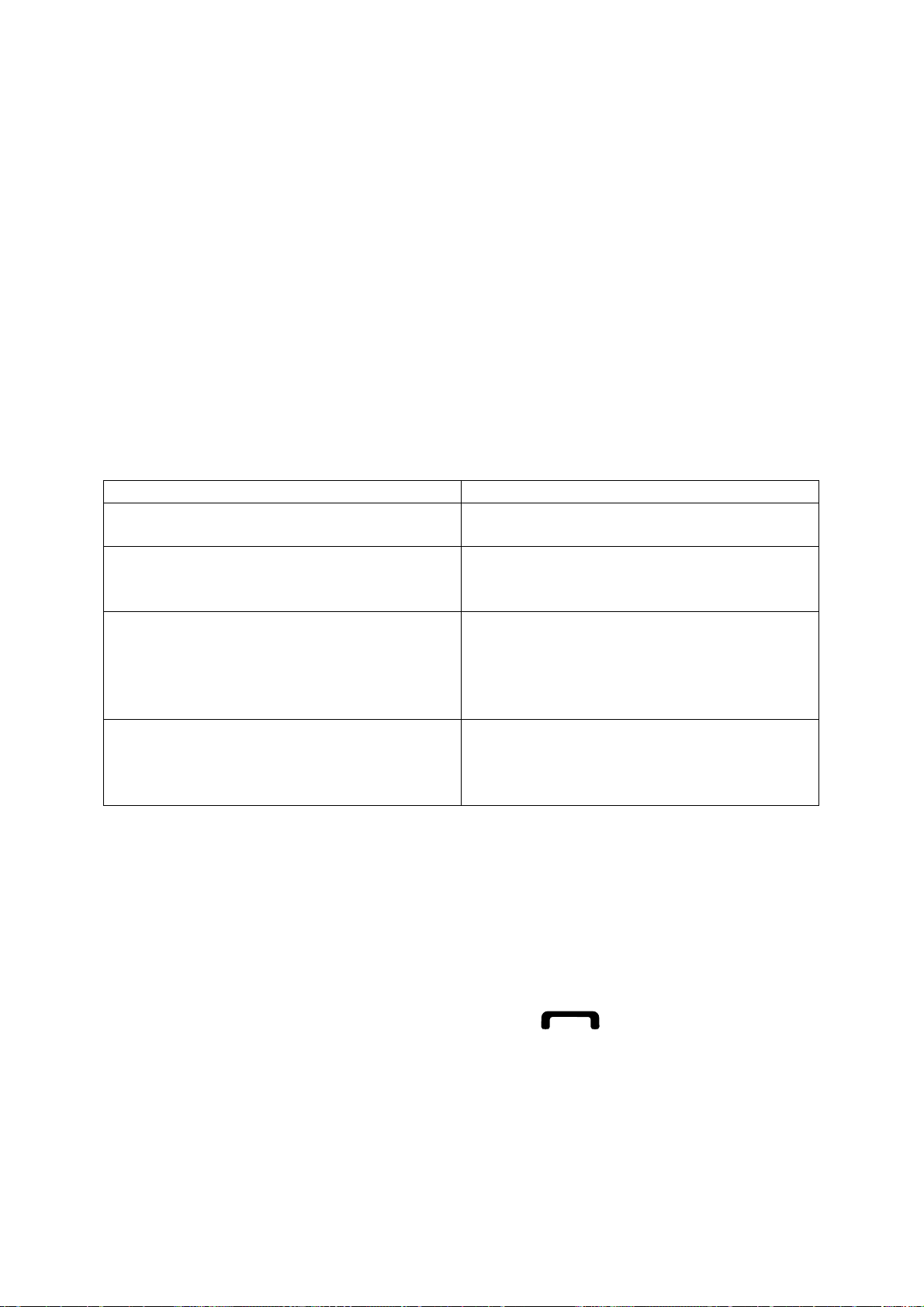
While using your phone, the following messages may appear:
Message Try this to solve the problem:
Please insert SIM card
Phone lock
Enter PIN
Enter PUK
Ensure that the SIM card is installed
correctly.
When the phone lock feature is enabled,
you must enter the password you set for
the phone.
When using the phone for the first time
or when the PIN requirement is enabled,
you must enter the PIN supplied with the
SIM card. You can disable this feature
by using the PIN lock menu.
Your SIM card is blocked, usually as a
result of entering your PIN incorrectly
several times. You must enter the PUK
supplied by your service provider.
Your phone displays “Network unavailable” or “Network error.”
When you are in areas with weak signals or poor reception, you may lose
reception. Move to another area and try again.
You cannot access some options without a subscription. Contact your service
provider for more details.
You enter a number, but the call is not dialled.
Ensure that you have pressed the Dial key: [ ].
Ensure that you have accessed the right cellular network.
Ensure that you have not set call barring for the phone number.
Another caller cannot reach you.
Ensure that your phone is turned on.
Ensure that you have accessed the right cellular network.
Page 31

Ensure that you have not set call barring for the phone number.
Another caller cannot hear you speaking.
Ensure that you are not covering the built-in microphone.
Ensure that the microphone is close to your mouth.
If using a headset, ensure that it is properly connected.
The phone beeps and the battery icon flashes.
Your battery is low. Recharge or replace the battery to continue using the phone.
The audio quality of the call is poor.
When you are in areas with weak signals or poor reception, you may lose
reception or experience poor audio quality. Move to another area and try
again.
When you are in areas with weak signals or poor reception, you may lose
reception. Move to another area and try again.
You select a contact to call, but the call is not dialled.
Ensure that the correct number is stored in the contact list.
Re-enter and save the number, if necessary.
The battery does not charge properly or sometimes the phone turns itself off.
The battery terminals may be dirty. Wipe both gold-coloured contacts with a
clean, soft cloth and try charging the battery again.
If the battery will no longer charge completely, dispose of the old battery
properly and replace it with a new battery.
Your phone is hot to the touch.
When you use several applications at once, your phone requires more power and
may heat up.
This is normal and should not affect your phone’s lifespan or performance.
Page 32

Connectivity
Bluetooth
Bluetooth is a short-range wireless communications technology
capable of exchanging information over a distance of about 10 m
without requiring a physical connection.
You do not need to line up the devices to beam information with Bluetooth.
If the devices are within range of one another, you can exchange
information between them even if they are located in different rooms.
misuse of data sent or received via the Bluetooth wireless feature.
Always ensure that you share and receive data with devices that
are trusted and properly secured. If there are obstacles between the
devices, the operating distance may be reduced.
Some devices, especially those that are not tested or approved by
Bluetooth SIG, may be incompatible with your device.
Samsung is not responsible for the loss, interception, or
› Turn on the Bluetooth wireless feature
1
In Menu mode, select Settings →Connectivity → Bluetooth.
2 Select Bluetooth to turn on the Bluetooth wireless feature.
3 To allow other devices to locate your device, select
→ Settings → My phone’s visibility → Always
› Turn off the Bluetooth wireless feature
1. In Menu mode, select Settings →Connectivity → Bluetooth.
2. Select Bluetooth to turn off the Bluetooth wireless feature.
Page 33

If you selected Custom, enter duration that your device is visible and
select Done.
Once the Bluetooth wireless feature is active, select
following options:
To change your device’s name, select Settings → My phone’s
name.
To set limits on browsing your files to others, select Settings →
Secure mode.
To check Bluetooth services available on your device and
information about the services, select Bluetooth services.
and use the
› Find and pair with other Bluetooth-enabled devices
1 In Menu mode, select Settings →Connectivity → Bluetooth
→Search.
2 Select a device.
3 Enter a PIN for the Bluetooth wireless feature or the other device’s
Bluetooth PIN, if it has one, and select Done. Alternatively, select Yes
to match the PIN between your device and the device.
When the owner of the other device enters the same PIN or accepts
the connection, pairing is complete. If the pairing is successful, the
device will automatically search for available services.
Some devices, especially headsets or hands-free car kits, may
have a fixed Bluetooth PIN, such as 0000. If the other device has a PIN,
you must enter it.
Once the device is paired with another Bluetooth-enable
device, the device icon will turn green.
d
Select a paired device and use the following options:
Page 34

To browse files on the paired device, select Browse files.
To view the service list of the paired device, select Service list.
To change the paired device name, select Rename.
To allow the paired device to access and browse your files, select
Authorise device.
To send your files to the paired device, select Send My files.
To end the connection and delete the paired device, select Delete.
› Send data using the Bluetooth wireless feature
1 Select a file or item, such as a contact, calendar event, memo, task, or
media file, from an appropriate application or My files.
2 Select
pair with a Bluetooth-enabled device.
→ an option for sending via Bluetooth. 3 Search for and
›Receive data using the Bluetooth wireless feature
1 Enter the PIN for the Bluetooth wireless feature and select OK (if
necessary).
2 Select Yes to confirm that you are willing to receive data from the
device (if necessary).
Received data is saved to an appropriate application or folder according
to its type. For example, a music or sound clip is saved to the sound
folder and a contact to the phonebook.
› Use Remote SIM mode
In Remote SIM mode, you can make or answer calls only with a
connected Bluetooth hands-free car kit via the SIM or USIM card on your
device. To activate Remote SIM mode,
1 In Menu mode, select Settings →Connectivity → Bluetooth.
Page 35

2 Select → Settings → Remote SIM mode.
To use Remote SIM mode, start the Bluetooth connection from a
Bluetooth hands-free car kit.
You must authorise the Bluetooth hands-free car kit.
HAC Mode
To insure that the Hearing Aid Compatibility rating for your phone is maintained, secondary
transmitters such as Bluetooth and WLAN components must be disabled during a call.
Page 36

Some of the contents in this manual may differ from your phone depending on
the software of the phone or your service provider.
Page 37

This phone has been tested and rated for use with hearing aids for some of the wireless
technologies that it uses. However, there may be some newer wireless technologies used in
this phone that have not been tested yet for use with hearing aids. It is important to try the
different features of this phone thoroughly and in different locations, using your hearing aid or
cochlear implant, to determine if you hear any interfering noise. Consult your service provider
or the manufacturer of this phone for information on hearing aid compatibility. If you have
questions about return or exchange policies, consult your service provider or phone retailer.
Page 38

GH68-08136A
HearingAidCompatibilitywithMobilePhones
Whensomemobilephonesareusednearsomehearingdevices(hearingaidsand
cochlearimplants),usersmaydetectabuzzing,humming,orwhiningnoise.Some
hearingdevicesaremoreimmunethanotherstothisinterferencenoise,andphones
alsovaryintheamountofinterferencetheygenerate.
Thewirelesstelephoneindustryhasdevelopedratingsforsomeoftheirmobile
phones,toassisthearingdeviceusersinfindingphonesthatmaybecompatible
withtheirhearingdevices.Notallphoneshavebeenrated.Phonesthatarerated
havetheratingontheirboxoralabelonthebox.
Theratingsarenotguarantees.Resultswillvarydependingontheuser’shearing
deviceandhearingloss.Ifyourhearingdevicehappenstobevulnerabletointerfer
-
ence,youmaynotbeabletousearatedphonesuccessfully.Tryingoutthephone
withyourhearingdeviceisthebestwaytoevaluateitforyourpersonalneeds.
M-Ratings:PhonesratedM3orM4meetFCCrequirementsandarelikelytogener-
atelessinterferencetohearingdevicesthanphonesthatarenotlabeled.M4isthe
better/higherofthetworatings.
T-Ratings:PhonesratedT3orT4meetFCCrequirementsandarelikelytobemore
usablewithahearingdevice’stelecoil(“TSwitch”or“TelephoneSwitch”)than
unratedphones.T4isthebetter/higherofthetworatings.(Notethatnotallhearing
deviceshavetelecoilsinthem.)
Hearingdevicesmayalsobemeasuredforimmunitytothistypeofinterference.Your
hearingdevicemanufacturerorhearinghealthprofessionalmayhelpyoufindresults
foryourhearingdevice.Themoreimmuneyourhearingaidis,thelesslikelyyouare
toexperienceinterferencenoisefrommobilephones.
 Loading...