

Page 1
CDMA PORTABLE
CELLULAR TELEPHONE
S C H - 4 7 0
O W N E R S MANUAL
Printed in Korea
Code No.: GH68-60686A
Hong Kong China.
5/98. Rev. 1.1
Page 2
Safety Precautions
Parts List
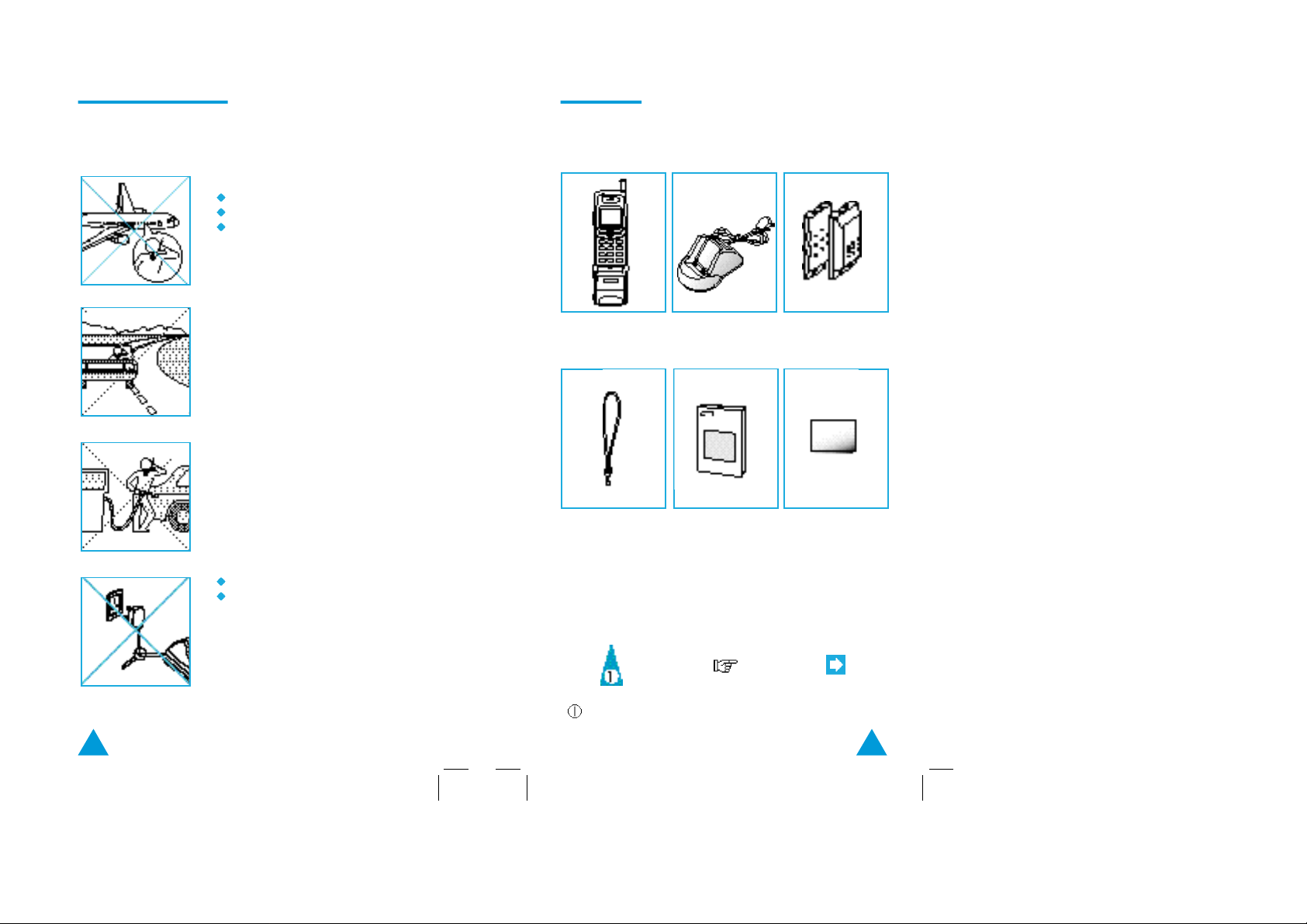
The illustrations below indicate the safety
precautions to be taken when using your cellular
telephone.
The use of cellular phones in an aircraft:
Is dangerous to aircraft operations.
May disrupt the cellular network.
Is illegal.
Failure to observe in-flight regulations
may lead to the suspension of cellular
services and/or legal action.
NEVER use your phone while driving,
even if hands free operation is allowed.
ALWAYS park your vehicle first.
In some countries, it is illegal to use
mobile and radio telephones while
driving.
You are advised to turn off the phone
when at a gas station.
NEVER store or carry inflammable gas,
liquids or explosive materials in the
same compartment as your cellular
phone.
DONOT use the power adapter if:
The power cord is damaged.
The phone has been dropped or
undergone a shock.
Have an authorized service center
repair the phone. NEVER try to repair
the phone yourself.
The SCH-470 product contains the following parts.
Phone Charger
Strap Manual
Symbols
Battery (BTL1021S)
Battery (BTL1621L)
Quick Reference
Card
Press/Push
= Step number
Important Note
2 3
Page 3

C o n t e n t s Contents ( c o n t i n u e d )
Front View of the Phone .................................................................6
Rear View of the Phone ................................................................. 7
LCD Display and Indicators ............................................................ 8
Preparation
Installing the Battery Pack .......................................................... 9
Charging the Battery Pack ......................................................... 10
Tips on Battery Charging ........................................................... 11
Checking the Battery Charge Level ...........................................12
Basic Operation
Turning the Phone On and Off ................................................... 13
Extending the Antenna .............................................................. 14
Making a Call ............................................................................ 15
Receiving Calls ..........................................................................17
Adjusting Volumes .................................................................... 18
Mute .......................................................................................... 19
Recording the Other Person’s Talking
During Telephone Conversation ................................................ 20
Choosing Alert Type .................................................................. 21
Choosing Ringer Bell ................................................................. 22
Redialing the Last Numbers ...................................................... 23
Memory Dialing
Finding an Empty Memory Location .......................................... 25
Storing Numbers in Memory ..................................................... 26
Entering Name in Memory ........................................................ 28
Correcting a Name or Number ..................................................29
Storing Numbers into Numeric Group ......................................30
One-Touch Dialing ..................................................................... 31
Two-Touch Dialing ....................................................................31
Searching for Numbers in Memory ........................................... 32
Erasing Numbers in Memory ....................................................36
Voice Dialing
Voice Dialing .............................................................................38
Recording Name ........................................................................ 38
Checking Recoded Name ..........................................................40
Erasing Recorded Name ............................................................ 40
Using Voice Dial ........................................................................ 42
Useful Features
Turning Tones On and Off .........................................................45
Sending Your Own Phone Number ........................................... 48
Displaying Your Own Phone Number ........................................ 48
System Selection ......................................................................49
Message Service ....................................................................... 50
Setting Alarm ............................................................................54
DTMF Dialing ............................................................................57
Timers ........................................................................................ 59
Advanced Features
Automatic Feature Setup ..........................................................64
Changing Greeting Message .................................................... 67
Restricting the Use of the Phone...............................................68
Changing Lock Code ..................................................................71
Locking the Phone ..................................................................... 72
Warning Beep Generation ........................................................ 73
Choosing NAM .......................................................................... 74
Setting the Phone to Send PIN .................................................75
System Reset ............................................................................77
Miscellaneous
Cleaning Your Cellular Phone ................................................... 78
Battery Safety Precautions .......................................................79
Accessories ............................................................................... 81
Troubleshooting ........................................................................82
LCD Messages .......................................................................... 85
Summary ................................................................................... 87
4 5
Page 4
Front View of the Phone Rear View of the Phone
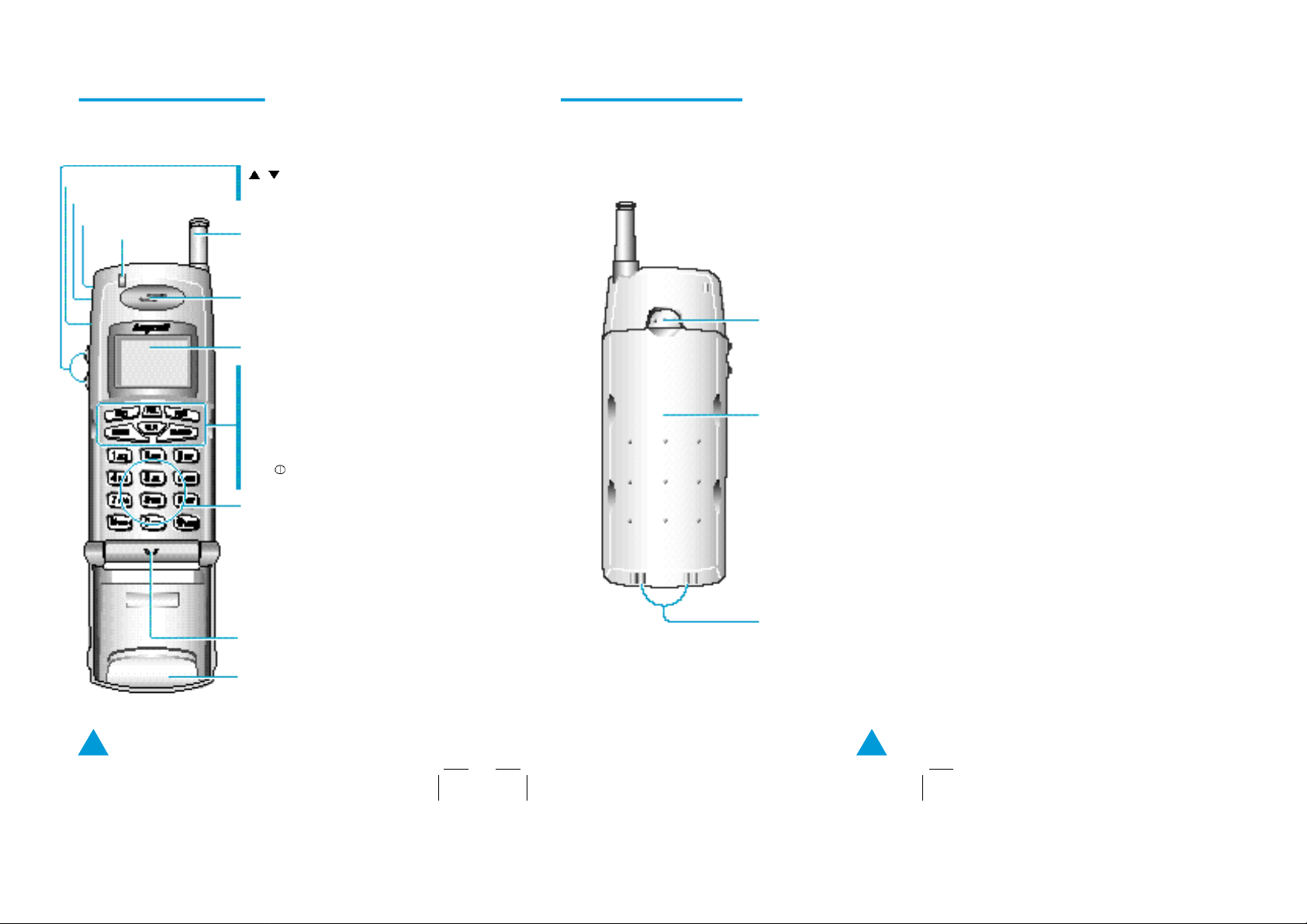
Earmicrophone
Buzzer
Strap hole
Receiving lamp
adjusts volume or
scrolls options menu
Antenna
Speaker
LCD display
STO: stores names and numbers in
memory
RCL: recalls stored memory entries
FCN: helps access special features
SEND: makes a call
CLR: clears messages on LCD
END/ : ends a call. Also it turns
power on and off
Number keypad
Microphone
Battery lock/unlock button
Battery
Charging points
Cover
6 7
Page 5
LCD Display and Indicators
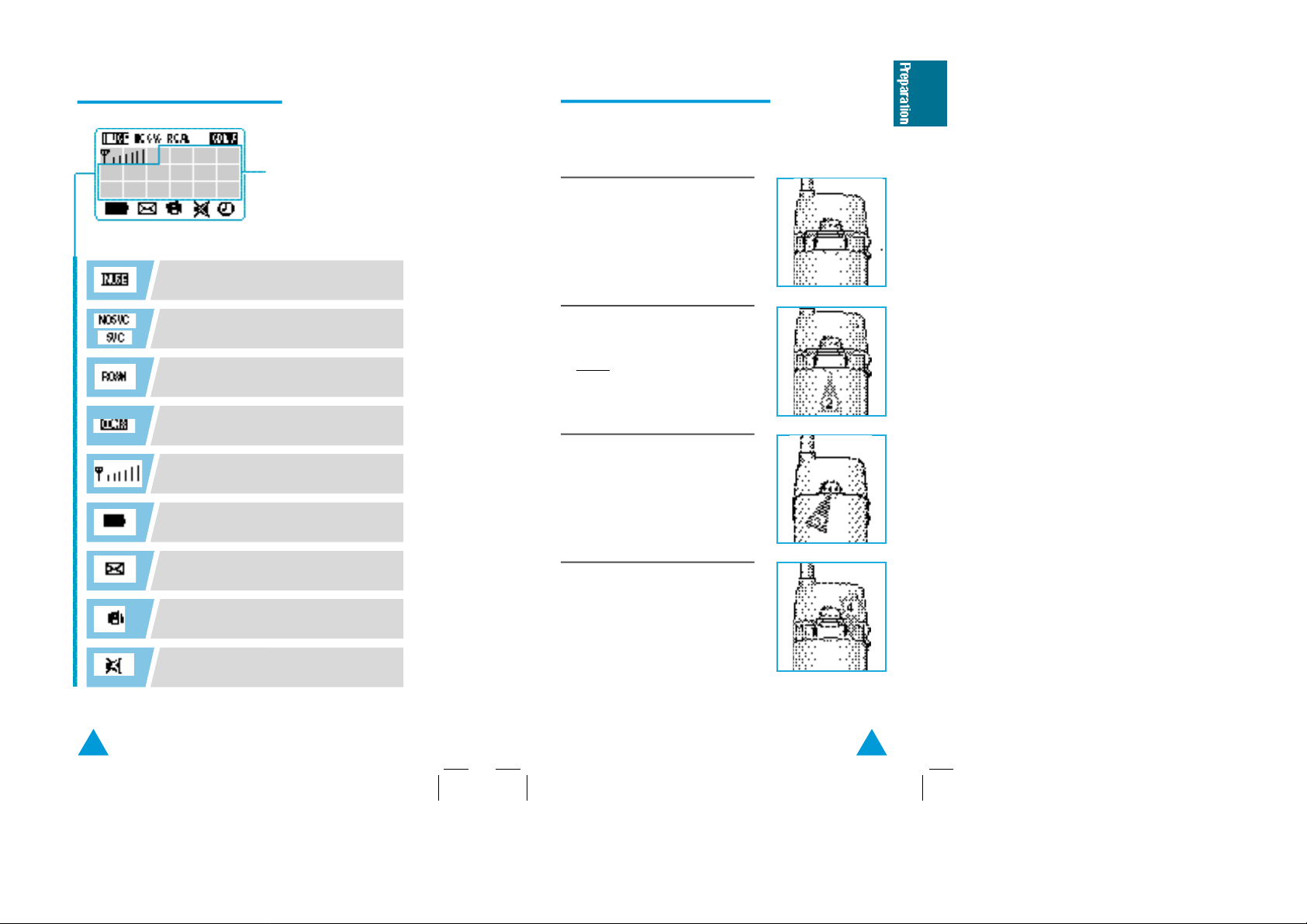
blinks while your phone selects a channel
and lights up when the line is connected.
displays the dialed
numbers and the
current status
Installing the Battery Pack
SCH-470 comes with rechargeable standard and
extended-life batteries.
1. To attach the battery pack after
charging, align it with the phone
about 1cm (1/2") away from its place
so that the two arrows on the phone
are seen, the battery charge contacts
pointing downward.
NOSVC: no service area
SVC: service area
lights up when your phone is out of the
home area.
CDMA: digital mode
displays the signal strength level with
the number of bars.
displays the battery charge level status
with the number of blocks.
indicates you have voicemail or text
m e s s a g e s .
indicates the vibration mode.
indicates silent mode (lamp mode).
2. Slide the battery pack upwards until
it clicks firmly into position.
Result: Your phone is now ready to
be turned on.
3. To remove the battery pack, release
it by pressing the button on the rear
of the phone.
4. Slide the battery pack downward
about 1cm (1/2") and lift it away from
the phone.
8 9
Page 6
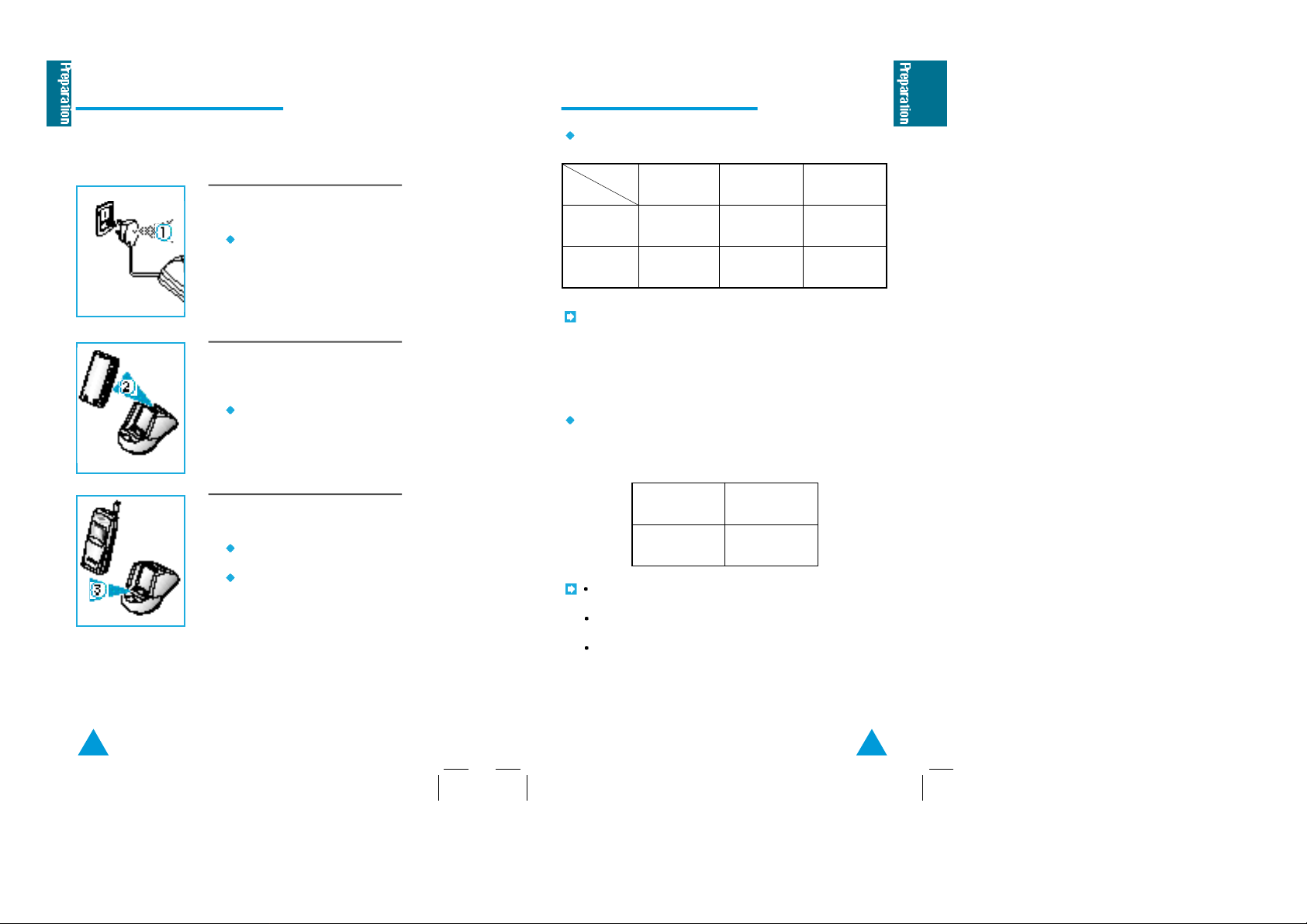
Charging the Battery Pack
Tips on Battery Charging
When you purchase the product, the battery is not fully
charged. Please charge the battery fully before you
operate your phone.
1. Plug the power cord of the charger
into an appropriate wall socket.
When the power is connected
correctly, the yellow lamp on the
charger flickers once.
2. To charge the battery pack, insert the
battery pack into the rear slot of the
charger.
The lamp marked BATT on the
front panel of the charger lights
up red.
3. If you do not wish to use your phone
while charging the battery, you can:
Leave the battery pack attached
to the phone.
Place the phone in the front slot
of the charger. The lamp marked
PHONE on the front panel of the
charger lights up red.
The lamp color indicates the charging status as follows:
Status
Slot
Front (phone
charging lamp)
Rear (battery
charging lamp)
If the lamp blinks yellow, the battery pack is not properly
inserted or the contact of the charging terminal is stained or
rusty. When this occurs, remove the battery pack, check the
charging terminal and reinsert the battery pack. If this does not
work properly, replace the battery pack with a new one.
The full charging time is different according to the battery type
as follows:
If both the front and rear slots are occupied, the charging
time may be longer.
When both the front and rear slots are occupied, the front
slot charges first.
It is normal for the battery pack to become warm during
charging.
Charging Completed
red green
red
Standard
about 180
Standby
(off)
greenyellow
(min)
Extended-life
about 180
10 11
Page 7
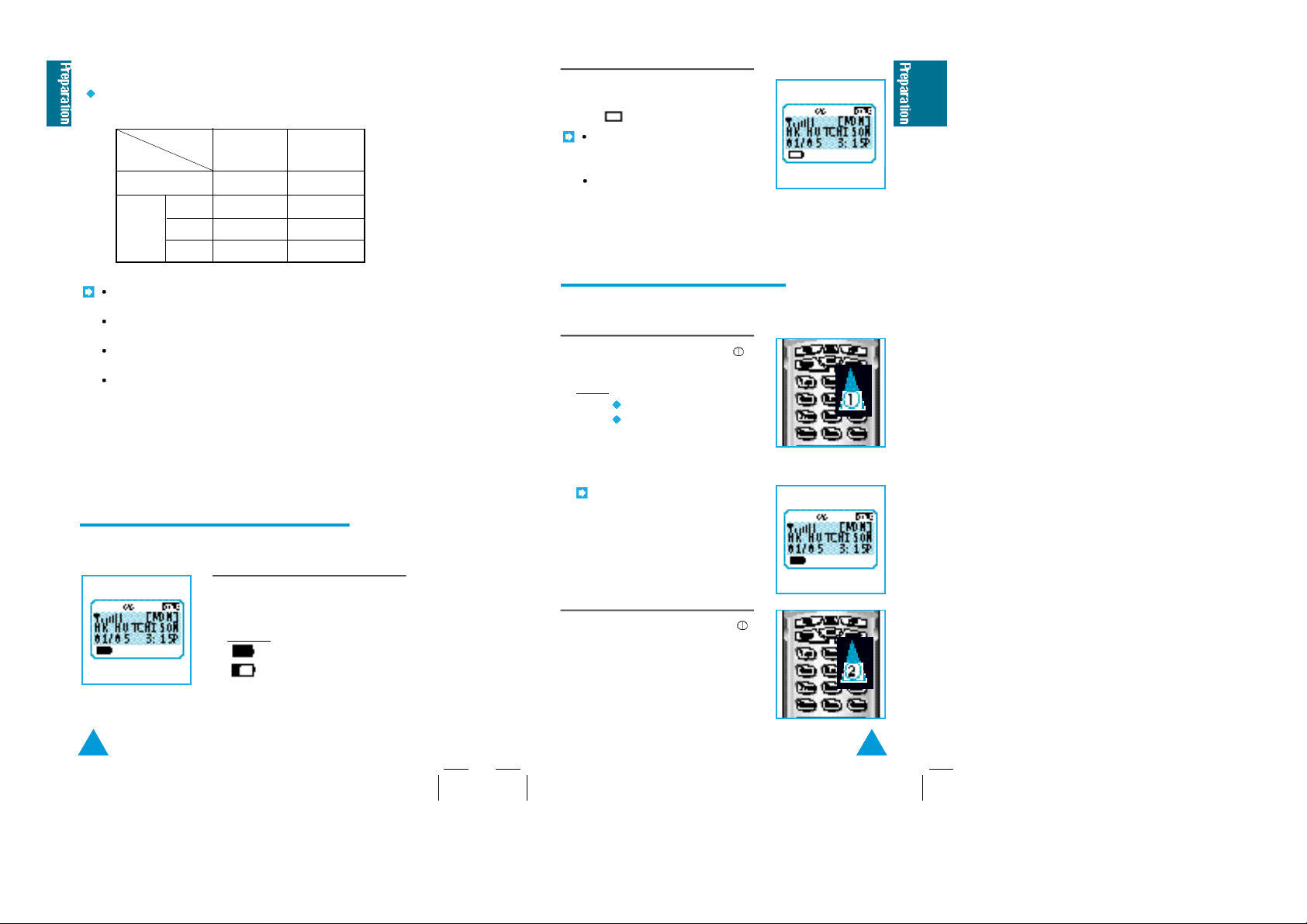
When fully charged, the new battery will last as
follows:
Battery
Status
Talk mode
Standby
The operating time varies according to the service mode you
are using.
If you stay in no-service area for a long time, the operating
time may be shorten.
The standby time is different according to the service type
provided from the supplier.
The battery is a consumable product, so that the battery life
will be reduced. We guarantee the battery for 6 months.
When the battery life is reduced by half, purchase new
battery.
mode
SLOT 1
SLOT 2
Standard
100-140 min
25-30 hr
30-40 hr
Extended
150-200 min
30-35 hr18-25 hrSLOT 0
40-50 hr
50-60 hr
Checking the Battery Charge Level
The battery charge level is displayed at the left corner of
the LCD display.
The number of blocks represent the
battery charge level.
Example:
Battery fully charged
Battery low
When the battery drops to a low level,
the phone beeps and the battery icon
turns to .
If any button is pressed in the
low battery status, the LCD
backlight lamp is not turned on.
If the battery is fully discharged,
a warning tone sounds three
times and the power is turned
off.
Turning the Phone On and Off
The phone can only place and receive calls when it is
turned on.
1.To turn on the phone, press END/
and hold.
Result:The phone
Beeps
Displays the greeting
message, your phone
number, and current date
and time.
If the phone is locked, the
message LOCKED is displayed.
To unlock the phone, enter the
lock code. You can place a 3-digit
emergency call when the phone
is locked.
2. To turn off the phone, press END/
until you hear a beep tone.
1312
 Loading...