

Page 1
Refrigerator
User manual
RS6*N**
SESG Free Standing Appliance
Untitled-10 1 2018-06-08 11:53:06
Page 2
Contents
Contents
Safety information 3
Important safety symbols and precautions: 5
Severe warning signs for transportation and site 6
Critical installation warnings 7
Installation cautions 10
Critical usage warnings 11
Usage cautions 16
Cleaning cautions 19
Critical disposal warnings 21
Additional tips for proper usage 22
Saving Energy Tips 23
This appliance is intended to be used in household and similar applications such as 23
Instructions about the WEEE 24
Installation 25
Refrigerator at a glance 25
Step-by-step installation 28
Door removal for entrance 44
Operations 49
Feature panel 49
SmartThings (available only with the optional adapter) 54
Dispenser panel (applicable models only) 56
Special features 57
Maintenance 64
Handle and care 64
Cleaning 66
Replacement 67
Troubleshooting 68
General 68
Do you hear abnormal sounds from the refrigerator? 72
SmartThings 74
English2
Untitled-10 2 2018-06-08 11:53:06
Page 3
Safety information
• Before using your new Samsung Refrigerator, please read this
manual thoroughly to ensure that you know how to operate the
features and functions that your new appliance offers safely and
efciently.
• This appliance is not intended for use by persons (including
children) with reduced physical, sensory, or mental capabilities,
or those who lack experience and knowledge, unless they have
been given supervision or instruction concerning the use of the
appliance by a person responsible for their safety.
• This appliance can be used by children aged from 8 years and
above and persons with reduced physical, sensory or mental
capabilities or lack of experience and knowledge if they have been
given supervision or instruction concerning use of the appliance in
a safe way and understand the hazards involved.
Children shall not play with the appliance. Cleaning and user
maintenance shall not be made by children without supervision.
• Warnings and Important Safety Instructions in this manual do not
cover all possible conditions and situations that may occur.
It is your responsibility to use common sense, caution, and care
when installing, maintaining, and operating your appliance.
• Because these following operating instructions cover various
models, the characteristics of your refrigerator may differ slightly
Safety information
from those described in this manual and not all warning signs may
be applicable. If you have any questions or concerns, contact your
nearest service center or nd help and information online at www.
samsung.com.
• R-600a or R-134a is used as a refrigerant. Check the compressor
label on the rear of the appliance or the rating label inside the
fridge to see which refrigerant is used for your refrigerator. When
this product contains ammable gas (Refrigerant R-600a), contact
your local authority in regard to safe disposal of this product.
English 3
Untitled-10 3 2018-06-08 11:53:06
Page 4
Safety information
• In order to avoid the creation of a ammable gas-air mixture
if a leak in the refrigerating circuit occurs, the size of the room
in which the appliance may be sited depends on the amount of
refrigerant used.
• Never start up an appliance showing any signs of damage. If in
Safety information
doubt, consult your dealer. The room must be 1 m3 in size for
every 8 g of R-600a refrigerant inside the appliance.
The amount of refrigerant in your particular appliance is shown on
the identication plate inside the appliance.
• Refrigerant squirting out of the pipes could ignite or cause an eye
injury. When refrigerant leaks from the pipe, avoid any naked
ames and move anything ammable away from the product and
ventilate the room immediately.
- Failing to do so may result in re or explosion.
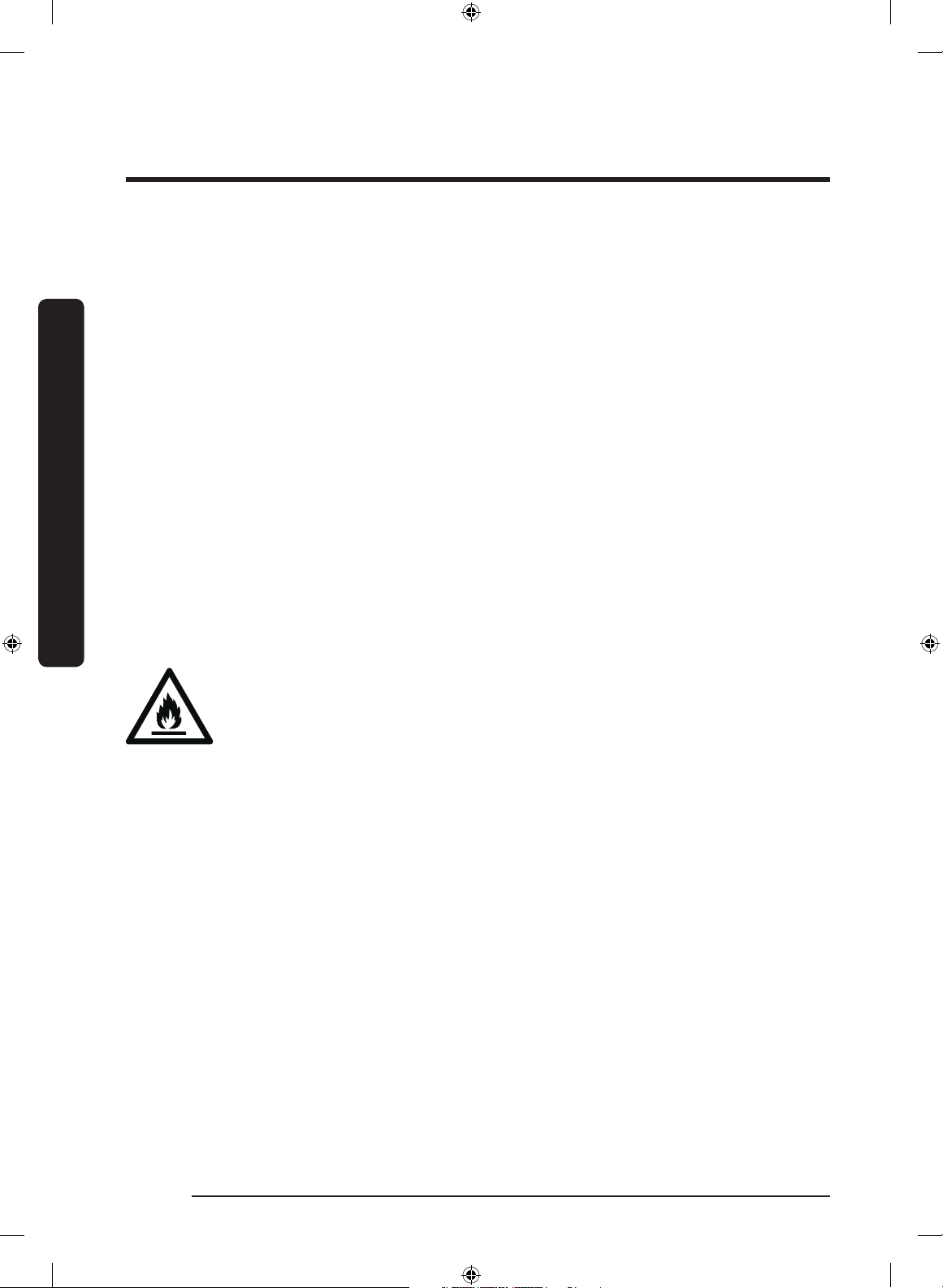
Warning; Risk of re / ammable materials
English4
Untitled-10 4 2018-06-08 11:53:06
Page 5

Important safety symbols and precautions:
Please follow all safety instructions in this manual. This manual uses the following safety
symbols.
WARNING
Hazards or unsafe practices that may result in severe personal injury,
property damage, and/or death.
CAUTION
Hazards or unsafe practices that may result in severe personal injury
and/or property damage.
NOTE
Useful information that helps users understand or benet from the
refrigerator.
These warning signs are here to prevent injury to you and others.
Please follow them carefully.
After reading this section, keep it in a safe place for future reference.
Safety information
English 5
Untitled-10 5 2018-06-08 11:53:06
Page 6
Safety information
Severe warning signs for transportation and site
WARNING
• When transporting and installing the appliance, care should be
taken to ensure that no parts of the refrigerating circuit are
damaged.
Safety information
- Refrigerant leaking from the pipe work could ignite or cause
an eye injury. If a leak is detected, avoid any naked ames
or potential sources of ignition and air the room in which the
appliance is standing for several minutes.
- This appliance contains a small amount of isobutane refrigerant
(R-600a), a natural gas with high environmental compatibility
that is, however, also combustible. When transporting and
installing the appliance, care should be taken to ensure that no
parts of the refrigerating circuit are damaged.
• When transporting and installing the refrigerator, do not touch the
water hose on the back side of the refrigerator.
- This may damage the refrigerator and as a result the water
dispenser can not be used.
English6
Untitled-10 6 2018-06-08 11:53:06
Page 7
Critical installation warnings
WARNING
• Do not install the refrigerator in a damp location or place where it
may come in contact with water.
- Deteriorated insulation on electrical parts may cause an electric
shock or re.
• Do not place this refrigerator in direct sunlight or expose it to the
heat from stoves, room heaters, or other appliances.
• Do not plug several appliances into the same multiple power strip.
The refrigerator should always be plugged into its own individual
electrical outlet which has a voltage rating that matches the
voltage listed on the refrigerator’s rating plate.
- This provides the best performance and also prevents
overloading of house wiring circuits, which could cause a re
hazard from overheated wires.
• If the wall socket is loose, do not insert the power plug.
Safety information
- There is a risk of electric shock of re.
• Do not use a power cord that has cracks or abrasion damage along
its length or at either end.
• Do not bend the power cord excessively or place heavy objects on
it.
• Do not pull or excessively bend the power cord.
• Do not twist or tie the power cord.
• Do not hook the power cord over a metal object, place a heavy
object on the power cord, insert the power cord between objects,
or push the power cord into the space behind the appliance.
• When moving the refrigerator, be careful not to roll over or
damage the power cord.
- This may result in an electric shock or re.
English 7
Untitled-10 7 2018-06-08 11:53:06
Page 8
Safety information
• Never unplug your refrigerator by pulling on the power cord.
Always grip the plug rmly and pull straight out from the outlet.
- Damage to the cord may cause a short-circuit, re, and/or
electric shock.
• Do not store explosive substances such as aerosol cans with a
Safety information
ammable propellant in this appliance.
• Do not use aerosols near the refrigerator.
- Using aerosols near the refrigerator may cause an explosion or
re.
• Do not install this appliance near a heater or inammable material.
• Do not install this appliance in a location where gas may leak.
- This may result in an electric shock or re.
• This refrigerator must be properly located and installed in
accordance with the instructions in this manual before you use it.
• Connect the power plug in the proper position with the cord
hanging down.
- If you connect the power plug upside down, the wire can get
cut off and cause a re or electric shock.
• Make sure that the power plug is not crushed or damaged by the
back of the refrigerator.
• Keep the packing materials out of reach of children.
- There is a risk of death from suffocation if a child puts the
packing materials on his or her head.
• The appliance must be positioned so that the plug is accessible
after installation.
- Failing to do so may result in an electric shock or re due to
electric leakage.
English8
Untitled-10 8 2018-06-08 11:53:06
Page 9
• Do not install this appliance in a humid, oily or dusty location, in a
location exposed to direct sunlight and water (rain drops).
- Deteriorated insulation of electrical parts may cause an electric
shock or re.
• If any dust or water is in the refrigerator, pull out power plug and
contact your Samsung Electronics service center.
- Otherwise there is a risk of re.
• Do not stand on top of the appliance or place objects (such as
laundry, lighted candles, lighted cigarettes, dishes, chemicals,
metal objects, etc.) on the appliance.
- This may result in an electric shock, re, problems with the
product, or injury.
• You need to remove all the protective plastic lm before you
initially plug the product in.
• Children should be supervised to ensure that they do not play with
the snap rings used for door adjustment or the water tube clips.
- There is risk of death by suffocation if a child swallows a snap
ring or water tube clip. Keep the snap rings and water tube clips
out of children’s reach.
• The refrigerator must be safely grounded.
- Always make sure that you have grounded the refrigerator
Safety information
before attempting to investigate or repair any part of the
appliance. Power leakages can cause severe electric shock.
• Never use gas pipes, telephone lines, or other potential lightning
attractors as an electrical ground.
- You must ground the refrigerator to prevent any power
leakages or electric shocks caused by current leakage from the
refrigerator.
- This may result in an electric shock, re, explosion, or problems
with the product.
English 9
Untitled-10 9 2018-06-08 11:53:06
Page 10
Safety information
• Plug the power plug into the wall socket rmly. Do not use a
damaged power plug, damaged power cord, or loose wall socket.
- This may result in an electric shock or re.
• If the power cord is damaged, have it replaced immediately by the
manufacturer or one of its service agents.
Safety information
• The fuse on the refrigerator must be changed by a qualied
technician or service company.
- Failing to do so may result in an electric shock or personal
injury.
• When positioning the appliance, ensure the supply cord is not
trapped or damaged.
• Do not locate multiple portable socket-outlets or portable power
supplies at the rear of the appliance.
Installation cautions
CAUTION
• Allow sufcient space around the refrigerator and install it on a
at surface.
- If your refrigerator is not level, cooling efciency and durability
can be declined.
- Keep the ventilation space in the appliance enclosure or
mounting structure clear of obstructions.
• Allow the appliance to stand for 2-3 hours before loading foods
after installation and turning on.
• We strongly recommend you have a qualied technician or service
company install the refrigerator.
- Failing to do so may result in an electric shock, re, explosion,
problems with the product, or injury.
English10
Untitled-10 10 2018-06-08 11:53:06
Page 11
Critical usage warnings
WARNING
• Do not insert the power plug into a wall socket with wet hands.
- This may result in an electric shock.
• Do not store articles on the top of the appliance.
- When you open or close the door, the articles may fall and
cause personal injury and/or material damage.
• Do not insert hands, feet or metal objects (such as chopsticks, etc.)
into the bottom or the back of the refrigerator.
- This may result in an electric shock or injury.
- Any sharp edges may cause a personal injury.
• Do not touch the inside walls of the freezer or products stored in
the freezer with wet hands.
- This may cause frostbite.
• Do not put a container lled with water on the refrigerator.
Safety information
- If spilled, there is a risk of re or electric shock.
• Do not keep volatile or ammable objects or substances (benzene,
thinner, propane gas, alcohol, ether, LP gas, and other such
products) in the refrigerator.
- This refrigerator is for storing food only.
- This may result in re or explosion.
• Children should be supervised to ensure that they do not play with
the appliance.
- Keep ngers out of “pinch point” areas. Clearances between the
doors and cabinet are necessarily small. Be careful when you
open the doors if children are in the area.
• Do not put your ngers or children's ngers between the doors.
- Keep ngers out of the left and right door gaps. Be careful
when you open the doors if your ngers are in between the
doors.
English 11
Untitled-10 11 2018-06-08 11:53:07
Page 12

Safety information
• Do not let children hang on the door or door bins. A serious injury
may occur.
• Do not let children go inside the refrigerator. They could become
trapped.
• Do not insert your hands into the bottom area under the appliance.
Safety information
- Any sharp edges may cause personal injury.
• Do not store pharmaceutical products, scientic materials, or
temperature sensitive products in the refrigerator.
- Products that require strict temperature controls must not be
stored in the refrigerator.
• Do not place or use electrical appliance inside the refrigerator/
freezer, unless they are of a type recommended by the
manufacturer.
• If you smell pharmaceutical or smoke, pull out power plug
immediately and contact your Samsung Electronics service center.
• If any dust or water is in Refrigerator, pull out power plug and
contact your Samsung Electronics service center.
- Otherwise there is a risk of re.
• Do not let children step on a drawer.
- The drawer may break and cause them to slip.
• Do not leave the doors of the refrigerator open while the
refrigerator is unattended and do not let children enter inside the
refrigerator.
• Do not allow babies or children go inside the drawer.
- It can cause death from suffocation by entrapment or personal
injury.
• Do not overll the refrigerator with food.
- When you open the door, an item may fall out and cause
personal injury or material damage.
English12
Untitled-10 12 2018-06-08 11:53:07
Page 13
• Do not spray volatile material such as insecticide onto the surface
of the appliance.
- As well as being harmful to humans, it may also result in an
electric shock, re, or problems with the product.
• Never put ngers or other objects into the water dispenser hole,
ice chute and ice maker bucket.
- It may cause a personal injury or material damage.
• Do not use or place any substances sensitive to temperature such
as ammable sprays, ammable objects, dry ice, medicine, or
chemicals near or inside of the refrigerator.
• Do not use a hair dryer to dry the inside of the refrigerator. Do
not place a lighted candle in the refrigerator for removing bad
odours.
- This may result in an electric shock or re.
• Fill the water tank, ice tray and water cubes only with potable
water (mineral water or puried water).
- Do not ll the tank with tea, juice or sports drink, this may
damage the refrigerator.
• Do not stand on top of the appliance or place objects (such as
laundry, lighted candles, lighted cigarettes, dishes, chemicals,
metal objects, etc.) on the appliance. This may result in an electric
Safety information
shock, re, problems with the product, or injury. Do not put a
container lled with water on the appliance.
- If spilled, there is a risk of re or electric shock.
• Do not use mechanical devices or any other means to accelerate
the defrosting process, other than those recommended by the
manufacturer.
• Do not damage the refrigerant circuit.
• Never stare directly at the UV LED lamp for long periods of time.
- This may result in eye strain due to the ultraviolet rays.
English 13
Untitled-10 13 2018-06-08 11:53:07
Page 14
Safety information
• Do not put fridge shelf in upside down. Shelf stopper could not
work.
- It may cause a personal injury because of glass shelf drop.
• Keep ngers out of “pinch point” areas. Clearances between the
doors and cabinet are necessarily small. Be careful when you open
Safety information
the doors if children are in the area.
• If a gas leak is detected, avoid any naked ames or potential
sources of ignition, and air the room in which the appliance is
standing for several minutes.
- Do not touch the appliance or power cord.
- Do not use a ventilating fan.
- A spark may result in explosion or re.
• Use only the LED Lamps provided by the manufacturer or its
service agents.
• Bottles should be stored tightly together so that they do not fall
out.
• This product is intended only for the storage of food in a domestic
environment.
• Never put ngers or other objects into the water dispenser hole,
ice chute and ice maker bucket.
- It may cause a personal injury or material damage.
• Do not attempt to repair, disassemble, or modify the refrigerator
yourself.
• Do not use any fuse (such as cooper, steel wire, etc.) other than a
standard fuse.
• If your refrigerator needs to be repaired or reinstalled, contact
your nearest service center.
- Failing to do so may result in an electric shock, re, problems
with the product, or injury.
English14
Untitled-10 14 2018-06-08 11:53:07
Page 15
• If the interior or exterior LED lamp has gone out, contact your
nearest service center.
• If the refrigerator emits a burning smell or smoke, unplug the
refrigerator immediately and contact your Samsung Electronics
service center.
- Failing to do so may result in an electric or re hazards.
• Pull the power plug out of the socket before changing the interior
lamps of the refrigerator.
- Otherwise, there is a risk of electric shock.
• If you experience difculty changing a non-LED light, contact a
Samsung service center.
• If the product is equipped with LED lamps, do not disassemble the
Lamp Covers and LED lamps yourself.
- Contact a Samsung service center.
• Plug the power plug into the wall socket rmly.
• Do not use a damaged power plug, damaged power cord or loose
wall socket.
- This may result in an electric shock or re.
Safety information
English 15
Untitled-10 15 2018-06-08 11:53:07
Page 16

Safety information
Usage cautions
CAUTION
• Do not refreeze thawed food.
- Frozen and thawed food will develop harmful bacteria faster
than fresh.
Safety information
- The second thaw will break down even more cells, leaching out
moisture and changing the integrity of the product.
• Do not thaw meat at room temperature.
- Safety will depend on whether the raw product was handled
properly.
• Do not place glass bottles or carbonated beverages into the
freezer.
- The container may freeze and break, and this may result in
injury.
• Use only the ice maker provided with the refrigerator.
• Have the refrigerator’s water supply connected only to a potable
water supply. To operate the ice maker properly, water pressure
of 138 ~ 862 kPa is required. If you will be away from home for a
long period of time (on vacation, for example) and won’t be using
the water or ice dispensers, close the water valve.
- Otherwise, water leakage may occur.
• If you won’t be using the refrigerator for a very long period of
time, (3 weeks or more) empty the refrigerator including the ice
bucket, unplug it, close the water valve, wipe excess moisture
from the inside walls, and leave the doors open to prevent odors
and mold.
• To get the best performance from the product:
- Do not place food too close to the vents at the rear of the
refrigerator as this can obstruct free air circulation in the
refrigerator compartment.
English16
Untitled-10 16 2018-06-08 11:53:07
Page 17

- Wrap food up properly or place it in airtight containers before
putting it into the refrigerator.
- Please observe maximum storage times and expiration dates of
frozen goods.
- There is no need to disconnect the refrigerator from the power
supply if you will be away for less than three weeks. However,
if you will be away for more than three weeks, remove all the
food and ice in the ice bucket, unplug the refrigerator, close the
water valve, wipe excess moisture from the inside walls, and
leave the doors open to prevent odors and mold.
• Service Warranty and Modication.
- Any changes or modications performed by a 3rd party on this
nished appliance are not covered under Samsung warranty
service, nor is Samsung responsible for safety issues that result
from 3rd party modications.
• Do not block the air vents inside the refrigerator.
- If the air vents are blocked, especially with a plastic bag, the
refrigerator can be over cooled. If a cooling period lasts too
long, the water lter may break and cause water leakage.
• Use only the ice-maker provided with the refrigerator.
• Wipe excess moisture from the inside and leave the doors open.
Safety information
- Otherwise, odor and mold may develop.
• If the refrigerator is disconnected from the power supply, you
should wait for at least ve minutes before plugging it back in.
• When the refrigerator got wet by water, pull out the power plug
and contact your Samsung Electronics service center.
• Do not strike or apply excessive force to any glass surface.
- Broken glass may result in a personal injury and/or property
damage.
English 17
Untitled-10 17 2018-06-08 11:53:07
Page 18
Safety information
• Fill the water tank and ice cube trays with potable water only (tap
water, mineral water, or puried water).
- Do not ll the tank with tea or a sports drink. This may damage
the refrigerator.
• Be careful that your ngers are not caught in.
Safety information
• If the refrigerator is ooded, make sure to contact your nearest
service center.
- There is a risk of electric shock or re.
• Do not keep vegetable oil in your refrigerator’s door bins. The oil
can solidify, making it foul-tasting and difcult to use. In addition,
the open container can leak and the leaked oil can cause the door
bin to crack. After opening an oil container, it is best to keep the
container in a cool and shaded place such as a cupboard or pantry.
- Examples of vegetable oil: olive oil, corn oil, grape-seed oil, etc.
English18
Untitled-10 18 2018-06-08 11:53:07
Page 19
Cleaning cautions
CAUTION
• Do not spray water directly on the inside or outside the
refrigerator.
- There is a risk of re or electric shock.
• Do not use a hair dryer to dry the inside of the refrigerator.
• Do not place a lighted candle in the refrigerator to remove bad
odors.
- This may result in an electric shock or re.
• Do not spray cleaning products directly on the display.
- Printed letters on the display may come off.
• If any foreign substance such as water has entered the appliance,
unplug the power plug and contact your nearest service center.
- Failing to do so may result in an electric shock or re.
• Use a clean, dry cloth to remove any foreign matter or dust from
the power plug blades. Do not use a wet or damp cloth when
Safety information
cleaning the plug.
- Otherwise, there is a risk of re or electric shock.
• Do not clean the appliance by spraying water directly onto it.
• Do not use benzene, thinner, or Clorox, Chloride for cleaning.
- They may damage the surface of the appliance and may cause a
re.
• Never put ngers or other objects into the dispenser hole.
- It may cause a personal injury or material damage.
• Before cleaning or performing maintenance, unplug the appliance
from the wall socket.
- Failing to do so may result in an electric shock or re.
• Use a clean sponge or soft cloth and a mild detergent in warm
water to clean the refrigerator.
English 19
Untitled-10 19 2018-06-08 11:53:07
Page 20
Safety information
• Do not use abrasive or harsh cleansers such as window sprays,
scouring cleansers, ammable uids, muriatic acid, cleaning
waxes, concentrated detergents, bleaches, or cleansers containing
petroleum products on exterior surfaces (doors and cabinet),
plastic parts, door and interior liners, and gaskets.
Safety information
- These can scratch or damage the material.
• Do not clean glass shelves or covers with warm water when they
are cold. Glass shelves and covers may break if exposed to sudden
temperature changes or impacts such as bumping or dropping.
English20
Untitled-10 20 2018-06-08 11:53:07
Page 21
Critical disposal warnings
WARNING
• Please dispose of the packaging material from this product in an
environmentally friendly manner.
• Ensure that none of the pipes on the back of the refrigerator are
damaged prior to disposal.
• R-600a or R-134a is used as a refrigerant. Check the compressor
label on the rear of the appliance or the rating label inside the
fridge to see which refrigerant is used for your refrigerator. If this
refrigerator contains ammable gas (Refrigerant R-600a), contact
your local authority in regard to safe disposal of this product.
• When disposing of this refrigerator, remove the door/door seals
and door latch so that small children or animals cannot become
trapped inside. Children should be supervised to ensure that they
do not play with the appliance. If trapped inside, a child may get
hurt or suffocate to death.
Safety information
- If trapped inside, the child may become injury and suffocate to
death.
• Cyclopentane is used in the insulation. The gases in the insulation
material require a special disposal procedure. Please contact your
local authorities in regard to the environmentally safe disposal of
this product.
• Keep all packaging materials well out of the reach of children, as
packaging materials can be dangerous to children.
- If a child places a bag over his or her head, the child could
suffocate.
English 21
Untitled-10 21 2018-06-08 11:53:07
Page 22

Safety information
Additional tips for proper usage
• In the event of a power failure, call the local ofce of your electric
company and ask how long the failure is going to last.
- Most power failures that are corrected in an hour or two will
not affect your refrigerator temperatures. However, you should
Safety information
• The refrigerator might not operate consistently (frozen contents
minimize the number of door openings while the power is off.
- Should the power failure last more than 24 hours, remove and
discard all frozen food.
can thaw or temperatures can become too warm in the frozen
food compartment) if sited for an extended period of time in a
location where ambient air temperatures are constantly below the
temperatures for which the appliance is designed.
• In case of particular foods, keeping it under refrigeration can have
a bad effect on preservation due to its properties.
• Your appliance is frost free, which means there is no need
to manually defrost your appliance. This will be carried out
automatically.
• Temperature rise during defrosting complies with ISO
requirements. If you want to prevent an undue rise in the
temperature of frozen food while the appliance defrosts, wrap the
frozen food in several layers of newspaper.
• Do not re-freeze frozen foods that have thawed completely.
• The temperature of two star section (sections) or compartment
(compartments) which have two star symbol ( ) is slightly higher
than other freezer compartment (compartments).
The two star section (sections) or compartment (compartments) is
(are) based on the instruction and/or the condition as delivered.
English22
Untitled-10 22 2018-06-08 11:53:07
Page 23
Saving Energy Tips
• Install the appliance in a cool, dry room with adequate ventilation.
Ensure that it is not exposed to direct sunlight and never put it
near a direct source of heat (a radiator, for example).
• Not to block any vents and grilles is recommended for energy
efciency.
• Allow warm food to cool down before placing it in the appliance.
• Put frozen food in the refrigerator to thaw. You can then use
the low temperatures of the frozen products to cool food in the
refrigerator.
• Do not keep the door of the refrigerator open for too long when
putting food in or taking food out. The shorter the time the door is
open, the less frost build-up you’ll have in the freezer.
• It is recommended to install the refrigerator with clearance to the
back and sides. This will help reduce power consumption and keep
your energy bills lower.
Safety information
• For the most efcient use of energy, please keep the all inner
ttings such as baskets, drawers, shelves on the position supplied
by manufacturer.
This appliance is intended to be used in household and similar applications such as
• staff kitchen areas in shops, ofces and other working
environments;
• farm houses and by clients in hotels, motels and other residential
type environments;
• bed and breakfast type environments;
• catering and similar non-retail applications.
English 23
Untitled-10 23 2018-06-08 11:53:07
Page 24
Safety information
Instructions about the WEEE
Safety information
Correct Disposal of This Product (Waste Electrical & Electronic
Equipment)
(Applicable in countries with separate collection systems)
This marking on the product, accessories or literature indicates
that the product and its electronic accessories (e.g. charger,
headset, USB cable) should not be disposed of with other
household waste at the end of their working life. To prevent
possible harm to the environment or human health from
uncontrolled waste disposal, please separate these items from
other types of waste and recycle them responsibly to promote the
sustainable reuse of material resources.
Household users should contact either the retailer where they
purchased this product, or their local government ofce, for details
of where and how they can take these items for environmentally
safe recycling.
Business users should contact their supplier and check the terms
and conditions of the purchase contract. This product and its
electronic accessories should not be mixed with other commercial
wastes for disposal.
For information on Samsung’s environmental commitments and
product specic regulatory obligations e.g. REACH visit: samsung.
com/uk/aboutsamsung/samsungelectronics/corporatecitizenship/
data_corner.html
(For products sold in European countries only)
English24
Untitled-10 24 2018-06-08 11:53:07
Page 25
Installation
Follow these instructions carefully to ensure a proper installation of this refrigerator and
to prevent accidents before using it.
WARNING
• Use the refrigerator only for its intended purpose as described in this manual.
• Any servicing must be performed by a qualied technician.
• Dispose of the product packaging material in compliance with the local regulations.
• To prevent electric shock, unplug the power cord before servicing or replacements.
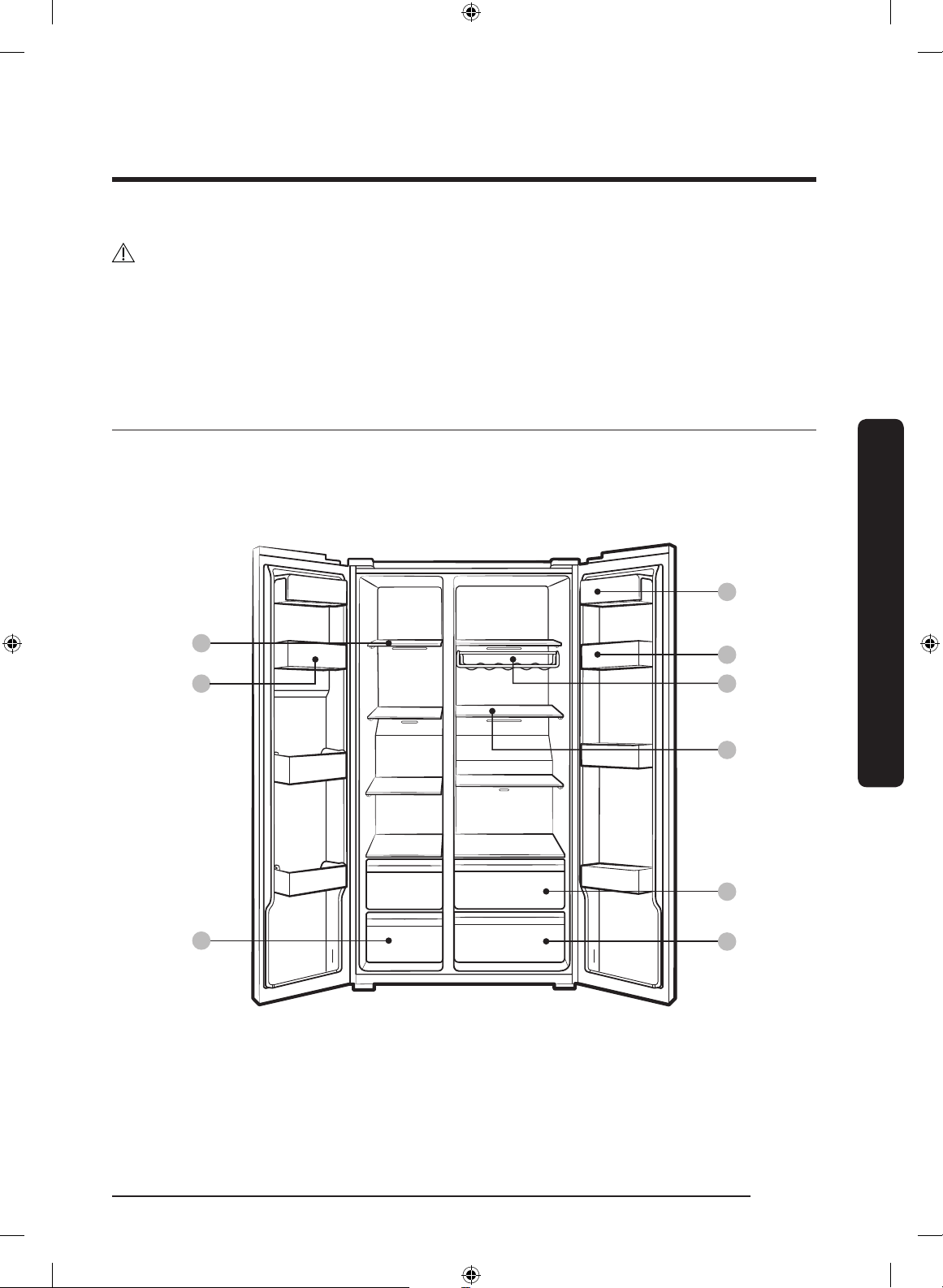
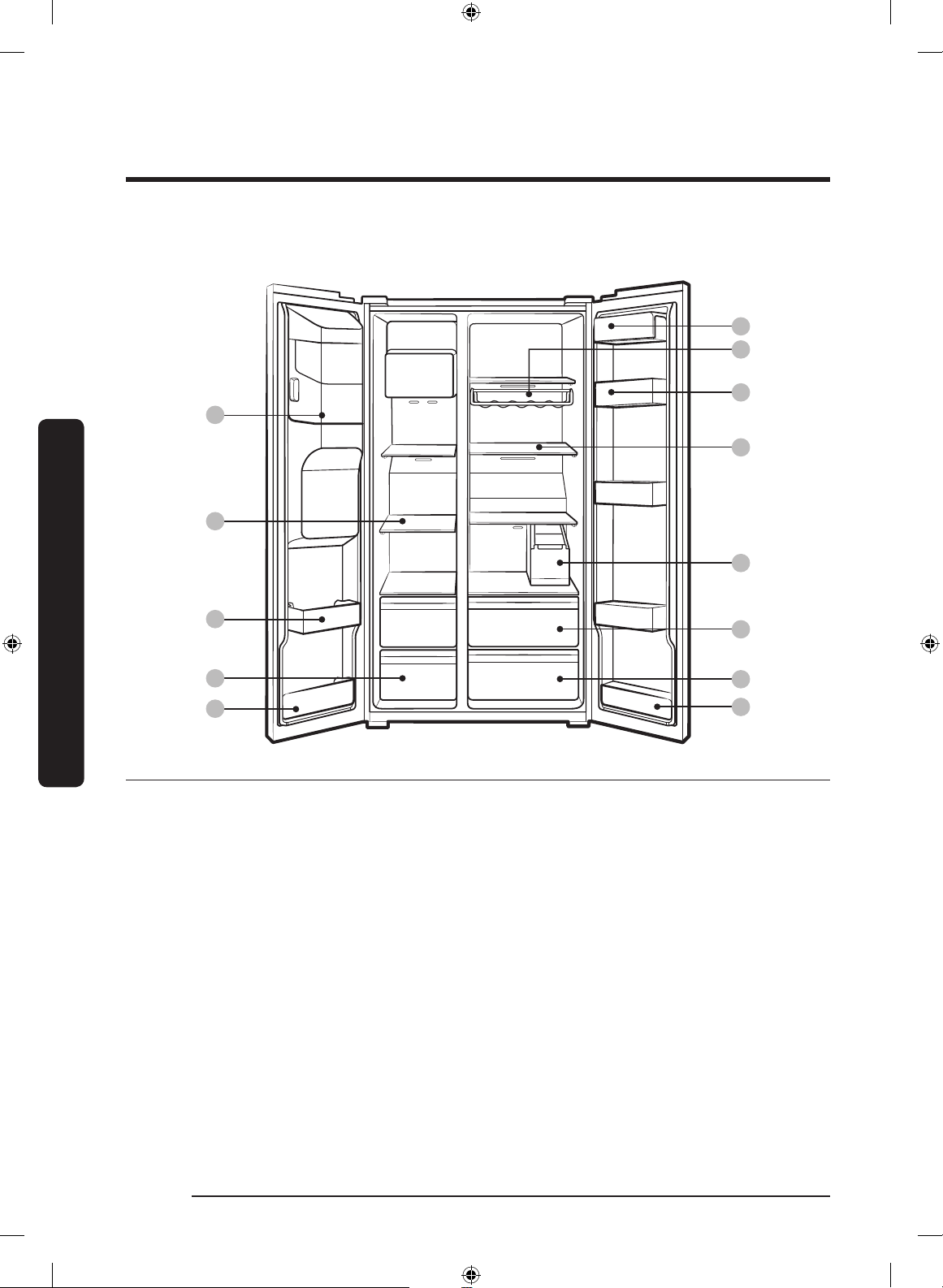
Refrigerator at a glance
The actual appearance of your refrigerator may differ, depending on the model and the
country.
Normal models
11
Installation
01
02
03
04
10
05
07
06
English 25
Untitled-10 25 2018-06-08 11:53:07
Page 26
Installation
Dispenser-featured models
08
01
11
10
04
05
Installation
01 Freezer shelves 02 Multipurpose freezer
04 Refrigerator bin 05 Refrigerator shelves 06 Vegetable drawer
07 Multipurpose drawer 08 Ice maker bucket ** 09 Water tank *
10 Wine rack * 11 Dairy bin 12 Lower freezer bin *
13 Lower refrigerator bin *
* Applicable models only
** Dispenser models only
02
03
12
bin
09
07
06
13
03 Dried food and meat
storage drawer
English26
Untitled-10 26 2018-06-08 11:53:08
Page 27
NOTE
• The design of the egg container may differ with the model.
• RS66*, RS6K* model : Lower freezer bin and lower refrigerator bin are not included.
• RS67*, RS6J* model : Lower refrigerator bin is not included.
CAUTION
For normal models, do not change the position of the freezer shelves. Freezer shelves
have different lengths, and if you change the position, you may damage the product when
closing the door.
Installation
English 27
Untitled-10 27 2018-06-08 11:53:08
Page 28

Installation
Step-by-step installation
STEP 1 Select a site
Site requirements:
• Solid, level surface without carpeting or ooring that may obstruct ventilation
• Away from direct sunlight
• Adequate room for opening and closing the door
• Away from a heat source
• Room for maintenance and servicing
• Temperature range: between 5 °C and 43 °C
Effective temperature range
The refrigerator is designed to operate normally in the temperature range specied by its
class rating.
Installation
Class Symbol
Ambient Temperature range (°C)
IEC 62552 (ISO 15502) ISO 8561
Extended Temperate SN +10 to +32 +10 to +32
Temperate N +16 to +32 +16 to +32
Subtropical ST +16 to +38 +18 to +38
Tropical T +16 to +43 +18 to +43
NOTE
The cooling performance and power consumption of the refrigerator may be affected
by the ambient temperature, the door-opening frequency, and the location of the
refrigerator. We recommend adjusting the temperature settings as appropriate.
English28
Untitled-10 28 2018-06-08 11:53:08
Page 29
Clearance
A
B
C
D
01
02 03
05
06
07
08
09
04
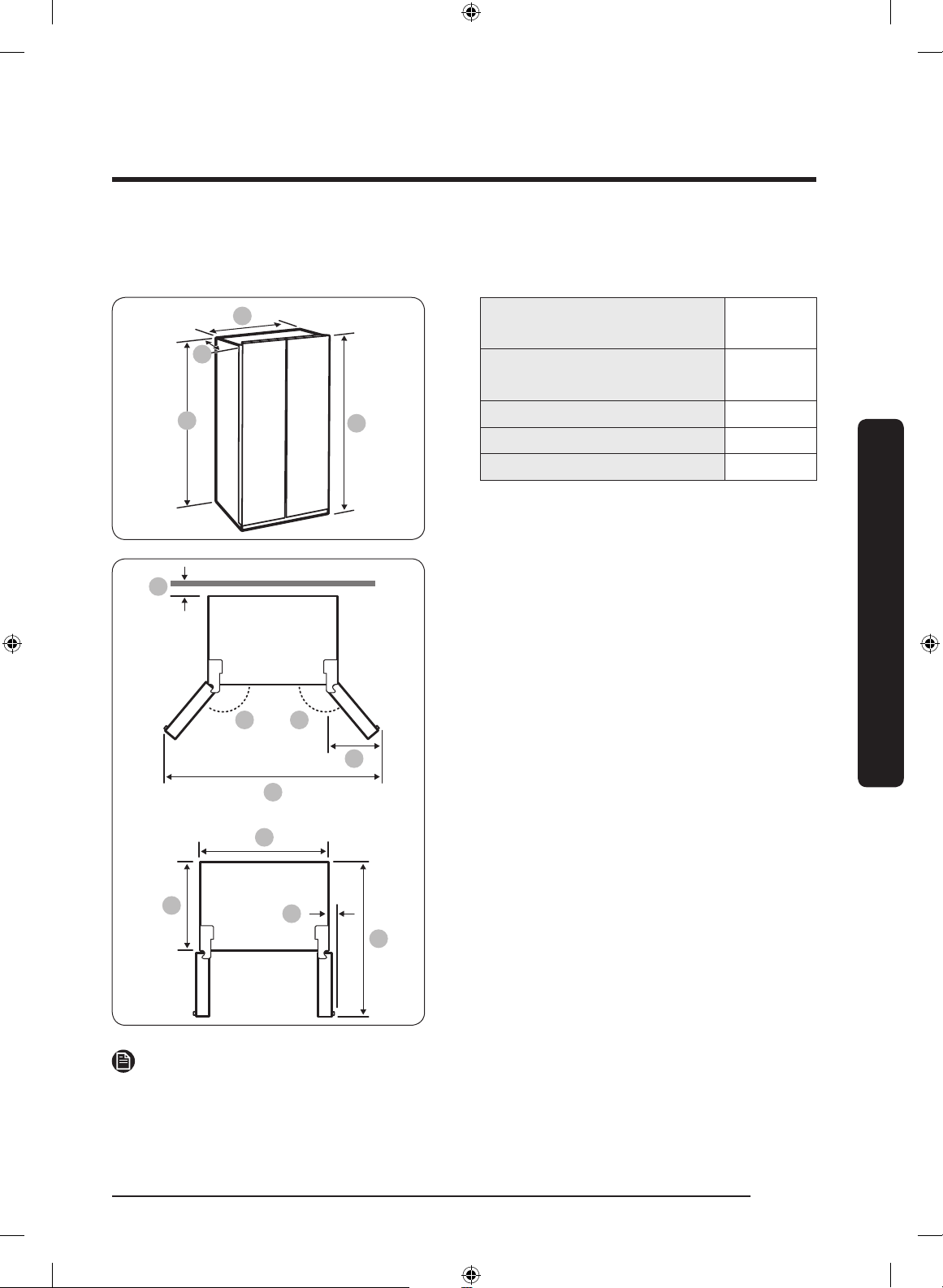
See the pictures and table below for space requirements for installation.
Depth “A”
Recess Handle Type
Depth “A”
Bar Handle Type
Width “B” 912
Height “C” 1747
Overall Height “D” 1780
(unit: mm)
01 more than 50 mm recommended
02 165°
03 170°
04 564 mm
05 1726 mm
06 610 mm
07 912 mm
08 29 mm (without handle)
09 1165 mm
716
772
Installation
NOTE
The measurements in the above table may differ, depending on the measuring method.
Untitled-10 29 2018-06-08 11:53:08
English 29
Page 30
Installation
STEP 2 Wi-Fi connection
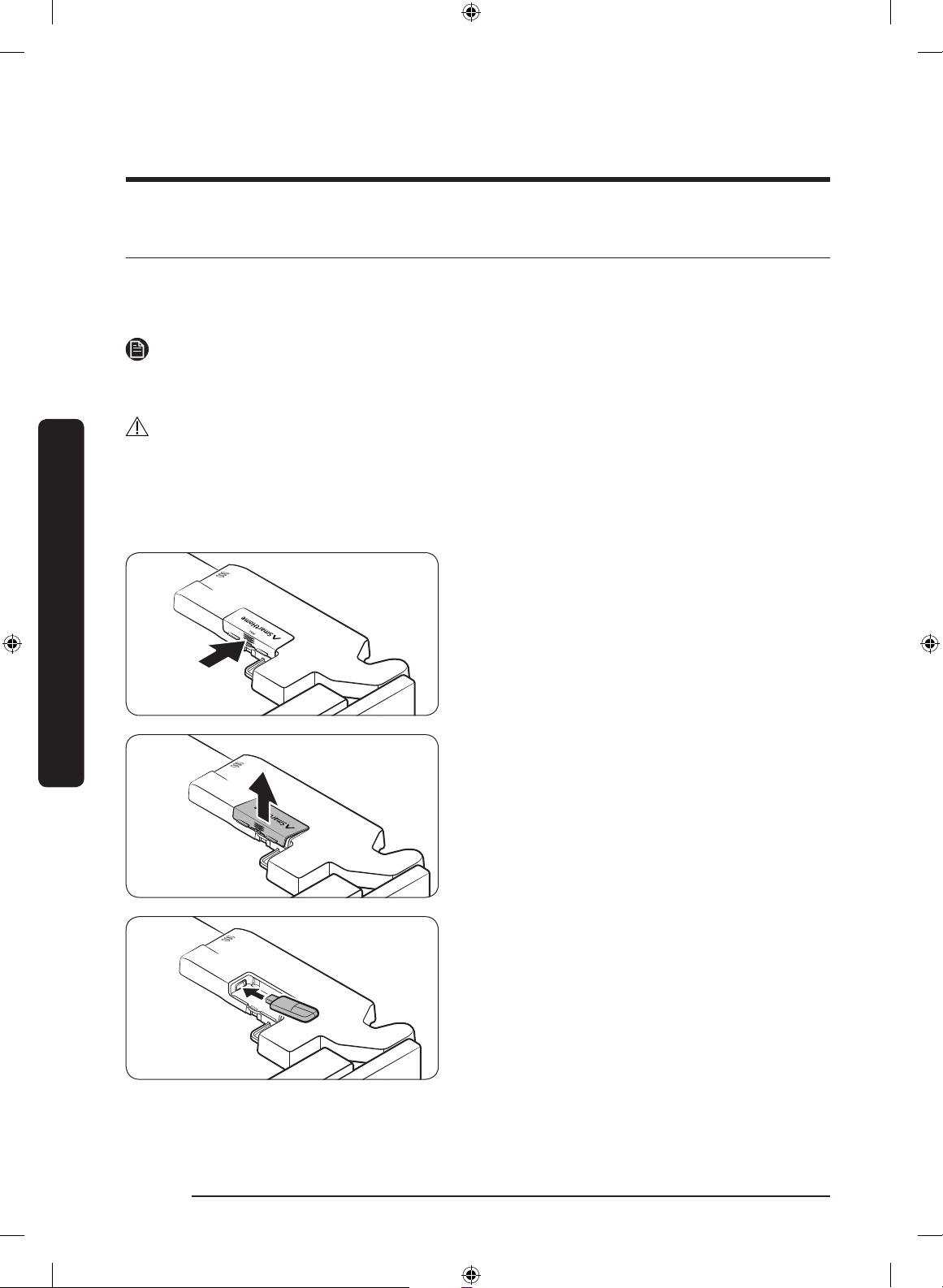
You can control the refrigerator remotely using the Smart Home Adapter that is sold
separately. To purchase the Smart Home Adapter, visit www.samsung.com and follow the
product information about the adapter.
NOTE
You may not be able to purchase the Smart Home Adapter separately in some countries.
Please check with your dealer for availability.
CAUTION
• The Samsung Smart Home Adapter comes in two types: one that is dedicated to
Samsung smart TVs, and the other one that is dedicated to Samsung home appliances.
• You must purchase the Samsung Smart Home Adapter (HD39N1230GW) dedicated to
home appliances. Any other adapters may cause system failure.
Installation
1. Press to unlock the arrow area of the
adapter cover.
2. Open up the adapter cover.
3. Insert the Smart Home Adapter into the
adapter port in the correct direction.
English30
Untitled-10 30 2018-06-08 11:53:08
Page 31

STEP 3 Spacing (applicable models only)
4. Insert the upper area of the adapter
cover rst, and then close to lock as
shown.
NOTE
The marked area is the cover of the
optional adapter, not a crack or defect.
Installation
1. Open the door and locate the provided
spacer.
2. Unpack the spacer and attach it to the
rear of the refrigerator as shown. It
helps ventilate air to the rear wall and
save power consumption.
English 31
Untitled-10 31 2018-06-08 11:53:09
Page 32

Installation
STEP 4 Flooring
• The surface to install the refrigerator
must support a fully loaded refrigerator.
• To protect the oor, put a large piece
of cardboard on each leg of the
refrigerator.
• Once the refrigerator is in its nal
position, do not move it unless
necessary to protect the oor. If you
have to, use a thick paper or cloth such
as old carpets along the movement
path.
Installation
If the refrigerator cannot pass through the entrance due to its size, see the Door removal
for entrance section in the Installation chapter.
NOTE
English32
Untitled-10 32 2018-06-08 11:53:09
Page 33

STEP 5 Adjust the levelling feet
CAUTION
• The refrigerator must be levelled on a at, solid oor. Failing to do so can cause
damage to the refrigerator or physical injury.
• Levelling must be performed with an empty refrigerator. Make sure no food items
remain inside the refrigerator.
• For safety reasons, adjust the front side a little higher than the rear side.
The refrigerator can be levelled using the front legs that have a special screw (leveller) for
levelling purposes. Use a at-head screwdriver for levelling.
To adjust the height of the freezer side:
Insert a at-head screwdriver into the
leveller of the freezer-side front leg. Turn
the leveller clockwise to raise, or turn it
counter clockwise to lower.
To adjust the height of the fridge side:
Insert a at-head screwdriver into the
leveller of the fridge-side front leg. Turn
the leveller clockwise to raise, or turn it
counter clockwise to lower.
Installation
English 33
Untitled-10 33 2018-06-08 11:53:09
Page 34

Installation
B
A
A
A
STEP 6 Adjust the door height as well as the door gap
To adjust the height of a door
The height of a door can be adjusted using the clamp nut and the height nut on the front
bottom of each door.
Installation
1. Open the door to adjust, and locate the
two nuts (A) and (B) on the front bottom
of the door.
2. With a 19 mm spanner (not provided),
turn the clamp nut (A) clockwise to
loosen. Then, open the door, and do the
following inside the door.
- To raise the door, turn the height nut
(B) counter clockwise.
- To lower the door, turn the height
nut (B) clockwise.
3. When complete, tighten the clamp nut
(A) by turning it counter clockwise.
English34
Untitled-10 34 2018-06-08 11:53:10
Page 35

STEP 7 Connect the water dispenser line (applicable models only)
Parts and tools required
Water line xer and screws Coupler Water line
Water lter lock-clip Water lter Check valve
Installation (external dispenser line)
1. Assemble the water pipe line using
couplers.
2. Close the main water supply, and then
close the water tap.
3. Connect the coupler to the cold water
tap.
CAUTION
• Make sure you connect the coupler to the cold water tap. Connection to the hot water
tap may cause the water lter to be clogged and fail to operate normally.
• The warranty for your refrigerator does not cover the water line installation. The
water line installation will be performed at your own costs unless the installation fee is
included in the retailer’s price.
• Samsung takes no responsibility for the water line installation. If water leaks occur,
contact the installer of the water line.
• The water line must be repaired by a qualied professional. If you encounter a water
leak, contact a local Samsung service centre or the installer of the water line.
Installation
English 35
Untitled-10 35 2018-06-08 11:53:11
Page 36

Installation
1
A
B
A
STEP 8 Connect to a water source (applicable models only)
• The water line must be connected by a qualied technician.
• The warranty for your refrigerator does not cover the water line installation. The
• Samsung takes no responsibility for the water line installation. If water leaks occur,
To connect the cold water pipe to the water ltering hose
• Make sure the water ltering hose is connected to a cold, potable water source pipe.
Installation
CAUTION
water line installation will be performed at your own costs unless the installation fee is
included in the retailer’s price.
contact the installer of the water line.
CAUTION
Connecting to the hot water pipe may cause the water lter to malfunction.
1. Shut off the water supply by closing the
main water valve.
2. Locate the cold, potable water pipe (1).
3. Follow the Water Line Installation to
connect to the water pipe.
A. Close Main Water pipe
B. No gap
NOTE
New hose-sets supplied with the appliance
are to be used and old hose-sets should
not be reused.
English36
Untitled-10 36 2018-06-08 11:53:11
Page 37

To connect the water ltering hose to the water line
a
a
a
A
B
03
1. Loosen and remove the compression
nut (a) from the water line of the
refrigerator, and insert it to the water
ltering hose.
2. Tighten up the compression nut (a) to
connect the water ltering hose and the
water line.
3. Open the main water valve and check
for any leaks.
4. If there are no leaks, dispense about 10
litres of water or dispense the water for
A. Water Line from unit
B. Water Line from Kit
6 - 7 minutes before actually using the
refrigerator to remove impurities inside
the water ltering system.
5. Secure the water line to a sink or a wall
using a clip.
• Do not tighten the water line
excessively. Make sure the water line is
not bent, pinched, or squashed.
• Do not mount the water line on any
part of the refrigerator. This may
damage the refrigerator.
Installation
CAUTION
NOTE
If you have to relocate the refrigerator
after connecting the water line, make sure
the joined section of the water line must is
straight.
To repair the water line
CAUTION
The water line must be repaired by a qualied professional. If you encounter a water leak,
contact a local Samsung service centre or the installer of the water line.
Untitled-10 37 2018-06-08 11:53:11
English 37
Page 38

Installation
Reverse osmosis water ltration system
The water pressure of the water supply system to a reverse osmosis water ltration
system must be between 241 kPa and 827 kPa.
The water pressure of the reverse osmosis water ltration system to the refrigerator’s
cold water line must be at least 276 kPa. If the water pressure is below the specied:
• Check if the sediment lter in the reverse osmosis system is blocked. Replace the lter
• Rell the water tank in the reverse osmosis system with water.
• If your refrigerator has a water lter, it may further reduce the water pressure when
For more information or servicing, contact a licensed plumbing professional.
Ordering a new lter
Installation
To purchase a new water lter (part type: HAFEX/EXP), contact a local Samsung service
centre.
To mount the water lter into place
if necessary.
used in conjunction with a reverse osmosis system. Remove the water lter.
1. Attach the lock clips (x2) to appropriate
positions under the sink, for instance.
Then, x the lock clips rmly using
screws.
2. Insert the water lter into the upper
and lower clips in the correct direction.
Make sure to check the vertical
direction of the water lter.
NOTE
If the lter is installed horizontally, water
may remain in the lter. Therefore, vertical
installation is recommended.
CAUTION
Do not mount the water lter on any part
of the refrigerator. This may damage the
refrigerator.
English38
Untitled-10 38 2018-06-08 11:53:12
Page 39

Water lter replacement (applicable models only)
CAUTION
• Do not use third-party water lters. Use only Samsung-provided or -approved lters.
• Unapproved lters may leak and damage the refrigerator, causing electric shock.
Samsung holds no responsibility for any damage that may occur from use of third
party water lters.
• The lter indicator turns red as a reminder that lets you know it is time to replace the
water lter.
1. Shut off the main water supply.
2. Connect the water supply line to the
inlet side of the lter to the end.
3. Connect the dispenser line to the outlet
side of the lter.
4. Check if there is any leak. If not, x the
lines with the clips.
5. Put the water lter into place and x it
with the clips.
6. Press and hold Filter Reset for
3 seconds to reset the lter lifecycle.
7. When replacing is complete, ush 10
litres of water (or dispense the water
for 6 - 7 minutes) to remove impurities
from the water line.
Installation
CAUTION
When adjusting the length of the water
line tubing, make sure to smooth out the
cut surface at a right angle. This is to
prevent a water leak.
English 39
Untitled-10 39 2018-06-08 11:53:12
Page 40

Installation
• A newly installed lter may cause the water dispenser to spurt water briey. This is
• This replacement process may involve the refrigerator to drip water onto the oor. If
Installation
NOTE
because air has entered the water line.
this happens, wipe up with dry cloths.
English40
Untitled-10 40 2018-06-08 11:53:12
Page 41

STEP 9 To attach the handles (applicable models only)
1. Locate the 4 holes on the doors.
2. Use the Phillips screwdriver to
assemble the xers to the holes by
tightening them clockwise.
Installation
CAUTION
Make sure the rubber washers on the
xers are not missing. Without the rubber
washers, you cannot attach the handles
correctly.
NOTE
Contact a local Samsung service centre if
the rubber washers are missing.
English 41
Untitled-10 41 2018-06-08 11:53:13
Page 42

Installation
Installation
3. Attach the handle supports to the xers.
4. Firmly press the handles at the support.
Check and make sure the handles are
rmly attached.
5. Make sure there is no gap between the
handle supports and the doors.
CAUTION
Handles may shake if they are not
properly xed.
English42
Untitled-10 42 2018-06-08 11:53:13
Page 43

STEP 10 Initial settings
By completing the following steps, the refrigerator should be fully functioning.
1. Plug the power cord into the wall socket to turn the refrigerator on.
2. Open the door, and check if the interior light lights up.
3. Set the temperature to the coldest, and wait for about an hour. Then, the freezer will be
slightly chilled, and the motor will run smoothly.
4. Wait until the refrigerator reaches the set temperature. Now the refrigerator is ready
for use.
STEP 11 Final check
When installation is complete, conrm that:
• The refrigerator is plugged into an electrical outlet and grounded properly.
• The refrigerator is installed on a at, level surface with a reasonable clearance from the
wall or the cabinet.
• The refrigerator is level and is sitting rmly on the oor.
• The door opens and closes freely, and the interior light turns on automatically when
you open the door.
Installation
English 43
Untitled-10 43 2018-06-08 11:53:13
Page 44

Installation
B
A
Door removal for entrance
If the refrigerator cannot pass through the entrance due to its size, follow these
instructions:
Tools required (not provided)
These tools are used for removing the doors.
Phillips screwdriver Flat-heat
Installation
Disconnect the water line
screwdriver
Socket spanner
(10 mm)
1. From the bottom rear side of the
refrigerator, pull out the water line to
the front.
NOTE
The refrigerator’s water line is a water
circulation line that connects between the
water pipe from the water source and the
hoses from the water ltering system of
the refrigerator.
2. To disconnect the hoses, press and hold
the transparent coupler (A) and detach
the water hose (B).
CAUTION
Do not apply excessive force to the
coupler. It may break.
Allen spanner
(5 mm)
English44
Untitled-10 44 2018-06-08 11:53:14
Page 45

Detach the doors
A
A
CAUTION
The door may fall off or over and damage itself during any of these steps. To prevent an
accident, use extreme caution when performing these steps.
1. Use a Phillips screwdriver to unscrew
the hinge covers (A) on the top of each
door.
2. Open the doors to loosen the hinges
and remove the hinge covers. Once the
covers are removed, close the doors.
3. Disconnect the electrical harness.
Installation
4. Gently lift the clamp.
NOTE
To prevent damage to the clamp or
injuries, do not lift the clamp forcefully.
English 45
Untitled-10 45 2018-06-08 11:53:14
Page 46

Installation
A
Installation
5. Pull the clamp to remove.
6. Open the door by 90 degrees. While
holding the door, remove the hinge.
CAUTION
If you remove the hinge without holding
the door, the door may fall and cause
injury.
Reconnect the water hoses
Once the refrigerator has passed through the entrance, reconnect the water hoses.
CAUTION
• Make sure the water hoses are
connected with matching colours.
• To prevent water leaks, each water
hose must be inserted fully to the
centre of the transparent coupler.
A. Centre of transparent coupler
• After reconnecting the water hoses,
push them under the cabinet and
arrange them on the hook.
English46
Untitled-10 46 2018-06-08 11:53:15
Page 47

Reattach the doors
CAUTION
• Before reattaching the doors, make sure all the electrical connectors are properly
connected.
• The freezer door must be reattached before the fridge door.
1. Hold the freezer door and hook to the
hinge at the bottom of the refrigerator.
2. Put the hinge into its position, and then
insert it into the hole on the door.
Installation
3. Insert the clamp in the arrow direction.
English 47
Untitled-10 47 2018-06-08 11:53:15
Page 48

Installation
Installation
4. Press the clamp as shown.
5. Connect the electrical harness.
6. Insert the hinge covers with the front
sides rst, and then tighten the screws.
Use a Phillips screwdriver for this step.
English48
Untitled-10 48 2018-06-08 11:53:16
Page 49

Operations
01 0206 03 04 05
01 02 0306 05
01 0206 05
Feature panel
Type 1
Type 2
Type 3
01 Freezer / Power Freeze 02 Fridge / Power Cool
03 Ice Maker * 04 Filter Reset *
05 Door Alarm / Vacation 06 Network connection
* Applicable models only
Operations
English 49
Untitled-10 49 2018-06-08 11:53:16
Page 50

Operations
01 Freezer / Power Freeze (3 sec)
Freezer
Power Freeze
Operations
02 Fridge / Power Cool (3 sec)
The Freezer button can be used to set the freezer temperature, or to
activate Power Freeze. Available temperatures are between -15 °C and
-23 °C.
Power Freeze speeds up the freezing process at maximum fan speed.
The freezer keeps running at full speed for 50 hours and then returns
to the previous temperature.
• To activate Power Freeze, press and hold Freezer for 3 seconds.
The corresponding indicator ( ) lights up, and the refrigerator will
speed up the freezing process for you.
• To deactivate, press and hold Freezer for 3 seconds again. The
freezer returns to the previous temperature setting.
• To freeze large amounts of food, activate Power Freeze for at least
20 hours before putting food in the freezer.
NOTE
Using Power Freeze increases power consumption. Make sure you turn
it off and return to the previous temperature if you do not intend to
use it.
Fridge
Power Cool
English50
The Fridge button can be used to set the fridge temperature, or to
activate/deactivate Power Cool.
You can manually adjust the cooling temperature for the fridge. Keep
pressing Fridge to select a desired temperature between 1 °C and 7 °C.
Power Cool speeds up the cooling process at maximum fan speed.
This is useful to quickly cool food that spoils quickly, or after the door
is left open for some time. The fridge keeps running at full speed for
several hours and then returns to the previous temperature.
Press and hold Fridge for 3 seconds.
The corresponding indicator ( ) lights up, and the refrigerator will
speed up the cooling process for you.
Untitled-10 50 2018-06-08 11:53:16
Page 51

03 Ice Maker
Ice Maker
Press and hold Ice Maker for more than 3 seconds to turn the ice
maker on or off.
The ice maker has 2 indicators (ON/OFF) to indicate the operating
status.
• When the ice maker operates, the ON indicator turns on.
• When the ice maker is turned off, the OFF indicator turns on. In
this case, ice making is disabled even if you press the Cubed Ice or
Crushed Ice buttons on the dispenser panel. To enable ice making,
you must turn the ice maker on.
• When the ice maker is off, pressing the dispenser lever for more
than 5 seconds will automatically turn on the ice maker.
• When you turn the ice maker off, you must wait at least 1 minute
before you can turn it back on.
NOTE
If the ice maker is turned off, it will turn on if you press and hold the
ice lever for more than 5 seconds.
Operations
English 51
Untitled-10 51 2018-06-08 11:53:16
Page 52

Operations
04 Filter Reset (3 sec)
Filter Reset
05 Door Alarm / Vacation (3 sec)
Door Alarm
Operations
Vacation
After about 6 months (approximately 300 gallons) of using the original
water lter, the Filter indicator turns red to remind you that the lter
needs to be replaced. If this happens, replace the lter, and press and
hold Filter Reset for 3 seconds. The lter indicator will be reset, and
the Filter indicator turns off.
NOTE
Some regional areas have relatively large amounts of lime contained
in the water. This may reduce the lifecycle of the lter. In these areas,
you will have to replace the water lter more often than specied
above.
You can set the alarm for a reminder. If the door is left open for more
than 2 minutes, the alarm will sound with the alarm indicator blinking.
The alarm is enabled by factory default. To disable the alarm, press
Door Alarm. To enable, press Door Alarm again.
The Vacation button can be used to activate/deactivate Vacation mode.
If you are going on vacation or a business trip, or if you do not intend
to use the refrigerator for an extended time, use the Vacation feature.
Press and hold Vacation for 3 seconds to turn off the fridge operation
with the Vacation indicator ( ) on.
Device
authentication
English52
NOTE
It is strongly recommended to empty the fridge compartment and
make sure the door is closed.
When connecting the refrigerator to SmartThings App or Samsung
smart devices such as Samsung Smart TVs, follow the app’s or device’s
onscreen instructions and press and hold Door Alarm for 5 seconds.
The temperature panel displays “on” for 5 seconds before proceeding
with the authentication procedure. Note that the Vacation function will
be not affected by this authentication.
Untitled-10 52 2018-06-08 11:53:17
Page 53

06 Network connection (applicable models only)
You can use the optional Smart Home Adapter (sold separately) to control and monitor
your refrigerator through the SmartThings app. For more information about SmartThings,
see the SmartThings section.
NOTE
• Recommended encryption systems include WPA/TKIP and WPA2/AES. Any newer or
unstandardized Wi-Fi authentication protocols are not supported.
• Wireless networks may be affected by the surrounding wireless communication
environment.
• If your Internet service provider has registered the MAC address of your PC or modem
for identication, your Samsung Smart Refrigerator may fail to connect to the Internet.
If this happens, contact your Internet service provider for technical assistance.
• The rewall settings of your network system may prevent your Samsung Smart
Refrigerator from accessing the Internet. Contact your Internet service provider for
technical assistance. If this symptom continues, contact a local Samsung service center
or retailer.
• To congure the wireless access point (AP) settings, see the user manual of the AP.
• Samsung Smart Refrigerators featuring the Samsung Smart Home Adapter support
both Wi-Fi 2.4 GHz with IEEE 802.11 b/g/n and Soft-AP protocols (IEEE 802.11 n is
recommended).
• Unauthorized Wi-Fi wireless routers may fail to connect to applicable Samsung Smart
Refrigerators.
Operations
English 53
Untitled-10 53 2018-06-08 11:53:17
Page 54

Operations
SmartThings (available only with the optional adapter)
Installation
Visit the Google Play Store, Galaxy Apps, or Apple App Store and search for “SmartThings”.
Download and install the SmartThings app provided by Samsung Electronics to your smart
device.
• The SmartThings app is designed for Android 6.0 (Marshmallow) or later, iOS 10.0
• For improved performance, the SmartThings app is subject to change without notice, or
Samsung account
You are required to register with a Samsung account to use the app. If you don’t have a
Samsung account, follow the app’s onscreen instructions to create a free Samsung account.
Getting started
1. Insert the Smart Home Adapter into the corresponding port of your refrigerator.
Operations
2. Run the SmartThings app and log in with your Samsung account. iPhone users are
3. Access Add Device and then tap Refrigerator.
4. Follow the onscreen instructions to provide the necessary information about the
5. Press and hold Fridge for more than 5 seconds until the "AP" message appears on the
6. When device registration is complete, the refrigerator icon will appear on the
7. Tap the refrigerator icon to open the refrigerator page.
8. When a network connection is established, the Wi-Fi icon lights up on your refrigerator.
NOTE
or later, iPhone 6 or later, and is optimized for Samsung smartphones (Galaxy S and
Galaxy Note series).
discontinued support according to the manufacturer’s policy.
required to provide the login information each time they access the app.
router, and then tap Next.
display. Your refrigerator will be registered with the app.
SmartThings app.
Refrigerator app
Integrated control
You can monitor and control your refrigerator at home as well as while on the move.
• Tap the refrigerator icon on the SmartThings to open the refrigerator page.
• Check the operation status or notications for your refrigerator, and change options or
settings if necessary.
NOTE
Some options or settings of the refrigerator may not be available for remote control.
English54
Untitled-10 54 2018-06-08 11:53:17
Page 55

Category Item Description
Fridge temperature
Freezer temperature
Displays the current temperature setting of the
fridge.
Displays the current temperature setting of the
freezer.
Monitoring
Diagnosis
Energy monitoring
Detects abnormal operations of the
refrigerator.
Checks the accumulated power consumption of
the refrigerator for the last 180 days.
You can turn the ice making function on or off,
and check the current settings of the function.
Ice making
You can also check the status and progress of
ice making.
Functions
You can turn Power Cool on or off, and check
the current settings.
You can turn Power Freeze on or off, and
check the current settings.
This alarm is triggered when the fridge or
freezer has abnormally high temperatures.
This alarm is triggered if the fridge or freezer
door is open for more than 2 minutes.
This alarm reminds you that the water lter
must be replaced.
Alarms
Power Cool
Power Freeze
Abnormally high
temperature
Door opening
Water lter
replacement
Operations
English 55
Untitled-10 55 2018-06-08 11:53:17
Page 56

Operations
01 02 03
Dispenser panel (applicable models only)
01 Water / Lock 02 Cubed Ice
03 Crushed Ice
01 Water / Lock (3 sec)
Water
Operations
Lock
(Dispenser panel /
Dispenser lever)
02 Cubed Ice
Cubed Ice
03 Crushed Ice
Crushed Ice
To dispense chilled water, press Water. The corresponding
indicator turns on.
To prevent use of the dispenser panel buttons and the dispenser
lever, press and hold Water for more than 3 seconds.
If you press and hold the button again for more than 3 seconds,
the dispenser lock will be deactivated.
NOTE
The Lock on the dispenser panel does not affect the controls
on the main panel. To lock the main panel, use the Control Lock
function on the main panel.
Press Cubed Ice to dispense cubed ice. The corresponding
indicator turns on.
Press Crushed Ice to dispense crushed ice. The corresponding
indicator turns on.
English56
Untitled-10 56 2018-06-08 11:53:17
Page 57

Special features
The refrigerator features user-oriented devices that you can use to benet from.
Water/Ice dispenser (applicable models only)
Using the dispenser, you can dispense water with or without ice.
The water dispenser offers 3 options: chilled water, cubed ice, and crushed ice. To
dispense chilled water, press Water on the dispenser panel. Put a water glass under the
dispenser, and then push the dispenser lever.
To dispense water with ice
1. With the Ice Maker enabled, press
Cubed Ice or Crushed Ice to select the
ice type.
2. Put a water glass under the dispenser,
and then push the dispenser lever with
the glass. Ice will be dispensed from the
dispenser.
3. Press Water to select water.
4. Push the dispenser lever with the
glass. Water will be dispensed from the
dispenser.
Operations
NOTE
• The dispenser will stop dispensing if you keep pushing the dispenser lever for about 1
minute. To dispense more water, release and push the lever again.
• Make sure the glass is in line with the dispenser to prevent the dispensed water from
spilling out.
• If you do not use the water dispenser for 2-3 days, the dispensed water may have an
abnormal smell or taste. This is not a system failure. Discard the rst 1-2 glasses of
water.
Ice maker (applicable models only)
The refrigerator has a built-in ice maker that automatically dispenses ice so that you can
enjoy ltered water with cubed or crushed ice.
Ice making
After you have installed your refrigerator and plugged it in, follow these instructions to
ensure proper ice making and to keep the ice bucket full of ice:
1. Let the refrigerator operate for at least 24 hours to ensure optimal performance.
2. Dispense the rst 4 to 6 ice cubes into a glass.
English 57
Untitled-10 57 2018-06-08 11:53:17
Page 58

Operations
A B
3. Wait another 8 hours and dispense another 4 to 6 ice cubes.
4. Then, wait another 16 hours and dispense the rst glass-full of ice.
NOTE
• If you consume all the ice at once, you must wait 8 hours before dispensing the rst 4
to 6 cubes. This ensures that the ice bucket is lled with ice properly.
• Ice cubes generated rapidly may look white, which is normal.
CAUTION
Dispense the ice according to the size of the cup.
• If you dispense excessive amount, ice may fall out on the ground and cause personal
injury.
• Ice may accumulate and block the ice chute.
To ll the water tank (applicable models only)
For rst-time use, clean the inner side of
the water tank and dry well.
1. Hold both handgrips on the front of the
tank, and slide out as shown.
Operations
• Make sure the water tank ts into the shelf. Otherwise, the water tank may not operate
2. Open the front lid (A) of the cover or
the entire cover (B) and ll the tank
with a max of 5 litres water.
CAUTION
Do not exceed the max line. Water
overows.
3. Reinsert the water tank and t into the
dispenser mechanism. Make sure the
front side (with the front lid) of the tank
faces to the front.
CAUTION
properly.
English58
Untitled-10 58 2018-06-08 11:53:18
Page 59

• Do not use the refrigerator without inserting the water tank. This may decrease the
A B
C
cooling performance.
• Fill the tank only with potable water such as mineral or puried water. Do not use
other liquid.
• Use caution when moving a lled tank. Physical injury may occur if the tank is
dropped.
• Do not try to disassemble the internal pump yourself. If the internal pump is damaged
or disconnected from the water tank, the dispenser does not operate.
For rst-time use
• Push the dispenser lever for 10 seconds to emit air from the hoses of the water supply
system.
• Discard the rst six glasses of water to remove impurities in the water supply system.
Ice making (applicable models only)
The refrigerator has a built-in ice maker that automatically dispenses ice so that you can
enjoy ltered water with cubed or crushed ice to your preference.
If ice does not dispense, rst check the ice
maker if it makes ice properly.
To check the ice maker
1. Gently hold the icemaker bucket (B)
with both hands and remove it from the
ice chute (A).
2. Check the icemaker bucket if it contains
ice as appropriate.
3. Press the button (C) on the bottom of
the ice maker. You will hear a chime
(ding-dong) at the press of the button.
4. You will hear another chime if the ice
maker operates properly.
NOTE
If this symptom continues, contact the
water line installer or a local Samsung
service centre.
Operations
English 59
Untitled-10 59 2018-06-08 11:53:18
Page 60

Operations
• Do not press the button repeatedly after the ice tray is lled with ice or water. Water
• When the refrigerator recovers power supply after a power failure, the icemaker
• To prevent dropping the icemaker bucket, make sure to use both hands when removing
• Do not let children hang on or play with the ice dispenser or the icemaker bucket.
• Do not put ngers or other objects into the dispenser hole or the ice chute. This may
• If you remove the icemaker bucket, the Ice Maker ON indicator will blink.
• Removal of the icemaker bucket does not affect the thermal and mechanical
• The declared freezer volume is measured with the freezer guide and the bottom shelf,
Operations
CAUTION
may overow or ice may be jammed.
bucket may contain a mix of melted and jammed ice cubes, resulting in a system
failure. To prevent this, make sure to empty the icemaker bucket before using the
refrigerator.
or reinserting the icemaker bucket.
Children may get hurt.
cause physical injury or property damage.
NOTE
performance of the refrigerator.
after removing the ice maker, upper and lower drawers.
English60
Untitled-10 60 2018-06-08 11:53:18
Page 61

To secure more storage space (applicable models only)
A
B
C
D F
E
²
If you do not use the ice maker and need
more storage space, remove the icemaker
bucket (A). Then, insert the Freezer guide
(Optional) (B) into the icemaker bucket’s
place.
To secure more space, remove the upper
drawer (C), lower drawer (D), and lower
drawer cover (E). Then, insert the provided
bottom shelf (F).
NOTE
• Removing the drawers does not affect
the temperature or usage of the freezer.
• The declared freezer volume is
measured with the bottom shelf, after
removing the upper drawer, lower
drawer, and lower drawer cover.
Operations
Untitled-10 61 2018-06-08 11:53:18
For more space, remove the water tank
and use the space to store more items.
If you do not use the ice maker and need
more storage space, remove the icemaker
bucket (G). Then, insert the Freezer guide
(Optional) (H) on the ice chute.
English 61
Page 62

Operations
Icemaker bucket
If you do not dispense ice for an extended
period, ice may form clumps inside the
bucket. If this happens, remove and empty
the icemaker bucket.
1. To remove the icemaker bucket, gently
lift it up and pull out slowly while
holding the handgrips with both hands.
2. Remove and empty the icemaker
bucket.
3. When done, turn the gear handle on the
rear of the bucket by 90°, and then put
the bucket back into position. Make sure
the bucket is inserted properly until you
hear a clicking sound.
4. Press and hold Ice Maker for 3 seconds
to reset the ice maker.
Operations
• If the Ice Maker ON indicator blinks, remove and reinsert the icemaker bucket. Make
• Any sound from the ice maker is normal, which outputs during the ice making process.
CAUTION
• Do not apply excessive force to the
bucket cover. The cover may break.
• Do not close the door hard. Water may
spill over the ice maker.
• To prevent injury, make sure to clean
up any ice or water that has fallen on
the oor.
• To prevent accidents or injury, do
not let children play with the water
dispenser or the ice maker.
• Do not put your hand or an object into
the ice chute. This may cause physical
injury or product damage.
NOTE
sure it is reinserted properly.
English62
Untitled-10 62 2018-06-08 11:53:19
Page 63

• While the door is open, neither the ice maker nor the water dispenser operates.
A
Water pressure
If you want to check how much water ows into the ice tray, follow these steps.
1. Remove the ice bucket.
2. Press the button (A) on the bottom of
the ice maker. Normally, the ice tray
lls with water in a few minutes.
3. If the water level is lower than
expected, check the water pressure of
the water supply line from the water
source. This is not a system failure.
CAUTION
• Do not repeatedly press the button on the bottom of the ice maker when the tray is
lled with water. Water may overow or ice may be jammed.
• Make sure the icemaker bucket is inserted properly. Otherwise, the ice maker will not
operate.
• If there is a power failure, remove the ice tray. Water may ow.
Operations
Untitled-10 63 2018-06-08 11:53:19
English 63
Page 64

Maintenance
Rear
1
2
3
Handle and care
Shelves (fridge/freezer)
• To remove a shelf, fully open the
corresponding door. Hold the front of
the shelf and gently lift up and slide
out.
• If the door cannot fully open, slide out
the shelf half way to the front and turn
it over to remove.
CAUTION
• The shelf must be inserted correctly. Do
not insert upside down.
• Glass containers may scratch the
surface of glass shelves.
• Do not insert a shelf in the wine
rack position. This may damage the
refrigerator. (applicable models only)
Maintenance
Door bins
To remove a door bin, hold the front sides
of the bin and gently lift up to remove.
English64
Untitled-10 64 2018-06-08 11:53:19
Page 65

Drawers
A
Vegetable / Dry drawers
Gently lift up the front of the drawer and
slide out.
To remove the vegetable drawer from the
fridge or the dry drawer from the freezer.
1. First, remove surrounding multipurpose
drawers if necessary.
2. If your refrigerator is provided with a
cover (A) for the vegetable/dry drawer,
remove the cover. For this, slide out the
cover while holding down the clips on
either side of the cover.
3. Gently pull out the vegetable/dry
drawer.
Icemaker bucket
To remove the ice maker bucket, see the Icemaker bucket section on page 62.
Maintenance
English 65
Untitled-10 65 2018-06-08 11:53:20
Page 66

Maintenance
Cleaning
Interior and exterior
WARNING
• Do not use benzene, thinner, or home/car detergent such as Clorox™ for cleaning
purposes. They may damage the surface of the refrigerator and cause a re.
• Do not spray water onto the refrigerator. This may cause electric shock.
• Do not put ngers or other objects into the dispenser hole.
Regularly use a dry cloth to remove all foreign substances such as dust or water from the
power plug terminals and contact points.
1. Unplug the power cord.
2. Use a moistened, soft, lint-free cloth or paper towel to clean the refrigerator’s interior
and exterior.
3. When done, use a dry cloth or paper towel to dry well.
4. Plug in the power cord.
Ice / Water dispenser (applicable models only)
For hygienic purposes, frequently clean the dispenser area.
When crushed ice is selected, some residual ice chips may collect in the ice chute. To
prevent this, remove the residual ice from the chute using a soft, clean cloth.
Maintenance
Rubber seals
If the rubber seals of a door become dirty, the door may not close properly and reducing
refrigerator performance and efciency. Use a mild detergent and damp cloth to clean the
rubber seals. Then, dry well with a cloth.
NOTE
CAUTION
English66
Untitled-10 66 2018-06-08 11:53:20
Page 67

Rear panel
To keep cords and exposed parts of the
rear panel free of dirt, vacuum the panel
once or twice a year.
CAUTION
Do not remove the rear panel cover. Electric shock may occur.
Replacement
Lamps
The lamps are not user-serviceable. To replace the lamps of the refrigerator, contact a
local Samsung service centre.
English 67
Maintenance
Untitled-10 67 2018-06-08 11:53:20
Page 68

Troubleshooting
Before calling for service, review the checkpoints below. Any service calls regarding
normal situations (No Defect Cases) will be charged to users.
General
Temperature
Fridge/freezer does
not operate.
Fridge/freezer
temperature is warm.
Fridge/freezer is
over-cooling.
Troubleshooting
Interior wall is hot.
Symptom Possible causes Solution
• Power cord is not plugged
in properly.
• Temperature control is not
set correctly.
• Refrigerator is located near
a heat source or direct
sunlight.
• Not enough clearance
between refrigerator and
nearby walls or cabinets.
• The refrigerator is
overloaded. Food is
blocking the refrigerator
vents.
• Temperature control is not
set correctly.
• Refrigerator has heat-proof
piping in the interior wall.
• Properly plug in the power
cord.
• Set the temperature lower.
• Keep the refrigerator away
from direct sunlight or a
heat source.
• We recommend that the gap
between the refrigerator
and nearby walls (or
cabinets) is more than
50 mm.
• Do not overload the
refrigerator. Do not allow
food to block vents.
• Set the temperature higher.
• To prevent condensation
from forming, the
refrigerator has heat-proof
piping in the front corners.
If the ambient temperature
rises, this equipment may
not work effectively. This is
not a system failure.
English68
Untitled-10 68 2018-06-08 11:53:20
Page 69

Odour
Symptom Possible causes Solution
Refrigerator has
odours.
Frost
Symptom Possible causes Solution
Frost around the
vents.
Frost on interior
walls.
Condensation
Symptom Possible causes Solution
Condensation forms
on the interior walls.
• Spoiled food.
• Food with strong odours.
• Food is blocking the vents.
• Door is not closed properly.
• If door is left open, moisture
enters the refrigerator.
• Food with high moisture
content.
• Clean the refrigerator and
remove any spoiled food.
• Make sure strong smelling
food is wrapped airtight.
• Make sure no food blocks
the refrigerator vents.
• Make sure food does not
block the door. Clean the
door gasket.
• Remove the moisture and
do not leave a door open
for extended periods of
time.
• Make sure food is wrapped
airtight.
Water/ice (dispenser models only)
Symptom Possible causes Solution
Water ow is weaker
than normal.
• Water pressure is too low.
• The ice maker function is
Ice maker makes a
buzzing sound.
activated, but the water
supply to the refrigerator
has not been connected.
Untitled-10 69 2018-06-08 11:53:20
• Make sure the water
pressure is between 20 to
120 psi.
• Turn off the Ice maker.
English 69
Troubleshooting
Page 70

Troubleshooting
Symptom Possible causes Solution
• Ice maker has just been
installed.
Ice maker does not
make ice.
Ice does not dispense.
• Freezer temperature is too
high.
• Dispenser panel Lock is
activated.
• Ice maker is off. • Turn on the ice maker.
• Ice may jam if the ice
dispenser is not used for a
long time (approx. 3 weeks).
• Ice bucket is not properly
inserted.
• Water line is not connected
properly or water supply is
not on.
• You must wait for 12 hours
for the refrigerator to make
ice.
• Set the freezer temperature
below -18 °C (0 °F) or -20 °C
(-4 °F) in warm ambient air.
• Deactivate dispenser panel
Lock.
• If you won't be using the
refrigerator for a long time,
empty the ice bucket and
turn off the ice maker.
• Make sure the ice bucket is
properly inserted.
• Check if the water line is
installed correctly. Check if
the water line stop cock is
closed.
Troubleshooting
English70
Untitled-10 70 2018-06-08 11:53:20
Page 71

Symptom Possible causes Solution
Water does not
dispense.
• Water line is not connected
properly or water supply is
not on.
• Check if the water line is
installed correctly. Check if
the water line stop cock is
closed.
• Dispenser panel Lock is
activated.
• A third-party water lter
was installed.
• Deactivate dispenser panel
Lock.
• Use only Samsung-provided
or approved lters.
• Unapproved lters may
leak and damage the
refrigerator.
Troubleshooting
English 71
Untitled-10 71 2018-06-08 11:53:21
Page 72

Troubleshooting
Clicking!
or Chirping!
Buzzing!
SSSRRR!
Whir!
HiSS!
Do you hear abnormal sounds from the refrigerator?
Before calling for service, review the checkpoints below. Any service calls related to
normal sounds will be charged to the user.
These sounds are normal.
• When starting or ending an operation, the refrigerator may make sounds similar to a
car engine igniting. As the operation stabilizes, the sounds will decrease.
• While the fan is operating, these sounds may occur. When the refrigerator reaches the
set temperature, no fan sound will occur.
Troubleshooting
• During a defrost cycle, water may drip on the defrost heater, causing sizzling sounds.
English72
Untitled-10 72 2018-06-08 11:53:21
Page 73

• As the refrigerator cools or freezes, refrigerant gas moves through sealed pipes,
Bubbling!
Cracking!
causing bubbling sounds.
• As the refrigerator temperature increases or decreases, plastic parts contract and
expand, creating knocking noises. These noises occur during the defrosting cycle or
when electronic parts are working.
• For ice maker models: When the water valve opens to ll the ice maker, buzzing
sounds may occur.
• Due to pressure equalizing when opening and closing the refrigerator door, whooshing
sounds may occur.
English 73
Untitled-10 73 2018-06-08 11:53:21
Troubleshooting
Page 74

Troubleshooting
SmartThings
Could not nd
“SmartThings” in the
app market.
The SmartThings app
fails to operate.
The SmartThings app
is installed but is
not connected to my
refrigerator.
Could not log into the
app.
An information
message appears
when I try to register
my refrigerator.
The SmartThings
app is successfully
Troubleshooting
connected to my
refrigerator but does
not run.
Symptom Action
• The SmartThings app is designed for Android 6.0
(Marshmallow) or later, iOS 10.0 or later, iPhone 6 or later,
and is optimized for Samsung smartphones (Galaxy S and
Galaxy Note series).
• The SmartThings app is available for applicable models only.
• The old Samsung Smart Refrigerator app cannot connect with
SmartThings models.
• You must log into your Samsung account to use the app.
• Make sure that your router is operating normally.
• Make sure that the Smart Home Adapter is inserted properly.
• If the Wi-Fi icon on the refrigerator’s display is off, this
indicates that no network connection has been established
yet. In this case, use the SmartThings app to connect and
register your refrigerator to the access point (AP/Router) in
your home.
• You must log into your Samsung account to use the app.
• If you don’t have a Samsung account, follow the app’s
onscreen instructions to create one.
• Network connection may fail due to the distance from
your access point (AP) or electrical interference from the
surrounding environment. Wait a moment and try again.
• Exit and restart the SmartThings app or disconnect and
reconnect the router.
• Remove the Smart Home Adapter, and reconnect it properly.
Then, try again.
English74
Untitled-10 74 2018-06-08 11:53:21
Page 75

Memo
Untitled-10 75 2018-06-08 11:53:21
Page 76

Contact SAMSUNG WORLD WIDE
If you have any questions or comments relating to Samsung products, please contact the
SAMSUNG customer care center.
Country Contact Center Web Site
SWITZERLAND 0800 726 78 64 (0800-SAMSUNG)
Untitled-10 76 2018-06-08 11:53:22
www.samsung.com/ch/support (German)
www.samsung.com/ch_fr/support (French)
DA68-03725Q-04
Page 77

Réfrigérateur
Guide d'utilisation
RS6*N**
SESG Appareil non encastrable
Untitled-11 1 2018-06-08 11:55:22
Page 78

Sommaire
Consignes de sécurité 3
Consignes de sécurité importantes et symboles : 5
Symboles d'avertissement importants concernant le transport et le lieu d'installation de l'appareil 6
Sommaire
Avertissements importants concernant l'installation 7
Installation en toute sécurité 10
Avertissements importants concernant l'utilisation 11
Utilisation en toute sécurité 16
Nettoyage en toute sécurité 19
Avertissements importants concernant la mise au rebut 21
Conseils complémentaires pour une utilisation appropriée 22
Conseils en matière d'économie d'énergie 23
Cet appareil est destiné à être utilisé dans les applications domestiques et similaires telles que : 23
Instructions concernant la règlementation DEEE 24
Installation 25
Présentation rapide du réfrigérateur 25
Installation étape par étape 28
Retrait des portes pour passer l'entrée 44
Opérations 49
Panneau de commande 49
Application SmartThings (disponible uniquement avec l'adaptateur en option) 54
Panneau du distributeur (modèles applicables uniquement) 56
Fonctions spéciales 57
Entretien 64
Utilisation et entretien 64
Nettoyage 66
Remplacement 67
Dépannage 68
Généralités 68
Entendez-vous des sons anormaux provenant du réfrigérateur ? 72
SmartThings 74
Français2
Untitled-11 2 2018-06-08 11:55:22
Page 79

Consignes de sécurité
• Avant d'utiliser votre nouveau réfrigérateur Samsung, veuillez lire attentivement ce
manuel an de vous assurer que vous savez comment utiliser de manière sûre et
efcace ses différentes fonctionnalités.
• Cet appareil n’est pas conçu pour être utilisé par des personnes (y compris des
enfants) ayant des capacités physiques, sensorielles ou mentales réduites, ou ayant
un manque d'expérience et de connaissances, à moins qu'elles soient surveillées
ou qu'elles aient reçu les instructions nécessaires concernant l'utilisation de cet
appareil de la part d'une personne responsable de leur sécurité.
• Cet appareil n’est pas destiné à être utilisé par des enfants de moins de 8 ans ou
des personnes ayant des capacités physiques, sensorielles ou mentales réduites,
ou un manque d’expérience et de connaissances, à moins qu’elles soient surveillées
ou qu’elles aient reçu les instructions nécessaires concernant l’utilisation de cet
appareil de la part d’une personne responsable, et ce, pour leur propre sécurité.
Les enfants ne doivent pas jouer avec l’appareil. Le nettoyage et la maintenance de
l’appareil ne doivent pas être effectués par des enfants sans surveillance.
Consignes de sécurité
• Les avertissements et les consignes importantes de sécurité contenus dans ce
manuel ne prétendent pas couvrir toutes les situations susceptibles de se produire.
Il est de votre responsabilité de faire preuve de bon sens et de prudence lors de
l'installation, de l'entretien et du fonctionnement de l'appareil.
• Les consignes d'utilisation suivantes concernent plusieurs modèles ; il est donc
possible que les caractéristiques de votre réfrigérateur soient légèrement
différentes de celles spéciées dans ce manuel et que certains symboles
d'avertissement ne s'appliquent pas. Pour toute question, contactez le centre
d'assistance le plus proche ou connectez-vous sur www.samsung.com.
• Le gaz réfrigérant utilisé est le R-600a ou R-134a. Vériez le gaz réfrigérant
utilisé dans votre réfrigérateur sur l'étiquette du compresseur située à l'arrière
de l'appareil ou sur l'étiquette signalétique située à l'intérieur du réfrigérateur.
Lorsque cet appareil contient du gaz inammable (gaz réfrigérant R-600a), veuillez
contacter les autorités locales pour obtenir des renseignements sur la mise au rebut
en toute sécurité de votre appareil.
Français 3
Untitled-11 3 2018-06-08 11:55:22
Page 80

Consignes de sécurité
• An d'éviter la création d'un mélange gaz-air inammable lorsqu'une fuite se
produit dans le circuit frigorique, la taille de la pièce où installer l'appareil dépend
de la quantité de gaz réfrigérant utilisée.
• Ne démarrez jamais un appareil qui présente des signes d'endommagement. En cas
de doutes, contactez votre revendeur. La pièce doit avoir un volume de 1 m3 pour
Consignes de sécurité
chaque 8 g de gaz réfrigérant R-600a à l'intérieur de l'appareil.
La quantité de gaz réfrigérant que votre appareil peut contenir est indiquée sur la
plaque signalétique située à l'intérieur de l'appareil.
• Le gaz réfrigérant qui pourrait s'échapper des tuyaux risquerait de s'enammer
ou de provoquer des lésions oculaires. En cas de fuite de réfrigérant, n'approchez
pas de amme nue, éloignez tout objet inammable de l'appareil et aérez
immédiatement la pièce.
- Le non-respect de cette consigne risquerait de provoquer un incendie ou une
explosion.
Avertissement ; risque d'incendie / matières inammables
Français4
Untitled-11 4 2018-06-08 11:55:22
Page 81

Consignes de sécurité importantes et symboles :
Veuillez suivre toutes les consignes de sécurité fournies dans le présent manuel. Le présent manuel utilise les
symboles de sécurité suivants.
AVERTISSEMENT
Pratiques inadaptées ou dangereuses susceptibles de causer des blessures graves,
voire mortelles, et des dommages matériels.
ATTENTION
Pratiques inadaptées ou dangereuses susceptibles de causer des blessures graves et/
ou des dommages matériels.
REMARQUE
Informations utiles qui aident l'utilisateur à comprendre ou à utiliser au mieux son
réfrigérateur.
Ces symboles d'avertissement ont pour but d'éviter tout risque de blessure.
Respectez-les en toutes circonstances.
Lisez attentivement la présente section et conservez le guide en lieu sûr an de
pouvoir vous y reporter ultérieurement.
Consignes de sécurité
Français 5
Untitled-11 5 2018-06-08 11:55:22
Page 82

Consignes de sécurité
Symboles d'avertissement importants concernant le transport et le lieu d'installation de l'appareil
AVERTISSEMENT
• Veillez à ce qu'aucune pièce du circuit frigorique ne soit endommagée pendant le
transport ou l'installation de l'appareil.
Consignes de sécurité
- Risque d'incendie ou de lésions oculaires en cas de fuite de réfrigérant. En
cas de fuite, n'approchez pas de amme nue ou de matière potentiellement
inammable et aérez la pièce pendant plusieurs minutes.
- Cet appareil contient une faible quantité de réfrigérant isobutane (R-600a),
un gaz naturel présentant une compatibilité écologique élevée, mais étant
également un combustible. Veillez à ce qu'aucune pièce du circuit frigorique ne
soit endommagée pendant le transport ou l'installation de l'appareil.
• Lors du transport et de l'installation du réfrigérateur, ne touchez pas les exibles
d'eau situés sur sa face arrière.
- Cela pourrait endommager le réfrigérateur et rendre inutilisable le distributeur
d'eau.
Français6
Untitled-11 6 2018-06-08 11:55:22
Page 83

Avertissements importants concernant l'installation
AVERTISSEMENT
• N'installez pas le réfrigérateur dans un lieu humide ou dans un lieu où il est
susceptible d'être en contact avec de l'eau.
- Une détérioration de l'isolation sur des composants électriques est susceptible
de provoquer une électrocution ou un incendie.
• N'installez pas le réfrigérateur dans un endroit exposé à la lumière directe du soleil
ou à proximité d'une cuisinière, d'un appareil de chauffage ou d'autres appareils.
• Ne branchez pas plusieurs appareils dans la même multiprise. Le réfrigérateur doit
toujours être branché sur une prise électrique indépendante dotée d'une tension
nominale correspondant à celle gurant sur la plaque signalétique du réfrigérateur.
- Vous obtiendrez de meilleurs résultats et éviterez également une surcharge des
circuits électriques (risque d'incendie à la suite d'une surchauffe des ls).
• Ne branchez pas la che d'alimentation dans une prise murale mal xée.
- Cela risquerait d'entraîner un choc électrique ou un incendie.
• N'utilisez pas de cordon dont la gaine est craquelée ou endommagée à quelque
Consignes de sécurité
endroit ou à l'une de ses extrémités.
• Ne pliez pas le cordon d'alimentation à l'excès et ne posez pas d'objets lourds
dessus.
• Ne tirez pas ou ne pliez pas excessivement le cordon d'alimentation.
• Ne tordez pas ou ne nouez pas le cordon d'alimentation.
• N'accrochez pas le cordon d'alimentation sur un objet métallique, ne placez pas
un objet lourd sur le cordon d'alimentation, n'insérez pas le cordon d'alimentation
entre des objets, ou n'enfoncez pas le cordon d'alimentation dans l'espace situé
derrière l'appareil.
• Lorsque vous déplacez le réfrigérateur, assurez-vous qu'il ne roule pas sur le
cordon d'alimentation, et prenez garde de ne pas endommager ce dernier.
- Risque de choc électrique ou d'incendie.
Français 7
Untitled-11 7 2018-06-08 11:55:22
Page 84

Consignes de sécurité
• Ne débranchez jamais le réfrigérateur en tirant sur le cordon d'alimentation.
Maintenez toujours fermement la che pour la débrancher de la prise de courant.
- Tout dommage causé au cordon est susceptible d'entraîner un court-circuit, un
incendie et/ou un choc électrique.
• Dans cet appareil, ne stockez pas de substances explosives telles que des aérosols
Consignes de sécurité
avec un propulseur inammable.
• N'utilisez pas d'aérosols à proximité du réfrigérateur.
- L'utilisation d'aérosols à proximité du réfrigérateur peut provoquer une
explosion ou un incendie.
• N'installez pas cet appareil près d'une source de chaleur ni d'un matériau
inammable.
• N'installez pas cet appareil dans un endroit où des fuites de gaz sont susceptibles
de se produire.
- Risque de choc électrique ou d'incendie.
• Ce réfrigérateur doit être correctement situé et installé conformément aux
instructions du présent guide avant d'être utilisé.
• Branchez la che d'alimentation de façon à ce que le cordon pende vers le bas.
- Si vous branchez la che d'alimentation à l'envers, le l est susceptible de se
rompre et de provoquer un incendie ou un choc électrique.
• Assurez-vous que la che d'alimentation n'est pas écrasée ou endommagée par le
dos du réfrigérateur.
• Gardez les matériaux d'emballage hors de portée des enfants.
- Il y a un risque d'asphyxie si un enfant place les matériaux d'emballage sur sa
tête.
• L'appareil doit être positionné de façon à ce que la che reste accessible après
l'installation.
- Le non-respect de cette consigne risquerait de provoquer un choc électrique ou
un incendie en raison de fuites électriques.
Français8
Untitled-11 8 2018-06-08 11:55:22
Page 85

• N'installez pas cet appareil dans un lieu humide, huileux ou poussiéreux, ni dans un
endroit exposé directement au soleil ou à l'eau (gouttes de pluie).
- Une détérioration de l'isolation des composants électriques est susceptible de
provoquer un choc électrique ou un incendie.
• Si vous constatez des traces de poussière ou d'eau dans le réfrigérateur,
débranchez la prise et contactez votre centre de service Samsung Electronics.
- À défaut, il existe un risque d'incendie.
• Ne montez pas sur l'appareil et ne placez pas d'objets (tels que du linge, des
bougies allumées, des cigarettes allumées, de la vaisselle, des produits chimiques,
des objets métalliques, etc.) sur celui-ci.
- Le non-respect de cette consigne risque d'entraîner une électrocution, un
incendie, des problèmes avec l'appareil ou des blessures corporelles.
• Vous devez retirer toutes les pellicules protectrices en plastique avant de brancher
l'appareil pour la première fois.
• Les enfants ne doivent pas jouer ni avec les circlips utilisés pour le réglage de la
porte ni avec les clips pour le tuyau d'eau.
- Il y a un risque d'asphyxie si un enfant avale un circlip ou un clip pour le tuyau
d'eau. Tenez les circlips et les clips pour le tuyau d'eau hors de portée des
enfants.
• Le réfrigérateur doit être correctement mis à la terre.
- Veillez toujours à ce que le réfrigérateur soit branché à la terre avant de
Consignes de sécurité
vérier ou de réparer n'importe quelle partie de l'appareil. Les fuites électriques
peuvent provoquer des chocs électriques graves.
• N'utilisez jamais de conduites de gaz, de ls téléphoniques ou d'autres éléments
susceptibles d'attirer la foudre pour relier l'appareil à la terre.
- Le réfrigérateur doit être mis à la terre an d'éviter les fuites électriques ou les
électrocutions provoquées par les fuites de courant de l'appareil.
- Le non-respect de cette consigne risque d'entraîner une électrocution, un
incendie, une explosion ou des problèmes avec l'appareil.
Français 9
Untitled-11 9 2018-06-08 11:55:22
Page 86

Consignes de sécurité
• Branchez fermement la che dans la prise murale. N'utilisez pas de che
d'alimentation endommagée, de cordon d'alimentation endommagé ou de prise
murale mal xée.
- Risque de choc électrique ou d'incendie.
• Si le cordon d'alimentation est endommagé, demandez son remplacement immédiat
Consignes de sécurité
par le fabricant ou ses fournisseurs de service.
• Le fusible du réfrigérateur doit être changé par un technicien qualié ou une
entreprise de dépannage.
- Le non-respect de cette consigne risquerait de provoquer un choc électrique ou
des blessures corporelles.
• Lorsque vous positionnez l'appareil, assurez-vous que le cordon d'alimentation n'est
ni endommagé, ni coincé.
• Ne placez pas plusieurs prises portables ou alimentations électriques portables à
l'arrière de l'appareil.
Installation en toute sécurité
ATTENTION
• Laissez un espace sufsant autour du réfrigérateur et installez celui-ci sur une
surface plane.
- Si le réfrigérateur n'est pas de niveau, l'efcacité et la durabilité du
refroidissement peuvent en être affectées.
- N'obstruez pas l'espace de ventilation à l'intérieur du réfrigérateur ou de son
caisson.
• Après l'installation et la mise sous tension, laissez l'appareil tourner à vide pendant
2 à 3 heures avant de placer des aliments à l'intérieur.
• Nous vous recommandons fortement de faire appel à un technicien qualié ou à
une entreprise de dépannage pour installer votre réfrigérateur.
- Le non-respect de cette consigne risque d'entraîner un dysfonctionnement, un
choc électrique, un incendie, une explosion ou des blessures corporelles.
Français10
Untitled-11 10 2018-06-08 11:55:22
Page 87

Avertissements importants concernant l'utilisation
AVERTISSEMENT
• Ne branchez pas la prise d'alimentation si vous avez les mains mouillées.
- Cela pourrait causer un choc électrique.
• N'entreposez pas d'objets sur le dessus de l'appareil.
- Lors de l'ouverture ou de la fermeture de la porte, les objets pourraient tomber
et provoquer des blessures corporelles et/ou des dommages matériels.
• Ne placez pas vos mains, vos pieds, ni des objets métalliques (baguettes
métalliques, etc.) sous le réfrigérateur ou à l'arrière de celui-ci.
- Risque de choc électrique ou des blessures corporelles.
- Les bords coupants sont susceptibles de provoquer des blessures corporelles.
• Ne touchez pas les parois intérieures du congélateur ni les produits qui y sont
rangés si vous avez les mains mouillées.
- Risque de gelures.
• Ne placez pas de récipient rempli d'eau sur le réfrigérateur.
Consignes de sécurité
- En cas de renversement, cela pourrait entraîner un incendie ou un choc
électrique.
• Ne stockez pas d'objets ou de substances volatiles ou inammables (benzène,
diluant, propane, alcool, éther, gaz liquéé et toute autre substance similaire) dans
le réfrigérateur.
- Le réfrigérateur a été conçu exclusivement pour le rangement de produits
alimentaires.
- Cela pourrait entraîner un incendie ou une explosion.
• Les enfants ne doivent pas utiliser l’appareil sans la surveillance d’un adulte.
- Maintenez les doigts éloignés des zones contenant des « points de pincement ».
Le jeu entre les portes et l'armoire doit nécessairement être faible. Soyez
attentif lorsque vous ouvrez les portes si des enfants se trouvent dans la zone.
Français 11
Untitled-11 11 2018-06-08 11:55:22
Page 88

Consignes de sécurité
• Ne mettez pas vos doigts et veillez à ce que les enfants ne mettent pas leurs doigts
entre les portes.
- Tenez vos doigts éloignés des intervalles situés à gauche et à droite des portes.
Veillez à ne pas avoir les doigts entre les portes avant de les ouvrir.
• Ne laissez pas les enfants se suspendre à la porte de l'appareil ou aux bacs des
Consignes de sécurité
portes. Ils risqueraient de se blesser.
• Ne laissez pas les enfants entrer dans le réfrigérateur. Ils risqueraient de rester
emprisonnés.
• Ne placez pas vos mains sous l'appareil.
- Les bords coupants sont susceptibles de provoquer des blessures corporelles.
• Ne rangez pas de produits pharmaceutiques, chimiques ou sensibles aux
températures dans le réfrigérateur.
- Les produits nécessitant un contrôle strict de la température ne doivent pas être
entreposés dans le réfrigérateur.
• Ne placez pas et n'utilisez pas d'appareil électrique à l'intérieur du réfrigérateur/
congélateur sauf s'il s'agit d'un type recommandé par le fabricant.
• Si l'appareil dégage une odeur chimique ou de la fumée, débranchez-le
immédiatement et contactez votre centre de service technique Samsung
Electronics.
• En cas de traces de poussière ou d'eau dans le réfrigérateur, débranchez la prise et
contactez votre centre de service technique Samsung Electronics.
- À défaut, il existe un risque d'incendie.
• Ne laissez pas les enfants monter sur un bac.
- Le bac risquerait de se casser et de provoquer leur chute.
• Ne laissez pas les portes du réfrigérateur ouvertes lorsque l'appareil n'est pas sous
surveillance an d'éviter qu'un enfant ne se glisse à l'intérieur de l'appareil.
• Ne laissez pas les jeunes enfants s'approcher du tiroir.
- Risque d'étouffement ou de blessures.
Français12
Untitled-11 12 2018-06-08 11:55:22
Page 89

• Ne remplissez pas trop le réfrigérateur.
- Lors de l'ouverture de la porte, un article pourrait tomber et provoquer des
blessures corporelles ou des dommages matériels.
• Ne vaporisez pas de substance volatile telle qu'un insecticide sur la surface de
l'appareil.
- Ces produits peuvent se révéler dangereux pour la santé et risquent en outre de
Consignes de sécurité
provoquer une électrocution, un incendie ou un dysfonctionnement de l'appareil.
• Ne mettez jamais les doigts ni d'autres objets dans l'orice du distributeur d'eau, le
conduit d'écoulement et le bac à glaçons.
- Cela pourrait provoquer des blessures corporelles ou des dommages matériels.
• N'utilisez pas ni n'entreposez pas de substances thermosensibles (ex. :
pulvérisateurs ou objets inammables, glace sèche, médicaments ou produits
chimiques) à proximité ou à l'intérieur du réfrigérateur.
• N'utilisez pas de sèche-cheveux pour sécher l'intérieur du réfrigérateur. Ne placez
pas de bougie allumée à l'intérieur du réfrigérateur pour éliminer les mauvaises
odeurs.
- Risque de choc électrique ou d'incendie.
• Remplissez le réservoir et le bac à glaçons d'eau potable uniquement (eau minérale
ou eau puriée).
- Ne remplissez pas le réservoir de thé, de jus de fruits ou de boissons
énergisantes car cela risquerait d'endommager le réfrigérateur.
• Ne montez pas sur l'appareil et ne placez pas d'objets (tels que du linge, des
bougies allumées, des cigarettes allumées, de la vaisselle, des produits chimiques,
des objets métalliques, etc.) sur celui-ci. Le non-respect de cette consigne risque
d'entraîner une électrocution, un incendie, des problèmes avec l'appareil ou des
blessures corporelles. Ne placez pas de récipient rempli d'eau sur l'appareil.
- En cas de renversement, cela pourrait entraîner un incendie ou un choc
électrique.
• N'utilisez pas d'appareil mécanique ni de dispositif susceptible d'accélérer le
processus de décongélation, autres que ceux recommandés par le fabricant.
Français 13
Untitled-11 13 2018-06-08 11:55:22
Page 90

Consignes de sécurité
• N'endommagez pas le circuit frigorique.
• Ne xez jamais directement l'ampoule DEL UV pendant une période prolongée.
- Cela risquerait d’entraîner une fatigue oculaire due aux rayons ultraviolets.
• Ne placez pas les clayettes du réfrigérateur à l'envers. La butée des clayettes ne
fonctionnerait pas.
Consignes de sécurité
- Cela pourrait provoquer des blessures dues à la chute de la clayette en verre.
• Maintenez les doigts éloignés des zones contenant des « points de pincement ».
Le jeu entre les portes et l'armoire doit nécessairement être faible. Soyez attentif
lorsque vous ouvrez les portes si des enfants se trouvent dans la zone.
• Si une fuite de gaz est détectée, évitez toute amme nue ou source potentielle
d'inammation et aérez pendant plusieurs minutes la pièce dans laquelle se trouve
l'appareil.
- Ne touchez pas à l'appareil ou au cordon d'alimentation.
- N'utilisez pas de ventilateur.
- Une étincelle risquerait de provoquer une explosion ou un incendie.
• Utilisez uniquement les ampoules DEL fournies par le fabricant ou son réparateur
agréé.
• Serrez les bouteilles les unes contre les autres pour éviter qu'elles ne tombent.
• Cet appareil est destiné au rangement des aliments dans un environnement
domestique uniquement.
• Ne mettez jamais les doigts ni d'autres objets dans l'orice du distributeur d'eau, le
conduit d'écoulement et le bac à glaçons.
- Cela pourrait provoquer des blessures corporelles ou des dommages matériels.
• Ne tentez pas de réparer, démonter ou modier le réfrigérateur vous-même.
• N'utilisez aucun fusible (tel que du cuivre, un l d'acier, etc.) autre qu'un fusible
standard.
• Si le réfrigérateur doit être réparé ou réinstallé, contactez le centre de service le
plus proche.
- Le non-respect de cette consigne risque d'entraîner un dysfonctionnement, un
choc électrique, un incendie ou des blessures corporelles.
Français14
Untitled-11 14 2018-06-08 11:55:22
Page 91

• Veuillez prendre contact avec le centre de service le plus proche lorsque l'ampoule
DEL intérieure ou extérieure est grillée.
• Si le réfrigérateur dégage une odeur de brûlé ou de la fumée, débranchezle immédiatement et contactez votre centre de service technique Samsung
Electronics.
- Le non-respect de cette consigne risquerait de provoquer un incendie ou un
choc électrique.
• Débranchez le réfrigérateur avant de remplacer les lampes intérieures.
- Sinon, il pourrait y avoir un risque de choc électrique.
• Contactez votre centre de service Samsung si vous éprouvez des difcultés à
remplacer une ampoule (qui n'est pas une DEL).
• Si l'appareil est équipé d'ampoules DEL, ne démontez pas vous-même les caches
des lampes et les ampoules.
- Contactez un centre de service Samsung.
• Branchez fermement la che dans la prise murale.
• N'utilisez pas de che d'alimentation endommagée, de cordon d'alimentation
endommagé ou de prise murale mal xée.
- Risque de choc électrique ou d'incendie.
Consignes de sécurité
Français 15
Untitled-11 15 2018-06-08 11:55:23
Page 92

Consignes de sécurité
Utilisation en toute sécurité
ATTENTION
• Ne recongelez pas des aliments décongelés.
- Les aliments surgelés et décongelés développent des bactéries nocives plus
rapidement que les aliments frais.
Consignes de sécurité
- Une deuxième décongélation détruit davantage de cellules extrayant l'humidité
et modiant l'intégrité du produit.
• Ne décongelez pas de la viande à température ambiante.
- La sécurité dépendra du fait si le produit cru a été manipulée correctement.
• Ne placez pas de bouteilles en verre ni de boissons gazeuses dans le congélateur.
- Le récipient peut geler et se briser, ce qui peut entraîner une blessure.
• Utilisez uniquement la machine à glaçons fournie avec le réfrigérateur.
• Raccordez l'alimentation en eau du réfrigérateur uniquement à une source d'eau
potable. Pour permettre le bon fonctionnement de la machine à glaçons, la pression
de l'eau doit être comprise entre 138 et 862 kPa. Si vous vous absentez durant une
longue période (pour des vacances par exemple) et savez que vous n'utiliserez pas
le distributeur d'eau ou de glaçons, fermez le robinet d'adduction d'eau,
- an d'éviter tout risque de fuite.
• Si vous savez que vous n'utiliserez pas le réfrigérateur durant une longue période
(3 semaines ou plus), videz-le ainsi que le bac à glaçons et débranchez-le. Fermez
le robinet d'adduction d'eau, essuyez l'excédent d'humidité à l'intérieur et laissez les
portes ouvertes an d'éviter la formation d'odeurs et de moisissure.
• Pour un fonctionnement optimal de l'appareil :
- Ne placez pas d'aliments trop près des orices de ventilation à l'arrière de
l'appareil car ils pourraient empêcher la libre circulation de l'air dans la partie
réfrigération.
- Emballez bien les aliments ou mettez-les dans des récipients hermétiques avant
de les placer dans le réfrigérateur.
- Respectez les durées de congélation et les dates de péremption associées aux
aliments surgelés.
Français16
Untitled-11 16 2018-06-08 11:55:23
Page 93

- Il n'est pas nécessaire de débrancher le réfrigérateur lorsque vous vous
absentez moins de trois semaines. Cependant, si vous vous absentez pendant
plus de trois semaines, retirez les aliments et la glace se trouvant dans le bac
à glaçons et débranchez le réfrigérateur. Fermez le robinet d'adduction d'eau,
essuyez l'excédent d'humidité à l'intérieur et laissez les portes ouvertes an
d'éviter la formation d'odeurs et de moisissure.
• Garantie de réparation et modication.
- Les changements et modications apportés à cet appareil par un tiers ne sont
pas couverts par le service de garantie Samsung. Samsung ne peut être tenue
responsable des problèmes de sécurité résultant des modications apportées
par un tiers.
• N'obstruez pas les orices de ventilation à l'intérieur du réfrigérateur.
- Si les orices de ventilation sont obstrués, notamment par un sac en plastique,
le réfrigérateur risque de trop refroidir. Une période de refroidissement trop
longue risque d'endommager le ltre à eau et de provoquer des fuites.
• Utilisez uniquement la machine à glaçons fournie avec le réfrigérateur.
• Essuyez l'excédent d'humidité à l'intérieur et laissez les portes ouvertes.
- Le non-respect de cette consigne pourrait engendrer le développement d'odeurs
et de moisissure.
• Si le réfrigérateur est débranché de la prise d'alimentation, patientez au moins cinq
minutes avant de le rebrancher.
Consignes de sécurité
• Si le réfrigérateur est mouillé par l'eau, débranchez la prise et contactez votre
centre de service technique Samsung Electronics.
• Ne frappez pas une surface en verre ou n'y appliquez pas une force excessive.
- Du verre brisé pourrait entraîner des dommages corporels et/ou matériels.
• Remplissez le réservoir et le bac à glaçons d'eau potable uniquement (eau du
robinet, eau minérale ou eau puriée).
- Ne remplissez pas le réservoir avec du thé ou une boisson énergisante. Cela
pourrait endommager le réfrigérateur.
• Soyez vigilant an de ne pas vous pincer les doigts.
Français 17
Untitled-11 17 2018-06-08 11:55:23
Page 94

Consignes de sécurité
• En cas d'inondation, si votre appareil est entré en contact avec de l'eau, contactez le
centre de service le plus proche.
- Risque de choc électrique ou d'incendie.
• Ne conservez pas d'huile végétale dans les bacs de la porte de votre réfrigérateur.
L'huile peut se solidier, ce qui peut lui donner un mauvais goût et la rendre
Consignes de sécurité
difcile à utiliser. De plus, le récipient ouvert risque de fuir et la fuite d'huile peut
créer une ssure dans le bac de la porte. Après avoir ouvert un récipient d'huile,
le mieux est de le conserver dans un endroit frais et à l'abri du soleil, par exemple
dans un placard ou un cellier.
- Exemples d'huile végétale : huile d'olive, huile de maïs, huile de pépins de raisin,
etc.
Français18
Untitled-11 18 2018-06-08 11:55:23
Page 95

Nettoyage en toute sécurité
ATTENTION
• Ne vaporisez pas directement de l'eau à l'intérieur ou à l'extérieur du réfrigérateur.
- Risque d'incendie ou de choc électrique.
• N'utilisez pas de sèche-cheveux pour sécher l'intérieur du réfrigérateur.
• Ne placez pas de bougie allumée à l'intérieur du réfrigérateur pour en éliminer les
mauvaises odeurs.
- Risque de choc électrique ou d'incendie.
• Ne vaporisez pas de produit de nettoyage directement sur l'écran.
- Les caractères imprimés risqueraient de s'effacer.
• Lorsqu'un corps étranger tel que de l'eau a pénétré dans l'appareil, débranchez ce
dernier et contactez le centre de service le plus proche.
- Le non-respect de cette consigne risquerait de provoquer un incendie ou un
choc électrique.
• Utilisez un chiffon propre et sec pour éliminer toute poussière ou corps étranger
des lames de la che d'alimentation. N'utilisez pas de chiffon mouillé ou humide
Consignes de sécurité
lors du nettoyage de la prise.
- Sinon, il pourrait y avoir un risque d'incendie ou de choc électrique.
• Ne nettoyez pas l'appareil en vaporisant de l'eau directement dessus.
• N’utilisez pas de benzène, de diluant, d'eau de Javel ou de chlorure pour le
nettoyage.
- Ces produits risquent d'endommager la surface de l'appareil et de provoquer un
incendie.
• Ne mettez jamais les doigts ni d'autres objets dans l'orice du distributeur.
- Cela pourrait provoquer des blessures corporelles ou des dommages matériels.
• Débranchez l'appareil de la prise murale avant de le nettoyer et d'en faire
l'entretien.
- Le non-respect de cette consigne risquerait de provoquer un incendie ou un
choc électrique.
Français 19
Untitled-11 19 2018-06-08 11:55:23
Page 96

Consignes de sécurité
• Utilisez une éponge propre ou un chiffon doux et un produit de nettoyage doux
avec de l'eau tiède pour nettoyer le réfrigérateur.
• N'utilisez pas de produits de nettoyage abrasifs ou concentrés, tels que des
produits à vitre, des produits à récurer, des liquides inammables, de l'acide
chlorhydrique, des cires nettoyantes, des détergents concentrés, de la Javel ou
Consignes de sécurité
des produits de nettoyage contenant des produits pétroliers, sur les surfaces
extérieures (portes et meuble), les pièces en plastique, les revêtements de la porte
et de l'intérieur, ainsi que les joints.
- Vous risqueriez de rayer ou d'endommager le matériau.
• Ne nettoyez pas les caches ou les clayettes en verre avec de l'eau tiède lorsqu'ils
sont froids. Les caches et les clayettes en verre risquent de se casser s'ils sont
exposés à des variations soudaines de température ou à des impacts (chocs ou
chutes).
Français20
Untitled-11 20 2018-06-08 11:55:23
Page 97

Avertissements importants concernant la mise au rebut
AVERTISSEMENT
• Jetez le matériel d'emballage de cet appareil dans le respect de l'environnement.
• Assurez-vous qu'aucun des tuyaux situés à l'arrière du réfrigérateur n'est
endommagé avant sa mise au rebut.
• Le gaz réfrigérant utilisé est le R-600a ou R-134a. Vériez le gaz réfrigérant
utilisé dans votre réfrigérateur sur l'étiquette du compresseur située à l'arrière
de l'appareil ou sur l'étiquette signalétique située à l'intérieur du réfrigérateur. Si
ce réfrigérateur contient du gaz inammable (gaz réfrigérant R-600a), veuillez
prendre contact avec les autorités locales pour obtenir des renseignements sur la
mise au rebut en toute sécurité de votre appareil.
• Lors de la mise au rebut de ce réfrigérateur, retirez la porte/les joints de porte ainsi
que le loquet de la porte an que des petits enfants ou des animaux ne puissent
pas se retrouver enfermés à l'intérieur. Les enfants ne doivent pas utiliser l’appareil
sans la surveillance d’un adulte. Un enfant risquerait de se retrouver emprisonné à
l'intérieur, de se blesser ou de s'asphyxier.
Consignes de sécurité
- Les enfants risqueraient de se retrouver emprisonnés à l'intérieur, de se blesser
et de s'asphyxier.
• Du cyclopentane est utilisé comme isolant. Les gaz utilisés pour l'isolation
nécessitent une procédure d'élimination spéciale. Pour obtenir des renseignements
sur la façon écologique de mettre ce produit au rebut, veuillez prendre contact avec
les autorités locales.
• Conservez les éléments d'emballage hors de portée des enfants, car ils présentent
un danger pour ces derniers.
- Un enfant pourrait suffoquer s'il met sa tête dans un sac.
Français 21
Untitled-11 21 2018-06-08 11:55:23
Page 98

Consignes de sécurité
Conseils complémentaires pour une utilisation appropriée
• En cas de coupure de courant, contactez le bureau local de votre fournisseur
d'électricité an de connaître la durée du problème.
- La plupart des coupures de courant qui sont corrigées dans l'heure ou dans
les deux heures qui suivent n'affectent pas les températures du réfrigérateur.
Consignes de sécurité
Cependant, il est recommandé de limiter le nombre d'ouvertures de la porte
pendant l'absence de courant.
- Si la coupure de courant dure plus de 24 heures, retirez et jetez tous les
aliments surgelés.
• L'appareil pourrait ne pas fonctionner d'une manière uniforme (possibilité de
décongélation des aliments ou de hausse trop importante de la température à
l'intérieur du compartiment d'aliments surgelés) s'il est placé pendant une longue
période en dessous des températures ambiantes pour lesquelles il a été conçu.
• En cas d'aliments particuliers, les conserver réfrigérés peut avoir un effet négatif
en raison de la préservation de ses propriétés.
• Votre appareil est équipé de la fonction de dégivrage automatique, ce qui veut
dire que vous n'avez pas besoin de le dégivrer manuellement. Le dégivrage se fera
automatiquement.
• L'augmentation de la température pendant le dégivrage reste conforme aux
normes ISO. Si vous souhaitez éviter toute augmentation excessive de la
température des aliments surgelés pendant le dégivrage de l'appareil, emballez-les
dans plusieurs couches de papier (un journal par exemple).
• Ne recongelez pas un aliment qui a complètement décongelé.
• La température du ou des parties deux étoiles ou du ou des compartiments qui
possèdent le symbole deux étoiles ( ) est légèrement plus froide que celle
régnant dans l'autre/les autres compartiments du congélateur.
La ou les parties ou le ou les compartiments deux étoiles sont basé(e)s sur les
instructions et/ou l'état lors de la livraison.
Français22
Untitled-11 22 2018-06-08 11:55:23
Page 99

Conseils en matière d'économie d'énergie
• Installez l'appareil dans une pièce sèche et fraîche, correctement ventilée. Vériez
qu'il n'est pas exposé à la lumière directe du soleil et ne le placez jamais à
proximité d'une source de chaleur (un radiateur par exemple).
• Pour obtenir une meilleure efcacité énergétique, il est conseillé de ne pas bloquer
les orices de ventilation ou les grilles de l'appareil.
Consignes de sécurité
• Laissez refroidir les aliments chauds avant de les placer à l'intérieur de l'appareil.
• Placez les aliments surgelés dans le réfrigérateur pour les laisser décongeler. Les
aliments surgelés peuvent ainsi servir à refroidir les aliments stockés dans le
réfrigérateur.
• Veillez à refermer la porte rapidement lorsque vous mettez des aliments dans le
réfrigérateur ou lorsque vous les en sortez. Moins la porte restera ouverte, moins il
se formera d'accumulation de givre dans le congélateur.
• Il est recommandé d'installer le réfrigérateur en laissant un espace à l'arrière et sur
les côtés. Ceci vous permettra de réduire sa consommation d'énergie et ainsi vos
factures.
• Pour l'utilisation la plus optimale de l'énergie, veuillez laisser tous les accessoires
internes tels que les paniers, les tiroirs, les clayettes sur leur position indiquée par
le fabricant.
Cet appareil est destiné à être utilisé dans les applications domestiques et similaires telles que :
• les zones de cuisine du personnel dans les magasins, bureaux et autres
environnements de travail ;
• les fermes et clients d'hôtels, motels et autres environnements de type résidentiels ;
• l'environnement de type « chambres d'hôtes » ;
• les applications de restauration et collectives similaires.
Français 23
Untitled-11 23 2018-06-08 11:55:23
Page 100

Consignes de sécurité
Instructions concernant la règlementation DEEE
Consignes de sécurité
Les bons gestes de mise au rebut de ce produit (Déchets d’équipements électriques
et électroniques)
(Applicable aux pays disposant de systèmes de collecte séparés)
Ce symbole sur le produit, ses accessoires ou sa documentation indique que ni
le produit, ni ses accessoires électroniques usagés (chargeur, casque audio, câble
USB, etc.) ne peuvent être jetés avec les autres déchets ménagers. La mise au rebut
incontrôlée des déchets présentant des risques environnementaux et de santé
publique, veuillez séparer vos produits et accessoires usagés des autres déchets.
Vous favoriserez ainsi le recyclage de la matière qui les compose dans le cadre d’un
développement durable.
Les particuliers sont invités à contacter le magasin leur ayant vendu le produit ou
à se renseigner auprès des autorités locales pour connaître les procédures et les
points de collecte de ces produits en vue de leur recyclage.
Les entreprises et particuliers sont invités à contacter leurs fournisseurs et à
consulter les conditions de leur contrat de vente. Ce produit et ses accessoires ne
peuvent être jetés avec les autres déchets.
Pour obtenir des informations sur les engagements environnementaux de Samsung et
sur les obligations réglementaires spéciques à l'appareil (par ex. la réglementation
REACH), rendez-vous sur : samsung.com/uk/aboutsamsung/samsungelectronics/
corporatecitizenship/data_corner.html
(Uniquement pour les produits commercialisés dans les pays européens)
Français24
Untitled-11 24 2018-06-08 11:55:23
 Loading...