

Page 1
RL33SB
RL33EB
RL33EA
ENGLISH
Please readall the safetyprecautions included inthis manual priorto use
and retainthis manual properlyfor future reference.
Please readthrough this manualbefore connecting topower and keepit
for futurereference.
Any changerelating to thismanual will resultin no additionalnotice due to
continuous improvementmade on ourproducts.
DA68-01339C(5)
MODEL:
INSTRUCTION MANUAL
Register your product at www.samsung.com/global/register
Page 2
290
200
90
12
R-600a,60g
0.87
76
595 646 1774
ST
I
220V-240V~/50Hz
100
20
300
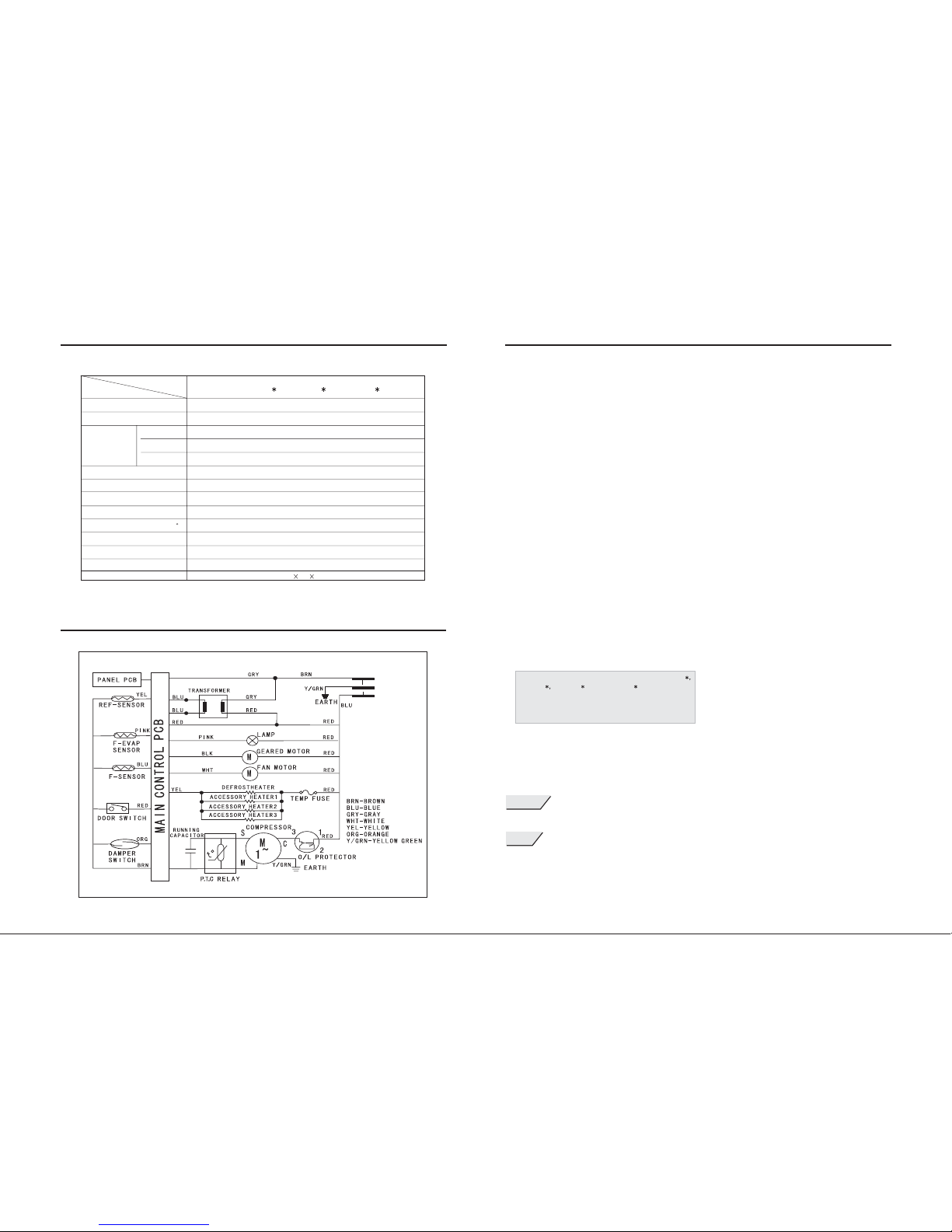
CIRCUIT DIAGRAM
DESCRIPTION
Climate type
Electric shockproof
Effective volume
(L)
Rated voltage& frequency
Totalinput power (W)
Frost thawpower (W)
Freezing capacitykg/24h
Refrigerating agentand dosage(g)
Weight (kg)
Visual dimension(width*deepth*hight)(mm)
Power consumptionkWh/24h(25 C)
MODEL
Totalvolume
Refrigerator
Freezer
Max.lighting power(W)
TECHNICAL PARAMETERS
WARNING
NOTES
1
16
CONTENTS
Parts description-----------------------------------2
Safety notes-------------------------------------------3
Pre-running issues-----------------------------------4
Installation and Placing notes--------------------5
Control panel introduction-------------------------6
Storing Foods----------------------------------------11
Maintenance and cleaning------------------------12
Dismount method of attachment ----------------13
Trouble shooting-----------------------------------14
Technical parameters and circuit diagram----16
Welcome to buy the world famous brand samsung refrigerator!
Please read this manual and use it as instructed. The messages marked with
"Warning" and "Notes" were about safety and of high importance.
Please read it carefully and repeatedly.
Which means it is possible to cause potential and severe damage
about dangerous issues if the instructions not followed.
Which means it may cause slight damage or performance
failure if certain cases not avoided.
This manualincludes three similarmodels of RL33SB
RL33EA RL33EB ,where RL33EB is dominater
by discriptions.
RL33SB RL33EB RL33EA
Page 3
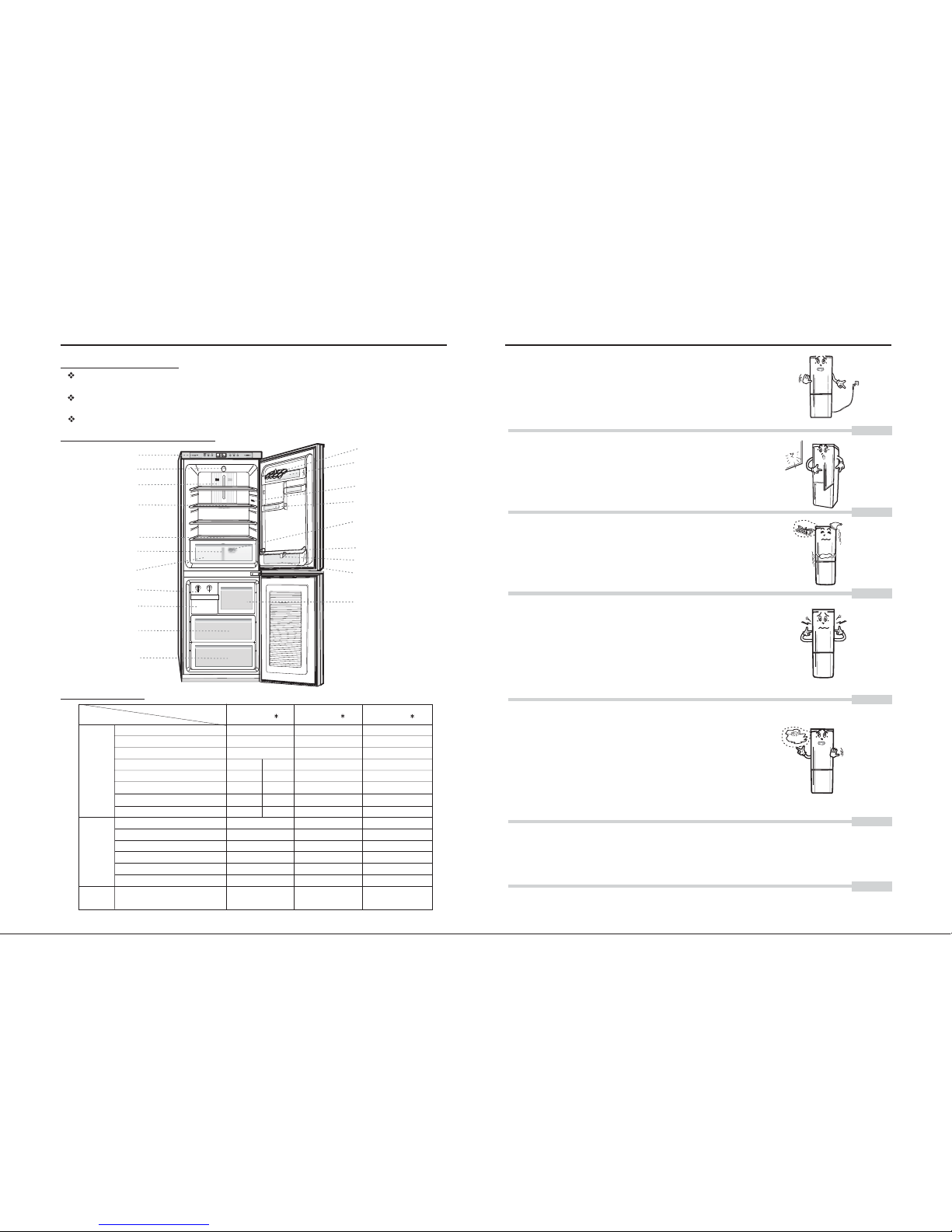
PARTS DESCRIPTION
Product features
Indirect coolingand frost-free: Therefrigerator is thetype of intervalcooling and frost-free,
auto defrostand even cabinettemperature.
Double temperaturedisplay and doublecontrol modes:
The temperatureof both coolingand freeze cabinetscan be readand controlled respectively.
Revolving icebox:convenient for ice-makingand its preservation.
Structure introduction
Tray egg
Egg guard
Can guard
Temperaturesensor
Steel frame
Bottle separationsheet
Bigbottleguard
Small drawer(option)
Control panel
Lamp cover
Air ventilationcover
Preservation cabinetshelf
Fruit boxcover
Fruit separationsheet
Fruit box
Revolving icebox(option)
Ice storagebox(option)
Upper drawer
Lower drawer
Attachment
Description
Model
Cabinet attachment
Door attachment
Printed
documents
Preservation cabinetshelf
Fruit boxcover
Fruit box
Revolving icebox
Ice storagebox
Smaller drawer
Upper drawer
Lower drawer
Egg guard
Can guard
Big bottleguard
Tray egg
Bottle separationsheet
Steel frame
Sterilized &deodorized
fresh-keeping box
(behind fruitbasket)
TROUBLE SHOOTING
Refrigerator stops working
- The plug is connected improperly .
-
-
-
-
Hot insummer.
The dooris opened andclosed frequently.
The temperaturesetting is toolow.
The ventilationoutside of theunit is inbad situation.
Long time running takes place
-
-
-
The temperature setting is too low.
The foodstuff is in contact with the back cold
resource.
The appliance is under the state of deepfreeze.
The foodstuff in the refrigerator was frozen up.
-
-
-
-
-
-
The inner items are not evenly placed.
The refrigerator is installed unevenly.
The unit is located too close to wall.
The external refrigerating pipe is in collision with
each other or the unit wall.
There are foreign objects behind or under the unit.
The noise is generated during compressor operation.
Refrigerator emits noise
-
-
-
-
The dooris not shutproperly.
The temperaturesetting is toohot.
The doorgasket is damagedor deformed, whichimpairs the
sealing effect.
The refrigeratoris laid nearheat resource andexposed in
the sunlight.
- The refrigerator is stuffy inside.
When the freezing function is not adequate.
- The drainage outlet is blocked.
The water result from frost thaws floods
in the refrigerator.
If it still does not work with above causes, please ask help from the appointed repair station
with The Repair Guarantee Card, or call the SAMSUNG Technical Service Center.
2
15
3
1
1
1
2
1
1
1
1
RL33SB
RL33EB
RL33EA
3
1
1
1
1
1
1
1
1
2
1
1
1
1
3
1
1
1
1
1
1
1
1
2
1
1
1
1
User manual
11 1
C C
0
0
0
2
1
1
1
1
1
1
Page 4
In caseof discard therefrigeratory, please discard the
door sealat first.
If the supply cord is damaged, it must be replaced by the
manufacturer or its service agent or a smililar qualified
person in order to avoid hazard.
The power cut-off should not be reconnected within 5
minutes to prevent the compressor being damaged.
Cautions:
Never use the combustible sprays like lacquer and
paint near the machine for those will cause blasting
hazard.
Don't let children play with or hang on the unit as this
will damage the unit or hurt children.
Neither store inflammable, explosive items, strongacid
and alkali corrosive items, such as butane, ether,
benzene, sulfuric acid, gas, alcohol and so on, nor put
the bottled fluid food in the freezer as the bottle might
crack.
When the refrigerator works in malfunction, or is damaged,
operation shall be stopped immediately. Cut off the power
and call the local service center.
Damaged power cord should be replaced by the manufacturer
representatives or the personnel with same qualification.
Do not splash the water to the unit back as this will impair
the insulation.
SAFETY NOTES
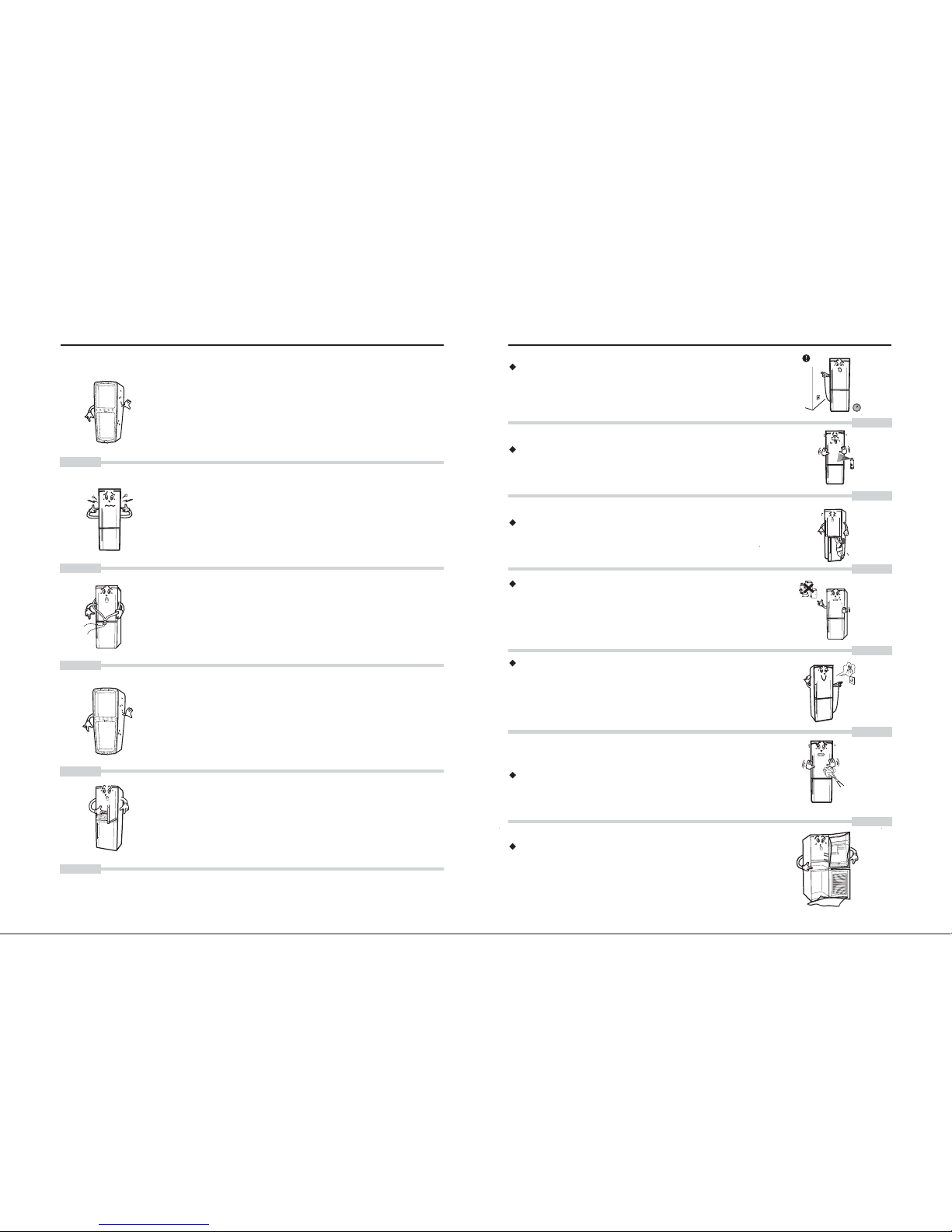
TROUBLE SHOOTING
--For the sake of restraining water steam condensing on
the unit frame, the frame is embedded with dew proof
pipe that will heat during the unit operation. It is not a
problem.
In both sides of the refrigerator was fitted with devices
to drive off heat (condenser).
The front or side wall grows hot
Ice crack sound.
- While refrigeratory starting to run or stopping,
temporary ice crack sound may be heared because
the inner mechanisms occured inordinate heat
expansionthe or cold shrink caused by severe
temperature change,which is not a failure.
Bicker is heard.
--It's the sound arising from refrigeration agent when
it flows.
It is not malfunction.
--The environment is too moist.
Not a trouble, just wipe it by cloth.
Dew appears on the inner bottom and frame.
--It occurs when the door is open for a long time.
The fluid food is not sealed.
Dew is found in the fruit and vegetable room.
3
14
Page 5
SAFETY NOTES
Please referto product's modeland No. whilecontrasting each other;
Before power supply connected, please makesure the matching between refrigeratory's voltage
range and supplied voltage. The optional voltage range is from 220V to 240V; if power supply not
meeting the requirement, then the auto-transformer with minimum 500 W output power should be used.
In case of power supply shutdown, wait for 5 minutes or longer interval for runningagain lest compressor
damaged.
Do not place food near temperature sensor lest negative effects to correct display of temperature sensor;
In hot seasons, avoid to keep door open long time or to open and close frequently, otherwise the
efficiency of totalset shall be weakened, and the running loadshall also be increased.
Keep in mind and do notreverse or make it lie down. If necessaryto make it incline,the gradient between
cabinet and ground should be less than 45 degree;
Do not move it by holdingdoor handle; or to pull or draw thedoor handle forcibly;
If abundant hot items placed in at one time, keeping it open long time or opening frequently, the cabinet
temperature shall be increased, and temperature display also flashes. usually it shall recover within 24
hours.
PRE-RUNNING ISSUES
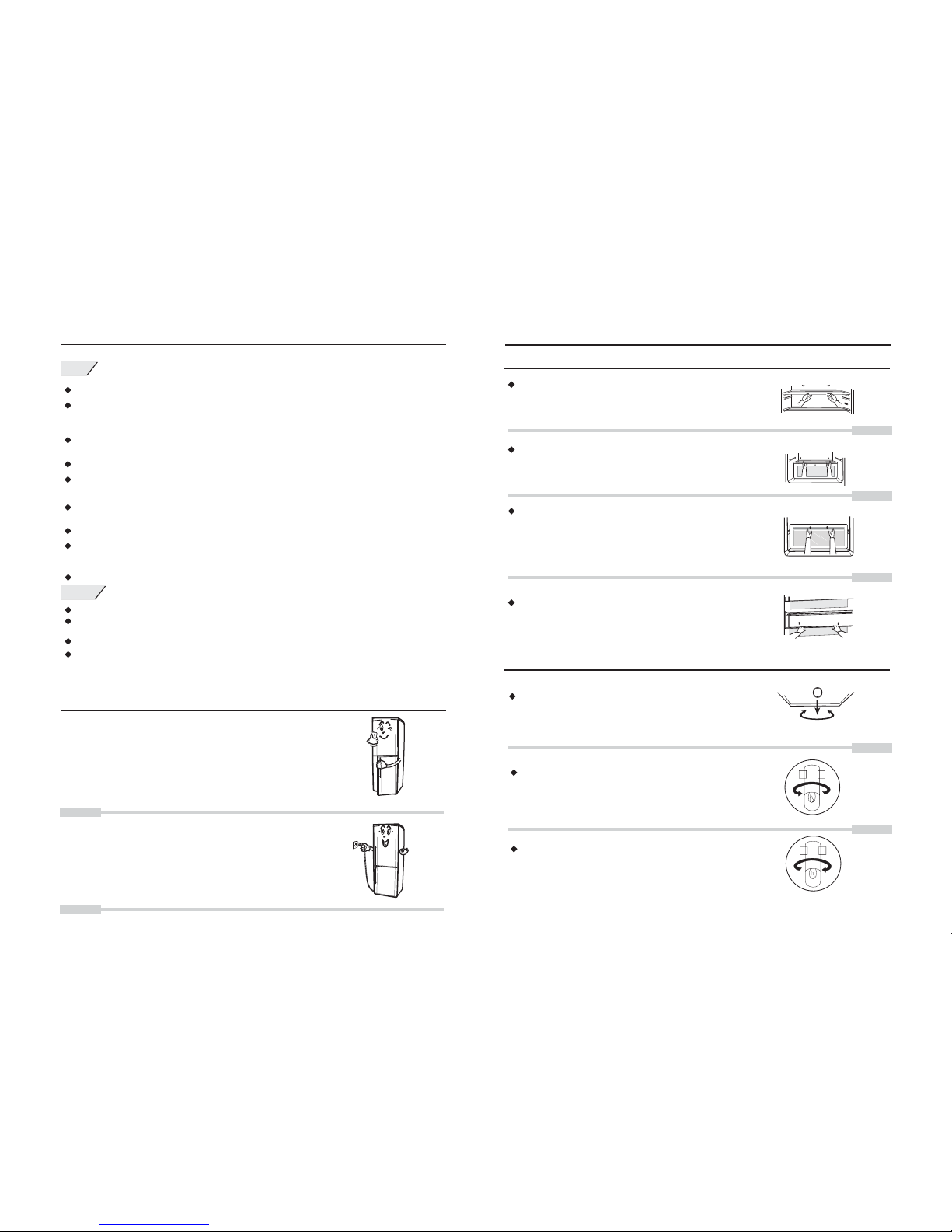
1. Removeall package materialand remove
bottom padbefore running.
2. Makethe interior andexternal clean withmild wet cloth
( littlenatural cleaner canbe added tomild water).
3. Keepit ready andafter 1 hour, plug inthe power supply.
Please referto the upperindication and conductrelative
operations.
The appliance must be installed sothat the plug is easily accessible .
Keep ventilation openings, in the appliance enclosure or in the build-in structure, clear of obstruction.
Do not use mechanical devices orother means to accelerate the defrosting process, otherthan those
recommended by the manufacturer.
Do not damage the refrigerant circuit.
Do not use electrical appliances insidethe food storage compartments of the appliance, unlessthey
are of the type recommended bythe manufacturer.
DISMOUNT METHOD OF ATTACHMENT
Attachment application
Fruit BoxCover
Toraise up therear portion, thentake it out.
Cabinet Lamp Replacement
Draw outthe plug ofpower supply
Toloose the screwbehind the lampcover. Andtake out
lamp cover by means of unclenching along itsedge with
flat screw-driver.
To screw out the bulb anti-clockwise.
To screw in new bulb clockwise.
Toembed lamp coveragain and fixthe screw behind
lamp cover.
Lighting lampspecification: 220/240V, 20W ,E14
Lift the shelf head and pull it out. (Position the
shelf as per the container height)
Refrigerator shelf
Freezer tray
Draw out it till the block, lift the shelf rear and
pull it out.
Egg guard and bottle guard
Lift themup to takethem down.
In caseof heavy foodstuff preserved in the drawer,
hold drawerup slightly andpull it back.
4
13
WARNING
NOTES
Page 6
Waterline
MAINTENANCE AND CLEANING
Door Seal
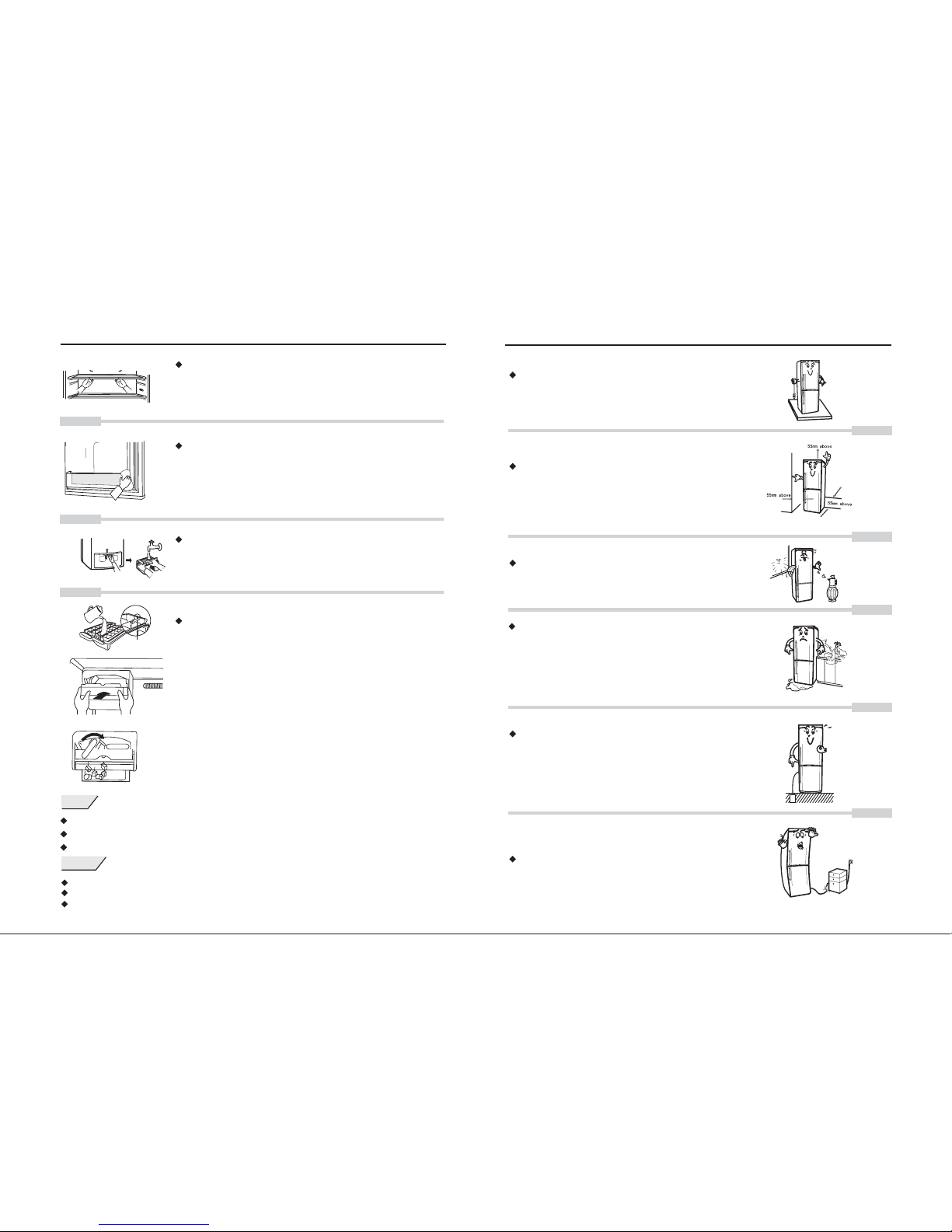
Toremove and cleanthe door seal,use the stickwrapped
by cottoncloth to cleanthe notch position.If cleaned with
water, then toclean it dry.
Ice Making Method
Fill waterinto revolving icebox until waterline arrived;
place theice box carefullyto the ice-makingshelf.
When takingout ice, turnthe revolving icebox clockwise
to itsend and releaseit. Then icecan be loosedfrom ice
making box.Store the icein preservation box.
Todraw out theplug of powersupply;
Tomake sure nowater in lampcover;
Toclean with neutralcleaner(recommended)
Interior parts
Dismantle all shelves, bars, trays, covers and
drawers, andclean with awarm damp clothwiper.
Water tray
Screw offthe screw inthe compressor cover, pull
up the water tray lightly and draw it out. Fix it as
before afterwashing.
Glass separationis moveable andvery heavy. Please takecare of childrenno touching lestinjured.
If theplacement of refrigeratoris not stableenough, it mayproduce abnormal noise.
For firsttime running, ittakes long timeto cool downfrom room temperatureto setting temperature.
usually itstops in 3hours and keepsnormal running later.
INSTALLATION AND PLACING NOTES
The refrigerator should be placed on the flat and
firm floor. In case of any unevenness, regulate the
adjustable foot under the body to level the refrigerator
(counterclockwise means rising).
The refrigeratorshall be awayfrom hot resource
and directsunlight.
Don't place the refrigerator in moisture as the metal
parts will get rust and impair the insulation effects.
In the event of natural disasters (such as rainstorm,
accidents), the submerged unit shall not be put into
use until nominated SAMSUNG service center
repairs it and proves that it is in good condition.
Ground properly for personal safety.
The refrigerator shall not be grounded via phone
wire or gas pipe.
Don't press the power cord.
5
12
leave 55mm between theback of theunit,
55 mmbetween the unitand the walland
55 mmabove.
WARNING
NOTES
Page 7
The tropicfruit, such asbananas and pineapples,were not suitable
to preservein the refrigerator;
Do notstore the itemswith rigorous temperaturerequirements, such
as bloodserum, bacterin, academicdata and soon.
Pack the foods with freshness reserving bags (films)
or seal the food container with a lid to prevent drying
or bad odor escaping.
STORING FOODS
Hot food and drink should be cooled to the room
temperature before putting into the refrigerator.
The cooked and raw foods shall be placed separately.
Please do not put the goods near the temperature
sensor to ensure the correct indication of
temperature.
Store foods in smaller portions.
Dry the fruits and vegetables for storage after
washing.
Fruits and vegetables shall be placed in the fruit and
vegetable room to retain their water content and
freshness.
C C
C C
CONTROL PANEL INTRODUCTION
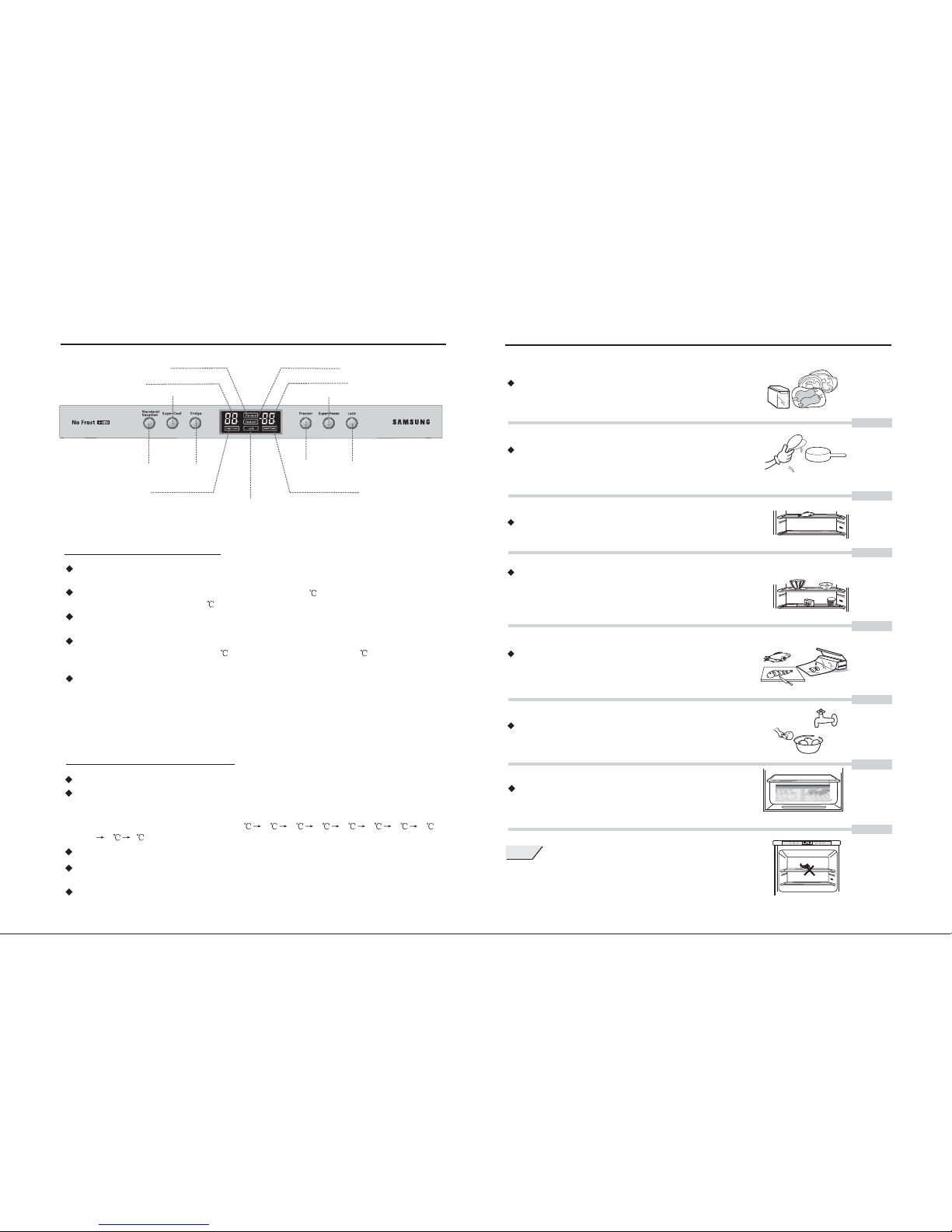
Standard indication
Vacationindication
Super CoolButton
Refrigerator Temperature
Freezer Temperature
Super Freeze Button
Standard/Vacation
Button
Fridge Button
Freezer Button
Lock Button
Super Coolindication
Super Freezeindication
1. Standard/Vacation Button
1-1. For saving energy, this product has three running modes: Standard , Vacation
and user setting;
1-2. Standard : the refrigerator temperature was set to 5 , the freezer temperature was
settorunat-18 .
1-3. Vacation: The refrigerate cabinet doesn't work, where the freezer keeps normal
running;
1-4. User setting: The user setting modes covered all conditions except refrigerator
temperature at 5 and freezer temperature at -18 .(Where in
user setting mode, there was no indication of "User Setting").
1-5. In case of first time power supplied, the refrigerator starts to run automatically
in the mode of tandard ; upon Standard/Vacation Button pressed down, the
running modes shall skip repeated along the cycle of "Standard ", "Vacation" and
"User setting".
In case of not user setting, the running modes shall be selected by the turn of
"Standard " and "Vacation" when the Standard/Vacation Button was pressed.
"S " " "
""
2. Fridge Button
2-1. Press down the button to set refrigerator temperature.
2-2. Press down the Button and you will hear "Ringing". The indicator displays
the current setting of refrigerator temperature.Press the button again to change
the setting of refrigerator temperature. Each pressing will make temperature
setting display as following steps 5 4321987
65.
"Fridge"
2-3. Pressing down the temperature button every time will make a "Ringing" sound;
2-4. The setting value shall be confirmed once stopping pressing 5 seconds. it displays
the current setting of refrigerator temperature.
2-5. There was no refrigerator temperature indication in the mode of "Vacation . No
pressing sound produced after button pressed down.
"
Lock statusindication
6
11
NOTE
(RL33EA*,RL33EB*)
Page 8
3. Freezer Button
3-1. Press Freezer Button to set freezer temperature.""
3-2. Pressdown the Freezer Button and you will hear "Ringing".The indicator
displays thecurrent setting offreezer temperature.Press thebutton again to
change thesetting of freezer temperature. Each pressing will make temperature
setting displayas following steps-18 -19 -20
""
-21 -22 -23
-15 -16 -17 -18 .
3-3. Pressingdown the Freezer Button every time will make a Ringing" sound;"" "
3-4. The setting value shall be confirmed once stopping pressing 5 seconds.
It displaysthe current settingof freezer temperature.
3-5. The freezer temperature can be set in any mode.
4. Open-door alarm Function
4-1. Incase of refrigeratordoor keeping openin a longtime, it willmake "Hooting"
sound toremind you toclose the door.
5. Super Cool and Super Freeze Buttons
5-1. It is recommended to use this function in case of abundant food preserved in the
cabinet or any requirements of Cool ;"Super "
5-2. Press down the Cool Button in the upper panel to enter the status of
Cool , and "Super Cool characters can be read there.
"Super "
"Super " "
5-3. Press the button again to exit the mode of Cool or after 1.5 hours' successive
and Cool , it shall automatically exit the mode of Cool .
"Super "
"Super " "Super "
5-4. It is recommended to use this function in case of abundant food preserved in the
cabinet,making ice or for any requirements of Freeze ;"Super "
5-5. Press down the Freeze Button in the upper panel to enter the status of
Freeze , and "Super Freeze characters can be read there.
"Super "
"Super " "
5-6. Press the button again to exit the mode of Freeze or after 2 hours' successive
and Freeze , it shall automatically exit the mode of r Freeze .
"Super "
"Super " "Supe "
5-7. The temperature of r Cool and r Freeze can be set in the mode of
er Cool , but actually it will run after exitting the Freeze Mode.
"Supe " "Supe "
"Sup " "Super "
6. Failure Alarm Function
6-1.Tocall professional personnelfor repair incase of following problems occured.
6-2.The temperatureindication displays as" ", " " or " ", it showsthat the
refrigerator worksin trouble; tillrepair,it will run as time settingof starting and
stopping.
""
CONTROL PANEL INTRODUCTION
FIRST POWER SUPPLY & TEMPERATURE ADJUSTMENT
7
10
When the power is switched on, all lamps are alive for 2 seconds and
the appliance enters the setting mode (3 lamps on) automatically,
leaving the refrigerating temperature at 5 and the freeze temperature
at -18 .
The appliance generally runs at the default temperature (3 lamps on) that
may be adjusted by the user for particular purposes.
(RL33EA*,RL33EB*)
Page 9
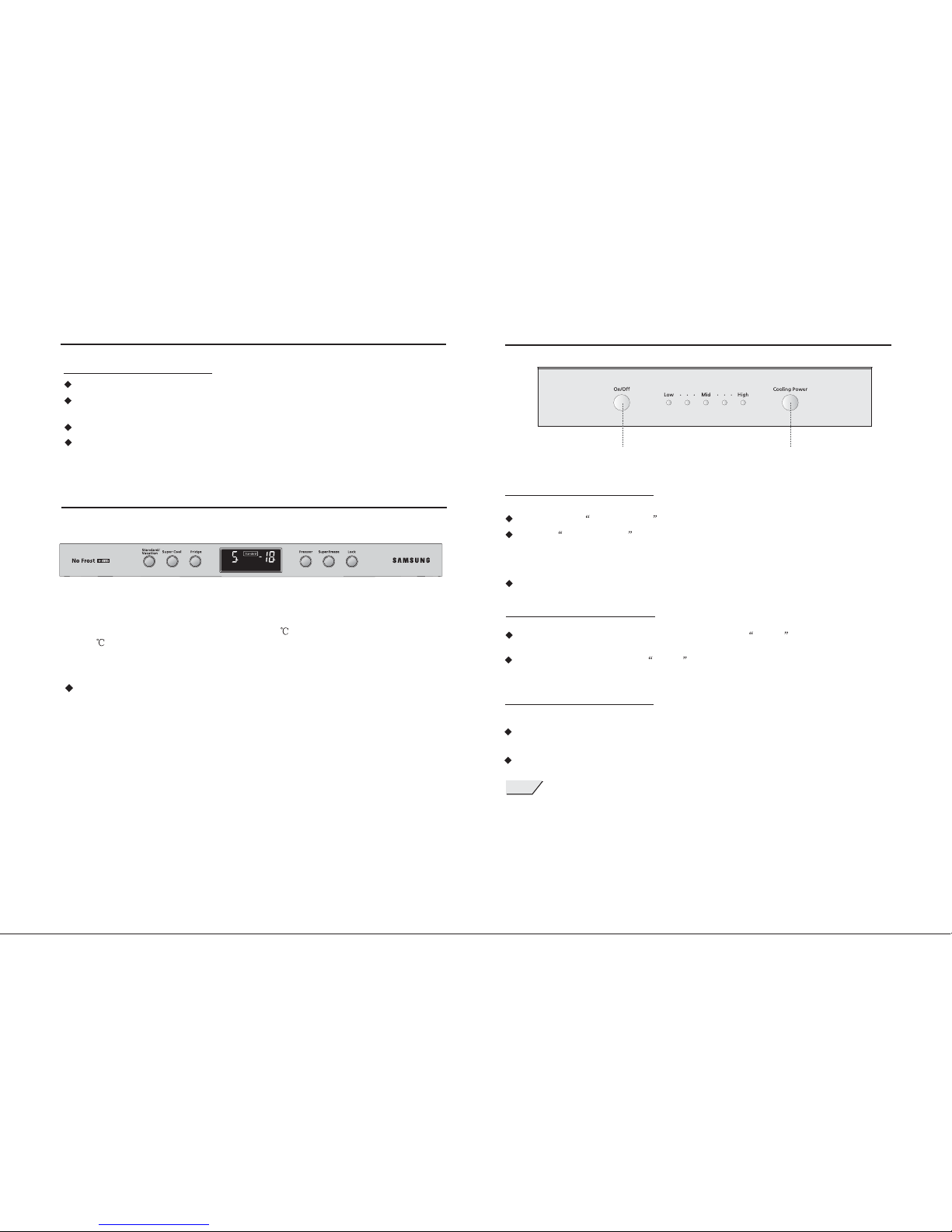
7. Lock Function
7-1 After setting and 2minutes passed, itentered the automaticallock status;
7-2 The lock indication shows that, upon button pressed, there were no pressing
sound orrelative responses.
7-3 Inlock status, press ock button in the control panel to unlock the setting."L "
7-4 Inunlock status, press Lock button in the control panel to lock thesetting.""
FIRST POWER SUPPLY & TEMPERATURE ADJUSTMENT
Upon power supplied, all indications read as 2 seconds. The "Standard "
displays as refrigerator setted to run automatically in the standard mode.
The temperature setting of refrigerator is 5 , where that of freezer
is -18 . The temperature of cooling and freeze cabinets shall display with
the music of activating running.
To set cabinet temperature. It is common to run in the standard mode,
and also adjustable based on the actual use requirements of users.
CONTROL PANEL INTRODUCTION
3-1.Inform authorized personal for repair service in case of any following problems
happening;
3-2.When indicationlamp flashing, itshows the refrigeratoris in trouble.
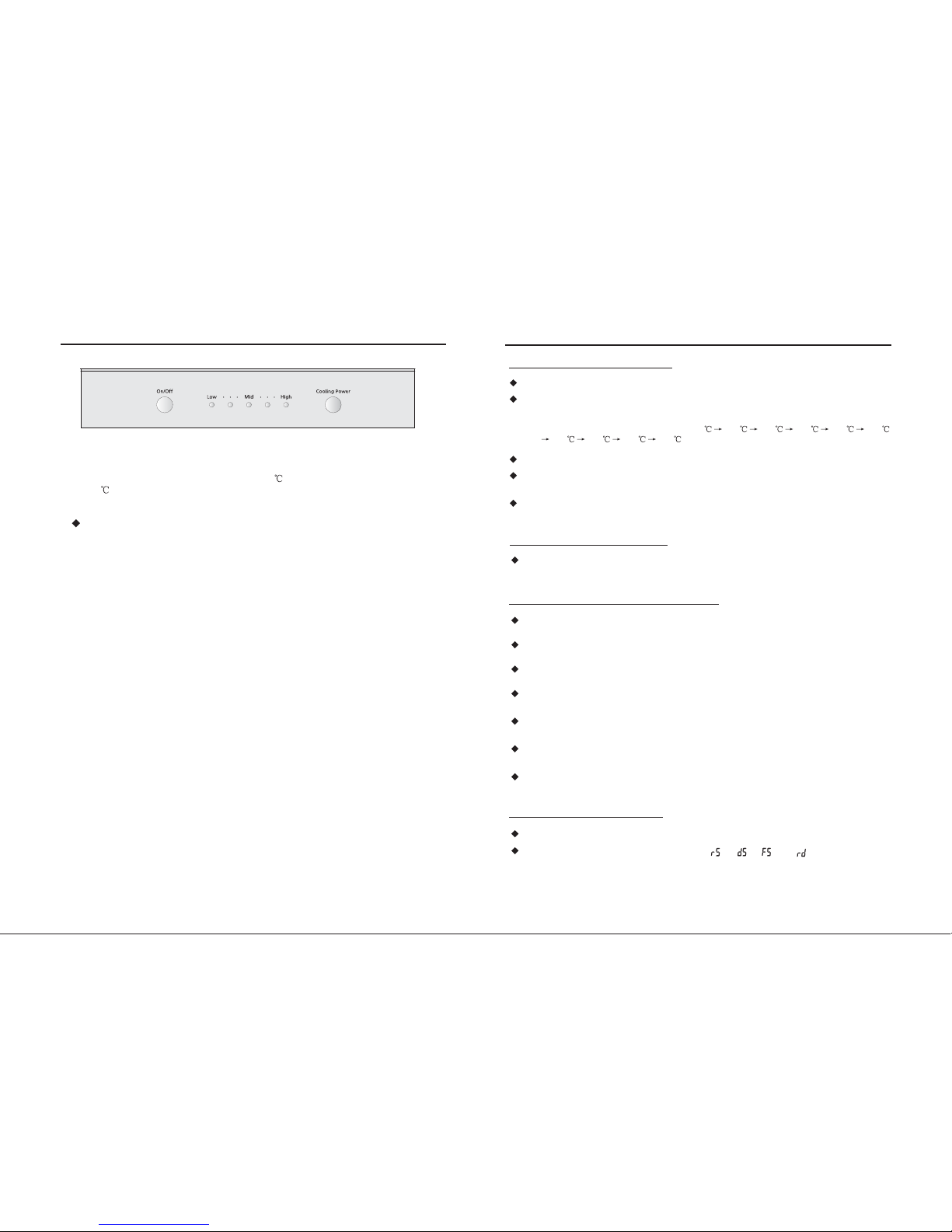
1-1.Press down Cooling Power Key and set refrigeration temperature.
2-1.While refrigerator is running, keeppressing down On/Off Key 3 seconds and all
indication lamps light off. The refrigerator stops running.
2-2.In case of repressing down On/Off Key 3 seconds, the refrigerator recovers running.
CONTROL PANEL INTRODUCTION
1.Cooling Power Key
2.On/Off key
3.Failure Running Function
Disconnect the plug from power socket for any cleaning service.
9
8
1-2. Ifthe Cooling Power Key is activated, the appliancewill display thecurrent setting
that maychanged by repeatpressing actions. There are 5 temperature options you
may take.The temperature setting will change in cycle with key press. More are the
lamps on,the temperature islower.
1-3. Somesetting is confirmedand shown asthe current temperatureafter a pauseup to
5 seconds.
C C
NOTE
(RL33SB*)(RL33EA*,RL33EB*)
On/Off Key Cooling PowerKey
 Loading...