

Page 1
DA68-01471B
OWNER'S INSTRUCTIONS
MODEL:
RL29TAV*
RL31TAV*
Register yourproduct at www.samsung.com/global/register
Please readall the safetyprecautions included inthis manual priorto use
and retainthis manual properlyfor future reference.
Please readthrough this manualbefore connecting topower and keepit
for futurereference.
Any changerelating to thismanual will resultin no additionalnotice due to
continuous improvementmade on ourproducts.
Page 2
1
14
1~
M
M
S
t
C
3
AC220V/50Hz
P. T.C R EL A Y
2
1
M
M
CONTENTS
Parts Description-------------------------------------2
Safety notes--------------------------------------------3
Pre-running Issues-----------------------------------4
Installation and Notes--------------------5
Control Panel Introduction-----------------------------6
Storing Foods(close gap)------------------------------9
Maintenance and Cleaning----------------------------10
Dismount method of attachment ----------------11
Trouble Shooting(close gap)--------------------------12
Technical Parameters and Circuit Diagram----14
Positioning
This instructionincludes two similar models ofRL29TAV* and RL31TAV*,
where RL31TAV* isdominated by thisdescription.
* RepresentativeColor:
S-Titanic Silver, W- SnowWhite, P- PearlBlue
WARNING
PRECAUTIONS
This meansit is possibleto cause potentialand severe damage
if theinstructions are notfollowed.
This meansit may causeslight damage orperformance
failure ifin certain casesit is notavoided.
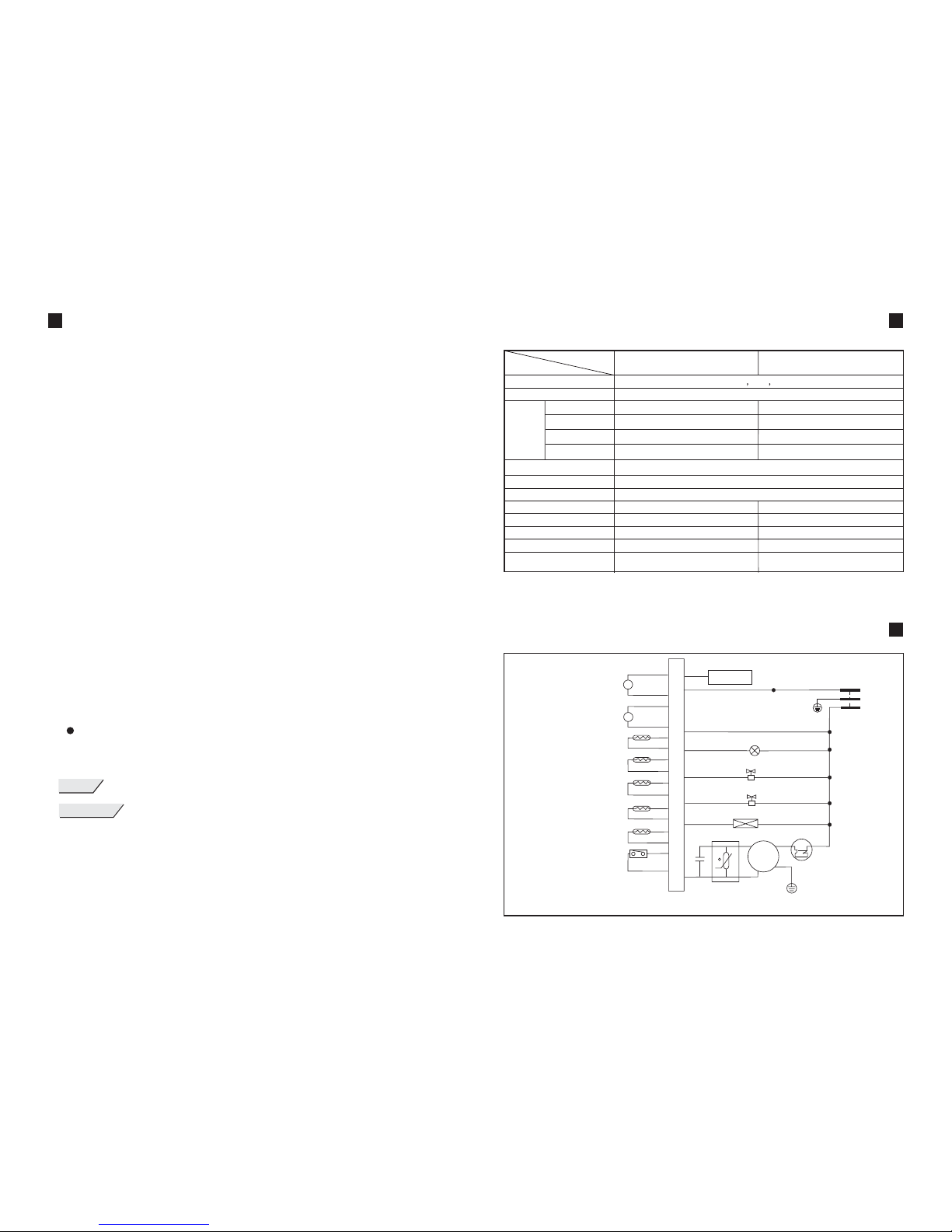
TECHNICAL PARAMETERS
CIRCUIT DIAGRAM
Climate type
Electric shockproof
Available
Capacity
(L)
Rated voltage/frequency
Totalinput power (W)
Lamp max.power (W)
Power consumptionkWh/24h
Freezing capacitykg/24h
Refrigerant anddosage(g)
Weight (kg)
Overall dimension
Tot al
Refrigerator
Freezer
CoolSelect Zone
(width*depth*height) (mm)
Name
Model
0.69
252
134
50
68
15
R600a,52g
595*679*1766
220V-240V /50Hz
110W
25
~
78
ST SN N
I
270
152
50
68
15
R600a,53g
595*679*1851
RL29TAV* RL31TAV*
0.70
82
Refrigerated Compartment Fan (8V)
CoolSelect ZoneFan (8V)
TemperatureSensor 1
TemperatureSensor 2
TemperatureSensor 3
TemperatureSensor 4
TemperatureSensor 5
REF Switch door
YEL
BLU
WHT
BRN
BRN
WHT
GRN
BLU
RED
YEL
BRN
BLK
RED
DISPLAY
BLK/WHT
YEL
BLU
BRN
MAIN CONTROLPCB
GRY
Y/GRN
EARTH
RED
RED
RED
RED
RED
RED
BLU
Solenoid Valve
LAMP
Solenoid Valve
COMPRESSOR
Y/GRN
EARTH
RUNNING
CAPACITOR
Electrical Heater
O/L PROTECTOR
Please read this manual and use it as instructed. The messages marked with
"Warning" and "Notes" are about safety and of high importance.
Please read it carefully and repeatedly.
BRN-BROWN
BLU-BLUE
GRY-GRAY
WHT-WHITE
YEL-YELLOW
ORG-ORANGE
Y/GRN-YELLOW GREEN
Page 3
2
13
RL29TAV*
23 2 121
11 21 1 1 1
23 2 121
11 22 2 1 1
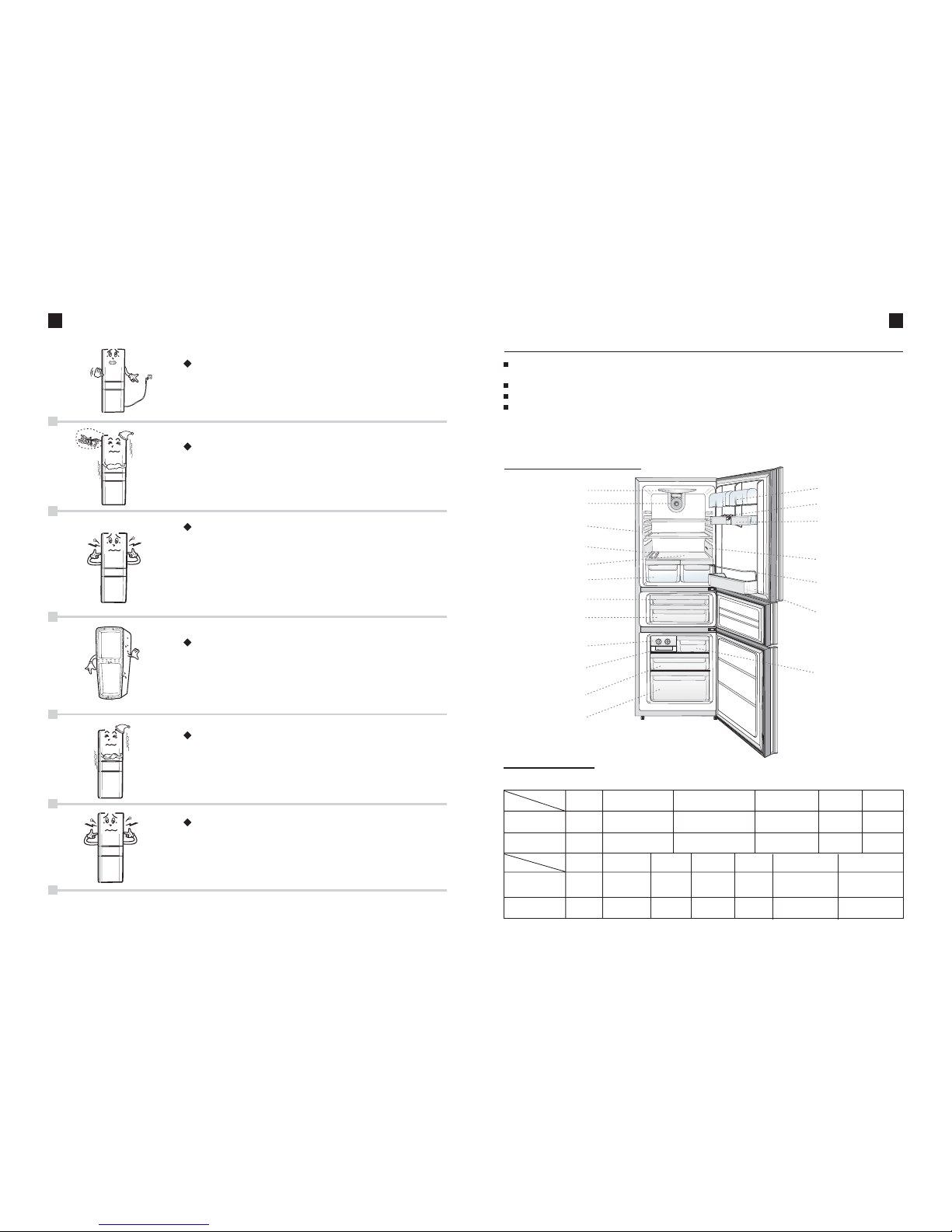
PARTS DESCRIPTION
Product features
Multiple Functions:
Stylish Appearance:
3-D Cooling:
The CoolselectZone can beswitched; six -levelthermo-regulation for variable
temperature freezer;quick-freezing, quick coolingand Vacation function, etc.;
LCD display, all contributing to aluxury style .
Using directcurrent blower fan,dynamic cooling witha more uniformtemperature in the
chamber.
Efficient andEnergy Saving: Usinghighly efficient compressor, saving energy with lownoise;
Structure introduction
Lamp Cover
Air DuctCover
Shelf
Vegetable Crisper Cover
Wine Shelf
Vegetable Crisper
CoolSelect Zone
TopDrawer
Twist Icemaker
Ice StorageTray
TopDrawer
Middle Drawer
Bottom Drawer
Dairy Tray
Egg Tray
Can Guard
TemperatureSensor
Steel WireGuard
BigBottleGuard
Attachment
Shelf
Drawer
(Top/Middle/Bottom)
CoolSelect ZoneDrawer
(Top/Bottom)
Vegetable Crisper
Cover
Vegetable
Crisper
Ice storage
Tray
Wine Shelf
Dairy Tray
Can Guard
Egg Tray
Steel WireGuard
BigBottleGuard
Name
Model
TROUBLE SHOOTING
The refrigeratoris not working
- The plug is not connected correctly.
- The power is not connected.
- The refrigerator plugs in again after power failure
for lessthan 5 minutes.
The foodstuffis frozen
- Theset temperature istoo low.
- The foodstuff is stored close to cold sourceon the back
wall.
- The refrigerator is in the Super Cool mode.
The noiseis produced inthe unit
- Thefoodstuff is not placedevenly.
- The setting is not stable.
- The unit is placed too close to the wall.
- The outer freezing duct collides with each other or itis
pressed againstthe refrigerator wall.
- There are foreign objects at the back and bottom ofthe
unit.
- The noise is produced when the compressor is running.
The frontframe or theside plate ofthe refrigerator
heats
- Theris the anti-condensation pipe installedin the unitto
avoid vaporcondensation on theframe and theheat is
produced whenthe unit isrunning. That is not a failure.
- There are heat sinks (condenser) installed mounted on
both sidesof the refrigerator.
Frost onthe back wallof the Fridge
- Itis a normalsituation when therefrigerator runs.
- Itwill automatically disappearafter the unitstops working.
-The foodand the foodcontainer cannot bepressed against
the backplate.
The Icecracks sound isheard
After followingthe troubleshooting andthe problem isnot improved, pleasevisit the
appointed service centers with Product Warrant Certificate for the service
or contactSAMSUNG technical servicecenter.
special " "
Twist
Icemaker
RL31TAV*
RL29TAV*
RL31TAV*
CoolSelect Zone
Bottom Drawer
Name
Model
When theunit is startedor stopped, theice cracking sound
is heardfor a whilebecause it iscaused by theimbalanced
expansion orshrinking of theinternal parts dueto the
extreme temperaturechange. This is not a failure.
Page 4
3
12
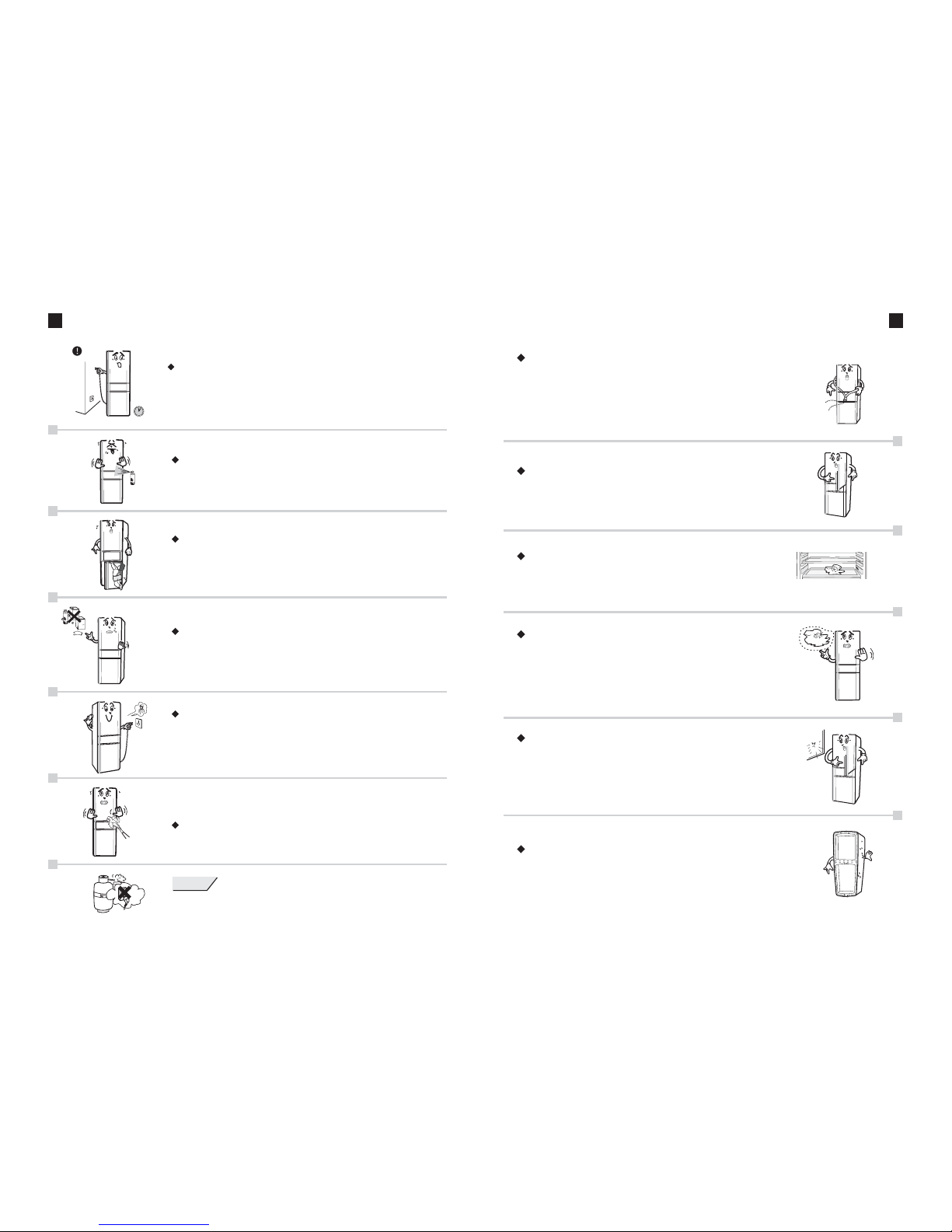
SAFETY NOTES
Do notuse flammable gasnear the refrigerator, such as
spray-paint, coating,etc, in caseof danger ofexplosion.
Note: Donot place therefrigerator outdoor orexpose to rain.
Do notlet children playand hang onthe refrigerator toavoid
injury andthe damage ofthe apparatus.
Do notstore any flammableand explosive dangerousgoods,
strong acid,alkaliand other corrosivesubstance, such as
butane, aether, benzene, vitriol, gasoline, alcohol, etc.
Do notplace bottled liquidfoodstuff into the freezer,
otherwise, thebottle will crackdue to the .frost
When therefrigerator cannot runnormally or isdamaged,
please donot continue touse. Disconnect thepower and
call thelocal service centerimmediately.
If thesupply cord isdamaged, it mustbe replaced bythe
manufacturer ortheir service agentor a similarqualified
person inorder to avoidany hazard.
Do notspray water directlyonto the refrigeratordoor and the
electrical componentsin order toavoid any accidents.
WARNING
If theris a gasleaks, it isnecessary to closethe gas valvefirst and take
measures toventilate and exchangeindoor air. Do notpull out theplug
first, becauseit may createsparks which cancause accidents.
TROUBLE SHOOTING
The abnormalsound is heared.
- Whenthe sound likestream flowing isheard,it is causedfromthe
refrigerant flowingbut it isnot a failure.
- Whenthe rattle sound is heard,it iscaused by the switching of
the solenoidvalve or relayaction and itis not afailure.
- Whenthe little enginesound is heardafter the unitstops functioning,
it iscaused by therotation of therefrigerator circulation fanto keep
the freezertemperature balanced butit is nota failure.
""
The defrostingwater enter intothe compartment
- Water outlet is clogged.
- Unplugthe refrigerator andclear the waterdrainage
channel.
Insufficient freezingof the Freezer
- The dooris not closedcorrectly.
- There is damage or deformation to the door seal orthe
sealing isloose.
- There is heat source near the refrigerator or it isexposed
to thedirect sunlight.
- The poor air circulation inside the refrigerator.
The refrigeratoris operating fora long period.
- Theambient temperature ishigher in summer.
- Openthe door toofrequently.
- The big load food is placed close to the temperaturesensor.
- The outside therefrigerator.poor aircirculatio
The frostis produced inthe middle girderand the frame
- Thefrost appears whenthe ambient humidityis high.
- Usethe soft clothto wipe theunit dry.
--It occurswhen the dooris open fora long time.
The fluidfood is notsealed.
If the supply cord is damaged, it must be replaced by
the manufacturer or their service agent or a similar
qualified person in order to avoid any hazard.
The power supply should not be reconnected within 5
minutes to prevent the compressor being damaged.
Cautions:
Dew isfound in thefruit and vegetableCrisper.
Page 5
11
4
SAFETY NOTES
- Whencomparing rated refrigerators,please check therefrigerator type andserial number.
- Beforeconnecting the power, please check if the refrigerator voltage range iscompliant
with thesupply voltage. The voltage range is 187-242V; to assure the use safely, the socket
and theconnecting wire mustsupport the circuitabove 10A;
- Whenthe refrigerator isconnected, the foodshould not beput into ituntil it iscooled
completely;
- Duringpower failure, therefrigerator should notbe connected untilfive minutes laterto
avoid anydamage to thecompressor;
- Donot touch theevaporator of thefreezer with wethands in casethe water onthe hand
freezes andsticks;
- Donot put foodstuff nearthe temperature sensorto avoid affecting thecorrect display of
temperature;
- Itis not necessaryto leave thedoor open fora long periodor frequently openand close in
high-temperature season,as this willreduce the unit'sefficiency and increase load during
the operation;
- Keepin mind notto overturn therefrigerator or positionhorizontally. When it is necessary
to incline,theslope between therefrigerator body andthe ground shouldbe larger than45
degrees;
- Donot move therefrigerator with thedoor handle orpull the handleup and downwith
extreme force;
- Pleaseclose the drawerbefore closing therefrigerator door toavoid damaging thedrawer;
- Whena lot ofhot things areput into therefrigerator once orthe door isopen frequently or
left openfor a longperiod , thetemperature in therefrigerator will increaseand the temperature displaywill flash. Usuallyit will returnto normal within24 hours;
WARNING
- Keepventilation openings, inthe appliance enclosureor in thebuilt-in structure, clear of
obstruction.
- Donot use mechanicaldevices or othermeans to acceleratethe defrosting process,other
than thoserecommended by themanufacturer.
- Donot damage therefrigerant circuit.
- Donot use electricalappliances inside thefood storage compartmentsof the appliance,
unless they are of thetype recommended bythe manufacturer.
PRE-RUNNING ISSUES
1. Disassembleall packaging components.The foam bottom mat must be
removed beforeoperating the unit.
2. Wipethe inner andouter of therefrigerator with warmand wet cloth
(It is to adda little neutralcleanser to thewarm water).
3. Letit stand forabout 1 hourand then plugin.
Be carefulto operate correspondinglyin accordance withthe content
on therefrigerator display window.
advisable
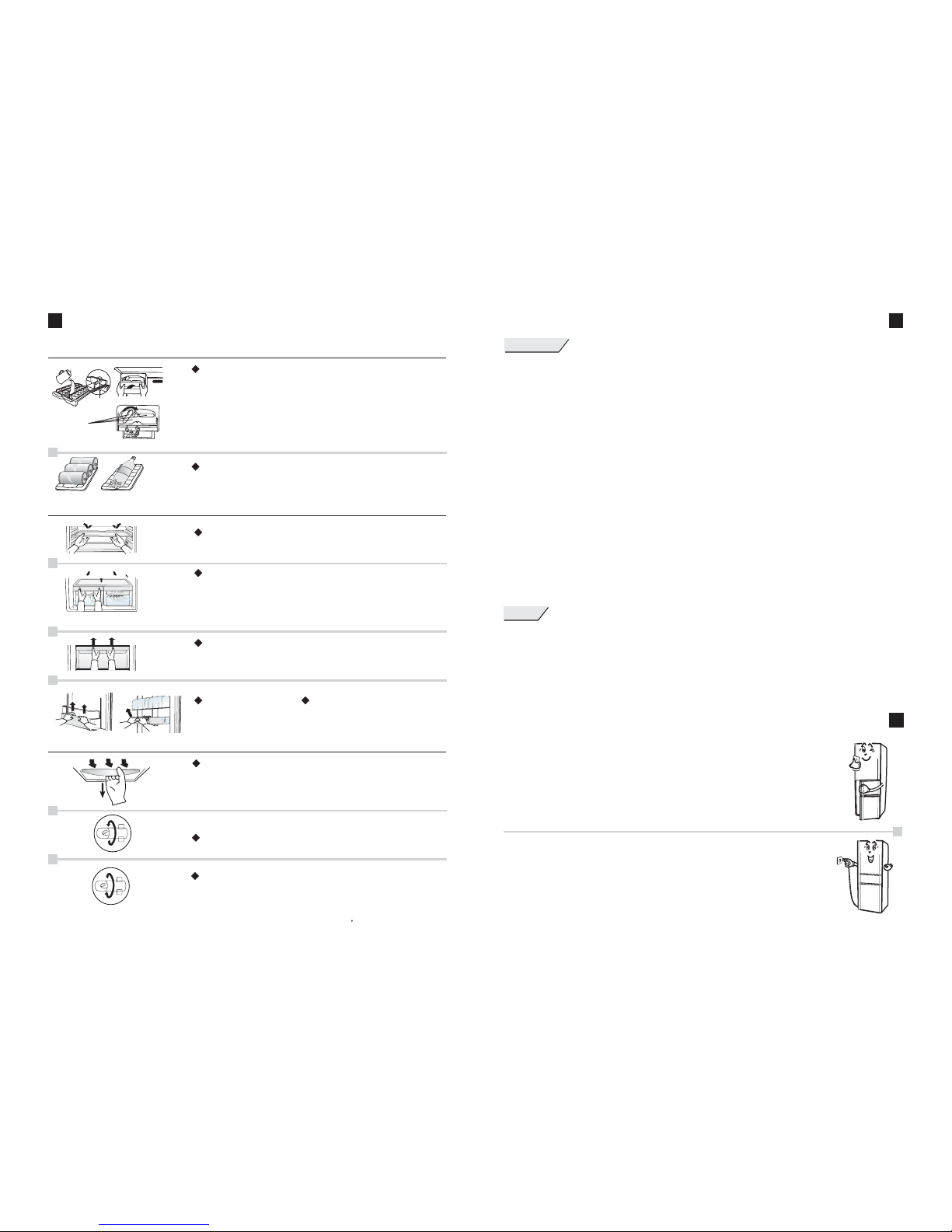
DISMOUNT METHOD OF ATTACHMENT
Use of accessories
Water line
Twisticemaker
button
Twist icemaker for Ice making
- Insertwater at roomtemperature into thet
until thewater reaches thewater line;
- Pressthe gently intothe ice makingshelf;
- Whentaking out theice, rotate the
clockwise tothe end andrelease it torebound. That will
separate theice cubes fromthe ice trayeasily and theice
canbestoredintheIceStoragetraydirectly;
wist icemaker
twist icemaker
twist icemaker
ShelfWine
Multi-functional hold 3tins drink
horizontally or1 bottled drinkvertically;
wine shelfcan
Disassembly of accessories
Refrigerator shelf
Lift therear of therefrigerator shelf totake it out.
Vegetable crisper and cover
Pull thevegetable crisper tillthe limit totake it out.
Lift therear of theVegetable crisper cover to remove it.
Freezer drawer
Pull itoutside to thelimit stop andraise, then itcan
be takenout.
Big BottleGuard
Lift itupward to removeit.
Dairy Tray and Can guard
Replacing the lamprefrigerator
Remove thepower plug.
Loosen off thescrew at theback of lampcover with the
philips driver. Squeeze the lamp cover with both hands
to deformit slightly toremove it.
Remove thebulb by turninganticlockwise.
Install thenew bulb byturning clockwise.
First lockthe hook atthe front ofthe lamp cover, then
lock thehook at theback of thelamp cover.And finally
tighten thescrew.
Lamp parameter:220V/240V,25W E14
PRECAUTIONS
Page 6
5
10
Above 55mm
Above 300mm
Above 55mm
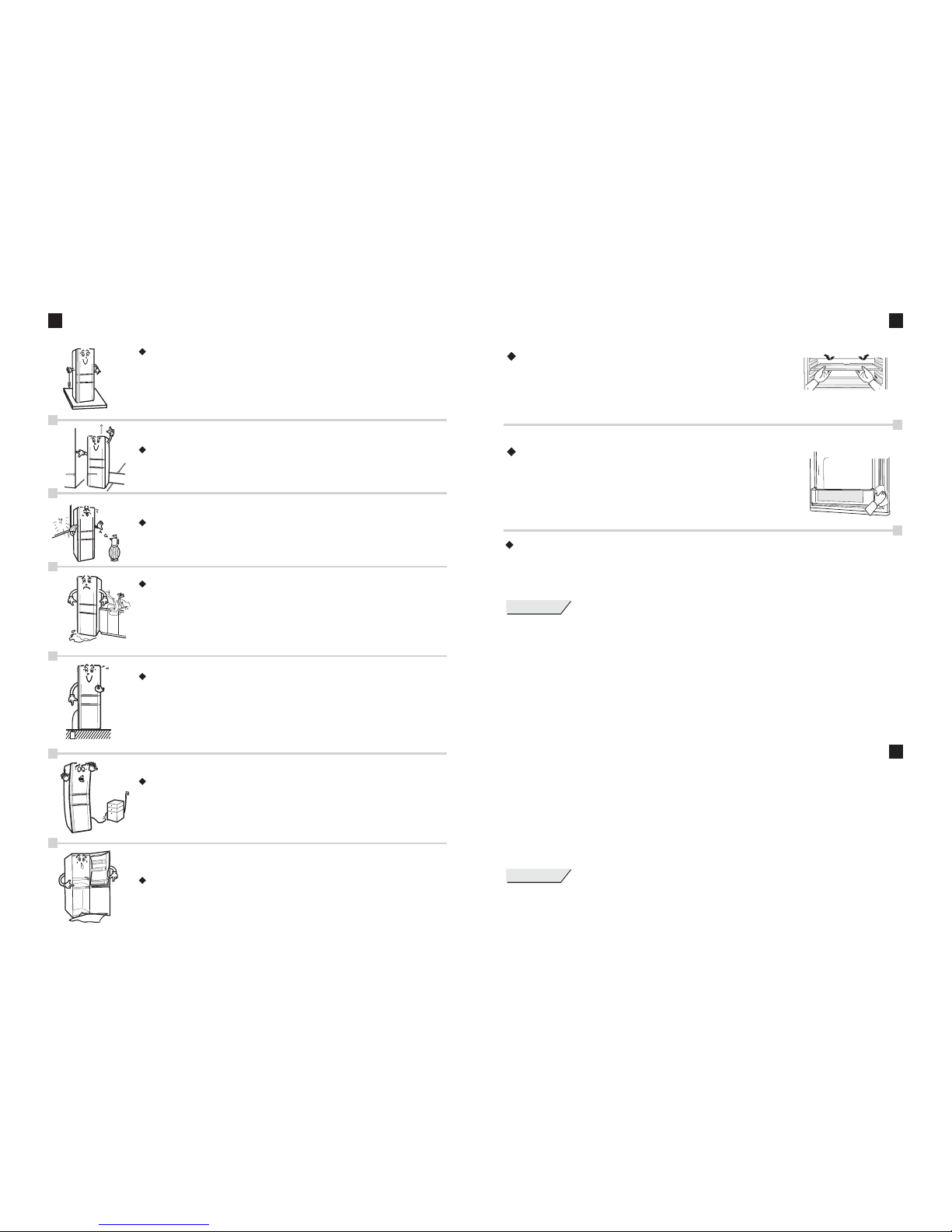
INSTALLATION AND NOTESPOSITIONING
The groundon which therefrigerator is placedshould be flatand
firm. Ifsome unevenness exists,the refrigerator levelcan be
adjusted through rotating the adjustablefeet under therefrigerator
body (counterclockwisedirection means rising).
At thebottom of theadjustable foot isan adjustable holewhich can
be easilyinserted by simpletools such asphilips driver, etc. for the
regulation. (seeleft picture)
The distancesbetween the walland the backand the sideof
refrigerator shouldnot be lessthan 55mm. The height above
the topshould not beless than 300mm.
The refrigeratorshould be keptaway from theheat source, and
avoid thedirect sunlight.
-Do not place the unit in a humid environment to avoid the metal
components get rusted and reducing the insulation effect. Besides
the wire, the leakage protector must be installed if the unit is placed
near humid areas such as the water pool and the basement.
-If the refrigerator is flooded by water in a natural disaster (such as
rainstorm, accident), it is necessary to refer to the designated
Samsung service centers and use it after ensuring of its good condition.
-Please besure to useindividual three-core powersocket with
ground wire.Do not sharethe socket withother electrical appliances;
-For personalsafety, please be sure to connectthe ground wire
correctly, The earthedpole of thesocket should havereliable ground
wire;
-Do notconnect the groundwire to anyunsafe places suchas water
pipe, gaspipe, telephone line,and lightning conductorline, etc.
-Do not to press against the power cord.
-Do notplace and usean electro-heat electricappliance on thetop of
the refrigeratorsuch as microwaveoven, electric cookerand voltage
regulator, etc.
Please removethe door sealbefore disposing ofthe refrigerator to
avoid anyaccidents.
MAINTENANCE AND CLEANING
Internal accessories
Takeout all shelves,door shelves, crisper, covers, drawers, etc.,
and cleanthem with softcloth moistened withluke-warm water
or neutralcleanser (for dishes).After using the cleanser,they
must becleaned with cleanwater and bewiped up witha dry cloth.
The door seal
Please cleanthe door sealcarefully and leaned
with awood chopstick entanglingwith cotton strip.
thegrooveisc
When insertingthe door sealafter cleaning, thefour corners
should besecured firmly andthe door sealis inserted itsect
by sect.
Defrosting methods
When alot of iceor frost stayedon the evaporatorof the and
the freezer, the freezing function will be affectedand the powerconsumption
is When thefrost layer onthe evaporator getsthicker, the refrigerator
must bedefrosted. It isadvised to defrosttwice a year.
increased.
CoolSelect Zone
PRECAUTIONS
1. Beforedefrosting, the refrigeratormust be disconnectedfrom the power;
2. Thegood time fordefrosting is whenthe Freezer andthe is entirelyor nearly empty;
3. Ifthere is stillsome food inthe Freezer andthe before defrosting, the refrigerator
can enterinto the SuperFreeze function. About 2hours later, the food temperature willdecrease to
a verylow level whichwhere the foodcan be keptfreshly for sometime;
4. Beforedefrosting, please besure to takeout all thefoodstuff in thedrawers of theFreezer and the
and storethem in thecooling place. Defrostingmust be doneas soon aspossible
(the longerthe food isplaced under roomtemperature, the moreunsuitable for thelong-term storage) ;
5. Donot defrost theFreezer with metalor sharp toolsin case theymay damage therefrigerator;
6. Donot defrost theFreezer using anelectric heater;
7. After defrosting,please be sureto clean theFreezer thoroughly;
CoolSelect Zone
CoolSelect Zone
CoolSelect Zone
Notes for inside and outside cleaning of the refrigerator
- Thepower plug mustbe removed fromthe outlet beforecleaning, the intervaltime between pluggingand
unplugging shouldbe more than5 minutes;
- Whencleaning, no wateris allowed toenter into thelamp box andthe control panelcover;
- Cleanwith soft clothdipped with luke-warmwater or neutraldetergent, and wipeup with drycloth;
- Cleanthe water drainagechannel and theweep hole atthe bottom ofthe Fridge andthe
frequently toensure the smoothdrainage;
- Donot use thedetergent containing abrasive(such as toothpaste),acid content, chemicalsolvents
(such asalcohol) or polishingfor cleaning.
CoolSelect Zone
PRECAUTIONS
Please dothe following inspectionafter the maintenance:
- Ifthere is crackor damage onthe power wire.
- Ifthe power plughas been insertedinto the socketcorrectly.
- Ifthere is anyabnormal heatin thepower plug etc..
Page 7
6
9
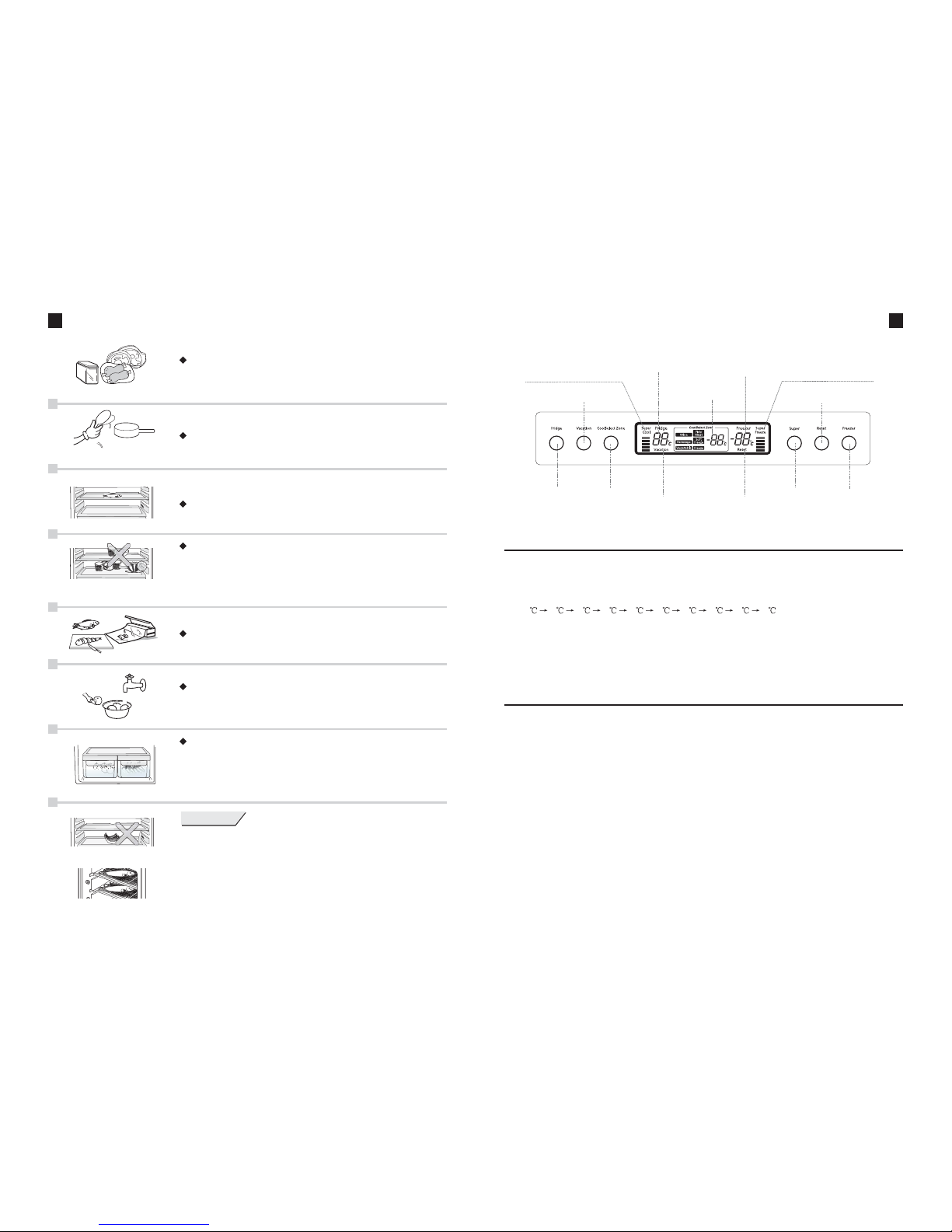
CONTROL PANEL INTRODUCTION
Super Coolstatus display
VacationButton
Fridge temperature
display
Freezer temperature
display
Super Freezestatus display
Fridge Button
CoolSelect ZoneButton
Vacationstatus display
CoolSelect Zone
temperature display
Reset Display
Super Button
Freezer Button
1. Fridge Button
1-1. PressFridge Button toset Fridge temperature;
1-2. PressFridge Button, the" tinkle" soundis heard, andthen the currentrefrigerator set
temperature willflicker. Press Fridge Button again to change theset temperature.
Each timeyou press theFridge Button, settemperature is displayedinsequence of
5432198765;
1-3. Eachtime you pressthe Fridge Button,the " tinkle"sound is heard;
1-4. Stoppressing the buttonfor 5 seconds,the set valuewill be confirmed.
1-5. Inthe mode ,there is nodisplay for theFridge temperature. T
ress theFridge Button ;
Vacation here isno any
respond whenyou p
2. Vacation Button
2-1. Ifthe refrigerator isnot running inthe Vacation mode, you press theVacation Button,
and the tinkle sound is heard, then the refrigerator will start in the ;
2-2. will turnon after the is started.There is no display for the
temperature of the Fridge and the Coolselect Zone;
2-3. Inthe mode, thereis no sound whenpressing the ResetButton,
changing theFridge temperature orsetting the temperatureof
and thereare no correspondingresponses, either;
2-4. Pressthe Vacation Button again, the tinkle sound is heard. The refrigerator will exit
the Vacation mode toreturn the operationmode prior tothe Vacation mode.
2-5. Vacation function isdesigned for therefrigerator operation whenthe user isout. In the
Vacation running status, refrigerator andCoolSelect Zone arenot in theworking status
but onlythe Freezer;
During theVacation, please do not store foodin the and theCoolSelect Zone.
""
""
Note:
Vacation mode
Vacation display Vacation
Vacation " tinkle"
the CoolSelectZone
Fridge
STORING FOODS
Hot foodor drink shouldbe cooled tothe room temperature
before placinginto the refrigerator,
The cookedfood and rawfood should beseparately.
It isnot suitable toput the foodtoo close toeach other.
Enough placeshould be leftfor the aircirculating cycle.
Note:
1. Pleasekeep the foodaway from thetemperature sensor.
2. The food and the container should not be place closely
to theback plate.
PRECAUTIONS
The tropicfruit, such asbananas and pineapples,were not
suitable topreserve in therefrigerator;
Do notstore the itemswith rigorous temperaturerequirements,
such asblood serum, bacterin,academic data andso on.
Tip: If it is necessary to store big foodload, make iceor fast
refrigerate quickly, you mayalso take outthe freezer
drawer tofreeze the fooddirectly on theevaporator
clapboard.
Pack the foods with freshness reserving bags (films)
or seal the food container with a lid to prevent drying
or bad odor escaping.
Store foods in smaller portions.
Dry the fruits and vegetables for storage after
washing.
- Vegetable and fruit can be stored in this
compartment.
- Itis possible, ifyou need morespace to store
vegetable andfruits, to removedrawers.
- A declared storage volume of fresh food storage
compartmentis calculatedwith Fruit boxremoved.
Reset Button
Page 8
7
8
3. CoolSelect Zone Button
3-1. Pressthe CoolSelect ZoneButton to setthe temperature ofthe CoolSelect Zone;
3-2. Pressthe CoolSelect ZoneButton, the "tinkle" sound isheard, and then the current
set temperatureof the CoolSelectZone will flicker. Press the Button again to change
the settemperature. Each timeyou press theButton, the settempe rature isdisplayed
in sequenceof 0 (Fish/Meat) -7 (Soft Freeze) -12 (Freeze) 10 (Wine)
4 (Beverage) 2 (vegetable) 0 .
3-3. Eachtime you pressthe CoolSelect ZoneButton, the "tinkle" sound isheard;
3-4. , andthe set valuewill be confirmed.
3-5. CoolSelectZone fine adjustmentfunction: The temperature of the CoolSelect Zone is
available forthe fine adjustmentaround the setvalue. Press theCoolSelect Zone Button
to startthe fine adjustment," 00 "displays. Each timeyou press thebutton, the barwill
be setas 00 01 02 03 00. The larger the number is, the lower the temperaturewill
be. Itwill quit thefine adjustment settingautomatically 5 secondsafter the stoppingthe
button-press;
3-6. Inthe Vacation mode, there is nodisplay for thetemperature of CoolSelect Zone.
There isno responde whenyou press theCoolSelect Zone Button;
Stop pressingthe Button for5 seconds
CONTROL PANEL INTRODUCTION
5. Reset Function
5-1. Ifthe refrigerator isnot running inthe Reset function,press the ResetButton to enterthe
Reset modeand the "tinkle" sound isheard;
5-2. Inthe Reset runningstatus the refrigeratorreturns to thedefault factory status;
5-3. Whenthe user changesthe refrigerator setting,refrigerator will quitthe Reset running
status;
5-4. Pressthe Reset Buttonagain in Resetrunning status, therefrigerator will exitthe Reset
running statuswitha"tinkle"sound.
5-5. The temperature of the CoolSelect Zone is controlled automatically atabout 0 .
6. Freezer Button
6-1. Pressthe Freezer Buttonto set theFreezer temperature;
6-2. Pressthe Freezer Button,the " tinkle"sound is heardand then thecurrent Freezer
setup temperaturewill flicker. Press the Button again to changethe set temperature.
Each timeyou press thebutton, the settemperature is displayedin sequence of-18
-19 -20 -21 -22 -23 -15 -16 -17 -18 ;
6-3. Eachtime you pressthe Freezer Button,the " tinkle"sound is heard;
6-4. , thenthe set valuewill be confirmed.
6-5. Freezertemperature can beset in anymode;
Stop pressingthe Button for5 seconds
CONTROL PANEL INTRODUCTION
7. Door opening alarm Function
7-1. There will produce an alarm tone when the Fridge dooris opened fortwo minutes,
two alarmtones for threeminutes and repeatedalarm with acycle of one-minutealarm
and two-minutepause for fourminutes to remindthe user ofclosing the door;
7-2. WhenFridge door isclosed, alarm tonesstop; if Fridgedoor is notyet closed afterfour
minutes, thelamp will turnoff, and the alarm tone will exist continuously to remind the
user ofclosing the door;
7-3. Whenthe Fridge dooris opened, theFridge fan willstop turning;
4. Super Cool Function/Super Freeze Function
8. Operation Failure
8-1. Whenthe refrigerator showsthe following symptoms,please immediately tothe
qualified servicepersonnel;
8-2. Whenthe refrigerator temperatureis flickering as" ", " ", " ", " ", " " refrige-
rator sensormight be damaged.Before the service,the damaged compartmentsare not
working while the other compartmentsrun normally;
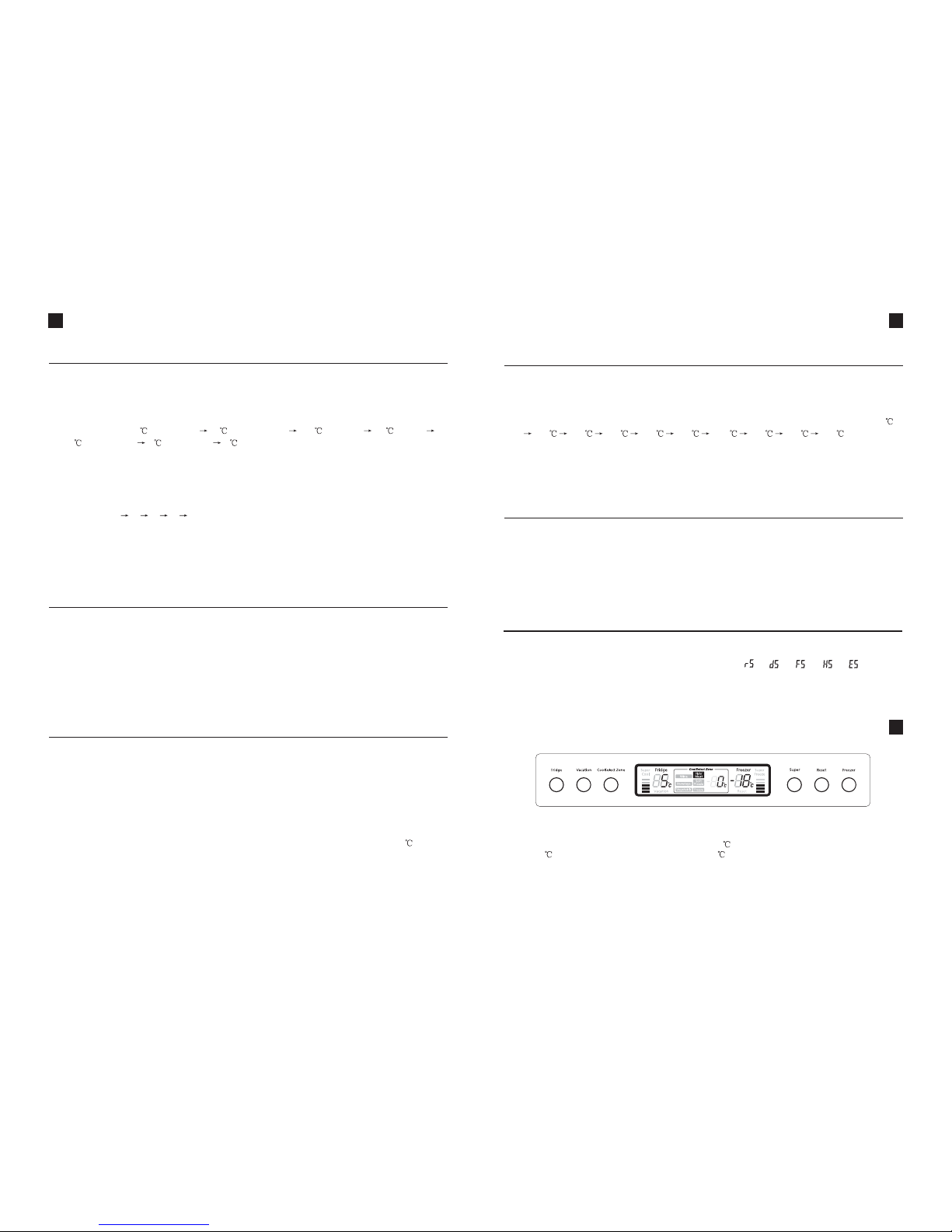
After thepower is on,all indications willdisplay for 2seconds, and therefrigerator starts
to run.The F default temperatureis set at5 ; the CoolSelect Zone temperature is
set at0 ; the Freezer temperature is set at -18 . the actual temperatures of the Fridge
will display, the CoolSelectZone and theFreezer with start-upmusic.
It isrecommended to runin the Resetstatus, also submittedto the adjustmentin
accordance withuser' practical situation.
ridge
s
First power supply & temperature adjustment
4-1. Pressthe Super Buttonin the normaloperation mode,and theFridge will enterinto the
Super Coolstatus with theSuper Cool displayturning on; Pressthe Super Button
again toexit the SuperCool status andenter into theSuper Freeze statuswith the
Super Freezedisplay turning on;Press the SuperButton again toenter into the
Super Cooland the SuperFreeze status simultaneouswith both theSuper Cool and
the SuperFreeze display turningon; Press theSuper Button againto return tothe
normal stasus;
 Loading...