

Page 1
quick start guide
RF32FM**
English
• Before operating the appliance, please read this manual thoroughly and retain it for your reference.
• Use this appliance only for its intended purpose as described in this instruction manual.
This appliance is not intended for use by persons (including children) with reduced physical, sensory or mental capabilities, or lack
of experience and knowledge, unless they have been given supervision or instruction concerning use of the appliance by a person
responsible for their safety.
• Warnings and Important Safety Instructions in this manual do not cover all possible conditions and situations that may occur.
It is your responsibility to use common sense, caution, and care when installing, maintaining, and operating your appliance.
• Because these following operating instructions cover various models, the characteristics of your refrigerator may differ slightly
from those described in this manual.
R-600a or R-134a is used as a refrigerant. Check the compressor label on the rear of the appliance or the rating label inside
the fridge to see which refrigerant is used for your refrigerator. When this product contains fl ammable gas (Refrigerant R-600a),
contact your local authority in regard to safe disposal of this product.
• In order to avoid the creation of a fl ammable gas-air mixture if a leak in the refrigerating circuit occurs, the size of the room in
which the appliance may be sited depends on the amount of refrigerant used.
• Never start up an appliance showing any signs of damage.
If in doubt, consult your dealer.
The room must be 1m³ in size for every 8g of R-600a refrigerant inside the appliance.
The amount of refrigerant in your particular appliance is shown on the identifi cation plate inside the appliance.
• Refrigerant squirting out of the pipes could ignite or cause an eye injury. When refrigerant leaks from the pipe, avoid any naked
fl ames and move anything fl ammable away from the product and ventilate the room immediately.
- Failing to do so may result in fi re or explosion.
WARNING
Hazards or unsafe practices that may result in severe personal injury or death.
CAUTION
Hazards or unsafe practices that may result in minor personal injury or property damage.
Important safety symbols and precautions:
Safety information
1. Safety Information
OTHER SYMBOLS USED
Do NOT attempt.
Do NOT disassemble.
Do NOT touch.
Follow directions carefully.
Unplug the power plug from the wall socket.
Page 2
• When transporting and installing the appliance,care should be taken to ensure that no parts of the refrigerating
circuit are damaged.
- Refrigerant leaking from the pipe work could ignite or cause an eye injury. If a leak is detected, avoid any naked
fl ames or potential sources of ignition and air the room in which the appliance is standing for several minutes.
- This appliance contains a small amount of isobutane refrigerant(R-600a), a natural gas with high environmental
compatibility that is, however, also combustible.
When transporting and installing the appliance, care should be taken to ensure that no parts of the refrigerating
circuit are damaged.
SEVERE WARNING SIGNS FOR TRANSPORTATION AND SITE
• Deteriorated insulation of electrical parts may cause an electric shock or fi re.
• Do not place this refrigerator in direct sunlight or expose to the heat from stoves, room heaters or other appliance.
• Do not plug several appliances into the same multiple power board.
The refrigerator should always be plugged into its own individual electrical outlet which has a voltage rating that
matched the rating plate.
- This provides the best performance and also prevents overloading house wiring circuits, which could cause a fi re
hazard from overheated wires.
• If the wall socket is loose, do not insert the power plug.
- There is a risk of electric shock or fi re.
• Do not use a cord that shows cracks or abrasion damage along its length or at either end.
• Do not pull or excessively bend the power cord.
• Do not twist or tie the power cord.
• Do not hook the power cord over a metal object, place a heavy object on the power cord, insert the power cord
between objects, or push the power cord into the space behind the appliance.
- When moving the refrigerator, be careful not to roll over or damage the power cord.
- This may result in an electric shock or fi re.
• Do not use aerosols near the refrigerator.
- Aerosols used near the refrigerator may cause an explosion or fi re.
- Do not bend the power cord excessively or place heavy articles on it.
SEVERE WARNING SIGNS FOR INSTALLATION
• This refrigerator must be properly installed and located in accordance with the manual before it is used.
• Do not install the refrigerator in a damp place or place where it may come in contact with water.
- Deteriorated insulation of electrical parts may cause an electric shock or fi re.
• Connect the power plug in proper position with the cord hanging down.
- If you connect the power plug upside down, wire can get cut off and a cause fi re or an electric shock.
• Make sure that the power plug is not squashed or damaged by the back of the refrigerator.
• When moving the refrigerator, be careful not to roll over or damage the power cord.
- This constitutes a fi re hazard.
These warning signs are here to prevent injury to you and others.
Please follow them carefully.
After reading this section, keep it in a safe place for future reference.
Make sure the machine is grounded to prevent electric shock.
Call the contact center for help.
Note.
Page 3

• Keep the packing materials out of reach of children.
- There is a risk of death from suffocation if children put them on their head.
• This appliance should be positioned in such a way that it is accessible to the power plug.
- Failing to do so may result in an electric shock or fi re due to electric leakage.
• Do not install this appliance near a heater, infl ammable material.
• Do not install this appliance in a humid, oily or dusty location, in a location exposed to direct sunlight and water (rain
drops).
• Do not install this appliance in a location where gas may leak.
- This may result in an electric shock or fi re.
• If any dust or water is in the refrigerator, pull out power plug and contact your Samsung Electronics service center.
- Otherwise there is a risk of fi re.
• Do not stand on top of the appliance or place objects (such as laundry, lighted candles, lighted cigarettes, dishes,
chemicals, metal objects, etc.) on the appliance.
- This may result in an electric shock, fi re, problems with the product, or injury.
• This appliance must be properly grounded.
• Do not ground the appliance to a gas pipe, plastic water pipe, or telephone line.
- You must ground the refrigerator to prevent any power leakages or electric shocks caused by current leakage from
the refrigerator.
- This may result in an electric shock, fi re, explosion, or problems with the product.
- Never plug the power cord into a socket that is not grounded correctly and make sure that it is in accordance with
local and national codes.
• Never use gas pipes, telephone lines, or other potential lightning attractors as an electrical ground.
- Improper use of the grounding plug can result in a risk of electric shock. If it is necessary to use an extension cord,
use only a 3-wire extension cord that has a 3-blade grounding plug and a 3-slot receptacle that will accept the plug
on the appliance. The marked rating of the extension cord should be AC115-120 V, 10 A, or more. If a grounding
adapter is used, make sure the receptacle box is fully grounded.
• Plug the power plug into the wall socket fi rmly. Do not use a damaged power plug, damaged power cord or loose
wall socket.
- This may result in an electric shock or fi re.
• If the power cord is damaged, have it replaced immediately by the manufacturer or its service agent.
• The fuse on the refrigerator must be changed by a qualifi ed technician or service company.
- Failing to do so may result in an electric shock or personal injury.
• Keep ventilation opening in the appliance enclosure or mounting structure clear of obstruction.
• Allow the appliance to stand for 2 hours after installation.
• The installation or any service of this appliance is recommended by a qualifi ed technician or service company.
- Failing to do so may result in an electric shock, fi re, explosion, problems with the product, or injury.
CAUTION SIGNS FOR INSTALLATION
Page 4
• Do not touch the power plug with wet hands.
- This may result in an electric shock.
• Do not store articles on the top of the appliance.
- When you open or close the door, the articles may fall and cause a personal injury and/or material damage.
• Do not put items fi lled with water on the refrigerator.
- If spilled, there is a risk of fi re or electric shock.
• Do not touch the inside walls of the freezer or products stored in the freezer with wet hands.
- This may cause frostbite.
• Do not use or place any substances sensitive to temperature such as infl ammable sprays, infl ammable objects, dry
ice, medicine, or chemicals near the refrigerator.
• Do not keep volatile or infl ammable objects or substances (benzene, thinner, propane gas, alcohol, ether, LP gas
and other such products etc.) in the refrigerator.
- This refrigerator is for storing food only.
- This may result in a fi re or an explosion.
• Do not store pharmaceuticals products, scientifi c materials or temperature-sensitive products in the refrigerator.
- Products that require strict temperature controls must not be stored in the refrigerator.
• Do not place or use electrical appliance inside the refrigerator/freezer, unless they are of a type recommended by the
manufacturer.
• If you smell pharmaceutical or smoke, pull out power plug immediately and contact your Samsung Electronics
service center.
• If any dust or water is in Refrigerator, pull out power plug and contact your Samsung Electronics service center.
- Otherwise there is a risk of fi re.
• If gas leak is detected, avoid any naked fl ames or potential sources of ignition and air the room in which the
appliance is standing for several minutes.
• Do not use mechanical devices or any other means to accelerate the defrosting process, other than those
recommended by the manufacturer.
• Do not damage the refrigerant circuit.
• Do not spray volatile material such as insecticide onto the surface of the appliance.
- As well as being harmful to humans, it may also result in an electric shock, fi re or problems with the product.
• Do not use a hair dryer to dry the inside of the refrigerator. Do not place a lighted candle in the refrigerator for
removing bad odours.
- This may result in an electric shock or fi re.
• Fill the water tank, ice tray, water cubes only with potable water.
- Do not fi ll tea or sports drink, this may cause the damage of refrigerator.
• Do not let children hang on the door.
If not, a serious injury may occur.
- Risk of children entrapment.
Do not let children enter inside the refrigerator.
• Do not leave the doors of the refrigerator open while the refrigerator is unattended and do not let children enter
inside the refrigerator.
• Do not allow babies or children go inside the drawer.
- It can cause death from suffocation by entrapment or personal injury.
• Do not sit on the Freezer door.
- The door may be broken and cause a personal injury.
• To prevent children entrapment, you must reinstall the divider using provided screws after cleaning or other actions if
you removed the divider from the drawer.
SEVERE WARNING SIGNS FOR USING
Page 5

• Do not attempt to repair, disassemble, or modify the appliance yourself.
- Do not use any fuse(such as cooper, steel wire, etc.) other than the standard fuse.
- When repairing or reinstalling the appliance is required, contact your nearest service center.
- Failing to do so may result in an electric shock, fi re, problems with the product, or injury.
• If the appliance generates a strange noise, a burning or smell or smoke, unplug the power plug immediately and
contact your nearest service center.
- Failing to do so may result in an electric or fi re hazards.
• Pull the power plug out of the socket before changing the interior lamps of the refrigerator
- Otherwise, there is a risk of electric shock.
• If you experience diffi culty when changing the light, contact service agent.
• If the products is equipped with the LED Lamp, do not disassemble the Lamp Cover and LED Lamp by yourself.
- Please contact your service agent.
• Plug the power plug into the wall socket fi rmly. Do not use a damaged power plug, damaged power cord or loose
wall socket.
- This may result in an electric shock or fi re.
• Do not put a container fi lled with water on the appliance.
- If spilled, there is a risk of fi re or electric shock.
• Never stare directly at the UV LED lamp for long periods of time.
- This may result in eye strain due to the ultraviolet rays.
• In the event of a gas leak (such as propane gas, LP gas, etc.), ventilate immediately without touching the power
plug. Do not touch the appliance or power cord.
- Do not use a ventilating fan.
- A spark may result in an explosion or fi re.
• Use only the LED Lamps provided by manufacturer or service agent.
• Children should be supervised to ensure that they do not play with the appliance.
• Keep fi ngers out of “pinch point” areas; clearances between the doors and cabinet are necessarily small.
• Do not let children hang on the door.
If not, a serious injury may occur.
• There is a Risk of children entrapment.
Do not let children enter inside the refrigerator.
• Bottles should be stored tightly together so that they do not fall out.
• This product is intended only for the storage of food in a domestic environment.
• Never put fi ngers or other objects into the dispenser hole, ice chute and ice maker bucket.
- It may cause a personal injury or material damage.
• Do not insert hands, feet or metal objects (such as chopsticks, etc.) into the bottom or the back of the refrigerator.
- This may result in an electric shock or injury.
- Any sharp edges may cause a personal injury
Page 6
• Do not spray cleaning products directly on the display.
- Printed letters on the display may come off.
• If any foreign substance such as water has entered the appliance, unplug the power plug and contact your nearest
service center.
- Failing to do so may result in an electric shock or fi re.
• Remove all foreign substances such as dust or water from the power plug terminals and contact points using a dry
cloth on a regular basis.
- Unplug the power plug and clean it with a dry cloth.
- Failing to do so may result in an electric shock or fi re.
• Do not clean the appliance by spraying water directly onto it.
• Do not use benzene, thinner, or Clorox, Chloride for cleaning.
- They may damage the surface of the appliance and may cause a fi re.
• Do not spray infl ammable gas near the refrigerator.
- There is a risk of explosion or fi re.
CAUTION SIGNS FOR CLEANING AND MAINTENANCE
• Allow the appliance to stand for 2 hours after installation.
• To get best performance from the product,
- Do not place foods too closely in front of the vents at the rear of the appliance as it can obstruct free air circulation
in the refrigerator compartment.
- Wrap the food up properly or place it in airtight containers before putting it into the refrigerator.
- Do not put any newly introduced food for freezing near to already existing food.
• Do not place glass or bottles or carbonated beverages into the freezer.
- The container may freeze and break, and this may result in injury.
• Please observe maximum storage times and expiry dates of frozen goods.
• There is no need to disconnect the refrigerator from the power supply if you will be away for less than three weeks.
But, remove all the food if you are going away for the three weeks or more. Unplug the refrigerator and clean it, rinse
and dry.
• Do not place carbonated or fi zzy drinks in the freezer compartment.
Do not put bottles or glass containers in the freezer.
- When the contents freeze, the glass may break and cause personal injury and property damage.
• Do not change or modify the functionality of the refrigerator.
- Changes or modifi cations may result in a personal injury and/or property damage.
Any changes or modifi cations performed by a 3rd party on this completed appliance are neither covered under
Samsung warranty service, nor is Samsung responsible for safety issues and damages that result from 3rd party
modifi cations.
• Do not block air holes.
- If the air holes are blocked, especially with a plastic bag, the refrigerator can be over cooled. If this cooling period
lasts too long, the water fi lter may break and cause water leakage.
• Use only the ice-maker provided with the refrigerator.
• The water supply to this refrigerator must only be installed/connected by a suitably qualifi ed person and connected
to a potable water supply only.
• If you have a long vacation or business trip and won’t use water or ice dispensers, close the water valve.
- Otherwise, water leakage may occur.
• Wipe excess moisture from the inside and leave the doors open.
- Otherwise, odor and mold may develop.
• When the refrigerator got wet by water, pull out the power plug and contact your Samsung Electronics service
center.
CAUTION SIGNS FOR USING
• Before cleaning or performing maintenance, unplug the appliance from the wall socket.
- Failing to do so may result in an electric shock or fi re.
Page 7
• In the event of a power failure, call the local offi ce of your Electricity Company and ask how long it is going to last.
- Most power failures that are corrected within an hour or two will not affect your refrigerator temperatures.
However, you should minimize the number of door openings while the power is off.
- But should the power failure last more than 24 hours, remove all frozen food.
• If keys are provided with the refrigerator, the keys should be kept out of the reach of children and not be in the
vicinity of the appliance.
• The appliance might not operate consistently (possibility of defrosting of contents or temperature becoming too
warm in the frozen food compartment) when sited for an extended period of time below the cold end of the range of
temperature for which the refrigerating appliance is designed.
• Do not store food which goes bad easily at low temperature, such as bananas, melons.
• Your appliance is frost free, which means there is no need to manually defrost your appliance, as this will be carried
out automatically.
• Temperature rise during defrosting can comply with ISO requirements.
But if you want to prevent an undue rise in the temperature of the frozen food while defrosting the appliance, please
wrap the frozen food up in several layers of newspaper.
• Any increase in temperature of frozen food during defrosting can shorten its storage life.
• Do not re-freeze frozen foods that have thawed completely.
- The California Safe Drinking Water and Toxic Enforcement Act requires the Governor of California to publish a list of
substances known to the State of California to cause cancer, birth defects, or other reproductive harm, and requires
businesses to warn of potential exposure to such substances.
This product contains a chemical known to the State of California to cause cancer, birth defects, or other
reproductive harm. This appliance can cause low-level exposure to some of the substances listed, including benzene,
formaldehyde, and carbon monoxide.
ADDITIONAL TIPS FOR PROPER USAGE
• DANGER : Risk of child entrapment. Before you throw away your old refrigerator or freezer:
- Take off the doors and door latch.
- Leave the shelves in place so that children cannot easily climb inside.
• Leave the shelves in place so that children may not easily climb inside.
• Ensure that none of the pipes on the back of the appliance are damaged prior to disposal.
• R-600a or R-134a is used as a refrigerant. Check the compressor label on the rear of the appliance or the rating
label inside the refrigerator to see which refrigerant is used for your refrigerator.
When this product contains fl ammable gas (Refrigerant R-600a), contact your local authority in regard to safe
disposal of this product. Cyclopentane is used as an insulation blowing gas.
The gases in insulation material require special disposal procedure.
Please contact your local authorities in regard to the environmentally safe disposal of this product. Ensure that none
of the pipes on the back of the appliances are damaged prior to disposal. The pipes shall be broken in the open
space.
• When disposing of this or other refrigerator/s, remove the door/door seals, door latch so that children or animals
cannot become trapped inside. Children should be supervised to ensure that they do not enter and play with the
appliance.
- If trapped inside, the child may become injury and suffocate to death.
• Please dispose of the packaging material for this product in an environmentally friendly manner.
• Keep all packaging materials well out of the reach of children, as packaging materials can be dangerous to children.
- If a child places a bag over its head, it may result in suffocation.
SEVERE WARNING SIGNS FOR DISPOSAL
STATE OF CALIFORNIA PROPOSITION 65 WARNINGS:
Page 8
- Install the appliance in a cool, dry room with adequate ventilation.
Ensure that it is not exposed to direct sunlight and never put it near a direct source of heat (radiator, for example).
- Never block any vents or grilles on the appliance.
- Allow warm food to cool down before placing it in the appliance.
- Put frozen food in the refrigerator to thaw.
You can then use the low temperatures of the frozen products to cool food in the refrigerator.
- Do not keep the door of the appliance open for too long when putting food in or taking food out. The shorter time for which
the door is open, the less ice will form in the freezer.
- Allow clearance to the right, left, back and top when installing.
This will help reduce power consumption and keep your energy bills lower.
Saving Energy Tips
Page 9
2. The Installation Space
Selecting the best location for the Refrigerator
• A location with easy access to the water supply.
• A location without direct exposure to sunlight.
• A location with level (or nearly level) fl ooring.
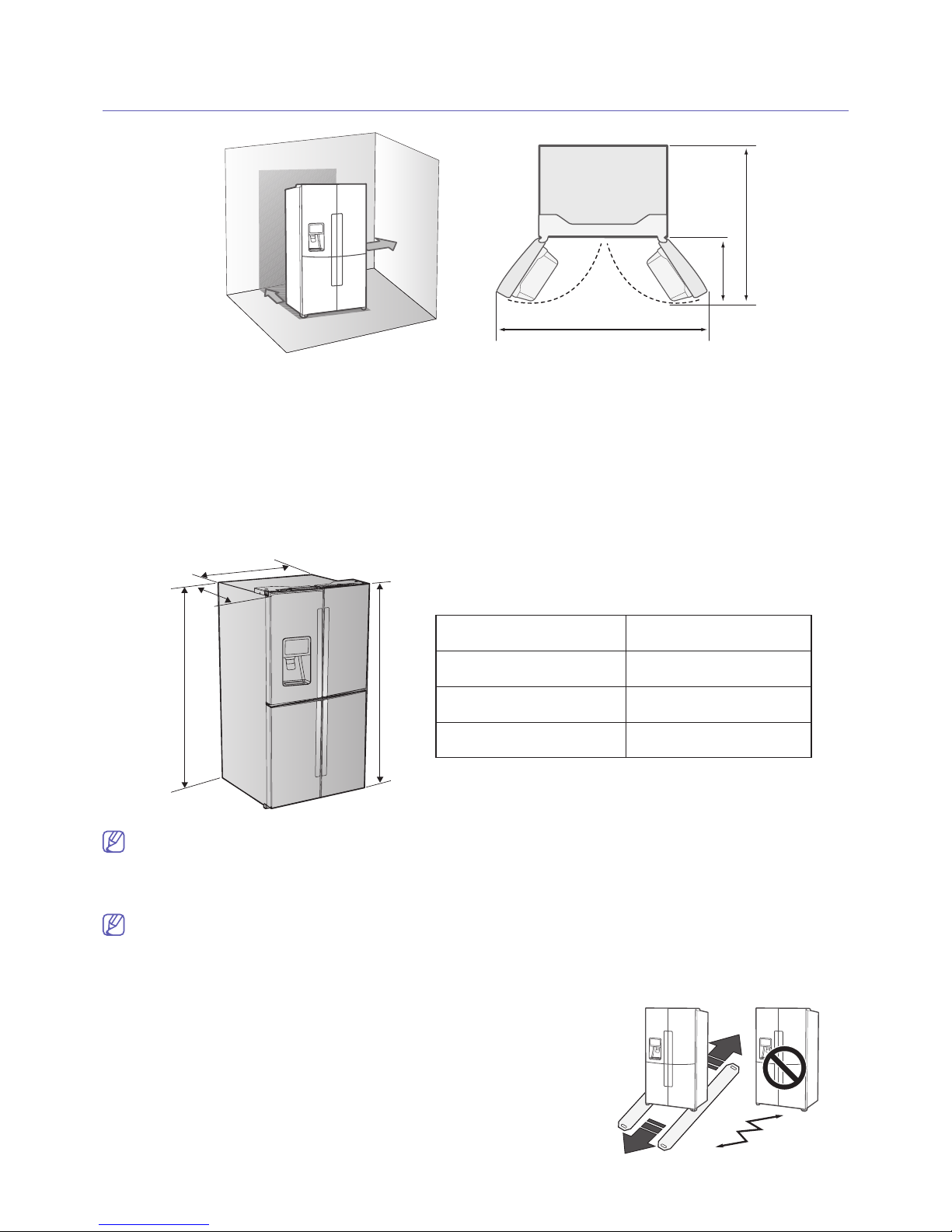
• A location with enough space for the Refrigerator doors to open easily.
• Allow suffi cient space to the right, left, back and top for air circulation.
If the Refrigerator does not have enough space, the internal cooling system may not work properly.
• Please ensure that appliance can be moved freely in the event of maintenance & service.
• Allow clearance to the right, left, back and top when installing.
This will help reduce power consumption and keep your energy bills lower.
• Do not install the refrigerator in locations where the temperature is over 109 °F (43 °C) or below 41
°F (5 °C ).
When moving your refrigerator
To prevent fl oor damage be sure the front leveling legs are in the up position(above the fl oor).
Refer to “HOW TO LEVEL THE REFRIGERATOR” in the manual.
FLOORING
For proper installation, this refrigerator must be placed on a level surface
of hard material that is the same height as the rest of the fl ooring.
This surface should be strong enough to support a fully loaded refrigerator, or approximately 412 lb (187kg).
To protect the fi nish of the fl ooring, cut a large section of the cardboard
carton and place under the refrigerator where you are working.
When moving, be sure to pull the unit straight out and push back in
straight.
2” (50mm)
2” (50mm)
2” (50mm)
2” (50mm)
49
49
15
15
/
/
32
32
” (1256 mm)
” (1256 mm)
19 ¾” (502 mm)
19 ¾” (502 mm)
B
A
C
D
B
A
C
D
Depth “A” 35 ¾” (908 mm)
Width “B” 35 ¾” (908 mm)
Height “C” 71 ¾” (1822 mm)
Overall Height “D” 72
7
/8” (1850 mm)
Page 10
PARTS AND FEATURES
3. Names and basic functions
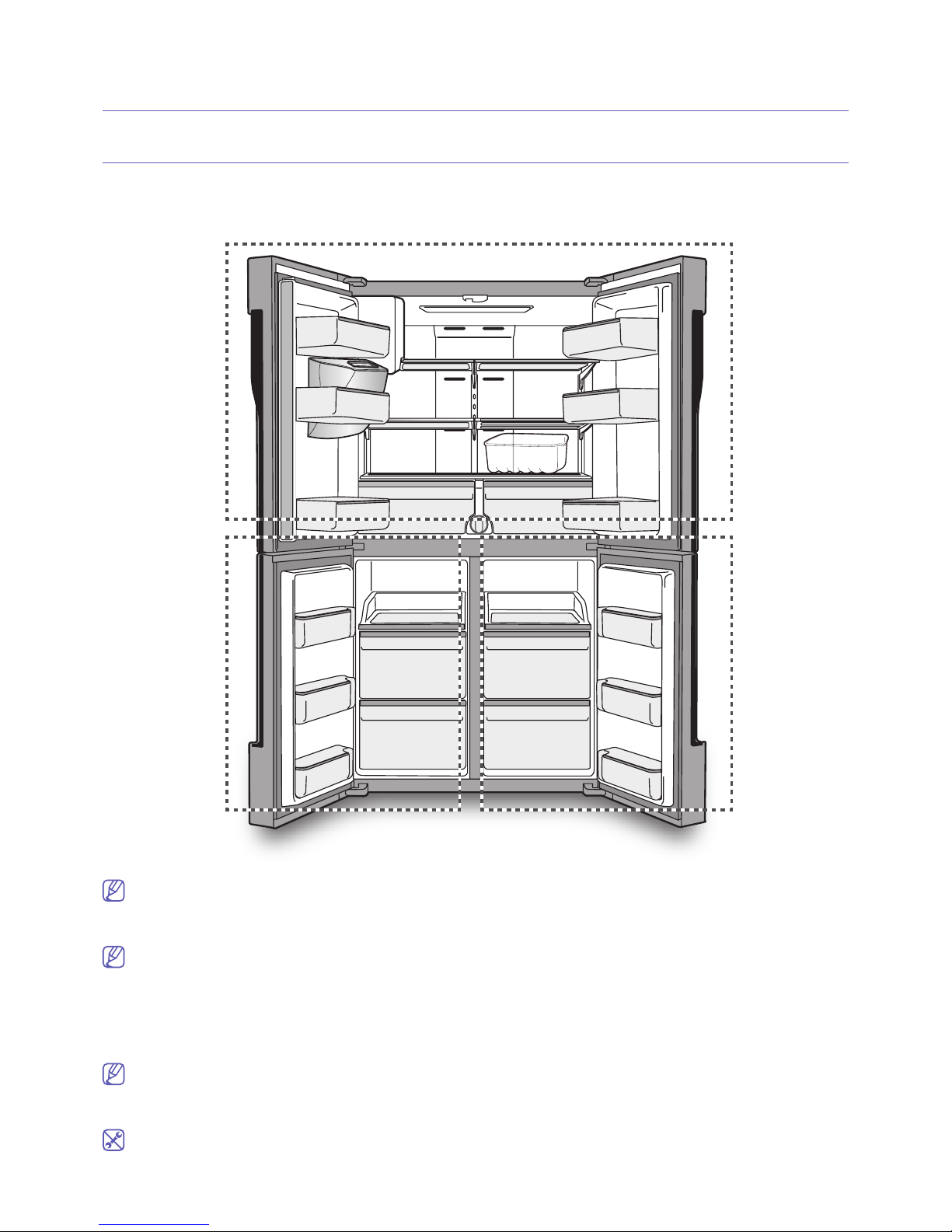
Use this page to become more familiar with the parts and features of the Refrigerator.
Fridge
Fridge
Cool select
Cool select
room
room
Freezer
Freezer
To get the best energy effi ciency of this product, please leave all selves, drawers and baskets on their
original position like as above illustration.
When closing the door, make sure the Vertical Hinged Section is in the correct position to avoid
scratching the other door. If the Vertical Hinged Section is reversed, put it back to the right position
and close the door. Moisture may appear at times on the Vertical Hinged Section.
The door handle may become loose over time. If this happens, tighten the bolts found on the inside
of the door. If you close one door with a lot of force, the other door may open.
When the door opens, the interlock switch automatically turns off the auger motor in the ice maker
for safety reasons.
When the interior or exterior LED lamp has gone out, please contact your service agents.
Page 11
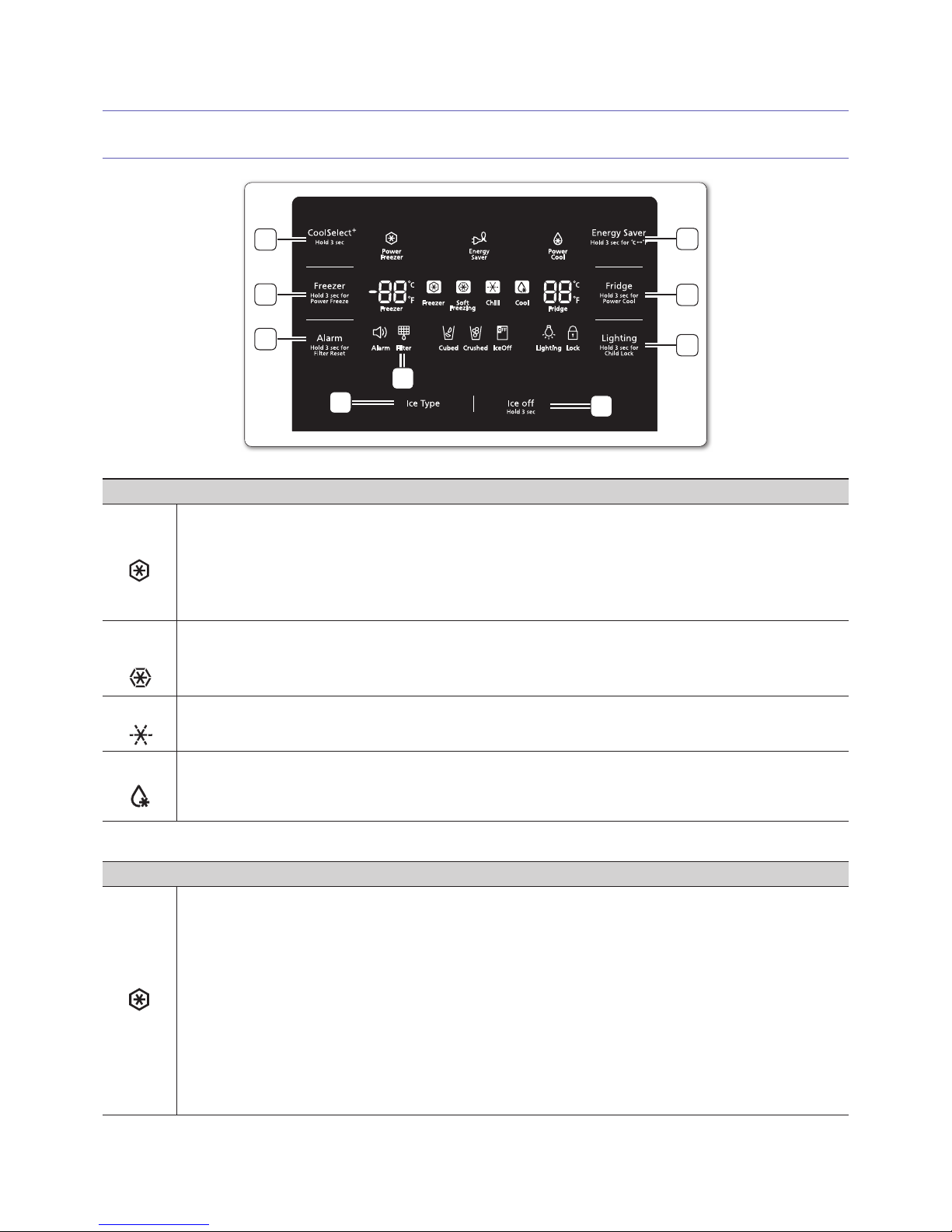
4. Operating your Refrigerator
USING THE CONTROL PANEL
9
1
2
3
5
6
4
7
8
( 1 ) CoolSelect+ (Cool Select Room)
Freezer
Press CoolSelect
+
button for 3 seconds to activate the Cool Select Room function.
The temperature is the same as the temperature confi gured for the freezer
compartment.
• The temperature is set to the temperature confi gured for the freezer compartment so
that you can keep frozen food fresh.
Soft
Freezing
• When you select Soft Freeze mode 23 °F (-5 °C) regardless of the overall temperature
setting of the refrigerator. This feature helps keep meat and fi sh fresh for longer.
Chill
• Regardless of the Freezer set temperature, the temperature will maintain at 30 °F
(-1 °C).
Cool
• When you select Cool mode, temperature of the Cool Select Room will be set on
41 °F (5 °C).
You can keep water, juice, soft drink, beer etc cold.
( 2 ) Freezer (Hold 3 sec for Power Freeze)
Touch this button to set the freezer to your desired temperature.
You can set the temperature between -8 °F and 5 °F (between -23 °C and -15 °C).
Touch and hold this button for 3 seconds to decrease the time needed to freeze
products in the Freezer. It can be helpful if you need to quickly freeze easily spoiled
items or if the temperature in the freezer has warmed dramatically (For example, if the
door was left open).
Page 12
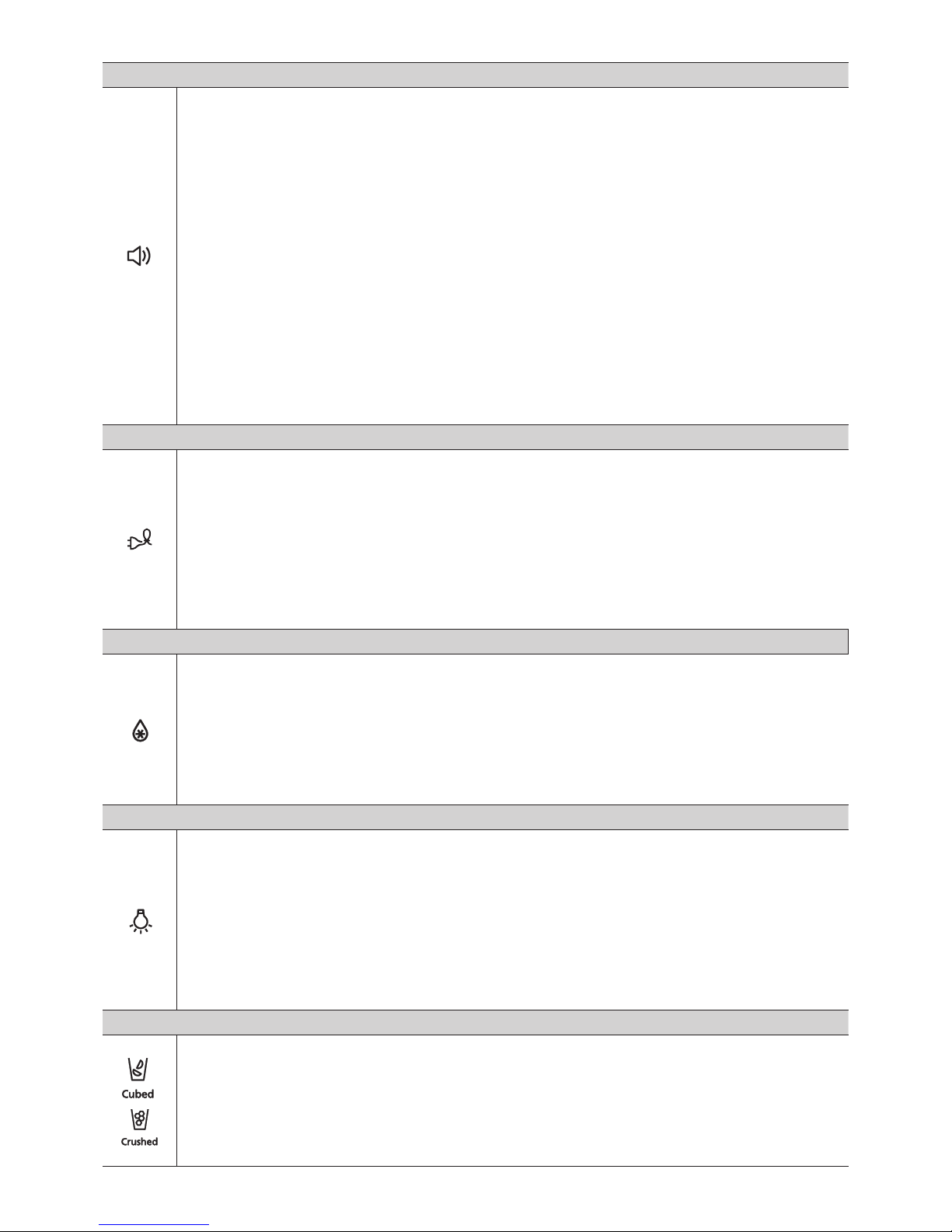
( 3 ) Alarm (Hold 3 sec for Filter Reset)
This button serves two purposes:
1) To turn the door open alarm on and off
If the door alarm is set to On, an alarm beeps if any refrigerator door is left open for
more than two minutes.
The beeping stops when you close the door. The door alarm function is pre-set to On
in the factory.
You can turn it off by touching and then releasing this button.
You can turn it back on in the same fashion. The icon lights up when the function is
on.
When the Door Alarm function is on and the alarm sound is triggered, the Door Alarm
Icon will blink while the alarm sounds.
2) To reset the water fi lter life indicator.
After you replace the water fi lter, touch and hold this button for 3 seconds to reset the
water fi lter life indicator.
( 4 ) Energy Saver
(Hold 3 sec for °C ↔°F)
Touching this button turns Energy Saver mode on and off. When you turn Energy Saver
on, the Energy Saver icon lights.
Turn Energy Saver off and the icon goes off. The Energy Saver function’s factory setting
is “ON”. If condensation or water drops appear on the doors, turn the Energy Saver
mode off.
Touch and hold this button for 3 seconds to switch the temperature units between °C
and °F.
( 5 ) Fridge (Hold 3sec for Power Cool)
Touch this button to set the fridge to your desired temperature. You can set the
temperature between 34 °F and 44 °F (between 1 °C and 7 °C). Touch and hold this
button for 3 seconds to decrease the time needed to cool products in the Refrigerator.
It can be helpful if you need to quickly cool easily spoiled items or if the temperature in
the fridge has warmed dramatically (For example, if the door was left open).
( 6 ) Lighting (Hold 3 sec for child lock)
Touching this button turns on the Dispenser LED lamp (under the display) in continuous
mode so that it stays on continuously. The button also lights up. If you want the
Dispenser lamp to come on only when some one uses the dispenser, touch this button
to turn the continuous mode off. Also, pressing this button for 3 seconds turns on Child
Lock which locks the display panel and dispenser buttons so the buttons can not be
used. The Child Lock icon lights up to indicate you’ve activated the Child Lock function.
Press 3 seconds to unlock.
( 7 ) Ice Type
Press the Ice Type button
Each time you press the button, the cubed and crushed ice modes alternate and the
Cubed or Crushed ice icon lights up, indicating your selection.
If you don’t need ice, turn the function off to save on water and energy consumption (See
Ice Off below).
Page 13
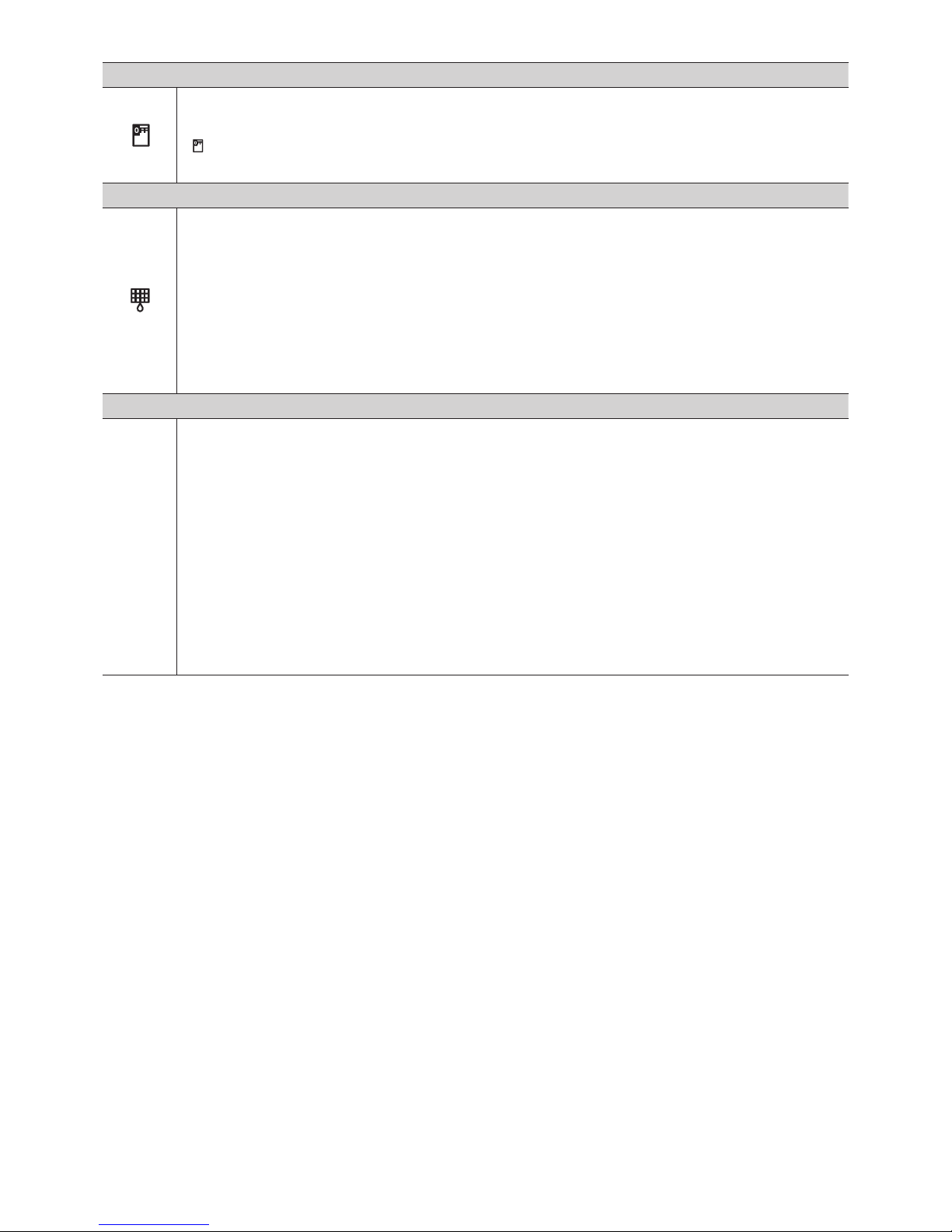
( 8 ) Ice Off (Hold 3 sec)
Press the Ice Off button for 3 seconds until the Ice Off Indicator
(
) illuminates.
( 9 ) Filter
Water fi lter usage
This icon will light up when you need to change the filter. After you use about 300
gallons of water, the fi lter indicator lights up. (about 6 months). After you install the new
water filter, reset the filter indicator by touching the Alarm/hold 3 sec for Filter Reset
button.
• If water is not dispensing or dispensing slowly, you need to replace the water fi lter
because the water fi lter is clogged.
• Some areas have large amounts of lime in their water, which causes the water fi lter to
clog more quickly.
Cooling Off Mode
- North American (US, Canada) Models Only ;
Cooling Off mode (also called Shop mode), is designed for use by retailers when they
are displaying refrigerators on the shop fl oor. In Cooling Off mode, the refrigerator’s fan
motor and lights work normally, but the compressors do not run, and the refrigerator
and freezer do not get cold. To start Cooling Off mode, touch and hold the CoolSelect
button and the Freezer button for 5 seconds during normal operation. The refrigerator
chime sounds and the temperature display fl ashes “OFF”.
To cancel Cooling Off mode, touch and hold the CoolSelect and the Freezer buttons
again for 5 seconds.
Page 14
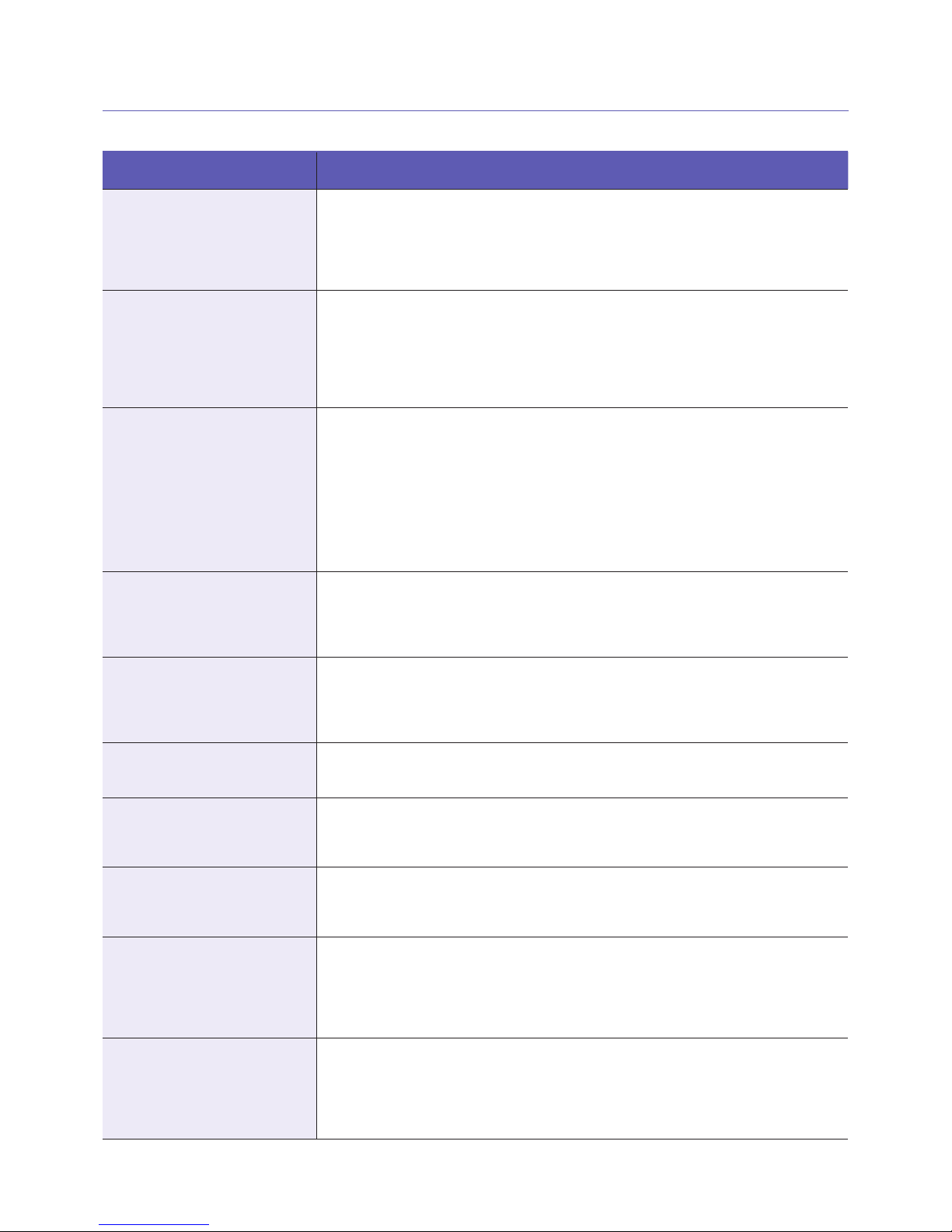
5. Troubleshooting
PROBLEM SOLUTION
The refrigerator does not
work at all or it does not chill
suffi ciently.
• Check that the power plug is properly connected.
• Check if the set temperature on the digital display is warmer than the freezer or fridge
inner temperature. If it is, set the refrigerator colder.
• Is the refrigerator in direct sunlight or located near a heat source?
• Is the back of the refrigerator too close to the wall, preventing proper ventilation?
The food in the fridge is
frozen.
• Check if the set temperature on the digital display is too low.
• Try setting the refrigerator to a warmer temperature.
• Is the temperature in the room too low? Set the refrigerator warmer.
• Did you store the food which is juicy in the coldest part of the refrigerator? Try moving those items to the other shelves in the fridge instead of keeping them in the colder
areas or bins.
You hear unusual noise or
sounds.
• Check that the refrigerator is level and stable.
• Is the back of the refrigerator too close to the wall, preventing proper ventilation?
• Try moving the back of the refrigerator at least 2 inches from the wall.
• Was anything dropped behind or under the refrigerator?
• A “ticking” sound is heard from inside the refrigerator. It is normal and occurs because
various accessories are contracting or expanding according to the temperature of the
refrigerator interior.
• If it sounds as if something is hitting something else inside the refrigerator, this is normal. The sound is caused by the compressor operating at high capacity.
The cabinet-door sealing area
of the appliance is hot and
condensation is occurring.
• Some heat is normal as anti-condensators are installed in the vertical hinged section of
the refrigerator to prevent condensation.
• Is the refrigerator door ajar? Condensation can occur when you leave the door open
for a long time.
Ice Maker is not producing
ice.
• Did you wait for 12 hours after installation of the water supply line before making ice?
• Is the water line connected and the shut-off valve opened?
• Did you manually stop the ice making function?
• Is the freezer temperature too warm? Try setting the freezer temperature lower.
You can hear water bubbling
in the refrigerator.
• This is normal. The bubbling comes from refrigerant circulating through the refrigerator.
There is a bad smell in the
refrigerator.
• Check for spoiled food.
• Foods with strong odors (for example, fi sh) should be tightly covered.
• Clean out your freezer periodically and throw away any spoiled or suspicious food.
Frost forms on the walls of
the freezer.
• Is the air vent blocked? Remove any obstructions so air can circulate freely.
• Allow suffi cient space between the stored foods for effi cient air circulation.
• Is the freezer drawer closed properly?
Water dispenser is not
functioning.
• Is the water line connected and the shut-off valve opened?
• Has the water supply line tubing been crushed or kinked?
• Make sure the tubing is free and clear of any obstruction.
• Is the water tank frozen because the fridge temperature is too low?
Try selecting a warmer setting on the Digital display.
Auto close system does not
work with the freezer door.
• Is there an imbalance between the right and left parts of the door?
• Open and close the door smoothly 1~2 times. After you do this, the auto close system
usually works properly again.
• Try opening the door smoothly to avoid unbalancing the right part and the left part of
the door.
 Loading...