

Page 1
Refrigerator
User manual
Free Standing Appliance
Untitled-4 1 2017-01-19 11:56:45
Page 2
English2
Contents
Contents
Safety information 4
Important safety symbols and precautions: 4
State of California Proposition 65 Warning (US only) 4
Critical installation warnings 5
Installation cautions 7
Critical usage warnings 7
Usage cautions 11
Cleaning cautions 12
Critical disposal warnings 13
1. Regulatory Notice 14
Installation 16
Your refrigerator at a glance 16
Door removal for entrance 18
Step-by-step installation 26
Operations 35
User interface 35
Samsung Smart Home 44
SMART GRID Function (Demand Response) 47
Recommendations for voice recognition 51
Samsung Family Hub 51
Special features 53
Maintenance 58
Handling and care 58
Cleaning 62
Replacement 63
Untitled-4 2 2017-01-19 11:56:45
Page 3
English 3
Contents
Troubleshooting 66
General 66
Samsung Smart Home 70
Samsung Family Hub 71
Smart Grid 72
LCD 73
Do you hear abnormal sounds from the refrigerator? 74
Warranty (USA) 76
WARRANTY ON SAMSUNG REFRIGERATOR 76
Open Source Announcement 79
Untitled-4 3 2017-01-19 11:56:45
Page 4
English4
Safety information
• Before using your new Samsung Refrigerator, please read this manual thoroughly
to ensure that you know how to operate the features and functions that your new
appliance offers safely and efciently.
• This appliance is not intended for use by persons (including children) with reduced
physical, sensory, or mental capabilities, or those who lack experience and knowledge,
unless they have been given supervision or instruction concerning the use of the
appliance by a person responsible for their safety.
• Because the following instructions cover various models, the characteristics of your
refrigerator may differ slightly from the refrigerator described in this manual.
• If you have any question, contact us at 1-800-SAMSUNG or nd help and information
online at www.samsung.com.
• R-600a or R-134a is used as a refrigerant. Check the compressor label on the rear of
the appliance or the rating label inside the fridge to see which refrigerant is used for
your refrigerator. If this product contains ammable gas (Refrigerant R-600a), contact
your local authority in regard to safe disposal of this product.
• It is hazardous for anyone other than an Authorized Service Person to service this
appliance.
Important safety symbols and precautions:
Please follow all safety instructions in this manual. This manual uses the following safety
symbols.
WARNING
Hazards or unsafe practices that may result in severe personal injury, property damage,
and/or death.
CAUTION
Hazards or unsafe practices that may result in severe personal injury and/or property
damage.
NOTE
Useful information that helps users understand or benet from the refrigerator.
These warning signs are here to prevent injury to you and others.
Please follow them carefully.
After reading this section, keep it in a safe place for future reference.
State of California Proposition 65 Warning (US only)
WARNING : This product contains chemicals known to the State of California to cause
cancer and birth defects or other reproductive harm.
Safety information
Untitled-4 4 2017-01-19 11:56:46
Page 5
English 5
Safety information
Critical installation warnings
WARNING
• Do not install the refrigerator in a damp location or place where it may come in contact
with water.
- Deteriorated insulation on electrical parts may cause an electric shock or re.
• Do not place this refrigerator in direct sunlight or expose it to the heat from stoves,
room heaters, or other appliances.
• Do not plug several appliances into the same multiple power strip. The refrigerator
should always be plugged into its own individual electrical outlet which has a voltage
rating that matches the voltage listed on the refrigerator’s rating plate.
- This provides the best performance and also prevents overloading of house wiring
circuits, which could overheat the wires and cause a re hazard.
• If the wall socket is loose, do not insert the power plug.
- There is a risk of electric shock of re.
• Do not use a power cord that has cracks or abrasion damage along its length or at
either end.
• Do not bend the power cord excessively or place heavy objects on it.
• Do not pull or excessively bend the power cord.
• Do not twist or tie the power cord.
• Do not hook the power cord over a metal object, place a heavy object on the power
cord, insert the power cord between objects, or push the power cord into the space
behind the appliance.
• When moving the refrigerator, be careful not to roll over or damage the power cord.
- This may result in an electric shock or re.
• Never unplug your refrigerator by pulling on the power cord. Always grip the plug
rmly and pull straight out from the outlet.
- Damage to the cord may cause a short-circuit, re, and/or electric shock.
• Do not store explosive substances such as aerosol cans with a ammable propellant in
this appliance.
• Do not install this appliance near a heater or ammable material.
• Do not install this appliance in a location where gas may leak.
- This may result in an electric shock or re.
• This refrigerator must be properly located and installed in accordance with the
instructions in this manual before you use it.
• Connect the power plug in the proper position with the cord hanging down.
- If you connect the power plug upside down, the wire can get cut off and cause a re
or electric shock.
Untitled-4 5 2017-01-19 11:56:46
Page 6
Safety information
English6
Safety information
• Make sure that the power plug is not crushed or damaged by the back of the
refrigerator.
• Keep the packing materials out of reach of children.
- There is a risk of death from suffocation if a child puts the packing materials on his
or her head.
• The appliance must be positioned so that the plug is accessible after installation.
- Failing to do so may result in an electric shock or re due to electric leakage.
• Do not install this appliance in a humid, oily or dusty location, or in a location exposed
to direct sunlight or to water (rain drops).
- Deteriorated insulation on electrical parts may cause an electric shock or re.
• If large amounts of dust or water enter the refrigerator, disconnect the power plug and
contact your Samsung Electronics service center.
- Otherwise there is a risk of re.
• Do not stand on top of the appliance or place objects (such as laundry, lighted candles,
lighted cigarettes, dishes, chemicals, metal objects, etc.) on the appliance.
- This may result in an electric shock, re, problems with the product, or injury.
• You need to remove all the protective plastic lm before you initially plug the product
in.
• Children should be supervised to ensure that they do not play with the snap rings used
for door adjustment or the water tube clips.
- There is risk of death by suffocation if a child swallows a snap ring or water tube
clip. Keep the snap rings and water tube clips out of children's reach.
• The refrigerator must be safely grounded.
- Always make sure that you have grounded the refrigerator before attempting to
investigate or repair any part of the appliance. Power leakages can cause severe
electric shock.
• Never use gas pipes, telephone lines, or other potential lightning attractors as an
electrical ground.
- You must ground the refrigerator to prevent any power leakages or electric shocks
caused by current leakage from the refrigerator.
- This may result in an electric shock, re, explosion, or problems with the product.
- Improper use of the grounding plug can result in a risk of electric shock. If it is
necessary to use an extension cord, use only a 3-wire extension cord that has a
3-blade grounding plug and a 3-slot receptacle that will accept the plug on the
appliance. The marked rating of the extension cord should be AC 115-120 V, 10
A, or more. If a grounding adapter is used, make sure the receptacle box is fully
grounded.
Untitled-4 6 2017-01-19 11:56:46
Page 7
English 7
Safety information
• Plug the power plug into the wall socket rmly. Do not use a damaged power plug,
damaged power cord, or loose wall socket.
- This may result in an electric shock or re.
• If the power cord is damaged, have it replaced immediately by the manufacturer or
one of its service agents.
• Only a qualied technician or service company should be allowed to change the fuse in
the refrigerator.
- Failing to do so may result in an electric shock or personal injury.
Installation cautions
CAUTION
• Allow sufcient space around the refrigerator and install it on a at surface.
- Keep the ventilation space in the appliance enclosure or mounting structure clear of
obstructions.
• After you have installed the refrigerator and turned it on, allow the appliance to stand
for 2 hours before loading it with food.
• We strongly recommend you have a qualied technician or service company install the
refrigerator.
- Failing to do so may result in an electric shock, re, explosion, problems with the
product, or injury.
• Overloading one door may make the refrigerator fall, causing physical injury.
Critical usage warnings
WARNING
• Do not insert the power plug into a wall socket with wet hands.
- This may result in an electric shock.
• Do not store articles on the top of the appliance.
- When you open or close the door, the articles may fall and cause personal injury
and/or material damage.
• Do not insert hands, feet or metal objects (such as chopsticks, etc.) into the bottom or
the back of the refrigerator.
- This may result in an electric shock or injury.
- Any sharp edges may cause a personal injury.
Untitled-4 7 2017-01-19 11:56:46
Page 8
Safety information
English8
Safety information
• Do not touch the inside walls of the freezer or products stored in the freezer with wet
hands.
- This may cause frostbite.
• Do not put a container lled with water on the refrigerator.
- If spilled, there is a risk of re or electric shock.
• Do not keep volatile or ammable objects or substances (benzene, thinner, propane
gas, alcohol, ether, LP gas, and other such products) in the refrigerator.
- This refrigerator is for storing food only.
- This may result in re or explosion.
• Children should be supervised to ensure that they do not play with the appliance.
- Keep ngers out of “pinch point” areas. Clearances between the doors and cabinet
are necessarily small. Be careful when you open the doors if children are in the area.
• Do not let children hang on the door or door bins. A serious injury may occur.
• Do not let children go inside the refrigerator. They could become trapped.
• Do not insert your hands into the area under the appliance.
- Any sharp edges may cause personal injury.
• Do not store pharmaceutical products, scientic materials, or temperature sensitive
products in the refrigerator.
- Products that require strict temperature controls must not be stored in the
refrigerator.
• Do not place or use electrical appliances inside the refrigerator/freezer, unless they are
of a type recommended by the manufacturer.
• If you smell smoke, pull out the power plug immediately, and then contact your
Samsung Electronics service center.
• If large amounts of dust or water enter the refrigerator, disconnect the power plug and
contact your Samsung Electronics service center.
- Otherwise there is a risk of re.
• Do not let children step on a drawer.
- The drawer may break and cause them to slip.
• Do not leave the doors of the refrigerator open while the refrigerator is unattended
and do not let children enter the refrigerator.
• Do not allow babies or children go into a drawer.
- It can cause death from suffocation by entrapment or personal injury.
• Do not overll the refrigerator with food.
- When you open the door, an item may fall out and cause personal injury or material
damage.
• Do not spray volatile material such as insecticide onto the surface of the appliance.
- As well as being harmful to humans, it may also result in an electric shock, re, or
problems with the product.
Untitled-4 8 2017-01-19 11:56:46
Page 9
English 9
Safety information
• Never put ngers or any objects into the water dispenser outlet, ice chute, or ice maker
bucket.
- It may cause a personal injury or material damage.
• Do not use or place any substances sensitive to temperature such as ammable sprays,
ammable objects, dry ice, medicine, or chemicals near or inside the refrigerator.
• Do not use a hair dryer to dry the inside of the refrigerator. Do not place a lighted
candle in the refrigerator to remove bad odors.
- This may result in an electric shock or re.
• Fill the water tank, ice tray, and water cubes with potable water only (tap water,
mineral water, or puried water).
- Do not ll the tank with tea, juice, or a sports drink. They can damage the
refrigerator.
• Do not stand on top of the appliance or place objects (such as laundry, lighted candles,
lighted cigarettes, dishes, chemicals, metal objects, etc.) on the appliance. This may
result in an electric shock, re, problems with the product, or injury. Do not put a
container lled with water on the appliance.
- If spilled, there is a risk of re or electric shock.
• Do not use mechanical devices or any other means to accelerate the defrosting process,
other than those recommended by the manufacturer.
• Do not damage the refrigerant circuit.
• Never stare directly at the UV LED lamp for long periods of time.
- This may result in eye strain due to the ultraviolet rays.
• Do not put a fridge shelf into the refrigerator upside down. The shelf stopper will not
work.
- The glass shelf could fall and cause personal injury.
• Keep ngers out of “pinch point” areas. Clearances between the doors and cabinet are
necessarily small. Be careful when you open the doors if children are in the area.
• If a gas leak is detected, avoid any naked ames or potential sources of ignition, and
air the room in which the appliance is standing for several minutes.
- Do not touch the appliance or power cord.
- Do not use a ventilating fan.
- A spark may result in an explosion or re.
• Use only the LED Lamps provided by the manufacturer or its service agents.
• Bottles should be stored tightly together so that they do not fall over or out.
• This product is intended only for the storage of food in a domestic environment.
• Never put ngers or any objects into the water dispenser outlet, ice chute, or ice maker
bucket.
- This can cause a personal injury or material damage.
Untitled-4 9 2017-01-19 11:56:46
Page 10
Safety information
English10
Safety information
• Do not attempt to repair, disassemble, or modify the refrigerator yourself.
- Unauthorized modications can cause safety problems. To reverse an unauthorized
modication, we will charge the full cost of parts and labor.
• Do not use any fuse (such as cooper, steel wire, etc.) other than a standard fuse.
• If your refrigerator needs to be repaired or reinstalled, contact your nearest service
center.
- Failing to do so may result in an electric shock, re, problems with the product, or
injury.
• If the interior or exterior LED lamp has gone out, contact your nearest Samsung service
center.
• If the refrigerator emits a burning smell or smoke, unplug the refrigerator immediately
and contact a Samsung service center.
- Failing to do so may result in an electric or re hazards.
• Pull the power plug out of the socket before changing the interior lamps of the
refrigerator.
- Otherwise, there is a risk of electric shock.
• If you experience difculty changing a non-LED light, contact a Samsung service
center.
• If the product is equipped with LED lamps, do not disassemble the Lamp Covers and
LED lamps yourself.
- Contact a Samsung service center.
• Plug the power plug into the wall socket rmly.
• Do not use a damaged power plug, damaged power cord, or loose wall socket.
- This may result in an electric shock or re.
Untitled-4 10 2017-01-19 11:56:46
Page 11
English 11
Safety information
Usage cautions
CAUTION
• Do not re-freeze frozen foods that have thawed completely. Do not place carbonated
or zzy drinks in the freezer compartment. Do not put bottles or glass containers in the
freezer.
- When the contents freeze, the glass may break and cause personal injury.
• Use only the ice maker provided with the refrigerator.
• To get the best performance from the product:
- Do not place food too close to the vents at the rear of the refrigerator as this can
obstruct free air circulation in the refrigerator compartment.
- Wrap food up properly or place it in airtight containers before putting it into the
refrigerator.
- Do not put glass bottles or carbonated beverages into the freezer. They can freeze
and break. Broken beverage containers can cause injury.
- Please observe maximum storage times and expiration dates of frozen goods.
• Do not put glass containers or bottles or carbonated beverages into the freezer.
- The container may freeze and break, and this may result in injury.
• Service Warranty and Modication.
- Any changes or modications performed by a 3rd party on this nished appliance
are not covered under Samsung warranty service, nor is Samsung responsible for
safety issues that result from 3rd party modications.
• Do not block the air vents inside the refrigerator.
- If the air vents are blocked, especially with a plastic bag, the refrigerator can be
over cooled. If a cooling period lasts too long, the water lter may break and cause
water leakage.
• If the refrigerator is disconnected from the power supply, you should wait for at least
ve minutes before plugging it back in.
• If large amounts of water enter the refrigerator, pull out the power plug and contact a
Samsung service center.
• Do not strike or apply excessive force to any glass surface.
- Broken glass may result in a personal injury and/or property damage.
• Fill the water tank and ice cube trays with potable water only (tap water, mineral
water, or puried water).
- Do not ll the tank with tea, juice, or a sports drink. They can damage the
refrigerator.
• If the refrigerator is ooded, shut off the power to the refrigerator and contact your
nearest Samsung service center.
- There is a risk of electric shock or re.
Untitled-4 11 2017-01-19 11:56:46
Page 12
Safety information
English12
Safety information
Cleaning cautions
CAUTION
• Do not spray water directly on the inside or outside the refrigerator.
- There is a risk of re or electric shock.
• Do not use a hair dryer to dry the inside of the refrigerator.
• Do not place a lighted candle in the refrigerator to remove bad odors.
- This may result in an electric shock or re.
• Do not spray cleaning products directly on the display.
- Printed letters on the display may come off.
• If any foreign substance such as water has entered the appliance, unplug the power
plug and contact your nearest service center.
- Failing to do so may result in an electric shock or re.
• Use a clean, dry cloth to remove any foreign matter or dust from the power plug
blades. Do not use a wet or damp cloth when cleaning the plug.
- Otherwise, there is a risk of re or electric shock.
• Do not clean the appliance by spraying water directly onto it.
• Do not use benzene, thinner, or Clorox (bleach) to clean the refrigerator.
- They may damage the surface of the appliance and may cause a re.
• Never put ngers or any objects into the dispenser outlet.
- This can cause a personal injury or material damage.
• Before cleaning or performing maintenance, unplug the appliance from the wall socket.
- Failing to do so may result in an electric shock or re.
Untitled-4 12 2017-01-19 11:56:46
Page 13
English 13
Safety information
Critical disposal warnings
WARNING
• DANGER : Risk of child entrapment. Before you throw away your old refrigerator or
freezer:
- Take off the doors and door latch.
- Leave the shelves in place so that children cannot easily climb inside.
- Children trapped inside a refrigerator can hurt themselves or suffocate to death.
• Please dispose of the packaging material from this product in an environmentally
friendly manner.
• Ensure that none of the pipes on the back of the refrigerator are damaged prior to
disposal.
• R-600a or R-134a is used as a refrigerant. Check the compressor label on the rear of
the appliance or the rating label inside the fridge to see which refrigerant is used for
your refrigerator. If this refrigerator contains ammable gas (Refrigerant R-600a),
contact your local authority in regard to the safe disposal of this product.
• When disposing of this refrigerator, remove the door/door seals and door latch so that
small children or animals cannot become trapped inside. Children should be supervised
to ensure that they do not play with the appliance.
- If trapped inside, the child could be injured or suffocate to death.
• Cyclopentane is used in the insulation. The gases in the insulation material require
a special disposal procedure. Please contact your local authorities in regard to the
environmentally safe disposal of this product.
• Keep all packaging materials well out of the reach of children, as packaging materials
can be dangerous to children.
- If a child places a bag over his or her head, the child could suffocate.
Untitled-4 13 2017-01-19 11:56:46
Page 14
Safety information
English14
Safety information
1. Regulatory Notice
1.1 FCC Notice
FCC CAUTION:
Any changes or modications not expressly approved by the party responsible for
compliance could void the user’s authority to operate the equipment.
Contains Transmitter Module FCC ID: A3LWCM730Q
This device complies with Part 15 of FCC Rules. Operation is Subject to the following two
conditions:
(1) This device may not cause harmful interference, and
(2) This device must accept any interference received including interference that cause
undesired operation.
For products available in the US and Canadian markets, only channels 1~11 are available.
You cannot select other channels.
FCC STATEMENT:
This equipment has been tested and found to comply within the limits for a Class B
digital device, pursuant to part 15 of the FCC Rules. These limits are designed to provide
reasonable protection against harmful interference in a residential installation.
This equipment generates, uses, and can radiate radio frequency energy and, if not
installed and used in accordance with the instructions, may cause harmful interference
to radio communications. However, there is no guarantee that interference will not occur
in a particular installation. If this equipment does cause harmful interference to radio or
television reception, which can be determined by turning the equipment off and on, the
user is encouraged to try to correct the interference by one or more of the following
measures:
• Reorient or relocate the receiving antenna
• Increase the separation between the equipment and receiver
• Connect the equipment to an outlet that is on a different circuit than the receiver.
• Consult the dealer or an experienced radio/TV technician for help.
FCC RADIATION EXPOSURE STATEMENT:
This equipment complies with FCC radiation exposure limits set forth for an uncontrolled
environment.
This equipment should be installed and operated so there is at least 8 inches (20 cm)
between the radiator and your body. This device and it’s antennas must not be co-located
or operated in conjunction with any other antenna or transmitter except in accordance
with FCC multi-transmitter product procedures.
Untitled-4 14 2017-01-19 11:56:46
Page 15
English 15
Safety information
1.2 IC Notice
Contains Transmitter Module IC: 649E-WCM730Q
The term “IC” before the radio certication number only signies that Industry Canada
technical specications were met. Operation is subject to the following two conditions : (1)
this device may not cause interference, and (2) this device must accept any interference,
including interference that may cause undesired operation of the device.
This Class B digital apparatus complies with Canadian ICES-003.
Cet appareil numérique de la classe B est conforme á la norme NMB-003 du Canada.
For products available in the US and Canadian markets, only channels 1~11 are available.
You cannot select other channels.
IC RADIATION EXPOSURE STATEMENT:
This equipment complies with IC RSS-102 radiation exposure limits set forth for an
uncontrolled environment. This equipment should be installed and operated so there is at
least 8 inches (20 cm) between the radiator and your body. This device and it’s antennas
must not be co-located or operated in conjunction with any other antenna or transmitter
except in accordance with FCC multi-transmitter product procedures.
SAVE THESE INSTRUCTIONS
Untitled-4 15 2017-01-19 11:56:46
Page 16
English16
Installation
Follow these instructions carefully to prevent accidents and to ensure the proper
installation of this refrigerator.
WARNING
• Use the refrigerator only for its intended purpose as described in this manual.
• Any servicing must be performed by a qualied technician.
• Dispose of the product packaging material in compliance with the local regulations.
• To prevent electric shock, unplug the power cord before servicing.
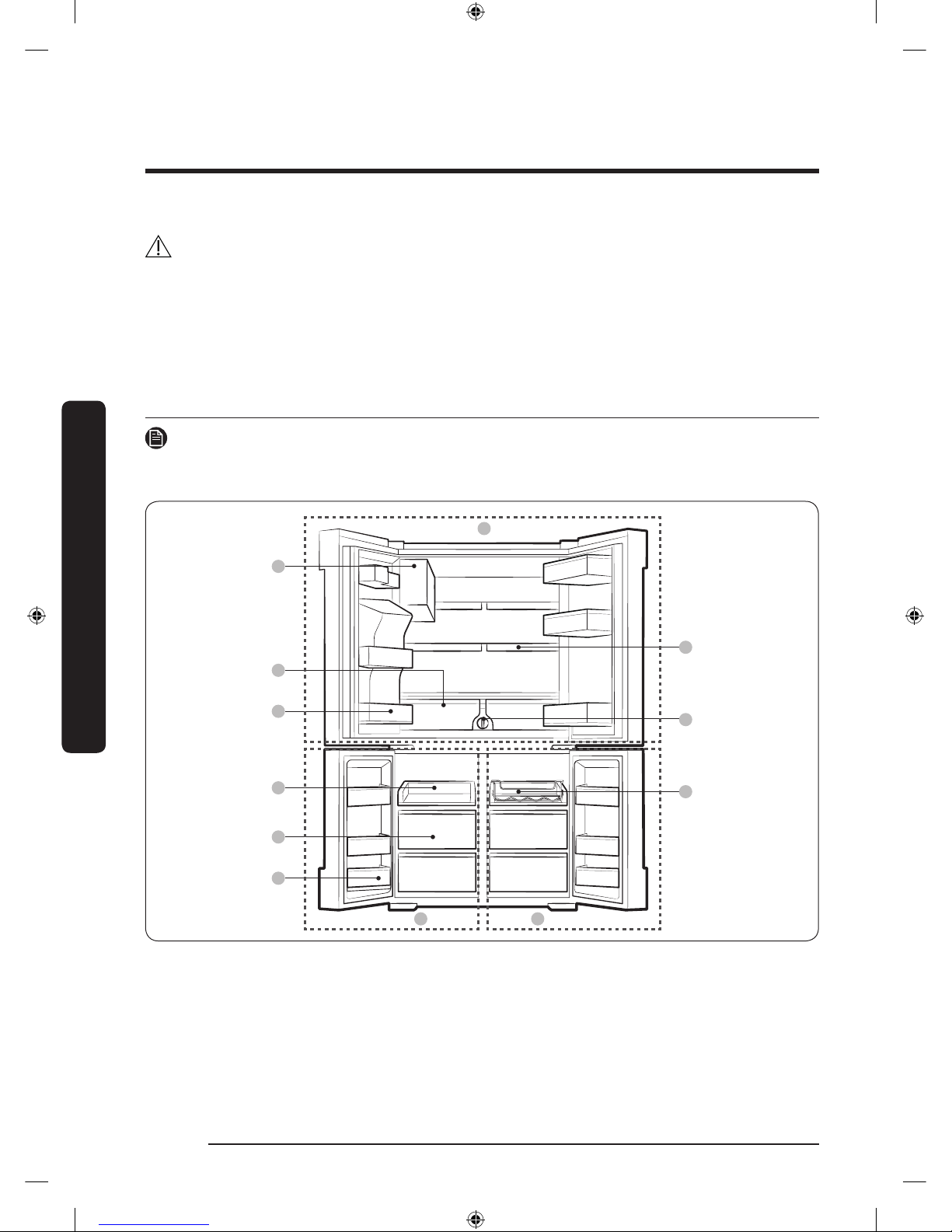
Your refrigerator at a glance
NOTE
Your refrigerator and the provided component parts of your refrigerator may differ from
the illustrations in this manual, depending on the model and your country.
01
07
09
08
A
B C
02
03
04
05
06
Installation
Untitled-4 16 2017-01-19 11:56:46
Page 17
English 17
Installation
01 Auto Ice Maker (Ice Master)
02 EZ Fresh Vegetable & Fruit Drawers
03 Fridge Multi-Purpose Guard
04 Easy Slide-Shelf
05 Dry Food and Meat Storage Drawers
06 Freezer door Bins
07 Quick Space Shelf
08 Water lter
09 Wine Rack
A. Fridge
B. Freezer
C. FlexZone
NOTE
• For energy efciency, keep all shelves, drawers, and baskets in their original positions.
• When closing the door, make sure the vertical hinged section is in the correct position
to avoid scratching the other door.
• If the vertical hinged section is reversed, put it back into the correct position, and then
close the door.
• Moisture may form at times on the vertical hinged section.
• If you close a door forcefully, the other door may open.
• When the door is opened, the interlock switch automatically disables the auger motor
of the ice maker for safety reasons.
• If the internal or external LED lamp is out of order, contact a local Samsung service
center.
Untitled-4 17 2017-01-19 11:56:46
Page 18
Installation
English18
Installation
Door removal for entrance
If the refrigerator cannot pass through the entrance to your home or kitchen due to its
size, follow these instructions to remove and then re-install the refrigerator's doors. If you
do not need to remove the doors, go to page 26 for the installation instructions.
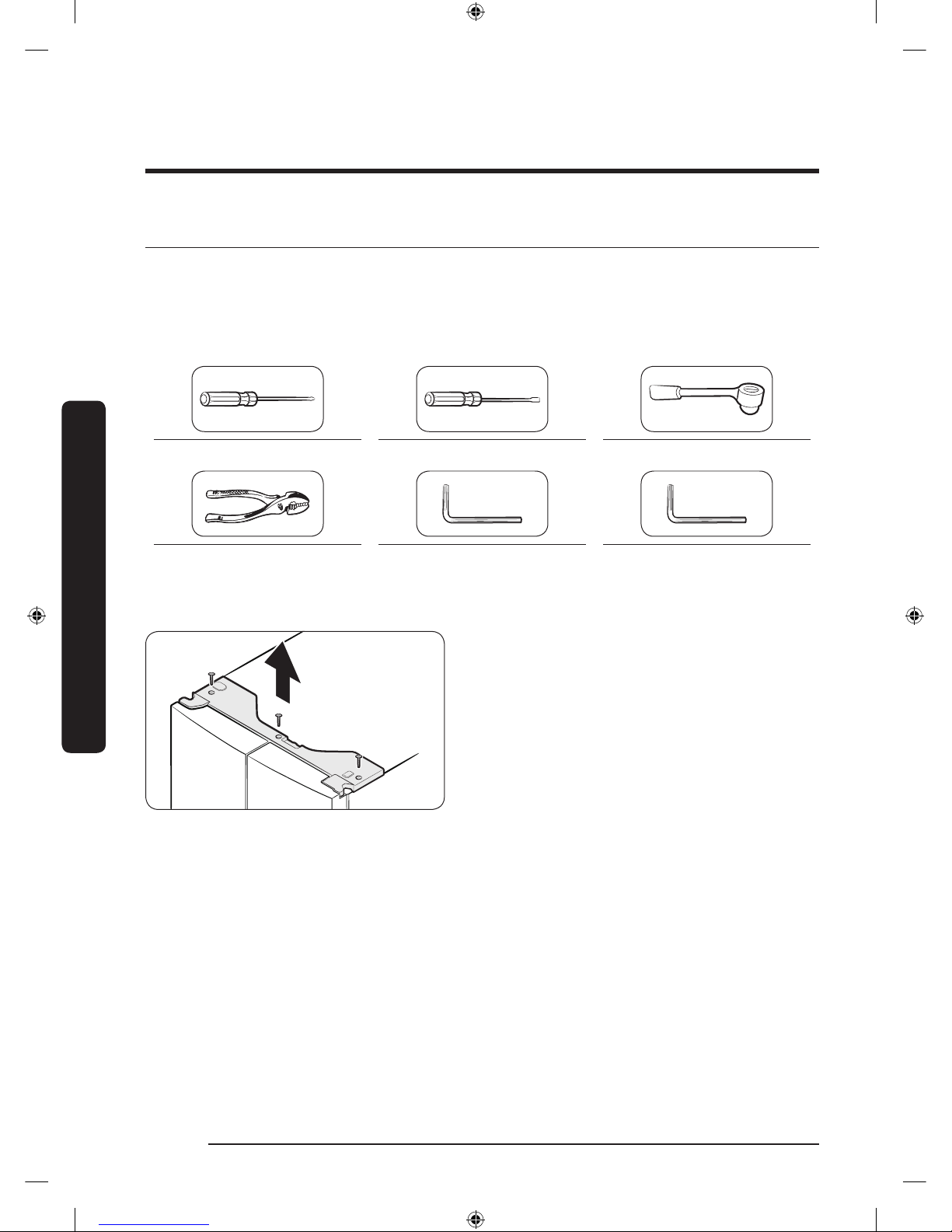
Tools required (not provided)
Phillips head screwdriver Flat-heat screwdriver Socket wrench (10 mm)
Pliers Allen wrench (4 mm) Allen wrench (5 mm)
Detaching the fridge doors
1. With the door closed, use a Phillips
head screwdriver to remove the
screws (x3) from the top cover. Pull
up and remove the top cover with the
connectors.
Untitled-4 18 2017-01-19 11:56:47
Page 19
English 19
Installation
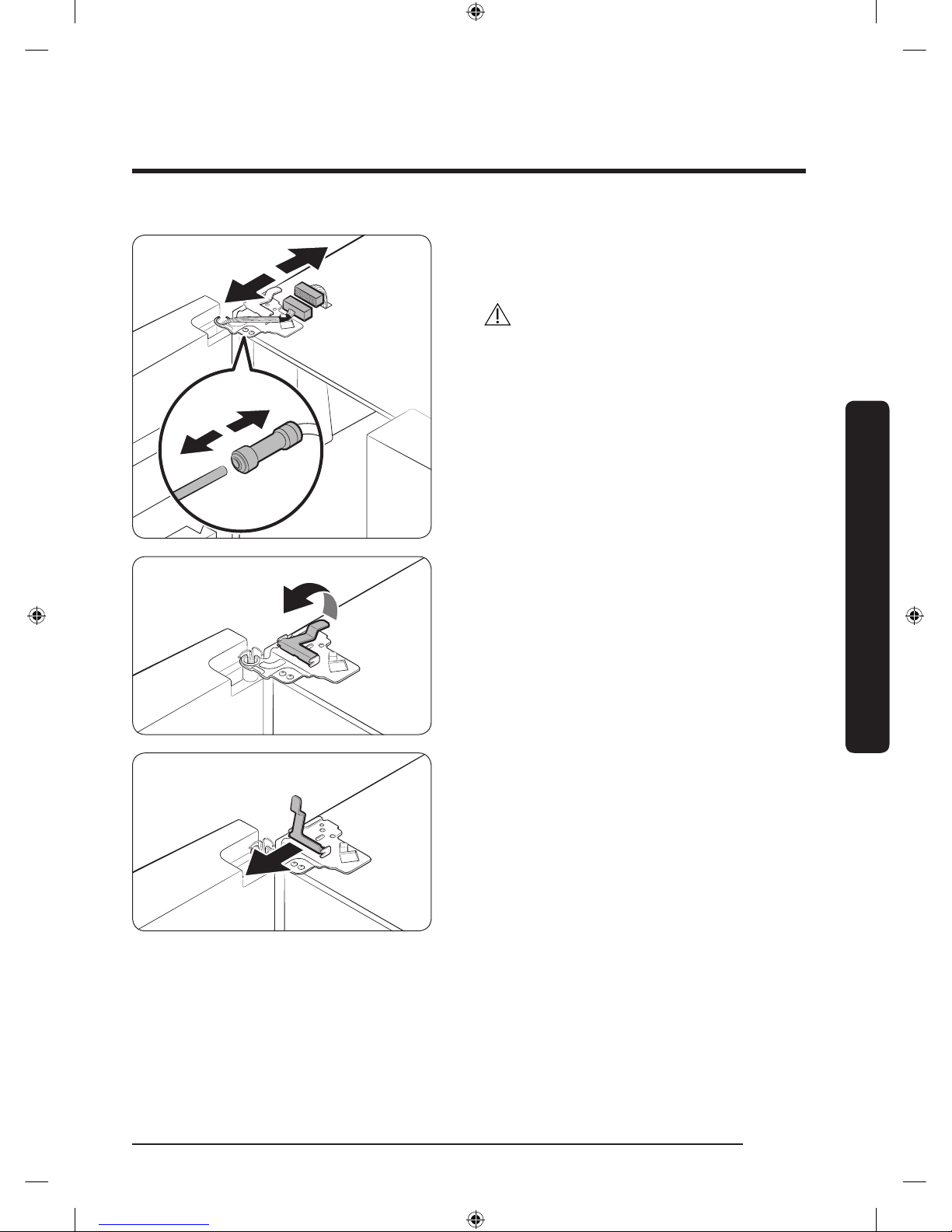
2. Disconnect the two wire connectors
on the left door. The position of the
connectors differs with the model.
CAUTION
• Do not remove both doors
simultaneously. Make sure to remove
one door at a time. Otherwise, one or
both of the doors may fall and cause
physical injury.
• Make sure the refrigerator is off before
disconnecting the connectors.
3. Disconnect the water tube from the
coupler on the left door as shown.
4. Gently draw up the clamp in several
steps. To prevent nger injuries, do not
apply a sudden force to the clamp.
5. Pull up the clamp to remove.
Untitled-4 19 2017-01-19 11:56:47
Page 20
Installation
English20
Installation
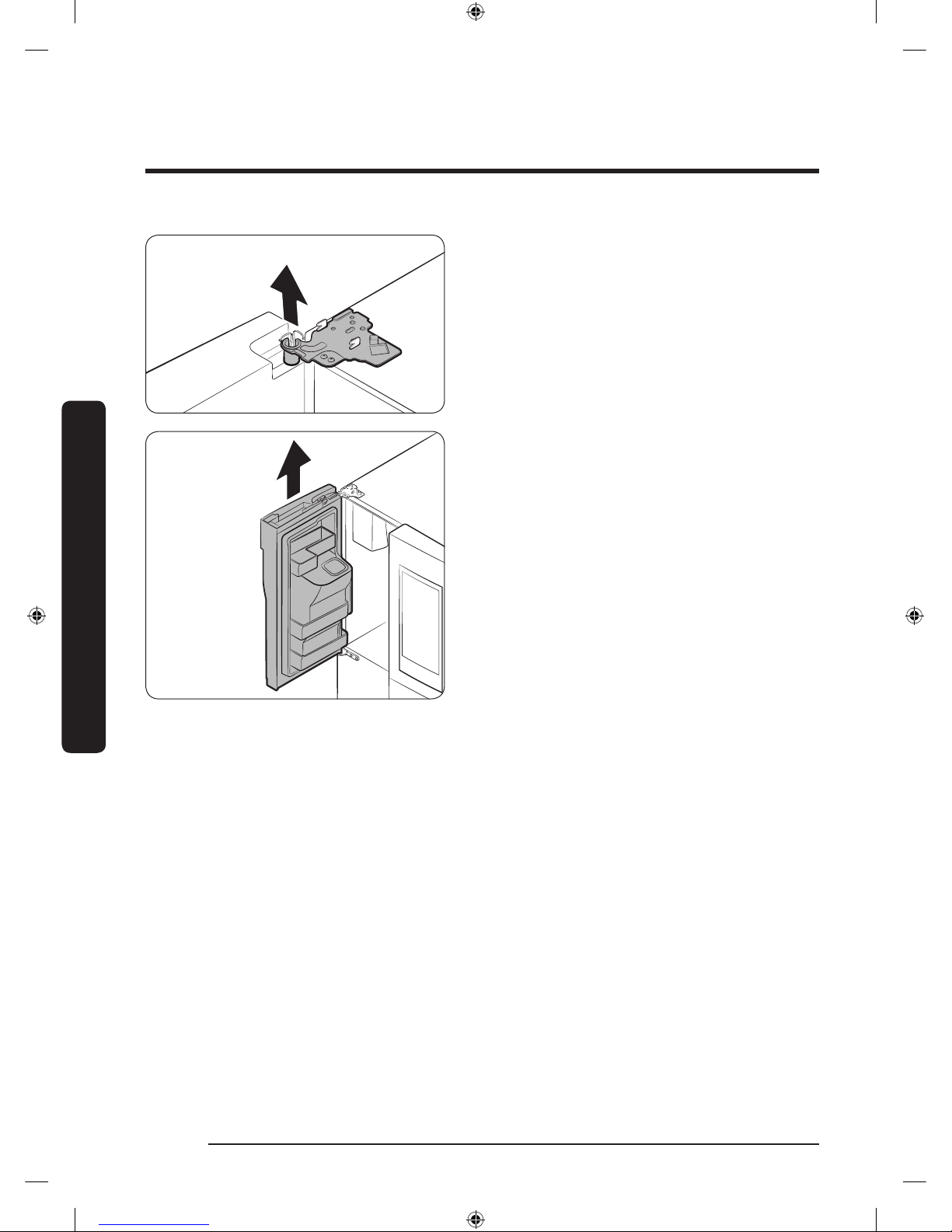
6. Open the door 90 degrees. While
holding the door, pull up and remove
the top hinge. Be careful not to damage
the connector wires when you remove
the hinge.
7. Gently pull up the door vertically to
remove. Do not apply excessive force
to the door. The door may fall, causing
physical injury.
8. Lay the door down on a at surface.
9. Repeat the steps above for the other
door, except for Step 3. There is no
water tube on the right side door.
Untitled-4 20 2017-01-19 11:56:48
Page 21
English 21
Installation
Detaching the freezer doors
CAUTION
• Be sure to remove the fridge doors before removing the freezer doors.
• Use caution when disconnecting the bottom connectors.
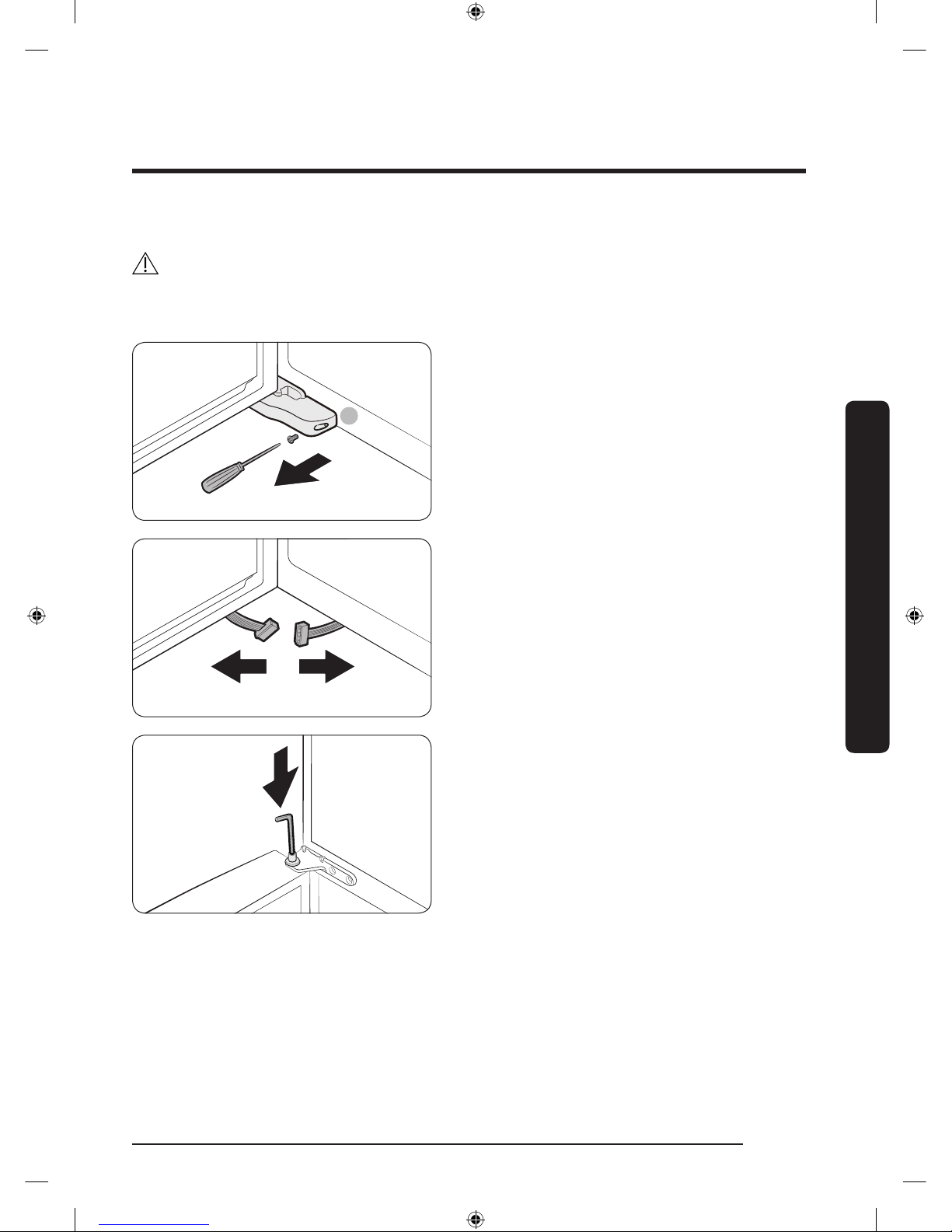
A
1. With the freezer door open, use a
Phillips head screwdriver to remove
the screw holding the cover (A) of the
adjustable leg.
2. Disconnect the wire connectors.
3. Locate the hinge shaft. While holding
the door with one hand, use a at-head
screwdriver or wrench to press the
shaft down. Make sure to hold the door
to prevent the door from falling.
Untitled-4 21 2017-01-19 11:56:48
Page 22
Installation
English22
Installation
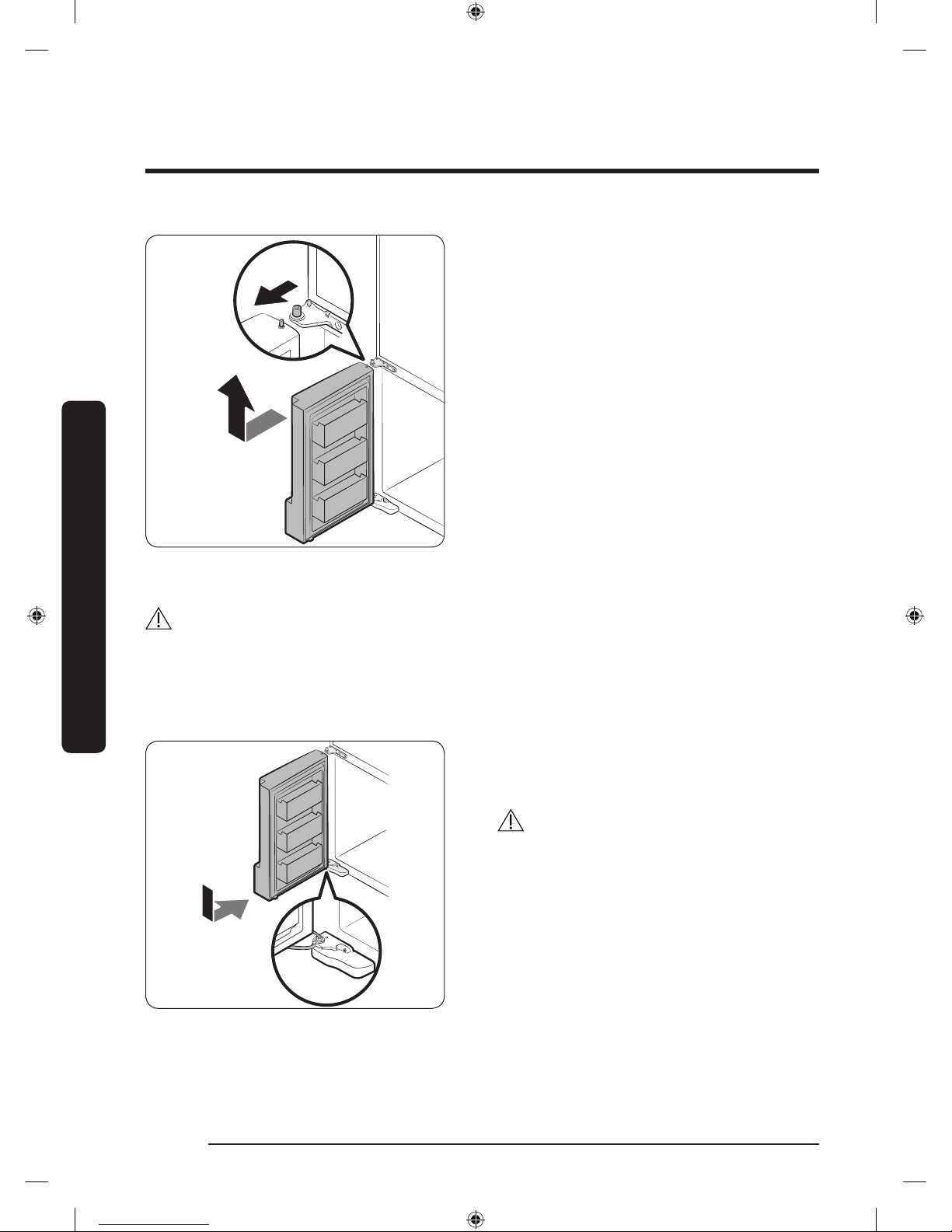
4. To prevent contact with the middle
hinge, slightly tilt the door to the front,
and then lift it up to remove.
5. Repeat the steps above for the other
door.
Re-attaching the freezer doors
CAUTION
• Before re-attaching the doors, make sure all the electrical connectors are properly
connected.
• The freezer doors must be re-attached before the fridge doors.
• Be careful not to damage or step on the wires during this process.
1. Insert the freezer door into the bottom
hinge while pushing the freezer door in
the direction of the arrow.
CAUTION
• Be careful not to damage or step on the
wires during this process.
Untitled-4 22 2017-01-19 11:56:48
Page 23
English 23
Installation
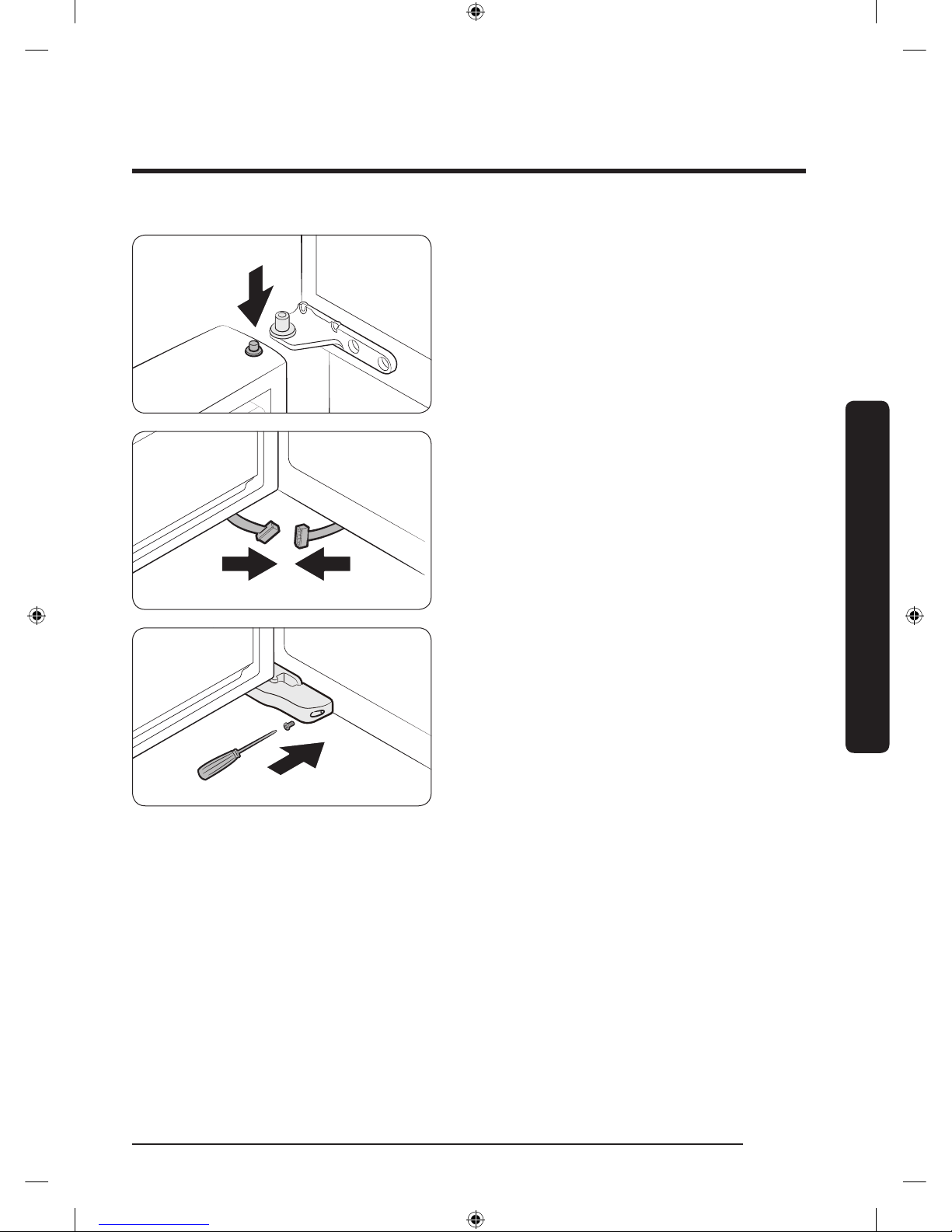
2. While pressing the hinge shaft down,
position the door so that the hinge shaft
is below the shaft hole in the middle
hinge. Release the hinge shaft so that it
enters the shaft hole.
3. With the door open, connect the bottom
connectors in the direction of the
arrows.
4. Attach the levelling foot cover using
a Phillips head screwdriver. Be
careful not to damage or step on the
connectors.
5. Repeat the steps above for the other
door.
Untitled-4 23 2017-01-19 11:56:48
Page 24
Installation
English24
Installation
Re-attaching the fridge doors
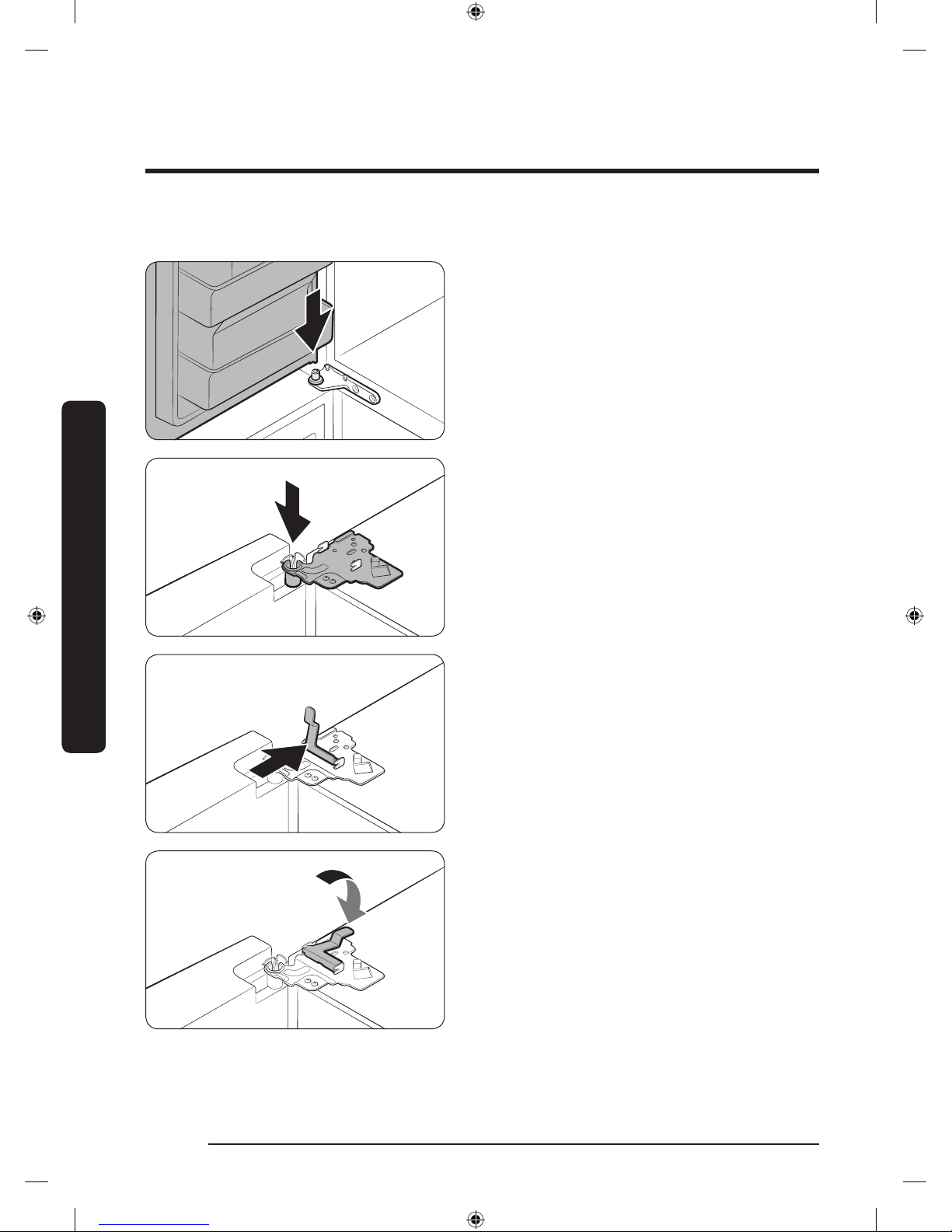
1. While holding the door open by more
than 90 degrees, insert the shaft on
the middle hinge into the hole on the
bottom of the door.
2. Put the top hinge into position on the
top of the refrigerator, and then insert
the hinge shaft into the top hole of the
door. Make sure the wires from the
door pass through the hole in the hinge
shaft.
3. Insert the clamp in the direction of the
arrow.
4. Push back the clamp as shown.
Untitled-4 24 2017-01-19 11:56:49
Page 25
English 25
Installation
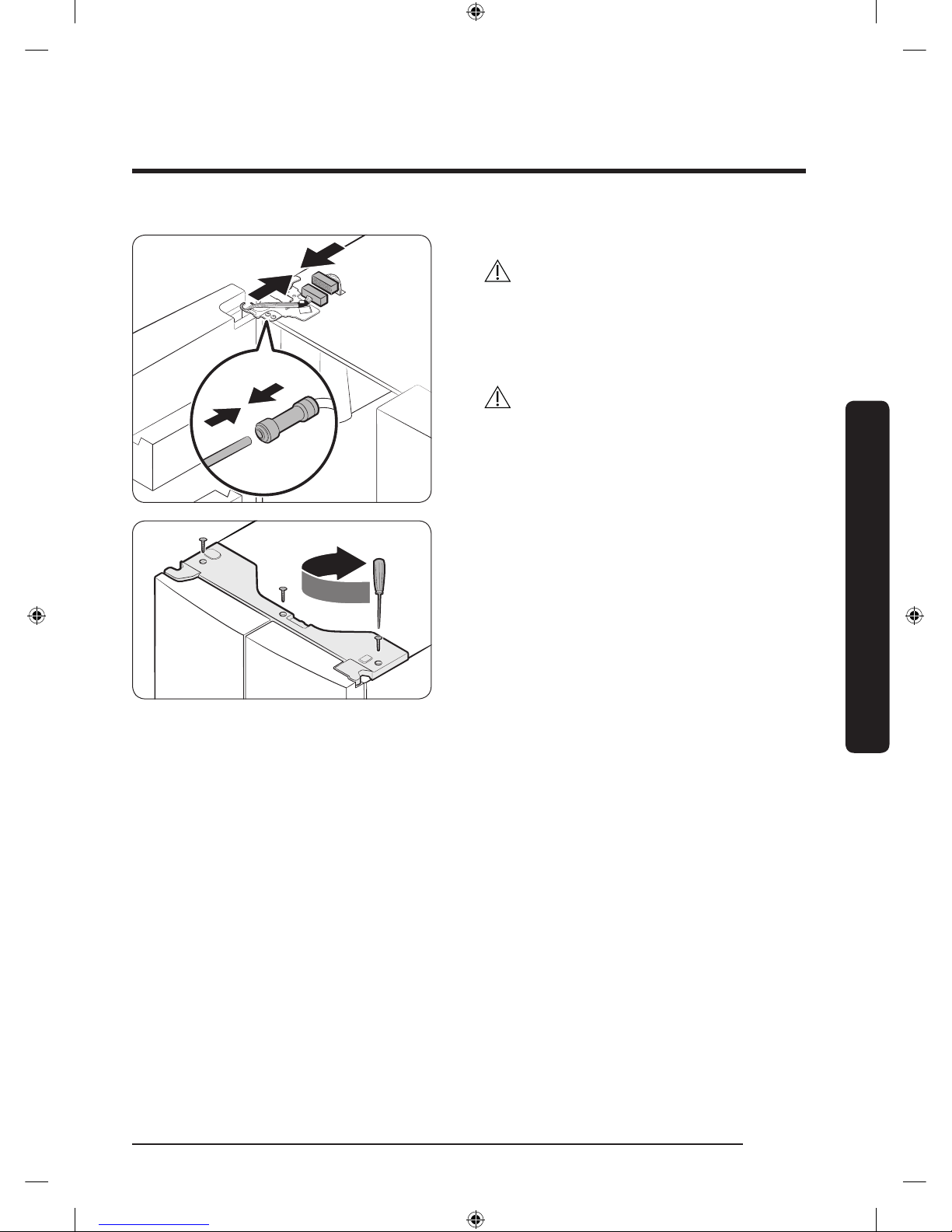
5. Connect the wire connectors.
CAUTION
• Make sure the wire connectors are
connected properly. Otherwise, the
display will not operate.
6. Connect the water tube.
CAUTION
• To prevent water leaks, make sure the
red clips tighten the coupler properly.
• Keep the clips out of children’s reach.
7. Repeat the above steps for the other
door, except for Step 6. The right door
does not have a water tube.
8. Attach the top cover with the front side
rst, and then press down on its back
to get it into position. Then, tighten the
screws (x3).
Untitled-4 25 2017-01-19 11:56:49
Page 26
Installation
English26
Installation
Step-by-step installation
STEP 1 Select a site
The site must:
• Have a solid level surface without carpeting or ooring that may obstruct ventilation
• Be out of direct sunlight
• Have adequate room for opening and closing the door
• Be away from any heat source
• Provide room for maintenance and servicing
• Have a temperature range between 50 °F (10 °C) and 110 °F (43 °C)
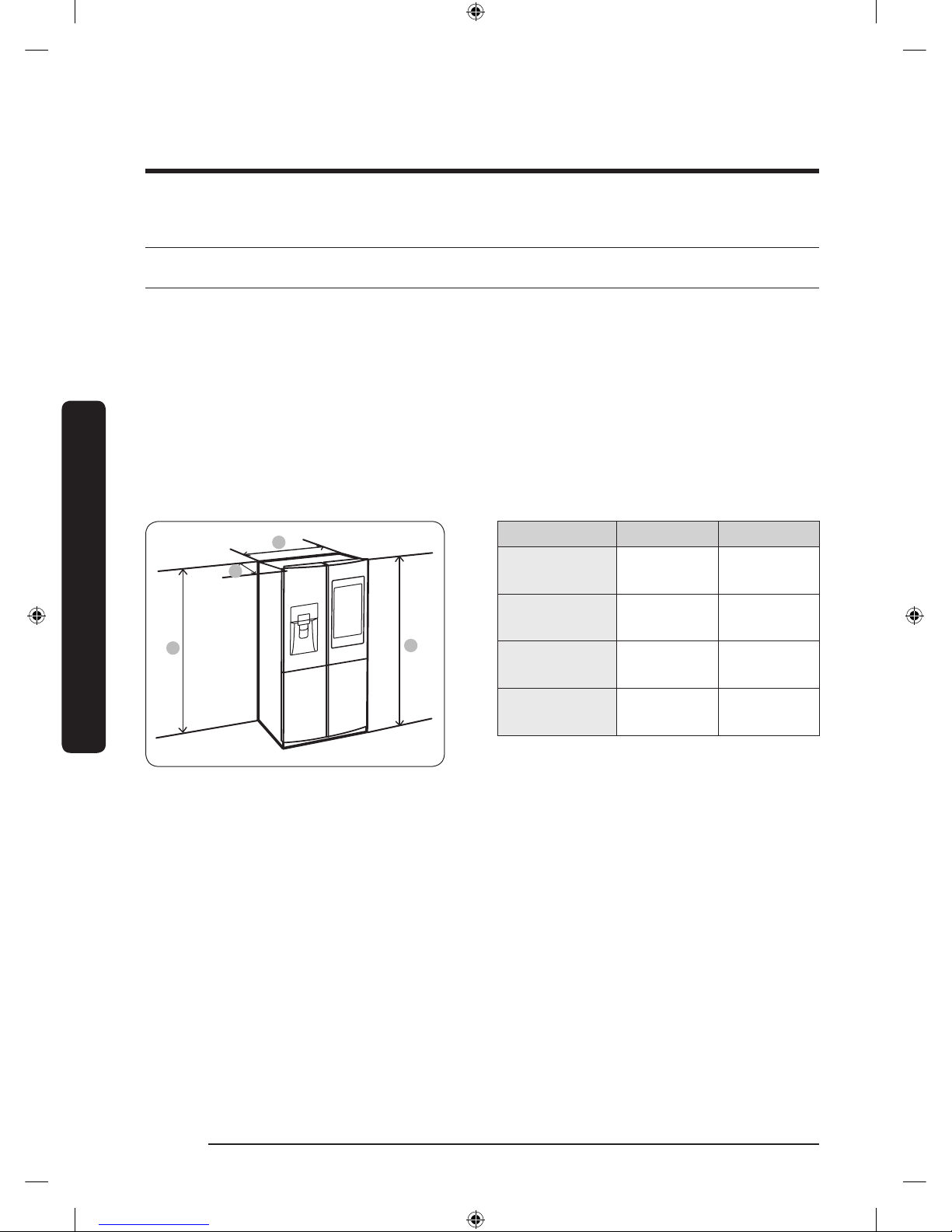
Clearance
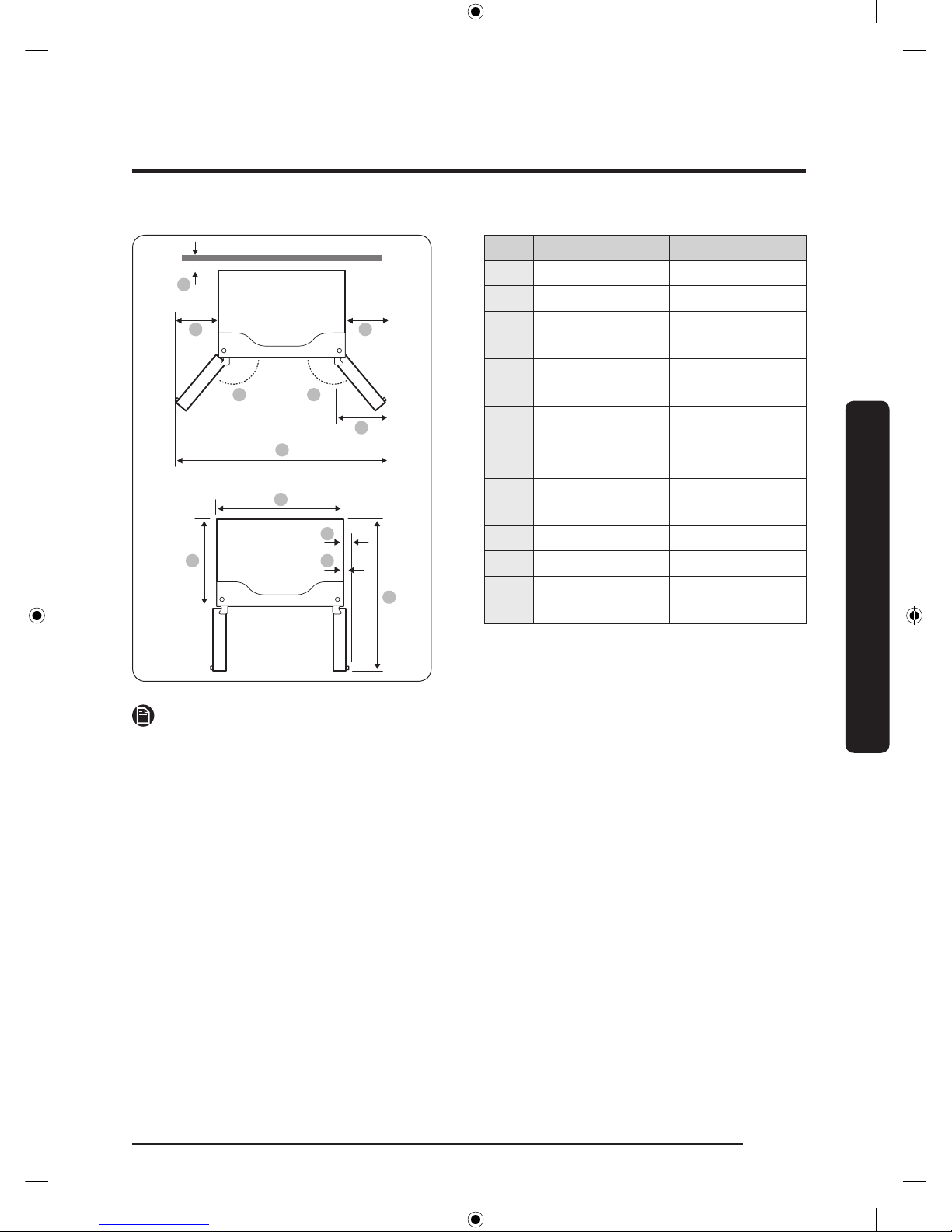
See the pictures and table below and on the next page for installation space requirements.
B
C
D
A
Model RF22M* RF28M*
Depth “A”
28
7
/8"
(733 mm)
34 1/4"
(871 mm)
Width “B”
35
3
/4"
(908 mm)
35 3/4"
(908 mm)
Height “C”
70
3
/4"
(1797 mm)
70 3/4"
(1797 mm)
Overall
Height “D”
71
7
/8"
(1825 mm)
71 7/8"
(1825 mm)
Untitled-4 26 2017-01-19 11:56:49
Page 27
English 27
Installation
01
02 02
04 04
05
03
06
08
0907
10
RF22M* RF28M*
01 2" (50 mm) 2" (50 mm)
02 125° 125°
03
59
5
/8"
(1515 mm)
59 5/8"
(1515 mm)
04
11
7
/8"
(303 mm)
11 7/8"
(303 mm)
05 12" (305 mm) 12" (305 mm)
06
35
3
/4"
(908 mm)
35 3/4"
(908 mm)
07 24" (610 mm)
29
3
/8"
(748 mm)
08 2
3
/4" (70 mm) 2 3/4" (70 mm)
09 1
3
/4" (43 mm) 1 3/4" (43 mm)
10
42
5
/8"
(1083 mm)
48 1/8"
(1221 mm)
NOTE
The measurements of your refrigerator may differ from those listed above, depending on
the measuring method.
Untitled-4 27 2017-01-19 11:56:49
Page 28
Installation
English28
Installation
STEP 2 Flooring
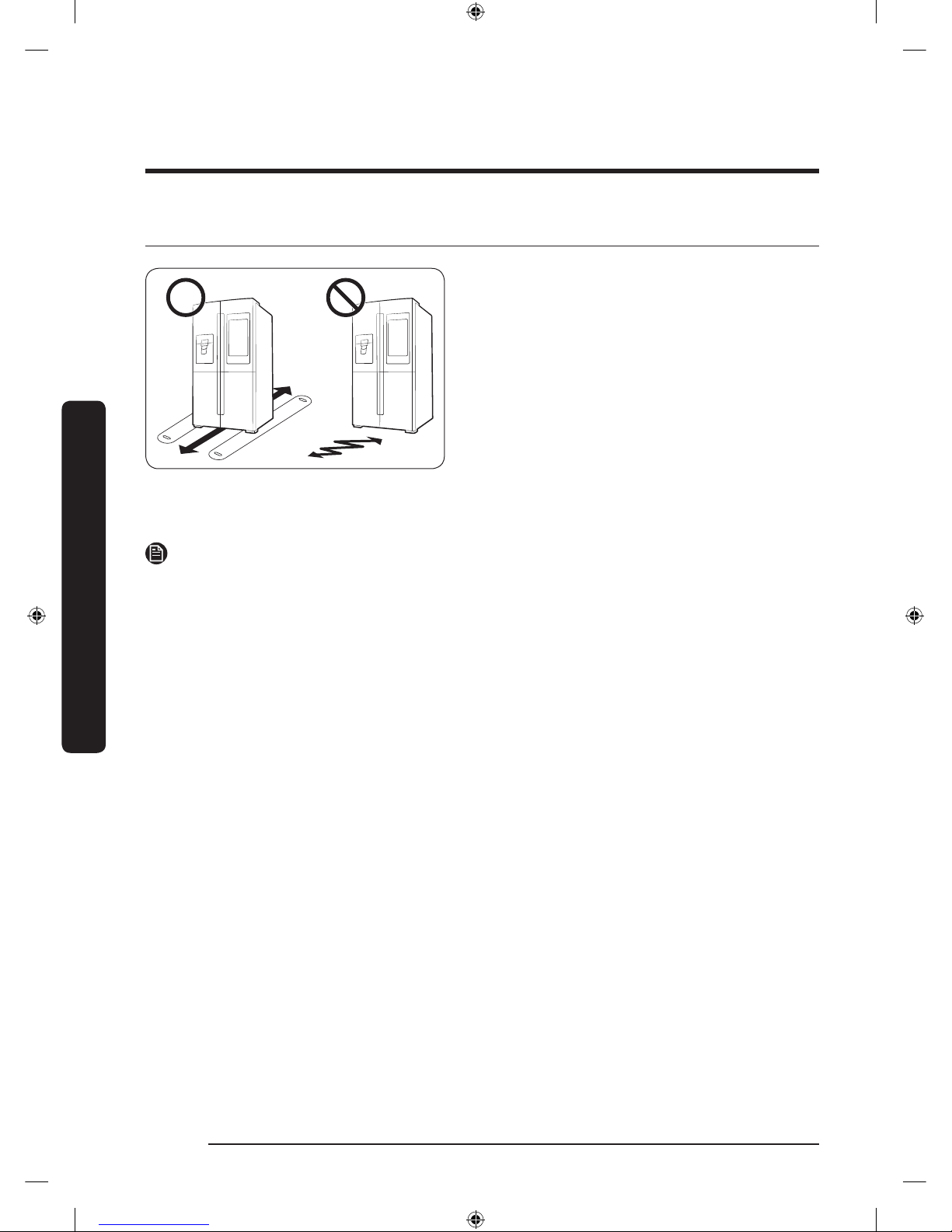
• The surface of the installation location
must support a fully loaded refrigerator.
• To protect the oor, put a large piece
of cardboard under each leg of the
refrigerator when you move it for
installation.
• To protect the oor once the
refrigerator is in its nal position, do
not move it unless necessary. If you
have to move it, place thick paper or
cloth such as an old carpet, along the
movement path.
NOTE
If the refrigerator cannot pass through entrance to your home or kitchen due to its size,
see Door removal for entrance on page 18.
Untitled-4 28 2017-01-19 11:56:50
Page 29
English 29
Installation
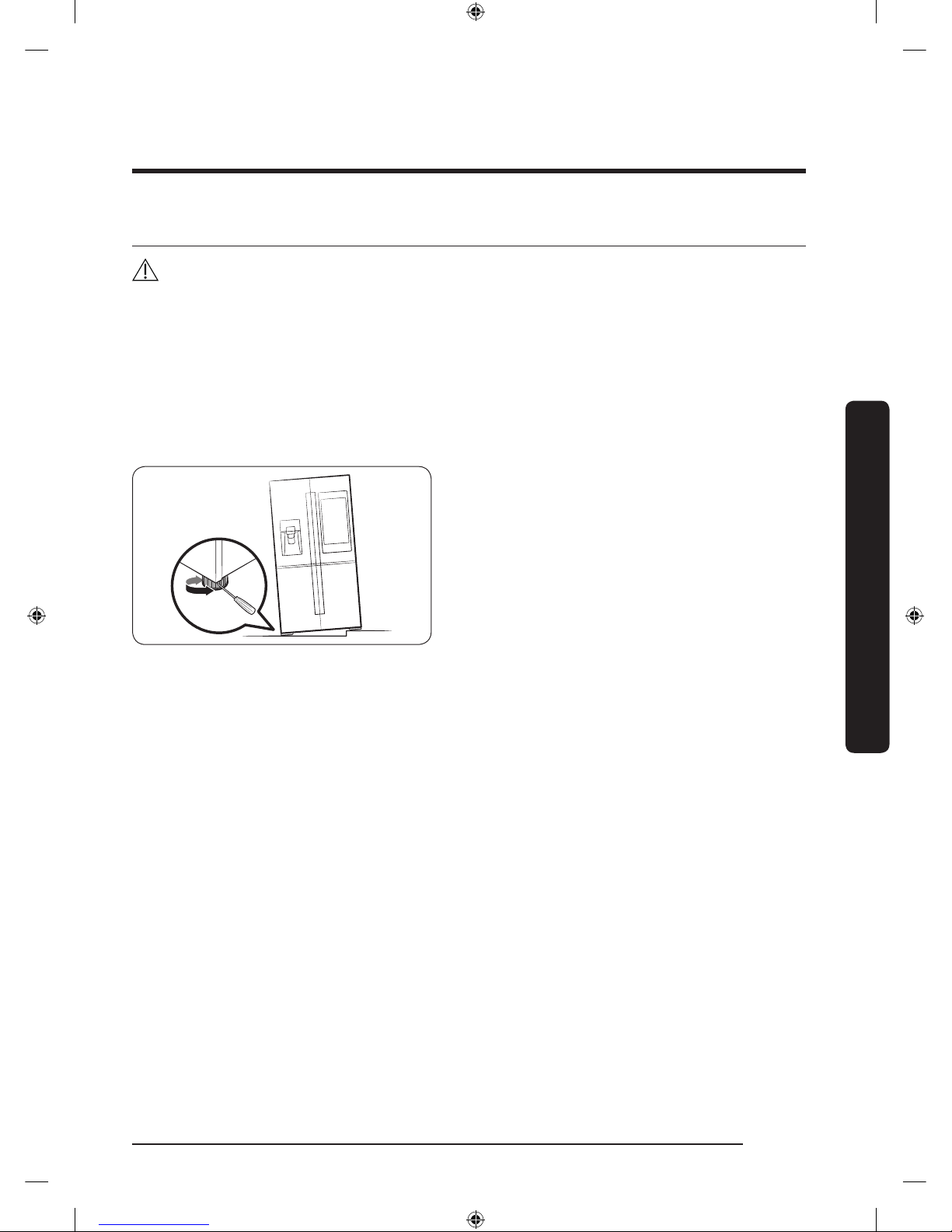
STEP 3 Adjust the levelling feet
CAUTION
• When installed, the refrigerator must be leveled on a at, solid oor. Not leveling the
refrigerator can cause damage to the refrigerator or physical injury.
• Levelling must be performed with the refrigerator empty. Make sure no food items are
inside the refrigerator.
• For safety reasons, adjust the front side a little higher than the rear side.
Level the refrigerator using the special screws (levellers) on the front legs. Use a at-head
screwdriver to turn the levellers.
• To adjust the height of the left side:
Insert a at-head screwdriver into the
leveller of the left side front leg. Turn
the leveller clockwise to raise or turn it
counterclockwise to lower.
• To adjust the height of the right side:
Insert a at-head screwdriver into the
leveller of the right side front leg. Turn
the leveller clockwise to raise or turn it
counterclockwise to lower.
Untitled-4 29 2017-01-19 11:56:50
Page 30
Installation
English30
Installation
STEP 4 Adjust the door height as well as the door gap
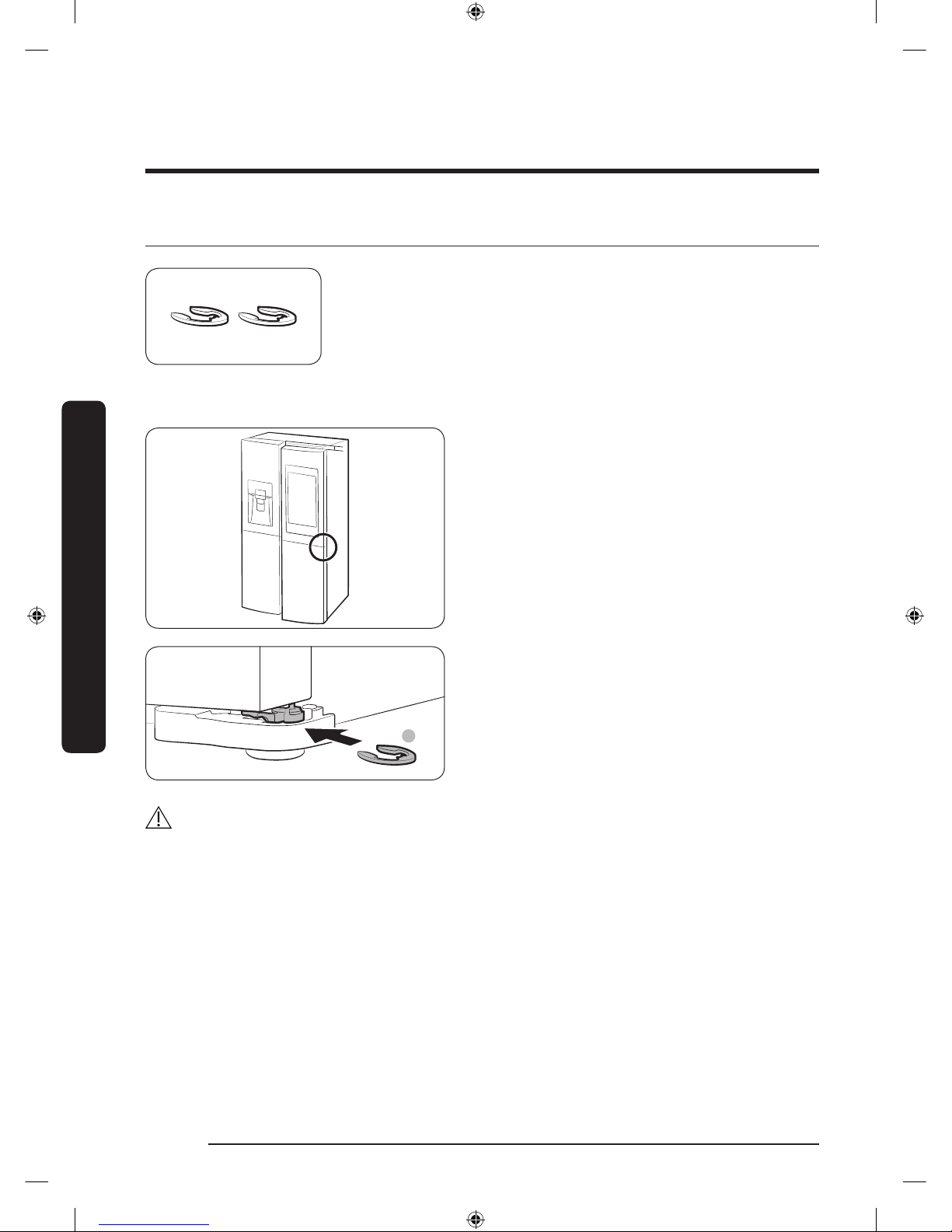
Snap ring
The height of a door can be adjusted using the provided snap
rings, which come in 4 different sizes (1 mm, 1.5 mm, 2 mm,
and 2.5 mm).
To adjust the height of a door
1. Check the height difference between
the doors, and then raise and hold the
lower door.
A
2. Insert a suitable-sized snap ring (A)
between the door and the hinge as
shown.
CAUTION
• Insert only one snap ring. If you insert two or more snap rings, the rings may slip out
or make a rubbing noise.
• Keep the snap rings out of children’s reach and keep them for future use.
• Do not raise the door too much. The door can contact and damage the top cover.
Untitled-4 30 2017-01-19 11:56:50
Page 31
English 31
Installation
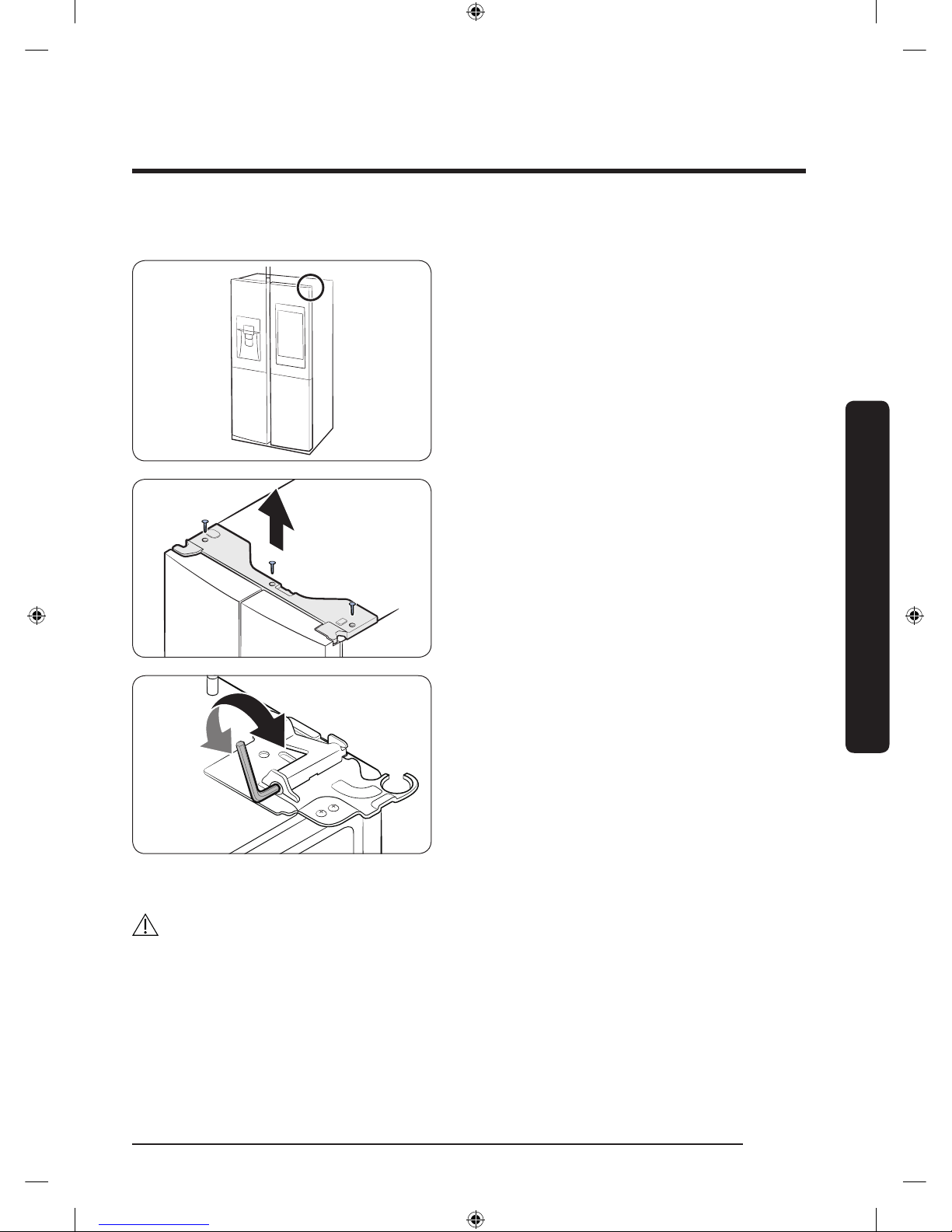
To correct the door gap
Door gaps can be corrected using the
gap bolt on the top right corner of the
refrigerator.
1. With the door closed, use a Phillips
head screwdriver to remove the 6
screws in the top cover. Then, carefully
remove the top cover along with the
wire connectors.
2. Use a 4 mm Allen wrench (not
provided) to correct the door gap
between two doors.
- To widen the gap, turn the gap bolt
clockwise.
- To narrow the gap, turn the gap bolt
counterclockwise.
3. When done, reinsert the top cover, and
then reinsert the screws that hold it in
place. Tighten the screws.
CAUTION
The electrical connectors must be left intact during this process. Use caution so you don't
tangle the connector wires or peel off the coating.
Untitled-4 31 2017-01-19 11:56:50
Page 32
Installation
English32
Installation
STEP 5 Connect the water dispenser line
A water dispenser with a lter is one of the helpful features on your new refrigerator. To
help promote better health, the water lter removes unwanted particles from your water.
However, it does not sterilize or destroy microorganisms. You may need to purchase a
water purifying system to do that.
The water line also connects to the ice maker. For the ice maker to operate properly, a
water pressure of 20-125 psi is required.
If the refrigerator is installed in an area with low water pressure (below 20 psi), you can
install a booster pump to compensate for the low pressure.
After you have connected the water line, make sure the water storage tank inside the
refrigerator is properly lled. To do this, press the water dispenser lever until the water
runs from the water outlet.
NOTE
• Water line installation kits are available at extra cost from your retailer. We
recommend using a water line installation kit that contains copper tubing and a 6 mm
(
1
/4”) compression nut.
• Use the new hose-sets supplied with the appliance only. Do not re-use an old hose set.
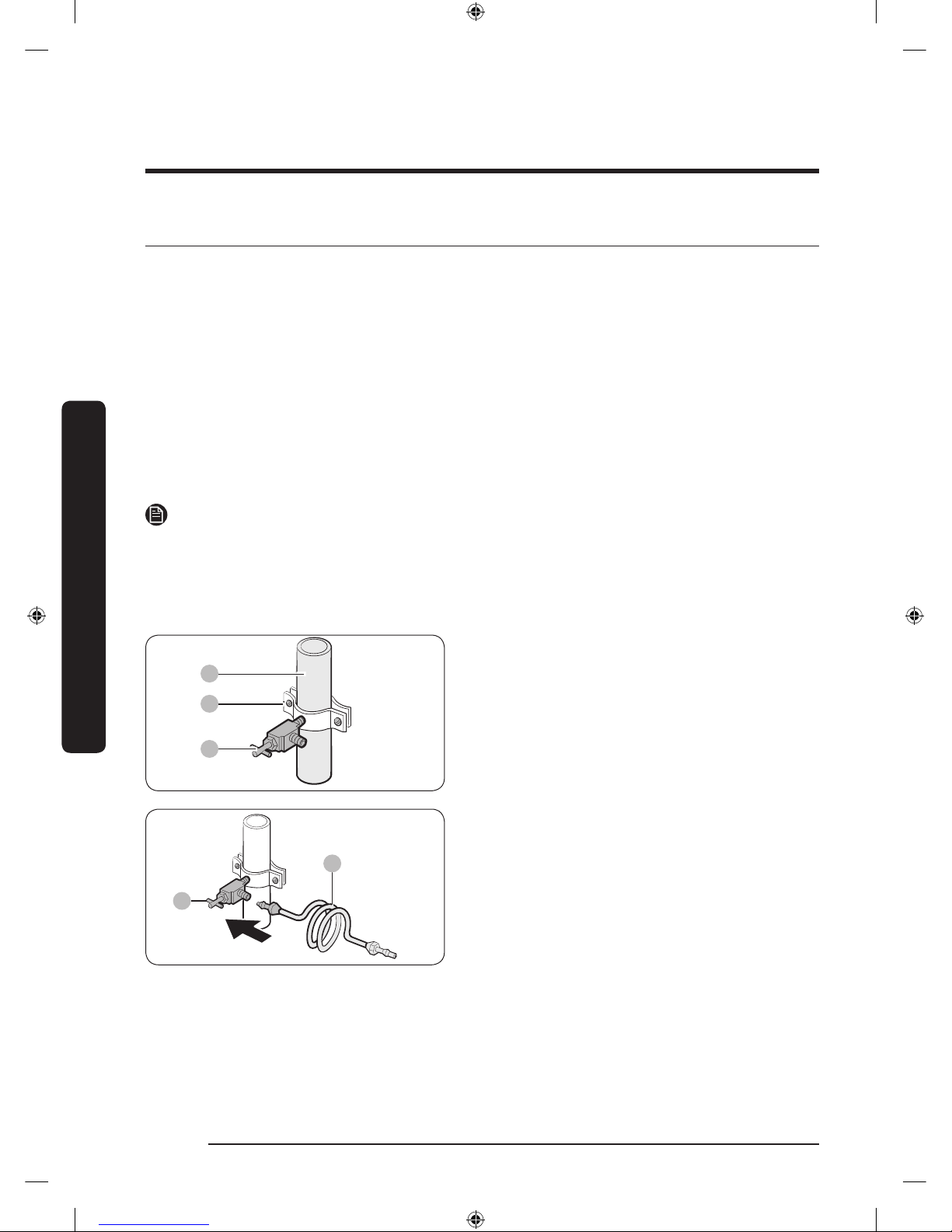
A
B
C
1. Shut off the main water source.
2. Insert the pipe clamp (B) and the shut
off valve (C) into the cold water line (A).
A
B
3. Connect the water line installation kit
(A) to the shut off valve (B).
Untitled-4 32 2017-01-19 11:56:51
Page 33
English 33
Installation
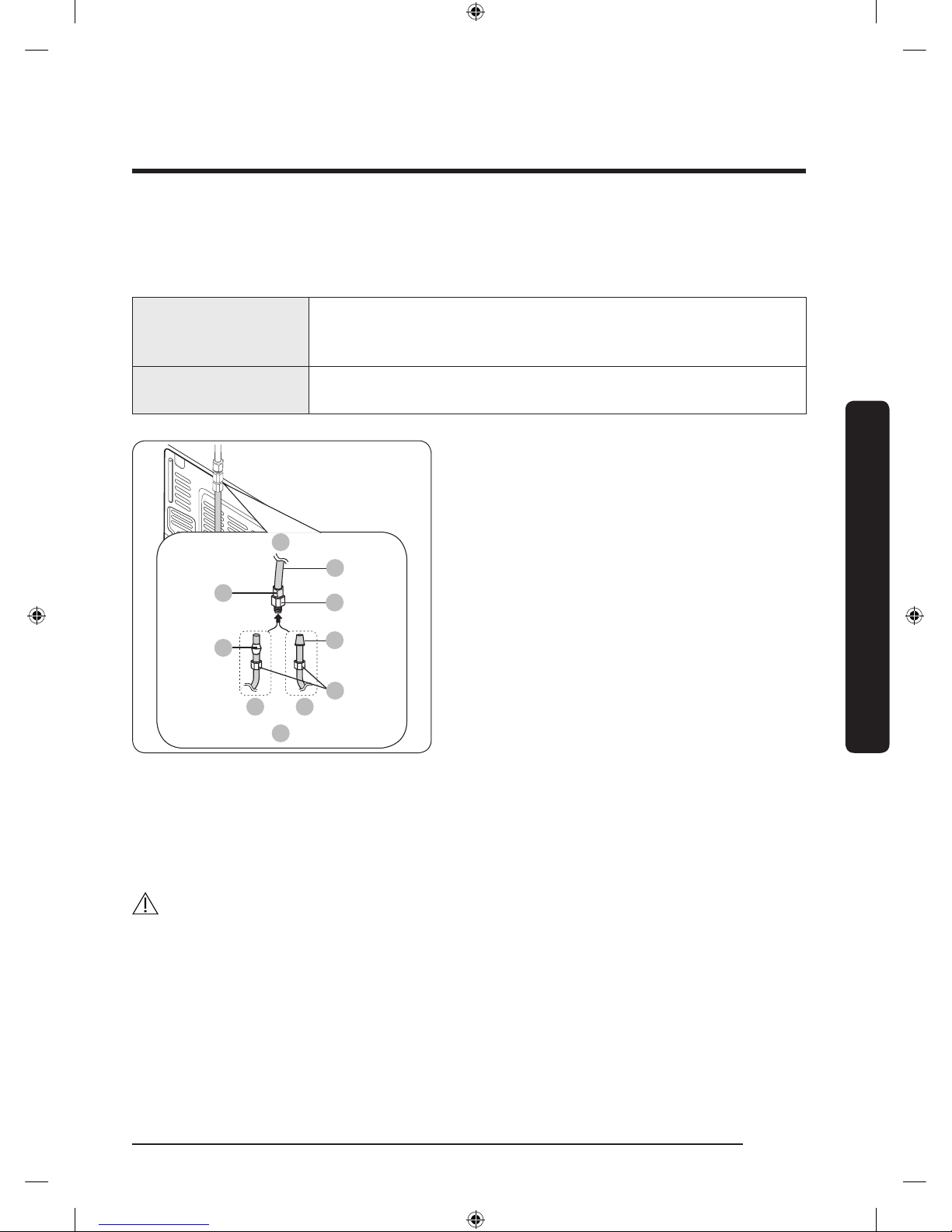
Connect the water supply line to the refrigerator
There are several items you must purchase to complete this connection. You may nd
these items sold as a kit at your local hardware store.
Copper Tubing
• 1/4” copper tubing
• 1/4” compression nut (1 pc)
• Ferrule (2 pc)
Plastic Tubing
•
1
/4” plastic tubing Molded end (Bulb)
• 1/4” compression nut (1pc)
A
01
02
03 08
04
05
06
07
B
A. Refrigerator
B. Household water supply line
01 Compression Nut (
1
/4”) (Assembled)
02 Ferrule (Not supplied)
03 Copper tubing (Not supplied)
04 Plastic Tubing (Assembled)
05 Compression Fitting (Assembled)
06 Molded end (Bulb)
07 Compression nut (B) (1/4”) (Not
supplied)
08 Plastic Tubing (A) (Not supplied)
1. Connect the household water line to the assembled compression tting.
- If you are using copper tubing, slip the compression nut (B) (not supplied) and
ferrule (not supplied) on the copper tubing (not supplied) as shown.
- If you are using plastic tubing (A), insert the molded end (Bulb) of the plastic tubing
(A) into the compression tting.
CAUTION
If you use plastic tubing, (A) do not use it without the molded end (Bulb).
2. Tighten the compression nut (B) onto the compression tting. Do not over-tighten the
compression nut (B).
3. Turn the water on and check for any leakage. If you nd water drops or leakage in
the connection areas, turn off the main water supply. Check the connections and, if
necessary, tighten.
Untitled-4 33 2017-01-19 11:56:51
Page 34
Installation
English34
Installation
4. Flush 1 gallon of water through the lter before drinking or using the water from
the refrigerator. (Flush approximately 6 minutes.) To ush, press a large glass or cup
against the water dispenser lever. Fill the glass, empty it, and then repeat.
5. After you turn on the refrigerator, let the ice maker make ice for 1 to 2 days. Over that
period of time, throw out the rst 1 or 2 buckets of ice the ice maker makes to ensure
all impurities have been removed from the water line.
NOTE
Only connect the water line to a potable water source.
• If you have to repair or disassemble the water line, cut off
1
/4“ of the plastic tubing to
make sure you get a snug, leak-free connection.
• You can test the water line quickly using a paper cup. Under normal conditions, the
water dispenser can ll a 5 3/4 oz. (170 cc) cup in about 10 seconds.
STEP 6 Initial settings
After you complete the following steps, the refrigerator should be fully functional.
1. Plug the power cord into the wall socket to turn the refrigerator on.
2. Open the door, and check if the interior light lights up.
3. Set the temperature to the coldest setting, and then wait for about an hour. Then, the
freezer will be slightly chilled, and the motor should be running smoothly.
4. Wait until the refrigerator reaches the set temperature. Now the refrigerator is ready
to use.
STEP 7 Final check
When installation is complete, conrm that:
• The refrigerator is plugged into an electrical outlet and grounded properly.
• The refrigerator is installed on a at, level surface with appropriate clearance between
it and any walls or cabinets.
• The refrigerator is level and is sitting rmly on the oor.
• The door opens and closes freely, and the interior light turns on automatically when
you open the door.
Untitled-4 34 2017-01-19 11:56:51
Page 35
English 35
Operations
User interface
NOTE
• For detailed information about the refrigerator's functions, and apps, see the on-screen
user manual available on the LCD display of your refrigerator.
• The content of apps and widgets and their design is subject to change. Support for apps
and widgets may be discontinued without notice, depending on the content provider’s
policy.
• Children's use of the refrigerator's functions, apps, and services must be supervised by
adults.
• The PANDORA apps are only available in the United States.
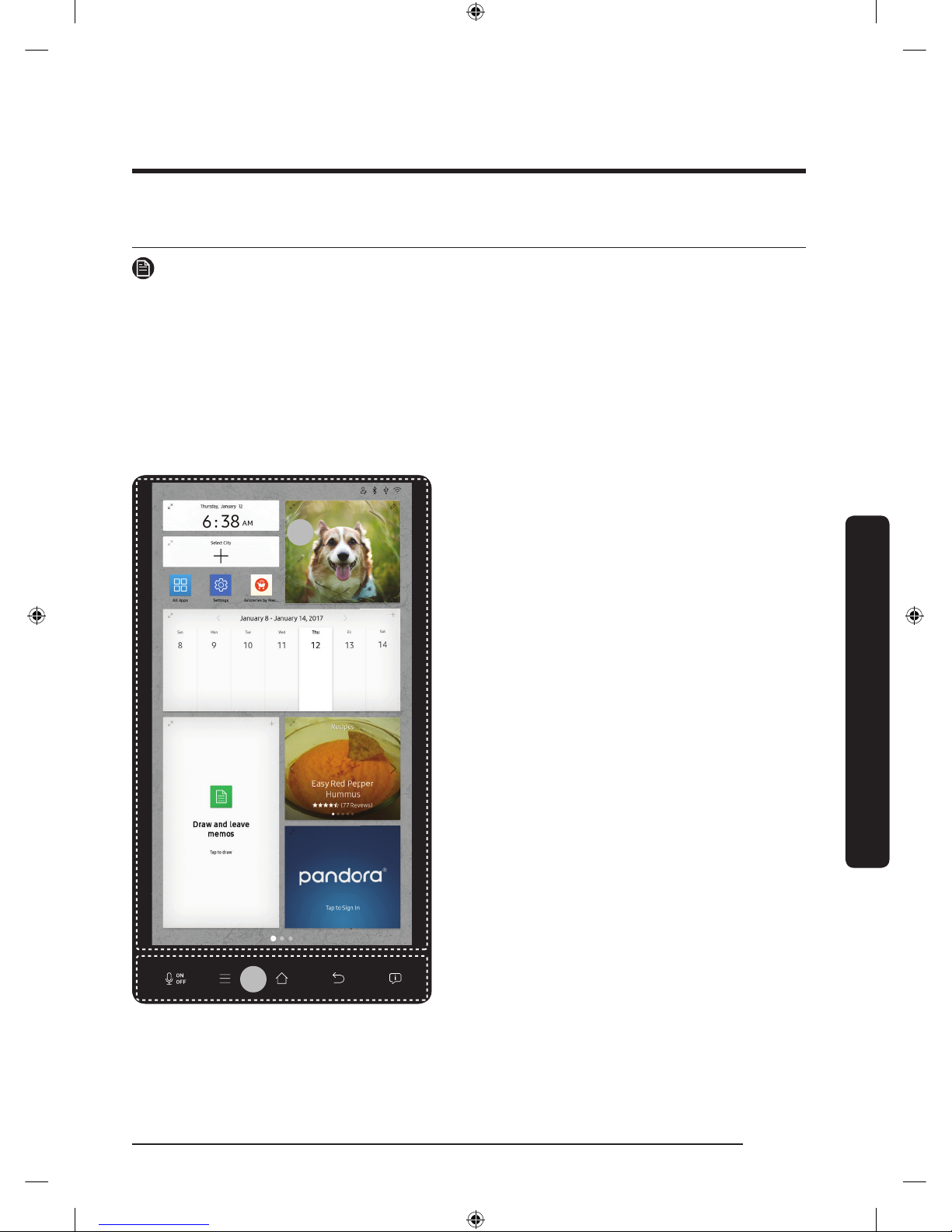
01
02
01 Home screen
02 Task bar
Operations
Untitled-4 35 2017-01-19 11:56:51
Page 36
Operations
English36
Operations
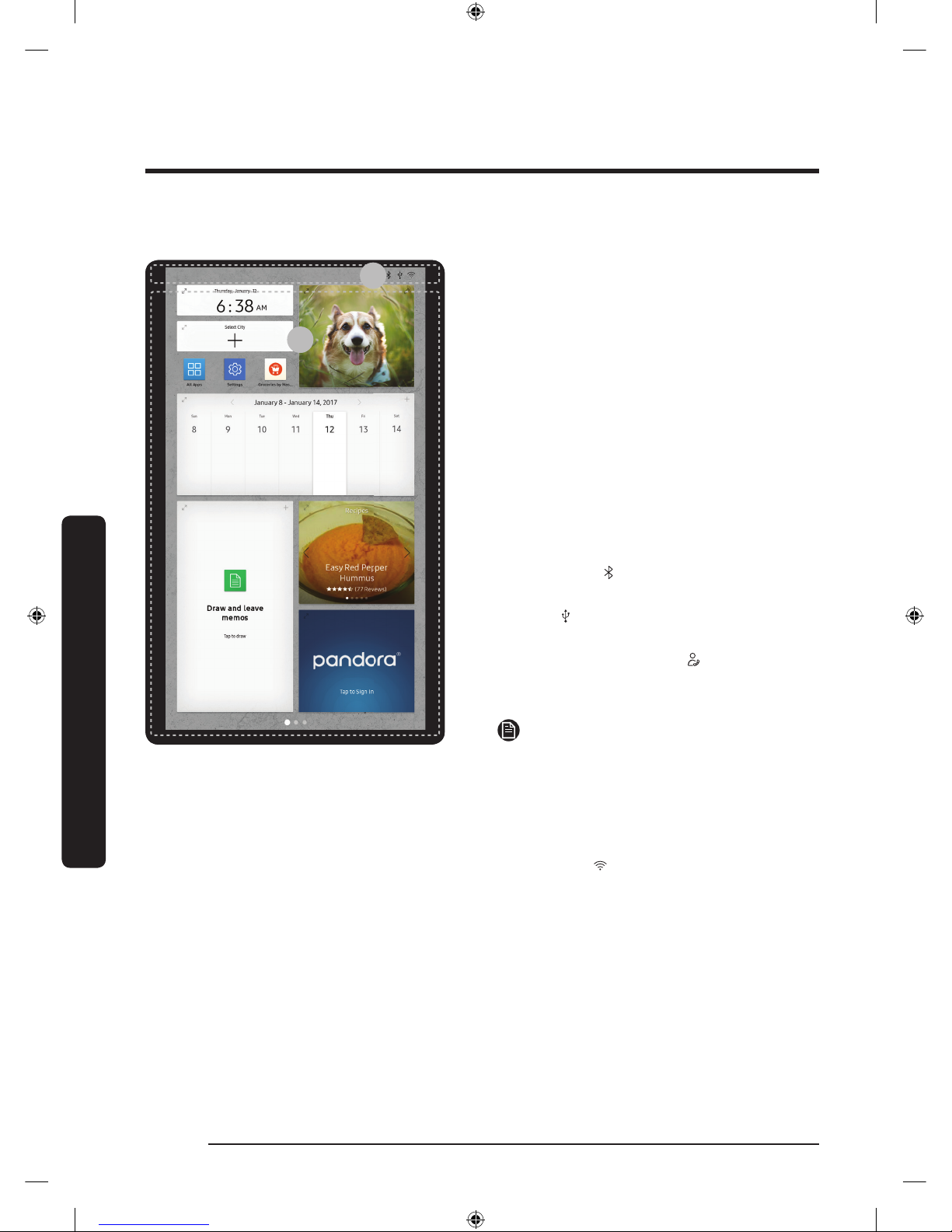
01 Home screen
01
02
01 Apps & Widgets
• Tap a desired app or widget to launch
it.
• Tap and hold an app or widget to enter
Edit mode. A grid appears. In Edit mode,
you can drag and drop an app or widget
to a new position on the grid. When you
move the app or widget to a new grid
location, the location turns blue if it is
available. If it is not available, it turns
red.
• You can add an app or widget that has
been removed from the All Apps list.
02 Status bar
• Bluetooth (
): Indicates Bluetooth
connection status.
• USB ( ): Indicates USB connection
status.
• Remote Management ( ): Turns on
when Remote Management is enabled
and running.
NOTE
The refrigerator supports USB memory
that is formatted in the FAT32 or exFAT
le systems. NTFS is not supported. Be
sure to convert NTFS to FAT32 or exFAT
before use.
• Network (
): Indicates network
connection status in 5 levels (Off, 1-4).
Untitled-4 36 2017-01-19 11:56:52
Page 37
English 37
Operations
02 Task bar
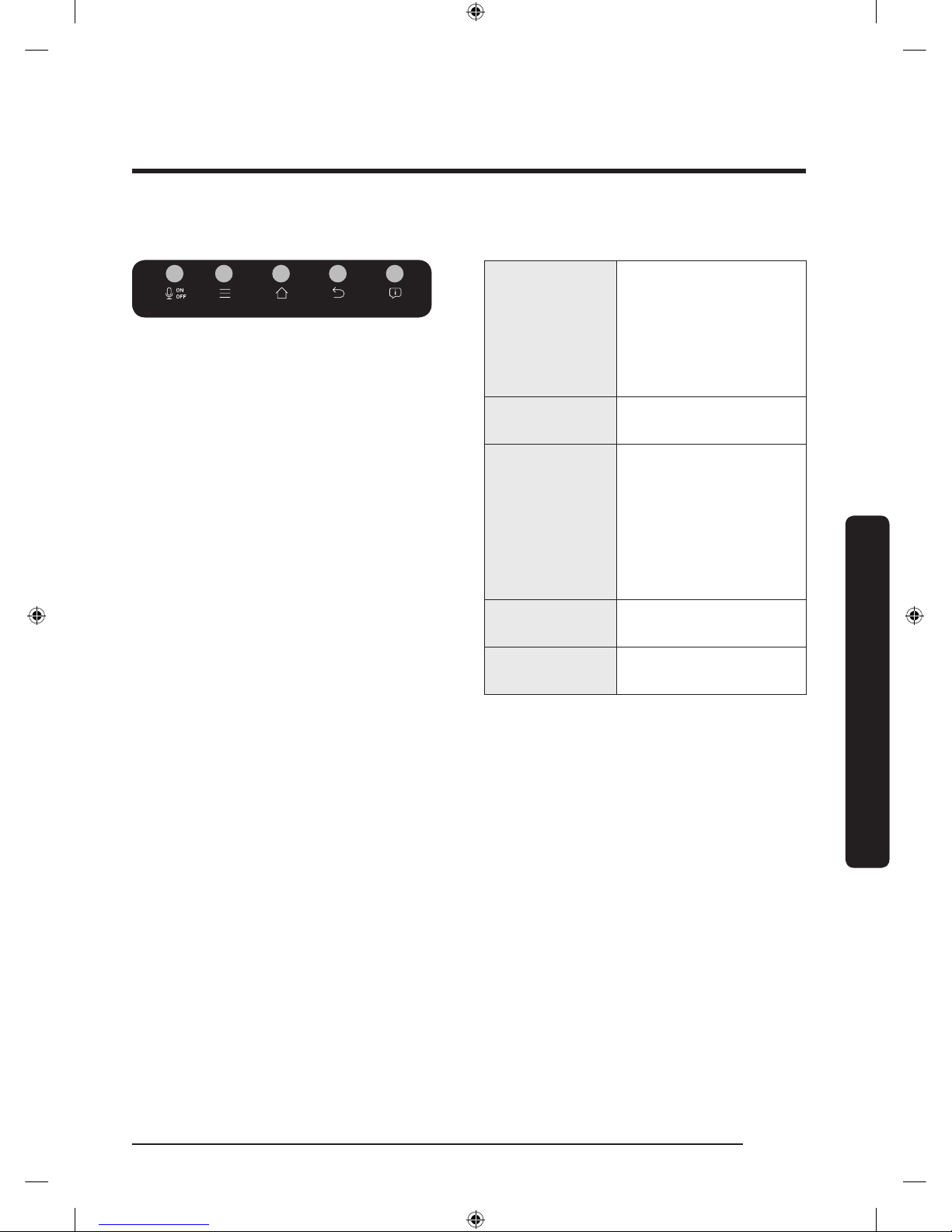
01 02 03 04 05
01 Microphone
Tap to turn on or
turn off the voice
recognition function.
The microphone icon
turns red when it is
turned off.
02 Menu
Tap to display the
menus available.
03 Home
• Tap to open the
Home screen.
• Tap and hold to
open the Task
Manager. See the
Task Manager
section for details.
04 Return
Tap to return to the
previous screen.
05 Notication
Tap to display the
Quick Panel.
Untitled-4 37 2017-01-19 11:56:53
Page 38
Operations
English38
Operations
Fridge Manager
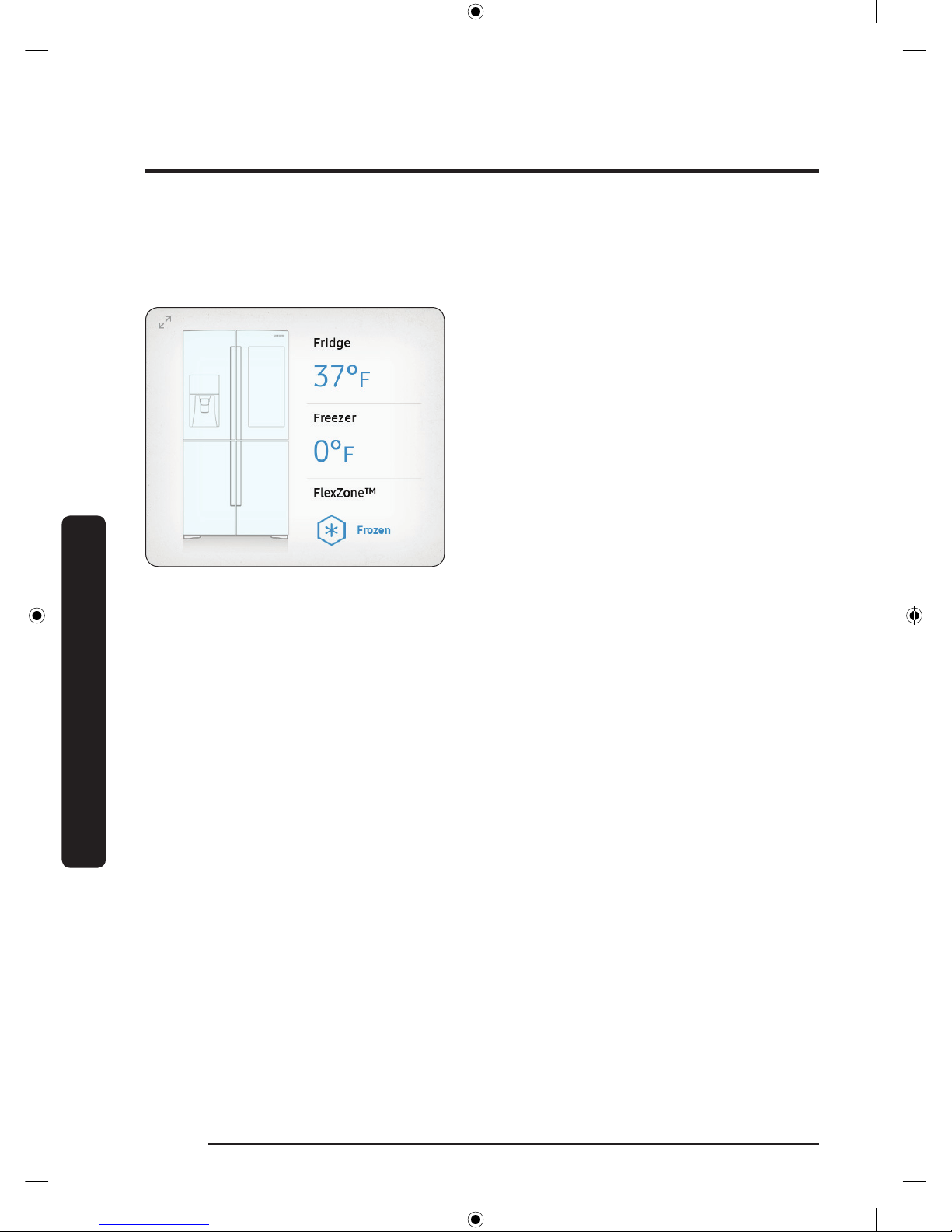
To access Fridge Manager, swipe the Home screen to the left, and then tap the Fridge
Manager widget.
• On the Fridge Manager widget, the
current fridge and freezer temperatures
as well as active special functions are
displayed.
• For detailed settings, tap the widget to
open the Fridge Manager.
Untitled-4 38 2017-01-19 11:56:53
Page 39
English 39
Operations
01
02
04
03
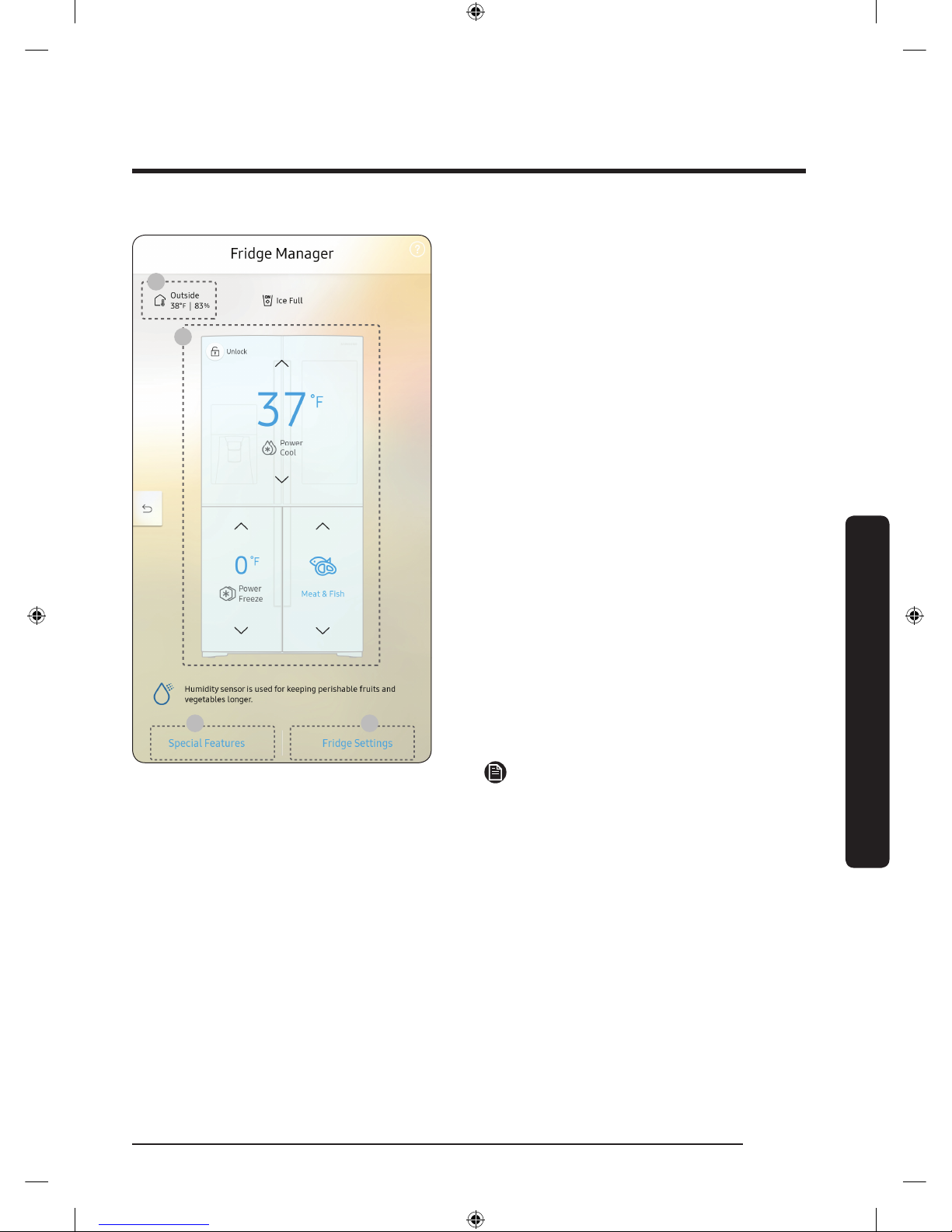
The Fridge Manager is a graphical
representation of your refrigerator.
The top half represents the refrigerator
compartment, the bottom left the freezer
compartment, and the bottom right the
FlexZone. The temperature or mode
settings for each are displayed over each
section.
Fridge Manager At a Glance
01 Temperature
Change the set temperature in the
fridge, freezer, and FlexZone. You
can also turn on and turn off the
refrigerator's Power Cool function and
the freezer's Power Freeze function.
- Power Freeze speeds up the freezing
process at maximum fan speed. The
freezer keeps running at full speed
for several hours and then returns to
the previous temperature.
- To freeze large amounts of food,
activate Power Freeze at least 20
hours before putting food in the
freezer.
NOTE
Using Power Freeze increases power
consumption. Make sure you turn it off
so the freezer returns to its previous
temperature if you do not need it any
longer.
02 Special Features
View a short explanation of some of the refrigerator's special features.
03 Fridge Settings
Change many of the fridge's settings including settings for ice making, the door alarm,
and the temperature units (°F or °C). See the next page for details.
04 External Conditions
Displays the external (ambient) temperature and humidity.
Untitled-4 39 2017-01-19 11:56:53
Page 40
Operations
English40
Operations
NOTE
The displayed conditions may differ from the actual temperature and humidity.
NOTE
Also displayed is the Ice Off (ice making off) indicator at the top, center. When the
indicator displays Ice Off, the refrigerator's ice maker is turned off.
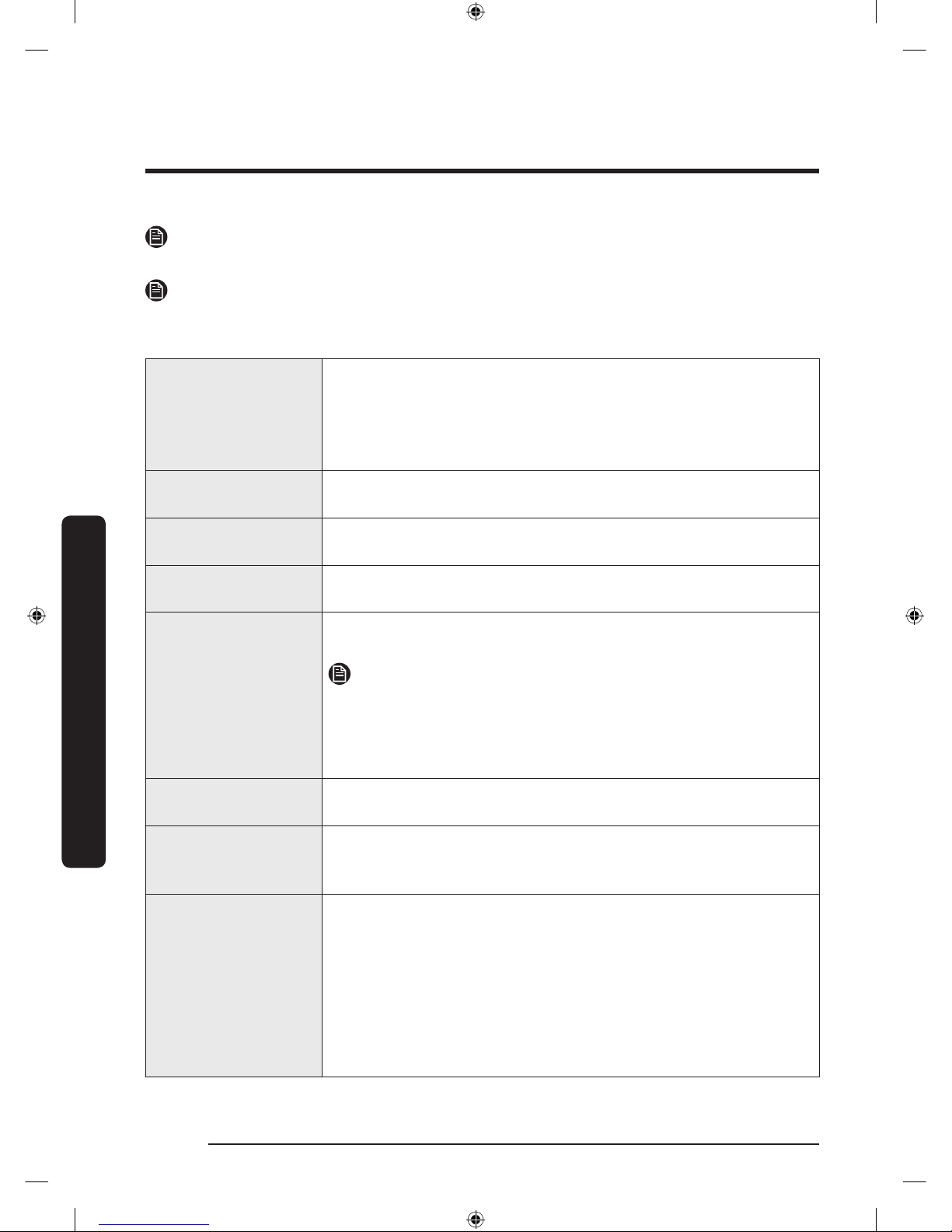
Ice Maker
Turns the icemaker on and off. Tap and drag the button to turn
on or off. Note that if the ice bucket is full of ice, the refrigerator
will not start making ice when you drag the button to On.
Instead, it displays the Ice Making Off indicator on the main
screen.
Dispenser Lock
Turns the ice and water dispensers on and off. Tap and drag the
button to turn on or off.
Door Alarm
The door alarm sounds if you leave the door open. Tap and drag
the button to turn on or off.
Temp. Unit
Switch the temperature scale between Celsius and Fahrenheit.
Touch °F or °C to change the scale.
Water Filter
Provides a water lter replacement tutorial and lets you reset
the water lter replacement indicator. Tap to open.
NOTE
After installing the water lter, tap Water Filter, and then tap
RESET. Tapping RESET re-initializes the function that measures
the time remaining until the water lter needs to be replaced
again.
Self Check
Self Check is a self diagnoses function. Tap to open. Tap START to
run.
Demand Response
Works with the Smart Grid energy saving manager. Tap to open.
Tap and drag the button to turn on or off. See the Smart Grid
section in this manual for more information.
Cooling Off
Cooling Off mode (also called Shop mode), is designed for use
by retailers when they are displaying refrigerators on the shop
oor.
In Cooling Off mode, the refrigerator’s fan motor and lights work
normally, but the compressors do not run, and the refrigerator
and freezer do not get cold. If Cooling Off is turned on, all
cooling controls will turn to OFF on the Fridge Manager.
Tap and drag the button to turn on or off.
Untitled-4 40 2017-01-19 11:56:53
Page 41
English 41
Operations
Settings
Display
• You can set the screen brightness, wallpapers, auto wake-up,
motion detector, and theme, duration and start time of the screen
saver.
Sound
• Set the volume and equalizer and turn on or turn off the touch
sound.
Wi-Fi
• Turn on or turn off a Wi-Fi connection. The current Wi-Fi network is
listed rst in the access point (AP) list.
Bluetooth
• Up to 4 recently paired Bluetooth devices are listed.
• To add a new device when 4 paired devices are listed, rst unpair a
paired device from the device list.
• Available devices are Bluetooth-enabled headsets, headphones, and
speakers.
Voice
• Set the language of the Voice function and turn on or turn off voice
feedback and voice wakeup.
Proles • You can add, edit, or delete a prole.
Parental
Controls
• Enable or disable restrictions on Family Hub features and apps.
Language
• Select a preferred language. Available languages depend on the
sales region.
Date and Time
• Make sure the Auto update function is on with a proper Wi-Fi
network connection. Open the fridge door and locate the display
reset button on the inner side of the door. Press the button and
press again to reset the display. Then, the date and time will be
synced by the time server.
• You can change the time zone through the Time zone menu.
About Device
• Make sure the Software Update function is on with a proper Wi-Fi
network connection.
• When updates are available, the Update button becomes active.
When updates are complete, the refrigerator restarts automatically.
• Legal information displays the Open Source License Agreement. Tap
the list item to open the Open Source Announcement.
Easy
Connection
• Easy Connection can be used with Samsung Smartphone apps, and
allows you to connect your device to the same home Wi-Fi network
that your smartphone is connected to.
Untitled-4 41 2017-01-19 11:56:53
Page 42
Operations
English42
Operations
Device
Authentication
• Device Authentication can be used with Samsung Smart TV apps
where the privacy information on the refrigerator can be shared to
the TV.
• Availability of this function depends on the device model.
Clean screen
mode
• Turn on so you can clean the screen without activating any apps.
Accessibility
• Set to turn on or off the screen reader function for blind and lowvision users.
Online Manual
• The online manual will walk you through various menus and apps
that the refrigerator provides directly on the display.
Factory Reset
• Tap Reset to restart the refrigerator in Factory Data Reset mode. All
user data will be removed permanently. Data that will be removed
includes account information, memos, photos, and user settings.
CAUTION
Once factory reset is complete, no user data can be recovered.
Remote
Management
• Use Remote Management to allow a service representative to
remotely diagnose problems and provide solutions.
• Remote Management requires a Wi-Fi connection.
• The Remote Management menu does not appear on models that do
not support Remote Management.
Untitled-4 42 2017-01-19 11:56:53
Page 43
English 43
Operations
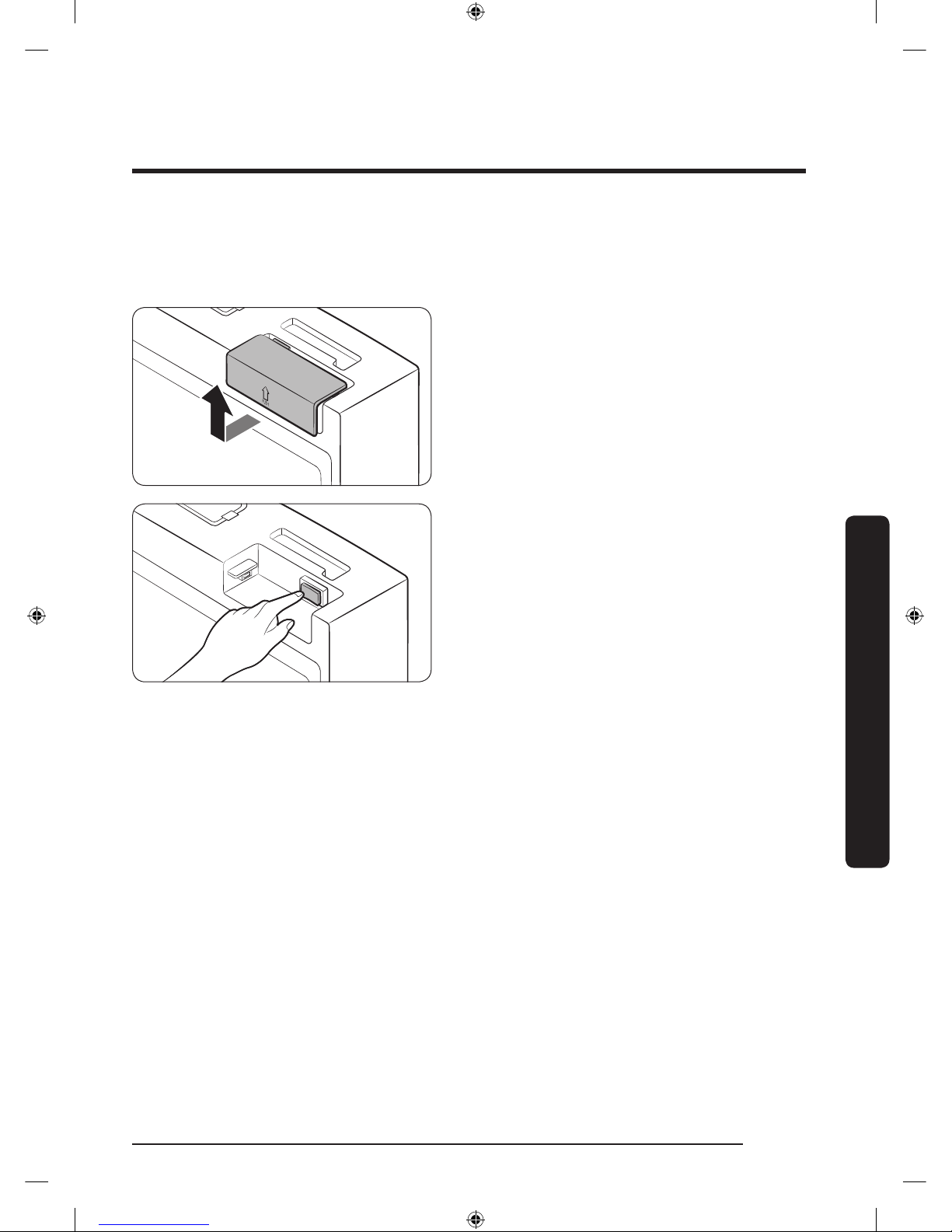
Display reset (applicable models only)
If the display is not working correctly, try resetting the display. This may resolve the
problem.
1. Open the right-side fridge door and
locate the switch cover on the top right
corner of the door.
2. Push up the cover to reveal the power
switch.
3. Turn the switch off, and then turn it on
again.
4. Reinsert the switch cover. You will hear
a click when the cover is in place.
Untitled-4 43 2017-01-19 11:56:53
Page 44
Operations
English44
Operations
Samsung Smart Home
Installation
Visit the Google Play Store, Galaxy Apps, or Apple App Store and search for “Samsung
Smart Home”. Download and install the Samsung Smart Home app provided by Samsung
Electronics to your smart device.
NOTE
• The Samsung Smart Home app is designed for Android 4.0 (ICS) or higher, or iOS 8.0 or
higher, and is optimized for Samsung smartphones (Galaxy S and Galaxy Note series).
• For improved performance, the Samsung Smart Home app is subject to change without
notice or discontinued support according to the manufacturer’s policy.
• Recommended encryption systems include WPA/TKIP and WPA2/AES. Any newer or
non-standard Wi-Fi authentication protocols are not supported.
• Wireless networks may be affected by the surrounding wireless communication
environment.
• If your Internet service provider has registered the MAC address of your PC or modem
for identication, your Samsung Smart Refrigerator may fail to connect to the Internet.
If this happens, contact your Internet service provider for technical assistance.
• The rewall settings of your network system may prevent your Samsung Smart
Refrigerator from accessing the Internet. Contact your Internet service provider for
technical assistance. If this symptom continues, contact a local Samsung service center
or retailer.
• To congure the wireless access point (AP) settings, see the user manual of the AP
(router).
• Samsung Smart Refrigerators support both Wi-Fi 2.4 GHz with IEEE 802.11 b/g/n and
Soft-AP protocols. (IEEE 802.11 n is recommended.)
• Unauthorized Wi-Fi wireless routers may fail to connect to applicable Samsung Smart
Refrigerators.
Untitled-4 44 2017-01-19 11:56:53
Page 45
English 45
Operations
Samsung account
You are required to register your Samsung account to use the app. If you don’t have a
Samsung account, follow the app’s onscreen instructions to create a free Samsung account.
Getting started
1. Run the Samsung Smart Home app and log in with your Samsung account. iPhone users
are required to provide the login information each time they access the app.
2. Select Add Device and then tap Refrigerator.
3. Follow the onscreen instructions to provide the necessary information about the
router, and then tap Next.
4. On the display of the refrigerator, access Settings, and then select Easy Connection.
5. When device registration is complete, the refrigerator icon will appear on the Samsung
Smart Home app.
6. Tap the refrigerator icon to open the refrigerator page.
Refrigerator app
Integrated control
You can monitor and control your refrigerator at home and on the go.
• Tap the refrigerator icon in Samsung Smart Home to open the Refrigerator page.
• Check the operation status or notications related to your refrigerator, and then
change options or settings if necessary.
NOTE
Some options or settings of the refrigerator may not be available for remote control.
Untitled-4 45 2017-01-19 11:56:53
Page 46
Operations
English46
Operations
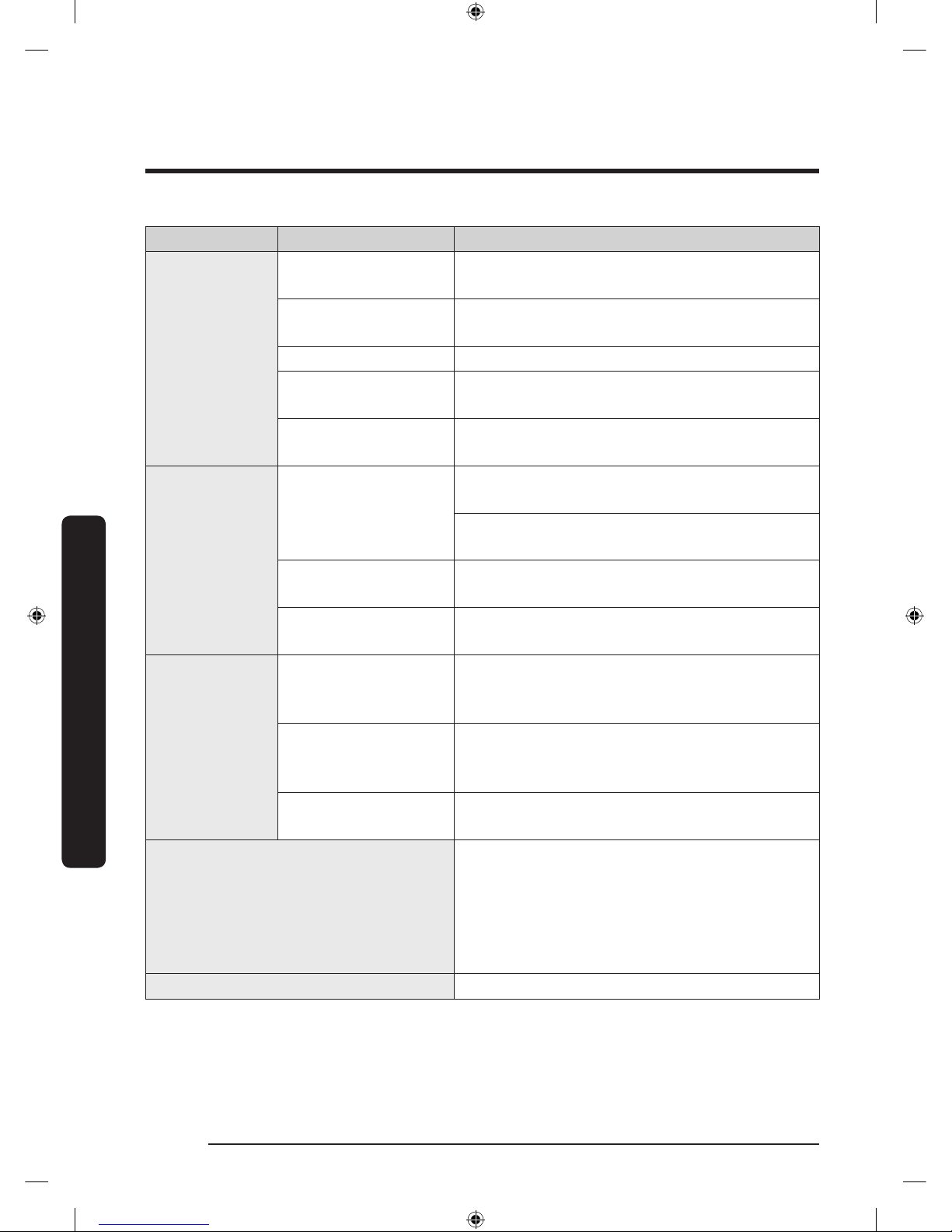
Category Item Description
Monitoring
Fridge temperature
Displays the current temperature setting of the
fridge.
Freezer temperature
Displays the current temperature setting of the
freezer.
FlexZone™ settings Displays the settings of the FlexZone™.
Diagnosis
Detects abnormal operations of the
refrigerator.
Energy monitoring
Checks the accumulated power consumption of
the refrigerator for the last 180 days.
Functions
Ice making
You can turn the ice making function on or off,
and check the current settings of the function.
You can also check the status and progress of
ice making.
Power Cool
You can turn Power Cool on or off, and check
the current settings.
Power Freeze
You can turn Power Freeze on or off, and
check the current settings.
Alarms
Abnormally high
temperature
This alarm is triggered when the fridge, the
freezer, or the FlexZone™ has abnormally high
temperatures.
Door opening
This alarm is triggered if the fridge or freezer
door or the FlexZone™ door is left open for a
specic time.
Water lter
replacement
This alarm reminds you that the water lter
must be replaced.
View Inside
You can view the inside of the refrigerator
and, by creating visible labels assigned to
specic items with item-specic storage
periods, keep track of item expiration dates so
that you can use up and replace food items in
a timely manner.
Shopping List You can create and edit a shopping list.
Untitled-4 46 2017-01-19 11:56:54
Page 47
English 47
Operations
SMART GRID Function (Demand Response)
When the refrigerator operates in SMART GRID (Demand Response) mode, the Energy
Management Refrigerator function can control energy usage or delay the operation of
some functions to save money when energy prices or demand are the highest.
NOTE
• You can deactivate the SMART GRID (Demand Response) function at any time using the
Override On/Off function.
• To use the SMART GRID (Demand Response) function, you need a separate contract with
your electric utility company.
In addition, to use the Smart Grid (Demand Response) function, you must register for the
service with your electric company. The company must have an EMS (Energy Management
System) that supports SEP (Smart Energy prole).
Using the SMART GRID (Demand Response) Function
This feature monitors energy prices and demand information from your utility company
and sends notications to the refrigerator to run high energy consuming tasks during offpeak times when electricity costs and demand are lower.
If the refrigerator receives a control signal from the utility company, the refrigerator will
display the DAL (L3) ~ TALR (L4) levels on the refrigerator display and control the power
consumption according to the level.
Exception condition: The DAL and TALR control signals from a utility company work as
long as product performance is maintained.
If the refrigerator receives the SMART GRID (Demand Response) signal (DAL or TALR), the
refrigerator will operate in Delay Appliance Load or Temporary Appliance Load Reduction
mode.
• Delay Appliance Load (L3): The refrigerator responds to a DAL signal by providing a
moderate load reduction for the duration of the delay period. This function controls
functions that consume a lot of energy such as adjusting the Cooling system, running
the defrost cycle, and making ice.
- DAL mode is automatically deactivated after it lasts for the amount of time
stipulated by the DAL signal (max. 4.5 hours) or when the Override function is
turned on.
Untitled-4 47 2017-01-19 11:56:54
Page 48
Operations
English48
Operations
• Temporary Appliance Load Reduction (L4): The refrigerator responds to a TALR signal
by aggressively reducing the load for a short time period. This function reduces energy
consumption by stopping the compressor and controlling the functions that consume a
lot of energy such as the defrost cycle and making ice.
- TALR (L4) mode is automatically deactivated after it lasts for the received duration
(max. 15 minutes), or when the Override function is turned on. The mode is
immediately deactivated and the refrigerator returns to the normal state when the
door is opened or closed, or the dispenser is used.
To check the MAC address
1. Tap the Settings icon on the Home screen.
2. Scroll down to and open About Device.
3. The screen displays (among others) the Wi-Fi MAC address.
Override Mode
When you want the refrigerator to ignore the SMART GRID (Demand Response) signal
from the utility company, you can activate OVERRIDE mode.
When you activate OVERRIDE mode, the refrigerator ignores the SMART GRID (Demand
Response) signal and is not controlled by the utility company.
Activating and deactivating Override mode
1. Tap the Fridge Manager icon.
2. On the bottom of the Fridge Manager screen, tap the Fridge Settings icon.
3. Tap Demand Response.
4. Slide the DAL/TALR override button to the ON or OFF position.
NOTE
• Alternatively, you can activate or deactivate OVERRIDE mode using the Samsung Smart
Home app and the Energy Management function. See the next page.
Untitled-4 48 2017-01-19 11:56:54
Page 49
English 49
Operations
Using the Energy Management Function
The Energy Management function enables you to control and monitor your Energy
Management refrigerator using the Smart Home app for your convenience.
NOTE
• To use the Energy Management refrigerator functions, you have to install the
corresponding app rst.
1. Operational Status
- You can check the DR and Override status.
2. Energy Consumption Reporting
- Shows the accumulated power consumption. Power consumption data is updated
every 5 minutes.
NOTE
The energy consumption report may differ from the power consumption specications of
the product depending on the operating environment and the quantity and type of stored
food.
3. Delay Defrost Capability
- The Delay Defrost Capability function saves energy by delaying the defrost
operation to a time specied by the user. You can congure the time. and this
function will save energy during the specied period in a 24 hour cycle. If the
time is not set, the function works with the default time settings. The default time
settings are below:
- 6 am to 10 am: November 1st to April 30th.
- 3 pm to 7 pm: May 1st to October 31st.
To change the time setting for the Delay Defrost Capability
You can change the time setting for the Delay Defrost Capability on the app.
Untitled-4 49 2017-01-19 11:56:54
Page 50
Operations
English50
Operations
Provision for Open Access to the Connected Product Requirements
1. SGIP Open Standards (Smart Energy Prole 2.0 - http://www.csep.org/)
- Energy Consumption Reporting
- Demand Response
2. Samsung OPEN API
- Operational Status, User Settings & Messages
- ICE Maker Status: GET /devices/0/fridge/iceMaker
- Door Open Alarm: GET /devices/0/Door/openState
- DR Status: GET /devices/0/drlc
- Delay Defrost Capability
- Set Schedule of the Defrost Delay: POST /devices/0/fridge/defrostreservations
- Get Schedule of the Defrost Delay : GET /devices/0/fridge/defrostreservations
- Delete Schedule of the Defrost Delay: DELETE /devices/0/fridge/
defrostreservations/<<id>>
- Defrost Delay On/OFF: PUT /devices/0/fridge
Untitled-4 50 2017-01-19 11:56:54
Page 51
English 51
Operations
Recommendations for voice recognition
Around the 'MIC' marked area of the refrigerator's display is a built-in microphone.
• Speak loud and clear towards the built-in microphone within 1 m from the
refrigerator's display.
• Voice recognition may not be triggered or enabled at distances over 1 m or with low
voices.
• Speak clearly at a regular pace. Reduce ambient noises, such as from the living-room
TV.
Samsung Family Hub
Installation
Visit the Google Play Store, Galaxy Apps, or Apple App Store and search for “Samsung
Family Hub”. Download and install the Samsung Family Hub app provided by Samsung
Electronics to your smart device.
NOTE
• The Samsung Family Hub app is designed for Android 4.4 (KitKat) or higher, or iOS
8.0 or higher, and is optimized for Samsung smartphones (Galaxy S and Galaxy Note
series).
• For improved performance, the Samsung Family Hub app is subject to change without
notice or support may be discontinued according to the manufacturer’s policy.
• Wireless networks may be affected by the surrounding wireless communication
environment.
• If your Internet service provider has registered the MAC address of your PC or modem
for identication, your Samsung Smart Refrigerator may fail to connect to the Internet.
If this happens, contact your Internet service provider for technical assistance.
• The rewall settings of your network system may prevent your Samsung Smart
Refrigerator from accessing the Internet. Contact your Internet service provider for
technical assistance. If this symptom continues, contact a local Samsung service center
or retailer.
Untitled-4 51 2017-01-19 11:56:54
Page 52
Operations
English52
Operations
Samsung account
You are required to register your Samsung account to use the app. If you don’t have a
Samsung account, follow the app’s onscreen instructions to create a free Samsung account.
NOTE
To connect your smartphone and the refrigerator, register your Samsung account in
Settings Proles.
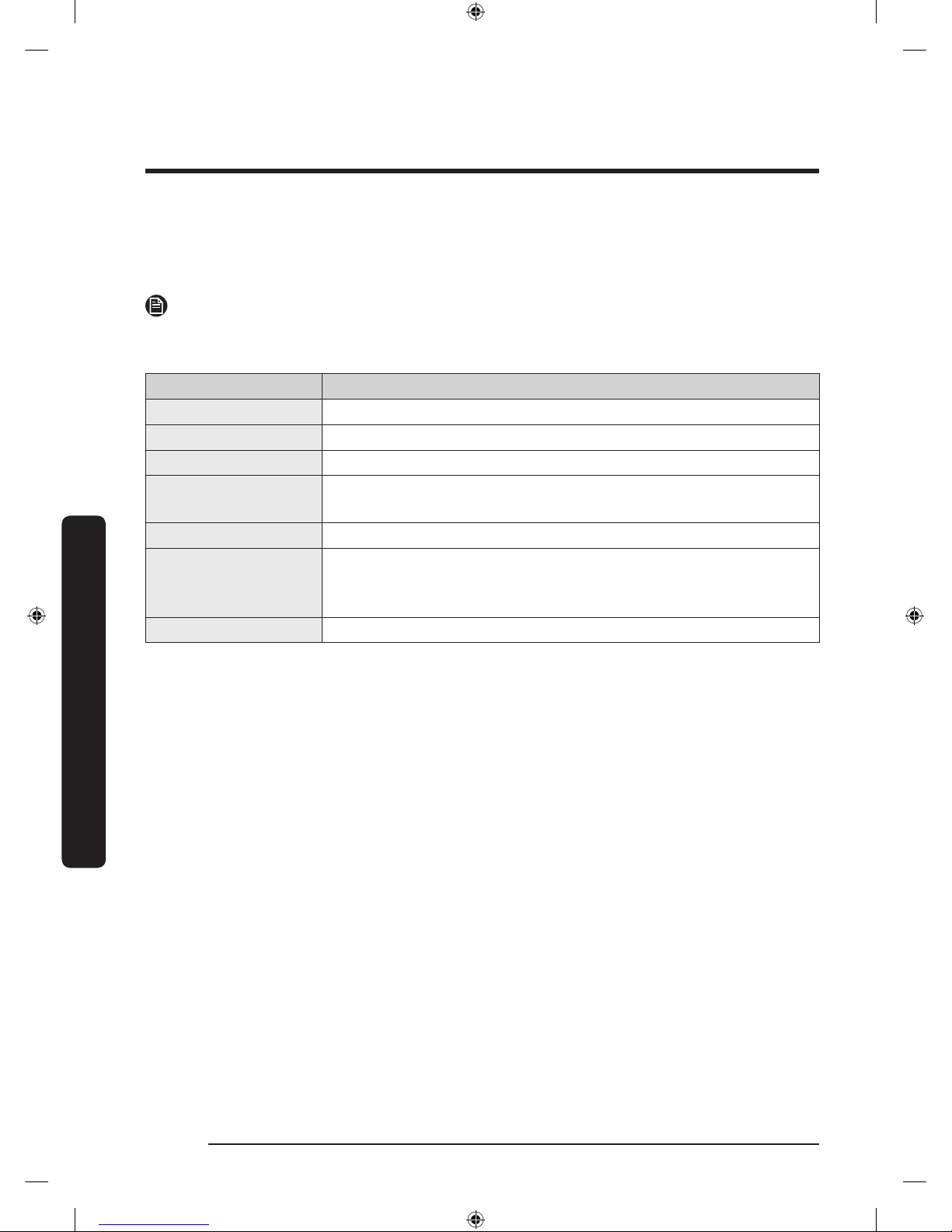
Item Description
Calendar You can share your schedule with your family.
To Do You can create and edit a to-do list to your needs.
Memo You can create and edit a memo to specic users.
Whiteboard You can send White Board contents created from the refrigerator
to your smartphone or vice versa.
Photo You can send photos from your smartphone to the refrigerator.
View Inside You can check the inner view of the refrigerator, and use
different labels to register item-specic storage periods and
keep track of them for managerial purposes.
Shopping List You can create and edit a shopping list to your needs.
Untitled-4 52 2017-01-19 11:56:54
Page 53
English 53
Operations
Special features
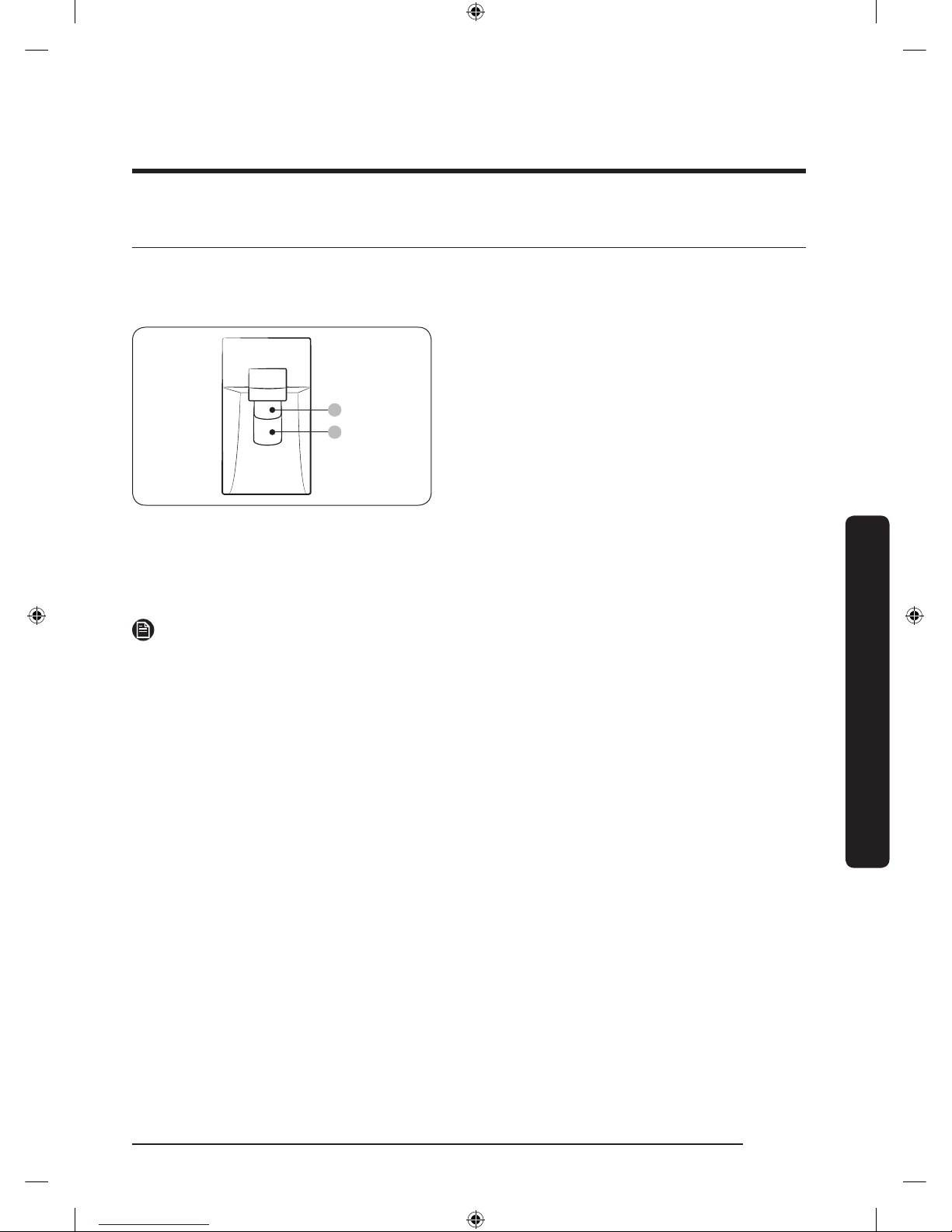
Water dispenser
With the water dispenser, you can dispense water without opening the fridge door.
A
B
The water dispenser offers 3 options:
chilled water, cubed ice, and crushed ice.
If you do not want to dispense ice, simply
press the water lever (B).
With the Ice Maker enabled,
1. Press to select an ice type.
2. Put a water glass on the ice lever (A)
and push it. Ice is dispensed from the
dispenser.
3. If you want water, put the glass on the
water lever (B) and push it. Water is
dispensed from the dispenser.
NOTE
• To get ice and water, push the ice lever (A) rst for ice, then move your glass down and
press the water lever (B) for water.
• If you push both levers at once, only the rst pushed lever operates.
• To prevent spills, wait 1 second before removing the glass after dispensing.
• Make sure the glass is in line with the dispenser to prevent the dispensed water from
spilling out.
• If you do not use the water dispenser for 2-3 days, the dispensed water may have an
abnormal smell or taste. This is not a system failure. Discard the rst 1-2 glasses of
water.
Untitled-4 53 2017-01-19 11:56:54
Page 54
Operations
English54
Operations
Ice maker
The refrigerator has a built-in ice maker that automatically dispenses ice so that you can
enjoy ltered water with cubed or crushed ice.
Ice making
After you have installed your refrigerator and plugged it in, follow these instructions to
ensure proper ice making and to keep the ice bucket full of ice:
1. Let the refrigerator run at least 24 hours without dispensing ice for optimal
performance.
2. Dispense the rst 4 to 6 ice cubes into a glass.
3. Wait another 8 hours and dispense another 4 to 6 ice cubes.
4. Then, wait another 16 hours and dispense the rst glass-full of ice.
NOTE
• If you consume all the ice at once, you must wait 8 hours before dispensing the rst 4
to 6 cubes. This ensures that the ice bucket is lled with ice properly.
• Ice cubes generated rapidly may look white, which is normal.
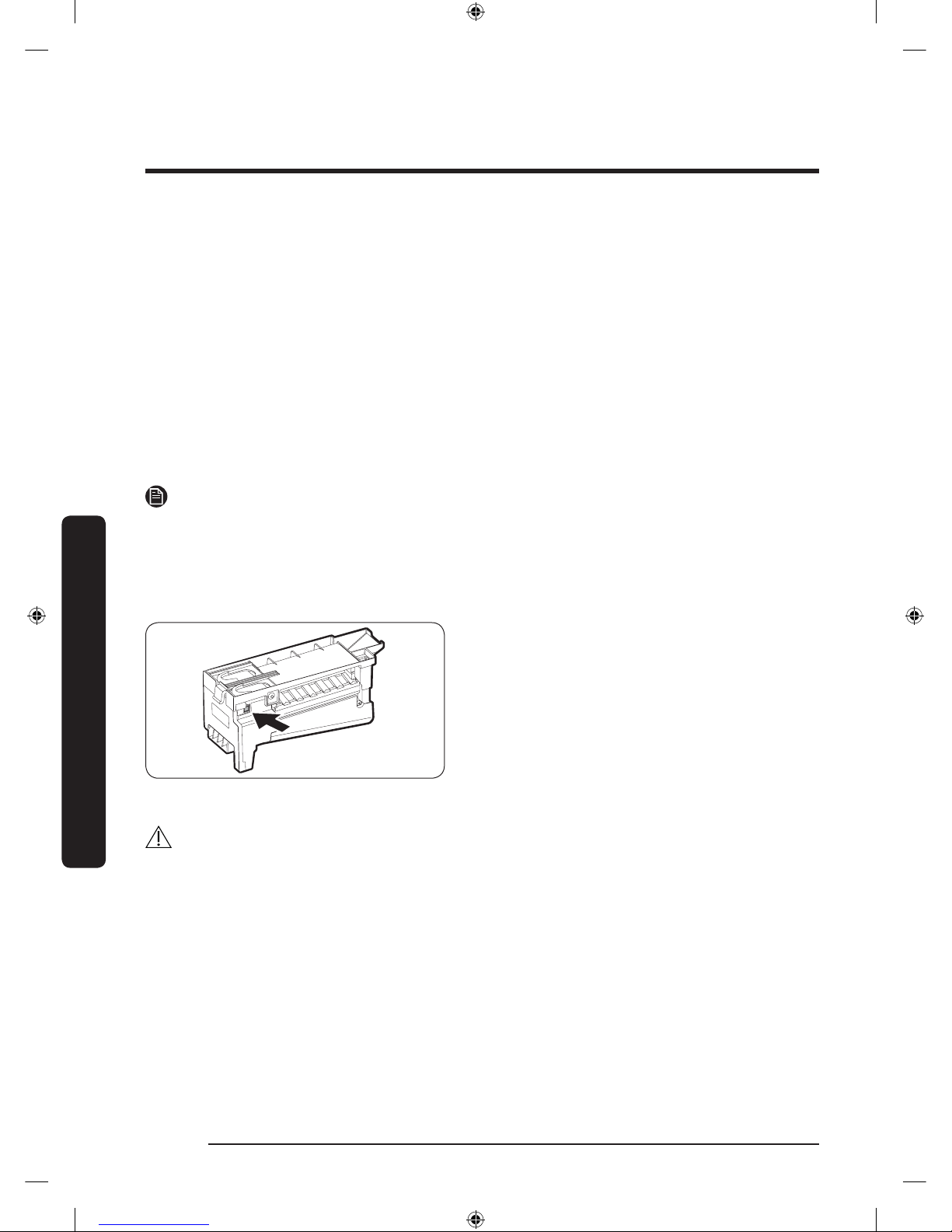
Diagnosis
If ice does not dispense, rst check the ice
maker.
To check the ice maker
1. Press Test on the side of the ice maker.
You will hear a chime (ding-dong) when
you press the button.
2. You will hear another chime if the ice
maker is operating properly.
CAUTION
• If the ice making chime rings repeatedly, contact the waterline installer or a local
Samsung service center.
• Do not press Test repeatedly after the ice tray is lled with ice or water. Water may
overow or ice may jam.
• Do not put food in the ice bucket. The frozen food may damage the ice maker,
especially when you open or close the door.
• When the refrigerator recovers power after a power failure, the ice bucket may contain
a mix of melted and jammed ice cubes, which can prevent the ice maker from working
properly. To prevent this, make sure to empty the ice bucket before using the ice
maker again.
Untitled-4 54 2017-01-19 11:56:54
Page 55
English 55
Operations
• Do not put ngers or any objects into the dispenser outlet or the ice maker. This can
cause physical injury or property damage.
• When reinserting the ice maker tray, make sure that the tray is properly centered at
the entrance. Otherwise, the tray can get stuck.
Ice Maker Off
To disable the icemaker, tap Fridge Manager > Fridge Settings > Ice Making on the Home
screen, and then select Off. Make sure to empty the ice bucket.
Remaining ice cubes may clump together, making it difcult to remove them.
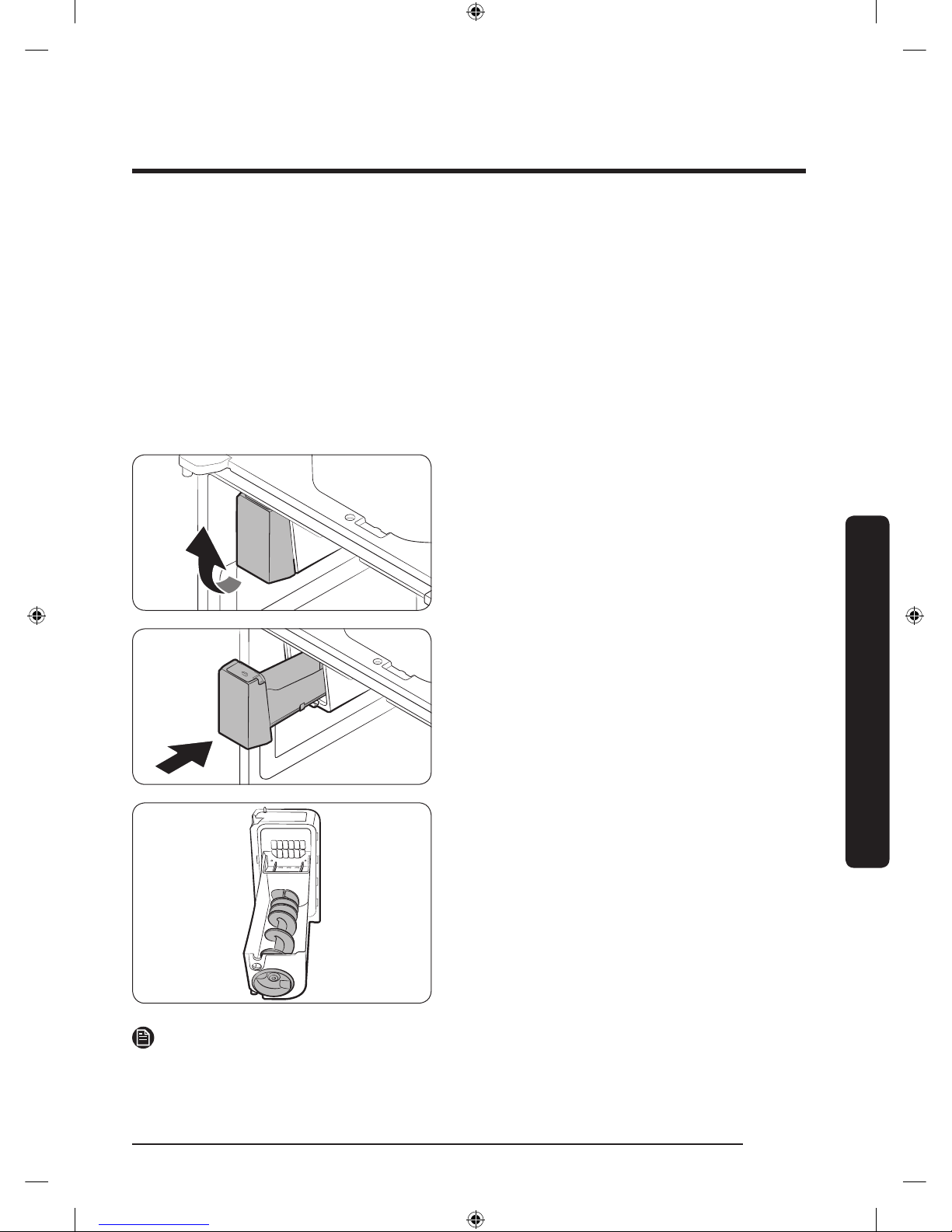
To remove the ice bucket
1. Hold the bottom of the ice bucket with
one hand and hold the side with the
other hand.
2. Gently lift it up and pull out.
3. Remove the remaining ice cubes, and
then put the ice bucket back into place.
If the bucket does not t in, turn the helix
screw 90 degrees, and then try again.
NOTE
• Removal of the ice bucket does not affect the thermal and mechanical performance of
the refrigerator.
Untitled-4 55 2017-01-19 11:56:54
Page 56
Operations
English56
Operations
Water clouding
Water supplied to the refrigerator ows through a core alkaline lter. During this ltering
process, the water pressure of the water increases and the water becomes saturated with
oxygen and nitrogen. This causes the water to look misty or cloudy temporarily when
dispensed. This is normal and the water will look clear after a few seconds.
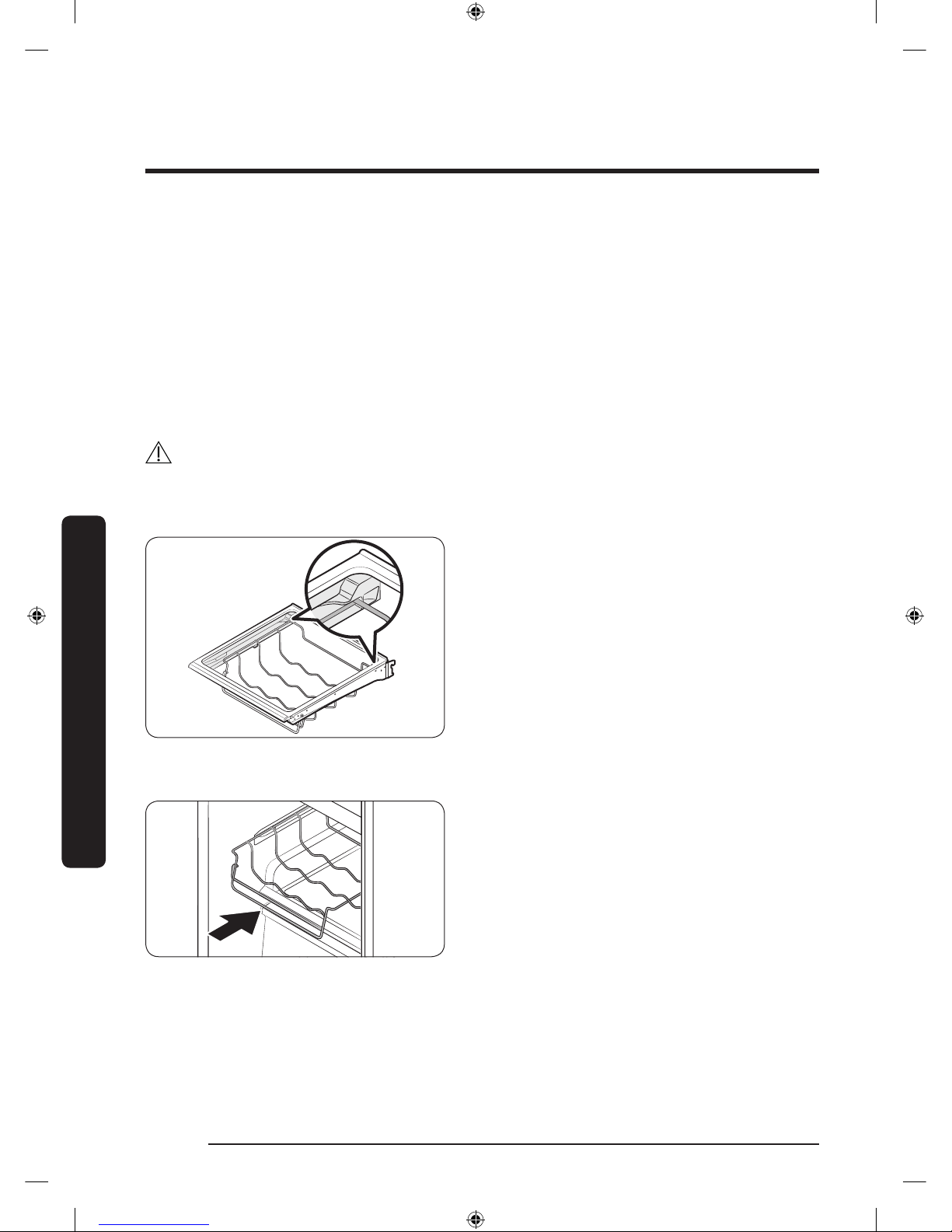
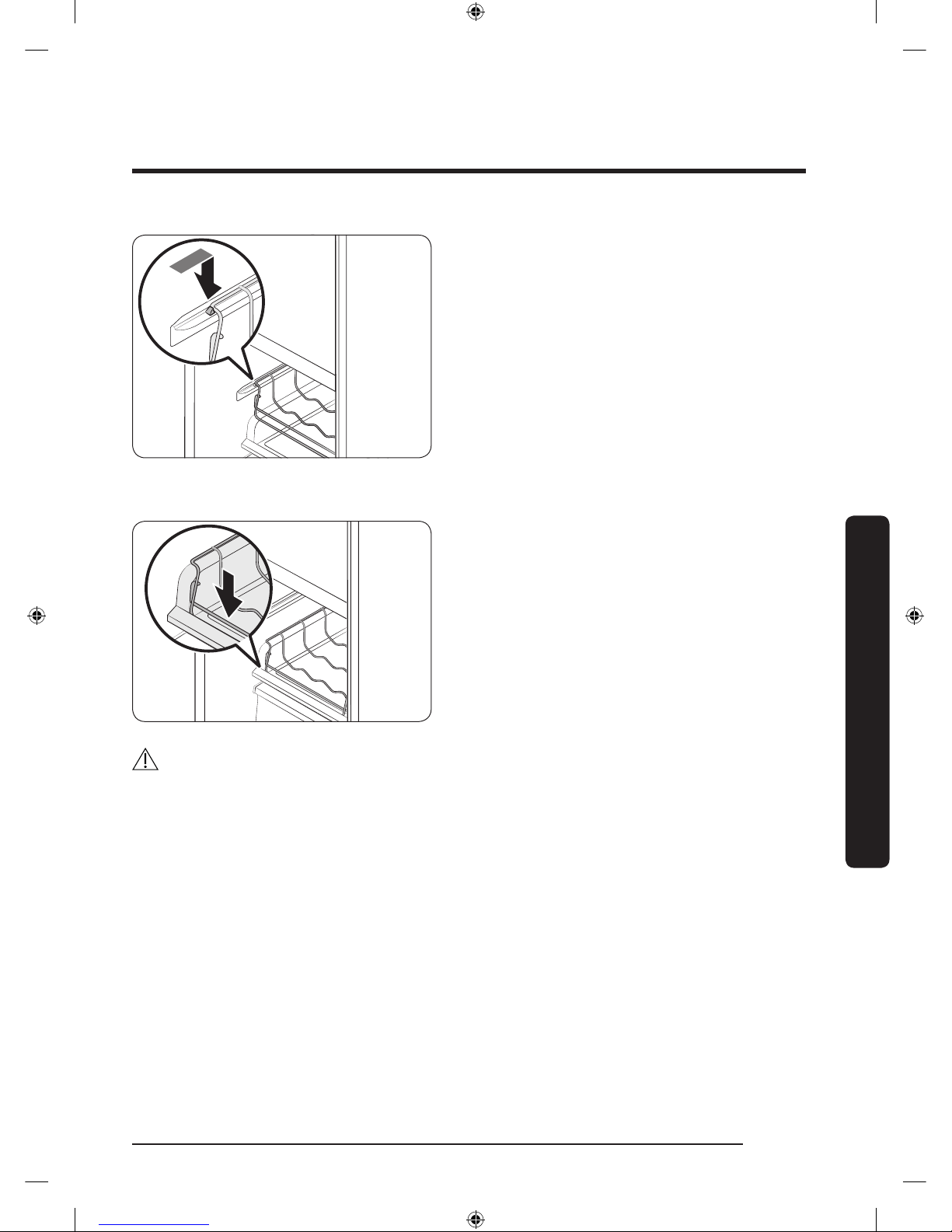
Wine Rack
The refrigerator ships with a wine rack, which can be positioned in one of 3 positions:
under the shelf, in the partition guide, or on top of the sliding shelf of the FlexZone. The
position or positions available to you depends on your model.
CAUTION
When you remove or insert the wine rack, make sure that the wine rack is empty.
Under the shelf
Insert the wine rack under the shelf of the
fridge. Make sure to insert it all the way to
the end as shown in the gure.
In the partition guide
Insert the wine rack in the partition guide
of the FlexZone.
• Make sure the front of the wine rack
ts in the partition guide on the inner
left-hand side of the FlexZone.
• Set the temperature of the FlexZone to
White Wine.
Untitled-4 56 2017-01-19 11:56:55
Page 57
English 57
Operations
On the sliding shelf
Insert the wine rack on top of the sliding
shelf of the FlexZone, which is normally
below the partition guide.
• Set the temperature of the FlexZone to
White Wine.
CAUTION
• Do not store wine bottles in the freezer. The bottles can freeze and break, causing
physical injury.
• Do not store wine bottles in two rows. The bottles may fall, causing physical injury.
• Do not store wine bottles taller than 13 in (330 mm) in height. The bottles may break
when you close the door, causing physical injury.
Untitled-4 57 2017-01-19 11:56:55
Page 58
English58
Maintenance
Handling and care
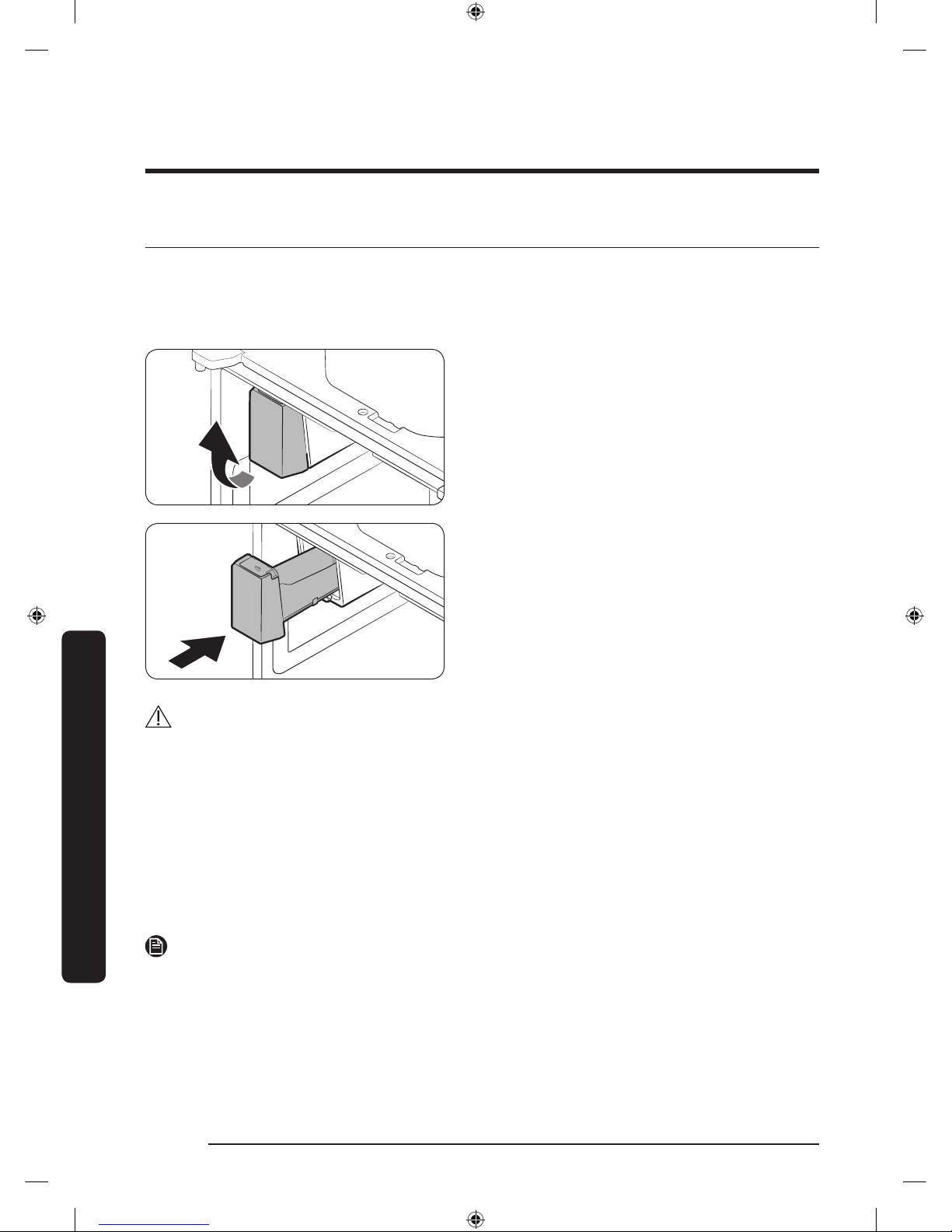
Ice bucket
If you do not dispense ice for an extended period, ice may form clumps inside the bucket.
If this happens, remove and empty the ice bucket.
1. To remove the ice bucket, gently lift
it up, and then pull it out slowly while
holding the bottom of the bucket with
one hand and the side with the other
hand.
2. Empty the bucket.
3. When done, put the bucket back into
position. If the bucket does not t in,
turn the helix screw 90 degrees, and
then try again.
CAUTION
• Do not apply excessive force to the bucket cover. The cover may break.
• Do not forcefully close the door. Water may spill over the ice maker.
• To prevent injury, make sure to clean up any ice or water that has fallen on the oor.
• To prevent accidents or injury, do not let children play with the water dispenser or the
ice maker.
• Do not put your hand or an object into the ice chute. This may cause physical injury or
product damage.
• Use only the provided ice bucket. Third-party ice buckets may cause a system failure.
• Use only potable water that is connected to the water supply line.
NOTE
• The water pressure required for ice making is between 20 psi and 125 psi.
• Noise coming from the ice maker as it produces ice during the ice making process is
normal.
• While the door is open, neither the ice maker nor the water dispenser operates.
Maintenance
Untitled-4 58 2017-01-19 11:56:55
Page 59
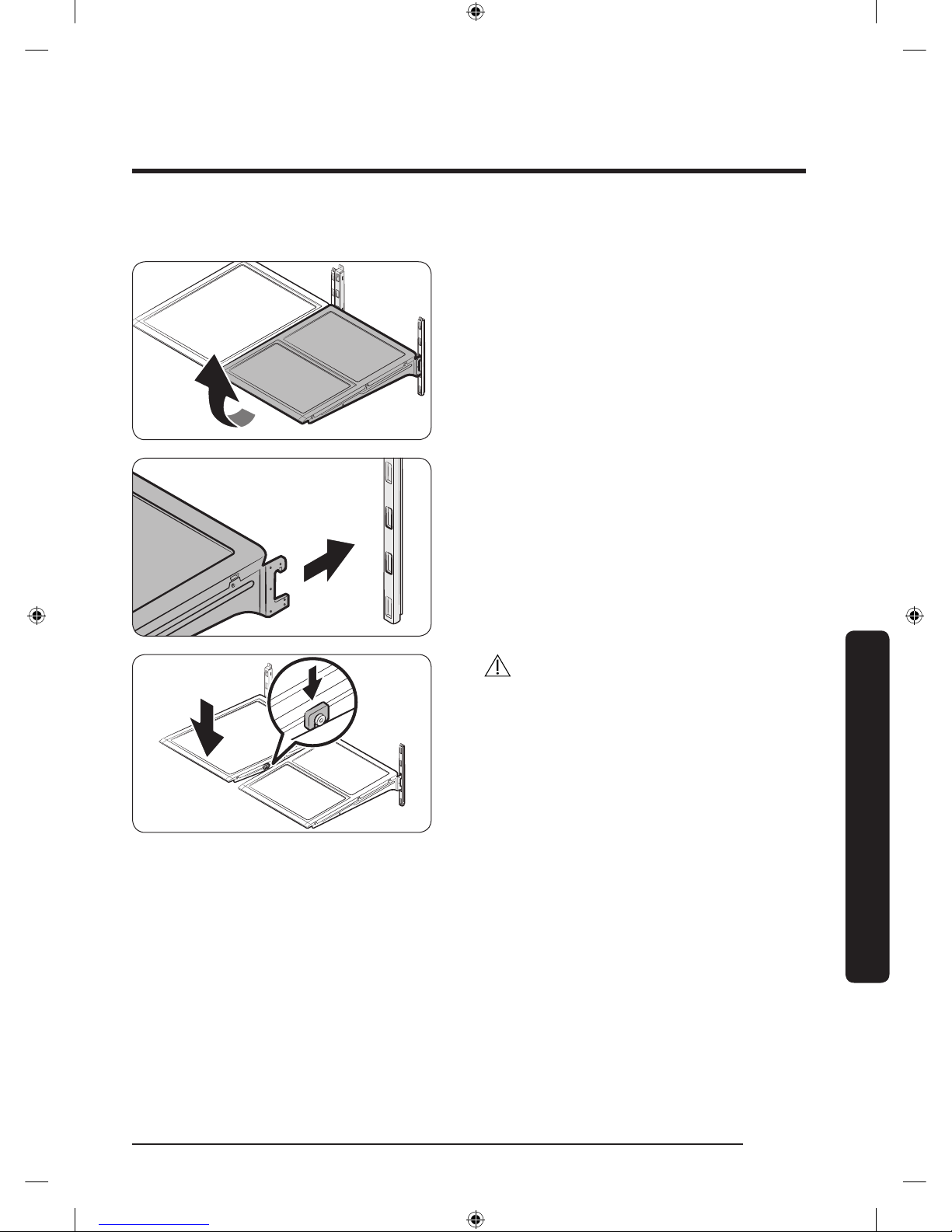
English 59
Maintenance
Tempered glass shelves (fridge)
• To remove a shelf, fully open the
corresponding door. Hold the front of
the shelf, and then gently lift up and
slide out.
• To reinsert, hold the shelf at an angle
so the front is higher than the back, and
then insert the top hook into the top
shelf notch. Then, lower the shelf and
insert the bottom shelf hook into the
bottom shelf notch.
CAUTION
• The tempered glass shelves are heavy.
Use caution when removing them.
• The shelf must be inserted correctly. Do
not insert upside down.
• Glass containers may scratch the
surface of glass shelves.
Untitled-4 59 2017-01-19 11:56:55
Page 60
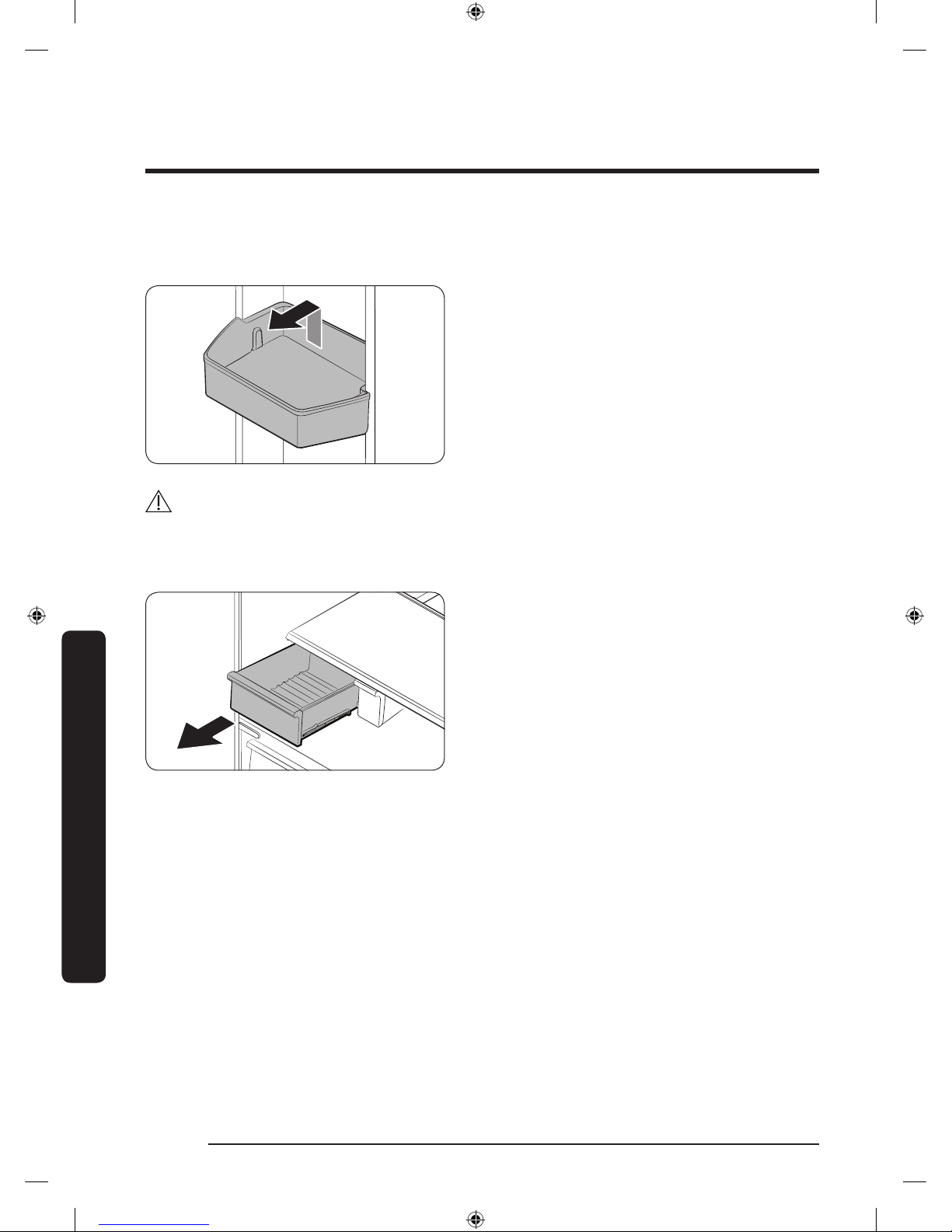
Maintenance
English60
Maintenance
Door bins
The top door bin section has a marked line to ensure easy removal and proper reinsertion.
Lift up the door bin, and then pull out
straight.
CAUTION
Do not allow children to play with the bins. Sharp-edged corners may cause injury.
Vegetable & fruit drawers (EZ fresh zone)
Gently lift up the front of the drawer and
slide out.
We recommend that you remove the door
bins before removing the drawer. This is to
prevent damage to the door bins.
Untitled-4 60 2017-01-19 11:56:56
Page 61
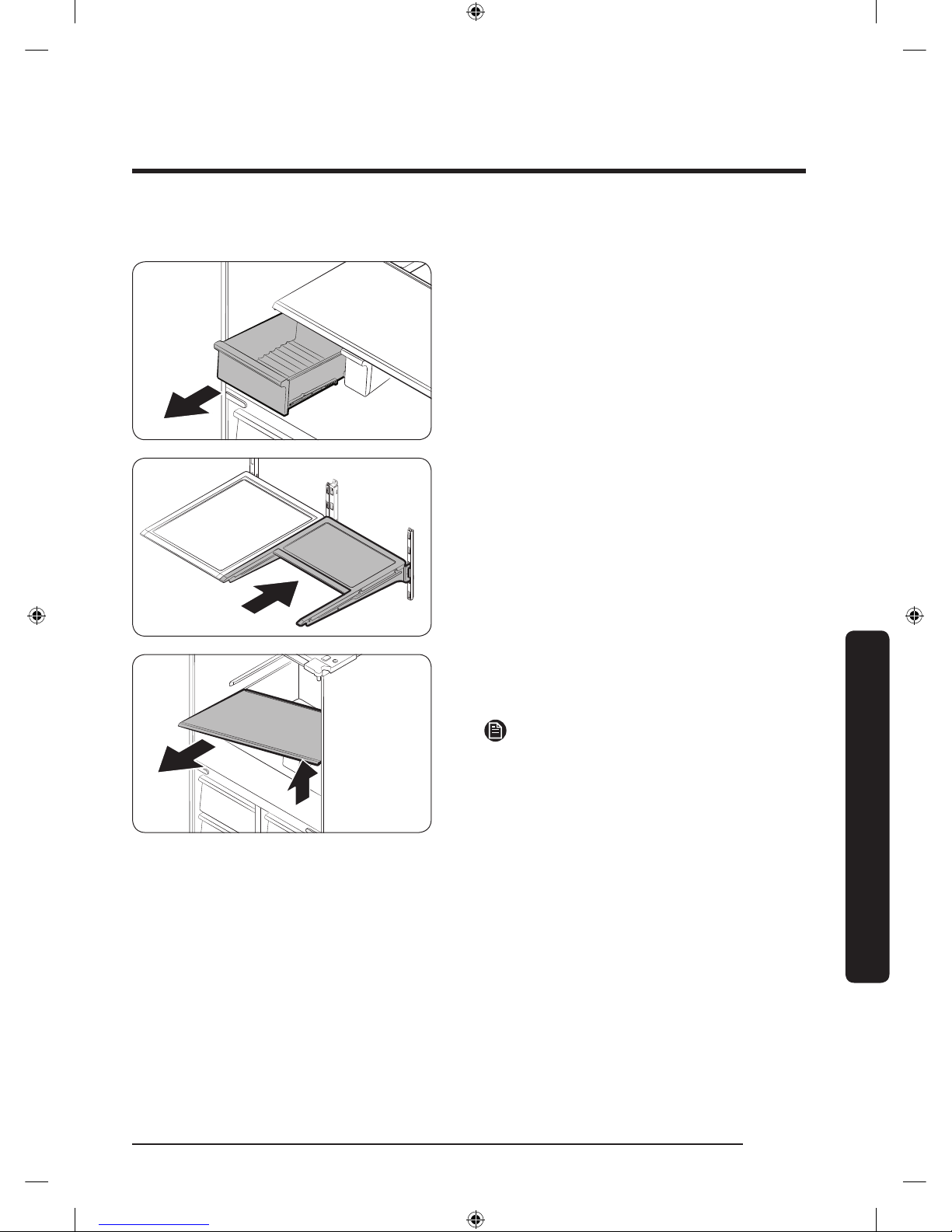
English 61
Maintenance
Vegetable shelf
1. Slide out the left-side vegetable drawer.
2. Slide in the right-side foldable shelf.
3. While supporting the vegetable shelf
with one hand, slide it out with the
other hand.
NOTE
To use the space that is opened up after
removing the foldable shelf, take out the
vegetable shelf.
To reinsert, follow the steps above in the
reverse order.
Ice bucket
To remove the ice bucket, see the Maintenance section on page 58.
Untitled-4 61 2017-01-19 11:56:56
Page 62
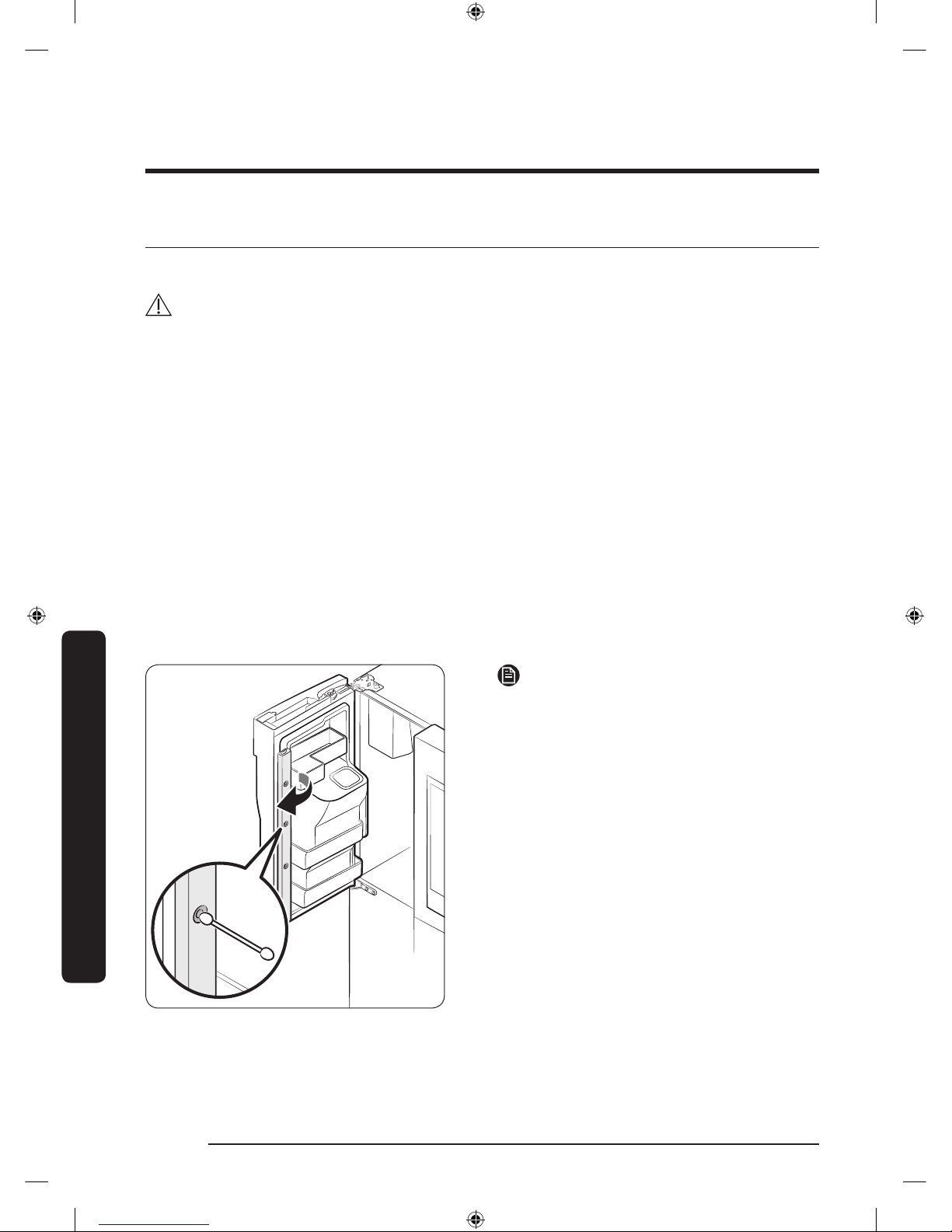
Maintenance
English62
Maintenance
Cleaning
Interior and exterior
WARNING
• Do not use benzene, thinner, home/car detergent, or Clorox™ to clean the refrigerator.
They may damage the surface of the refrigerator or cause a re.
• Do not spray water onto the refrigerator. This may cause electric shock.
• Do not put ngers or any objects into the dispenser outlet.
Regularly use a dry cloth to remove all foreign substances such as dust or water from the
power plug terminals and contact points.
To clean the refrigerator
1. Unplug the power cord.
2. Use a moistened, soft, lint-free cloth or paper towel to clean the refrigerator’s interior
and exterior.
3. When done, use a dry cloth or paper towel to dry well.
4. Plug in the power cord.
Inner-view camera
NOTE
Use a cotton swab or microber cloth to
clean the camera on the left-side door of
the fridge.
Untitled-4 62 2017-01-19 11:56:56
Page 63
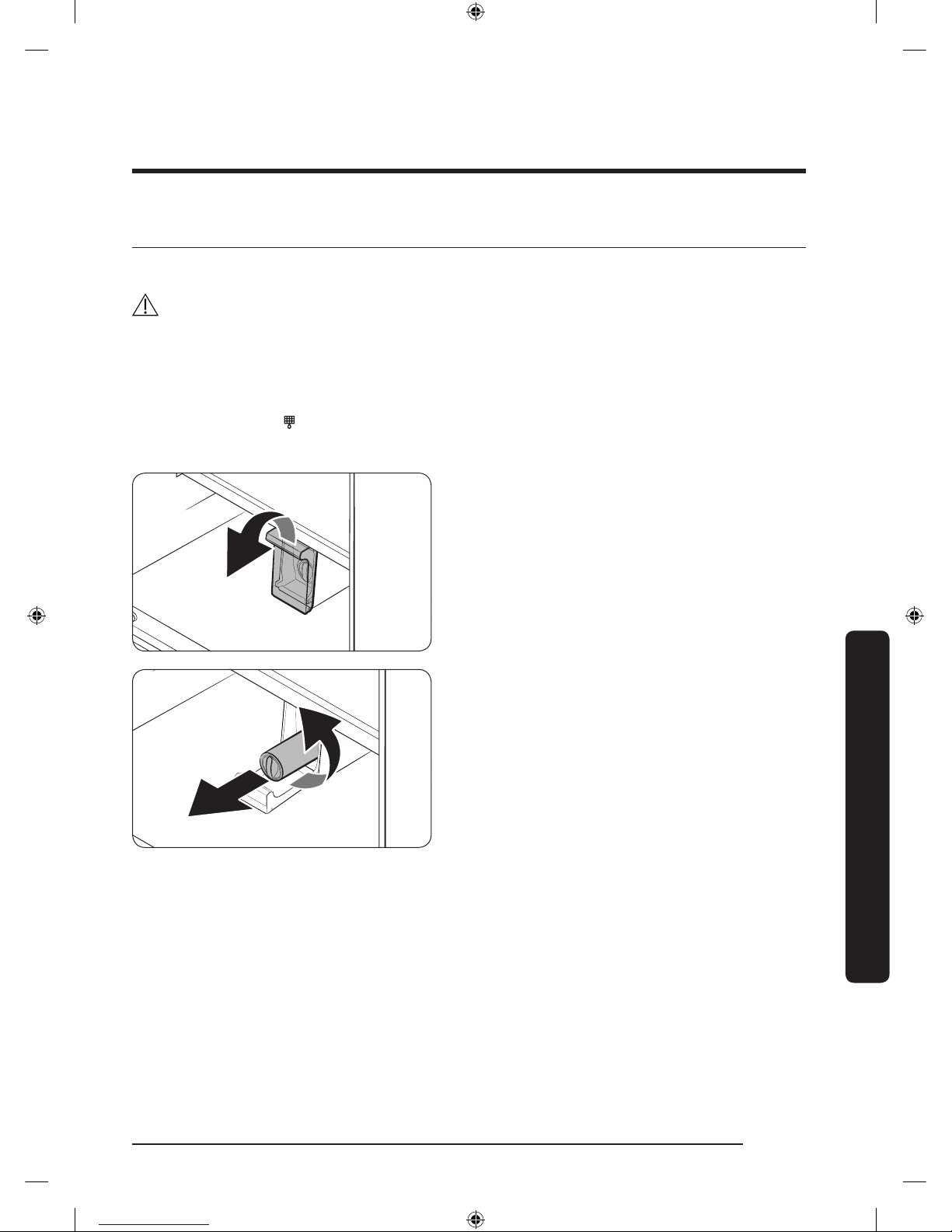
English 63
Maintenance
Replacement
Water lter
WARNING
• Do not use third-party water lters. Use only Samsung-provided or -approved lters.
• Unapproved lters may leak and damage the refrigerator, causing electric shock.
Samsung is not responsible for any damage that may occur from use of third-party
water lters.
The lter indicator (
) turns red to let you know it is time to replace the water lter.
Before replacing the lter, make sure the water supply line is shut off.
1. Open the lter cover.
- Some models may not have a lter
cover. If your model does not, skip
this step.
2. Turn the knob of the lter cartridge
counter clockwise 90 degrees (1/4
turn). The lter cartridge unlocks.
3. Pull out to remove the cartridge.
- If the water lter is severely
contaminated, the cartridge may not
be easy to remove. If that is the case,
use force to remove the cartridge.
- To prevent water leaks from the
lter opening, pull the cartridge
straight out while removing it.
Untitled-4 63 2017-01-19 11:56:56
Page 64
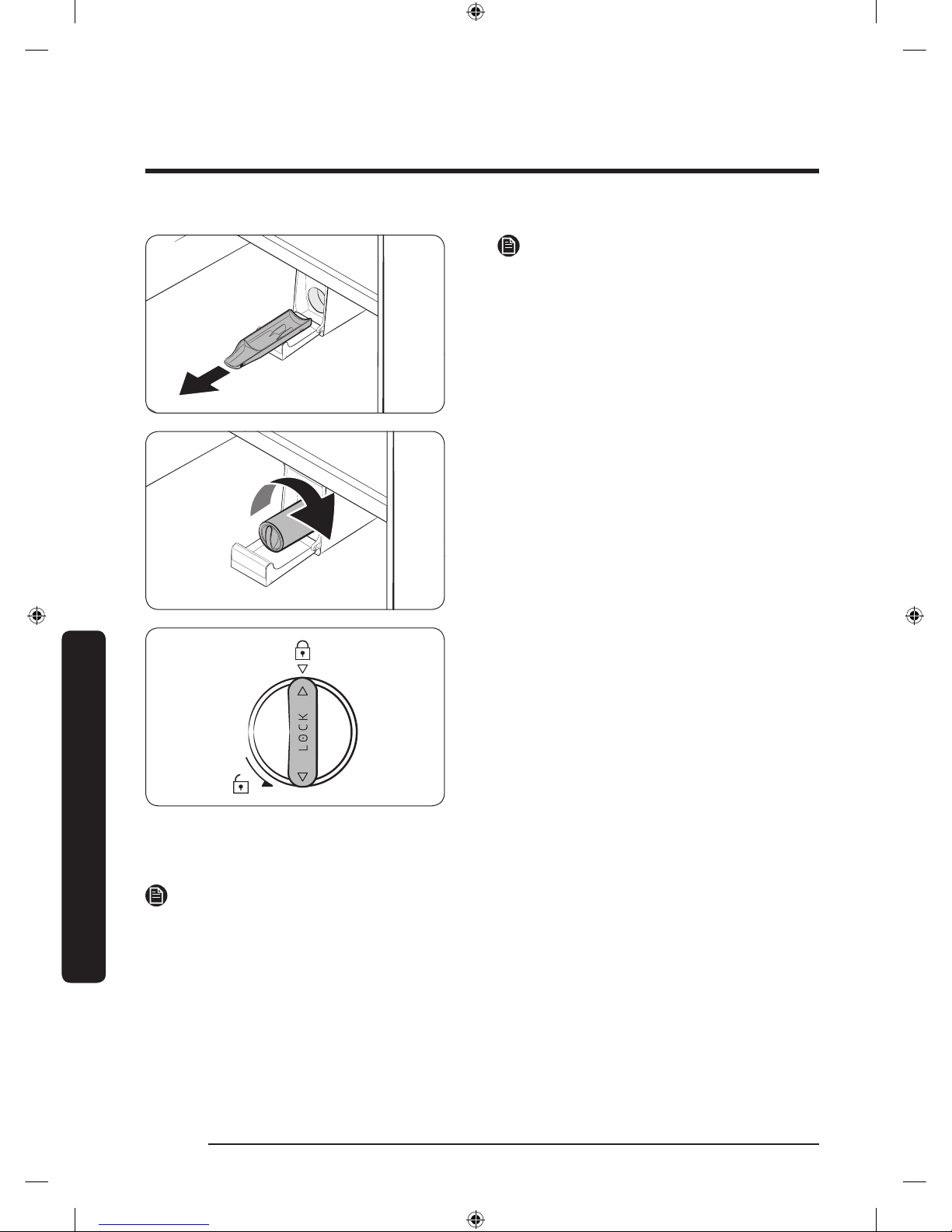
Maintenance
English64
Maintenance
NOTE
To prevent overow, empty and dry the
water lter tray.
4. Insert a new lter cartridge. Use only
Samsung-provided or approved lters.
5. Turn the cartridge knob clockwise to
lock into place.
6. On the Home screen, tap Fridge
Manager > Fridge Settings > Water
Filter, and then select RESET.
The lter indicator turns off.
7. When you are done replacing the lter,
open the water valve and run water
through the dispenser for about 7
minutes. This is to remove impurities
and air from the water line.
NOTE
• A newly installed lter may cause the water dispenser to spurt water briey. This is
because air has entered the waterline.
• The replacement process may cause the water dispenser to drip for a short period of
time. If it drips, simply wipe up any water on the oor with a dry towel.
Untitled-4 64 2017-01-19 11:56:57
Page 65
English 65
Maintenance
Reverse osmosis water ltration system
The water pressure of the water supply system to a reverse osmosis water ltration
system must be between 35 psi and 120 psi (241 kPa and 827 kPa).
The water pressure of the reverse osmosis water ltration system to the refrigerator’s
cold water line must be at least 40 psi (276 kPa). If the water pressure is below these
specications:
• Check if the sediment lter in the reverse osmosis system is blocked. Replace the lter
if necessary.
• Rell the water tank in the reverse osmosis system with water.
• If your refrigerator has a water lter, it may further reduce the water pressure when
used in conjunction with a reverse osmosis system. Remove the water lter.
For more information or servicing, contact a licensed plumbing professional.
Ordering a new lter
To purchase a new water lter, contact a local Samsung service center or visit www.
samsungparts.com on the web.
LED Lights
To replace the LED lights on the refrigerator, contact a local Samsung service center.
WARNING
The LED lights are not user-serviceable. Do not attempt to replace an LED light yourself.
This can cause electric shock.
Untitled-4 65 2017-01-19 11:56:57
Page 66
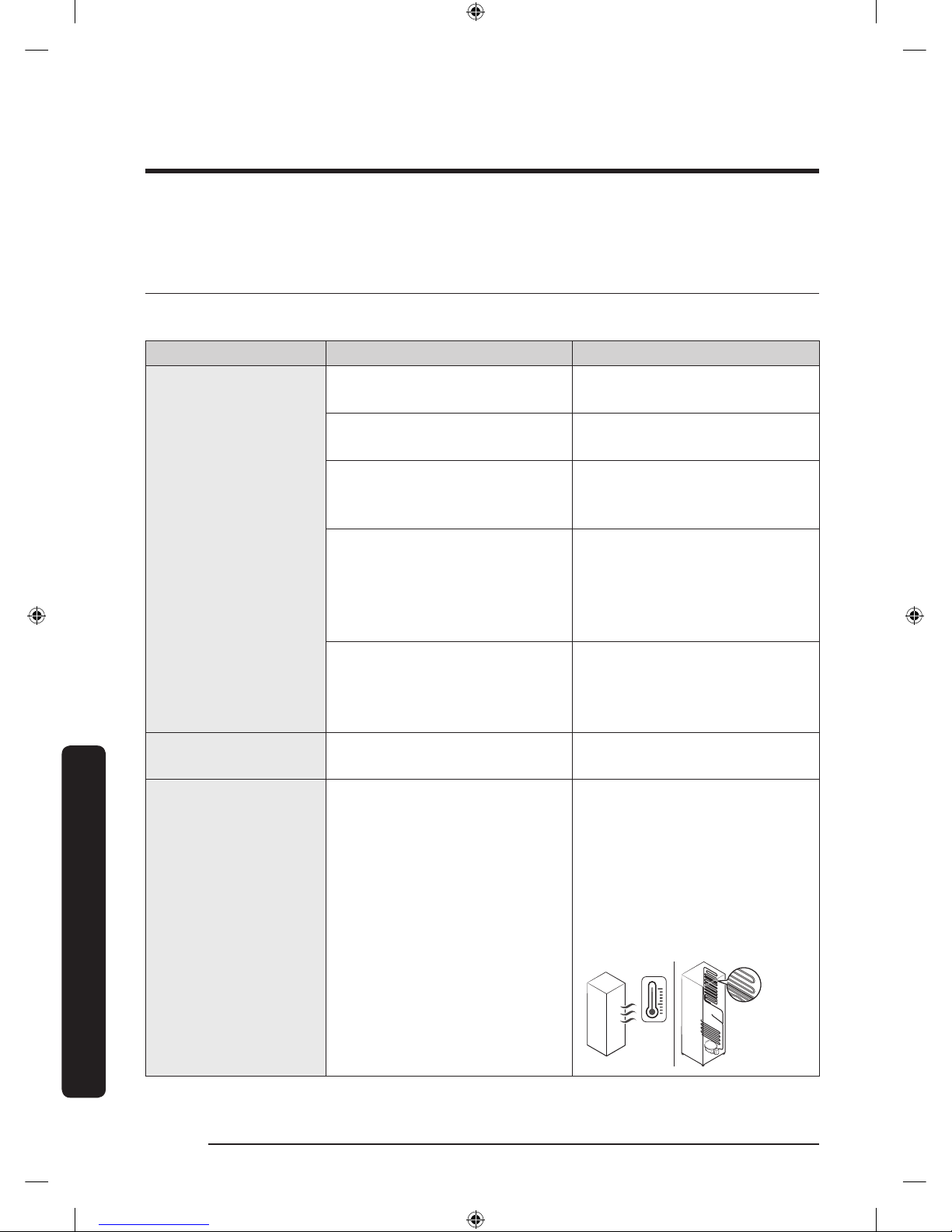
English66
Troubleshooting
Before calling for service, review the checkpoints below. Any service calls regarding
normal situations (No Defect Cases) will be charged to users.
General
Temperature
Symptom Possible causes Solution
Fridge/freezer does
not operate.
Fridge/freezer
temperature is warm.
• Power cord is not plugged
in properly.
• Properly plug in the power
cord.
• Temperature control is not
set correctly.
• Set the temperature lower.
• Refrigerator is located near
a heat source or direct
sunlight.
• Keep the refrigerator away
from direct sunlight or a
heat source.
• Not enough clearance
between refrigerator and
nearby walls or cabinets.
• Make sure there is a gap of
at least 2.5 inches (5 cm)
between the refrigerator
back and sides and any
nearby walls or cabinets.
• The refrigerator is
overloaded. Food is
blocking the refrigerator
vents.
• Do not overload the
refrigerator. Do not allow
food to block ventilation.
Fridge/freezer is
over-cooling.
• Temperature control is not
set correctly.
• Set the temperature higher.
Interior wall is hot.
• Refrigerator has heat-proof
piping in the interior wall.
• To prevent condensation
from forming, the
refrigerator has heat-proof
piping in the front corners.
If the ambient temperature
rises, this equipment may
not work effectively. This is
not a system failure.
Troubleshooting
Untitled-4 66 2017-01-19 11:56:57
Page 67
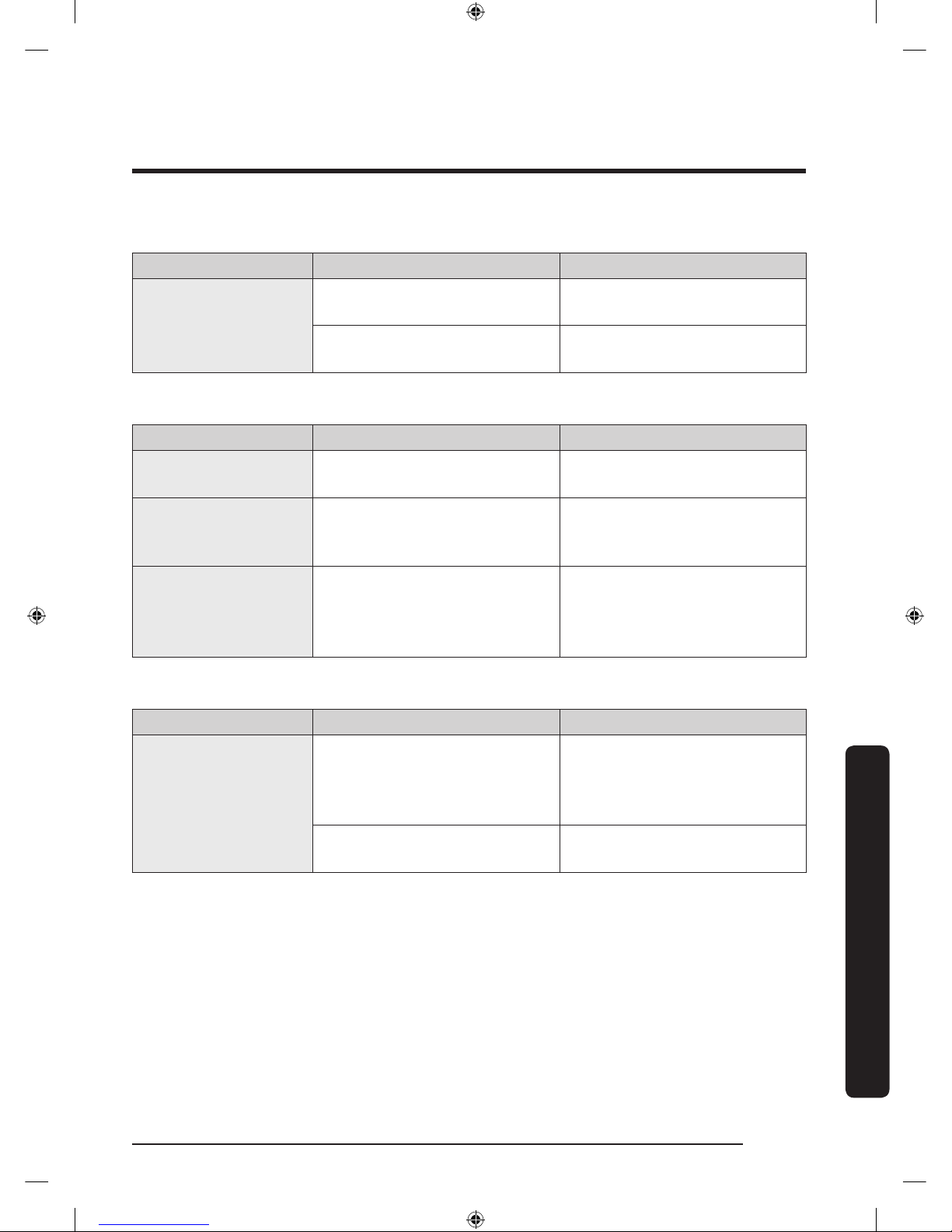
English 67
Troubleshooting
Odors
Symptom Possible causes Solution
Refrigerator has
odors.
• Spoiled food.
• Clean the refrigerator and
remove any spoiled food.
• Food with strong odors.
• Make sure strong smelling
food is wrapped airtight.
Frost
Symptom Possible causes Solution
Frost around the
vents.
• Food is blocking the vents.
• Make sure no food blocks
the refrigerator vents.
Frost on interior
walls.
• Door is not closed properly.
• Make sure food does not
block the door. Clean the
door gasket.
Fruits or vegetables
are frozen.
• Fruits or vegetables are
stored in the Flex Zone and
the temperature was set too
low.
• Set the temperature of the
Flex Zone to a temperature
appropriate for fruits or
vegetables.
Condensation
Symptom Possible causes Solution
Condensation forms
on the interior walls.
• If door is left open, moisture
enters the refrigerator.
• Remove the moisture and
do not leave a door open
for extended periods of
time.
• Food with high moisture
content.
• Make sure food is wrapped
airtight.
Untitled-4 67 2017-01-19 11:56:57
Page 68
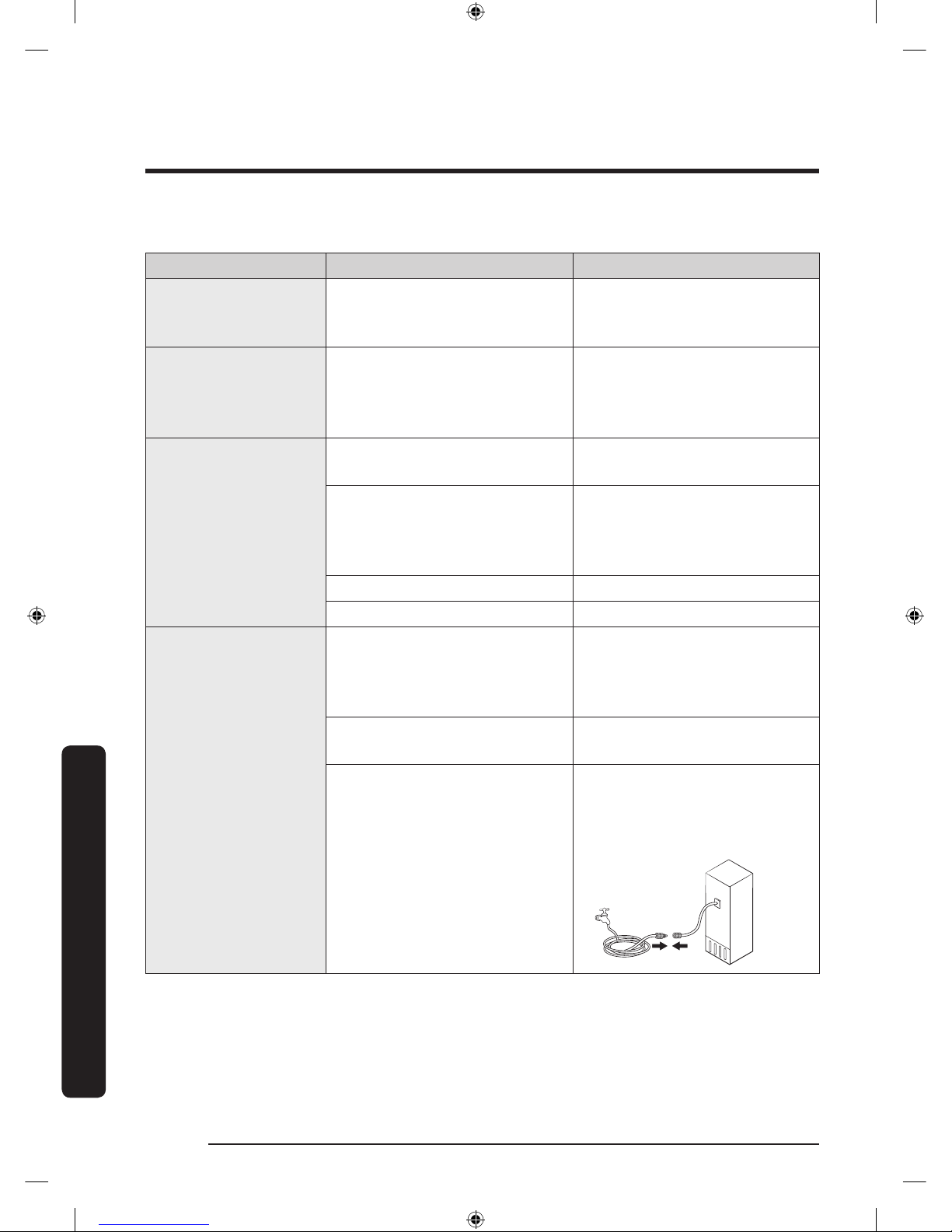
Troubleshooting
English68
Troubleshooting
Water/ice (dispenser models only)
Symptom Possible causes Solution
Water ow is weaker
than normal.
• Water pressure is too low.
• Make sure the water
pressure is between 20 to
120 psi.
Ice maker makes a
buzzing sound.
• The ice maker function is
activated, but the water
supply to the refrigerator
has not been connected.
• Press Ice Maker off .
Ice maker does not
make ice.
• Ice maker has just been
installed.
• You must wait 12 hours for
the refrigerator to make ice.
• Freezer temperature is too
low.
• Set the freezer temperature
below 0 °F (-18 °C) or -4 °F
(-20 °C) in warm, ambient
air.
• Dispenser Lock is activated. • Deactivate Dispenser Lock.
• Ice maker is off. • Turn on the ice maker.
Ice does not dispense.
• Ice may jam if the ice
dispenser is not used for a
long time (approx. 3 weeks).
• If you won't be using the
refrigerator for a long time,
empty the ice bucket and
turn off the ice maker.
• Ice bucket is not properly
inserted.
• Make sure the ice bucket is
properly inserted.
• Water line is not connected
properly or water supply is
not on.
• Check if the water line is
installed correctly. Check if
the water line stop cock is
closed.
Untitled-4 68 2017-01-19 11:56:57
Page 69
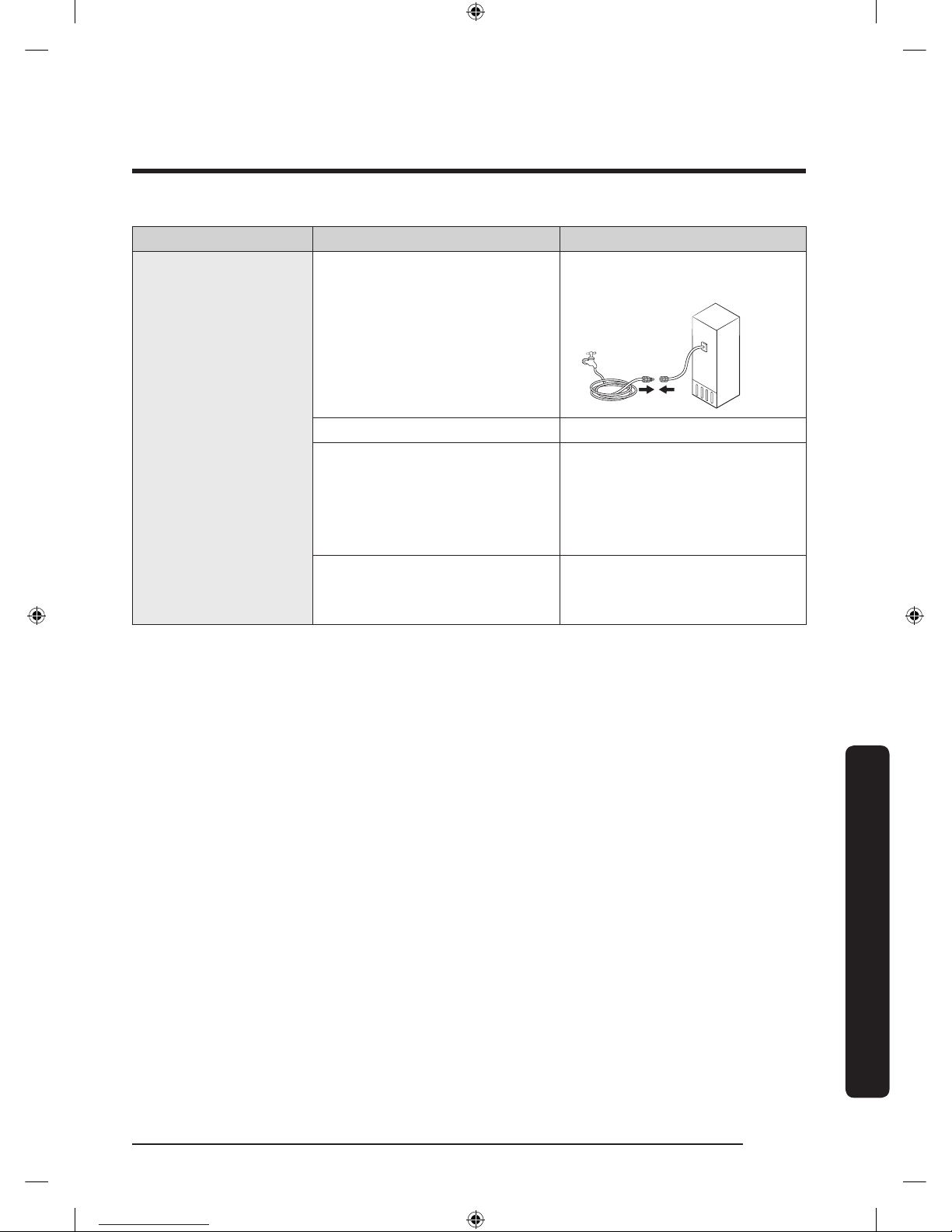
English 69
Troubleshooting
Symptom Possible causes Solution
Water does not
dispense.
• Water line is not connected
properly or water supply is
not on.
• Check the water installation
conditions.
• Dispenser Lock is activated. • Deactivate Dispenser Lock.
• A third-party water lter
was installed.
• Use only Samsung-provided
or approved lters.
• Unapproved lters may
leak and damage the
refrigerator.
• Water lter indicator turns
on or blinks.
• Replace the water lter.
After replacing, reset the
lter indicator sensor.
Untitled-4 69 2017-01-19 11:56:57
Page 70
Troubleshooting
English70
Troubleshooting
Samsung Smart Home
Symptom Action
Could not nd
“Samsung Smart
Home” in the app
market.
• The Samsung Smart Home app is available for smartphones
that run Android 4.0 (ICS) or higher, or iOS 8.0 or higher.
The Samsung Smart
Home app fails to
operate.
• The Samsung Smart Home app is available for applicable
models only.
• The old Samsung Smart Refrigerator app cannot connect with
Samsung Smart Home models.
The Samsung Smart
Home app is installed
but is not connected
to my refrigerator.
• You must log into your Samsung account to use the app.
• Make sure that your router is operating normally.
• If you have not connected your refrigerator to the Samsung
Smart Home App after the app was installed, you must make
the connection using the device registration function of the
app.
Could not log into the
app.
• You must log into your Samsung account to use the app.
• If you don’t have a Samsung account, follow the app’s
onscreen instructions to create one.
An error message
appears when I
try to register my
refrigerator.
• Easy Connection may fail due to the distance from your
access point (AP) or electrical interference from the
surrounding environment. Wait a moment and try again.
The Samsung
Smart Home app
is successfully
connected to my
refrigerator but does
not run.
• Exit and restart the Samsung Smart Home app or disconnect
and reconnect the router.
• Unplug the power cord of the refrigerator, and then plug it in
again after 1 minute.
Untitled-4 70 2017-01-19 11:56:57
Page 71
English 71
Troubleshooting
Samsung Family Hub
Symptom Action
Could not nd
“Samsung Family
Hub” in the app
market.
• The Samsung Family Hub app is available for smartphones
that run Android 4.4 (KitKat) or higher, or iOS 8.0 or higher.
Could not log into the
app.
• You must log into your Samsung account to use the app.
• If you don’t have a Samsung account, follow the app’s
onscreen instructions to create one.
Untitled-4 71 2017-01-19 11:56:57
Page 72
Troubleshooting
English72
Troubleshooting
Smart Grid
Symptom Action
What Do I Need
to use the Energy
Management and
Smart Grid functions?
To use the Smart Grid (Demand Response) and Energy
Management functions on your refrigerator, you need the
following:
Devices
• A wireless access point (router)
• A Samsung Energy Management-supported refrigerator
• A smartphone
Registration
• Connect your refrigerator to your home Wi-Fi network.
• Register for the EMS service with your electric company.
Your electric company must have an EMS (Energy
Management System) supporting SEP (Smart Energy prole).
App
• Download the Samsung Smart Home app from the Google
Play Store, Apple App Store, or Samsung Galaxy Apps.
• Install and run the Samsung Smart Home app on your
smartphone.
Why isn’t the Energy
Management function
working normally?
• Make sure that your home router is operating normally with
proper Internet service and connection.
• Make sure that the refrigerator is connected to the AP
(router).
Checkpoints
• Connect your smartphone to the router (AP, Access Point),
and then check if you can browse the Internet on the
smartphone.
Why isn’t the Delay
Defrost Capability
working normally?
• Make sure that your home router is operating normally with
proper Internet service and connection.
Untitled-4 72 2017-01-19 11:56:57
Page 73
English 73
Troubleshooting
LCD
Symptom Action
Cannot connect to my
TV.
• This refrigerator can connect only with Samsung Smart TV
6400 series or higher models released since 2015. Please
check the model name of your TV rst.
• Network connections may suffer temporary interruptions.
Turn your TV off, and then try again.
The inner view
picture looks bulged
out or incomplete.
• The edges of the inner view may look bulged out. The
bulging is caused by the convex lens of the camera.
• The inner view may be incomplete due to the blind spots
on the left and right corners or screened depending on the
layout of food items. Make sure to place food items in the
front center.
The displayed
measurement on the
Fridge Manager is not
correct.
• The displayed conditions may differ from the actual
temperature and humidity.
Untitled-4 73 2017-01-19 11:56:57
Page 74
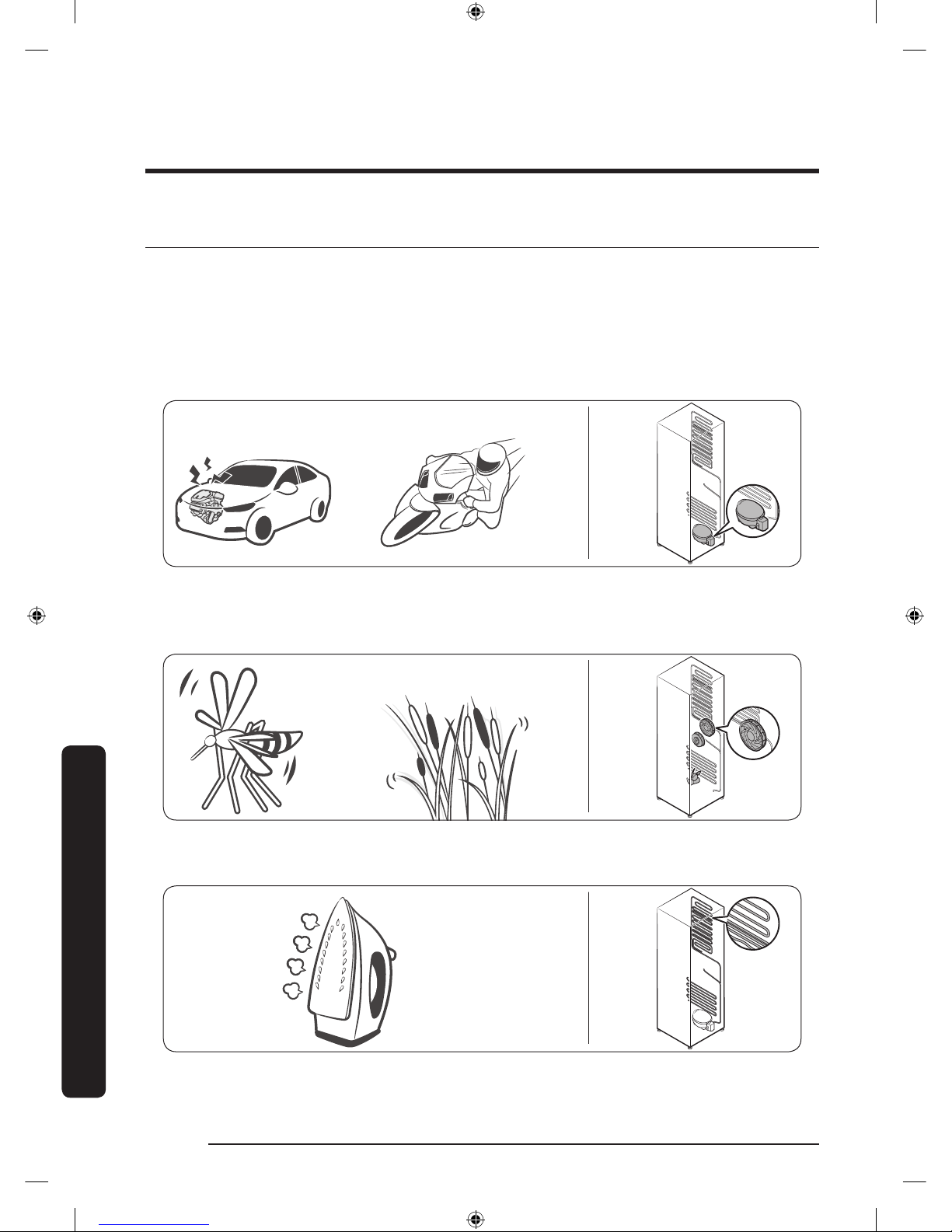
Troubleshooting
English74
Troubleshooting
Do you hear abnormal sounds from the refrigerator?
Before calling for service, review the checkpoints below. Any service calls related to
normal sounds will be charged to the user.
These sounds are normal.
• When starting or ending an operation, the refrigerator may make sounds similar to a
car engine ignition. As the operation stabilizes, the sounds will decrease.
Clicking!
or Chirping!
Buzzing!
• While the fan is operating, these sounds may occur. When the refrigerator reaches the
set temperature, the fan sound will stop.
SSSRRR!
Whir!
• During a defrost cycle, water may drip on the defrost heater, causing sizzling sounds.
HiSS!
Untitled-4 74 2017-01-19 11:56:58
Page 75
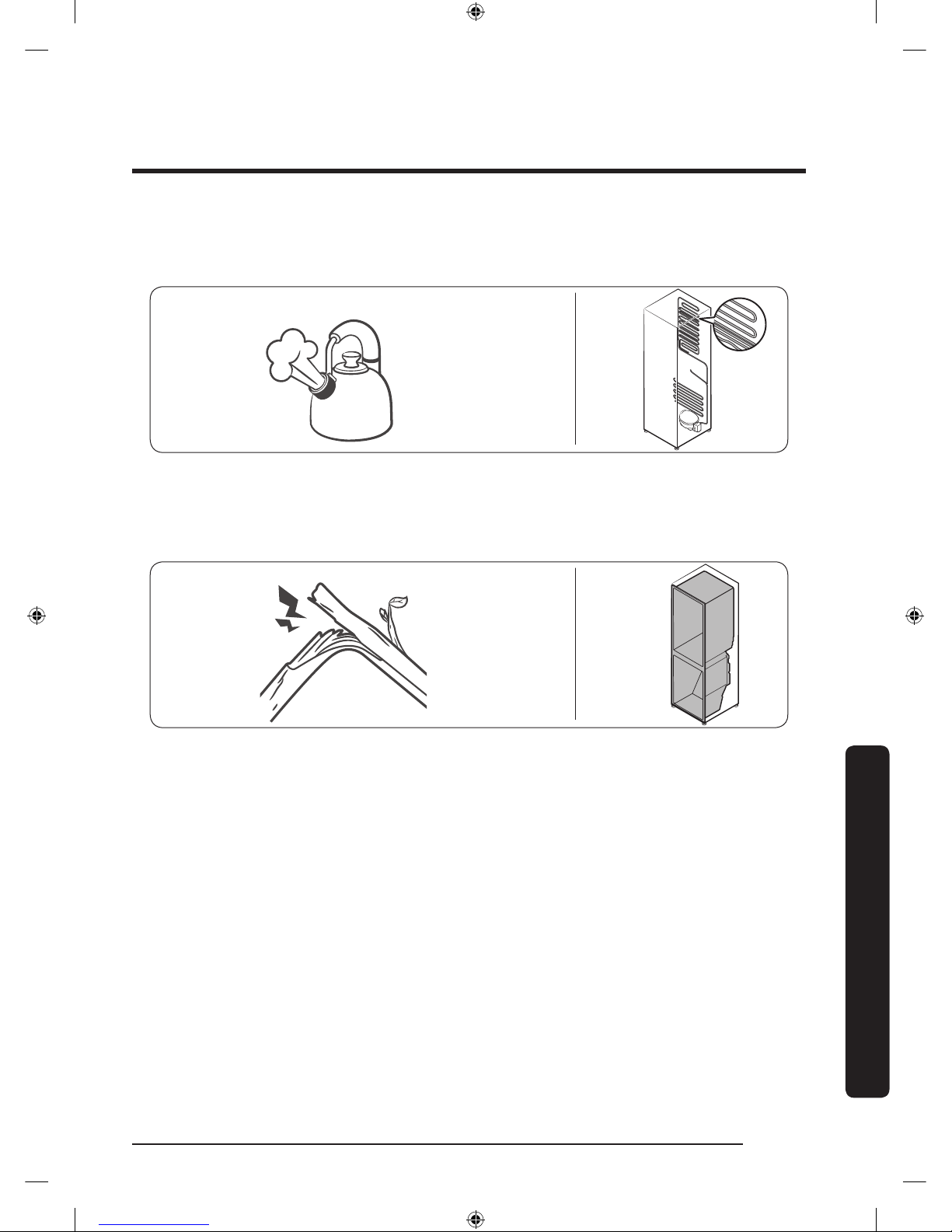
English 75
Troubleshooting
• As the refrigerator cools or freezes, refrigerant gas moves through sealed pipes,
causing bubbling sounds.
Bubbling!
• As the refrigerator temperature increases or decreases, plastic parts contract and
expand, creating knocking noises. These noises occur during the defrosting cycle or
when electronic parts are working.
Cracking!
• For ice maker models: When the water valve opens to ll the ice maker, buzzing
sounds may occur.
• Due to pressure equalizing when you open and close the refrigerator door, whooshing
sounds may occur.
Untitled-4 75 2017-01-19 11:56:58
Page 76
English76
Warranty (USA)
WARRANTY ON SAMSUNG REFRIGERATOR
LIMITED WARRANTY TO ORIGINAL PURCHASER
This Samsung brand product, as supplied and distributed by Samsung Electronics
America, Inc. (Samsung) and delivered new, in the original carton to the original consumer
purchaser, is warranted by Samsung against manufacturing defects in materials and
workmanship for a limited warranty period of:
One (1) year Parts and Labor on Refrigerator
Five (5) years Parts and Labor on sealed Refrigeration system only*
Ten (10) years Parts and Five (5) years Labor on Digital Inverter Compressor
(*Compressor, evaporator, condenser, drier, connecting tubing)
This limited warranty begins on the original date of purchase, and is valid only on
products purchased and used in the United States. To receive warranty service, the
purchaser must contact Samsung for problem determination and service procedures.
Warranty service can only be performed by a Samsung authorized service center.
The original dated bill of sale must be presented upon request as proof of purchase to
Samsung or Samsung authorized service center.
Samsung will repair or replace any part found to be defective, at our option and at no
charge as stipulated herein, with new or reconditioned parts during the limited warranty
period specied above. All replaced parts and products become the property of Samsung
and must be returned to Samsung. Replacement parts and products assume the remaining
original warranty, or ninety (90) days, whichever is longer.
In-home service will be provided during the warranty labor period subject to availability
within the contiguous United States. In-home service is not available in all areas. To
receive in-home service, the product must be unobstructed and accessible from oor
level to service personnel. If during in-home service repair cannot be completed, it may
be necessary to remove, repair and return the product. If in-home service is unavailable,
Samsung may elect, at our option, to provide for transportation of our choice to and from
a Samsung authorized service center. Otherwise, transportation to and from the Samsung
authorized service center is the responsibility of the purchaser.
Untitled-4 76 2017-01-19 11:56:58
Page 77
English 77
This limited warranty covers manufacturing defects in materials and workmanship
encountered in normal, noncommercial use of this product, and shall not apply to the
following, including, but not limited to: damage which occurs in shipment; delivery
and installation; applications and uses for which this product was not intended; altered
product or serial numbers; cosmetic damage or exterior nish; accidents, abuse, neglect,
re, water, lightning or other acts of nature; use of products, equipment, systems,
utilities, services, parts, supplies, accessories, applications, installations, repairs, external
plumbing and leaks, external wiring, circuit breakers, fuses or connectors not supplied
and authorized by Samsung, or which damage this product or result in service problems;
incorrect electrical line voltage, uctuations and surges; customer adjustments and failure
to follow operating instructions, cleaning, maintenance and environmental instructions
that are covered and prescribed in the instruction book; loss of food due to spoilage;
consumable items including lters and light.
THERE ARE NO EXPRESS WARRANTIES OTHER THAN THOSE LISTED AND DESCRIBED
ABOVE, AND NO WARRANTIES WHETHER EXPRESS OR IMPLIED, INCLUDING, BUT NOT
LIMITED TO, ANY IMPLIED WARRANTIES OF MERCHANTABILITY OR FITNESS FOR A
PARTICULAR PURPOSE, SHALL APPLY AFTER THE EXPRESS WARRANTY PERIODS STATED
ABOVE, AND NO OTHER EXPRESS WARRANTY OR GUARANTY GIVEN BY ANY PERSON,
FIRM OR CORPORATION WITH RESPECT TO THIS PRODUCT SHALL BE BINDING ON
SAMSUNG. SAMSUNG SHALL NOT BE LIABLE FOR LOSS OF REVENUE OR PROFITS, FAILURE
TO REALIZE SAVINGS OR OTHER BENEFITS, OR ANY OTHER SPECIAL, INCIDENTAL OR
CONSEQUENTIAL DAMAGES CAUSED BY THE USE, MISUSE OR INABILITY TO USE THIS
PRODUCT, REGARDLESS OF THE LEGAL THEORY ON WHICH THE CLAIM IS BASED, AND
EVEN IF SAMSUNG HAS BEEN ADVISED OF THE POSSIBILITY OF SUCH DAMAGES. NOR
SHALL RECOVERY OF ANY KIND AGAINST SAMSUNG BE GREATER IN AMOUNT THAN THE
PURCHASE PRICE OF THE PRODUCT SOLD BY SAMSUNG AND CAUSING THE ALLEGED
DAMAGE. WITHOUT LIMITING THE FOREGOING, PURCHASER ASSUMES ALL RISK AND
LIABILITY FOR LOSS, DAMAGE OR INJURY TO PURCHASER AND PURCHASER’S PROPERTY
AND TO OTHERS AND THEIR PROPERTY ARISING OUT OF THE USE, MISUSE OR INABILITY
TO USE THIS PRODUCT SOLD BY SAMSUNG NOT CAUSED DIRECTLY BY THE NEGLIGENCE
OF SAMSUNG. THIS LIMITED WARRANTY SHALL NOT EXTEND TO ANYONE OTHER THAN
THE ORIGINAL PURCHASER OF THIS PRODUCT, IS NONTRANSFERABLE AND STATES YOUR
EXCLUSIVE REMEDY.
Some states do not allow limitations on how long an implied warranty lasts, or the
exclusion or limitation of incidental or consequential damages, so the above limitations
or exclusions may not apply to you. This warranty gives you specic legal rights, and you
may also have other rights, which vary from state to state. To obtain warranty service,
please contact Samsung at:
Untitled-4 77 2017-01-19 11:56:58
Page 78
Warranty (USA)
English78
SAMSUNG CUSTOMER CARE CENTER
Samsung Electronics America, Inc.
85 Challenger Road
Ridgeeld Park, NJ 07660
1-800-SAMSUNG (726-7864)
www.samsung.com/us/support
Untitled-4 78 2017-01-19 11:56:58
Page 79
English 79
Open Source Announcement
The software included in this product contains open source software. You may obtain the
complete corresponding source code for a period of three years after the last shipment of
this product by sending an email to mailto:[email protected].
It is also possible to obtain the complete corresponding source code in a physical medium
such as a CD-ROM; a minimal charge will be required.
The following URL http://opensource.samsung.com/opensource/F_HUB/seq/0 leads to the
download page of the source code made available and open source license information as
related to this product. This offer is valid to anyone in receipt of this information.
Untitled-4 79 2017-01-19 11:56:58
Page 80
Scan the QR code* or visit
www.samsung.com/spsn
to view our helpful
How-to Videos and Live Show
s
* Requires reader to be installed on your
smartphone
Contact SAMSUNG WORLD WIDE
If you have any questions or comments relating to Samsung products, please contact the
SAMSUNG customer care center.
Country Contact Center Web Site
U.S.A
1-800-SAMSUNG (726-7864)
1-844-SAM-PAYS (726-7297)
www.samsung.com/us/support
CANADA 1-800-SAMSUNG (726-7864)
www.samsung.com/ca/support (English)
www.samsung.com/ca_fr/support (French)
DA68-03460F-00
Untitled-4 80 2017-01-19 11:56:58
Page 81
Refrigerador
Manual del usuario
Electrodoméstico independiente
Untitled-3 1 2017-01-19 11:46:27
Page 82
Español2
Contenido
Contenido
Información sobre seguridad 3
Símbolos y advertencias de seguridad importantes: 3
Advertencia sobre la State of California Proposition 65 (solo EE.UU.) 3
Advertencias muy importantes para la instalación 4
Precauciones para la instalación 6
Advertencias muy importantes para el uso 6
Precauciones de uso 10
Precauciones para la limpieza 11
Advertencias muy importantes para la eliminación de residuos 12
1. Aviso regulatorio 13
Instalación 15
Descripción breve de su refrigerador 15
Extracción de la puerta para la entrada 17
Instalación paso a paso 25
Funcionamiento 34
Interfaz del usuario 34
Samsung Smart Home 44
Función SMART GRID(respuesta a la demanda) 47
Recomendaciones relativas al reconocimiento de voz 51
Samsung Family Hub 51
Funciones especiales 53
Mantenimiento 58
Manipulación y cuidado 58
Limpieza 62
Reemplazo 63
Solución de problemas 66
General 66
Samsung Smart Home 70
Samsung Family Hub 71
Smart Grid 72
LCD 73
¿Se oyen ruidos anómalos procedentes del refrigerador? 74
Garantía (USA) 76
GARANTÍA DEL REFRIGERADOR SAMSUNG 76
Untitled-3 2 2017-01-19 11:46:27
Page 83
Español 3
Información sobre seguridad
• Antes de utilizar su nuevo refrigerador Samsung, lea detenidamente este manual a n de aprender a
usar las funciones que ofrece de manera segura y eciente.
• Este electrodoméstico no debe ser utilizado por personas (incluidos niños) con capacidades mentales,
sensoriales o físicas reducidas o por personas que carezcan de experiencia y conocimientos, a menos
que se encuentren bajo la supervisión o hayan recibido instrucciones de un responsable de su
seguridad sobre el uso del refrigerador.
• Debido a que las siguientes instrucciones corresponden a diversos modelos, es posible que las
características de su refrigerador dieran ligeramente de las que se describen en este manual.
• Si tiene alguna duda, comuníquese al 1-800-SAMSUNG o encuentre ayuda e información en línea en
www.samsung.com.
• Se utiliza R-600a o R-134a como refrigerante. Mire la etiqueta del compresor en la parte posterior
del electrodoméstico o la etiqueta de voltaje dentro del refrigerador para constatar qué refrigerante
fue utilizado en su refrigerador. Si este producto contiene gas inamable (Refrigerante R-600a),
comuníquese con las autoridades locales para desechar este producto en forma segura.
• Es peligroso que una persona que no sea un técnico de servicio autorizado realice tareas de reparación
en este aparato.
Símbolos y advertencias de seguridad importantes:
Sírvase seguir todas las instrucciones de seguridad del presente manual. En el presente manual se utilizan
los siguientes símbolos de seguridad.
ADVERTENCIA
Riesgos o prácticas inseguras que pueden causar graves lesiones personales, daños a la propiedad y/o
incluso la muerte.
PRECAUCIÓN
Riesgos o prácticas inseguras que pueden causar lesiones personales leves y/o daños materiales.
NOTA
Información útil que ayuda a los usuarios a comprender u obtener benecios del refrigerador.
Estas señales de advertencia se incluyen aquí para evitar que usted o terceros sufran lesiones.
Sígalas atentamente.
Después de leer esta sección, consérvela en un lugar seguro para referencia futura.
Advertencia sobre la State of California Proposition 65 (solo EE.UU.)
ADVERTENCIA : Este producto contiene productos químicos reconocidos en el estado de California como
capaces de provocar cáncer y defectos de nacimiento u otras afecciones reproductivas.
Información sobre seguridad
Untitled-3 3 2017-01-19 11:46:28
Page 84
Información sobre seguridad
Español4
Información sobre seguridad
Advertencias muy importantes para la instalación
ADVERTENCIA
• No instale el refrigerador en un lugar húmedo o donde pueda entrar en contacto con agua.
- El aislamiento deciente de las piezas eléctricas puede provocar una descarga eléctrica o un
incendio.
• No exponga este refrigerador a la luz solar directa ni al calor de estufas, calefactores u otros
electrodomésticos.
• No enchufe varios electrodomésticos en la misma toma múltiple. El refrigerador debe conectarse
siempre a un tomacorriente individual cuyo voltaje nominal coincida con el que se especica en la
placa de voltaje del refrigerador.
- De esta manera se obtiene el mejor desempeño y también se evita que se sobrecarguen los
circuitos del cableado de la casa, lo que podría sobrecalentar los cables y provocar un riesgo de
incendio.
• Si el tomacorriente está ojo, no conecte el enchufe.
- Existe el riesgo de que se produzca una descarga eléctrica o un incendio.
• No utilice un cable de alimentación que esté dañado o gastado en su extensión o en cualquiera de los
extremos.
• No doble excesivamente el cable de alimentación ni coloque objetos pesados sobre él.
• No tire del cable de alimentación ni lo doble excesivamente.
• No retuerza ni amarre el cable de alimentación.
• No coloque el cable de alimentación sobre un objeto metálico; no coloque sobre él ningún objeto
pesado; no lo coloque entre objetos ni lo empuje hacia el espacio que hay detrás del electrodoméstico.
• Al mover el refrigerador, tenga cuidado de no enroscar ni dañar el cable de alimentación.
- Esto podría causar una descarga eléctrica o un incendio.
• Nunca desenchufe el refrigerador jalando el cable de alimentación. Siempre sostenga el enchufe con
rmeza y jale para extraerlo del tomacorriente.
- Los daños al cable pueden provocar un cortocircuito, un incendio o una descarga eléctrica.
• No almacene sustancias explosivas como latas de aerosoles con gases propelentes inamables en este
electrodoméstico.
• No instale este electrodoméstico cerca de calefactores o materiales inamables.
• No instale este electrodoméstico en un lugar donde pueda haber fugas de gas.
- Esto podría causar una descarga eléctrica o un incendio.
• Antes de usarse, el refrigerador debe ubicarse e instalarse de manera apropiada de acuerdo con las
instrucciones de este manual.
• Conecte el enchufe en la posición correcta con el cable colgando hacia abajo.
- Si conecta el enchufe al revés, el cable puede cortarse y provocar un incendio o una descarga
eléctrica.
Untitled-3 4 2017-01-19 11:46:28
Page 85
Español 5
Información sobre seguridad
• Asegúrese de que el enchufe no esté aplastado ni haya sido dañado por la parte posterior del
refrigerador.
• Mantenga los materiales de empaque fuera del alcance de los niños.
- Existe el riesgo de muerte por asxia si un niño se coloca los materiales de empaque en la cabeza.
• El electrodoméstico debe colocarse de manera tal que se pueda acceder al enchufe después de la
instalación.
- No seguir esta recomendación puede causar una descarga eléctrica o un incendio debido a una fuga
de electricidad.
• No instale este electrodoméstico en un lugar húmedo, engrasado o sucio, o en un sitio con exposición
directa al sol o al agua (lluvia).
- El aislamiento deciente de las piezas eléctricas puede provocar una descarga eléctrica o un
incendio.
• Si ingresaran grandes cantidades de polvo o agua al refrigerador, desenchufe el cable de alimentación
y comuníquese con el Centro de Servicio de Samsung Electronics.
- Si no lo hace, existe el riesgo de que se produzca un incendio.
• No se pare sobre el electrodoméstico ni le coloque objetos encima (tales como ropa, velas o cigarrillos
encendidos, platos, productos químicos, objetos metálicos, etc.).
- Esto podría causar una descarga eléctrica, un incendio, problemas con el producto o lesiones.
• Es necesario quitar toda la película plástica protectora antes de enchufar el producto por primera vez.
• Se deberá vigilar a los niños para asegurarse de que no jueguen con los anillos elásticos utilizados para
el ajuste de la puerta o con las grapas del tubo de agua.
- Existe riesgo de muerte por asxia si un niño se traga un anillo elástico o una grapa del tubo de
agua. Mantenga los anillos elásticos y las grapas del tubo de agua fuera del alcance de los niños.
• El refrigerador debe estar conectado a tierra de manera segura.
- Siempre asegúrese de haber conectado el refrigerador a tierra antes de intentar examinar o reparar
alguna pieza. Las fugas de energía pueden provocar una descarga eléctrica grave.
• Nunca utilice como conexión a tierra tubos de gas, líneas telefónicas ni otras posibles fuentes de
atracción de rayos.
- El refrigerador debe estar conectado a tierra para evitar cualquier fuga de energía o descarga
eléctrica provocada por fugas de corriente del refrigerador.
- Esto podría causar descargas eléctricas, incendios, explosiones o problemas con el producto.
- El uso inapropiado de la conexión a tierra puede traer como consecuencia un riesgo de descarga
eléctrica. Si necesita usar un cable de extensión, use solo uno de tres hilos con un enchufe que
tenga una tercera punta para el polo a tierra; la toma de corriente deberá tener 3 ranuras para
adaptarse al enchufe del electrodoméstico. La potencia indicada en el cable de extensión debe ser
CA 115-120 V, 10 A o superior. Si se utiliza un adaptador de tierra, asegúrese de que el receptáculo
esté conectado correctamente a tierra.
Untitled-3 5 2017-01-19 11:46:28
Page 86
Información sobre seguridad
Español6
Información sobre seguridad
• Conecte bien el enchufe a la toma de pared. No utilice enchufes o cables de alimentación dañados ni
enchufes de pared ojos.
- Esto podría causar una descarga eléctrica o un incendio.
• Si el cable de alimentación está dañado, solicite su reemplazo de inmediato al fabricante o a uno de los
agentes de servicio técnico.
• Únicamente un técnico calicado o compañía de reparaciones debe estar autorizado para cambiar el
fusible del refrigerador.
- No seguir esta recomendación, podría causar una descarga eléctrica o lesiones.
Precauciones para la instalación
PRECAUCIÓN
• Deje espacio suciente alrededor del refrigerador e instálelo sobre una supercie plana.
- Mantenga libre de obstáculos el espacio de ventilación en el gabinete o la estructura de montaje
del electrodoméstico.
• Una vez que haya instalado el refrigerador y lo haya encendido, permita que funcione durante 2 horas
antes de cargarlo con alimentos.
• Recomendamos que el refrigerador sea instalado por un técnico calicado o una compañía de servicios.
- No seguir esta recomendación puede causar descargas eléctricas, incendios, explosiones, problemas
con el producto o lesiones.
• Sobrecargar una de las puertas puede ocasionar la caída del refrigerador y provocar lesiones
personales.
Advertencias muy importantes para el uso
ADVERTENCIA
• No conecte el enchufe en un tomacorriente con las manos mojadas.
- Esto podría causar una descarga eléctrica.
• No coloque objetos en la parte superior de la unidad.
- Cada vez que abra o cierre la puerta, estos podrían caerse y provocar lesiones personales o daños
materiales.
• No coloque las manos, los pies ni objetos metálicos (como palillos chinos, etc.) en la parte inferior o
posterior del refrigerador.
- Esto podría causar una descarga eléctrica o lesiones personales.
- Algunos bordes losos podrían provocar lesiones personales.
Untitled-3 6 2017-01-19 11:46:28
Page 87
Español 7
Información sobre seguridad
• No toque las paredes internas del congelador ni los productos almacenados en este con las manos
mojadas.
- Esto puede provocar quemaduras por frío.
• No coloque un recipiente con agua sobre el refrigerador.
- Si se derrama, existe el riesgo de que se produzca un incendio o una descarga eléctrica.
• No almacene sustancias u objetos volátiles o inamables (benceno, solvente, gas propano, alcohol, éter,
gas LP ni cualquier otro producto de este tipo) en el refrigerador.
- Este refrigerador se debe utilizar solo para almacenar alimentos.
- Esto podría causar un incendio o una explosión.
• Se deberá vigilar a los niños para asegurarse de que no jueguen con el electrodoméstico.
- Aleje los dedos de los puntos de agarre. Los espacios entre las puertas y el gabinete son
inevitablemente pequeños. Abra las puertas con cuidado si hay niños cerca.
• No permita que los niños se cuelguen de la puerta ni de los compartimientos de la puerta. Pueden
producirse lesiones graves.
• No permita que los niños ingresen al refrigerador. Podrían quedar atrapados.
• No coloque las manos debajo del electrodoméstico.
- Es posible que algunas puntas losas le provoquen lesiones.
• No almacene en el refrigerador productos farmacéuticos, materiales cientícos ni productos sensibles a
la temperatura.
- No se deben almacenar productos que requieran controles estrictos de temperatura.
• No coloque ni utilice aparatos eléctricos dentro del refrigerador/congelador, a menos que sean del tipo
recomendado por el fabricante.
• En caso de sentir olor a humo, desconecte el enchufe de inmediato y comuníquese con el Centro de
Servicio de Samsung Electronics.
• Si ingresaran grandes cantidades de polvo o agua al refrigerador, desenchufe el cable de alimentación
y comuníquese con el Centro de Servicio de Samsung Electronics.
- Si no lo hace, existe el riesgo de que se produzca un incendio.
• No permita que los niños se paren sobre un cajón.
- El cajón se puede romper y los niños pueden caerse.
• No deje las puertas del refrigerador abiertas si el refrigerador no está siendo vigilado y no permita
que los niños ingresen en el refrigerador.
• No permita que los bebés ni los niños ingresen al cajón.
- Esto puede provocar muerte por asxia debido al encierro o lesiones personales.
• No sobrecargue el refrigerador con comida.
- Cuando abra la puerta, algún elemento podría caerse y provocar lesiones personales o daños
materiales.
• No pulverice material volátil, tal como un insecticida, sobre la supercie del electrodoméstico.
- Además de ser perjudicial para los seres humanos, puede causar una descarga eléctrica, un incendio
o problemas con el producto.
Untitled-3 7 2017-01-19 11:46:28
Page 88
Información sobre seguridad
Español8
Información sobre seguridad
• Nunca coloque los dedos ni otros objetos en el oricio del dispensador de agua, en el recipiente de
hielo o en la cubeta de la fábrica de hielo.
- Esto puede provocar lesiones personales o daños materiales.
• No utilice ni coloque ninguna sustancia sensible a la temperatura, tales como pulverizadores
inamables, objetos inamables, hielo seco, medicamentos o productos químicos, cerca o dentro del
refrigerador.
• No utilice un secador de cabello para secar el interior del refrigerador. No coloque velas encendidas en
el refrigerador para eliminar los malos olores.
- Esto podría causar una descarga eléctrica o un incendio.
• Llene el tanque de agua, la charola para el hielo solamente con agua potable (agua de la llave, agua
mineral o agua puricada).
- No llene el tanque con té, jugo ni bebidas isotónicas. Pueden dañar el refrigerador.
• No se pare sobre el electrodoméstico ni le coloque objetos encima (tales como ropa, velas o cigarrillos
encendidos, platos, productos químicos, objetos metálicos, etc.). Esto podría causar una descarga
eléctrica, un incendio, problemas con el producto o lesiones. No coloque un recipiente con agua sobre
el electrodoméstico.
- Si se derrama, existe el riesgo de que se produzca un incendio o una descarga eléctrica.
• No utilice dispositivos mecánicos ni cualquier otro medio para acelerar el proceso de descongelamiento
que no sean aquellos recomendados por el fabricante.
• No dañe el circuito del refrigerante.
• No mire jamente la lámpara LED UV durante mucho tiempo.
- Los rayos ultravioletas podrían dañarle la visión.
• No coloque el estante del refrigerador al revés. El tope del estante no funcionará.
- El estante de vidrio puede caerse y provocar lesiones.
• Aleje los dedos de los puntos de agarre. Los espacios entre las puertas y el gabinete son
inevitablemente pequeños. Abra las puertas con cuidado si hay niños cerca.
• Si se detecta una fuga de gas, evite las llamas o posibles fuentes de ignición y ventile durante varios
minutos la habitación en la que se encuentra el electrodoméstico.
- No toque el electrodoméstico ni el cable de alimentación.
- No utilice un ventilador.
- Una chispa puede provocar una explosión o un incendio.
• Utilice solamente lámparas LED proporcionadas por el fabricante o sus agentes de servicio técnico.
• Las botellas se deben almacenar una junto a otra de manera tal que no se tumben ni se caigan.
• Este producto se debe utilizar solo para almacenar alimentos en un entorno doméstico.
• Nunca coloque los dedos ni otros objetos en el oricio del dispensador de agua, en el recipiente de
hielo o en la cubeta de la fábrica de hielo.
- Puede provocar lesiones personales o daños materiales.
Untitled-3 8 2017-01-19 11:46:28
Page 89
Español 9
Información sobre seguridad
• No intente reparar, desensamblar ni modicar el refrigerador por su cuenta.
- Las modicaciones que no han sido autorizadas pueden provocar problemas de seguridad. Para
revertir una modicación no autorizada, cobraremos el costo completo de las piezas y mano de
obra.
• No utilice ningún fusible (tales como los de alambres de acero, de cobre, etc.) que no sea un fusible
estándar.
• Si es necesario reparar o volver a instalar el refrigerador, comuníquese con su Centro de Servicio más
cercano.
- No seguir esta recomendación puede causar una descarga eléctrica, un incendio, problemas con el
producto o lesiones.
• Si la lámpara LED interior o exterior se ha apagado, comuníquese con el Centro de Servicio más
cercano.
• En caso de sentir olor a quemado o a humo en el refrigerador, desenchúfelo de inmediato y
comuníquese con un Centro de Servicio Samsung.
- No seguir esta recomendación podría causar una descarga eléctrica o un incendio.
• Desenchufe el refrigerador antes de cambiar las lámparas internas.
- Si no lo hace, existe el riesgo de que se produzca una descarga eléctrica.
• Si le resulta difícil cambiar una luz que no sea de LED, comuníquese con un Centro de Servicio de
Samsung.
• Si el producto cuenta con lámparas LED, no desensamble las cubiertas de la lámpara y las lámparas
LED usted mismo.
- Comuníquese con un Centro de Servicio de Samsung.
• Conecte bien el enchufe a la toma de pared.
• No utilice enchufes o cables de alimentación dañados ni enchufes de pared ojos.
- Esto podría causar una descarga eléctrica o un incendio.
Untitled-3 9 2017-01-19 11:46:28
Page 90
Información sobre seguridad
Español10
Información sobre seguridad
Precauciones de uso
PRECAUCIÓN
• No vuelva a congelar alimentos que se hayan descongelado completamente. No coloque bebidas
carbonatadas o con gas en el compartimiento del congelador. No coloque botellas ni recipientes de
vidrio en el congelador.
- Cuando el contenido se congela, el vidrio puede romperse y provocar lesiones personales.
• Utilice solamente la fábrica de hielo del refrigerador.
• Para obtener el mejor desempeño del producto:
- No coloque alimentos muy cerca de las rejillas de ventilación en la parte posterior del refrigerador,
ya que pueden obstruir la libre circulación del aire en el compartimiento del refrigerador.
- Envuelva los alimentos adecuadamente o colóquelos en recipientes herméticos antes de
almacenarlos en el refrigerador.
- No coloque botellas de vidrio ni bebidas carbonatadas en el congelador. Si se congelan, pueden
romperse. Los recipientes de bebidas rotos pueden provocar lesiones personales.
- Cumpla con los tiempos máximos de almacenamiento y las fechas de vencimiento de los alimentos
congelados.
• No coloque recipientes ni botellas de vidrio ni bebidas carbonatadas en el congelador.
- El recipiente puede congelarse y romperse, y esto puede ocasionar lesiones.
• Garantía de servicio y modicación.
- El servicio de garantía de Samsung no cubre los cambios o las modicaciones realizadas por un
tercero a este electrodoméstico; Samsung tampoco es responsable de los problemas relacionados
con la seguridad que puedan surgir a causa de modicaciones hechas por terceros.
• No obstruya las rejillas de ventilación dentro del refrigerador.
- Si las rejillas de ventilación están tapadas, en particular con una bolsa de plástico, el refrigerador
se puede sobrecongelar. Si el período de enfriamiento es demasiado prolongado, el ltro de agua
puede romperse y provocar fugas de agua.
• Si se desconecta el refrigerador del suministro de energía, espere al menos cinco minutos antes de
volver a enchufarlo.
• Si entraran grandes cantidades de agua al refrigerador, desenchúfelo y comuníquese con un Centro de
Servicio Samsung.
• No golpee ni aplique una fuerza excesiva sobre ninguna supercie de vidrio.
- Un vidrio roto puede causar lesiones personales o daños materiales.
• Llene el tanque de agua y la charola para el hielo solamente con agua potable (agua de la llave, agua
mineral o agua puricada).
- No llene el tanque con té, jugo ni bebidas isotónicas. Pueden dañar el refrigerador.
• Si el refrigerador se inunda, desconecte la alimentación del refrigerador y comuníquese con el centro
de servicios Samsung más cercano.
- Existe el riesgo de que se produzca una descarga eléctrica o un incendio.
Untitled-3 10 2017-01-19 11:46:28
Page 91
Español 11
Información sobre seguridad
Precauciones para la limpieza
PRECAUCIÓN
• No pulverice con agua directamente dentro o fuera del refrigerador.
- Existe el riesgo de que se produzca un incendio o una descarga eléctrica.
• No utilice un secador de cabello para secar el interior del refrigerador.
• No coloque velas encendidas en el refrigerador para eliminar los malos olores.
- Esto podría causar una descarga eléctrica o un incendio.
• No rocíe productos de limpieza directamente sobre el visor.
- Las letras impresas en el visor pueden borrarse.
• Si cualquier sustancia extraña, tal como agua, ingresa en el refrigerador, desenchúfelo y comuníquese
con su Centro de Servicio más cercano.
- No seguir esta recomendación podría causar una descarga eléctrica o un incendio.
• Use un paño seco y limpio para retirar cualquier sustancia extraña o polvo de las clavijas del enchufe.
No utilice un paño mojado ni húmedo para limpiar el enchufe.
- De lo contrario, existe el riesgo de que se produzca un incendio o una descarga eléctrica.
• No limpie el refrigerador rociando agua directamente sobre él.
• No limpie el refrigerador con benceno, disolvente o Clorox (blanqueador).
- Pueden dañar la supercie del refrigerador y provocar un incendio.
• Nunca coloque los dedos ni otros objetos en la salida del dispensador.
- Puede provocar lesiones personales o daños materiales.
• Antes de limpiar o realizar el mantenimiento, desenchufe el refrigerador del enchufe de pared.
- No seguir esta recomendación podría causar una descarga eléctrica o un incendio.
Untitled-3 11 2017-01-19 11:46:28
Page 92
Información sobre seguridad
Español12
Información sobre seguridad
Advertencias muy importantes para la eliminación de residuos
ADVERTENCIA
• PELIGRO : Existe el riesgo de que los niños queden encerrados. Antes de desechar su antiguo
refrigerador o congelador:
- Retire las puertas y los pestillos.
- Deje los estantes en su lugar de manera tal que los niños no puedan trepar fácilmente en el interior.
- Si algún niño queda atrapado dentro del refrigerador, puede lastimarse o asxiarse hasta morir.
• Deseche el material de empaque de este producto de forma tal que no resulte nocivo para el medio
ambiente.
• Asegúrese de que ninguno de los tubos que se encuentran en la parte trasera del refrigerador estén
dañados antes de desecharlos.
• Se utiliza R-600a o R-134a como refrigerante. Mire la etiqueta del compresor en la parte posterior
del electrodoméstico o la etiqueta de voltaje dentro del refrigerador para constatar qué refrigerante
fue utilizado en su refrigerador. Si este refrigerador contiene gas inamable (Refrigerante R-600a),
comuníquese con las autoridades locales para desechar este producto en forma segura.
• Cuando deseche este refrigerador, retire los burletes y los pestillos de las puertas de manera tal que
los niños pequeños o los animales no puedan quedar atrapados en el interior. Se deberá vigilar a los
niños para asegurarse de que no jueguen con el electrodoméstico.
- Si quedan atrapados dentro, los niños pueden lesionarse o sofocarse hasta morir.
• Se utiliza ciclopentano como aislante. Los gases del material de aislamiento requieren un
procedimiento especial para desecharlos. Comuníquese con las autoridades locales para desechar este
producto de manera que no resulte nocivo para el medio ambiente.
• Mantenga los materiales de empaque fuera del alcance de los niños, ya que pueden ser peligrosos para
ellos.
- Si un niño se coloca una bolsa en la cabeza, puede asxiarse.
Untitled-3 12 2017-01-19 11:46:28
Page 93
Español 13
Información sobre seguridad
1. Aviso regulatorio
1.1 Aviso de la FCC (Federal Communications Commission)
PRECAUCIÓN de la FCC:
Todos los cambios y modicaciones que no cuenten con la aprobación expresa de la parte responsable del
cumplimiento pueden invalidar la autoridad del usuario para operar el equipo.
Contiene módulo transmisor FCC ID: A3LWCM730Q
Este aparato cumple con la sección 15 de las Normas de la FCC. El funcionamiento se encuentra sujeto a
las siguientes dos condiciones:
(1) Este aparato no puede causar interferencia dañina y
(2) Este aparato debe aceptar la recepción de cualquier interferencia, incluidas aquellas que causen un
funcionamiento indeseado.
En los productos disponibles en los mercados de los Estados Unidos y Canadá, solo están disponibles los
canales 1 a 11.
No es posible seleccionar otros canales.
DECLARACIÓN DE LA FCC:
Este equipo ha sido sometido a pruebas y se ha determinado que se encuentra dentro de los límites para
los dispositivos digitales clase B, de acuerdo con la parte 15 de las Normas de la FCC. Dichos límites
han sido diseñados para proporcionar una protección razonable contra la interferencia dañina en una
instalación residencial.
Este equipo genera, utiliza y puede irradiar energía de frecuencias de radio y, si no se lo instala y utiliza
de acuerdo con las instrucciones, pueden producirse interferencias en las comunicaciones de radio. Sin
embargo, no existe garantía alguna de que no habrá interferencia en una instalación determinada. Si
el equipo provoca interferencia dañina a la recepción de radio o televisión, que puede determinarse al
encender y apagar el equipo, se sugiere que el usuario trate de corregir la interferencia mediante una o
más de las siguientes medidas:
• Reorientar o reubicar la antena receptora
• Aumentar la distancia entre el equipo y el receptor
• Conectar el equipo en un tomacorriente que está en un circuito diferente que el receptor.
• Consultar a su distribuidor o a un técnico experimentado en radio/TV para obtener ayuda.
DECLARACIÓN DE LA FCC SOBRE LA EXPOSICIÓN A LA RADIACIÓN:
Este equipo cumple con los límites de exposición a la radiación establecidos por la FCC para un entorno no
controlado.
Este equipo debe instalarse y utilizarse con una distancia mínima de 8 pulgadas (20 cm) entre el radiador
y su cuerpo. Este aparato y sus antenas no deben ubicarse ni utilizarse junto con ninguna otra antena o
transmisor excepto si se cumplen los procedimientos de la FCC para productos transmisores múltiples.
Untitled-3 13 2017-01-19 11:46:28
Page 94
Información sobre seguridad
Español14
Información sobre seguridad
1.2 Aviso de la IC
Contiene módulo de transmisor IC: 649E-WCM730Q
El término “IC” antes del número de certicación de radio solo signica que cumple con las
especicaciones técnicas de la Industria de Canadá. El funcionamiento se encuentra sujeto a las siguientes
dos condiciones: (1) Este aparato no puede causar interferencia dañina, y (2) este aparato debe aceptar la
recepción de cualquier interferencia, incluidas aquellas que puedan causar un funcionamiento indeseado.
Este aparato digital Clase B cumple con el ICES-003 de Canadá.
Cet appareil numérique de la classe B est conforme á la norme NMB-003 du Canada.
En los productos disponibles en los mercados de los Estados Unidos y Canadá, solo están disponibles los
canales 1 a 11. No es posible seleccionar otros canales.
DECLARACIÓN IC SOBRE LA EXPOSICIÓN A LA RADIACIÓN:
Este equipo cumple con los límites de exposición a la radiación establecidos por la IC RSS-102 para un
entorno no controlado. Este equipo debe instalarse y utilizarse con una distancia mínima de 8 pulgadas
(20 cm) entre el radiador y su cuerpo. Este aparato y sus antenas no deben ubicarse ni utilizarse junto
con ninguna otra antena o transmisor excepto si se cumplen los procedimientos de la FCC para productos
transmisores múltiples.
GUARDE ESTAS INSTRUCCIONES
Untitled-3 14 2017-01-19 11:46:28
Page 95
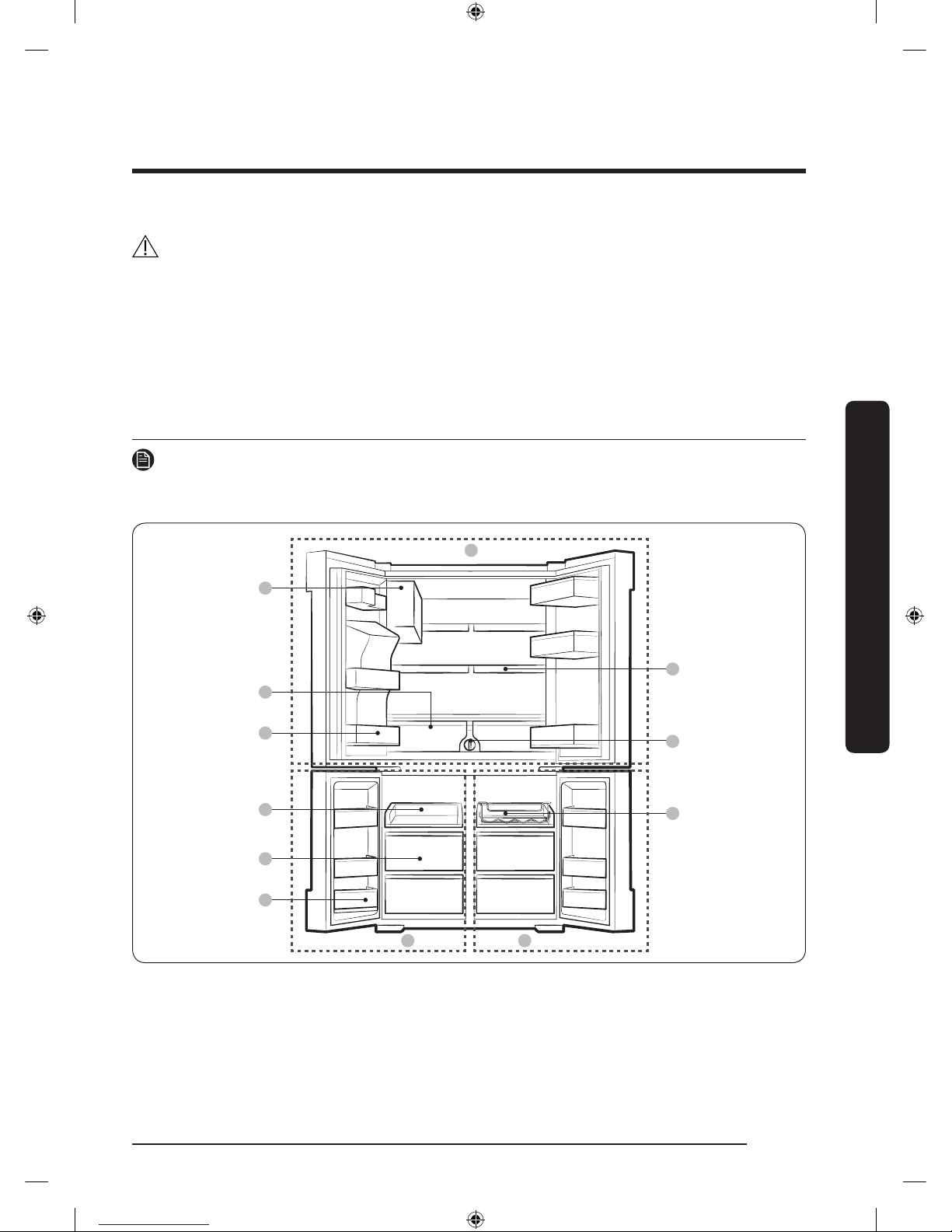
Español 15
Instalación
Siga estas instrucciones cuidadosamente para evitar accidentes y garantizar la instalación adecuada del
refrigerador.
ADVERTENCIA
• Utilice el refrigerador solamente para su uso previsto como se describe en este manual.
• Todas las reparaciones deben estar a cargo de un técnico calicado.
• Descarte el material de empaque del producto de acuerdo con la normativa local.
• A n de evitar descargas eléctricas, desenchufe el cable de alimentación antes de realizar trabajos de
mantenimiento.
Descripción breve de su refrigerador
NOTA
El refrigerador y los componentes provistos de su refrigerador pueden diferir de las ilustraciones en este
manual según el modelo y el país.
01
07
09
08
A
B C
02
03
04
05
06
Instalación
Untitled-3 15 2017-01-19 11:46:28
Page 96
Instalación
Español16
Instalación
01 Fábrica de hielo automática (Ice Master)
02 Cajones de verduras y frutas frescas EZ
03 Guarda multiusos del refrigerador
04 Estante corredizo accesible
05 Cajones de almacenamiento de carne y
alimentos secos
06 Compartimientos de la puerta del congelador
07 Estante espacio rápido
08 Filtro de agua
09 Estante para vinos
A. Refrigerador
B. Congelador
C. FlexZone
NOTA
• Para una mayor eciencia energética, asegúrese de que todos los estantes, cajones y canastos estén en
su posición original.
• Al cerrar la puerta, asegúrese de que la sección de la bisagra vertical se encuentre en la posición
correcta para impedir que se raye con la otra puerta.
• Si la sección de la bisagra vertical está invertida, colóquela en la posición correcta y cierre la puerta.
• Algunas veces puede aparecer humedad en esta sección de la bisagra vertical.
• Si cierra una puerta por la fuerza, la otra puerta puede abrirse.
• Cuando se abre la puerta, el disyuntor desactiva automáticamente el motor sinfín de la fábrica de hielo
por razones de seguridad.
• Si la lámpara LED interna o externa no funcionan, comuníquese con un centro de servicio Samsung.
Untitled-3 16 2017-01-19 11:46:28
Page 97
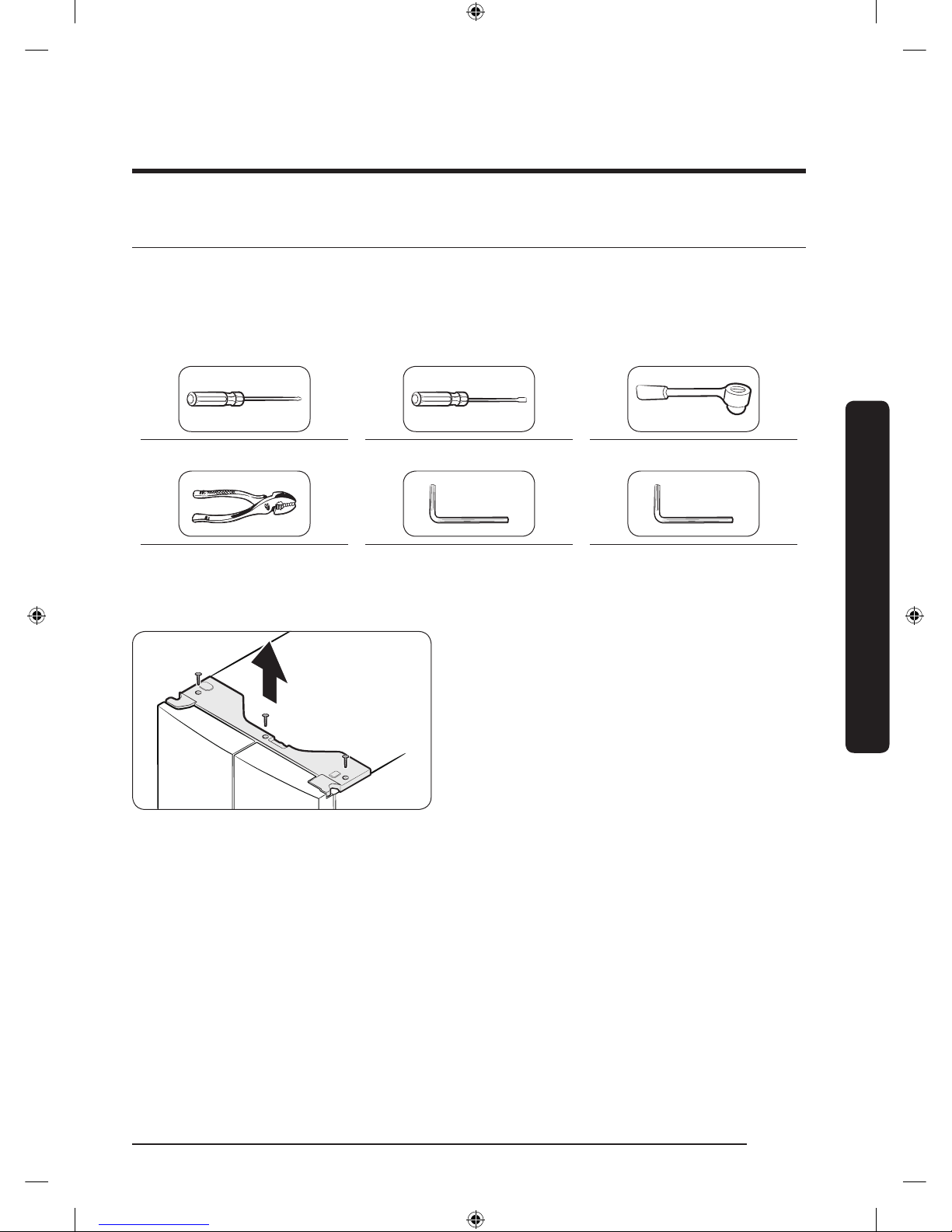
Español 17
Instalación
Extracción de la puerta para la entrada
Si el refrigerador no pasa por la entrada de su casa o de la cocina por una cuestión de tamaño, siga estas
instrucciones para extraer y colocar nuevamente las puertas del refrigerador. Si no necesita retirar las
puertas, vaya a la página 25 para obtener las instrucciones de instalación.
Herramientas necesarias (no provistas)
Destornillador de cabeza Phillips Destornillador plano Llave de tubo (10 mm)
Pinzas Llave Allen (4 mm) Llave Allen (5 mm)
Cómo retirar las puertas del refrigerador
1. Con la puerta cerrada, utilice un destornillador
de cabeza Phillips para extraer los tornillos
(x3) de la cubierta superior. Levante y retire la
cubierta superior con los conectores.
Untitled-3 17 2017-01-19 11:46:29
Page 98
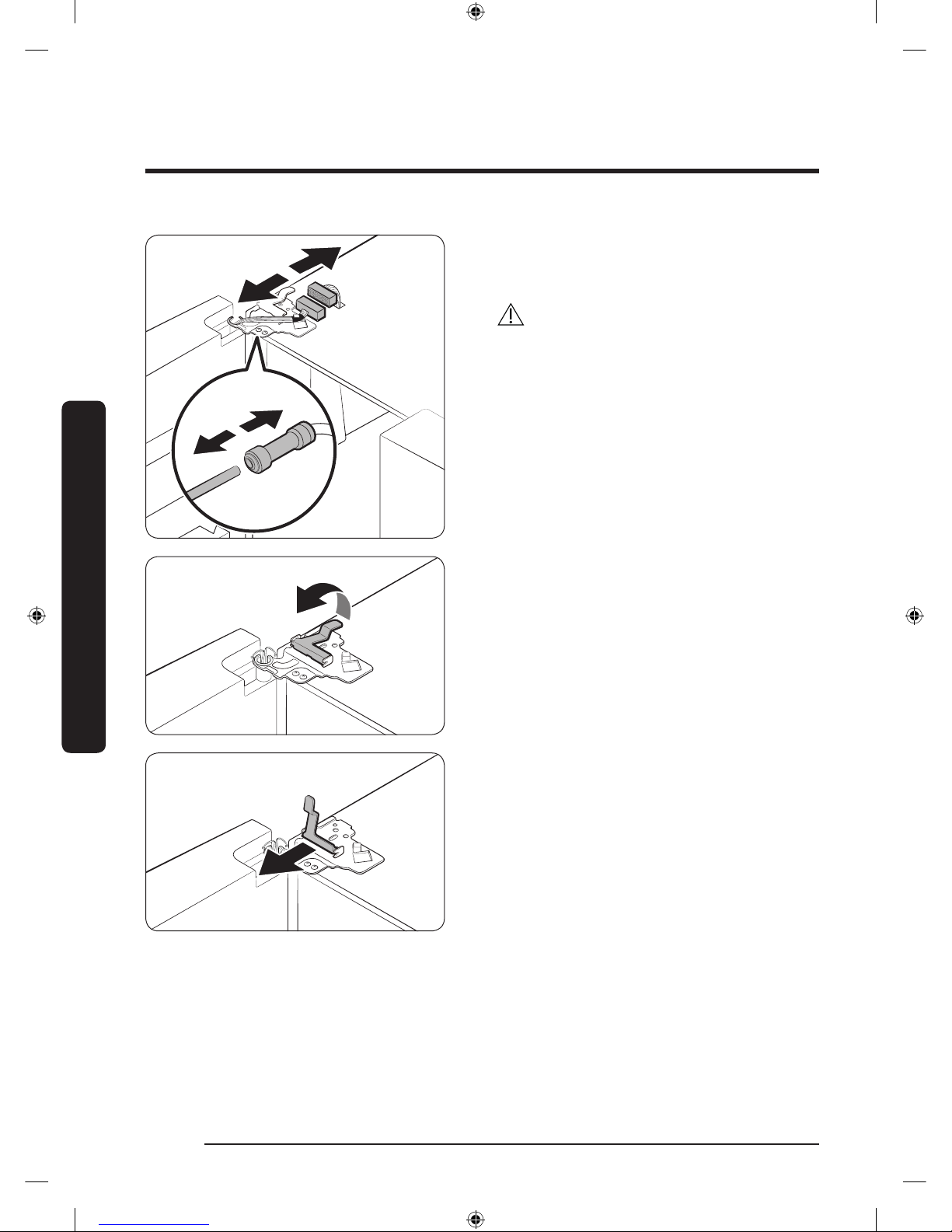
Instalación
Español18
Instalación
2. Desconecte los dos conectores de cables de la
puerta izquierda. La posición de los conectores
varía entre modelos.
PRECAUCIÓN
• No estriga ambas puertas simultáneamente.
Asegúrese de retirar una puerta por vez. De
lo contrario, podría caerse una o las dos y
provocar lesiones.
• Asegúrese de que el refrigerador esté apagado
antes de desconectar los conectores.
3. Desconecte la tubería de agua del acoplador de
la puerta izquierda como se ilustra.
4. Levante suavemente la abrazadera en varios
pasos. A n de evitar lesiones en los dedos,
no aplique fuerza repentinamente sobre la
abrazadera.
5. Tire hacia arriba de la abrazadera para
retirarla.
Untitled-3 18 2017-01-19 11:46:29
Page 99
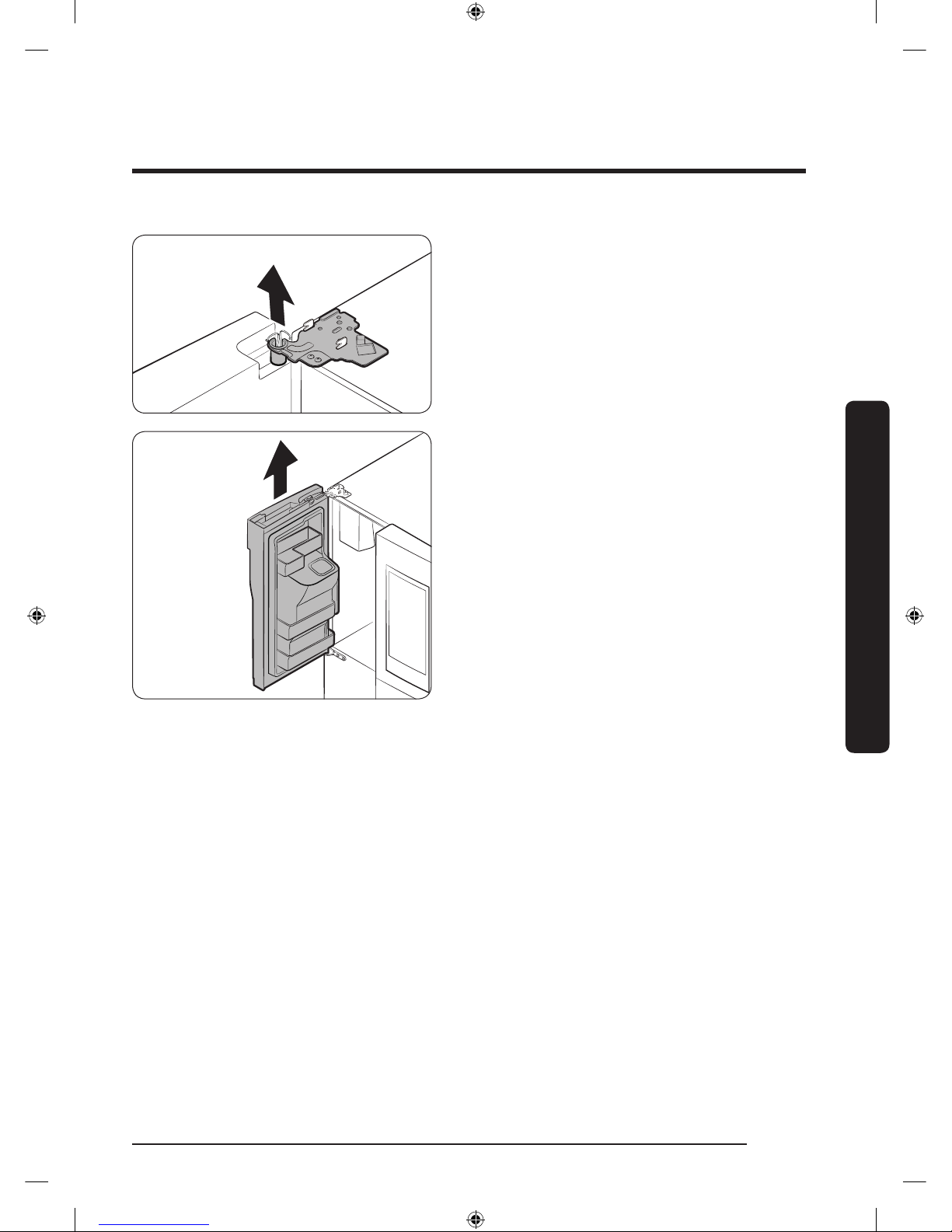
Español 19
Instalación
6. Abra la puerta a 90 grados. Mientras sostiene
la puerta, levante y retire la bisagra superior.
Tenga cuidado de no dañar los cables de los
conectores al retirar la bisagra.
7. Suavemente levante la puerta en sentido
vertical para retirarla. No use fuerza excesiva.
La puerta puede caerse y provocarle lesiones.
8. Coloque la puerta en una supercie plana.
9. Repita los pasos anteriores para la otra puerta
(excepto el paso 3). La puerta del lado derecho
no tiene tubo de agua.
Untitled-3 19 2017-01-19 11:46:29
Page 100
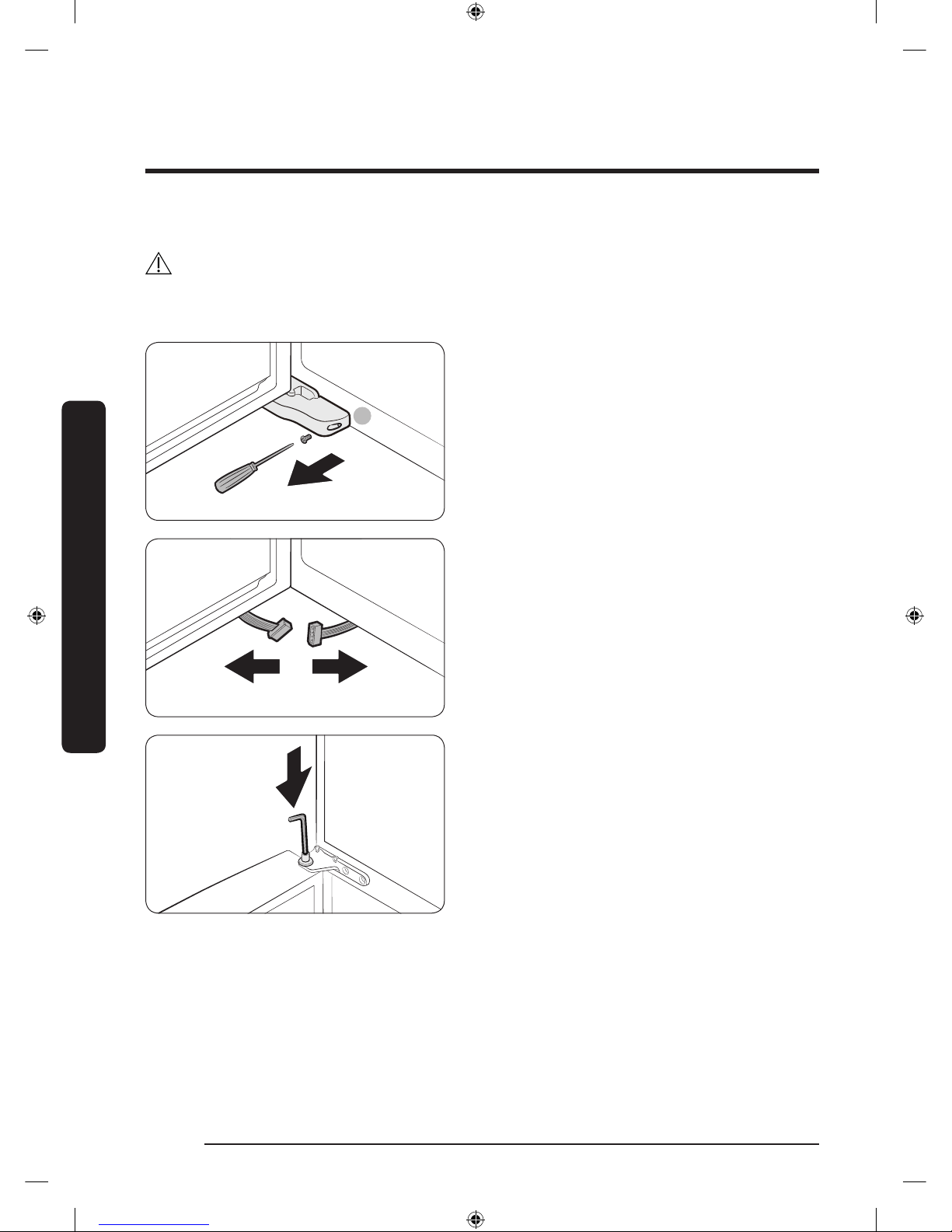
Instalación
Español20
Instalación
Cómo retirar las puertas del congelador
PRECAUCIÓN
• Asegúrese de retirar las puertas del refrigerador antes de retirar las puertas del congelador.
• Tenga cuidado al desconectar los conectores inferiores.
A
1. Con la puerta del congelador abierta, use un
destornillador de cabeza Phillips para retirar el
tornillo sosteniendo la cubierta (A) de la pata
ajustable.
2. Desconecte los conectores de cables.
3. Ubique el eje de la bisagra. Mientras
sostiene la puerta con una mano, utilice un
destornillador plano o llave para presionar
el eje hacia abajo. Asegúrese de sostener la
puerta para evitar que se caiga.
Untitled-3 20 2017-01-19 11:46:30
 Loading...