

Page 1
Page 2
Before
This
TV
comes
with this
Before
reading
this
Reading
user
manual
user
manual,
This
and
review
·
UserManual
e-Manual
User
an
embedd
the following:
ed e-Manual.
Manual
Read
this pr
ovided
about product
configuration,
For
more
embedded
•
To
open thee-Manual,
8
safety,
and
in
formation about this
in
the product.
>$Settings >
user
manual to
installatio
product
Support>
speci
see
information
n,
accessories
fications.
TV,
read
Open
,
in
itial
thee-Manual
e-Manual
~
-
Learning
~
A-Z
0
•
Some
menu s
Learning
@
Scan
this
QR
code
with your smart
can
also
vi
sit the site- http
download the
user
manual
thee-Manual's
Search
Index
Recently
Topics
the
Try
Viewed
creen
s cannot
functions
Now
be
a
device
//
:www.
sam
and
see
assistance
Select
an item from the
Select
a keyword to navigate to the relevant
Select
a topic from the list
cces
s
ed
from thee-
of
the
buttons
Access
the as
to visit
s
ung.com
its contents
functions
Manual.
that
sociated
Samsung's online
/
us
/
sup
port -
on
your
PC
or mobile
search
resu
lts to
of
r
ece
ntly
appear
menu
it
em
and
Cu
stomer
Ser
vice
Center. You
on
your
PC.
On
the website ,
device.
load
the corre
page.
vi
ewed topi
one-Manual
try out the featured irectly.
cs
.
sp
onding
topic
you
can
page.
pages
Link
English- 2
Ac
ce
ss
an
und
erlined topic refer
re
d to
on
an e-Manual pa
ge
immediately.
Page 3
Warning!
Please
read
the
Safety
Important
Instructions
before
using
Safety
your
TV.
Instructions
Class
II
product:
safety connection to electrical earth (ground)
not required.
This
symbol indicates that a
is
CAUTION:
NOT
SERVICEABLE
QUALIFIED
•
The
reliable operation of this apparatus
blocked
•
Do
in
authorized dealer immediate
•
This
dispo
•
Do
elect
•
Power-supply
or against them.
from the
•
To
unplug
to lightning
TO
REMOVE
PERSONNEL.
slots
and
REDUCE
This
present
of contact with
This
includ
operation
THE
RISK
COVER
(OR
BACK).
PARTS
INSIDE.
REFER
symbol indicates that
inside.
It
any
symbol
ind
icates that this product
ed
important literature concerning
and
maintenance.
openings
in
OF
ELECTRIC
THERE
ARE
ALL
SERVICING
high
is
dangerous
internal part of this product.
the cabinet
and
or
co
vered
.
-
Do
not
place
ventilation
-
Do
-
Do
not
a wet
not
place
not
place
expose
this apparatus to
basement,
this apparatus
is
provided.
this apparatus
vessels
or near a swimming
in
a confined
near
(vases
etc.) containing water
rain
or
ly.
apparatus
se
not
overload
ric
of
these
shock.
use
s batteries.
In
your community, there might
batteries properly.
wall outlets, extension
cords
should
be
placed
Pay
particular attention to
Please
appliance.
protect this apparatus from a lightning storm,
it
from the wall outlet
and
power line
and
surges.
disconnect the
SHOCK,
DO
NO
USER
TO
voltage
is
to
make
any
k
ind
---
has
and
in
the
back
or bottom
to protect
or over a radiator or heat
place
pool,
contact your
cords,
so
that they
it
space,
it
n
ea
r water
etc.).
If
or adaptors
are
cords
at the
or
antenna
from overheating, these slots
such
as
on
this
(near
this apparatus accidentally gets
lo
cal
beyond
not likely to
plug
when
left
or
AC
voltage:
symbol is
DC
voltage:
symbol
Caution
symbol instructs the
manual forfurthersafety related informat
are
provided
Rated
AC
vo
Rated
is
DC
voltage.
. Consult
for
necessary
ltage.
and
a
bookcase
register,
apparatus,
or built-in
or where
as
this
cabinet,
it
is
can
exposed
resul
a bathtub, washbowl, kitchen
wet,
be
environmental regulat
author
it
i
es
for
di
sposa
l
or
their
be
walked
end,
at wall outlets,
una
ttended
cab
le
system
capacity,
and
.
This
on
unused
s
in
ce this
or
pinched
and
will prevent
vo
ltage
marked
with this
voltage marked with th is
instruct
ion
s for
use:
T
his
user
to consult the
ventilation.
openings
unless
mu
proper
st n
To
ever
use
ens
io
r
n.
ure
be
to direct sunlight.
t
in
a fire or electric
sink,
or laundry tub,
unplug
io
ns
that
it
and
require
recycling informati
can
result
in
by
items
placed
contac
you
on
fire or
upon
shock.
t
to
.
at the point where they exit
forlong periods oftime,
damage
to the
se
t
due
an
English - 3
Page 4
• Before connecting the
adaptor corresponds to the local electrical
Never insert anything metallic into the
•
id electric
avo
To
•
AC
supply.
r
pa
open
never touch the inside of this apparatus.
shock,
of this apparatus. T
ts
adaptor outlet,
DC
to the
cord
power
apparatus.
seated.
firmly
is
it
until
cord
r
powe
the
in
plug
to
sure
Be
•
unplug
Never
plug.
the power
on
always
with wet
• If
itBe
•
pull
hands.
this apparatus
does
unplug it immediately
to pull the power pl
sure
extended period of time (especially
- Accumulated dust
generate sparks
to contact
sure
Be
•
high or low temperatures, high humidity, chemical su
dust,
heavy
with
airport, a train station,
an
in
as
such
day
only a properly grounded
Use
•
improper ground
An
turn off this apparatus completely, disconnect it from the wall outl
To
•
ry,
quickly if n
Store
•
Do
•
service
clean
To
•
not
These
Do
•
Do
•
Do
•
There
•
Replace
WARNING-
•
FLAMES
Use
•
ecessa
accessories
the
not drop or strike the product. If
center.
this apparatus, unplug the power
chemicals
any
use
chemicals
expose
not
dispose
not
can
this apparatus to dripping or splashing.
batteries
of
not short-circuit,
danger of
is
only with the
PR
TO
FROM
AWAY
touching the
when
care
cord's
not operate normally-
contact
and
out of the outlet if the
ug
an
cause
can
by
or
heat
and
authorized
an
Samsung
plug
cause
may
that the wall outlet
sure
make
(batteries,
such
damage
disassemble,
explosion if
an
me
sa
NTTHE
EVE
IS
TH
etc.)
x,
wa
as
appearance
the
a fire.
in
or overheat the batteries.
you
or equivalent type.
SPREAD
PRODUCT
after it
TV
particular, if there
in
zed
authori
an
children, elderly, or disabled people will
when
electric
causing
and
electric
shock,
the insulation to deteriorate.
ce
i
serv
Failure
etc.
wall outlet.
shock
a location safely out of the
in
the product is
from the wall outlet
cord
alcohol, thinners,
ne,
ze
ben
of the
replace the batteries
KEEP
,
RE
FI
OF
TIMES.
ALL
AT
on
been
has
When
pulling
by
it
dealer or
is
TV
electric
an
center for informati
do
to
or equipment
power plug are readily
and
damaged,
or
TV
CANDLES
some
for
touch.
Warning
•
State
-
California
of
WARNING
Proposition
product contains chemicals known to the
This
-
65
or other reproductive harm.
that the volt
sure
make
cause
may
his
Only a qualified technician should
unplugging the power
cord.
unusual
if
or
sounds
you
remain
to
the power
on
are
service
any
center.
unused
be
or
on
bstances,
serious
to
lead
damage.
et.
reach
intend to install your
you
if
or where it will operate
damage
Equ
l
(Class
you
ensure
To
essible
acc
of children.
so
leakage,
may
caus
by
a fire
disconnect the power
produ
air fresheners, lubricants, or detergents.
the product.
on
MS
E
IT
be
can
to
ia
orn
lif
erase
used
time.
wipe the
and
cide,
cti
inse
the printing
the remote with the wrong type of battery.
in
OTHER
AND
parts
Some
Ca
of
te
Sta
designation of the
age
nger of electric
da
a
open
from a wall outlet,
cord
not touch the power
Do
or smells coming from
the
leave
to
are
the
in
one
left al
the power
ng
i
TV.
to your
ipment only.)
unplug this apparatus
can
.
contact a
and
cord
ct with a soft, dry cloth.
OPEN
TH
WI
to the
warm
nd
a
cancer
cause
DC
shock
this
rd
co
se for
hou
house).
to
cord
loc
a
in
TV
ours
h
24
sung
Sam
birth defects
.
an
ation
a
Do
English- 4
Page 5
Internet
security
Samsung
hacking.
addition, the
Although
transmission
your
•
•
• If
•
takes a number of
example,
For
operating system
TV's
steps
take
we
completely
is
Internet
When
updates.
Support>
screen.
wireless router
following
-
-
-
- Confirm your router's firewall setting
-
-
Use
camera
session,
Do
those authorized
connection,
Samsung
Accept
Secure
to security related settings.
Implement
network
Secure
Make
your router or modem
If
when
strong
into the
unexpected
any
do
not visit
releases
automatically
To
Software
the software download
and
measures:
your wireless router's management settings with a unique
standard encryption
signal.
access
that all your Internet-
sure
not
is
it
passwords
TV's
accept.
NOT
suspicious
steps
certain sensitive communications between the
to protect your Smart
secure.
minimize the risk of unauthorized
and
software updates to improve the security of your
receive
Update>
network.
to your wireless network with a hard-to-guess
use
in
bezel
messages
apps
Auto
Your
has
.
for all your
when
appear
sites
web
provided
against unauthorized incursions
to protect its Internet-compatible Smart
adopted controls to preventthe installation of unauthorized applications.
has
personal information,
and
TV
to take additional steps to
you
Auto
on
turn
update
an
selecting
by
so
(if
ed
l
devices
are
button, use
(Netflix,
requesting
een
r
suspiciou
any
Samsung
access
Update
available, a
is
YES
on
equipped).
i
beh
to disconnect your
it
Facebook,
camera
the
updates,
.
and
WPA
g.,
.
(e
is
accounts
in
your
not install
do
encourage
When
update
2 encryption)
enab
mode
Recessing
use.
sc
TV
through
therefore
We
these
Update)
router's manual should provide additional details about
connected
a standby
Internet
not
is
it
on
and
Samsung
by
TVs
Internet
the
and
TV
Internet-connected
no
are
steps
These
.
shou
you
TV,
menu
TV's
in the
message
popup
prompted.
when
password
reless
your wi
password.
your network's firewall.
nd
etc.).
makes
mission
r
pe
ams
r
prog
s
Hub.
Smart
to prevent unauthorized
router to
home
your
If
inoperative.
it
to link a
commend
re
We
.
servers
listed below:
Take
TV
are
device
safeguard
ld promptly install these
(0
secure
ne
has
device
your
>®Settings>
appears
to
steps
to implement the
how
your wireless
twork from the
camera,
a
enable
or
that
and
encrypted.ln
or
secu
TV,
TV
the
on
your
secure
changes
ternet
In
the
recess
emo
a r
install only
users
re
te
Figures
appearance
and
illustrations
. Product
design
in
User
this
specifications
and
Manual
are
may
provided
change
for reference only
without
notice.
and
differ from the actual product
may
English- 5
Page 6
Contents
Before
Reading
Warning! Important Safety Instructions
This
User
Manual
2
3
01
02
03
04
TV
Installation
One
Invisible
Mounting the
Providing proper ventilation foryourTV
Safety Precaution:
falling
Detaching the
The
Samsung
About the Buttons
Pairing
Installing batteries into the
Initial
Using
the
Troubleshooting
Troubleshooting
What
is
Eco
Sensor
Caring
Connection
TV
on
a wall
Securing
Clean
back
Smart
on
the
TV
to the
Samsung
Setup
TV
Control
Remote Support?
and
for the
Stick
screen
TV
Guide
the
TV
to the wall to prevent
stand coverfrom the
Remote
the
Sam
s
ung
Smart Remote
Smart
Samsung
and
Maintenance
brightne
ss
TV
Remote
Smart Remote
7
8
9
9
10
11
12
12
13
14
15
16
16
05
FCC
English- 6
Specifications
Specifications
Environmental
Decreasing
Dimensions
Li
ce
and
Warranty
Federal
St
atement
LIMITED
n
power consumption
ses
Communication
WARRANTY
and
Cons
iderations
Information
TO
Other
Commission
ORIGINAL
PURCHASER
Information
17
17
18
19
19
Interference
20
21
Page 7
01
One
Invisible
TV
To
connect
1.
After the
Connection
WARNING:
properly, there
2.
Connect
in
Step 5 above
WARNING:
Always
back
the
-
See
~-
TV
Installation
Connection
the
One
Invisible
TV
is
completely set
to the
Make
is
the
One
.
Follow
disconnect the power
of the
TV
the illustrated
When
connecting the
One
Invisible
cause
damage
•
When
connecting the
that they
When
•
•
•
•
connecting the
Connection.
When
arranging the remaining
Take
care
power circuit.
Handle
Connection
TV,
and
sure
that both connectors
a danger of
Connect
the directions
or from the
Quick
Connection
to the
are
connected
Failure
not to subject the
You
the
One
Guide
D
to the
One
Connect
up
and
placed
in
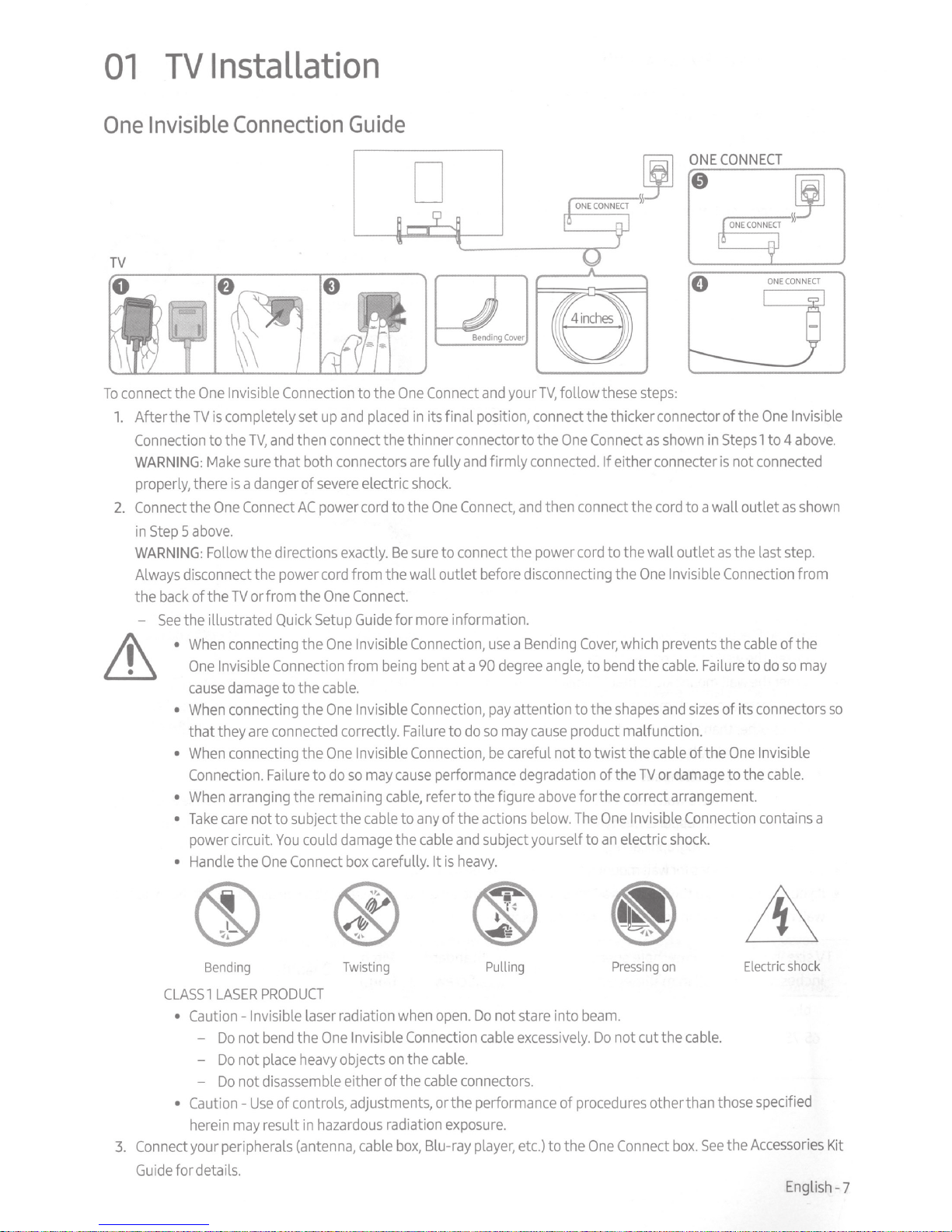
its final position, connect the thicker connector of the
then connect the thinner connector
are
fully
severe
AC
power
cord
One
Setup
One
cable.
One
One
to
do
could
Connect
electric
cord
exactly.
from the wall outlet
Connect.
Guide
Invisible
from
Invisible
correctly.
Invisible
so
cable
damage
box
shock.
to the
Be
sure
for
more
Connection,
being
bent at a
Connection,
Failure
Connection,
may
cause
cable,
to
any
the
cable
carefully. It
One
refer to the figure
and
and
firmly
Connect,
to
connect
before
information.
use a Bending
90
pay
to
do
so
be
performance degradation of the
of the actions
and
subject yourself to
is
heavy.
your
TV,
follow these
to
the
One
Connect
connected.
and
then
the power
disconnecting the
degree
angle,
attention to the
may
cause
careful not to twist the
above
below.
If either connecter
connect
cord
to the wall outlet
Cover,
which
to
bend
shapes
product malfunction.
for the correct arrangement.
The
One
an
electric
steps:
as
shown
the
cord
One
Invisible
prevents
the
cable.
and
cable
TV
or
Invisible
shock.
ONE
CONNECT
in
Steps
is
not
to a wall outlet
as
the last
Connection
the
cable
Failure
sizes
of its connectors
of the
One
damage
to the
Connection
One
Invisible
1 to 4
connected
as
step.
of the
to
do
so
Invisible
cable.
contains a
above.
shown
from
may
so
M\
\£:1
Bending
CLASS 1 LASER
• Caution- Invisible
-
-
-
• Cautionherein
3.
Connect
Guide
your peripherals
for details.
Do
Do
Do
not
not
not
may
PRODUCT
laser
bend
the
place
heavy
disassemble
Use
of controls, adjustments, or the performance of
result
in
hazardous
(antenna,
Twisting Pulling
radiation
One
Invisible
objects
either of the
cable
when
Connection
on
the
cable.
cable
radiation
box,
Blu-ray
open.
connectors.
exposure.
Do
not stare into
cable
excessively.
player,
etc.)
procedures
to the
Pressing
beam.
Do
One
on
not cut the
other than those
Connect
box.
cable.
See
Electric
specified
the
Accessories
shock
English
Kit
-7
Page 8
Mounting
the
TV
on
a
wall
~
Lll
For
models
kit.
•
Refer
If
you
mount this
correctly mounted, the
to the
TV.
providing wall mount
to the installation manual
TV
on
a
TV
adapters
wall,
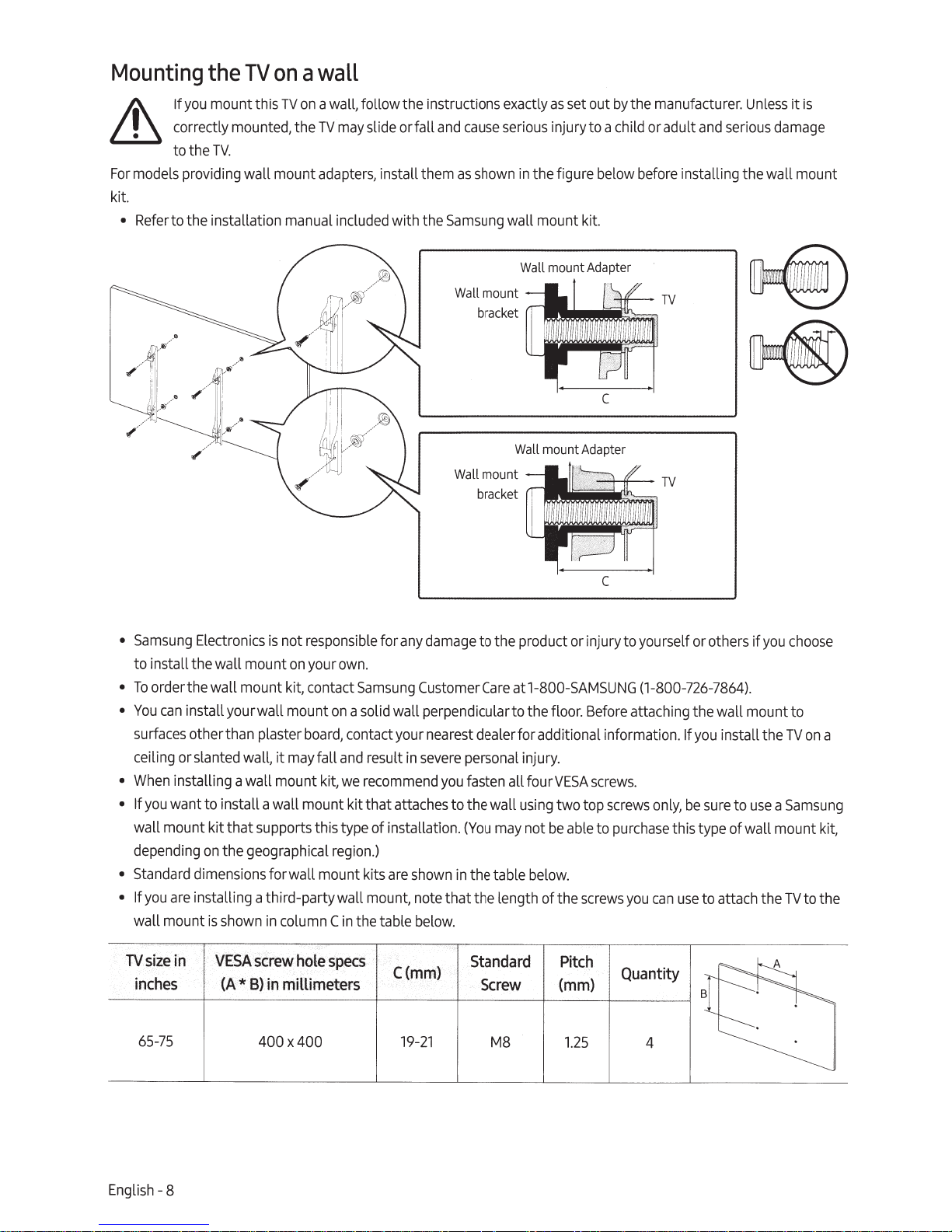
follow the instructions exactly
may
slide or fall
, install
included
them
with the
and
cause
as
shown
Samsung
Wall
bra
Wall
bracket
serious
in
the fi
wall mount kit.
Wall
mount
c
ket
1
Wall
mount
as
set
out
by
the
manufacturer.
injury to a child or adult
gure
below
before
mount
Adapter
TV
c
mo
u
nt
Adapter
Unless
and
serious
installing the wall
damage
it
mou
is
nt
•
Samsung
to install the wall mount
•
To
•
You
surfaces
ceiling or
•
When
• If
you
wall mount kit that supports this type of installation.
depending
•
Standard
• If
you
wall mount is s
TV
size
inches
Electronics
order the wall mount kit, contact
can
install your wall mount
other than plaster
slanted
installing a wall mount kit,
want to install a wall mount kit that
on
dimensions
are
installing a third-party wall
in
VESA
(A*
is
not
responsible
on
your
board,
wall,
it
may
fall
the geographical
for wall mount kits
hown
in
column
screw
hole
B)
in
millimeters
own
on
contact your
and
we
region.)
C
in
specs
for
any
.
Samsung
a solid wall perpendicularto the
result
recommend
mount,
the table
Customer
in
attaches
are
shown
note that the length of t
below
C(mm)
damage
nearest
severe
you
to the wall
in
.
c
to the product
Care
at1-800-
dealer for additional information.
personal
fasten all
(You
the table below.
injury.
using
may
Standard
Screw
or
SAMSUNG
floor.
fourVESA
two top scr
not
be
able
he
Pitch
(mm)
injury to yourself
(1-800
Before
attaching the wall mount to
screws.
ew
s
to
purchase
screws
you
Quantity
or
others if
-726-7
864).
If
you
install the
only
, be s
ure
this type of wall
ca
n
use
to attach the
to
you
use
ch
TV
a
Sa
moun
TV
o
ose
on a
ms
t kit,
to t
ung
he
65
-
75
English-8
400 x400
19
-21
M8
1.2
5 4
Page 9
not install your wall mount kit while your
Jl\
Do
~shock.
screws
use
not
Do
•
specifications.
wall mounts that
For
•
differ depending
fasten
not
Do
•
Samsung
injury.
sung
Sam
•
when
or
not mount the
Do
•
Always
•
Screws
the
is
not liable for product
is
the consumerfails to follow the product installation instructions.
two
have
longer than the
are
that
may
long
too
are
that
not comply with the
do
the wall mount specifications.
on
may
these
damage
than a
This
kinds of
or personal injury
degree
15
onto a
TV
screws
people
too firmly.
not liable for
re
mo
at
TV
mount the
result
may
This
on.
turned
is
TV
not comply with the
to the
when
do
inside
cause
non-VESA
a
TV
of the
the productto
or non-specified wall mount is
rd dimension or
standa
damage
cause
standard screw specifications, the length of the
VESA
damage
accidents.
tilt.
wa
the product or
ll.
personal injury from electric
in
screw
screws
set.
standard
VESA
leading to personal
fall,
may
us
ed
Providing
install your
you
When
ects
with other
result
When
Electronics
injury
Safety
obj
a fire or a problem with the product
in
install your
you
only.
caused
by
Precaution:
WARNING
personal injury or death. Ma
such
Us
•
Onl
•
En
•
Not placing the televi
•
both the furniture a
Not
•
se
Educating
•
you
If
apply the
properventilation
Connect,
One
and
TV
c.)
et
(walls, cabinet
with a
TV
parts provided
Using
the product falling.
sides,
stand
a wall mount,
or
another manufacturer
by
Securing
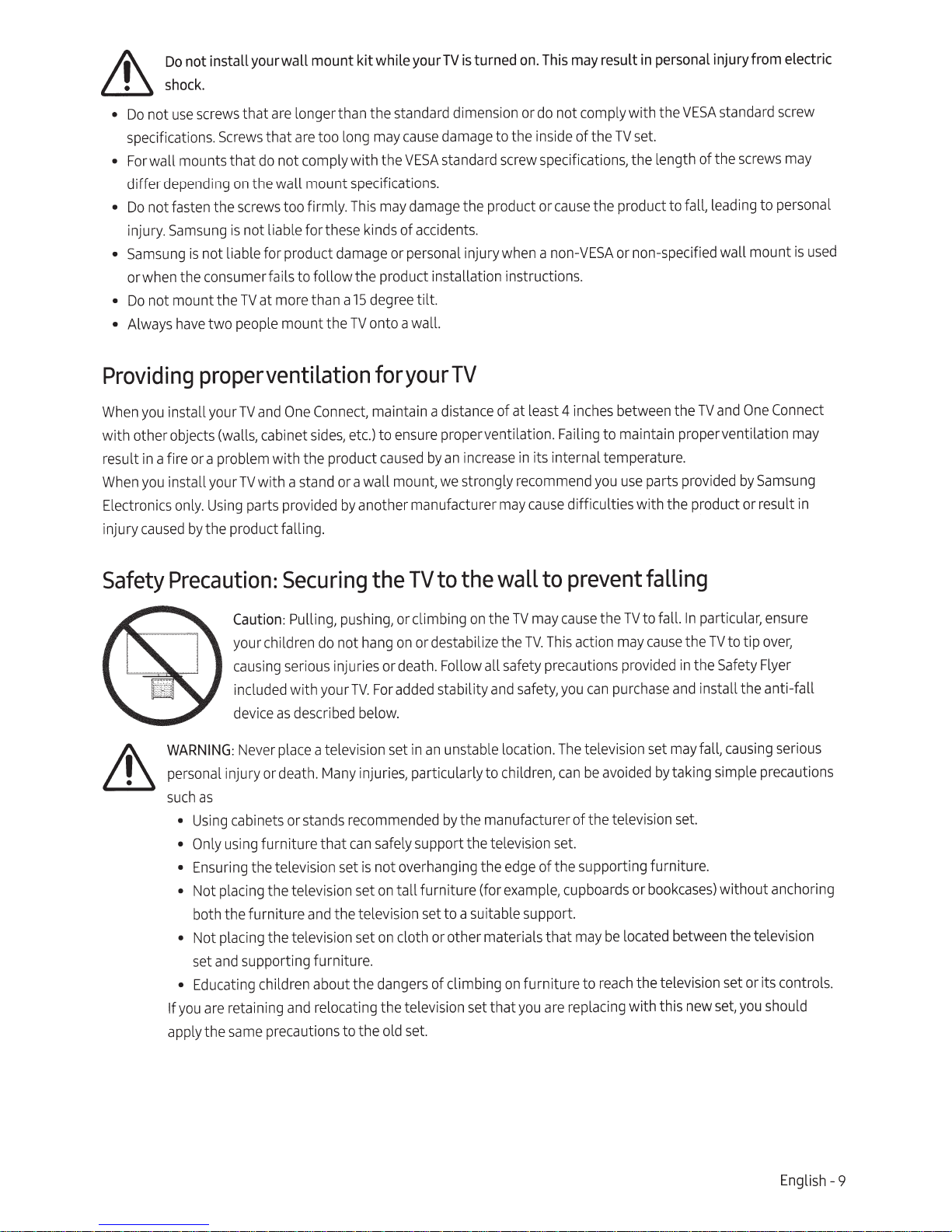
Caution:
your
cau
included with your
device
Never
:
as
ca
ing
using
y
suring t
ci
a
pl
supporting furniture.
and
t
retaining
are
same
Pulling, pushing, or climbing
hang
not
do
en
ldr
chi
injuries or death. Follow a
ious
ser
ing
s
TV.
described
as
place
ets or st
bin
furniture that
televis
he
the television
ng
children
and
ecaut
pr
below.
a television
injuries, particularly to child
ny
comm
re
ands
can
t is not o
se
ion
set
sion
the televis
nd
se
ut the
abo
ing
cat
lo
re
s to the old
ion
foryourTV
maintain a distance of at least 4
proper ventilation. Failing to maintain proper ventilation
ensure
to
its internal temperature.
increase
an
caused
the
For
safely support the televisi
on
on
t
dang
the tel
by
strongly
we
the
to
TV
on
on or destabilize the
stability
ed
add
unstable location. T
an
in
set
the manufacturer of the tele
by
nded
e
nging
verha
tall furniture (for
t to a suit
se
ion
cloth or other mat
of climbing
rs
e
set that
ision
ev
set.
in
recommend
cause
may
to
wall
may
TV
the
This act
TV.
safety precautions
ll
safety, y
and
ren,
se
on
of the supporting furniture.
edge
the
example,
uppo
le s
ab
ials that
er
furniture to
on
are
you
between
inches
use
you
difficulties with the product or result
prevent
the TV to fal
cause
may
n
io
provided
purchase
can
ou
televisi
he
avoided
be
n
ca
t.
ards
upbo
c
rt.
lo
be
may
h the tel
reac
lacing with this
ep
r
the
parts provided
falling
particular,
In
l.
he
t
cause
he
t
in
in
d
an
fall,
may
set
on
ng
taki
by
set.
vision
cases
book
or
between the televisi
ated
c
ision
ev
ne
Sams
by
ensure
over,
to tip
TV
Flyer
Safety
the anti-fall
ll
sta
causing
simple precautio
) without
it
set or
should
you
set,
w
One
and
TV
may
g
un
in
serious
ri
on
t
ns
ng
Connec
ancho
s controls.
English - 9
Page 10
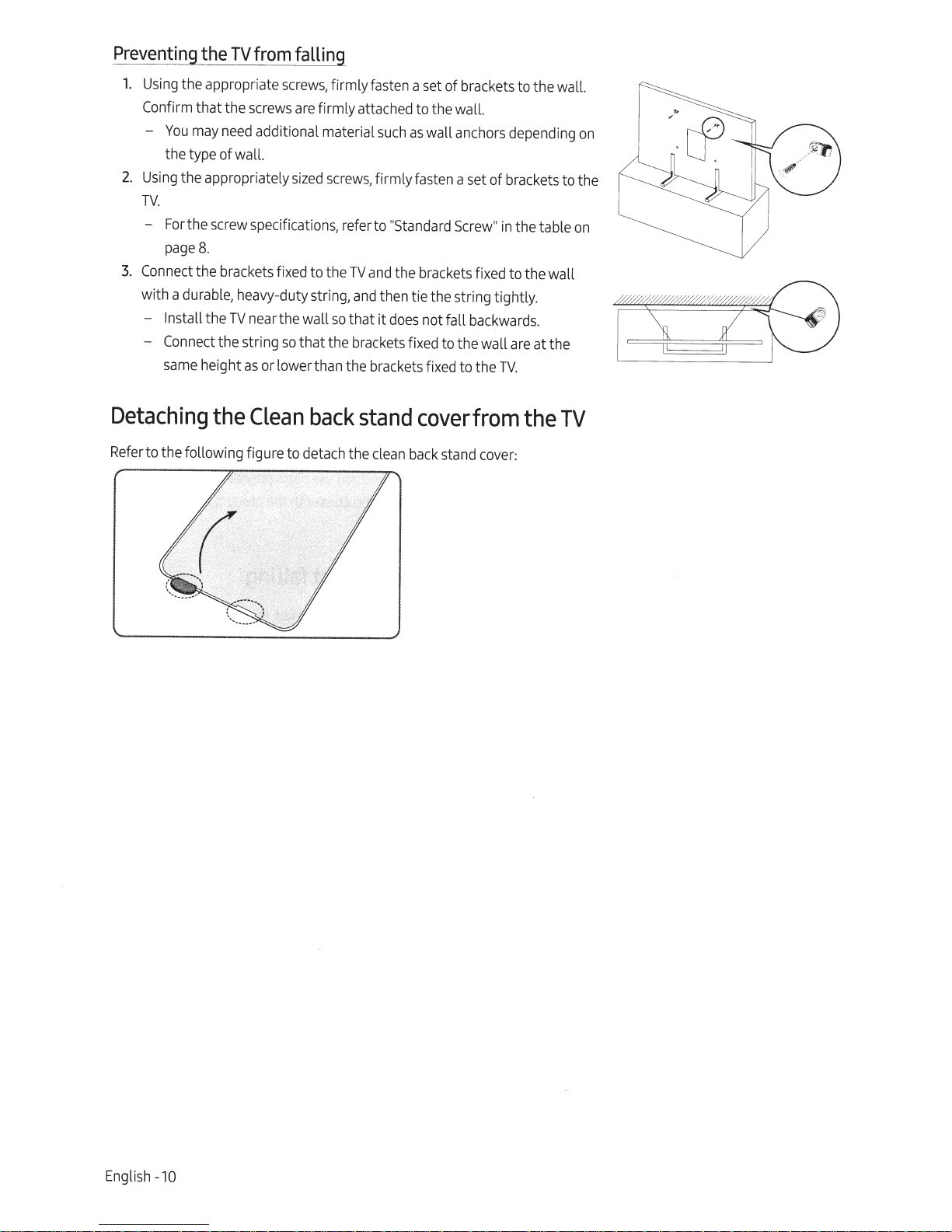
Preventing
1.
Using
the appropriate
Confirm
-
2.
Using
TV.
-
3.
Connect
with a
- Install the
-
that the
You
may
the type of wall.
the appropriately
For
the
page
the brackets fixed to the
durable,
Connect
same
the
TVf~om
screws
need
additional material
screw
specificati
8.
heavy-duty string,
TV
near
the string
height
as
or lower than the brackets fixed to the
falling
screws,
the wall
so
firmly fasten a set of brackets to the wall.
are
firmly attached to the wall.
such
sized
screws,
ons,
that the
firmly fasten a set of brackets to the
refer to
so
"Standard
TV
and
the brackets fixed to the wall
and
then tie the string tightly.
that
it
does
brackets
as
wall
anchors
Screw"
not fall
backwards.
fixed to the wall
TV.
depending
in
the table
are
at the
on
on
Detaching
Refer
to the following figure to
the
Clean
detach
back
the
stand
clean
cover
back
stand
from
cover:
the
TV
Engli
sh -
10
Page 11

02
The
Samsung
Smart
Remote
About
•
G)(Power)
Press
8
Each
colored
virtual numeric
alternately.
o
Select
S
el
e
When
watching content, detailed program
information
the
The
images,
to turn the
(Color
I
Number button)
time
you
press
buttons window
Use
these
colored
access
additional options
to the feature
When
pressed,
appears
screen.
then select
numeric
cha
code,
nn
cts
or
pressed
on
the bottom of the
Select
Done
value.
el, enter a
etc.
runs
a
while
appears
Buttons
buttons,
TV
on
or off.
this button, the
and
pad
are
displayed
buttons to
you
are
us
a number strip
numbers
to enter a
U
se
to
change
PIN,
enter a
focus
ed item.
you
are
.
on
and
functions of the
the
specific
ing
.
and
the
Z
IP
the
Samsung
Samsung
·-·
Smart
Smart
·---
'
:
' '
'
'
'
'
' '
--·
.
Remote
'
:
'
'
'
'
Remote
may
differ
depending
1\V..
·cc=------------------
VOL
CC!VD
s
CH
-1
;
:
'
on
the
ft(Bixby)
Runs
Bixby.
button,
say
a
release
the button to
When
you
press
Enter
My
Bixby
bottom of t
&
o
e
In
TV
ente
button
turned off, the
Ambient
o
Directional
Mov
va
lue
he
Kee
p the
0.6
inches
using
and
through the
For
more
Bixby
, refer to Smart
Using
Bixby
(Ambient
mode,
r Ambient
when
Mode
For
mo
re
Ambient
Features
Mode
in
pad
es
t
he
focus a
s
se
en
model.
Press
and
hold
the
command,
menu
screen.
remote
from yourface
speaking
information about the
Mode)
press
Mode.
the
TV
.
in
fo
Mode,
>
Using
thee-Manual.
(up/down/left/right)
on
the
and
then
run
Bixby.
the button, the
appears
more
th
to
Bi
xby
mic
on
the
re
Features>
in
thee-Manual.
this button to
If
you
press
TV
is
completely
turns
on
in
rmation
ab
out the
refer to Smart
the Ambient
nd
cha
ng
es
TV'
s
menu
.
at the
an
when
mot
the
e.
the
-(Return)
Returns
to the
previous
When
pre
s
sed
forl s
the running function is te
When
pressed
while
watching a
channel
0
Wh
appear.
ca
n
is playing.
e
Returns
program,
appears.
(Play/pause)
en pr
esse
Using
co
ntrol th e
(Smart
Hub)
to the Ho
d, the
these
playba
media
me
menu.
econd
or
more
rmina
you
are
t
he
previous
ck
co
control
s,
you
content that
Sc
r
ee
n.
,
ted.
ntrols
SftMSUNG
VOL
(Volume)
Move
the button
adjus
t the
so
und
,
press
pressed
fo
Accessibility Shortcuts m
appears
.
CH
(Channel)
Move
the button
c
hang
e the
Guide
scree
vo
lume.
the button.
rl
second
up
chann
n,
pr
ess
up
or
down
To
mute t
or
or
dow
e
l.
To
the button.
to
he
Wh
en
mor
e,
en
u
n to
see
t
he
English
the
-11
Page 12

Pairing
the
TV
to
the
Samsung
Smart
When
you
turn
on
the TVforthe first time, the
to the
TV
automatically.
automatically, point
and
hold
the buttons labeled
simultaneouslyfor3
Remote
If
the
Samsung
it
at the
remo
e
seconds
or
te control
and
0
more.
Smart
sensor
as
Samsung
Remote
of t
shown
in
Smart
Remote
does
not pair to the
he
TV,
and
the figure
then
on
pairs
TV
press
the left
Installing
1.
Press
cover
2.
Turn
3.
If
there
remove
4.
Insert two
( +,-)are oriented correctly.
5.
Turn
into
•
Alkaline batteries
batteries
the.&
button at the top
.
the remote
are
batteries
the existing batteries.
new
batteries
the remote
place.
over,
into
over,
and
in
the
(l.SV
press
are
recommended
the
Samsung
rear
of the
Samsung
then slide the body of the remote upwards until the battery compartment
remote,
When
and
press
the
I!>
AAA
type) into the battery compartment making
done,
slide the
hold
the.&
bu
for longer battery life.
Smart
Smart
and
~buttons
body
of
tt
on
on
the top
Remote
Remote.
the remote until it
on
rear,
The
body
both
sides
and
then slide the
will
pop
out slightly from the
of the battery compartment to
sure
that the batteries' polarit
is
nearly
in
its original position.
body
of the remote down
body
is
revealed.
ies
En
glish -
12
Page 13

03
When
the
•
•
•
•
Initial
you
turn
screen
and
Noise
may
The
SmartThings
To
perform initialization
When
the pop-up for setup
with the
on
your
configure the
occur
temporarily
app
process
after manually
Setup
TV
for the first time,
TV
's
basic
when
is
available
by
using
does
it
immediately starts the
Initial
settings to suit your viewing environment.
the
TV
communicates with mobile
on
mobile
the SmartThings
not
appear
adding
devices
automatically
the
TV
using
for
Android
app,
the mobile
Add
on
the
Device
6.0
Sma
on
or
device
the
Setup.
Follow the instructions
devices.
higher
and
must
rtThings
dashboard
iOS
have
app
10
been
of
your
of the
or higher.
connected
mobile
device,
SmartThings
displayed
via
Wi-Fi.
proceed
app.
on
Using
You
your
Stick
the
can
use
TV
. While watching
or adjust the
to display the
To
run
an
item
press
the@ button
•
The
screen
remove
TV
Control
the
Control Stick
volume
Control
on
the
menu
menu,
on
may
dim
on
TV,
you
by
pressing
.
press
the
Control
if
the protective film
the protective film.
Stick
the bottom of the
can
change
t
he
Stick.
the channel
the left
and
directional buttons
on
TV
i
nstead
of the remote control to control most of the functi
by
pressing
the
right directional buttons.
on
the
Control Stick to
the
SA
M
SUNG
logo
or the bottom of the
Control menu
@
@ :
@ :Return
up
:S
Se
and
Press
mart
tt
in
down
move
Hub
gs
directional buttons
the@ button
the
focus
TV
is
not
@ :Sour
@ : PowerO
on
on
the
Control Stick
to the item,
detached
ce
ff
ons
the
Control
and
.
Please
of
then
Control Stick
•
Pr
focus
•
Pr
•
Up
•
L
eft
The Control Stick is loc
I
Remote control sensor
e
ss
@
button: Di
ed
item on
th
ess
and hold@ button: The running function is terminated.
/Dow
n button:
/
Rig
ht
bu
tt
o
n:
sp
e me
Chang
Cha
at
ed on
lay
nu.
es
nges
th
e
the ch
the
th
e
Control
an
n
vo
lume.
bott
om
menu.
el.
of
I
Select
or
run a
th
e
TV.
English
-1
3
Page 14

04
Troubleshooting
Troubleshooting
a problem, first
have
to
seems
TV
the
If
Troubleshooting
Samsung
call
For
•
This
•
however , a
product.
To
•
functions
Customer
detailed information
LED
TFT
your
keep
on
Section
panel
few
TV
the
in
Service
made
is
bright or dark
optimum condition, upgrade to the latest software.
in
menu
TV's
review
thee-Manual.
at1-800-
troubleshooting,
on
sub
of
up
pixels
>®Settings>
(e
this list of
none
If
SAMSUNG
which require sophisticated technology to
pixels
screen.
the
on
and
he
of t
(1-800-726-7864)
watch
Support> Software
Maintenance
possible
troubleshooting t
the troubleshooti
els
x
pi
These
problems
ips
.
ng
have
will
Update>
solutions. Alternatively,
and
visit www.
apply,
at www.
videos
produce.
the performance of t
on
impact
no
the Update
Use
Update
Now
Now
review
/support
com
There
or Auto
.
may
Update
Update).
samsung
samsung.com/spsn
or Auto
the
.
be
he
or
,
won't turn
TV
The
sure
Make
•
sure
Make
•
.
red
pressing
Try
•
refer to
on,
turns
picture/video/sound, or a distorted picture/video/sound from
no
There
"Weak
is
No
or
sure
Make
•
Remove
•
Confirm that the correct input
•
• Perform
Support> Self
• If
plugging
• If
conn
and
TV
a
the test results
it
not us
are
you
ctor,
e
on.
the
AC
Power
"Remote
that the
that the wall outlet
Signal"
the connection to the
reconnect all
self diagnosis to determine
Diagnosis
are
If
again.
in
a
ing
Program
Auto
run
ecurely
is s
cord
power
working
is
TV
the
on
button
cables
source
or
box
to se
does
on
device
connected
has
persists
satellite
ch for
ar
control
displayed
is
> Start Picture
normal, reboot the
issue
the
ble
ca
to the
plugged
the
and
make
to
work"
not
TV,
the
correct
is
to the
been
ifthe
or Start
Test
connected
, refer to the connection
x,
bo
channels
in
power
that the problem
sure
.
below
you
or
that all
and
and
TV
ected
l
se
problem
Sound
devices
your
nd
a
(e
indicator at
cannot find a
the external
(e
aused
c
is
Test).
by
is
TV
>®Settings>
the wall outlet.
and
TV
the
are
cables
Source)
>
he
t
by
unplugging
in the user
guide
receiving
bottom of the
not with the remote control.
is
TV
external
an
and
lit
is
channel.
fully inserted.
es
cabl
new
Try
.
devices
.
>®Settings>
(e
e
ic
dev
or the
TV
's power
device
each
l of the
manua
ante
signals from
TV
Broadcasting
an
> Auto
Program)
glowing a solid
the
If
device,
sible.
pos
if
then
and
cord
connected
cable
or a
nna
.
TV
dev
or
ic
wall
e.
not work.
remote control
The
power indicator at the bottom of the
he
if t
Check
•
the remote c
ce
pla
re
not,
tha
ure
s
Make
•
pointing
ry
T
•
your
• If
cable
The
gram
ro
• P
nu
ma
English -
th
am
c
TV
box
the
al for the
14
does
rol's
t
on
are
ries
e
t the ba
e with a
or satellite
ca
tt
e remote directly at the
Samsung
box
or satellite
ox
ble b
cod
G TV
UN
MS
SA
press
you
when
blinks
TV
es.
ri
batte
th e corr
in
/- )
(+
ed with their pol
ll
sta
in
TV
Remot
Smart
from 5 ft. to 6ft.
(Blu
e
es
etooth
1.8
5-
(1.
Remote),
m)
awa
make
remote control doesn't turn the
th e TV.
ate
er
x remote
bo
e.
ntrol to
co
op
tion.
ca
Pow
ble
the remote's
ec
t dir
ec
y.
to pairthe remote to the
sure
or off or adjust the volume.
on
TV
r to the
efe
R
button.
er
or satellite
box
If it
does
TV.
bo
x u
se
r
Page 15

The
TV
•
The
Settings>
settings
TV
is
are
in
the
Retail
General>
lntermittentWi-Fi
•
Make
sure
the
TV
•
Make
sure
the
Wi-Fi
Check
the
•
•
Reduce
the
fireplaces,
distance
interference
TV
and
the Modem/Router.
etc.)
Single story Multi story
lost
aft~I2_11Jl!l.!:Jte
Mode.
Change
System
has
password
between the
Manager>
a network connection (8 >®Settings>
is
entered correctly.
TV
by
not
using
orturning off wireless
(The
the
and
Wi-Fi
_
~:
Usage
Mode
Usage
Mode>
the
Modem/Router.
strength
in
Home
can
~
8
the
System
Mode).
General>
The
distance should not
devices.
be
Also,
decreased
c~~~
Manager
verify that there
by
Menu
to
Network> Network
exceed
appliances,
0
cordless
Wireless
l
8
Wireless
Home
Mode(~>®
Status).
50ft
(15.2
m).
are
no
obstacles
phones,
router
repeater
between
stone
walls/
• Contact your Internet
addresses
Video
•
Change
Setting > Enter manually>
•
Reset
What
Samsung
• DiagnoseyourTV
• Adjust the
• Perform a factory
• Install
How
does
You
can
1.
Call
2.
Open
3.
Select
provide the
4.
The
of your
App
problems (Youtube
the
DNS
by
selecting~>®
is
Remote
Remote
Support
TV
sett
recommended
Remote
eas
ily get
Samsung
the
Samsung
the
menu
Remote
technician will then
Management, then
PIN
new
to
8.8.8.8.
Service
Provider
Modem/Router
Select
DNS
Server>
Settings> Support> Self
Support?
service
ings
for
reset
firmware
Support
Conta
on
your
numbertothetec
you
on
your
work?
Remote
ct Center
TV,
and
access
offers
TV
updates
Support
then
your
(ISP)
and
ask
them to
and
the TV.
etc)
e
>$Settings>
enter
8.8.8.8
you
one-on-one support with a
service
foryourTV.
and
ask
for remote support.
go
to the Support sect
read
and
agree
to
hnician.
TV.
reset
your network circuit to re-register the
General>
>OK.
Diagnosis> Reset
the
Network> Network Status>
Samsung
ion
. (8 >®Settings> Support)
service
agreements.
Smart
Hub.
Technician
When
the
who
PIN
IP
Settings>
can
screen
Mac
DNS
remotely:
appears
,
English -15
Page 16

Eco
Sensor
and
screen
brightness
D
adjusts the brightness of the
Sensor
Eco
the brightness
>General>
the
• If
Detection
The
•
brightness.
Caring
• If a sticker
after
watching
The
•
sure
Be
prevent
Do
•
goes
clean
To
•
and
body
small amount of
cloth. While cleaning,
panel
(benzene,
spray
then
ofthe
Solution
Eco
screen
function.
sensor
eco
for
was
remove
you
TV.
exterior
to wipe the exterior
scratches.
spray
not
into the product
the
fingerprints
panel
or
because
thinner,
a small amount of
the cloth to wipe
use
automatically to
TV
>Ambient
too dark while
is
located at the bottom of the
is
TV
the
attached to the
the sticker.
screen
and
water or
screen,
of the
any
may
turn off the
the panel with a micro-fiber cloth.
on
TV
water.
do
damage the
can
it
etc.)
Light
you
TV
Please
TV
of the
screen
and
liquid directly onto the
cause
TV,
with a micro-fiber cloth
that,
After
not apply strong force to the surface of the
ora cleaning
cleaner
screen
the
away
..
automatically.
TV
power consumption.
reduce
Detection.
watching
are
TV.
screen,
can
a failure, fire,
panel.
some
the debris off before
clean
scratched
get
carefully
then gently wipe
remove
the moisture with a dry
Never
For
agent.
a micro-fiber cloth,
on
smudges.
feature
This
a dark environment,
in
TV
not block the
Do
remain
can
debris
during cleaning.
a soft cloth to
using
liquid that
Any
TV.
electric
or
dampened
use
stubborn
shock.
smudges
away
Clean
with a
flammable liquids
smudges,
the
and
measures
want to turn this
you
If
it
with
sensor
the light
be
may
any
in
to the
due
object.
your
off,
This
room
0
to
go
Ambient
can
optimizes
and
>®Settings
Light
decrease
picture
English
-16
Page 17

OS
Specifications
Specifications
Model
Name
Display
Screen
Diagonal
Measured
Sound
Resolution
Size
Diagonally
(Output)
and
QN65Q9FNAF
3840
Other
X
2160
65"
Class
64.5
inches
60W 60W
Information
QN75Q9FNAF
3840
74.5
75
X
2160
"
Class
inches
Dimensions
(W
x H x
Body
Withstand
Weight
Without
Stand
WithStand
Environmental
Operating
Operating Humidity
Storage
Storage
Temperature
Temperature
Humidity
D)
(1450.1
Considerations
57.1
(1450.1
57.1
x
58.9
62.8lbs
x
32.7
x
34.1
x
x
830.4
x
865.4
lbs
1.5
x
14.4
x
366.5
(26.7
(28.5
inches
38.9
mm)
inches
mm)
kg)
kg)
50°F
to
104°F
(10°( to
10%
to
80%,
non-condensing
-4°F
to
l13°F (-20°(
5%
to 95%, non-condensing
66.0
(1675.8
66.0 x
(1675
40°(}
to
45°(}
x
37.9
x
961.9
39.2
.8
x
996.7
86.6lbs
90.4lbs
x1.6
x
x
14.4
x
(39
(41.0
inches
39.4
inches
366.5
.3
kg)
kg)
mm)
mm)
English -
17
Page 18

Notes
subject to
specifications
and
Design
•
Class
a
is
device
This
•
information about the power
For
•
the label attached to the product.
on
Connect
One
On
models,
most
On
-
terminal.)
Typical
•
•
•
•
2018
©
Dispose
find the
To
www.samsung.com/recyclingdirect
power consumption
accessories
its
and
TV
Your
model.
not
All drawings
dimensions before installing your
connect a
To
*Shielded
Samsung
unwanted electronics through
are
LAN
Twist
nearest
cable,
Pair
Electronics
recycling location,
are
B digital
models,
the label
necessarily
apparatus.
the label
is
may
a
use
America,
change
and
supply,
is
attached to the
is
measured
look different
scale.
to
Not
TV.
(*STPtype)
CAT7
Inc
approved
an
to our
go
(877)
call,
or
of the
notice.
TV.
Star
are
(On
Program
images
subjec
cal
without prior
information about power consumption, refer to the
more
attached to the bottom of the
back
Energy
to
ng
i
accord
the product
than
dimensions
Some
responsible
website:
278-
for typographi
for the connection.
cable
recycler.
0799
One
some
presented
change
t to
or printed
Connect.
models,
requirements
the label
this
in
without prior notice.
errors.
inside
is
r televisions.
fo
manual,
depending
formation
in
cover
the
Refe
the
on
r to the
Decreasing
shut the
you
When
decrease
power consumption, unplug the power
power
it
off,
TV
consumption
enters
Standby
mode.
In
cord
Standby
when
it
mode,
don't intend to
you
continues to draw a small amount of power. To
for a long time.
TV
the
use
English -
18
Page 19

Dimensions
Port
panel
detail
I
Rear
•
The
displayed
Model
image
name
view
may
differfrom your
[!)
•
TV,
depending
on
the model.
@
@)
(Unit:
inches)
QN65Q9FNAF
QN75Q9FNAF
Licenses
[I]
DOLBY
The
terms
HDMI
trademarks of
AUDIO
and
HDMI
HOM
I
Licensing
4.l
9.6
POWERED
BY
~
OUICKS
High-Definition Multimedia Interface,
LLC
in
the United
States
ET
'
and
other countries.
t-IE
~L
and
20.6
25.0
HEVd\dvance
Covered
by
Patents
at
pate
ntlist.hevcadvance.com
the
HOM
I
Logo
are
trademarks or registered
l2.5
l2.3
TM
English -
l9
Page 20

FCC
and
Warranty
Information
Federal
equipment
This
FCC
the
installation.
accordance
in
guarantee
radio
to
to try to correct the interference
Reorienting
•
Increasing
•
Connecting
•
Consulting
•
Caution:
FCC
user's
the
This
may
that
products
For
channels
This
FCC
This
should
Communication
been
has
limits
These
Rules.
equipment
This
with the instructions,
that interference will not
television
or
authority to
complies
device
cause
not
cause
may
.
and
device
Radiation
equipment
installed
be
reception,
relocating the
or
separation
the
radio
the
the dealer or
changes
Any
operate
with
harmful interference,
undesired
available
antenna(s)
its
Exposure
complies
and
tested
are
generates,
between
orTVto
an
modifications not
or
Part15
operation.
US
the
in
Statement:
with
operated
Commission
to
found
and
provide
designed
which
by
experienced
this equipment.
and
must not
FCC
to
uses
cause
may
occur
can
of the following
one
receiving
the equipment
outlet that
an
FCC
of the
and
Canadian
be
radiation
there
so
in
be
antenna.
(2)
co-located
is
Interference
comply
and
a particular installation.
determined
radio/TV
Rules.
this
exposure
at least 8
with the limits for a
reasonable
radiate
can
harmful interference to
and
a different circuit than the equipment.
on
is
technician for
expressly
Operation
ce
i
dev
markets,
or operated
limits
inches
protection against harmful interference
frequency
radio
turning the equipment off
by
measures:
receiver.
approved
subject to the following two conditions:
is
accept
must
channels
only
in
forth for
set
em)
(20
Statement
B digital
Class
energy
communications.
radio
this equipment
If
help.
the party
by
any
1-11
conjunction with
between
responsible
interference
available.
are
uncontrolled environment.
an
the radiator
device,
if
and,
does
and
received,
You
other
any
pursuant to
a residential
in
not installed
However;
cause
the
on,
for compliance
including interference
cannot
antenna
your
and
and
there
harmful interference
encouraged
is
user
could
This
(1)
select other
or transmitter.
This
.
body
of
Part15
used
no
is
void
device
equipment
20
sh-
Engli
Page 21

LIMITED
WARRANTY
TO
ORIGINAL
PURCHASER
distributed
product,
brand
SUNG
SAM
This
to the original
consumer
workmanship for
period
purchaser,
of:
Categories
LCD/LED
For
•
limited warranty
This
United
the
service
Warranty
presented
be
SAMSUNG
TV
commercial
States.
procedures.
service
can
upon
repair
will
use,
begins
receive
To
only
request
or
replace
the warranty
on
warranty
be
as
reconditioned parts or products
products
and
parts
products
Certain
must
may
our option, to
assume
products
unobstructed
be
necessary
be
provide
transportation to
s limited warranty
Thi
to the extent otherwise
except
become
the remaining original warranty, or ninety
are
to
and
the property of
eligible for
accessible
and
remove,
for transportation of our
from the
manufacturing defects
covers
supplied
as
Parts
Year
1
the original date of
performed
proof of
this
found
if
In-home
repair
SAM
expressly
and
warranted
is
by
Labor
Year
1
Parts
Days
90
is
purchaser
service,
purchase
product,
the
SUNG
SAM
a
by
to
at our option
defective during the limited warranty
be
to
SAMSUNG
service
service
to
return the product. If
and
at
personnel.
choice
authorized
SUNG
provided
for
SAMSUNG
purchase,
SAMSUNG
Samsung's
in
not apply to the following, including, but not limited to:
not
applications
or exteriorfinishes;
systems,
and
utilities,
accidents
services,
for
uses
not supplied or authorized
line voltage, fluctuations
environmental instructions that
maintenance
problems
brightness related
SAMSUNG
and
distortion related to
and
normal
to
not warrant uninterrupted or error-
does
which
abuse,
,
parts,
SAMSUNG
by
surges;
and
aging
this product
supplies,
noise,
or
was
neglect, fire,
water,
accessories,
damage
which
customer adjustments
are
, interfer
echo
issues
other
any
free
delivered
SAMSUNG
by
and
against manufacturing defects
Size
Larger
and
i
--------
i
Labor
and
must contact
authorized
and
must
and
(90)
during in-home
If
from a
and
to
service
materials
this statement, noncommercial
in
damage
intended;
lightning or other
application
produ
this
and
covered
or
ence
TV
if the
oper
42"
---------------
----
-
--
Smaller
and
40"
.
valid only
is
and
service
orSAMSUNG's
charge
no
at
returned to
be
wh
days,
discretion.
on
SAM
center.
authorized
as
chever
i
receive
To
SUNG
stipulated
SAMSUNG.
service,
NG
manship
occurs
is
authorized
in
in-home
SAMSU
center
and
which
service
the responsibility of the p
is
work
altered product or serial
of nature;
acts
installations,
s,
ct or result
in
failure to follow operati
prescribed
and
in
other signal transmission
for commercial or non-normal
used
is
product.
ofthe
ion
at
the original
in
new,
materials
in
Carry-In
I
!----------------------------
---
----------
-
i
for
original
period
purchased
problem
dated
service
, with
herein
ified
spec
center.
products
The
Replacement
longer.
is
vice,
r
se
home
-
in
repair cannot
unavailable,
SAM
service
urchaser.
encountered
use
in
of this
shipment; delivery
s;
r
numbe
products,
of
use
repairs,
service
the instruction
external wiring or
;
ms
proble
instruct
ng
book;
delivery
and
carton
and
Service
Home
In
or
-
Carry-In
used
and
determination
sale
bill of
or
new
All
above.
parts
the product
completed,
be
elect, at
may
SUNG
Otherwise,
center.
normal,
product,
and
cosmetic
and
and
installation;
damage
equipment,
connectors
correct electrical
in
cleaning
,
ions
reception
problems;
nsumer
co
in
and
must
replaced
and
it
shall
,
or
.
use
English- 21
Page 22

EXPRESS
NO
ARE
THERE
NO
EXPRESS
FOR
OTHER
THIS
PROFITS,
OR
A
EXPRESS
PRODUCT
WHETHER
FITNESS
OR
AND
RESPECTTO
REVENUE
CONSEQUENTIAL
THEORY
LEGAL
SUCH
OF
PURCHASE
FOREGOING,
THE
PURCHASER'S
AND
INABILITY
LIMITED
THIS
PRODUCT,
states
Some
consequential
or
legal rights,
obtain warranty
To
ON
DAMAGES.
PRICE
PURCHASER
USE
TO
WARRANTY
NONTRANSFERABLE
IS
not allow limitations
do
damages,
you
and
WARRANTIES
IMPLIED,
OR
PARTICULAR
WARRANTY
SHALL
FAILURE
DAMAGES
WHICH
NOR
THE
OF
CAUSED
THE
SHALL
PRODUCT
PROPERTY
PRODUCT
THIS
SHALL
the
so
have
also
may
service,
please
OTHER
INCLUDING,
PURPOSE,
BE
REALIZE
TO
CLAIM
SHALL
GUARANTY
OR
BINDING
THE
BY
BASED,
IS
RECOVERY
BY
SOLD
TO
EXTEND
AND
on
ALL
OTHERS
SAMSUNG
BY
STATES
how
limitations
ASSUMES
AND
SOLD
NOT
above
other rights which
contact
SAMSUNG
Samsung
Ridgefield
l-800-SAMSUNG
THOSE
THAN
NOT
BUT
APPLY
SAMSUNG
ON
SAVINGS
MISUSE
USE,
AND
KIND
ANY
OF
SAMSUNG
AND
RISK
AND
ANYONE
TO
YOUR
implied warranty
an
long
or
at:
Electronics
Challenger
85
(726-7864)- www.samsung.com
AND
ANY
TO,
THE
ANY
SAMSUNG
.
BENEF
INABILITY
SAMSUNG
LIMITED
AFTER
GIVEN
OTHER
OR
OR
EVEN
LISTED
BY
IF
AGAINSTSAMSUNG
CAUSING
AND
LIABILITY
THEIR
NOT
EXCLUSIVE
exclusions
from state
vary
FOR
PROPERTY
CAUSED
OTHER
DIRECTLY
THAN
REMEDY.
may
America,
Road
07660-2l
NJ
Park,
DESCRIBED
IMPLIED
EXPRESS
PERSON,
WARRANTY
FIRM
SHALL
OR
TS,
I
USE
TO
BEEN
HAS
ALLEGED
THE
DAMAGE
LOSS,
ARISING
BY
ORIGINAL
THE
or the
lasts,
not apply to
state.
to
Inc.
l2
ABOVE,
WARRANTIES
PERIODS
CORPORATION
OR
LIABLE
BE
NOT
OTHER
ANY
PRODUCT,
THIS
ADVISED
GREATER
BE
DAMAGE.
INJURY
OR
THE
OF
OUT
NEGLIGENCE
THE
PURCHASER
exclusion
This
.
you
WARRANTIES
NO
AND
MERCHANTABILITY
OF
STATED
WITH
LOSS
FOR
SPECIAL,
INCIDENTAL
REGARDLESS
POSSIB
THE
OF
AMOUNTTHAN
IN
WITHOUT
PURCHASER
TO
MISUSE
USE,
SAMSUNG.
OF
OF
or limitation of
warranty gives
OF
LIMIT
OR
THIS
inc
you
ABOVE,
OR
THE
OF
LITY
I
THE
NG
I
idental
specific
benefits of this Limited Warranty
The
LIMITED
Samsung
reseller.
UNAUTHORIZED
a list of
Samsung
THIS
ELLERS
RES
authorized retailers,
html.
extend
WARRANTY
RETAILERS,
OR
plea
only to the original purchaser of
ANY
TO
APPLY
NOT
SHALL
EXCEPT
to: http://www
go
se
STATES
IN
WHERE
amsung.com/us/peaceofmind/authorized_resellers.
.s
Samsung
SUNG
SAM
RESTRICTION
SUCH
products from
PRODUCTS
MAY
authorized
an
PURCHASED
PROHIBITED
BE
FROM
.
For
English- 22
Page 23

Page 24

10
11
D ONECONNEG
\\
~
BN68-08952A-01
Page 25

D
ForWallMount
r---;~-~-----------------1
L~~~l-~~~~~
~d-a-~t-e~
_
~=~~i~~
1
Jx4
,
••.
"..
_:o_v:~
_l
~~
'
~~.,,..
~
One
Connect
& o
One
Invisible Connection
~ ®
3
Power
Cable
l
0
4
~~_,-~
5
·
~
x4
(M4xl14)
T
6
Samsung
Batteries
i
oo
Smart
Remote I User
(AAA x 2)
Manual I
Regulatory
Guide
7
0
Page 26

Page 27

CONNECT
a
HOD
Ill
il
USB
tt
When
the
ONE
TV
reboots immediately.
the
>
CONNECT
CABLE
is
connected or disconnected,
I
POWER
ANT
IN
OPTICAL
IIIII
w
I
LAN
ARC
Page 28

Using
Accessibility Functions
Accessing
The
Accessibility
•
On
the
'
~';;,.
On
Accessibility
your
Shortcuts
Samsung
a remote control without the Mute button/
Shortcut
LJ
~
The
images
•
On
the standard remote control:
TV's
Smart
may
accessibility
button
Remote:
differ
menu.
by
on
your remote provides
Press
model.
Press
functions
easy
access
and
hold the Mute button to display the
press
and
hold the Volume button to display the
the
CC
or
CCIVD
button.
to the accessibility functions
Accessibility
Shortcut
on
your TV.
menu.
Accessibility
Voice
Guide
You
can
activate
function/ set
information
Browser,
•
You
•
The
supported.
Language
Video
You
can
function
High
Yo
u c
an
opaque
Voice
on
and
in
can
configure the volume/
Voice
Description
activate
is
only available with broadcasts that provide this
Contrast
change
so
that text
functions
Settings
voice
Guide
current
Search.
Guide
is
However,
screen.
an
audio guide that provides
major service
can
(may
guides that describe the
to On. With
and
upcoming programs/ schedule viewing/ other
provided
some
be
more
Voi
speed/
in
the language that
languages
screens
to white text
eas
ily
ce
pitch,
are
read.
Guide
To
differ
menu
and
not supported
an
activate this function/
with
options aloud to
on/
the
TV
provides
level of the
is
specified
by
audio
description of video
service.
on a bla
ck background or change the trans
model)
aid
the visually impaired.
voice
TV
Voice
Guide.
on
the
Language
Voice
Guide
set
High
To
guides for channel
functions, various content
screen. English
even
though they
scenes
for the visually impaired.
Contrast
to
On.
change/
is
are
listed
parent TV me
activate th
volume adjust/
in
the
always
in
the
This
nus
is
Web
to
~nla~~
You
can
enlarge the
size
of the font
on
the
screen.
To
activate, set
Enlarge
to
On.
Page 29

Learn
This function helps individuals
When
return
TV
this
function is activated, you can press a button
to
the
•
This function
Remote
previous screen, press
is
only available when
with
a visual impairment
thee
button
Voice
Guide
to
learn
on
the
twice.
To
is enabled.
the
positions
remote control and
exit, press and hold
of
the
buttons
the
thee
TV
on
will
tell
button.
the
remote control.
you its name. To
Learn
Learn
select.
Grayscale
You
Color
You
Menu
the
can change
•
If
Grayscale
Inversion
can
invert
Screen
menus
on
(Available
the
is
on, some Accessibility menus are
(Available
the
colors
(Available
the
TV
from
color
of
of
sc
the
the
Caption
Set
Caption
•
Captions are not displayed
•
The
feature
Caption
•
Default
(Analog channels only) Operates in
device
digital channels.)
to
On
to
TV
cannot control
of
the
DVD
Mode
I
CC1
-
to
the
TV.
watch programs
or
modify
or Blu-ray player and
CC4
I
Text1
(Depending
from
2017
models
reen.
Once
enabled, your
2018
models)
TV
screen
to
a black and
from
2018
models)
text
and background displayed on
with
the
captions displayed.
for
programs
-
Text4
on
the
DVD
that
do not support captions.
or
Blu-ray subtitles.
the
player's remote control.
either
analog
broadcast signal,
and
later)
TV
will
tell
you
the
structure
white
tone
to
sharpen blurred edges caused by colors .
not
available.
the
TV
screen
To
contro l
TV
channel mode or when a signal is supplied
the
analog caption function may
DVD
and features
to
make
or Blu-ray subtitles, use
it
easier
or
may
of
the
menus you
to
read them.
the
from
not
work
sub-title
an
external
wi
th
•
Default
(Digital channels only) Works
mode depending on
Digital
You
can change
Background
•
You
•
The foreground and background colors and opacity settings cannot be
Multi-output
You
ca
volume
I
Caption
Opacity,
can
cha
n turn
on
of
the
Service1
-
Service6
the
broadcast.
Options
the
Size,
Font,
Font
nge
Window
the
po
si
tion
Opacity,
of
Audio
the
TV
speake r and a Bluetooth dev
Bluetooth device higher
I
CC1
with
Style,
captio
-
CC4
I
digital
channels.
Foreground
Edge
type
n.
(Available
th
an
the
Text1
a
nd
ic
volume
-
Text4
Service1-
Color,
Edge
from
e
at
the
of
Service6
Background
Color
s
etti
2018
models)
same time.
the
TV spea
may
not
be
ava
ilable
Color,
Window
ngs.
the
same.
Wh
en this function is active, you
ker.
Color,
111111111111111111111111111111111
BN68
in
digital
Foreground
can
-
08792A
caption
Opacity,
set
the
1
111111111
-02
Page 30

IMPORTANT
SAFETY
PRECAUTIONS
If
a
te
levision is n
ot
positioned in a suffiCien
tly
stable location,
it
can
be potent
iall
y hazardou s due
to
falling. Many injurie
s,
part
ic
ul
a
rl
y to
c
hildr
en, can be avoided by
taki
ng
si
mp
le preca utions such as:
Placing
the
te
levision on a p
latfor
m, stan
d,
cabinet, table or oth
er
surface
which
i
s:
-r
ecomme
nded by Samsung
or
sold
wit
h the product;
-se
cure and stable;
- sufficien
tl
y wider in the base than
the
base
me
a
su
rement
of
the
television;
- strong and Lar
ge
enough to su
ppor
t
the
size and w e
ight
of
the
televi
si
on.
Posit ioning
the
television close to the
wall
to
avoid
the
possib
il
ity
of
the
telev
is1on fa
lli
ng
when pushed.
Ens
ur
ing your television is
installed
by
an
author
i
zed
Sam sung
i
nstaller
.
Fol
low
ing
the
in
st
ruct
ions
for
wal
l
mount
ing in t he instal
lat
ion manual
and using t he
moun
tin g
equipment
su
ppl
ied
by
Sam
sung
Placing
the
te
levision toward
the
back
of
the fu
rnitur
e
or
surf ace on
wh
ich it is placed.
Ensur
ing
that
the
telev
ision does n
ot
hang over the edge of the
f
urnit
ure
or
s
ur
face on w hich
it
is placed.
Important
Safety
Instructions
(UL Only)
1. Read t
he
se in
str
uc
tion
s.
2. Keep these i
nst
ructions.
3. Heed
all
warnings.
4. Follow a
ll
instructions.
5. Do n
ot
use
th
is apparatus near wa
te
r.
6. Clean
only
w
it
h dry cloth.
7. Do n
ot
block a
ny
ventilatio
n openings, in
stall
in
accordance
with
the
manu
f
act
urer's
instru
ct
ions.
8. Do n
ot
in
st
all
near any heat sources such
as
radiators, heat
regist er
s,
stoves, or ot
he
r appara
tu
s (including
ampl
ifiers) t h
at
produce heat.
9. Do
not
defeat
th
e safety purpose of the polarized
or
ground
ing -
type
pl
ug
. A polarized plug ha s
tw
o
bl
ades
with
one
wider
than t he
other. A
grounding
type plug has t
wo
blades and a
thi
rd
gro
u
nding
pro
ng. The
wide
blade
or
the
thi rd prong are provided
fo
r your
safety.
If the
pr
ovided plug does
no
t f it i
nto
your
outlet
, consu
lt
an
elec
tri
cian for replac
ement
of
the obsolete
out
let.
10
.
Pro
te
ct
the
power
cord f rom bei
ng
walked on or
pi
nched
part
i
cu
l
arly
at
plugs, conven ience receptacles, and
the
po
i
nt
whe
re
they
exit f
rom
the
apparatu
s.
11.
O
nl
y
use
attachmen
ts/accessories specified by
the
manufactu
r
er
.
Not
hang1ng
anythi
ng
f
rom
or
on
the
television.
Anchoring
bot
h the tel evision and
the
fu
rn
it
ure on which
1t
is placed
to
a suitable
support
especially in
the
case of ta
ll
f
urn
it
ure, such as
cupboards
or
bo
okcases w hich exceed one m
et
re in height. This can
be done
by
usi
ng
sturdy brac kets, saf
et
y
strap
s
or
mounts that
ar
e
made specifica
ll
y f
or
flat s
cr
e
en
televisions.
Not
placing any mate
ri
al
be
tween
the
television and the f
ur
nit ure on
wh
i
ch
1t
is
placed.
If
the
furni
ture on
wh
ich t he
te
levision is pla
ce
d has drawers, cabinets
or
she
lv
es und er
th
e televi
si
on,
ta
king
steps to prevent children
from
climbin
g, such as i
nstall
ing
sa
fety
latches so
the
doors canno t be
opened.
Keeping pe
ts
away
fr
om
the
te
levisio
n.
Educat ing chi
ld
ren about t he dangers
of
cl
i
mb
ing on f
urni
tur e
to
reach
the
television or
its
con
tr
ol.
Failure
to
take
these
safet
y prec
autions
may
cause
the
te
lev
ision
to
fall
from
the
stand
or
mou
ntin
g
equipment,
causing damage
or
serious injury.
lllllllllllllllllllm
l
llll
l
lll
l
ll
l
ll
l
lll
ll
BN68-08114Q-
OO
12.
Use
only
wit
h
ca
rt, stand, t ripod, brac
ket
,
or table spec
if
ied
by
th
e manufact
ur
e
r,
or
so
ld
with
t
he
apparatus.
When
a cart
is
used, use caution when moving the
cart
/
apparatus combina
ti
on to avoid injury
from
tip
-over.
13. Unp
lug
th
is apparatus d
ur
ing
light
ning
st
orms
or
when unused for long periods
oft
1me
14.
Refe
r
all
servicing
to
qu
alified servi
ce
personnel. Servicing is required w h
en
the
apparatus has been damaged in any way, such as power-supply
cord or plug is damaged, l iquid has been spilled or objects have
fallen
into
the
apparatu
s,
the apparatus has been ex pos
ed
to rain
or
moisture, does
not
oper
at
e normally, or has been dropp
ed
.
A
WARNING
To
pr
event da
mage
which ma y res
ult
in
fire
or
elec
tr
ic shoc k haza rd,
do
not expose this
appl
ian
ce
to
ra
in
or
mo
ist
ure
.
Ventilation
Do not place t
he
appara
tu
s in a rack or
bo
okcase. Ensure th
at
there
is adequate
vent
il
ati
on and t hat you've fo
ll
owe
d that manufac
tu
rer's
instruc
ti
ons f
or
mount
ing and installation.
Wiring
the
Mains Power Supply Plug (UK Only)
IMPORTANT
NOTICE
The mains lead
on
thi
s
equipment
is
supplied
wit
h a
moulded
plu
g inco rporat ing a fuse. The v
al
ue
of t he fuse is indica
ted
on the pin face
of
the
plug and,
if it
requires replacing, a fuse approved to
BSI1362
of
the
sa
me
rating
must
be used.
Never use
the
plug
with
the
fuse
cover
omitted
if
the
cover is detachable.
If
a replaceme
nt
fuse cover is requ
ire
d, it
mus
t be of t
he
same
colour
as
the
pin face
of
the
plug. Replacement covers are available
from
your dealer.
If
the
fi
tted
pl
ug
is
not
suitabl
e f
or
th
e
power
points in your house or t
he
cable is
not
long en
ough
to re
ac
h a
power
po
i
nt
, you should ob t ain a
su
i
tab
le
sa
fety approved extension lead
or
consu
lt
your
dealer
f
or
assistance. However, if
th
ere is no alternat ive but
to
cut off t he
pl
ug, remove
the
fu
se and then
sa
fely dispose
of
t
he
plug.
Do
NOT
co
nnect
the plug
to
a mains sock
et
as
th
ere
IS
a risk
of
shock hazard
from
the bared
fl
exible cord.
IMPORTANT
The w
ir
es in
th
e mains l
ea
d
ar
e coloured in accordance
with
th
e fo
llow
ing c
od
e:
BLU
E - NEUT
RAL
BROWN
- LIVE
As
these co
lou
rs may
not
correspond to t he coloured
mark
ings i
den
tif
ying
the
term
inals in
your
plug, proceed as
fol
lows :
Th
e w
ir
e colou red
BLUE
must
be
connected
to
the
terminal
ma
rk
ed w
ith
the
le
tt
er
Nor
coloured B
LU
E or BLACK. The
wire
coloured
BR
OW
N
must
be connected to
the
termi
nal ma
rke
d
wi
th
the
lett
er
Lo
r coloured B
ROWN
or
RED.
A
WARNING
DO
NOT
CONNECT
EITHER
WIRE
TO
THE
EARTH
TERM
INAL,
WH
ICH IS
MA
R
KED
WI
TH
T
HE
LE
TTER
E
OR
BY
T
HE
E
AR
TH
SY
MBOL ,
OR
CO
L
OUR
ED
GREE
N
OR
GR
EEN
AND
YE
LL
OW.
Regulatory
Compliance
Statements
Yo
urSa
ms
un
g prod
uct
complia
n
ce
cl
as
s is marked in
the
user manual.
USA
FCC
Caution:
Any chang
es
or mod i
ficat
ions not exp ressly appr
ov
ed
by
th
e pa
rty
responsible for c
omp
liance co
ul
d void t he user's author ity to operate
this equipment.
This
de
vice
co
m
pl
ies w it h
Pa
rt
15
of
the
F
CC
Rules. O
pe
ration is
subje
ct
to th e fo ll
ow
ing
tw
o conditions:
1. This device may
no
t cause
harmf
ul interference, and
2.
This devi
ce
mu
st
accept any in
te
r
fe
rence received, incl
ud
ing
interference t h
at
may
cause und
es
ired operation.
Class
A
FCC
Statement
This equipment has been
te
s
te
d and found
to
c
om
ply wit h t he limit s
for
a
Class
A digital
de
vice,
purs
u
ant
to
Part
15 of
th
e
FCC
Rules.
These li
mi
ts
are desi
gn
ed to pr
ov
i
de
r
eas
onable p
rotect
ion agai
ns
t
ha
rmf
ul interference
whe
n t
he
equip
me
nt is operated in a com mercial
env
ironm
ent. This equ i
pm
e
nt
generates, uses, and
ca
n rad i
at
e r
ad
io
fre
quency ener
gy
and, if n
ot
installed and used in accordance w
it
h
th
e i
nst
ructio n
man
u
al
, may cause harmf
ul
rnte
rfe
rence
to
r
ad
io
communic
at
ions. Operation
of
thi s equ ip
me
nt in a resident i
al
ar
ea
is likely t o cause h
armful
inter
ference in w hich case
the
user w il l
be
required to
co
rrect the i
nte
r
fe
rence at his
ow
n expense.
Class
B
FCC
Statement
The inclu ded mod ule(s) has been tested
an
d found t o
com
ply
wit h the
l
im
it
s
for
a Cl
as
s B di
gi
tal device, pursuant t o
Part
15
of the
FCC
Rules.
These limits are desi
gned
to provide r
eas
onable
pr
otec
ti
on against
har mf ul inte
rf
erence in a resid e
nt
ial insta
ll
at
ion. This equipm ent
gener
at
es, uses and
ca
n rad iate rad io frequency energy and, if n
ot
insta
ll
ed
and used in acc
or
dance with the instruct ions, may cau
se
har
mful i nt
erfe
rence
to
radio comm uni
ca
tio ns. Ho
weve
r,
t
he
re is no
guarant ee th
at
in
terfere
nce wi
ll
no
t occur in a partic
ul
ar
insta
ll
ation
If
this equ i pment
do
es
cause
harm
ful interference to radio or t e
lev
ision
re
cept
ion, which can
be
dete
rm
ined
by
turning the equip
me
nt
of
f and
on,
th
e u
se
r is en
co
uraged
to
try
to
correct the i
nte
rferen
ce
by one
of
the
foll
owing meas
ur
es:
•
Re
orient or reloca
te
t
he
rece
iv
ing antenn
a.
I
ncr
ea
se
the
se
parat
ion
betwee
n the e
qu
i
pme
nt and rece
iv
er.
Conn
ec
t t he e
qu
ip
ment
int
o an outl
et
on a circu
it
di
ffere
nt from
th
at
to
wh1ch
the recei
ver
is connec
te
d.
•
Consult the d
ea
ler
or
an e
xper
ien
ced
radio/TV technician
for
help.
FCC
Radiation
Exposure
Statemen
t:
This equipment co
mp
lies wi
th
FC
C radiation exposu re
lim
its set fort h
fo
r
an
uncontrol led
env
iro
nme
nt.
Th
is equipmen t sho
uld
be
instal l
ed
and operate d w
it
h mini
mu
m
distance 20cm
b
et
ween t
he
radiat or
&
your bo
dy
.
This
de
vi
ce
and its a
nt
enn
a(s) mu
st
not
be co- located
or
op
era
ti
on in
conjunction
with
any
othe
r
anten
na or t ransmit
ter
.
A
WARNING
Us
er
must u
se
shiel
ded
si
gna
l in
te
rf
ace cables to m ai
nta
in
FCC
co
mp
lian
ce
for t he
pr
o
du
ct.
Pr
ov
ided
wit h t his
mo
nit or is a det achable power sup
pl
y cord w it h
IEC320
style term inat ion
s.
It
may be
sur
table
for connec
ti
on to any
UL
Li
sted personal
comput
er
wit h si
mil
ar conf i
gu
ra
ti
on. Before
m
ak
i
ng
the
co
nn
ect
ion, make s
ur
e the volta
ge
ra
ting
of
the comp ut
er
convenien
ce
o
utl
et
is
the
same
as t he moni
to
r and
th
at
th
e ampere
r
at
ing
of
the comp
ut
er
convenience o
ut
let is equ
al
or
exceeds t he
monit
or
vo
lt
age rating. For 120
Vo
lt appl ic
at
ions, use only UL Listed
detachable power c
or
d w
ith
NEMA c
on
fi
gur
at
ion
5-
15P
ty
pe(pa rallel
blades) plug
ca
p.
For
240
V
olt
appli cat io ns use only UL Listed
d
et
achable power supply cord w it h N
EM
A conf i
gu
ration
6- 15P
type
(tandem blades)
plug
ca
p. This
te
lev
rsio
n receive r provides disp lay of
tel
evision closed
capt
ioning in acc
or
dance
wi
th Section 15.
11
9 of
th
e
F
CC
rules.
(TV
broadcast rece
iv
ers with pi
ct
ure screens 13 inches or
l
ar
ge
r in dia m
eter
mod
el
s
only)
(Applica
ble
to
tu
ner-included
mode
ls only)
Th
is television rece i
ver
prov ides display of
te
levi
si
on closed capt ioning
in acco rd
an
ce
with
Sec
ti
on
15.
11
9 of t he FCC rules.
Use
r
In
formati
on
Chan
ge
s
or
mo
difi
ca
ti
ons not expressly appro
ve
d by
th
e party
responsible for
co
mplian
ce
could void
th
e
us
er's
aut
hority t o operate
the equi
pm
ent.
If neces
sa
ry, consult w ith your dealer or an experienced
radio/ t elevision t e
ch
nician for addition
al
su
ggest i
on
s. You may find
the book
let
called
Ho
w to
Identify
and Reso
lv
e R
ad
io/
TV
In
ter
ference
Problems
h
el
pful. T
hi
s booklet was prepared by t he Federal
C
om
mu
nications
Co
mm
i
ss
ion. It
is
available
fro
m the U.S.
Go
vernme
nt
Print ing
Of
frce.
Was
hington,
DC
20
40
2,
Stock
Nu
mber0
04-000-00345-4.
The
party
respo
nsible
for
product
compliance:
Samsung Ele
ct
ronics
Co
., L
TD.
America QA lab of Samsung
19 Chapin Rd. Bu
il
ding D,
P
ine
Brook
New
Jersey
07
058
CANAPA ·
Canad
i
an
Cautio
n
This equi
pme
nt
complies with
I
nd
ustr y
Canada l icence-exem
pt
RSS
st
andar d(s
).
Operat ion is
sub
ject t o t he f
oll
ow
ing
two
condit ion
s:
(1)
this device may not
ca
use in
te
rf
erence, and (2) t his device m ust acce
pt
any in
te
rf
eren
ce
, includi ng i nte
rf
erence
that
may cause undes
ir
ed
operation
of
the
device.
This eq
uip
ment and it s antenna(s) must not be co-loc
at
ed
or
operat ion
in con
ju
nc
ti
on
with
any ot h
er
a
nt
enna or trans m
itt
e
r.
Le present appareil est co
nfo
r
me
aux
CNR
d'lndu
str
ie Canada
a
pp
licables aux app are
il
s radio exempts
de
licence.
L:
exploitat io n est
autorisee
aux
deux condit ion s suivan
te
s : (1) l'a
ppar
e
il
ne
do
it pas
produire
de
brour
ll
a
ge
,
et
(2) l'ut
ili
sateur de l'appareil do it accep
te
r
to
ut
brou
ill
age radioelec
tr
ique sub
i,
meme
si le
br
oui
ll
age est suscept ible
d'en comprome
tt
re le fonct ion
ne
ment.
Cet
app
are
il
et ses
an
tennes ne do
iv
ent pas
et
re
inst
alle
s ou
ut
ilises
conjoi
nt
ement avec d'autres anten nes ou
emetteur
s.
The e
qu
ip
ment could aut
om
a
tic
a
ll
y disc
ont
inue transmission in case
of absence
of
infor m
ati
on
to
tr ansm it,
or
oper
at
ional fa
il
ur
e.
N
ote
that
this is n
ot
i
nt
e
nd
ed
to prohi bit
tra
nsmi
ss
ion
of
cont rol or signa
li
ng
Info
rmat
ion
or
th
e use
of
repetitive codes
wh
ere r
eq
uired by t he
technology.
ICES-003
Class
A
Not
i
ce-
Avis
NM
B-003,
Classe
A
This
Cl
ass A dig
it
al appara
tu
s complies w it h
Can
adian
IC
ES
-0
03
.
Ce
t
a
pp
areil numeriq ue
de
Ia
cl
asse A e
st
confor me a la no
rm
e NMB-
003
du Canada.
ICES-003
Class
B
Not
i
ce-
Av
is
NMB-003,
C
la
sse
B
This Class B digital appar
at
us comp
li
es wit h
Ca
n
ad
ian
IC
ES
-003.
Ce
t
a
pp
areil nu me rique de la classe B e
st
conforme a la norme NMB-
003
du
Ca
nada.
Rad
iat
ion
E
xp
osure
Statemen
t :
This equi
pm
ent comp lies w it h
IC
RSS-1
02
radiat ion expos
ur
e limi
ts
set fo r th f
or
an un
co
ntr
olled e
nv
iron
me
nt. This equi
pm
e
nt
should be
inst
alle
d and operated w
it
h mini
mum
distance
20cm
betw een the
radiat
or
&
your bo
dy
.
De
cl
ar
ation
d'exposition
aux
rad
i
ations:
Ce
t eq uipe
me
nt est conforme aux
li
mit
es d'expos1t ion
aux
rayonnement s
IC
RS5
-102 etab lies pour un envi ron nem e
nt
non
co
nt
role.
C
et
equipe ment doit etre in
st
alle
et utili
se
avec un m inimum
de
20 em de distan
ce
e
nt
re la source de rayonnement
et
vot
re corps.
.
GI:IINA
CCC
Class A notice
~
t
;!JM.!li""r%
,
:(Eti
i!i£F
i,l
<f!,
*f"
r%0J
~~
~m!iX7C
!i
~T-
J
Jt
,
~~~m~~.
orn~
~mP
~
x
:rm•~m~
orfi~•
•
·
Page 31

TAIW~N
BSMI
Class A Noti
ce
The
following statement
is
applicable to products shipped to Taiwan
and
marked
as
Class A on
the product compliance label.
~<!i~l!l'iif
:
Jlt.l'OEfll!l!'i'l'~l\Ji
/ilt
i~iilfH · IRI*f111lll't'PI~I!lH1i
·
ii:Jilli~ii'i
n'Z!tt!tlltlilill
• 1I
Jit
l!llffl5
lCT
·
{~l!l'iif~fl!i~J!(l*li
1
E't
i!to
@ii\if'Jtll'l'i
o
-fil1!i\i:MHI'i'l}(
lt~:rJJ$
1l[
5&1~!tttt
l!l
~~l_II!_I!JI$
~+=llili ~l!'i
'i'tM?.~~ffiZfti:
J;!J
$M~1!!lf~ · ml1~'FiiJ
·
:G'OJ
·
illi
'lli!lll~lll'iif.t"J'f
1
1j.
Jll_
§~~~
$ · :IJa:krJJ$!lii~~J!j\
§
ii§tZ'I'il1&rJJ
Ire
o
~H!I~;\\
ft\:Jil$!tt~1!l:~Z{lelll'f1~!1Y2l
'JRM
'lt
:i:&'f~~$
il!i
11;
;
~~#~1H!f!Jl,g,H
1j • li'!l\&~~!i\i:
'f!IH
1i151~ml!ll~
lll
o
il1JJj'j
i5-
;;t;jj!j{1; •
Fsftttl[ffi5ti;!;!UE:
I
'F~Zii\\!$!
'
iliil!ifi'i
- ft\:Jil#!tt~~~Jit'c'-:¥1:
~5;/i;il!im!lii
i
~ -
N*&U~Illtl[5&1~MI1~~§9:111lZ
'f
l:i'
o
t£
5.25-5.35
f$M~1'if
f'<J
t'ld'FZii\\!~'i'l'§R!WltJ
~
iillll
·
'Cl/R"iif'<J~Ill
5.25-5.35 & 5.47-5.725f$1;i)WIIHl,llllDFSJ;!Jife
· 1\t'ftEJit
~Cl)E
f'<J
0
J
t\1?~
-
VCCI
Class A Notice
~m~~~-
~~~A~~tt•~
~ ~~
.
~OJ~
ifl
~ii!Binlll~ltlll~
{> ~ ii:i&:l1iWBI
~~~., ~ ~n<i:J
'J *'·
~m~~~I=I;J:ltm,gn
<
~i;1lt.;;;l;Jl!<~~'f
{>J;
?~:;~t~n{>~
ctJ<
i:J
LJ*~
•
VCCI
Class B Notice
~m~~~-~~~s ~~a•~~~•
.
~m~~I;J:, ~liilllf~i!lll9{>~cHle<.Jc
1..-n'*~n
<.
~m
~
i!l:n<~:;
;tf.>-Tvt:"3:..-!/t~
11
1!1=llitivc
i!lll~n{>c,
!It
m
~'@t
~s~~~~~~cllii'>'J
*~· lll!l&~aJl
•
1=11E-=><:iE
U'ill!
'J!&"'~
1..-
<:r~"
'·
tM~~
~~
La operaci6n de este equipo esta sujeta a las siguientes dos
condiciones
:
Illes
posible
que
este
equipo
o di
spositive
no
cause
interf
erencia
perj
udici
al
y
121
este
equipo
o dispositivo
debe
aceptar
cualquier
inte
rfer
enc
ia, i
ncluyendo
Ia
que pueda causar
su
operaci6n
no
deseada.
[World
Wide]
Class A Warning
(If the user manual declares the product
as Class
A, foll
owing
statement applies.)
This
is
a class A product.
In
a domestic environment this product may
cause radio interference in which
case
the user may
be
required to
take adequate measures.
Eco-Label
(EU
Eco-Label
applied
model
only)
Products which have model codes
that
end in
XU
are intended for t
he
UK
market.
Sam
sung h
as
not applied for Ecolabels for products
with
this specific model code.
:·f·:
EU)f;
Ecolabel
www.ecolabel
.eu
Better for the environment. ..
• High E
nergy
Effi
ciency
• Reduced C02 emi
ssion
s
• Designed to
facilitate repa
ir and
recyclin
g
... better for you.
I
EU
Ecolabel : HU/022/03 )
SAMSUNG
Electronics makes
an
eff
ort
to devel
op
environment -
friendly product
that
minimizing
an
impact to environment through
whole pr
ocess
from
getting
raw materials, production, transportation,
usage
and
end-of-
life
disposal by adding 'environment '
on
function,
price, quality, design t hat were the essence for product development.
These
environmenta l character istics are endorsed
by
the award
of
the European Eco-label (al
so
known
as
the Euro Flower) issued
by
the European Commission
as
approval
of
the product environmental
status for energy saving, faci lities for recycling and a host of other
featur
es
. The full list of criteria and more information
on
the ecolabel
can
be
found at t he web-site address: http://www.ecolabel.eu
[ENERGY STAR]
ENERGY
STAR
qualified
model
only
(Applicable
to
tuner-included
models only)
- Your Samsung
TV
is
ENERGY
STAR
qualified in its
"factory default(Home
Use)"
setti
ng.
Change to certa in features, settings and
functionality in this
TV
can
change the power
consumption, possibly beyond the
lim
its required for
ENERGY
STAR
qualificat ion.
- Environmental Protect ion Agency and Department of Energy.
ENERGY
STAR
is a joint
program of the Government agencies,
designed to promote ene rgy efficient
products and practices.
Referto
www
.energystar.gov for more information of the
ENERGY
STAR
Program.
ENERGY
STAR
qualified
model
only
(The
other
models)
-
As
an
ENERGY
STAR
Partner, Samsung
has
determined
that
this
product or product models meets the
ENERGY STAR
guideline for
energy efficiency.
EUROPE
Recycling
Information
(Take-back
offer)
For
recycling information for our product and packaging, please
contact the company corresponding to
you
r region of residence.
Fo
r those who reside in other countr
ies,
please
con
tact a nearest
local Samsung dealer for recycling information for the products to
be
treated
in
environmentally acceptable
way.
The informati
on
of
Reg
ional Takeback Schemes
can
be
found at
Samsung's web-
site.
http://www.samsung.com/recycling_compliance
European consumer
can
find ta ke- back information below.
Samsung
UK
: (http://www.samsung.com/uk/
~About
Us~
Corporate
citizenship~
Env
ironmental Data Corner)
Link: http://www.samsung.com/uk/aboutsa msung/
sa
ms
u ngelect ron ics/corpo ratecitizens hip/data_ corner.
htm
I
USA
State
of
California Proposition
65
Warning
WARNING:
This
product contains chemicals known to the State of
Ca
lifornia to cause cancer and birth defects
or
other reproductive
harm.
.
QI;IAZIL
Pilhas e baterias, ap6s
seu
usa,
nao devem ser jogadas em lixo
comum. Para
evitar ri
scos
a
saUde
humana
e
ao
meio
ambiente,
reali
ze
o descarte amb1entalmente adequado,
em
um
Servi'o
Autorizado Samsung.
[World
Wide)
The
PVC
Free
(except for accessory cables) logo
is
the self-declared
trademark
of
Samsung.
*Accessory cables: s1gnal cables and power cords
PVC
Free(QijAjiAj2.17IIDI~-\l-
Jil2.1).£j!e
~'Af-2.1
;q7f
{:1\'1
Df3.~L1Q.
*
QljAiiA12.1
71101~-\l-:
Zl% Signal Cable, Power
Cord§
For
the
One
Connect
or
One Connect Mini supported models, when
the
TV
is
connected
to
other equipment such
as
DVD/BD or
STB
via
HDMI, network standby mode
will be
automat ically activated.
In
this
network standby mode, the
TV
continues
to
detect and connect
HDM
I
Devices. This function
can
be
deactivated
by
pressing the following
buttons
on
the remote
con
trol.
•
On
the Samsung Smart
Remote:
VOL > (up di rectional button)
>(left
directional button)> l!!fl directiona l button)> (down
directional button) >VOL >
eJ
•
On
the standard remote cont rol:
11.
>(up directional button)>
(left
directional button) > (up directional butt
on)
> (down directional
button) >
11,
>
RETURN
- If the functi
on
is
deactivated and
TV
is
turn off, the function
is
automatically activated again when the
TV
is
next switched
on.
 Loading...