

Page 1
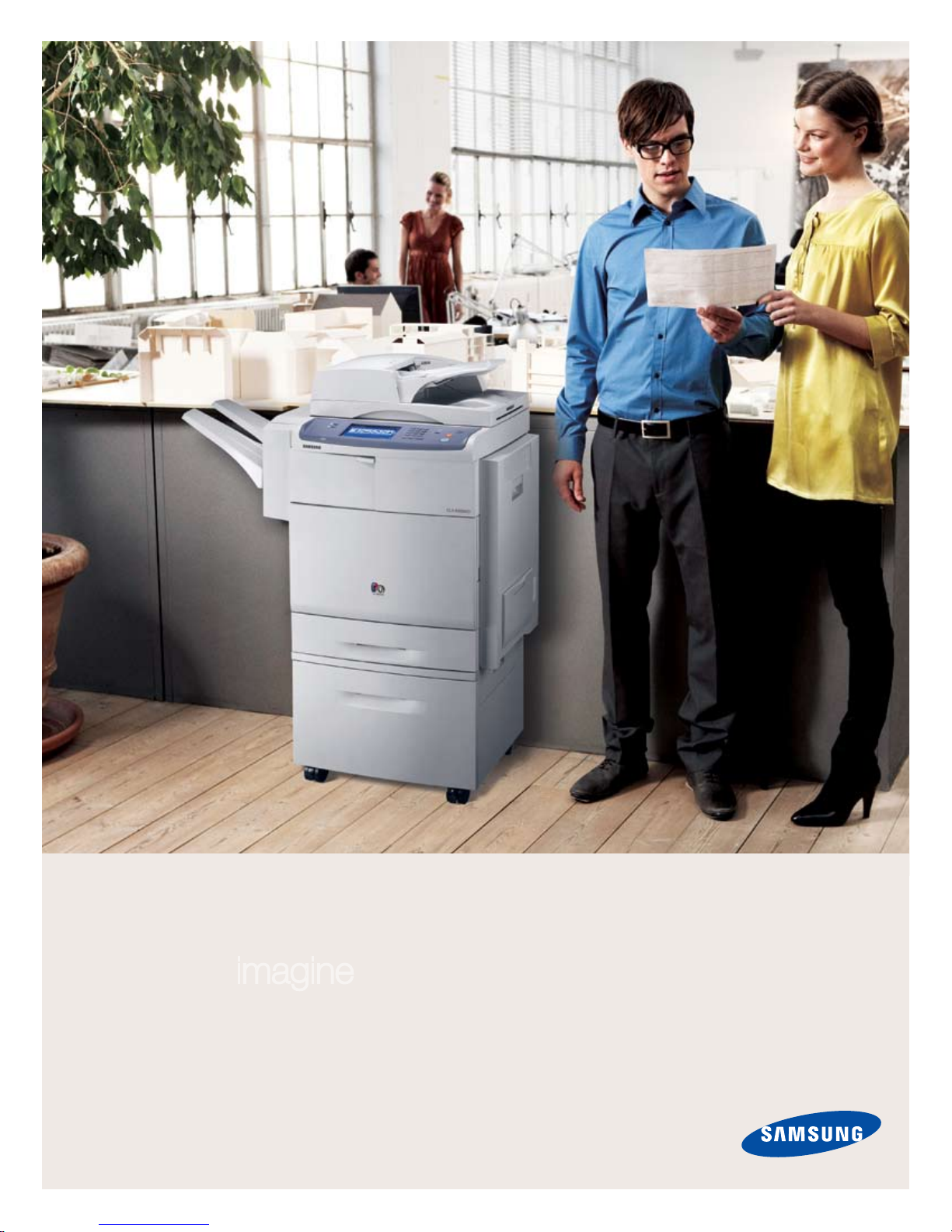
imagine improving your image
with the push of a button.
MultiXpress C8380ND Color Laser Multifunction Printer
Page 2
The most important feature is the logo.
Of the many features the Samsung MultiXpress C8380ND offers your business, the most useful feature of all is the fact that when you
really need it, the MultiXpress C8380ND will be there for you. Samsung leads the industry in reliability and dependability. Year after year,
Samsung wins reliability and design awards from the most knowledgeable and trusted organizations in the industry, including PC World
and BLI (Buyers Laboratory, Inc.).
Samsung invests billions (more than $6 billion last year) into R&D every year, creating innovative, reliable and beautifully designed
machines your business can count on. And every year, we offer you the very latest technical advances, all to make it easier for you to
do your job. Today, and tomorrow as well.
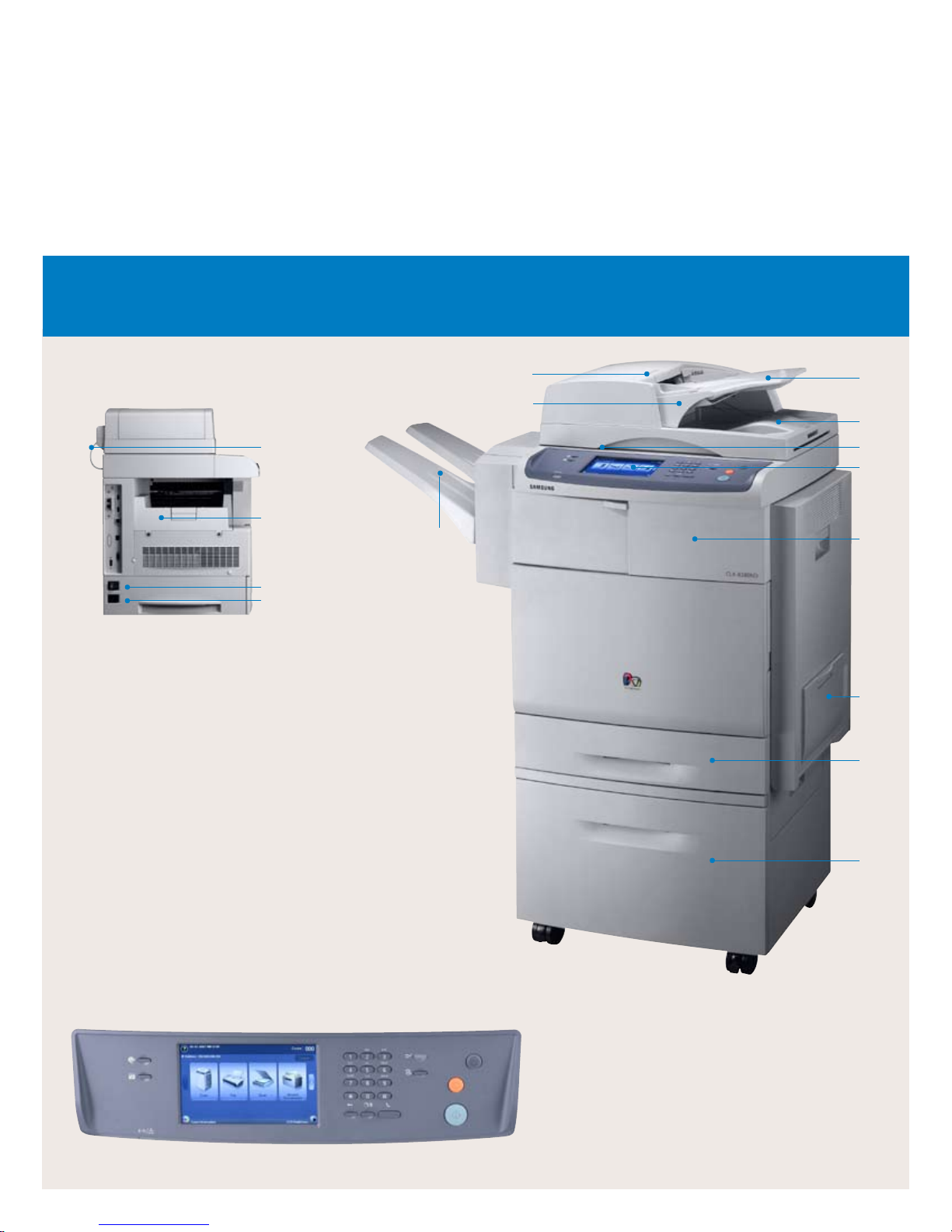
MultiXpress C8380ND Features
Standard
1. DADF
2. Document Width Guides
3. Document Input Tray
4. Document Output Tray
5. Control Panel
6. Scanner Lid
7. Front Cover
8. Multi-Purpose Tray
9. Paper Tray
10. ADF Connector
11. Output Tray
12. Power Switch
13. Power Receptacle
(Duplex Automatic
Document Feeder)
10
11
12
13
Options
14. Output Handling:
Sorter and Stapler Finisher
15. Optional Tray
Not Shown:
Tall Stand
1
2
14
3
4
6
5
7
8
9
15
Easy-to-Use Control Panel
• Touch screen operation is easy to learn and navigate,
making user training a snap.
• Manage your jobs right from the control panel. Move
important jobs to the top of the queue for maximum
efficiency.
• Advanced fax functions such as email forwarding can be
easily managed from the touch screen control panel.
Page 3
Samsung MultiXpress C8380ND
Proof
Proof
B
A
B
A
40 PPM 35 PPM
Samsung Electronics
Digital Printing Division
A.Client
456 Front Street
Someplace, FL 67890
Web page design
Scanning
Inv Out: 11/4/2004 7:19:32 PM
10.00 $30.00 $300.00
5.00 $20.00 $100.00
$400.00
Net 30 Days
INVOICE
BILL TO:
TERMS: AMT. DUE
Item
Units Rate / Ea. Amount
Thank You!
INVOICE
BILL TO:
TERMS: AMT. DUE
Item
Units Rate / Ea. Amount
Thank You!
Samsung Electronics
Digital Printing Division
A.Client
456 Front Street
Someplace, FL 67890
Web page design
Scanning
Inv Out: 11/4/2004 7:19:32 PM
10.00 $30.00 $300.00
5.00 $20.00 $100.00
$400.00
Net 30 Days
INVOICE
BILL TO:
TERMS: AMT. DUE
Item
Units Rate / Ea. Amount
Thank You!
Samsung Electronics
Digital Printing Division
A.Client
456 Front Street
Someplace, FL 67890
Web page design
Scanning
Inv Out: 11/4/2004 7:19:32 PM
10.00 $30.00 $300.00
5.00 $20.00 $100.00
$400.00
Net 30 Days
INVOICE
BILL TO:
TERMS: AMT. DUE
Item
Units Rate / Ea. Amount
Thank You!
Samsung Electronics
Digital Printing Division
A.Client
456 Front Street
Someplace, FL 67890
Web page design
Scanning
Inv Out: 11/4/2004 7:19:32 PM
10.00 $30.00 $300.00
5.00 $20.00 $100.00
$400.00
Net 30 Days
Samsung Electronics
Digital Printing Division
A.Client
456 Front Street
Someplace, FL 67890
Web page design
Scanning
Inv Out: 11/4/2004 7:19:32 PM
10.00 $30.00 $300.00
5.00 $20.00 $100.00
$400.00
Net 30 Days
INVOICE
BILL TO:
TERMS: AMT. DUE
Item
Units Rate / Ea. Amount
Thank You!
Samsung Electronics
Digital Printing Division
A.Client
456 Front Street
Someplace, FL 67890
Web page design
Scanning
Inv Out: 11/4/2004 7:19:32 PM
10.00 $30.00 $300.00
5.00 $20.00 $100.00
$400.00
Net 30 Days
INVOICE
BILL TO:
TERMS: AMT. DUE
Item
Units Rate / Ea. Amount
Thank You!
Samsung Electronics
Digital Printing Division
A.Client
456 Front Street
Someplace, FL 67890
Web page design
Scanning
Inv Out: 11/4/2004 7:19:32 PM
10.00 $30.00 $300.00
5.00 $20.00 $100.00
$400.00
Net 30 Days
INVOICE
BILL TO:
TERMS: AMT. DUE
Item
Units Rate / Ea. Amount
Thank You!
Samsung Electronics
Digital Printing Division
A.Client
456 Front Street
Someplace, FL 67890
Web page design
Scanning
Inv Out: 11/4/2004 7:19:32 PM
10.00 $30.00 $300.00
5.00 $20.00 $100.00
$400.00
Net 30 Days
INVOICE
BILL TO:
TERMS: AMT. DUE
Item
Units Rate / Ea. Amount
Thank You!
Samsung Electronics
Digital Printing Division
A.Client
456 Front Street
Someplace, FL 67890
Web page design
Scanning
Inv Out: 11/4/2004 7:19:32 PM
10.00 $30.00 $300.00
5.00 $20.00 $100.00
$400.00
Net 30 Days
INVOICE
BILL TO:
TERMS: AMT. DUE
Item
Units Rate / Ea. Amount
Thank You!
Color Laser Multifunction Printer
imagine a color workgroup MFP that cares as much about your image as any member of your team. The
Samsung MultiXpress C8380ND delivers impressive color documents with the efficiency of a copier, but at
a fraction of the price. The MultiXpress C8380ND features a hardworking duty cycle of 100,000 pages per
month, a 2,720-sheet paper capacity and speeds up to 40 pages per minute. It comes loaded with productivityenhancing features like an 80 GB hard drive for increased functionality and security, open architecture that
allows it to be customized to your specific workflow needs, an intuitive 7-inch color touch-screen control panel
and more. Efficiency in living color. With the Samsung MultiXpress C8380ND, it’s not hard to imagine.
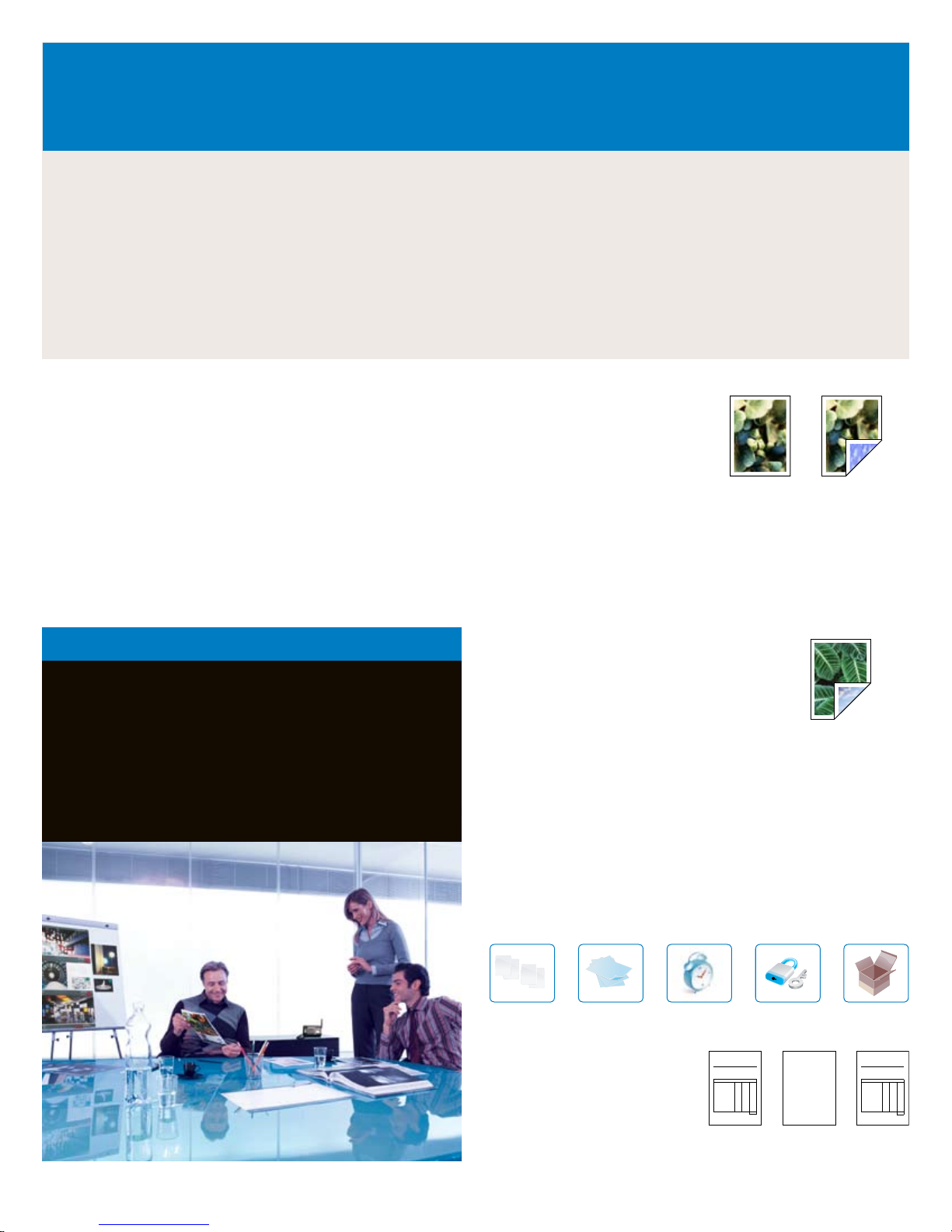
Fast Printing At 40 pages per
A flexible printer.
Open Architecture Design Customize touchscreen applications
to make workflow easier. Enhance security by using a custom
application such as a badge reader or bio recognition. Use a card
swipe to keep track of throughput. Scan and auto send documents
to team members without a computer. Access your network to print
documents or forms without a computer. And much more. (Custom
applications require software development kits, and third-party
development partners are required for implementation.)
minute (either black or color)
and up to 35 images per minute
in Duplex mode, you can work
quickly and efficiently. And with
many standard printing functions
built in, you can do more with your
printer than you thought.
Large Duty Cycle and Capacity The MultiXpress C8380ND can
churn out stacks of vibrant color documents at a rate of 100,000
pages per month. And the 2,720-sheet maximum capacity (with
optional cassettes) means longer non-stop printing.
Who We Built the MultiXpress C8380ND for:
The MultiXpress C8380ND is for mediumsized businesses in fields where highvolume color is critical, such as financial
services, sales and marketing, and for
any business who wants to use color to
project a more professional image.
Auto Duplex Savings Save money by printing
on both sides of the paper. Save time by using
the auto document feeder. Load and print 100
sheets at a time. Even incoming faxes can be
printed duplex.
80 GB Hard Drive for Expanded Printing and Security The
standard 80 GB hard drive enables the Samsung MultiXpress
C8380ND to do more than you expect. You’ll have functions like
collate printing, proof printing, delayed printing, confidential printing
and job storage (password protected secure printing).
The standard 80 GB hard drive also increases your ability to manage
and monitor network print jobs. Using the simple interface, print jobs
can be monitored and controlled from anywhere on the network. Print
jobs can be stored on the MFP’s hard drive, and you can delay printing
until you’re able to retrieve them, to increase security and confidentiality.
Collate Printing
Proof Printing
Delayed Printing Confidential
Printing
Store Job
Overlay Printing You can also
store forms directly on the hard
drive for use with our Forms
+ =
Overlay feature, so you can update
forms easily, and everyone on the
network will have access to the
latest versions.
Form Stored
on Printer
Data from PC
Printed Output
Page 4
A versatile copier.
8.5" x 11" 8.5" x 11"
Cove
r
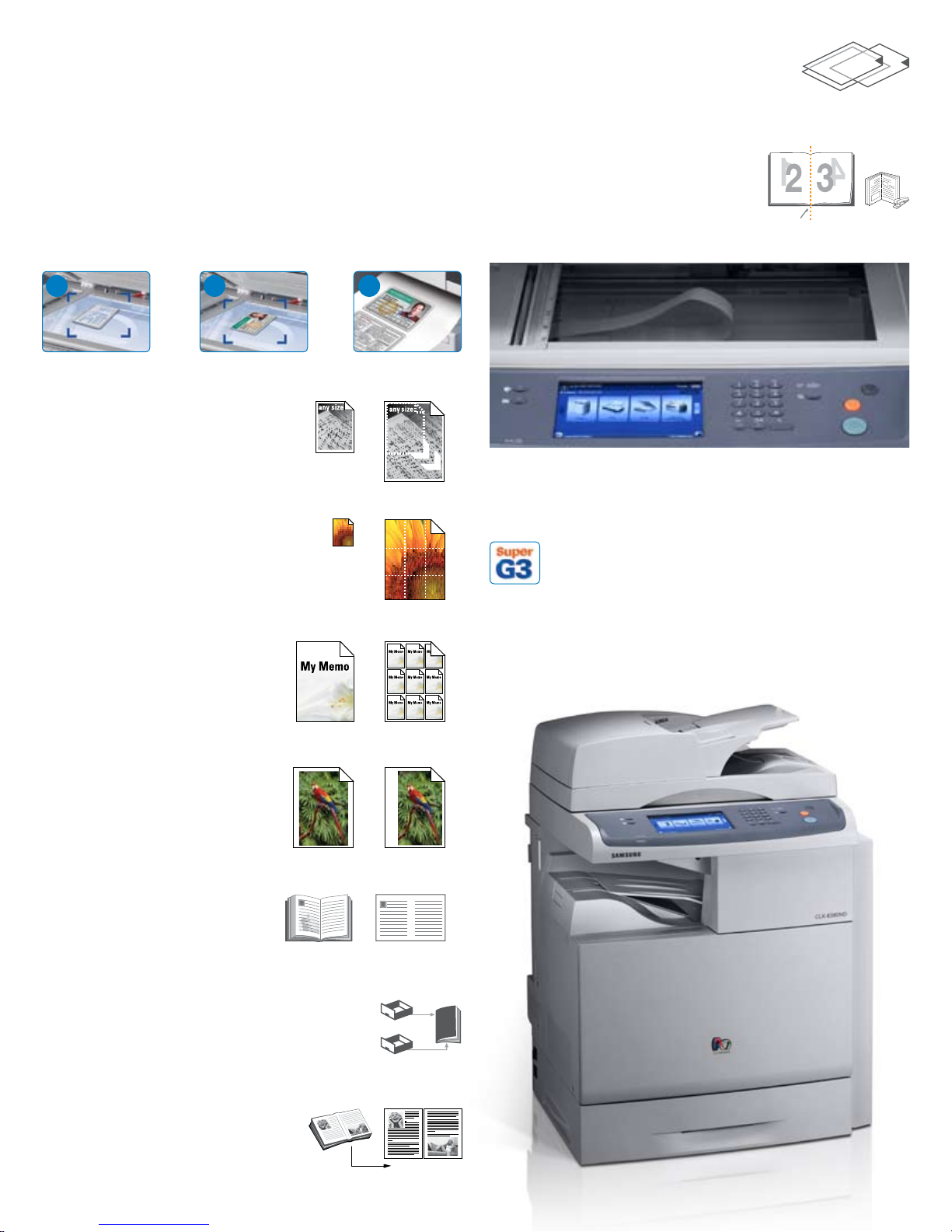
Legal Size Platen Just lay your legal size original on the legal size
glass, and make true 1-to-1 copies, without having to feed your legal
size originals through the document feeder. You aren’t limited to 81/2" x 11" size documents.
ID Copy Copy both sides of an ID, driver’s license or passport onto
one side of the page. It saves paper. It saves time.
Transparent Film Copy Need to make a
copy of a transparency? It’s simple with the
MultiXpress C8380ND.
Booklet Copy Turn any document into
a booklet. The MultiXpress C8380ND can
reduce each page by 50%, then print
them side-by-side with the proper spacing
and in the correct order, so you can fold,
staple and distribute booklets efficiently.
Fold here.
1
2 3
+
1
Copy Front
Copy Back Print 2 Sides on 1
Auto-Fit Copy Copy any size
original, then print it full size on a
sheet of letter, legal or any other
size paper in the paper tray.
Poster Copy You don’t need
a giant printer to make a giant
poster. The C8380ND prints your
image on several sheets that form
one big poster.
Clone Copy Quickly copy one
image and print it multiple times
on the same sheet of paper. No
additional software required.
=
A powerful fax.
Fax Options It’s more than a simple fax machine. It allows
you to speed dial up to 200 numbers, group dial up to 100
groups, duplex send and receive, fax-to-email, secure fax
and color fax. And the Duplex function lets you print received faxes
double-sided, to reduce your operating costs.
Secure Fax With the Secure Fax feature, all incoming faxes are held
in memory until you access them with your password.
Margin Shift Want to copy
documents or images and put them
into a binder? The MultiXpress
C8380ND can add a margin, so
you don’t have to punch holes in
your words or pictures.
Auto Suppress Copy an article
from a newspaper or magazine and
remove its background. You get a
clean copy, suitable for inclusion in
presentations.
Cover Copy Print the text of a large
document or booklet from one tray, and the
cover on a different size and weight paper from
the other tray.
Book Copy No need to reposition
the book for each page. You can copy
left pages only, right pages only, or
both at once.
Cassette 1
Cassette 2
Copy
Page 5
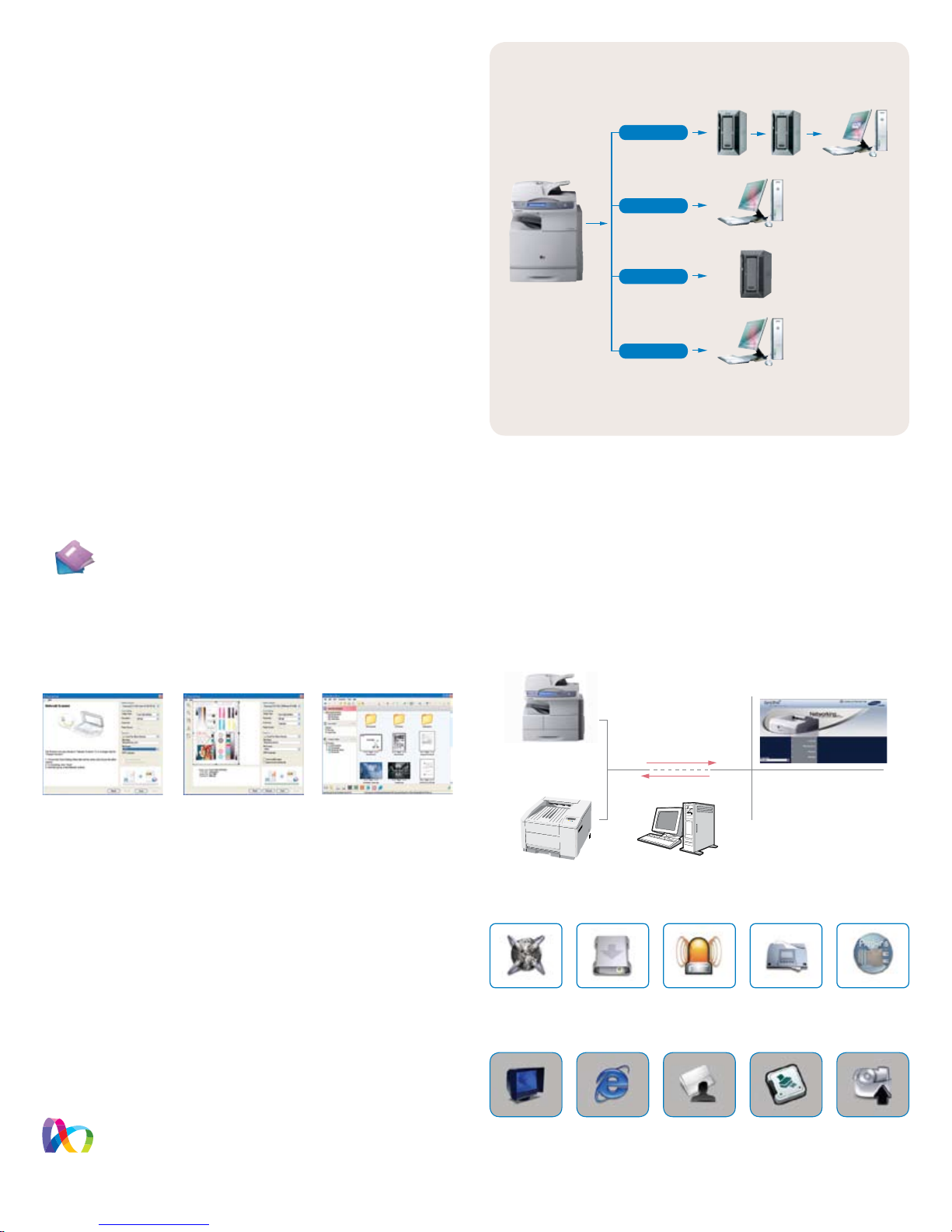
An efficient scanner.
SMTP Server
FTP Server
POP3 Server User PC with E-mail Client
User PC with Netscan Manager
Scan to E-mail
Scan to Network
Scan to FTP
Scan to SMB
SMB Server
SmarThru
Office
ColorXpression
Color Scanner Enhanced scanning resolution (up to 4800 x 4800
dpi) and color CCD give you the finest quality images for your
documents. Scanning is also an easy way to capture and store
information from hard copy documents.
Color Scan to Network Store and share documents easily by
converting them to PDF, TIFF or JPEG files. Then send the files
directly to any server or PC, or anywhere else on your network.
Network Scan Management with LDAP Scan-to-email provides
address book function using an LDAP server. With this feature, the
most up-to-date email address book will always be available. PDF,
JPEG and TIFF file formats are supported for digital scanning, and
settings for SMB (Server Message Block), FTP and LDAP servers
should be executed through SyncThru™ Web Service.
Scan to Anywhere The MultiXpress C8380ND supports efficient
distribution of scanned documents by allowing you to send them
through email, FTP, SMB and Client.
So many features. And so easy to use.
SmarThru™ Office Document Management Software
This powerful document management application for Office
users creates, stores and edits scanned images, then
delivers them to each application. It also makes it easy to
take advantage of all the features of the MultiXpress C8380ND, even
with complicated networks. SmarThru™ Office also provides network
scan as a default, so you don’t have to install additional applications.
And SmarThru™ client lets users scan documents directly to their PC.
Network Scan View Local Scan View SmarThru™ Office Main Page
Secure Hard Drive Features The standard 80 GB hard drive
increases your ability to manage and monitor network print jobs.
Using the simple interface, print jobs can be monitored and
controlled from anywhere on the network. Increase security and
confidentiality for print jobs when they’re stored on the MFP’s hard
drive and delay job printing until you’re available to retrieve them. You
can also store forms directly on the hard drive for use with our Forms
Overlay feature, so everyone on the network has instant access to
the very latest forms.
50-Sheet Finisher and Stapler Collate and staple documents up
to 50 pages thick automatically. The integrated stapler will help you
finish up large jobs in no time.
Color Expression Desktop Icon Why search through menus to
check on your toner status? The Color Expression Desktop
Icon is always on your screen so you can check your toner
status at any time without having to print a status page.
SyncThru™ Web Admin Service SyncThru™ Web Admin service
allows IT managers to easily manage and monitor all printers/MFPs
on the network. This powerful feature supports job accounting,
usage metering, authentication, storage management, remote driver
installation and modification settings. You can also easily change
network and individual printer settings, upgrade firmware and view
network printer status.
SyncThru™ Web
Admin Service
MultiXpress
C8380ND
Other Managed Devices
for Multiple
Network MFP
Remote
Configuration
and Monitoring of
Network MFP
Device DiscoveryFleet Management
Use Popular Web
Browsers without
Installing Extra
Software
Information
Control
• Discovery
• Device Management
• Status & Alerts
• Diagnostics
• Report Generation
Email Notification Report Generation
Modification Enabled
by Authorized
User (Password
Protection)
Modify Admin
Settings
Print Out
Configuration Sheet
of Network MFP
Supported by
Plug-in
Firmware
Upgrade of MFP
and Network Card
Page 6
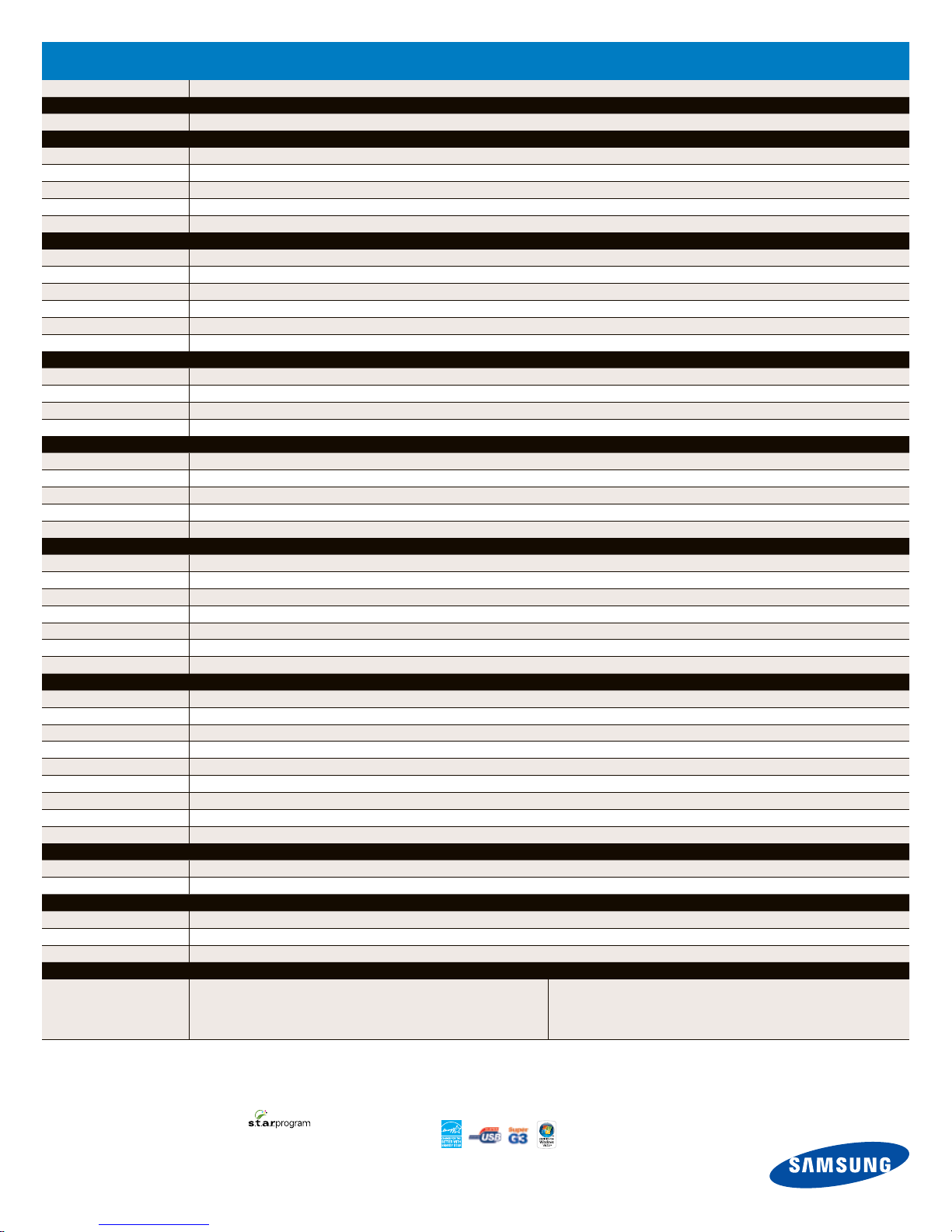
Specifications
MultiXpress C8380ND
Overview
Function Print, Scan, Fax (Optional), Copy, Network, Duplex Print, Duplex Copy
Print
Speed (Mono and Color) Up to 40 ppm in Letter, Duplex Printing Speed: Up to 35 in Letter
First Print Out Time 14 seconds B&W, 14 seconds Color (from Standby mode)
Resolution Up to 9600 x 600 dpi Effective Output
Emulation PCL5ce, PCL6, PostScript 3, PDF Direct 1.4
Duplex Standard
Copy
Speed (Mono and Color) Up to 40 cpm in Letter
Resolution Up to 1200 x 1200 dpi
First Copy Out Time Less than 13 seconds
Zoom Rate 25~400% (platen), 25~200% (DADF)
Multi Copy/Duplex Copy 1~999/Standard (1:2, 2:2, 2:1)
Copy Features ID card copy, Auto fit, Margin shift, Book copy, Covers, Transparencies, Auto suppression, Booklet, N-up, Clone, Poster
Scan
Compatibility N/W TWAIN standard, WIA standard
Method Color CCDM
Resolution (Optical/Enhanced) Up to 600 x 600 dpi/Max. 4800 x 4800 dpi
Scan To Email, FTP, SMB, Client, USB Memory (Direct Scan)
Fax
Compatibility/ Modem Speed ITU-T G3, Super G3/33.6 Kbps
Resolution Standard: 203 x 98 dpi, Fine: 203 x 196 dpi, Superfine: 230 x 391 dpi, 300 x 300 dpi, 406 x 392 dpi
Memory 16 MB
Auto Dial 1-touch dial: 40 Locations, Speed dial: 200 Locations
Fax Features On-hook Dial, Pause, Auto Redial, Last Number Redial, PC Fax
Paper Handling
Input Capacity and Types Main Tray: Up to 520 sheets MP Tray: 100 sheets
Max Paper Capacity 2,720 sheets
Output Capacity and Types 500-sheet Face Down
Media Size 3.85" x 5.83" to 8.5" x 35.4"
Media Type Plain Paper, Thick Paper, Thin Paper, Bond Paper, Color Paper, Pre-Printed, Recycled Paper, Envelope, Transparency, Label, CardStock, Letterhead, Thick, Cotton, Archive
ADF Capacity DADF 100 sheets
ADF/Document Size Single pass color scanning/Width: 5.7" x 8.5" Length: 5.7" x 14.0" for Single page scan 5.7" x 15.7"
General
Control Panel 800 x 480 7" WVGA Color Touch Screen
Storage 80 GB HDD
Memory (Min./Max.) 320 MB/832 MB
OS Compatibility Windows 2000/XP (32/64bit)/2003 (32/64bit)/Vista (32/64bit), Various Linux OS including Red Hat 8~9, Fedora Core 1~4, Mandrake 9.2~10.1 and SuSE 8.2~9.2 Mac OS 10.3~10.5
Interface Hi-Speed USB 2.0, Ethernet 10/100 BaseTX, USB host 2.0 (Scan to USB, USB print)
Noise Level Operating: 58 dBA @ simplex printing, 60 dBA @ simplex copy, Standby: 43 dBA
Duty Cycle, Monthly Up to 100,000 pages
Dimension (W x D x H) 23.9" x 22.6" x 32.1" (Base MFP)
Weight 171.9 lbs.
Security
Secure Features Secure Printing, Time-Date-ID Stamp
Authentication LDAP (Lightweight Directory Access Protocol)
Consumables
Yield Toner: Average Cartridge Yield 15,000 color/20,000 BW standard pages, Declared yield value in accordance with ISO/IEC 19752, Drum: 30,000 Standard Pages
Type 2-piece Cartridge
Model Code Toner: CLX-K8380A, CLX-C8380A, CLX-M8380A, CLX-Y8380A Drum: CLX-R8380K, CLX-R8380C, CLX-R8380M, CLX-R8380Y, Waste Container: CLX-W8308A
Options
SCX-S6555A
SCX-HCF100
CLP-MEM103
SCX-FAX210
SCX-FIN10S
Optional 520-Sheet Second Paper Cassette (Up to 3)
2 100-Sheet High Capacity Paper Feeder
512 MB Memory
Fax Kit
Finisher Stapler
SCX-STP000
SCX-DSK10S
SCX-DSK10T
Staple Cartridge Refill
Short Stand
Tall Stand with Storage
Product Information: 1-800-921-1202
Product Support: 1-877-873-7279
www.samsung.com/mfp
©2008 Samsung Electronics America, Inc. Samsung is a registered trademark of Samsung Electronics Corp., Ltd. Specifications and design
are subject to change without notice. See www.samsung.com for detailed information. Printed in USA. PNT-C8380NDPBRO-Jun08T
SAMSUNG Toner Recycling Program
www.samsung.com/starus
Distributed by:
 Loading...