

Page 1
imagine a versatile laser MFP ready
for any performance at any place
Samsung MultiXpress 6322DN/6122FN
Page 2
imagine a versatile laser MFP ready for any
performance at any place.
Durable life cycle, fastest print/copy speed in its class make the MultiXpress
6322DN/6122FN an attractive option. Economical maintenance, easy to use
features and an operation panel that includes a built-in QWERTY keyboard
for scan to email communication.
1
9
2
17
Components
Control Panel Components
Mono
2
10
11
3
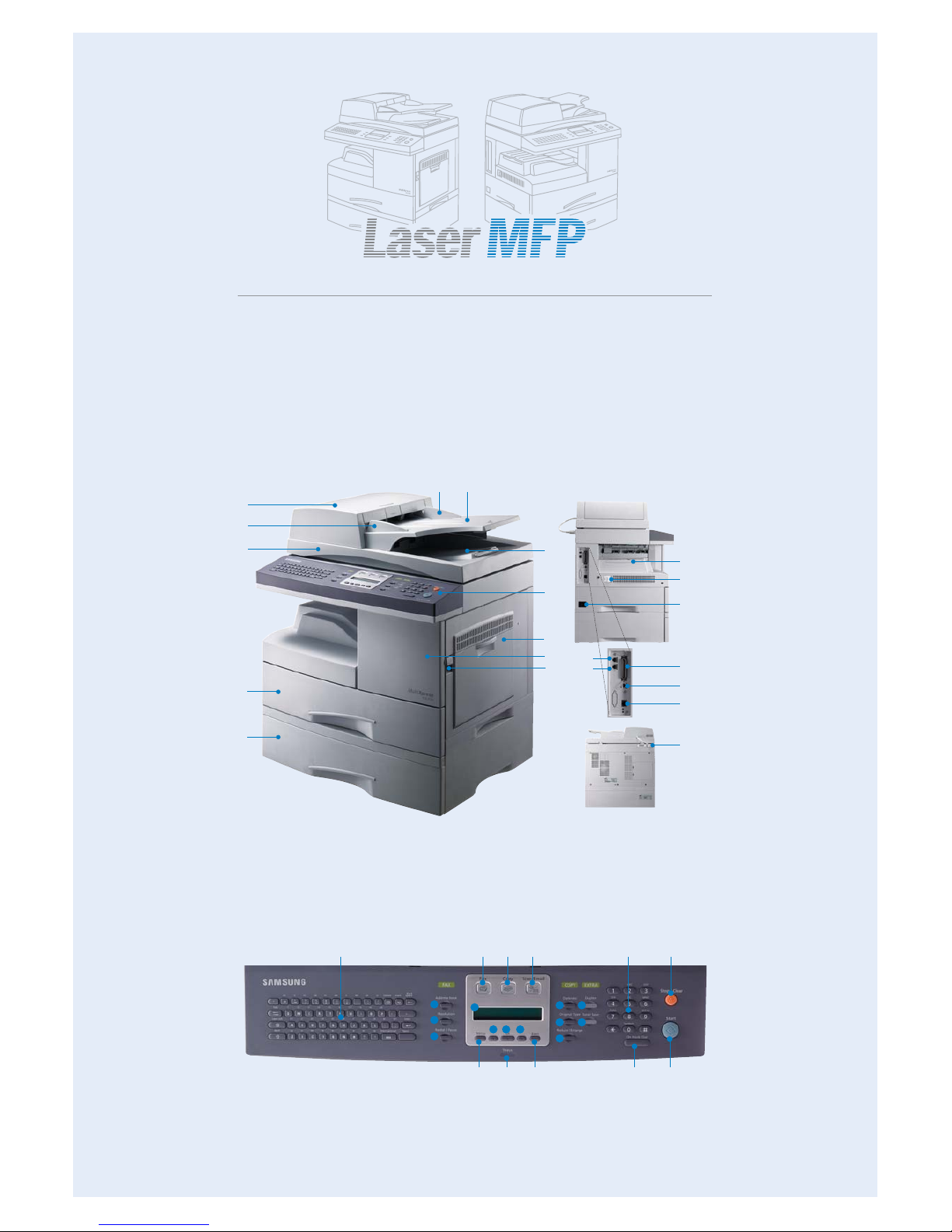
1. ADF (Automatic Document Feeder) 2. Document width Guides 3. Document Input Tray
4. Document Output Tray 5. Control Panel 6. Multi-Purpose Tray 7. Front Cover
8. Release Lever 9. Scanner Lid 10. Tray 1 11. Optional Tray 12. Output Support
13. Power Switch 14. Power Receptacle 15. Extension Telephone Socket (EXT)
16. Telephone Line Socket (LINE) 17. Parallel Port 18. USB Port 19. Network Port
20. ADF Connector
4
5
6
7
8
14
13
12
17
18
19
20
MultiXpress 6322DN/6122FN
1. Keyboard 2. Address Book 3. Resolution 4. Redial/Pause 5. Fax 6. Copy 7. Scan/Email
8. Display 9. Menu 10. Scroll buttons 11. OK 12. Back 13. Status 14. Darkness
15. Original Type 16. Reduce/Enlarge 17. Duplex 18. Toner Save 19. Number keypad
20. On Hook Dial 21. Stop/Clear 22. Start
1
91312 20 22
5 6 7 19 21
2
3
4
8
10
141517
18
16
10 11
15
16
Page 3
Scan to FTP
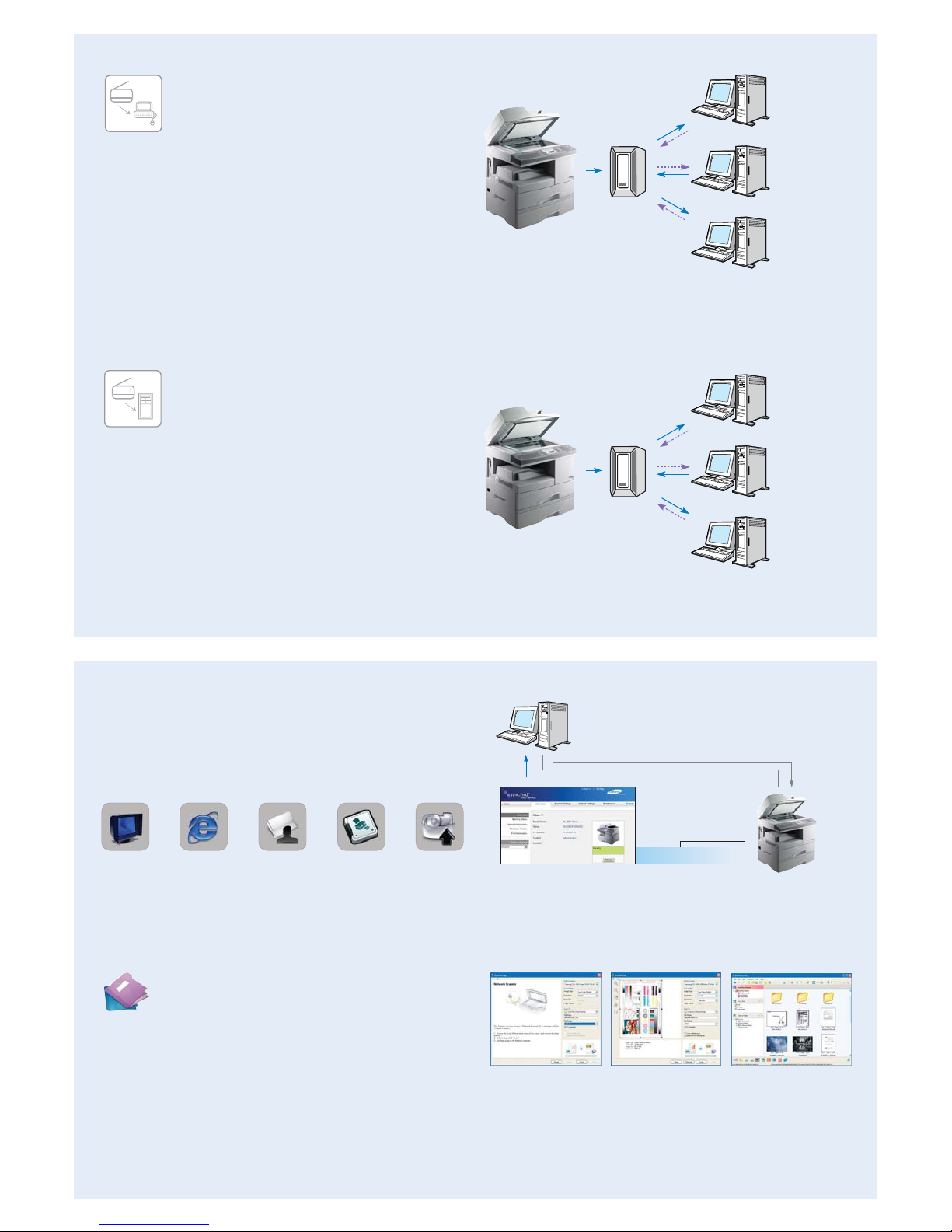
Scan to FTP is an efficient way to digitize and
transmit large quantities of documents. Simply scan
hardcopy documents, convert them to digital
format, and store in a specified directory on the
in-house or external FTP server. Scanned data stored on the
FTP server can be accessed from an FTP client program
installed on the user’s PC or a web browser conveniently.
Scan to FTP is designed especially for larger files and provides
a strategic complement to Scan to E-mail. Scan to FTP can handle files of near limitless proportions, and is consequently the
perfect tool for archiving larger documents. Scan to FTP is a
very effective scan solution for transferring large size documents
due to its dedicated functionality.
In brief
• Up to 20 servers are supported
• Easy configuration with SyncThru™ Web Service
• Transmits large quantities of documents
• Fast transmission speed
• Easily shares large files on a server with multiple users
• Choice of PDF, JPEG and TIFF files for added convenience
• Supported products : MultiXpress 5530FN, MultiXpress 6122FN, and MultiXpress 6322DN
FTP Client 1
FTP Client 2
FTP Client 3
Network scan view Local scan view
SmarThruTMOffice Main Page
Document Management Software
SmarThru
TM
Office
Samsung’s SmarThruTMOffice is a powerful document
management application for Office users. It creates,
stores and edits scan images, and delivers them to
each application. With new features the document
management and editing features are greatly
enhanced for easy and convenient use with Samsung MFP in
offices with complicated networks and a variety of equipment.
Also network scan is provided as default so that users do not
have to install additional applications. Users will also appreciate
the convenience of scanning documents directly to their PC by
using SmarThru client. With Samsung SmarThruTMOffice software, you will wonder how you ever managed your documents
without it.
SMB
Server
LAN
SMB Client 1
SMB Client 2
SMB Client 3
SMB
Server
LAN
In brief
• Transmits large quantities of documents
• Transmits scanned documents directly to PC even without a server
• Ensures security because password is encrypted • Up to 20 destinations are supported
• Easy configuration with SyncThru™ Web Service
• Choice of PDF, JPEG and TIFF files for added convenience
• Supported products: MultiXpress 5530FN, MultiXpress 6122FN, and MultiXpress 6322DN
Scan to SMB
With the Scan to SMB (Server Message Block)
feature, users can store scanned documents directly
to a shared folder in user’s PC. Up to 20 destinations
can be designated as a shared folder. Scan to SMB
is more secure than Scan to FTP because password is encrypted
and it allows transmission of larger documents than Scan to
E-mail since there is no limitation of document size.
This is a very convenient and user-friendly feature for users
because they do not need an additional client program but can
set up to shared folders through embedded web server,
SyncThru™ Web Service. This supports Microsoft Windows,
TCP/IP and other network protocols.
SyncThruTMWeb Service
Increase productivity with SyncThruTMWeb Service. This user
friendly printer configuration tool requires no installation in the
form of embedded web server that can be accessed by webbrowser. It provides administrators with the ability to change
network and individual printer settings, upgrade firmware and
view network printer status.
SmarThru
Office
Remote
Configuration
and Monitoring
of Network Printer
Use Popular
Web Browser
without Installing
Extra Software
Modification
Enabled by Authorized
User (Password
Protection)
Print Out
Configuration
Sheet of
Network Printer
Firmware
Upgrade of
Printer and
Network Card
Control
LAN
Status
Embedded
SyncThru Web Service
Page 4
imagine digital duplex copier
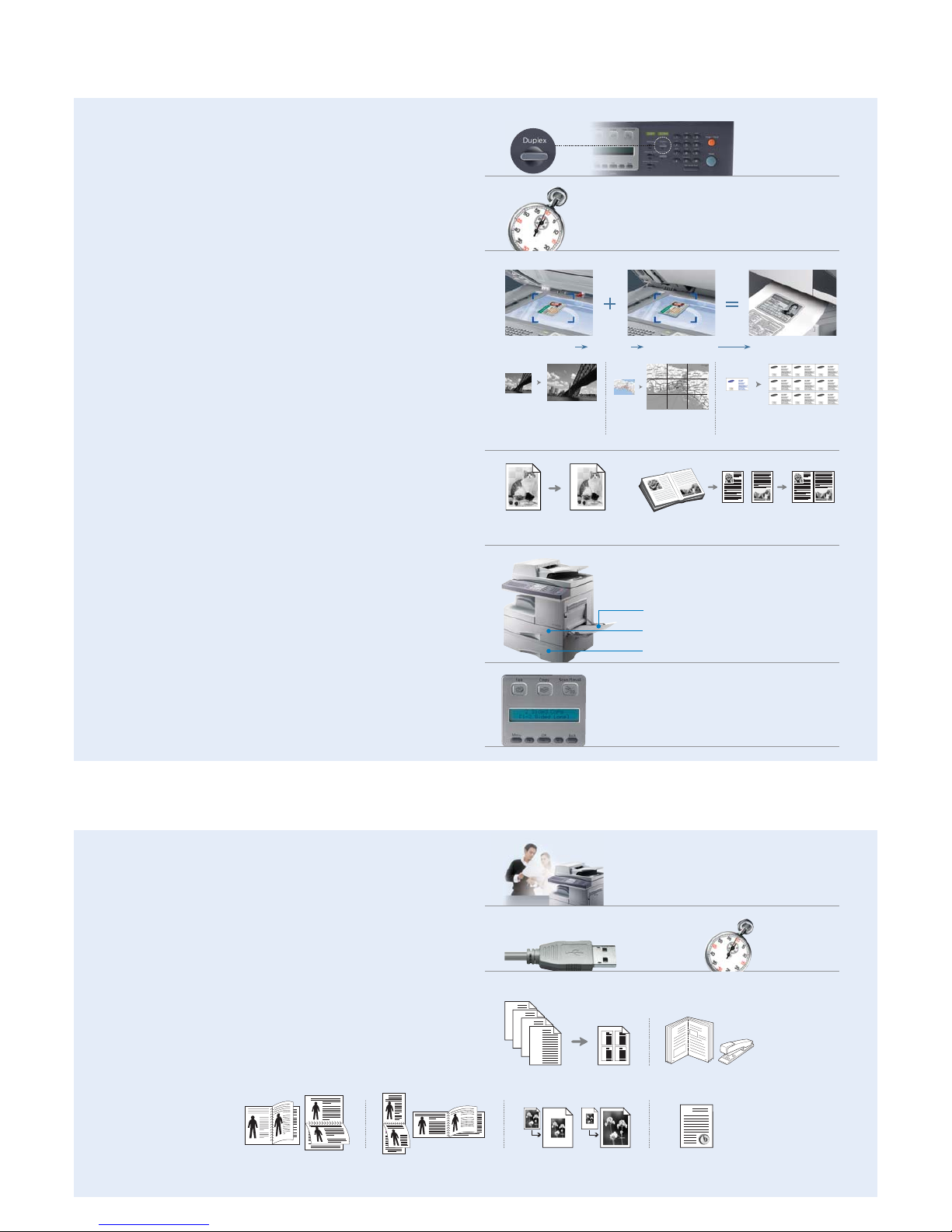
Standard DADF (Duplex Automatic Document Feeder)
creates professional duplex (2-sided) documents in 4 copy
formats including 1:1, 1:2, 2:1, 2:2 with simple one-touch buttons,
saving on paper or additional equipment costs.
(MultiXpress 6322DN only)
22 pages (A4)/min.
The fastest copy speed in its class will make short work of your
volume documents.
Special Copy Editing
The high-tech digital core of the MultiXpress 6322DN/6122FN
adds a finishing touch to your document creation with various
editing functions like Clone, Auto-fit, 2-up, Poster and ID Card
copy in addition to other essentials like 25%~400% Zoom-copy
or a 999 page Multi-copy.
Front Copy Back CopyMemory
2-sides-in-1
Auto-fit Copying
Auto Margin Shift Book Copy
Original Left Page Right Page Both Pages
Copy
Poster Printer Clone Copying
MultiXpress
6322DN only
Any Size
A4
A4
Any Size
Max. 1,200 sheets
imagine high quality laser printer
Printouts
The superb output of up to 1,200 dpi will sharpen up your appearance
as well with outstanding image quality.
22 ppm /A4
Auto Margin Shift & Book Copy
Create a binding edge for the document by shifting the image
horizontally or vertically. Then copy an entire book by using Book
Copy options like Left Page, Right Page or Both Pages.
High Volume Paper Capacity
the standard 550-sheet paper tray, 100-sheet multi purpose tray
and optional 550-sheet additional tray, mean you can copy more
with less reloading, saving you time and effort.
A4
Easy Operation
1,200x 1,200
dpi
22 pages/min. (A4)
With a fast printout speed and a high speed USB 2.0 interface you’ll
never have to wait long.
Professional Layouts
Printing in various layouts from the menu tab like Multiple Pages
per Side, Scaling, Fit to Page, Poster, Duplex Printing, Booklet
Printing, Watermark and Overlay will allow you to create with
professional flair.
USB 2.0 22 ppm /A4
Easy Operation
The intuitively designed operation panel has ergonomic onetouch buttons, a clear LCD display and an Error Indicator for
instant job status checking and more direct control.
550
550
100
Multiple Pages per Side
AB
CD
A
4
1
4
1
2
3
B
C
D
Booklet Printing
8
9
Duplex (2-sided) Printing-Long Edge
4
1
4
1
2
3
2
5
3
2
5
3
5
3
Duplex (2-sided) Printing-Short Edge
4
1
4
1
2
3
2
5
3
2
5
3
Scaling
4
1
4
1
2
3
Watermark and Overlay
The
CONFIDENTIAL
Page 5
imagine smart scanner
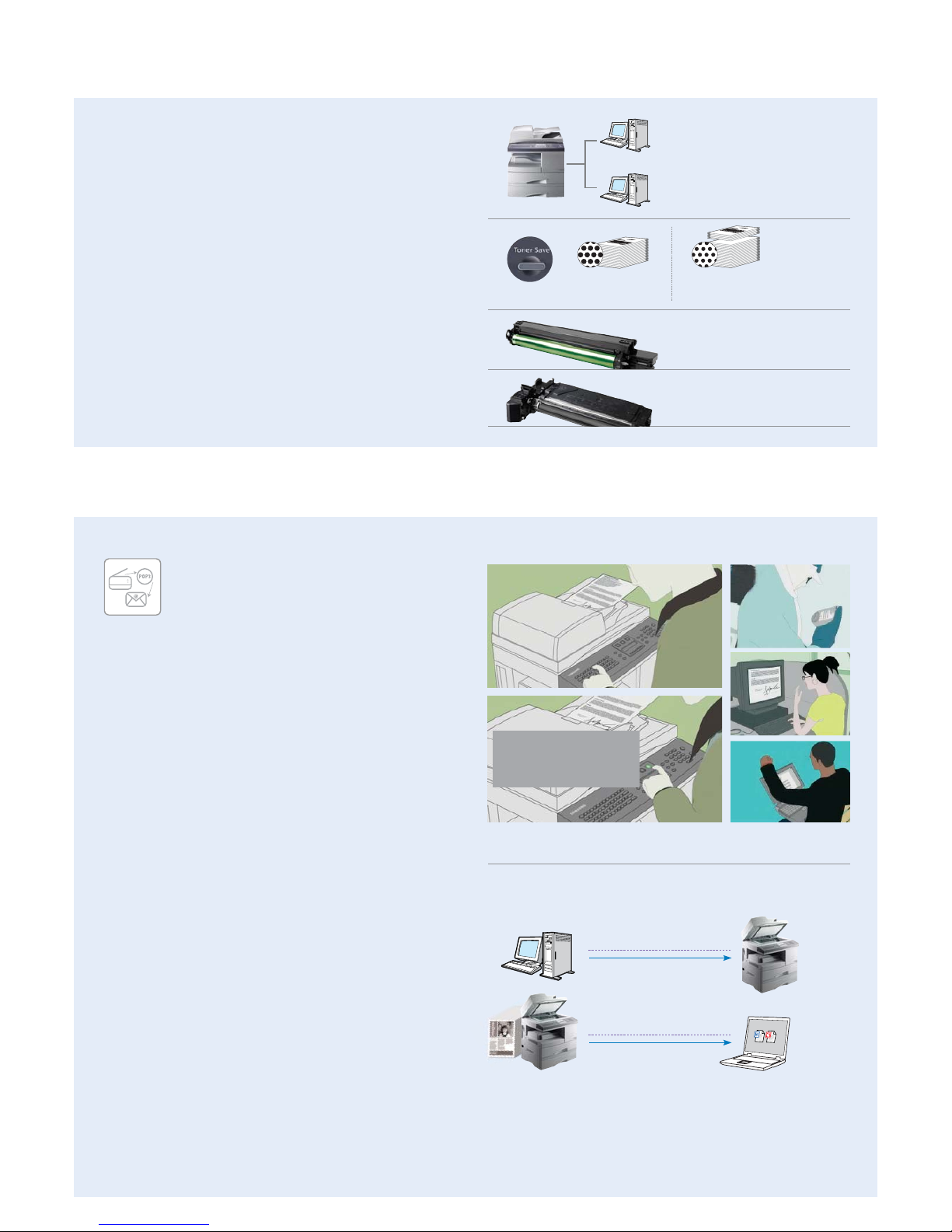
Samsung’s Scan to E-mail solution is a powerful productivity tool for
any small to medium sized enterprise or workgroup within a larger
organization. For example, members of a Mergers and Acquisition
Team might want to share sensitive hard copy reports or news articles
with selected colleagues. All they have to do is scan the relevant pages
using Samsung MFP, select the address, add a message subject on
the full e-mail keypad, and send. Everyone gets the information they
need and, unlike faxes, confidentiality is maintained from the moment
it’s sent to the moment it’s received.
Digital scanning solution is sending scanned document to
various destinations such as e-mail, PC (network), SMB (Server
Message Block) server, and FTP (File Transfer Protocol) server.
Scan to E-mail provides address book function using LDAP
server. The LDAP (Lightweight Directory Access Protocol) is a
networking protocol for querying and modifying directory
services running over TCP/IP. If the user company has adopted
this, the most up-to-date e-mail address book will be always
available. PDF, JPEG and TIFF file formats are supported for
digital scanning and settings for SMB, FTP and LDAP server
should be executed through SyncThru™ Web Service.
Scan to E-mail
Samsung’s powerful Scan to E-mail solution lets you
e-mail documents to anyone in the world directly from
your network connected multi function printers.
A powerful productivity tool
New Scan Management with LDAP
Scan to Network
Samsung’s advanced Scan to network solution gives you an
easy way to capture and store information from hard copy
documents. Featuring the same walk-up simplicity of our other
scanning solutions, Scan to Network turns your Samsung
network connected MFP into a powerful engine for capturing
and sharing information. Now you can scan directly to your
document management system.
user 1
user 2
Network Printing
The advanced capabilities of the MultiXpress 6322DN/
6122FN can be shared over a network with the built in network
kit for easy printing management to meet the needs of a small
workgroup.
Drum Unit - 20,000 pages yield
Toner Save Button for up to 30% Savings
Just push the one-touch button to reduce toner consumption by
up to 30% while still producing high quality printouts in a slightly
lighter tone.
Economic 2-piece Consumables
Allows you to maximize the use of the 20,000 page yield drum
unit by replacing the 8,000 page yield toner cartridge separately,
thereby extending the drum’s usability.
Toner Cartridge - 8,000 pages yield
Standard Toner Yield
8,000 sheets
Toner Yield with
One-touch save function
8,000 sheets + 2,400 sheets
1. Register e-mail address 2. Scan document 3. Send to multiple e-mail recipients
Scan to Network
1
2
3
"DIRECT SCAN TO E-MAIL"
The standard keyboard on the MultiXpress 6322DN
/6122FN and optional network kit enable the direct
transfer of scanned images via E-mail.
In brief
• Scan directly to your networked PC with the client software installed
• Effortless scanning from the Samsung MFPs - SCX-4X20 series, MultiXpress 6X20 series,
MultiXpress 5X30 series, MultiXpress 6X22 series or CLX-3160 Series to anywhere on your network
• Ideal for capturing and sharing information
• Integrates with document management systems
• Choice of PDF, JPEG and TIFF files for added convenience
• Supported products: *SCX-4520/4720F/4720FN, *MultiXpress 6220/6320F, MultiXpress 5530FN/5330N,
MultiXpress 6122FN/6322DN, CLX-3160FN/3160N
* Network card is required for these models.
PC Registration
LAN Connection
DOC Send Scanned
LAN Connection
Page 6
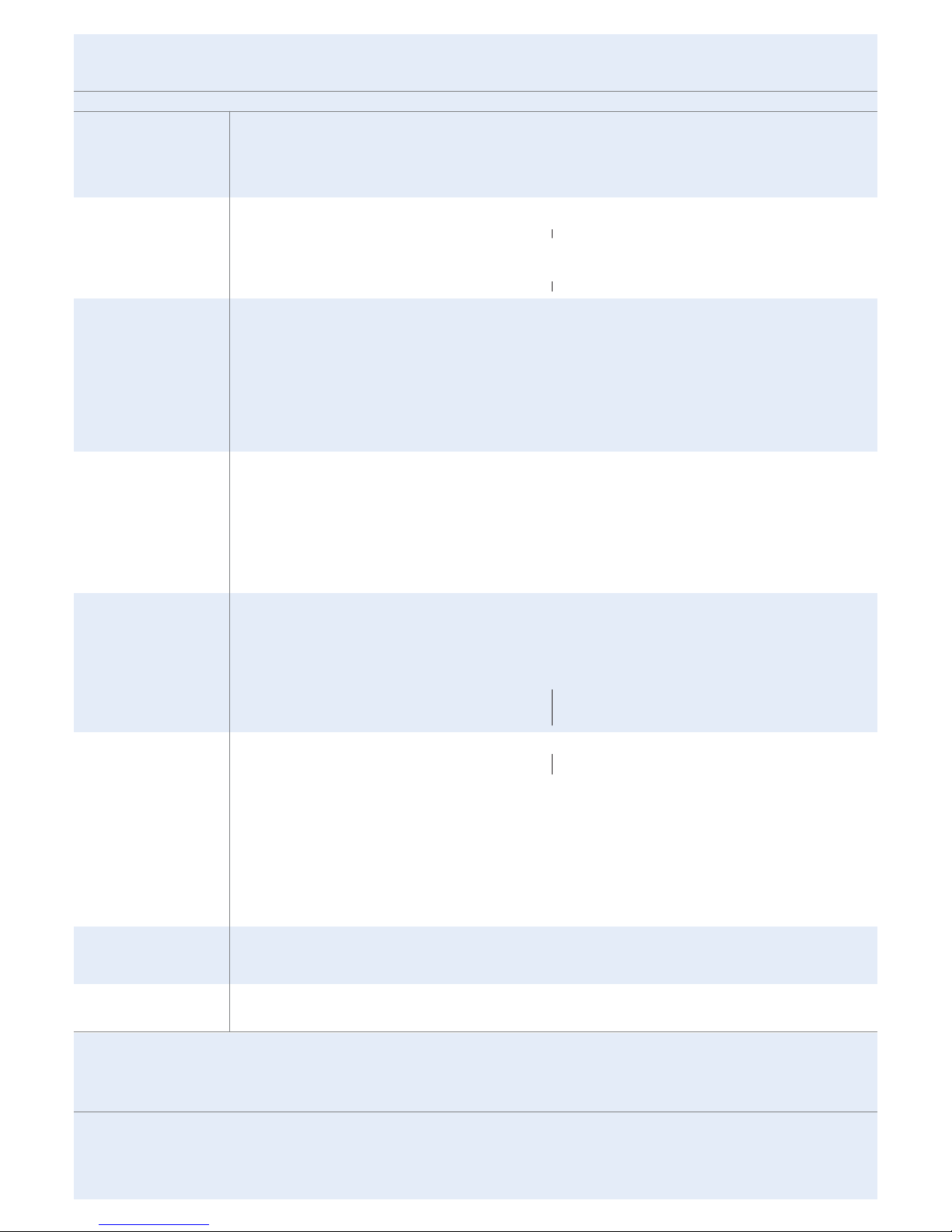
Specifications
Print
Speed *
Resolution
First Print Out Time
Emulation
Duplex Print
MultiXpress 6322DN MultiXpress 6122FN
Up to 22 ppm in A4 (23 ppm in Letter) Duplex Printing Speed : Up to 12.5 ipm in A4 (13 ipm in Letter)
Up to 1200 dpi Effective Output
Less than 12 seconds (from Standby mode)
PCL6, PostScript 3
Standard
Copy
Speed **
Resolution ( Optical )
First Copy Out Time
Zoom Rate
Multiple Copy
Duplex Copy
Up to 22 cpm in A4 (23 cpm in Letter)
10 seconds
25~400% (platen), 25~100% (ADF)
1~999 pages
Scan
Compatibility
Method
Resolution( Optical )
Resolution( Enhanced )
Scan to
Effective Scan Length
Effective Scan Width
Color Bit depth
B/W Bit depth
Gray Scale
Twain standard, WIA standard
Color CCD
600 x 600 dpi
Max. 4,800 x 4,800 dpi
Email, FTP, SMB, Client
Platen : 356mm (14"), ADF : 356mm (14")
208 mm (8.2")
Internal : 36 bit, External : 24 bit
1 bit for Text mode, 8 bit for Gray mode
256 Levels
FAX
Compatibility
Applicable line
Modem Speed
Transmission Speed ***
Compression Mode
Scan Speed ****
Resolution
Memory
Auto Dial
ITU-T Group 3
Public Switched Telephone Network (PSTN) or behind PABX
33.6 Kbps
Approx. 3 seconds per page
MH / MR / MMR (ECM Mode) / JBIG / JPEG
2.5sec/A4 @ 203x98dpi, DADF(Scan Time) 3.2sec/A4 @ 203x98dpi, DADF(Multi Page Scan Time)
Standard : 203 X 98dpi Fine : 203 X 196dpi Super Fine : 203 X 391dpi, 300 X 300dpi, 406 X 392dpi
8 MB (Approx. 640 pages at ITU-T #1 Chart)
1-touch dial : 40 Locations Speed dial : 240 Locations (including 1-touch dial)
Paper Handling
Input Capacity and Types
Output Capacity and Types
Media Size ( for Print )
Media Size ( for Fax and Copy )
Media type
ADF Capacity
ADF Document Size
550-sheet Cassette Tray (75 g/m
2
, 20 lbs), 100-sheet MP Tray
250-sheet Face Down (75 g/m
2
, 20 lbs)
Main Tray : A4, Letter, Legal, Folio, Oficio MP Tray : A4. Lettter, Legal, Folio, Executive, Envelope, #10,DL,C5,B5,Oficio, A5, C6 Env.
Monach Env., A6, Custom(Min:76x127mm(3.00x5.00inch), Max : 216x356mm(8.50x14.00inch)
for Fax : Letter, A4, Legal
Main Tray : Plain Paper MP Tray : Plain Paper, Transparency, Envelope, Labels, Card stock, Thick, Thin, Cotton, Color, Pre-Printed, Recycled, Bond, Archive
General
Net Dimension ( W x D x H )
Weight with Consumables
LCD
System Memory
Interface
OS Compatibility *****
Warm-up Time
Noise Level ******
Power Requirement
Power Consumption
Operating Conditions
Duty Cycle, monthly
2 line x 20 characters
64 MB
USB 2.0 (High Speed), IEEE 1284, Ethernet 10/100 base Tx
Windows Me/NT4.0/2000/XP(32/64bit)/Vista -Various Linux OS (via USB interface only) including Red Hat 8 ~ 9, Fedora Core 1~4,
Mandrake 9.2~10.1, and SuSE 8.2~9.2 -Mac 10.3, 10.4, Windows Terminal Services
Less than 25 seconds (from sleep mode)
Warm up : Less than 48 dBA Stand by : Less than 40 dBA Printing, Copying, Scan : Less than 65 dBA
110~127VAC 50.60Hz, 6.0A or 220~240VAC, 50/60Hz, 3.5A
Sleep Mode : 28 W Standby Mode : 100 W Average : 450 W
Temperature : 10 °C ~ 32 °C (50 °F ~ 89 °F) Humidity : 20 % ~ 80 % RH
Up to 20,000 pages
Consumables
Type
Yield *******
Code
2-piece Cartridge
Toner : Average Cartridge Yield 8,000 standard pages.
Toner : SCX-6320D8 Drum : SCX-6320R2
Options
Network
Others
Standard
Paper Cassette : 1EA x 550-sheet Cassette Tray(SCX-S6122A) Cabinet : SCX-6320G5
*Print speed will be affected by Operating system used, computing performance, application software, connecting method, media type, media size and job complexity
**Copy Speed is based on Single Document Multiple Copy
***Condition: Standard resolution, MMR(JBIG), Maximum modem speed, Phase"C" by ITU-T No.1 Chart, Memory Tx, ECM
****Condition: ITU-T No.1 Chart, Standard Resolution
*****Please visit www.samsungprinter.com to download the latest software version
******Sound Pressure Level, ISO7779
*******Declared yield value in accordance with ISO/IEC 19752 Drum : 20,000 Pages
Design and Specifications are subject to change without notice.
Trademarks of other companies mentioned in these publications are hereby recognised and acknowledged.
Distributed by
2008. 08
Standard (1:2, 2:2) Standard (1:2)
600 x 600 dpi Text, Text/Photo mode : 600 x 300 dpi Photo mode : 600 x 300 dpi (Platen), 600 x 600 dpi (DADF ) 600 x 600 dpi Text, Text/Photo mode : 600 x 300 dpi Photo mode : 600 x 300 dpi (Platen), 600 x 600 dpi (ADF )
ADF 40 sheets ( 20lb, 75 g/m2)
Width: 174 ~ 216mm (6.9"~8.5") Length : 128 ~ 356mm (5"~14.0")
for Single page scan 128 ~ 400mm (5"~15.7") for Multi pages scan
DADF 50 sheets ( 20lb, 75 g/m2)
Width: 142 ~216mm (5.6"~8.5") Length : 128 ~356mm (5"~ 14.0")
for Single page scan 128 ~400mm (5"~15.7") for Multi pages scan
560 x 430 x 455 mm (22" x 16.9" x 18")
22.55 Kg (49.7 lbs)
560 x 430 x 495 mm (22" x 16.9" x 19.4")
25.65Kg (56.5 lbs)
 Loading...