

Page 1
1
2
3
4
5
S
ecure
U
ser
Secure
Da
ta
Se
cure
Network
Secure
Document
Se
cure
Man
agement
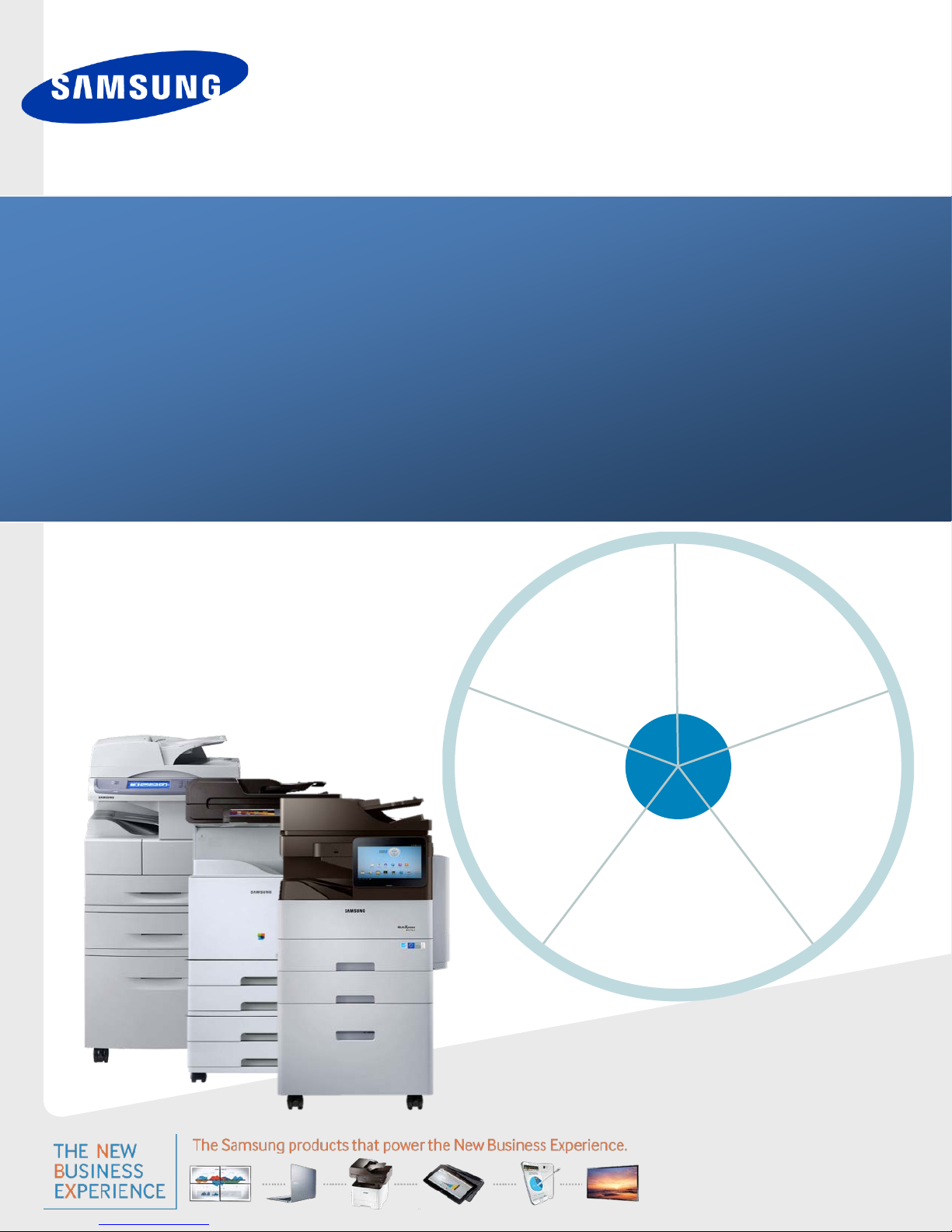
Samsung MFP Security
White Paper: Samsung Security Framework
Page 2

WHITE PAPER SAMSUNG MFP SECURITY
© 2014 Samsung Electronics Co., Ltd. All rights reserved.
Samsung Electronics provides this guide for information purposes only. All information included herein is subject to change without notice.
Samsung Electronics is not responsible for any direct or indirect damages that may occur when you use this guide or that you relate to the use of this guide.
Samsung and Samsung logo are trademarks of Samsung Electronics Co., Ltd.
All other brand or product names are trademarks of their respective companies or organizations.
Version – Draft
Page - 2 Copyright 2014 Samsung Electronics Co., Ltd., All rights reserved.
Page 3

SAMSUNG MFP SECURITY WHITE PAPER
Table of Contents
1. Introduction ....................................................................................................................................... 6
1.1 Information Security .............................................................................................................................. 6
1.2 The Objectives of Multifunction Printer (MFP) Security ........................................................................ 7
1.2.1 MFP Hardcopy Vulnerability ....................................................................................................... 8
1.2.2 MFP Electronic Vulnerability ....................................................................................................... 8
1.2.3 Common Results of Having an Unsecured MFP ......................................................................... 8
2. Security Regulatory Requirements ....................................................................................................... 9
3. Security Business Requirements ........................................................................................................ 10
3.1 Public Sector (Government / Education / Healthcare) Security Requirements .................................. 10
3.1.1 Government .............................................................................................................................. 10
3.1.2 Education .................................................................................................................................. 11
3.1.3 Healthcare ................................................................................................................................. 11
3.2 Private Sector Security Requirements .................................................................................................. 12
4. Common Criteria Security Validation ................................................................................................. 13
5. IEEE 2600™-2008, IEEE 2600.1™-2009, IEEE 2600.2™-2009
(2)
.............................................................. 14
6. Samsung’s Security Framework ......................................................................................................... 15
7. Secure User ...................................................................................................................................... 16
7.1 Authentication ...................................................................................................................................... 17
7.1.1 System Authentication .............................................................................................................. 17
7.1.2 Local Authentication ................................................................................................................. 17
7.1.3 Network Authentication ........................................................................................................... 17
7.1.4 XOA –E / XOA Web Authentication ........................................................................................... 17
7.2 User Authentication Scenarios ............................................................................................................. 18
7.2.1 For Administrators .................................................................................................................... 18
7.3 Authorization (Group/Role Management) ........................................................................................... 19
7.3.1 Using Group and Role-Based Authority .................................................................................... 19
7.4 User Authorization Scenarios ............................................................................................................... 20
7.4.1 Administrator Menu ................................................................................................................. 20
7.5 Accounting ............................................................................................................................................ 21
7.5.1 Standard and Network Accounting ........................................................................................... 21
7.6 User Accounting Scenarios ................................................................................................................... 21
7.6.1 For Administrators .................................................................................................................... 21
7.6.2 For Users ................................................................................................................................... 21
7.7 Single Sign-On (SSO) ............................................................................................................................. 22
7.8 Key Benefits of “Secure User” .............................................................................................................. 22
7.8.1 Good Basic Security................................................................................................................... 22
7.8.2 Increased Productivity .............................................................................................................. 22
7.8.3 Cost Control .............................................................................................................................. 22
8. Secure Data ...................................................................................................................................... 23
Page - 3 Copyright 2014 Samsung Electronics Co., Ltd., All rights reserved.
Page 4

WHITE PAPER SAMSUNG MFP SECURITY
8.1 Encryption ............................................................................................................................................ 23
8.1.1 Hard Disk Drive (HDD) Encryption ............................................................................................ 23
8.1.2 Print Job Encryption .................................................................................................................. 25
8.1.3 Secure PDF - PDF Encryption .................................................................................................... 26
8.1.4 Secure PDF – Digital Signature in PDF ....................................................................................... 26
8.1.5 Digital Certificate ...................................................................................................................... 27
8.1.6 PC Scan Security ........................................................................................................................ 28
8.1.7 Secure E-mail (SMTPs) .............................................................................................................. 28
8.2 Image Overwrite ................................................................................................................................... 29
8.2.1 Automatic Image Overwrite ..................................................................................................... 29
8.2.2 Manual Image Overwrite .......................................................................................................... 29
8.2.3 Scheduled Image Overwrite ...................................................................................................... 29
8.2.4 Image Overwrite from the Local UI........................................................................................... 29
8.3 Information Hiding ............................................................................................................................... 30
8.4 Key Benefits of Using Secure Data ....................................................................................................... 31
8.4.1 Data Protection ......................................................................................................................... 31
8.4.2 Various Options Settings ........................................................................................................... 31
9. Secure Network ................................................................................................................................ 32
9.1 Transport Layer Security (TLS) / Secure Sockets Layer (SSL) ................................................................ 32
9.2 SNMPv3 ................................................................................................................................................ 32
9.3 IP Security (IPSec): IPv4, IPv6 ............................................................................................................... 33
9.4 802.1x Support ..................................................................................................................................... 34
9.5 Protocol/Port Management ................................................................................................................. 35
9.6 IP/MAC Filtering ................................................................................................................................... 35
9.7 Key Benefit of Using Secure Network .................................................................................................. 35
10. Secure Document .............................................................................................................................. 36
10.1 Confidential Print ................................................................................................................................. 36
10.2 Secure Fax ............................................................................................................................................ 36
10.3 Document Tagging ............................................................................................................................... 37
10.3.1 Watermarks .............................................................................................................................. 37
10.3.2 Stamp ........................................................................................................................................ 38
11. Secure Management ......................................................................................................................... 39
11.1 Logging (Job Auditing) .......................................................................................................................... 39
11.1.1 Job Log ...................................................................................................................................... 40
11.1.2 SYS Log ...................................................................................................................................... 40
11.1.3 Operation Log ........................................................................................................................... 40
11.1.4 Security Event Log ..................................................................................................................... 40
11.2 Log Features ......................................................................................................................................... 40
11.3 System Back-Up .................................................................................................................................... 42
11.4 Email Notification ................................................................................................................................. 42
11.4.1 Device Alert Notification ........................................................................................................... 43
11.4.2 Device Status Notification ......................................................................................................... 43
12. Samsung Business CoreTM MFP Security Solutions .............................................................................. 44
Page - 4 Copyright 2014 Samsung Electronics Co., Ltd., All rights reserved.
Page 5

SAMSUNG MFP SECURITY WHITE PAPER
12.1 SmarThruTM Workflow Lite ................................................................................................................... 45
12.2 Cloud Connector ................................................................................................................................... 47
12.3 Secure Login Manager .......................................................................................................................... 48
12.4 SecuThruTM Lite 2.................................................................................................................................. 49
12.5 Usage Tracker ....................................................................................................................................... 51
13. Smart Print UX with Android Security ................................................................................................ 52
14. Key Benefits of Samsung MFP Security .............................................................................................. 53
15. Conclusion ........................................................................................................................................ 54
Page - 5 Copyright 2014 Samsung Electronics Co., Ltd., All rights reserved.
Page 6
WHITE PAPER SAMSUNG MFP SECURITY
1. Introduction
The security of valuable information was an easy process back in the early days of computing. All of the data was kept on
tapes and disks, which were not accessible to anybody outside of the building. However, now with networks connecting
everything to the outside world, security leaks can occur anywhere.
IT professionals are faced with managing an assortment of devices that can allow security breaches. This overwhelming
burden of device management has led IT managers to demand better security features from the manufacturers of the
devices they use.
Samsung has responded to the requests of our IT customers and created security features for our MFPs that protect
valuable data from unauthorized access.
1.1 Information Security
In our digital information-based society, we have become more aware of the perils associated with sharing information. In
the name of productivity we have created increasingly easier ways to share information, at faster speeds and with higher
bandwidth. The downside to this increase in sharability is the decrease in our ability to secure our information. Search
engines and sniffers are constantly monitoring networks for information, usually for innocuous purposes, but sometimes
the reasons are malicious.
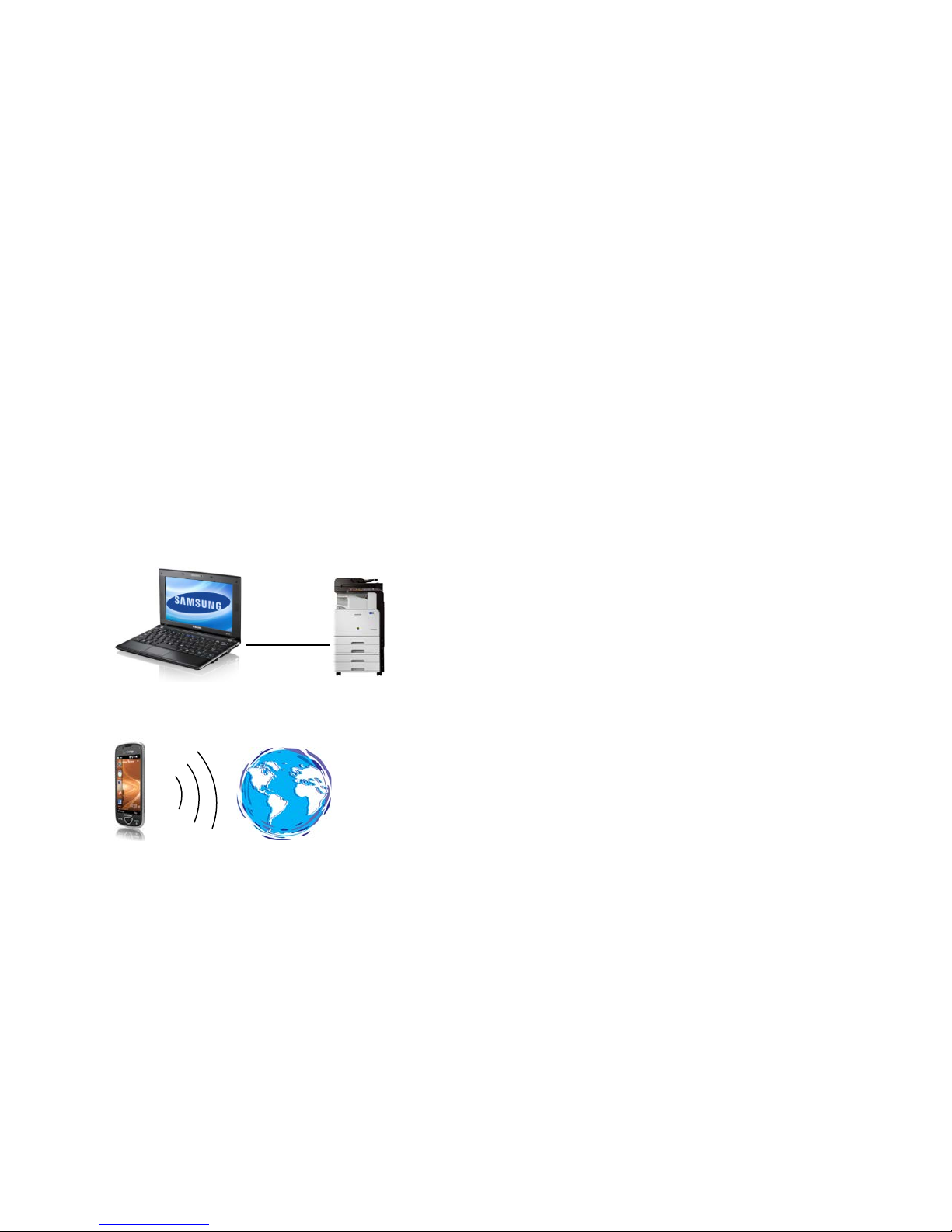
To address this situation we need to understand the path information travels and then we can identify the vulnerabilities
the information can encounter. A simple path is one that uses a single connection such as the path from a computer to a
printer:
A complex path can include several connections over various wired and wireless networks such as sending an email from a
cell phone to several distant locations.
In the Information Technology field, our goal is to make information highly available, but only to the desired recipients.
The tools we use to achieve this goal include data encryption and user authentication.
Page - 6 Copyright 2014 Samsung Electronics Co., Ltd., All rights reserved.
Page 7
MF
P
PC
PC
Security Vulnerable Point
Input
Document
Output
Document
Output Privacy
Invasion
Network
Penetration
Network
Sniffing
Unauthorized
Copy
Unauthorized
Access
Retained
Information
Theft
Unauthorized
FAX Access
Unauthorized
USB Access
SAMSUNG MFP SECURITY WHITE PAPER
1.2 The Objectives of Multifunction Printer (MFP) Security
Information is a resource that by its nature is most valuable when it is being shared with a group working together to
achieve a goal. It is this ability to share information over great distances at the speed of light that has created the
technological world we live in today. Unfortunately the creation of so many ways to access information has also resulted
in so many more ways for unauthorized access to information. So the dilemma IT professionals are faced with is “how do I
balance high availability of information with high security?”
Many formulas and strategies have been developed to determine the level of security that is required and the amount of
harm that would result from breaches in security. This is useful for accounting purposes to determine the cost of security.
However these accounting tools do not help the IT professional implement security.
Samsung has targeted the MFP security as the area of information security where we can add the most value for our IT
customers. MFPs offer many features that process information electronically and on paper. This means that the security
objectives for MFPs must address and target the vulnerabilities of these features.
Page - 7 Copyright 2014 Samsung Electronics Co., Ltd., All rights reserved.
Page 8

WHITE PAPER SAMSUNG MFP SECURITY
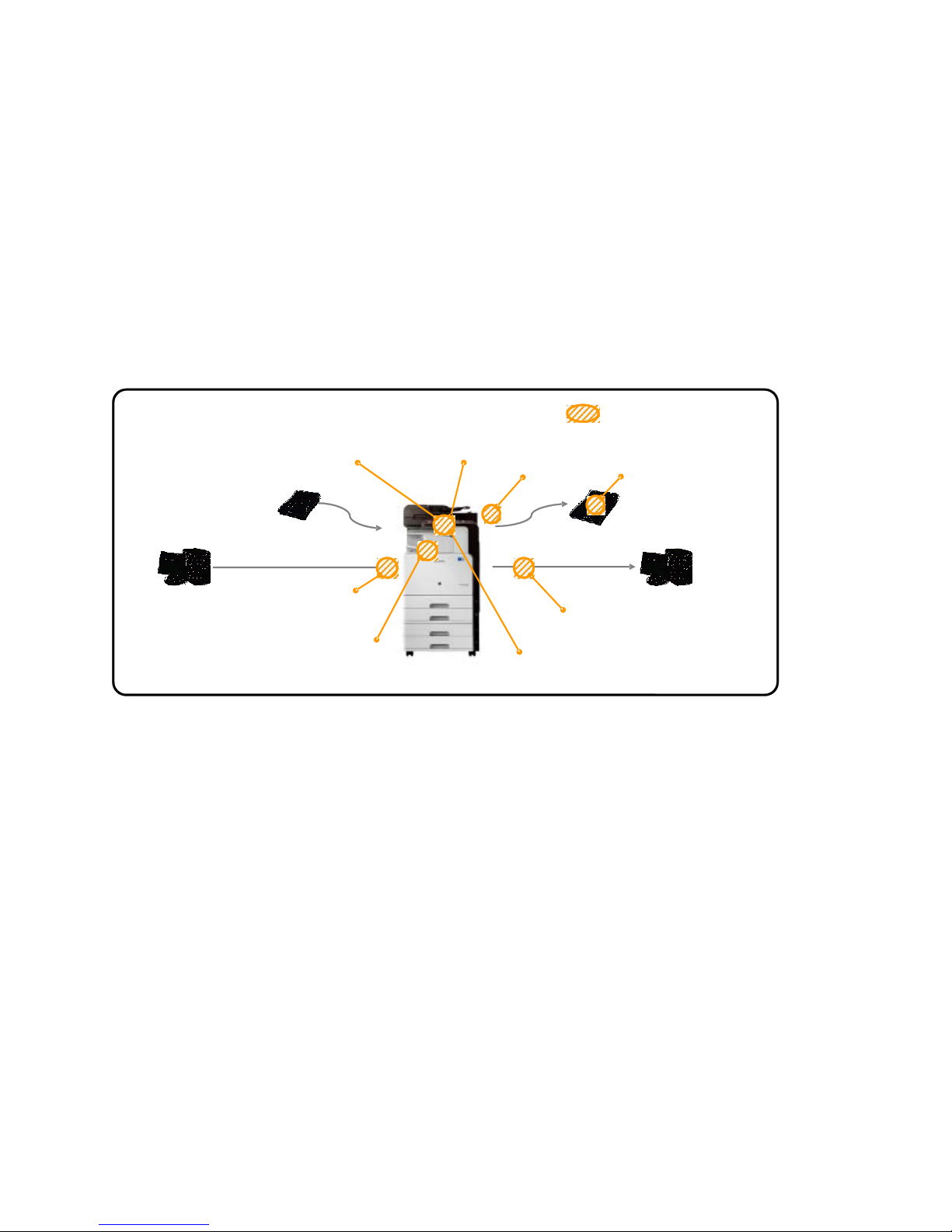
1.2.1 MFP Hardcopy Vulnerability
The primary task of an MFP is to print documents. Printed documents are vulnerable to both unintentional and intentional
security breaches. Potential document security issues include the following:
• Unintentional removal
• Paper jams
• Intentional removal
• Copying
1.2.2 MFP Electronic Vulnerability
The additional tasks an MFP performs (Copy, FAX, Scan, Email, Network, Document Storage), create many more
opportunities for security breaches. These tasks all share a common process – electronic routing of the information.
During this electronic routing, the information can be stored on and transferred through many vulnerable locations on the
MFP. These locations can include the following:
• Phone line (FAX)
• Ethernet (network connection)
• Hard Drive (stored documents from fax, E-mail, network, and scan)
• USB
1.2.3 Common Results of Having an Unsecured MFP
Some of the most common results associated with an unsecured MFP include the following:
• Unauthorized use by a malicious user
• Identity theft
• Stolen information
• Lawsuits from stolen information
• Loss of access
• Loss of productivity.
Page - 8 Copyright 2014 Samsung Electronics Co., Ltd., All rights reserved.
Page 9
Fa mil y Educa tion
Rights and Privacy Act
(F ER PA) prohi bits the
disclosure of personally
identifiable education
inf ormati on without
the w ritten pe rmis sion
of the student or their
guardian.
He alth Ins urance
Portabi li ty and
Accountability Act of
1996 (HIPAA) forces all
healthcare
organizations to
uniformly manage data
to protect patient
inf ormati on and
privacy at all times.
For G ramm-LeachBliley Act of 1999
(GLBA) compliance,
organizations must
complete a risk analysis
on thei r current
proces ses a nd
implement firewalls,
user access, monitor
printi ng, and more .
Fe deral I nforma tion
Se curity Mana gem ent
Act of 2002 (FISM A)
requires that all
networked devices
meet strict i nformation
assura nce.
•CC-ISO15408
•FDIC
•IEEE 2600-2008
•IEEE 2600.1-2009
•DoD 5200.2
•HS PD-12
At Tennessee Tech
University, Social
sec urity number s of
990 students have been
lost due to a misplaced
portable flash drive.
California health
regulators fined Kaiser
Permanente's
Bellflower Hospital
$250,000 for fai ling to
keep employees from
viewing the medical
records of a patie nt.
At Jax Federal Credit
Uni on, clie nt ac count
numbe rs and Socia l
Se curity numbe rs w ere
acci dental ly posted on
the Internet because
the pri nter di d not
encrypt the data being
trans mit ted on the
network.
Depart ment of
Workforce
Development
(Indianapolis)
accidentally disclosed
4,500 Socia l Security
numbers due to a
printi ng error m ade by
a pri nting vendor.
Educa tion ins tituti ons
are adopting the online
environm ent in their
service area –
applications, class
notes , medi cal rec ords,
etc.. This electronic
environm ent is
vulnera ble to security
threats.
With innovative
technological advances,
He althca re now nee ds
to sha re im portant
medical data and
patient information
electronically, creating
a major security
concern.
Financial services have
critical issues in IT
sec urity beca use
more business is
being conducted
electronically than
ever before.
The g overnment puts
an em phasi s on
simplifying processes
and i mproving cross agency collaboration.
To do so, the
governm ent employs
the latest technologies,
while implementing
strict regulations.
• Infor mati on
Technology
Management Reform
Act of 1996
• National Institute of
St andards a nd
Technology
Publication 800
• Health Information
Technology for
Economic and Clinical
Hea lth, 2009
REGULATIONS
EXAMPLES O F
INFORMATION
SECU RITY
BREACH CASE
GENERAL
REQUIREMENTS
SAMSUNG MFP SECURITY WHITE PAPER
2. Security Regulatory Requirements
The importance of the information that is flowing through private and public devices has resulted in the need for broad
regulations to protect this information. Some of these regulations were directly developed to protect information such as
medical records. Other regulations are indirect effects from other sources such as the need for document audit trails for
SOX financial regulation compliance.
Samsung is continuously working with our industry partners to create compatible MFPs that meet the regulatory
requirements of today’s information infrastructure. The MFP security features presented in this paper are able to meet or
exceed the current regulatory requirements of our customers.
Page - 9 Copyright 2014 Samsung Electronics Co., Ltd., All rights reserved.
Page 10
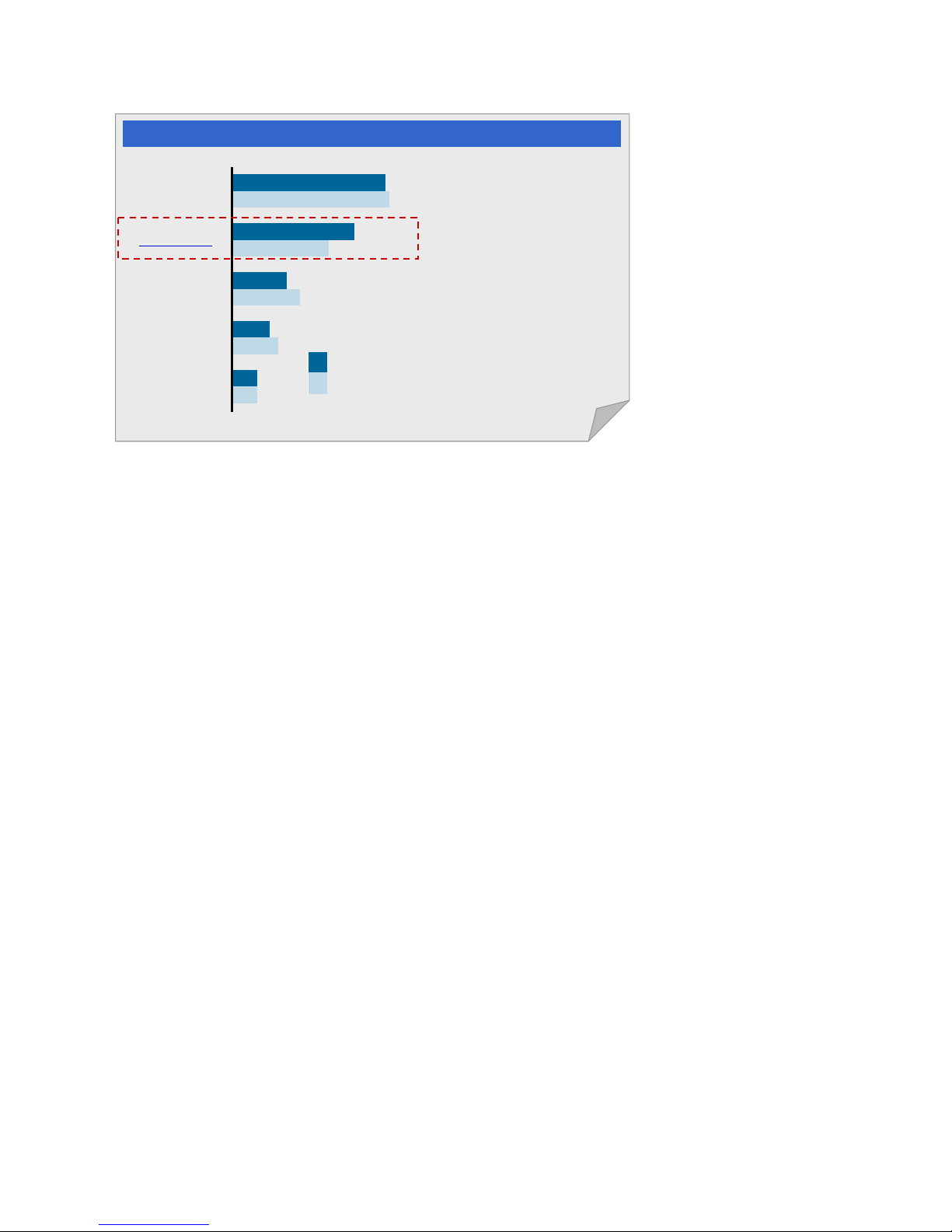
Enterprise
SMB
Data Security
Compliance
Protection
from Damage
to IT Infra.
Secure
Communication
Emerging
Technologies
6%
11%
16%
19%
37%
6%
9%
13%
24%
36%
Many re gulat ions and IT
best practi ces prescribe
appropriate secur ity
requirements to whi ch
organizati ons, especi al l y
within regul at ed vert i cals,
must comply.
Data security , data leak
prevention, identity
management, secur ity
information logging, and
event management are
the most impor tant
security categories.
Regulatory Compliance
• Gartner, Security Purchasing Behaviors, Worldwide, 2008
• Gartner, Global SMB Security Purchasing Behaviors, 2008
WHITE PAPER SAMSUNG MFP SECURITY
3. Security Business Requi rements
Businesses today are constantly creating new ways to use information. IT professionals have the demanding task of
protecting that information from new ways of abuse. The most successful strategy for protecting this information is by
implementing best practices for user authorization and to use devices that provide a high level of security.
Samsung MFP devices employ high levels of security to meet or exceed today’s business security requirements. We are
also working with our business customers to continuously improve our MFP security features.
3.1 Public Sector (Government / Education / Healthcare)
Security Requirements
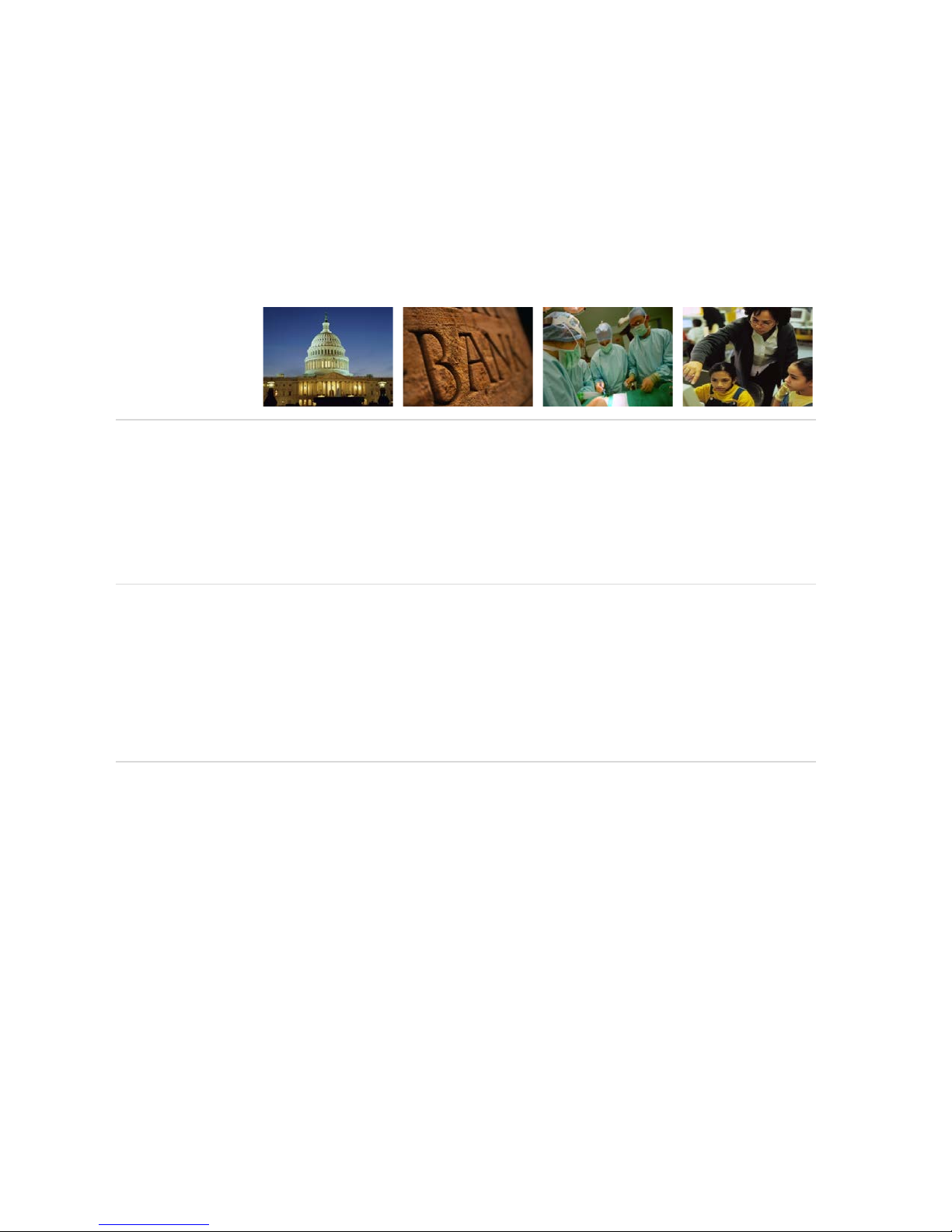
Public sector entities have very specialized security needs. The military must be able to protect sensitive information from
foreign interests. Schools need to be able to protect the integrity of their student’s grades. Healthcare systems must
protect the privacy of their patients.
3.1.1 Government
U.S. government requirements include hard drive overwriting schemes that digitally shred the latent document
information from the hard drive of a device. When devices with hard drives are removed from secure sites, the hard drives
must be removed and physically destroyed.
Regulatory requirements that require these practices include the following:
Page - 10 Copyright 2014 Samsung Electronics Co., Ltd., All rights reserved.
• FISMA
This regulation requires a mandatory set of processes that must be followed for all information systems used or
operated by a U.S. federal government agency.
• HSPD-12
A common identification standard used to ensure that government facilities and sensitive information stored in
networks remain protected.
Page 11

SAMSUNG MFP SECURITY WHITE PAPER
3.1.2 Education
Education requirements include protecting data from teachers, students, or other staff who engage in unauthorized
behavior, either knowingly or inadvertently. These activities can include: improper storage of passwords, students
practicing their hacking abilities, and individuals attempting to access the system to modify their grades. Many of these
risks can be avoided by implementing usage policies. These policies can add clarity to the tasks required of the network
administrator. The policies should include the following:
• Password Policy
• Acceptable Use Policy;
• Anti-Virus Procedures;
• E-mail Policy;
• Remote Access Policy;
• Encryption Policy;
• System Audit Procedures;
• Confidentiality and Data Distribution Procedures
• Copyright Compliance Policy.
Regulatory requirements that require these practices include the following:
• FERPA
A federal law that protects the privacy of student education records.
• FISMA
Requires a mandatory set of processes that must be followed for all information systems used or operated by a U.S.
federal government agency.
• HSPD-12
A common identification standard used to ensure that government facilities and sensitive information stored in
networks remain protected.
3.1.3 Healthcare
The healthcare industry is required to manage highly sensitive and private information for all of the patients in the system.
Advances in IT have allowed them to manage this data more efficiently and cost-effectively, and it has allowed patients to
be more proactive in managing their personal healthcare data. Now medical records are documented electronically in the
exam room, patients can request their records over e-mail, and health records can be accessed online. All of these
advances in management, distribution, and storage of health records also make them vulnerable to unauthorized access.
Regulations requiring the healthcare industry to protect this information from unauthorized access include HIPAA
compliance.
HIPAA Compliance
Electronically-distributed patient information requires strong data security. The Health Insurance Portability and
Accountability Act of 1996 (HIPAA), requires that Protected Health Information (PHI) remain secure at all times. In
addition, recent regulations and mandates from the Department of Health and Human Services apply to HIPAA covered
entities and any of their business associates that “access, maintain, retain, modify, record, store, destroy, or otherwise
hold, use, or disclose unsecured PHI.”
Page - 11 Copyright 2014 Samsung Electronics Co., Ltd., All rights reserved.
Page 12

WHITE PAPER SAMSUNG MFP SECURITY
3.2 Private Sector Security Requirements
Private sector security requirements include authorization and encryption which is standard across all business sectors.
However, private businesses have the added requirement of SOX compliance.
SOX
The Sarbanes-Oxley Act of 2002 (SOX) was enacted in response to several high-profile financial scandals. The SOX act is
aimed at enforcing corporate responsibility by improving financial disclosures, and avoiding corporate and accounting
fraud. SOX contains many requirements aimed at standardizing financial reporting procedures. The requirement that
targets IT policies is section 404 of the act, “Management Assessment of Internal Controls.”
COBIT
The Control Objectives for IT (COBIT) is a framework that is commonly used by IT departments to comply with SOX.
COBIT is set of standard IT policies and procedures that can be adopted by all businesses. By using COBIT, an organization
can quickly design IT controls to comply with SOX. This includes deploying the right security solutions in the right areas:
• Identity Management
Each user must be uniquely identifiable. User identities and access rights must be maintained in a central repository.
• User Account Management
Account management procedures must exist for requesting, establishing, issuing, suspending, modifying, and closing
user accounts and related user privileges, as well as performing regular management reviews of all accounts and
related privileges.
• Logs, Alerts and Reports
Logging and alerting policies require recording and notification of abnormal access events. Reporting policies require
authorized managers to generate periodic event and log reports.
• Network Devices
This regulation requires secure network devices to be used to ensure authorized system access and to preserve
information integrity to and from networks. Network devices should be capable of central management from remote
locations. Devices should deliver a high level of data security by providing strong, full-disk encryption and access
control to ensure the secure exchange of sensitive data by ensuring the integrity and authenticity of data.
SOX section 404 compliance provides the momentum for most IT organizations to develop and document the IT security
controls and processes needed to support financial reporting. Protecting the integrity of information and controlling
access to resources are not only essential elements for the preservation of a company but are also requirements for
compliance.
Page - 12 Copyright 2014 Samsung Electronics Co., Ltd., All rights reserved.
Page 13

SAMSUNG MFP SECURITY WHITE PAPER
4. Common Criteria Security Validation
Information systems are growing every day and the IT professionals that manage these
systems need to keep up with this growth. As with all other aspects of business these
days, they are trying to achieve more without adding any new personnel. To
streamline the process of choosing network devices, a standard has been
developed for certifying the security features/claims of a device. The process is known
as Common Criteria.
Only when each of the security features passes Common Criteria testing does the device
security level get rated and do they issue a Common Criteria certificate.
Products validated under the Common Criteria program provide customers with a high degree of confidence that they
address the security issues described in the posted evaluation documents. CCRA posts the claims and evaluation reports
on their Web site. Listings can be accessed by going to the Common Criteria Portal:
Samsung is proud to have received EAL 3 certification for our MFP security features.
The Common criteria conformances were either to Samsung Security Target
(1) Samsung Security Target includes a set of security claims that have been validated by a Common Criteria certified lab. For more deta ils, refer to the listings on the
following web page:
http://www.commoncriteriaportal.org/.
http://www.commoncriteriaportal.org/
(1)
or to IEEE-2600-2009.1 Protection Profile.
Page - 13 Copyright 2014 Samsung Electronics Co., Ltd., All rights reserved.
Page 14
WHITE PAPER SAMSUNG MFP SECURITY
5. IEEE 2600™-2008, IEEE 2600.1™-2009, IEEE 2600.2™-2009
(2)
The Institute of Electrical and Electronics Engineers (IEEE) Standards Association (IEEE-SA) is a recognized standards
sanctioning body responsible for creating, developing, integrating, sharing, and applying knowledge about information
technologies and sciences. The IEEE SA developed new security standards focused on modern network printers and
hardcopy peripherals (such as copiers and multifunction devices) with the goal of preventing unauthorized access.
The IEEE 2600™-2008, "Standard for Information Technology: Hardcopy System and Device Security standard defines
security requirements (all aspects of security including but not limited to authentication, authorization, privacy, integrity,
device management, physical security and information security) for manufacturers, users and others on the selection,
installation, configuration and usage of hardcopy devices and systems; including printers, copiers, and multifunction
devices.
For more information about IEEE 2600™, go to:
http://standards.ieee.org/getieee/2600/index.html
This standard identifies security exposures for these HCDs and systems, instructs manufacturers and software developers
on appropriate security capabilities to include in their devices and systems, and instructs users on appropriate ways to use
these security capabilities.
Prior to IEEE 2600, there were no standards to guide manufacturers or users of hardcopy devices in the secure installation,
configuration, or usage of these devices and systems.
Based on the IEEE 2600-2008 standards the IEEE developed the following standards:
• IEEE 2600.1-2009
• IEEE 2600.2-2009
These standards provide a set of criteria/security requirements for Common Criteria labs, so they can verify that an MFP
meets the IEEE standard requirements.
By complying with the IEEE 2600.1™-2009 standard, Samsung also complies with the IEEE 2600-2009.2 standard.
(3)
Samsung is a proud sponsor of this new standard and the new MFPs are now certified for the IEEE 2600.2-2009
standards.
For more information, refer to the listings on the following IEEE website:
http://grouper.ieee.org/groups/2600/conforming_products.html.
Page - 14 Copyright 2014 Samsung Electronics Co., Ltd., All rights reserved.
Page 15
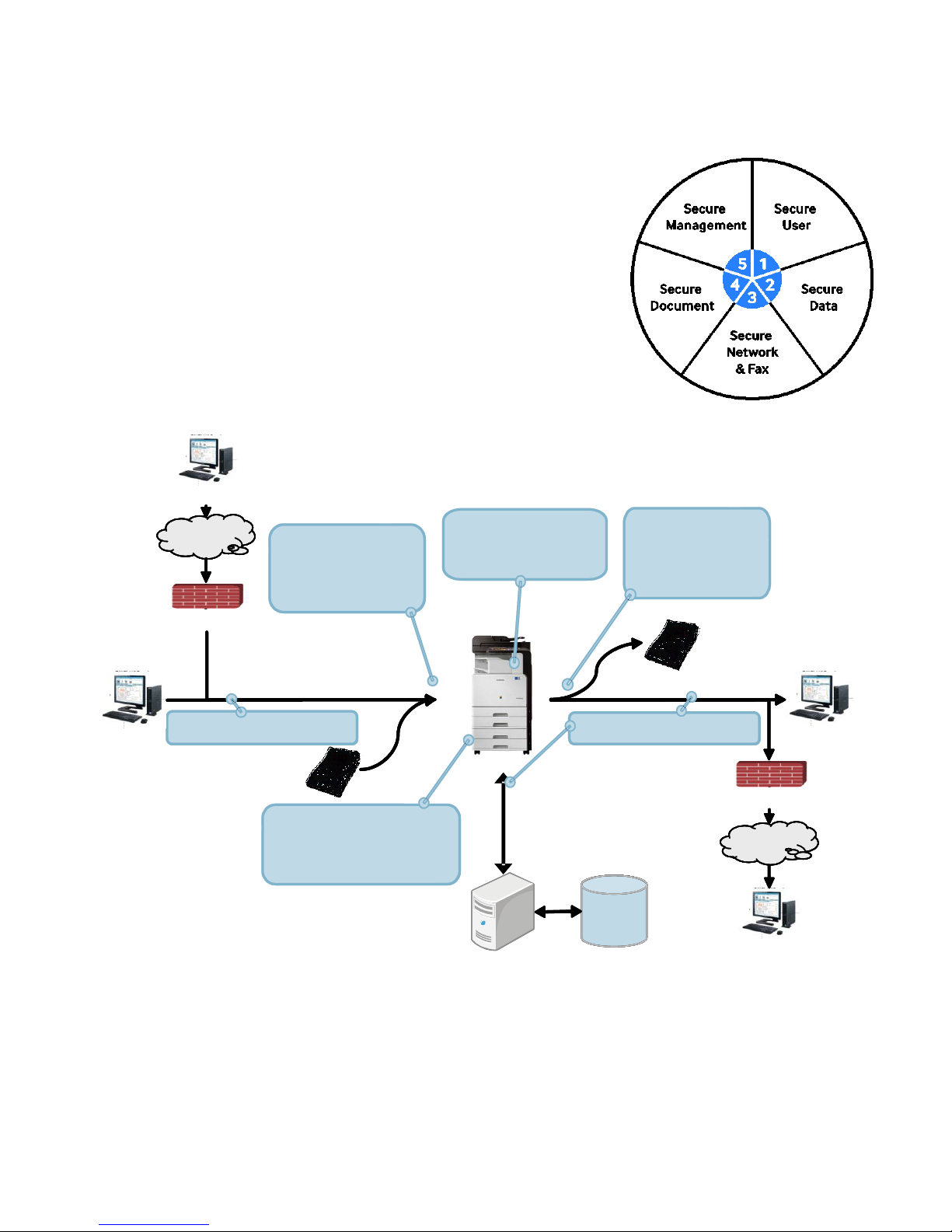
•
N/W Access Control
MFP
PC
Internet
PC
Firewall
PC
Internet
PC
Firewall
Secure
Network
Secure
Network
& Fax
Secure User
Secure Data
Secure Document
Secure Mgmt.
Storage
Server
•
Authentication
•
Authorization
•
Accounting
•
N/W Access Control
•
N/W Access Control
MF
PC PC
Internet
PC PC
Firewall Firewall
PC PC
Internet
PC PC
Firewall Firewall
Secure
Network
& Fax
Secure User
Secure Data
Secure Document
Secure Mgmt.
Storage
•
Data Encryption
•
Image Overwrite
•
Secure Print
•
Secure Fax
•
Watermark
•
Stamp
•
Job Auditing
•
Log Management
•
Data Backup
• E -
Mail Notification
SAMSUNG MFP SECURITY WHITE PAPER
6. Samsung’s Security Framework
Samsung defines its security framework with five security categories to cover
all areas of security in the business environment. This framework is built to
protect your most important information and keep your documents safe
throughout the document life cycle. The categories of this framework include
the following:
1. Secure User
2. Secure Data
3. Secure Network and Fax
4. Secure Document
5. Secure Management
Page - 15 Copyright 2014 Samsung Electronics Co., Ltd., All rights reserved.
Page 16
WHITE PAPER SAMSUNG MFP SECURITY
7. Secure User
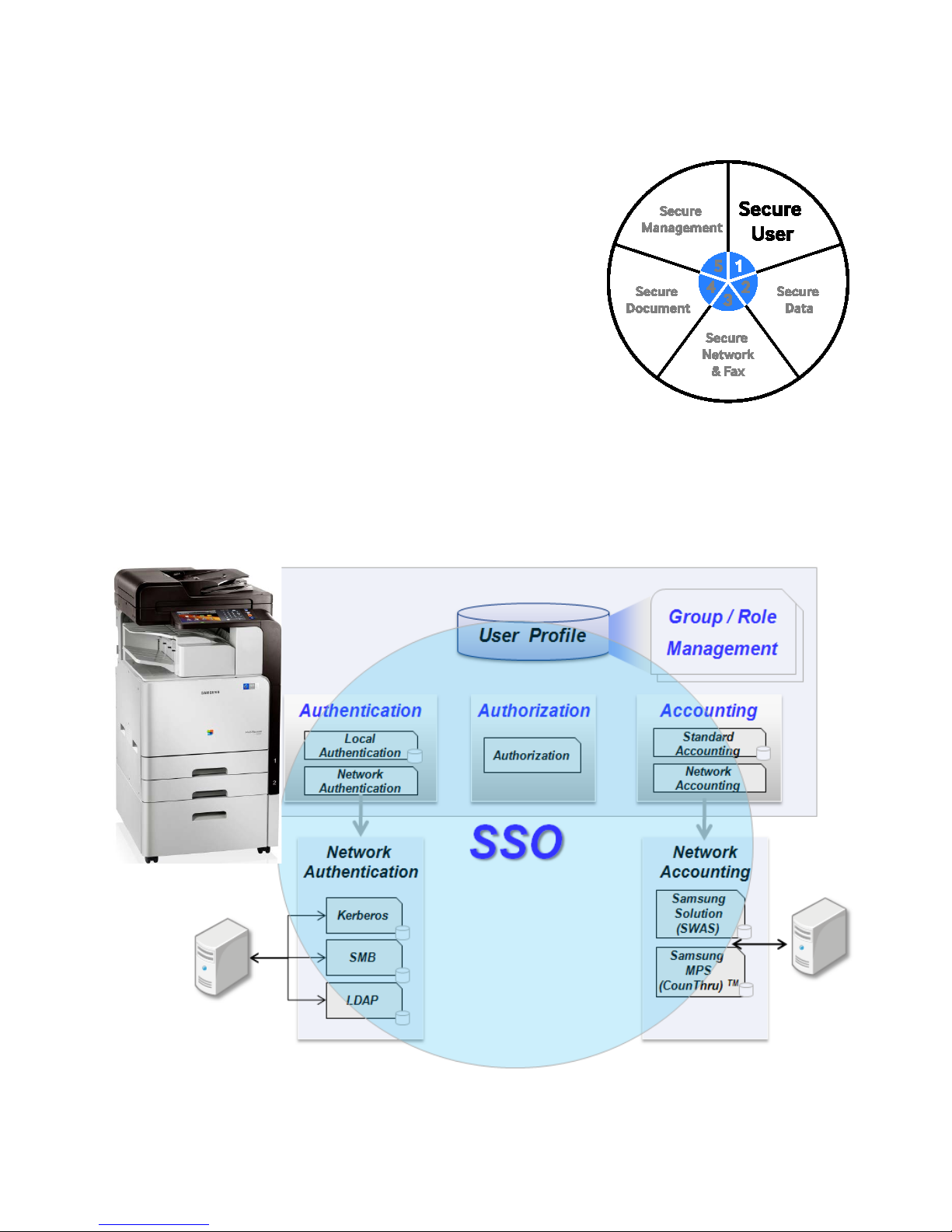
The Secure User category of the Samsung Security Framework includes the
features needed to protect the MFP from access by unauthorized users.
These features include the following:
• System Authentication (for Administrators)
• Authentication ( Local, NW)
• XOA-E / XOA Web Authentication
• Authorization (Group/Role Management)
• Accounting
• Single Sign-On (SSO).
The Secure User feature is designed to allow only authorized users to access the MFP, protecting your valuable
information from unauthorized access.
Both large office groups and small to medium size offices can use our secure user features to easily enhance their secured
environment.
Page - 16 Copyright 2014 Samsung Electronics Co., Ltd., All rights reserved.
Page 17

SAMSUNG MFP SECURITY WHITE PAPER
7.1 Authentication
Authentication is used by Samsung MFPs to confirm that a user has rights to access the MFP. MFP authentication includes
the following security checks:
• System Authentication
• Local Authentication
• N/W Authentication
• Employee Badge / HID Proximity Card
• Smartcard Authentication / Common Access / PIV Card
7.1.1 System Authentication
Samsung MFPs require the system administrator to enter their authentication information before allowing access to the
system management menus. The System Administrators role includes SyncThru
local system administrator. The authentication process for the SyncThru
and a password on the user interface, the authentication process for the local MFP system administrator uses a PIN
number on the MFP user interface. The system administrator must enter a PIN to access the system administration
functions. The SyncThru
TM
Service UI, and the local administrator must type their PIN number in to the MFP UI. The security software displays
asterisks instead of characters to hide the characters they enter.
The authentication process is delayed by the MFP UI for three minutes when 3 wrong PINs are entered in succession.
When 3 wrong PINs are entered in the SyncThru
software will send an error message to the browser session screen.
7.1.2 Local Authentication
When the Authentication mode is enabled, a local MFP user must enter a password to access the menu. The password for
a local MFP user can be up to 15 characters in length, and it can include alphabetic, numeric and special characters. The
password complexity consists of upper case letters, lower case letters, numbers and special characters.
7.1.3 Network Authentication
The Samsung MFP prevents unauthorized use of the network options (network scanning, scan-to-e-mail, and scan-toserver). The MFP System Administrator sets the network options available for each user. To access a network service, the
user must provide a user name and password, which is then validated by the designated authentication server.
Network authentication includes 802.1x, Kerberos, SMB and LDAP. LDAP (Lightweight Directory Access Protocol) is a
software protocol for enabling anyone to locate organizations, individuals, and other resources such as files and devices on
a network, whether on the public Internet or on a corporate intranet.
TM
TM
Web Service administrator uses an account
Web Service administrators and the
Web Service administrator must enter their account and password in to the SyncThruTM Web
TM
Web Service UI from one particular browser session, the security
7.1.4 XOA –E / XOA Web Authentication
The Samsung MFP additionally provides XOA-E / XOA Web authentication to prevent unauthorized use of the network
options (network scanning, scan-to-e-mail, and scan-to-server). XOA-E authentication server is located inside MFP and
XOA Web authentication server is located outside MFP. That is, the Samsung MFP provides various authentication
methods which are implemented by ISVs
Page - 17 Copyright 2014 Samsung Electronics Co., Ltd., All rights reserved.
Page 18
WHITE PAPER SAMSUNG MFP SECURITY
7.2 User Authentication Scenarios
The following are examples of different user authentication configurations.
7.2.1 For Administrators
Method Setup
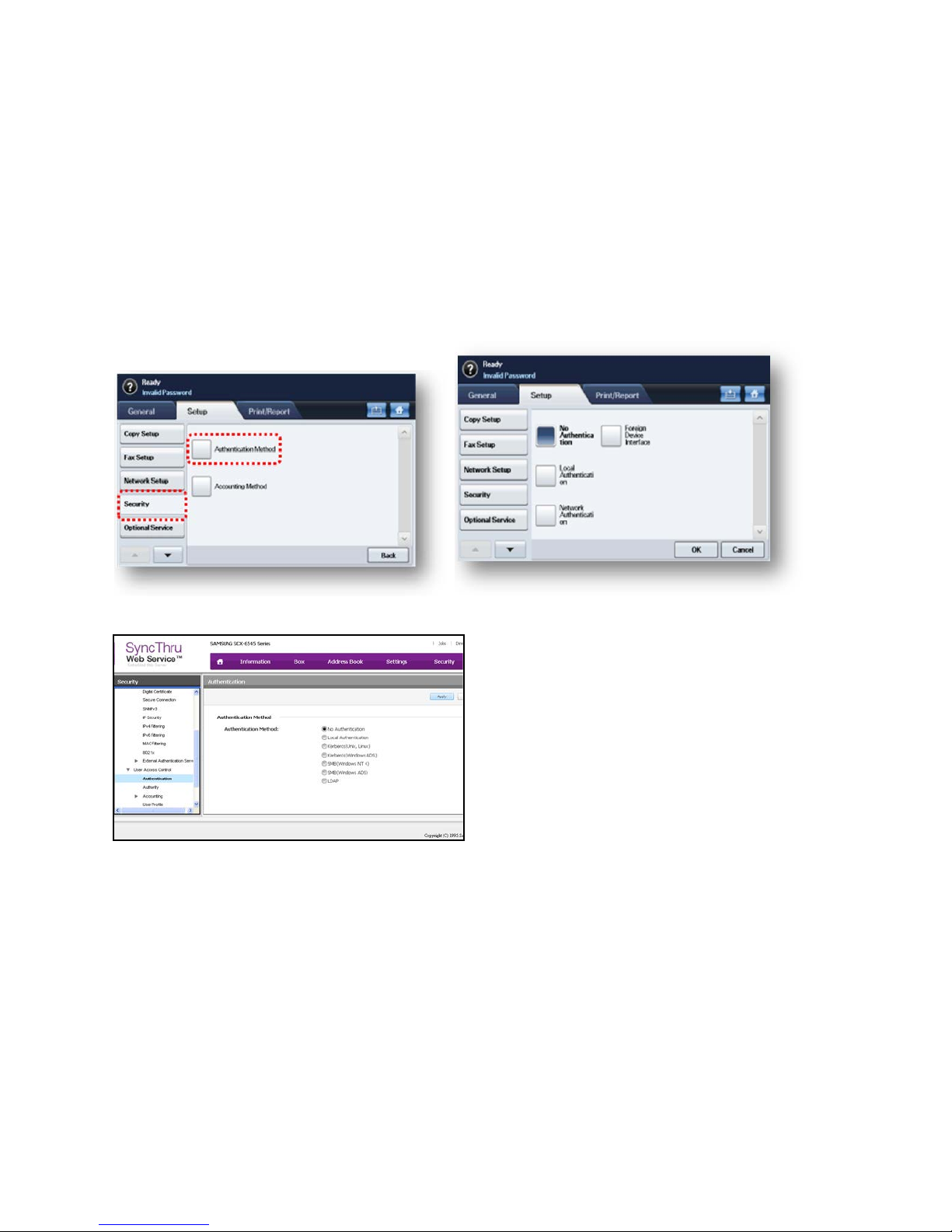
The Authentication Method can be set up by using the Local UI and the Web-UI. Only Administrator can use these
functions, after logging in to the MFP. The Administrator can select from the following methods: No Authentication, Local
Authentication, Network Authentication (Kerberos, SMB, and LDAP), and XOA-E/XOA Web Authentication.
Local UI:
SyncThru
TM
Web Service UI:
Page - 18 Copyright 2014 Samsung Electronics Co., Ltd., All rights reserved.
Page 19
SAMSUNG MFP SECURITY WHITE PAPER
ID and Password Setup
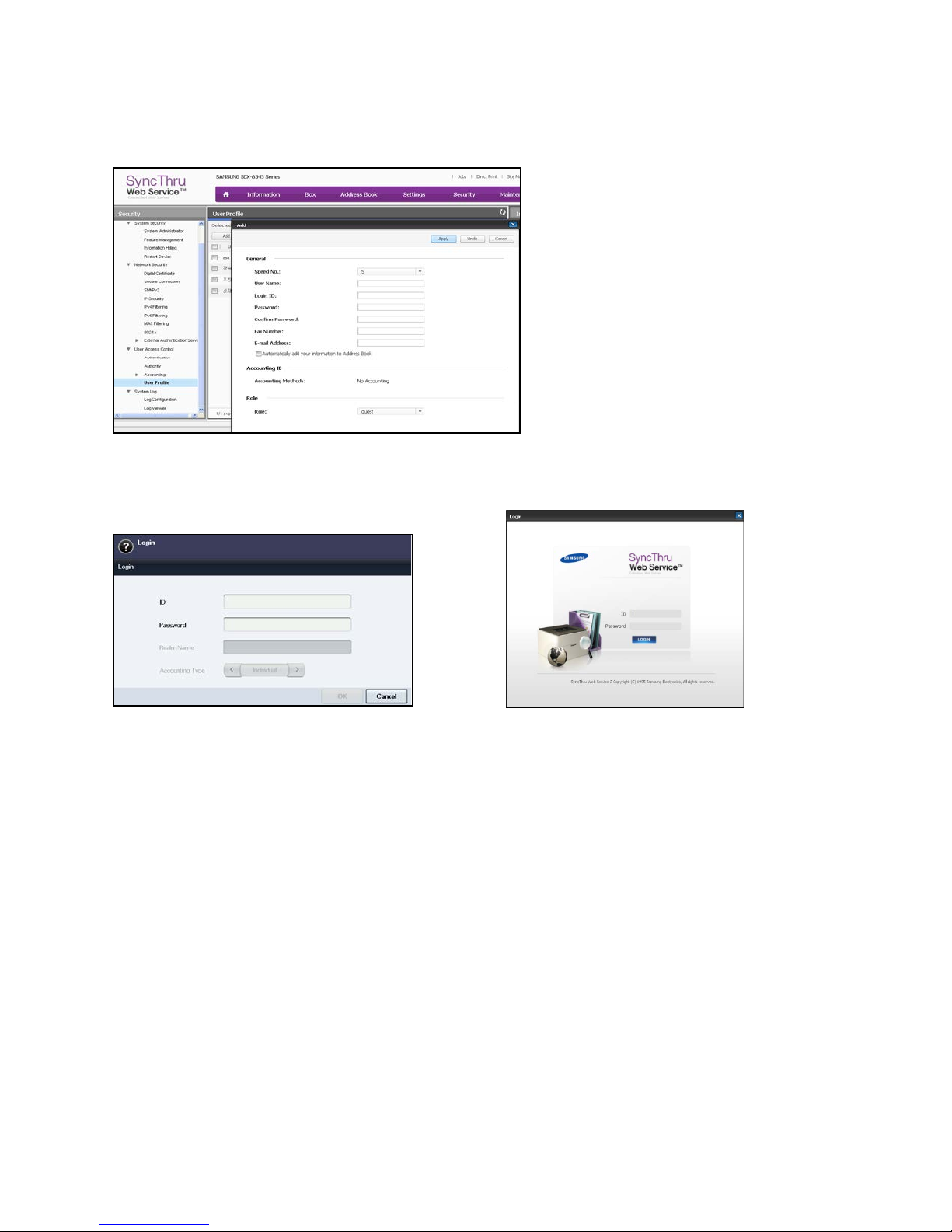
The system administrator can create each user’s ID and Password by using the Web-UI.
When the Authentication mode is enabled, a User can log in to the device through the Local UI or through a Network
connection. Only authorized users can access the device after successfully logging on. The following are examples of
Local and Network login screens:
7.3 Authorization (Group/Role Management)
A common form of user management is known as Role-Based Access Control (RBAC). By using a defined set of roles, an
administrator can easily assign access to a user by assigning them to a role. Adding a user to a group also allows the
administrator to manage access for large groups of users. Examples of Roles for the MFP are Print only; Scan Only, Copy
Only or any combination of these and others.
7.3.1 Using Group and Role-Based Authority
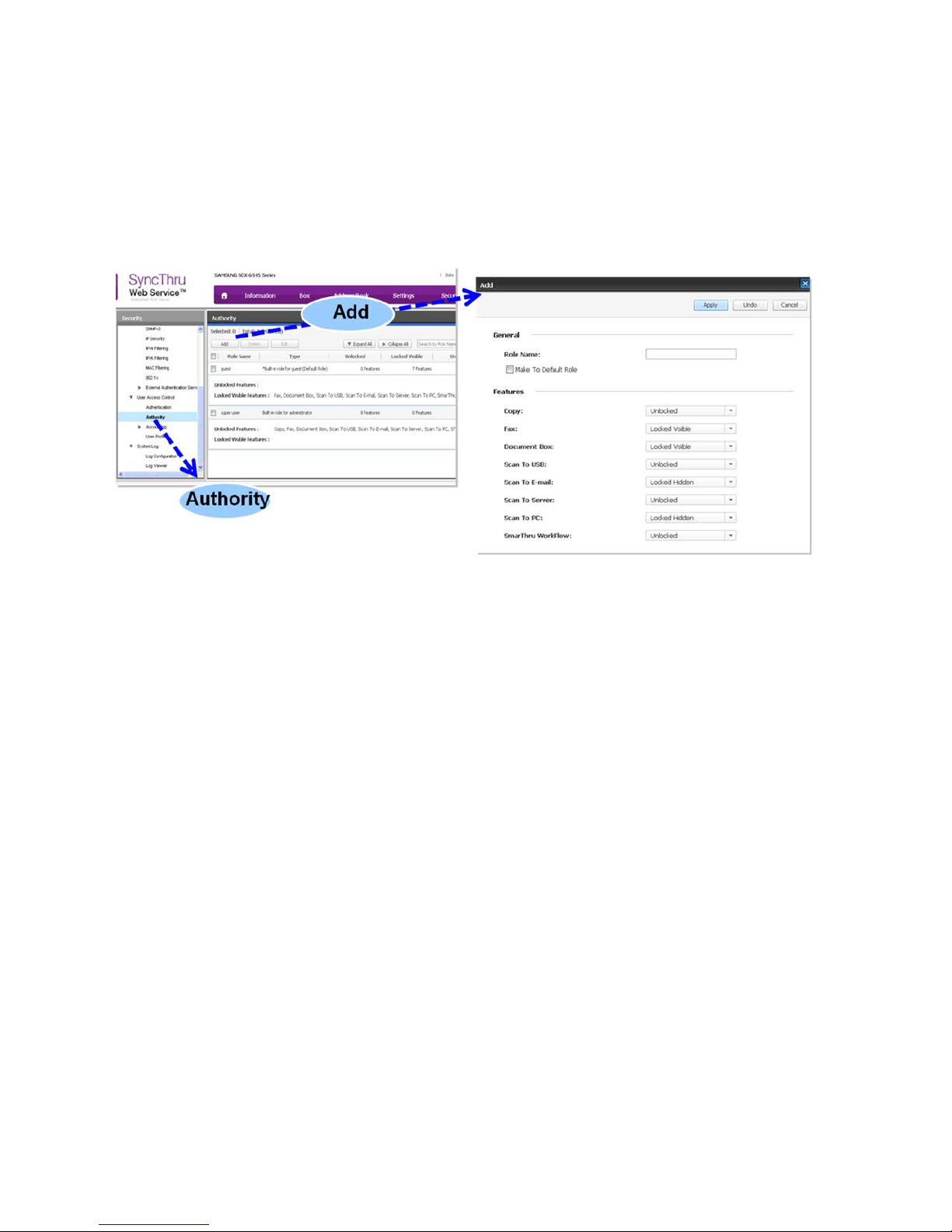
The Administrator can create several groups with different user roles by using SyncThruTM Web Service. With this function,
the user property of Authorization, Authentication and Accounting can be controlled by Group/Role definitions. For
example, when Group “A” has only “Copy” authority, a user in that group can only use 1 Copy feature but not other
features like Faxing or Scanning.
Page - 19 Copyright 2014 Samsung Electronics Co., Ltd., All rights reserved.
Page 20
WHITE PAPER SAMSUNG MFP SECURITY
7.4 User Authorization Scenarios
The following are overviews of User Role and Group menus.
7.4.1 Administrator Menu
The Administrator uses the Web UI to set up the Role and Group Authorization modes. This feature is only accessible to
the Administrator and it requires an ID and password.
The features that can be assigned to Users and Groups include the following:
• Color
• Copy
• Fax
• Document Box
• Scan To USB
• Scan To E-mail
• Scan To Server
• Scan To PC
• Address Book
• Job Quese
• Admin Setting
Each feature can be given one of the following permissions:
• Unlocked
• Locked Visible
• Locked Hidden.
Page - 20 Copyright 2014 Samsung Electronics Co., Ltd., All rights reserved.
Page 21
SAMSUNG MFP SECURITY WHITE PAPER
7.5 Accounting
Accounting is the process of collecting MFP usage data by Device, Group, and User. This section describes the accounting
features used by the MFP.
7.5.1 Standard and Network Accounting
Samsung MFPs track User Accounting for each impression of each job. Based on the User’s ID, the Administrator can
count each job for Users and Groups. This allows you to see the cost for MFP usage by User and Group.
The system supports the following types of accounting method to support this functionality:
• Local User for Standard Accounting
TM
• Network User for Server based Accounting (SyncThru
Admin 5, CounThruTM)
7.6 User Accounting Scenarios
7.6.1 For Administrators
Accounting modes can be set up by using the Web-UI or the Local UI. When Network Accounting is enabled, you can use
the SyncThru
TM
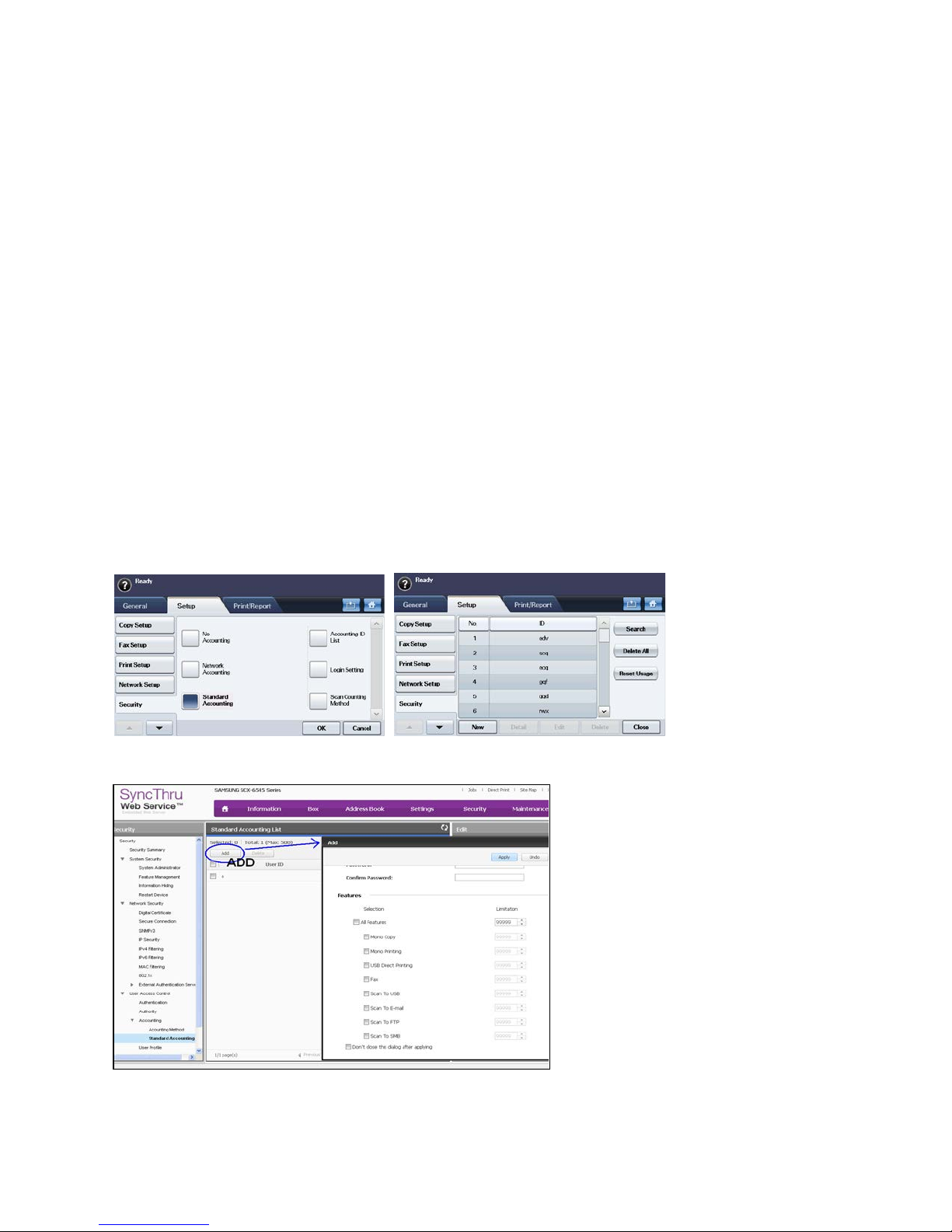
Admin 5 and CounThruTM solutions. Standard Accounting allows the Administrator to manage the
Accounting IDs list and the Login Settings (ID/Password or ID only). Detailed Accounting can be set up with the Web-UI,
allowing the Administrator to manage limitations on Copying, Printing (Color, Black), Fax, and various Scanning options.
The following are examples of the Standard Accounting menus on the Local UI:
The following is an example of a Standard Accounting menu on the Web UI:
7.6.2 For Users
When a user logs on to the MFP, they can view their own accounting statistics for usage.
Page - 21 Copyright 2014 Samsung Electronics Co., Ltd., All rights reserved.
Page 22
WHITE PAPER SAMSUNG MFP SECURITY
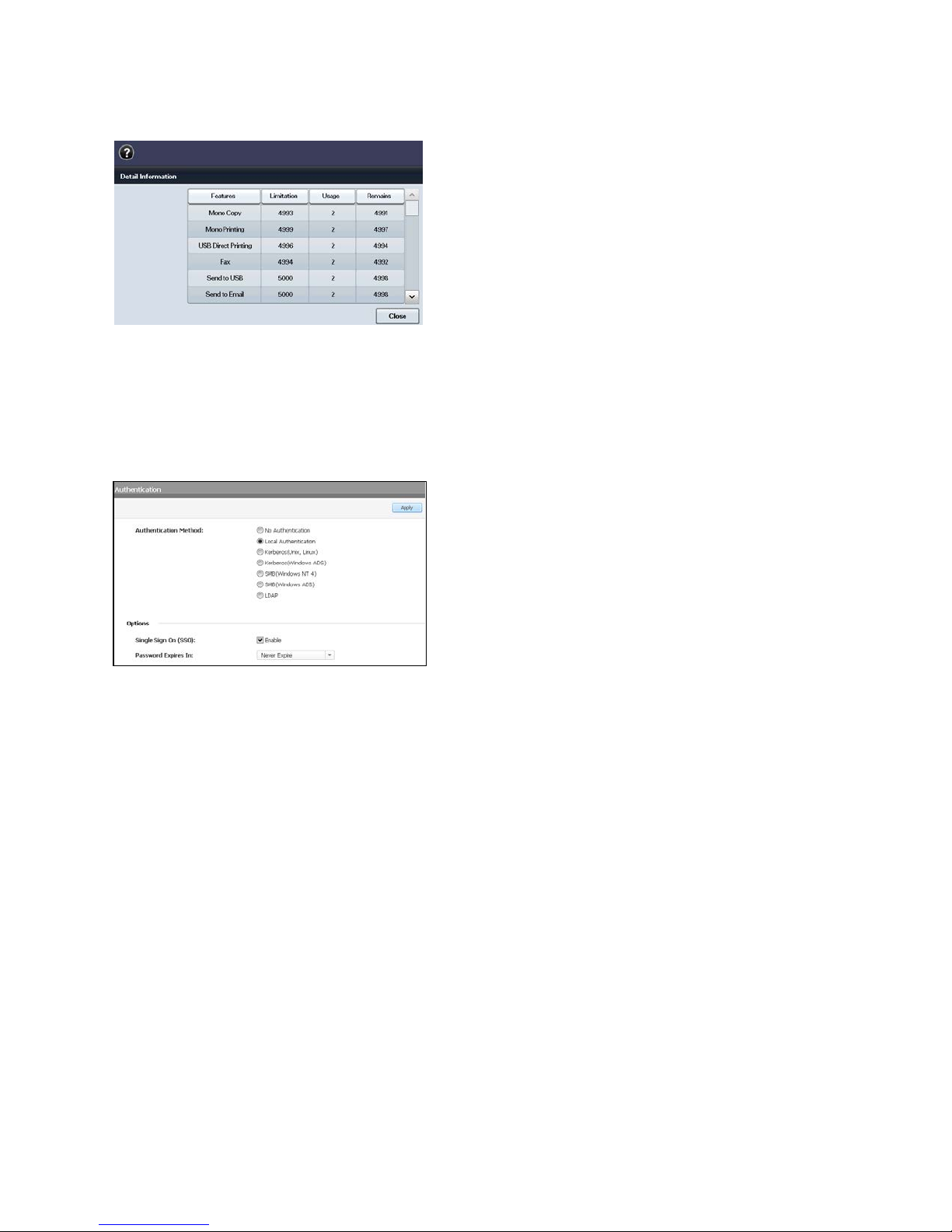
The following is a User Accounting view on the Local UI:
7.7 Single Sign-On (SSO)
The SSO feature allows the user to only log-in to the system (Local and Network) once. SSO remembers the authority and
authentication automatically based on initial user ID/PW input values. The SSO feature controls all of “Secure User”
functions such as Authentication, Authorization, and Accounting. The SSO feature is configured through the SyncThru
Web Service.
TM
7.8 Key Benefits of “Secure User”
This section describes the benefits provided by the Samsung Secure User category of the Samsung Security Framework.
7.8.1 Good Basic Security
“Secure User” protects the Samsung MFP from unauthenticated or unknown user access. This is a very basic step in
protecting your valuable data and information on the MFP.
7.8.2 Increased Productivity
Simple user management tools allow administrators to easily perform their administrative tasks from one location to
several devices. A Single Sign-On path for authorizing multiple MFP features allows easy access for end users to the
information and resources they need. Both of these features provide the increased productivity required by today’s lean
business model.
7.8.3 Cost Control
Accounting allows you to track job costs and charge the correct departments for their portion of the MFP expenses.
Page - 22 Copyright 2014 Samsung Electronics Co., Ltd., All rights reserved.
Page 23
SAMSUNG MFP SECURITY WHITE PAPER
8. Secure Data
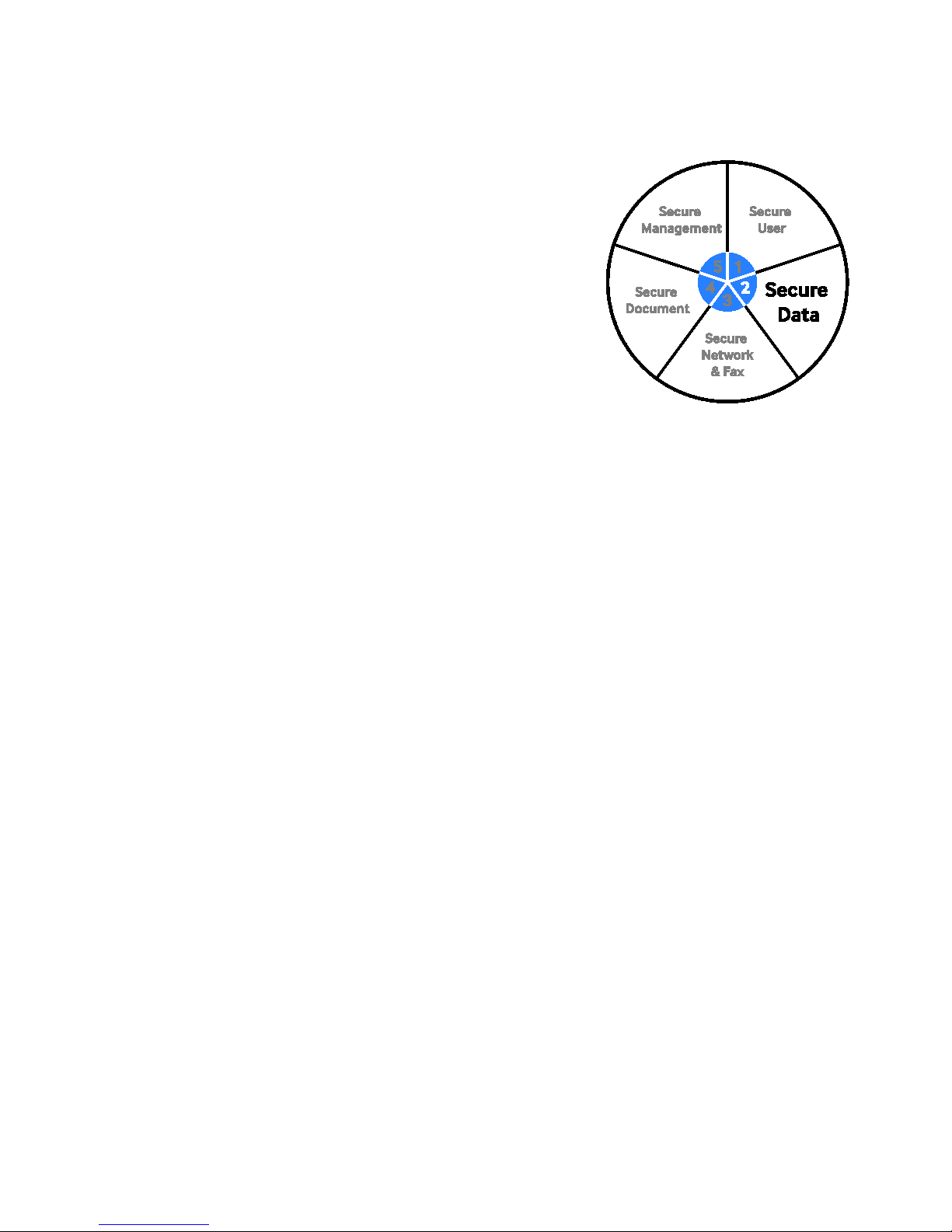
The “Secure Data” category of the Samsung Security Framework is
designed to protect your valuable data from threats while it is residing or
passing through the MFP. Confidential and private data such as patient
information, student records, client information in banks, insurance
companies, etc. must now be protected on an MFP in the same way a
server must be protected from unauthorized access. It is no longer
surprising to find MFPs and printers equipped with hard drives. These hard
drives store various types of hardcopy information such as, user
information, copy/scan/fax/print images from processed jobs, and device
activity logs. Some or all of the information on the hard drives need to be
protected securely. Hard drive overwriting technology and encryption are the
industry standard methods for securely protecting the data.
Samsung’s “Secure Data” protects your valuable data by using advanced
security features like Encryption of the hard drives, scans and Network printing, and hard drive image overwriting.
8.1 Encryption
Encryption is the process of changing data into useless characters that must be unscrambled by using a key. The Samsung
Secure Data feature uses the following methods:
• Hard Disk Drive (HDD) Encryption
• Print Job Encryption
• PC Scan Security
• Secure PDF (PDF Encryption, Digital Signature in PDF)
• Secure Email (SMTP).
• E-mail Encryption
8.1.1 Hard Disk Drive (HDD) Encryption
To protect the confidentiality of the data stored on a computer HDD, encryption is used. Data on the HDD is written in
plain text which makes it available for everyone to read. To prevent this from occurring, HDD encryption is required.
Samsung MFPs protect data by using built-in AES-256 HDD encryption technology.
Page - 23 Copyright 2014 Samsung Electronics Co., Ltd., All rights reserved.
Page 24
Samsung’s Security Kit enable highly-sensitive information to be
sponsored by the National Security Agency (NSA) and NIST.
WHITE PAPER SAMSUNG MFP SECURITY
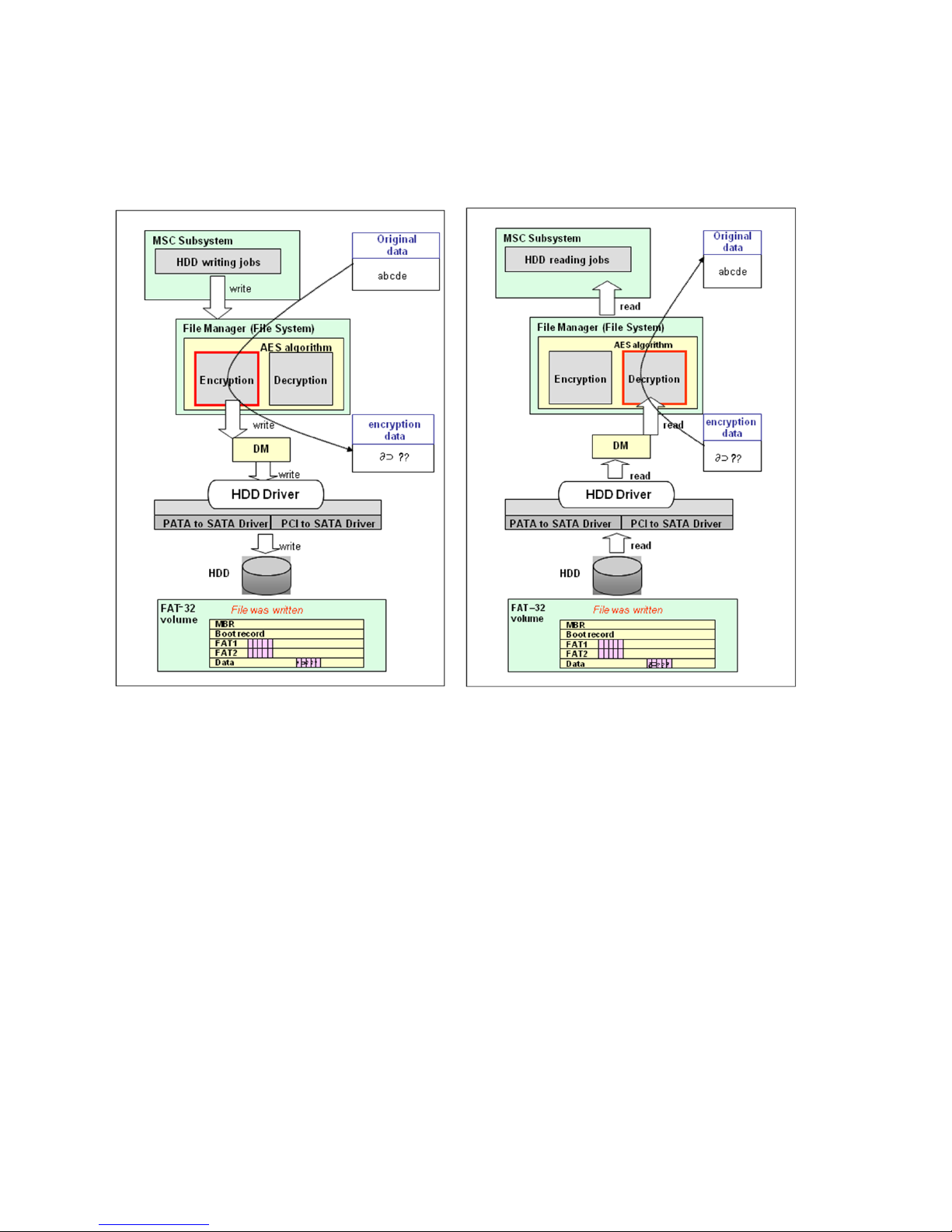
Example of HDD encryption
When a user stores data on the HDD, the original data is encrypted and stored on the HDD. When the user retrieves the
data from the HDD, the encrypted data is decrypted using a key before it is sent to the user. HDD encryption is a built-in
feature available on all HDD-equipped Samsung MFPs.
securely printed, copied, scanned and faxed, helping minimize your
exposure to data theft from memory retention. The Data Security Kit is
able to first encrypts the image data and then overwrite it after the job
is complete. The security Kit was validated by the National Information
Assurance Program’s (NIAP) at EAL3
Common Criteria (ISO15408) program, which is
Samsung offers our optional Common Criteria certified Secure Data Kit. This Secure Data Kit includes security features
such as image overwrite options, Hard Drive encryption, and SSL/TLS. This kit provides up-to-date security technology,
letting you achieve the highest level of security
Page - 24 Copyright 2014 Samsung Electronics Co., Ltd., All rights reserved.
Page 25
SAMSUNG MFP SECURITY WHITE PAPER
8.1.2 Print Job Encryption
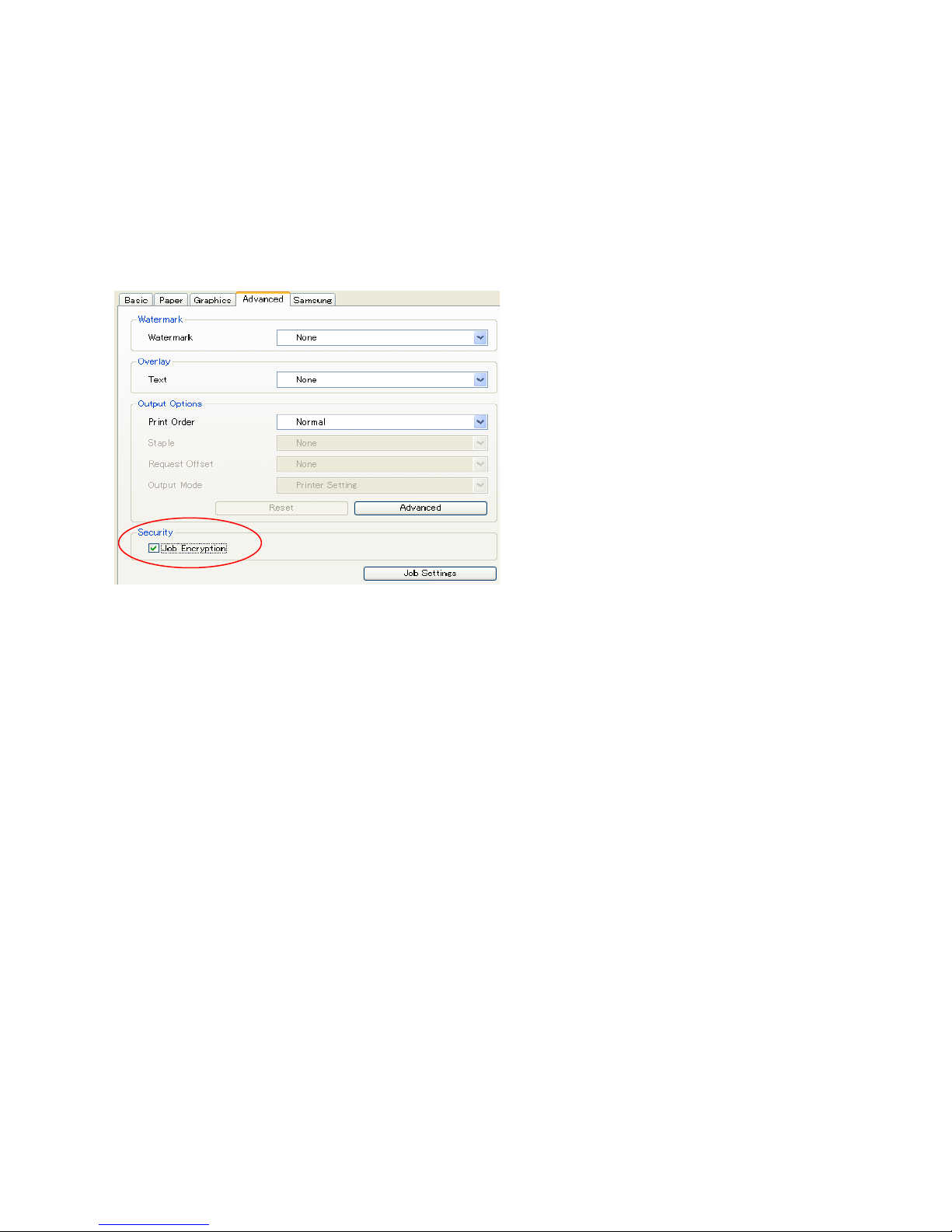
Print Job Encryption encrypts the data used by the network while printing. The network encryption process follows this
path: Make and share keys (ECDH) --> Encrypt data (AES) --> Transmit encrypted data --> Decrypt data --> Print decrypted
data.
This feature can be enabled from the Printer Driver and it is transparent to the User.
There is no visible printing performance deterioration even when the encryption is enabled.
Page - 25 Copyright 2014 Samsung Electronics Co., Ltd., All rights reserved.
Page 26
WHITE PAPER SAMSUNG MFP SECURITY
8.1.3 Secure PDF - PDF Encryption
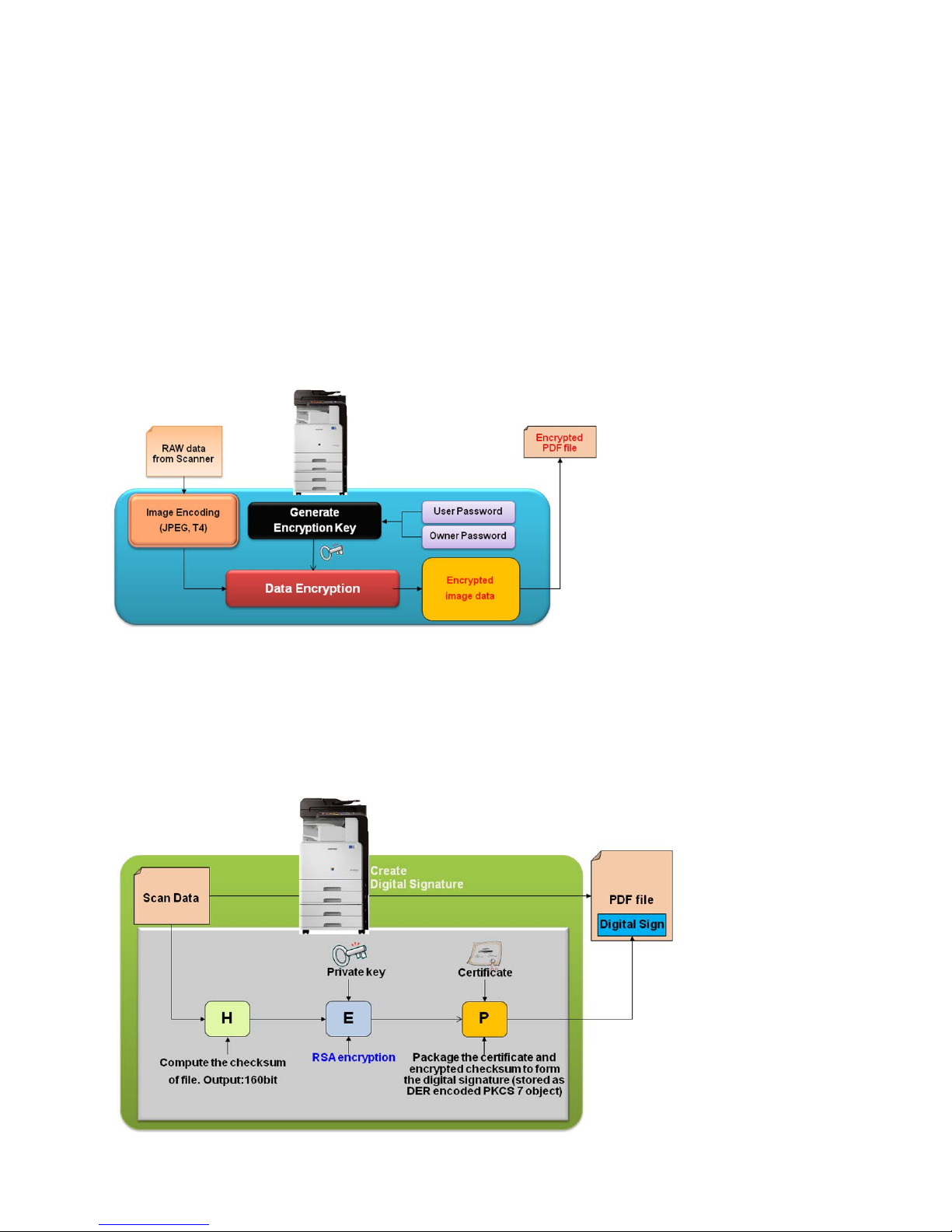
Samsung Secure Data allows you to encrypt a PDF document to protect its contents from unauthorized access. Encryption
applies to all strings and streams (Scanned Images) in the document’s PDF file, but not to other object types such as
integers and Boolean values, which are used primarily to convey information about the document’s structure rather than
its content. Leaving these values unencrypted allows random access to the objects within a document, whereas
encrypting the strings and streams protects the document’s substantive contents. The PDF encryption process follows this
path:
1. The AES algorithm is used for data encryption
2. Key data is generated by using the Owner Password and User Password from the hash function.
The scope of this encryption includes all data streams, all creation data, all of the creator information, and all of the
producer information.
Example of the PDF encryption workflow:
8.1.4 Secure PDF – Digital Signature in PDF
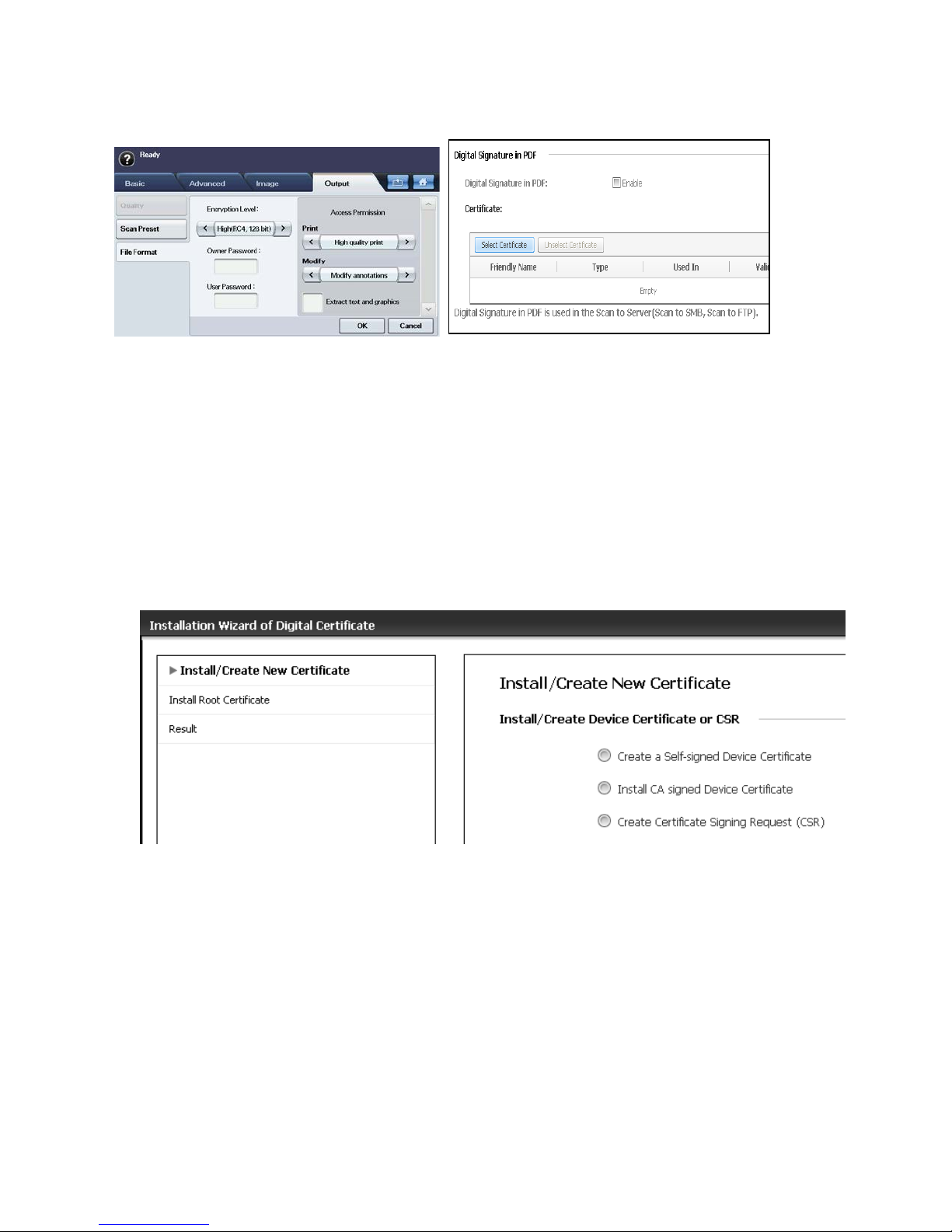
Users can add a Digital Signature to the PDF with the certification. To add the Digital Signature, users must create the
digital certificate (See 8.1.5) from the SyncThru
the Scan to Server feature.
Example of Digital Signature in PDF Workflow:
TM
Web Service. The Digital Signature in the PDF function can be used in
Page - 26 Copyright 2014 Samsung Electronics Co., Ltd., All rights reserved.
Page 27
SAMSUNG MFP SECURITY WHITE PAPER
Example of MFP menu for PDF Encryption / Digital Signature in PDF:
8.1.5 Digital Certificate
Digital certificate is an electronic credential that can help verify the secure connection between communication nodes. The
most common use of digital certificates is to prove a person's or device's identity and to provide the secure exchange of
encrypted information.
There are 2 kinds of Certificate.
• Self Signed Device Certificate
The certificate created by device itself
• CA (Certificate Authority) Signed Device Certificate
The certificate authorized by 3
Certificate. To get CA Signed Device Certificate, a Certificate Signing Request should be sent to the CA.
rd
CA (Certificate Authority). This certificate is more reliable than the Self Signed Device
Page - 27 Copyright 2014 Samsung Electronics Co., Ltd., All rights reserved.
Page 28
WHITE PAPER SAMSUNG MFP SECURITY
8.1.6 PC Scan Security
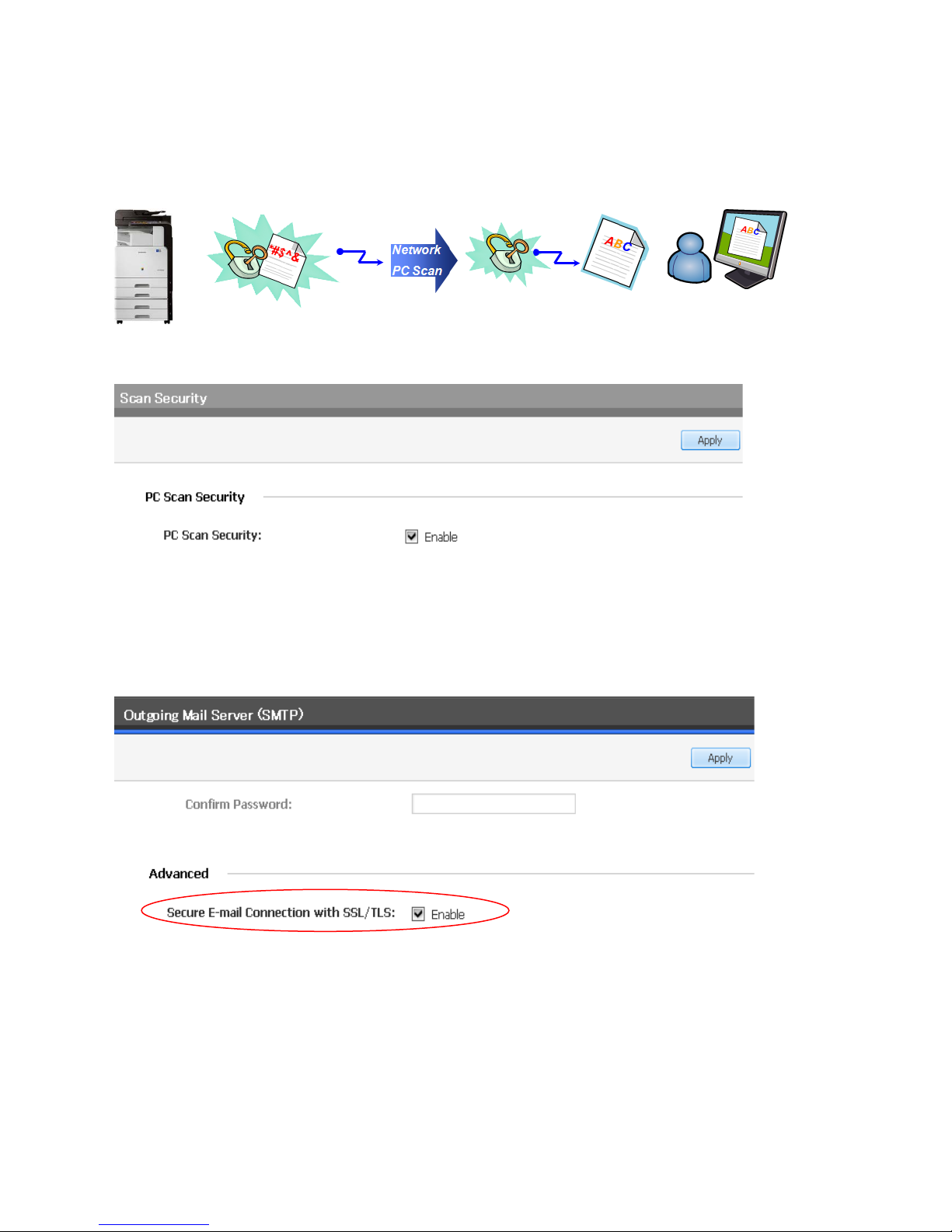
PC Scan Security Feature provides the Security Protection for scanned documents. Scanned data is delivered to a PC or to
a user by using encryption. Scan jobs sent through the Twain Protocol are supported with ECDH key exchange and AES
encryption algorithms. This feature is managed through the Web UI.
Example of WUI PC Scan setting
SettingMachine SettingScanScan Security
8.1.7 Secure E-mail (SMTPs)
The Secure E-mail feature sends an e-mail with attached image files generated from MFP scans, faxes, and notifications to
SMTP server over secured network (SSL/TLS). By using this feature, users can always ensure that the e-mail data is sent to
SMTP server with encrypted. This feature is managed through the Web UI.
Page - 28 Copyright 2014 Samsung Electronics Co., Ltd., All rights reserved.
Page 29
SAMSUNG MFP SECURITY WHITE PAPER
8.2 Image Overwrite
User information created during the copying, printing, network scanning, scanning to e-mail, or scanning to server
processes is immediately recorded on the MFP’s hard drive. To secure this information, the MFP software implements an
image overwrite function to erase image data created during the copying, printing, network scanning, scanning to e-mail,
or scanning to server processes. The MFP software performs three overwrite passes of the data using the methods defined
in Department of Defense (DoD) 5220.22-M (ECE). The MFPs can perform the following image overwrites:
• Automatic Image Overwrite
• Manual Image Overwrite
8.2.1 Automatic Image Overwrite
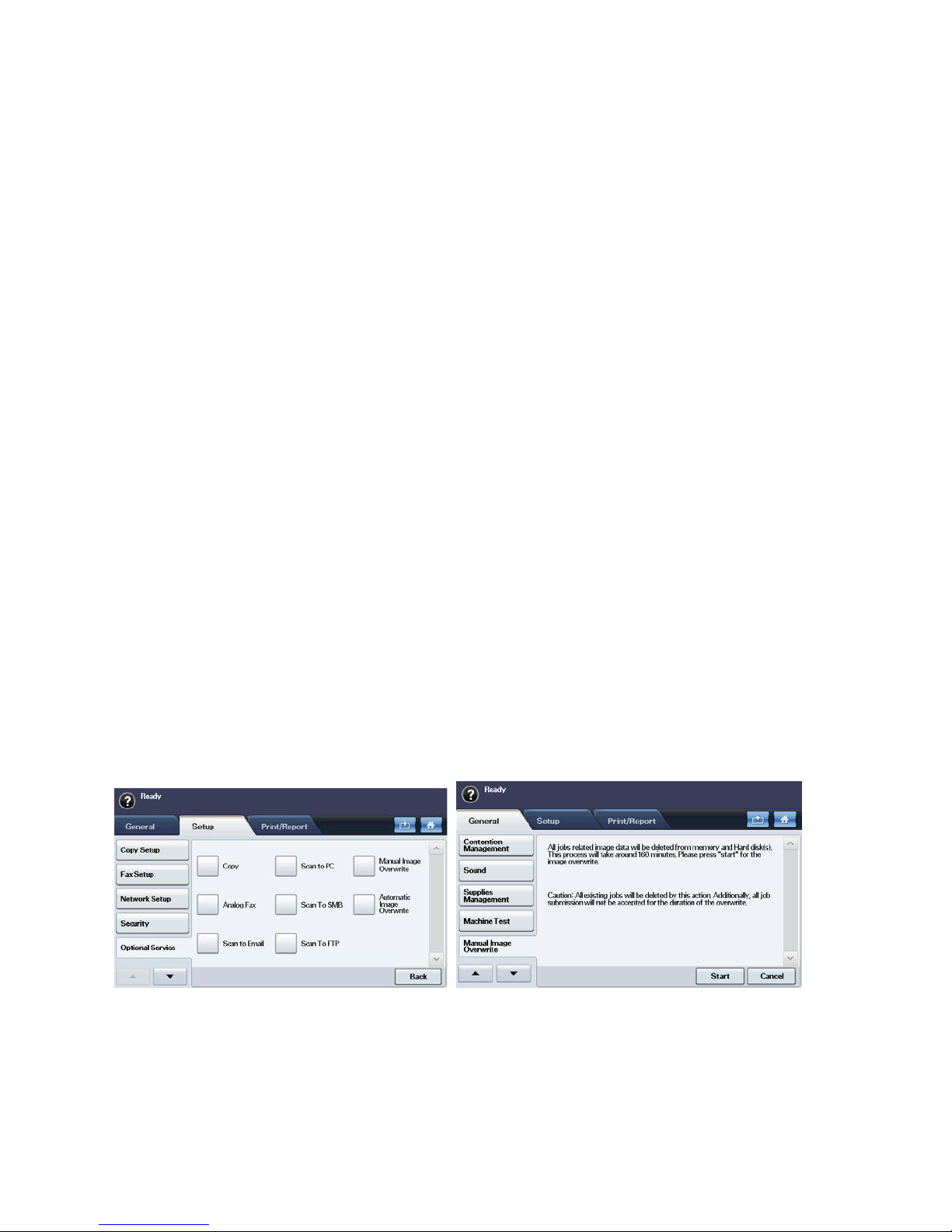
The Automatic Image Overwrite feature overwrites temporary image files automatically after the completion of each MFP
task.
8.2.2 Manual Image Overwrite
The Manual Image Overwrite feature allows the MFP System Administrator to manually perform a data overwrite of the
HDD data.
8.2.3 Scheduled Image Overwrite
The Scheduled Image Overwrite feature allows the MFP System Administrator to reserve a data overwrite of the HDD data
base on assigned schedule (Frequency, Day, Week, and Time).
8.2.4 Image Overwrite from the Local UI.
The system automatically overwrites temporary files created during processing and manually overwrites temporary files
created during processing on a specially-reserved section of the hard drive (Automatic Image Overwrite).
The image overwrite security function can also be invoked manually by the system administrator. Once invoked, it cancels
all print and scan jobs, halts the printer interface (network), overwrites the contents of the reserved section on the hard
drive, and then it reboots the main controller. When a power failure interrupts the manual overwrite, the process will
restart automatically after the power returns allowing it to finish overwriting all of the remaining files (Manual Image
Overwrite).
Examples of MFP menus for Image Overwrite:
Page - 29 Copyright 2014 Samsung Electronics Co., Ltd., All rights reserved.
Page 30
WHITE PAPER SAMSUNG MFP SECURITY
8.3 Information Hiding
User information created during the copying, printing, network scanning, scanning to e-mail, or scanning to server
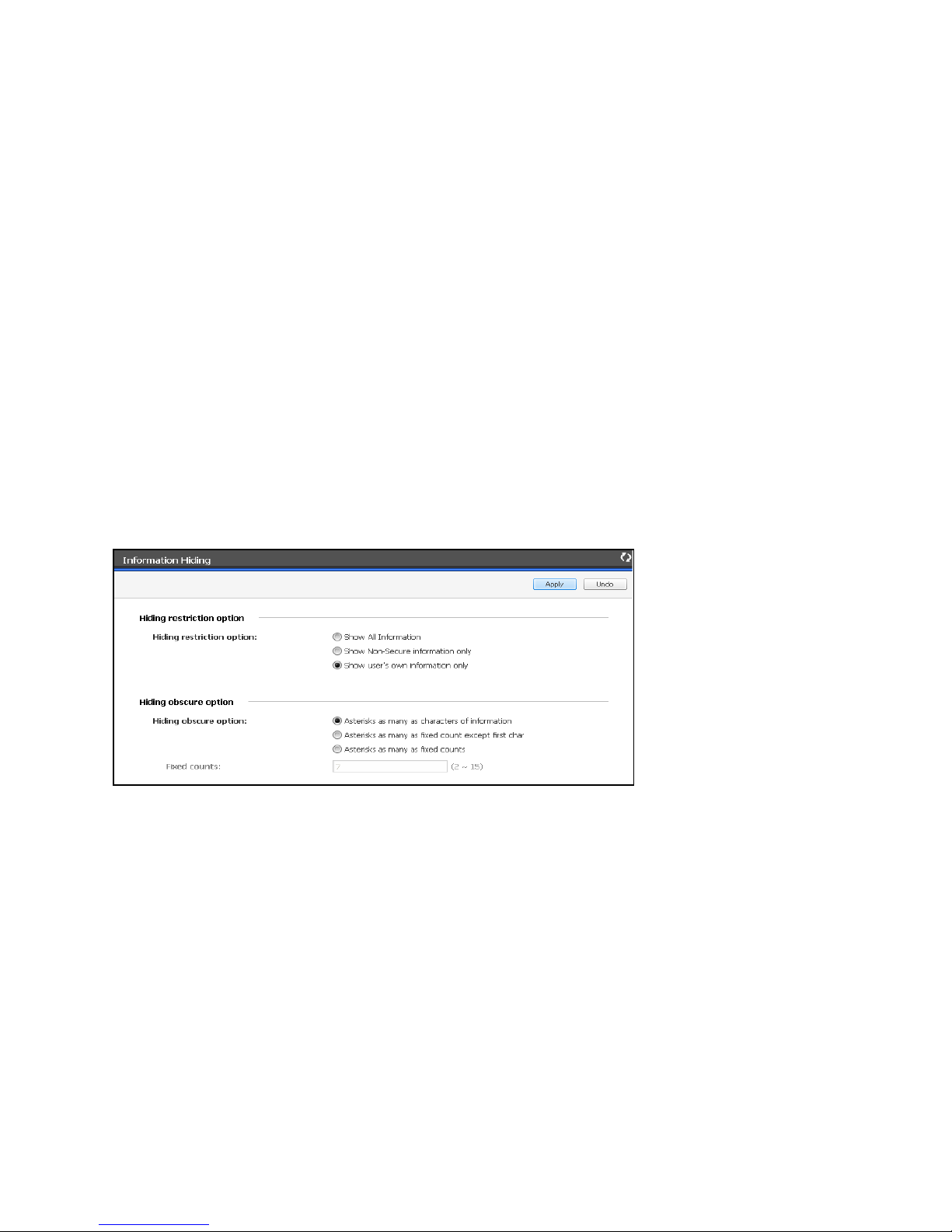
processes is immediately recorded on the MFP’s hard drive. Some data includes sensitive information from the job list.
You want this information to be obscured in the Local UI, Web-UI and the Job Monitor. Information Hiding displays
information differently according to the login user and the Information Hiding settings. Information Hiding settings
include the following:
• Hiding restriction option
• All information
• Non-Secure information only
• User’s Own information only
• Hiding obscure option
• Asterisks as many as characters of information
• Asterisks as many as fixed count except first char
• Asterisks as many as fixed counts
Note: Secure information includes Secure Print, and Secure Received Fax jobs.
Example of Information Hiding menu:
Page - 30 Copyright 2014 Samsung Electronics Co., Ltd., All rights reserved.
Page 31
SAMSUNG MFP SECURITY WHITE PAPER
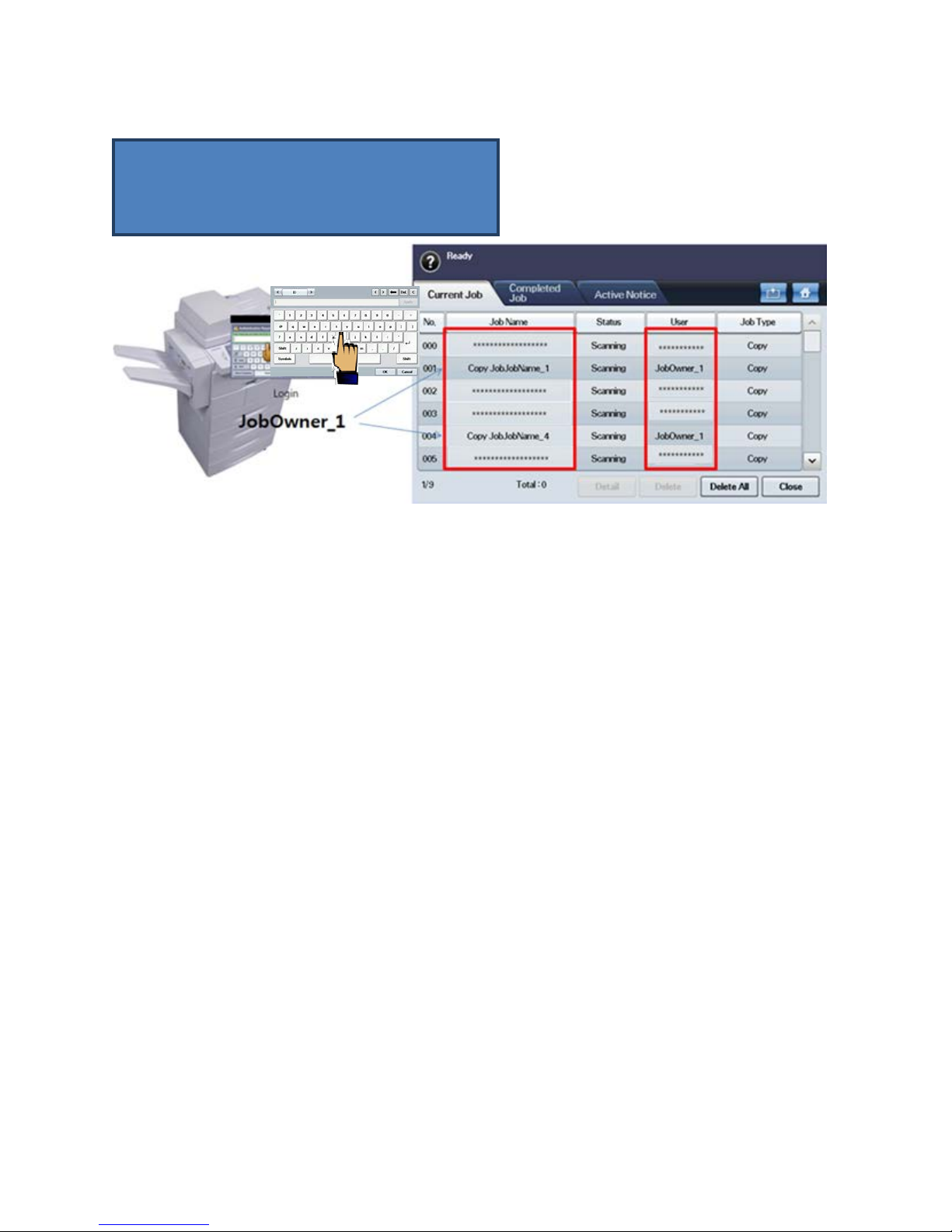
Example of Hidden Information on the Local UI:
1. Show all information
2. Show Non-Secure information only
3. Show user’s own information only
8.4 Key Benefits of Using Secure Data
8.4.1 Data Protection
By using these various MFP data security methods, you can protect your secured information from unauthorized access.
Information in the system device (MFP) and in the Server can be protected by using encryption, overwriting and some N/W
capacity.
8.4.2 Various Options Settings
Administrator would experience various option methods using Web & Local UI. Even a general user has a chance to
choose the best way to protect their data with many option items.
Page - 31 Copyright 2014 Samsung Electronics Co., Ltd., All rights reserved.
Page 32
WHITE PAPER SAMSUNG MFP SECURITY
9. Secure Network
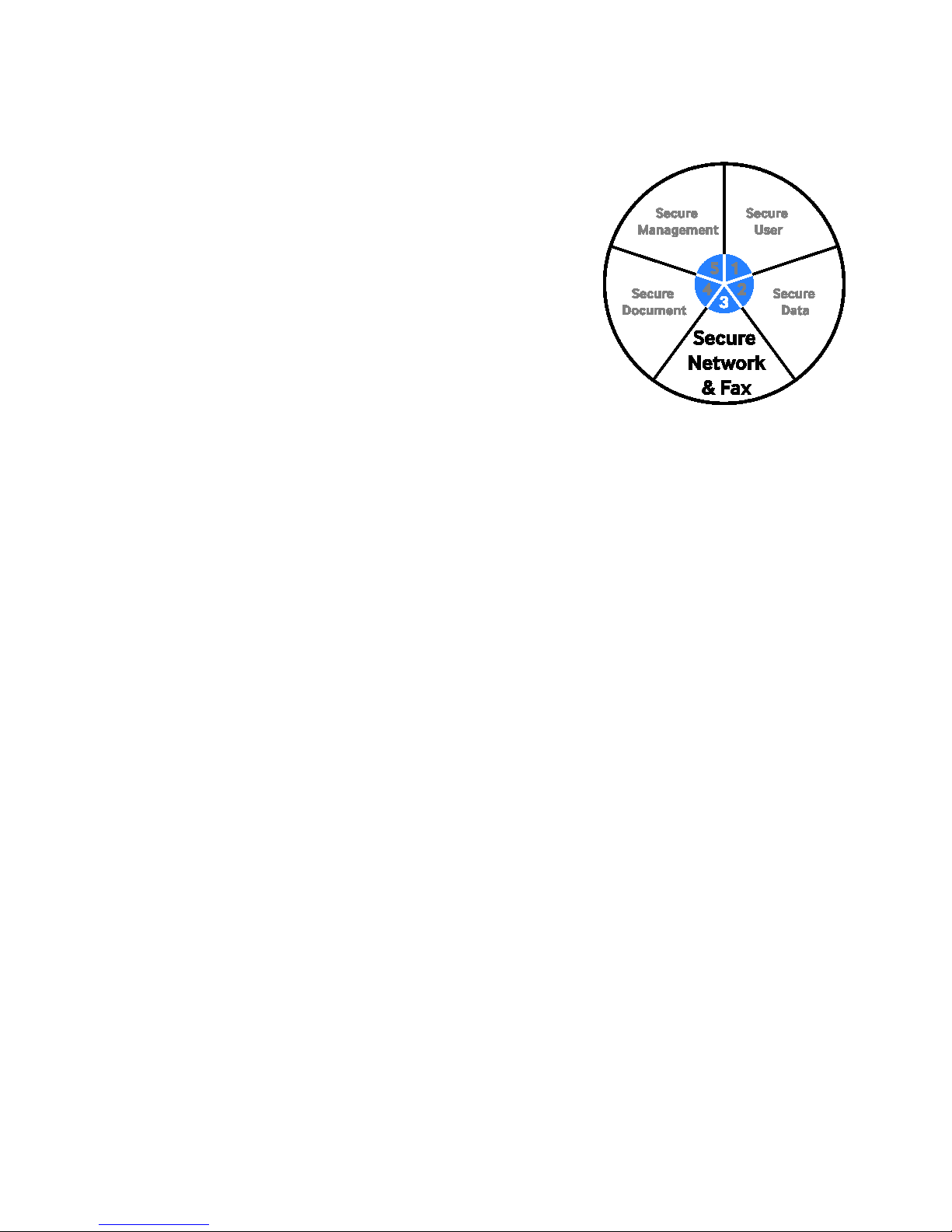
The Secure Network category of the Samsung Security framework is
designed to protect your network from unauthorized access through the MFP.
This protection is made possible by using industry standard methods
including the following:
• Transport Layer Security (TLS) / Secure Sockets Layer (SSL)
• Simple Network Management Protocol (SNMPv3)
• IP Security (IPSec)
• 802.1x Network Security
• Protocol/Port Management
• IP/MAC Filtering
9.1 Transport Layer Security (TLS) / Secure Sockets Layer (SSL)
Transport Layer Security (TLS) and its predecessor, Secure Sockets Layer (SSL), are cryptographic protocols that provide
security and data integrity for communications over TCP/IP networks such as the Internet. TLS and SSL encrypt the
segments of network connections at the Transport Layer from end-to-end. (Using AES 256)
• FTP over SSL/TLS
• SMTP over SSL/TLS
• HTTP over SSL/TLS
• LDAP over SSL/TLS
• IPP over SSL/TLS
• POP3 over SSL/TLS
• ThinPrint over SSL/TLS
9.2 SNMPv3
The Simple Network Management Protocol (SNMP) is an application layer protocol that facilitates the exchange of
management information between network devices. It is part of the TCP/IP suite. SNMP enables network administrators
to manage network performance, find and solve network problems, and plan for network growth.
SNMPv3 is not a stand-alone replacement for SNMPv1 and/or SNMPv2. SNMPv3 is SNMPv2 plus security and
administration. SNMPv3 security features support authentication and encryption. The SNMPv3 used on Samsung MFPs
can support authentication by using the SHA algorithm and can support one account to read and write. Samsung MFPs
with SNMPv3 support the DES encryption algorithm.
Page - 32 Copyright 2014 Samsung Electronics Co., Ltd., All rights reserved.
Page 33
SAMSUNG MFP SECURITY WHITE PAPER
9.3 IP Security (IPSec): IPv4, IPv6
IPSec is an important element between the other network nodes in IP communication. It supports authenticating and
encrypting IP packets between network devices using IPv4 or IPv6. IPSec is used widely without upper layer security
protocols like TLS/SSL or SSH because of the existing layer 3 based on the OSI layer. When IPSec is used between a user
PC and an MFP, print job security and scan job security can be enhanced. When IPSec is used between the Administrator
and an MFP, management data security can be enhanced. IPSec is used to protect IP-based network traffic.
IPSec is designed to provide interoperable, high quality, cryptographically-based security for IPv4 and IPv6. The set of
security services offered includes access control, connectionless integrity, data origin authentication, protection against
replays (a form of partial sequence integrity), confidentiality (encryption), and limited traffic flow confidentiality. These
services are provided at the IP layer, offering protection for IP and/or upper layer protocols.
IPSec uses two protocols to provide traffic security – Authentication Header (AH) and Encapsulating Security Payload
(ESP). Both protocols are described in more detail in their respective Internet Society
TM
RFCs:
• 4302 - IP Authentication Header
• 4835 - Cryptographic Algorithm Implementation Requirements for Encapsulating Security Payload (ESP) and
Authentication Header (AH)
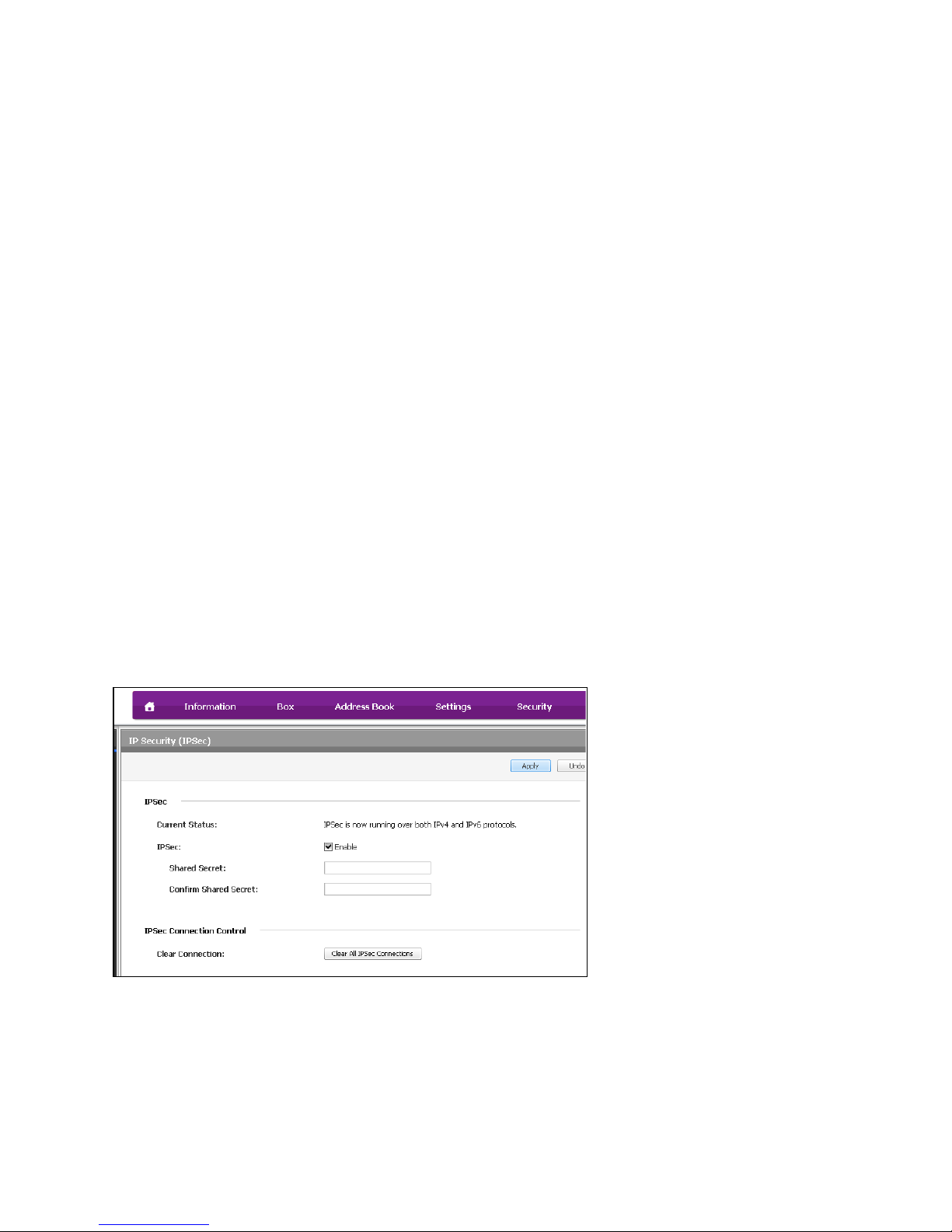
IPSec only supports the pre-shared key method for IPSec authentication. Users can setup pre-shared key values through a
Web UI. IKE protocol is used to establish and manage Security Association (SA) between a printer and a user node in the
AH and ESP services. In IPSec and IKE protocol, the supporting algorithms include the following:
• Diffie-Hellman algorithm: modp 1024, modp 1536, modp 2048, modp 3072, modp 4096, modp 6144 and modp 8192
• Hash algorithm: SHA1
• Encryption algorithm: 3DES, AES128,AES192, AES256
• Integrity algorithm: SHA1
Example if IPSec menu in the Web UI:
Page - 33 Copyright 2014 Samsung Electronics Co., Ltd., All rights reserved.
Page 34
WHITE PAPER SAMSUNG MFP SECURITY
9.4 802.1x Support
802.1x Network Security is a protocol used for authenticating network access for 802.1x enabled ports. Generally it is used
in 802.11 wireless security communications. Wired network communications also use 802.1x enabled ports. A switch
network device called ‘Authenticator’ requires the 802.1x authentication to be connected to the MFP and requires that the
MFP responds with its credentials when polled. The authenticator transfers the MFP’s credentials to an authentication
server called ‘RADIUS’ and finally RADIUS decides whether to permit the connection or not.
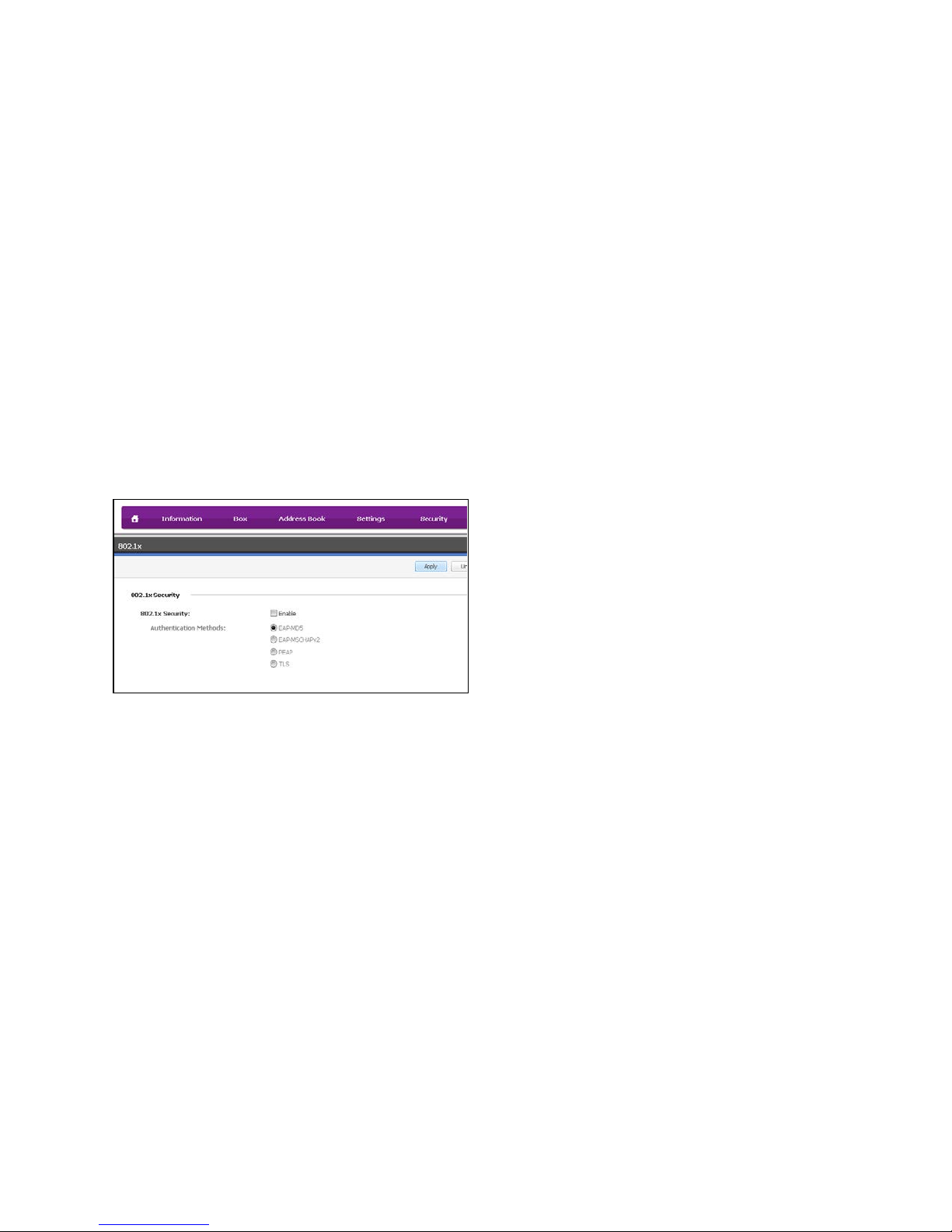
802.1x Network Security protocol uses some Extensible Authentication Protocols (EAP). Samsung MFPs support the
following EAPs:
• EAP-MD5
• PEAP
• EAP-MSCHAPv2
• TLS
Server certificate validation is not supported. Each EAP requires a user ID and a Password as a credential.
Example of 802.1x Web UI menu:
Page - 34 Copyright 2014 Samsung Electronics Co., Ltd., All rights reserved.
Page 35

• EtherTalk
• FTP
• HTTP/HTTPS
• IPP
• LPD
• mDNS
• Network Scan
• Raw TCP/IP Printing
• SETIP
• SLP
• SMB
• SMTP
• SNMP
• SNMPv3
• Telnet
•
•
•
•
•
SAMSUNG MFP SECURITY WHITE PAPER
9.5 Protocol/Port Management
Protocol Management can select whether a network protocol is used or not. According to a user’s network policy, some
protocols can be disabled and this can protect an MFP from an external network attack like a port scan. Additionally
Protocol Management can reduce network traffic. Samsung MFPs can support Protocol Management for the following
protocols:
T4Net
UPnP
9.6 IP/MAC Filtering
Samsung MFPs support IP Filtering to configure available IP Address Ranges. Only registered IP devices can print or scan
through a network. Samsung MFPs support IPv4 Filtering and IPv6 Filtering. This can protect MFPs from unknown
network devices (supports 10 IPv4 address ranges and 10 IPv6 address ranges).
MAC Address Filtering is also capable of rejecting or accepting request comes from particular Ethernet MAC address.
9.7 Key Benefit of Using Secure Network
The Samsung MFP Secure Network feature protects your information from unauthorized network access.
Hackers are always finding new ways to access your valuable information. One of those new points of access is through
what were once considered “dumb” devices. Now because of the high level of features and technology in these devices
and their network management access, you must employ security measures that protect these devices. Methods of
protection include IP/MAC address filtering. This only allows PCs that have a registered IP address (Internet Protocol) or
MAC address (Media Access Control) to access and use the device over the network. Server-based port filtering is another
method used when the network firewall software does not suffice to secure servers and LANs from TCP/IP-based security
attacks. Network data encryption can also be deployed to protect print data streams and Web interfaces from
eavesdropping and making malicious data interceptions. Transport Layer Security (TLS) and Secure Sockets Layer (SSL),
are used as cryptographic protocols to provide security and data integrity for communications over TCP/IP networks. By
shuffling data and passwords as they travel over the LAN, these security protocols make it very difficult for hackers to
intercept, decipher, and tamper with this information. Another method of protection is cryptographic algorithms used on
internal hard drives and volatile memory that could be accessed maliciously. Samsung even includes overwriting of
unwanted data from the hard drive so that it can never be recovered, ensuring the confidentiality of vital data and
information (e-shredding).
WINS
SSL
LDAP
The Samsung MFP provides the feature management option to enable/disable the port/protocol and physical device such
as Ethernet and USB host/device. Therefore, if administrators don’t want to use physical interface such as USB port, USB
device, and Ethernet (Network Connection), the administrators easily disable the each interface.
In general, Samsung MFP does not provide network access abilities thru the USB port/device. Therefore, the malicious
users cannot access the network thru any other interface. Therefore, even if the Samsung MFP is installed within a LAN
and a PC is connected thru USB additionally with the device, PC cannot access the network thru the MFP. Samsung
Printing Division assures that any users cannot access the network thru any USB port/device.
Page - 35 Copyright 2014 Samsung Electronics Co., Ltd., All rights reserved.
Page 36
WHITE PAPER SAMSUNG MFP SECURITY
10. Secure Document
The Secure Document category of the Samsung Security Framework is
designed to secure the document path from unauthorized access.
10.1 Confidential Print
Confidential Print Function is restricting unauthorized people access to
printed documents. If Confidential Print enabled through Printer-Driver, user
input the pin number for PW. Upon receipt of the print job at the device, the
user must enter the job password in order to print. Using this feature,
users can always ensure that they are at the device when their job is
delivered.
10.2 Secure Fax
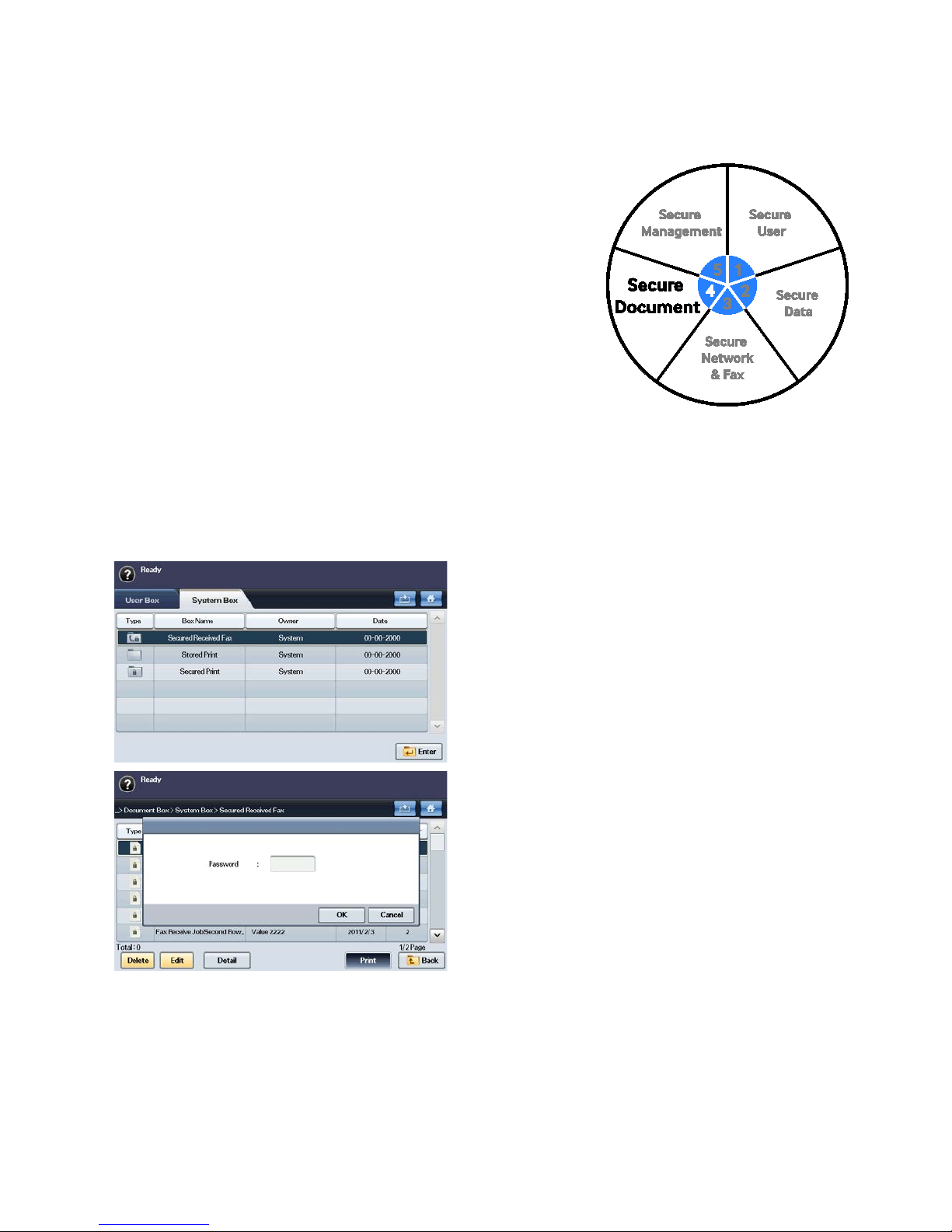
The Samsung Secure Fax feature restricts unauthorized access to received fax documents. When the Secure Fax Option is
enabled, all received fax documents are stored in memory. These stored fax documents are protected by a password. You
can only print out or disable this feature when you have the password. Selecting the “Document Box” button from the
MFP UI and entering the password, allows you to access the Secured Received Fax Folder and retrieve your faxes.
Examples of the Secure Fax MFP UI:
Page - 36 Copyright 2014 Samsung Electronics Co., Ltd., All rights reserved.
Page 37
SAMSUNG MFP SECURITY WHITE PAPER
10.3 Document Tagging
The Document Tagging feature allows you to add distinctive markings to your documents to enhance document control, a
requirement of several regulatory standards.
10.3.1 Watermarks
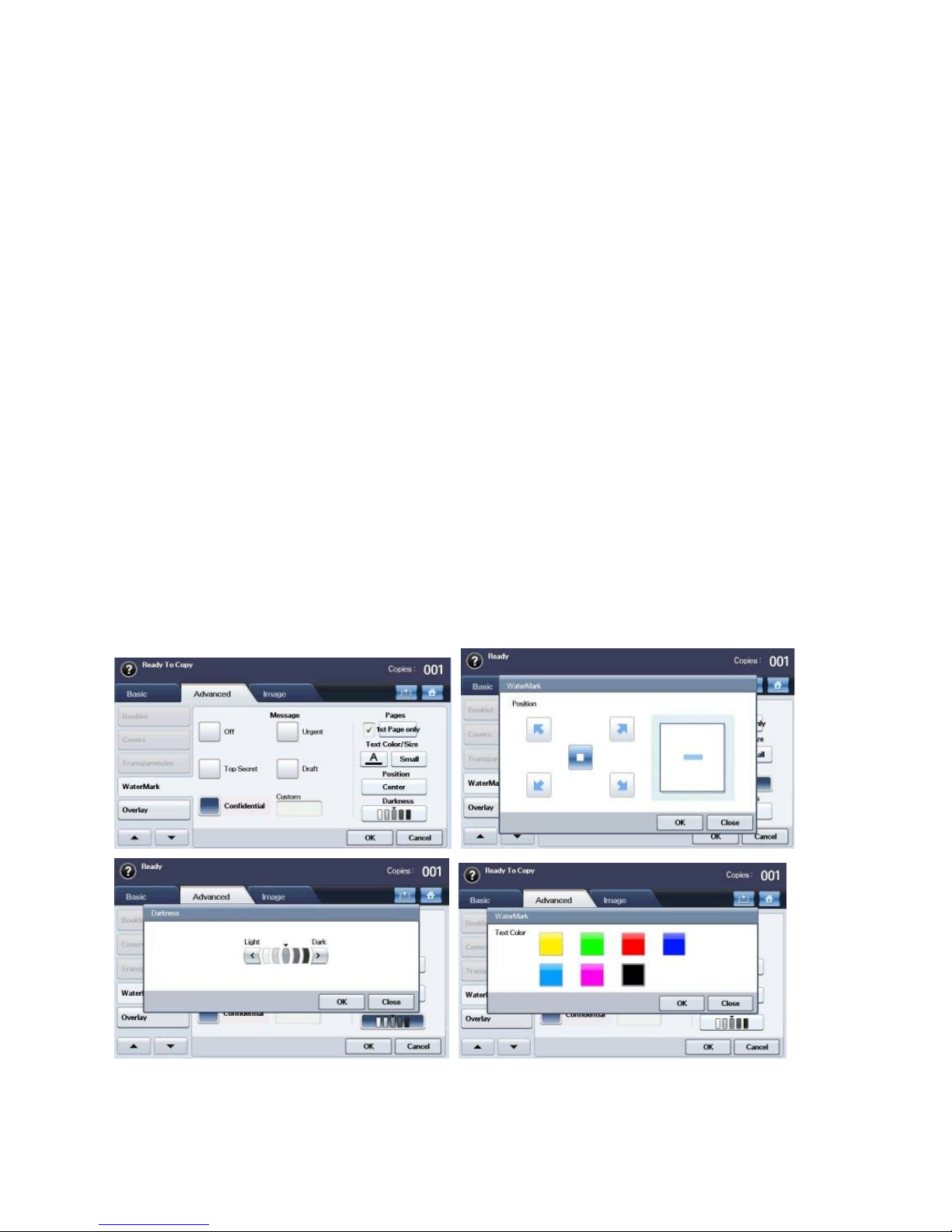
The Watermark feature is designed for Controlled documents such as “Classified” information or documents designated as
officially secret that require markings like “Confidential” or “Top Secret.” This feature allows you to print text over copied
documents by using the Advanced Copy menu on the Local UI. You can select several predefined watermarks including
the following:
• Top Secret
• Urgent
• Confidential
• Draft
You can also create your own watermark and modify the following parameters:
• Page
• Text Color
• Size
• Position
• Darkness
Examples of Watermark menus from the Local UI:
Page - 37 Copyright 2014 Samsung Electronics Co., Ltd., All rights reserved.
Page 38
WHITE PAPER SAMSUNG MFP SECURITY
10.3.2 Stamp
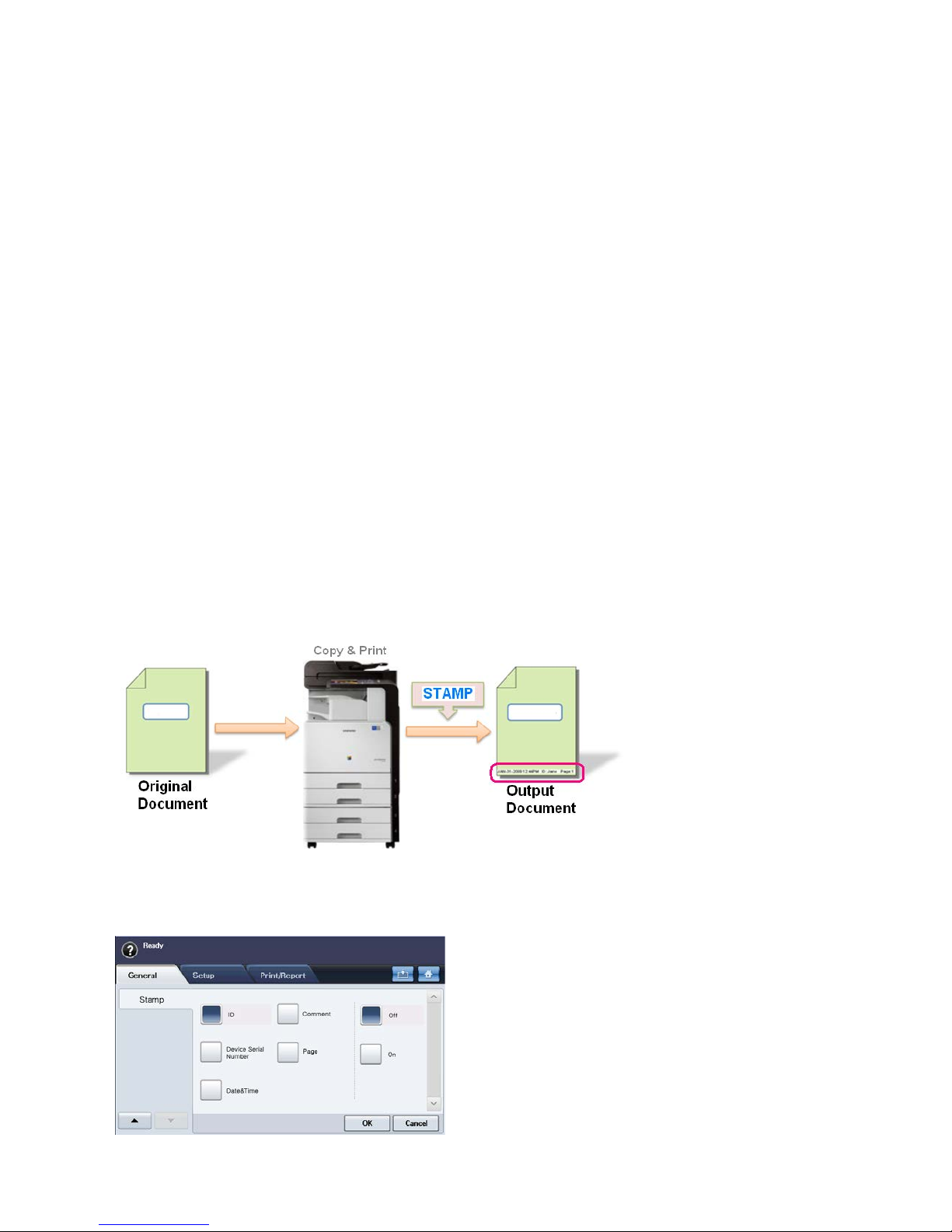
The Stamp feature allows you to add tracking information to your documents. This feature adds job information to the
document such as, user ID, device serial number, printed date and time, etc.
Print jobs that can use the Stamp feature include the following:
• Copy
• Print (PC printing, Report, Stored Job Printing, Document Box Printing, USB Direct Printing)
The information that can be stamped on the document includes the following:
• User ID
• Device Serial Number
• Date and Time
• Comment (Custom),
• Page Number
You can also modify the following parameters:
• Position (Top, Bottom)
• Appearance (Opaque, Transparent)
Example of the Stamp process:
Example of the Stamp feature menu in the Local UI:
Page - 38 Copyright 2014 Samsung Electronics Co., Ltd., All rights reserved.
Page 39
SAMSUNG MFP SECURITY WHITE PAPER
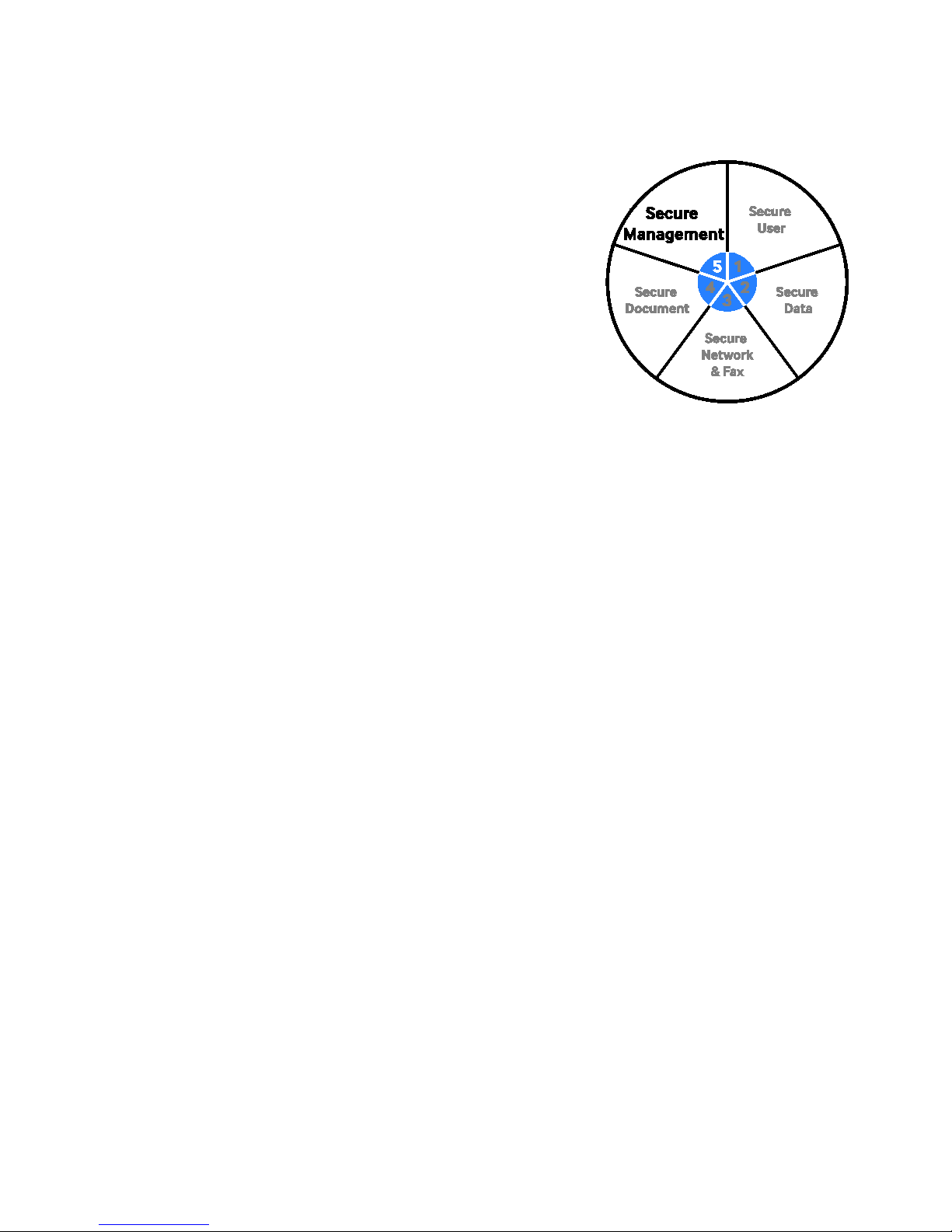
11. Secure Management
The Secure Management category of the Samsung Security Framework is
designed to protect the logging and notification features of the MFP. The logs
can contain sensitive information that is useful to administrators and
managers. The sensitivity of this information requires that it be protected from
unauthorized access. While the notification pathways must be secured from
unauthorized redirection or snooping.
The logging and notification features protected by Secure Management
include the following:
• Logging (Job Auditing)
• System Back-up
• Email Notification.
11.1 Logging (Job Auditing)
Samsung MFPs track events and actions for logged-on users such as, print jobs, scan jobs, and fax jobs. Job Auditing
tracks the following metrics:
• Who (ID)
• Job (Print, Scan, Fax...)
• When (Time and Date Stamp)
While the Stamp feature can add useful tags to the documents, this feature allows the Administrator to manage and
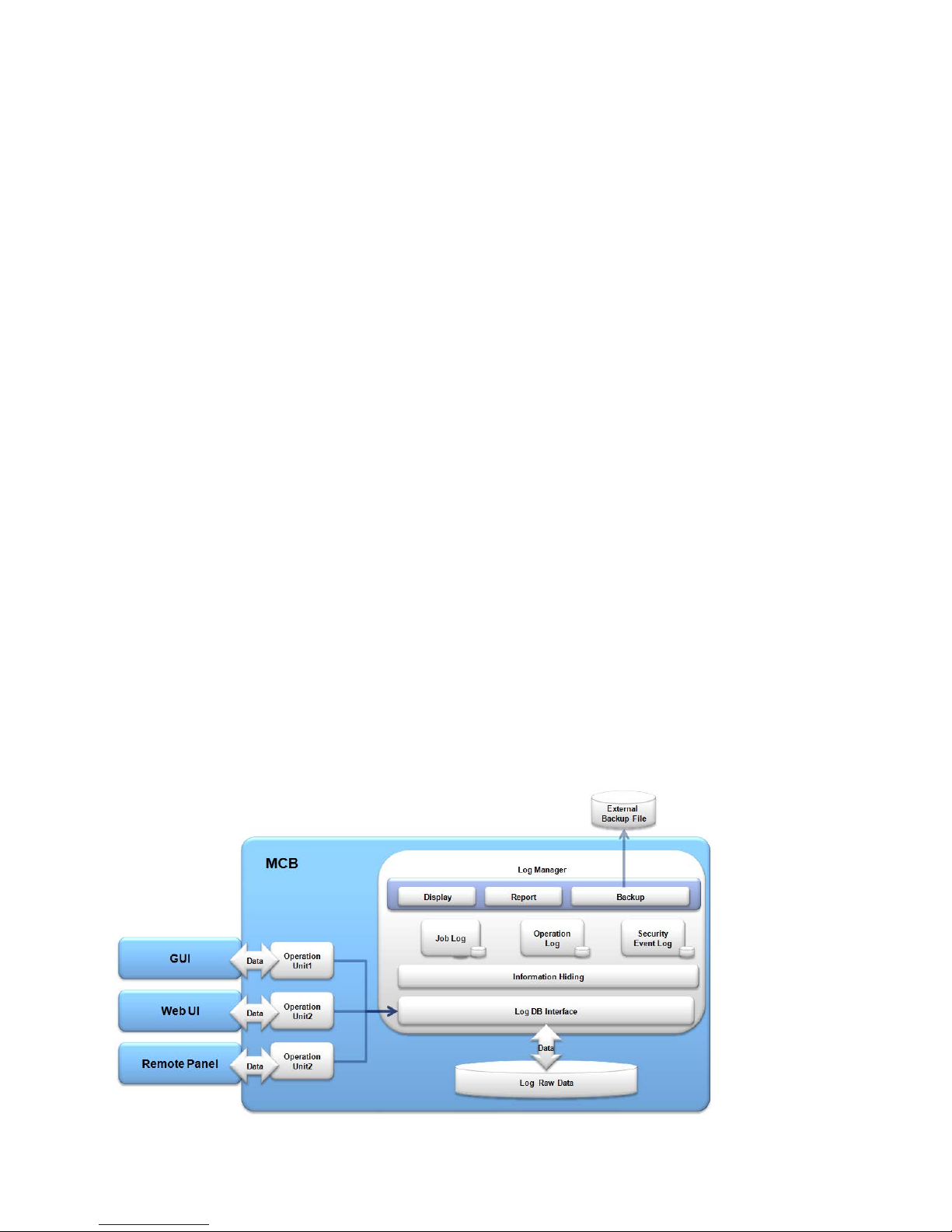
monitor all of the jobs, MFP operations, and events on the MFP. All of this log information is stored on the MFP HDD. Log
data stored on the MFP HDD can be exported and backed up to an external server. There are 3 types of logs kept on the
MFP, these include the following:
• Job Log
• Operation Log
• Security Event Log
These audit logs track data requests, changes to the security audit functions, image overwriting –result and
inquiries/changes to the security audit configuration. Because Log data is only available to authorized web administrators,
unauthorized users cannot change or delete them. Log data can be downloaded by using the Web UI for viewing and
analysis. When the MFP HDD storage is full of log data, the latest records overwrite the oldest audit records.
Page - 39 Copyright 2014 Samsung Electronics Co., Ltd., All rights reserved.
Page 40
WHITE PAPER SAMSUNG MFP SECURITY
11.1.1 Job Log
The Job log is used for storing all of the job activity data on the MFP.
11.1.2 SYS Log
The Sys log is used for storing all of the Admin activity on the MFP.
11.1.3 Operation Log
The Operation log is used by the MFP to store all of the user’s activities performed on the MFP.
11.1.4 Security Event Log
The Security Event log is used for storing all of the attempts to access the MFP.
11.2 Log Features
Log features include the following:
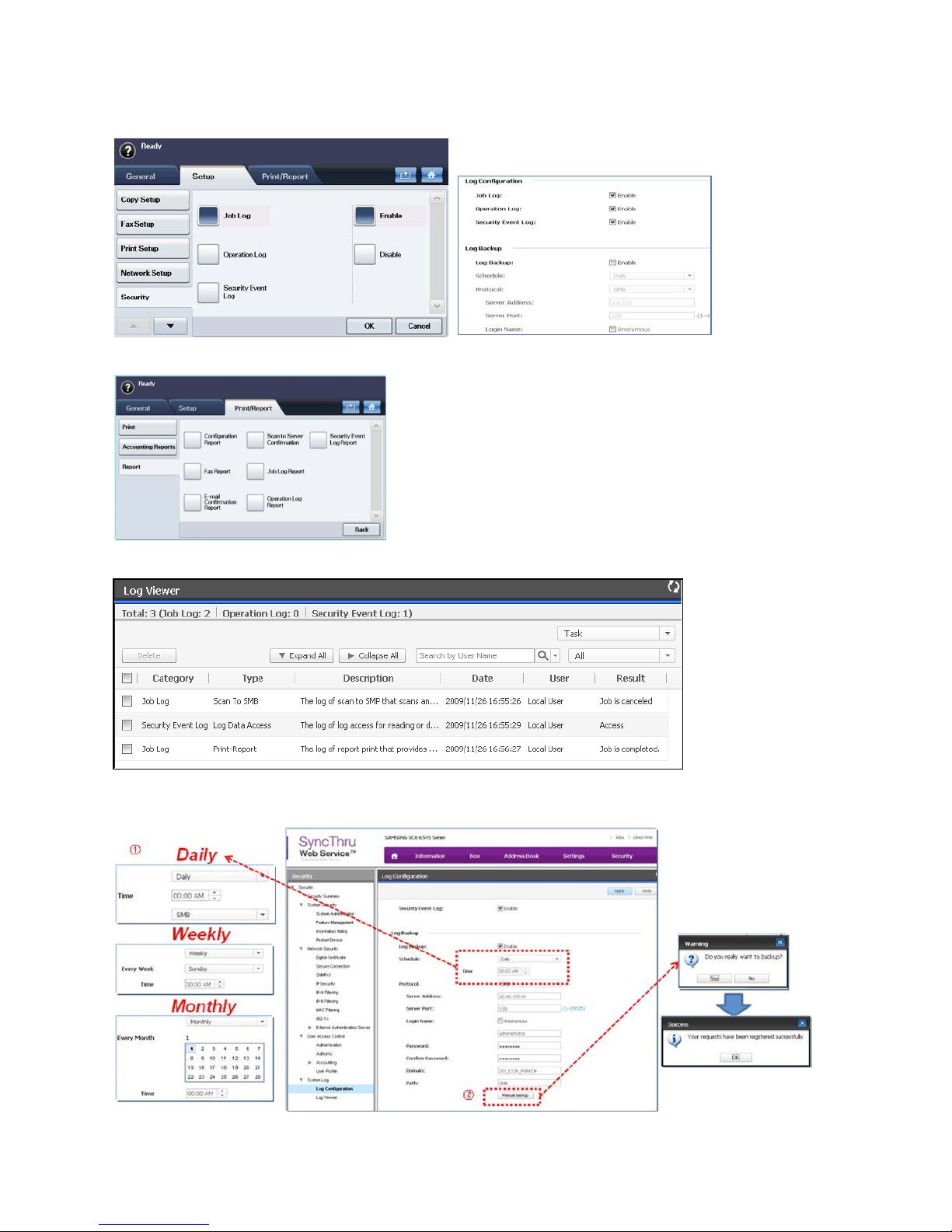
• Log Enablement
This feature allows you to enable logs from the Local UI and SyncThru
TM
Web Service UI
• Log Report
This feature allows you to generate a Job Log Report, an Operation Log report, and a Security Event Log Report from
the Local UI
• Log Query
This feature allows you to query the log entries by using parameters such as, Log Type, User Name, and Date.
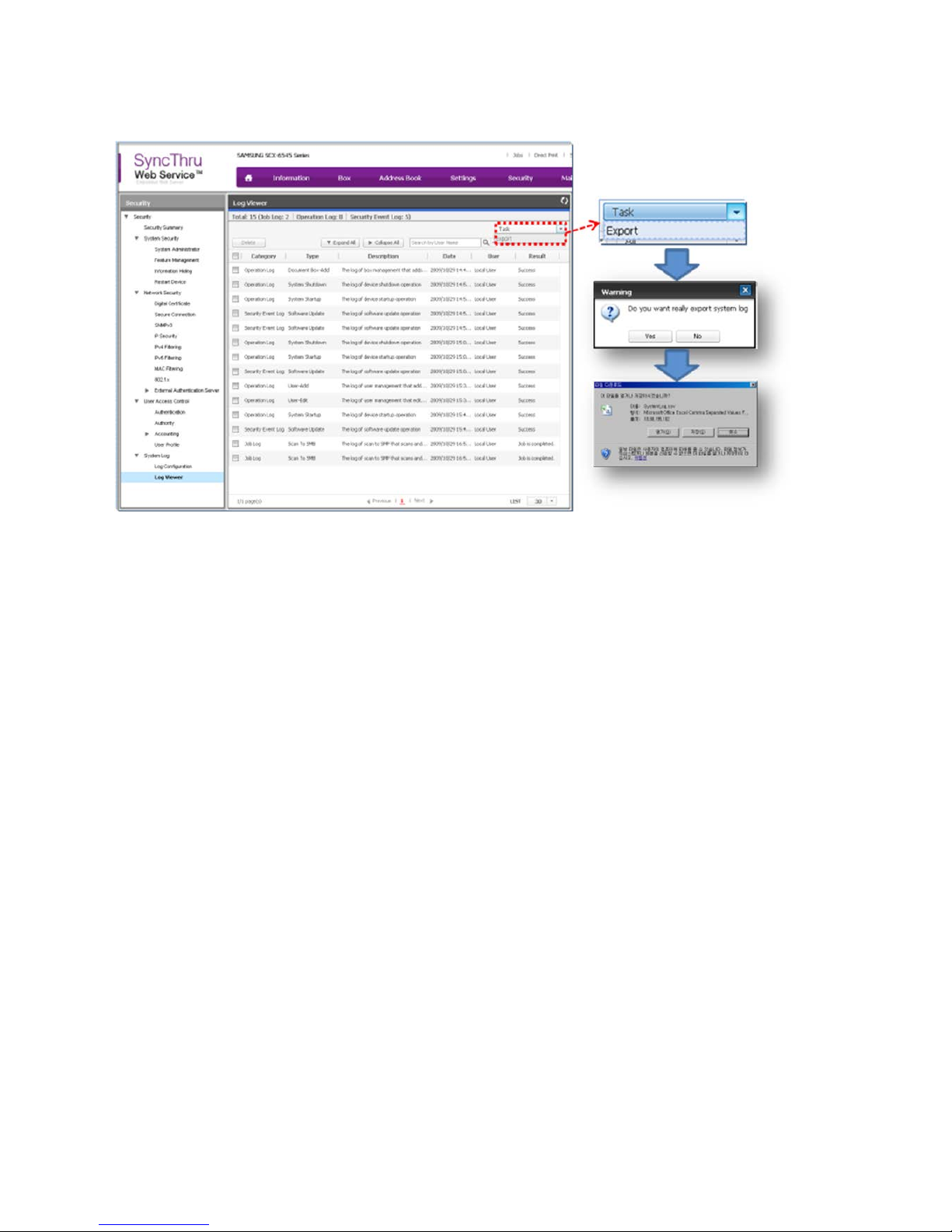
• Log Export
This feature allows you to export the logs by using the SyncThru
TM
Web Service UI. The logs are exported using the
comma separated (.csv) file format.
• Log Backup
This feature allows you to perform periodic backups (Daily/Weekly/Monthly) or Manual backups to the Backup Server
(SMB/FTP) using the comma separated (.csv) file format.
Example of Log process:
Page - 40 Copyright 2014 Samsung Electronics Co., Ltd., All rights reserved.
Page 41
SAMSUNG MFP SECURITY WHITE PAPER
Example of Log enablement menus from the Local and Web UIs:
Example of Log report menus from the Local UI:
Example of Log viewer:
Example of the Log back-up process from the SyncThru
TM
Web Service UI:
Page - 41 Copyright 2014 Samsung Electronics Co., Ltd., All rights reserved.
Page 42
WHITE PAPER SAMSUNG MFP SECURITY
Example of the Log Export process from the SyncThruTM Web Service UI:
11.3 System Back-Up
The MFP System Back-Up feature allows you to back-up important data on the MFP to ensure quick disaster recovery. The
information you can back-up on the MFP includes the following:
• Logs
• Mailbox
• Address Book
11.4 Email Notification
The Samsung MFPs are capable of using your e-mail system to notify you when the MFP needs your attention. This
process allows you to respond to MFP issues faster and increase productivity. The e-mail notification feature can notify
you when the device needs your attention.
Page - 42 Copyright 2014 Samsung Electronics Co., Ltd., All rights reserved.
Page 43
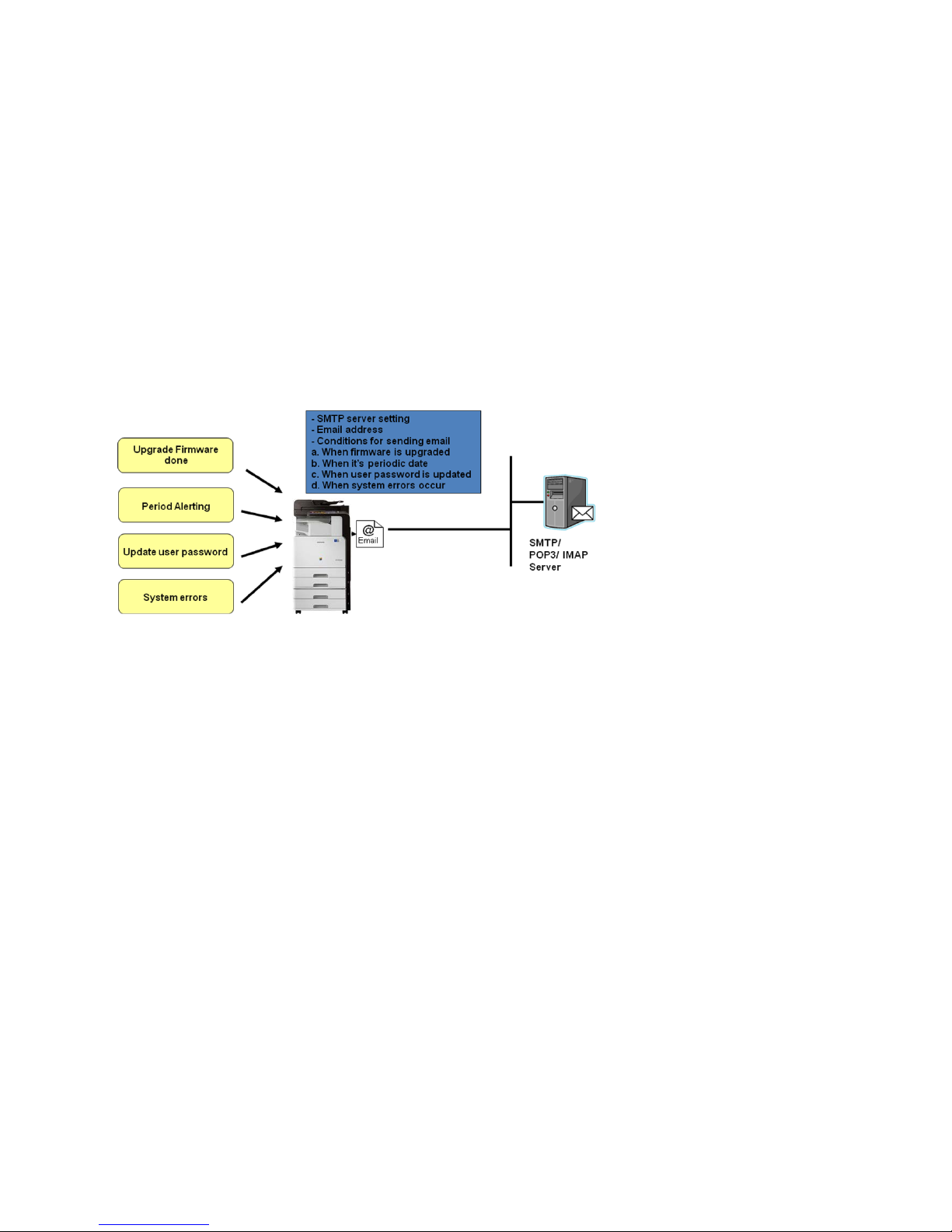
SAMSUNG MFP SECURITY WHITE PAPER
11.4.1 Device Alert Notification
When a Samsung MFP experiences an event that needs your attention such as, out of paper or low toner, the MFP can
send you an e-mail.
This feature requires the following settings in the MFP to be configured:
• SMTP server
• E-mail addresses
• Event thresholds.
Events can include the following:
• Firmware upgrades
• User password expiration
• System errors.
Example of E-mail notification workflow:
11.4.2 Device Status Notification
Device status can be notified to Administrator by E-mail periodically. Device status includes the following:
• Configuration Report
• Counter Information Report
• E-mail Sent Report
• Fax Sent Report
• Network Accounting Report
• Standard Accounting Usage Report
• Standard Accounting Remain Report
And you can specify notification period as:
• Every page
• Daily
• Weekly
• Monthly
• Or every 100 to10000 pages.
Page - 43 Copyright 2014 Samsung Electronics Co., Ltd., All rights reserved.
Page 44
WHITE PAPER SAMSUNG MFP SECURITY
12. Samsung Business Core
TM
MFP Security Solutions
The Samsung core business MFP security solutions include the following:
TM
• SmarThru
Workflow Lite
• Cloud Connector
• Secure Login Manager
TM
• SecuThru
Lite 2
• Usage Tracker
Each of these core business MFP security solutions are discussed in detail in the following section.
Page - 44 Copyright 2014 Samsung Electronics Co., Ltd., All rights reserved.
Page 45
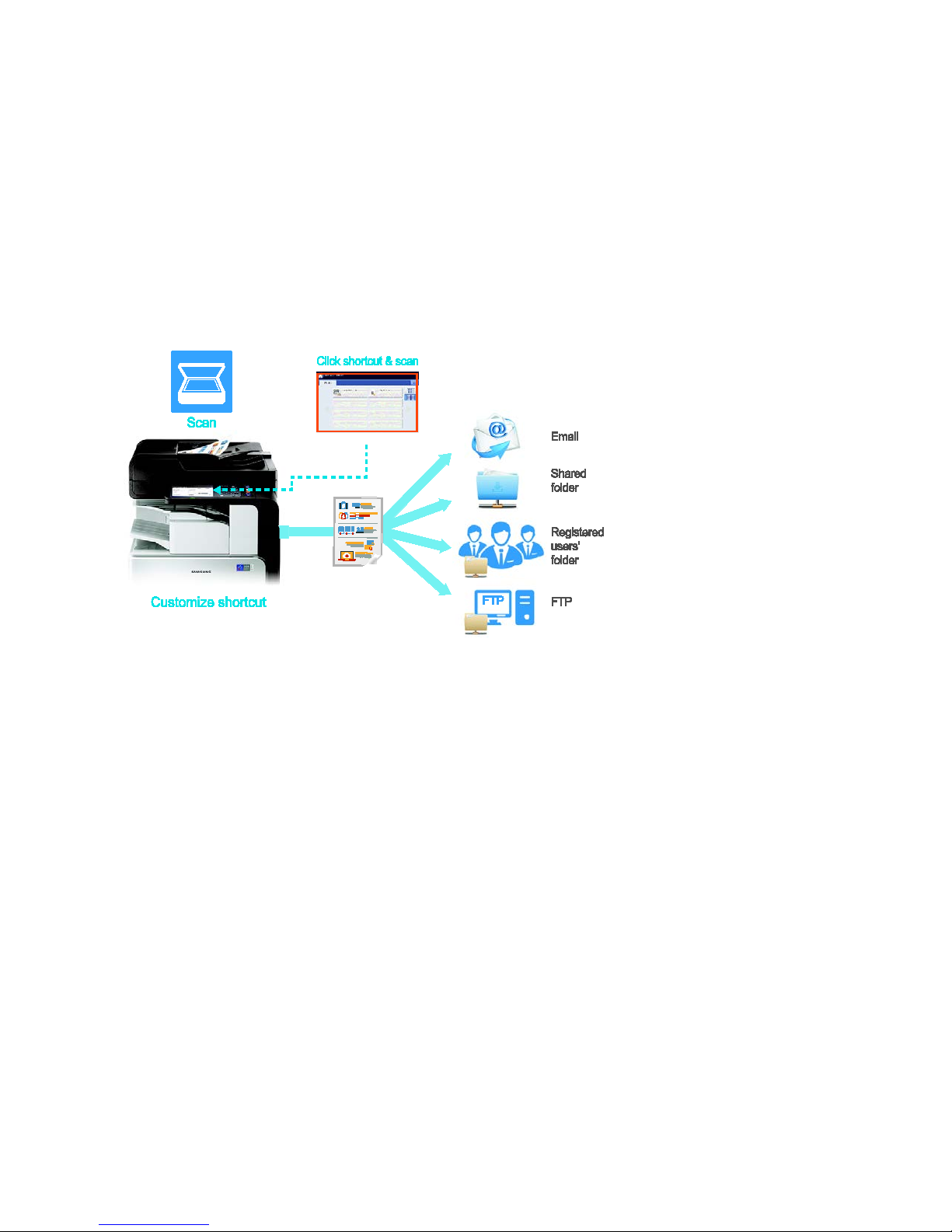
SAMSUNG MFP SECURITY WHITE PAPER
12.1 SmarThru
TM
Workflow Lite
Samsung SmarThru™ Workflow Lite is an automated document capturing, scanning, and routing solution that creates a
seamless and intuitive infrastructure for repetitive digital document handling. It enables users to capture, process, and
distribute documents digitally, which is a core component for operating an optimized business environment.
One-Touch Scanning to Distribution
Documents can be scanned from a device and distributed to predefined destinations automatically without a server by
creating a workform. When repetitive work is defined, it can be streamlined with the One-Touch scanning feature on the
printer panel. Users can send a captured document to multiple predefined destinations with just one scanning conversion,
improving productivity by removing tedious work. Plus, with easy access to digital files, the time and effort spent
searching for paper documents is virtually eliminated.
Page - 45 Copyright 2014 Samsung Electronics Co., Ltd., All rights reserved.
Page 46
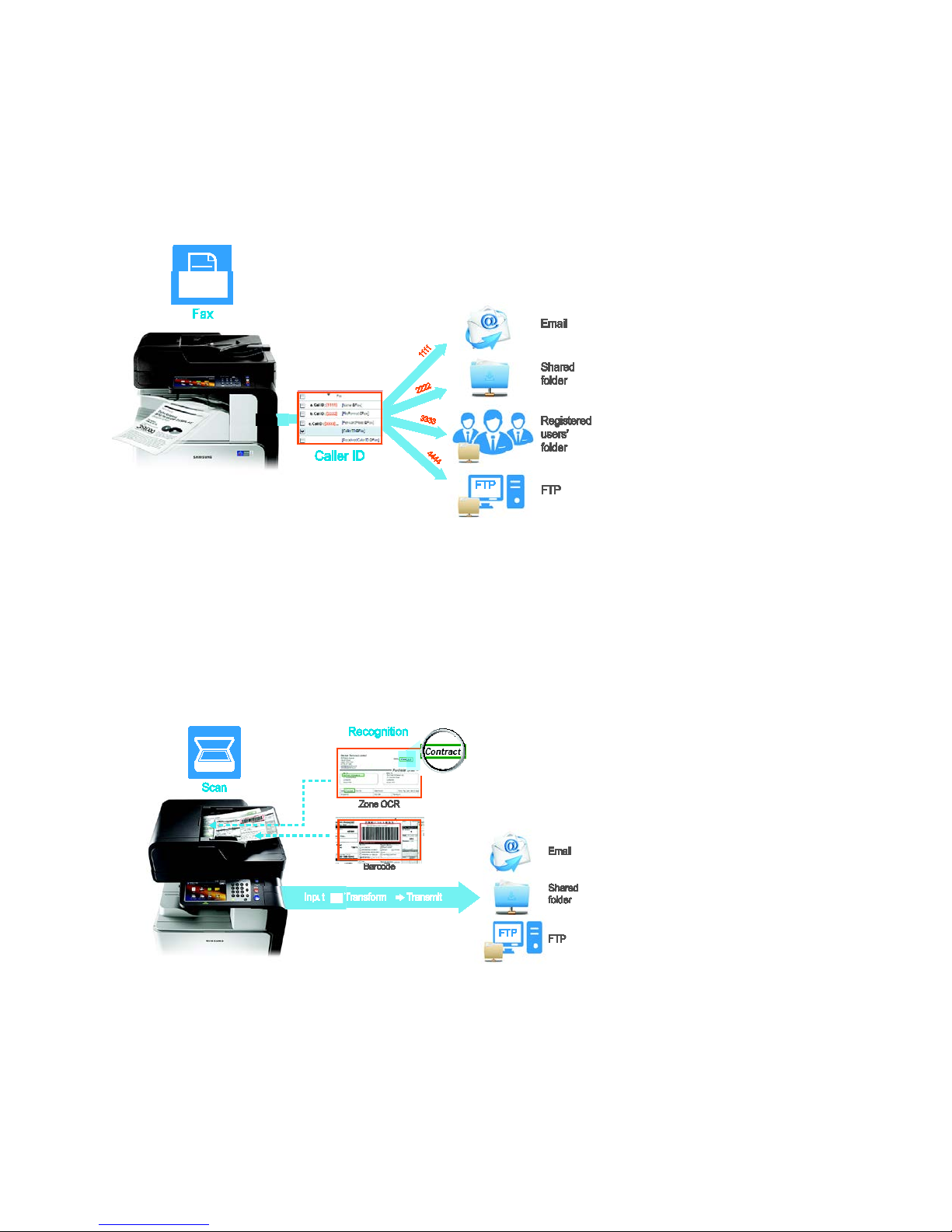
WHITE PAPER SAMSUNG MFP SECURITY
Fax Routing
For enhanced workflow, SMBs can automatically distribute faxes to predetermined locations by manually categorizing
locations using metadata or caller ID. For example, incoming faxes can be automatically categorized by using the caller ID.
This feature is a time-saver when all faxes received from a specific client need to be sent to one individual or a specific
group. By entering the client’s fax number, a workform is automatically started when a fax is received from that number.
Metadata can be handled in much the same way, greatly enhancing workflow efficiency.
Zone-OCR and Barcode Recognition
SmarThru™ Workflow Lite supports OCR, an optical character recognition feature that reads and translates scanned
character images into character codes. Once captured, documents can be routed to predetermined destinations based on
text content in document zones using Zone-OCR, or based on barcode scans using the barcode recognition function.
Samsung OCR and Zone-OCR, standard features with this solution, provide broad support for 27 languages allowing
accurate document conversion and processing. Businesses can save resources by eliminating the need for an additional
server, gaining the added benefit of automated save folder naming and creation by Zone-OCR and of automated naming
of saved files by barcode recognition.
Page - 46 Copyright 2014 Samsung Electronics Co., Ltd., All rights reserved.
Page 47
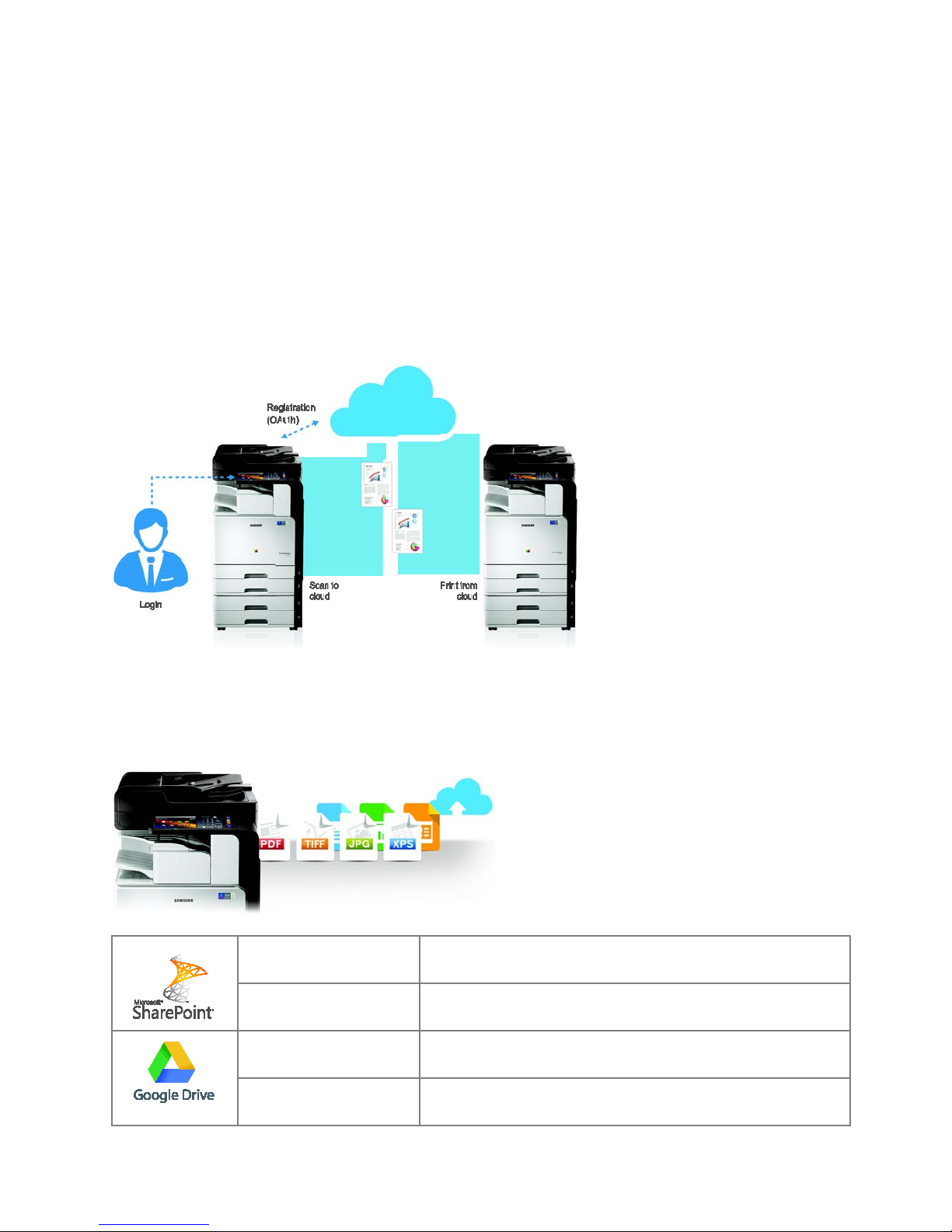
SAMSUNG MFP SECURITY WHITE PAPER
12.2 Cloud Connector
With the Samsung Cloud Connector solution, users can directly scan to, and print from, the Cloud. Users can also preview
the content before uploading to the Cloud.
Easy, Secure Access to the Cloud
Cloud Connector supports a variety of Cloud services and provides an easy way to upload, scan, and access content for
printing directly without an additional server. Supported Cloud services include Google® Drive and Microsoft®
Sharepoint® Online. Additional Cloud services will be supported as they become available.
Secure authentication and authorization for Google®Drive online storage service is provided by the use of OAuth 2.0 for
secure file access.
Support for Various File Formats and Cloud Services
Cloud Connector can accept PDF, TIFF, and XPS scans and can print PDF and Google® Drive formats.
With the ability to support various file formats and services including Microsoft® SharePoint® Online and Google® Drive,
Cloud Connector allows users achieve the most efficient and convenient experience possible.
Scan (Upload) PDF (Secure, Searchable and Compact), XPS, TIFF, JPG
Print (Download) PDF (Secure, Searchable and Compact), TIFF, JPG
Scan (Upload) PDF (Secure, Searchable and Compact), XPS, TIFF, JPG
Print (Download) PDF (Secure, Searchable and Compact),TIFF, JPG,
Page - 47 Copyright 2014 Samsung Electronics Co., Ltd., All rights reserved.
Page 48
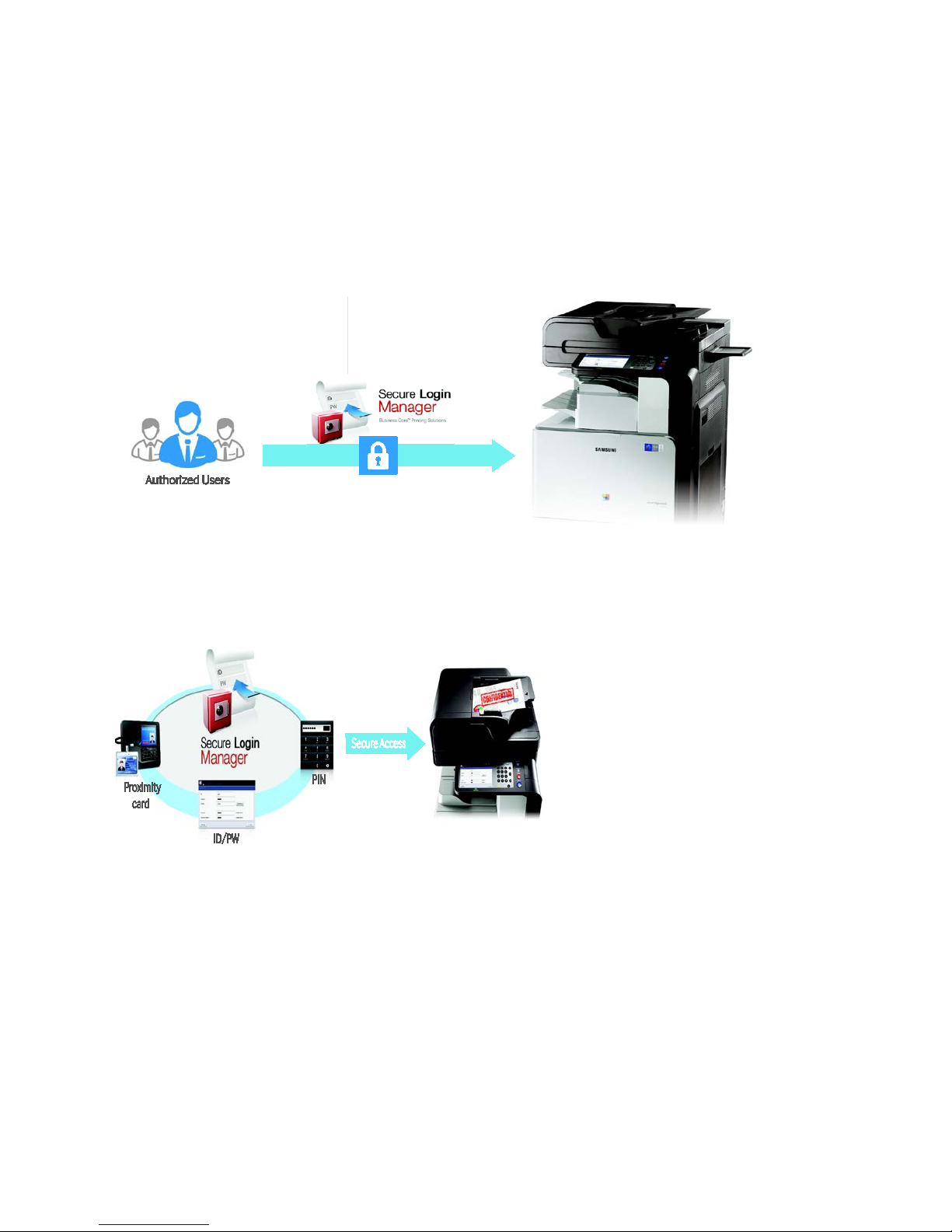
WHITE PAPER SAMSUNG MFP SECURITY
12.3 Secure Login Manager
In today’s fast-paced business environment, it is essential that companies protect valuable devices from unauthorized
access and use. To ensure that only authorized users log in to the systems, Samsung has developed Secure Login Manager.
This authentication security solution supports a variety of authentication methods and types for SMBs.
Secure Authentication
Protect access and usage of your valuable MFP devices from unauthorized personnel with secure login authentication.
Only authorized users will be able to access permitted functions.
Flexible User Access
Secure Login Manager supports a variety of authentication types, including ID/PW, proximity card and Personal
Identification Number (PIN). The optimal access method can then be chosen based on the situation and preference of
each SMB.
Page - 48 Copyright 2014 Samsung Electronics Co., Ltd., All rights reserved.
Page 49
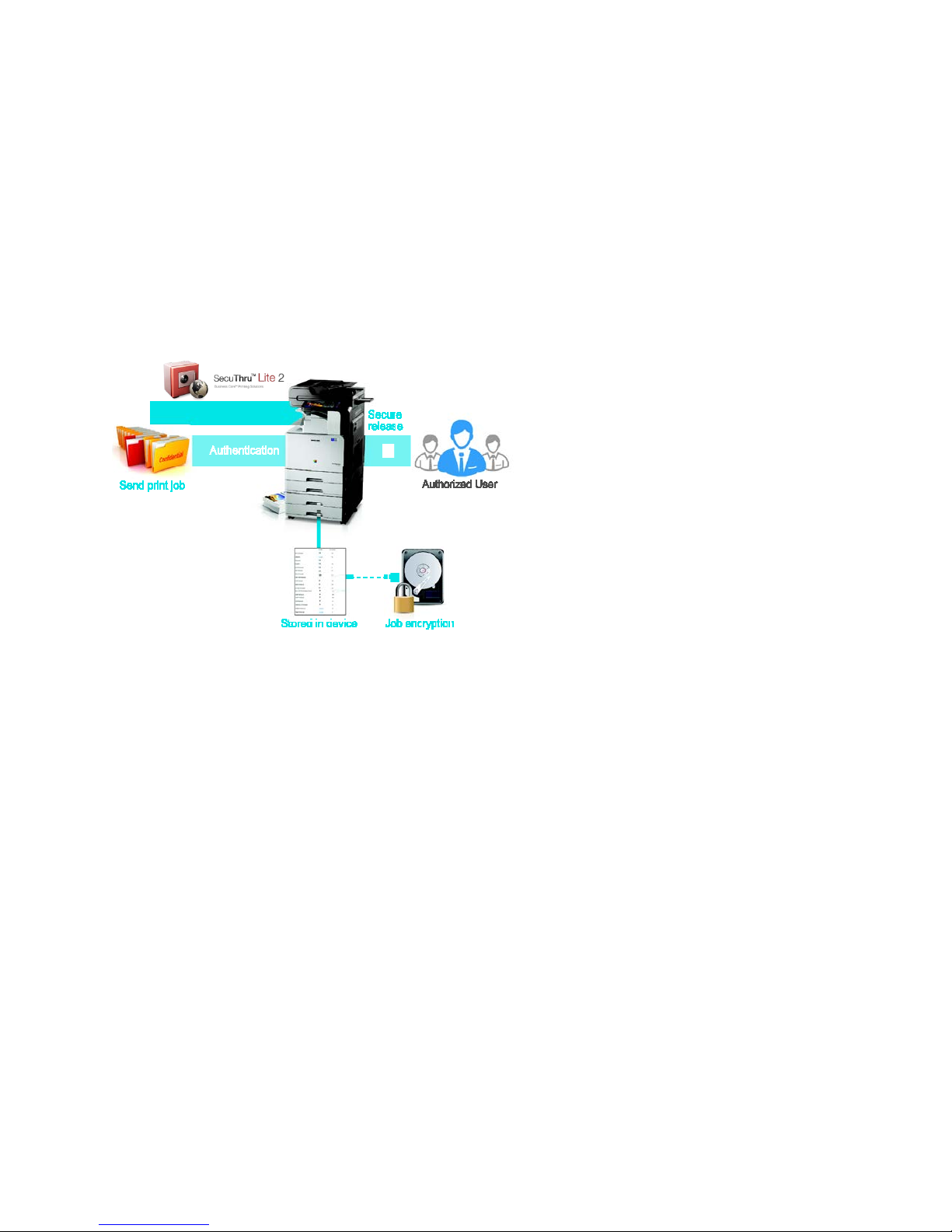
SAMSUNG MFP SECURITY WHITE PAPER
12.4 SecuThru
TM
Lite 2
The modern SMB requires much more than high-quality network printing and multifunction devices. Business and IT
managers demand productive solutions that handle document output effectively and securely while keeping costs under
control. Samsung SecuThru
TM
Lite 2 raises business print environment security to the same high level as that of the overall
IT infrastructure, quickly and cost-effectively.
Secure Authentication and Release
SecuThru
TM
Lite 2 provides secure authentication and release of documents. When the user sends a document to a printer,
all jobs are temporarily stored in the device securely through encryption. Once the authorized user provides authentication
the document is then released. By utilizing this safe and efficient user authentication flow, enterprise-level security can be
professionally supported.
Serverless, Secure Pull Printing
Equipped with secure pull printing, SecuThru
TM
Lite 2 ensures only authorized users can pull documents from up to 10
compatible devices connected to the network. Safely and conveniently allows sharing of print jobs while protecting
confidential documents. Delivers print jobs securely, only to authorized users, through a flexible authentication process
supporting up to 500 users.
Page - 49 Copyright 2014 Samsung Electronics Co., Ltd., All rights reserved.
Page 50
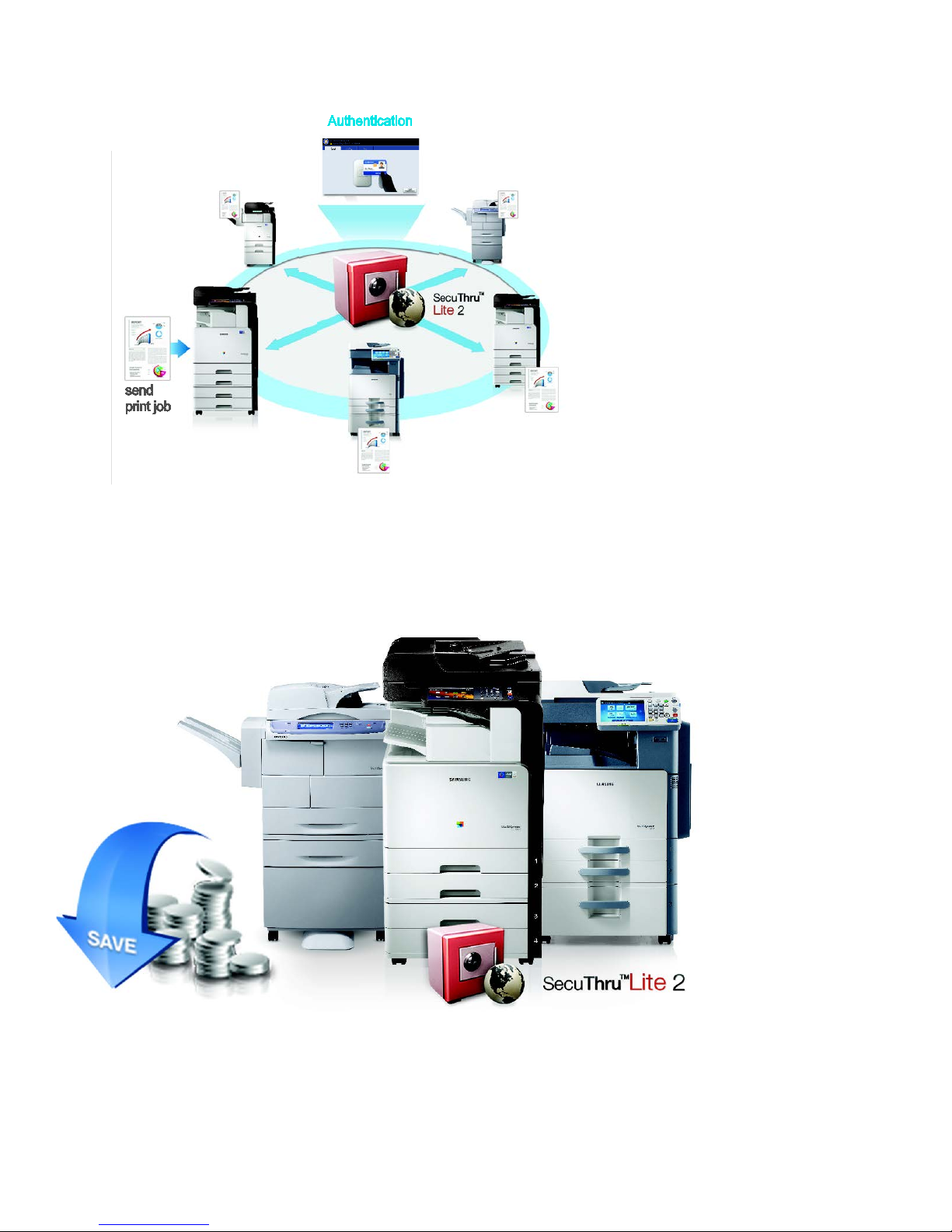
WHITE PAPER SAMSUNG MFP SECURITY
Reduced Printing Costs
This output management solution helps SMBs reduce printing cost by providing pull printing capabilities that reduce paper
usage from unclaimed printouts.
Additionally, the solution allows SMBs to save expenses by eliminating the costly need for an additional server.
Page - 50 Copyright 2014 Samsung Electronics Co., Ltd., All rights reserved.
Page 51
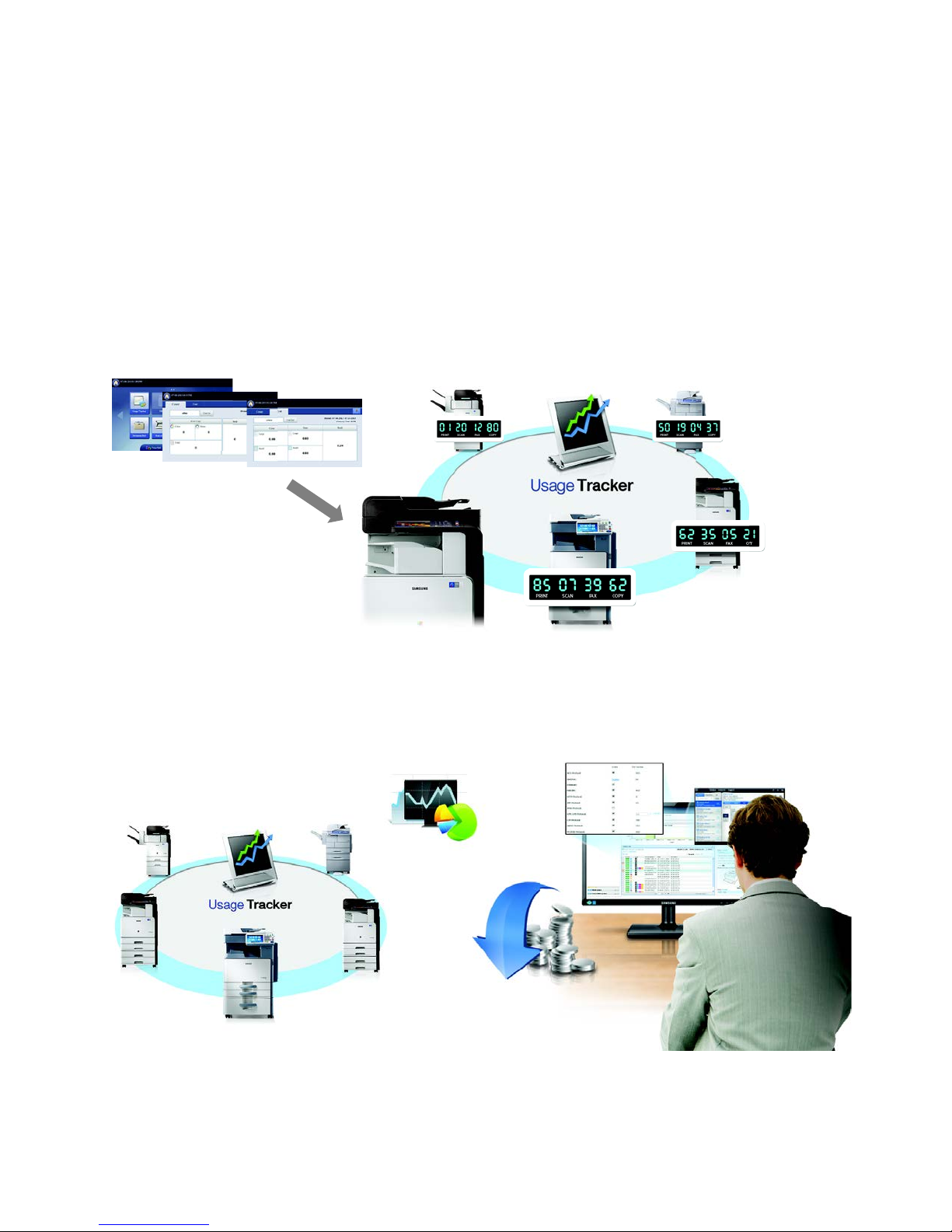
SAMSUNG MFP SECURITY WHITE PAPER
12.5 Usage Tracker
The Samsung Usage Tracker solution provides businesses with the ability to remotely manage and monitor functionality of
multiple devices, which offers a big advantage to any business. This advantage is especially important for SMBs that need
to keep operating costs at a minimum.
Printing-Cost Tracking
With the Usage Tracker tool, easily track printing and copying counts and cost as well as scanning and faxing counts
without a server. Conveniently utilize the touch screen user-interface of a compatible device for intuitive right-away
tracking of one or multiple devices integrated in the network environment.
This solution also creates historical or current time-based reports.
Proactive Monitoring
Monitor device usage from a central location with email notifications. By proactively monitoring print device and function
usage, IT staff can more efficiently manage their print environments. IT managers can aggregate reports on up to 10
compatible devices.
Page - 51 Copyright 2014 Samsung Electronics Co., Ltd., All rights reserved.
Page 52
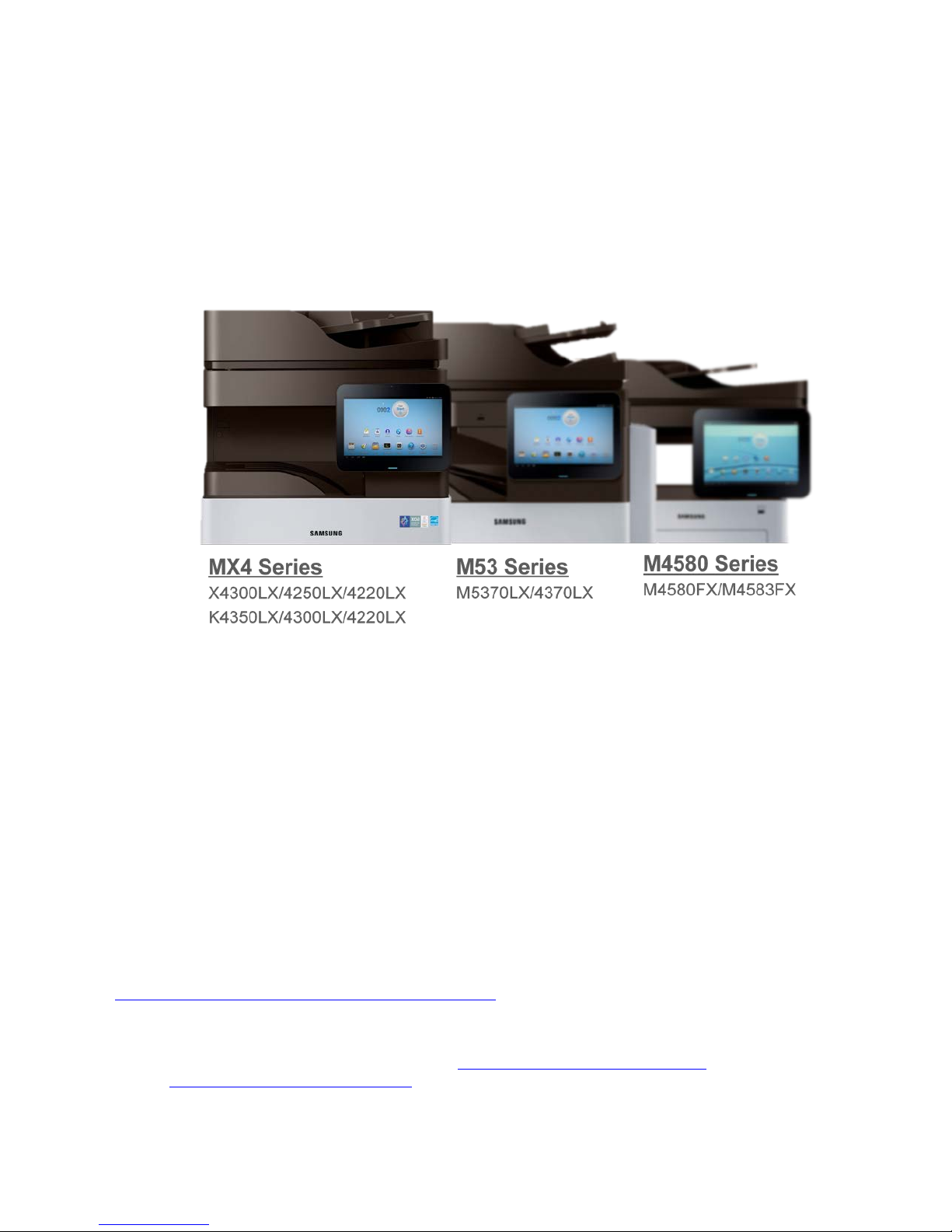
WHITE PAPER SAMSUNG MFP SECURITY
13. Smart Print UX with Android Security
Smart Printing UX
Recently, Samsung new introduced MFP products provide a versatile smart printing UX using Android User Interface with
10.1” Color touch Panel LCD. It provides easy, Intuitive, expansible user experience. To ensure that your MFP maintain a
high level of quality and offers a consistent experience for your users, Samsung was certified to have passed through
Google’s CTS (Compatibility Test Suite) certification.
Securing an open platform requires robust security architecture and rigorous security programs. Android was designed
with multi-layered security that provides the flexibility required for an open platform, while providing protection for all
users of the platform. Android was designed with device users in mind. Users are provided visibility into how applications
work, and control over those applications. This design includes the expectation that attackers would attempt to perform
common attacks, such as social engineering attacks to convince device users to install malware, and attacks on third-party
applications on Android. Android was designed to both reduce the probability of these attacks and the impact of the
attack in the event it was successful.
Furthermore, Samsung has developed the security mechanism and authentication methods to improve the Android
security. Samsung supports the Samsung Application Store to provide various powerful applications to the customer.
These all application shall be verified by Samsung Printing Division’s auditor to guarantee the security level of application.
Note that only an administrator can install additional application. It means that hacker cannot install any application
(malware) using third-party applications to reveal customer’s valuable information. If customers do not want to install any
additional application in your MFP, Samsung absolutely provides the Application Locking Solution to prohibit the
installation of any third-party applications.
Samsung continuously improves its security abilities and offerings to overcome Android level of security.
For more detail information about Android Security, please refer to the below link;
http://source.android.com/devices/tech/security/index.html
Portions of this page are modifications based on work created and shared by the Android Open Source Project and used according to terms
described in the Creative Commons 2.5 Attribution License.
Page - 52 Copyright 2014 Samsung Electronics Co., Ltd., All rights reserved.
Page 53

Samsung
Security
Convenience
Cost
Effectiveness
High Level
of
Security
SAMSUNG MFP SECURITY WHITE PAPER
14. Key Benefits of Samsung MFP Security
With the cost of security breaches and information loss being so high, all IT professionals are looking for products that
offer security. The Samsung MFPs offer you the Samsung Security Framework – a five point fortress against unauthorized
access to your data. Now your MFP security is one less thing you need to worry about. Samsung offers certified high level
security that is also convenient and affordable. Samsung’s “Out of the Box” built-in MFP Security includes the following:
1. Samsung Security Framework:
• Secure User:
- Authentication
- Authorization
- Accounting
- SSO
- Access Control
• Secure Data
- Encryption
- HDD Image
Overwrite
- Information Hiding
• Secure Network & Fax
- SSL/TLS
- SNMPv3
- IPSec (IPv4, IPv6)
- 802.1x (with EAP)
- Protocol/Port
Management
- IP/MAC Filtering
- Watermarks
- Stamps
• Secure Document
- Secure Print
- Secure Fax
- Document Tagging
• Secure Management
- System Logs
- System Back-Up
- E-mail Notification
2. Common Criteria Certification:
Samsung MFP Security has received EAL 3 certification.
3. Out of the Box Security:
Enjoy Samsung’s valuable MFP security features without the need to purchase a “Security Kit” to ensure device
security.
4. End Of Lease:
At the end of the lease the user/service can easily erase all data from the MFP/Printer before returning the device.
Page - 53 Copyright 2014 Samsung Electronics Co., Ltd., All rights reserved.
Page 54

WHITE PAPER SAMSUNG MFP SECURITY
15. Conclusion
Samsung has created an MFP security system that is affordable, convenient, and effective. This security system has been
verified and certified by Common Criteria and comply with IEEE 2600 security standards. Now enterprises and IT
managers have a choice for low TCO MFPs with built-in security. The “Out of the Box” built-in MFP security features are
perfect for most enterprises and they do not require you to buy a “Security Kit” to ensure your system security.
Samsung is continually working with our customers and designing MFPs that keep your documents safe and secure from
internal and external threats. We understand your security requirements and strive to provide value-based security
technology that satisfies your needs. Our out-of-the-box comprehensive and reliable security offerings are the foundation
to a productive and secure work environment.
Page - 54 Copyright 2014 Samsung Electronics Co., Ltd., All rights reserved.
 Loading...