

Page 1
Specification
2.
2-1.
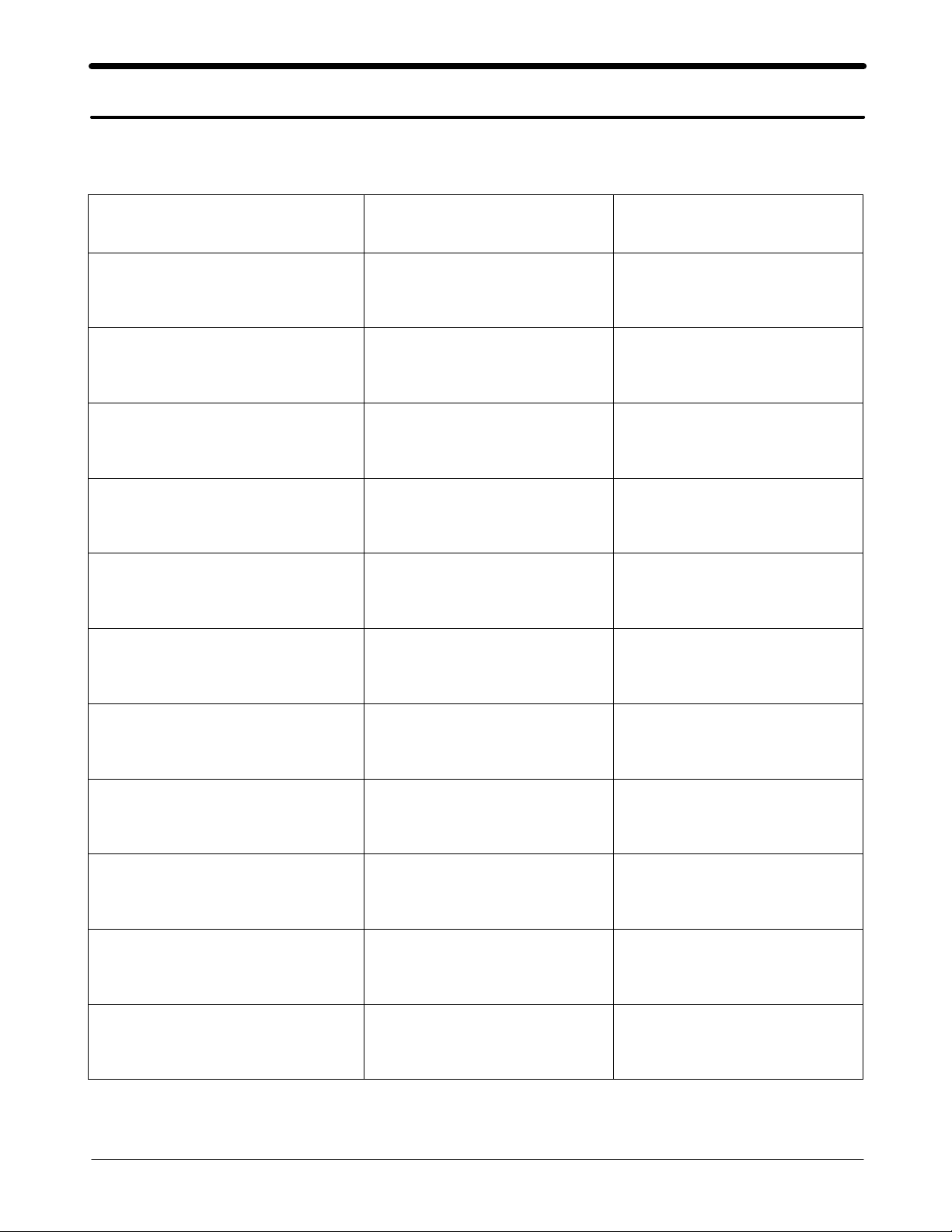
GSM General Specification
EGSM 900 DCS1800
Freq. Band[MHz]
Uplink/Downlink
ARFCN range 0~124 & 975~1023 512~885
Tx/Rx spacing 45MHz 95MHz
Mod. Bit rate
/BitPeriod
Time Slot Period
/ Frame Period
880~915
925~960
270.833kbps
3.692us
576.9us
4.615ms
1710~1785
1805~1880
270.833kbps
3.692us
576.9us
4.615ms
Modulation 0.3GMSK 0.3GMSK
MS Power 33dBm~5dBm 30dBm~0dBm
Power Class 5
Sensitivity -102dBm -100dBm
TDMA Mux 8 8
Cell Radius 35Km 2Km
pcl
~19
pcl
pcl
0
~15
pcl
2-1
SAMSUNG Proprietary-Contents may change without notice
This Document can not be used without Samsung's authorization
Page 2
Specification
2-2.
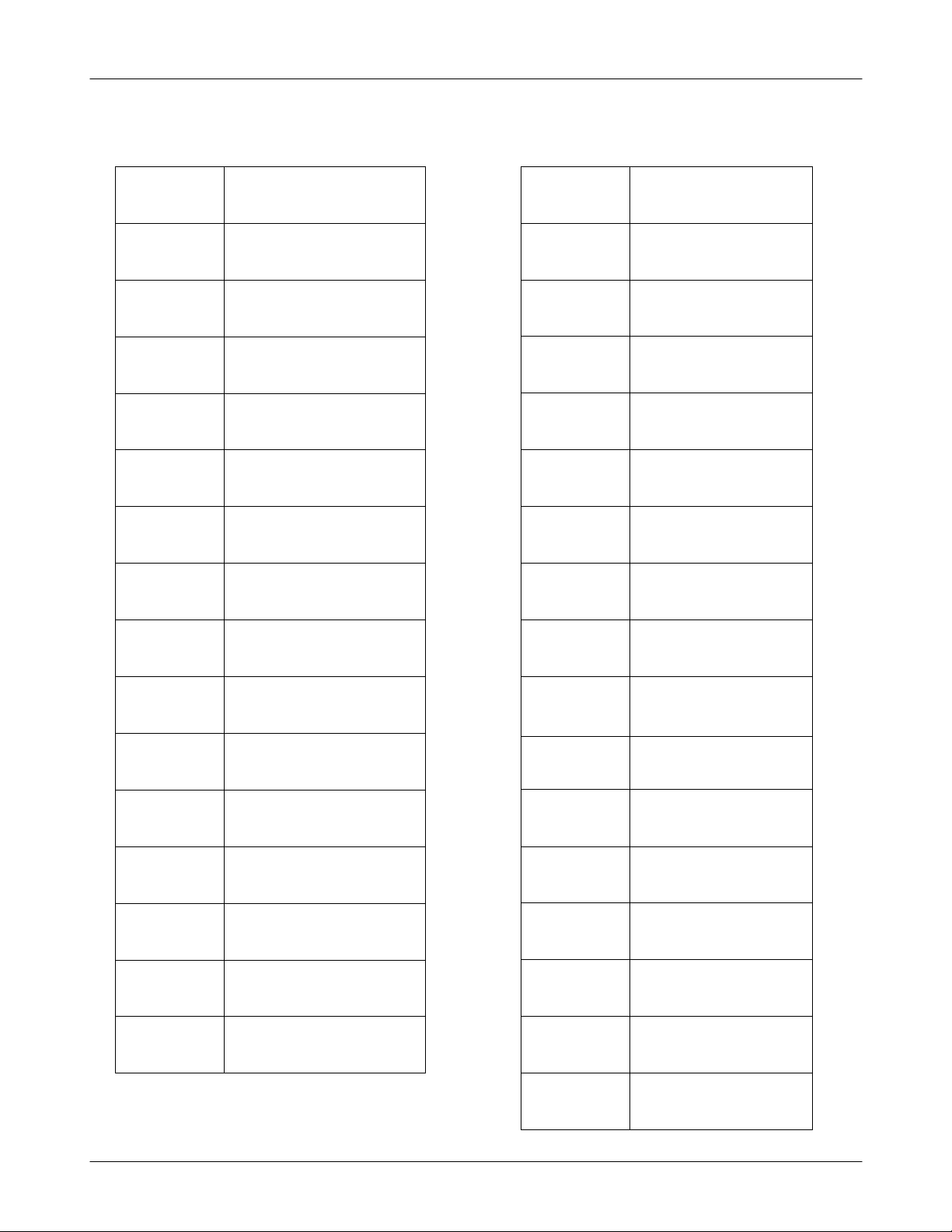
GSM TX power class
TX Power
control level
GSM900
533±2
631±2
729±2
827±2
925±2
10 23±2
11 21±2
dBm
dBm
dBm
dBm
dBm
dBm
dBm
TX Power
control level
0 30±3
1 28±3
2 26±3
3 24±3
4 22±3
5 20±3
6 18±3
DCS1800
dBm
dBm
dBm
dBm
dBm
dBm
dBm
12 19±2
13 17±2
14 15±2
15 13±2
16 11±3
17 9±3
18 7±3
19 5±3
dBm
dBm
dBm
dBm
dBm
dBm
dBm
dBm
7 16±3
8 14±3
9 12±4
10 10±4
11 8±4
12 6±4
13 4±4
14 2±5
dBm
dBm
dBm
dBm
dBm
dBm
dBm
dBm
15 0±5
2-2
SAMSUNG Proprietary-Contents may change without notice
This Document can not be used without Samsung's authorization
dBm
Page 3

Operation Instruction and Installation
3.
Main Function
S20 Pin TA
-
No Java
-
Phonebook
-
Dual band(900/1800MHz)
-
Auto power alarm
-
-46x109
MP3 Ringtone,
-
SOS
-
x
entry, quick search
200
mm
11.1
Poly Sound, WAV/MIDI
40
3-2
SAMSUNG Proprietary-Contents may change without notice
This Document can not be used without Samsung's authorization
Page 4
Array course control
4.
Software Adjustments
4-1.
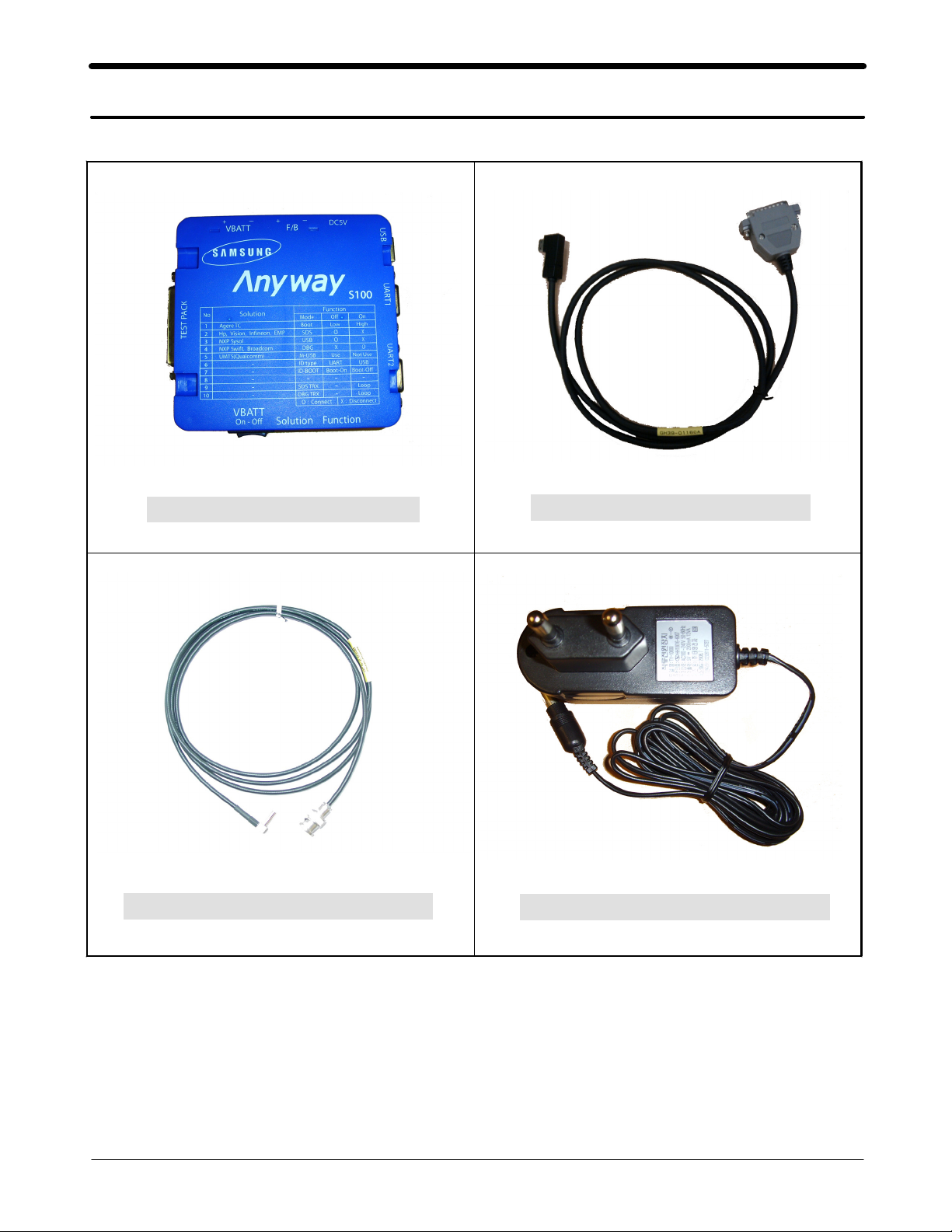
Test Jig(GH99
RF Test Cable(GH
-36900
39-00985
A)
A)
Test Cable(GH
Adapter(GH
39-01160
99-38251
A)
A)
4-1
SAMSUNG Proprietary-Contents may change without notice
This Document can not be used without Samsung's authorization
Page 5

Array course control
Software Downloading
4-2.
4-2-1.
4-2-2.
■
1
2
Pre-requsite for Downloading
Downloader Program(
•
GT-S3110C Mobile Phone
•
Data Cable
•
Binary file, TFS file
•
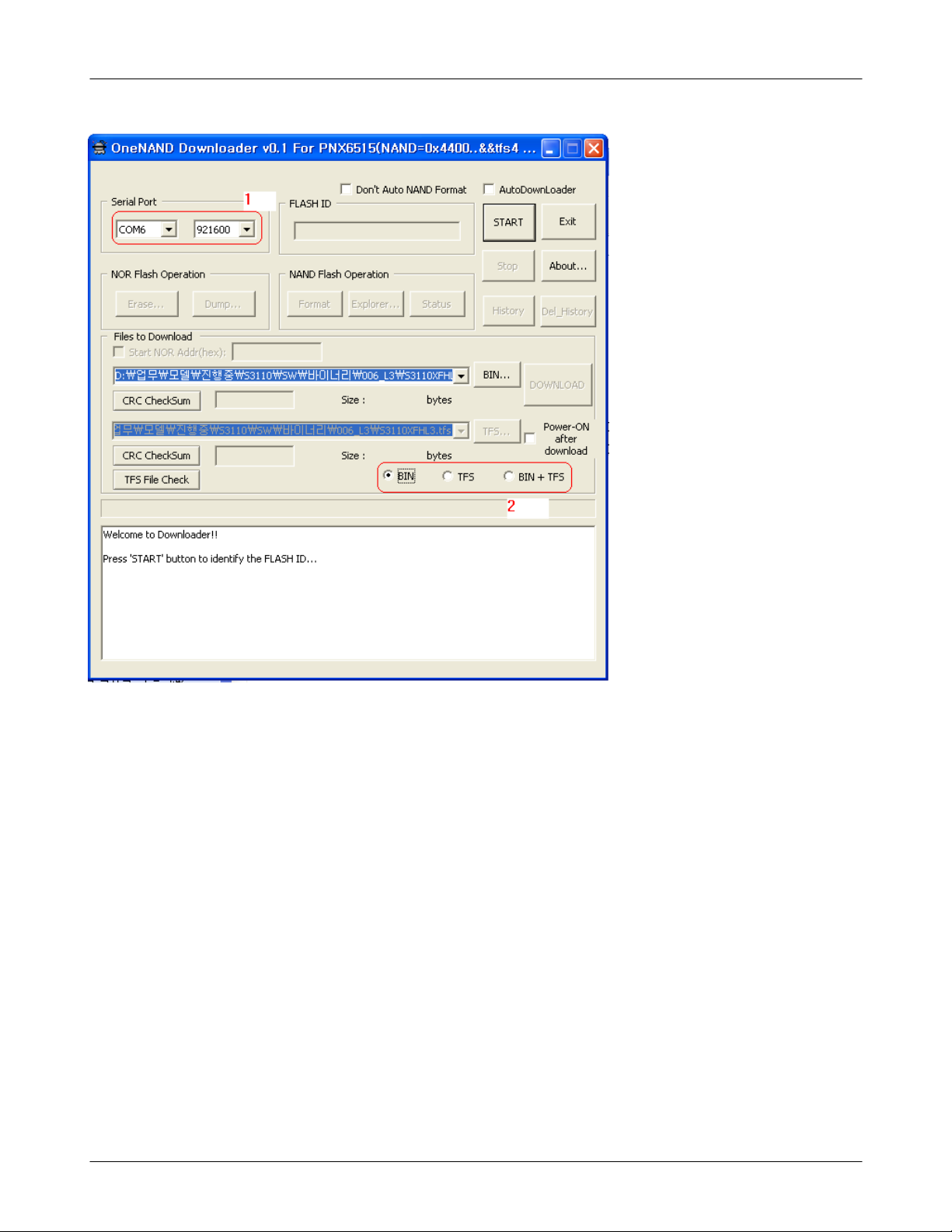
OneNAND Downloader v0.1 For PNX6512.exe
S/W Downloader Program
Load the binary download program by executing the
OneNAND Downloader v1.5 Lite For PNX6512.exe
“
Select the connected serial port and the rate of speed
.
Select the check box, the mode you want to download.
.
if the binary file wanted, check only'BIN'
-
if the tfs file wanted, check only'TFS'
-
if all the files wanted, check'BIN+TFS'
-
”
)
4-2
SAMSUNG Proprietary-Contents may change without notice
This Document can not be used without Samsung's authorization
Page 6
Array course control
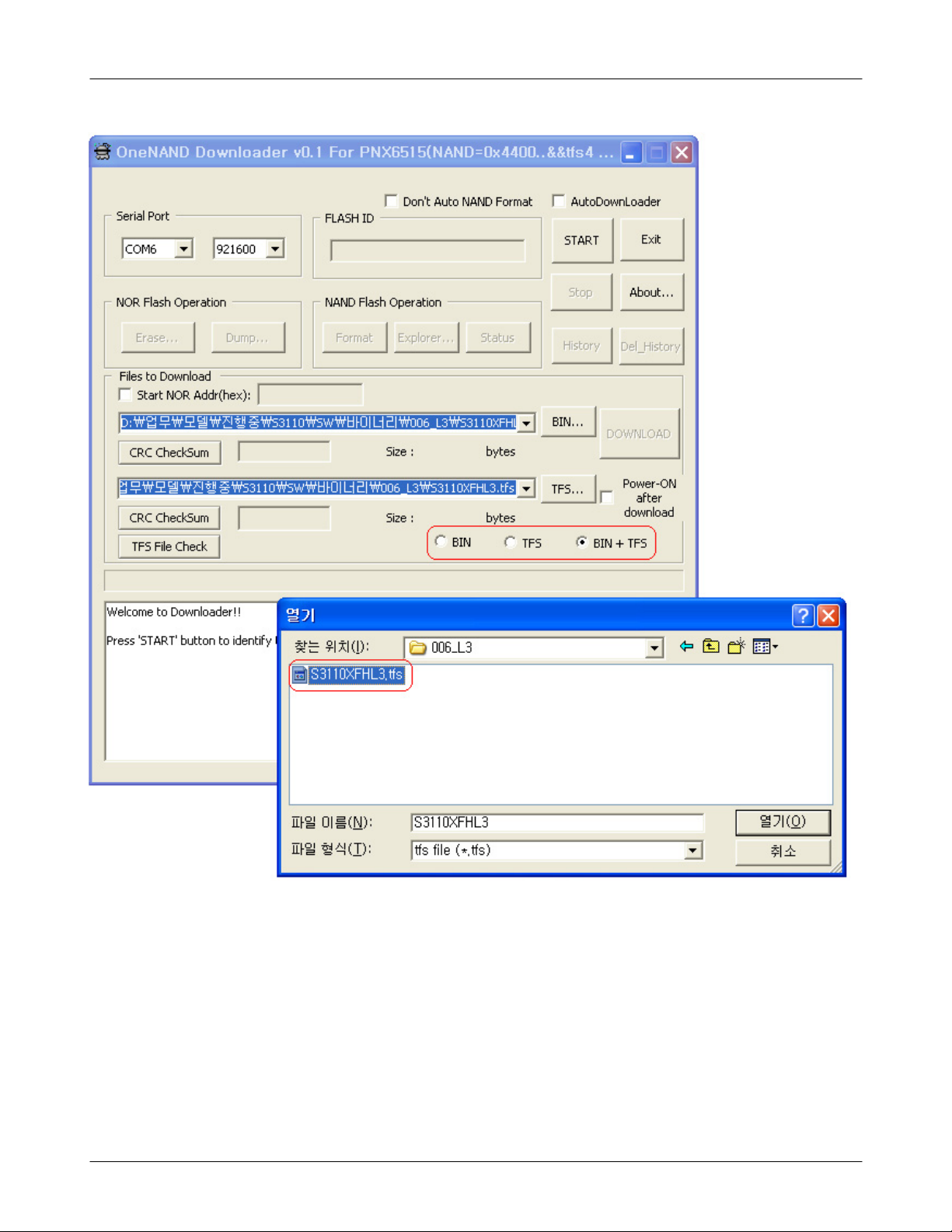
Select the file(s) what you want to download
.
3
click'BIN...'to selectabinary file.
-
click'TFS...' to selectatfs file.
-
4-3
SAMSUNG Proprietary-Contents may change without notice
This Document can not be used without Samsung's authorization
Page 7
Array course control
Click the'START' button to Erasing.
.
4
Click the'DOWNLOAD' button to downloading
Confirm the downloaded version name and etc.
.
5
*#1234#
Full Reset
:
*0206*3855#
4-4
SAMSUNG Proprietary-Contents may change without notice
This Document can not be used without Samsung's authorization
:
Page 8

10.
Reference data
10-1.
AAC:
AVC :
BER :
BPSK:
CA :
CDM :
C/I :
DMB :
EN
ES
ETSI:
MPEG:
PN :
PS :
QPSK:
RS :
SI :
TDM :
TS
Reference Abbreviate
Advanced Audio Coding.
Advanced Video Coding.
Bit Error Rate
Binary Phase Shift Keying
Conditional Access
Code Division Multiplexing
Carrier to Interference
Digital Multimedia Broadcasting
European Standard
:
Elementary Stream
:
European Telecommunications Standards Institute
Moving Picture Experts Group
Pseudo-random Noise
Pilot Symbol
Quadrature Phase Shift Keying
Reed-Solomon
Service Information
Time Division Multiplexing
Transport Stream
:
10-1
SAMSUNG Proprietary-Contents may change without notice
This Document can not be used without Samsung's authorization
Page 9

Safety Precautions
1.
Repair Precaution
1-1.
Repair in Shield Box, during detailed tuning.
●
Take specially care of tuning or test,
because specipicty of cellular phone is sensitive for surrounding interference(RF noise).
Be careful to useakind of magnetic object or tool,
●
because performance of parts is damaged by the influence of manetic force.
Surely useastandard screwdriver when you disassemble this product,
●
otherwise screw will be worn away.
Useathicken twisted wire when you measure level.
●
thicken twisted wire has low resistance, therefore error of measurement is few.
A
Repair after separate Test Pack and Set because for short danger(for example an
●
overcurrent and furious flames of parts etc) when you repair board in condition of
connecting Test Pack and tuning on.
Take specially care of soldering, because Land of PCB is small and weak in heat.
●
Surely tune on/off while using AC power plug, becausearepair of battery charger is
●
dangerous when tuning ON/OFF PBA and Connector after disassembing charger.
Don't use as you pleases after change other material than replacement registered on SEC
●
System.
Otherwise engineer in charge isn't charged with problem that you don't keep this rules.
1-2
SAMSUNG Proprietary-Contents may change without notice
This Document can not be used without Samsung's authorization
Page 10

Safety Precautions
ESD(Electrostatically Sensitive Devices) Precaution
1-2.
Several semiconductor may be damaged easilly by static electricity. Such parts are called by
ESD(Electrostatically Sensitive Devices), for example IC,BGA chip etc. Read Precaution below.
You can prevent from ESD damage by static electricity.
Remove static electricity remained your body before you touch semiconductor or parts with
●
semiconductor. There are ways that you touch an earthed place or wear static electricity
prevention string on wrist.
Use earthed soldering steel when you connect or disconnect ESD.
●
Use soldering removing tool to break static electricity.,otherwise ESD will be damaged by
●
static electricity.
Don't unpack until you set up ESD on product. Because most of ESD are packed by box
●
and aluminum plate to have conductive power,they are prevented from static electricity.
You must maintain electric contact between ESD and place due to be set up until ESD is
●
connected completely to the proper place oracircuit board.
1-2
SAMSUNG Proprietary-Contents may change without notice
This Document can not be used without Samsung's authorization
 Loading...