

Page 1
Mobex_User_Guide_SLT_screen.qxd 4/13/2011 10:53 AM Page 1
Mobex_User_Guide_SLT_screen.qxd 4/13/2011 10:53 AM Page 2
Executive MOBEX
User Guide
March 2011
Samsung Telecommunications America reserves the right without prior notice to revise information in
this guide for any reason. Samsung Tele com mu ni ca tions America also re serves the right without prior
notice to make changes in design or components of equipment as engineering and man u fac tur ing
may warrant. Samsung Telecommunications America disclaims all liabilities for damages arising from
the erroneous interpretation or use of information presented in this guide.
for
OfficeServ
™ 7000 Series
Page 2

TABLE OF CONTENTS
ABOUT THIS BOOK ................................................................................1
THINGS YOU SHOULD KNOW ................................................2
CONNECTING TO THE SYSTEM ......................................3–4
OUTSIDE CALLS
Making an Outside Call......................................................................................5
INTERCOM CALLS
Calling Other Stations ........................................................................................6
Calling Your System Operator..........................................................................6
CALL PROCESSING
Retrieving Calls on Hold at Another Station ..............................................7
Trans ferr ing Cal ls ..................................................................................................7
Trans fer with Camp -On ......................................................................................7
Setting Up a Conference ..................................................................................8
Forwarding Your Calls ....................................................................................8–9
Call Pickup ......................................................................................................9–10
DIALING FEATURES
Speed Dialing......................................................................................................11
Programming Personal Speed Dial Numbers ........................................11
Last Number Redial ..........................................................................................11
Mobex_User_Guide_SLT_screen.qxd 4/13/2011 10:53 AM Page 5
PAG IN G AN D MESS AGIN G
Making an Internal Page ................................................................................12
Making an External Page ................................................................................12
All Page..................................................................................................................12
Meet Me Page/Answer ....................................................................................12
Call Park and Page ............................................................................................12
Retrieving a Parked Call ..................................................................................13
PERSONAL SPEED DIAL LIST ....................................14–15
Mobex_User_Guide_SLT_screen.qxd 4/13/2011 10:53 AM Page 6
Page 3

Mobex_User_Guide_SLT_screen.qxd 4/13/2011 10:53 AM Page 7
ABOUT THIS BOOK
This booklet provides instructions for call handling and feature interaction on your
Executive MOBEX phone with OfficeServ 7000 Series system.
Please take the time to study this guide and to become familiar with the op er a tion
of your Executive MOBEX phone. Keep it handy. You may need to look up in struc tions for infrequently used features.
Learning to use your Executive MOBEX phone correctly will make everyday telephone com mu ni ca tions a breeze.
This book is written based on the factory default settings for the feature access
codes. Sometimes, due to programming requirements, these codes may be
changed. If you find that a feature code does not work as described in this book,
please contact your installation and service company to determine the correct
code.
1
Mobex_User_Guide_SLT_screen.qxd 4/13/2011 10:53 AM Page 8
Page 4

2
THINGS YOU SHOULD KNOW
USER ORIENTATION
You r E xe cu ti ve MO BE X p ho ne in te r fa ce s t o t he O ff ic eS er v 70 00 Se ri es s ys te m i n
two ways:
• By logging in after receiving a MOBEX call, or
• If configured, you may dial in to the system and log in to activate the interface.
Both connection methods will be discussed in this booklet.
To get a n o ut sid e lin e f ro m t he te le ph one co mp an y o nce c onn ec te d, d ial an a cce ss
code, usually the digit “9.” To call an oth er station in your system, simply dial its
extension number. See your sys tem directory list for other access codes and extension numbers.
C.O. LINES
Lines from the telephone company are “C.O. lines.” Calls on these lines are referred
to as “outside calls.” These C.O. lines are accessed by dialing an access code. For
example, dial 9 to get a local outside line or dial 800–8XX for other line groups.
Each line in the system is numbered beginning with 701, and then 702, 703, etc. To
get a specific line, dial its three digit line number. If Least Cost Routing (LCR) is programmed into the system, you will only be required to dial 9.
Mobex_User_Guide_SLT_screen.qxd 4/13/2011 10:53 AM Page 9
CONNECTING TO THE SYSTEM
For the remai nder of this bookl et i nstruc tions will ass ume that you are connec ted, logged in, and hearing a system dial tone. There are two ways to connect and
log in:
CONNECTING DURING A MOBEX CALL
When someone calls your office number and rings your Executive MOBEX phone
you can initiate the system connection by dialing the MOBEX feature access code,
typically ✱8. You will hear system dial tone if successful or, if no resources are avail-
able, you will be returned to your caller.
CONNECTING BY CALLING IN TO
THE SYSTEM
If the system administrator has allowed it, you may log in to the Executive MOBEX
interface by dialing in to the system. Your administrator will provide you with
instructions on what number to dial and which login method is used. The two
types of login methods are:
• AUTOM ATIC : Meaning the system will automatically log you in based on
the Caller ID of y
ou Executive MOBEX phone, or
• MANUAL: Meaning the system requires you to log in based on your exten-
sion and passcode
.
To l o g i n m an u al l y:
•call in to the number provided by the administrator
•dial your extension number at the tone (or music)
•you will hear a short confirmation tone
3
Mobex_User_Guide_SLT_screen.qxd 4/13/2011 10:53 AM Page 10
Page 5
4
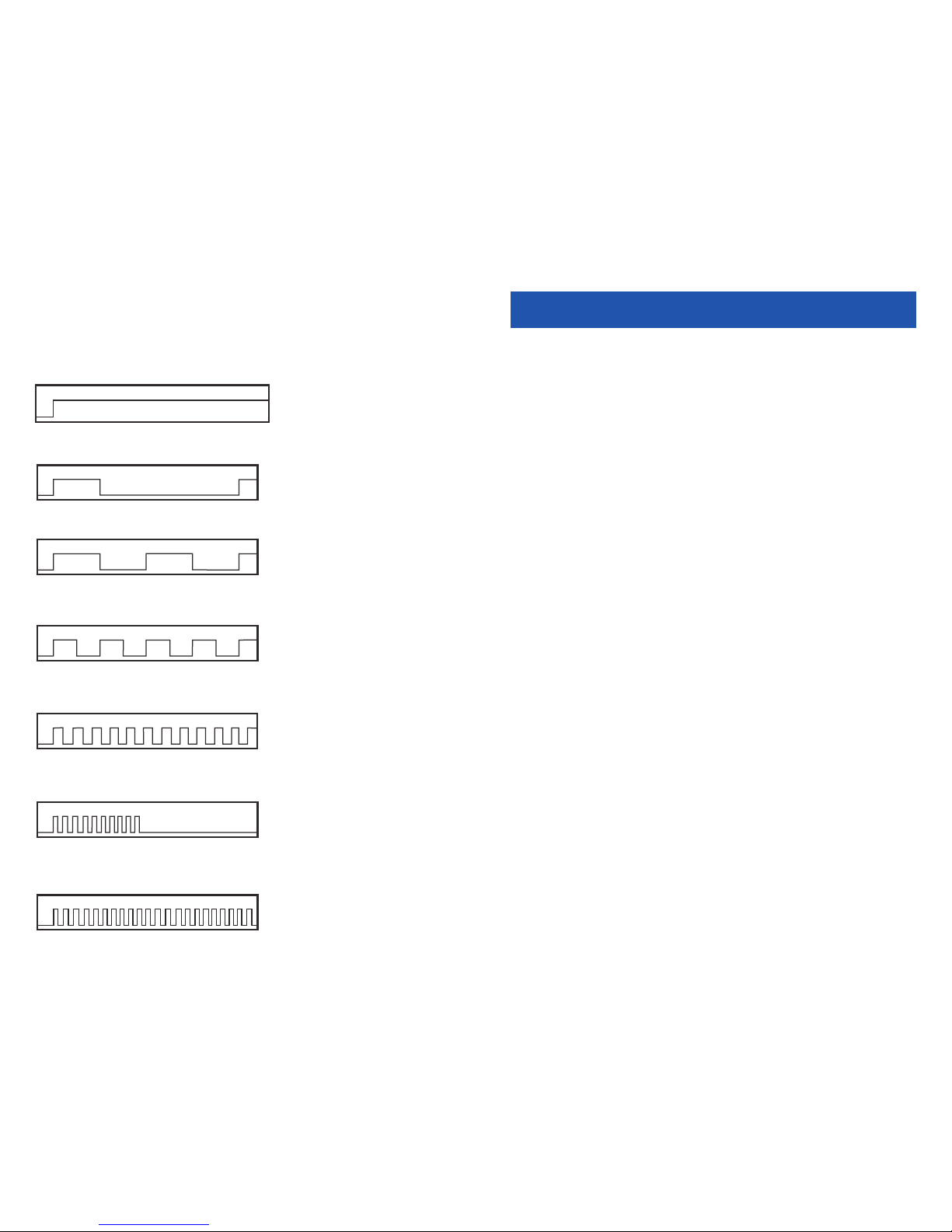
SYSTEM TONES
The system provides several tones to assist you. Some of these tones are already
familiar to you.
Intercom Dial Tone—A steady tone that indicates you can begin dialing.
DIAL TONE
CONTINUOUS
Ringback Tone—Indicates the station you dialed is ringing.
RINGBACK TONE—1000 ms ON/3000 ms OFF
CONTINUOUS
Busy Tone—Indicates the station you dialed is busy.
BUSY TONE—500 ms ON/500 ms OFF
CONTINUOUS
DND/No More Calls Tone—Fast busy tone indicates the station you dialed
is in the Do Not Disturb mode or cannot receive any more calls.
DND/NO MORE CALLS TONE—250 ms ON/250 ms OFF
FOR TEN SECONDS
Transfer/Conference Tone—Indicates your call is being held and you
can dial another party.
TRANSFER/CONF TONE—100 ms ON/100 ms OFF
CONTINUOUS
Confirmation Tone—Very short beeps followed by dial tone indicate you
have correctly set or canceled a system feature.
CONFIRMATIONTONE—50 ms ON/50 ms OFF
FOR ONE SECOND
(programmable)
Error Tone—A distinctive two level beeping tone indicates you have done
something incorrectly.Try again.
ERROR TONE—50 ms of tone 1/50 ms of tone 2
FOR THREE SECONDS
Mobex_User_Guide_SLT_screen.qxd 4/13/2011 10:54 AM Page 11
5
OUTSIDE CALLS
MAKING AN OUTSIDE CALL
• Dial a C.O. line or line group access code.
• Receive outside dial tone and then dial the telephone number.
• Finish the call by hanging up.
If your system is programmed to require an authorization code before mak ing a
call:
• Dial ✱ and a valid code. You will hear confirmation tone, followed by dial
tone.
• Select a C.O. line.
If your system is programmed to require an account code before making a call:
• Dial 47 and a valid code.
• Dial ✱8 and receive transfer tone. Select a C.O. line.
For more informa tion see yo ur sy s t em ad mi n i s t ra tor.
Mobex_User_Guide_SLT_screen.qxd 4/13/2011 10:54 AM Page 12
Page 6

INTERCOM CALLS
CALLING OTHER STATIONS
•Dial the extension number or group number.
•Wait for the party to answer.
• If you hear several brief tone bursts instead of ringback tone, the
station you called is set for Voice Announce or Auto An swer.
•Begin speaking immediately after the tone.
•Finish the call by hanging up.
BUSY STATION CAMP-ON
When you call another station and receive a busy signal but you do not want to
wait for a callback:
•Dial ✱8 receive transfer tone and dial 45.
• The called station will receive off-hook ring or camp-on tone.
•You will hear ringback tone.
• Wait for the called party to answer.
The called station must release its first call or put it on hold before an swer ing your
camp-on.
CALLING YOUR SYSTEM OPERATOR
•Dial 0 to call your system operator or group of op er a tors.
•If you want to call a specific operator, dial that person’s ex ten sion num ber.
6
Mobex_User_Guide_SLT_screen.qxd 4/13/2011 10:54 AM Page 13
7
CALL PROCESSING
RETRIEVING CALLS ON HOLD AT
AN OTH ER STATION
When a line is on hold at any other station:
•Dial 12 plus the extension number of the station that placed the call on
hold—OR—dial 12 plus the line number if you know what it is.
TRANSFERRING CALLS
Tran sfer is us ed to send an y c all to ano ther ex tens ion in one of tw o w ays. You ca n
perform a screened transfer by informing the other extension who is call ing or you
can perform a blind transfer without notification.
• While you are speaking on a call, dial ✱8 to receive transfer dial tone and
then dial an extension number. Your call is au to mat i cal ly put on transfer
hold.
• Hang up when you hear ringing—OR—wait for the party to answer and
advise the party of the call and then hang up. If the transfer is refused, you
will be reconnected to the outside line when the station hangs up or you
can ✱8 to return to the outside party.
TRANSFER WITH CAMP-ON
When you are transferring a call to another station and it is busy, you may camp
the call on to this station:
• While you are speaking on a call, ✱8 to receive transfer dial tone and then
dial an extension number. Your call is au to mat i cal ly put on transfer hold.
•Hang up when you hear a busy signal. The called party will be alert ed that
a call is waiting.
Mobex_User_Guide_SLT_screen.qxd 4/13/2011 10:54 AM Page 14
Page 7

SETTING UP A CONFERENCE
You m ay c on fe re nc e f iv e pa rt ie s (y ou a nd f ou r o th e r p ar t ie s) i n a ny c om b i na tio n of
outside lines and internal stations in any order.
•While you are engaged in a conversation, dial ✱8, receive transfer tone and
dial 46. Yo u w il l re c ei ve c on fe re nc e t on e.
•Make another call, either intercom or outside.
• After the called party answers, dial ✱8 and receive conference tone.
• Make another call—OR—dial ✱8 to join all parties.
•Repeat as necessary.
To drop a party from your conference call:
•Dial ✱8, receive confirmation tone and dial the extension or line num ber
that is to be dropped.
•Receive conference tone and dial 46 to rejoin the oth er par ties.
NOTE: To leave the conference, hang up. Control will be passed to the first internal
station that was added. If there are no internal stations and you wish to leave outside lines connected together in a trunk to trunk conference, fol low the instructions to drop a party and use your extension number. When the par ties on the out side lines hang up, the lines will re lease au to mat i cally, proceeding disconnect
supervision is supplied by the telephone company.
FORWARDING YOUR CALLS
You ma y fo r wa rd y ou r c al ls to o th er st at io ns or g ro up s o f s ta t io ns . W he n t he y ar e
programmed, Forward All Calls will have priority over Forward Busy and Forward
No Answer conditions.
To cl ea r al l cal l fo rw ard c on di tio ns s et a t you r st at ion dia l 600.
NOTE: It is not necessary to clear call forwarding to change your selection; simply
enter a new forward command.
FORWARD ALL CALLS
To fo rw ar d all o f yo ur c all s to a no the r st at ion :
•Dial 601 followed by the destination you want your calls to forward to. This
can be an internal (within your system) or external (outside your system
such as a cell phone) number.
•Receive confirmation tone and hang up.
To ca nc el Fo rw ar d All C al ls d ial 600—OR—dial another for ward code, e.g., 604.
8
Mobex_User_Guide_SLT_screen.qxd 4/13/2011 10:54 AM Page 15
9
FORWARD BUSY
To fo rw ar d cal ls t o an oth er s ta tio n wh en y ou ar e on t he p hon e:
•Dial 602 followed by the destination you want your calls to forward to. This
can be an internal (within your system) or external (outside your system
such as a cell phone) number.
•Receive confirmation tone and hang up.
To cancel Forward Busy dial 600—OR—dial another forward code, e.g., 604.
FORWARD NO ANSWER
To fo rw ar d cal ls t o an oth er s ta tio n wh en y ou do n ot a ns wer :
•Dial603 followed by the destination you want your call to forward to. This
can be an internal (within your system) or external (outside your system
such as a cell phone) number.
•Receive confirmation tone and hang up.
To ca nce l F or wa rd No An sw er di al 600—OR—dial an oth er forward code, e.g., 604.
FORWARD NO ANSWER/BUSY
To f or war d c all s t o an ot her st ati on whe n y ou d o no t a nsw er or w he n yo u ar e on
the phone:
•Dial604.
•Receive confirmation tone and hang up.
NOTE: This option will only work if Forward No Answer and Forward Busy destinations are already programmed.
To can ce l F or wa rd No A ns we r/B us y d ia l 600—OR—dial another forward code,
e.g., 601.
STATION CALL PICKUP
To pi ck u p (a nsw er ) a ca ll ri ng in g at an ot he r sta ti on :
•Dial 65 plus the extension number of the ringing phone.
Mobex_User_Guide_SLT_screen.qxd 4/13/2011 10:54 AM Page 16
Page 8

GROUP CALL PICKUP
To pi ck u p (a nsw er ) a ca ll ri ng in g in an y pi cku p gr ou p:
•Dial 66 plus the desired group number.
GROUP NUMBERS
01-10 OfficeServ 7030
01-20 OfficeServ 7100 and OfficeServ 7200-S
01-99 OfficeServ 7200 and OfficeServ 7400
NOTE: Station and group pickup features cannot be used to answer re calls to a station, only new ringing calls and operator recalls.
10
Mobex_User_Guide_SLT_screen.qxd 4/13/2011 10:54 AM Page 17
11
DIALING FEATURES
SPEED DIALING
You can d i al a p re pr og ra mm ed tel ep ho ne num be r st or ed i n th e sy st em -w id e
speed dial list of numbers 500–999 or from your personal list of num bers 00–49.
•Dial 16.
• Dial the desired speed dial number.
•The telephone number is automatically dialed for you.
NOTE: Your system may be set for 950 system wide numbers. If so the system speed
dial access codes are 050~999 and the station speed dial codes are 000~049.
PROGRAMMING PERSONAL
SPEED DIAL NUMBERS
To program personal speed dial numbers:
•Dial 15105 the next available speed dial bin number (e.g. 01), a trunk or
trunk group number and your speed dial digits.
•Hang up.
NOTE: It is much easier to have your System Administrator program these for you.
LAST NUMBER REDIAL
To re di al th e la st t ele ph on e nu mbe r yo u hav e di al ed:
•Dial 19.
NOTE: Redial does not apply to intercom calls.
Mobex_User_Guide_SLT_screen.qxd 4/13/2011 10:54 AM Page 18
Page 9

12
PAGING AN D MESSAGIN G
MAKING AN INTERNAL PAGE
To ma ke a n an nou nc em ent t hr ou gh th e ke ys et s pea ke rs i n the i dl e co ndi ti on :
•Dial 55 plus zone number 0, 1, 2, 3 or 4.
•After the brief attention tone, make the announcement.
MAKING AN EXTERNAL PAGE
To ma ke a n an nou nc em ent t hr ou gh th e ex te rn al pa gi ng s pea k ers :
•Dial 55 plus zone number 5, 6, 7 or 8—OR—dial 55 plus 9 to page all exter-
nal zones.
•After the brief attention tone, make the announcement.
ALL PAGE
To pag e all d esi gn at ed ke yse ts in in te rn al zo ne 0 a nd al l e xt er nal zo ne s a t the s ame
time:
•Dial 55 plus ✱.
•After the brief attention tone, make the announcement.
MEET ME PAGE/ANSWER
•Make a page by dialing 54 plus any zone and in struct the paged per son to
dial 56.
•After completing the page, dial ✱8 and remain off-hook until the paged
person dials 56 from any phone. The paged person will be au to mat i cal ly
connected with you.
CALL PARK AND PAGE
When you have an outside call for someone who is not at his/her desk, you can
park the call and page the requested party:
•While in conversation, dial ✱8 and dial 55. The call is au to mat i cal ly parked
at your station.
•Dial the desired page zone and make the announcement. Be sure to
include your station number, for example, “Mr. Smith, park 201.”
Mobex_User_Guide_SLT_screen.qxd 4/13/2011 10:54 AM Page 19
RETRIEVING A PARKED CALL
To retrieve a call that has been parked for you:
•Dial 10 plus the station number that was announced. You will be con nect -
ed to the parked call.
13
Mobex_User_Guide_SLT_screen.qxd 4/13/2011 10:54 AM Page 20
Page 10

14
PERSONAL SPEED DIAL NUM BERS
CODE N AME T ELEPHO NE N UMBER
00 _________________________ _________________________
01 _________________________ _________________________
02 _________________________ _________________________
03 _________________________ _________________________
04 _________________________ _________________________
05 _________________________ _________________________
06 _________________________ _________________________
07 _________________________ _________________________
08 _________________________ _________________________
09 _________________________ _________________________
10 _________________________ _________________________
11 _________________________ _________________________
12 _________________________ _________________________
13 _________________________ _________________________
14 _________________________ _________________________
15 _________________________ _________________________
16 _________________________ _________________________
17 _________________________ _________________________
18 _________________________ _________________________
19 _________________________ _________________________
20 _________________________ _________________________
21 _________________________ _________________________
22 _________________________ _________________________
23 _________________________ _________________________
24 _________________________ _________________________
Mobex_User_Guide_SLT_screen.qxd 4/13/2011 10:54 AM Page 21
15
PERSONAL SPEED DIAL NUMBERS
CODE N AME T ELEPHO NE N UMBER
25 _________________________ _________________________
26 _________________________ _________________________
27 _________________________ _________________________
28 _________________________ _________________________
29 _________________________ _________________________
30 _________________________ _________________________
31 _________________________ _________________________
32 _________________________ _________________________
33 _________________________ _________________________
34 _________________________ _________________________
35 _________________________ _________________________
36 _________________________ _________________________
37 _________________________ _________________________
38 _________________________ _________________________
39 _________________________ _________________________
40 _________________________ _________________________
41 _________________________ _________________________
42 _________________________ _________________________
43 _________________________ _________________________
44 _________________________ _________________________
45 _________________________ _________________________
46 _________________________ _________________________
47 _________________________ _________________________
48 _________________________ _________________________
49 _________________________ _________________________
Mobex_User_Guide_SLT_screen.qxd 4/13/2011 10:54 AM Page 22
Page 11
Mobex_User_Guide_SLT_screen.qxd 4/13/2011 10:54 AM Page 23
 Loading...