

Page 1
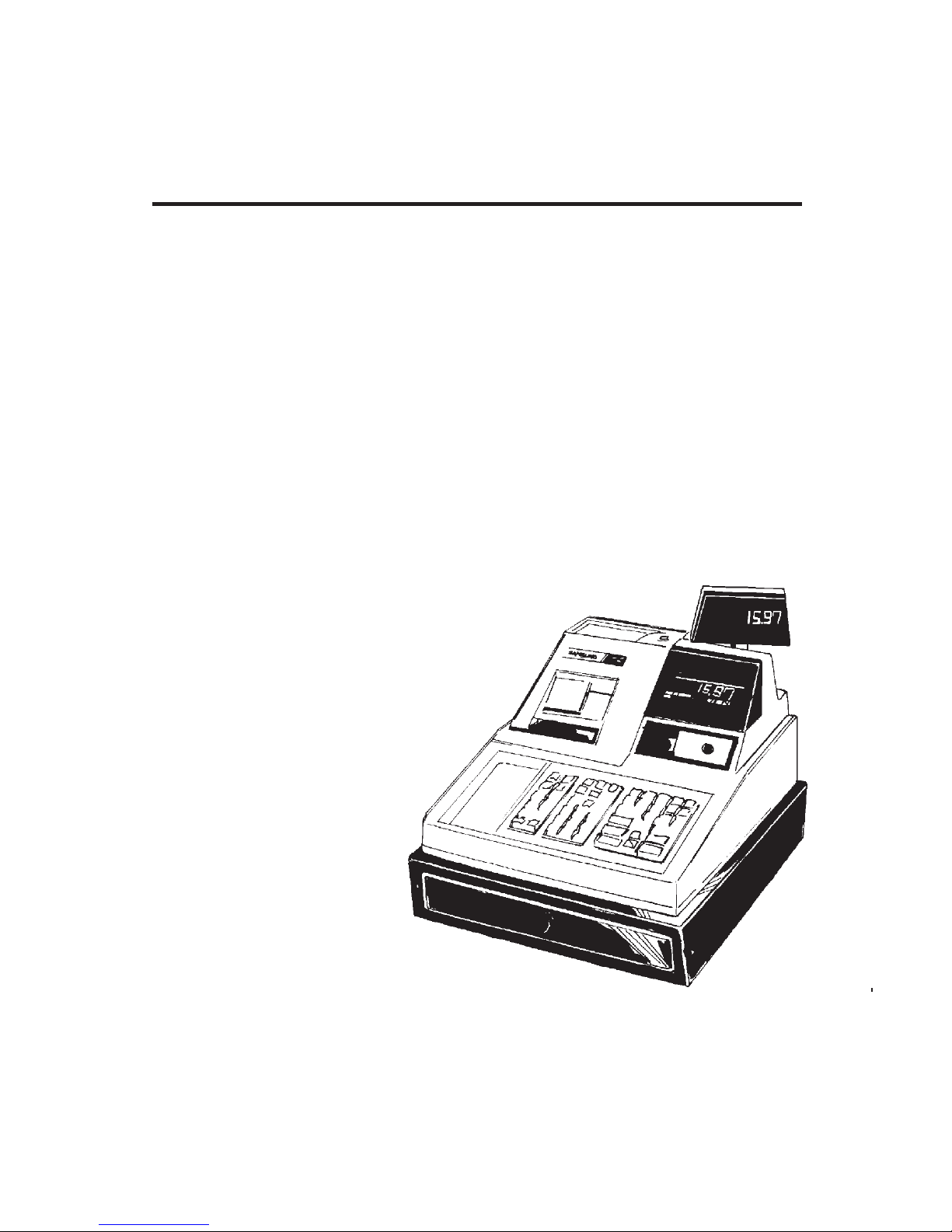
ELECTRONIC CASH REGISTER
DD
DD
D
EALEREALER
EALEREALER
EALER
PP
PP
P
OCKETOCKET
OCKETOCKET
OCKET
PP
PP
P
ROGRAMMINGROGRAMMING
ROGRAMMINGROGRAMMING
ROGRAMMING
GG
GG
G
UIDEUIDE
UIDEUIDE
UIDE
ER-4915
Page 2

Page 3
ER-4915 Dealer Pocket Programming Guide
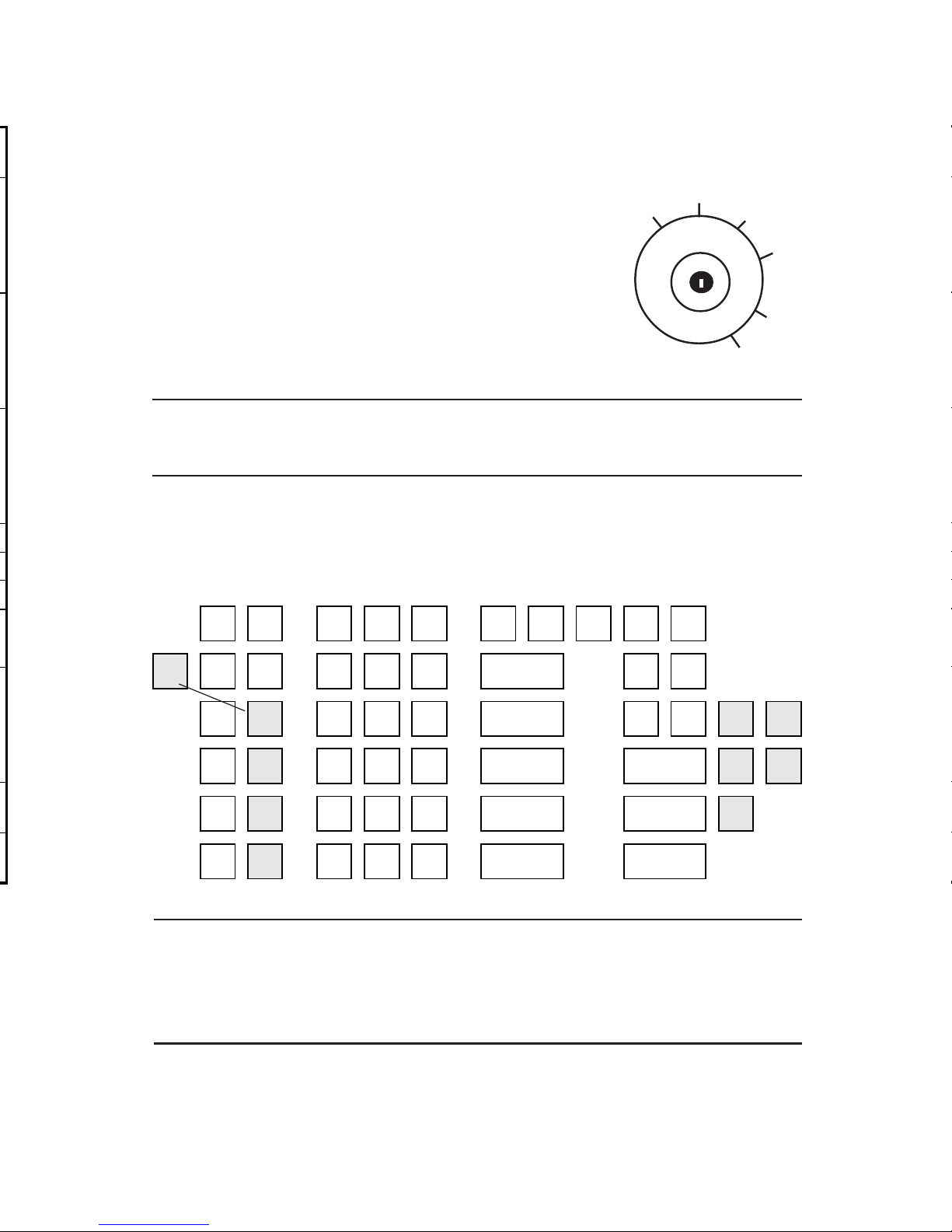
The Keylock has 7 positions, with 5 keys. Each ECR is shipped with two
full sets of keys.
Keys Include:
1. ‘REG’ - travel from ‘OFF’ to ‘REG’.
2. ‘VOID’ - travel from ‘X’ to ‘VOID’.
3. ‘Z’ - travel from ‘Z’ to ‘VOID’.
4. ‘P’ - travel from ‘P’ to ‘VOID’.
5. ‘C’ - travel to all key positions.*
NOTE: Keys are removable from the ‘OFF’ and ‘REG’ positions
only.
Keyboard
The 60 position keyboard is shown below with standard five departments.
VOID
OFF
REG
X
Z
P
RECEIPT
ON/OFF
RECEIPT
FEED
DETAIL
FEED
VALID
TAX 1
SHIFT
TAX 2
SHIFT
A B D E
GST
SHIFT
VOID
#/NO
SALE
CLEAR PLU X/TIME
5
RECD
ACCT
PAID
OUT
RETURN
MDSE
F / S
SHIFT
7 8 9
4
CHARGE1CHARGE210.00
CASH
20.00
CASH
CANCEL
ADD
CHECK
4 5 6
3
CHECK
F / S
TEND
CHECK
%1
CONV
1
1 2 3
2
SUBTOTAL
5.00
CASH
%2
CONV
2
0 00
.
1
CASH
TEND
>
←←
←←
←
←←
←←
←
↑↑
↑↑
↑
NOTE: The above keyboard indicates the positions for optional
function keys. These keys have been shaded in the
illustration and may or may not be installed on your
machine.
Page 4

Page 5
ER-4915 Dealer Pocket Programming Guide
VOID
S
OFF
REG
X
Z
P
NOTE: The ER-4915 may be initialized (Initial
Cleared) at any time. The Initial Clear procedure may be used to clear keyboard lock-ups
and constant error conditions. An Initial Clear
will not affect register programming or clear
previously stored totals from memory. However, an Initial Clear
will
cause balancing
discrepancies if performed in the middle of a
transaction.
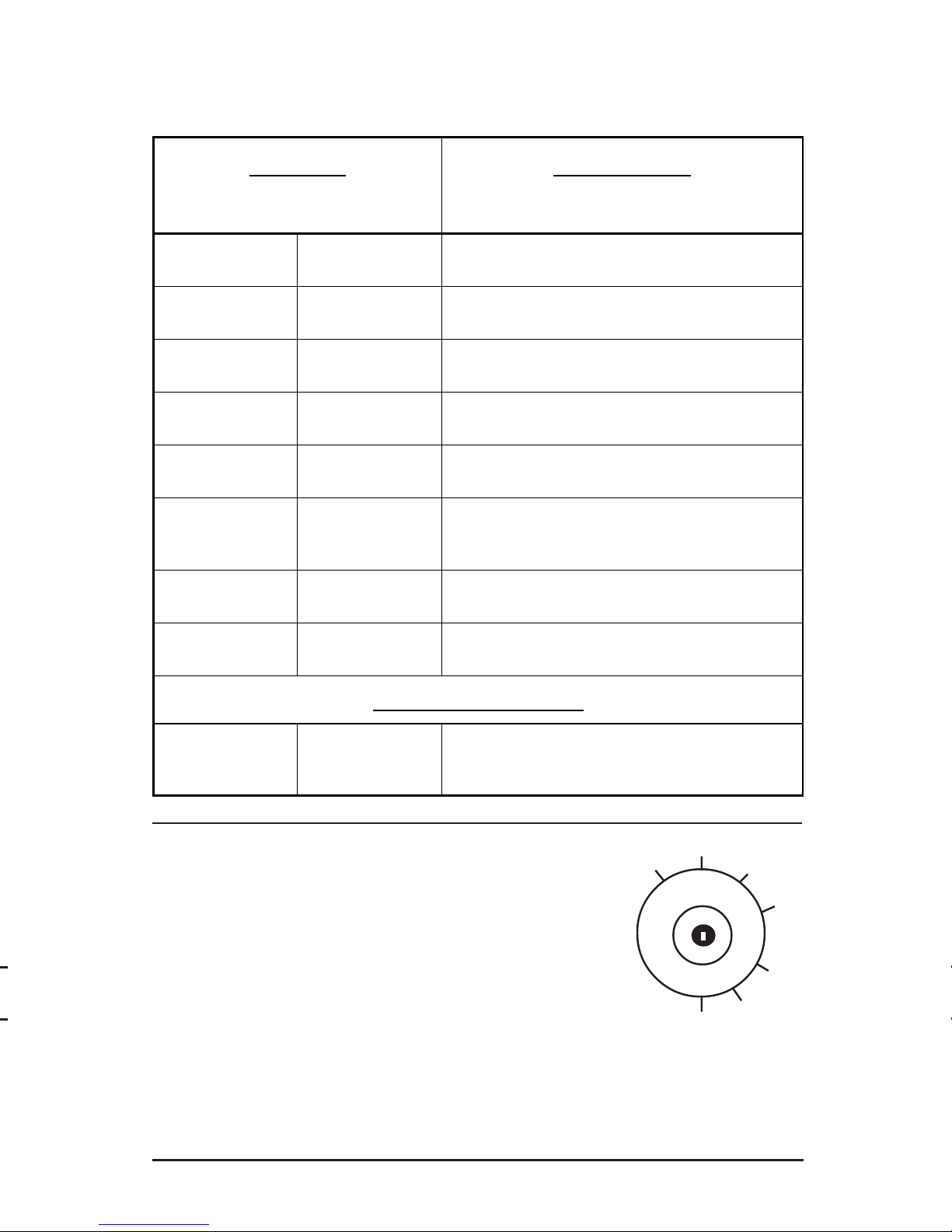
The Service mode (S-Mode) position is at “6 o’clock” on the
keylock. It is not labeled, and can be accessed only by the “C” key.
See the above illustration.
S-Mode Set-UpProgram Scans
Self Tests Key Sequence
Function Keylock Position
Initialize
P-Mode
Power up machine while holding down the
"SUBTOTAL" key.
Memory All Clear
"C" key to the
S-Mode position
Power up machine while holding down the "00"
key.
Reset All Totals
& Counters
"C" key to the
S-Mode position
Power up machine while holding down the
"CHECK" key.
Reset Grand
Total Only
"C" key to the
S-Mode position
Power up machine while holding down the "CASH
TEND" key.
Printer & Display
Test
"C" key to the
S-Mode position
Enter 1 and press the "CASH TEND" key.
Keyboard Test
"C" key to the
S-Mode position
Enter 2 and press the "CASH TEND" key. Exit
test mode by pressing the "CLEAR" key twice.
Keylock Test
"C" key to the
S-Mode position
Enter 3 and press the "CASH TEND" key. Rotate
the "C" key to all keylock positions.
EPROM Check
Sum
"C" key to the
S-Mode position
Enter 4 and press the "CASH TEND" key.
S-Mode Programming
Setting the
Number of
Departments
"C" key to the
S-Mode position
Enter the number of Departments (5, 10, or 15),
press the "X/TIME" key, and "CASH TEND" key.
Page 6

Page 7
ER-4915 Dealer Pocket Programming Guide
7
Tax Table Programming
n Maximum 47 tax breaks.
n Tax breaks determine at what dollar amount an additional .01 will be
added to the tax total of the sale.
n Determine break points by subtracting the high side of a dollar range
from the high side of the next dollar range.
n The pattern of break points is the repeat breaks pattern.
n The beginning break points, that do not fit into the repeat breaks
pattern are the non-repeat breaks.
n The following example uses a 6% Illinois tax.
Sample Tax Table
If Tax rate 3 is designated as GST, table programming is not allowed for
that rate.
NOTE: 10 is maximum non-taxable amount in this example. .01
is the first tax amount charged.
}
}
}
}
TAX
CHARGED
SALE DOLLAR RANGE BREAK POINTS
LOW SIDE
-
HIGH SIDE
- $ .00 $ .00 - $ .10
.01 .11 - .21 11
Non Repeat
Breaks
.02 .22 - .38 17
.03 .39 - .56 18
.04 .57 - .73 17
.05 .74 - .91 18
.06 .92 - 1.08 17
Repeat Breaks
Pattern
.07 1.09 - 1.24 16
.08 1.25 - 1.41 17
.09 1.42 - 1.58 17
- .10 1.59 - 1.74 16
.11 1.75 - 1.91 17
.12 1.92 - 2.08 17
- .13 2.09 - 2.24 16
.14 2.25 - 2.41 17
Page 8
Page 9
ER-4915 Dealer Pocket Programming Guide
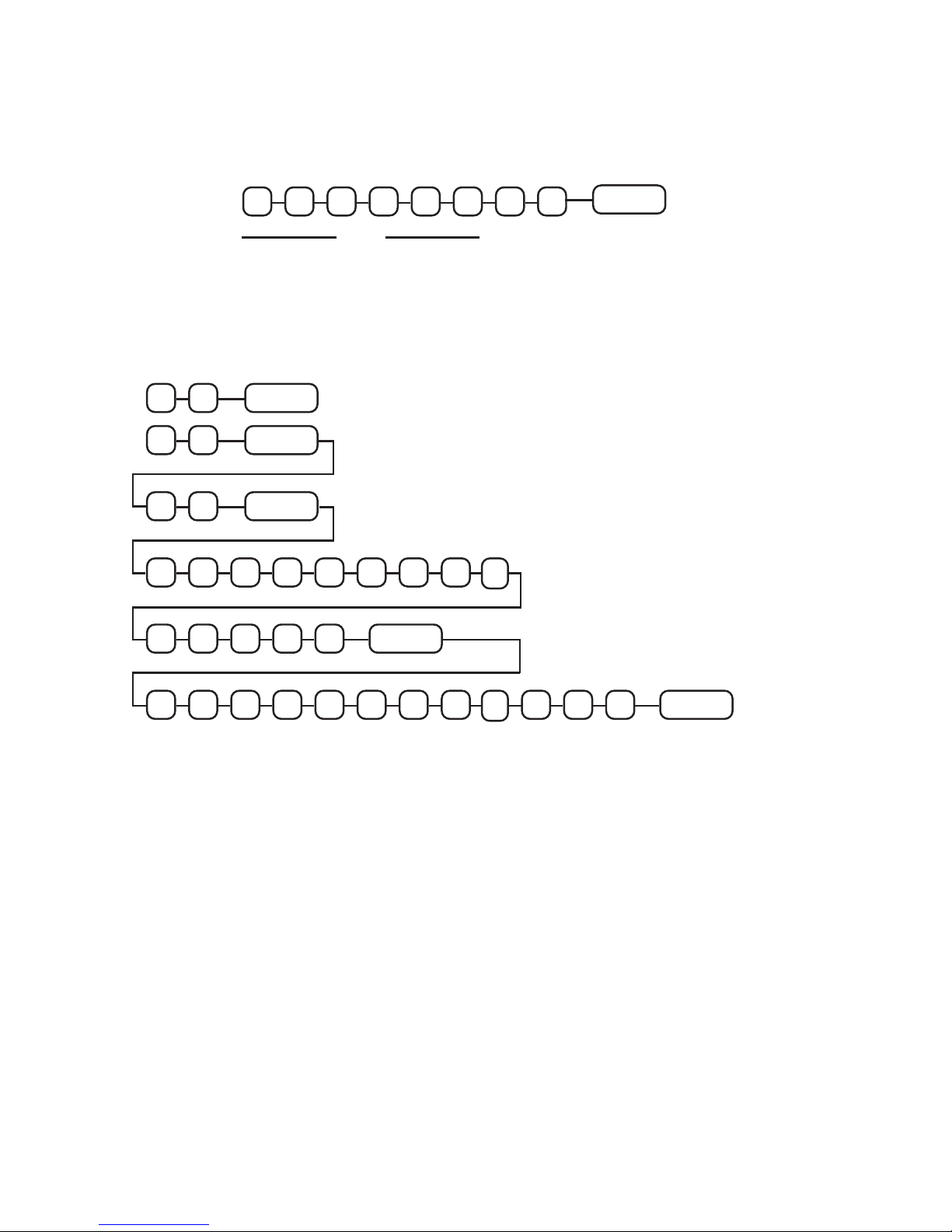
RATE
Programming Example
Tax 1 is a 5% add-on straight percentage
EXIT
.
5
00
0
0
0
This completes programming for Rate 1
Tax 2 is a 6% add-on tax table
1
O
1
O
0
1
.
1
38
5
6
.
.
2
.
3
91
7
X / TIME
0
CASH TEND
.
2
.
.
ENTERS SECOND REPEAT BREAK CYCLE
ENTERS STATUS ONLY FOR TABLE ADD-ON
ENTERS HIGHEST NON-TAXABLE AMOUNT
ENTERS THE FIRST TAX AMOUNT CHARGED
ENTERS NON-REPEAT
BREAKS & FIRST REPEAT
BREAK CYCLE
ENDS TAX
TABLE
PROGRAMMING
OPTION
CODE
1814141
<
>
TAX 1
SHIFT
TAX 2
SHIFT
TAX 2
SHIFT
TAX 2
SHIFT
Page 10
Page 11
ER-4915 Dealer Pocket Programming Guide
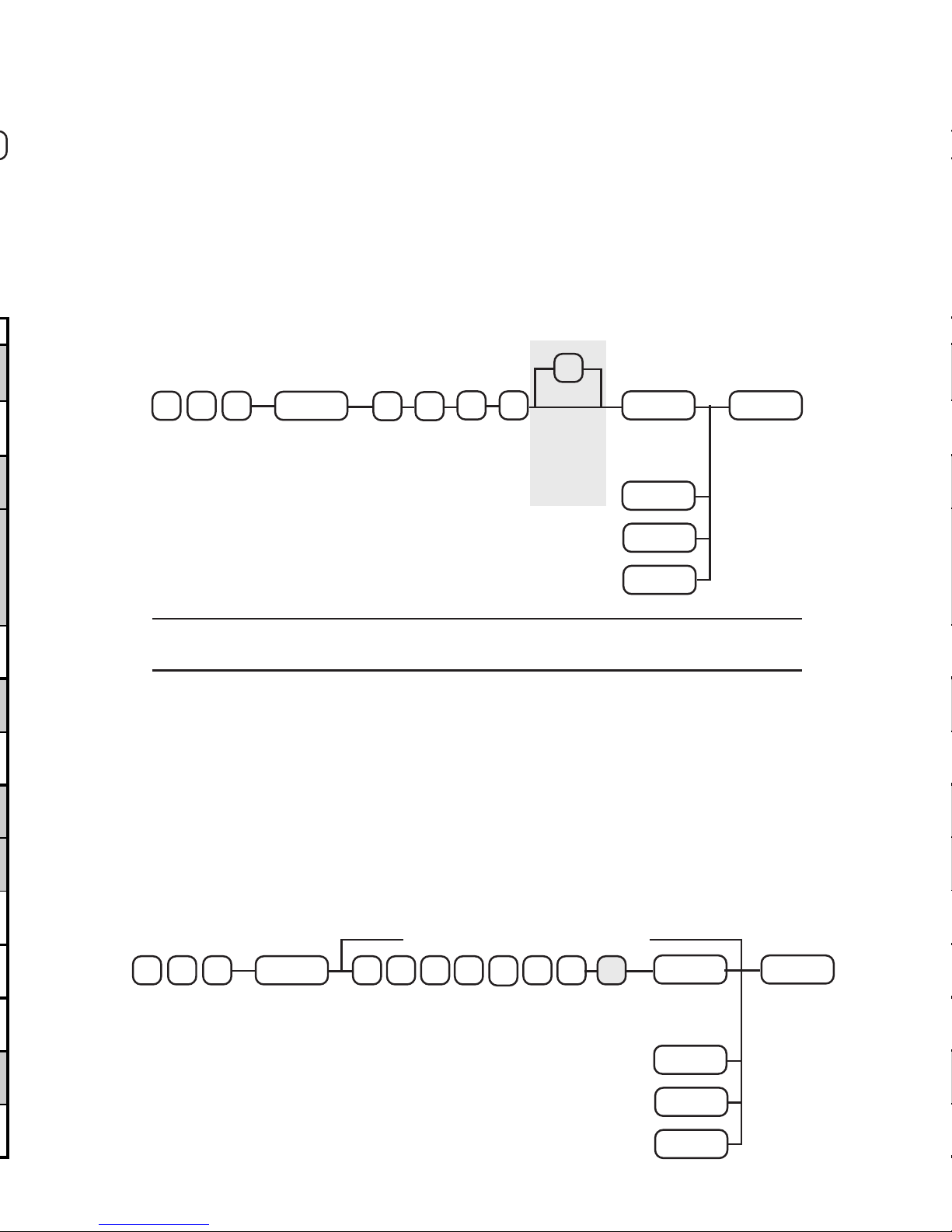
Department Programming Key Sequence
Enter the three digit address for department status programming (100)
and depress the SUBTOTAL key. Then, enter the desired four digit
status and depress each department key to be assigned that status.
Depress the CASH TEND key to complete status programming.
If the status is to be assigned to one department only, simply depress
that department key, followed by the CASH TEND key to complete
status programming.
N1 N2 N3 N4
STATUS
SUBTOTAL
001
CASH TEND
DEPART-
MENT
EXIT
DEPART-
MENT
DEPART-
MENT
DEPART-
MENT
PRESS 1 OR
MORE DEPTS.
DEPTS.
16-30
ONLY
Programming Price/Price Lock-Out
To establish a preset price, or High Amount Lock-Out, enter the three
digit address for department price/HALO programming (110), and
depress the SUBTOTAL key. Then enter the amount and depress the
appropriate department key. A zero amount entry for open departments
will set the HALO at the maximum seven digits (99999.99) for departments. Zero preset departments are allowed.
PROGRAM ANOTHER AMOUNT
SUBTOTAL
<
110
CASH TEND
DEPART-
MENT
EXIT
DEPART-
MENT
DEPART-
MENT
DEPART-
MENT
<
PRESS 1 OR
MORE DEPTS.
PRESET PRICE/
LOCK-OUT AMOUNT
DEPTS.
16-30
ONLY
NOTE: DEPT SHIFT functions as “Stay Down” in P-mode only.
DEPT
SHIFT
DEPT
SHIFT
Page 12

25
Page 13
ER-4915 Dealer Pocket Programming Guide
PLU Programming
Programming Options
Carry the desired value for addresses with single options directly to the “SUM” column. For
addresses with multiple choices, enter values of individual options in “=” column, add, and
enter the combined value in the “SUM” column.
NOTE: Negative hash PLUs and negative gallonge PLUs are
not
allowed. Also, compulsory validation is
not
allowed on
single item PLUs.
13
ADDRESS PLU STATUS VALUE = SUM
N1
Hash PLU feature activated
YES = 1
(A)
NO = 0
Gallonage PLU feature activated
YES = 2
(B)
NO = 0
Enforce Compulsory Non-add # Entry
YES = 4
(C) (A+B+C)
NO = 0
N2
PLU is NEGATIVE
YES = 1
(A)
NO = 0
SINGLE ITEM
YES = 2
(B)
NO = 0
Validation Compulsory
YES = 4
(C) (A+B+C)
NO = 0
N3
PLU is:
PLUs may not be programmed to be
both open and preset.
OPEN PLU = 0
PRESET PLU = 1
DISABLED = 2
N4
PLU is TAXABLE AT RATE 1
YES = 1
(A)
NO = 0
TAXABLE AT RATE 2
YES = 2
(B)
NO = 0
TAXABLE AT RATE 3 OR FOOD
STAMP ELIGIBLE
* System programming option 31
specifies the use of either Tax rate 3
(Canadian GST) or Food Stamp
function.
YES = 4
(C) (A+B+C)
NO = 0
Page 14

Page 15
ER-4915 Dealer Pocket Programming Guide
PLU NO. (1-300)
1522
PLU Descriptor Programming
Each PLU is allowed an alpha-descriptor of up to twelve characters.
Programming twelve letters requires the entry of 24 digits (a two-digit
code for each letter). Codes for each of the available characters are
shown in the chart below.
Alpha Codes
SUBTOTAL
0031
PLU
XXX
PROGRAM ANOTHER?
A B C D E F G H I J K L
CASH TEND
12 CHARACTERS x 2 DIGITS
↓↓
↓↓
↓
PAID PUT
EXIT
<
<
<
<
↓↓
↓↓
↓
DESCRIPTOR CODES
CHAR
SPAC ! " # $ % & ' ( )
CODE
32 33 34 35 36 37 38 39 40 41
CHAR
* + , - . / 0 1 2 3
CODE
42 43 44 45 46 47 48 49 50 51
CHAR
4 5 6 7 8 9 : ; < =
CODE
52 53 54 55 56 57 58 59 60 61
CHAR
> ? @ A B C D E F G
CODE
62 63 64 65 66 67 68 69 70 71
CHAR
H I J K L M N O P Q
CODE
72 73 74 75 76 77 78 79 80 81
CHAR
R S T U V W X Y Z [
CODE
82 83 84 85 86 87 88 89 90 91
CHAR
\ ] ^ - `
DOUBLE
WIDE
Double wide characters must be
preceded w/ "99", and count as
two characters
CODE
92 93 94 95 96 99
PLU Descriptor Programming Key Sequence
Begin programming PLU alpha descriptors by entering the four-digit
programming address (1300) followed by the SUBTOTAL key. Now
enter the 3 digit PLU number and press the PLU key. Enter up to 24
digits (12 characters x 2 digits) and press the PAID OUT key. Press the
CASH TEND key to exit PLU descriptor programming, or enter the PLU
number and descriptor codes for the next PLU to be programmed.
Page 16

2116
Page 17
ER-4915 Dealer Pocket Programming Guide
17
% Key 1 - 2 Programming
The % key may be programmed either positive or negative, as an open
or preset amount or percentage. The % key may also be programmed
to tax either the original or net amount.
Programming Options
Carry the desired value for addresses with single options directly to the “SUM” column. For
addresses with multiple choices, enter values of individual options in “=” column, add, and
enter the combined value in the “SUM” column.
ADDRESS % OPTIONS VALUE = SUM
N1
Tax status: Taxable by tax 1
YES = 1
(A)
NO = 0
Taxable by tax 2
YES = 2
(B)
NO = 0
Taxable by tax 3
YES = 4
(C) (A+B+C)
NO = 0
N2
Discount/Surcharge is
POSITIVE = 1
(A)
NEGATIVE = 0
Discount/Surcharge is
OPEN = 2
(B) (A+B)
PRESET = 0
N3
Discount/Surcharge is
SALE = 1
(A)
ITEM = 0
Discount/Surcharge is
AMOUNT = 2
(B)
PERCENTAGE = 0
Discount/Surcharge is
INACTIVE = 4
(C) (A+B+C)
ACTIVE = 0
NOTE: If % key status = 002 or 022, it will function as Store
Coupon Key. Also, if value for N2 is 1 or 3, then values
for N3 of 2 and 3 are not allowed.
Page 18
19
Page 19
ER-4915 Dealer Pocket Programming Guide18
19
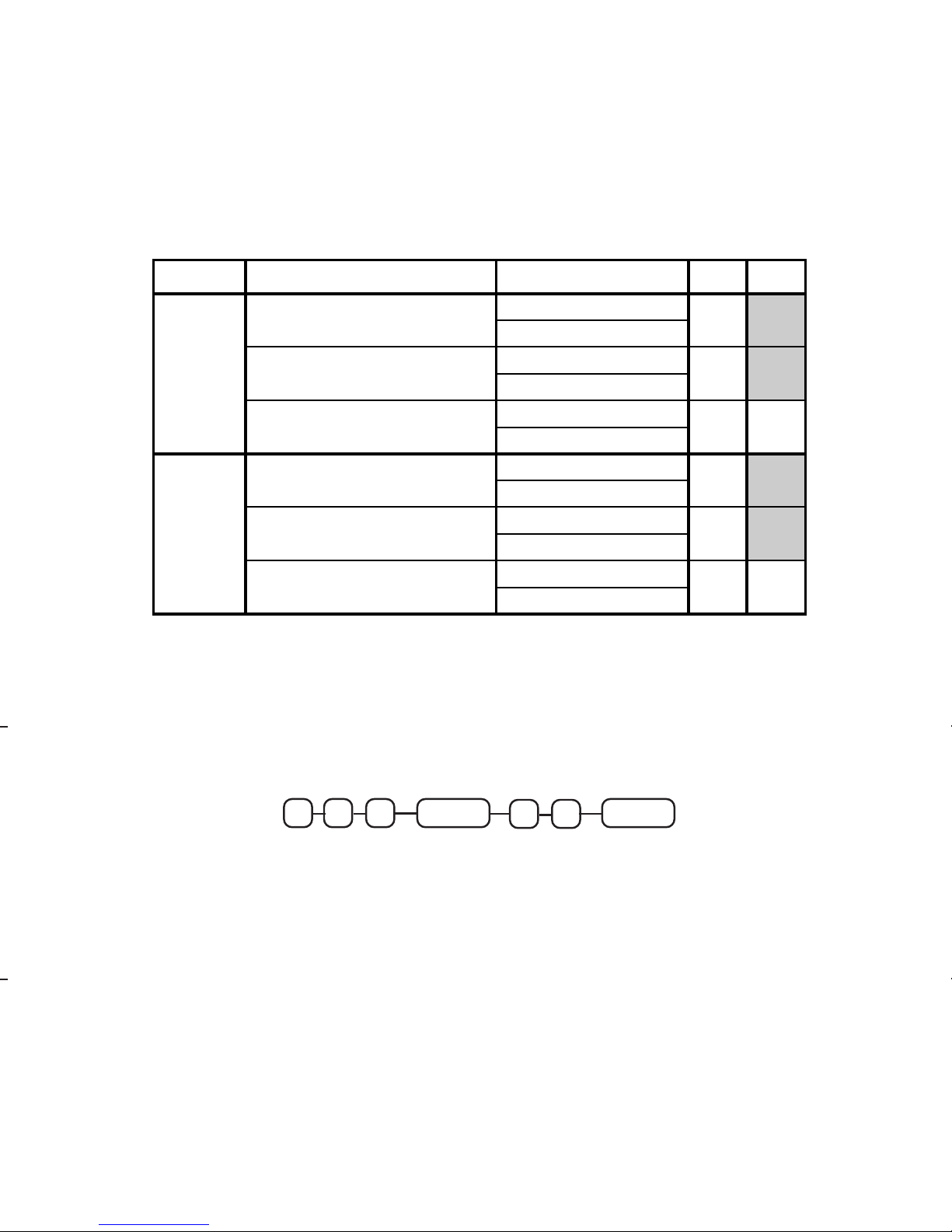
CASH TEND Key Programming
Programming Options
Carry the desired value for addresses with single options directly to the “SUM” column. For
addresses with multiple choices, enter values of individual options in “=” column, add, and
enter the combined value in the “SUM” column.
CASH TEND Key Programming Key Sequence
Enter the address for CASH TEND key programming (400), and press
SUBTOTAL. Enter the desired status for options N1 and N2 from the
table above, and press the CASH TEND key.
ADDRESS CASH OPTIONS VALUE = SUM
N1
Sale is Exempt from Tax 1
YES = 1
(A)
NO = 0
Sale is Exempt from Tax 2
YES = 2
(B)
NO = 0
Sale is Exempt from Tax 3
YES = 4
(C) (A+B+C)
NO = 0
N2
Amount tender is compulsory on cash
tender.
YES = 1
(A)
NO = 0
Under-tendering is disallowed.
YES = 2
(B)
NO = 0
Validation is compulsory.
YES = 4
(C) (A+B+C)
NO = 0
N1 N2
SUBTOTAL CASH TEND
EXIT
40 0
Page 20

17
Page 21
ER-4915 Dealer Pocket Programming Guide
2116
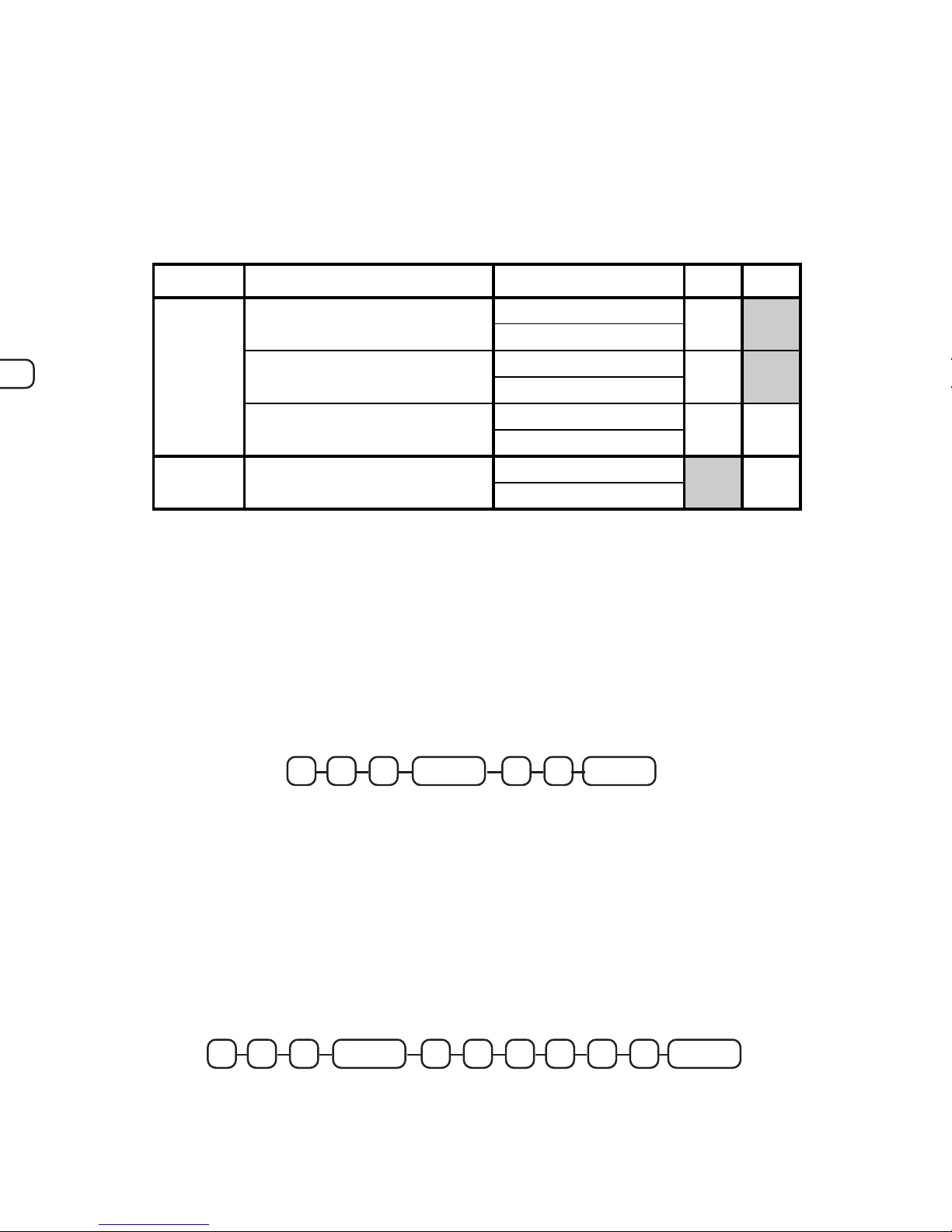
CHARGE Key 1 - 2 Programming
Programming Options
Carry the desired value for addresses with single options directly to the “SUM” column. For
addresses with multiple choices, enter values of individual options in “=” column, add, and
enter the combined value in the “SUM” column.
CHARGE Key Programming Key Sequence
First Programming Step
Enter the program address for a CHARGE key, 601 for charge 1, 602 for
charge 2 and press SUBTOTAL. Enter the desired status, from the table
above, and press the CASH TEND key.
ADDRESS CHARGE OPTIONS VALUE = SUM
N1
Sale is Exempt from Tax 1
YES = 1
(A)
NO = 0
Sale is Exempt from Tax 2
YES = 2
(B)
NO = 0
Sale is Exempt from Tax 3
YES = 4
(C) (A+B+C)
NO = 0
N2
Non-add number entry is compulsory
on charge tender.
YES = 1
NO = 0
Second Programming Step
Key in the program address for programming the charge key tender
limit, 611 for charge 1, 612 for charge 2 and pressing the SUBTOTAL
key. Enter up to a six digit amount HALO (0-9999.99, 0 for no HALO)
for maximum amount allowed on a charge sale and press the CASH
TEND key.
CASH TEND
EXITHALO (0-9999.99)
SUBTOTAL61 X
X = 1-2
CASH TEND
EXIT
N1 N2
SUBTOTAL60 X
X = 1-2
Page 22

1522
Page 23
ER-4915 Dealer Pocket Programming Guide
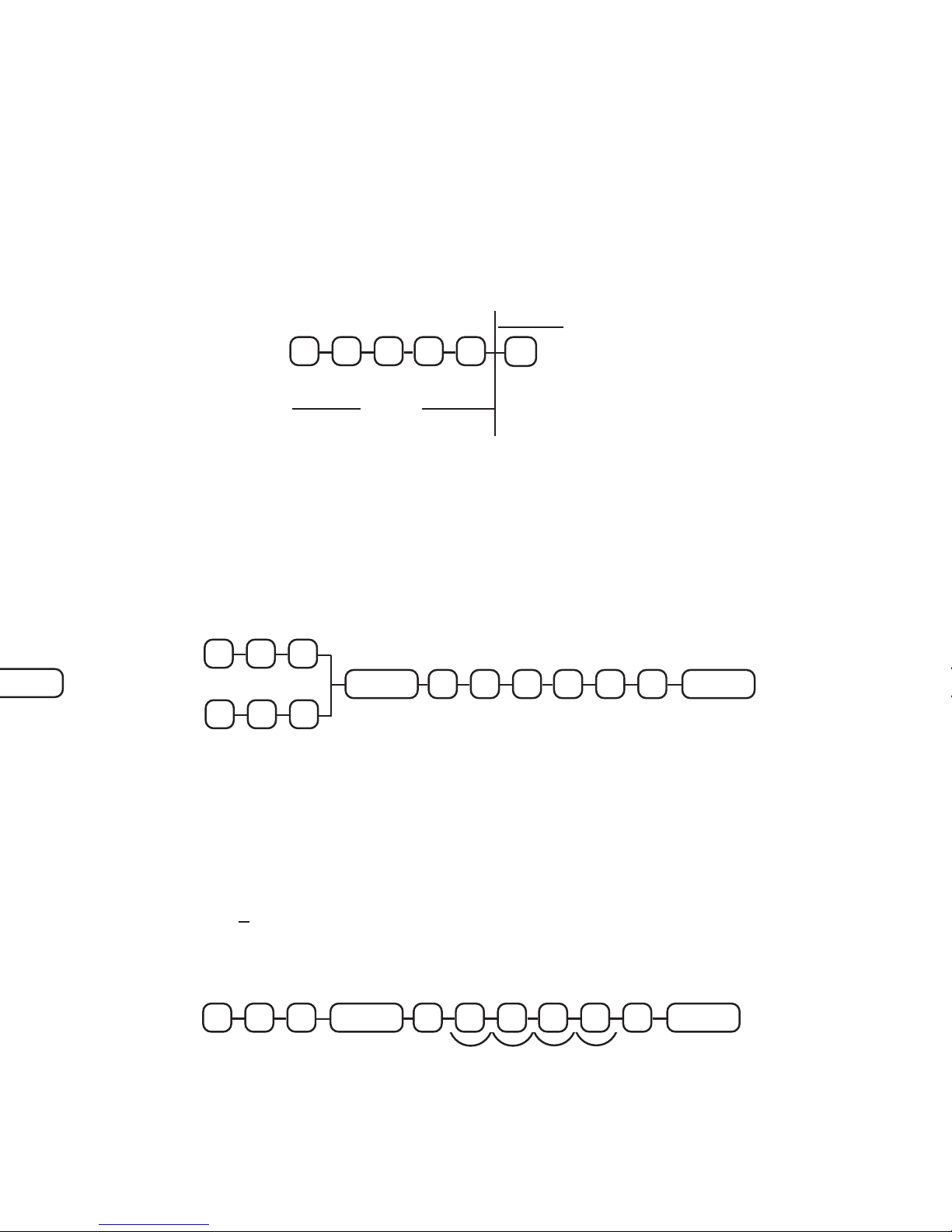
Currency Conversion Programming
Setting the Exchange Rate
The Foreign exchange rate is determined based on a six digit code
entered during this programming step. Digits N1 - N5 contain the
numeric value of the exchange rate. N6 sets the decimal point position
(0-5), counting from the right of the fifth digit.
VALUE
DECIMAL
PLACEMENT
(FROM THE RIGHT)
<
Programming Key Sequence
A) Enter 801 for currency exchange key 1 programming.
Enter 802 for currency exchange key 2 programming.
B) Enter the six digit rate code, press CASH TEND.
>
8
01
802
CONV. KEY 1
CONV. KEY 2
EXCHANGE RATE
SUBTOTAL CASH TEND
EXIT
Programming Example
$1.00 = $1.33c/n - In this example for the currency exchange key #1, the
home currency is $1.00/US, and the currency being exchanged is the
Canadian dollar. The program code for this exchange rate would be
1 3 3 0 0 4, giving a numeric value of 13300 with the decimal at four
places. The rate programmed is always the equivalent of one home
currency unit.
EXIT
<
N1 N2 N3 N4 N5 N6
801
SUBTOTAL CASH TEND400331
∧∧
∧∧
∧
Page 24

13
Page 25
ER-4915 Dealer Pocket Programming Guide
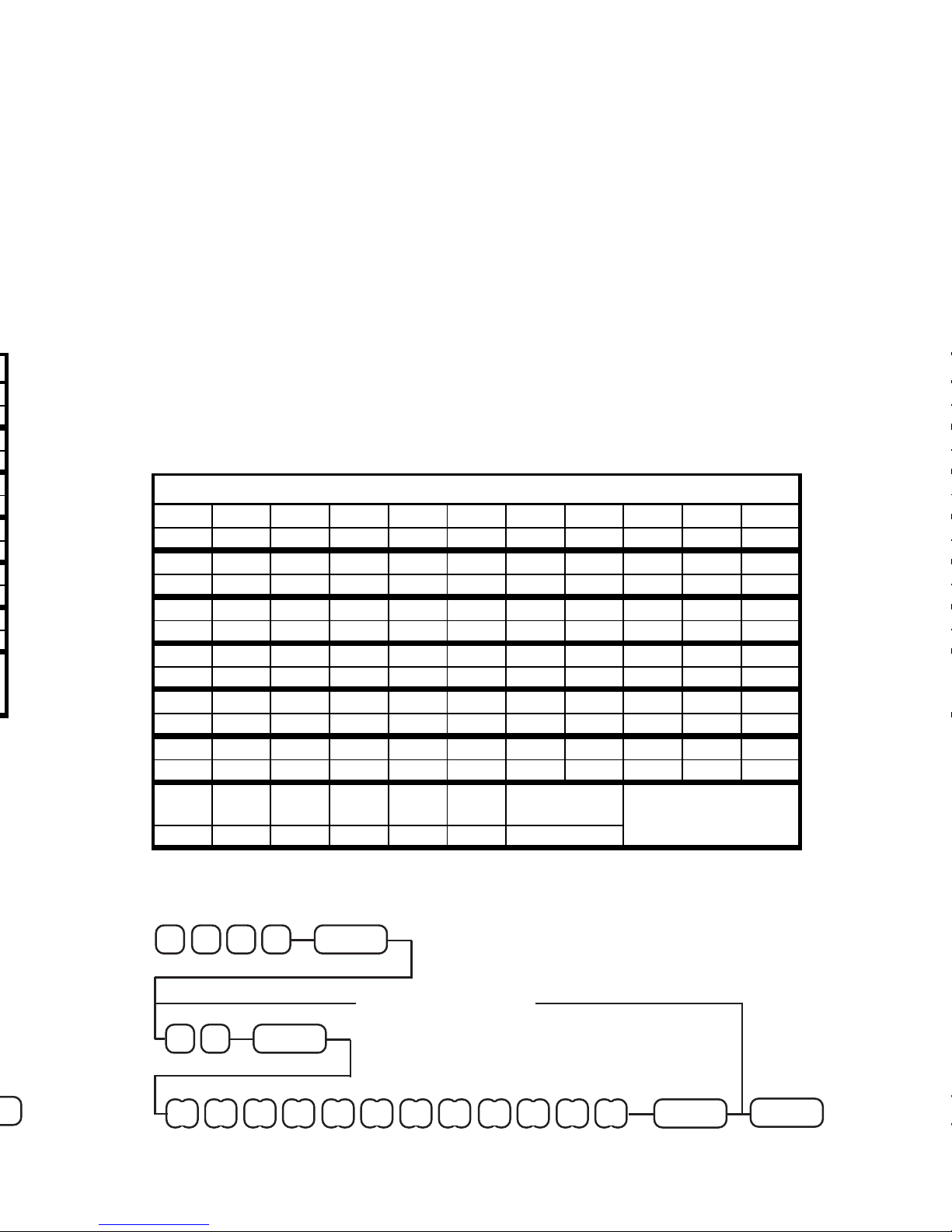
Programming Clerk Descriptors
After converting letters for clerk names into two-digit alpha-numeric
codes, begin programming by entering the program address (1400) and
pressing SUBTOTAL. Now enter the two-digit code for the clerk to be
programmed and press PAID OUT. Now enter up to 24 digits for the
descriptor and press the PAID OUT key again. Press the CASH TEND
key to exit descriptor programming, or enter the code for the next clerk
descriptor to be programmed.
Clerk Codes
CLERK 1=1, 2=2, 3=3, and 4=4.
Alpha Codes
PROGRAM ANOTHER?
SUBTOTAL
0041
<
<
<
25
PAID OUT
XX
A B C D E F G H I J K L
12 CHARACTERS x 2 DIGITS
CASH TEND
EXIT
↓↓
↓↓
↓
↓↓
↓↓
↓
<
PAID OUT
Clerk Descriptor Programming Key Sequence
NO (1-4)
DESCRIPTOR CODES
CHAR
SPAC ! " # $ % & ' ( )
CODE
32 33 34 35 36 37 38 39 40 41
CHAR
* + , - . / 0 1 2 3
CODE
42 43 44 45 46 47 48 49 50 51
CHAR
4 5 6 7 8 9 : ; < =
CODE
52 53 54 55 56 57 58 59 60 61
CHAR
> ? @ A B C D E F G
CODE
62 63 64 65 66 67 68 69 70 71
CHAR
H I J K L M N O P Q
CODE
72 73 74 75 76 77 78 79 80 81
CHAR
R S T U V W X Y Z [
CODE
82 83 84 85 86 87 88 89 90 91
CHAR
\ ] ^ - `
DOUBLE
WIDE
Double wide characters must be
preceded w/ "99", and count as
two characters
CODE
92 93 94 95 96 99
Page 26

Page 27
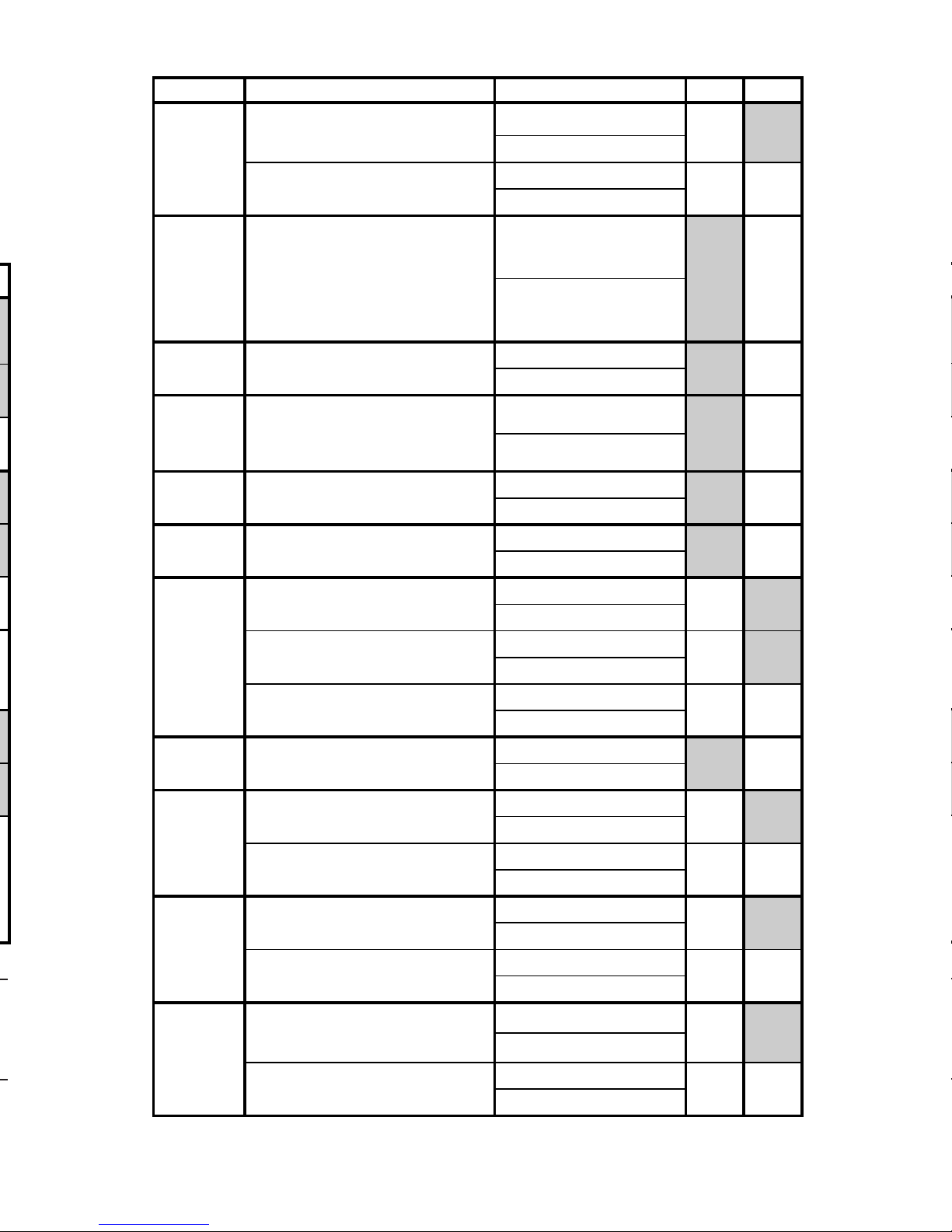
ER-4915 Dealer Pocket Programming Guide
ADDRESS SYSTEM OPTION VALUE = SUM
8
Inhibit printing of Positive department
and PLU entries on journal. (Journal
skip)
YES = 1
(A)
NO = 0
Print PLUs and Dept.s with zero totals
on reports.
YES = 2
(B) (A+B)
NO = 0
9
VAT (value added tax) will print on the
receipt and journal separate from the
cost of the taxable item.
NOTE: An item taxable at 10% and
registered at $1.00 would print .09 as
tax.
YES = 1
NO = 0
10 Decimal for display:
no decimal = 1
set at two places = 0
11
Print media totals on cashier reports.
NOTE: Setting this option to "YES"
will print totals for each of the media
keys on cashier reports.
YES = 1
NO = 0
12 Print sales % on Dept./PLU reports.
YES = 1
NO = 0
13
Cash declaration is compulsory before
taking X/Z reports.
YES = 1
NO = 0
14
Voids are allowed in the 'X' control
lock position only.
YES = 1
(A)
NO = 0
Voids require validation.
YES = 2
(B)
NO = 0
Allow multiple validations/
buffered receipt.
YES = 4
(C) (A+B+C)
NO = 0
15
Cancel Function is allowed in the 'X'
control lock position only.
YES = 1
NO = 0
16
Merchandise Returns are allowed in
the 'X' control lock position only.
YES = 1
(A)
NO = 0
Merchandise Returns require
validation.
YES = 2
(B) (A+B)
NO = 0
17
% key operations are allowed in the 'X'
control lock position only.
YES = 1
(A)
NO = 0
Do % key operations require
validation?
YES = 2
(B) (A+B)
NO = 0
18
Received On Account, and Paid Out
are allowed in 'X' control lock position
only.
YES = 1
(A)
NO = 0
Do Received On Account, and Paid
Out operations require validation?
YES = 2
(B) (A+B)
NO = 0
Page 28

Page 29
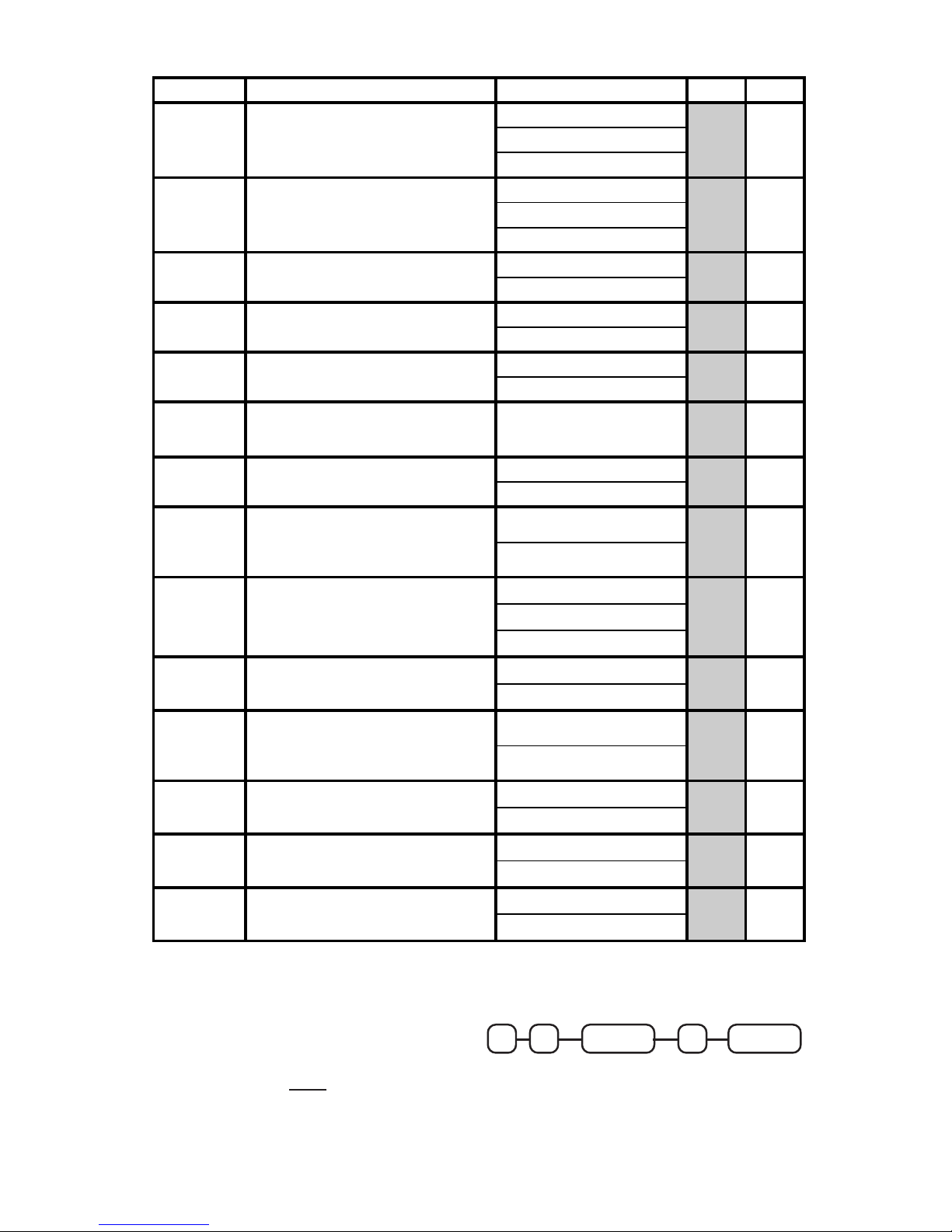
ER-4915 Dealer Pocket Programming Guide
System Options Programming Key Sequence
Enter the address number, drepress
the X/TIME key. Enter the status
number, or the
sum
of the options,
and depress the SUBTOTAL key.
X / TIME SUBTOTAL
ADDRESS
NUMBER
STATUS
OR SUM
ADDRESS SYSTEM OPTION VALUE = SUM
29
% calculations will:
NOTE: % calculations include %+, %-,
and % tax calculations.
round up at .50 = 0
always round up = 1
always round down = 2
30
Rounding factor for split pricing and
decimal multiplication.
round up at .50 = 0
always round up = 1
always round down = 2
31 System uses:
Tax 3 / GST = 1
Food Stamps = 0
32 Allow Post Tender Function.
YES = 1
NO = 0
33
Enforce Non-add # key entry at beginning
of sale.
YES = 1
NO = 0
34
Number of digits required for Non-add #
entry.
(0 allows any length, 1-7 digits)
0 - 7
35
Disable Department/PLU preset/HALO
override.
YES = 1
NO = 0
36
Activate Preset Tender Feature:
FOOD STAMP becomes $5.00
CHARGE 1 becomes $10.00
CHARGE 2 becomes $20.00
YES = 1
NO = 0
37 Header message on receipt is:
Stamp Only = 0
Stamp & Prog. Logo = 1
Programmable Only = 2
38 Activate Validation Sensor
YES = 1
NO = 0
39
Allow Eight-digit DEPT. & PLU amount
entries.
NOTE: Maximum 8 digit amount is
500,000.00. 7 digit max is 99,999.99.
YES = 1
NO = 0
40
Allow dicimal entry of Food Stamp
Tendered?
YES = 1
NO = 0
41 Final Validation is:
Total of Sale = 1
Last Tender = 0
42
Department Shift key is active
(15 department configuration only.)
YES = 1
NO = 0
Page 30

7
Page 31
ER-4915 Dealer Pocket Programming Guide
NOTE: If the drawer limit is exceeded, error tone will sound. The
tone will sound each time a sale is finalized as long as the
limit is exceeded. The clear key will stop the error tone.
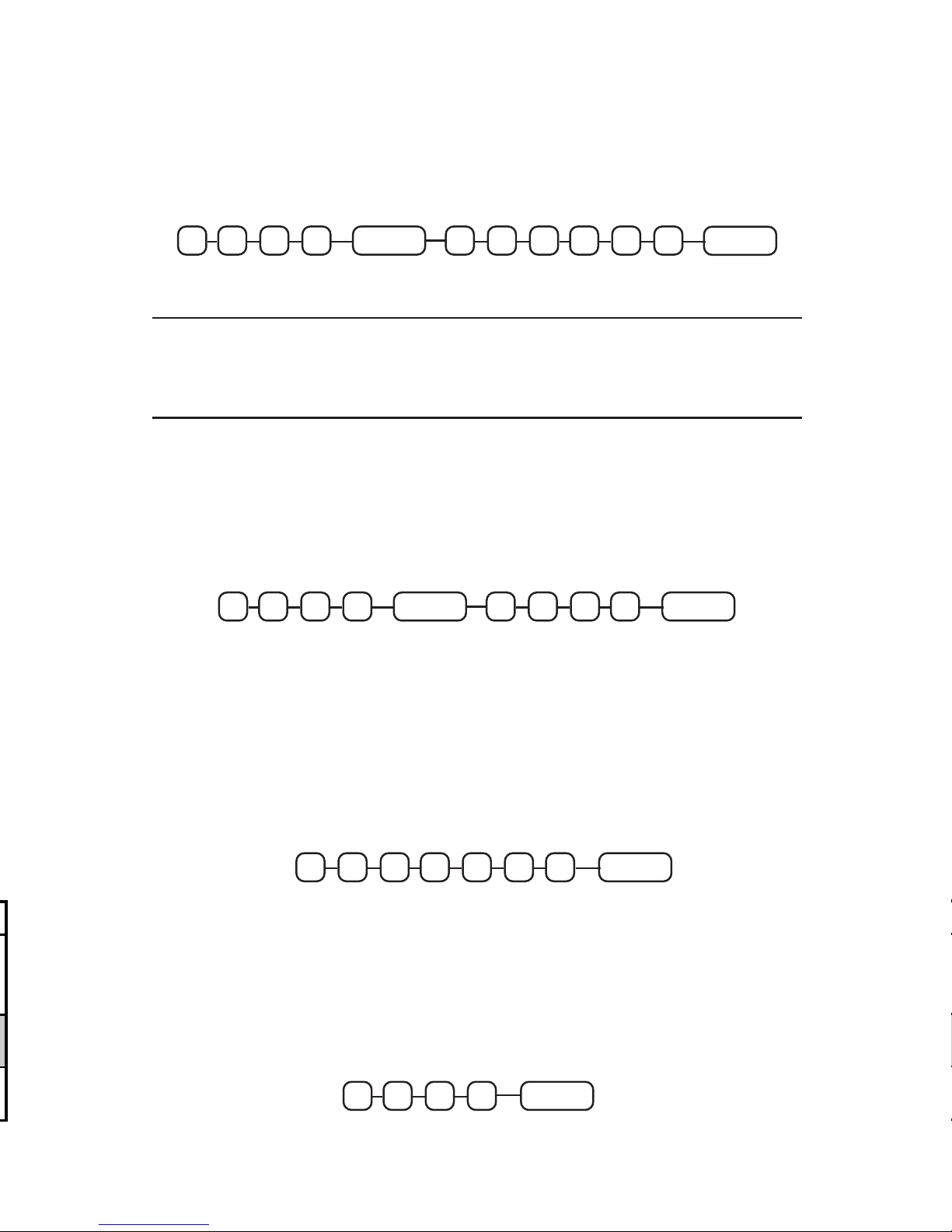
Register Number Programming
Enter 1100 and press SUBTOTAL, and then enter up to a four-digit
register number. Press the CASH TEND key to finalize programming.
Drawer Limit Programming
Enter 1000 and press SUBTOTAL, and then enter the total amount of
cash and checks allowed to be in the drawer at one time. Press the
CASH TEND key to finalize programming.
SUBTOTAL
CASH TEND
EXIT
HALO (0-9999.99)
0001
SUBTOTAL
4 DIGITS
0011 CASH TEND
EXIT
X / TIME01 3926 6
Time Programming
Enter time in military standard time (based on 24 hours), must be four
digits (i.e. 1300 hours = 1:00 PM), depress the X/TIME key.
2:00 PM would be entered as:
X / TIME10
40
Date Programming
In P-mode, enter month, day, and year and day of the week
(0 = Sunday, 1 = Monday, 2 = Tuesday, etc.); depress the X/TIME key.
For example, Saturday June 12, 1993 would be entered as:
Page 32
Page 33
ER-4915 Dealer Pocket Programming Guide
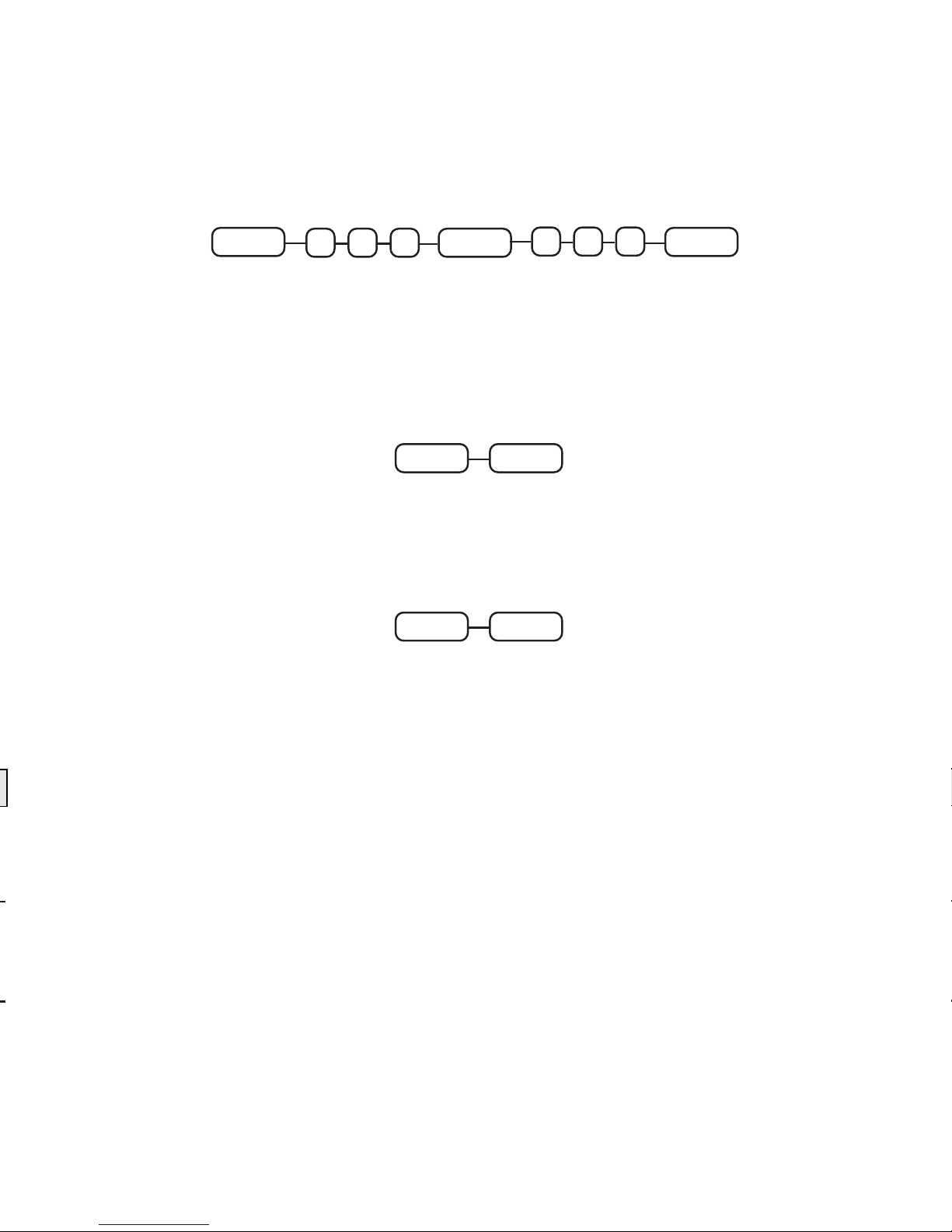
PLU Program Scan
Depress the CASH TEND key; then enter the number of the first PLU
to be read, depress the PLU key; then enter the number of the last
PLU to be read, depress the PLU key.
CASH TEND
BEGINNING
PLU
PLU
PLU
ENDING PLU
Options Program Scan
Depress the CASH TEND key, then the SUBTOTAL key.
Programmable Message Program Scan
Depress the CASH TEND key, then the PAID OUT key.
CASH TEND SUBTOTAL
CASH TEND PAID OUT
Page 34

Page 35
ER-4915 Dealer Pocket Programming Guide
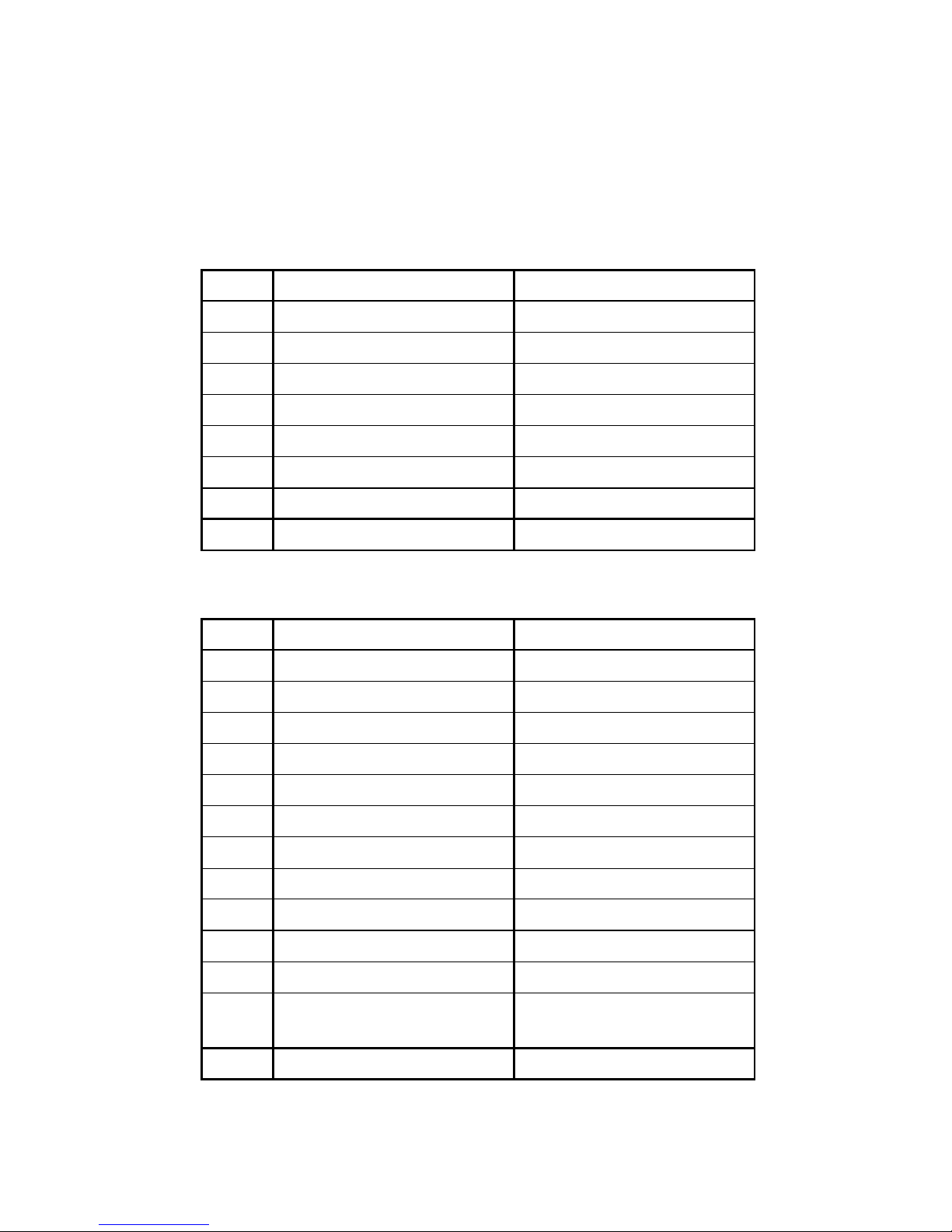
System Balancing
1. Department Sales Total
The sum of all department totals: Add all positive departments,
subtract all negative depart
ments.
2. Net Sales
3. Gross Sales
4. Ending Grand Total = Previous Grand Total
+ Absolute Value of Today’s Gross Sales
Total
+/- NET SALES $
= Department Sales Total $
+ Tax 1 $
+ Tax 2 $
+ Tax 3 $
+ Sale Coupon Total $
+ Sale Percent Discount $
+ Surcharge Sale $
= Net Sales $
+/- GROSS SALES $
= Net Sales $
- Negative Departments* $
- Item Coupon $
- Item Percent Discount $
- Sale Coupon $
- Sale Percent Discount $
- Credit Tax 1 $
- Credit Tax 2 $
- Credit Tax 3 $
- Merchandise Return $
- Void Position Total $
-
(-) PLU linked to
(+) Depts.*
$
= Gross Sales $
Page 36

 Loading...