

Page 1
Verizon Wireless
Network Extender
Quick Start Guide
What if my GP S LED is still re d after one ho ur?
If the GPS L ED is still red a fter one ho ur, you need to reloc ate the GPS a ntenna to re ceive a stron ger signal . See
“Ext ernal GPS A ntenna” in t he User Guide .
How do I kno w my phone is con necting th rough the Net work Ext ender?
When dialing #48 on your wirele ss phone, an a nnounce ment will tell yo u if you are wit hin range of t he Networ k
Exten der. In addition , you will hear a s hort doub le tone on your w ireless pho ne wheneve r making or re ceiving a call .
The tone i s played at the b eginning o f the call.
Optional Accessories
• A wall and ceiling bracket mount is
available to allow for the unit to be
conveniently mounted on the wall or
ceiling.
• Power over Ethernet adaptor
For More Information
• Refer to the Network Extender User Manual at www.verizonwireless.com/networkextender/business
• Call Customer Care toll free at 800-922-0204 or *611 from your Verizon Wireless mobile phone.
TroubleshootingConfirming Network E xtender Operation
LED Function Description
PWR Power Solid blue: normal
No light o r solid magen ta: failure
System System connected Solid blue: normal
Persistent solid magenta: failure
Persist ent solid re d or slow or fast b linking re d: abnormal
GPS GPS Sign al Solid blue: normal
Persistent solid magenta: failure
Persist ent solid re d: external GPS antenna is required*
Blinki ng blue or red : searching for signals
WAN WAN (Eth ernet
connection)
Solid blue: normal
Blinking blue: data communication
No light o r solid red: abnormal
* For more i nformat ion, see “E xternal G PS Anten na” in the Use r Manual.
NOTE: All ow 3 - 5 minut es for the N etwor k Exte nder to co mplete th e star tup sequ ence and d etect b oth its co nnect ions and a vailabl e commun icatio ns.
When th e Netwo rk Exte nder is p owered up , it may take a s long as on e hour for G PS acqui sition .
Your Netwo rk Ext ender is r eady for u se when al l four LED s are blue .
© 2014 Verizon Wireless. All rights reserved. Verizon Wireless is a trademark of Verizon Trademark Services LLC.
EP68-00520A A3LSCS-2UAAAA
Page 2
To use a Verizon Wir eless Netwo rk Exten der you need :
• An always-on broadband Internet connection with a minimum speed of 1 MB (3.1 Mbps to support the maximum
EVDO data rate.)
• An available Ethernet port on either your broadband modem or a router connected to the
modem.
• If you are deploying a cluster of Network Extenders and/or your local network uses VLAN and/or static IP
addressing, refer to the user guide located at: www.verizonwireless.com/networkextender/business.
NOTE: If you are connecting your Network Extender to a router, please ensure that it supports Virtual Private Networking (VPN). Most routers support this
functionality, but if you are unsure of your router’s capabilities, refer to the manual that came with your router.
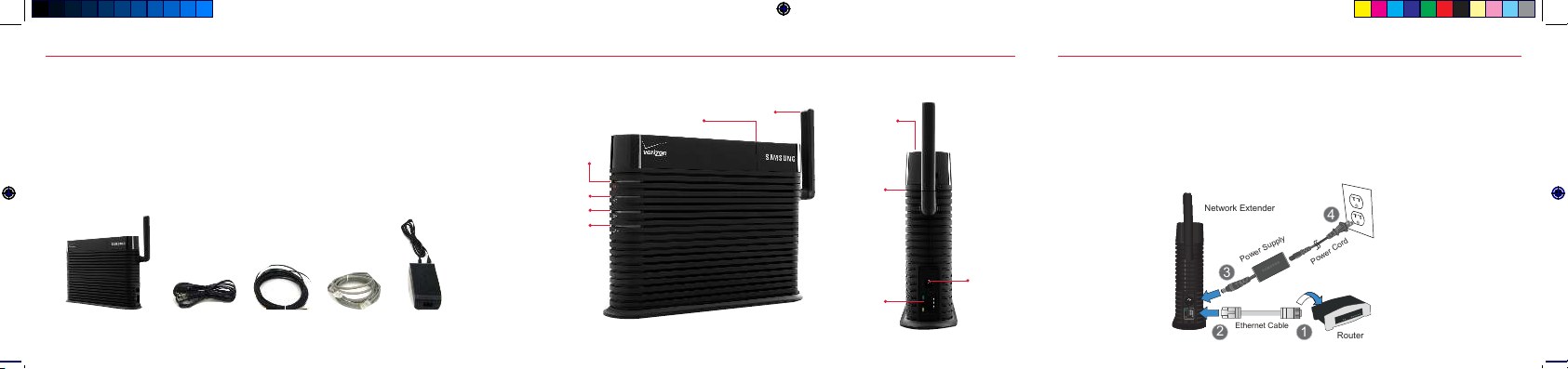
Your Networ k Extende r package shou ld contain the c omponent s shown below :
NOTE: Contact Customer Care if a component is missing.
1. Place the N etwork E xtender n ear a window i n a central loc ation. For b est result s, place the Ne twork
Exten der in an eleva ted location , such as the t op of a booksh elf or tall cabi net. If you us e a Wi-Fi rout er, keep
the Net work Ext ender at leas t two feet aw ay from it.
2. Conne ct one end of t he include d Ethernet c able to an open p ort on the r outer (1) and con nect the o ther end
to the WAN por t located at t he rear of th e Networ k Extende r (2).
3. Plug th e power suppl y connecto r into the DC 12 V power por t located at t he rear of the N etwork E xtender
(3).
4. Insert o ne end of the p ower cord int o the power su pply and the n plug the oth er end into an a vailable out let
(4).
Before You Begin Connecting Your Network Extender
Network
Extender
Ethernet Cable
Power Cord
GPS Ante nna
Cable
Power
Supply
GPS LED
WAN LE D
System
LED
Power
LED
GPS
Antenna
Adjustable
Antenna
GPS
Antenna
Port
Heat
Vent s
WAN
Port
DC12V
Power
Port
1HWZRUN([WHQGHU
(WKHUQHW&DEOH
5RXWHU
3R
Z
H
U
6X
S
S
O
\
3
R
ZH
U
&R
U
G
 Loading...