

Page 1

QUICK
START
GUIDE
EI-YP322
Gamepad for Gear VR
Draft
Printed in Korea
GH68-46341A Rev.1.0
E Type 04/2016
Page 2

a
b
c
d
A
1
2
Copyright © 2016 Samsung Electronics
is a registered trademark of
Bluetooth
®
Bluetooth SIG, Inc. worldwide.
•
Please read this guide before using the device
to ensure safe and proper use.
2
e
f
g
h
Page 3
•
Images may differ in appearance from the
actual product. Content is subject to change
without prior notice. You can access the
full user manual for more information. Visit
www.samsung.com
the user manual, and more.
•
Before using the gamepad, make sure it is
compatible with your mobile device.
•
Your consumer rights are governed by the law
of the country in which you purchased the
product. Please contact your service provider
for more information.
to view device information,
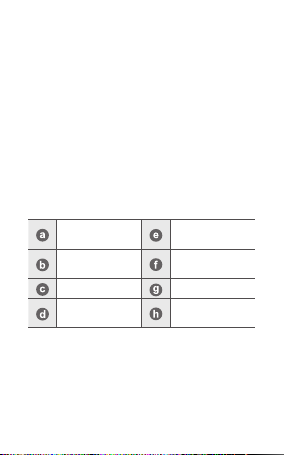
Device layout
Action buttons
Shoulder button
(R)
Indicator light Battery cover
Bluetooth
pairing button
Menu/Home
button
Analogue stick
Shoulder button
(L)
3
Page 4
Replacing the batteries
When the indicator light flashes red, replace the
batteries.
Do not recharge the provided batteries.
1. Remove the battery cover from the back of
the gamepad.
Be careful not to damage your fingernails
when you remove the battery cover.
Do not bend or twist the battery cover
excessively. Doing so may damage the
cov er.
2. Remove the batteries and insert new AAA
batteries with the positive and negative
terminals properly aligned with the + and symbols on the gamepad.
3. Reattach the battery cover to the back of the
gamepad.
Place the cover on the back of the gamepad
and press the edges together to reassemble
the gamepad.
4
Page 5
Connecting devices via Bluetooth
1. Press the Bluetooth pairing button to enter
Bluetooth pairing mode.
The indicator light will flash red, green, and
blue.
2. On your other mobile device, activate the
Bluetooth feature and tap Gamepad for
Gear VR (0000) from the list of available
devices.
Keep the gamepad attached to the Gear VR
when you are not using it. (
)
5
Page 6

Safety information
Read all safety information before using the
device to ensure safe and proper use. To view
the full safety information, refer to the Samsung
website.
Use manufacturer-approved batteries,
chargers, accessories, and supplies
Do not touch the device with wet hands
Do not drop or cause an impact to the charger
or the device
The device can be used in locations with an
ambient temperature of 0°C to 35°C. You can
store the device at an ambient temperature
of -20°C to 50°C. Using or storing the device
outside of the recommended temperature
ranges may damage the device or reduce the
battery’s lifespan
Do not allow children or animals to chew or
suck the device
Do not disassemble, modify, or repair your
device
6
Page 7
Correct disposal
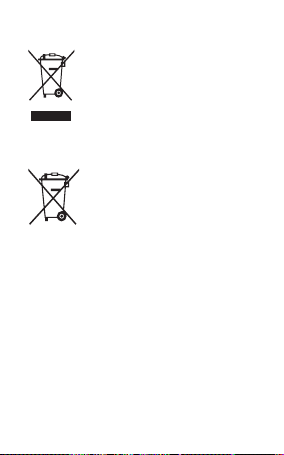
This marking on the product,
accessories or literature
indicates that the product and
its electronic accessories (e.g.
charger, headset, USB cable)
should not be disposed of with
other household waste.
This product is RoHS compliant.
This marking on the battery,
manual or packaging indicates
that the batteries in this product
should not be disposed of with
other household waste.
For information on Samsung’s environmental
commitments and product-specific regulatory
obligations, e.g. REACH, WEEE, Batteries, visit
samsung.com/uk/aboutsamsung/
samsungelectronics/corporatecitizenship/
data_corner.html
7
Page 8

FCC Statement
This device complies with part 15 of the FCC Rules.
Operation is subject to the following two conditions: (1)
This device may not cause harmful interference, and (2) this
device must accept any interference received, including
interference that may cause undesired operation.
Caution: Any changes or modifications not expressly
approved by Samsung Electronics Co., Ltd. could void the
user's authority to operate the equipment.
FCC Radiation Exposure Statement
This equipment complies with FCC Radiation exposure
limits set forth for an uncontrolled environment. This
equipment must not be co-located or operating in
conjunction with any other antenna or transmitter.
8
Page 9

Industry Canada Statement
This device complies with Industry Canada licence-exempt RSS
standard(s). Operation is subject to the following two conditions:
(1) this device may not cause interference, and (2) this device must
accept any interference, including interference that may cause
undesired operation of the device.
IC Radiation Exposure Statement
This equipment complies with IC radiation exposure limits set forth
for an uncontrolled environment. This equipment must not be colocated or operating in conjunction with any other antenna or
transmitter.
Le présent appareil est conforme aux CNR d'Industrie Canada
applicables aux appareils radio exempts de licence. 'exploitation
est autorisée aux deux conditions suivantes : (1) l'appareil ne doit
pas produire de brouillage, et (2) l'utilisateur de l'appareil doit
accepter tout brouillage radioélectrique subi, même si le brouillage
est susceptible d'en compromettre le fonctionnement.
Déclaration d'Industrie Canada sur l'exposition aux radiations
Cet équipement est conforme aux limites établies par Industrie
Canada en matière d'exposition aux radiations dans un
environnement non contrôlé. Cet équipement ne doivent pas être
colocalisés ou fonctionner en conjonction avec tout autre
antenne ou émetteur.
9
Page 10
Declaration of Conformity
Product details
For the following
Product : Gamepad for Gear VR
Model(s) : EI-YP322
Declaration & Applicable standards
We hereby declare, that the product above is in compliance with the essential requirements of the Electromagnetic
Compatibility Directive (2004/108/EC) by application of:
EN 55022 : 2010
EN 55024 : 2010
ective (2011/65/EU) on the restriction of the use of certain hazardous substances in electrical and
and the Dir
electronic equipment by application of EN 50581:2012.
Representative in the EU
Samsung Electronics Euro QA Lab.
Blackbushe Business Park, Saxony Way,
Yateley, Hampshire, GU46 6GG, UK
Draft
2016.XX.XX
(Place and date of issue) (Name and signature of authorised person)
* This is not the address of Samsung Service Centre. For the address or the phone number of Samsung Service Centre, see
the warranty card or contact the retailer where you purchased your product.
Stephen Colclough / EU Representative
Page 11
 Loading...