

Page 1
Page 2

QUICK
START
GUIDE
EF-NG960
LED View Cover
Printed in Korea
GH68-XXXXX Rev.1.0
EU/ASIA Type 11/2017
Page 3
b
A
a
2
Page 4

Copyright © 2017 Samsung Electronics
•
Please read this guide before using the device
to ensure safe and proper use.
•
Images may differ in appearance from the
actual product. Content is subject to change
without prior notice. Visit
to view device information, the latest guide,
and more.
•
Before using the LED View Cover, make sure it is
compatible with your device.
•
Verify that the NFC function is working properly
before using the device with the LED window
functions, Auto Screen On/Off feature, or
Theme Curation Service feature active.
•
If your device is running Mobile Device
Management (MDM) or is located near a
metallic object, the NFC function may not work
properly.
•
If you flip the front cover and block the back of
the mobile device, the NFC function may not
work properly.
•
Your consumer rights are governed by the law
of the country in which you purchased the
product. Please contact your service provider
for more information.
www.samsung.com
3
Page 5
Device layout
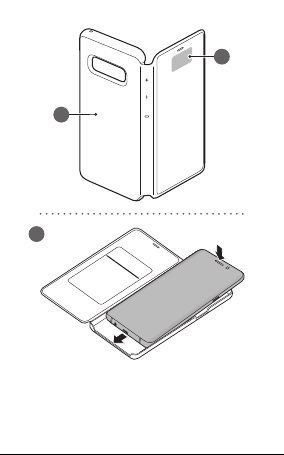
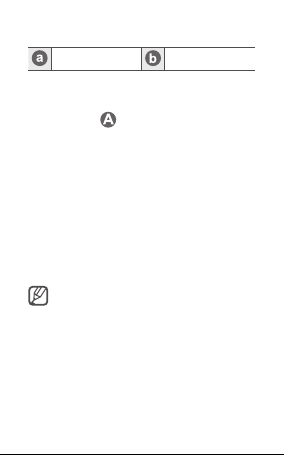
NFC antenna LED window
Attaching the LED View Cover
Open the LED View Cover and attach it to your
mobile device. (
Answering or rejecting calls
You can answer or reject a call on your mobile
device using the LED window without opening
the LED View Cover.
To answer a call, drag your finger to the right on
the LED window.
To reject a call, drag your finger to the left on the
LED window.
To stop an alarm or timer, drag your finger to the
right on the LED window.
4
)
•
You cannot answer or reject an
incoming call on the LED View Cover
during a video call.
•
The LED window may not work while
wireless charging.
Page 6
Unlocking the mobile device’s screen
automatically
You can set your mobile device to unlock
automatically when the LED View Cover is
opened.
On your mobile device, tap Settings
Advanced features
activate the automatic unlock feature.
This feature is available only when secure
lock is disabled.
Setting LED images
Using your mobile device, you can create and
set LED images to display for contacts during
incoming calls or for notifications on the LED
window.
On your mobile device, tap Settings
Advanced features
use the LED icon editor feature.
You can also use the LED icon editor app that
appears when you attach the LED View Cover to
the mobile device.
→
Accessories, and then
→
Accessories, and then
→
→
5
Page 7

Safety information
Read all safety information before using the
device to ensure safe and proper use. To view
the full safety information, refer to the Samsung
website.
Use manufacturer-approved batteries,
chargers, accessories, and supplies
Do not touch the device with wet hands
Do not drop or cause an impact to the charger
or the device
The device can be used in locations with an
ambient temperature of 0 °C to 35 °C. You can
store the device at an ambient temperature
of -20 °C to 50 °C. Using or storing the device
outside of the recommended temperature
ranges may damage the device or reduce the
battery’s lifespan
Prevent the multipurpose jack and the
small end of the charger from contact with
conductive materials, such as liquids, dust,
metal powders, and pencil leads
Do not allow children or animals to chew or
suck the device
Do not disassemble, modify, or repair your
device
6
Page 8
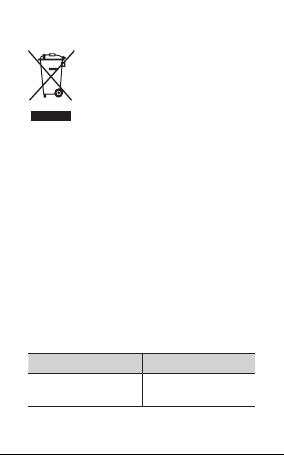
Correct disposal
This marking on the product,
accessories or literature indicates
that the product and its electronic
accessories (e.g. charger, headset,
USB cable) should not be disposed
of with other household waste.
This product is RoHS compliant.
For information on Samsung’s environmental
commitments and product-specific regulatory
obligations, e.g. REACH, WEEE, Batteries, visit
samsung.com/uk/aboutsamsung/
samsungelectronics/corporatecitizenship/
data_corner.html
Declaration of Conformity
Samsung Electronics declares that this device
complies with the essential requirements and
relevant provisions of Directive 2014/53/EU.
Go to
www.samsung.com/mobile_doc
the Declaration of Conformity.
to view
Band and mode
Band and mode Output power
NFC 13.56 MHz
H field of 42 dBμA/m
at 10 m
7
Page 9

FCC Statement
This device complies with part 15 of the FCC Rules. Operation is
subject to the following two conditions: (1) This device may not
cause harmful interference, and (2) this device must accept any
interference received, including interference that may cause
undesired operation.
Caution: Any changes or modifications not expressly approved
by Samsung Electronics Co., Ltd. could void the user's authority
to operate the equipment.
Industry Canada Statement
This device complies with Industry Canada licence-exempt RSS
standard(s). Operation is subject to the following two conditions:
(1) this device may not cause interference, and (2) this device
must accept any interference, including interference that may
cause undesired operation of the device.
Le présent appareil est conforme aux CNR d'Industrie Canada
applicables aux appareils radio exempts de licence. 'exploitation
est autorisée aux deux conditions suivantes : (1) l'appareil ne doit
pas produire de brouillage, et (2) l'utilisateur de l'appareil doit
accepter tout brouillage radioélectrique subi, même si le
brouillage est susceptible d'en compromettre le
fonctionnement.
6
 Loading...