

Page 1
Quick Start Manual
PL200/PL201
ENG / SPA
Page 2
32
Health and safety informationContents
Warnings
Do not use your camera near flammable or explosive
gases and liquids
Do not use your camera near fuels, combustibles, or
flammable chemicals. Do not store or carry flammable
liquids, gases, or explosive materials in the same
compartment as the camera or its accessories.
Keep your camera away from small children and pets
Keep your camera and all accessories out of the reach of
small children and animals. Small parts may cause choking
or serious injury if swallowed. Moving parts and accessories
may present physical dangers as well.
Prevent damage to subjects’ eyesight
Do not use the flash in close proximity (closer than 1m/3 ft) to
people or animals. Using the flash too close to your subject’s
eyes can cause temporary or permanent damage.
Health and safety
information…………………… 2
Camera layout ……………… 4
Setting up your camera …… 5
Unpacking ……………………… 5
Inserting the battery and
memory card …………………… 6
Charging the battery …………… 7
Selecting options ……………… 7
Capturing photos or videos
… 8
Playing files ………………… 9
Transferring files to a PC
(Windows) ……………………10
Specifications ……………… 11
1
13
12
15
16
18
26
53
67
89
Page 3

32
32
English
Exercise caution when connecting cables or adapters •
and installing batteries and memory cards. Forcing
the connectors, improperly connecting cables, or
improperly installing batteries and memory cards can
damage ports, connectors, and accessories.
Do not insert foreign objects into any of your camera’s •
compartments, slots, or access points. This type of
damage may not be covered by your warranty.
Protect batteries, chargers, and memory cards from
damage
Avoid exposing batteries or memory cards to very •
cold or very hot temperatures (below 0° C/32° F or
above 40° C/104° F). Extreme temperatures can
reduce the charging capacity of your batteries and
can cause memory cards to malfunction.
Prevent memory cards from making contact with •
liquids, dirt, or foreign substances. If dirty, wipe the
memory card clean with a soft cloth before inserting
it in your camera.
Handle and dispose of batteries and chargers with
care
Use only Samsung-approved batteries and chargers. •
Incompatible batteries and chargers can cause serious
injuries or damage to your camera.
Never place batteries or cameras on or in heating •
devices, such as microwave ovens, stoves, or
radiators. Batteries may explode when overheated.
Cautions
Handle and store your camera carefully and sensibly
Do not allow your camera to get wet—liquids can •
cause serious damage. Do not handle your camera
with wet hands. Water damage to your camera can
void your manufacturer’s warranty.
Avoid using or storing your camera in dusty, dirty, •
humid, or poorly-ventilated areas to prevent damage
to moving parts and internal components.
Page 4
54
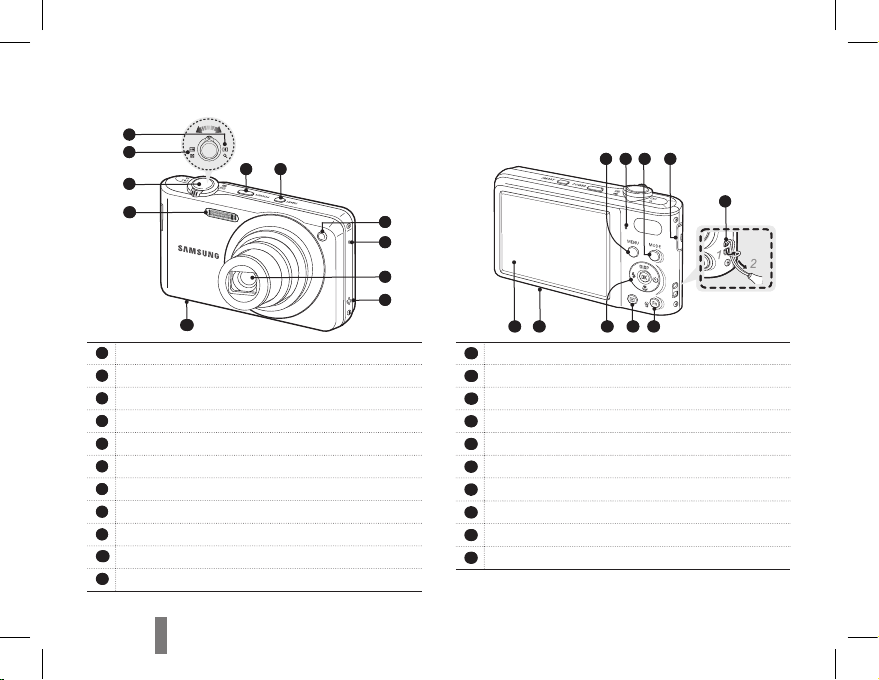
1
Shutter button
2
Zoom W Lever (Thumbnail)
3
Zoom T Lever (Digital zoom)
4
POWER button
5
Smart button
6
AF-assist light/timer lamp
7
Microphone
8
Lens
9
Speaker
10
Battery chamber cover
11
Flash
Camera layout
12
MENU button
13
Status lamp
14
MODE button
15
USB and A/V port (Accepts USB cable or A/V cable)
16
Strap eyelet
17
Fn/Delete button
18
Playback button
19
Navigation button/OK button
20
Tripod mount
21
Main display
4
9
8
2
3
1
11
5
6
7
10
19 18
20
17
21
16
14 15
13 12
Page 5
54
54
English
Setting up your camera
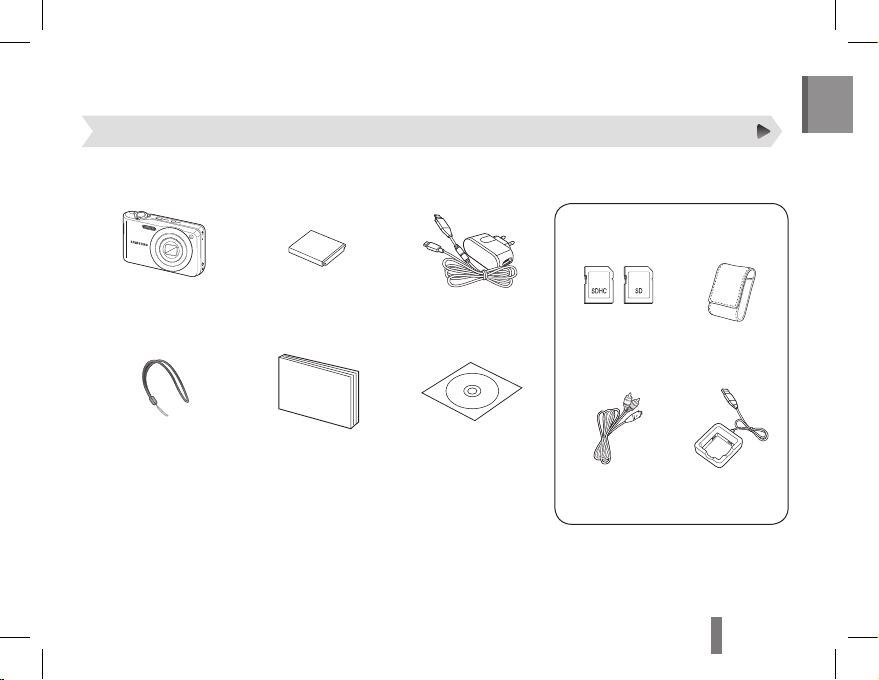
Please check that you have the correct contents before using this product. The contents can vary depending on the sales region.
To buy the optional equipment, contact your nearest Samsung dealer or Samsung service center.
Unpacking
Camera Rechargeable Battery
AD43-00194A
AC adapter/USB cable
AD44-00143A/
AD39-00183A
Camera strap
AD63-02596A
AD63-02604A
Quick Start Manual
AD68-05529A
Software CD-ROM
(User manual included)
AD46-00362A
Memory cards Camera case
A/V cable
AD39-00146A
Battery charger
AD44-00164A
Optional accessories
Page 6
76
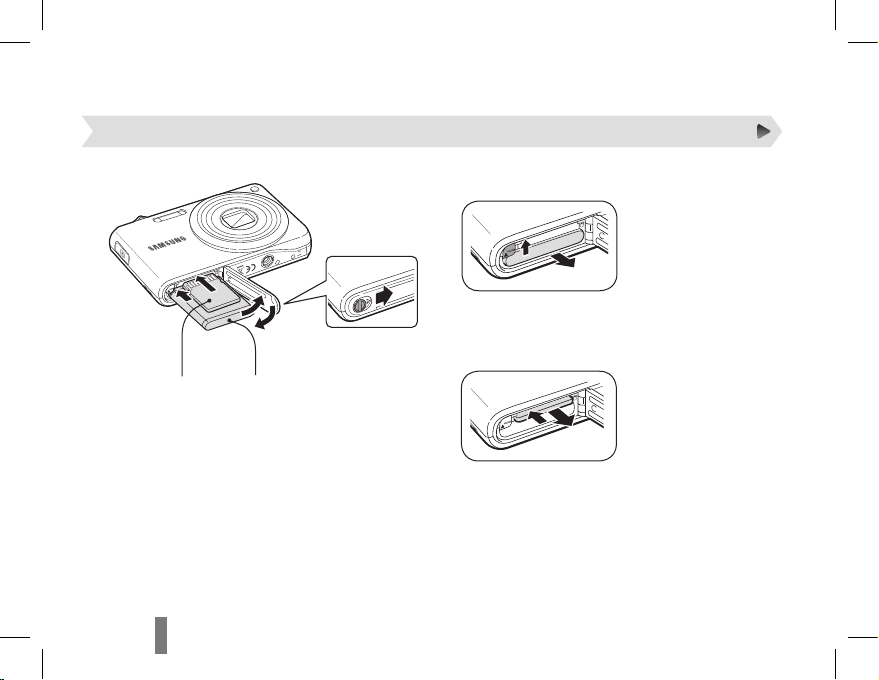
Inserting the battery and memory card
▼
Removing the battery
▼
Removing the memory card
Push gently until the card
disengages from the camera
and then pull it out of the
slot.
Setting up your camera
With the gold-colored
2
contacts facing up
1
4
With the Samsung logo
3
facing up
Page 7
76
76
English
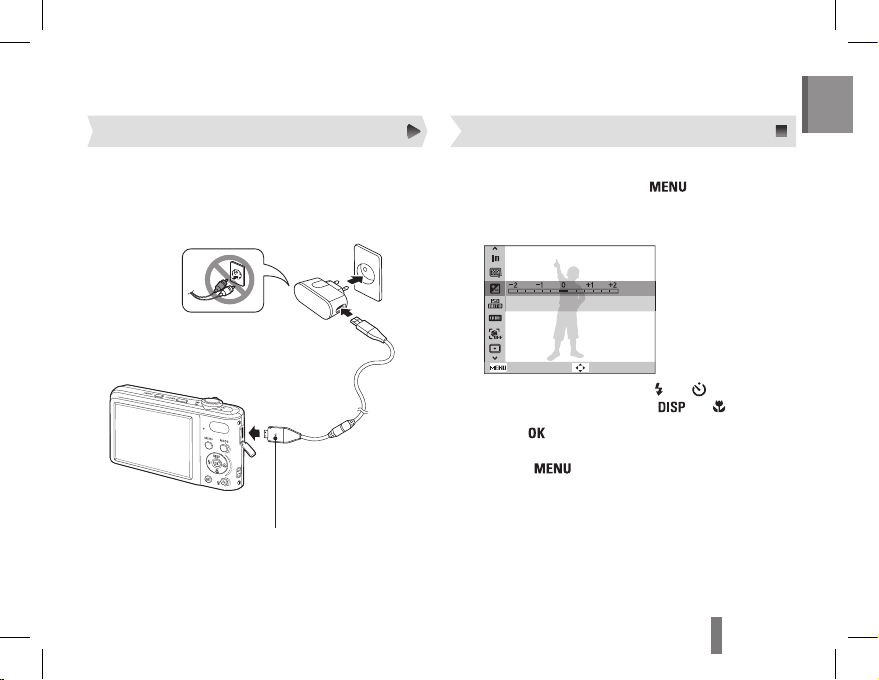
In Shooting mode, press [1 ].
Use the navigation buttons to scroll to an
2
option or menu.
Back
EV
Move
To move left or right, press [ ▪ ] or [ ].
To move up or down, press [ ▪
] or [ ].
Press [3 ] to confirm the highlighted option or
menu.
Press [ ▪ ] again to go back to the previous
menu.
Selecting optionsCharging the battery
Indicator light
Red ▪ : Charging
Green ▪ : Fully charged
Before using the camera for the first time, you must
charge the battery.
Page 8
98
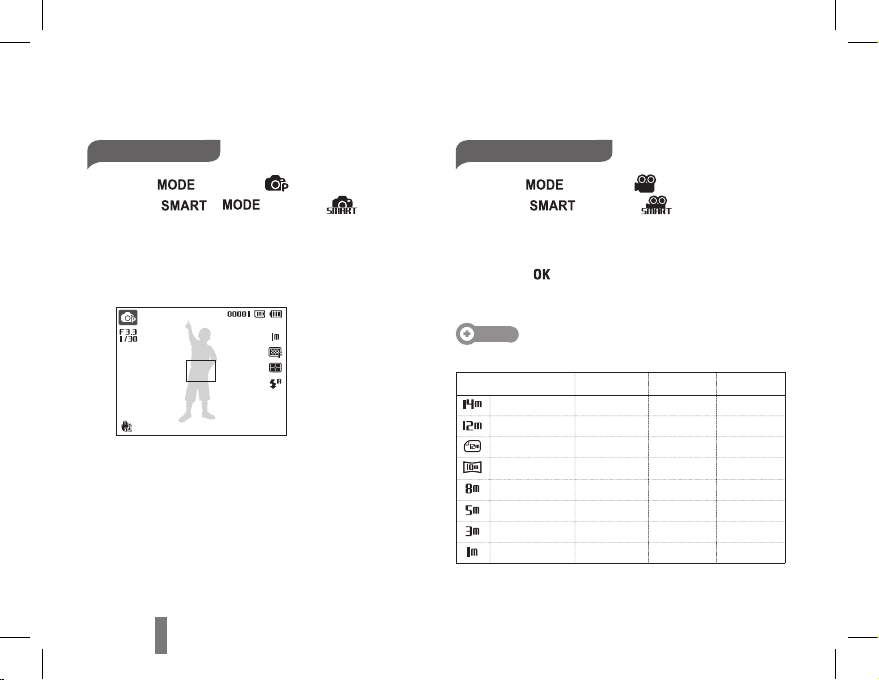
Taking a photo
Press [1 ] to select ( ).
(Press [
], [ ] to select ( ).)
Align your subject in the frame.
2
Press [3 Shutter] halfway down to focus
automatically.
A green frame means the subject is in focus. ▪
Press [4 Shutter] all the way down to take the
photo.
Recording a video
Press [1 ] to select ( ).
(Press [
] to select ( ).)
Align your subject in the frame.
2
Press [3 Shutter].
Press [ ▪ ] to pause or resume.
Press [4 Shutter] again to stop the recording.
Note
Number of photos by resolution (for 1 GB SD)
Resolution Super fine Fine Normal
4320 x 3240 168 238 362
4000 x 3000 195 267 407
4272 x 2848 195 267 407
4224 x 2376 229 305 477
3264 x 2448 244 326 515
2592 x 1944 362 489 699
2048 x 1536 543 674 752
1024 x 768 978 1,086 1,222
These figures were determined under Samsung’s standard
conditions. Your results may vary depending on your
shooting conditions and camera settings.
Capturing photos or videos
Page 9
98
98
English
Playing files
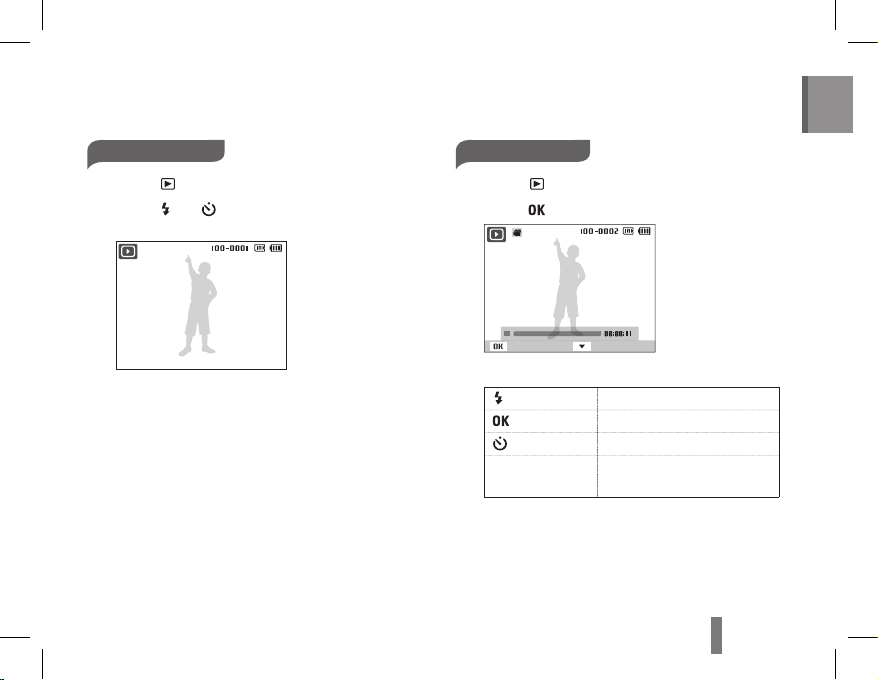
Viewing photos
Press [1 ].
Press [
2
] or [ ] to scroll through files.
Press and hold to view files quickly. ▪
Viewing videos
Press 1 [ ].
Press [
2
].
Play Capture
Use the following buttons to control playback.
3
[ ]
Scan backward
[
]
Pause or resume playback
[
]
Scan forward
[Zoom] left or right Adjust the volume level
Page 10
1110
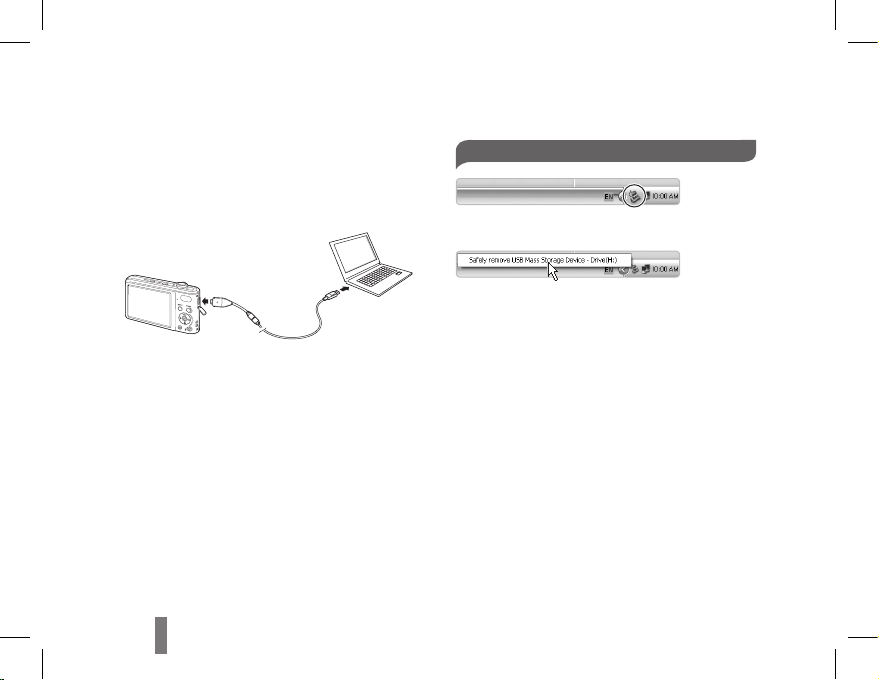
Transferring files to a PC (Windows)
Insert the installation CD in a CD-ROM drive
1
and follow the onscreen instructions.
Connect the camera to the PC with the USB
2
cable.
Turn on the camera.
3
On your PC, select 4 My Computer →
Removable Disk → DCIM → 100PHOTO.
Select the files you want and drag or save them
5
to the PC.
Disconnecting safely (for Windows XP)
Click
▼
Click
Page 11
1110
1110
English
Image sensor
Type: 1/2.3” (approx. 7.76 mm) CCD•
Effective pixels: approx. 14.2 mega-pixels•
Total pixels: approx. 14.4 mega-pixels •
Lens
Focal length: Samsung 7X Zoom Lens f = 5.6 - 39.2 mm (35 mm film equivalent: 31 - 217 mm)•
F-stop range: F3.3 (W) - F5.5 (T)•
Display
3.0” (7.6 cm) TFT LCD, 230 K
Focusing
TTL auto focus (Multi AF, Center AF, Face Detection AF, Tracking AF)
Shutter speed
Smart Auto : 1/8 ~ 1/2,000 sec.•
Program : 1 ~ 1/2,000 sec.•
Night : 8 ~ 1/2,000 sec.•
Fireworks : 2 sec.•
Storage
Internal memory: approx. 90 MB•
External memory (Optional): SD card (up to 2 GB guaranteed), •
SDHC card (up to 8 GB guaranteed)
Internal memory capacity may not match these specifications.
DC power
input connector
4.2 V
Rechargeable battery
BP70A (740mAh)
Dimensions (W x H x D)
99.8 x 59.5 x 21 mm (excluding protrusions)
Weight
143 g (without battery and memory card)
Operating temperature
0 - 40° C
Operating humidity
5 - 85 %
Specifications
Page 12
ES-3ES-2
Información sobre salud
y seguridad
Contenido
Advertencias
No utilice la cámara cerca de líquidos y gases
explosivos o inflamables
No utilice la cámara cerca de carburantes, combustibles
o sustancias químicas inflamables. No almacene ni
transporte líquidos inflamables, gases o materiales
explosivos en el mismo compartimento en el que están la
cámara o los accesorios.
Mantenga la cámara alejada del alcance de los niños
y las mascotas
Mantenga la cámara y todos los accesorios fuera del
alcance de los niños y los animales. Es posible que se
traguen las piezas más pequeñas y, como consecuencia,
se asfixien o sufran graves lesiones. Los accesorios y las
piezas móviles también pueden causar daños físicos.
Evite dañar la vista del sujeto
No utilice el flash si está a una proximidad inferior a 1m
de las personas o los animales. Si utiliza el flash cuando
está demasiado cerca de los ojos del sujeto, puede
producirle daños temporales o permanentes.
Información sobre salud y
seguridad …………………… 2
Diseño de la cámara ……… 4
Configuración de la cámara
… 5
Desembalaje …………………… 5
Insertar la batería y la tarjeta de
memoria ………………………… 6
Cargar la batería ……………… 7
Selección de opciones …………7
Captura de fotografías o
vídeos ……………………… 8
Reproducción de archivos
… 9
Transferencia de archivos a un
ordenador (para Windows)
…10
Especificaciones ………… 11
1
13
12
26
53
67
89
15
16
18
Page 13
ES-3ES-2
ES-3ES-2
Español
Tenga cuidado al conectar los cables y los
adaptadores y al instalar las baterías y las tarjetas
de memoria. Si ejerce demasiada fuerza sobre los
conectores, conecta de manera inapropiada los
cables o instala de manera inadecuada las baterías
y las tarjetas de memoria, puede dañar los puertos,
los conectores y los accesorios.
No inserte objetos extraños en ningún
compartimento, ranura o punto de acceso de la
cámara. Es posible que la garantía no cubra este
tipo de daños.
Proteja las baterías, los cargadores y las tarjetas
de memoria contra daños
No exponga las baterías o las tarjetas de memoria
a temperaturas demasiado bajas o demasiado altas
(inferiores a 0 ºC/32 ºF o superiores a 40 ºC/104 ºF).
Las temperaturas extremas pueden reducir la
capacidad de carga de las baterías y generar un
funcionamiento defectuoso de las tarjetas de memoria.
Evite que las tarjetas de memoria entren en
contacto con líquidos, suciedad o sustancias
extrañas. Si la tarjeta de memoria se ensucia,
límpiela con un paño suave antes de insertarla en
la cámara.
Utilice y deseche las baterías y los cargadores con
cuidado
Utilice únicamente baterías y cargadores aprobados
por Samsung. Las baterías y los cargadores
incompatibles pueden producirle graves lesiones o
causar daños a la cámara.
Nunca coloque las baterías o las cámaras dentro de
dispositivos conductores de calor, como hornos de
microondas, estufas o radiadores, ni sobre ellos. Las
baterías pueden explotar si se recalientan.
Precauciones
Utilice y guarde la cámara con cuidado y de manera
prudente
No permita que la cámara se moje, ya que los
líquidos pueden causarle graves daños. No manipule
la cámara si tiene las manos mojadas. Si se
producen daños en la cámara a causa del agua, se
puede anular la garantía del fabricante.
No utilice ni guarde la cámara en áreas en las que
haya polvo, suciedad, humedad o poca ventilación,
a fin de evitar daños en las partes móviles o en los
componentes internos.
Page 14
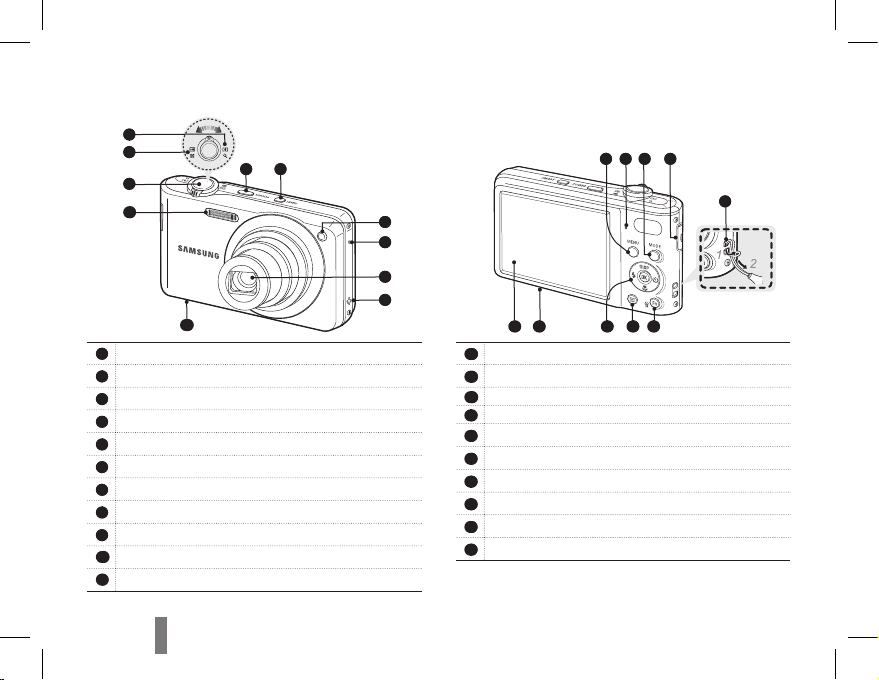
ES-5ES-4
Diseño de la cámara
1
Botón del obturador
2
Palanca W de zoom (Miniatura)
3
Palanca T de zoom (zoom digital)
4
Botón de encendido y apagado
5
Botón inteligente
6
Luz AF auxiliary/luz de temporizador
7
Micrófono
8
Objetivo
9
Altavoz
10
Cubierta de la cámara de la batería
11
Flash
12
Botón MENU
13
Luz indicadora de estado
14
Botón MODE
15
Puerto USB y A/V (Admite cable USB y cable A/V)
16
Orificio de la correa
17
Botón Fn / Eliminar
18
Botón de reproducción
19
Botón de navegación/botón OK
20
Orificio para el montaje del trípode
21
Pantalla principal
4
9
8
2
3
1
11
5
6
7
10
19 18
20
17
21
16
14 15
13 12
Page 15
ES-5ES-4
ES-5ES-4
Español
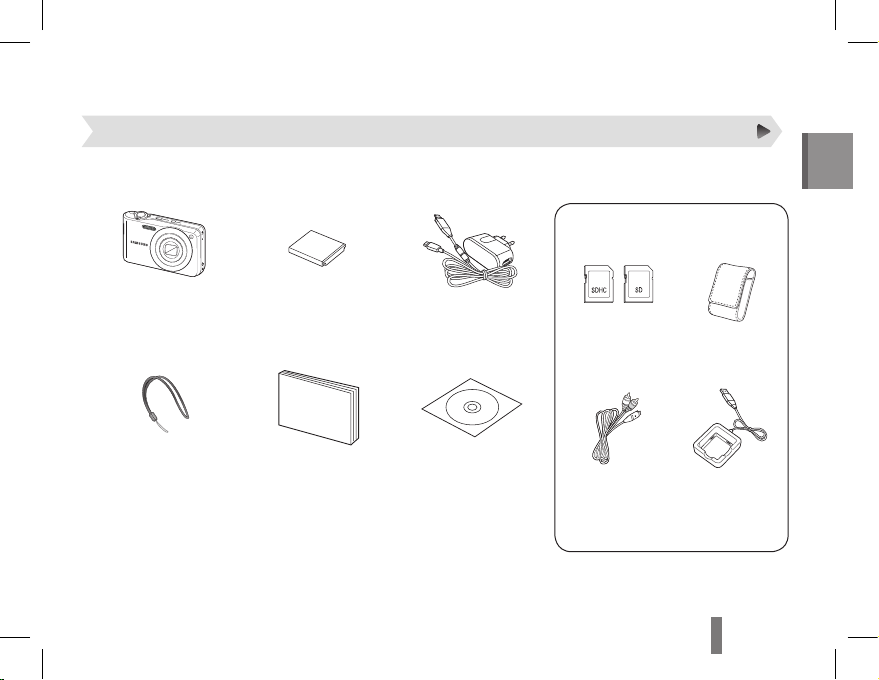
Configuración de la cámara
Revise que estén todos los componentes antes de usar este producto. El contenido puede variar en función de la zona de
venta. Para comprar equipos opcionales, diríjase al distribuidor de Samsung o al centro de servicio de Samsung más cercano.
Desembalaje
Cámara Batería recargable
AD43-00194A
Fuente de alimentación /
Cable USB
AD44-00143A/
AD39-00183A
Correa de la cámara
AD63-02596A
AD63-02604A
Manual de inicio rápido
AD68-05529A
CD-ROM del software
(incluye el manual del
usuario)
AD46-00362A
Tarjetas de
memoria
Estuche para la
cámara
Cable A/V
AD39-00146A
Cargador de la
batería
AD44-00164A
Accesorios opcionales
Page 16
ES-7ES-6
Configuración de la cámara
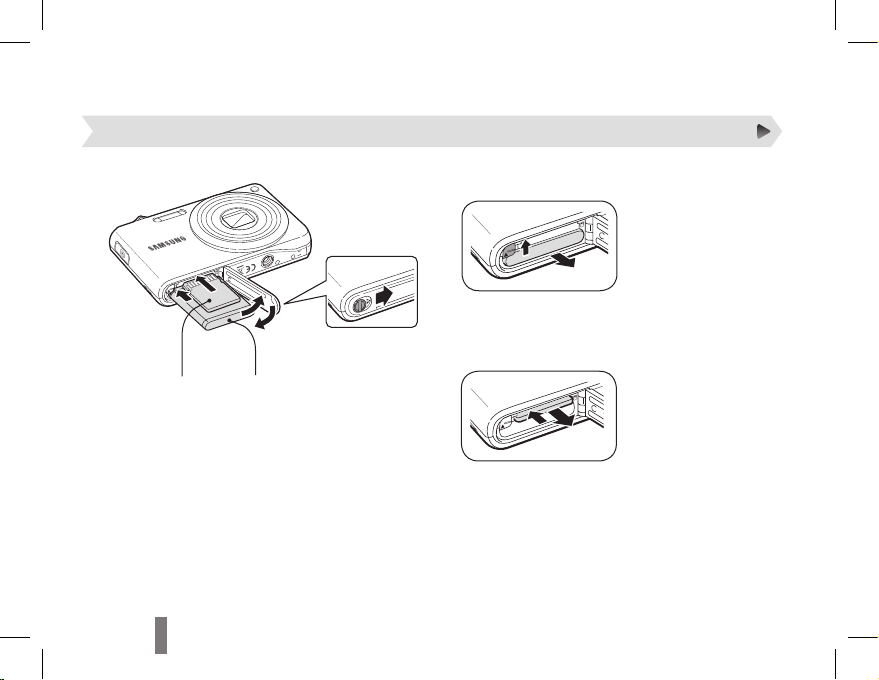
Insertar la batería y la tarjeta de memoria
Quitar la batería
Quitar la tarjeta de memoria
Ejerza una leve presión
hasta que la tarjeta se
desprenda de la cámara y,
luego, retírela de la ranura.
Con los contactos de
2
color dorado hacia
arriba
1
4
Con el logotipo de
3
Samsung hacia arriba.
Page 17
ES-7ES-6
ES-7ES-6
Español
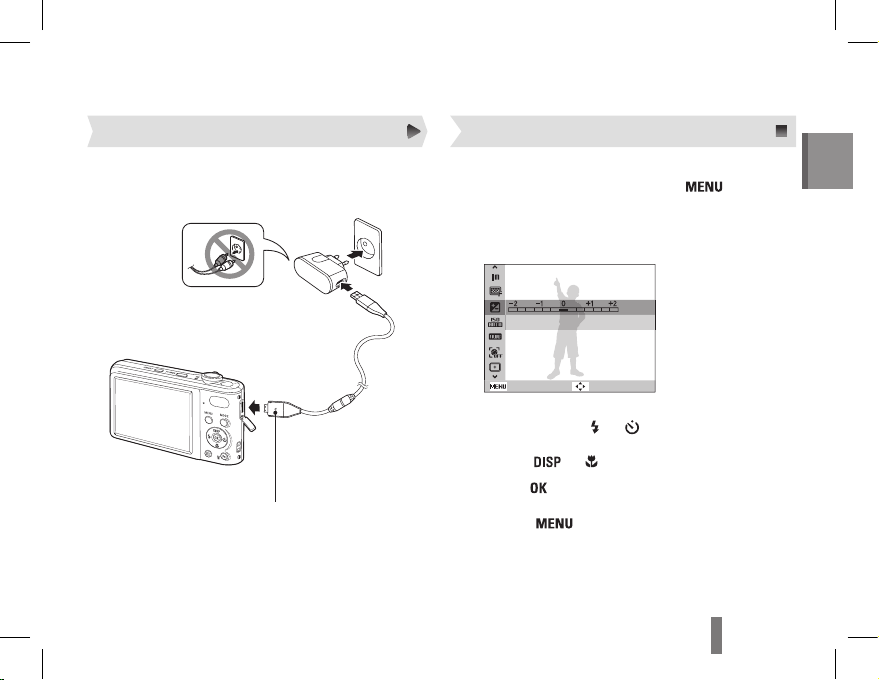
En el modo de disparo, pulse [1 ].
Utilice los botones de navegación para
2
desplazarse hacia una opción o hacia un
menú.
Atrás
EV
Mover
Para desplazarse hacia la izquierda o hacia la
derecha, pulse [
] o [ ].
Para desplazarse hacia arriba o hacia abajo,
pulse [
] o [ ].
Pulse [3 ] para confirmar la opción o el menú
resaltados.
Pulse [ ] nuevamente para regresar al
menú anterior.
Selección de opciones
Cargue la batería antes de utilizar la cámara.
Cargar la batería
Luz indicadora
Rojo
: cargándose
Verde
: completamente cargada
Page 18
ES-9ES-8
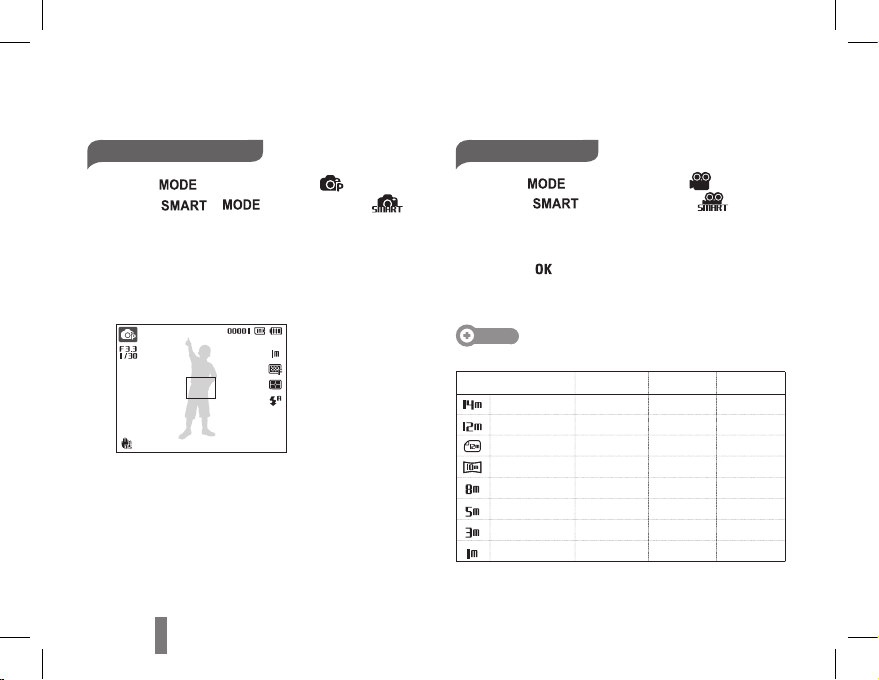
Tomar una fotografía
Pulse [1 ] para seleccionar ( ).
(Pulse [ ], [ ] para seleccionar ( ).)
Alinee el sujeto en el marco.
2
Pulse [3 Obturador] hasta la mitad para utilizar
el enfoque automático.
Si aparece un cuadro verde, significa que el
sujeto está enfocado.
Pulse completamente [4 Obturador] para
tomar la fotografía.
Grabar un vídeo
Pulse [1 ] para seleccionar ( ).
(Pulse [
] para seleccionar ( ).)
Alinee el sujeto en el marco.
2
Pulse [3 Obturador].
Pulse [ ] para pausar o reanudar.
Pulse [4 Obturador] nuevamente para detener
la grabación.
Nota
Cantidad de fotografías por resolución (para SD de 1GB)
Resolución Superfina Fina Normal
4320 x 3240
168 238 362
4000 x 3000
195 267 407
4272 x 2848
195 267 407
4224 x 2376
229 305 477
3264 x 2448
244 326 515
2592 x 1944
362 489 699
2048 x 1536
543 674 752
1024 x 768
978 1086 1222
Estas son medidas tomadas en condiciones estándar,
establecidas por Samsung, y pueden variar según las
condiciones de disparo y la configuración de la cámara.
Captura de fotografías o vídeos
Page 19
ES-9ES-8
ES-9ES-8
Español
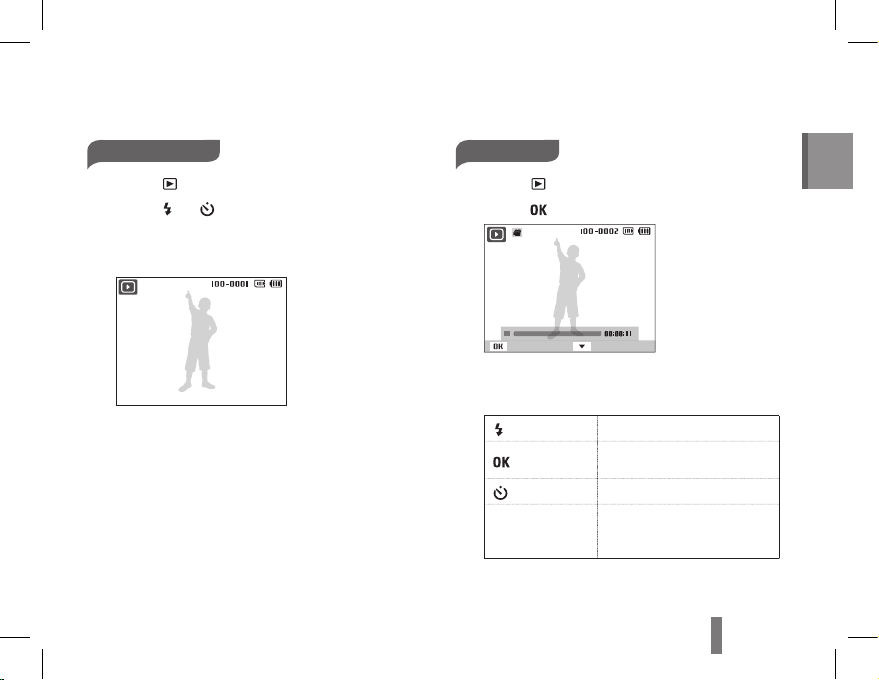
Reproducción de archivos
Ver fotografías
Pulse [1 ].
Pulse [
2
] o [ ] para desplazarse por los
archivos.
Mantenga la tecla pulsada para ver los archivos
rápidamente.
Ver vídeos
Pulse [1 ].
Pulse [
2
].
Reproducir Captura
Utilice los siguientes botones para controlar
3
la reproducción.
[ ]
Permite retroceder.
[
]
Permite pausar o reanudar la
reproducción.
[
]
Permite avanzar.
[Zoom] hacia la
izquierda o hacia
la derecha
Permite ajustar el nivel de
volumen.
Page 20
ES-11ES-10
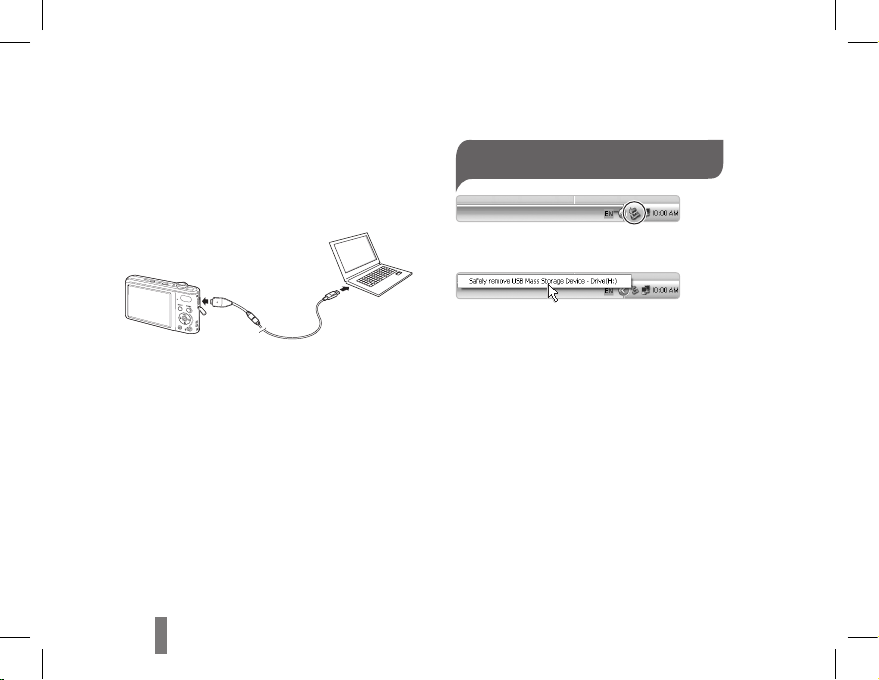
Transferencia de archivos a un ordenador (para Windows)
Inserte el CD de instalación en la unidad de
1
CD-ROM y siga las instrucciones que
aparezcan en la pantalla.
Conecte la cámara a su PC con el cable USB.
2
Encienda la cámara.
3
En el ordenador, seleccione 4 Mi PC
Disco extraíbleDCIM100PHOTO.
Seleccione los archivos que desee y
5
arrástrelos o guárdelos en el ordenador.
Desconectarse de manera segura
(para Windows XP)
Haga clic
Haga clic
Page 21

ES-11ES-10
ES-11ES-10
Español
Especificaciones
Sensor de imagen
Tipo: 1/2,3” (aprox. 7,76 mm) CCD
Píxeles reales: aproximadamente 14,2 megapíxeles
Píxeles totales: aproximadamente 14,4 megapíxeles
Lente
Distancia focal: Objetivo de zoom de 7x de Samsung f = 5,6-39,2 mm
(equivalente en película de 35 mm: de 31 a 217 mm)
Rango de apertura del objetivo: F3,3 (W) y F5,5 (T)
Pantalla
3,0" (7,6 cm) TFT LCD, 230K
Enfoque
Enfoque automático TTL (Multi af, Af central, AF de detección de rostros, Estabilización AF)
Velocidad del obturador
Auto inteligente: de 1/8 a 1/2.000 s
Programa: de 1 a 1/2.000 s
Nocturno: de 8 a 1/2.000 s
Fuegos Artificiales: 2 s
Almacenamiento
Memoria interna: aprox. 90 MB
Memoria externa (opcional): tarjeta SD (hasta 2 GB garantizados),
tarjeta SDHC(hasta 8 GB garantizados)
Es posible que la capacidad de la memoria interna no coincida con estas
especificaciones.
Conector de entrada de CC
4,2V
Batería recargable
BP70A (740mAh)
Dimensiones
(alto x ancho x profundidad)
99,8 x 59,5 x 21 mm (excluyendo el saliente)
Peso
143 g (sin la batería ni la tarjeta de memoria)
Temperatura de
funcionamiento
Humedad de funcionamiento
5 - 85 %
Page 22

AD68-05529A (1.0)
Please refer to the warranty that came with your product or visit our
website http://www.samsungimaging.com/ or http://www.samsung.com/
for after-sales service or inquiries.
 Loading...