

Page 1
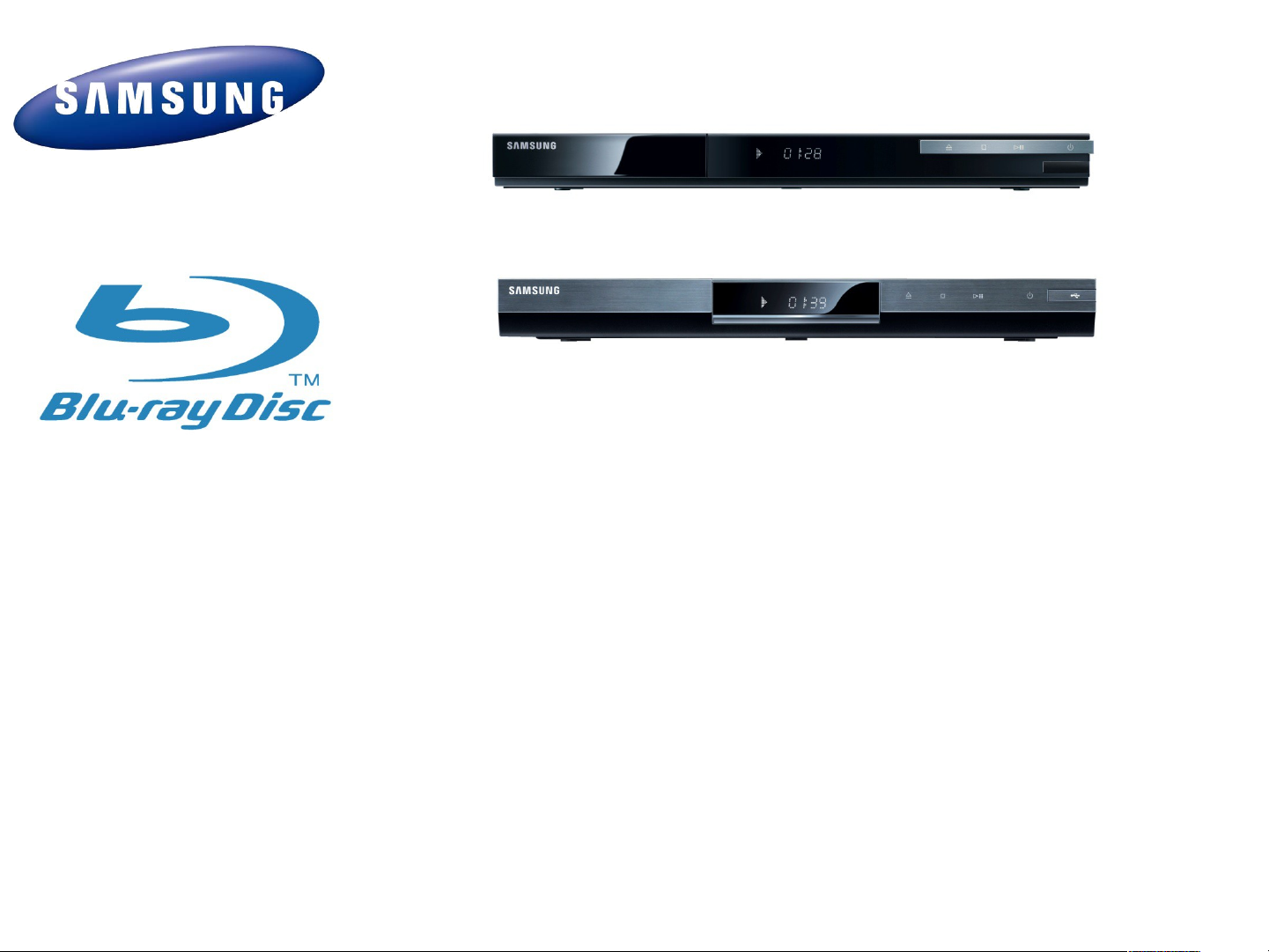
BD-D5100Blu-ray Disc Player
Training Manual
May. 2011
VD Division
Page 2

Contents
•
Reference Information
–
Blu-ray Disc
–
Copy Management
•
Product Information
•
Circuit Description
•
Disassembly & Reassembly
•
Troubleshooting & adjustment
Page 3
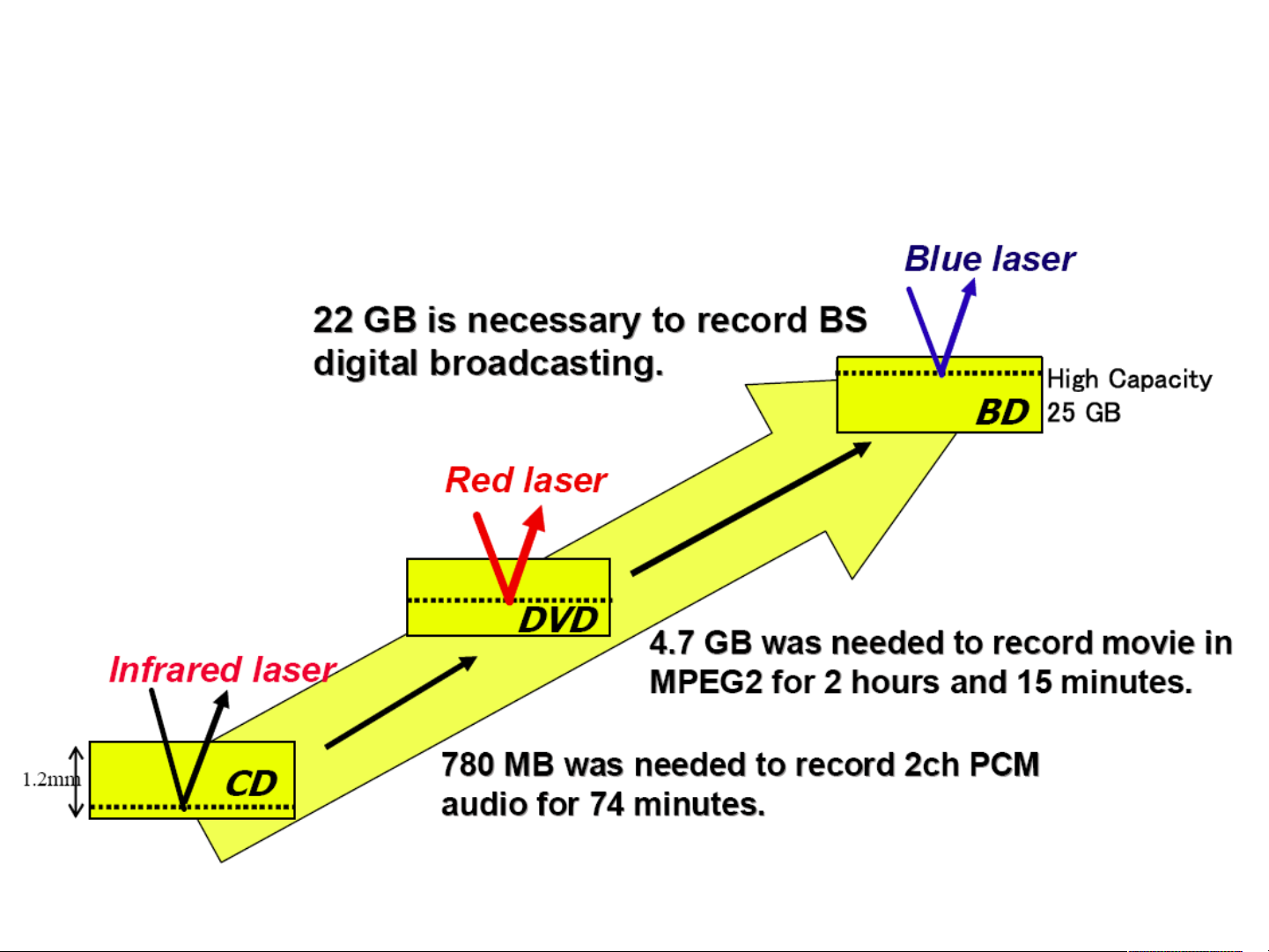
Evolution of consumer optical discs
Page 4
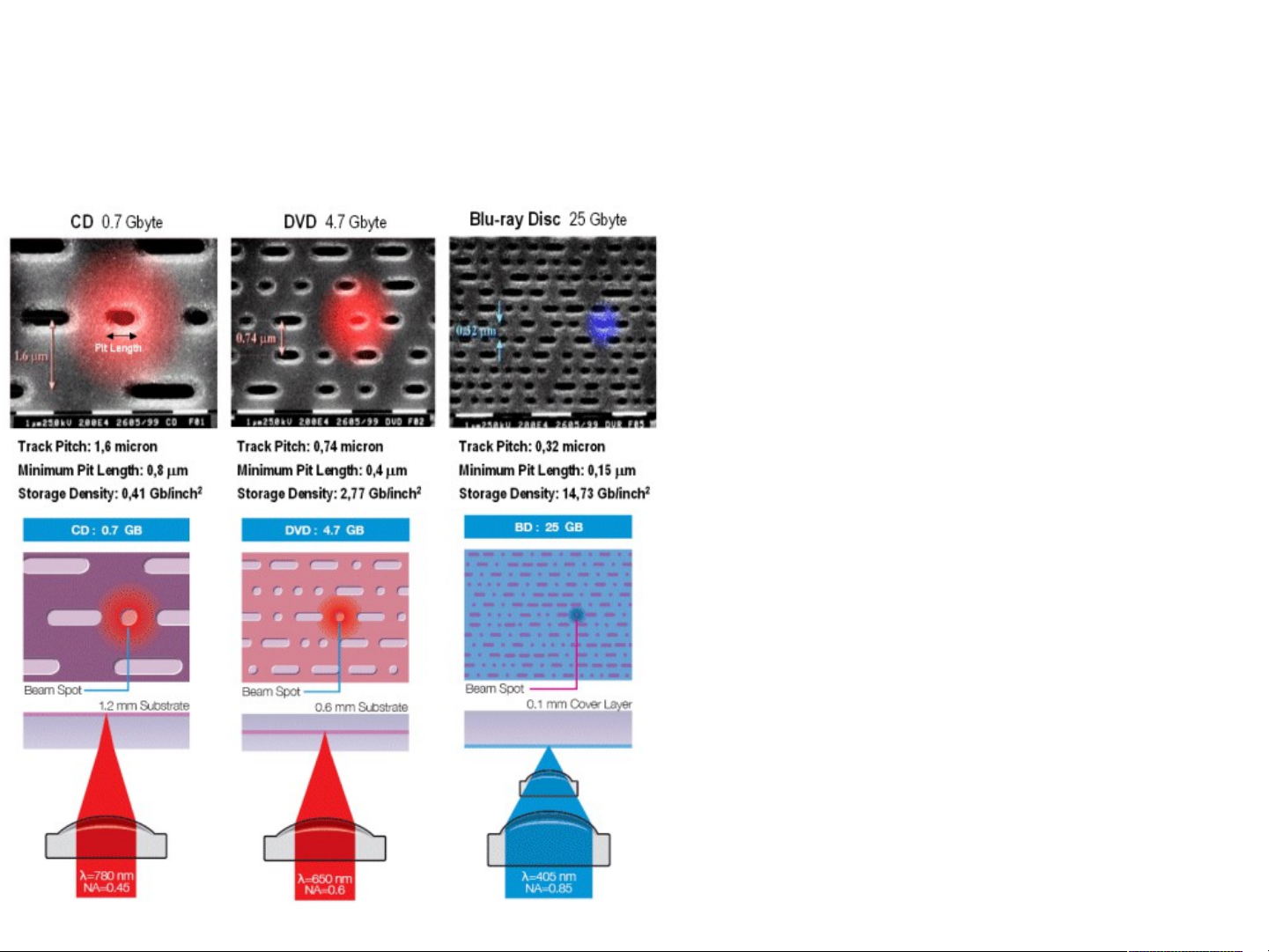
Blu-ray Disc and DVD
•
Just as DVD meant a 5 to 10 times increase in
storage capacity compared to CD, Blu-ray Disc will
increase DVD capacity by 5 to 10 times. This is due,
among other reasons, to the usage of a blue instead
of a red laser and improved lens specifications,
allowing for a much smaller focus laser beam which
enables the recording of much smaller and higher
density pits on the disc.
•
Due to the fact that the data layer on a Blu-ray Disc
is placed much "closer" to the laser lens than in DVD
(or even the HD-DVD proposal), there is less
distortion resulting in significantly improved
tolerances. Hence, more precision and ultra high
storage densities are made possible.
•
As a result of Blu-ray Disc being manufactured as a
single substrate disc comparable to CD, but unlike
DVD (and the HD-DVD proposal), the manufacturing
process does not involve the bonding of two
substrates, resulting in less production material, a
shorter production time and hence lower production
costs per disc.
•
Blu-ray Disc has the same physical characteristics
as DVD and CD, and like its predecessors it also
does not require a cartridge. This makes it possible
to create Blu-ray Disc products that are backwards
compatible with CD and DVD, allowing for a
seamless transition to the new technology. Likewise,
the technology is perfectly suitable for integration in
small form factor equipment, like notebook
computers.
Page 5

What is Blu-ray Disc ?
Blu-ray, also known as Blu-ray Disc (BD), is the name of a next-generation optical disc
format jointly developed by the Blu-ray Disc Association (BDA), a group of the world's
leading consumer electronics, personal computer and media manufacturers (including
Apple, Dell, Hitachi, HP, JVC, LG, Mitsubishi, Panasonic, Pioneer, Philips, Samsung,
Sharp, Sony, TDK and Thomson). The format was developed to enable recording, rewriting
and playback of high-definition video (HD), as well as storing large amounts of data. The
format offers more than five times the storage capacity of traditional DVDs and can hold up
to 25GB on a single-layer disc and 50GB on a dual-layer disc. This extra capacity
combined with the use of advanced video and audio codecs will offer consumers an
unprecedented HD experience.
While current optical disc technologies such as DVD, DVD±R, DVD±RW, and DVD-RAM
rely on a red laser to read and write data, the new format uses a blue-violet laser instead,
hence the name Blu-ray. Despite the different type of lasers used, Blu-ray products can
easily be made backwards compatible with CDs and DVDs through the use of a
BD/DVD/CD compatible optical pickup unit. The benefit of using a blue-violet laser
(405nm) is that it has a shorter wavelength than a red laser (650nm), which makes it
possible to focus the laser spot with even greater precision. This allows data to be packed
more tightly and stored in less space, so it's possible to fit more data on the disc even
though it's the same size as a CD/DVD. This together with the change of numerical
aperture to 0.85 is what enables Blu-ray Discs to hold 25GB/50GB.
Page 6

What is BD-J
BD-J, or Blu-ray Disc Java, is the interactive platform supporting advanced
content for Blu-ray Disc. BD-J allows bonus content on Blu-ray Disc titles to be
far more sophisticated than bonus content provided by standard DVD, including
network access (such as for downloading updated trailers or accessing live
studio events), picture-in-picture and access to local storage. BD-J was
developed by the Blu-ray Disc Association. All Blu-ray Disc players supporting
video content are required to support BD-J.
Possible applications include:
Creating vastly more dynamic menu systems;
downloading additional content such as subtitles from the internet(Profile 2.0 :
BD Live);
serving current movie previews if the viewer requests them from the
network(Profile 2.0 : BD Live);
downloading games and other related titles at the request of the viewer(Profile
2.0 : BD Live);
being able to buy new titles (online shopping) (Profile 2.0 : BD Live);
Dual-Decoder Picture-in-Picture(Profile 1.1);
Page 7

BD Profile
The BD-ROM specification defines four profiles of Blu-ray players. All video-based profiles
are required to have a full implementation of BD-J. 1.0 is the basic profile that all current
Blu-ray players (as of April 2007) are based on. Players based on this profile are only
required to have 64 KB of application data area storage, which is typically used for
bookmarks and other preference storage. Most players have more than the minimum
required 64 KB. After October 31, 2007, this profile will be superseded by profile 1.1 as the
new minimum profile.
1.1 (mandatory November 2007) is typically referred to as "Profile 1.1" (but is more
formally known as "Final Standard Profile") adds a secondary video decoder (typically used
for picture in picture), secondary audio (typically used for interactive audio and
commentary) and capability of supporting a minimum of 256 MB of local storage (for
storing audio/video and title updates). Compliance with this profile will be mandatory for
player models introduced to the market after October 31, 2007.
Some profile 1.0 players may be upgradeable via firmware update to profile 1.1 if they
have the appropriate hardware, but no manufacturer has announced any such upgrade.
When software authored with interactive features dependent on Profile 1.1 hardware
capabilities are played on profile 1.0 players some features may not be available or may
offer limited capability. However, profile 1.0 players will still be able to play the main feature
of the disc.
Page 8

BD Profile
2.0 (BD-Live), also known as BD-Live, adds network connectivity to the list of
mandatory functions and increases mandatory local storage capability to 1 GB.
No players have been announced as compatible with this profile. However,
players of earlier profiles will still be able to play the main feature of the disc.
Local Storage Dual Decoder Network connectivity
Profile 1.0 X X X
Profile 1.1 O
(Min capacity:
256Mbytes)
Ex : Bookmark,
downloaded A/V
material
Profile 2.0 O
(Mandatory capacity :
1Gbytes)
O
(Secondary Audio,
Picture in Picture)
O
(Secondary Audio,
Picture in Picture)
X
O
(Download,
Streaming, etc)
Page 9
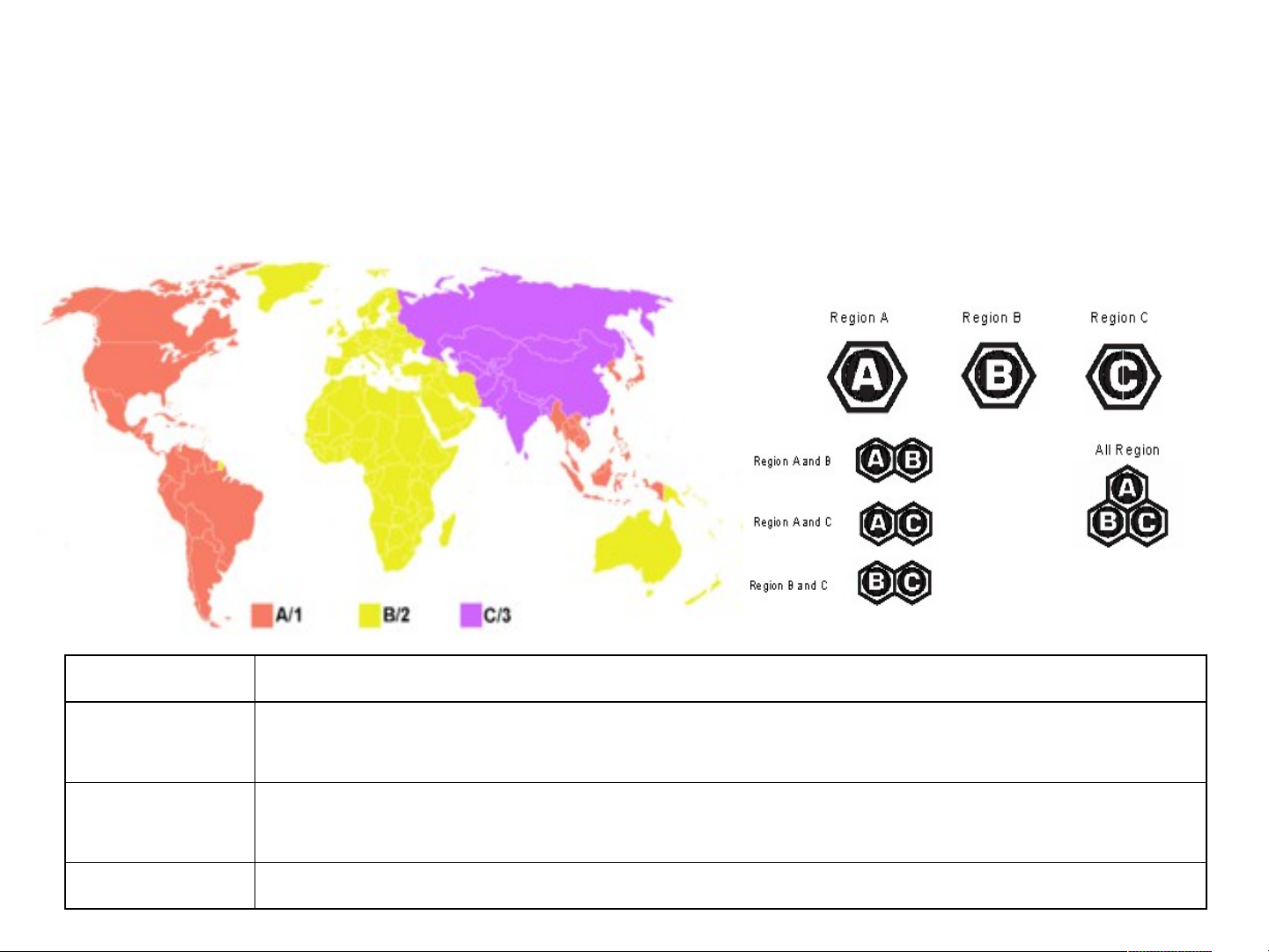
Blu-ray Disc Region Code
The Blu-ray movie region codes are different from the DVD region codes.[9] The
following are the region codes for Blu-ray discs:
Region code Area
A North America, Central America, South America, Japan, North Korea,
South Korea, Taiwan, Hong Kong and Southeast Asia.
B Europe, Greenland, French territories, Middle East, Africa, Australia and
New Zealand.
C India, Nepal, Mainland China, Pakistan, Russia, Central and South Asia.
Page 10
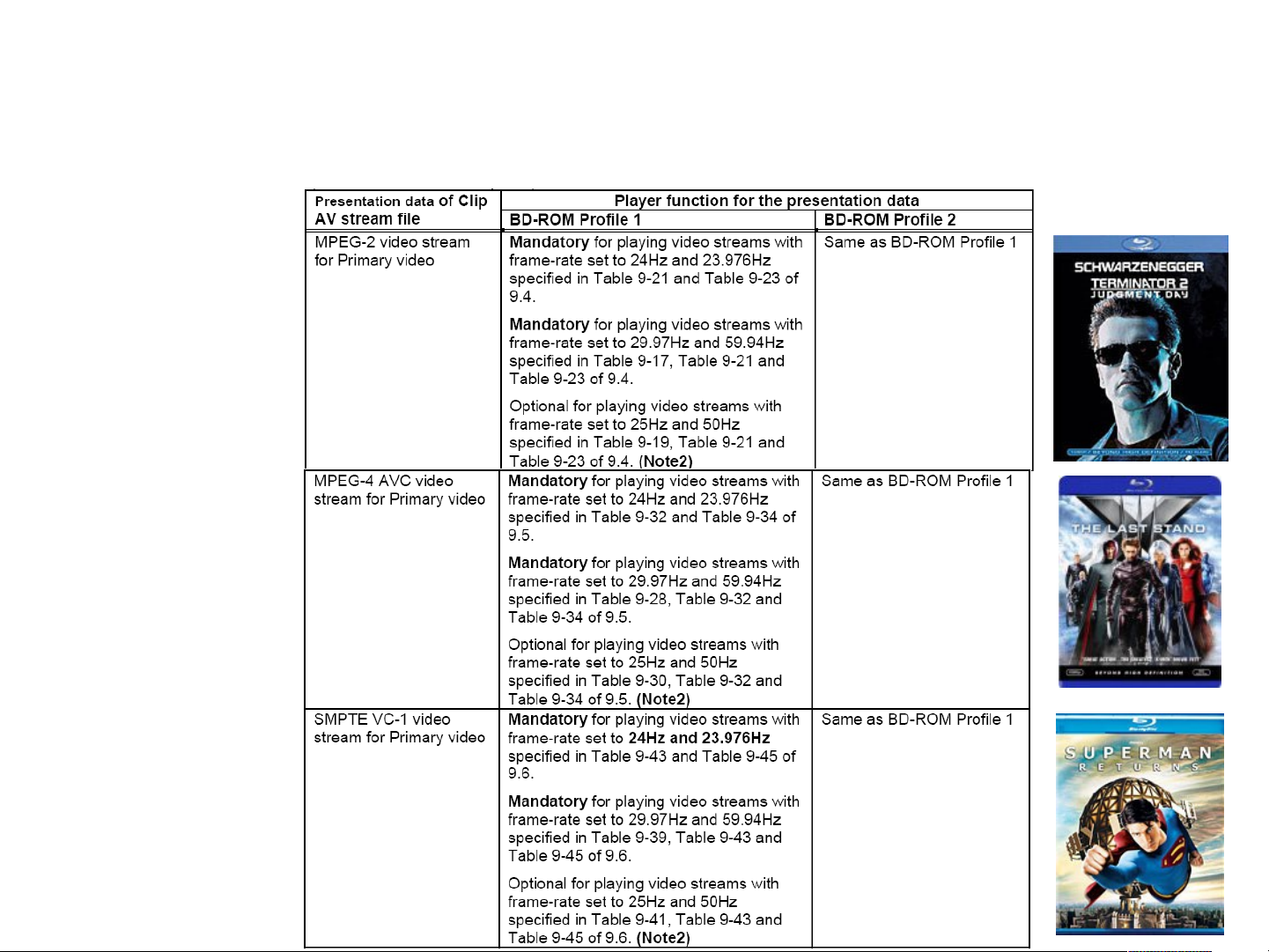
Blu-ray :
Player function of Clip AV stream file
Page 11
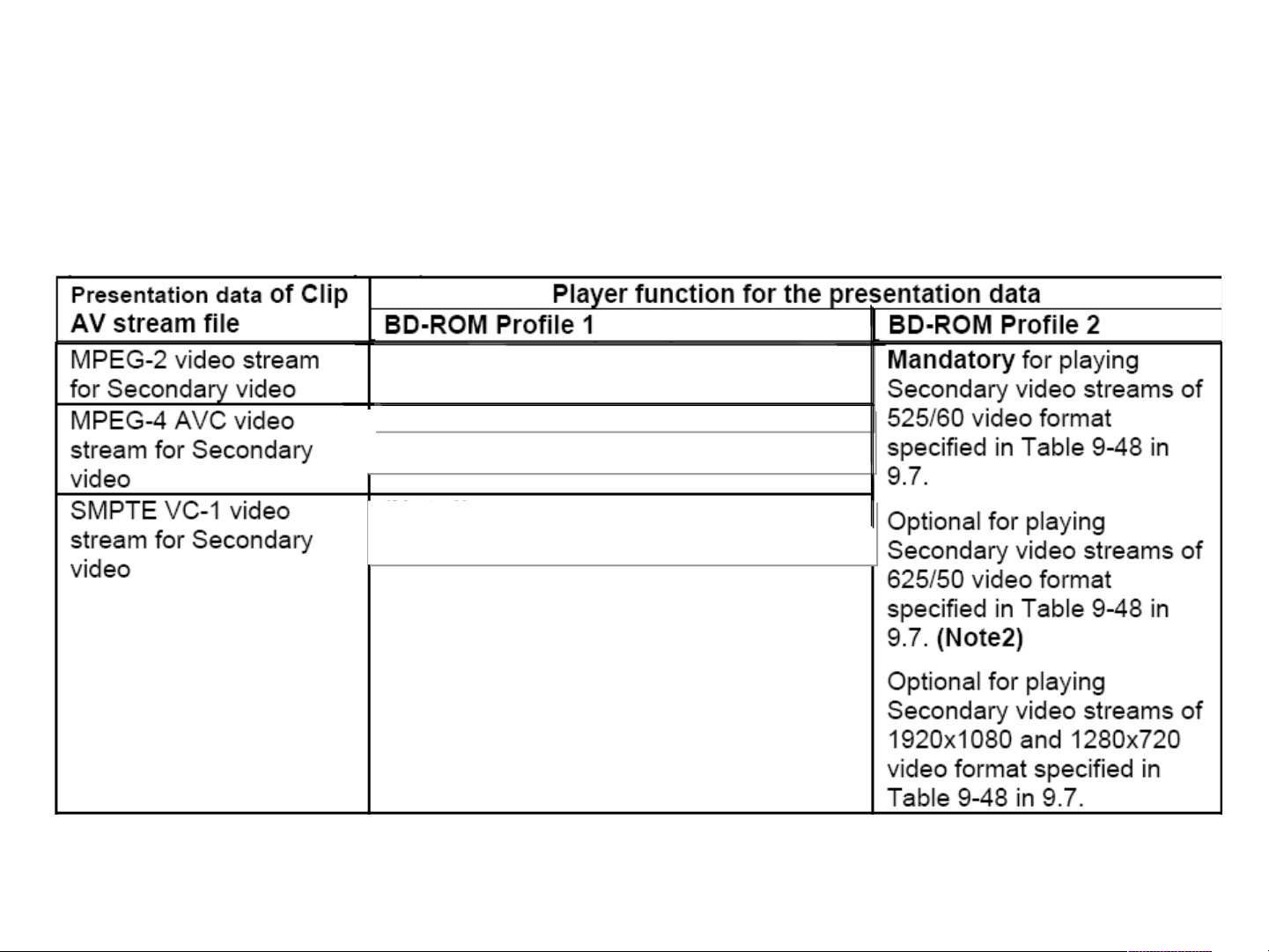
Blu-ray :
Player function of Clip AV stream file
Minimum capability of secondary audio
Minimum capability of secondary audio
Decoder
Decoder
Is 2ch decoding and output for mixing
Is 2ch decoding and output for mixing
Minimum capability of secondary audio Decoder
Minimum capability of secondary audio Decoder
Is 2ch decoding and output for mixing
Is 2ch decoding and output for mixing
Minimum capability of secondary audio Decoder
Minimum capability of secondary audio Decoder
Is 2ch decoding and output for mixing
Is 2ch decoding and output for mixing
Page 12
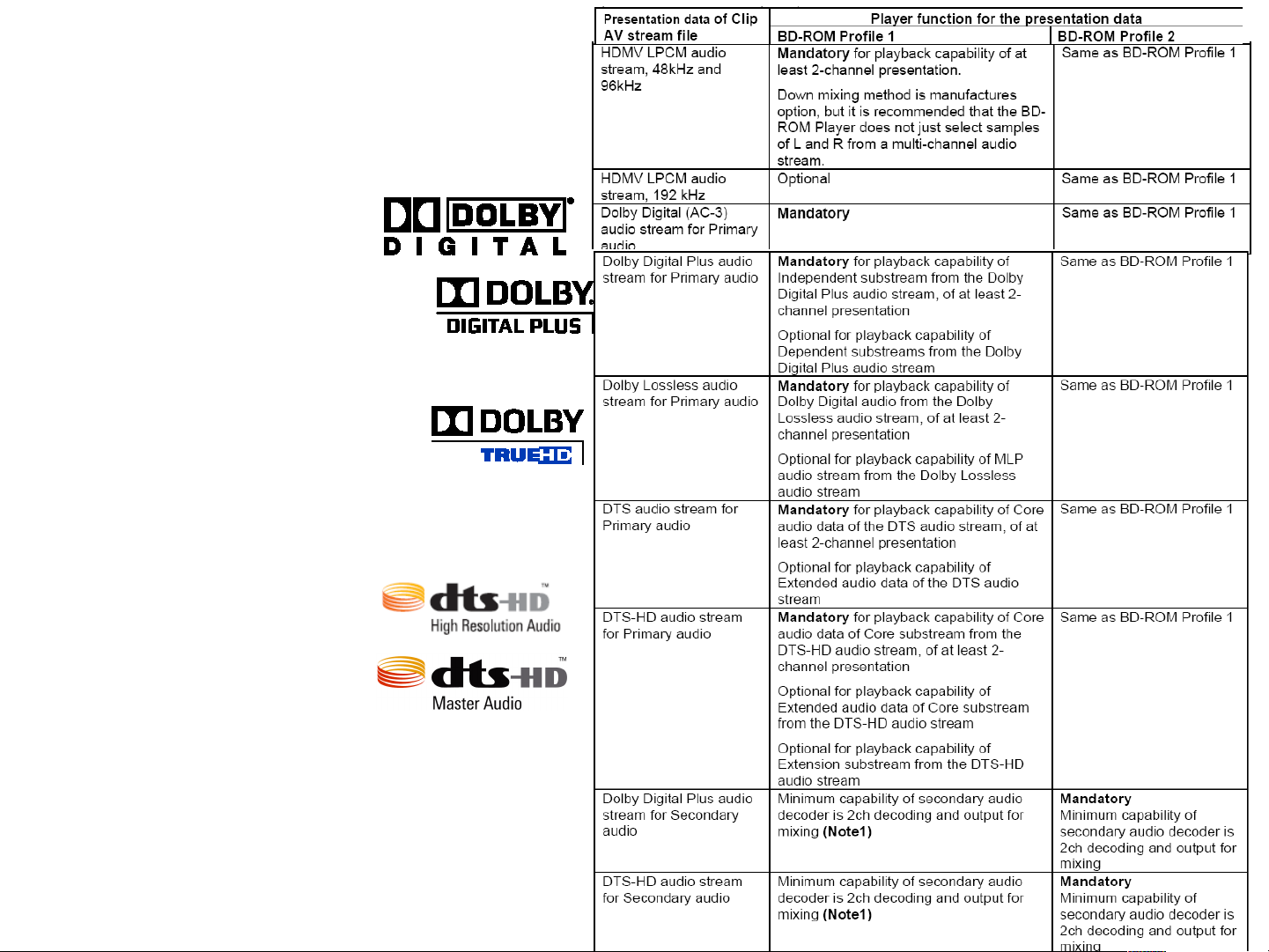
Blu-ray
D.2.19 Player function
of Clip AV stream file
January 2006
System Description Blu-ray Disc Read-Only
Format
Part 3 Audio Visual Basic Specifications
Page 13

Blu-ray Audio Codec
Blu-ray Disc ROM 2005/0810
D.2.1 Presentation for audio, video and graphics data
Mandatory Optional
HDMV LPCM audio stream, 48kHz
and 96kHz
HDMV LPCM audio stream, 192
kHz
Dolby Digital (AC-3) audio stream Mandatory
DTS audio stream Core audio data of the DTS audio
DTS-HD audio stream Core audio data of Core substream
at least 2-channel presentation. Down mixing method is
Optional Optional
stream
from the DTS-HD audio stream
manufacture’s option, but it is
recommended that the player does
not just select samples of L and R
from a multichannel audio stream.
Extended audio data of the DTS
audio stream
Extended audio data of Core
substream from the DTS-HD audio
stream
Extension substream from the
DTS-HD audio stream
Dolby Digital Plus audio stream Independent substream from the
Dolby Digital Plus audio stream
Dolby Lossless audio stream Dolby Digital audio from the Dolby
Lossless audio stream
Dependent substreams from the
Dolby Digital Plus audio stream
MLP audio stream from the Dolby
Lossless audio stream
Page 14
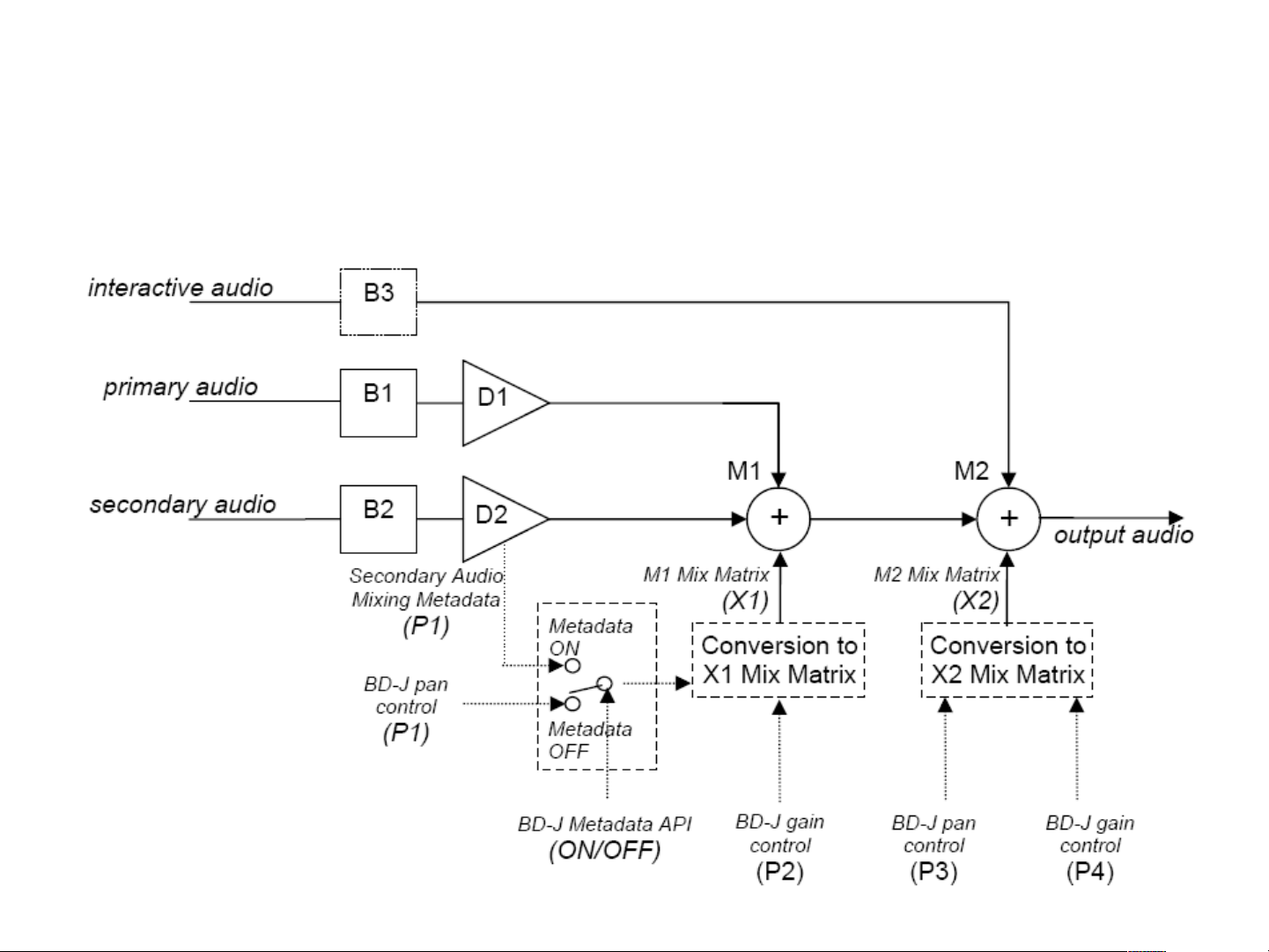
Blu-ray Disc : Audio-mixing model
Page 15

Blu-ray Disc for Movie Distribution
•
Blu-ray Disc for Movie Distribution
–
Most people know about Blu-ray Disc's basic features: It can store 25 GB (single layer) or 50 GB (dual
layer) on a single sided disc - about 5 to 10 times the capacity of DVD. As a result, Blu-ray Disc
supports the highest quality HD video available in the industry (up to 1920 x 1080 at 40 Mbit/sec) Large capacity means no compromise on video quality. Furthermore, a Blu-ray Disc has the same
familiar size and look as DVD, allowing for compatibility with existing discs.
•
Compatibility across full family
–
Blu-ray Disc Rewritable (BD-RE) and related video specifications were first defined in 2003. The Blu-ray
Disc ROM format for movie distribution is fully based on this specification when it was defined in 2004.
As a result, users can play home-recorded discs on all of their Blu-ray Disc equipment; there are no
playback compatibility issues as with rewritable DVD formats. The Video Distribution format was widely
expanded to offer content producers a full range of additional features unavailable in the home
recording format.
•
Video highlights
–
The BD-ROM format for movie distribution supports three highly advanced video codecs, including
MPEG-2, so an author can choose the most suitable one for a particular application. All codecs are
industry standards, meaning easy integration with existing authoring tools, and choice from wide range
of encoding solutions. All consumer video resolutions are available:
- 1920 x 1080 HD (50i, 60i and 24p)
- 1280 x 720 HD (50p, 60p and 24p)
- 720 x 576/480 SD (50i or 60i)
•
Audio highlights
–
The BD-ROM format for movie distribution supports various advanced audio codecs, so an author can
choose the most suitable for a particular application. The high capacity and data rate of Blu-ray Disc
allow for extreme high quality audio in up to 8 channels to accompany High Definition video. Final audio
specifications include DTS (core format), Dolby Digital AC-3 and LPCM (up to 96/24) . Optionally, the
format might support DTS++ and LPCM 192/24 7.1.
Page 16

Blu-ray Disc for Movie Distribution
•
Exceed DVD feature set
–
The Blu-ray Disc movie distribution format was designed to offer all features and the
familiar user interface model of DVD-Video. However, content producers have a wide
array of new and extended features to be included in a Blu-ray Disc title. For this, two
profiles are available:
•
"HDMV" mode
–
Offers all features of DVD-Video and more. The authoring process in line with DVDVideo creation.
•
"BD-J" mode
–
Offers unparalleled flexibility and features, because it is based on Java runtime
environment. It allows for extensive interactive applications, and offers Internet
connectivity.
Page 17

Introduction to HDMV mode
•
BD-ROM provides an easy-to-author framework for creation of High Definition movie experiences
known as “HDMV” (High Definition Movie) mode. HDMV supports a lot of features such as seamless
multi-angle and multi story, Language Credits (dynamic selection of a credits sequence depending on
the users Language choice), Director’s cuts, Trilogy collections etc.
•
Here are some of the key features offered by HDMV:
•
Industry Standard High Definition Video and Surround Sound Audio:
–
MPEG-2, MPEG-4 AVC and SMPTE VC-1 video formats.
–
LPCM as well as Dolby® Digital, Dolby Digital Plus, Dolby Lossless, DTS digital surround® and
DTS-HD® audio formats.
•
Independent High Definition Graphic planes:
–
Two independent High Definition graphic planes and one High Definition video plane simplifies the
process of Authoring both Menu and Subtitle graphics.
•
Improved Menu features:
–
“Multi-page Menus” - Menu presentations can be changed with no interruption to AV playback.
–
“Pop-up Menus” – Menus can be shown or removed from display based on user request.
–
Full color High Definition animated Buttons and animated Menu transition effects.
–
“Button-sounds” – sounds can be presented when Menu Buttons are selected or activated.
•
Improved Subtitle features:
–
High Definition “Bitmap Subtitles” supporting full color images with frame-accurate animation
effects up to full video frame-rate.
–
High Definition “Text Subtitles” utilizing vector-based fonts, encoded text data and multiple style
definitions. Text Subtitles do not affect the bandwidth available for a BD-ROM Title’s AV stream.
•
Additional Features:
–
“Browsable Slideshow” - still images may be presented and changed without interruption to audio
playback.
Page 18

Introduction to BD-J mode
•
BD-ROM also provides a fully programmable application environment with network connectivity thereby
enabling the Content Provider to create highly interactive, updateable BD-ROM titles. This mode is
based on the Java™ platform and is known as “BD-J”. Content Providers are able to include interactive
Java applications on a BD-ROM disc in various ways (one application for the entire disc, one
application per Title, etc.).
•
Possible BD-J applications include:
–
A BD-ROM Title that supports downloading trailers for a sequel from a Content Provider’s website
and playback under application control.
–
A BD-ROM disc with a set of games, each game associated with a Title in the disc’s table of
content. The main Menu of the disc allows downloading subsequent games from a Content
Provider’s website under certain conditions, like solving a puzzle for example.
–
A BD-ROM Title is distributed supporting only a small number of languages. Later support for
more languages (i.e. subtitle and or audio streams) can be downloaded by the BD-J application on
the disc.
Page 19
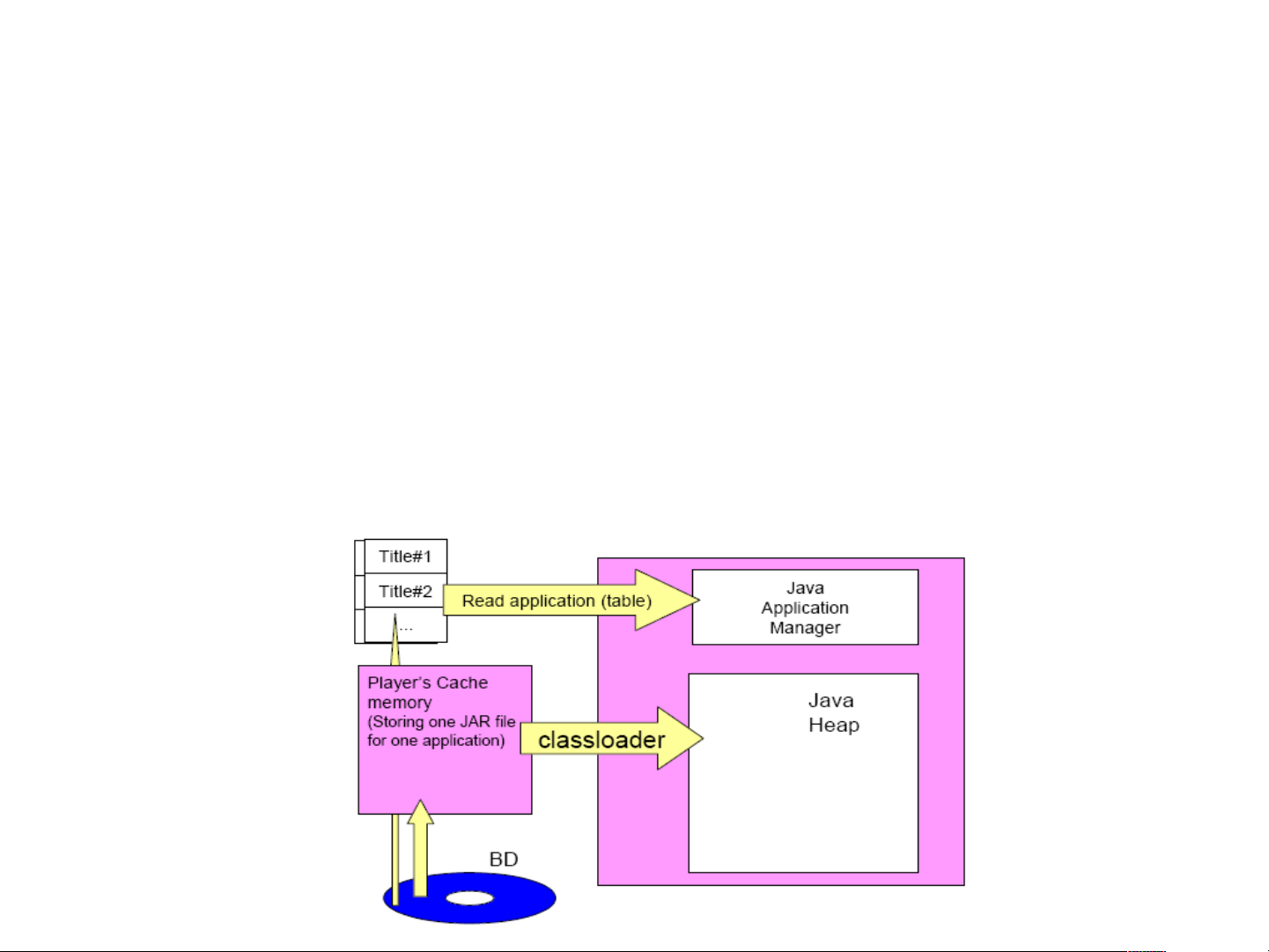
Introduction to BD-J mode
•
Java is a platform independent programming environment deployed in a wide verity of
environments: Server based applications can be supported through the Java 2 platform
Enterprise Edition (J2EE), while Desktop based applications can be supported through the
Java 2 platform Standard Edition (J2SE), and Consumer Electronics based applications (for
devices like cell-phones and interactive digital receivers) can be supported through the Java 2
platform Micro Edition (J2ME). Java provides an open and flexible programming environment
for BD-ROM.
•
BD-J provides a Java UI & graphics framework along with support for Local Storage and
Internet connectivity features thereby creating a complete and future proof solution. A BD-ROM
disc can contain a mix of titles based on HDMV and BD-J. Details of the BD-J platform are
given in Section 2.3 along with more detailed examples of BD-J applications.
Page 20

Blu-ray Disc for Movie Distribution
"HDMV" mode
•
Introduction
–
HDMV" mode was designed to offer exciting new features, while keeping authoring process
as simple as possible. It streamlines the production of both Blu-ray Disc as well as DVDVideo titles, as the production process incorporates many identical phases. It offers
improved navigational and menu features, improved graphics and animation, improved
subtitling support and new features like browsable slideshows.
•
"Out-of-mux" reading
–
Unlike DVD-Video, the Blu-ray Disc format allows for data to be read from a different
location on the disc, while uninterruptedly decoding and playing back video. This allows the
system to call up menus, overlay graphics, pictures, button sounds, etc. at user request
without stopping playback. Some examples of possibilities will be explained later.
•
Graphic planes
–
Two individual, full HD resolution (1920x1080) graphics planes are available, on top of the
HD video plane. One plane is assigned to video-related, frame accurate graphics (like
subtitles), and the other plane is assigned to interactive graphical elements, such as buttons
or menus. For both planes, various wipes, fades and scroll effects are available. One
example is to present a menu.
•
Button graphics
–
Menu buttons can have 3 different states: Normal, Active and Selected. They support 256
color full resolution graphics and animation, thereby greatly surpassing the capabilities of
DVD-Video. Buttons can be called and removed during video playback, there is no need to
return to a "menu screen“.
Page 21

Blu-ray Disc for Movie Distribution
"HDMV" mode
•
Button sounds
–
Button sounds can be loaded into memory of the Blu-ray Disc player. When a user
highlights or selects a menu option, the sound can be played (such as a voice-over
explaining the highlighted menu choice, or button clicks). These button sounds can even be
mixed with the running audio from the movie or menu.
•
Multi-page Menus
–
In DVD-Video, playback was interrupted each time a new menu screen is called. Due to Bluray Disc's ability to read data from the disc without interrupting the current audio/video
stream, a menu can consist of several pages. Users will be able to browse through the
menu pages or select different menu paths, while the audio and video remain to be playing
in the background.
•
User Browsable Slideshows
–
In DVD-Video, user browsable slide shows were not possible with uninterrupted audio. As a
result of Blu-ray Disc's ability to read data from the disc without interrupting the current
audio/video stream, users can browse through various still pictures while the audio remains
playing. This applies not only to forward and backward selection; a user can make different
selections on what picture to view (or selects from a screen presented with thumbnail
images) while the audio remains playing.
•
Subtitles
–
In DVD-Video, subtitles were stored in the audio/video stream, and therefore they had
limitations on the number of languages and display styles. Again, it is due to Blu-ray Disc's
ability to read data from the disc without interrupting the current audio/ video stream, that
subtitles can be stored independently on the disc. A user may select different font styles,
sizes and colors for the subtitles, or location on screen, depending on the disc's offerings.
Subtitles can be animated, scrolled or faded in and out.
Page 22

Blu-ray Disc for Movie Distribution
"BD-J" mode
•
Introduction
–
"BD-J" mode was designed to offer the content provider almost unlimited functionality when creating
interactive titles. It is based on Java 2 Micro Edition, so programmers will quickly be familiar with the
programming environment for BD-J. Every Blu-ray Disc player will be equipped with a Java interpreter,
so that it is capable of running discs authored in BD-J mode.
•
Graphical User Interface
–
In BD-J mode, the author has complete freedom in designing the user interface. The interface is
controllable by user using standard navigational buttons on remote. It can display up to 32bit
dynamically generated graphics (millions of colors), and it supports the display of pictures in standard
file formats like JPEG, PNG, etc.
•
Playback control
–
The BD-J application can act as the sole interface to the disc's contents (thus replacing the players
on-screen controls as with discs authored in HDMV mode). The BD-J environment offers all of the
playback features of HDMV mode, including the selection of subtitle, trick play modes, angles, etc.
Video can even be scaled dynamically, so that it can be played in a small size in the corner of a menu,
and resume full screen when a selection is made
Page 23

Blu-ray Disc for Movie Distribution
"BD-J" mode
•
Storage
–
A Blu-ray Disc player might contain a small amount of non-volatile system storage (flash memory).
This system storage can be used to store game scores, bookmarks, favorites from a disc, training
course results, etc. As a manufacturer's option, a Blu-ray Disc player may also be equipped with Local
Storage (hard disk, to allow large amounts of data like audio/video to be stored.
•
Internet connection
–
The BD-J system supports basic Internet protocols like TCP/IP and HTTP. The player may connect to
the disc publisher's web site to unlock certain content on the disc (after certain conditions, like
payment, are met), or dynamically display certain info (like theater playing schedules for a movie) on
the screen. The disc's program may be extended with JPEG pictures or audio fragments downloaded
from the Internet, or it can even stream full new audio/visual content to Local Storage.
•
Conclusion
–
The Blu-ray Disc format for Movie Distribution offers two flexible profiles for the creation of titles. It
was designed to allow for the streamlined development of Blu-ray Disc (HD) and DVD-Video (SD)
titles at the same time, if needed. Basic menus and navigation can be identical. However, it also offers
many new functions that will benefit both the author (by offering flexible ways of creating disc content),
as well as end users (by offering exiting new functionality compared to DVD-Video).
Page 24
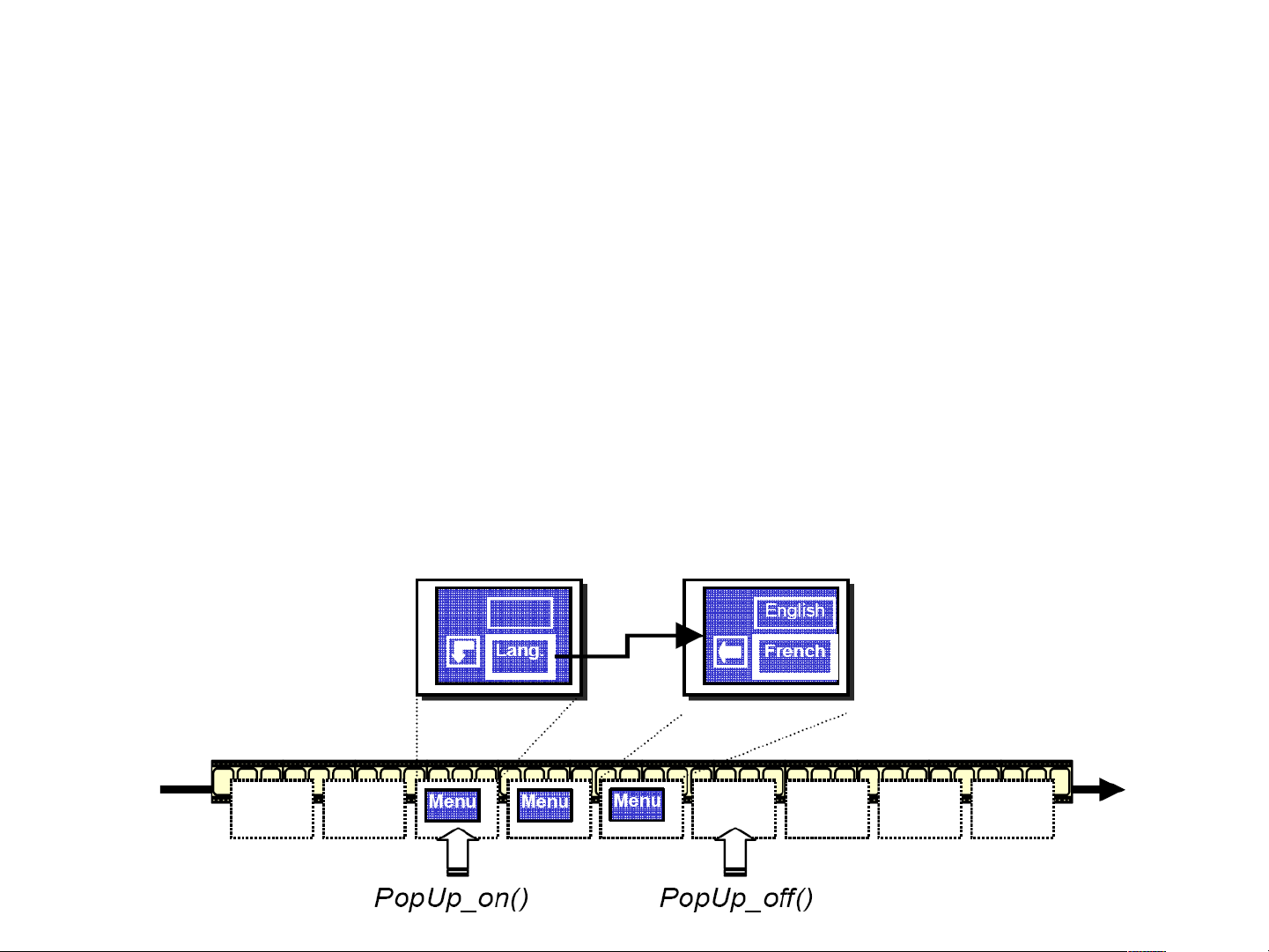
Pop-Up Menus
•
HDMV Interactive Graphics support a “Pop-Up” Menu Interface: once playback of video has
begun, HDMV graphical interactive content may be activated during the playback of video by
pressing a ‘Pop-Up’ Button on the remote. In this case, video playback can continue while the
HDMV Interactive Graphics are on the screen or video playback may be paused – this is
determined by the Content Provider using navigation commands.
•
Menus that support a “Pop-Up” Menu Interface are always pre-loaded. As shown in below figure,
several pages of HDMV Interactive Graphics data can be pre-loaded before playback starts. This
Interactive Graphics data is kept in memory during playback of the AV stream and is not
displayed until requested by the user.
Page 25
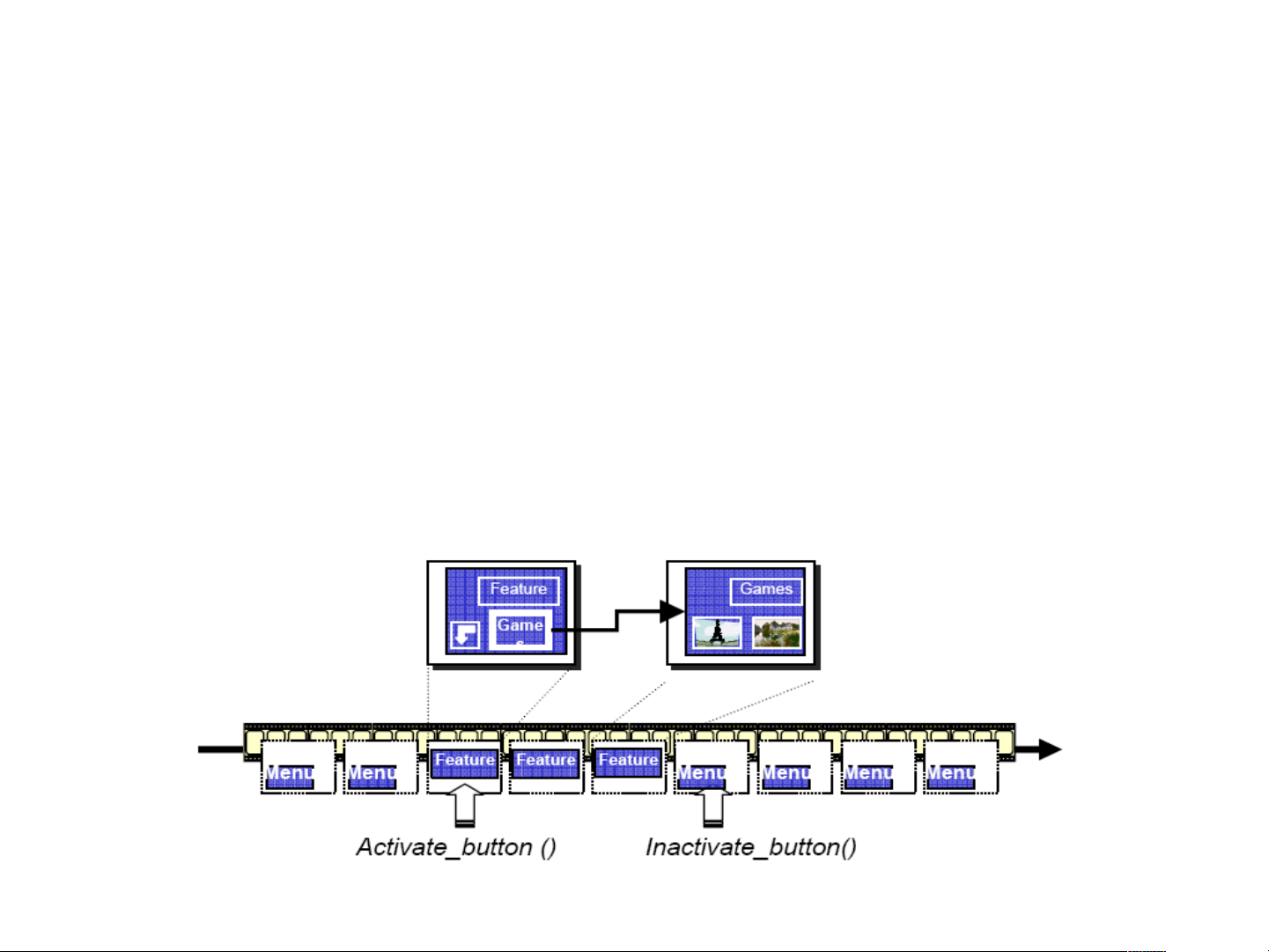
Always-On Menu
•
HDMV Interactive Graphics support an “Always-On” Menu Interface; Interactive Graphics content
that cannot be removed from the screen by user request is called “Always-On”. This is one of the
methods provided by HDMV to present interactivity to the user. For example, a Menu
implemented with the Always-On interface may be presented to the user when the disc is
inserted into the BD-ROM Player.
•
Menus that support an “Always-On” Menu Interface may be pre-loaded or multiplexed with video.
If the HDMV Interactive Graphics stream is multiplexed with video, PTS/DTS timestamps can
frame accurately determine when the Always-On Menu shall appear and disappear.
Page 26
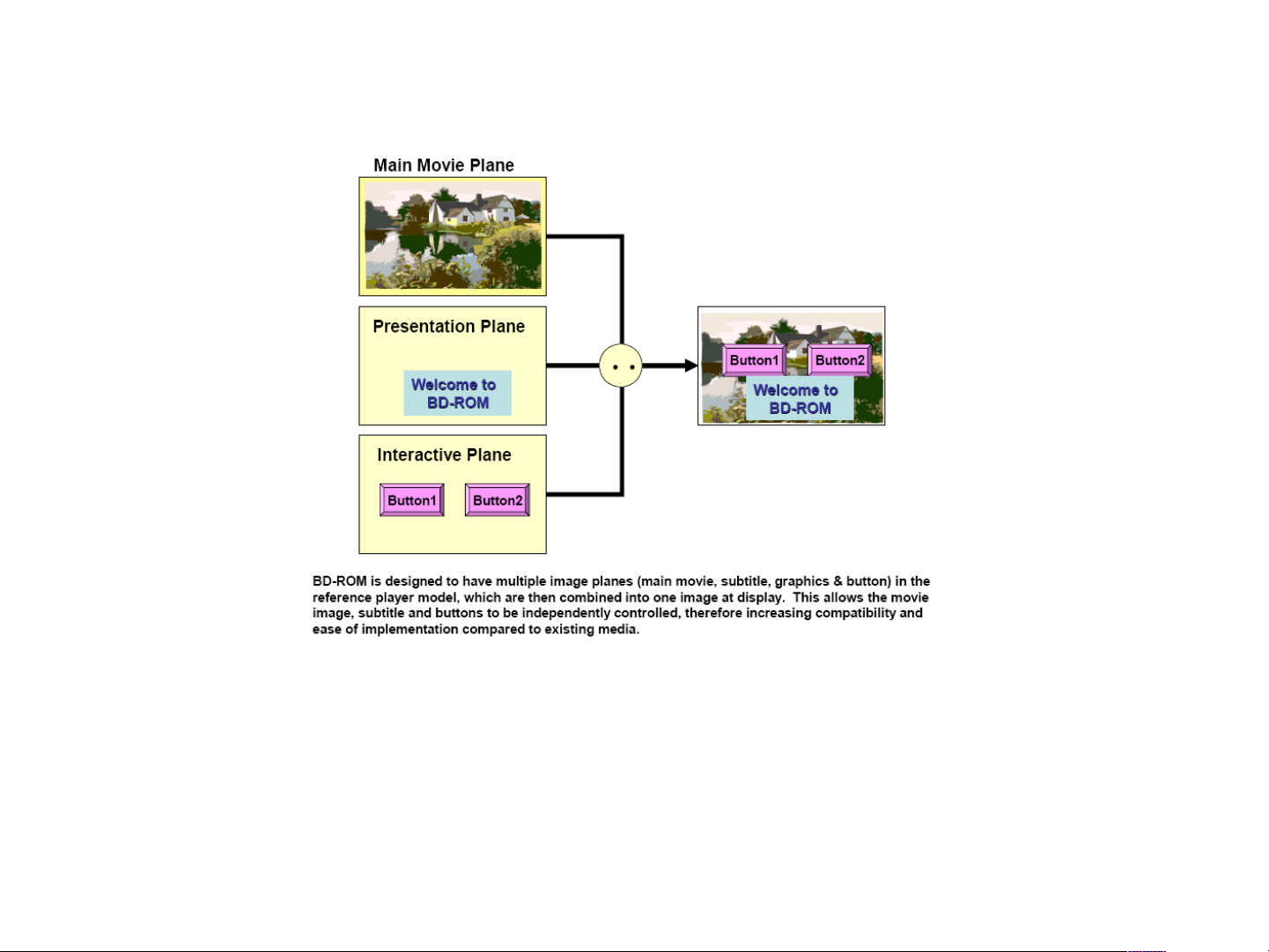
Graphics planes
•
As shown in Figure, HDMV defines two independent full HD resolution (1920x1080)
graphics planes for graphics which are composited on the video plane. One graphics
plane is assigned for subtitling applications (Presentation Graphics or Text Subtitles)
and the other plane is assigned to interactive applications (HDMV or BD-J mode
interactivity graphics).
•
Each graphics plane has 8-bits per pixel, with each pixel value referring to an index
entry in a Palette for translation to YCrCb color and 8-bit (256level) alpha. This color
capability offers an enhanced visual experience and allows compelling content to be
displayed using the HDMV Interactive Graphics system.
Page 27
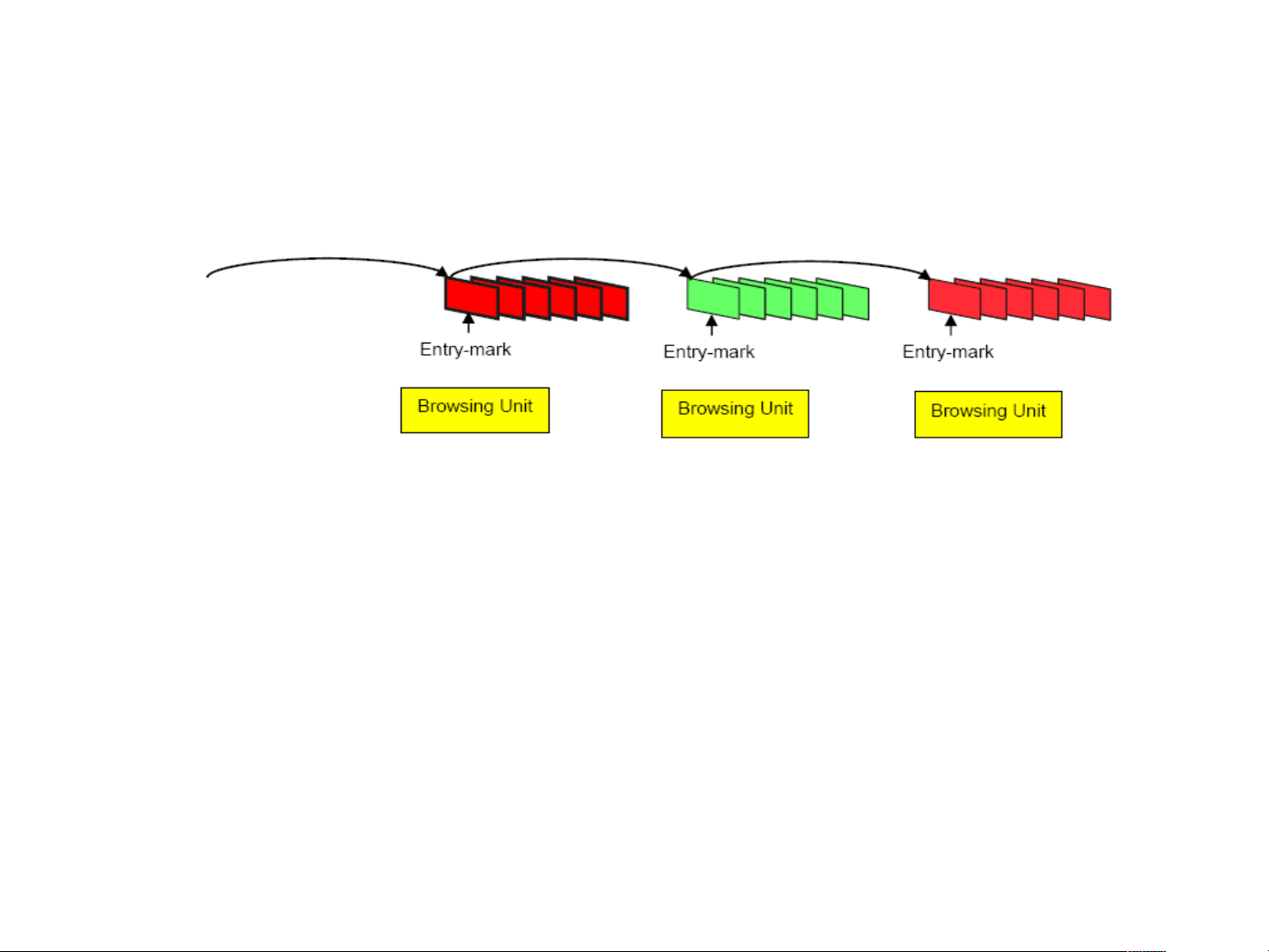
Browsable Slideshow
•
The HDMV Browsable Slideshow is another application
to present still pictures. There are three differences
between Browsable Slideshow and Timebased
Slideshow. The Browsable Slideshow has
characteristics listed below.
–
Time duration of presenting a still picture may be set to infinite
time.
–
A separate audio stream from main TS that contains still
pictures may be presented.
–
A browsing unit can contain either one still picture or one video
sequence.
Page 28
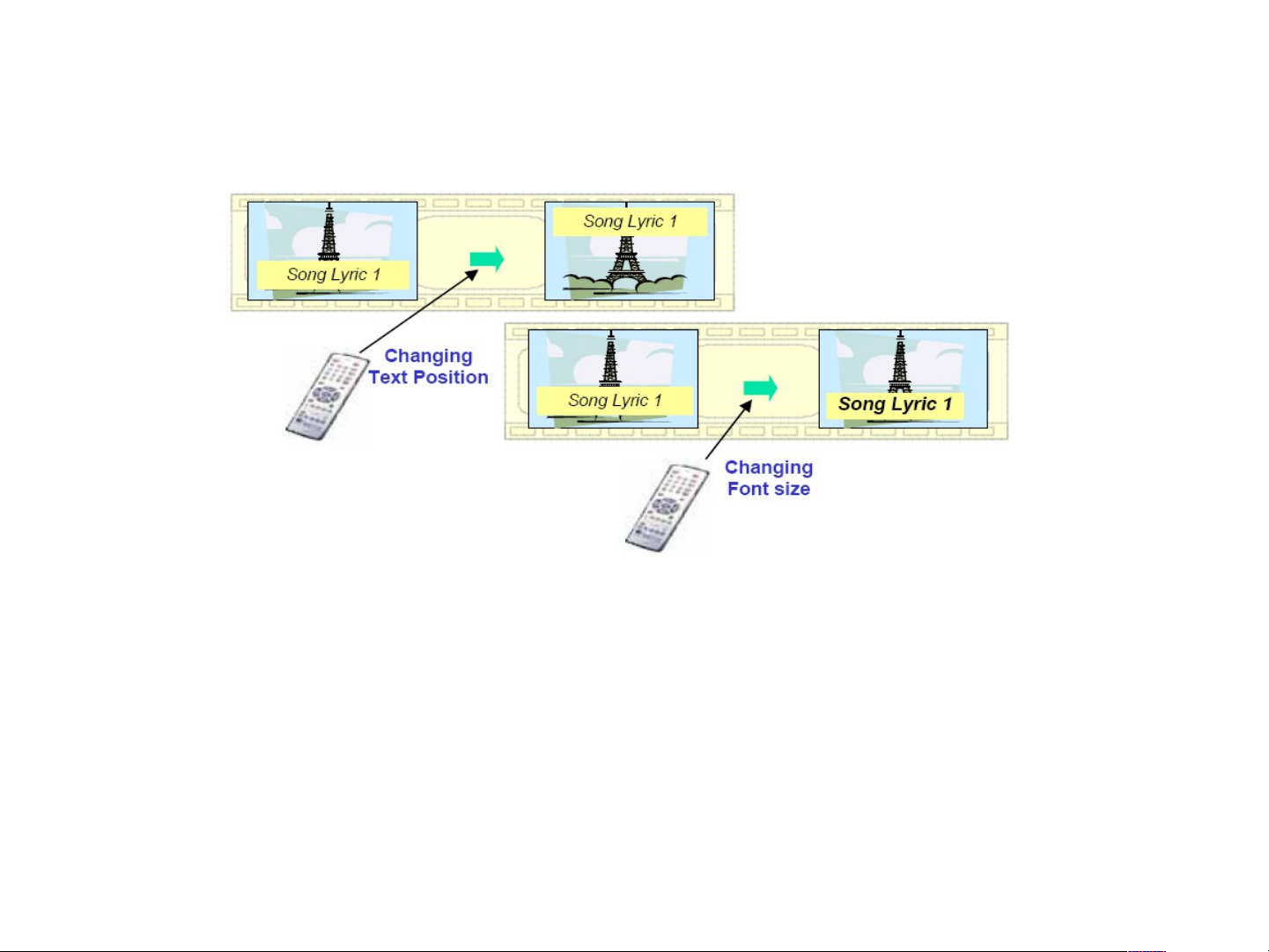
User Changeable Subtitle styles
•
In addition to the basic style control made available in
the Text subtitle format, the Content Provider can also
define a set of various presentation positions and font
sizes for the display region as user selectable styles. In
this case, the user can change the presentation style by
selecting one style from the set of user selectable styles
as shown in the figure above.
Page 29
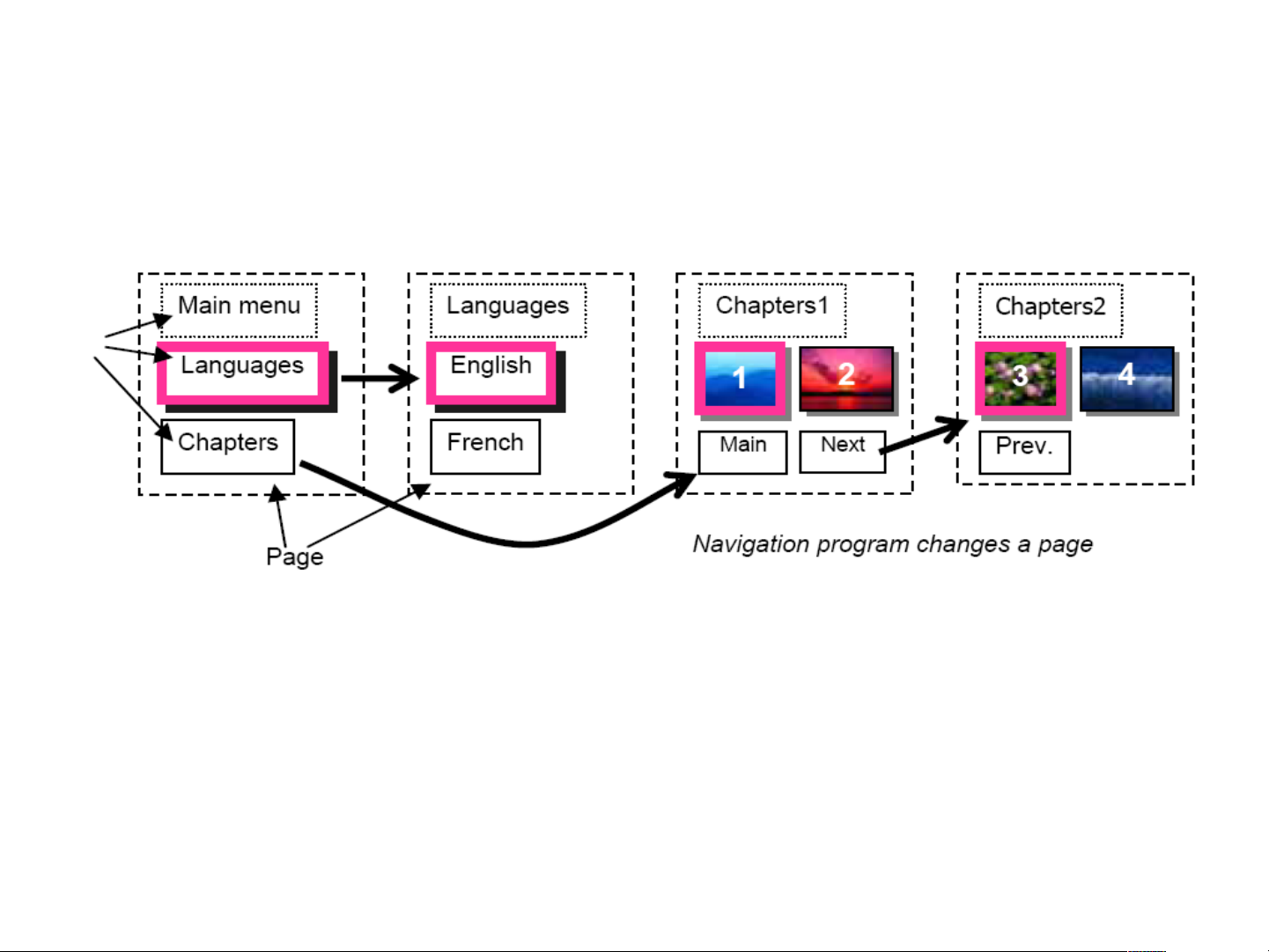
Multi-page Menus
•
The HDMV Interactive Graphics framework provides a scheme for
Menu Page definition, thereby allowing a large amount of data to be
presented in an organized manner with special commands available for
inter-page navigation. When a Button is activated, a corresponding
navigation command is executed which causes the display to change to
a specified page. This action is performed with no visible interruption to
the screen allowing a seamless user experience.
Page 30
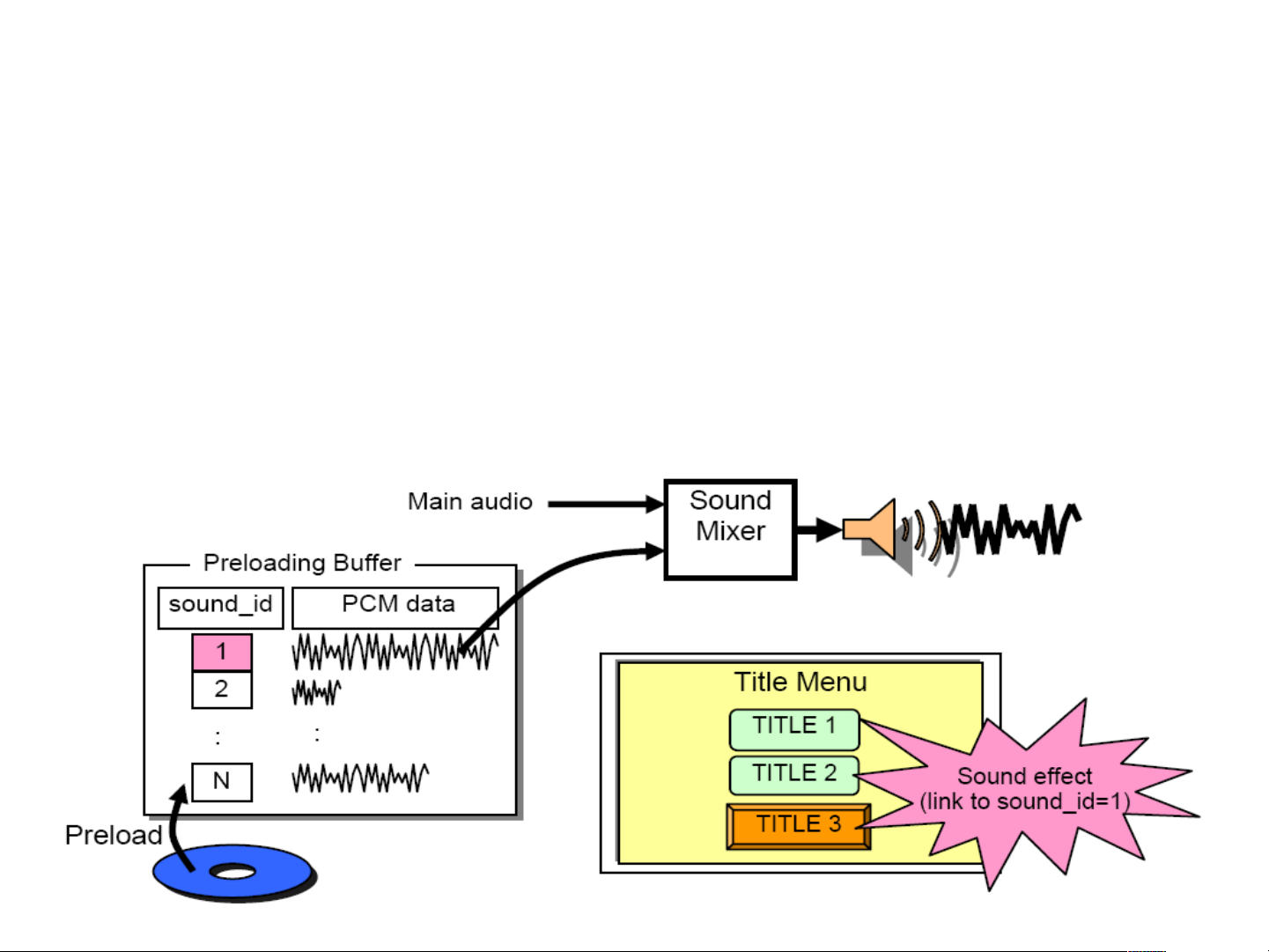
Button sounds
•
The concept of Button Sounds is available in HDMV.
Both the Select and Activate actions may be associated
with short duration sounds which are mixed with the
underlying audio.
Page 31
STATUS OF Blu-ray Disc Format
2002
2002.6
RE V1.0
25GB/50GB
P
h
y
s
i
c
a
l
F
o
r
m
a
t
RE V1.0
BD-AV/BD-FS
2002.6
1X
Bare Disc
2003 2004 2005
Nov. 200 5
ROM
R
UDF
RE
2004.6
ROM V1.0
25GB/50GB
RE V2.0:Jan. R V1.0:Mar. ROM V1.2:Dec. /2005
File System
Nov. 200 5
Nov. 200 5
Mar.2005
RE V2.1
25GB/50GB
R V1.1
25GB/50GB
File system
R/RE/ROM
2006
1-2X
ROM
V1.3
1-2X
R V1.2
4X
Sep..2006
BD-MV V3.0
on R/RE
L
o
g
i
c
a
l
F
o
BD-RE/R
Application
BD-ROM
Application
BD-AV V2.0
on R/RE
May.2006
BD-MV V2.0
on ROM
Page 32
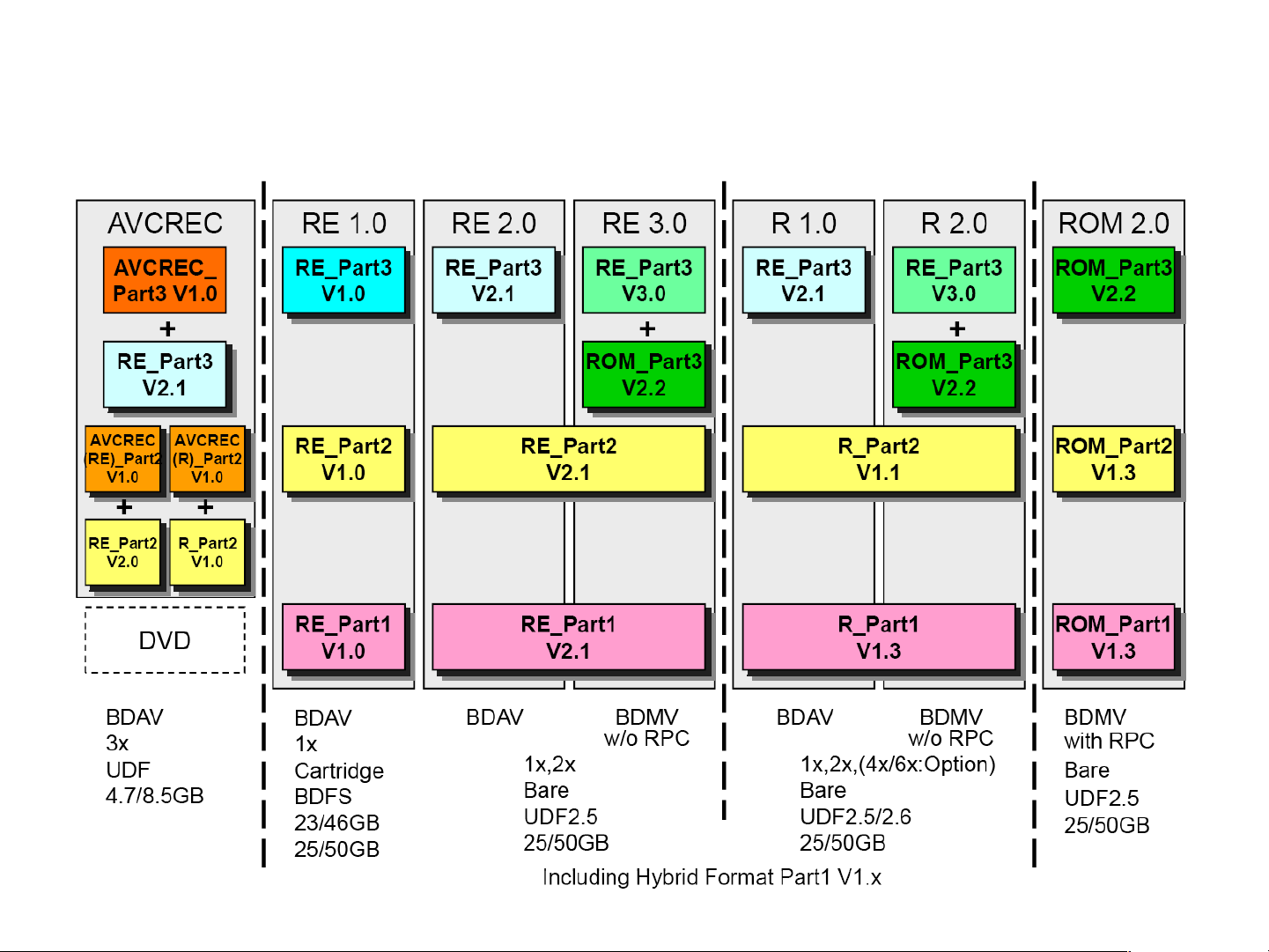
There are 7 types of Blu-ray Format
Page 33

Blu-ray Disc Notation
•
Example of incorrect manner:
–
Bluray Disc
–
Blu-Ray Disc
–
BLU-RAYDISC
–
Blu-ray disc
–
BLU-RAY Disc
–
Bluray
•
Example of correct manner:
–
Blu-ray Disc
–
BLU-RAY DISC
–
Blu-ray
–
BLU-RAY
•
There is no ‘e’
Page 34

Contents
•
Reference Information
–
Blu-ray Disc
–
Copy Management
•
Product Information
•
Circuit Description
•
Disassembly & Reassembly
•
Troubleshooting & adjustment
Page 35

AACS Features – Managed Copy
•
Enables authorized movement of content onto home
network and portable devices
•
Specifications allow first generation AACS-protected
discs to be Managed Copy-ready
•
Devices manufactured under Interim License will have
access to entire library of content (i.e., discs produced
under current and future AACS specifications)
•
Managed Copy technologies currently submitted include
CPRM, VCPS, WMDRM, MagicGate, as well as AACS
for Recordable Media
•
Managed Copy to be permitted under Final License
Page 36

AACS Features – Image Constraint
Token
•
Applicable to Analog outputs
•
Provides better than current Standard Definition DVD
experience for legacy Analog devices
–
960x540 – superior to current DVDs, twice the resolution of
standard definition
•
Encourages industry adoption of protected digital
interconnections
•
Provides flexible business options for Content Providers
•
Obligation to notify consumer when ICT used on disc
•
Employed at the option of the content owner
Page 37

AACS Features – Digital Only Token
•
Digital Only Token will be utilized to enable new
business models that are materially different from
traditional video sell-through
–
e.g., “Day and date” release of disc and theatrical versions
–
e.g., HD preview of content before generally available
•
Restricts content from flowing out of analog outputs,
further protecting content from piracy
•
If employed, disc required to be clearly labeled to avoid
consumer confusion
•
Encourages industry use of protected digital
interconnections and enhanced security
•
Digital Only Token to be permitted under terms of Final
Agreement
Page 38

AACS Features – Audio Watermark
•
Used at the discretion of content providers to combat
piracy
•
Inaudible signal that a content provider may choose to
insert into the audio track of their content
•
Invisible to authorized users
•
Interim devices will not detect watermark
•
Final devices will detect and respond to WM in pirated
content
•
Audio Watermark detection addressed in Final License
Page 39

AACS Features – Analog Sunset
•
Addressed as “Note to Adopter” in Compliance Rules
under Interim License, since obviously not applicable
until Final License
•
Addresses balance between content protection needs &
realistic timeframe for digital output adoption
•
Complements existing timeframes for phase-out of
analog broadcasting in US and Japan
•
2010 – analog output limited to SD Interlace Modes only
(i.e., Composite, S-Video, 480i component)
•
2013 – sunset for all analog output
Page 40

BD+
•
BD+ is the DRM scheme embedded in every Blu-ray Disc.
•
BD+ is the name given to an experimental Digital Rights Management
(DRM) mechanism that will be included on BD-ROM discs. The Blu-ray Disc
Association was forced into providing this extra layer of protection following
pressure from Fox. The HD DVD group did not agree to provide Fox with
such a DRM over AACS. The fears about BD+ surround the possibility of
studios like Fox theoretically being given the power to restrict Mandatory
Managed Copy (a system that allows users to make digital copies of movies
and send them around a home network).
•
BD+ allows for dynamic encryption schemes, meaning that if the protection
were to be cracked, manufacturers could simply change the encryption
scheme on new discs, so one single crack could not open up all BD-ROM
discs. This is, of course a major advantage over the Content Scrambling
System (CSS) protection used on DVD discs which was cracked years ago.
All old and new DVDs containing CSS can be ripped from the disc to a
HDD, or software is available to simply remove CSS on-the-fly.
Page 41

Contents
•
Reference Information
–
Blu-ray Disc
–
Copy Management
•
Product Information
•
Circuit Description
•
Disassembly & Reassembly
•
Troubleshooting & adjustment
Page 42

New Features
•
New features for BD-C5900, BD-C6800
–
3D BD-PLAYER
–
Wireless Network
•
‘WiFi Module’ provided for BD-C6800
•
‘WiFi Module’ NOT included for BD-C5900
–
MKV, mp4
–
Various Video Setups
•
Progressive Mode
•
Still Mode
•
BD Wise
•
Picture Control
•
Full screen
•
BD-P1590/1600/3600/3600A/4600
BD-C5500/C5900/C6500/C6800/C7500
–
Youtube, Blockbuster, Widget, Allshare
Page 43
Netflix
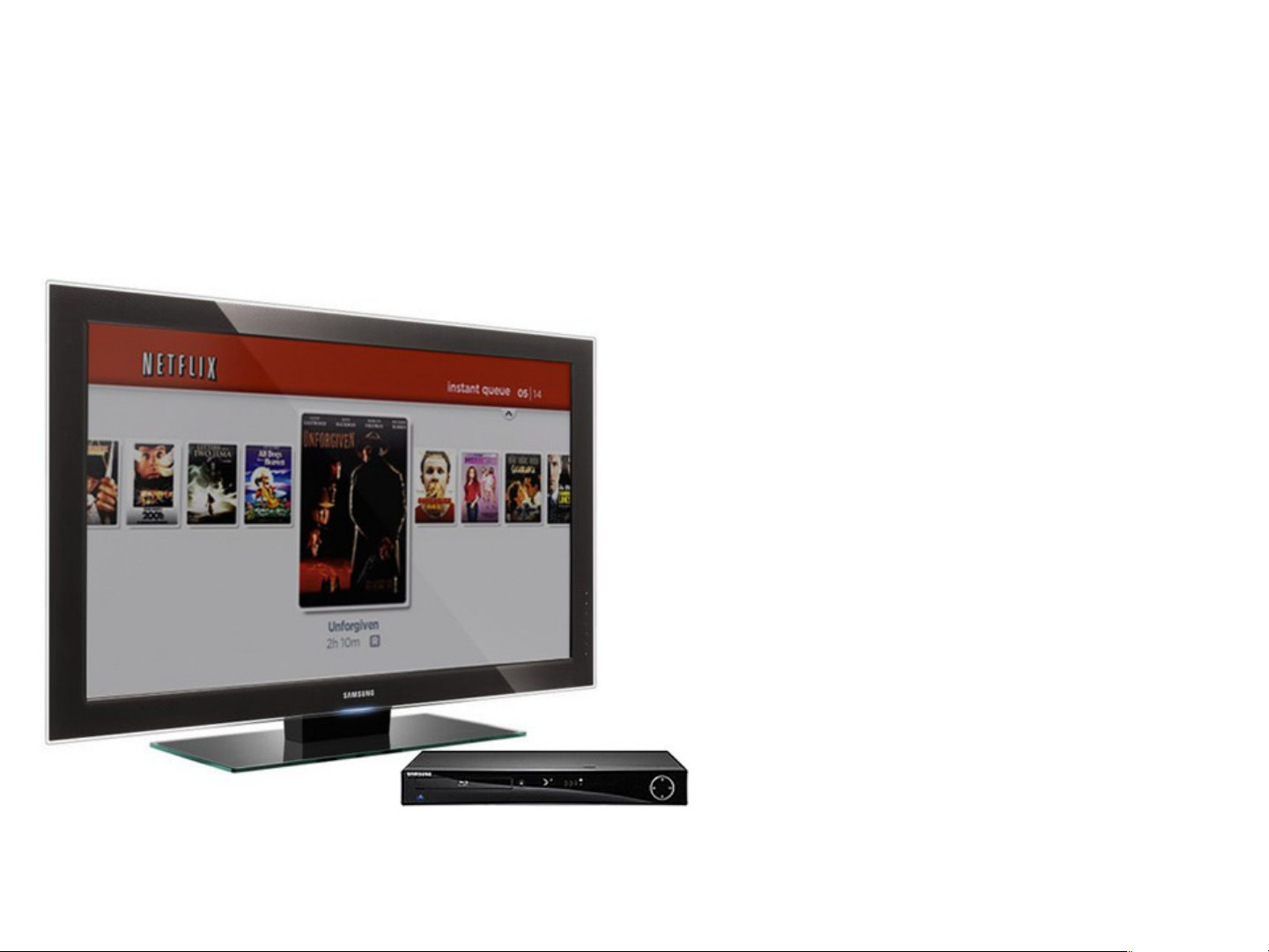
Samsung BD Player enable Instant
streaming of movies and TV episodes
from Netflix.
Requires an Netflix account and an
internet connection
Video: VC1 Advanced Profile encoding
at following bitrates:
(<=480p) 375, 500, 1000, and 1500kbps
(720p) 2600, 3800kbps
Audio : Only stereo (delivered via WMA)
Page 44
Netflix : Queue and Springboard
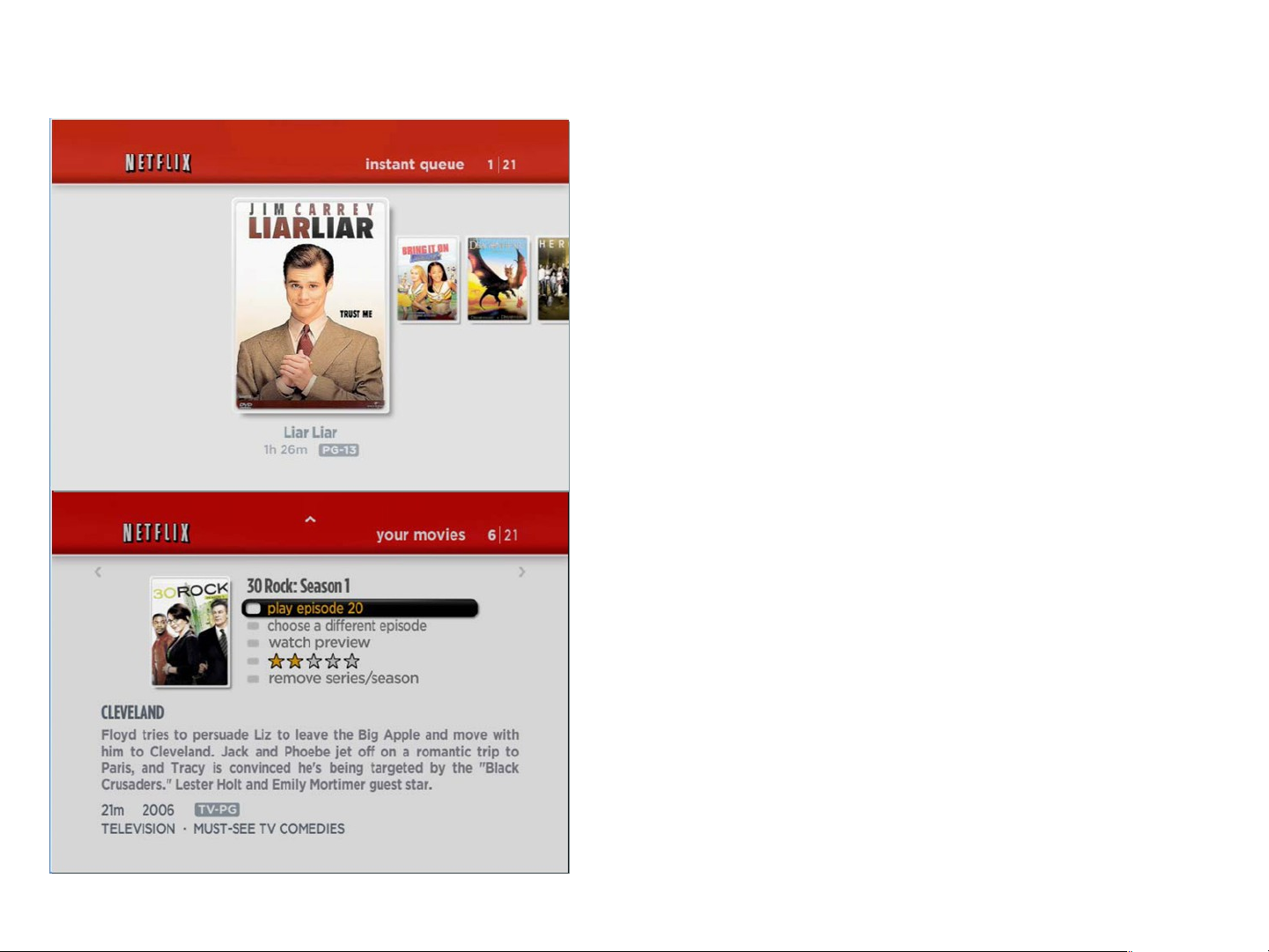
•
The Poster Screen shows “box art” (titlespecific DVD cover or movie poster images)
for each of the movies in the member’s
instant Queue, and allows navigation
through that queue using the remote control.
The instant Queue is a list of movies and
television shows selected previously by the
member on the Netflix web site.
•
The Springboard Screen is the main movie
information and action screen. It shows a
synopsis and other details about the title,
and lists actions that can be taken on it
(including resuming playback, rating the title,
and selecting a different episode if the title
has episodes).
Page 45
Netflix : Episodic Selection and TrickPlay
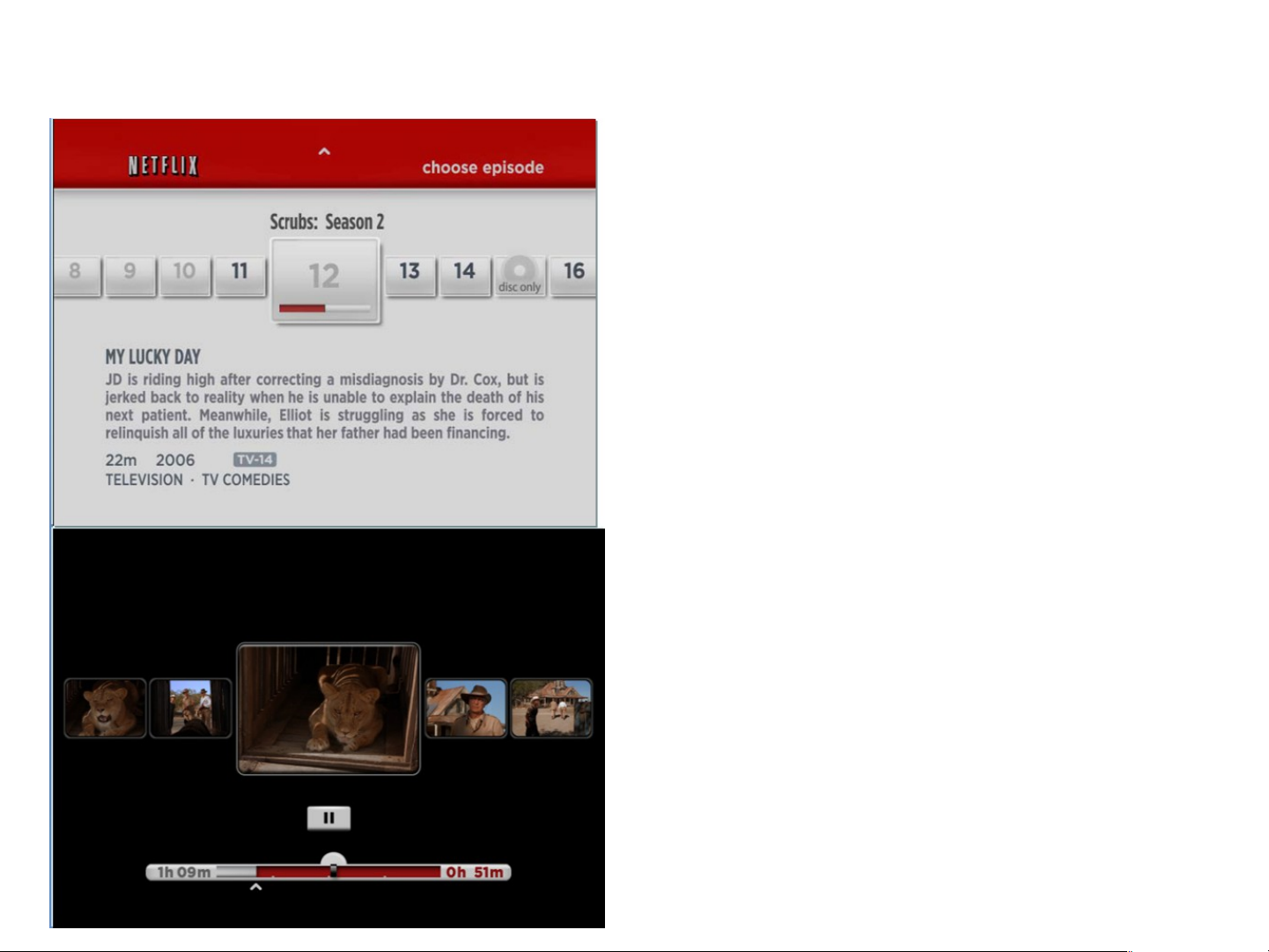
•
The Episodic Selection screen is accessed
by selecting “choose a different episode” on
the Episodic Springboard Screen, and
shows a list of episodes, centered on the
currently-bookmarked episode. It allows
selection of other episodes of a series, and
also shows which episodes have been
previously watched.
•
“Trick Play” mode allows a viewer to scan or
step forward or back through a title to pick a
specific scene or time. Trick Play mode can
be accessed during Full-Screen Playback by
pressing left or right arrows or BWD or FWD
on the remote control. It presents a series of
thumbnail frames taken approximately every
10 seconds throughout the video.
Page 46
Netflix : Stream Bandwidth
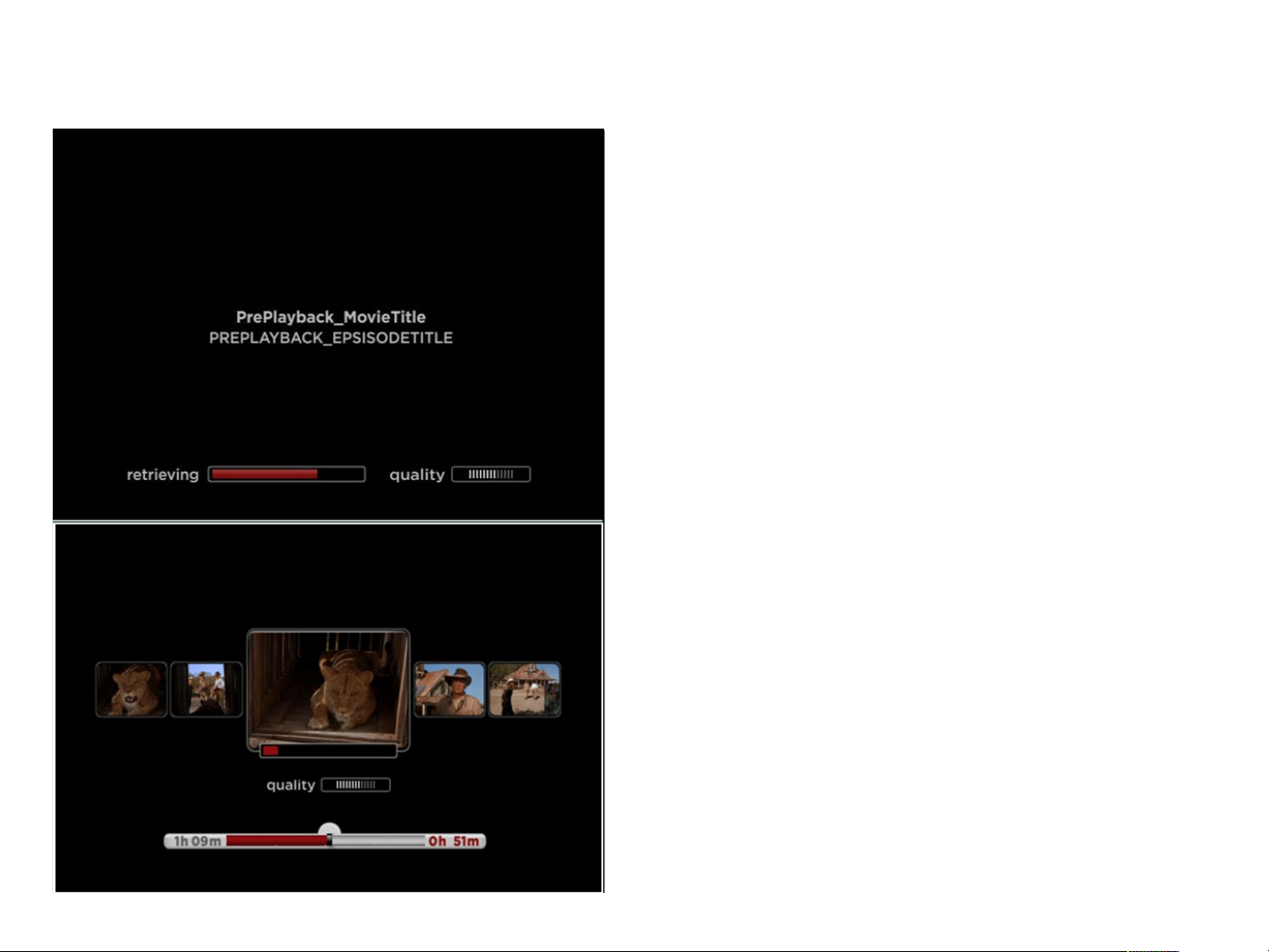
Deciding on a Stream Bandwidth
Netflix provides a number of encodings (streams) for
every content item, each with different bandwidth
requirements.
The player chooses the stream with the highest
bandwidth that is still likely to be streamable without any
buffering.
Stream Switching
The player switch between streams during playback by
monitoring current Network situation.
A player can switch to higher or lower bandwidth stream
based on the currently observed rate of incoming
content data.
Page 47
Netflix : HD Streaming
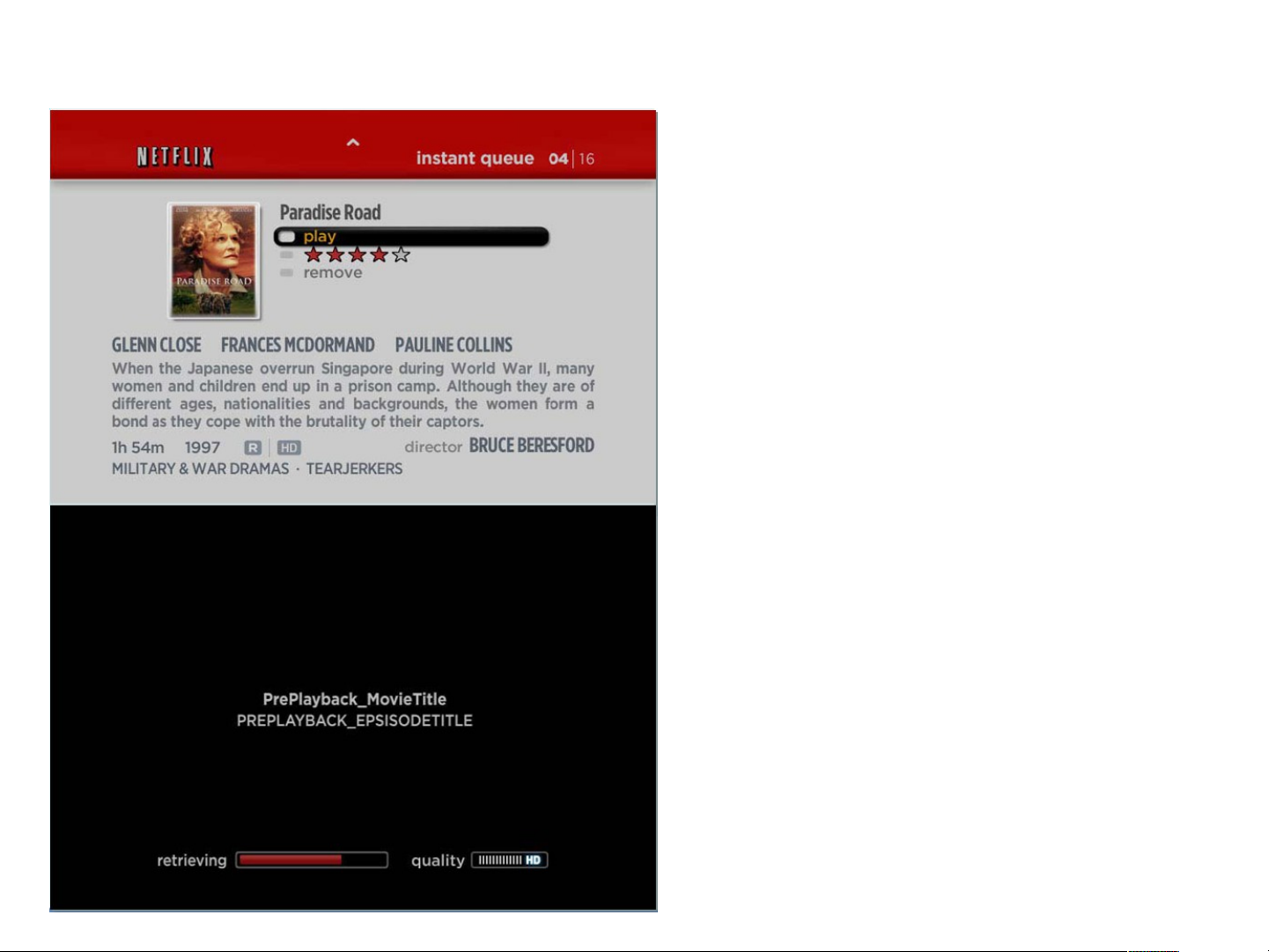
If a title is available in HD 720p resolution, and
HD icon is displayed next to the MPAA movie
rating.
During the start of playback, after the bandwidth
detection logic has determined the optimal
stream quality that can be played with the user’s
current bandwidth, an HD icon should show in
the quality meter if an HD stream is being
loaded.
Page 48

Pandora
•
With Pandora you can explore this vast trove of music to your heart's
content. Just drop the name of one of your favorite songs or artists into
Pandora and let the Genome Project go. It will quickly scan its entire world
of analyzed music, almost a century of popular recordings - new and old,
well known and completely obscure - to find songs with interesting musical
similarities to your choice. Then sit back and enjoy as it creates a listening
experience full of current and soon-to-be favorite songs for you.
•
To understand just how Pandora does this you need to know about the
Music Genome Project®.
About Music Genome Project®
•
The Music Genome Project was founded by musicians and music-lovers.
Pandora believes in the value of music and has a profound respect for those
who create it. Pandora provides all kinds of music, from the most obtuse
bebop, to the most tripped-out drum and bass, and to the simplest catchy
pop tune.
Page 49

Listening to Pandora I
1. With the unit in Stop mode/No Disc mode,
press the MENU button.
2. Press the ▲▼ buttons to select Pandora,
then press the ENTER or ► button.
Pandora’s initial screen appears.
3. To run Pandora, you need to input the
activation code at
<http://www.pandora.com/samsung> page
with your PC. After you input the activation
code, you may have to create a new account
if you don't have one yet. If you already have
an account, you can use the existing
account.
1. It automatically shows the list of stations created from the web or player, and
plays music.
< Activation code >
2. Press the RED(A) button while the highlight is on the station list to display the
create station window.
3. Enter the keyword and press the BLUE(D) button to display the search result.
4. Press the GREEN(B) button while the highlight is on the station list to delete
the selected station.
Page 50
Listening to Pandora II
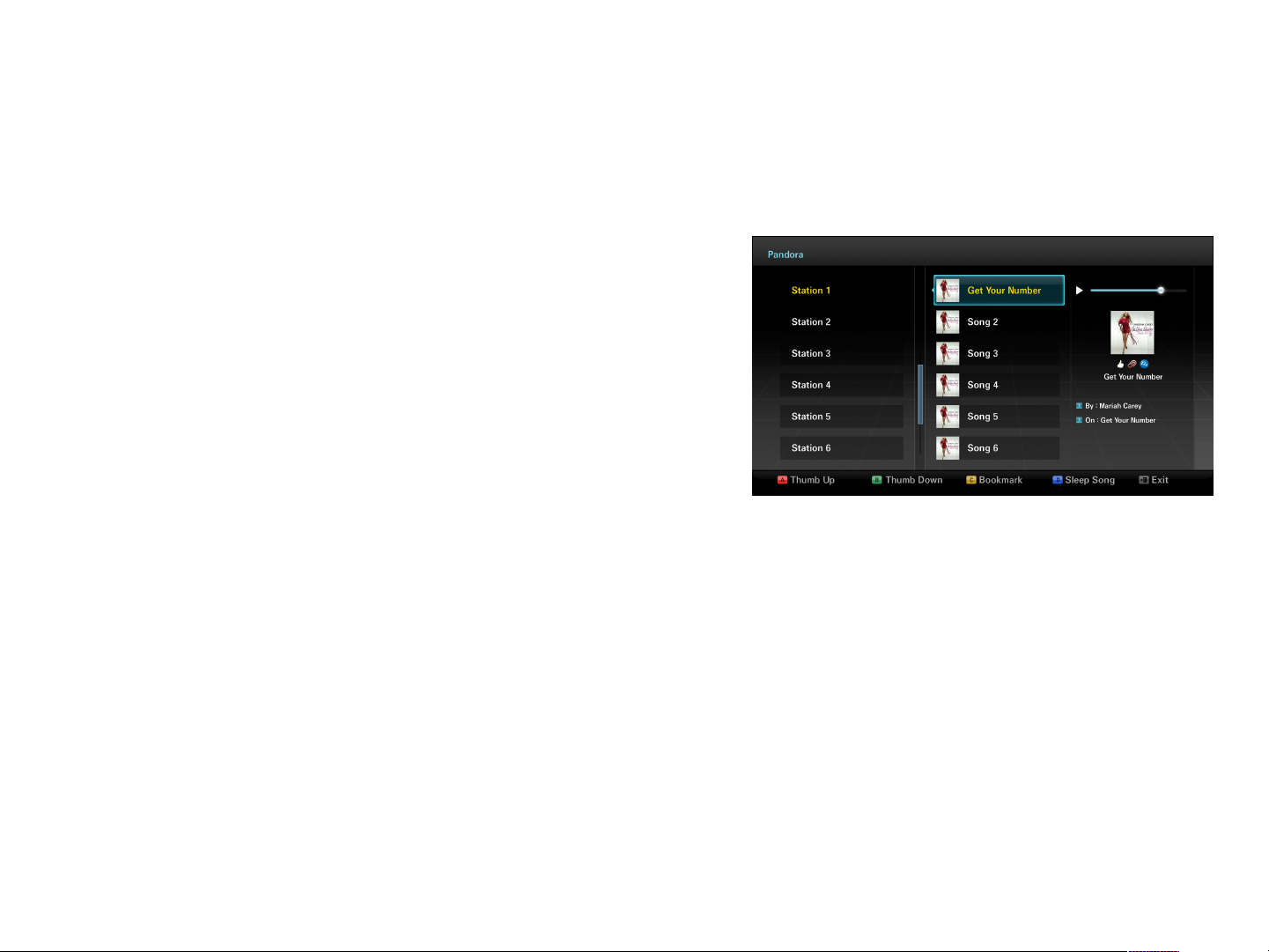
1. You can edit your song list by using color
buttons of the remote control while the
highlight is on the song list.
•
•
•
•
Thumb Up : By indicating your preference
to the server, Pandora plays more songs
similar to the one currently playing.
Thumb Down : By indicating your dislike
to the server, Pandora plays fewer songs
similar to the one currently playing
Bookmark : It bookmarks the selected song. Once bookmarked with this Bluray Disc Player, you can find those from www.pandora.com using your account
and various additional services provided by Pandora web service using your
PC.
Sleep Song : It excludes the selected song from the station for a month.
< Song List>
Page 51

YouTube
Samsung BD Player has the YouTube
UCC video watching feature.
YouTube server provides streaming file
type for each UCC. There are types for
Mobile device, computers and such.
BD Player uses the streaming type for
embedded device. AppleTV also uses this
streaming type.
The streaming file spec for this type is the
following::
Video: MPEG-4 AVC (H.264)
Audio: AAC encoding with 2 channels
Resolutions: 320x240, 400x226, 640x360
Page 52
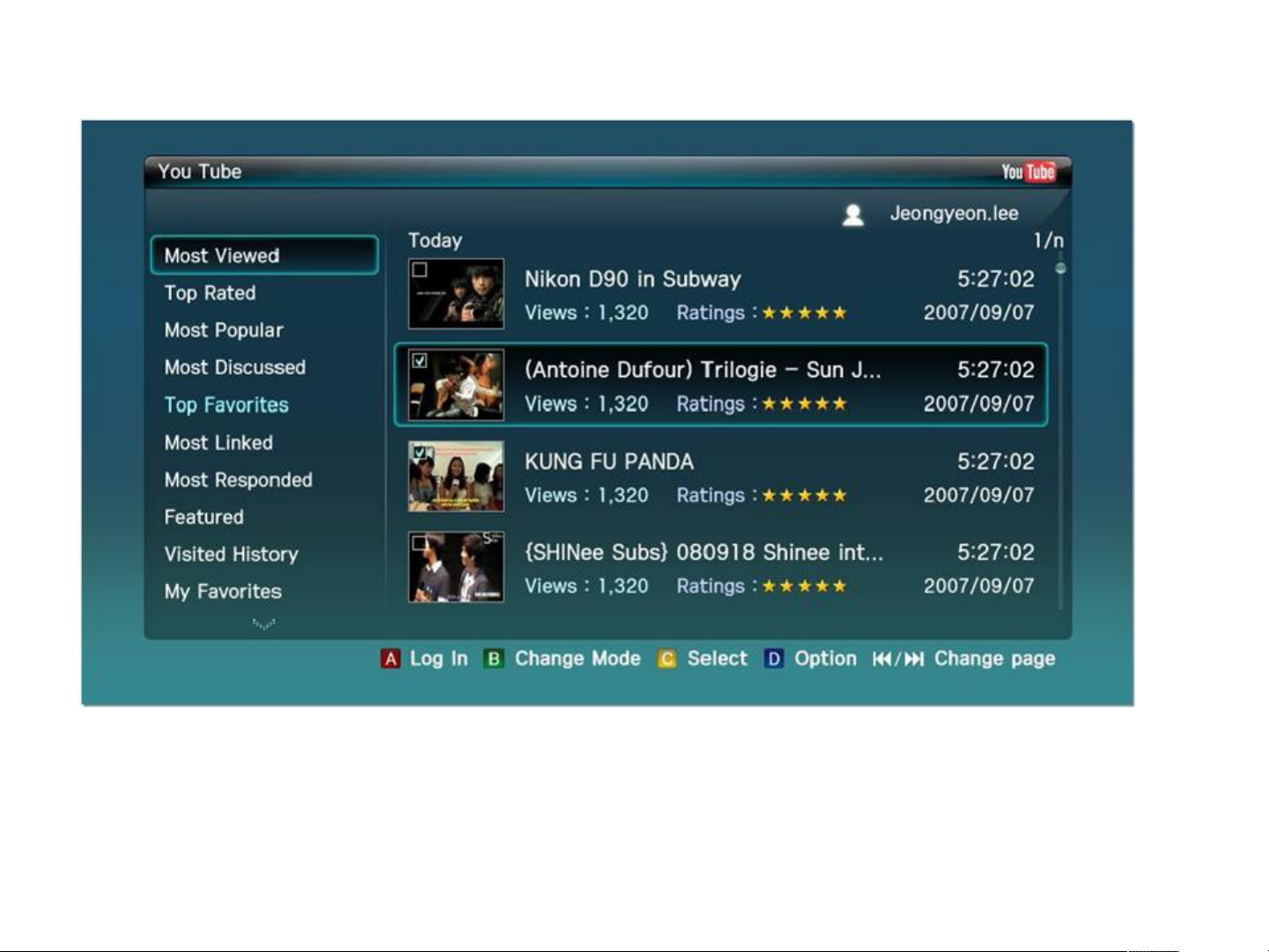
YouTube : Main List
•
In this main list, the user can select category. (Most viewed, Top rated, etc..)
The user can Change Mode (Today, Weekly, Monthly, All) by using B key for
each category. (See next page for screen)
•
The UCC videos corresponding to “Selected category” and “Mode” are
displayed and can be selected to watch.
Page 53
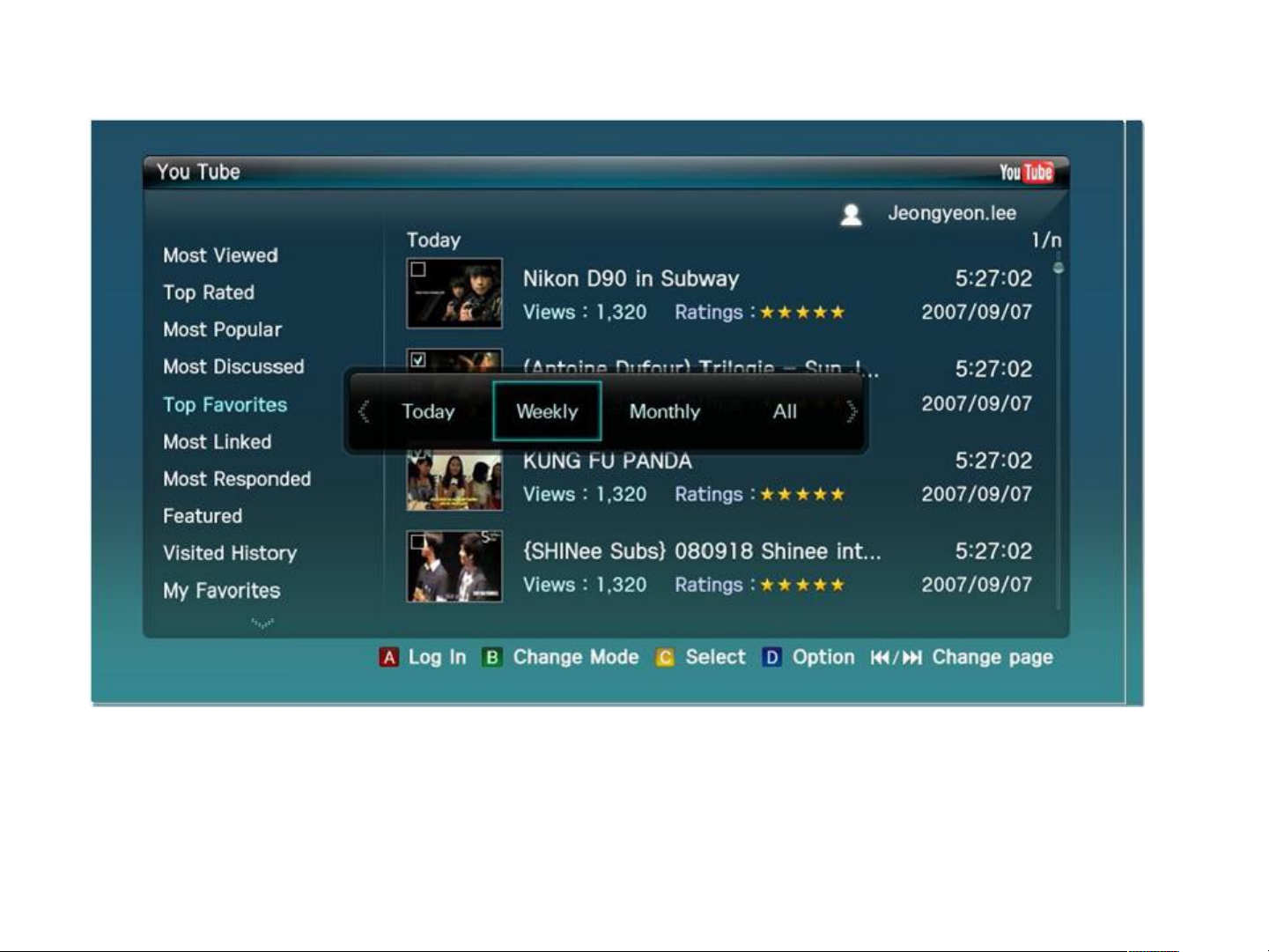
YouTube: Change Mode
•
As shown in screen capture, the popup is displayed when the user selects “Change
Mode”. The user can move right/left and enter to choose the mode.
•
UCC videos are refreshed showing videos for this mode.
Page 54
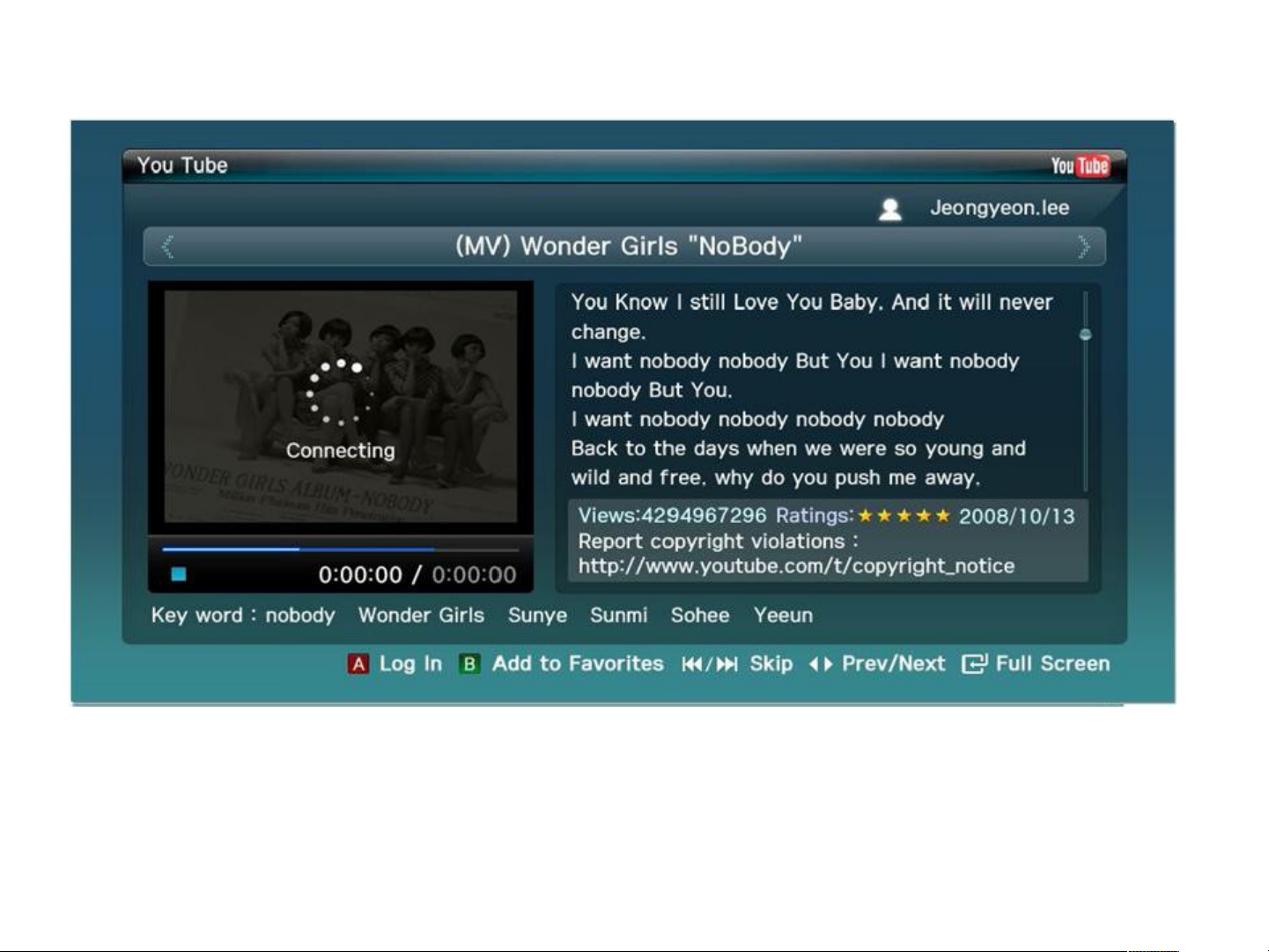
YouTube : Playing screen
•
The user selects the UCC video to watch.
•
The user can also see the title, the description, views info, rating info, creation date and
key word.
Page 55
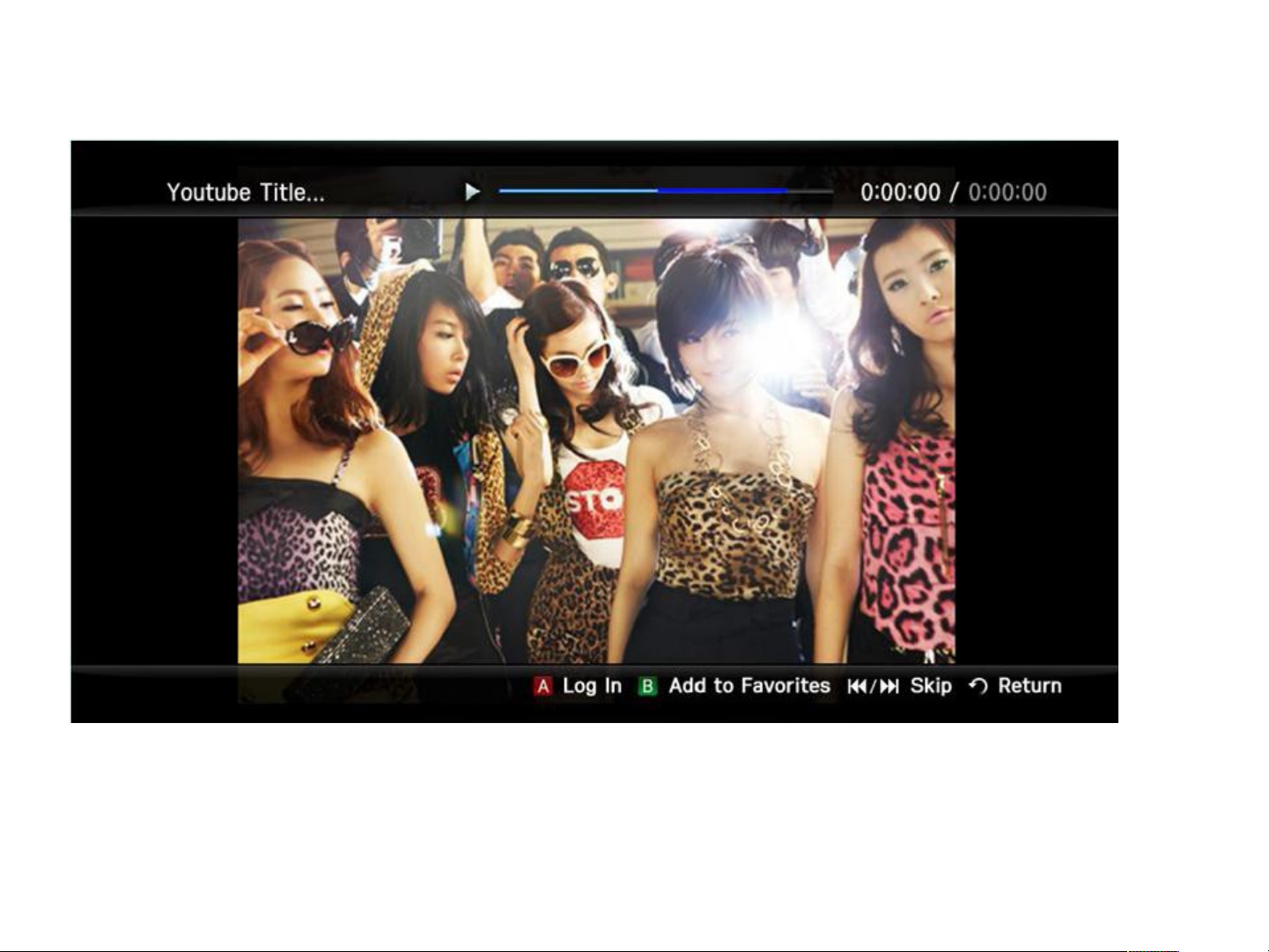
YouTube : Full screen playing
•
The user can watch UCC video in full screen mode.
Page 56
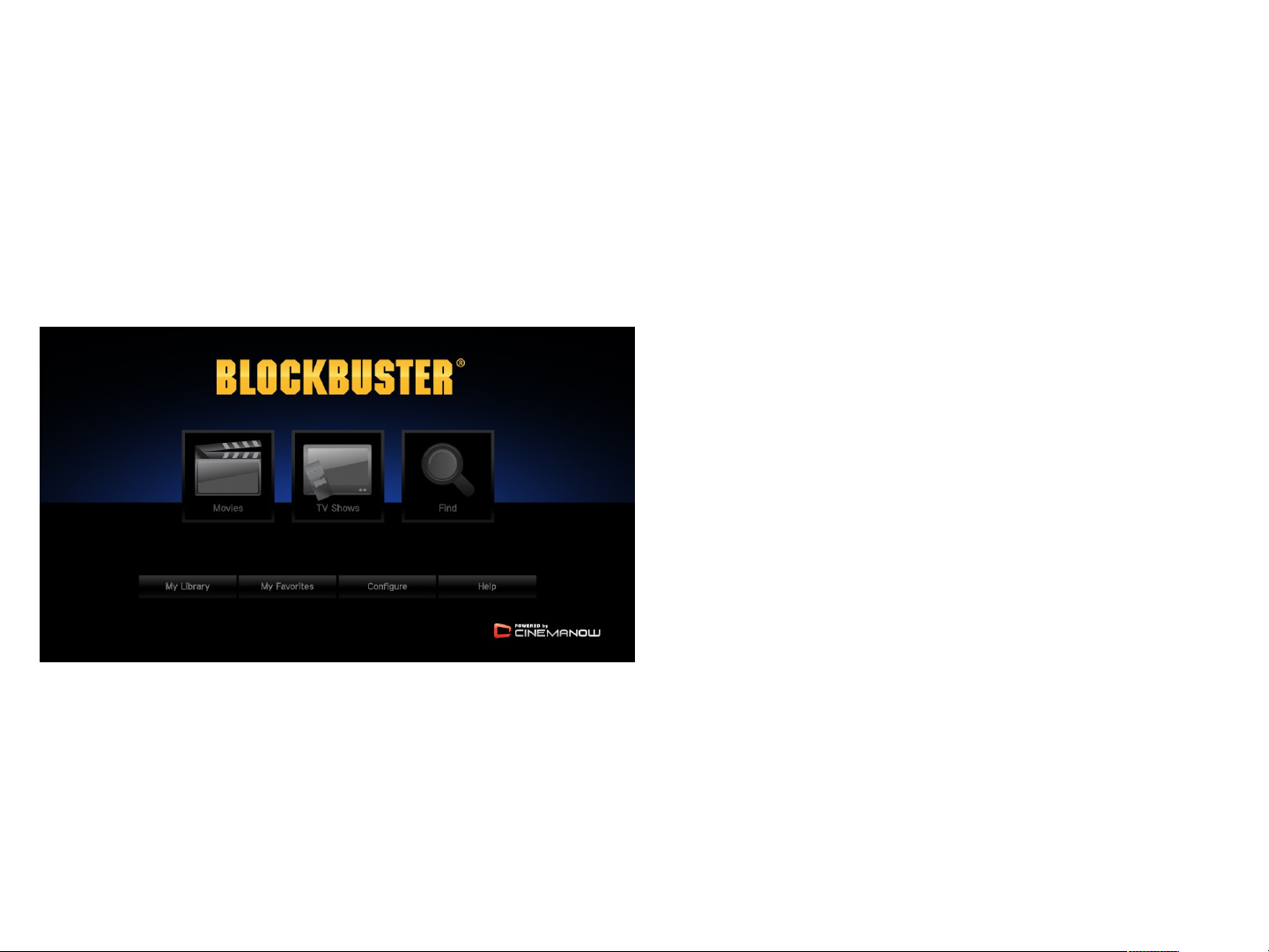
Blockbuster - Home
Thi s i s t he home page, and t he f i r st page t he user sees when st ar t i ng
t he Bl ockbust er .
1. Movi es – Move t o Movi es br owser
2. TV Shows – Move t o TV Shows
br owser (Not avai l abl e yet )
3. Fi nd – Move t o f i nd page
4. My Li br ar y – Move t o your
pur chased t i t l e l i st
5. My Favor i t es – Move t o your
f avor i t e t i t l e l i st
6. Conf i gur e – Act i vat e or
deact i vat e your devi ce
7. Hel p – I nf or mat i on of your
devi ce
Page 57
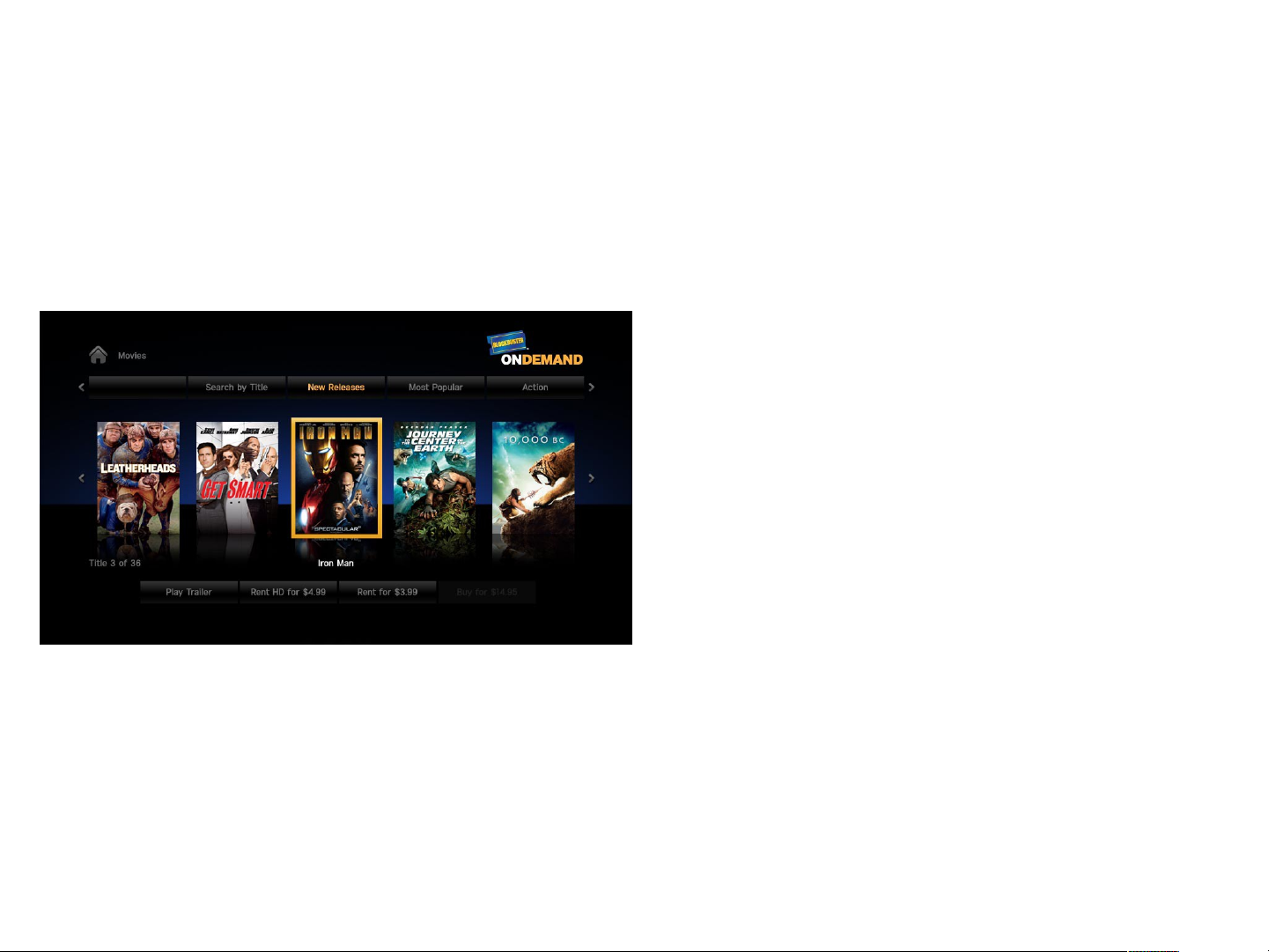
Blockbuster - Movies
Thi s i s mai n br owser scr een f or movi es.
1. Home I con – Move t o Home
2. Movi e Box Ar t – Move t o Ti t l e
Det ai l s menu f or each movi e
3. Pl ay Tr ai l er – Upon cl i ck,
t r ai l er shoul d pl ay. Di spl ays
onl y i f movi e has a t r ai l er
4. Rent or Buy – Move t o Checkout
page
Page 58
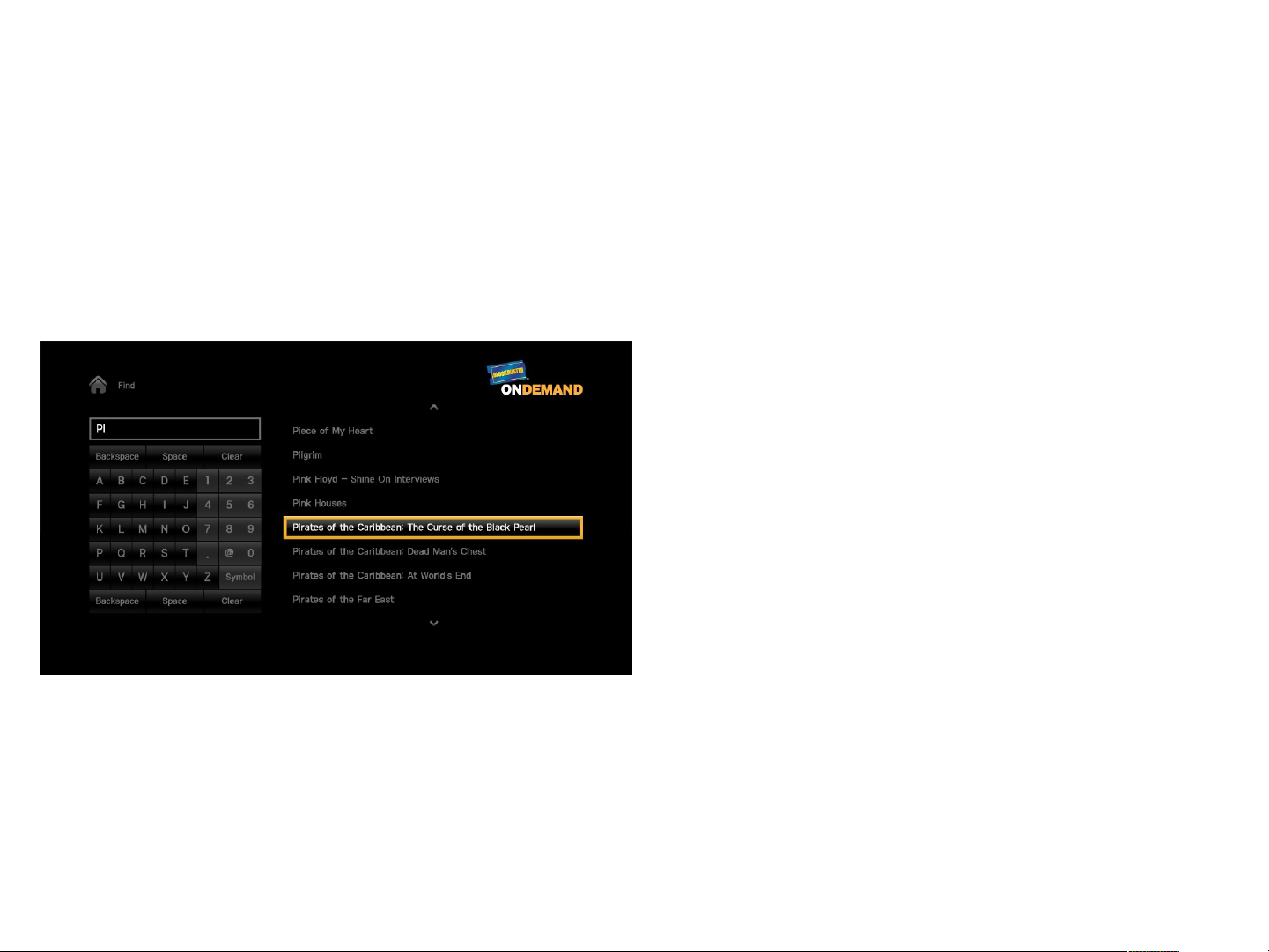
Blockbuster - Find
Thi s i s t he f i nd page. The r esul t s show up as t he user i s t ypi ng t he
sear ch st r i ng. Fi nd i s onl y val i d f or movi e t i t l e. I t does not
i ncl ude act or , di r ect or , or ot her f or t hi s i ni t i al phase.
1. Home I con
2. Fi nd Fi el d – As t he l et t er s or
number s ar e ent er ed i n t he
f i l ed, t he movi e t i t l es wi l l be
di spl ay t o t he r i ght
3. Keypad – User navi gat es l ef t ,
r i ght , up and down t o sel ect
l et t er s or number s
4. Ti t l es – Ti t l es ar e di spl ayed as
user ent er s l et t er s or number s
i n t he f ound movi es sect i on.
Upon cl i ck, i t t akes t he user t o
t he Ti t l e Det ai l s page.
Page 59
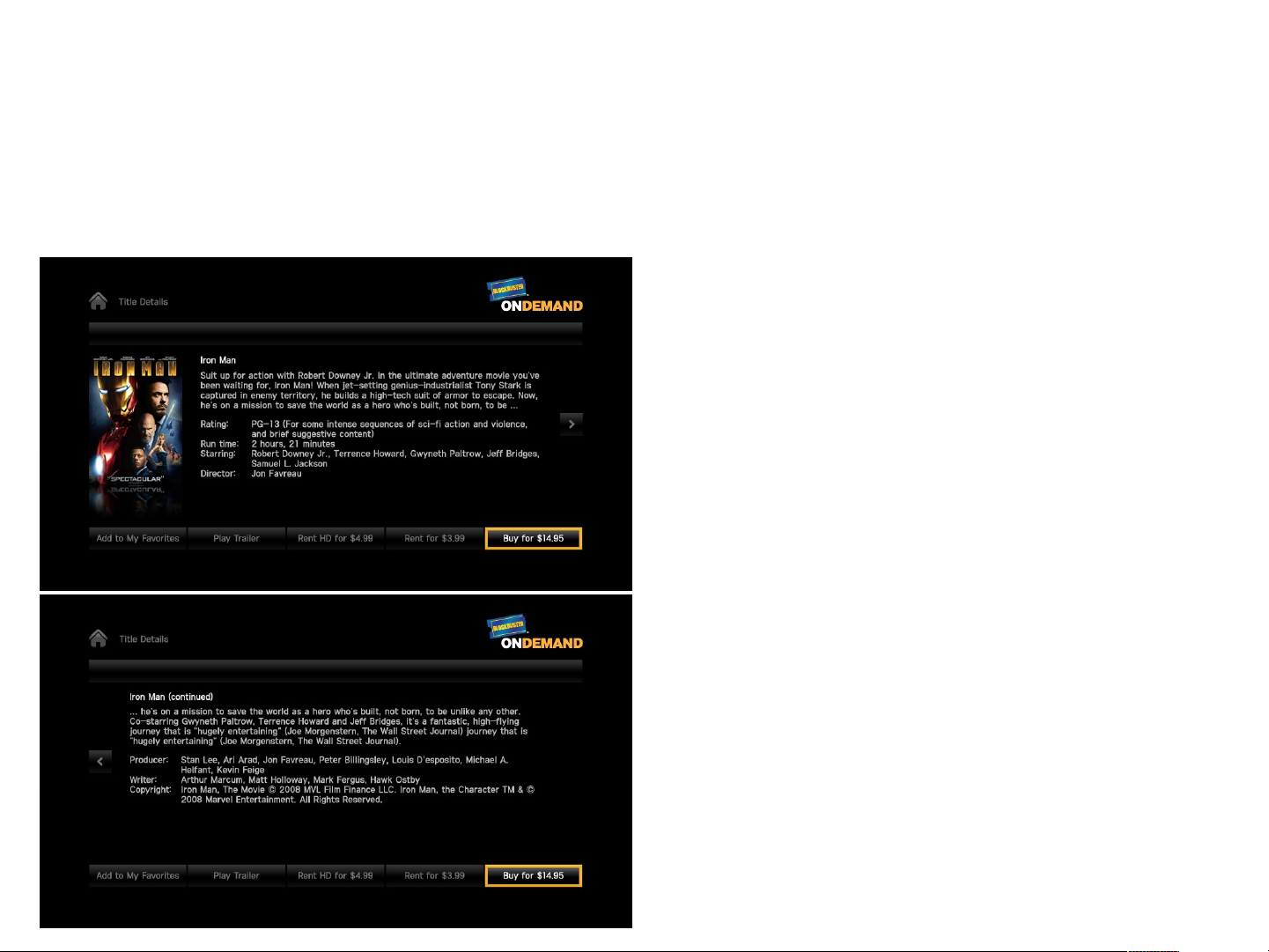
Blockbuster – Title Details
Thi s i s t he det ai l s page f or movi es.
1. Home I con
2. I nf or mat i on – Movi e t i t l e,
Synopsi s, Rat i ng, Run t i me,
St ar r i ng, Di r ect or , Pr oducer ,
Wr i t er , Copywr i t er
3. Ar r ow – Move bet ween upper
scr een and l ower scr een
4. Add t o Favor i t es/Remove Favor i t e
– Add or Remove f r om Favor i t es
l i st
5. Pl ay Tr ai l er
6. Rent or Buy
Page 60
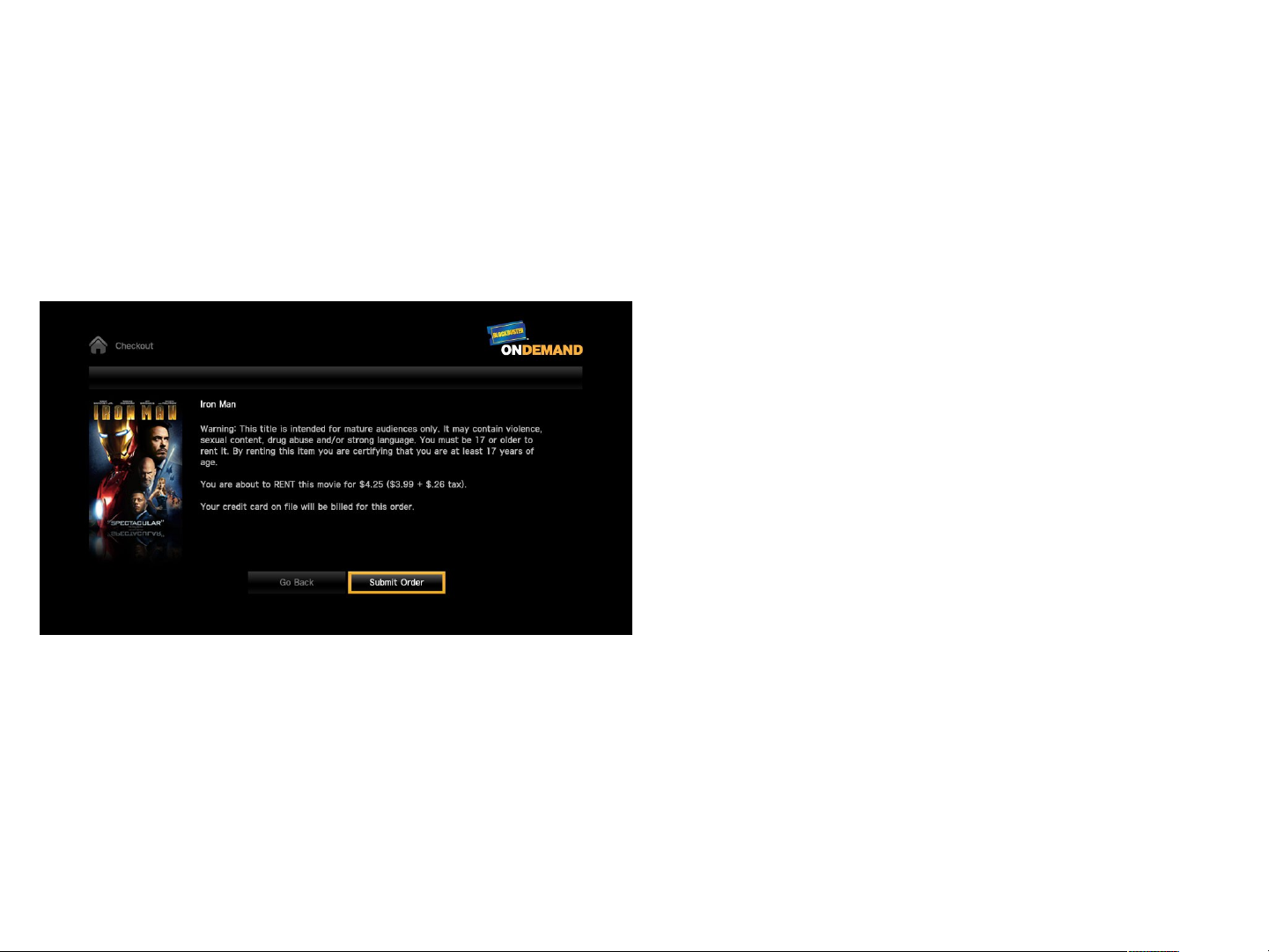
Blockbuster – Checkout (1)
Thi s i s t he checkout page f or a t i t l e. Checkout i s val i d f or onl y 1
i t em at a t i me
1. Home I con
2. War ni ng Message – Di spl ays onl y
i f movi e i s R or NC-17
3. Submi t Or der – Move t o Checkout
page ( 2)
4. Go Back – Go back t o l ast vi ewed
page by t he user
Page 61
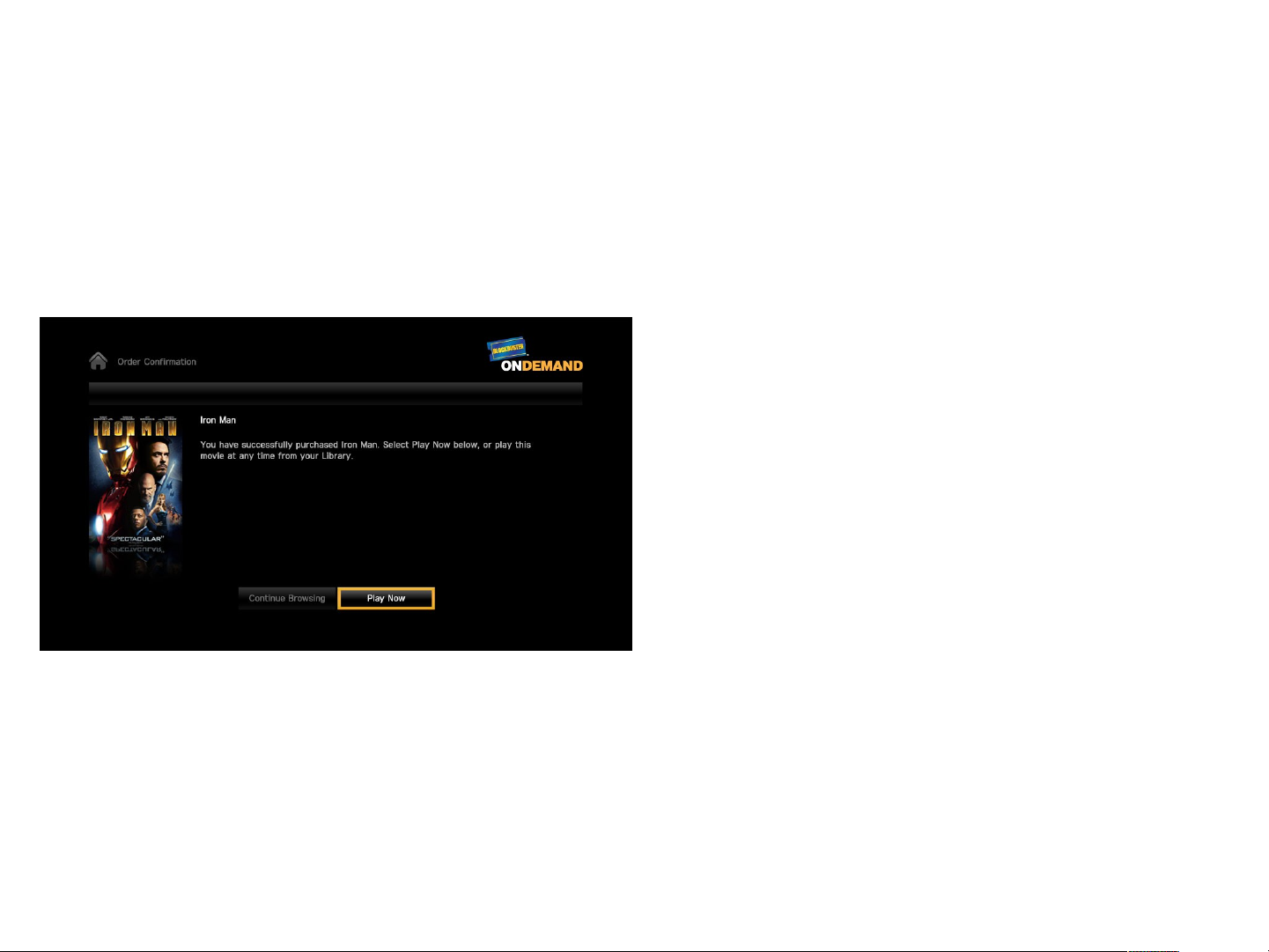
Blockbuster – Checkout (2)
Thi s page di spl ays i f a user has successf ul l y compl et ed t r ansact i on
f or a pur chase movi e.
1. Home I con
2. Cont i nue Br owsi ng - Go back t o
br owser
3. Pl ay Now – Pl ay pur chased movi e
Page 62
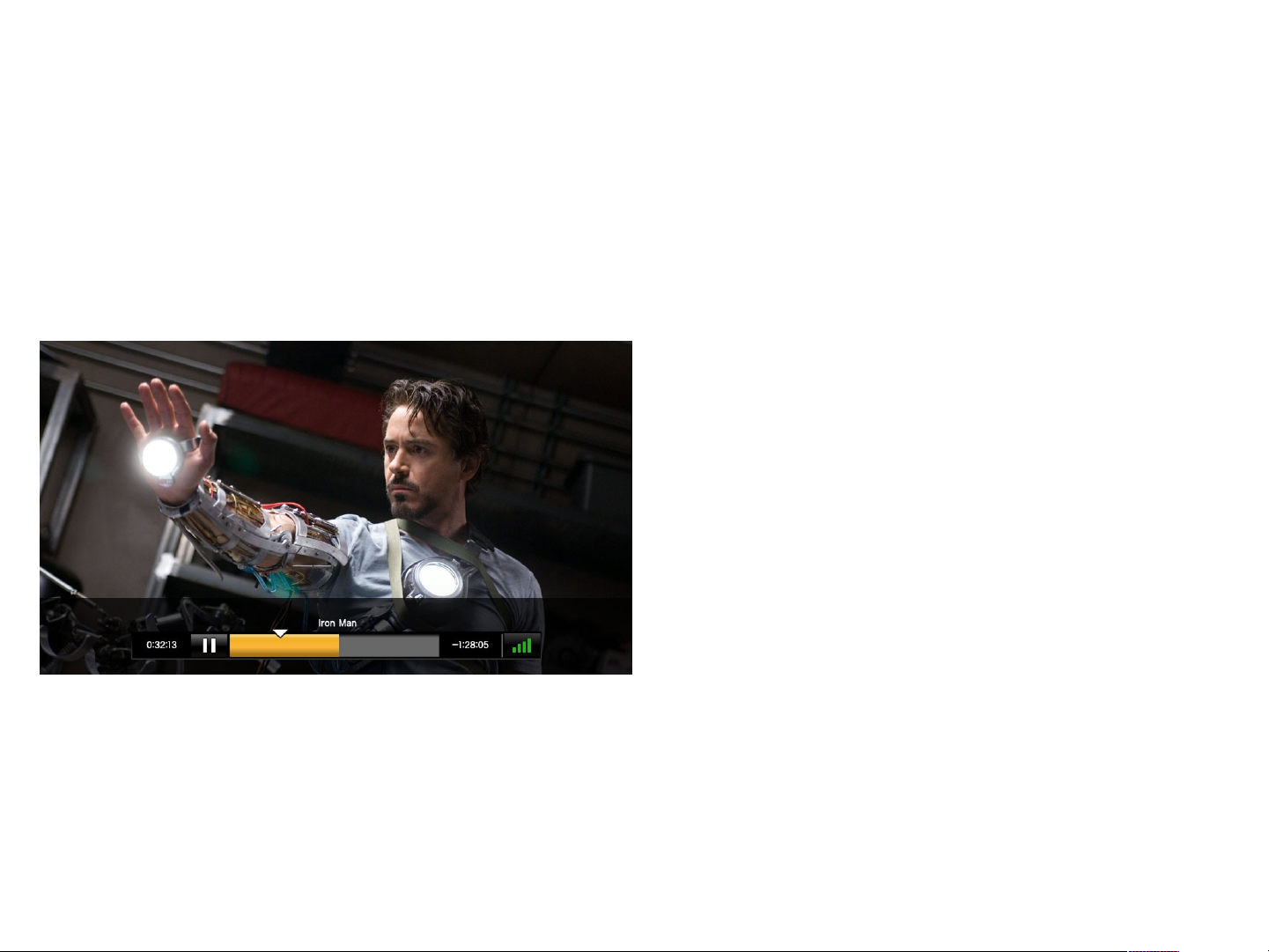
Blockbuster - Player
Thi s i s t he pl ayer f or a st andar d def i ni t i on movi e i n f ul l scr een.
These cont r ol s shoul d di spl ay upon t he user pr essi ng any movi e cont r ol
but t on ( f ast f or war d, r ewi nd, pl ay, r esume, and st op)
1. Ti me Pl ayed – Di spl ays t ot al
t i me pl ayed
2. Pr ogr ess Bar – Di spl ays cur r ent
posi t i on i n t he movi es
3. Movi e Ti t l e
4. Remai ni ng t i me – Di spl ays t i me
r emai ni ng f r om t ot al r unt i me of
t i t l e
5. Qual i t y I ndi cat or
1 bar = 700 kbps
2 bar = 1000 kbps
3 bar = 1500 kbps
4 bar = 2000 kbps
Page 63
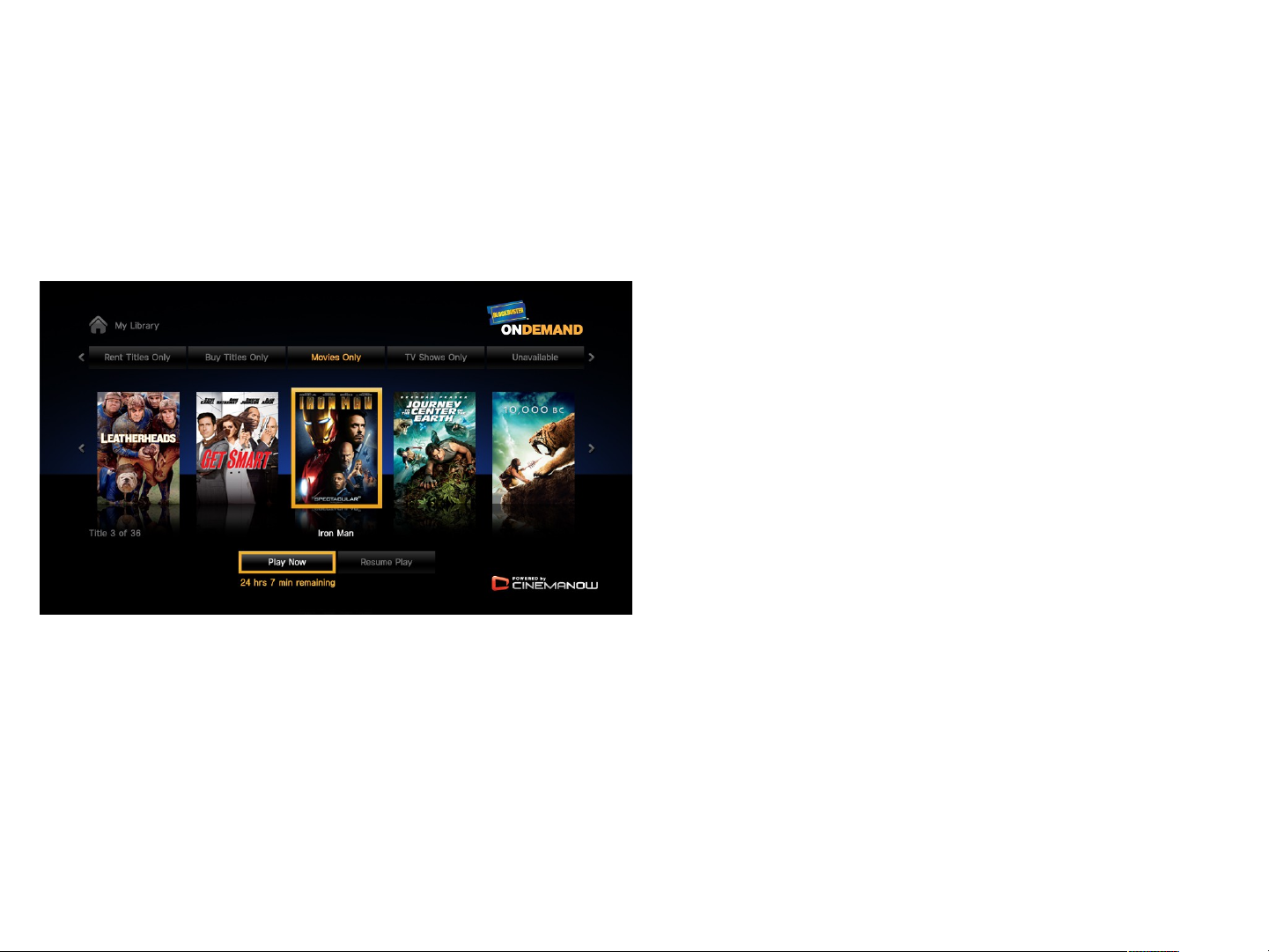
Blockbuster – My Library
Thi s i s My Li br ar y sect i on f or a user wher e al l t hei r cont ent i s
st or ed.
1. Home I con
2. Pl ay Now
3. Resume Pl ay – I f a user was
cur r ent l y wat chi ng a movi e,
pr essi ng t hi s but t on shoul d
st ar t pl ayback wher e t he user
l ast l ef t of f .
Page 64
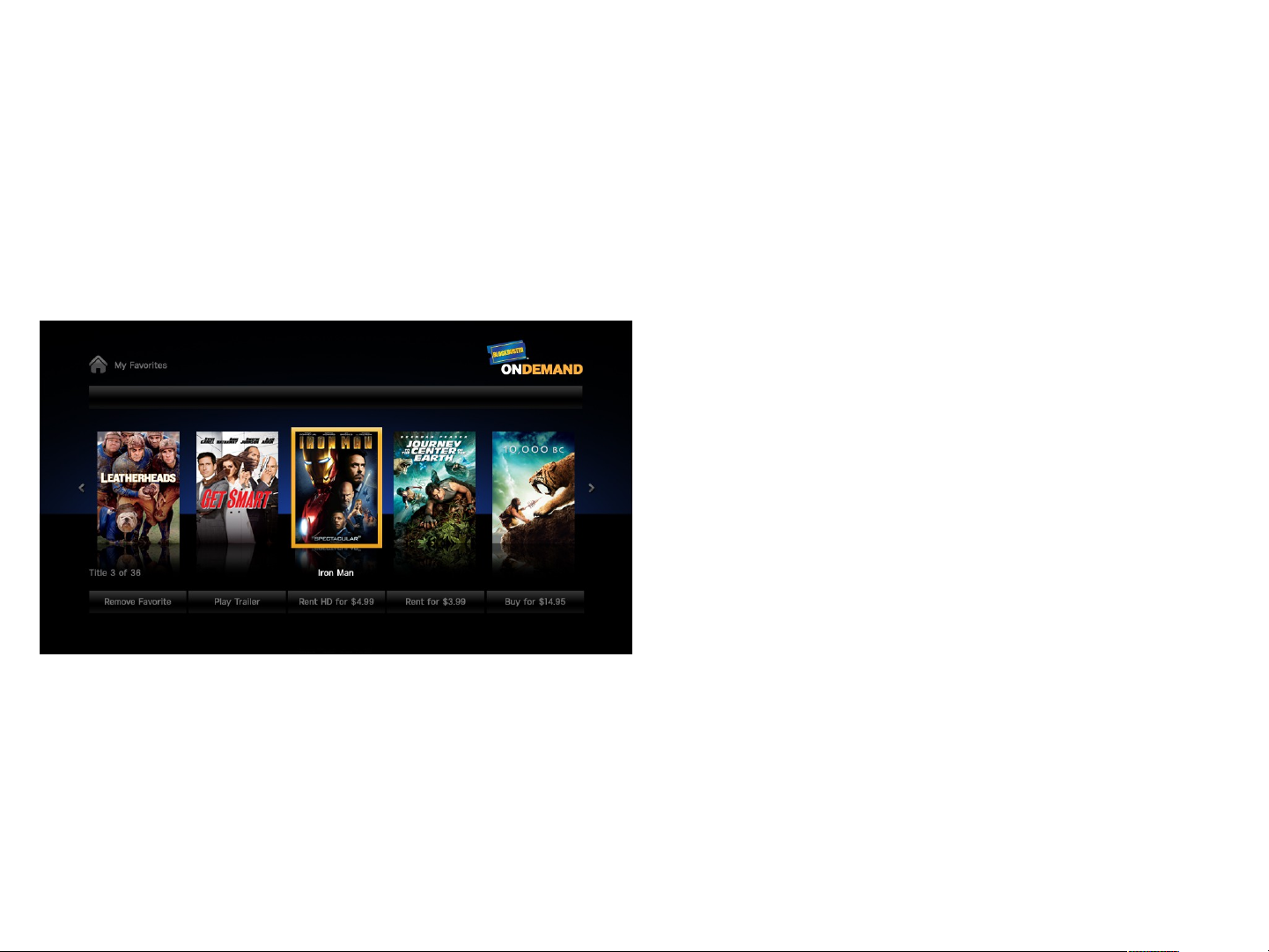
Blockbuster – My Favorites
Thi s sect i on, My Favor i t es, cont ai ns al l t he movi es t hat t he user
sel ect s t o be a f avor i t e t hr oughout t hei r br owsi ng exper i ence.
1. Home I con
2. Remove Favor i t e – Remove f r om
f avor i t es l i st
3. Pl ay Tr ai l er
4. Rent or Buy
Page 65
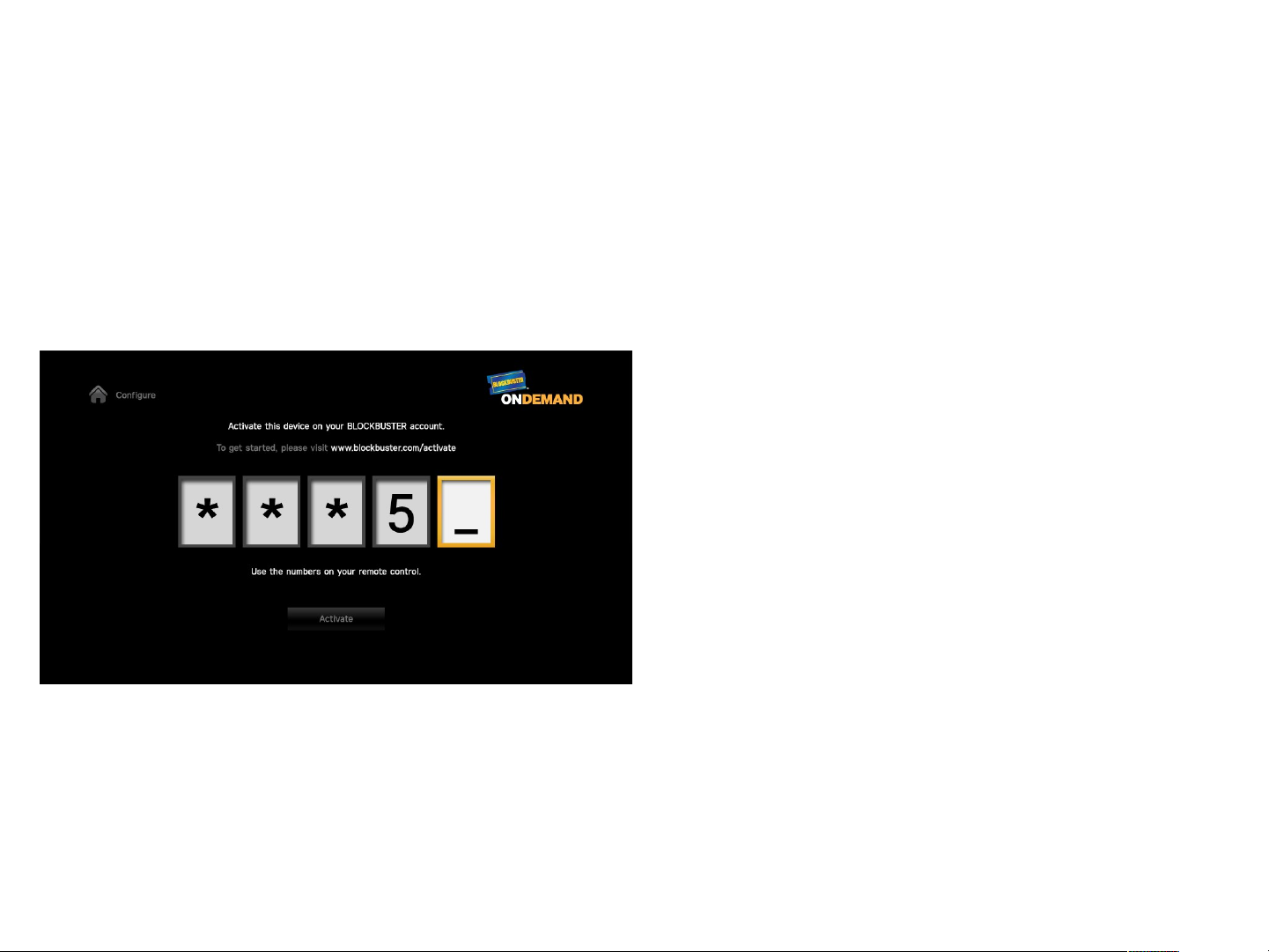
Blockbuster – Configure (1)
Thi s page di spl ays i f a user has not act i vat ed t hei r devi ce yet on
bl ockbust er . com. Thi s page shoul d appear i f t he user i s about t o
checkout or i f t he user cl i cks Conf i gur e f r om t he home page, and t hey
ar e not act i vat ed.
Page 66
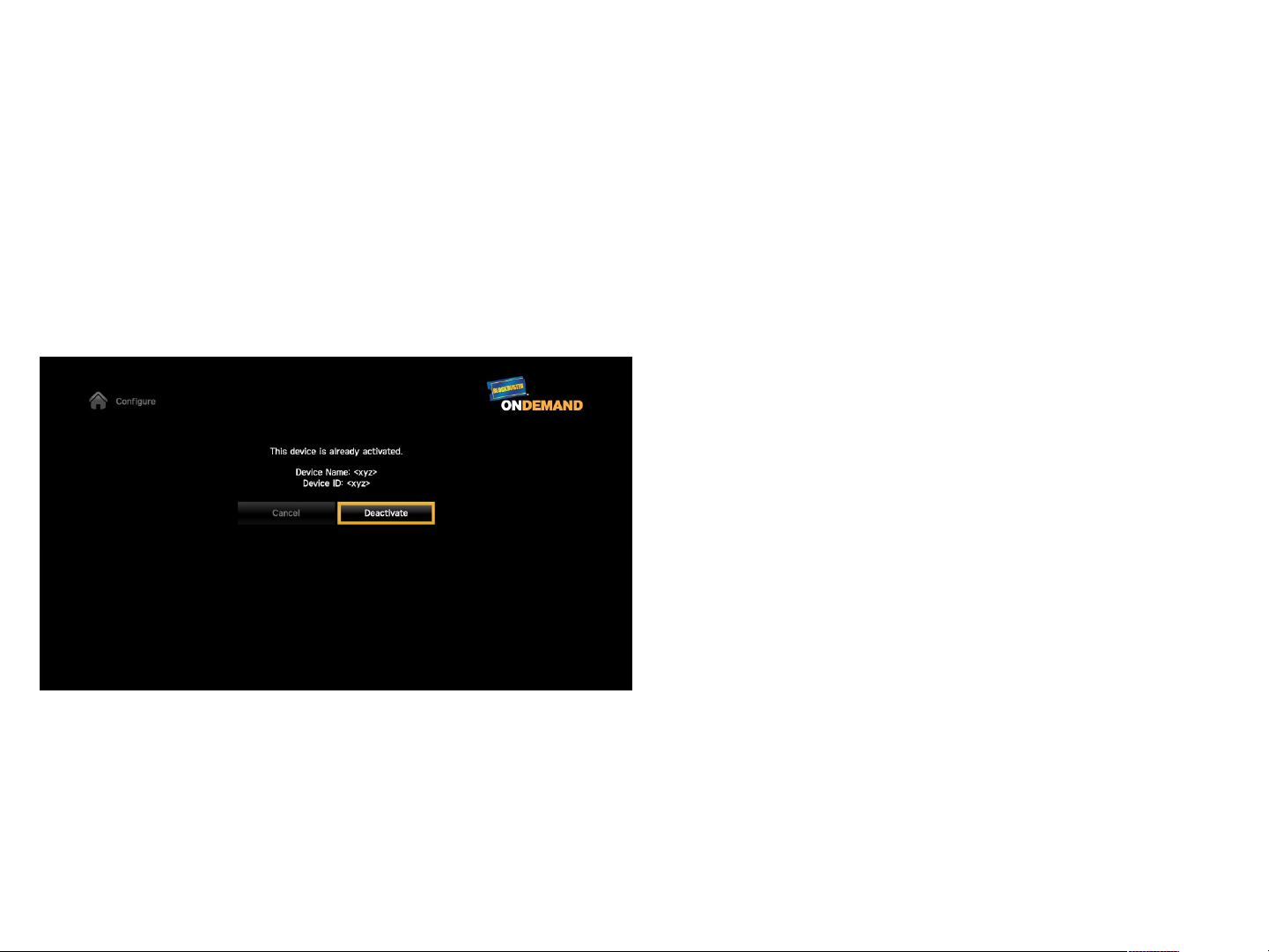
Blockbuster – Configure (2)
Thi s page i s a conf i r mat i on page f or t he user t o conf i r m t hey want t o
deact i vat e t hei r account . Thi s page di spl ays i f a user i s al r eady
act i vat ed and cl i cks on t he Conf i gur e but t on f r om t he Home scr een.
Page 67
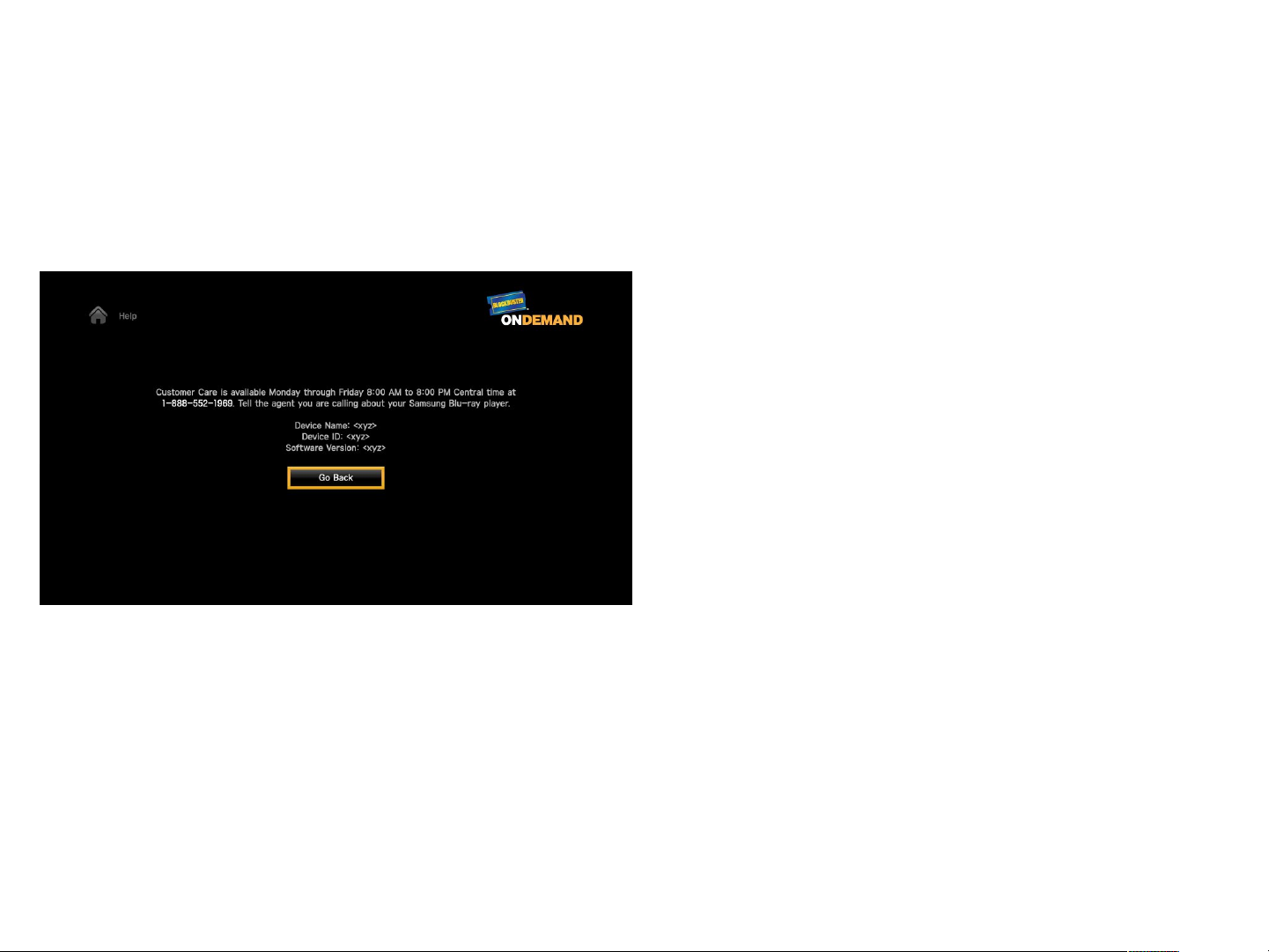
Blockbuster - Help
Thi s i s t he mai n Hel p page f or user s.
1. Home I con
2. Devi ce Name – Thi s i s t he devi ce
name t hat i s gi ven by t he user
dur i ng act i vat i on on
bl ockbust er . com
3. Devi ce I D – Thi s i s t he devi ce
I D t hat i s uni que per per son
4. Sof t war e Ver si on – Di spl ays
cur r ent sof t war e ver si on
5. Go Back
Page 68
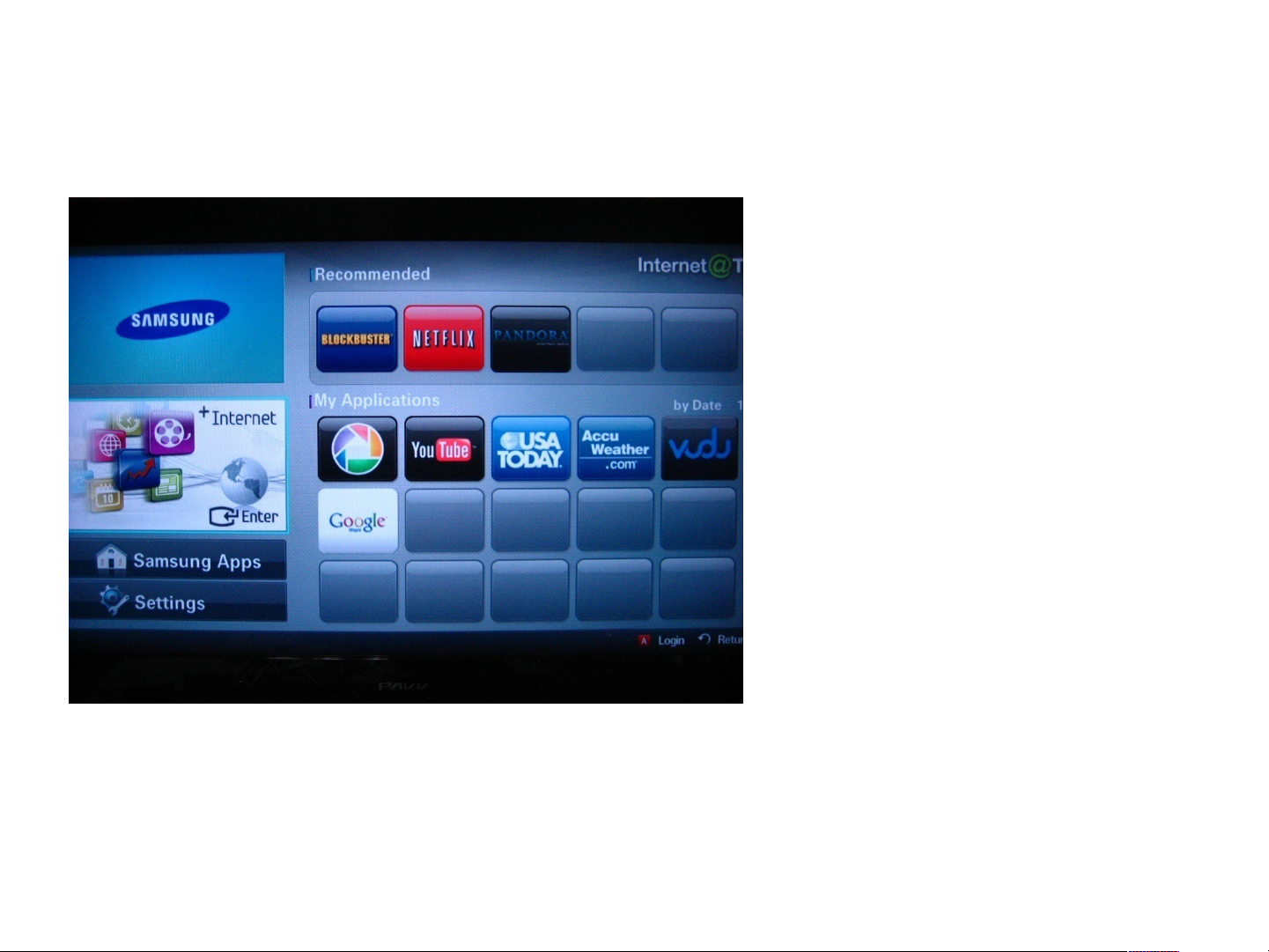
Internet@TV : Content Home
Samsung BD Player has
Internet@TV mode.
You can enter this mode from
selecting Internet@TV in Home
Menu.
When you have an active Internet
connection, you can choose the
widget to run and experience various
services.
Widgets are implemented using
HTML and JavaScript. Widgets are
downloadable and installable. (You
can do this from Samsung Apps.)
Page 69
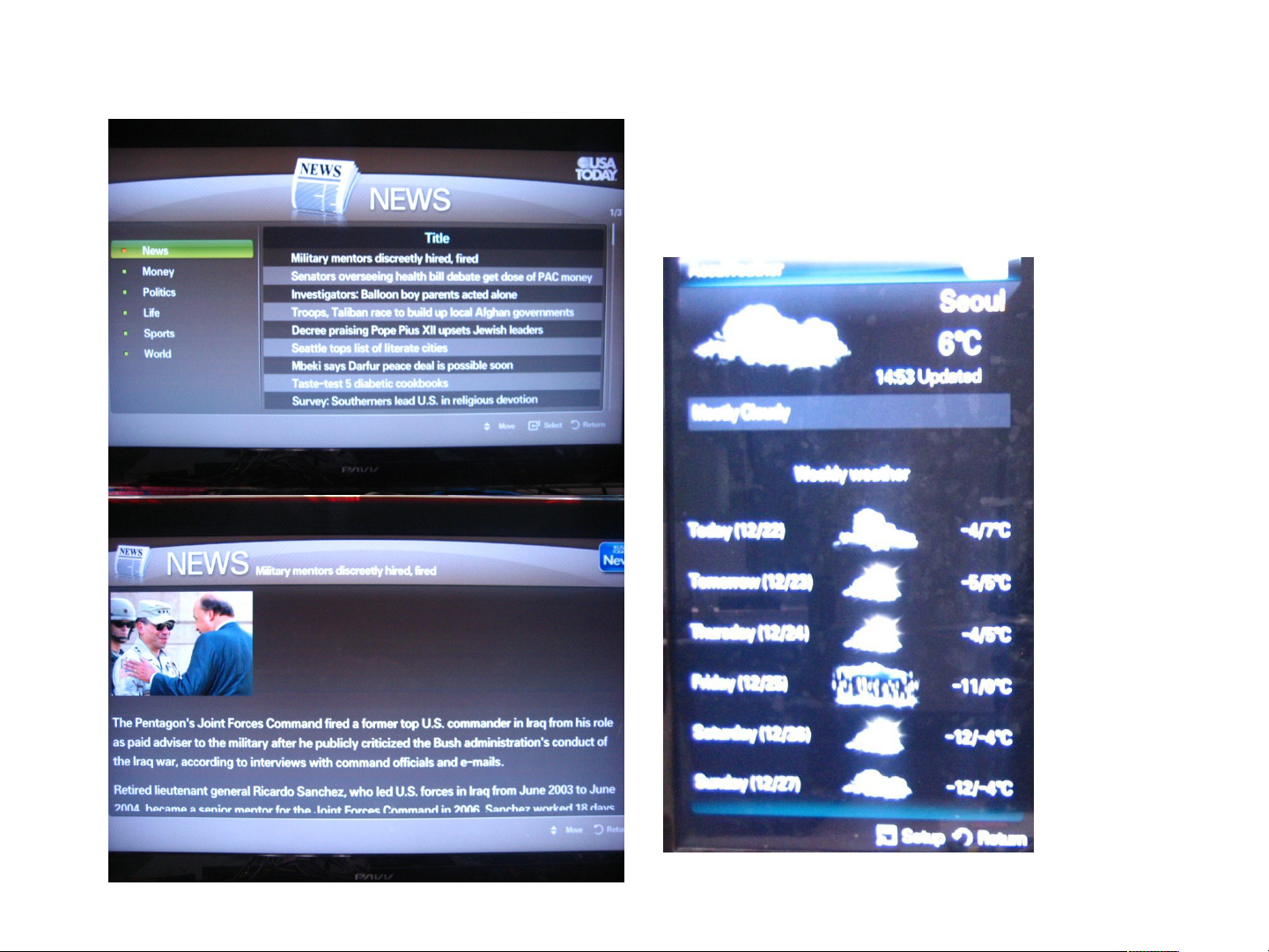
News and Weather
•
You can read the news provided by
USA Today.
•
You can check Weather of your
region.
Page 70
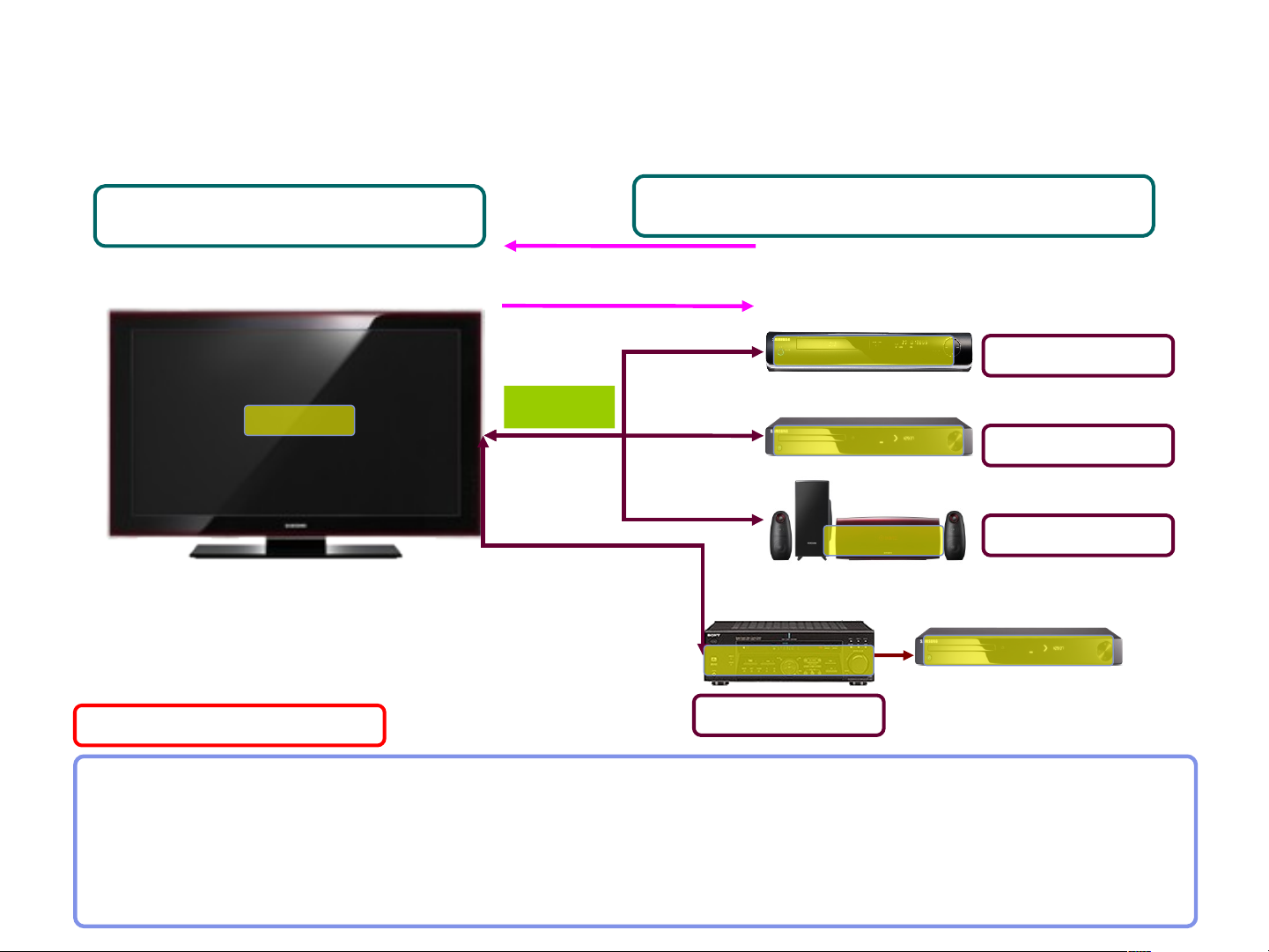
BD Wise
SAMSUNG T V
BD Wise TV
What is BD Wise?
SAMSUNG Player/Receiver
Infoframe (Source Product)
EDID (TV, Receiver)
HDMI
BD Wise Receiver
AV Receiver
BD Wise BD Player
BD Wise DVD Player
BD Wise HTS
BD Wise DVD Player
BD Player
DV D Player
Home theater
BD Wise automatically adjusts compliant Samsung products to the
optimal settings between them.
-
This feature is enabled only if BD Wise compliant Samsung Products
are connected with each other using the HDMI cable.
Page 71

O : Supported
Comparison : Media
Profile
3D
BD-C5900
BD-C6800
Blu-ray 2.0
from the
beginning.
O X X
BD-C5500
BD-C6500
BD-C7500
Blu-ray 2.0
from the
beginning.
BD-P1600
BD-P3600
BD-P4600
Blu-ray 2.0
from the
beginning.
BD-P1500
BD-P2550
Blu-ray 1.1
from the
Beginning.
Blu-ray 2.0
after Field
Upgrade
X X X
BD-
UP5000
1. Blu-ray 1.0
(Updated in
2008 for
Blu-ray 1.1)
2. HD DVD
X : Not supported
BD-P1400
Blu-ray 1.0
DVD, CD
MP3, JPG
AVCHD O O
DivX/MKV
Memory Slot
BD-RE
O O O
O O O
O/O O/O
X X X
Does not
Does not
O
X/X (P1600)
O/X (P3600)
O/X (P4600)
Does not
O O O
X X O
O X X
X X X
X X X
Does not
Does not
Does not
Page 72

O : Supported
Comparison : Network
Profile
Netflix/Pandora
Blockbuster/Youtube
Widget
(Accu weather/USA
today)
BD-C5900
BD-C5500
BD-C6500
BD-C6800
BD-C7500
Blu-ray 2.0 Blu-ray 2.0
O O O X X X
O O X X X X
BD-P1600
BD-P3600
BD-P4600
Blu-ray 2.0
from the
beginning.
BD-P1500
BD-P2550
Blu-ray 1.1
from the
Beginning.
Blu-ray 2.0
after Field
Upgrade
X : Not supported
BD-UP5000 BD-P1400
1. Blu-ray 1.0
(Updated in
2008 for Blu-
ray 1.1)
2. HD DVD
Blu-ray 1.0
O
Wireless Connection
PC Steaming Allshare Allshare O X X X
Wifi built-in
for C6800
Wifi built-in
for C6500
and C7500
O
dongle(P3600
O
Provide
bundle
and P4600
X X X
Page 73

Comparison : Update, Accessory
Update
Method
Required
time for
update
Accessory
Cable
BD-C5900
BD-C5500
BD-C6500
BD-C6800
BD-C7500
CD, Network,
USB
4~5min 4~5min
Video/L/R
only
CD, Network,
Video/L/R
USB
only
BD-P1600
BD-P1500
BD-P3600
BD-UP5000 BD-P1400
BD-P2500
BD-P4600
CD,
Network,
USB
3~4min 3~4min 2~3 min 10~12 min
Video/L/R
only
CD,
Network,
USB
Video/L/R
only
CD, Network CD, Network
Video/L/R only
Video/L/R
only
Remote
long long
long long long long
Note : network update time may vary
Page 74

O : Supported
Comparison : HDMI
BD-C5900
BD-C6800
HDMI 1.4 1.3 1.3 1.3 1.3 1.3
1080p 24frame O O O O O O
CEC
(Anynet+)
Deep Color
xvYCC O O O O X X
O O O O O O
O
(12bit)
BD-C5500
BD-C6500
BD-C7500
O
(12bit)
BD-P1600
BD-P3600
BD-P4600
X
(8bit :P1600,P3600)
O
(12bit :
P3600A,P4600)
BD-P1500
BD-P2550
X
(8bit : P1500)
O
(12bit : P2550)
BD-UP5000 BD-P1400
O
(12bit)
X : Not supported
X
(8bit)
HD Audio
Transmission
O (Progressive
Picture Quality
Control
Picture Control)
BD Wise O O O X X X
O O O O
Mode,
BD Wise,
O (Progressive
Mode,
BD Wise,
Picture Control)
O (Progressive
Mode,
BD Wise,
Picture Control)
X (P1500)
O (P2550,
Noise
Reduction
Sharpness
Control)
X : so far
O : updated in
2008
O X
O
Page 75

O : Supported
Comparison : Video
BD-C5900
BD-C6800
Main SoC
Video Processor
1080p 60frame O O O O O O
1080i 60frame O O O O O O
1080p 24frame O O O O O O
Internal
Scaler
BD-C5500
BD-C6500
BD-C7500
Main SoC
Internal
Scaler
BD-P1600
BD-P3600
BD-P4600
Main SoC
Internal
Scaler
BD-P1500
BD-P2550
P1500 :
Main SoC
Internal
Scaler
P2550 :
HQV from
Silicon Optix
BD-UP5000 BD-P1400
HQV from
Silicon Optix
X : Not supported
Main SOC
internal
Scaler
480i/p video output
for Blu-ray
Simultaneous
Video Output
between
HDMI/Component/
S-Video/CVBS
S-Video Output X X X X O O
O O O O O O
O O O O O O
Page 76

Comparison : Video Resolution Default
BD-C5900
BD-C6800
Factory Default 480p 480p 480p 480p 480p 480p
When
connected the
TV which has
correct EDID
When
connected the
TV which has
incorrect EDID
Remark BD-
Maximum
resolution for
TV input
480p 480p 480p 480p 480p 576p/480p
C5900/C6800
can also output
480i/480p
resolution with
Blu-ray Disc
BD-C5500
BD-C6500
BD-C7500
Maximum
resolution for
TV input
BD-
C5500/C6500/
C7500 can
also output
480i/480p
resolution with
Blu-ray Disc
BD-P1600
BD-P3600
BD-P4600
Maximum
resolution for
TV input
BD-
P1600/P3600/P
4600 can also
output
480i/480p
resolution with
Blu-ray Disc
BD-P1500
BD-P2550
Maximum
resolution for
TV input
BD-P1500
can also
output
480i/480p
resolution
with Blu-ray
Disc
BD-UP5000 BD-P1400
Maximum
resolution for TV
input
BD-UP5000 can
also output
480i/480p
resolution with
Blu-ray Disc / HD
DVD
Maximum
resolution for
TV input
BD-P1400
can also
output
480i/480p
resolution
with Blu-ray
Disc
Page 77

O : Supported
Comparison : Audio
DD Plus
decoding
Dolby
TrueHD
decoding
Dts HD HRA
decoding
Dts-HD MA
decoding
Re-encoding
BD-C5900
BD-C5500
BD-C6500
BD-C6800
BD-C7500
O O
O O
O O
O (into dts) O (into dts)
BD-P1600
BD-P3600
BD-P4600
O (into dts) O (into dts) O (into dts) X
BD-P1500
BD-UP5000 BD-P1400
BD-P2550
O O O
O O O (2ch only)
O
X : from the
beginning
O : Will be
updated
within 2008
X
X X
X : Not supported
O
(HDMI only)
O
(HDMI only)
O
(HDMI only)
Number of
channels for
analog audio
Number of
channels for
HDMI PCM
HD audio
bitstream
output on
HDMI 1.3
2
(C5500)
2+7.1
(C6800)
7.1 7.1
dts-HD MA
dts-HD HRA
TrueHD
DD+
2
(C5500,C7500
)
2+7.1
(C6500)
dts-HD MA
dts-HD HRA
TrueHD
DD+
2
(P1600,P4600)
2+7.1
(P3600)
7.1 7.1 7.1 7.1
dts-HD MA
dts-HD HRA
TrueHD
DD+
2 (P1500)
2+7.1(P2550)
dts-HD MA
dts-HD HRA
TrueHD
DD+
2 + 7.1 2 + 5.1
X (so far)
O (Will be
updated in
May 2008)
dts-HD MA
dts-HD HRA
TrueHD
DD+
Page 78
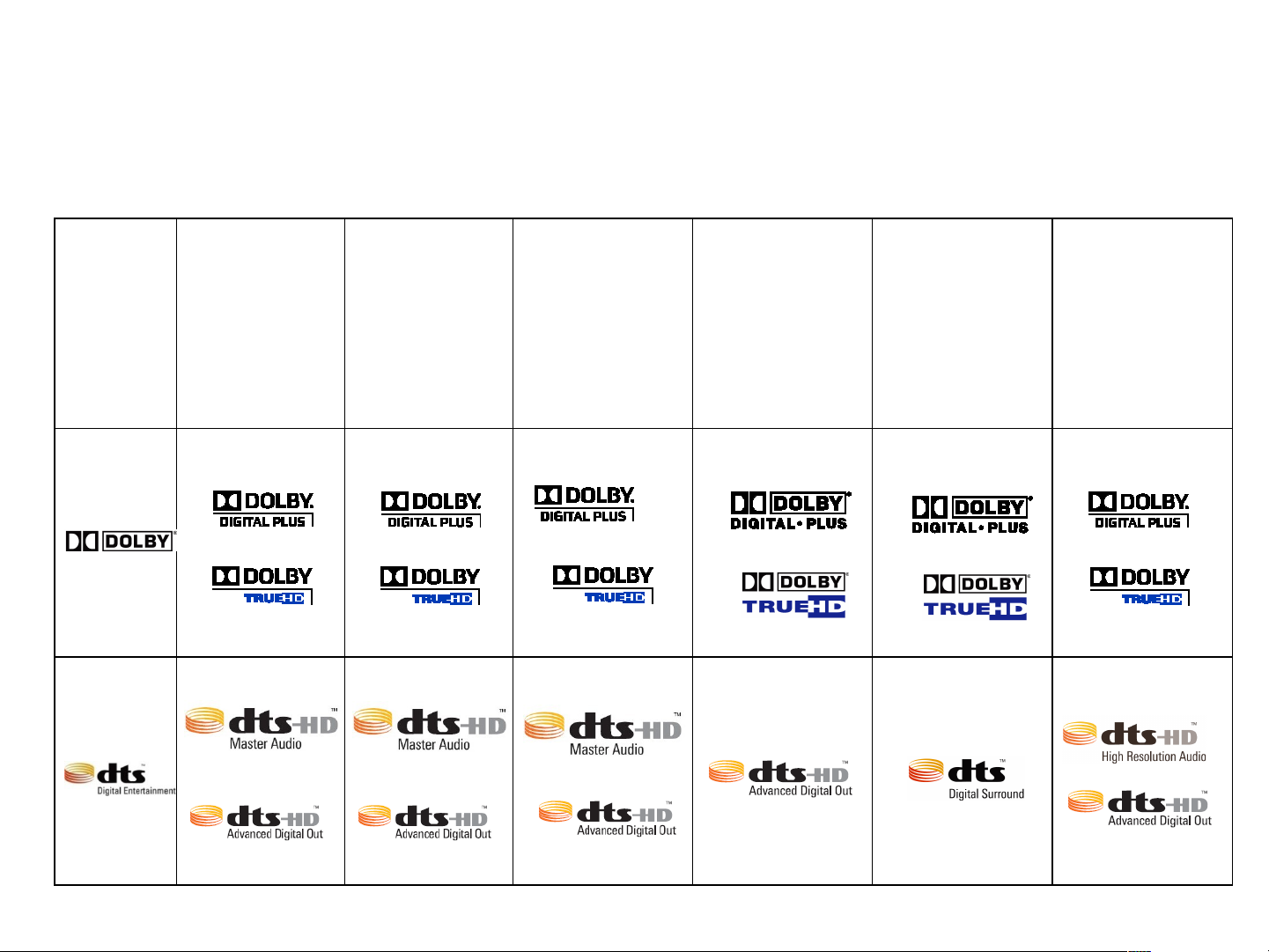
Comparison : Audio Logos
BD-C5900
BD-C6800
BD-C5500
BD-C6500
BD-C7500
BD-P1600
BD-P3600
BD-P4600
BD-P1500
BD-UP5000 BD-P1400
BD-P2550
Page 79

Comparison : H/W
O : Supported
X : Not supported
BD-C5900
BD-C6800
SMPS 1 trans 1 trans 1 trans 1 trans 1 trans 1 trans
Deck Plastic Cover Plastic Cover Plastic Cover
Pick Up 6th Generation
Pickup
Front
Micom
ABOV ABOV ABOV ABOV Hynix Hynix
BD-C5500
BD-C6500
BD-C7500
6th Generation
Pickup
(C5500,C6500)
Slim P/U(C7500)
BD-P1600
BD-P3600
BD-P4600
5th Generation
Pickup
(P1600,P3600)
Slim
P/U(P4600)
BD-P1500
BD-P2550
No cover
(P1500)
With cover
(P2550)
BD-UP5000 BD-P1400
Spindle Motor
changed
VE Pickup VE Pickup
Spindle Motor
change
Main <->
Loader
FAN X X O
One Board One Board One Board S-ATA P-ATA P-ATA
X (1500)
O (2550)
O O
Page 80
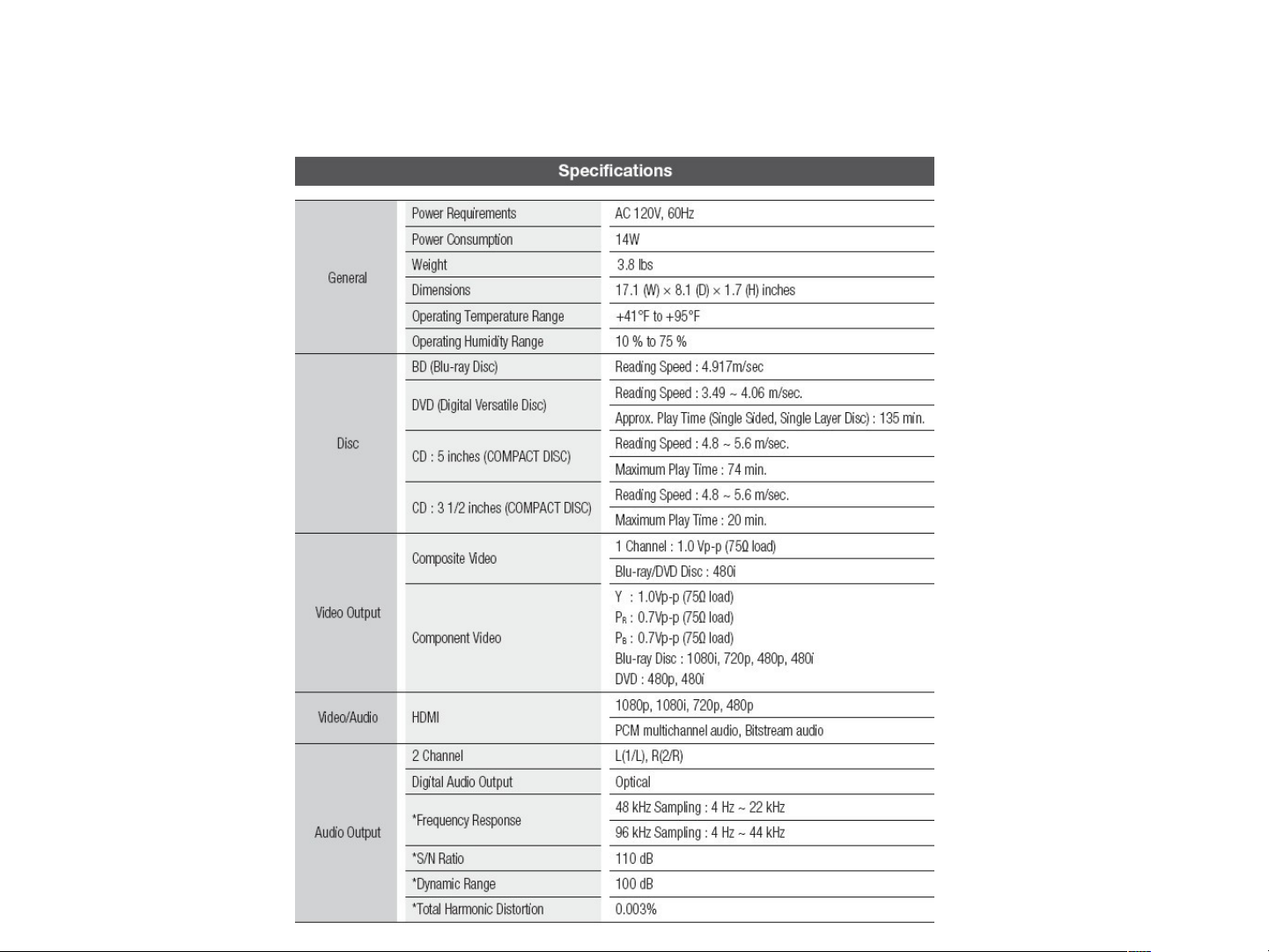
Specifications for BD-C5900
Page 81
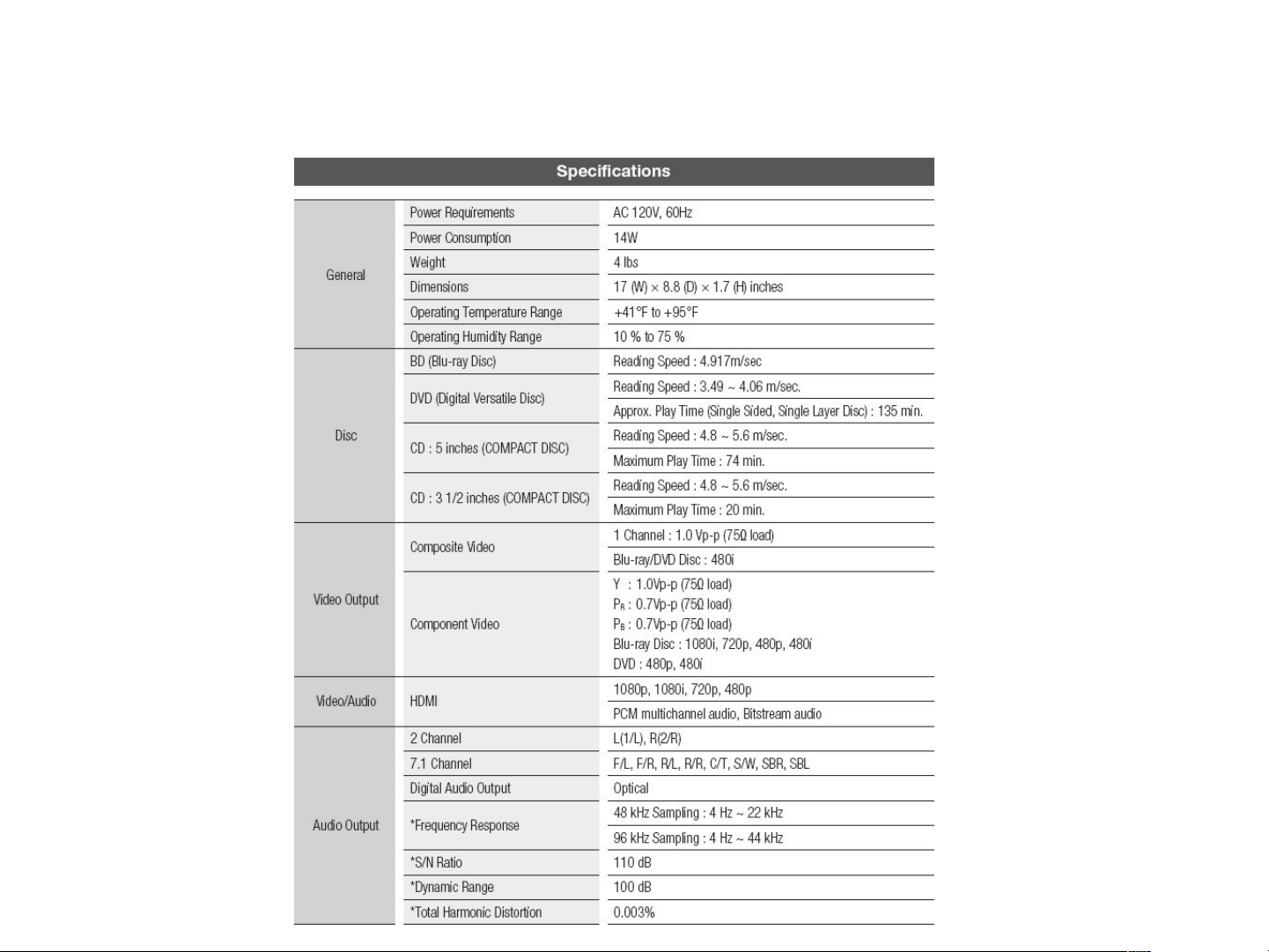
Specifications for BD-C6800
Page 82
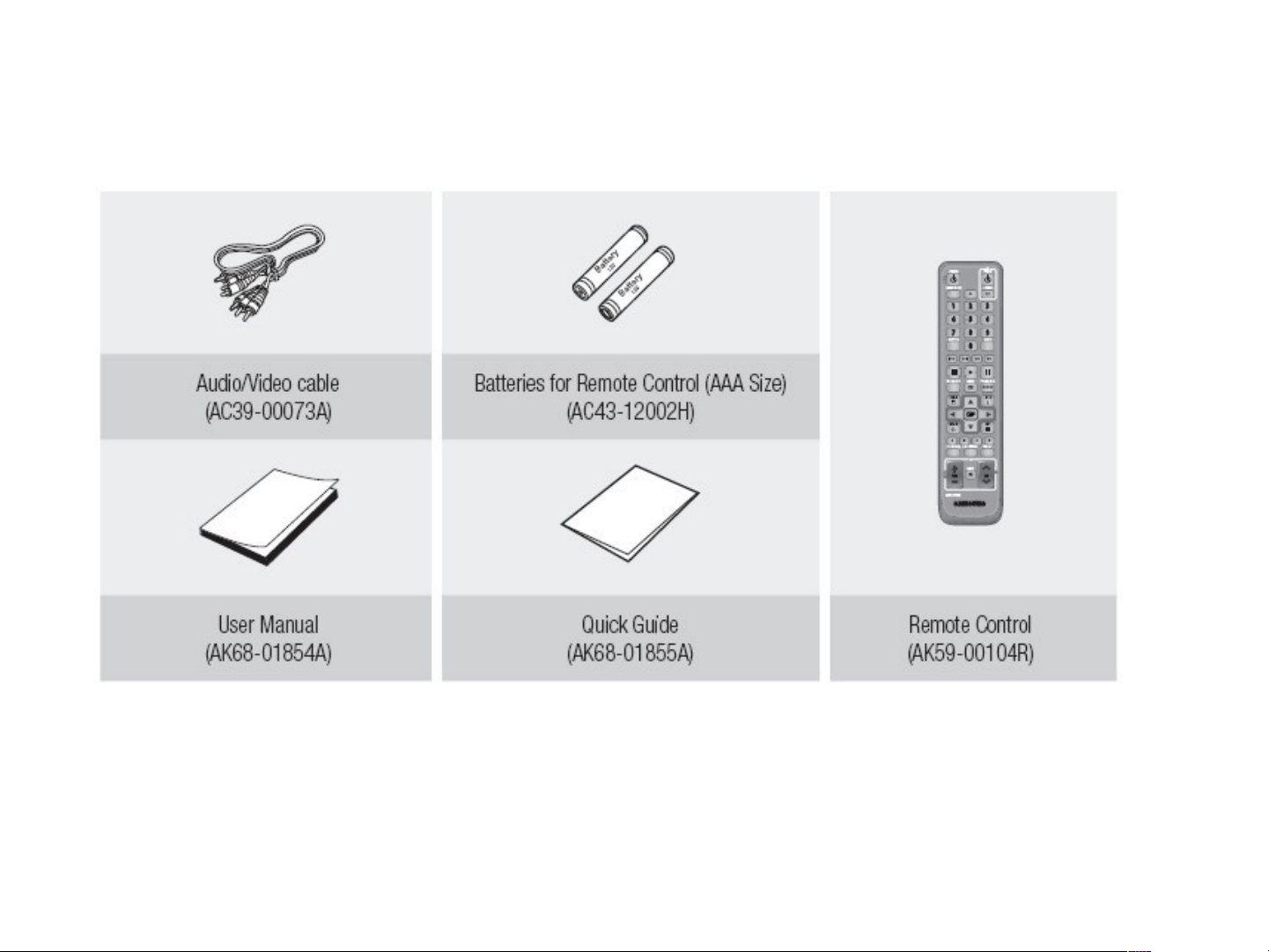
Accessories
HDMI or Component cable is not provided with the Unit.
Page 83
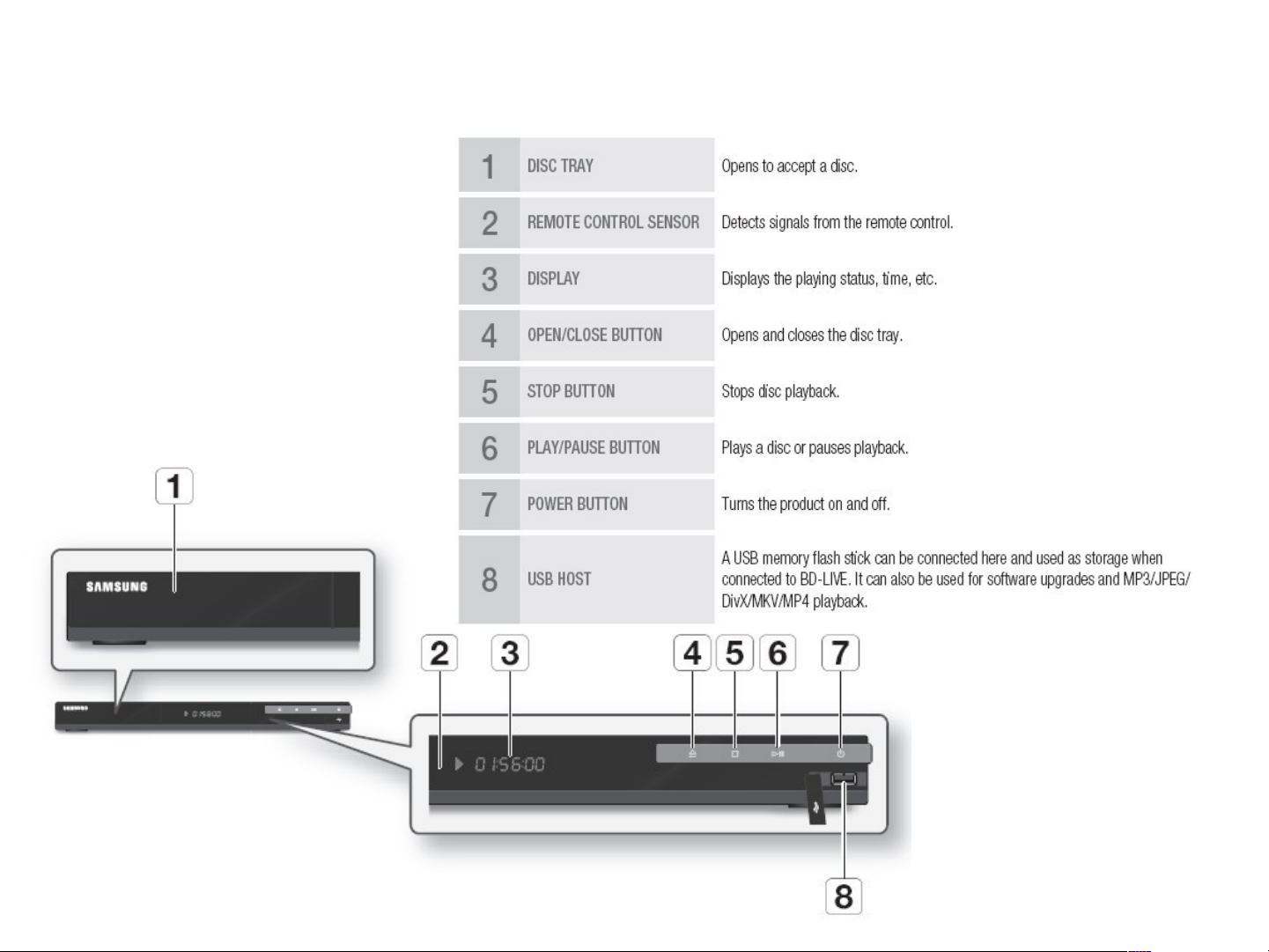
Front Panel for BD-C5900
Page 84
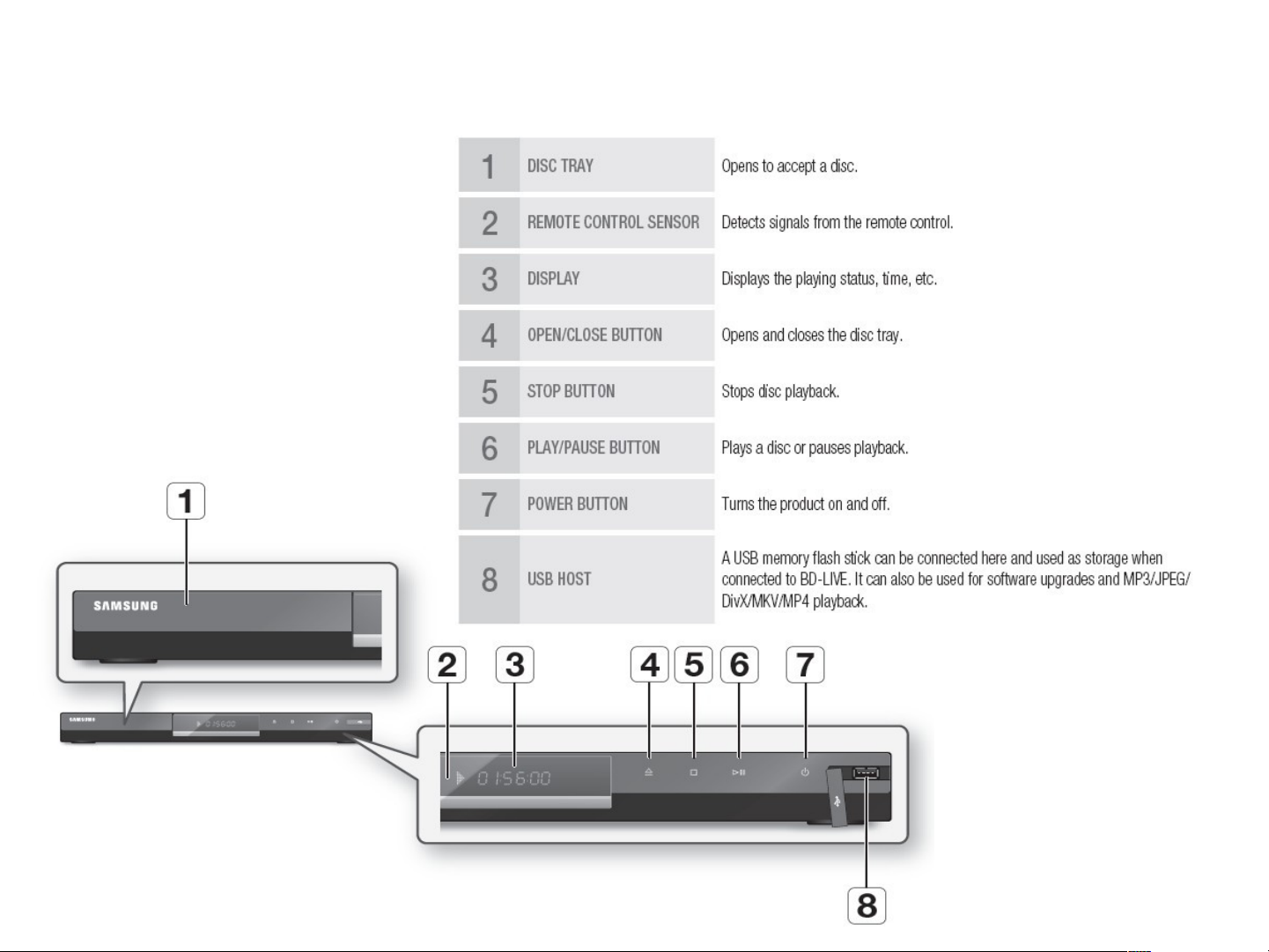
Front Panel for BD-C6800
Page 85
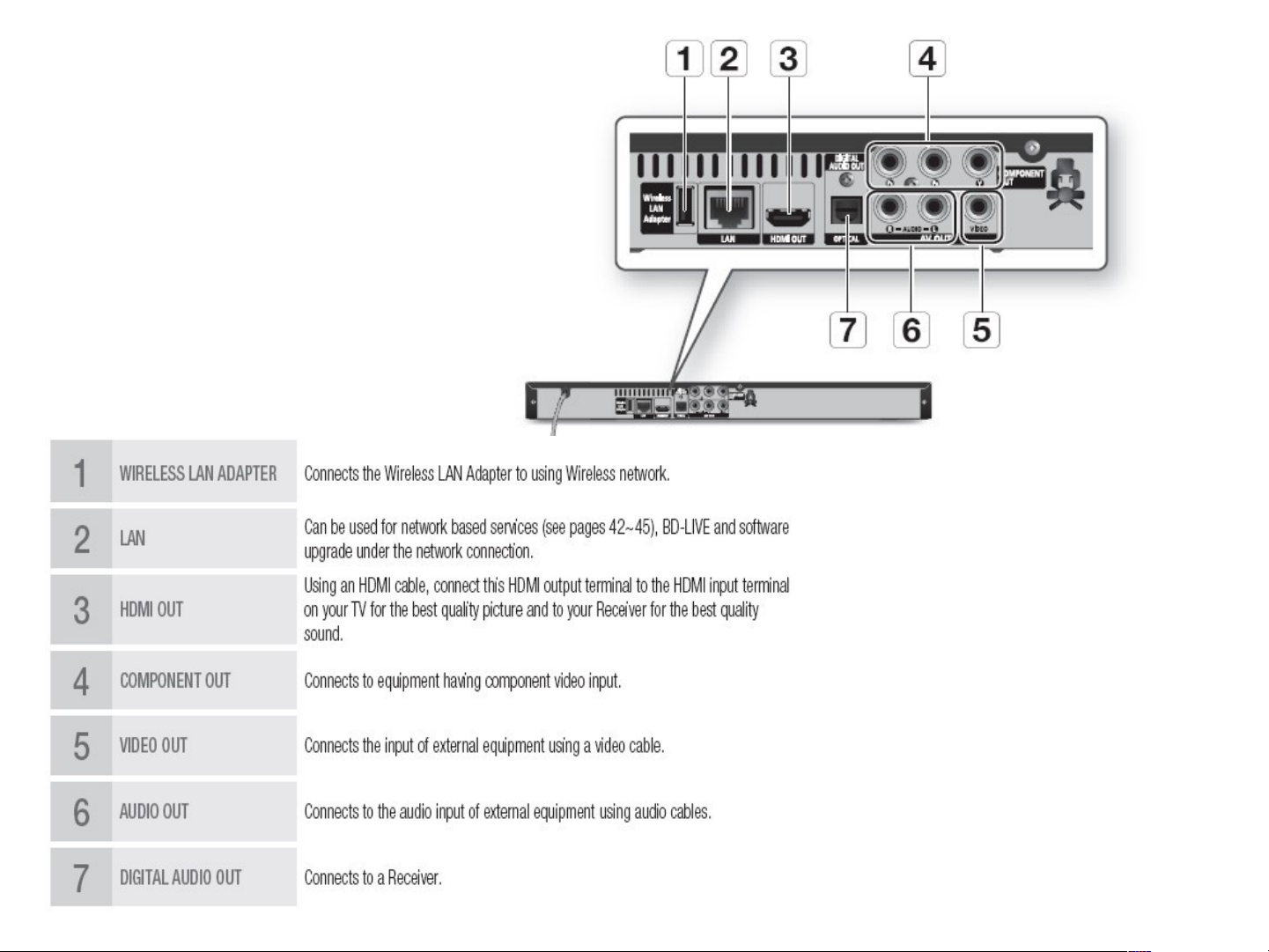
Rear
Panel for
BD-C5900
Page 86
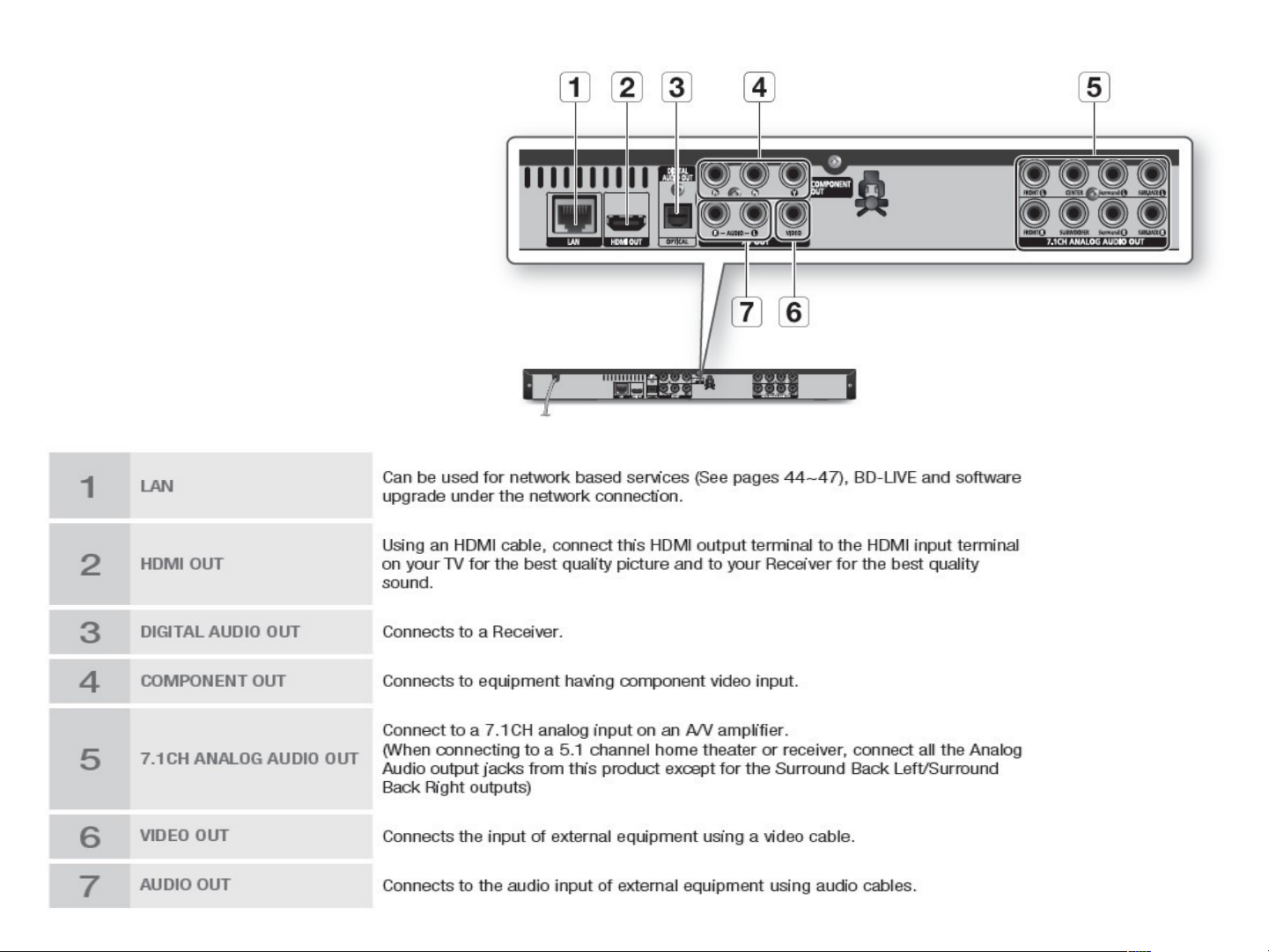
Rear
Panel for
BD-C6800
Page 87
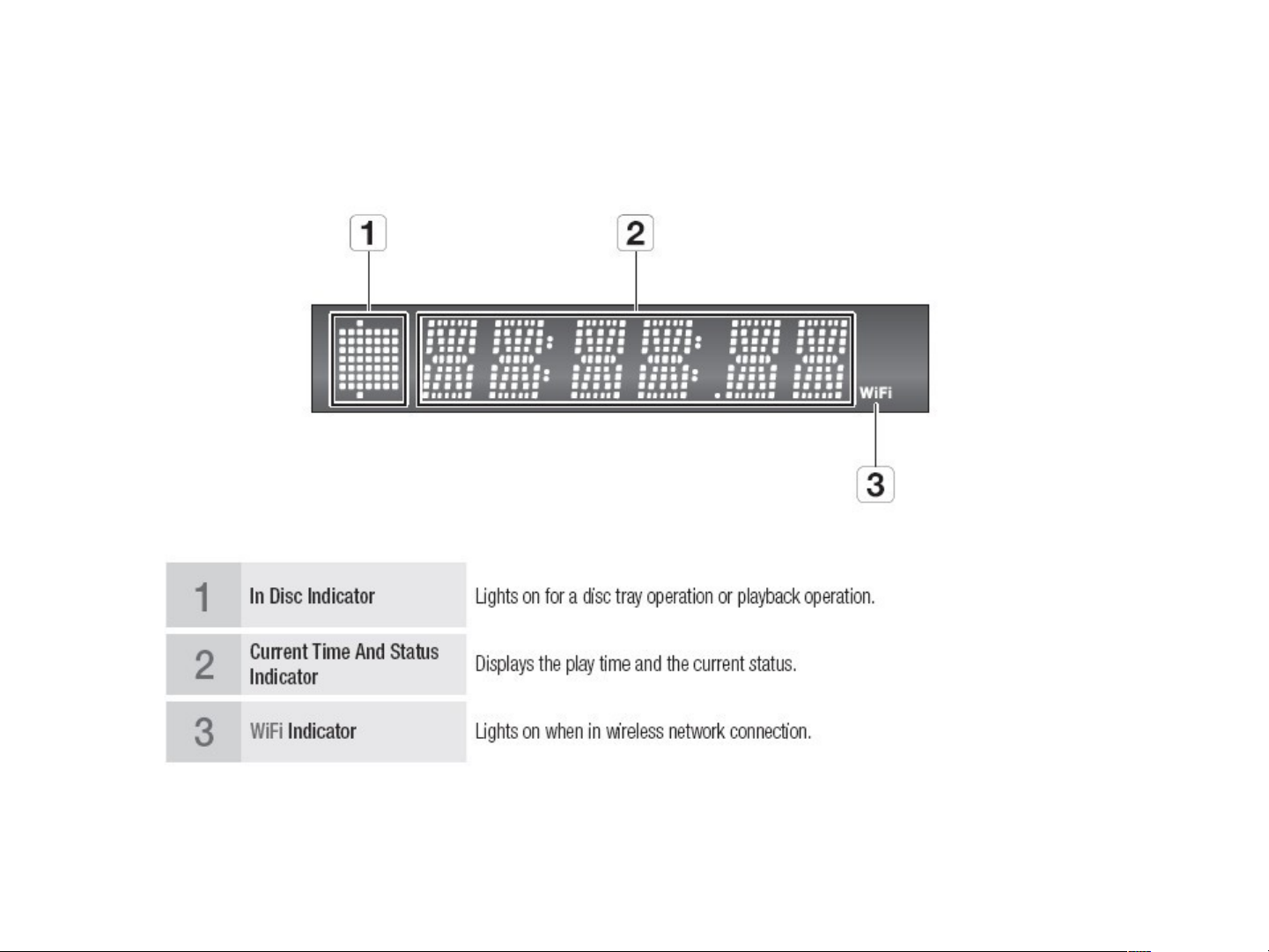
Front Panel Display
Page 88
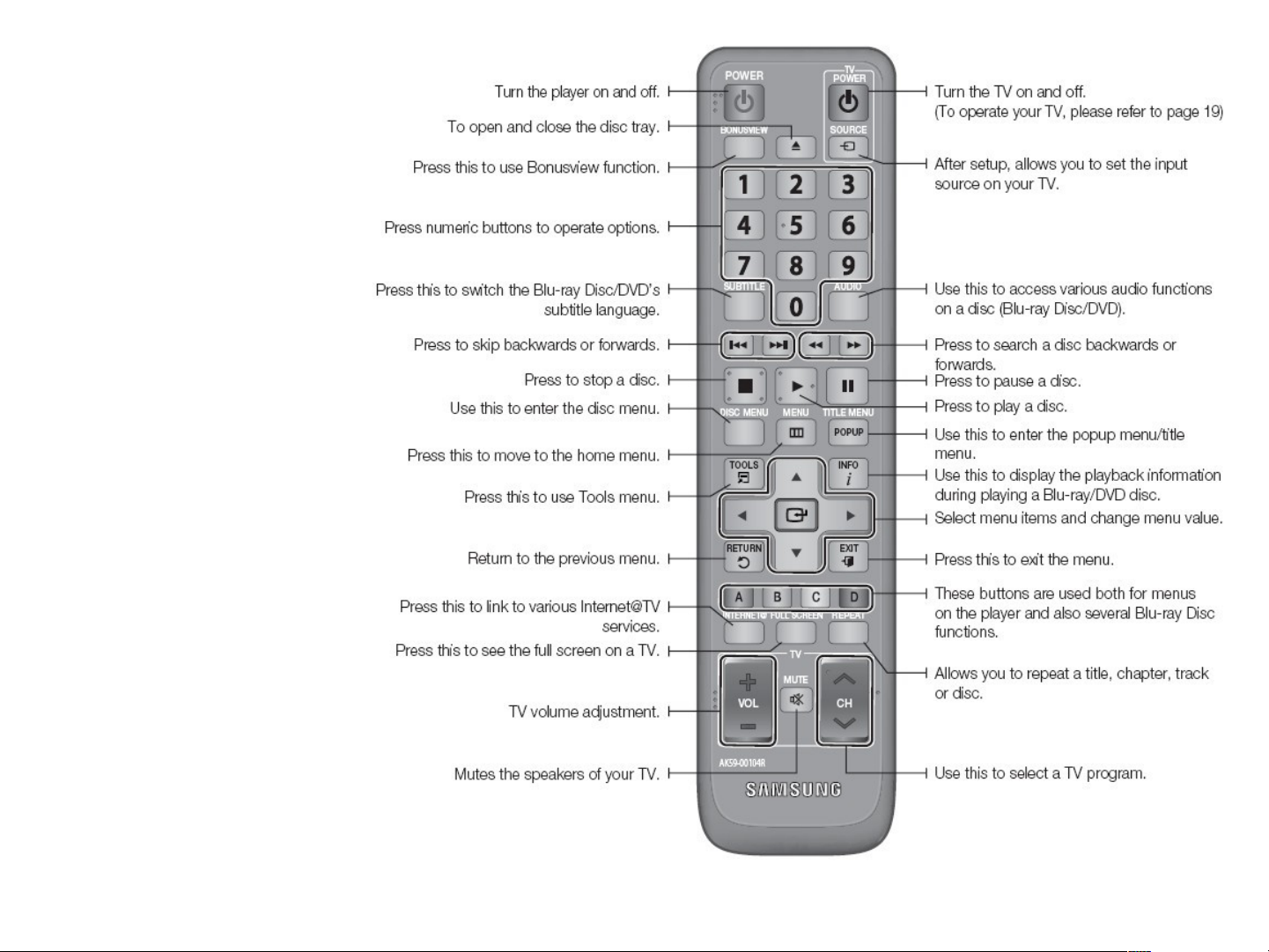
Remote
Control
Page 89

Contents
•
Reference Information
Blu-ray Disc
AACS
•
Product Information
•
Circuit Description
•
Disassembly & Reassembly
•
Troubleshooting & adjustment
Page 90
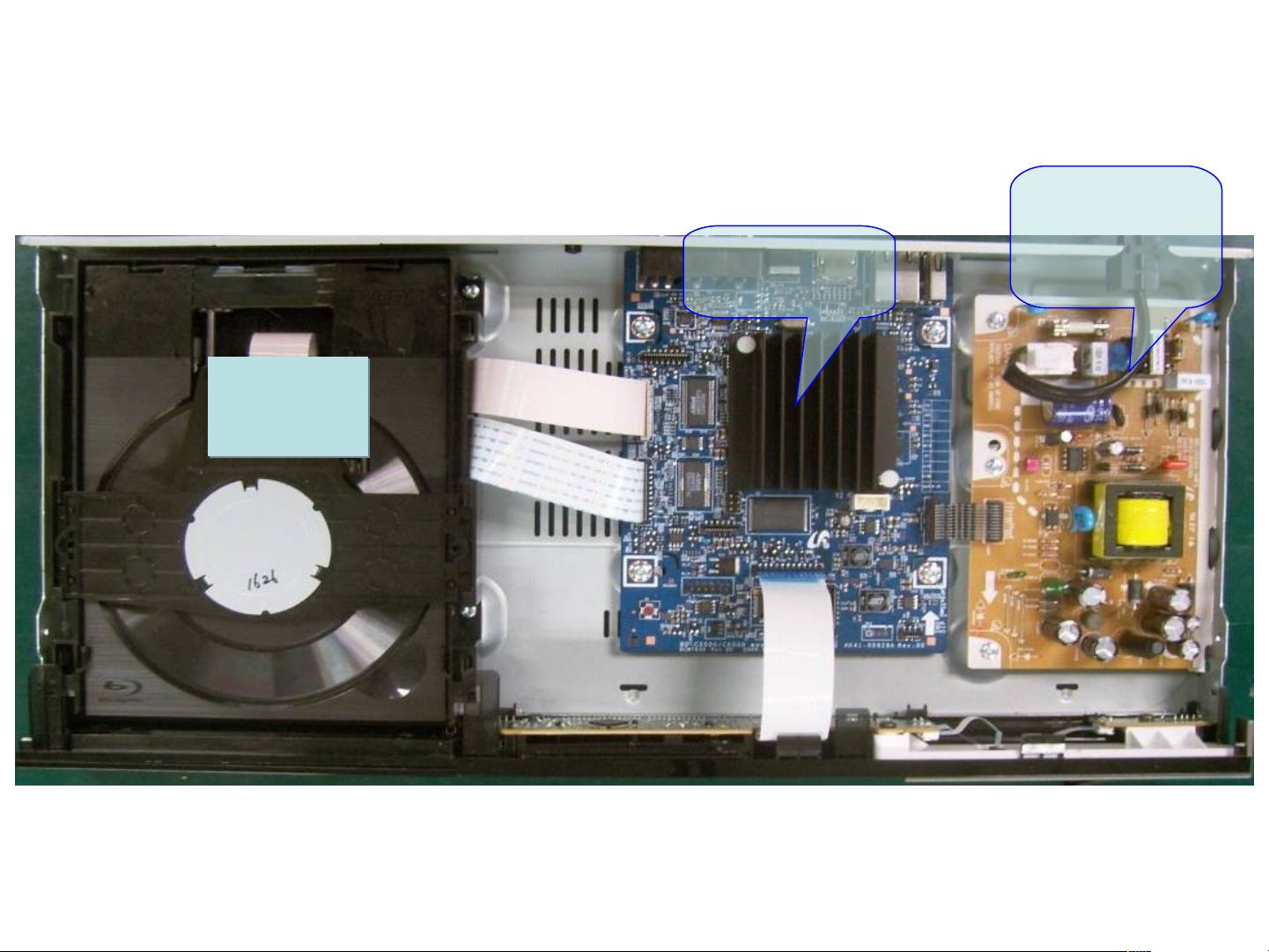
Set Inside : BD-C5900
Loader
Loader
SMPS
Main
Board
You should update the Firmware if you replaced the Main Board or Loader
Page 91
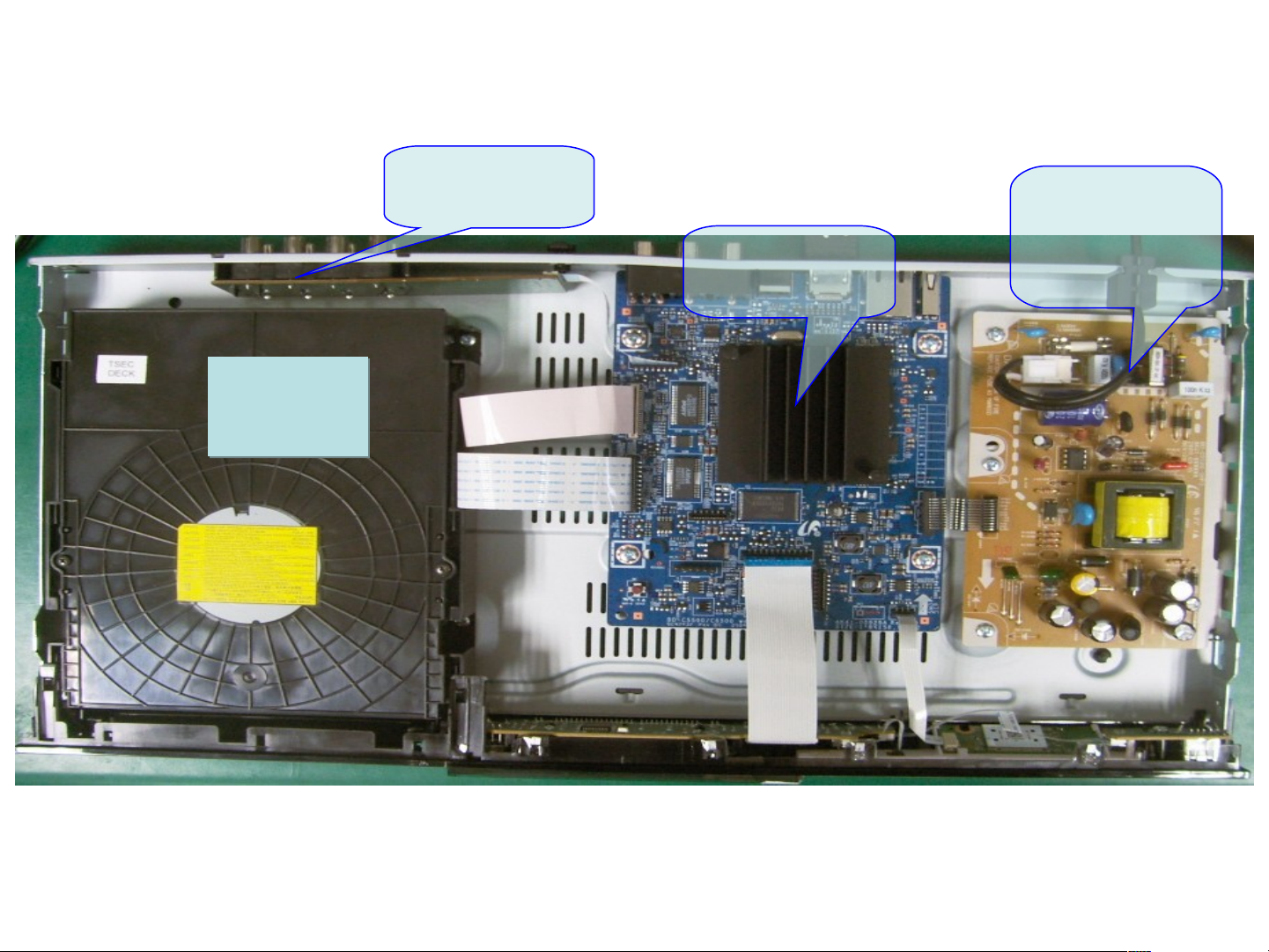
Set Inside : BD-C6800
7.1ch
Board
Loader
Loader
SMPS
Main
Board
You should update the Firmware if you replaced the Main Board or Loader
Page 92
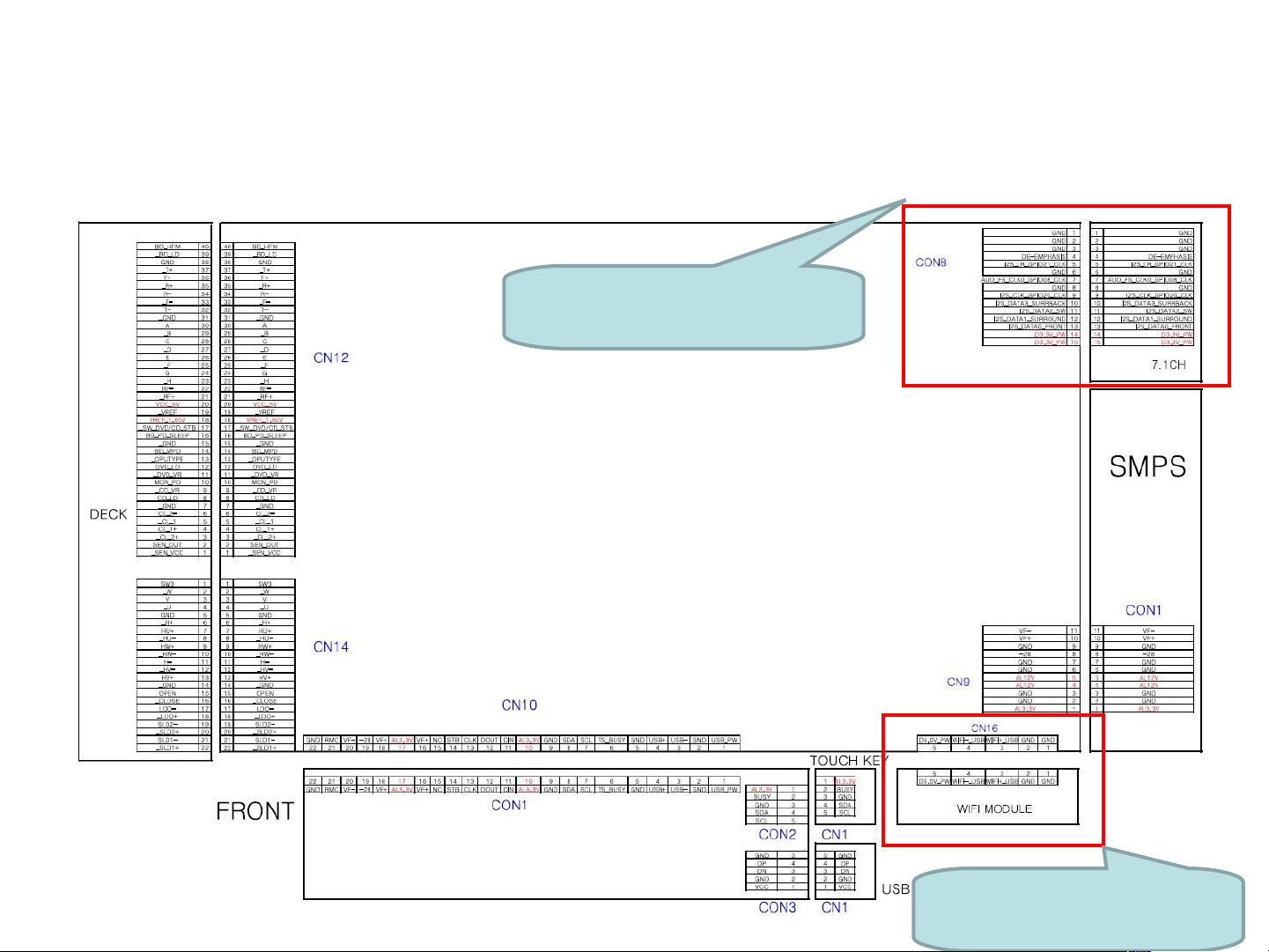
Wiring Diagram for BD-C5900/C6800
7.1ch Audio is Only for
BD-C6800
WiFi is Only for BD-
C6800
Page 93
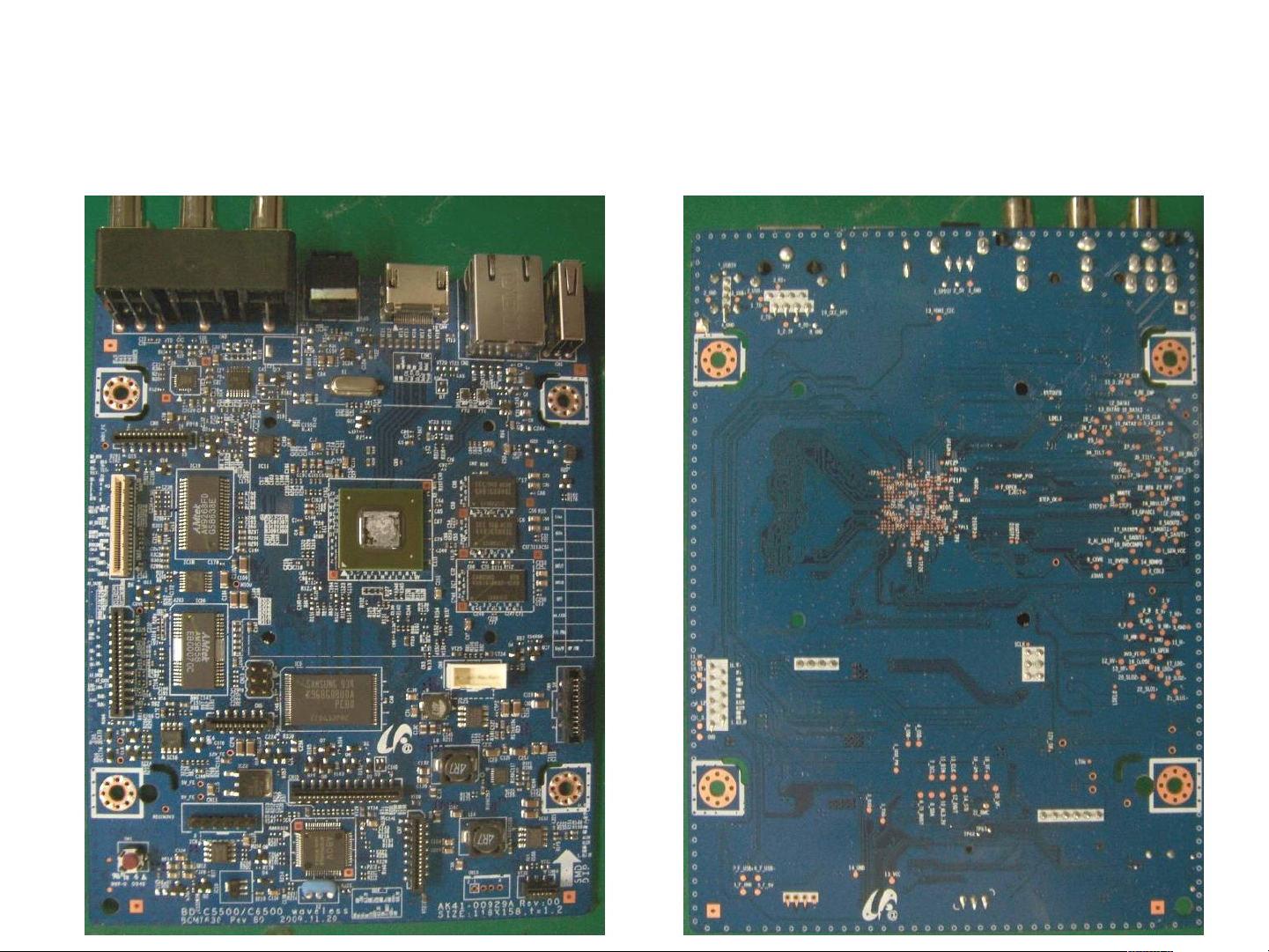
Main Board : BD-C5900, C6800
Component Side
HDMI
Transmitter
Audio DAC
NAND
Video Amp
Bottom Side
Main CPU
Video
Decoder
BCM7440
DDR2 Memory
Motor Driveer
Buzzer
SDRAM
DDR2 Memory
Front-end DSP
Front u-
Controller
Page 94
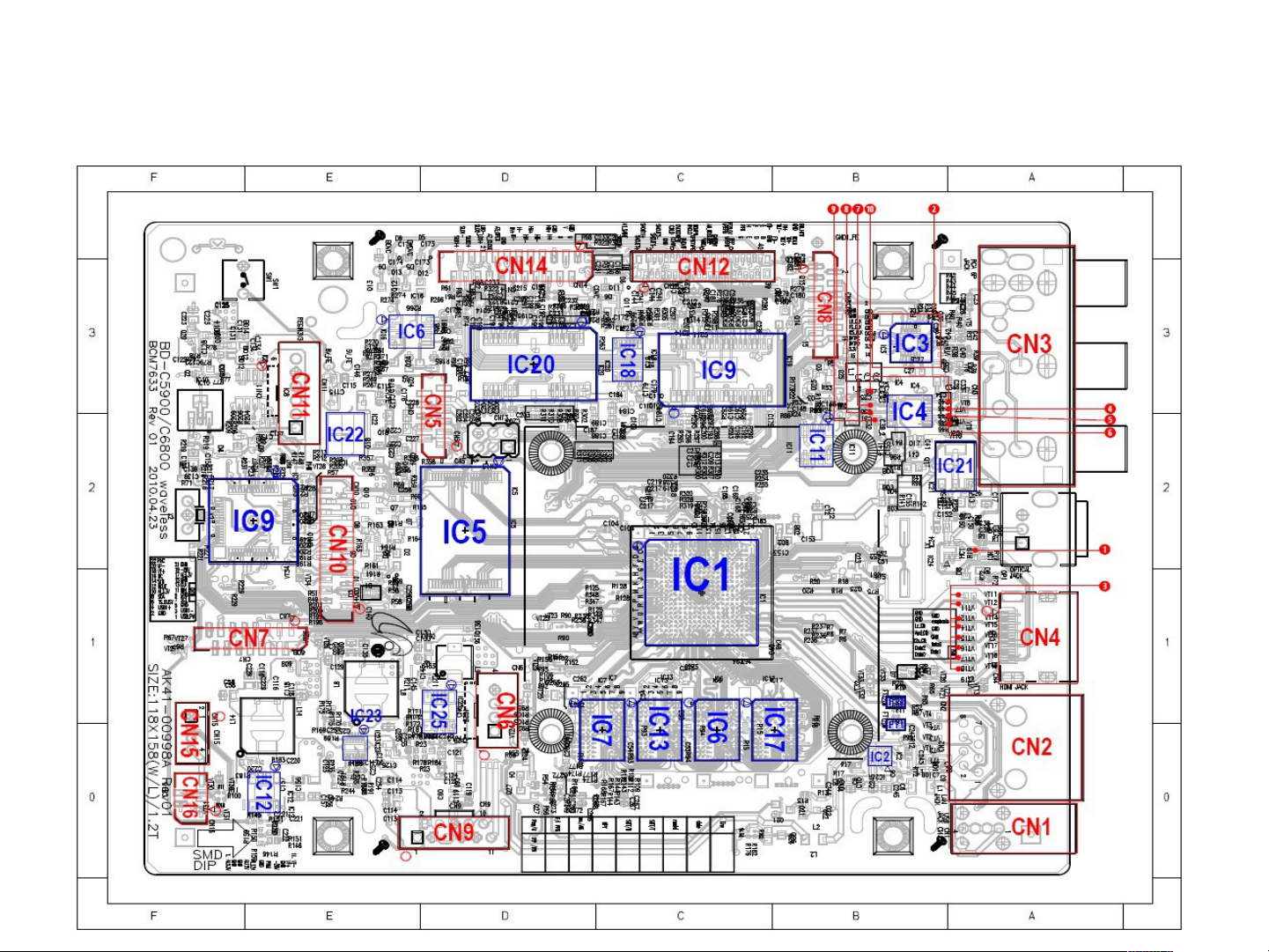
Main PCB : BD-C5900, C6800
Component side
Page 95
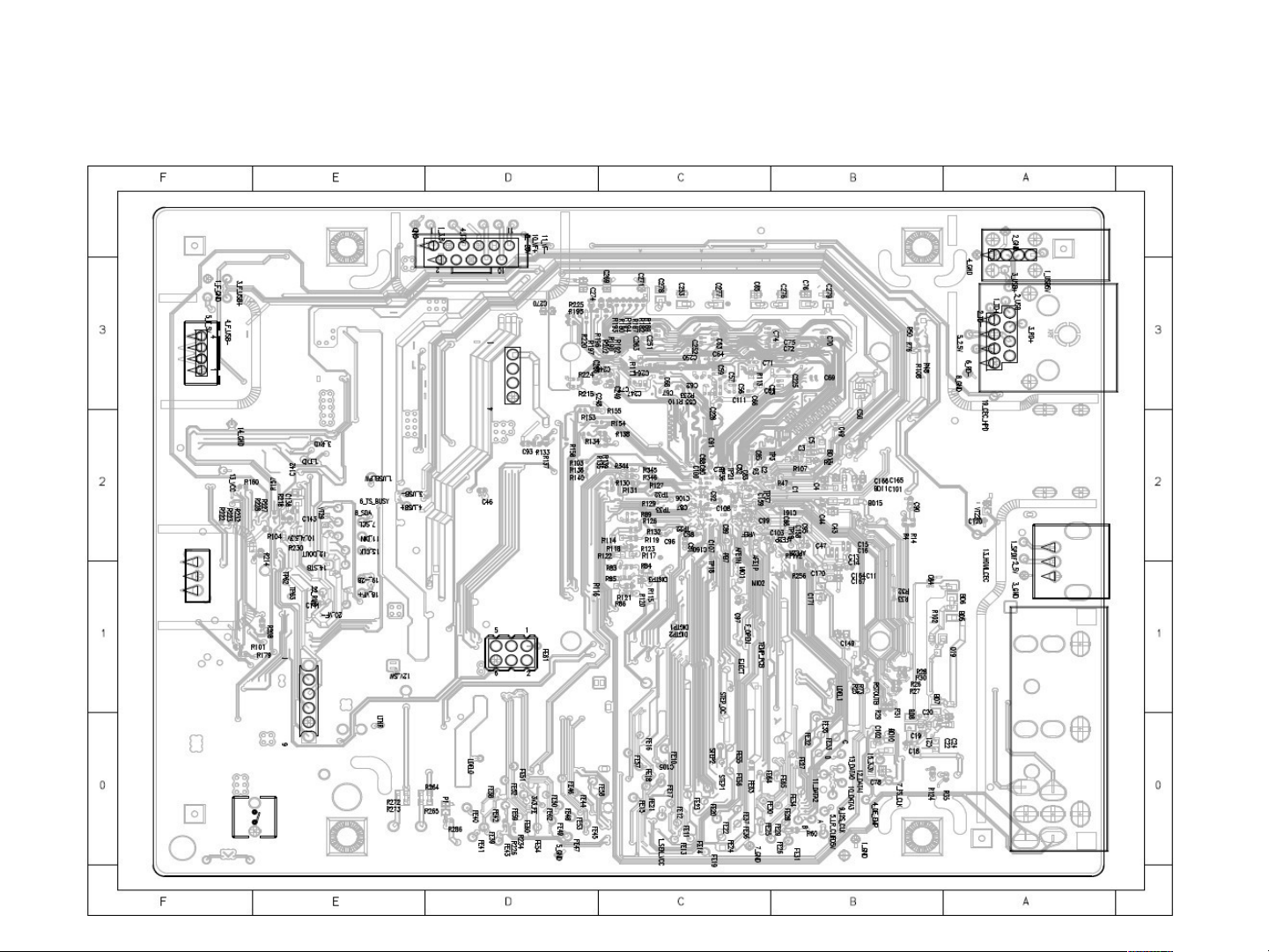
Main PCB : BD-C5900, C6800
Conductor side
Page 96
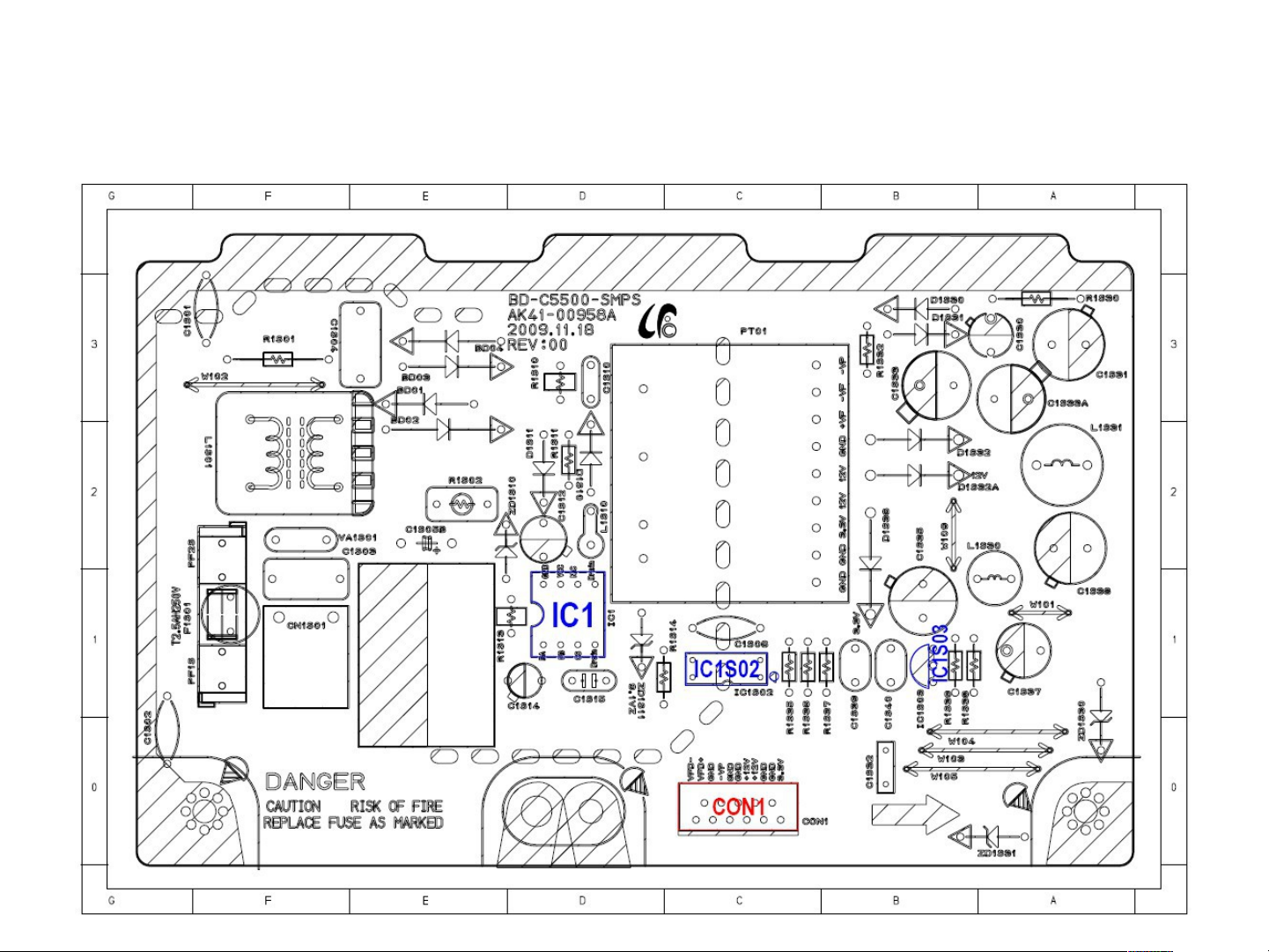
S.M.P.S PCB(BD-C5900/C6800)
Component side
Page 97
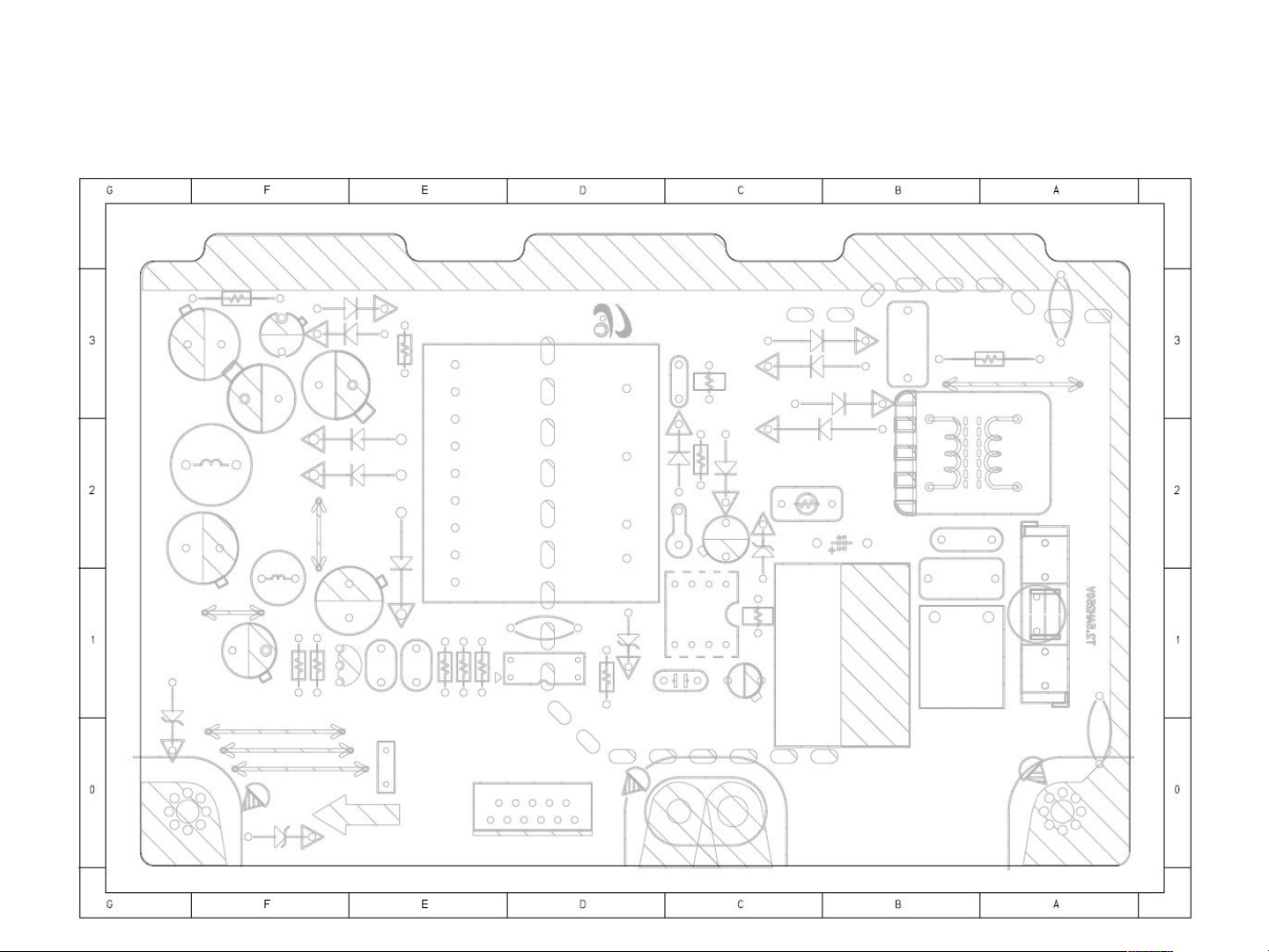
S.M.P.S PCB(BD-C5900/C6800)
Conductor side
Page 98
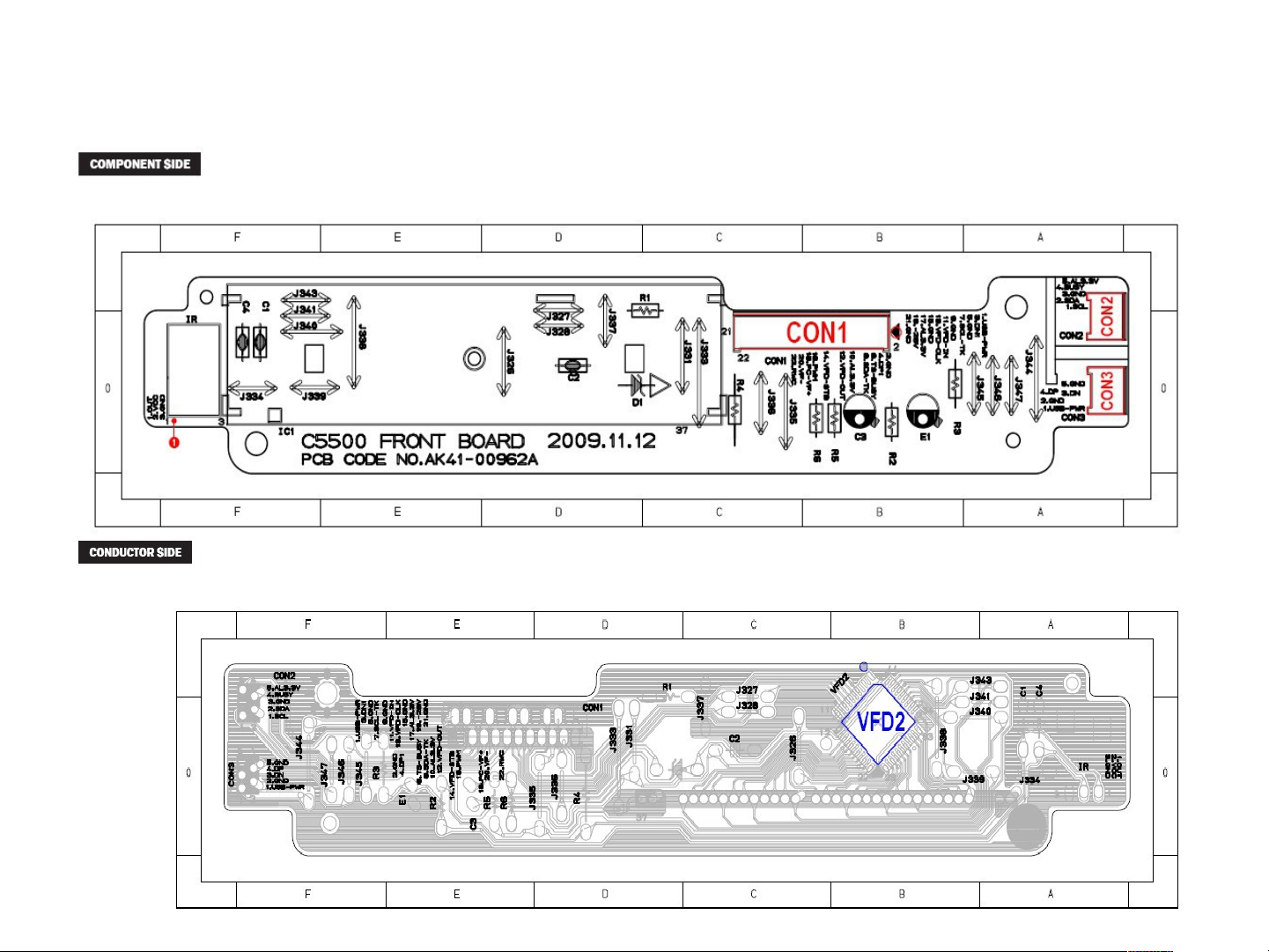
Front key PCB : BD-C5900
Page 99
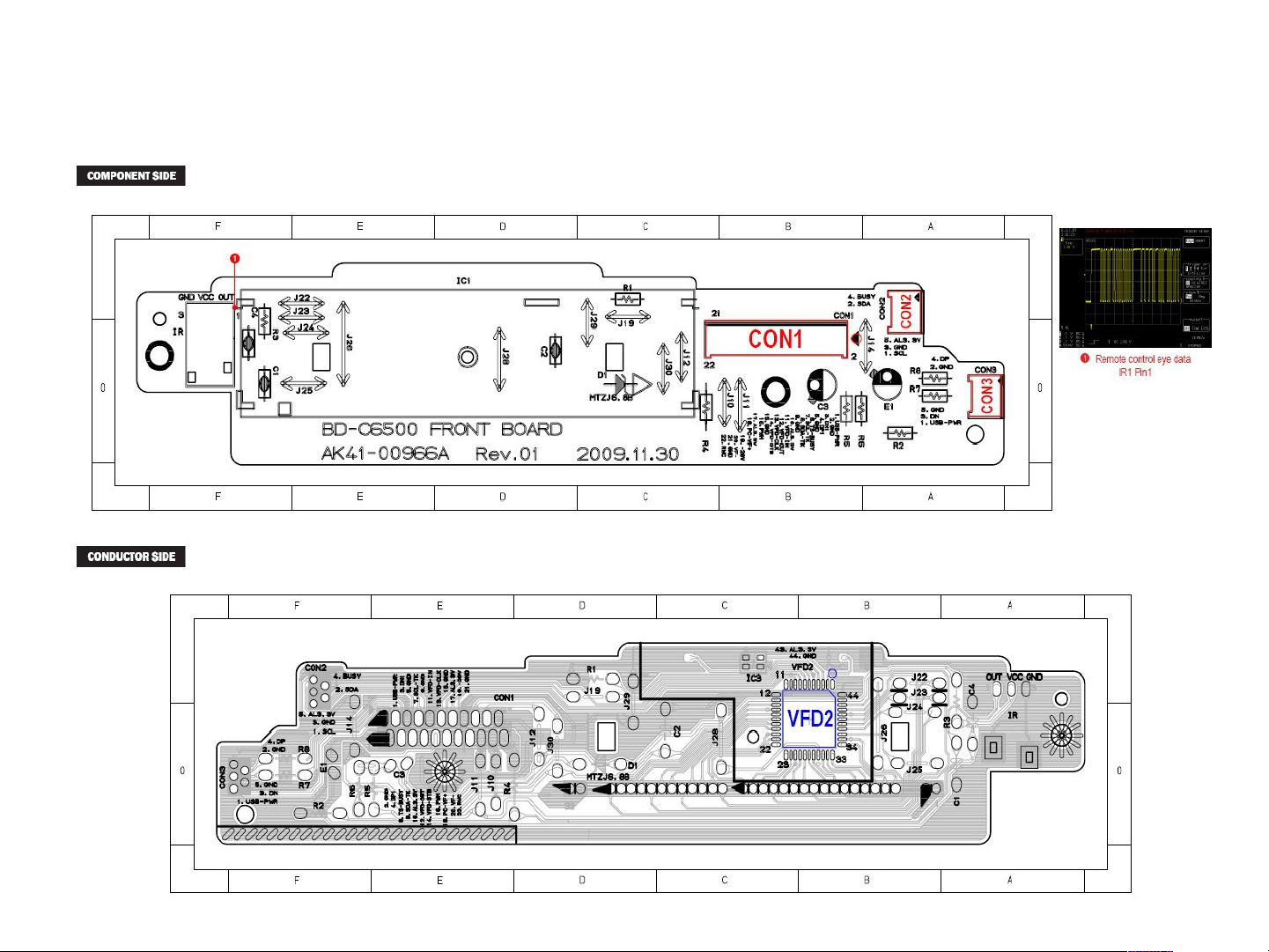
Front key PCB : BD-C6800
Page 100
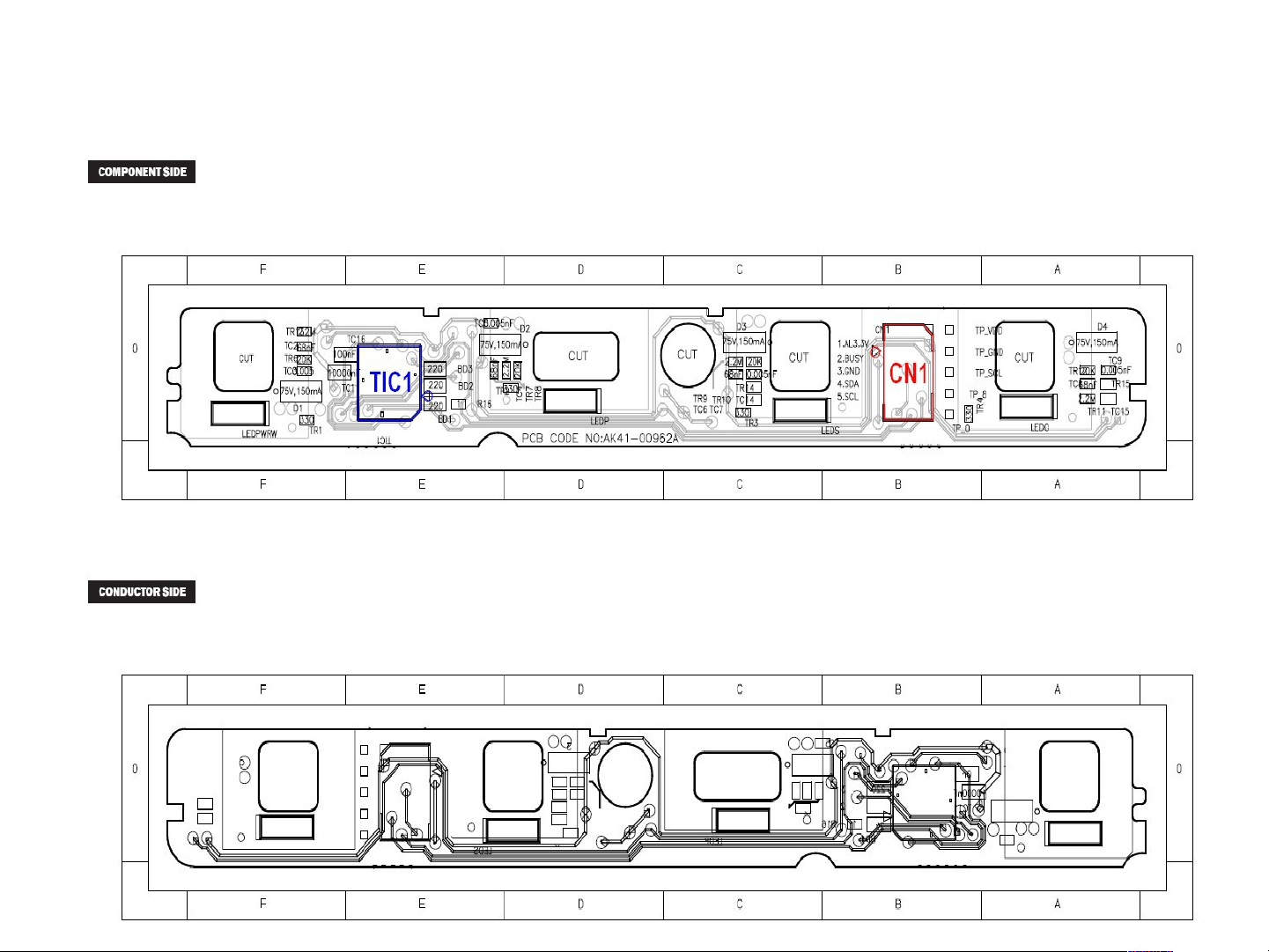
Touch key PCB(BDC5900/C6800)
 Loading...