

Page 1

Air conditioner
User manual
ARKSPD
• Thank you for purchasing this Samsung air conditioner.
• Before operating this unit, please read this user manual carefully and retain it for future reference.
QUESTIONS OR COMMENTS?
COUNTRY CALL OR VISIT US ONLINE AT
UK 0330 SAMSUNG (7267864) www.samsung.com/uk/support
EIRE 0818 717100 www.samsung.com/ie/support
GERMANY
0180 6 SAMSUNG bzw.
0180 6 7267864*
(*0,20 €/Anruf aus dem dt. Festnetz, aus dem Mobilfunk
max. 0,60 €/Anruf)
[HHP] 0180 6 M SAMSUNG bzw.
0180 6 67267864*
(*0,20 €/Anruf aus dem dt. Festnetz, aus dem Mobilfunk
max. 0,60 €/Anruf)
www.samsung.com/de/support
FRANCE 01 48 63 00 00 www.samsung.com/fr/support
ITALIA 800-SAMSUNG (800.7267864) www.samsung.com/it/support
SPAIN
0034902172678
[HHP] 0034902167267
www.samsung.com/es/support
PORTUGAL 808 20 7267 www.samsung.com/pt/support
LUXEMBURG 261 03 710 www.samsung.com/be_fr/support
NETHERLANDS 0900-SAMSUNG (0900-7267864) (€ 0,10/Min) www.samsung.com/nl/support
BELGIUM 02-201-24-18
www.samsung.com/be/support (Dutch)
www.samsung.com/be_fr/support (French)
NORWAY 815 56480 www.samsung.com/no/support
DENMARK 70 70 19 70 www.samsung.com/dk/support
FINLAND 030-6227 515 www.samsung.com/fi/support
SWEDEN 0771 726 7864 (0771-SAMSUNG) www.samsung.com/se/support
POLAND
801-172-678* lub +48 22 607-93-33*
Dedykowana infolinia do obsługi zapytań dotyczących
telefonów komórkowych: 801-672-678* lub +48 22 607-
93-33*
* (koszt połączenia według taryfy operatora)
www.samsung.com/pl/support
HUNGARY
0680SAMSUNG (0680-726-786)
0680PREMIUM (0680-773-648)
www.samsung.com/hu/support
AUSTRIA
0800-SAMSUNG (0800-7267864)
[Only for Premium HA] 0800-366661
[Only for Dealers] 0810-112233
www.samsung.com/at/support
SWITZERLAND 0800 726 78 64 (0800-SAMSUNG)
www.samsung.com/ch/support (German)
www.samsung.com/ch_fr/support (French)
CZECH
800 - SAMSUNG
(800-726786)
www.samsung.com/cz/support
SLOVAKIA
0800 - SAMSUNG
(0800-726 786)
www.samsung.com/sk/support
CROATIA 072 726 786 www.samsung.com/hr/support
BOSNIA 055 233 999 www.samsung.com/support
MONTENEGRO 020 405 888 www.samsung.com/support
SLOVENIA 080 697 267 (brezplačna številka) www.samsung.com/si
SERBIA 011 321 6899 www.samsung.com/rs/support
BULGARIA
*3000 Цена в мрежата
0800 111 31 , Безплатна телефонна линия
www.samsung.com/bg/support
ROMANIA
*8000 (apel in retea)
08008-726-78-64 (08008-SAMSUNG) Apel GRATUIT
www.samsung.com/ro/support
CYPRUS 8009 4000 only from landline, toll free
www.samsung.com/gr/support
GREECE
80111-SAMSUNG (80111 726 7864) only from land line
(+30) 210 6897691 from mobile and land line
LITHUANIA 8-800-77777 www.samsung.com/lt/support
LATVIA 8000-7267 www.samsung.com/lv/support
ESTONIA 800-7267 www.samsung.com/ee/support
AR7000K EU Better_IB_DB68-06101A-00_EN_A5.indd 32 2016/4/7 14:08:33
Page 2
Air conditioner
User manual
ARKSPD
• Thank you for purchasing this Samsung air conditioner.
• Before operating this unit, please read this user manual carefully and retain it for future reference.
AR7000K EU Better_IB_DB68-06101A-00_EN_A5.indd 1 2016/4/7 14:08:33
Page 3
2
English
Contents
Safety Information 4
Safety Information 4
At a Glance 12
Indoor Unit Overview 12
Display
Remote Control Overview 13
Inserting batteries
Remote Control Operation 14
Operation modes
Controlling temperature
Controlling fan speed
Controlling air flow direction
Power Smart Features 16
Cooling Operation 16
Cool mode
2-Step cooling function
Dehumidifying Operation 17
Dry mode
Air Purifying Operation 17
Virus doctor function
Heating Operation 18
Heat mode
Quick Smart Features 19
Auto mode
Fan mode
Fast function
Comfort function
Beep sound function
Quiet function
Display lighting function
Wi-Fi function (Smart A/C application)
AR7000K EU Better_IB_DB68-06101A-00_EN_A5.indd 2 2016/4/7 14:08:33
Page 4

3
English
Energy-Saving Features 23
Energy-Saving Operation 23
Electricity consumption check
Single user function
Timed on/Timed off function
good’sleep function
Cleaning and Maintenance 27
Cleaning at a Glance 27
Troubleshooting 29
Correct Disposal of This Product
(Waste Electrical & Electronic Equipment)
(Applicable in countries with separate collection systems)
This marking on the product, accessories or literature indicates that the product and its electronic accessories (e.g.
charger, headset, USB cable) should not be disposed of with other household waste at the end of their working
life. To prevent possible harm to the environment or human health from uncontrolled waste disposal, please
separate these items from other types of waste and recycle them responsibly to promote the sustainable reuse of
material resources.
Household users should contact either the retailer where they purchased this product, or their local government
office, for details of where and how they can take these items for environmentally safe recycling.
Business users should contact their supplier and check the terms and conditions of the purchase contract. This
product and its electronic accessories should not be mixed with other commercial wastes for disposal.
Correct disposal of batteries in this product
(Applicable in countries with separate collection systems)
This marking on the battery, manual or packaging indicates that the batteries in this product should not be
disposed of with other household waste at the end of their working life. Where marked, the chemical symbols Hg,
Cd or Pb indicate that the battery contains mercury, cadmium or lead above the reference levels in EC Directive
2006/66. If batteries are not properly disposed of, these substances can cause harm to human health or the
environment.
To protect natural resources and to promote material reuse, please separate batteries from other types of waste
and recycle them through your local, free battery return system.
For information on Samsung’s environmental commitments and product specific regulatory obligations e.g.
REACH visit: samsung.com/uk/aboutsamsung/samsungelectronics/corporatecitizenship/data_corner.html
AR7000K EU Better_IB_DB68-06101A-00_EN_A5.indd 3 2016/4/7 14:08:33
Page 5

4
English
Safety InformationSafety Information
Safety Information
Before using your new air conditioner, please read this manual
thoroughly to ensure that you know how to safely and efficiently
operate the extensive features and functions of your new appliance.
Because the following operating instructions cover various models,
the characteristics of your air conditioner may differ slightly from
those described in this manual. If you have any questions, call your
nearest contact centre or find help and information online at www.
samsung.com.
WARNING
Hazards or unsafe practices that may result in severe personal
injury or death.
CAUTION
Hazards or unsafe practices that may result in minor personal
injury or property damage.
Follow directions. Do NOT attempt.
Make sure the machine is grounded to prevent electric shock.
Cut off the power supply. Do NOT disassemble.
FOR INSTALLATION
WARNING
Use a power cord with this product's power specifications
or higher and use the power cord for this appliance only. In
addition, do not use an extension cord.
• Extending the power cord may result in electric shock or fire.
• Do not use an electric transformer. This may result in electric
shock or fire.
Safety Information
AR7000K EU Better_IB_DB68-06101A-00_EN_A5.indd 4 2016/4/7 14:08:34
Page 6
5
English
Safety InformationSafety Information
• If the voltage/frequency/rated current condition is different,
it may cause fire.
The installation of this appliance must be performed by a
qualified technician or service company.
• Failing to do so may result in electric shock, fire, explosion,
problems with the product, or injury and may also void
warranty on the installed product.
Install an Isolation Switch next to the Air Conditioner (but
not on the panels of the Air Conditioner) and circuit breaker
dedicated to the air conditioner.
• Failing to do so may result in electric shock or fire.
Fix the outdoor unit firmly so that the electric part of the
outdoor unit is not exposed.
• Failing to do so may result in electric shock, fire, explosion,
or problems with the product.
Do not install this appliance near a heater, or inflammable material.
Do not install this appliance in a humid, oily or dusty location, in
a location exposed to direct sunlight and water (or rain). Do not
install this appliance in a location where gas may leak.
• This may result in electric shock or fire.
Never install the outdoor unit in a location such as on a high
external wall where it could fall.
• If the outdoor unit falls, it may result in injury, death or
property damage.
This appliance must be properly grounded. Do not ground the
appliance to a gas pipe, plastic water pipe, or telephone line.
• Failing to do so may result in electric shock, fire, and
explosion.
• Make sure to use a socket-outlet with ground.
AR7000K EU Better_IB_DB68-06101A-00_EN_A5.indd 5 2016/4/7 14:08:34
Page 7
6 English
Safety InformationSafety Information
CAUTION
Please cover the air conditioner with PE BAG after installation,
and remove it when you start to run air conditioner.
Install your appliance on a level and hard floor that can
support its weight.
• Failing to do so may result in abnormal vibrations, noise, or
problems with the product.
Install the drain hose properly so that water drains correctly.
• Failing to do so may result in water overflowing and
property damage. Avoid adding drain to waste pipes as
odours may arise in the future.
When installing the outdoor unit, make sure to connect the
drain hose so that draining is performed correctly.
• The water generated during heating by the outdoor unit may
overflow and result in property damage.
In particular, in winter, if a block of ice falls, it may result in
injury, death or property damage.
FOR POWER SUPPLY
WARNING
When the circuit breaker is damaged, contact your nearest
service centre.
Do not pull or excessively bend the power line. Do not twist
or tie the power line. Do not hook the power line over a metal
object, place a heavy object on the power line, insert the
power line between objects, or push the power line into the
space behind the appliance.
• This may result in electric shock or fire.
AR7000K EU Better_IB_DB68-06101A-00_EN_A5.indd 6 2016/4/7 14:08:34
Page 8

7English
Safety InformationSafety Information
CAUTION
When not using the air conditioner for a long period of time or
during a thunder/lightning storm, cut the power at the circuit
breaker.
• Failing to do so may result in electric shock or fire.
FOR USING
WARNING
If the appliance is flooded, please contact your nearest service
centre.
• Failing to do so may result in electric shock or fire.
If the appliance generates a strange noise, a burning smell or
smoke, cut off the power supply immediately and contact the
nearest service centre.
• Failing to do so may result in electric shock or fire.
In the event of a gas leak (such as propane gas, LP gas, etc.),
ventilate immediately without touching the power line. Do not
touch the appliance or power line.
• Do not use a ventilating fan.
• A spark may result in an explosion or fire.
To reinstall the air conditioner, please contact your nearest
service centre.
• Failing to do so may result in problems with the product,
water leakage, electric shock, or fire.
• Delivery service for the product is not provided. If you
reinstall the product in another location, additional
construction expenses and an installation fee will be charged.
AR7000K EU Better_IB_DB68-06101A-00_EN_A5.indd 7 2016/4/7 14:08:34
Page 9

8 English
Safety InformationSafety Information
• Especially, when you wish to install the product in an
unusual location such as in an industrial area or near the
seaside where it is exposed to salt in the air, please contact
your nearest service centre.
Do not touch the circuit breaker with wet hands.
• This may result in electric shock.
Do not turn the air conditioner off with the circuit breaker
while it is operating.
• Turning the air conditioner off and then on again with the
circuit breaker may cause a spark and result in electric shock
or fire.
After unpacking the air conditioner, keep all packaging
materials well out of the reach of children, as packaging
materials can be dangerous to children.
• If a child places a bag over its head, it may result in
suffocation.
Do not touch the air flow blade with your hands or fingers
during heating.
• This may result in electric shock or burns.
Do not insert your fingers or foreign substances into the air
inlet/outlet of the air conditioner.
• Take special care that children do not injure themselves by
inserting their fingers into the product.
Do not strike or pull the air conditioner with excessive force.
• This may result in fire, injury, or problems with the product.
Do not place an object near the outdoor unit that allows
children to climb onto the machine.
• This may result in children seriously injuring themselves.
AR7000K EU Better_IB_DB68-06101A-00_EN_A5.indd 8 2016/4/7 14:08:34
Page 10
9English
Safety InformationSafety Information
Do not use this air conditioner for long periods of time in badly
ventilated locations or near infirm people.
• Since this may be dangerous due to a lack of oxygen, open a
window at least once an hour.
If any foreign substance such as water has entered the
appliance, cut off the power supply and contact the nearest
service centre.
• Failing to do so may result in electric shock or fire.
Do not attempt to repair, disassemble, or modify the appliance
yourself.
• Do not use any fuse (such as cooper, steel wire, etc.) other
than the standard fuse.
• Failing to do so may result in electric shock, fire, problems
with the product, or injury.
CAUTION
Do not place objects or devices under the indoor unit.
• Water dripping from the indoor unit may result in fire or
property damage.
Check that the installation frame of the outdoor unit is not
broken at least once a year.
• Failing to do so may result in injury, death or property
damage.
Max current is measured according to IEC standard for safety
and current is measured according to ISO standard for energy
efficiency.
Do not stand on top of the appliance or place objects (such as
laundry, lighted candles, lighted cigarettes, dishes, chemicals,
metal objects, etc.) on the appliance.
AR7000K EU Better_IB_DB68-06101A-00_EN_A5.indd 9 2016/4/7 14:08:35
Page 11
10 English
Safety InformationSafety Information
• This may result in electric shock, fire, problems with the
product, or injury.
Do not operate the appliance with wet hands.
• This may result in electric shock.
Do not spray volatile material such as insecticide onto the
surface of the appliance.
• As well as being harmful to humans, it may also result in
electric shock, fire or problems with the product.
Do not drink the water from the air conditioner.
• The water may be harmful to humans.
Do not apply a strong impact to the remote control and do not
disassemble the remote control.
Do not touch the pipes connected with the product.
• This may result in burns or injury.
Do not use this air conditioner to preserve precision
equipment, food, animals, plants or cosmetics, or for any other
unusual purposes.
• This may result in property damage.
Avoid directly exposing humans, animals or plants to the air
flow from the air conditioner for long periods of time.
• This may result in harm to humans, animals or plants.
This appliance is not intended for use by persons (including
children) with reduced physical, sensory or mental capabilities,
or lack of experience and knowledge, without supervision
or instruction concerning use of the appliance by a person
responsible for their safety. Children should be supervised to
ensure that they do not play with the appliance.
AR7000K EU Better_IB_DB68-06101A-00_EN_A5.indd 10 2016/4/7 14:08:35
Page 12
11English
Safety InformationSafety Information
For use in Europe : This appliance can be used by children aged
from 8 years and above and persons with reduced physical,
sensory or mental capabilities or lack of experience and
knowledge if they have been given supervision or instruction
concerning use of the appliance in a safe way and understand
the hazards involved. Children shall not play with the
appliance. Cleaning and user maintenance shall not be made by
children without supervision.
FOR CLEANING
WARNING
Do not clean the appliance by spraying water directly onto it.
Do not use benzene, thinner or alcohol to clean the appliance.
• This may result in discolouration, deformation, damage,
electric shock or fire.
Before cleaning or performing maintenance, cut off the power
supply and wait until the fan stops.
• Failing to do so may result in electric shock or fire.
CAUTION
Take care when cleaning the surface of the heat exchanger of
the outdoor unit since it has sharp edges.
• This should be done by a qualified technician. Please contact
your installer or service centre.
Do not clean the inside of the air conditioner by yourself.
• For cleaning inside the appliance, contact your nearest
service centre.
• When cleaning the filter, refer to the descriptions in the
‘Cleaning at a Glance’ section.
• Failing to do so may result in damage, electric shock or fire.
AR7000K EU Better_IB_DB68-06101A-00_EN_A5.indd 11 2016/4/7 14:08:35
Page 13
12 English
At a Glance
08
07
03
04
10
09
01
02
05
06
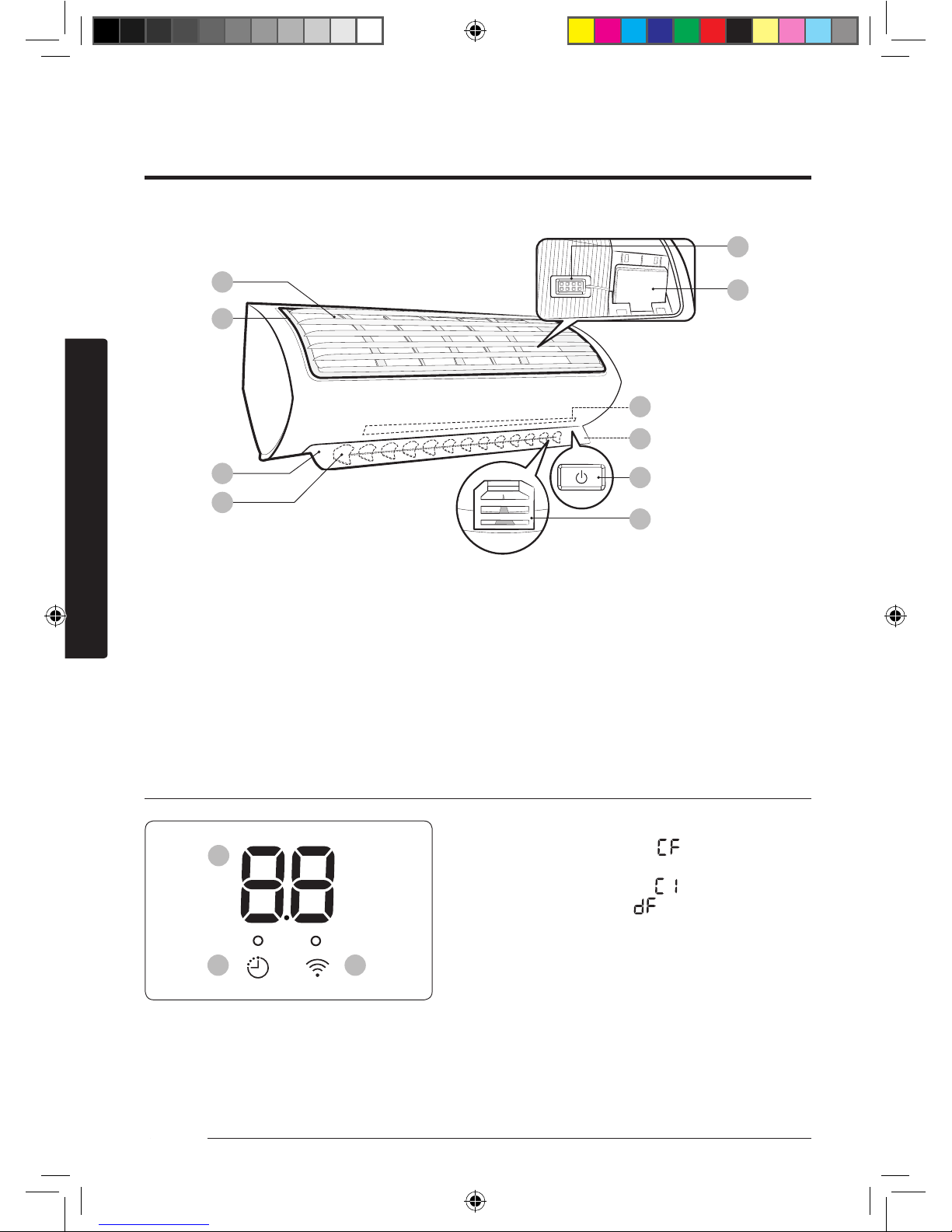
01 Air intake
02 Air filter
03 Air flow blade (up and down)
04 Air flow blade (left and right)
05 Room temperature sensor
06 Wi-Fi module
07 Virus doctor lamp
08 Display
09 Power button /
Remote control receiver
10 (Inside) Virus doctor
Display
01
02 03
01 Temperature indicator
Filter reset indicator ( )
Electricity consumption indicator
Auto clean indicator ( )
Defrost indicator ( )
02 Timer indicator
good'sleep indicator
Auto clean indicator
03 Wi-Fi indicator
The actual product may differ slightly from the image depicted below.
Indoor Unit Overview
At a Glance
AR7000K EU Better_IB_DB68-06101A-00_EN_A5.indd 12 2016/4/7 14:08:35
Page 14
13English
At a Glance
Remote Control Overview
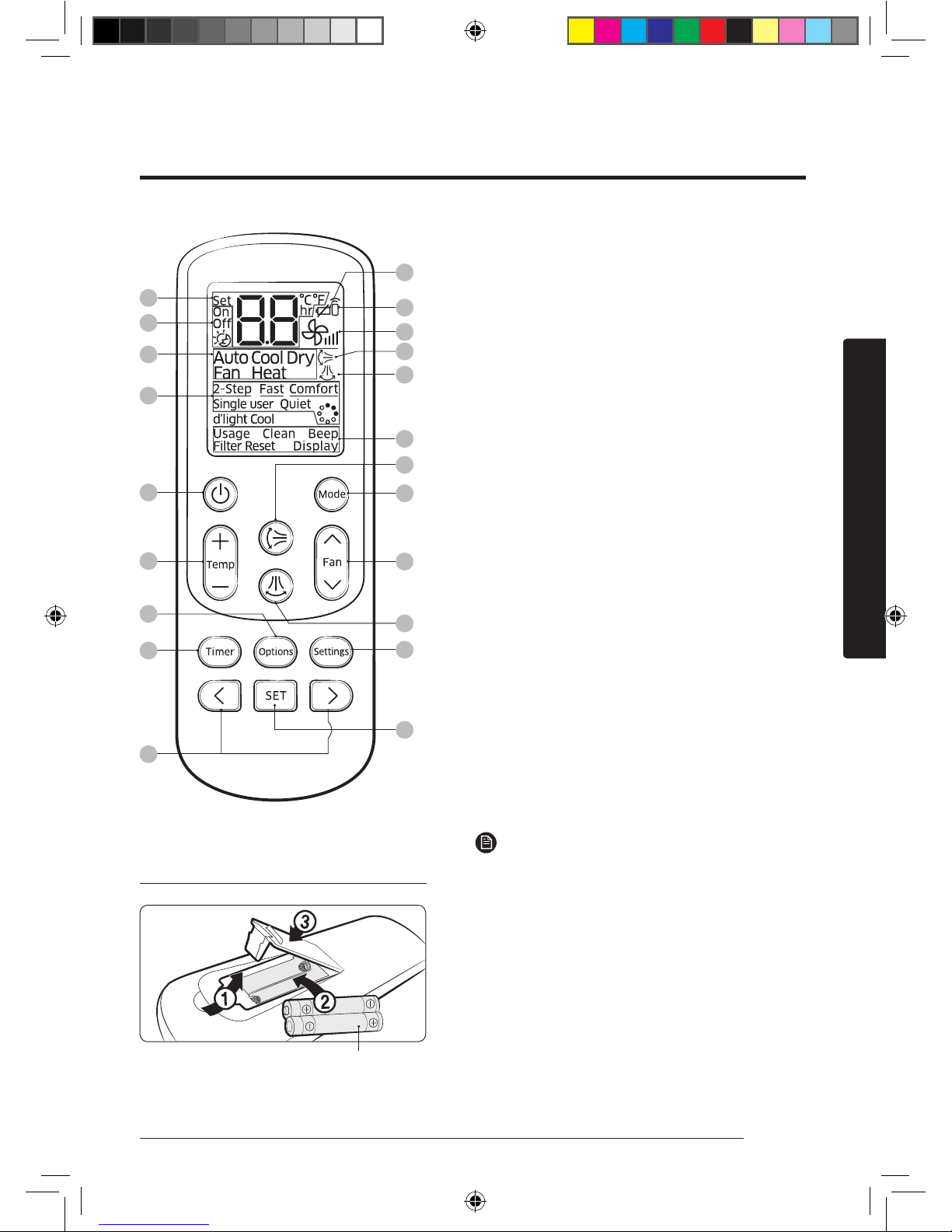
01 Set temperature indicator
02 Timer option indicator
03 Operation mode indicator
04 Options indicator
05 Low battery indicator
06 Transmit indicator
07 Fan speed indicator
08 Vertical air swing indicator
09 Horizontal air swing indicator
10 Settings indicator
11 Power button
12 Temperature button
13 Options button
14 Timer button
15 Direction button / Selection button
16 Vertical air swing button
17 Mode button
18 Fan speed button
19 Horizontal air swing button
20 Settings button
21 SET button
NOTE
• The descriptions in this manual are primarily
made based on the remote control buttons.
• Although d'light Cool is displayed on the
remote control display, it is not available on
this model.
01
05
06
07
08
10
09
16
17
18
20
21
02
03
04
11
12
13
19
14
15
Inserting batteries
two 1.5V AAA type batteries
AR7000K EU Better_IB_DB68-06101A-00_EN_A5.indd 13 2016/4/7 14:08:35
Page 15
14 English
At a Glance
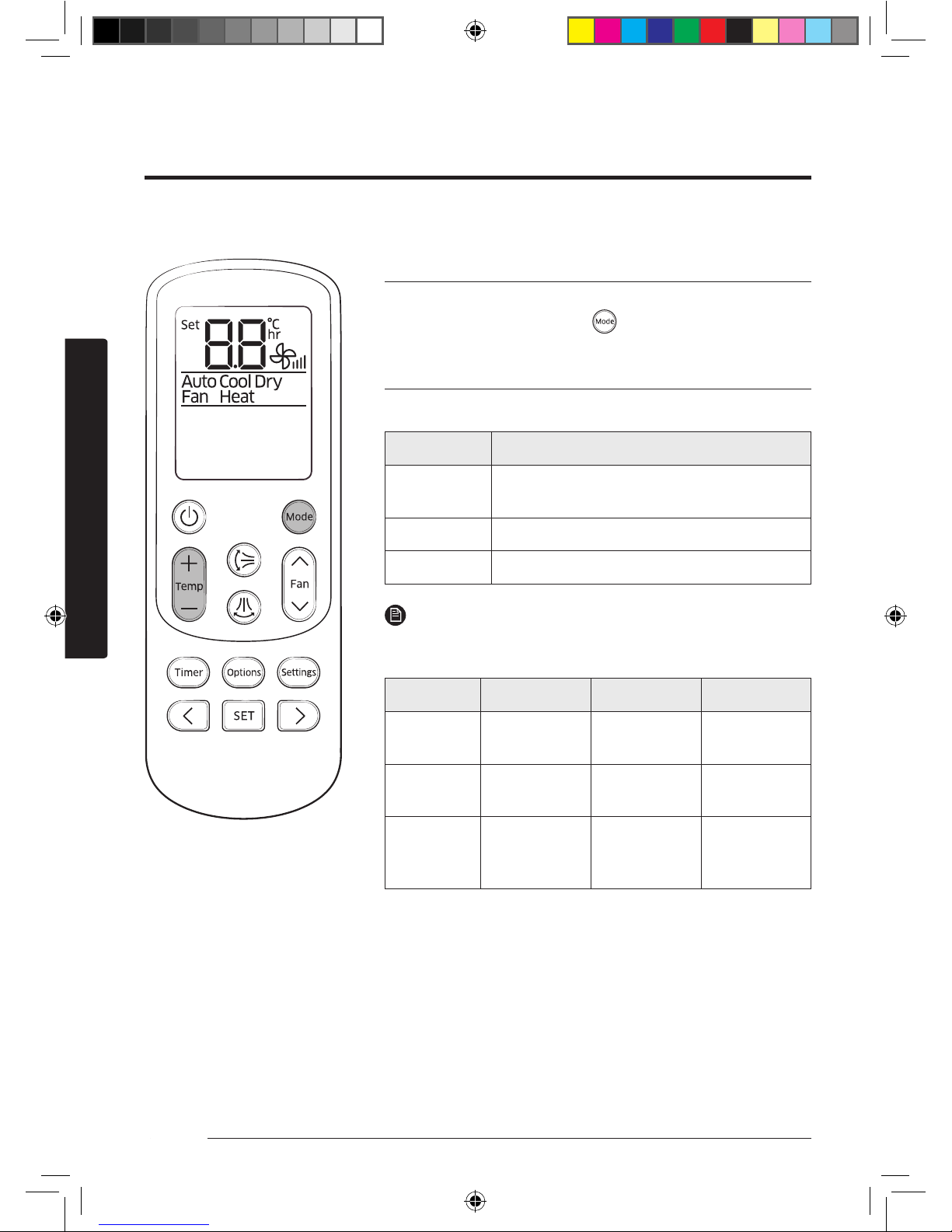
Operation modes
You can change the current mode between Auto, Cool, Dry,
Fan, and Heat by pressing the button.
Controlling temperature
You can control the temperature in each mode as follows:
Mode Temperature control
Auto/Cool/
Heat
Adjust by 1 °C between 16 °C and 30 °C.
Dry Adjust by 1 °C between 18 °C and 30 °C.
Fan You cannot control the temperature.
NOTE
You can use the Cool, Dry, and Heat modes in the following
conditions:
Mode Cool Dry Heat
Indoor
temperature
16 °C to 32 °C 18 °C to 32 °C 27 °C or less
Outdoor
temperature
-10 °C to 46 °C -10 °C to 46 °C -15 °C to 24 °C
Indoor
humidity
80% or less
relative
humidity
_ _
• If the air conditioner operates in a high humidity
environment in the Cool mode for an extended period of
time, condensation may occur.
• If the outdoor temperature drops to -5°C, the heating
capacity may decrease to as much as 60% to 70% of the
specified capacity.
You can use the air conditioner easily by selecting a mode and then by controlling the
temperature, fan speed, and air direction.
Remote Control Operation
AR7000K EU Better_IB_DB68-06101A-00_EN_A5.indd 14 2016/4/7 14:08:36
Page 16
15English
At a Glance
Model : AJ
Mode Cool Dry Heat
Indoor temperature 16 °C to 32 °C 18 °C to 32 °C 27 °C or less
Outdoor
temperature
-5 °C to 46 °C -5 °C to 46 °C -15 °C to 24 °C
Indoor humidity
80% or less relative humidity
_ _
Remark
AJ100 outdoor
temperature : -10˚C to 46˚C .
AJ100 outdoor
temperature : -10˚C to 46˚C.
• The standardizedtemperature for heating is 7˚C. If the outdoor temperature drops to 0˚C or
below, the heating capacity can be reduced depending on the temperature condition.
• If the cooling operation is used at over 32˚C (indoor temperature), it does not cool at its full
capacity.
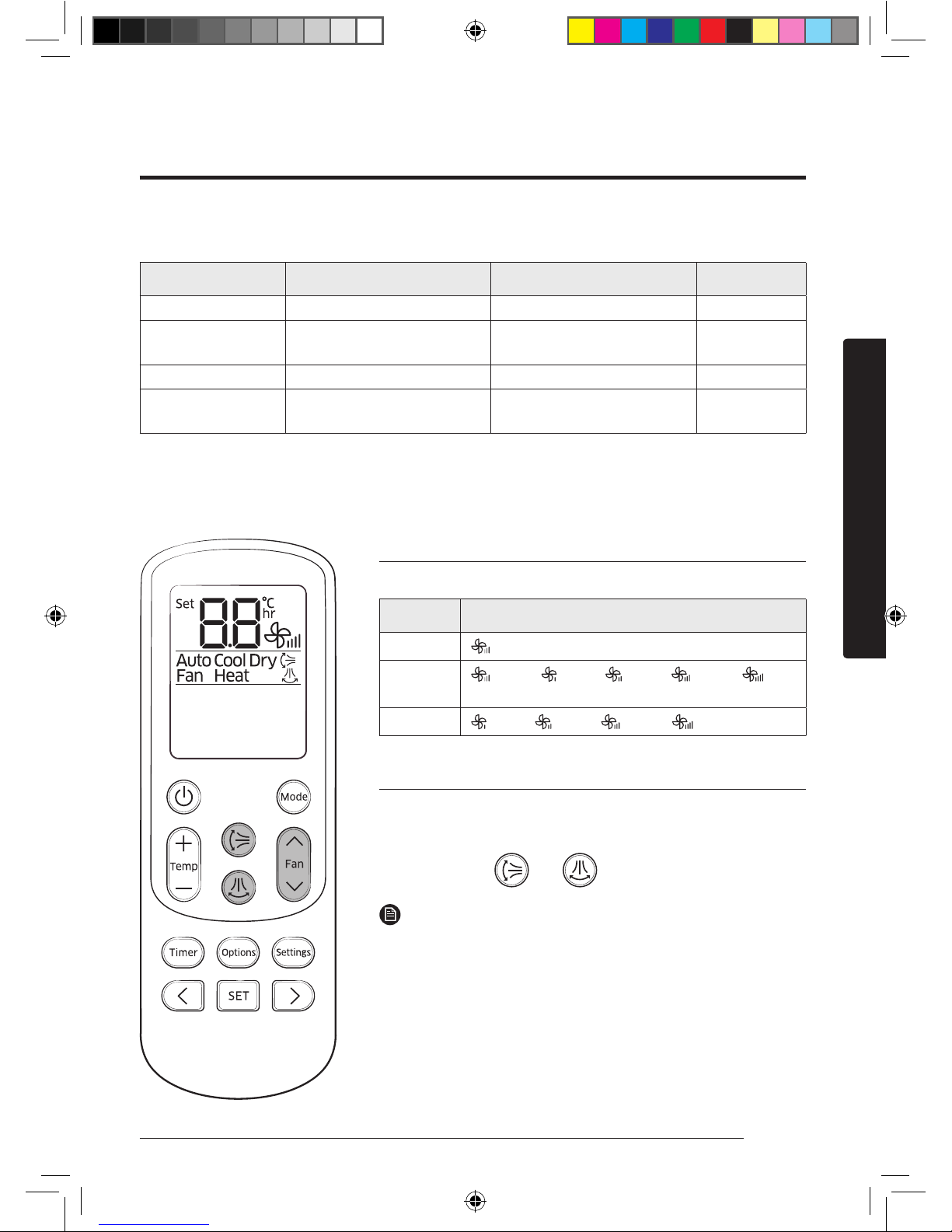
Controlling fan speed
You can select the following fan speeds in each mode:
Mode Available fan speeds
Auto/Dry
(Auto)
Cool/Heat
(Auto), (Low), (Med), (High),
(Turbo)
Fan
(Low), (Med), (High), (Turbo)
Controlling air flow direction
Keep the air flow in a constant direction by stopping the
movements of the vertical and horizontal air flow blades.
In operation
►
or
NOTE
• If you adjust the vertical air flow blade manually, it may
not close completely when you turn off the air conditioner.
• If you adjust the horizontal air flow blade manually, it may
not operate normally.
• You can control the air flow direction when the good'sleep
function is running while in the Heat mode, but not while
in the Cool mode.
AR7000K EU Better_IB_DB68-06101A-00_EN_A5.indd 15 2016/4/7 14:08:36
Page 17
16 English
Power Smart Features
The smart and powerful cooling functions of the Samsung air conditioner keep an enclosed space
cool and comfortable.
Cooling Operation
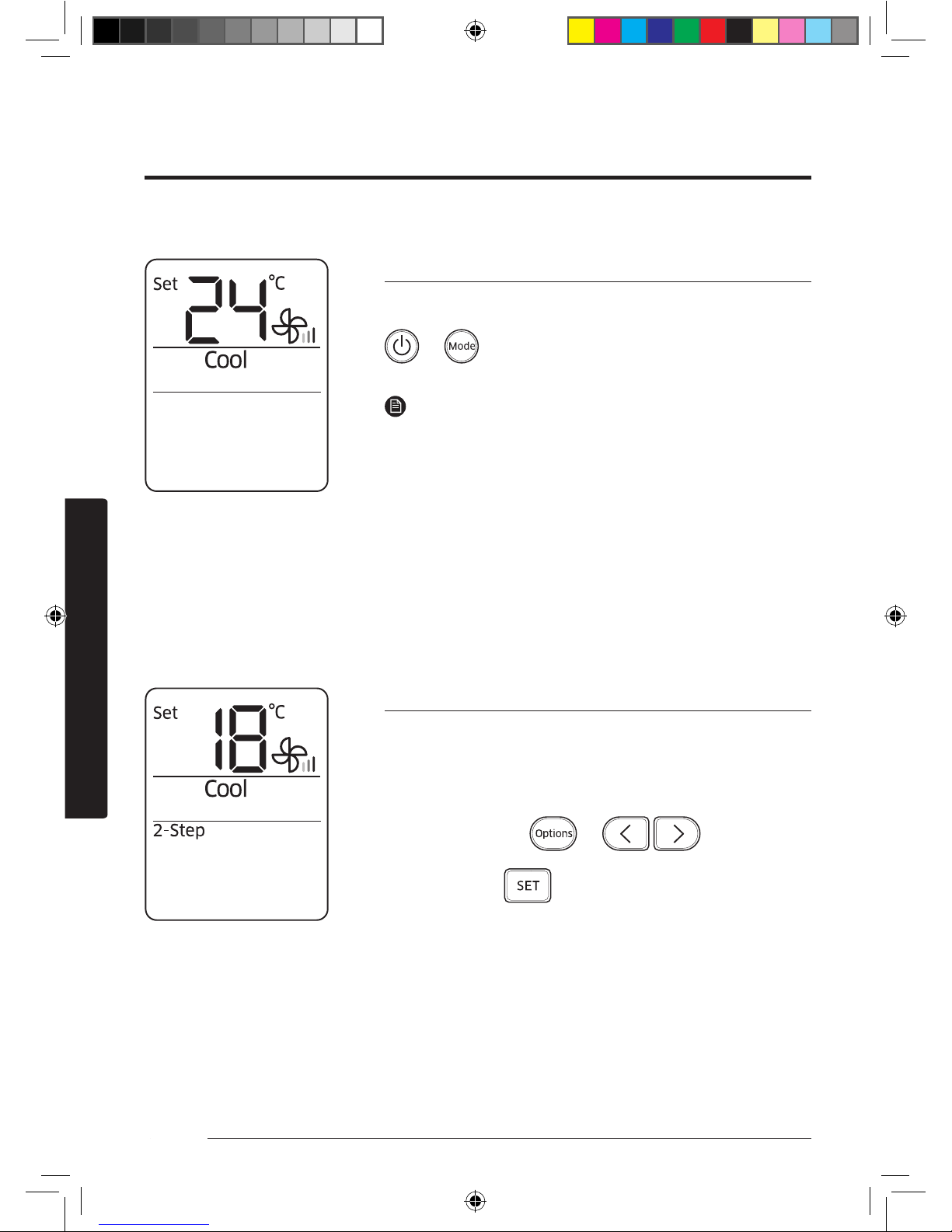
Cool mode
Use the Cool mode to stay cool in hot weather.
► ►
Select Cool.
NOTE
• For comfort, keep the temperature difference between the
indoor and outdoor air within 5 °C in the Cool mode.
• After selecting the Cool mode, select a function,
temperature, and fan speed that you want to apply.
– To cool your room quickly, select a low temperature and
a strong fan speed.
– To save energy, select a high temperature and a weak
fan speed.
– As the indoor temperature approaches the set
temperature, the compressor will operate at a low speed
to save energy.
2-Step cooling function
Use the 2-Step cooling function to quickly reach the set
temperature. The air conditioner automatically adjusts the fan
speed and air flow direction. You can select this function only
when the Cool mode is running.
In the Cool mode
► ► ►
Select 2-Step.
►
Power Smart Features
AR7000K EU Better_IB_DB68-06101A-00_EN_A5.indd 16 2016/4/7 14:08:37
Page 18
17English
Power Smart Features
The dehumidifying function of the Samsung air conditioner keeps an enclosed space dry and
comfortable.
Dehumidifying Operation
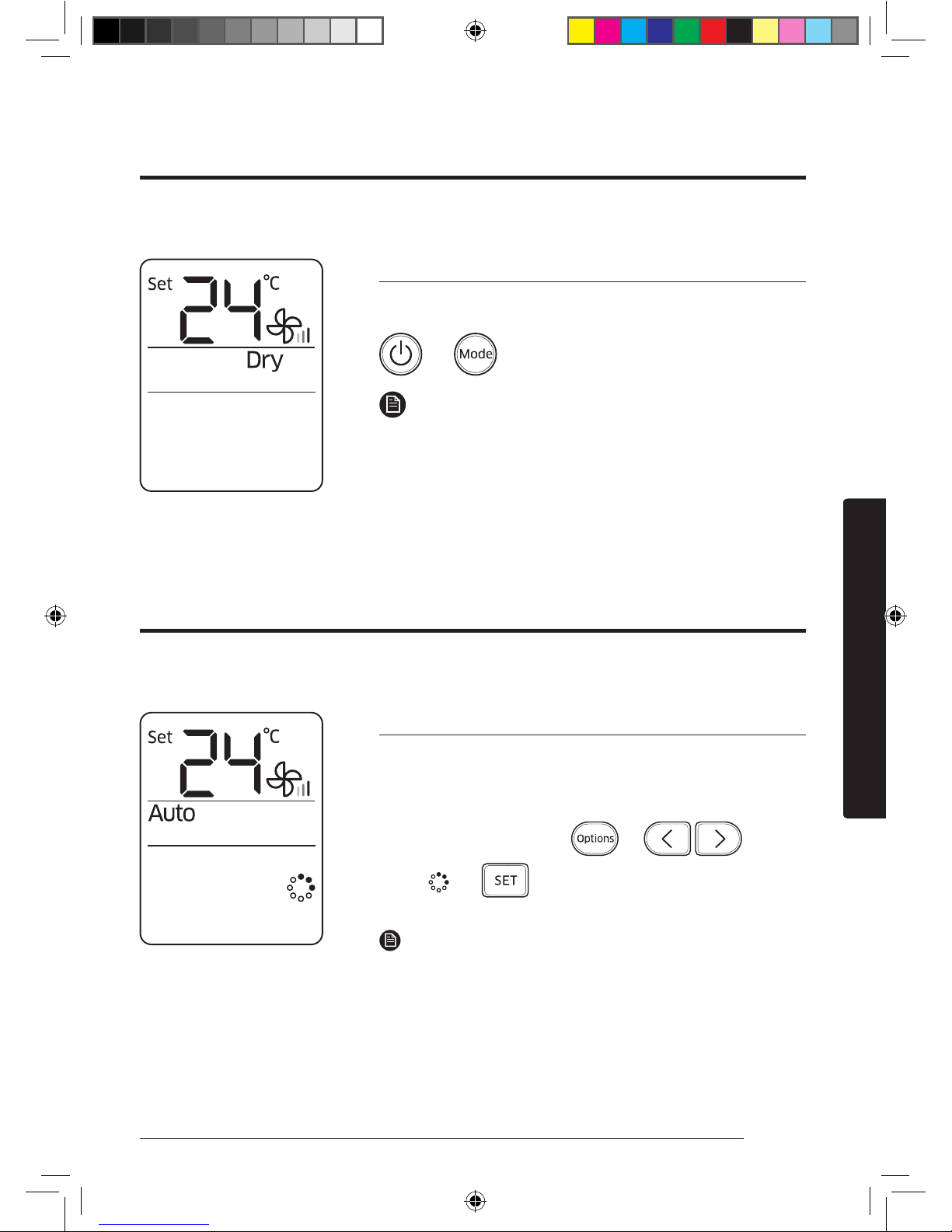
Dry mode
Use the Dry mode in rainy or humid weather.
► ►
Select Dry.
NOTE
• The lower the set temperature is, the greater the
dehumidifying capacity is. When the current humidity
seems to be high, adjust the set temperature to a low
temperature.
• You cannot use the Dry mode for heating. The Dry mode is
designed to produce a cooling side-effect.
Virus doctor function
Use the Virus doctor function to purify your room with
positive ions produced by the air conditioner. This function is
available in the Auto, Dry, Fan, and Heat modes.
In the Auto, Cool, Dry,
Fan, or Heat mode
► ► ►
Select .
►
NOTE
• When the Virus doctor function starts, the Virus doctor
lamp turns on automatically.
• You can adjust the set temperature, except for in the Fan
mode.
• When the Virus doctor function is additionally selected
while a specific mode is running, there is little difference
in electricity consumption and operating noise.
The air purification function of the Samsung air conditioner keeps the air in an enclosed space
purified.
Air Purifying Operation
AR7000K EU Better_IB_DB68-06101A-00_EN_A5.indd 17 2016/4/7 14:08:38
Page 19
18 English
Power Smart Features
A
B
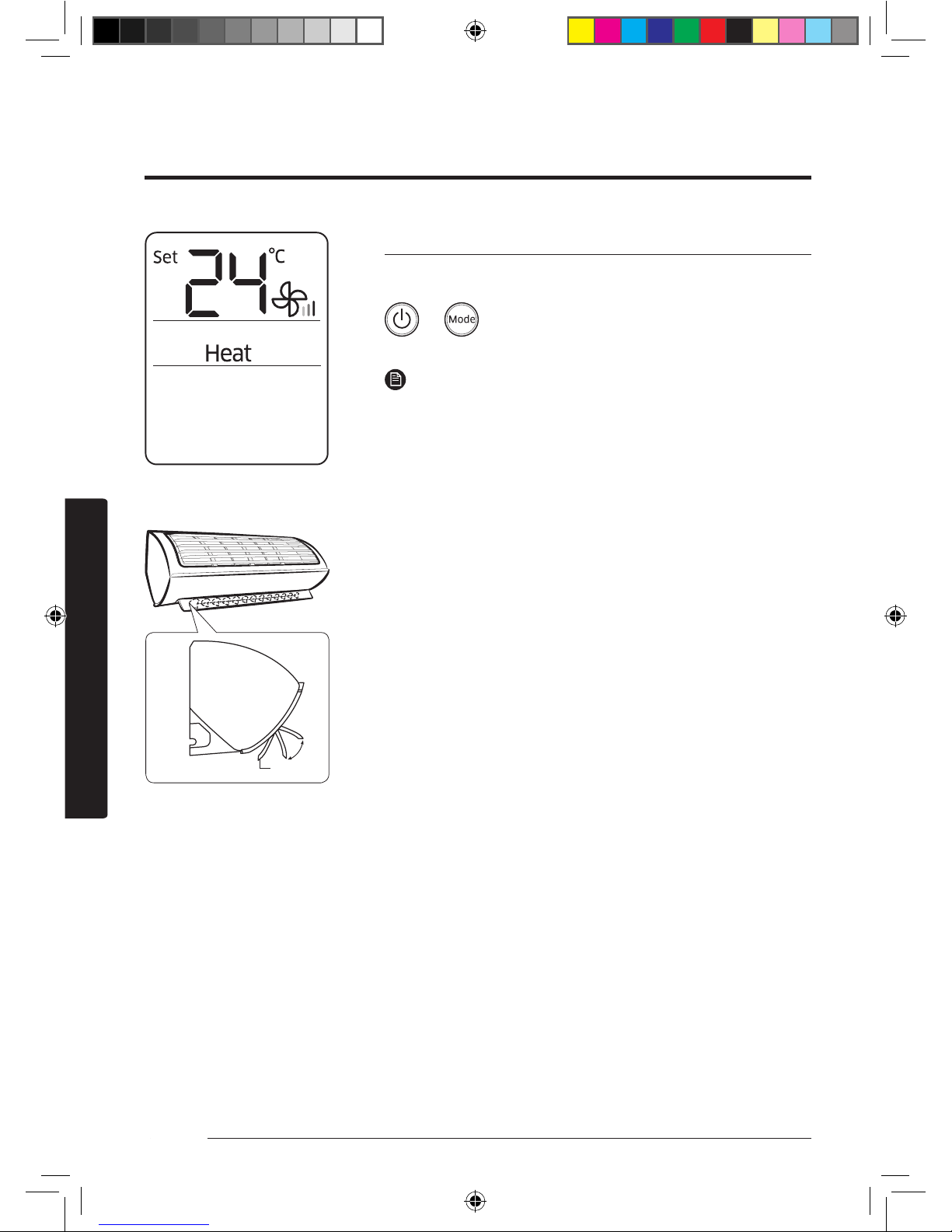
Heat mode
Use the Heat mode to stay warm.
► ►
Select Heat.
NOTE
• While the air conditioner warms up, the fan may not
operate for about 3 to 5 minutes at the beginning to
prevent cold blasts.
• If the air conditioner heats insufficiently, use an additional
heating appliance in combination with the air conditioner.
• When the outdoor temperature is low and the humidity is
high in Heat mode, frost may develop on the outdoor heat
exchanger. This may also decrease the heating efficiency.
If this occurs, the air conditioner runs the defrost function
for 5 to 12 minutes to remove frost from the outdoor heat
exchanger.
• When the defrost function is running, steam is produced
on the outdoor unit. The air conditioner moves the vertical
air flow blade to the lowest position, as shown in the
left figure, to prevent cold air from coming out from the
indoor unit.
A. The position of the vertical air flow blade when the
defrost function is running (The blade looks almost closed.)
B. The position range of the vertical air flow blade when
the Heat mode is running.
• When the defrost function is running, no air comes out
from the indoor unit in order to prevent cold air from
coming out. When the defrost function is finished, warm
air comes out after a while.
• The cycle of the defrost function may be shortened
depending on the amount of frost on the outdoor unit.
• The cycle of the defrost function may be shortened
depending on the humidity from rain and snow, too.
• When the defrost function is running, you cannot select
other functions with the remote control. Select them after
the defrost function is finished.
The heating functions of the Samsung air conditioner keep an enclosed space warm and
comfortable.
Heating Operation
AR7000K EU Better_IB_DB68-06101A-00_EN_A5.indd 18 2016/4/7 14:08:38
Page 20
19English
Power Smart Features
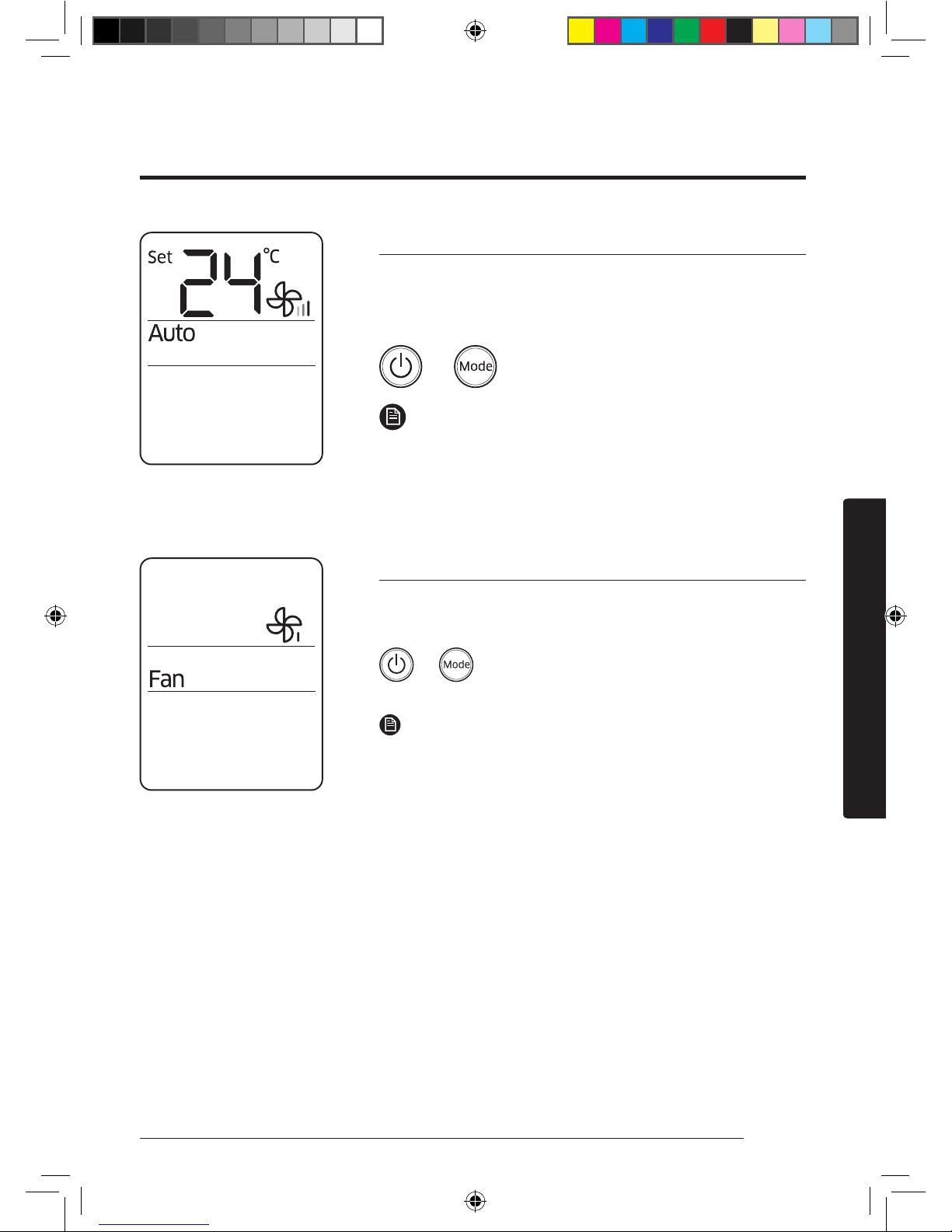
Auto mode
Use the Auto mode when you want the air conditioner to
automatically control the operation. The air conditioner will
provide the most comfortable atmosphere that it can.
► ►
Select Auto.
NOTE
• When the indoor temperature seems to be higher
or lower than the set point, the air conditioner
automatically produces either cool air to cool down the
indoor temperature or warm air to warm up the indoor
temperature.
Fan mode
Use the Fan mode to run the air conditioner like a common
fan. The air conditioner provides a natural breeze.
► ►
Select Fan.
NOTE
• If the air conditioner will not be used for an extended
period of time, dry the air conditioner by running it in the
Fan mode for 3 or 4 hours.
• The outdoor unit is designed not to operate in the Fan
mode to prevent cold air from entering through the unit.
This is a normal operation and not a fault with the air
conditioner.
There is a variety of extra functionality provided by the Samsung air conditioner.
Quick Smart Features
AR7000K EU Better_IB_DB68-06101A-00_EN_A5.indd 19 2016/4/7 14:08:39
Page 21
20 English
Power Smart Features
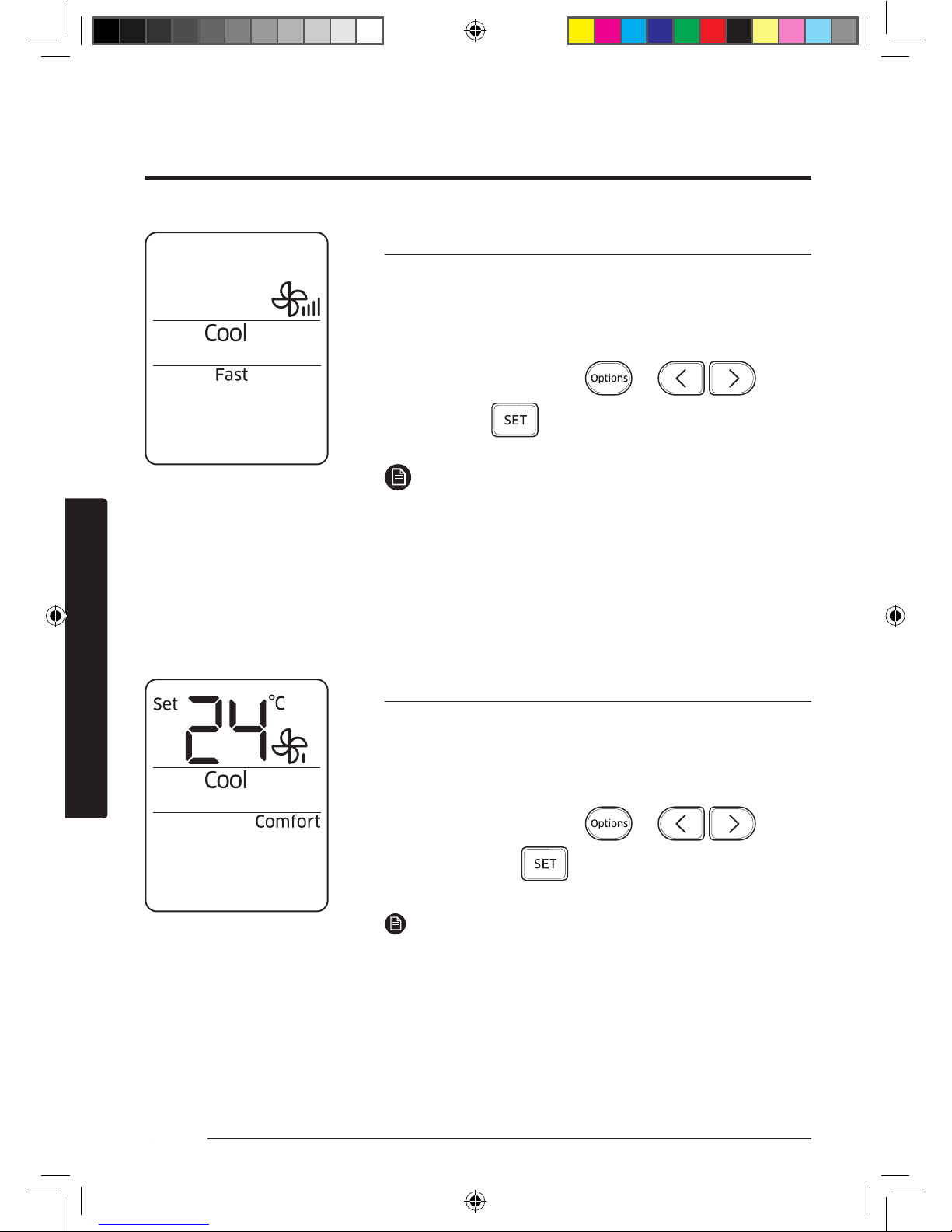
Fast function
Use the Fast function to quickly cool or heat your room. This
function is the most powerful cooling and heating function
provided by the air conditioner. You can select this function
both in the Cool and Heat modes.
In the Cool or Heat mode
► ► ►
Select Fast.
►
NOTE
• If you select the Fast function while such functions as
2-Step cooling, Comfort, Single user, Quiet, or good'sleep
are running, these functions are cancelled.
• You can change the air flow direction.
• You cannot change the set temperature and the fan speed.
• When you select the Fast function in the Heat mode, you
may not be able to increase the fan speed in order to
prevent cool air from blowing.
Comfort function
Use the Comfort function when you feel the current cooling
or heating effect is too strong. The air conditioner provides a
mild cooling or heating. You can select this function both in
the Cool and Heat modes.
In the Cool or Heat mode
► ► ►
Select Comfort.
►
NOTE
• You can change the set temperature and the air flow direction.
• You cannot change the fan speed.
• If you select the Comfort function while such functions as
2-Step cooling, Fast, Single user, Quiet, or good'sleep are
running, these functions are cancelled.
• If you feel cooling or heating effect in the Comfort
function is weak, cancel the Comfort function.
AR7000K EU Better_IB_DB68-06101A-00_EN_A5.indd 20 2016/4/7 14:08:39
Page 22
21English
Power Smart Features
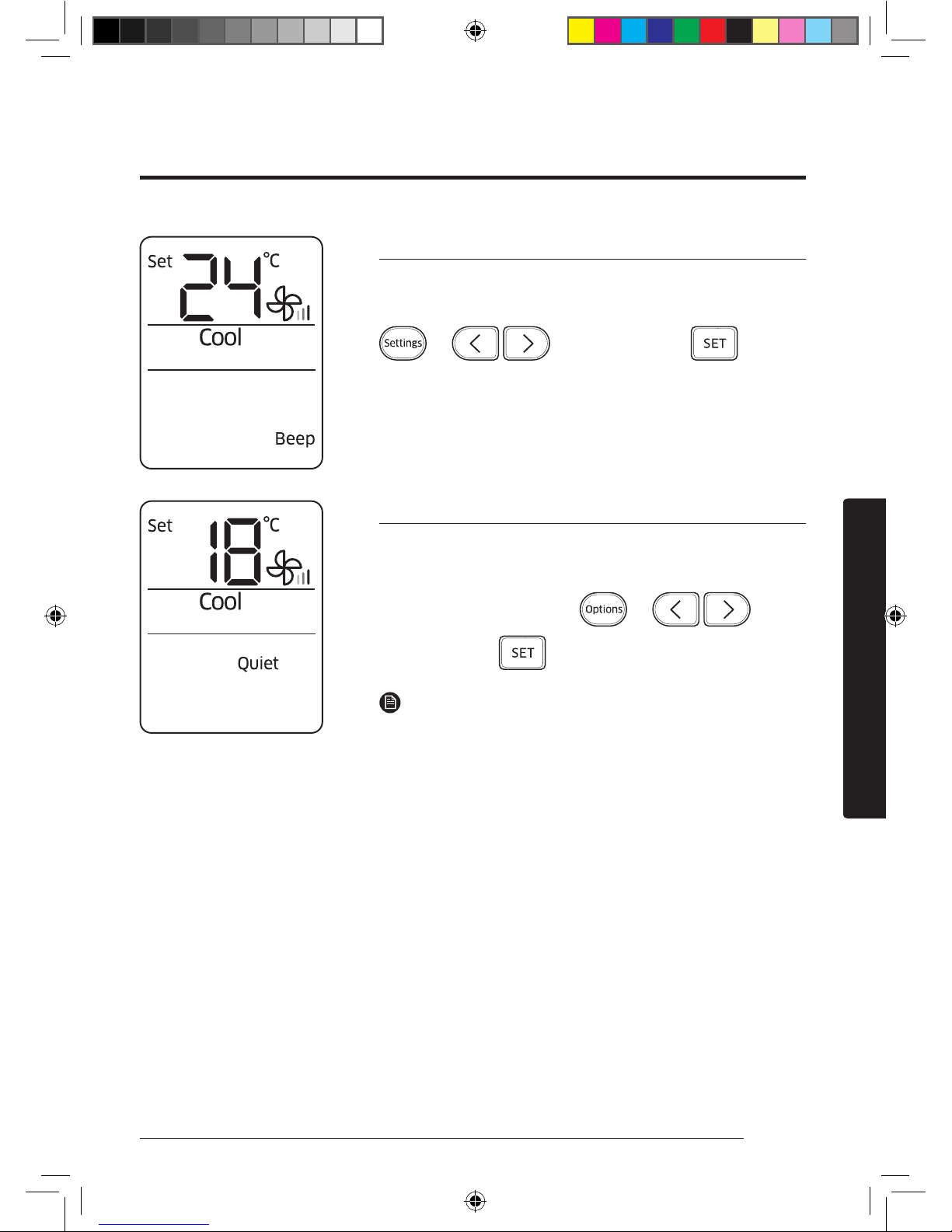
Beep sound function
Use the Beep sound function to turn on or off the beep sound
that plays when you press a button on the remote control.
► ►
Select Beep.
►
Quiet function
Use the Quiet function to reduce operating noise. You can
select this function both in the Cool and Heat modes.
In the Cool or Heat mode
► ► ►
Select Quiet.
►
NOTE
• You can change the set temperature and the air flow
direction.
• You cannot change the fan speed.
• If you select the Quiet function while such functions as
2-Step cooling, Fast, Comfort, Single user, or good'sleep
are running, these functions are cancelled.
AR7000K EU Better_IB_DB68-06101A-00_EN_A5.indd 21 2016/4/7 14:08:40
Page 23
22 English
Power Smart Features
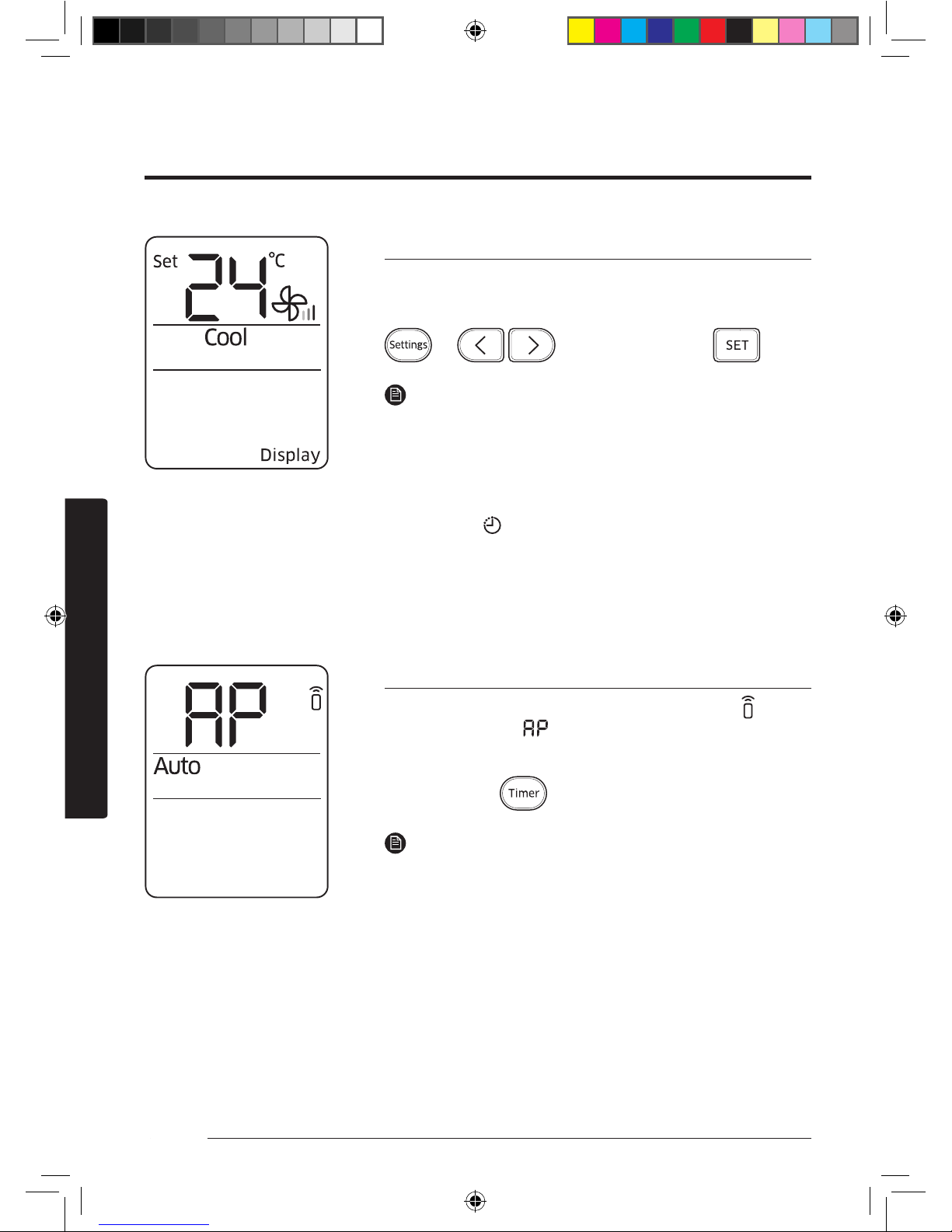
Display lighting function
Use the Display lighting function to turn on or off the lighting
of the indoor unit display.
► ►
Select Display.
►
NOTE
• The Display lighting function does not operate when the
indoor unit is turned off.
• If you turn off the Display lighting function while the
Virus doctor function is running, the Virus doctor lamp
also turns off.
• The Timer ( ) indicator does not disappear, even if you
turn off the Display lighting function.
• If you change the current mode or function when the
Display lighting function is on, the Display lighting
function turns off.
Wi-Fi function (Smart A/C application)
When you turn on the Wi-Fi function, the Transmit ( )
indicator blinks and appears on the remote control display
for a few seconds. Then both of them disappear.
In operation
► ►
Hold down 4 seconds.
NOTE
• For further information, refer to the Smart A/C application
manual.
• Smart A/C application may not be available on some
models.
AR7000K EU Better_IB_DB68-06101A-00_EN_A5.indd 22 2016/4/7 14:08:41
Page 24
23English
Energy-Saving Features
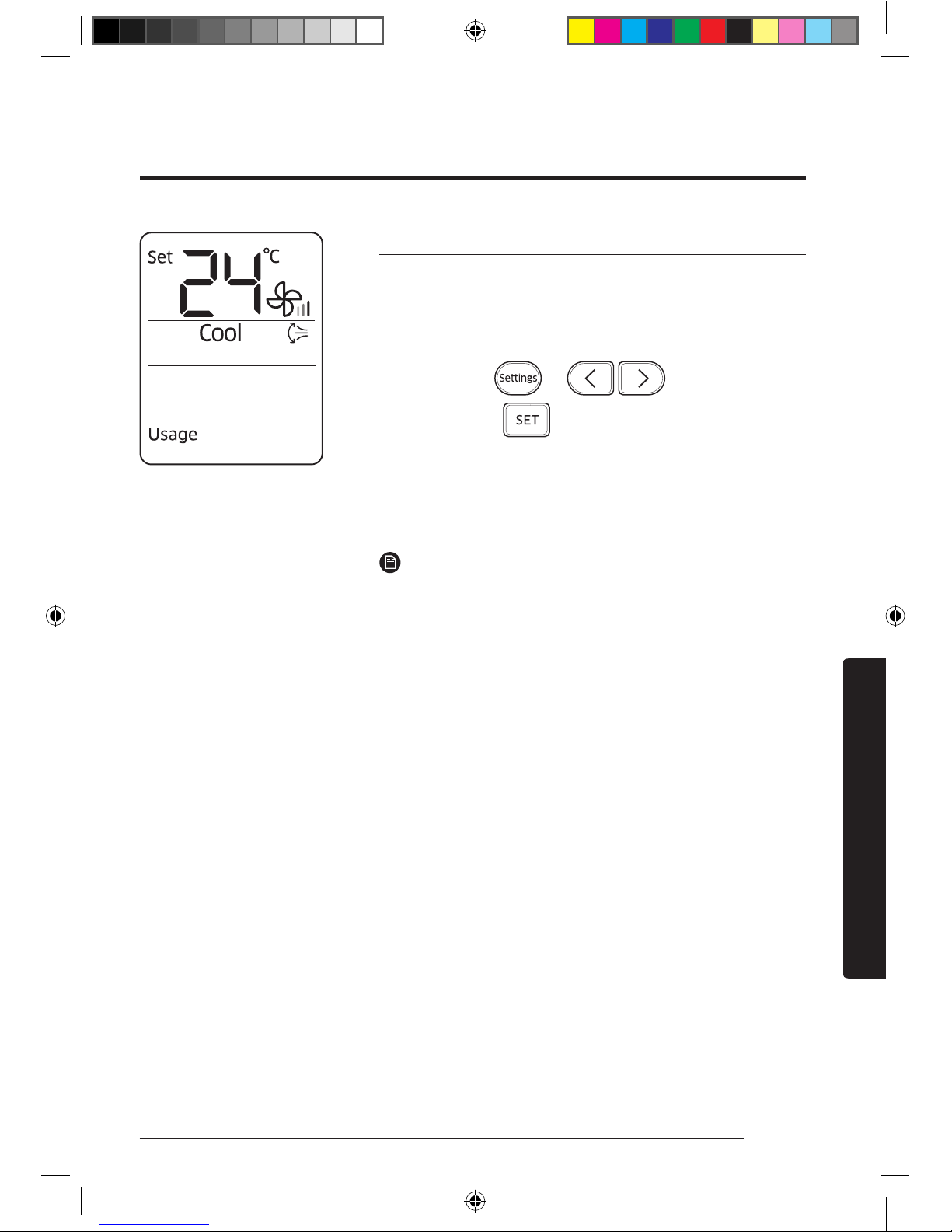
Electricity consumption check
Use the Usage function to check the amount of electricity
consumed by using the air conditioner. The amount consumed
is displayed on the indoor unit display for a few seconds, and
the set indoor temperature appears.
In operation
► ► ►
Select Usage.
►
The value range displayed is between 0.1 kWh and 99 kWh.
Electricity consumption is calculated from the moment the
air conditioner turns on. The value is reset when the air
conditioner turns off.
NOTE
• The usage shown on the indoor unit display may slightly
differ from the amount of electricity actually consumed.
• You can view electricity consumption only when the air
conditioner is operating.
The smart energy-saving functions of the Samsung air conditioner reduce electricity
consumption.
Energy-Saving Operation
Energy-Saving Features
AR7000K EU Better_IB_DB68-06101A-00_EN_A5.indd 23 2016/4/7 14:08:42
Page 25
24 English
Energy-Saving Features
If using a multi system, this function is not supported.
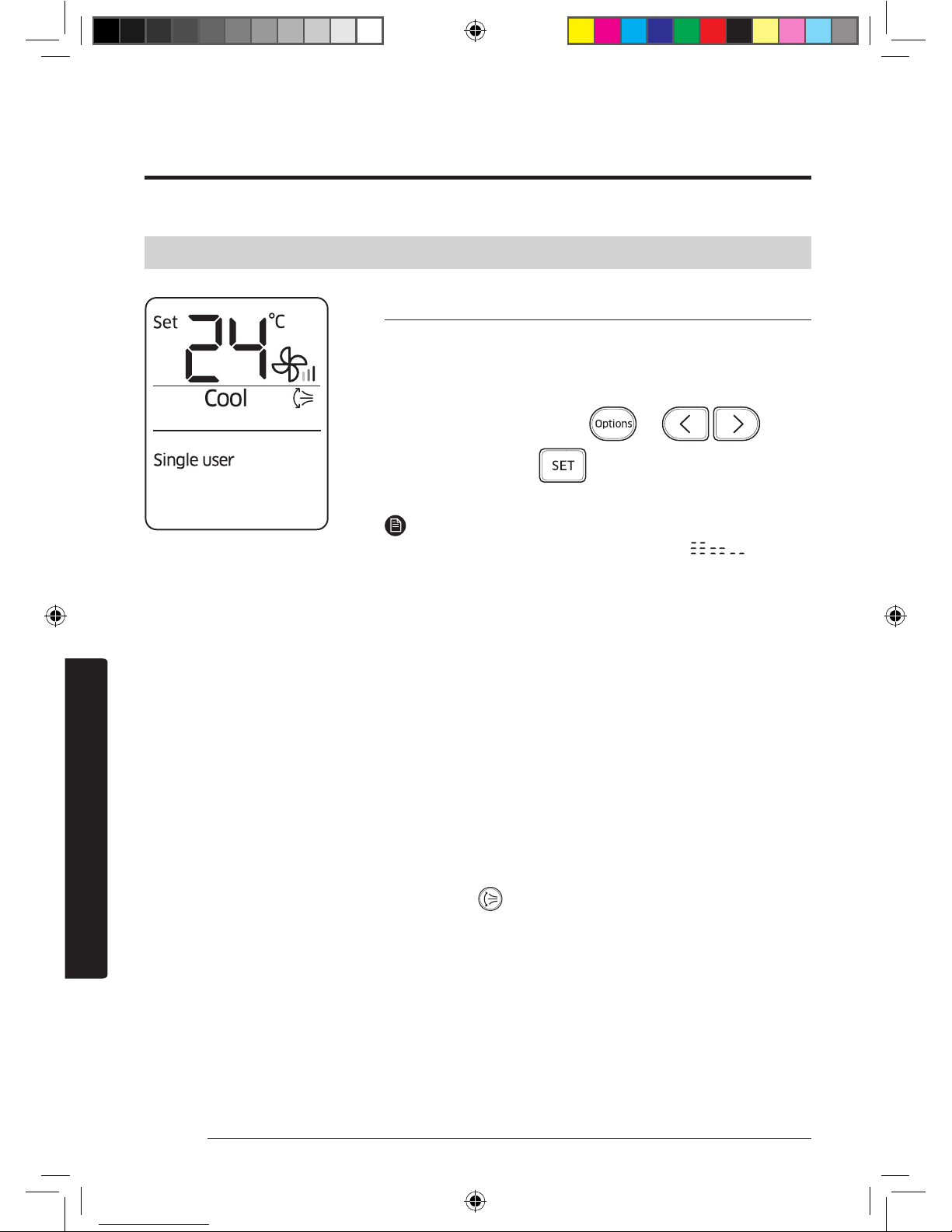
Single user function
Use the Single user function to reduce electricity consumption
while staying cool or warm. You can select this function in the
Cool and Heat modes.
In the Cool or Heat mode
► ► ►
Select Single user.
►
NOTE
• When the Single user function starts, the pattern
appears on the remote control for a few seconds, and
vertical air swing begins automatically.
• If you select the Single user while such function as 2-Step
cooling, Fast, Comfort, Quiet, or good'sleep are running,
these modes are cancelled.
• After selecting the Single user function, you can change
the set temperature (24 °C to 30 °C in the Cool mode, 16 °C
to 30 °C in the Heat mode), fan speed, and vertical air flow
direction.
• When the Single user function is turned on in the Cool
mode while the set temperature is set to lower than 24 °C,
the set temperature is automatically raised to 24 °C. But if
the set temperature is set to between 25 °C and 30 °C, it
remains the same.
• Even after you turn off the Single user function, vertical
air swing continues until you turn it off with the Vertical
air swing ( ) button.
AR7000K EU Better_IB_DB68-06101A-00_EN_A5.indd 24 2016/4/7 14:08:42
Page 26
25English
Energy-Saving Features
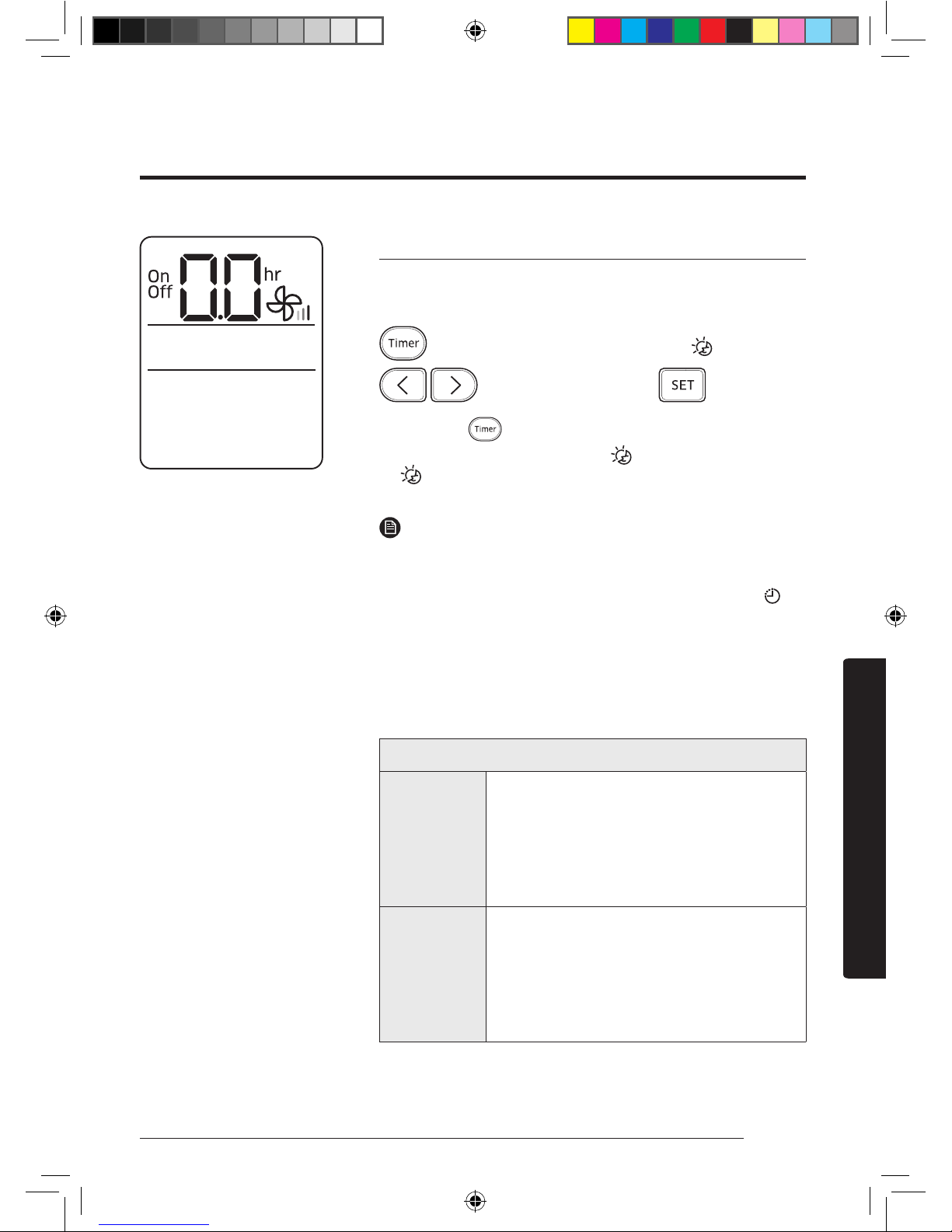
Timed on/Timed off function
Use the Timed on/Timed off to turn on or off the air
conditioner after the time that you set.
(Select On or Off among On, Off, and .)
►
(Set the on/off time.)
►
• Press the (Timer) button to change the current
function between On, Off, and (good’sleep).
(good’sleep) is displayed in the Cool and Heat modes
only.
NOTE
• You can set a time between 0.5 and 24 hours. Set the time
interval to 0.0 to cancel the Timed on/off function.
• Once you start the Timed on/off function, the Timer ( )
indicator is displayed on the indoor unit display.
• After starting the Timed on function, you can change the
mode and the set temperature. You cannot change the set
temperature while the Fan mode is running.
• You cannot set the same time for both of the Timed on
and Timed off functions.
Combining Timed on and Timed off
When
the air
conditioner
is off
Example) Timed on: 3 hours, Timed off: 5
hours
The air conditioner turns on after 3 hours
from the moment you start Timed on/
off, remains on for 2 hours, then turns off
automatically.
When
the air
conditioner
is on
Example) Timed on: 3 hours, Timed off: 1
hour
The air conditioner turns off after 1 hour
from the moment you start Timed on/
off, then turns on after 2 hours from the
moment it is turned off.
AR7000K EU Better_IB_DB68-06101A-00_EN_A5.indd 25 2016/4/7 14:08:43
Page 27
26 English
Energy-Saving Features
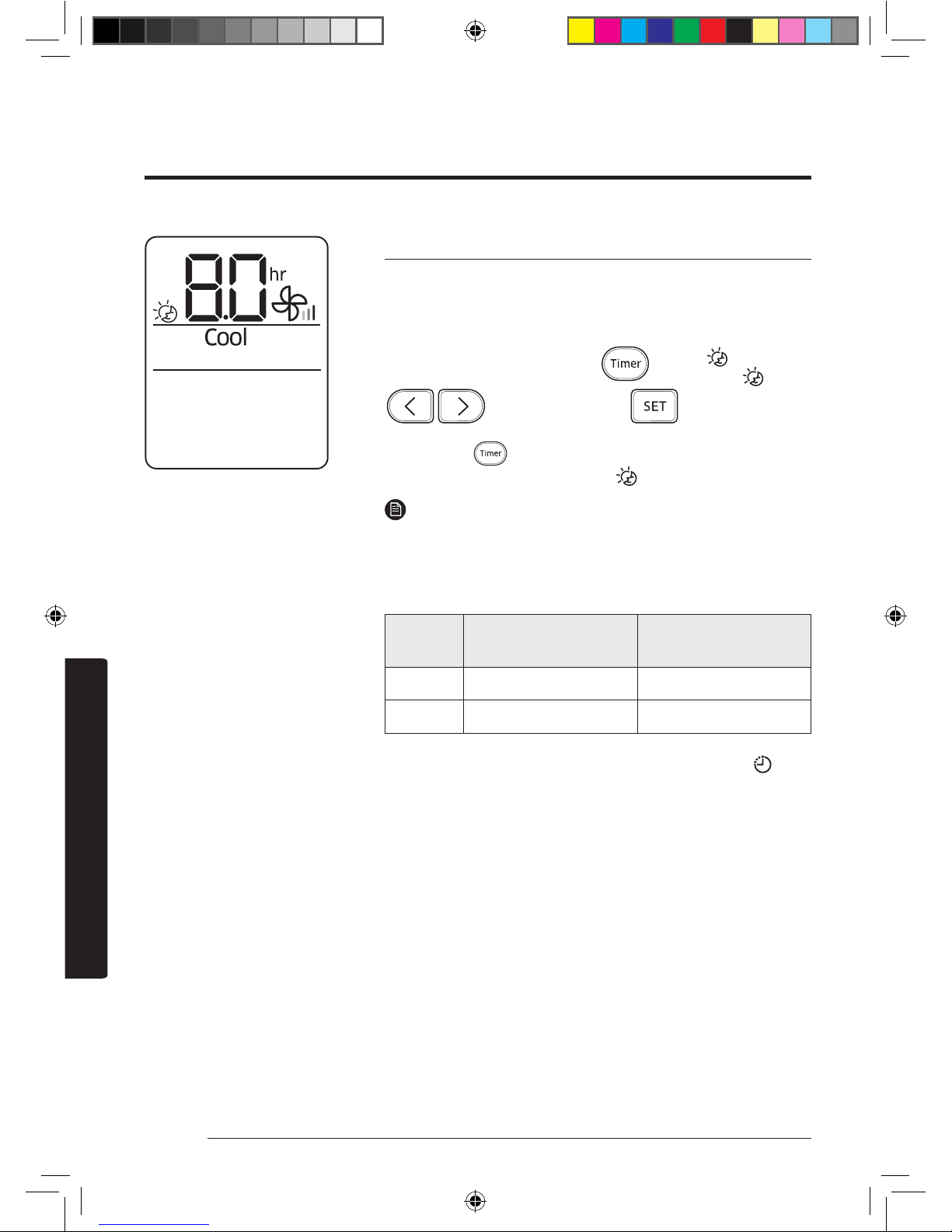
good’sleep function
Use the good'sleep function to get a good sleep at night and
to save energy. You can select this function both in the Cool
and Heat modes.
In the Cool or Heat mode
►
(Select among
On, Off, and .)
►
(Set the
operation time.)
►
• Press the (Timer) button to change the current
function between On, Off, and (good’sleep).
NOTE
• You can adjust the set temperature by 1 °C between 16 °C
and 30 °C.
• The recommended and optimal set temperatures in the
good’sleep function are as follows:
Mode
Recommended set
temperature
Optimal set
temperature
Cool 25 °C to 27 °C 26 °C
Heat 21 °C to 23 °C 22 °C
• Once you start the good’sleep function, the Timer ( )
indicator appears on the indoor unit display.
• You can set the operation time to between 0.5 and
12 hours. Set the operation time to 0.0 to cancel the
good’sleep function.
• The default operation time for the good’sleep function in
the Cool mode is 8 hours. If the operation time is set to
over 5 hours, the Wake up function begins 1 hour before
the set time. The air conditioner stops automatically when
the operation time expires.
• When the Timed on, Timed off, and good'sleep functions
are overlapped, the air conditioner operates its timer with
only the function that you have started most recently.
AR7000K EU Better_IB_DB68-06101A-00_EN_A5.indd 26 2016/4/7 14:08:43
Page 28
27English
Cleaning and Maintenance
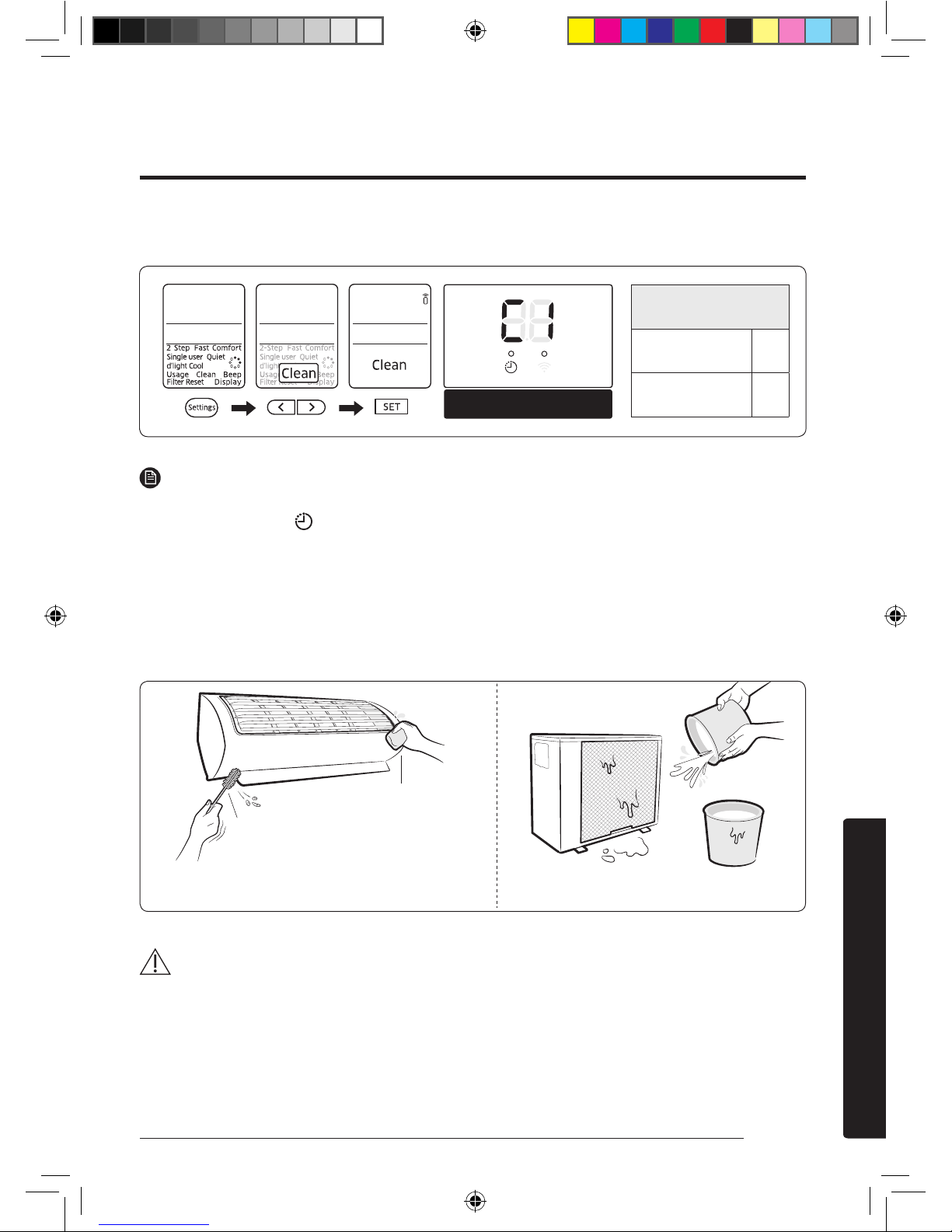
Running Auto clean
Indoor unit display
NOTE
• When you set the Auto clean timer, Clean blinks and then disappears on the remote control
display. The Timer ( ) indicator also appears on the indoor unit display.
• When the air conditioner is off, Auto clean starts immediately when it is selected. When the
air conditioner is on, Auto clean starts as soon as the air conditioner stops running.
• During Auto clean, the indoor fan continues to run, and air flow blades remain open to expel
ambient air.
Cleaning the indoor unit exterior and outdoor unit heat exterior
CAUTION
• Do not clean the display by using alkaline detergent.
Cleaning at a Glance
Cleaning and Maintenance
Cleaning duration
(minutes)
Auto (Cool),
Cool, Dry
30
Auto (Heat),
Heat, Fan
15
Soft brush
Tepid damp cloth
Before cleaning, be sure to turn off the equipment
and disconnect the power plug.
Spray water to clean the dust.
AR7000K EU Better_IB_DB68-06101A-00_EN_A5.indd 27 2016/4/7 14:08:43
Page 29
28 English
Cleaning and Maintenance
• Do not use sulphuric acid, hydrochloric acid, or organic solvents
(such as thinner, kerosene, and acetone) to clean the surfaces. Do
not put any stickers on it as this can damage the surface of the
air conditioner.
• When you clean and inspect the heat exchanger on the outdoor
unit, contact the local service centre for help.
• Make sure to prevent any injury from sharp edges of the surface
when handling the heat exchanger.
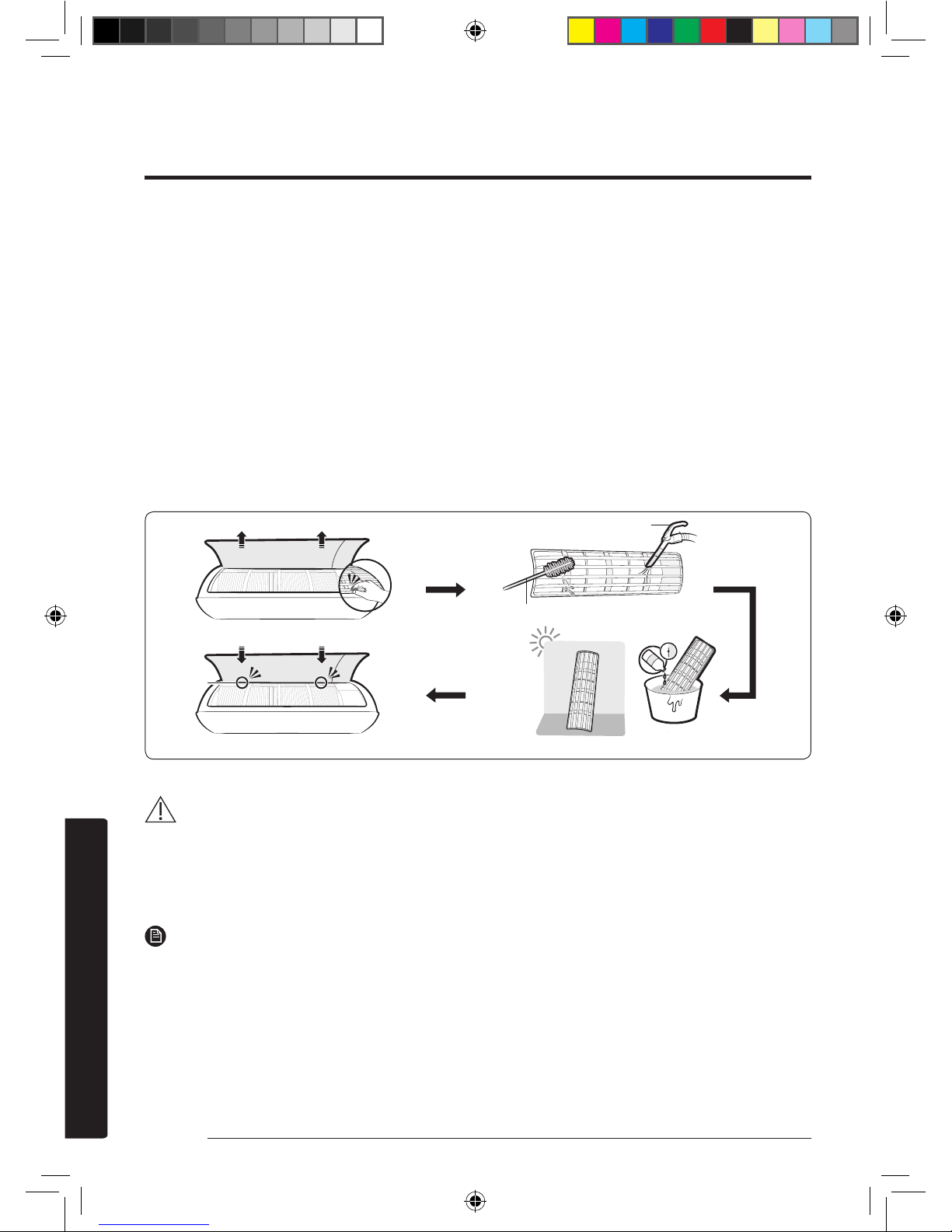
Cleaning the filter
CAUTION
• Do not scrub the air filter with a brush or other cleaning utensil.
This may damage the filter.
• Do not expose the air filter to direct sunlight when drying it.
NOTE
• Clean the air filter every 2 weeks. Cleaning term may vary depending on the usage and
environmental conditions.
• If the air filter dries in a humid area, it may produce offensive odours. Clean it again and dry
it in a well-ventilated area.
Vacuum cleaner
Soft brush
30 minutes
Mild detergent
Hooks
AR7000K EU Better_IB_DB68-06101A-00_EN_A5.indd 28 2016/4/7 14:08:44
Page 30
29English
Cleaning and Maintenance
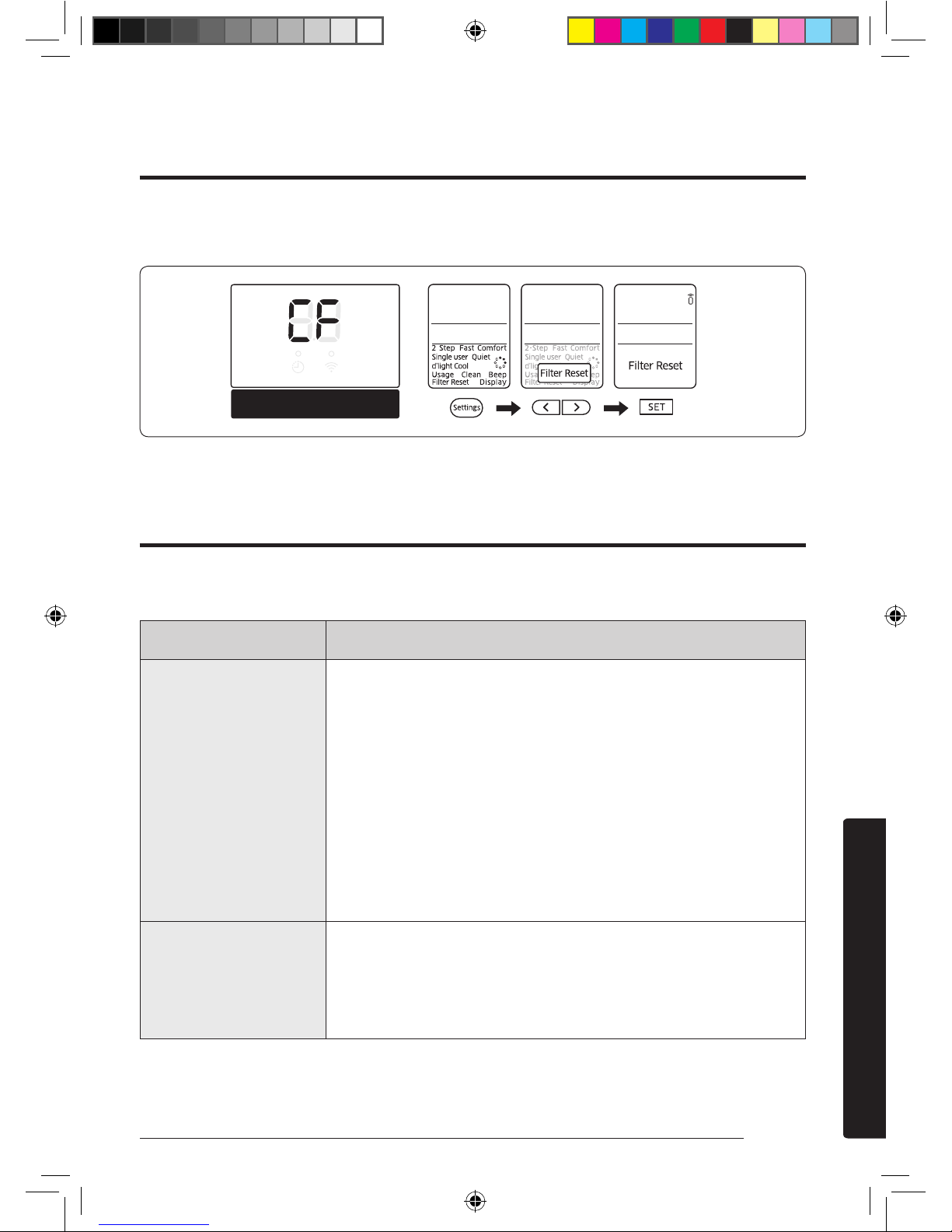
Resetting the filter-cleaning reminder
Indoor unit display
If the air conditioner operates abnormally, refer to the following
chart to save time and unnecessary expenses.
Problem Solution
The air
conditioner does
not work at all.
• Check the power status, then operate the air
conditioner again.
• Switch on the circuit breaker, plug in the
power cord, then operate the air conditioner
again.
• Make sure that the isolator is turned on.
• Check whether the Timed off function is
running. Operate the air conditioner again by
pressing the Power button.
I cannot change
the temperature.
• Check whether the Fan or Fast mode is
running. In these modes, the air conditioner
controls the set temperature automatically,
and you cannot change the set temperature.
Troubleshooting
AR7000K EU Better_IB_DB68-06101A-00_EN_A5.indd 29 2016/4/7 14:08:44
Page 31
30 English
Cleaning and Maintenance
Problem Solution
Cool or warm air
does not come
out of the air
conditioner.
• Check whether the set temperature is higher
in the Cool mode or lower in the Heat mode
than the current temperature. Press the
Temperature button on the remote control to
change the set temperature.
• Check whether the air filter is blocked with
dirt. If the air filter is blocked, the cooling
and heating performance may decrease.
Remove dirt regularly.
• Check whether the outdoor unit is covered
or installed near obstacles. Remove the
coverings and obstacles.
• Check whether the air conditioner is running
the defrost function. When ice forms in
winter or the outdoor temperature is too low,
the air conditioner runs the defrost function
automatically. While this function is running,
the indoor fan stops and warm air does not
come out.
• Check whether doors or windows are open.
This may cause poor cooling or heating
performance. Close the doors and windows.
• Check whether the air conditioner is turned
on immediately after the cooling or heating
operation stops. In this case, only the fan
runs to protect the outdoor unit compressor.
AR7000K EU Better_IB_DB68-06101A-00_EN_A5.indd 30 2016/4/7 14:08:44
Page 32
31English
Cleaning and Maintenance
Problem Solution
Cool or warm air
does not come
out of the air
conditioner.
• Check whether the pipe length is too long.
When the pipe length exceeds the maximum
pipe length, the cooling and heating
performance may decrease.
I cannot change
the air flow
direction.
• Check whether the good'sleep function is
running. While this function is running, you
cannot control the air flow direction. (But
you can control the air flow direction if this
function is running in the Heat mode.)
I cannot change
the fan speed.
• When the Auto, Dry, or Fast mode is running
or the good'sleep function is running in the
Cool mode, the air conditioner controls the
fan speed automatically and you cannot
change the fan speed.
The remote
control does not
work.
• Replace the batteries in the remote control
with new ones.
• Make sure that nothing is blocking the
remote control sensor.
• Check whether there are strong lighting
apparatus near the air conditioner. Strong
light which comes from fluorescent bulbs or
neon signs may interrupt the electric waves.
The Timed on/
off function
does not work.
• Check whether you pressed the SET button
on the remote control after setting the time.
AR7000K EU Better_IB_DB68-06101A-00_EN_A5.indd 31 2016/4/7 14:08:44
Page 33
32 English
Cleaning and Maintenance
Problem Solution
The indicator
blinks
continuously.
• Press the Power button to turn off the air
conditioner or disconnect the power plug.
If the indicator is still blinking, contact the
service centre.
Odours
permeate in the
room during
operation.
• Check whether the air conditioner is
running in a smoky area. Ventilate the
room or operate the air conditioner in the
Fan mode for 3 to 4 hours. (There are no
components used in the air conditioner that
emit a strong odour.)
• Check whether the drains are clean. Clean
them regularly.
An error is
indicated.
• If the indoor unit indicator blinks, contact
the nearest service centre. Be sure to pass
the error code to the service centre.
Noise is
generated.
• When refrigerant flow changes, noise may
be generated, depending on the status
of the air conditioner. This is a normal
operation.
Smoke is
generated from
the outdoor unit.
• If may not be a fire but it can be a steam
generated from the outdoor heat exchanger
while the defrost function is running in the
Heat mode in winter.
Water drops
from the pipe
connections of
the outdoor unit.
• Condensation may develop when the
ambient temperature changes excessively.
This is a normal operation.
AR7000K EU Better_IB_DB68-06101A-00_EN_A5.indd 32 2016/4/7 14:08:44
 Loading...