

Page 1
Page 2

Page 3

English
» Getting started
1. Unpacking . . . . . . . . . . . . . . . . . . . . . . . . . . . . . . . . . . . . . . . . . . . . . . . 3
2. Speaker Overview. . . . . . . . . . . . . . . . . . . . . . . . . . . . . . . . . . . . . . . . 3
3. Button Functions. . . . . . . . . . . . . . . . . . . . . . . . . . . . . . . . . . . . . . . . . 4
4. Charging the Battery . . . . . . . . . . . . . . . . . . . . . . . . . . . . . . . . . . . . . 6
5. Replacing the Battery . . . . . . . . . . . . . . . . . . . . . . . . . . . . . . . . . . . . 8
6. Indicator light status . . . . . . . . . . . . . . . . . . . . . . . . . . . . . . . . . . . . . 9
» Before using your speaker
7. Turning the speaker On or Off . . . . . . . . . . . . . . . . . . . . . . . . . . . 10
8. Pairing the speaker with a compatible phone . . . . . . . . . . . . 10
9. Connecting the paired speaker to the phone . . . . . . . . . . . . 12
English
» Using the speaker
10. Making and answering a call . . . . . . . . . . . . . . . . . . . . . . . . . . . 13
11. Rejecting a call. . . . . . . . . . . . . . . . . . . . . . . . . . . . . . . . . . . . . . . . . 14
12. Switching the call between phone and speaker. . . . . . . . . 14
13. Activating Call-Waiting function. . . . . . . . . . . . . . . . . . . . . . . . 14
14. Activating 3-way Call function. . . . . . . . . . . . . . . . . . . . . . . . . . 15
15. Adjusting the speaker volume. . . . . . . . . . . . . . . . . . . . . . . . . . 15
16. Muting an ongoing call . . . . . . . . . . . . . . . . . . . . . . . . . . . . . . . . 15
» Care and Maintenance
17. Storing the speaker . . . . . . . . . . . . . . . . . . . . . . . . . . . . . . . . . . . . 16
18. Precautions when using batteries . . . . . . . . . . . . . . . . . . . . . . 16
19. Frequently asked questions . . . . . . . . . . . . . . . . . . . . . . . . . . . . 17
20. Certification and safety approvals . . . . . . . . . . . . . . . . . . . . . . 19
21. Warranty and parts replacement . . . . . . . . . . . . . . . . . . . . . . . 21
22. Correct Disposal of This Product. . . . . . . . . . . . . . . . . . . . . . . . 22
23. Glossary . . . . . . . . . . . . . . . . . . . . . . . . . . . . . . . . . . . . . . . . . . . . . . . 23
24. Specifications. . . . . . . . . . . . . . . . . . . . . . . . . . . . . . . . . . . . . . . . . . 24
1
Page 4

!
Thank you
English
Thank you for purchasing the Samsung Bluetooth Speaker
ADSP100BBE, we hope you will be delighted with its operation.
Please read the instruction manual to get started and to make best
use of the speaker’s many features.
!
Using a mobile phone while driving creates a distraction to the
driver which may increase the likelihood of an accident.
When using the phone while driving, keep conversations short
and do not make notes or read documents. Before answering calls
consider your circumstances. Pull off the road and park before
making or answering calls when driving conditions require (e.g.
Drive safely
bad weather, high traffic density, presence of children in the car,
difficult junctions or manoeuvres.)
Remember, driving comes first, not the call!
Abide by local laws.
!
The Samsung Bluetooth Speaker ADSP100BBE is compatible with
most Bluetooth¹ (see Glossary) phones that are compliant with
Bluetooth version 1.1 or higher specification and support
Hands-free profile, Headset profile and Serial port Profile².
Ensure that your phone has Bluetooth capability by visiting your
phone manufacturer’s web site.
Check phone compatibility
2
Page 5
Getting Started
Explains what to remember for a proper use of your Bluetooth speaker.
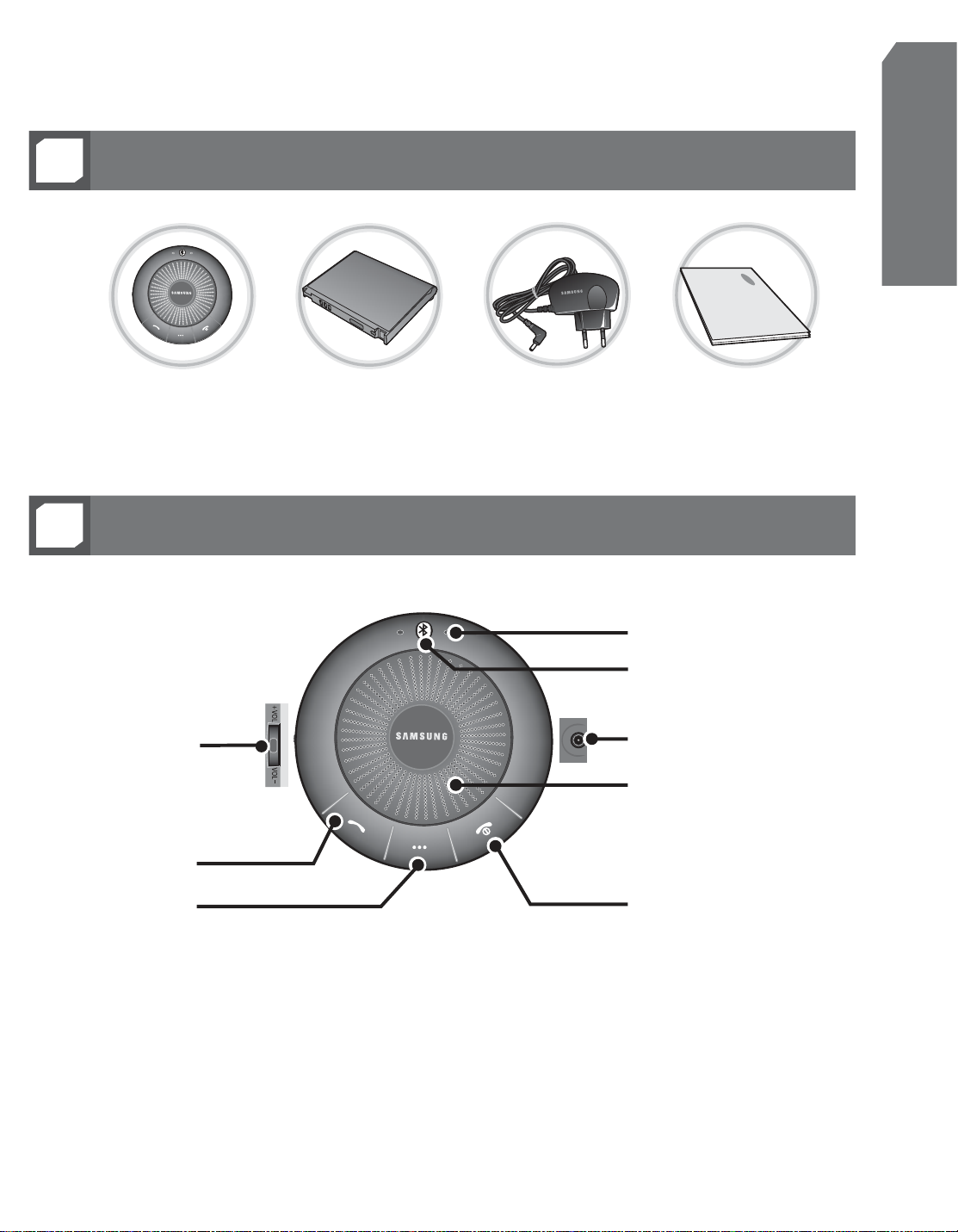
1
2
Unpacking
Bluetooth Speaker
Speaker Overview
Battery
Charger
English
User Manual
Microphone
Volume +
Side Function
Button
Talk Button
Function Button
Indicator Light
Charging Connector
Speaker
Volume -
End Button
3
Page 6
English
3
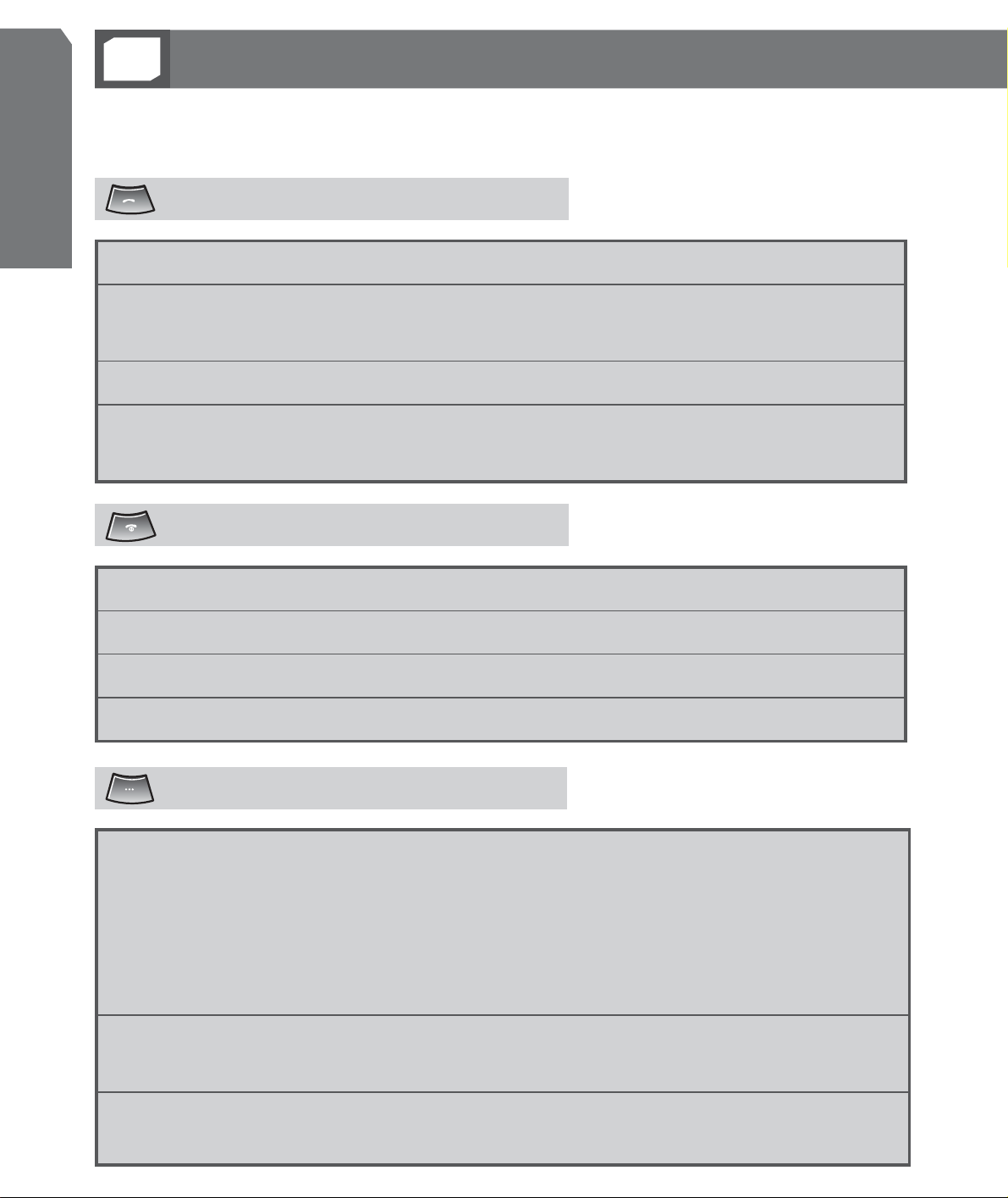
Refer to Before using the product and Using the product sections for further
details about button functions.
Button Functions
Talk Button
Press to answer a call.
Press and hold for 2 seconds to connect to the phone after the pairing
is completed.
Press in standby mode5 to redial the last dialed number.
Press and hold for 2 seconds to put current call on hold and answer a
second call.
End Button
Press and hold for 2 seconds to end a call.
Press and hold for 2 seconds in standby mode to disconnect the phone.
Press and hold for 2 seconds when a call comes in to reject a call.
Press and hold for 3 seconds to power on/off.
Function Button
Press and hold for
2 seconds
in standby mode to flash GREEN
light to notify the remained battery amount.
- Flashes once : Approx 5~20% charged
- Flashes twice : Approx 20~50% charged
- Flashes three times : Approx 50~80% charged
- Flashes four times : Approx 80~100% charged
Press and hold for 2 seconds while Call-Wating is activated to
activate 3-way call.
Press and hold for 3 seconds in idle mode when ready to be
paied or connected to the phone.
4
Page 7
– The buttons detect the signal through magnetic sensor.
Please make sure to press the buttons with hands until the
sensor recognizes the signal. The product may malfunction
if you press the buttons with plastics ( Nonconductors ) or
press too shortly.
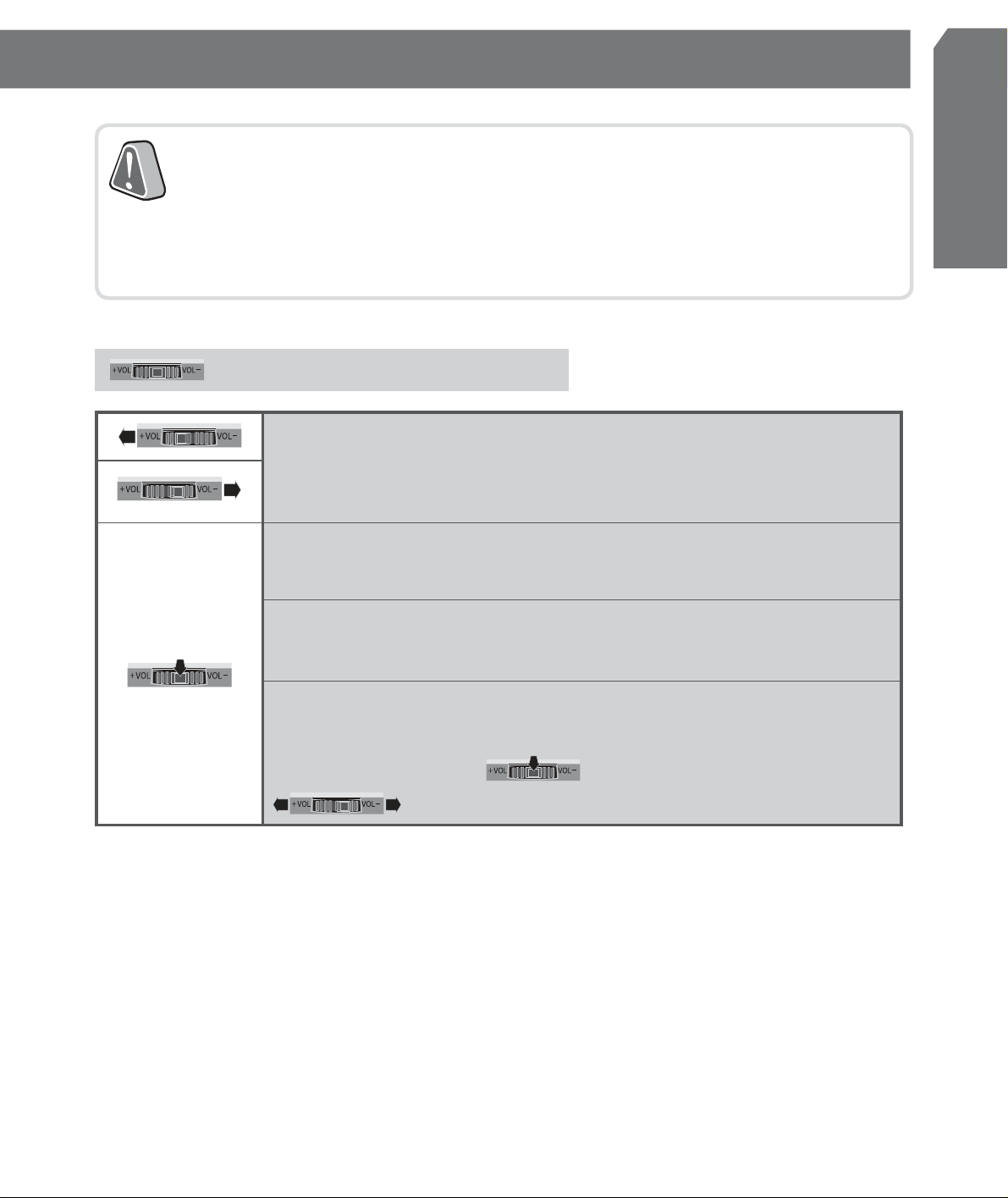
Side Function Button
Move left/right to adjust speaker volume. (8 Steps)
Move left/right while pressing and holding to adjust
speaker volume step by step automatically.
Press and hold for 3 seconds to switch the call to the
product while talking on the phone.
Press and hold for 3 seconds to switch the call to the
phone while talking on the product.
English
Press and hold for 2 seconds to mute the
microphone while talking on the product.
(To unmute, press
)
or move left/right
5
Page 8
English
4
This device has an internal battery which is non-removable and rechargeable. Please make
sure that you should charge the battery fully before using the speaker for the first time.
Charging the Battery
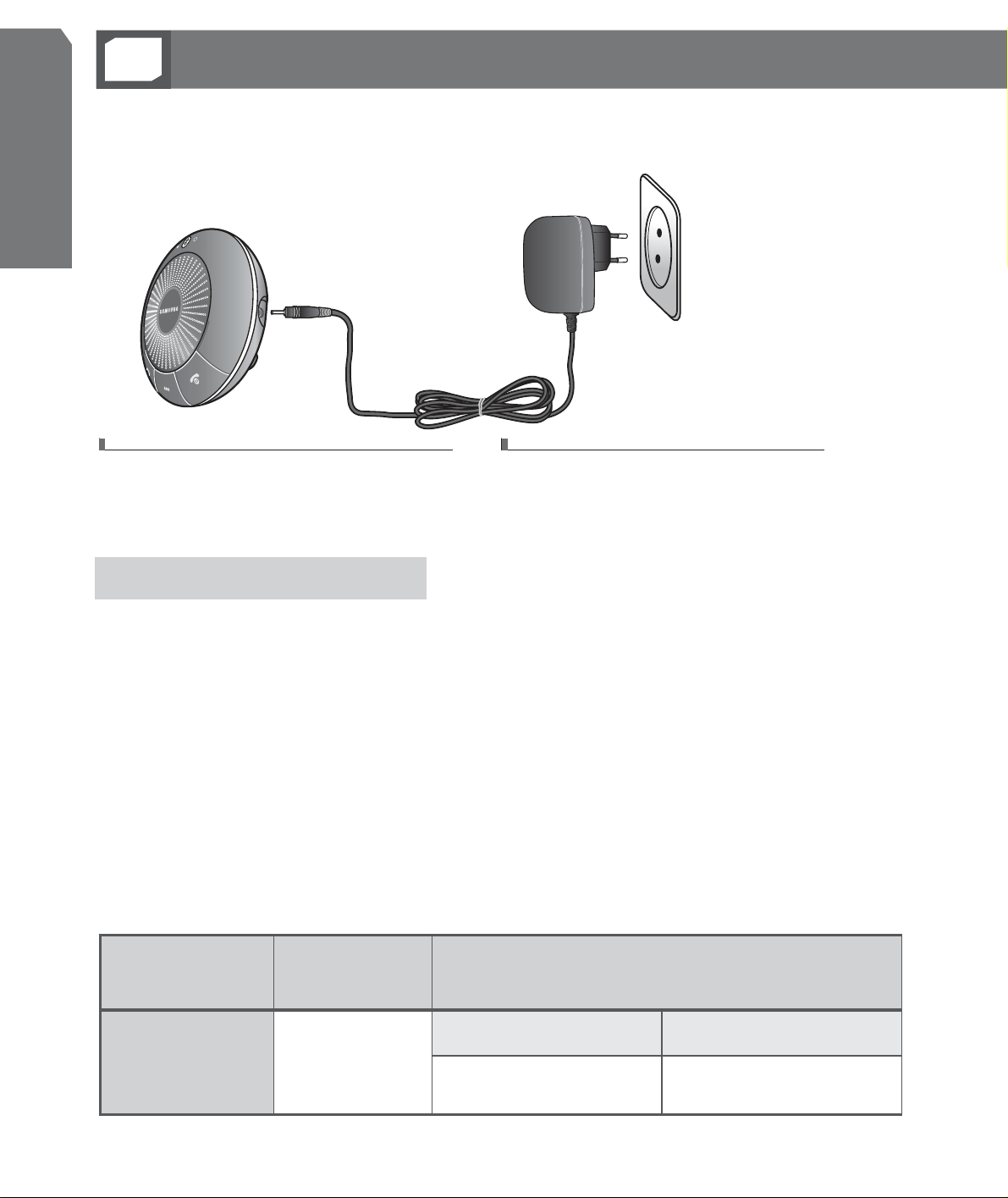
Plug the charger into the
Speaker’s charging connector.
Plug the charger into the
electrical outlet.
About the charging
> RED indicator light is on while charging, and GREEN indicator light
is on if the charging is completed.
> You can use the speaker while charging.
> It indicates that the battery may explode if ORANGE light is
on while charging. (In direct sunlight or in a hot vehicle) If this
happens, remove the battery from the charger or move to proper
place to use the product.
Battery charging and standard operation time
charging
Standard operation time
time
6
Battery
operation
time
Approximately
3hr.
Talk timeStandby time
Up to 10hr.Up to 80hr.
Page 9
- Disconnect the charger from the power source or the speaker
after completing the charging.
- Use only Samsung-approved charger. Unauthorized charger
may cause an explosion or damage on the speaker.
-
Always try to keep the battery at room temperature (0 °C~ +40°C).
- Try connecting again if the battery has been recharged after
fully consumed and turned off.
When the battery charge falls low
> RED indicator light flashes 3 times every 10 seconds.
> In that case, switch the call from the speaker to the phone.
(While on call)
> The speaker will be automatically turned off.
English
Please charge the battery.
> If the battery is fully consumed and turned off, the speaker and the
phone will not be automatically connected when turning on again.
To check the charging status
> Press and hold
> The GREEN indicator light flashes from 1 to 4 times depending
on the remaining battery amount.
> The more it flashes, the more the battery is remained.
(Refer to 3. Button Functions section.)
for 2 seconds in standby mode.
7
 Loading...