

Page 1

Alignment & Adjustment
Samsung Electronics 3-1
3. Alignment & Adjustment
3-1 Service Instruction
1. General Adjustment :
In general, a color TV can provide ideal visual quality by adjusting the basic settings such as the vertical size, horizontal size,
focus, etc.
Display a black and white picture on the screen to check if the picture is clearly displayed.
If there are some 'spotted' points on the screen when displaying a black and white picture, degauss the screen using the
degauss coil. If the spotted points remain, re-adjust the purity and the convergence. This completes the basic performance
examination.
Notice.
■ These adjustments and the check list are only applied to S62B chassis-applied models.
■ Only use 230V for the measurement set. It is recommended using an insulation transformer when supplying power to
the set so as to prevent shock to the set or to yourself.
■ These adjustment specifications have been created on the basis of the domestic S62B chassis-applied remote control
model. Some of the contents may be changed subject to the sales location and the product specifications.
2. When replacing the F_Box Board :
Since the software is loaded to the EPROM of the F_box board, check the version of the
software of the EPROM.
To check the version of the software, Enter service mode presee the key on the reomte
control according to the following seguenu.
(in stand-by status) Info→Menu→Mute→Power→ON
The software information will then be displayed below the OSD menu.
The notation of the software information : For example, T_SHPEU_1009 refers to
"CORSET BASIC MODEL Europe. ver.1009".
Since the settings including the Channel
information, Deflection, etc. are saved to the
nvRAM, reconfigure these settings when
replacing the System Board
3. When replacing the Deflection Board :
Tilt adjustment, focus adjustment, screen voltage setting and W/B adjustment are all required.
4. When replacing the Main Board : No adjustments required.
5. When replacing the CRT Ass'y : No adjustments required.
6. When replacing the front panel master power switch : No adjustments required.
7. When replacing the Side AV : No adjustments required.
8. When replacing the control switch : No adjustments required.
Page 2
Alignment & Adjustment
3-2 Samsung Electronics
3-2 How to Access Service Mode
MENU Show all menus
▲ / ▼
Move the cursor to select an item.
◀ / ▶
Adjust the selected configuration value
1. To enter Service Mode, press the keys on the remote control according to the following sequence. (in Stand-by status)
Info → Menu → Mute → Power On
※ When failing to enter Service Mode, repeat the procedure above.
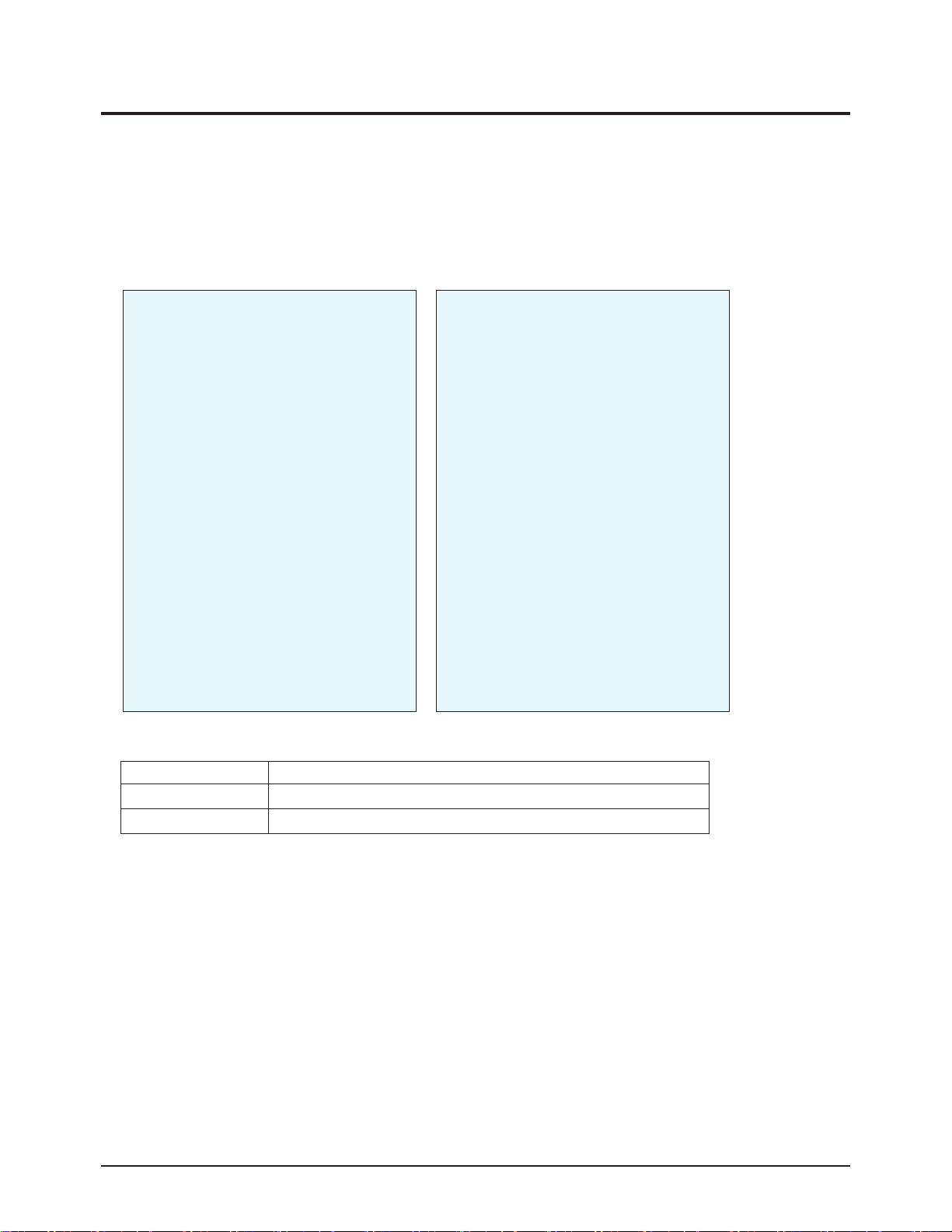
2. The initial screen of Service Mode.
< Europe> <Asia/CIS>
3. Functions of the Keys within Service Mode
Service / T_SHPEU_XXXX
Option (XX XX XX)
Deflection
Video Adjust 1
Video Adjust 2
Video Adjust 3
Video Adjust 4
Video Adjust 5
YC Delay
EEPROM
Checksum(XXXX)
Reset / XX-XX-XX
Service / T_SHPAS_XXXX
Deflection
480/576P Deflect Offset
1080i Deflect Offset
4:3 Offset -- Vixlim
Video Adjust 1
Video Adjust 2
Video Adjust 3
Video Adjust 4
Video Adjust 5
Video Adjust 6
DTV Video Adjust
DTV Video Adjust2
YC Delay
EEPROM
Option (XX XX XX)
Checksum(XXXX)
Reset / XX-XX-XX
Page 3
Alignment & Adjustment
Samsung Electronics 3-3
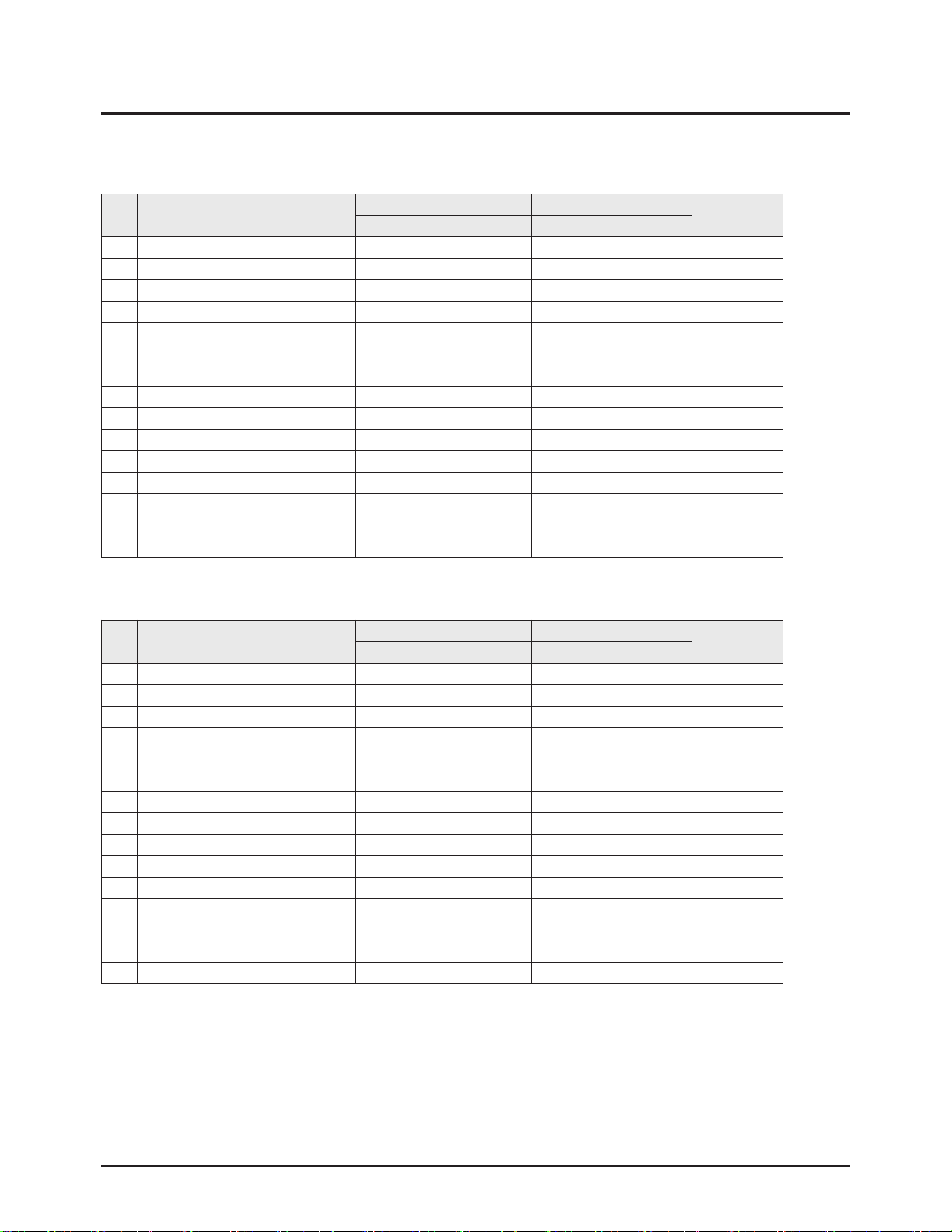
3-3 Factory Data
■ Europe
No item
WS32Z306VB CW29Z306VB
Remark
Data Data
0 V Amp 38 38 Adjust
1 V_SHIFT 26 24 Adjust
2 H EW 43 24 Adjust
3 H Shift 34 41 Adjust
4 V Linearity 6 6 Fix
5 Upper-Linearity 6 2 Fix
6 Lower-Linearity 1 2 Fix
7 V SC 3 5 Fix
8 H Parablar 42 42 Adjust
9 Upper Corner 30 34 Adjust
10 Lower Corner 39 37 Adjust
11 H Trapezium 26 28 Adjust
12 Bow 33 34 Fix
13 Angle 32 34 Fix
14 V Position 40 40 Fix
1. Deflection Adiustment (PAL)
No item
WS32Z306VB CW29Z306VB
Remark
Data Data
0 V Amp 0 0 Fix
1 V_SHIFT 1 0 Fix
2 H EW 3 -1 Fix
3 H Shift 5 5 Fix
4 V Linearity 2 2 Fix
5 Upper-Linearity 1 1 Fix
6 Lower-Linearity -1 -1 Fix
7 V SC 0 0 Fix
8 H Parablar 1 1 Fix
9 Upper Corner -3 -3 Fix
10 Lower Corner 1 1 Fix
11 H Trapezium -8 -8 Fix
12 Bow 1 1 Fix
13 Angle 3 3 Fix
14 V Position 0 1 Fix
2. Deflection Adiustment (NTSC)
Page 4
Alignment & Adjustment
3-4 Samsung Electronics
Page 5
Alignment & Adjustment
Samsung Electronics 3-5
No item
WS32Z306VB CW29Z306VB
Remark
Data Data
0 H Parablar_Pal 0 0 Adjust
1 Upper Corner_Pal 0 0 Adjust
2 Lower Corner_Pal 0 0 Adjust
3 Bow_Pal 0 0 Adjust
4 Angle_Pal 0 0 Adjust
5 H Shift_Pal 0 0 Adjust
6 H Parablar_NTSC 0 0 Adjust
7 Upper Corner_NTSC 0 0 Adjust
8 Lower Corner_NTSC 0 0 Adjust
9 Bow_NTSC 0 0 Adjust
10 Angle_NTSC 0 0 Adjust
11 H Shift_NTSC 0 0 Adjust
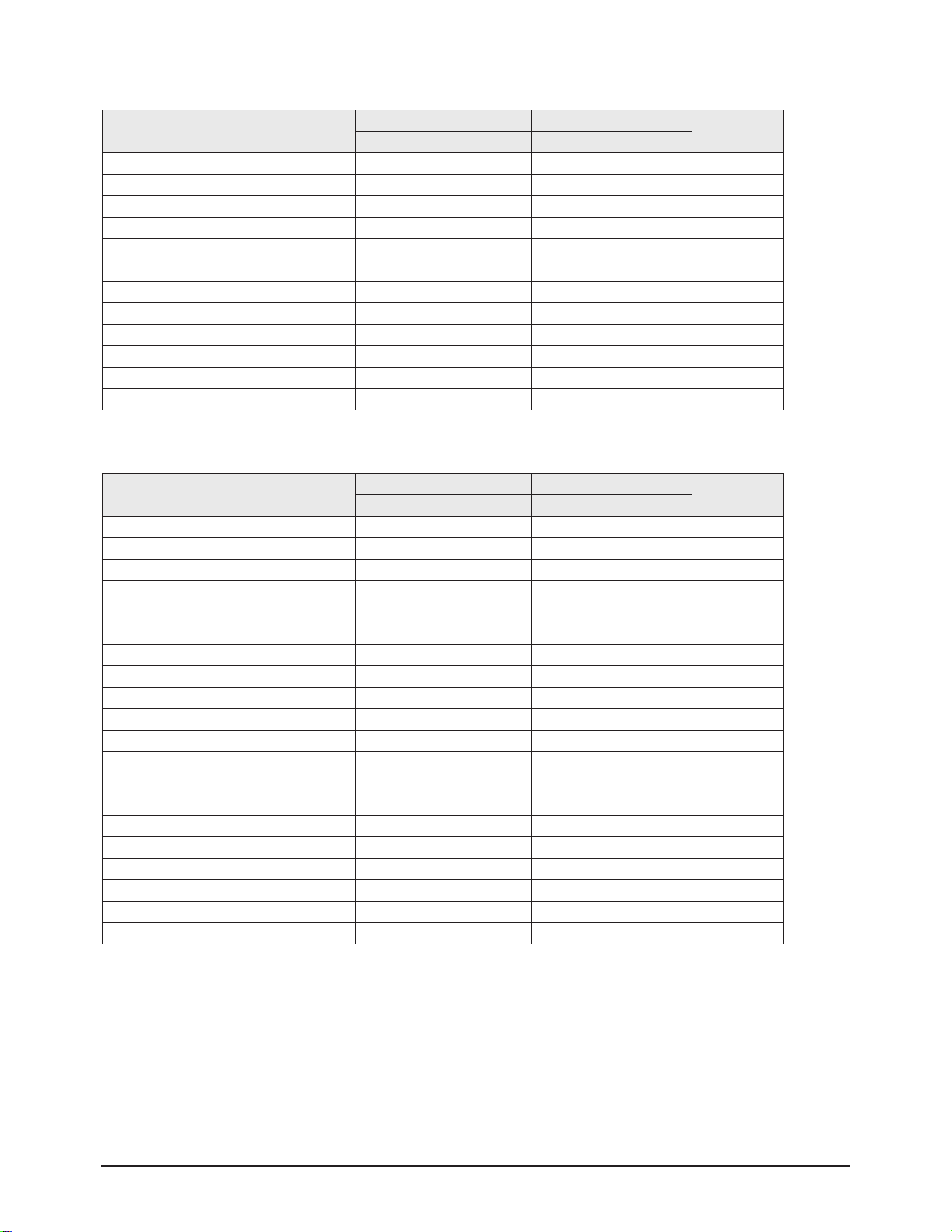
3. 4:3 Offset__Vixlim
No item
WS32Z306VB CW29Z306VB
Remark
Data Data
0 EE_R_CUTOFF, 32 32 Adjust
1 EE_G_CUTOFF, 32 32 Fix
2 EE_B_CUTOFF, 32 32 Adjust
3 Color On / Off 1 1 Adjust
4 CR Offset 30 30 Fix
5 CB Offest 30 30 Fix
6 R Drive 37 37 Adjust
7 G Drive 32->38 38 Fix
8 B Drive 29 29 Adjust
9 Sub Bright 44 44 Adjust
10 Sub Contrast 6 6 Adjust
11 Sub Color 9 9 Fix
12 Secam sub color 5 5 Fix
13 Sub Tint 28 28 Fix
14 CTI Level 1 1 Fix
15 Color AXIS 1 1 Fix
16 LTI Level 1->3 3 Fix
17 VSU 5 4 Fix
18 Melody volume 9 9 Fix
19 Video mute time 6 6 Fix
4. Video Adjustment 1
Page 6
Alignment & Adjustment
3-6 Samsung Electronics
No item
WS32Z306VB CW29Z306VB
Remark
Data Data
0 ABL Mode 3 3 Fix
1 Gamma 2 2 Fix
2 DPIC Level 2 2 Fix
3 DC Trans 2->1 1 Fix
4 ABL-TH 14 3 Fix
5 VM-Level 2 1 Fix
6 VM-Coring 2 2 Fix
7 VM-f0 2 2 Fix
8 VM-Limit 2 0 Fix
9 VM-Delay 1 1 Fix
10 SHP CD 1 1 Fix
11 SHP f0 1 1 Fix
12 SHP f1& p/o 10 11 Fix
13 AKB Time 13 13 Fix
14 Coring 0 0 Fix
15 Bandpass 7 7 Fix
16 Highpass 8 8 Fix
17 Bandpass_AV 6 6 Fix
18 Highpass_AV 7 7 Fix
19 Nicam MAE value 255 255 Fix
5. Video Adjustment 2
No item
WS32Z306VB CW29Z306VB
Remark
Data Data
0 H_EHT comp 4 0 Fix
1 V_EHT comp 5 4 Fix
2 PIN EHT comp 6 5 Fix
3 AFC EHT comp 0 0 Fix
4 Sync Phase 0 0 Fix
5 NR Value 6 6 Fix
6 PIP Contrast 14 14 Fix
7 PIP Bright 0 0 Fix
8 PIP Tint 63 63 Fix
9 PIP Color 6 6 Fix
10 PIP Pal V Pos 28 28 Fix
11 PIP NTSC V Pos 25 25 Fix
12 PIP H Pos 34 34 Fix
13 PIP R Cut off 0 0 Fix
14 PIP G Cut off 0 0 Fix
15 PIP B Cut off 0 0 Fix
16 PIP R Drive 56 56 Fix
17 PIP G Drive 56 56 Fix
18 PIP B Drive 56 56 Fix
19 PIP VSP Delay 5 5 Fix
6. Video Adjustment 3
Page 7
Alignment & Adjustment
Samsung Electronics 3-7
No item
WS32Z306VB CW29Z306VB
Remark
Data Data
0 3Pip Pal V position 11 11 Fix
1 3Pip Pal H Position 12 12 Fix
2 3Pip Ntsc V Position 11 11 Fix
3 3Pip Ntsc H Position 19 19 Fix
4 Sync Phase (480p) 0 0 Fix
5 Sync Phase (576p) 1 1 Fix
6 Sync Phase (1080i) 0 0 Fix
7. Video Adjustment 4
No item
WS32Z306VB CW29Z306VB
Remark
Data Data
0 R_Drive Warm2 3 3 Fix
1 B_Drive Warm2 -9 -9 Fix
2 R_Cutoff_Warm2 6 6 Fix
3 B_Cutoff_Warm2 -11 -11 Fix
4 R_Drive Warm1 2 2 Fix
5 B_Drive Warm1 -2 -2 Fix
6 R_Cutoff_Warm1 3 3 Fix
7 B_Cutoff_Warm1 -2 -2 Fix
8 R_Drive Normal 0 0 Fix
9 B_Drive Normal 0 0 Fix
10 R_Cutoff_Normal 0 0 Fix
11 B_Cutoff_Normal 0 0 Fix
12 R_Drive Cool1 0 0 Fix
13 B_Drive Cool1 4 4 Fix
14 R_Cutoff_Cool1 2 2 Fix
15 B_Cutoff_Cool1 6 6 Fix
16 R_Drive Cool2 -2 -2 Fix
17 B_Drive Cool2 6 6 Fix
18 R_Cutoff_Cool2 0 0 Fix
19 B_Cutoff_Cool2 9 9 Fix
8. Video Adjustment 5
Page 8
Alignment & Adjustment
3-8 Samsung Electronics
No item
WS32Z306VB CW29Z306VB
Remark
Data Data
0 P.YC (AV) Delay -9 -9 Fix
1 S.YC (AV) Delay -7 -7 Fix
2 N.YC (AV) Delay -8 -8 Fix
3 P.BG.YC Delay -8 -8 Fix
4 P.DK.YC Delay -10 -10 Fix
5 P.I.YC Delay -10 -10 Fix
6 P.L.YC Delay -8 -8 Fix
7 S.BG.YC Delay -6 -6 Fix
8 S.DK.YC Delay -8 -8 Fix
9 S.I.YC Delay -10 -10 Fix
10 S.L.YC Delay -4 -4 Fix
11 N.M.YC Delay -7 -7 Fix
12 P.60.YC Delay -10 -10 Fix
13 N.443 YC Delay -8 -8 Fix
9. YC DELAY
No item
WS32Z306VB CW29Z306VB
Remark
Data Data
0 System 1 1 Fix
1 System (VGA) 2 2
2 System (480p) 2 2 Fix
3 System (1080i) 3 3 Fix
4 Dynamic Contrast 90 90 Fix
5 Dynamic Brightness 50 50 Fix
6 Dynamic Shapness 50 50 Fix
7 Dynamic Color 50 50 Fix
8 Dynamic Tint 50 50 Fix
9 Dynamic Color Tone 2 2 Fix
10 Standard Contrast 70 70 Fix
11 Standard Brightness 50 50 Fix
12 Standard Shapness 50 50 Fix
13 Standard Color 50 50 Fix
14 Standard Tint 50 50 Fix
15 Standard Color Tone 2 2 Fix
16 Movie Contrast 40 40 Fix
17 Movie Brightness 50 50 Fix
18 Movie Shapness 40 40 Fix
19 Movie Color 45 45 Fix
20 Movie Tint 50 50 Fix
21 Movie Color Tone 2 2 Fix
22 Left Blanking (PAL)
23 Right Blanking (PAL)
24 Left Blanking (VGA)
25 Right Blanking (VGA)
26 Left Blanking (480p) 215 185 Fix
10. EEPROM
Page 9
Alignment & Adjustment
Samsung Electronics 3-9
No item
WS32Z306VB CW29Z306VB
Remark
Data Data
27 Right Blanking(480p) 169 141 Fix
28 Left Blanking(1080i) 141 77 Fix
29 Right Blanking(1080i) 109 175 Fix
30 Brightness (RGB) 236 236 Fix
31 Contrast (RGB) 165 165 Fix
32 U Saturation (RGB) 94 94 Fix
33 V Saturation (RGB) 36 36 Fix
34 DVD Brightness (YPbPr) 221 5 Fix
35 DVD Contrast (YPbPr) 166 166 Fix
36 DVD U Saturation (YPbPr) 122 230 Fix
37 DVD V Saturation (YPbPr) 57 38 Fix
38 9402 Y Gain 175 175 Fix
39 9402 U Gain 71 71 Fix
40 -
41 9402 V Gain 65 65 Fix
42 CrCb Gain (480p) 119 11 9 Fix
43 CrCb Gain (1080i) 119 11 9 Fix
44 LTI Mode 2->1 1 Fix
45 LTI Mode (VGA)
46 LTI Mode (480p) 1 1 Fix
47 LTI Mode (1080i) 1 1 Fix
48 NR ON value1 85 85 Fix
49 NR ON value2 85 85 Fix
50 NR OFF value1 68 68 Fix
51 NR OFF value2 68 68 Fix
52 NR ON value3 170 170 Fix
53 NR ON value4 170 170 Fix
54 NR OFF value3 34 34 Fix
55 NR OFF value4 34 34 Fix
56 -
57 SECAM Sensitivity 28 28 Fix
58 Range of R Gain 32 32 Fix
59 Range of G Gain 32 32 Fix
60 Range of B Gain 32 32 Fix
61 Range of F/B Gain 23 23 Fix
62 -
63 TTX V-Position 40 40 Fix
64 TTX H-Position 180 180 Fix
65 -
66 Pal Sensitivity (AV mode) 215 234
67 wide model 4:3 Normal Parabola 0 0 Fix
68 1080i 50HZ Trepezium 15 15 Fix
69 1080i 60HZ Trepezium 13 13 Fix
70 UP-UCG (Up Corner Semi Control) 0 0 Fix
71 LO-UCG (Low Corner Semi Control) 0 0 Fix
72 Vertical Slicing Level 15 15 Fix
Page 10
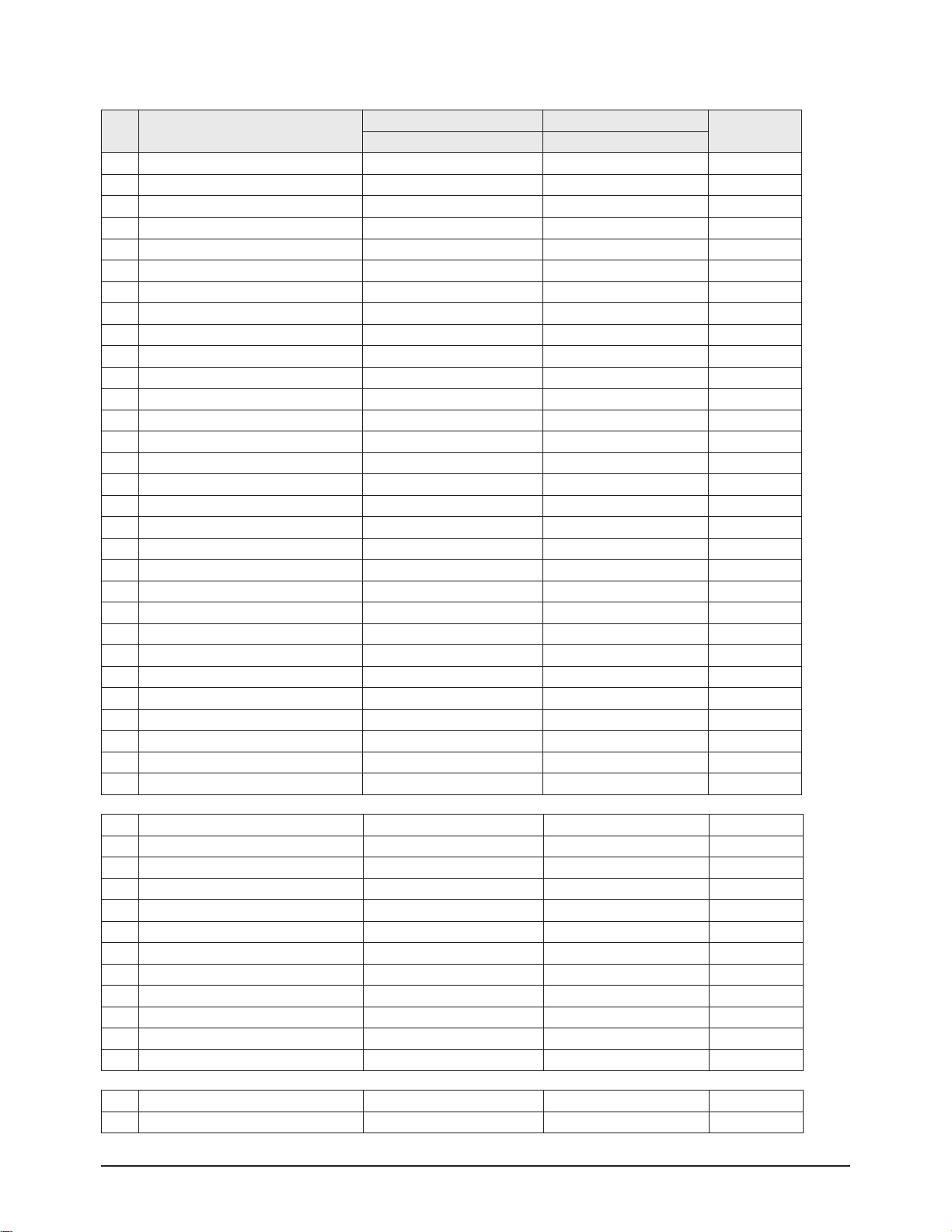
Alignment & Adjustment
3-10 Samsung Electronics
No item
WS32Z306VB CW29Z306VB
Remark
Data Data
73 Vertical Sync Lowpass-Filter 13 13 Fix
74 Amplifier Current Setting of Oscillator Pad 2 2 Fix
75 PAL Sensitivity 185 185 Fix
76 Chroma Sensitivity(PAL) and the Priority Order 215 215 Fix
77 Adjusting Chroma PLL 1 1
78 WSS 4:3 Panorama
79 NT left blank 79 79 Fix
80 NT Right blank 126 126 Fix
81 Progressive TTX V Position
82 Progressive TTX H-Position
83 3Pip Pal V position
84 3Pip Pal H Position
85 3Pip Ntsc V Position
86 3Pip Ntsc H Position
87 -
88 -
89 -
90 RF SubBright 124 124 Fix
91 TTX Sub Brightness 235 235 Fix
92 Left Blanking 101 101 Fix
93 Right Blanking 153 153 Fix
94 S - ABL 0 0 Fix
95 P - ABL 48 80 Fix
96 Picture Limit Level 3 3 Fix
97 OSD Level (LRGB2_LEV) 10 10 Fix
98 TTX Level (LRGB2_LEV) 3 3 Fix
99 AGCADJ1 238 238 Fix
100 AGCADJ2 110 11 0 Fix
101 ON TIMER CH memory 1 1 Fix
102 COMPONENT2 OSD Brightness 10 10 Fix
196 TNR1 207 207 Fix
197 TNR2 149 149 Fix
198 TNR3 95 95 Fix
199 TNR4 63 63 Fix
200 TNR5 47 47 Fix
201 TNR6 31 31 Fix
202 Fix
203 Fix
204 Fix
205 HPLL timing 156 156 Fix
206 SECAM MODE INITIAL DATA 76 76 Fix
207 SECAM MODE INITIAL DATA 64 64 Fix
244 Zoom2 H-para offset -1 2 Fix
245 Initialize 171 171 Fix
Page 11
Alignment & Adjustment
Samsung Electronics 3-11
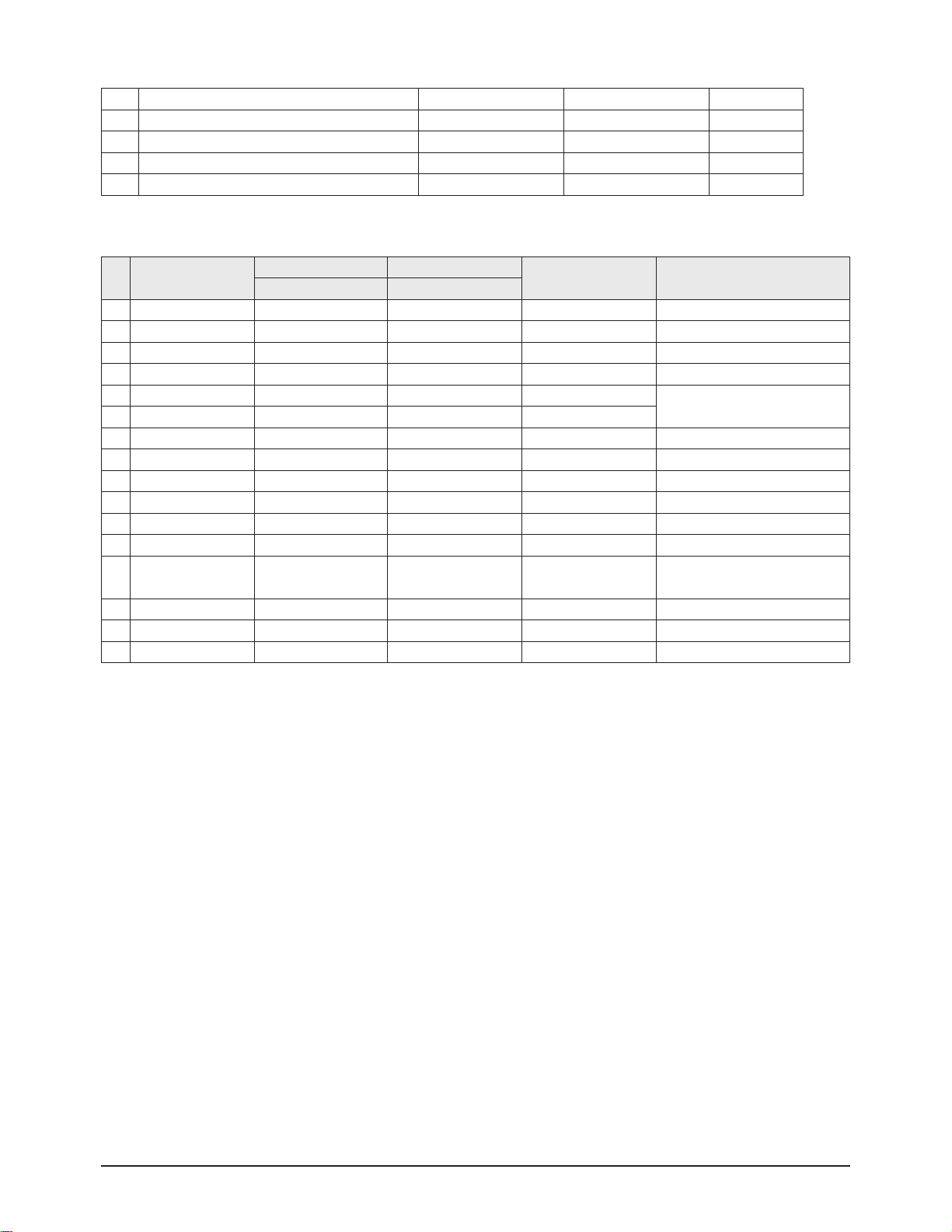
251 PL preventive measure caused by FBT high pressure 250 250 Fix
252 PL preventive measure caused by FBT high pressure 40 40 Fix
253 PL preventive measure caused by FBT high pressure 150 150 Fix
254 Z00M1 OFFSET -6 -2 Fix
255 Z00M2 OFFSET -10 -5 Fix
No Option Byte
WS32Z306VB CW29Z306VB
Alterable Change Mode Remark
Data Data
1 CRT Wide 4:3 Wide / 4:3 depending on the CRT
2 AV_JACK Scart Scart Scart / RCA
3 DTV Off Off On / Off
4 PIP Off Off 2-Tuner/1-Tuner/Off depending on the model
5 LNA Off Off On / Off
On: 2T PIP LNA All model
Off: 1Tuner/No PIP
6 SEARCH_LNA Off Off On / Off
7 Sound SRS SRS SRS / A2-NICAM
8 Auto FM On On On / Off
9 Tilt On On On / Off
10 High Deviation Off Off On / Off
11 Woofer Off Off On / Off
12 TTX Group OSD Language OSD Language Table TTX Language Group
13 TTX List Off Off On / Off
On : Australia,Newzealand
Off: Europe,CIS,Asia
14 Digital NR On / Off On On
15 AGC on/off Off Off On / Off
16 Blue Screen On On On / Off
11. Option
Page 12
Alignment & Adjustment
3-12 Samsung Electronics
No item
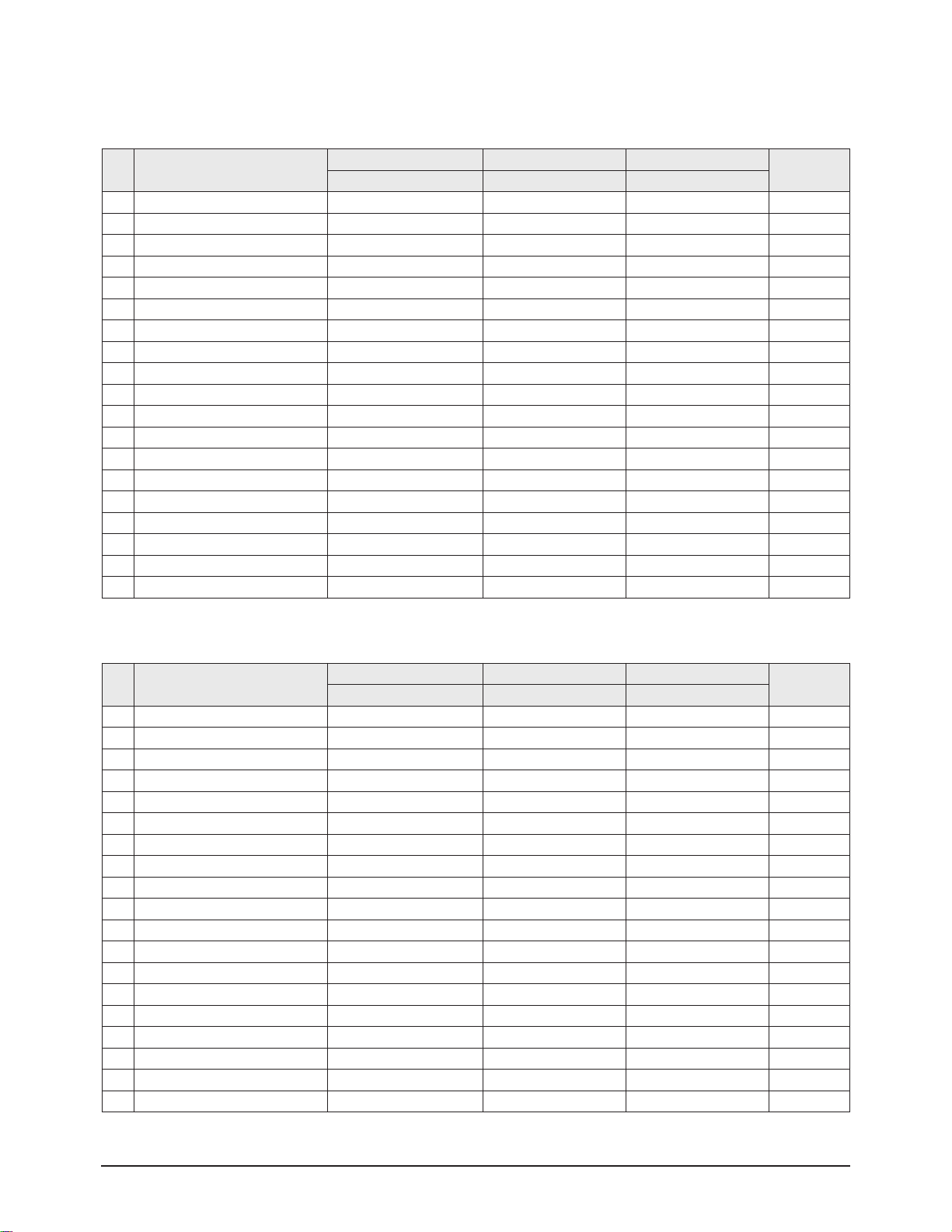
CIS 29" CIS 32" Asia 29"
Remark
Data Data Data
0 V Amp 0 0 0 Fix
1 V_SHIFT 3 2 3 Fix
2 H EW -1 1 -1 Fix
3 H Shift -3 9 -3 Fix
4 V Linearity 2 2 2 Fix
5 Upper-Linearity 1 1 1 Fix
6 Lower-Linearity -1 -1 -1 Fix
7 V SC 0 0 0 Fix
8 H Parablar 2 0 2 Fix
9 Upper Corner -1 -3 -1 Fix
10 Lower Corner 2 1 2 Fix
11 H Trapezium -6 -7 -6 Fix
12 Bow 0 0 0 Fix
13 Angle 0 -1 0 Fix
14 V Position 0 0 0 Fix
15 CXA2151 Sub01 68 68 68 Fix
16 CXA2151 Sub02 1 1 1 Fix
17 Zoom1 Tra-offset -4 -6 -2 Fix
18 Zoom2 Tra-offset -7 -10 -8 Fix
2. Deflection Adiustment (NTSC)
■ Asia / CIS
No item
CIS 29" CIS 32" Asia 29"
Remark
Data Data Data
0 V Amp 38 29 39 Adjust
1 V_SHIFT 23 23 23 Adjust
2 H EW 37 26 37 Adjust
3 H Shift 38 40 43 Adjust
4 V Linearity 3 6 5 Fix
5 Upper-Linearity 2 6 4 Fix
6 Lower-Linearity 4 1 2 Fix
7 V SC 4 3 4 Fix
8 H Parablar 38 42 43 Adjust
9 Upper Corner 30 30 36 Adjust
10 Lower Corner 36 39 36 Adjust
11 H Trapezium 25 26 37 Adjust
12 Bow 32 33 34 Fix
13 Angle 34 32 30 Fix
14 V Position 40 40 40 Fix
15 CXA2151 Sub01 68 68 68 Fix
16 CXA2151 Sub02 1 1 1 Fix
17 Zoom1 Tra-offset -4 -6 -2 Fix
18 Zoom2 Tra-offset -7 -10 -8 Fix
1. Deflection Adiustment (PAL)
Page 13
Alignment & Adjustment
Samsung Electronics 3-13
No item
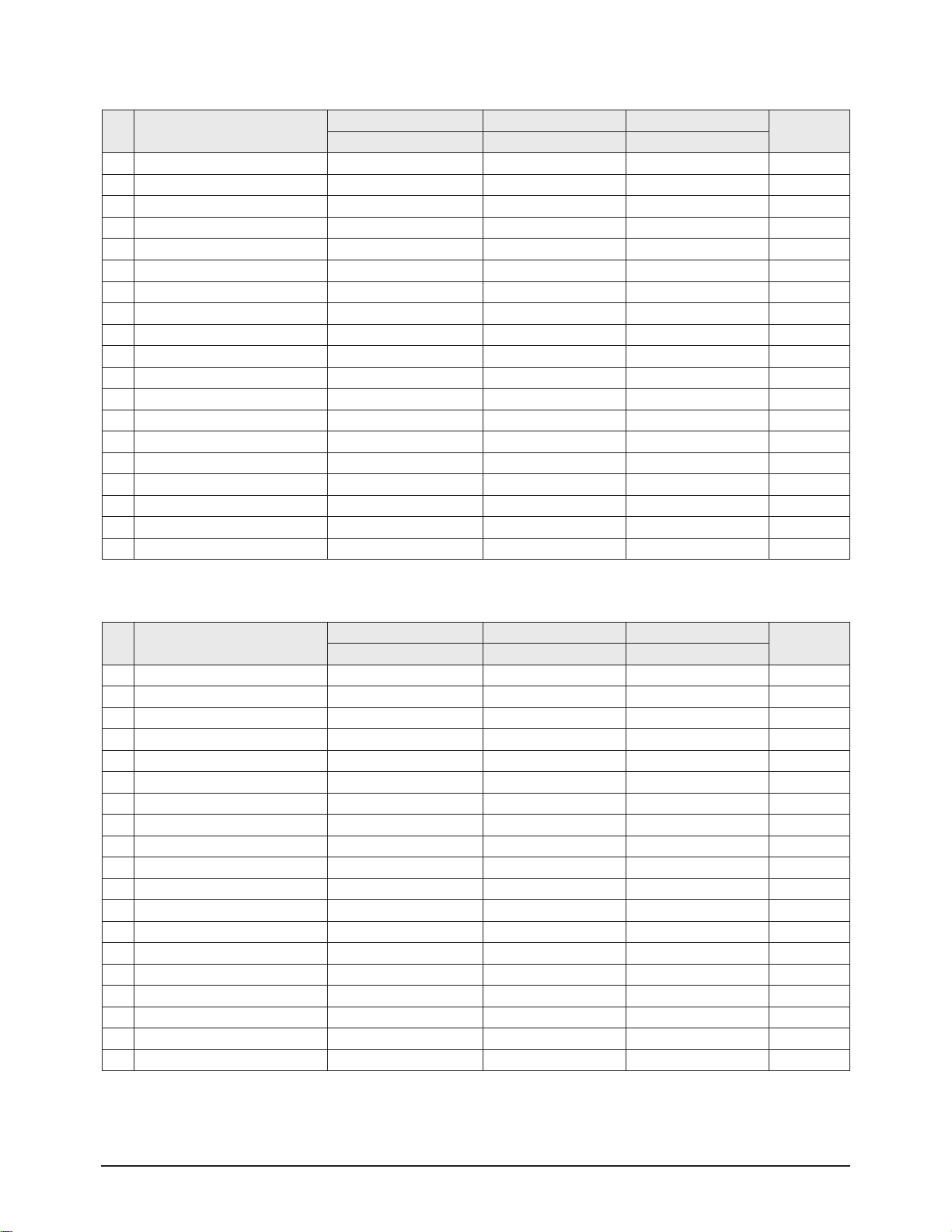
CIS 29" CIS 32" Asia 29"
Remark
Data Data Data
0 V Amp 0 0 0 Fix
1 V_SHIFT -1 -1 2 Fix
2 H EW -6 -6 -6 Fix
3 H Shift -12 -12 -12 Fix
4 V Linearity 0 0 0 Fix
5 Upper-Linearity 0 0 0 Fix
6 Lower-Linearity 0 0 0 Fix
7 V SC 0 0 0 Fix
8 H Parablar -1 -1 -1 Fix
9 Upper Corner 5 5 5 Fix
10 Lower Corner -3 -3 -3 Fix
11 H Trapezium 13 13 13 Fix
12 Bow 0 0 0 Fix
13 Angle 0 0 0 Fix
14 V Position 0 0 0 Fix
15 CXA2151 Sub01 232 232 232 Fix
16 CXA2151 Sub02 97 97 97 Fix
17 Zoom1 Tra-offset 0 0 0 Fix
18 Zoom2 Tra-offset 0 0 0 Fix
3. 576P Deflect Offset
No item
CIS 29" CIS 32" Asia 29"
Remark
Data Data Data
0 V Amp 0 0 0 Fix
1 V_SHIFT 0 0 0 Fix
2 H EW -3 -3 -3 Fix
3 H Shift -19 -19 -22 Fix
4 V Linearity 0 0 0 Fix
5 Upper-Linearity 0 0 0 Fix
6 Lower-Linearity 0 0 0 Fix
7 V SC 0 0 0 Fix
8 H Parablar 0 0 0 Fix
9 Upper Corner 2 2 2 Fix
10 Lower Corner -1 -1 -1 Fix
11 H Trapezium 7 7 7 Fix
12 Bow 0 0 0 Fix
13 Angle 0 0 0 Fix
14 V Position 0 0 0 Fix
15 CXA2151 Sub01 232 232 232 Fix
16 CXA2151 Sub02 97 97 97 Fix
17 Zoom1 Tra-offset 0 0 0 Fix
18 Zoom2 Tra-offset 0 0 0 Fix
4. 480P Deflect Offset
Page 14
Alignment & Adjustment
3-14 Samsung Electronics
No item
CIS 29" CIS 32" Asia 29"
Remark
Data Data Data
0 H Parablar_Pal 0 0 0 Adjust
1 Upper Corner_Pal 0 0 0 Adjust
2 Lower Corner_Pal 0 0 0 Adjust
3 Bow_Pal 0 0 0 Fix
4 Angle_Pal 0 0 0 Fix
5 H Shift_Pal 0 0 0 Adjust
6 H Parablar_NTSC 0 0 0 Adjust
7 Upper Corner_NTSC 0 0 0 Adjust
8 Lower Corner_NTSC 0 0 0 Adjust
9 Bow_NTSC 0 0 0 Fix
10 Angle_NTSC 0 0 0 Fix
11 H Shift_NTSC 0 0 0 Adjust
6. 4:3 Offset__Vixlim
No item
CIS 29" CIS 32" Asia 29"
Remark
Data Data Data
0 V Amp 12 12 11 Fix
1 V_SHIFT -6 -6 0 Fix
2 H EW -22 -22 -22 Fix
3 H Shift 0 0 0 Fix
4 V Linearity -6 -6 0 Fix
5 Upper-Linearity 0 0 4 Fix
6 Lower-Linearity 5 5 1 Fix
7 V SC 0 0 0 Fix
8 H Parablar -15 -15 -20 Fix
9 Upper Corner 10 10 0 Fix
10 Lower Corner -1 -1 -3 Fix
11 H Trapezium 15 15 10 Fix
12 Bow 1 1 0 Fix
13 Angle -2 -2 0 Fix
14 V Position 0 0 0 Fix
15 CXA2151 Sub01 196 196 196 Fix
16 CXA2151 Sub02 97 97 97 Fix
17 Zoom1 Tra-offset 0 0 0 Fix
18 Zoom2 Tra-offset 0 0 0 Fix
5. 1080i Deflect Offset
Page 15
Alignment & Adjustment
Samsung Electronics 3-15
No item
CIS 29" CIS 32" Asia 29"
Remark
Data Data Data
0 EE_R_CUTOFF, 40 40 32 Adjust
1 EE_G_CUTOFF, 32 32 32 Fix
2 EE_B_CUTOFF, 36 36 32 Adjust
3 Color On / Off 1 1 1 Adjust
4 CR Offset 30 30 30 Fix
5 CB Offest 30 30 30 Fix
6 R Drive 41 41 37 Adjust
7 G Drive 38 38 35 Fix
8 B Drive 38 38 29 Adjust
9 Sub Bright 44 44 44 Adjust
10 Sub Contrast 9 9 6 Adjust
11 Sub Color_Pal 9 9 18 Fix
12 Sub Color_NTSC 20 20 16 Fix
13 Secam sub color 5 5 5 Fix
14 Sub Tint 28 28 28 Fix
15 CTI Level 1 1 1 Fix
16 Color AXIS 1 1 1 Fix
17 LTI Mode 1 1 1 Fix
18 LTI Level 3 3 3 Fix
19 VSU 3 5 5 Fix
20 Melody volume 9 9 9 Fix
21 Video mute time 6 6 6 Fix
7. Video Adjustment 1
No item
CIS 29" CIS 32" Asia 29"
Remark
Data Data Data
0 ABL Mode 3 3 3 Fix
1 Gamma 2 2 3 Fix
2 DPIC Level 3 3 3 Fix
3 DC Trans 1 1 1 Fix
4 ABL-TH 3 3 3 Fix
5 VM-Level 1 1 1 Fix
6 VM-Coring 2 2 2 Fix
7 VM-f0 2 2 2 Fix
8 VM-Limit 0 0 0 Fix
9 VM-Delay 1 1 1 Fix
10 SHP CD 1 1 1 Fix
11 SHP f0 1 1 1 Fix
12 SHP f1& p/o 11 11 11 Fix
13 AKB Time 13 13 13 Fix
14 Coring 0 0 0 Fix
15 Bandpass 7 7 12 Fix
16 Highpass 8 8 11 Fix
17 Bandpass_AV 6 6 10 Fix
18 Highpass_AV 7 7 8 Fix
8. Video Adjustment 2
Page 16
Alignment & Adjustment
3-16 Samsung Electronics
No item
CIS 29" CIS 32" Asia 29"
Remark
Data Data Data
0 3Pip Pal V position 11 11 11 Fix
1 3Pip Pal H Position 12 12 12 Fix
2 3Pip Ntsc V Position 11 11 11 Fix
3 3Pip Ntsc H Position 19 19 19 Fix
4 Sync Phase (480p) 1 1 0 Fix
5 Sync Phase (576p) 1 1 0 Fix
6 Sync Phase (1080i) 0 0 0 Fix
10. Video Adjustment 4
No item
CIS 29" CIS 32" Asia 29"
Remark
Data Data Data
0 H_EHT comp 0 2 0 Fix
1 V_EHT comp 4 5 4 Fix
2 PIN EHT comp 5 6 5 Fix
3 AFC EHT comp 0 0 0 Fix
4 Sync Phase 0 0 0 Fix
5 NR Value 6 6 6 Fix
6 PIP Contrast 14 14 14 Fix
7 PIP Bright 0 0 0 Fix
8 PIP Tint 63 63 63 Fix
9 PIP Color 6 6 6 Fix
10 PIP Pal V Pos 28 28 28 Fix
11 PIP NTSC V Pos 25 25 25 Fix
12 PIP H Pos 34 34 34 Fix
13 PIP R Cut off 0 0 0 Fix
14 PIP G Cut off 0 0 0 Fix
15 PIP B Cut off 0 0 0 Fix
16 PIP R Drive 56 56 56 Fix
17 PIP G Drive 56 56 56 Fix
18 PIP B Drive 56 56 56 Fix
19 PIP VSP Delay 5 5 5 Fix
9. Video Adjustment 3
Page 17
Alignment & Adjustment
Samsung Electronics 3-17
No item
CIS 29" CIS 32" Asia 29"
Remark
Data Data Data
0 R_Drive Warm2 3 3 7 Fix
1 B_Drive Warm2 -9 -9 -19 Fix
2 R_Cutoff_Warm2 6 6 13 Fix
3 B_Cutoff_Warm2 -11 -11 -16 Fix
4 R_Drive Warm1 2 2 6 Fix
5 B_Drive Warm1 -2 -2 -12 Fix
6 R_Cutoff_Warm1 3 3 6 Fix
7 B_Cutoff_Warm1 -2 -2 -11 Fix
8 R_Drive Normal 0 0 4 Fix
9 B_Drive Normal 0 0 -9 Fix
10 R_Cutoff_Normal 0 0 3 Fix
11 B_Cutoff_Normal 0 0 -9 Fix
12 R_Drive Cool1 0 0 2 Fix
13 B_Drive Cool1 4 4 -3 Fix
14 R_Cutoff_Cool1 2 2 2 Fix
15 B_Cutoff_Cool1 6 6 -2 Fix
16 R_Drive Cool2 -2 -2 0 Fix
17 B_Drive Cool2 6 6 0 Fix
18 R_Cutoff_Cool2 0 0 0 Fix
19 B_Cutoff_Cool2 9 9 0 Fix
11. Video Adjustment 5
No item
CIS 29" CIS 32" Asia 29"
Remark
Data Data Data
0 R drive offset 1080i 1 1 1 Fix
1 G drive offset 1080i 5 5 5 Fix
2 R cutoff offset 1080i -11 -11 -11 Fix
3 G cutoff offset 1080i -22 -22 -22 Fix
4 R drive offset 480P -2 -2 -2 Fix
5 G drive offset 480P 0 0 0 Fix
6 R cutoff offset 480P -5 -5 -5 Fix
7 G cutoff offset 480P -1 -1 -1 Fix
8 R drive offset 576P -2 -2 -2 Fix
9 G drive offset 576P 0 0 0 Fix
10 R cutoff offset 576P -1 -1 -1 Fix
11 G cutoff offset 576P 8 8 8 Fix
12 R drive offset 480i 0 0 0 Fix
13 G drive offset 480i 1 1 1 Fix
14 R cutoff offset 480i 2 2 2 Fix
15 G cutoff offset 480i 0 0 0 Fix
16 R drive offset 576i -3 -3 -3 Fix
17 G drive offset 576i 0 0 0 Fix
18 R cutoff offset 576i 6 6 6 Fix
19 G cutoff offset 576i 2 2 2 Fix
12. Video Adjustment 6
Page 18
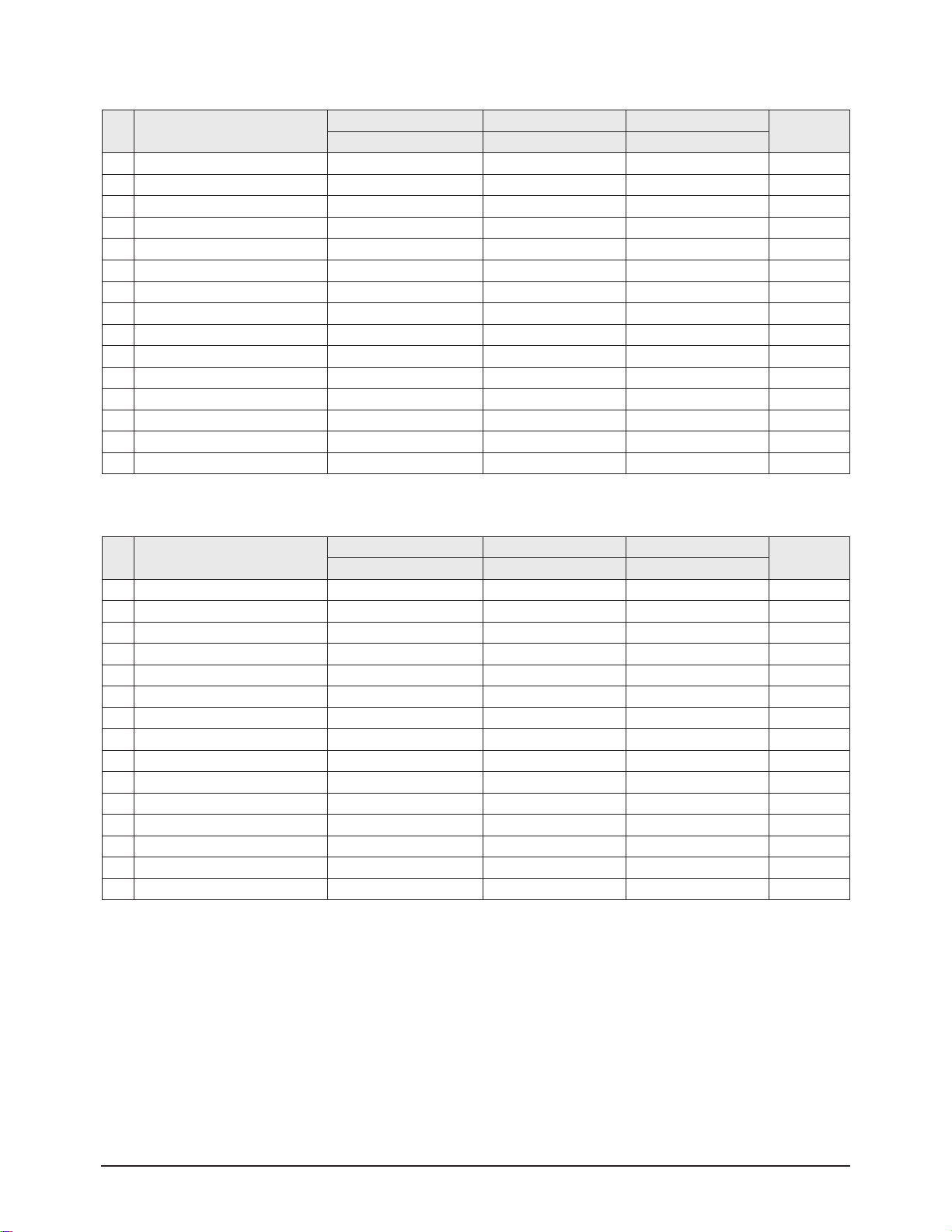
Alignment & Adjustment
3-18 Samsung Electronics
No item
CIS 29" CIS 32" Asia 29"
Remark
Data Data Data
0 Sub Bright 34 34 34 Fix
1 Sub Contrast 11 11 11 Fix
2 Sub Color 20 20 20 Fix
3 Sub Tint (Hue) 29 29 29 Fix
4 Color AXIS 1 1 1 Fix
5 LTI mode 1 1 1 Fix
6 VM-Level 2 2 2 Fix
7 VM-Coring 2 2 2 Fix
8 VM-f0 0 0 0 Fix
9 VM-Limit 1 1 1 Fix
10 VM-Delay 2 2 2 Fix
11 SHP CD 1 1 1 Fix
12 SHP f0 1 1 1 Fix
13 SHP f1& p10 12 12 12 Fix
14 LTI level 2 2 2 Fix
14. DTV Video Adjustment(576p)
No item
CIS 29" CIS 32" Asia 29"
Remark
Data Data Data
0 Sub Bright 37 37 37 Fix
1 Sub Contrast 10 10 10 Fix
2 Sub Color 16 16 16 Fix
3 Sub Tint (Hue) 29 29 29 Fix
4 Color AXIS 1 1 1 Fix
5 LTI mode 1 1 1 Fix
6 VM-Level 2 2 2 Fix
7 VM-Coring 2 2 2 Fix
8 VM-f0 0 0 0 Fix
9 VM-Limit 1 1 1 Fix
10 VM-Delay 2 2 2 Fix
11 SHP CD 1 1 1 Fix
12 SHP f0 1 1 1 Fix
13 SHP f1& p10 12 12 12 Fix
14 LTI level 2 2 2 Fix
13. DTV Video Adjustment(480p)
Page 19
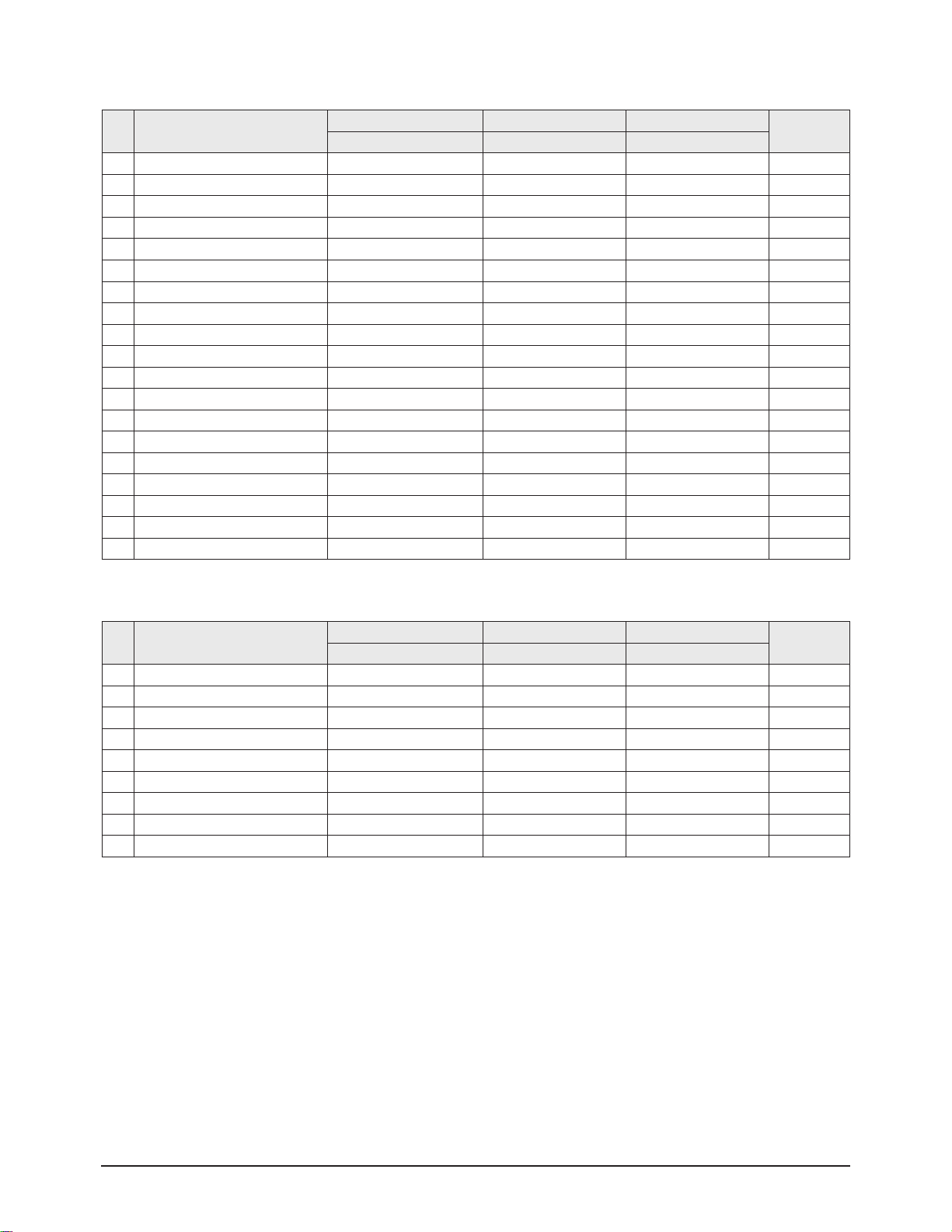
Alignment & Adjustment
Samsung Electronics 3-19
No item
CIS 29" CIS 32" Asia 29"
Remark
Data Data Data
0 Sub Bright 12 12 12 Fix
1 Sub Contrast 0 0 0 Fix
2 Sub Color 18 18 18 Fix
3 Sub Tint (Hue) 29 29 29 Fix
4 Color AXIS 1 1 1 Fix
5 LTI mode 1 1 1 Fix
6 VM-Level 2 2 2 Fix
7 VM-Coring 2 2 2 Fix
8 VM-f0 0 0 0 Fix
9 VM-Limit 1 1 1 Fix
10 VM-Delay 2 2 2 Fix
11 SHP CD 1 1 1 Fix
12 SHP f0 1 1 1 Fix
13 SHP f1& p10 12 12 12 Fix
14 LTI level 1 1 1 Fix
15 H_EHT comp_1080i 1 1 0 Fix
16 V_EHT comp_1080i 3 3 4 Fix
17 PIN EHT comp_1080i 5 5 5 Fix
18 ABL TH_1080i 3 3 3 Fix
15. DTV Video Adjustment(1080i)
No item
CIS 29" CIS 32" Asia 29"
Remark
Data Data Data
0 EEP_GAMMA_480P 1 1 1 Fix
1 EEP_DPIC_LEVEL_480P 2 2 2 Fix
2 DC_TRANS_480P 3 3 3 Fix
3 EEP_GAMMA_576P 1 1 1 Fix
4 EEP_DPIC_LEVEL_576P 2 2 2 Fix
5 DC_TRANS_576P 3 3 3 Fix
6 EEP_GAMMA_1080I 1 1 1 Fix
7 EEP_DPIC_LEVEL_1080I 2 2 2 Fix
8 DC_TRANS_1080I 3 3 3 Fix
16. DTV Video Adjustment 2
Page 20
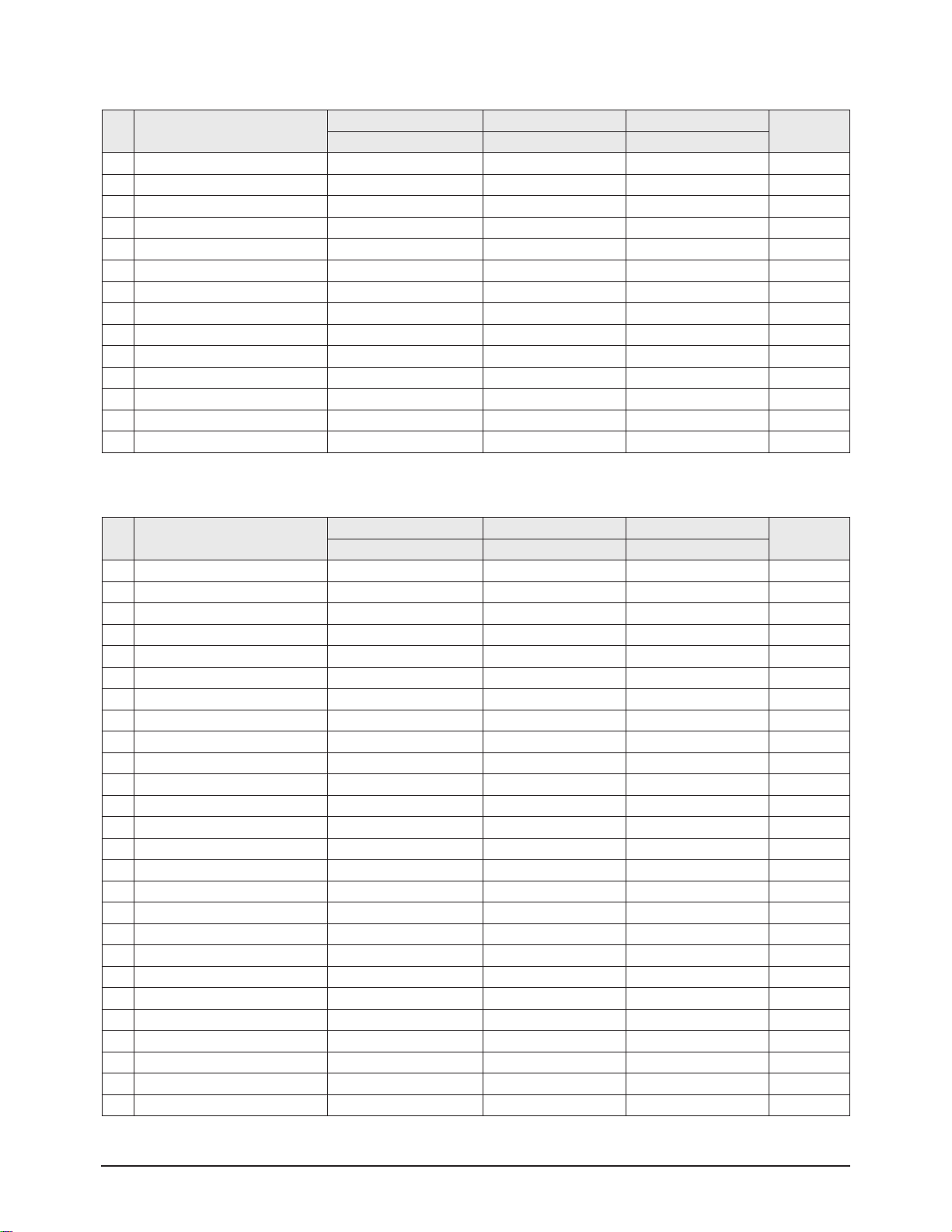
Alignment & Adjustment
3-20 Samsung Electronics
No item
CIS 29" CIS 32" Asia 29"
Remark
Data Data Data
0 P.YC (AV) Delay -9 -9 -9 Fix
1 S.YC (AV) Delay -7 -7 -7 Fix
2 N.YC (AV) Delay -8 -8 -8 Fix
3 P.BG.YC Delay -10 -10 -12 Fix
4 P.DK.YC Delay -10 -10 -11 Fix
5 P.I.YC Delay -10 -10 -11 Fix
6 P.M.YC Delay -10 -10 -10 Fix
7 P.L.YC Delay -10 -10 -10 Fix
8 S.BG.YC Delay -6 -6 -12 Fix
9 S.DK.YC Delay -8 -8 -8 Fix
10 S.I.YC Delay -10 -10 -10 Fix
11 S.M.YC Delay -10 -10 -10 Fix
12 S.L.YC Delay -4 -4 -4 Fix
13 N.M.YC Delay -10 -10 -10 Fix
17. YC DELAY
No item
CIS 29" CIS 32" Asia 29"
Remark
Data Data Data
0 System 1 1 1 Fix
1 System (VGA) 1 1 1 Fix
2 System (480p) 2 2 2 Fix
3 System (1080i) 3 3 3 Fix
4 Dynamic Contrast 90 90 100 Fix
5 Dynamic Brightness 50 50 55 Fix
6 Dynamic Shapness 50 50 75 Fix
7 Dynamic Color 50 50 55 Fix
8 Dynamic Tint 50 50 50 Fix
9 Dynamic Color Tone 2 2 0 Fix
10 Standard Contrast 70 70 80 Fix
11 Standard Brightness 50 50 50 Fix
12 Standard Shapness 50 50 50 Fix
13 Standard Color 50 50 50 Fix
14 Standard Tint 50 50 50 Fix
15 Standard Color Tone 2 2 2 Fix
16 Movie Contrast 40 40 50 Fix
17 Movie Brightness 50 50 55 Fix
18 Movie Shapness 40 40 25 Fix
19 Movie Color 45 45 40 Fix
20 Movie Tint 50 50 50 Fix
21 Movie Color Tone 2 2 4 Fix
22 Left Blanking (PAL)
23 Right Blanking (PAL)
24 Left Blanking (VGA)
25 Right Blanking (VGA)
18. EEPROM
Page 21
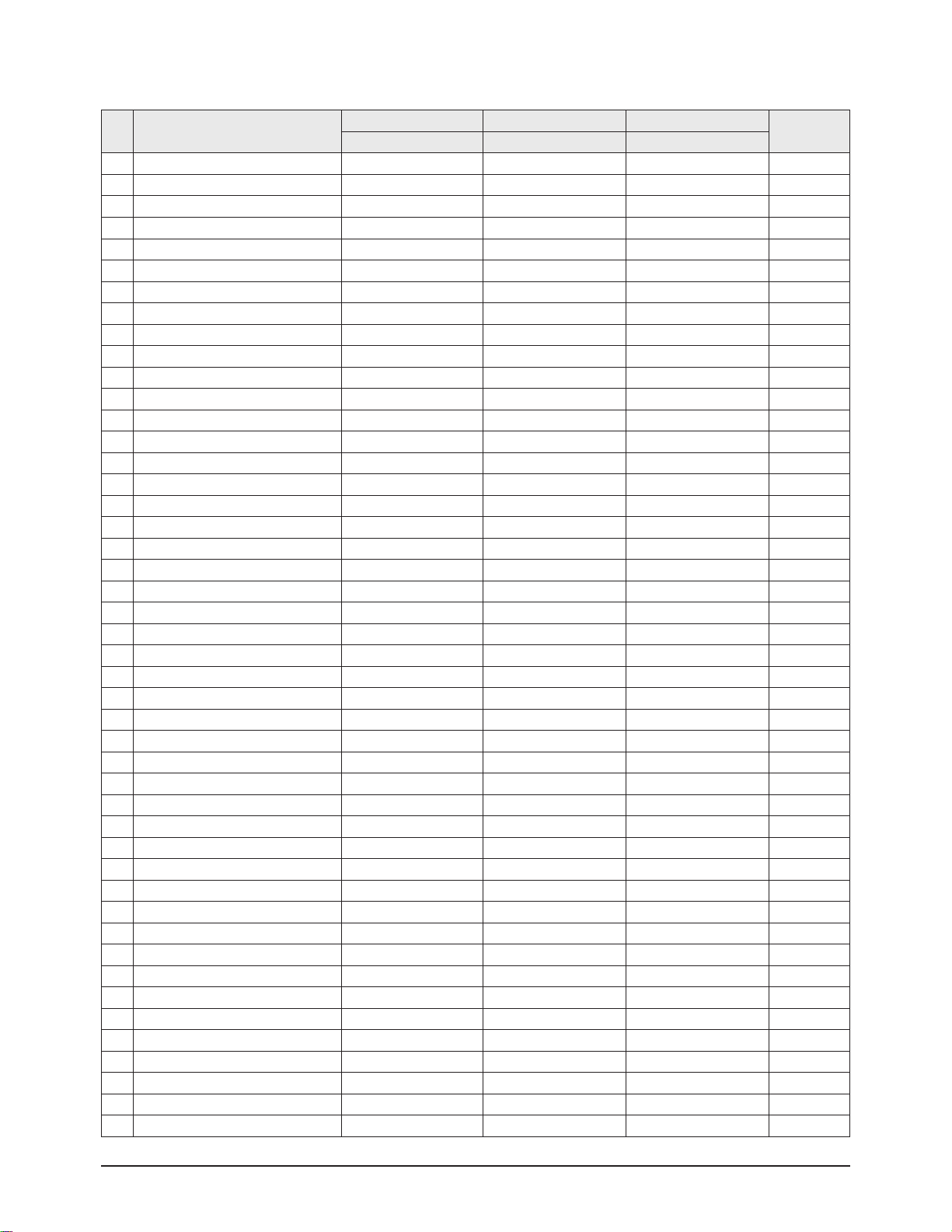
Alignment & Adjustment
Samsung Electronics 3-21
No item
CIS 29" CIS 32" Asia 29"
Remark
Data Data Data
26 Left Blanking (480p) 185 185 145 Fix
27 Right Blanking(480p) 141 141 99 Fix
28 Left Blanking(1080i) 77 77 77 Fix
29 Right Blanking(1080i) 175 175 175 Fix
30 Brightness (RGB) 236 236 236 Fix
31 Contrast (RGB) 165 165 165 Fix
32 U Saturation (RGB) 94 94 94 Fix
33 V Saturation (RGB) 36 36 36 Fix
34 DVD Brightness (YPbPr) 5 5 5 Fix
35 DVD Contrast (YPbPr) 166 166 166 Fix
36 DVD U Saturation (YPbPr) 230 230 230 Fix
37 DVD V Saturation (YPbPr) 38 38 38 Fix
38 9402 Y Gain 175 175 175 Fix
39 9402 U Gain 71 71 71 Fix
40 -
41 9402 V Gain 65 65 65 Fix
42 CrCb Gain (480p) 255 255 255 Fix
43 CrCb Gain (1080i) 255 255 255 Fix
44 480i_Sub Bright 44 44 44 Fix
45 480i_Sub Contrast 10 10 10
46 576i_Sub Bright 46 46 46 Fix
47 576i_Sub Contrast 10 10 10 Fix
48 NR ON value1 85 85 85 Fix
49 NR ON value2 85 85 85 Fix
50 NR OFF value1 68 68 68 Fix
51 NR OFF value2 68 68 68 Fix
52 NR ON value3 170 170 170 Fix
53 NR ON value4 170 170 170 Fix
54 NR OFF value3 34 34 34 Fix
55 NR OFF value4 34 34 34 Fix
56 -
57 SECAM Sensitivity 28 28 28 Fix
58 Range of R Gain 32 32 32 Fix
59 Range of G Gain 32 32 32 Fix
60 Range of B Gain 32 32 32 Fix
61 Range of F/B Gain 23 23 23 Fix
62 -
63 TTX V-Position 40 40 40 Fix
64 TTX H-Position 180 180 180 Fix
65 -
66 PAL Sensitivity (AV mode) 234 234 234 Fix
67 wide model 4:3 Normal Parabola 0 0 0 Fix
68 1080i 50HZ Trepezium 255 255 255 Fix
69 1080i 60HZ Trepezium 255 255 255 Fix
70 UP-UCG (Up Corner Semi Control) 0 0 0 Fix
71 LO-UCG (Low Corner Semi Control) 0 0 0 Fix
Page 22
Alignment & Adjustment
3-22 Samsung Electronics
168 EEP_DTV _contrast offset_1080i 0 0 0 Fix
169 EEP_Gamma_1080i 2 2 2 Fix
196 TNR1 207 207 207 Fix
197 TNR2 149 149 165 Fix
198 TNR3 95 95 111 Fix
199 TNR4 63 63 63 Fix
200 TNR5 47 47 47 Fix
201 TNR6 31 31 31 Fix
202 Fix
203 Fix
204 Fix
205 HPLL timing 156 156 156 Fix
206 SECAM MODE INITIAL DATA 76 76 76 Fix
207 SECAM MODE INITIAL DATA 64 64 64 Fix
No item
CIS 29" CIS 32" Asia 29"
Remark
Data Data Data
72 Vertical Slicing Level 15 15 15 Fix
73 Vertical Sync Lowpass-Filter 13 13 13 Fix
74
Amplifier Current Setting of Oscillator Pad
2 2 2 Fix
75 PAL Sensitivity 215 215 215 Fix
76 Chroma Sensitivity(PAL) and the Priority Order 215 215 215 Fix
77 Adjusting Chroma PLL 1 1 1
78 WSS 4:3 Panorama 255 255 255
79 NT left blank 150 150 150 Fix
80 NT Right blank 92 92 92 Fix
81 Progressive TTX V Position 255 255 255
82 Progressive TTX H-Position 255 255 255
83 3Pip Pal V position -> Cr Gain 480p 46 46 46
84 3Pip Pal H Position -> Cb Gain 480p 35 35 35
85 3Pip Ntsc V Position -> Cr Gain 576p 43 43 43
86 3Pip Ntsc H Position -> Cb Gain 576p 30 30 30
87 Cr Gain 1080i 22 22 22
88 Cb Gain 1080i 27 27 27
89 -
90 RF SubBright 124 124 124 Fix
91 TTX Sub Brightness 235 235 235 Fix
92 Left Blanking(PAL) 101 101 101 Fix
93 Right Blanking(PAL) 153 153 153 Fix
94 S - ABL 0 0 0 Fix
95 P - ABL 80 80 80 Fix
96 Picture Limit Level 3 3 3 Fix
97 OSD Level (LRGB2_LEV) 10 10 7 Fix
98 TTX Level (LRGB2_LEV) 3 3 3 Fix
99 AGCADJ1 238 238 238 Fix
100 AGCADJ2 11 0 110 110 Fix
101 ON TIMER CH memory 1 1 1 Fix
102 COMPONENT2 OSD Brightness 10 10 10 Fix
Page 23
Alignment & Adjustment
Samsung Electronics 3-23
230 EEP_GAMMA_480I 2 2 2 Fix
231 EEP_DPIC_LEVEL_480I 2 2 2 Fix
232 DC_TRANS_480I 3 3 3 Fix
233 EEP_GAMMA_576I 2 2 2 Fix
234 EEP_DPIC_LEVEL_576I 2 2 2 Fix
235 DC_TRANS_576I 3 3 3 Fix
240 EEP_480i H_EW Offset 0 0 0 Fix
241 EEP_480i H_Shift Offset 0 0 0 Fix
242 EEP_576i H_EW Offset -2 -2 -2 Fix
243 EEP_576i H_Shift Offset -5 -5 -5 Fix
244 ZOOM2 PARA 2 2 2 Fix
251 PL preventive measure caused by FBT high pressure 250 250 250 Fix
252 PL preventive measure caused by FBT high pressure 40 40 40 Fix
253 PL preventive measure caused by FBT high pressure 150 150 150 Fix
No Option Byte
CIS 29" CIS 32" Asia 29" Middle East 29"
Remark
Data Data Data Data
1 CRT 4:3 Wide 4:3 4:3 depending on the CRT
2 OSD Group CIS CIS East Asia Arab
3 OSD Language CIS CIS English Arab
4 AV Jack SCART SCART RCA RCA depending on the CRT
5 DTV Off Off On On
On: 2T PIP LNA All model
Off: 1Tuner/No PIP
6 PIP 2-Tuner Off 2-Tuner 2-Tuner
7 LNA On On On On
8 Search LNA On On On On
9 Sound SRS SRS SRS SRS
10 carrier mute Off Off Off Off
11 High Deviation Off Off Off Off
12 TTX Group Russian Russian West Europe Arabic TTX Language Group
13 TTX List Off Off Off Off
On : Australia,Newzealand
Off: Europe,CIS,Asia
14 TTX On/Off On On On On
15 AGC Off Off Off Off
16 Tilt On On On On
17 Hotel Mode Off Off Off Off
19. Option
Page 24
Alignment & Adjustment
3-24 Samsung Electronics
3-4 Service Adjustment
3-4-1 Adjusting the Picture Size
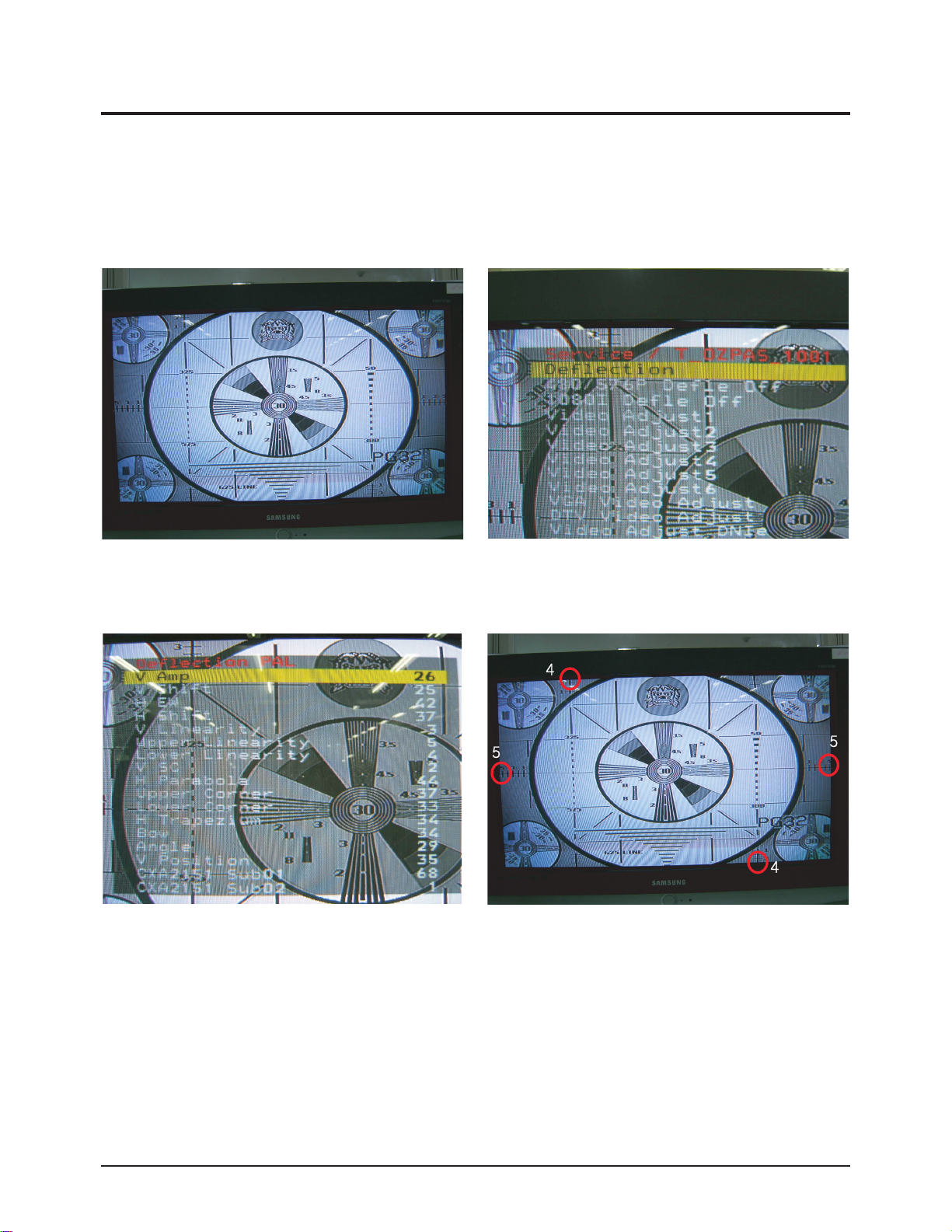
■ Since the S62A chassis has the deflection settings data within the Factory Data, the picture size has to be adjusted when
replacing the System Board or the Deflection Board, according to the following procedures.
① Display the Lion pattern. ② Press "Info → Menu → Mute → Power On"
using the remote control and enter Factory Mode.
③ Enter Deflection Mode. ④ Adjust the V-AMP, V-SHIFT, H-AMP and H-SHIFT items so
that the width becomes 5 and the height becomes 4.
Page 25
Alignment & Adjustment
Samsung Electronics 3-25
3-4-2 Adjusting the Picture Straight Lines
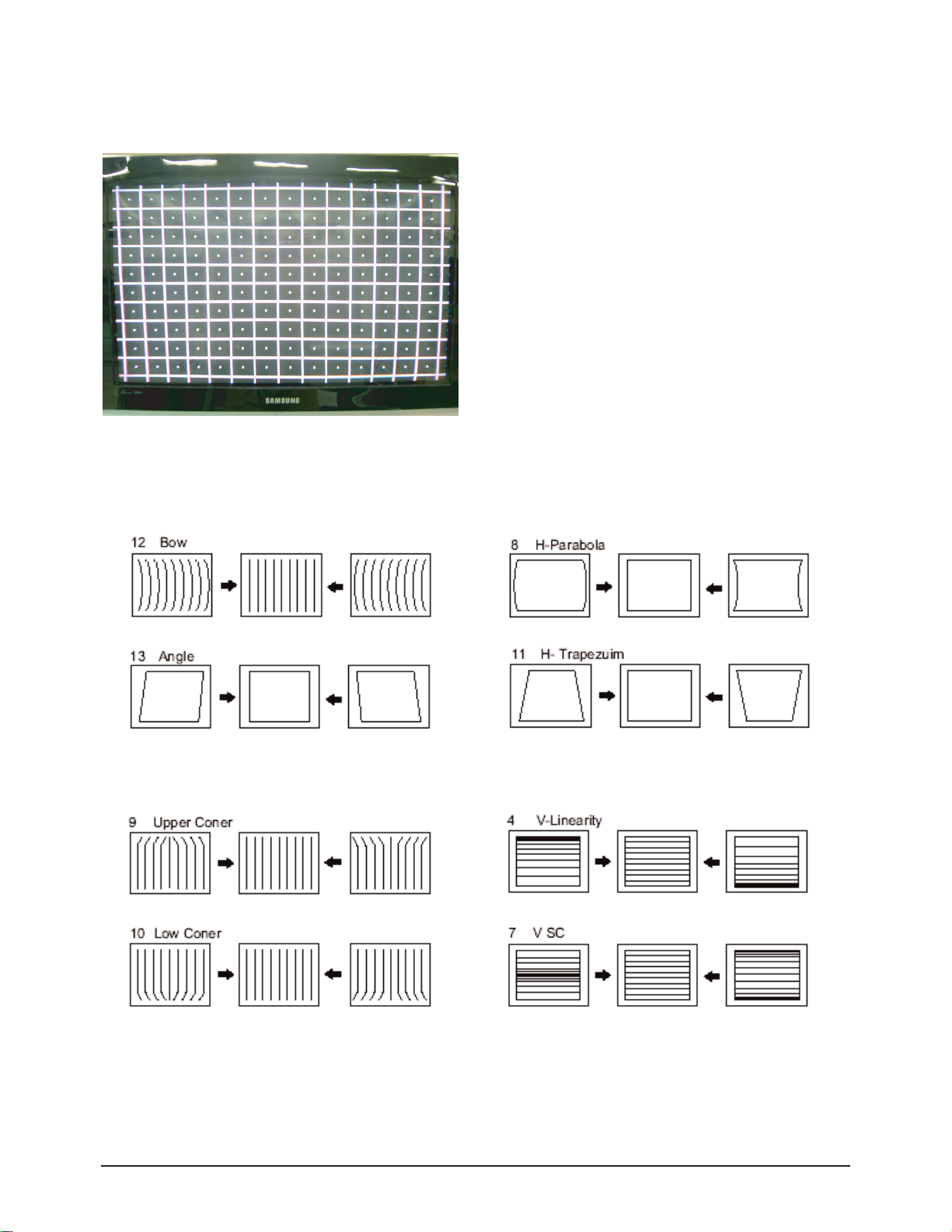
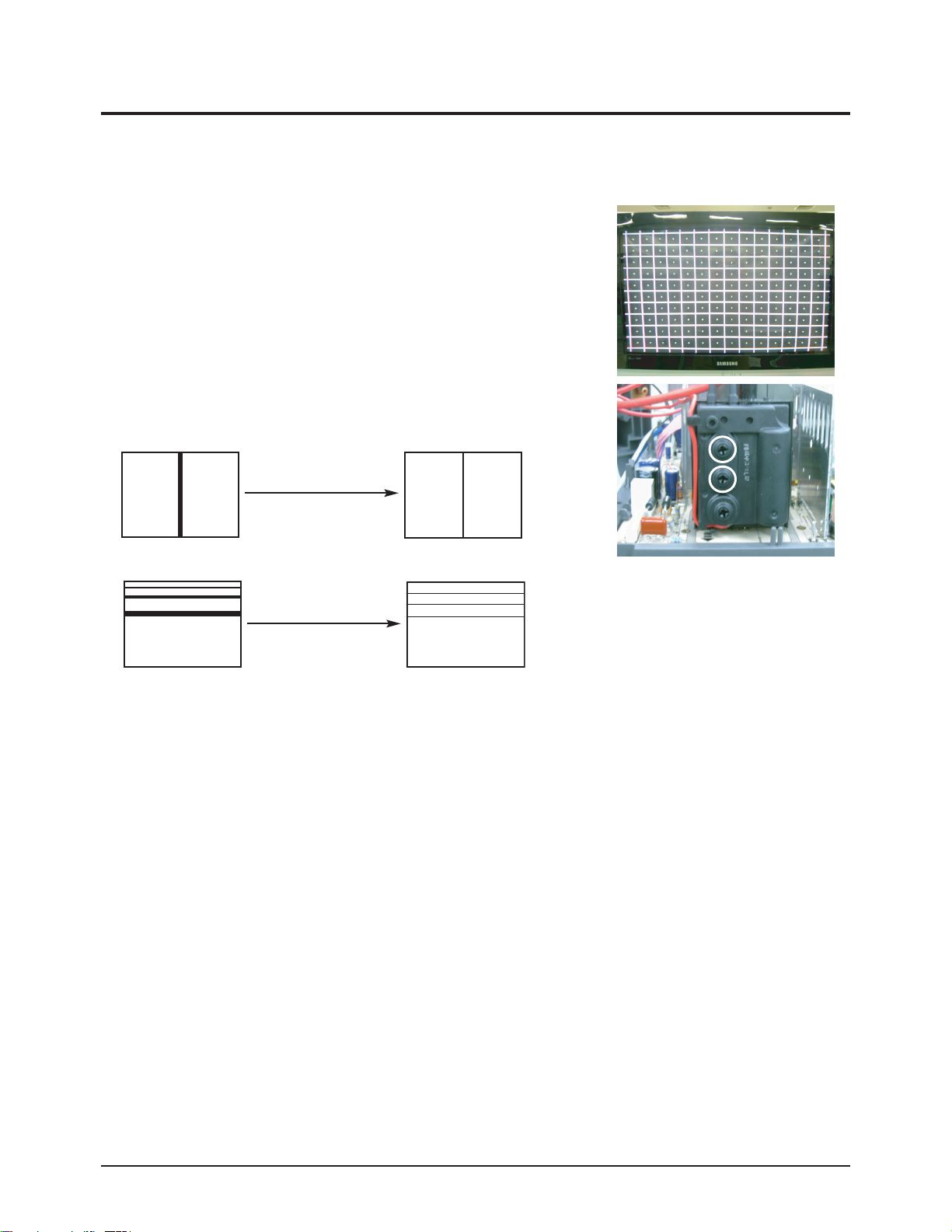
① Display the Cross Hatch pattern.
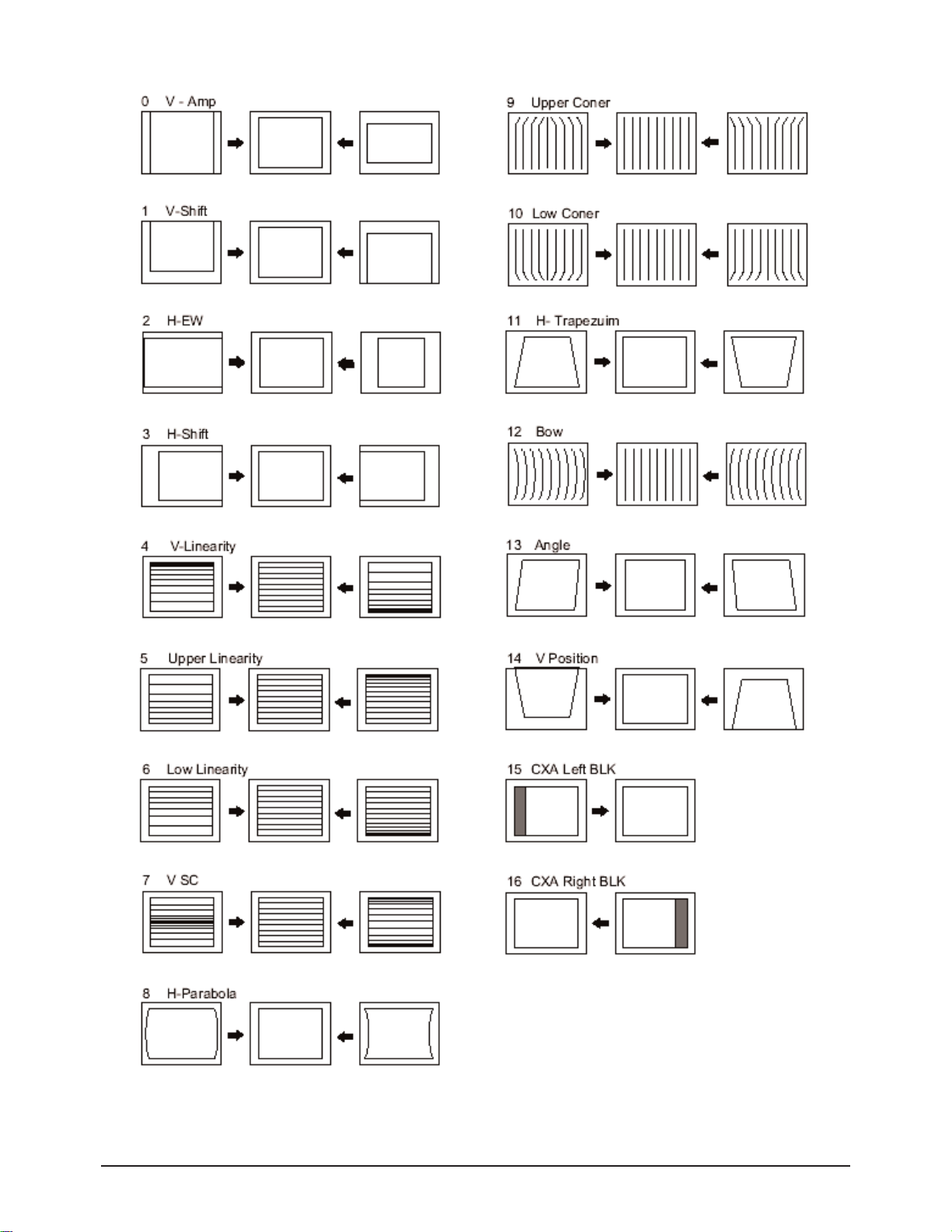
② Adjust settings other than V-AMP, V-SHIFT, H-AMP and H-SHIFT so that straight lines are displayed without curves.
⑦ When the adjustments are complete, display the Lion pattern and check that the picture size has not been changed.
If there is no change, finish the adjustments.
③ Adjust BOW and the Angle settings so that the center line
becomes a straight line.
④ Adjust the H-Parabola and H-Trapezium settings so that
the left and right lines become straight.
⑤ Adjust the Upper Corner and the Low Corner settings so that
the end of the lines become straight.
⑥ Adjust the V-Linearity and V-SC settings so that the
intervals of the horizontal lines become uniform.
Page 26
Alignment & Adjustment
3-26 Samsung Electronics
3-5 Replacements & Calibration
3-5-1 Adjusting the Focus
■ Since the S62A chassis has a built-in dynamic focus circuit, take care when adjusting the focus. When the CRT PCB, FBT or
CRT has been replaced, the focus has to be adjusted according to the following procedures.
1. Display the CROSS Hatch pattern.
2. Set the Screen Adjustment to "View as Standard".
3. Turn the Static Focus VR clockwise to the maximum position.
(End of clockwise direction)
4. Turn the Dynamic Focus VR counter clockwise to the maximum position.
(End of counter clockwise direction)
5. Slowly turn the Static Focus VR counter clockwise so that the center vertical line
is the most clearly displayed.
6. Slowly turn the Dynamic Focus VR clockwise so that the 2nd line is the most clearly displayed.
7. Check the entire screen focus and repeat steps 3 to 6, if necessary.
H
V
Static
Focus VR
Dynamic
Focus VR
H
V
H
V
After Adjustment
1
2
3
After Adjustment
Page 27
Alignment & Adjustment
Samsung Electronics 3-27
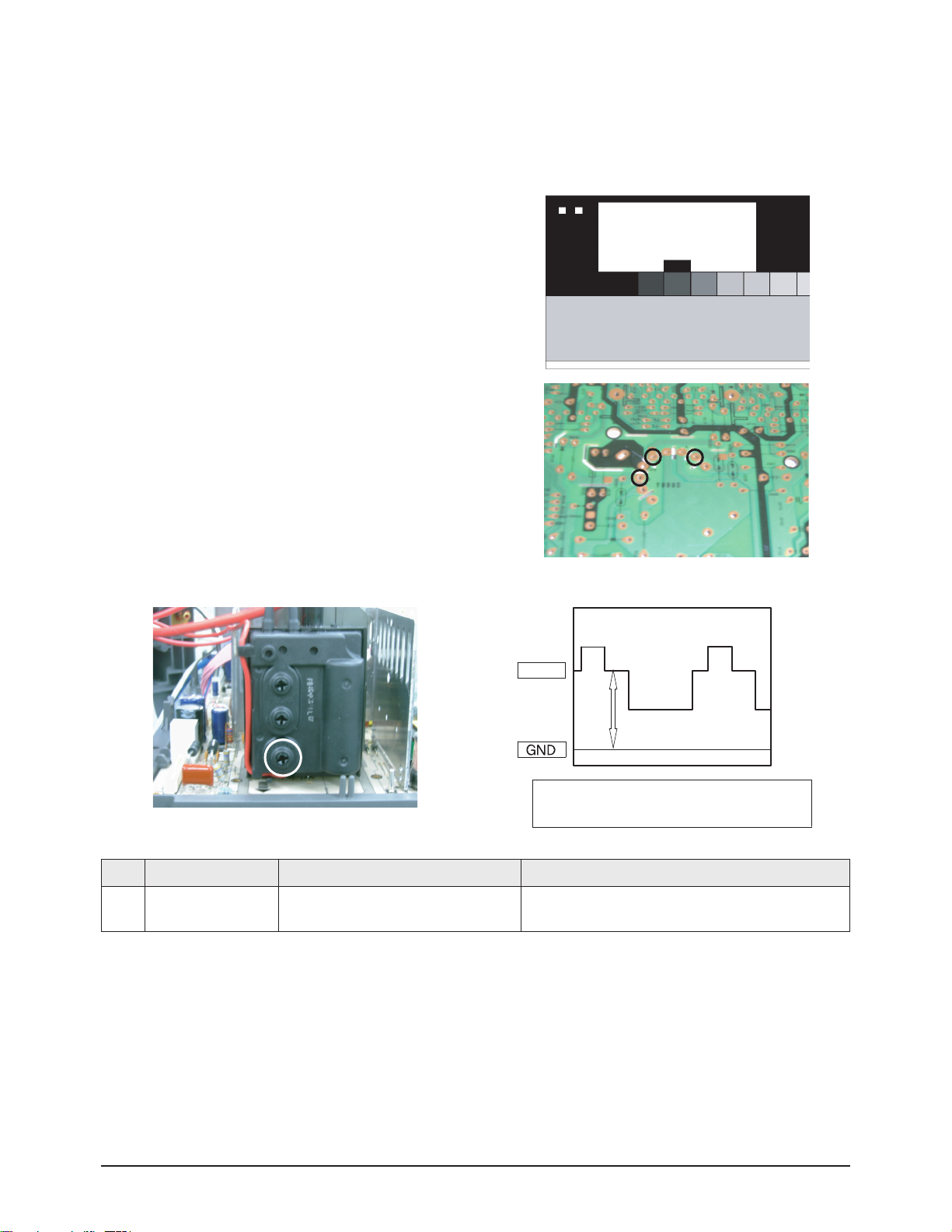
3-5-2 Adjusting the Screen Voltage
1. Select "Info → Menu → Mute → Power On" to enter Service Mode.
2. Initialize all settings to the values appropriate to the corresponding model.
3. Display the Toshiba pattern.
4. Using an Oscilloscope, measure the size of RK, BK and GK to the
Pedestal Level.
5. Adjust the Screen VR of FEB so that the highest point of the Pedestal Level is 175V.
※ Screen Voltage Measurement Data
175V
Adjust Method the Screen Voltage
for Toshiba Pattern by Oscilloscope
No Item Data Required Adjustment
1 Screen Voltage
The Highest Voltage among RK, GK and
BK 175Vp-p-3V
Screen Voltage
RK
GK
BK
Screen
VR
Page 28
Alignment & Adjustment
3-28 Samsung Electronics
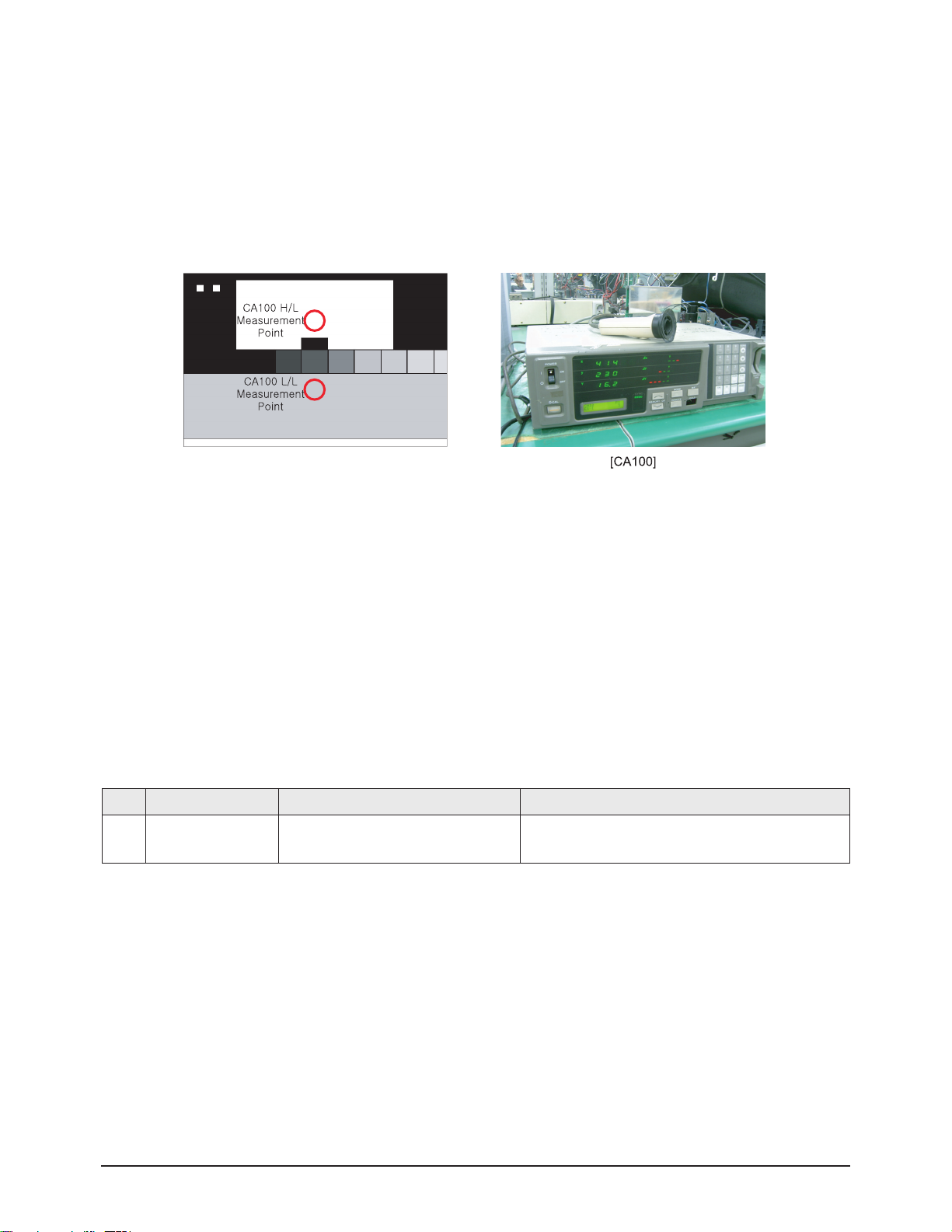
3-5-3 Adjusting the White Balance
1. Initialize all settings to the values appropriate to the corresponding model.
2. Select "Info → Menu → Mute → Power On" to enter Service Mode.
3. Initialize all settings to the values appropriate to the corresponding model.
4. Display the Toshiba pattern and adjust the White Balance using CA100 with the coordinates of the corresponding model.
5. Enter Video Adjust1 of Service Mode. Adjust Low/Light.
- Adjust Sub Bright to set Y.
- Adjust B Cutoff to set y.
- Adjust R Cutoff to set x.
6. Enter Video Adjust1 of Service Mode. Adjust High/Light.
- Adjust Sub Contrast to set Y.
- Adjust B Drive to set y.
- Adjust R Drive to set x.
7. Check Low/Light and readjust it if its value has been changed.
8. If you have readjusted Low/Light, readjust High/Light until the two values are identical to the coordinates of the corresponding
model.
※ White Balance Standard Data
3-5-4 Check List for the Screen Voltage and White Balance Adjustment
1. The Screen Voltage and White Balance are connected each other, and both of them have to be configured to the correct values.
2. Adjust the White Balance after the Screen Voltage was adjusted, and check if the Screen Voltage is normal after adjusting the
White Balance.
3. If the White Balance is readjusted, check the Screen Voltage again.
4. When the adjustment is finished, check the following checklist.
- If there is a spot on the screen when turning the TV set off/on, adjust the Screen Voltage again.
- If there is a ghost line on the screen, adjust the Screen Voltage again.
No Item Data Required Adjustment
1
White
Balance
x:282±3/ y:290±3/ 40± 3(High)
x:282±3/ y:290±3/ 1.2± 0.2(Low)
White Balance (Europe)
 Loading...