

Page 1

Line Level Converter Box
S Class Signal Processors
Page 2

Table Of Contents
Introduction and Features 3
Front and Rear Panel Layout 4
Operating the S convert
Using the LEVEL controls 5
Typical Set-up 6
Wiring Guide 7
Specifications 8
Copyright 2003, Samson Technologies Corp.
Printed January 2003
Samson Technologies Corp.
575 Underhill Blvd.
P. O. Box 9031
Syosset, NY 11791-9031
Phone: 1-800-3-SAMSON (1-800-372-6766)
Fax: 516-364-3888
www.samsontech.com
Page 3

S convert Introduction and Features
Introduction
Thank you for purchasing the S convert stereo line level converter from Samson Audio! S
convert provides a convenient solution for matching levels and interfacing audio devices,
either on stage or in the studio. The S convert is a specially designed miniature level
matching device that allows you to convert stereo –10dBV (RCA) signals like those from
consumer CD players and cassette recorders, to +4 dBu (XLR) signals like those from professional mixers, outboard effects processors and DAT machines to name some. The S
convert works in both directions and features male and female XLR connectors for the balanced +4dBu inputs and outputs, along with RCA connectors for the unbalanced –10dBV
inputs and outputs. The addition of +4 and –10 LEVEL controls allows you to use S convert to calibrate your signals to an exact level. And just because this unit is miniature, don’t
be surprised with its great sound and reliability thanks to high quality components and
solid build construction.
In this manual, you’ll find a more detailed description of the features of the S convert, as
well as a guided tour through the front and rear panels, step-by-step instructions for using
the S convert, and full specifications. You’ll also find a warranty card enclosed—please
don’t forget to fill it out and mail it so that you can receive online technical support and so
we can send you updated information about other Samson products in the future.
Sconvert Features
• Compact device for converting +4 dBu audio signal level to –10dBV
• RCA –10dBV level Inputs with Level control
• XLR +4dBu level Balance Outputs
• XLR +4dBu level Balanced Inputs with Level control
• RCA –10dBV level Unbalanced Outputs
• Rugged aluminum extrusion chassis
• Large rubber bumper feet
• 18 Volt AC adapter included
• Three year extended warranty
Page 4
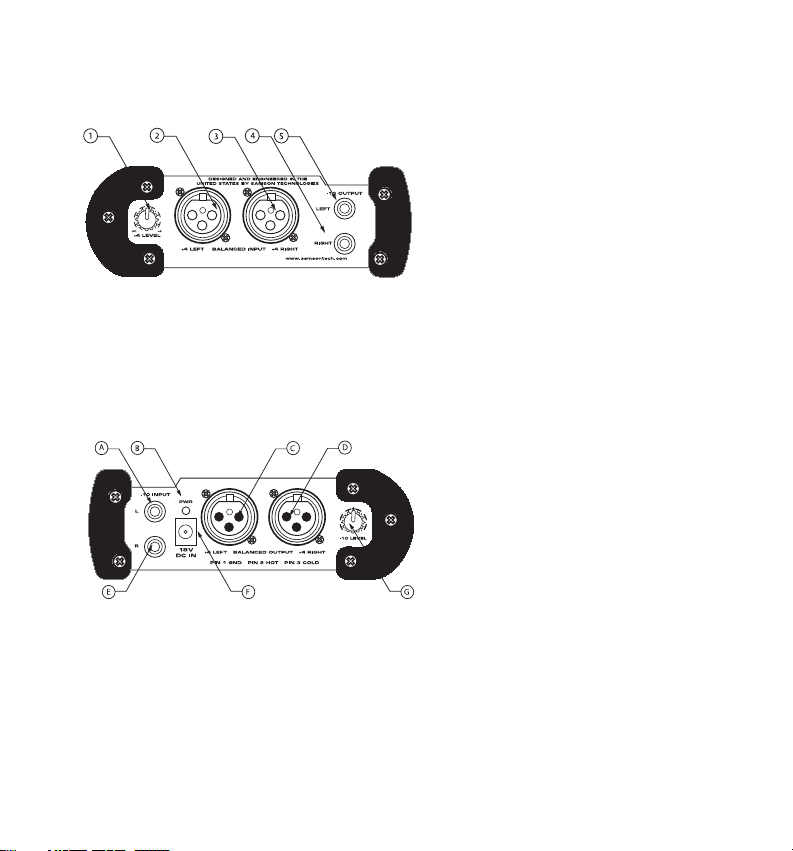
Sconvert Front and Rear Panel Layout
A -10 LEFT INPUT- RCA input for con-
necting left, -10dBV input signals.
BPOWER LED - Green LED will illumi-
nate when power is on indicating the
S convert is ready for operation.
1 +4 LEVEL - Control knob used to adjust
the signal level connected to the
+4dBu, XLR inputs.
2 +4 LEFT INPUT- XLR balanced input for
connecting left, +4dBu input signals.
3
3 +4 RIGHT INPUT- XLR balanced
input for connecting right, +4 dBu
input signals.
4 -10 OUTPUT RIGHT- RCA con-
nector outputs the right side -10
dBV signal.
5 -10 OUTPUT LEFT- RCA connec-
tor outputs the left side -10 dBV
signal.
C +4 LEFT OUTPUT- XLR balanced
connector outputs the left, +4dBu
signal.
D +4 RIGHT OUTPUT- XLR balanced
connector outputs the right, +4dBu
signal.
E -10 RIGHT INPUT- RCA input for
connecting right, -10dBV input signals.
FDCPOWER INPUT- Connect the
supplied power adapter here.
G -10 LEVEL - Control knob used to
adjust the signal level connected
to the -10dBV, RCA inputs.
Front Panel Layout
Rear Panel Layout
Page 5

5
Operating the S convert
The basic procedure for setting up and using your S convert is simple and takes only a
few minutes. Remove all packing materials (save them in case of need for future service)
and check to make sure that you remove the supplied AC power adapter.
• Connect the output from the device you want to level match (like a consumer CD
player using standard RCA cables) to the S converts –10dBV, Left & Right RCA
inputs.
• Using standard XLR to XLR mic cables, connect the S convert’s +4dBu Left & Right
OUTPUTS to the professional DAT recorder balanced inputs.
• Set the -10 dBV LEVEL control to the detent position (12:00 o’clock).
• Set the +4 dBu LEVEL control to the detent position (12:00 o’clock).
• Plug the S converts power adapter into a wall outlet and switch the unit on by pressing the power switch.
• Apply a signal from the output of the CD, and monitor the input of the DAT recorder.
• If necessary, you can use the –10 LEVEL control to fine tune the level sent out of the
S convert.
Using the LEVEL controls
Both the +4dBU and –10dBV inputs have a LEVEL control that you can use to slightly
adjust either of the inputs. The fact is, not all gear is calibrated to the same input and output levels. There are plenty of great sounding devices whose input and output levels are all
over the board. S convert’s LEVEL controls can be tremendously useful in precisely
matching the signal of different gear, which will maximize signal to noise ratio and improve
the overall sound of your recordings or live performance. The LEVEL controls have center detents so when placed in the detent (12:00 o’clock) position the unit is at unity gain
and the LEVEL control has no effect on the signal. Moving the LEVEL control to the left
will decrease the signal, and moving the LEVEL control to the right will increase the signal.
Page 6
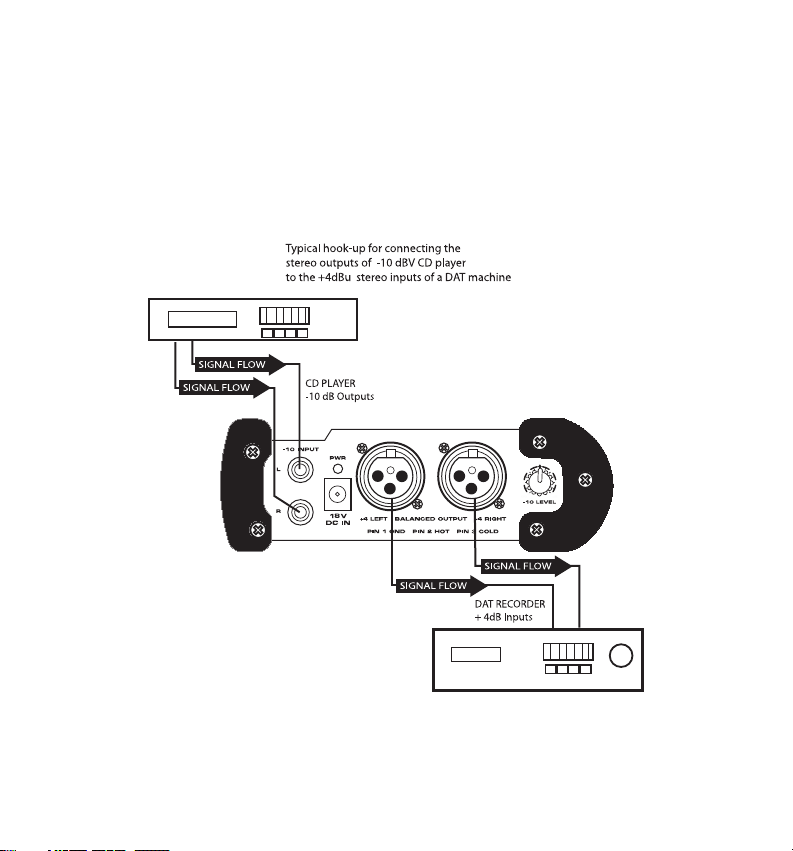
Typical Set-up
The diagram below shows a typical set-up for a project recording studio using the S convert to match the levels of a consumer CD player to the correct operating level of a professional DAT recorder.
6
Operating the S convert
Page 7
7
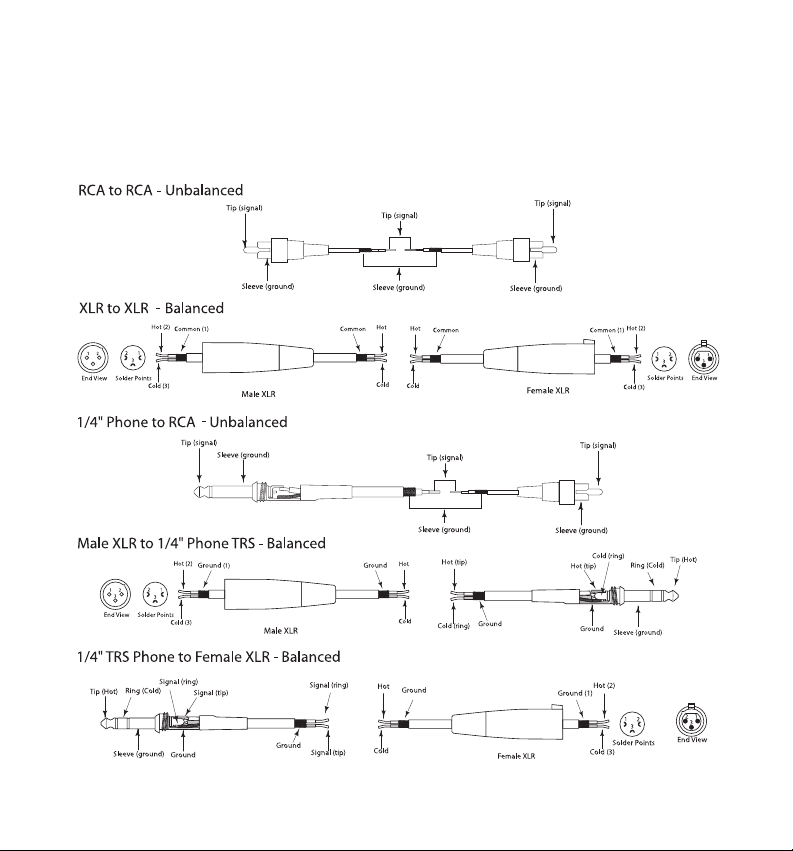
S convert Wiring Guide
Wiring Guide
There are several ways to interface the S convert, depending on your exact set-up. Follow the cable
diagrams below for connecting your gear.
3
Page 8

Samson Technologies Corp.
575 Underhill Blvd.
P. O. Box 9031
Syosset, NY 11791-9031
Phone: 1-800-3-SAMSON (1-800-372-6766)
Fax: 516-364-3888
www.samsontech.com
Frequency Response 10 Hz to 100kHz
Noise Level -110 dBu
Maximum Ouput Level Bal: +18 dBu
Unbal: +16 dBV
Max Input Level Bal: +22 dBu
Unbal: 20 dBV
Input Impedance RCA: 100k Ohm
XLR: 10k Ohm
Output Impedance RCA: 100 Ohm
XLR: 100 Ohm balanced
Maximum Gain +4 dBu In: -6 dB
-10 dBV In; +19 dB
THD .003% Max
Noise Floor <-90 dBu
Power 18 VDC adapter
Dimensions 5.65” L x 4.13” W x 2” H (144mm L x 105mm
W x 51mm H)
Weight 16.5 oz., 419 gm.
S convert Specifications
 Loading...